What's inside
- Key Takeaways
- Quick Picks
- Why Replace the Cooler on an Old Build at All?
- Which Coolers Deserve a Detailed Look?
- What About the NH-U12S Redux, the Cooler This Era Chose?
- How Do You Revive an Old Build’s Cooling, Step by Step?
- Comparison Table
- Which Mistakes Shorten an Old PC’s Second Life?
- Which 1151 Processors Actually Need Cooling Help?
- What Else Deserves Attention While the Case Is Open?
- A Note on Second-Hand Coolers and Missing Brackets
- What Does the Swap Feel Like, Week One and Year One?
- What Should You Know About Paste and Old Heat Spreaders?
- Which BIOS Quirks Do Old Boards Bring to a New Cooler?
- How Do You Decide Between Repair and Replacement, One Last Time?
- One Last Check Before You Order
- Final Recommendation
- Frequently Asked Questions
- Related Guides
As an Amazon Associate I earn from qualifying purchases. This post may contain affiliate links at no extra cost to you.
gizmoverdict.com is reader-supported. When you buy through links on our site, we may earn an affiliate commission.
Where to buy: Each cooler named below links to its current Amazon listing. With a platform this age, read the listing’s socket list yourself before ordering — the exact wording there decides whether the box in the post contains the bracket your motherboard needs.
There is a particular kind of PC that the best 1151 cpu air coolers exist to serve: the machine built between 2015 and 2019 around Intel’s LGA1151 socket that still does its job every day. Perhaps it is a Skylake or Coffee Lake desktop that runs the household accounts, a teenager’s first gaming rig, an office PC with software that would be painful to migrate, or a media machine under the television. The processor is fine. The storage has probably been upgraded already. What has aged is the cooling: a stock aluminium cooler whose fan has grown rough, dust felted into fins that were never generous, thermal paste that has spent years baking into a dry grey crust.
Replacing that cooler is the cheapest dignity you can restore to an old build, and it is what this guide is about. Let us be clear about the framing, because honesty matters with legacy hardware: LGA1151 is a retired platform. Nobody should build a new PC around it, and no cooler purchase will make a 2017 processor into a 2026 one. What a good air cooler does for a surviving 1151 machine is quieter evenings, steadier behaviour under load, and a few more years of useful life from hardware that has already earned its keep. That is a worthwhile, modest goal, and the six coolers below pursue it at six different levels of ambition.
Compatibility needs one careful paragraph. The 1151 socket shares its mounting-hole spacing with the wider LGA115x family — 1150, 1151, 1155 and 1156 all use the same pattern — so coolers whose listings state LGA115x support are the natural fit. Where a listing below explicitly names 115x, we say so. Where the current version of a cooler ships with an Intel 115x bracket but the headline text emphasises newer sockets, we say that instead, and the advice is the same in both cases: check the socket list on the listing before you place the order, because bracket contents are exactly the sort of detail that changes between production runs of an old, popular cooler.
Key Takeaways
- This is a guide about keeping a 2015–2019 build healthy, not about reviving it into a modern gaming rig — set expectations there and every pick below makes sense.
- LGA1151 shares its mounting pattern with the whole 115x family; a listing that states LGA115x support is your green light, and the listing’s own socket list is the final authority.
- The ID-COOLING SE-214-XT V2 names Intel 115X support outright in its listing, which makes it the least ambiguous purchase on this page.
- A big cooler like the NH-D15S only belongs in an old build if the case is a full-size tower; most 1151-era cases were not built for flagship dual towers.
- Fresh paste and a ten-minute fan-curve session will do as much for an old machine’s manners as the new hardware itself.
Quick Picks
| Pick | Badge | Why it earns its place |
|---|---|---|
| Cooler Master Hyper 212 Black II | The natural successor | The cooler most 1151 builds should have had from the start, in its current blacked-out form. |
| Thermalright Assassin X 120 R SE | Modern value | A current budget tower with an S-FDB bearing fan, for owners who want new-hardware manners at old-PC money. |
| Noctua NH-D15S chromax.Black | Overkill, knowingly | A single-fan flagship tower for the big-case 1151 machine that doubles as the household’s quiet workstation. |
| be quiet! Pure Rock 3 LX Black | Quiet with light | An ARGB-accented tower from a silence-obsessed brand, for the glass-sided survivor in the living room. |
| ARCTIC Freezer 36 | Push-pull compact | Two pressure-optimised fans on a single tower, sized for the ordinary mid-towers most 1151 PCs live in. |
| ID-COOLING SE-214-XT V2 Black | Clearest 115x listing | Full memory clearance and an explicitly stated LGA115X mount in the listing text. |
One more name belongs in this conversation even though it is not linked here: the Noctua NH-U12S redux, the classic single-tower choice of the 1151 era itself. Owners of period builds will remember it as the cooler that forum threads of the time recommended by default. Its current listing did not come through this guide’s verified pool, so it appears in prose only, discussed honestly after the main six.
Why Replace the Cooler on an Old Build at All?
Because cooling is the part of an old PC that degrades on a schedule. Fans are mechanical: bearings wear, lubricant dries, and a fan that was inaudible in 2017 develops a tick, a rumble or a hunting wobble by its seventh year. Thermal paste dries and pumps out microscopically with every heat cycle, so the junction between processor and cooler slowly insulates itself. Dust completes the picture, matting across fin edges until the cooler is breathing through felt. The processor responds the only way it can — by running its fan harder, then by trimming its own boost, then, in neglected cases, by throttling during the exact moments you ask something of it.
A replacement tower cooler addresses all three at once: new fan, new paste, clean fins, and a heatsink with several times the surface area of the bundled aluminium puck these machines shipped with. The result is not a faster computer in any benchmark-headline sense. It is a computer that stops announcing itself. The fans stop surging when a browser opens. The summer-afternoon shutdowns, if they had begun, stop happening. For a machine with a defined job — homework, accounts, media, light gaming, a home server humming in a cupboard — that restoration is the whole point, and it costs a fraction of a platform replacement.
There is a decision to make honestly before spending anything, though. If the 1151 machine’s problem is that its processor is too slow for your software, a cooler will not rescue it, and the money belongs in a savings pot for a modern platform. If the problem is noise, heat or reliability, the cooler is precisely the right spend. This guide assumes you have already made that call and chosen to keep the old machine in service.
Which Coolers Deserve a Detailed Look?

Cooler Master Hyper 212 Black II — The natural successor
If the 1151 era had an official aftermarket cooler, it was the Hyper 212 in its earlier forms, which means this Black II version arrives with a decade of accumulated trust behind it. Four heatpipes, a single tower, one 120mm PWM fan and a black finish that suits the dark interiors most surviving builds have. Its current listing headlines the newest sockets, so apply this guide’s standing rule: the present production version ships within a cooler family that has covered Intel’s 115x pattern for years — confirm the socket list on the listing itself before ordering, and you are buying the most familiar upgrade in the category.
The case for it on an old build is about proportion. Most 1151 processors, from the locked i5s and i7s that filled offices to the popular gaming chips of the Coffee Lake years, produce heat that a competent four-heatpipe tower handles with room to spare. The Hyper 212 does not merely beat the stock cooler it replaces; it changes the machine’s acoustic personality, because a 120mm fan turning moderately makes a gentler sound than a small stock fan spinning desperately. Owners routinely describe the swap as the day the PC stopped sounding strained, and that description is the product.
Practicalities favour it too. The tower is modest enough for the mid-tower cases of its era, memory clearance is rarely a drama, and the mounting hardware is a refined descendant of a system millions of builders have already survived. On an old motherboard you will handle once and then close for years, a calm installation matters. One caution from experience: clean the old paste completely before the new mount — isopropyl alcohol and patience — because on a machine of this age the dried residue is often nearly ceramic, and a new cooler seated over old crust inherits the old problem.
- Format: single-tower air cooler
- Heatpipes: 4
- Fan: one 120mm PWM
- Finish: blacked-out, suited to dark interiors
- Sockets: verify the listing’s socket list for Intel 115x bracket inclusion
Strengths
- A decade of refinement in exactly the size class old builds need.
- Gentle noise character transforms machines saddled with stock cooling.
- Undemanding dimensions suit period mid-tower cases.
Trade-offs
- Headline listing text leads with newer sockets, so the socket-list check is on you.
- Four heatpipes are right-sized, not generous, for the hottest unlocked 1151 chips.
- Its popularity means lookalike listings exist; buy the exact model named here.
Best for: the typical surviving 1151 desktop that needs quiet, reliability and no drama. Not suited for: an overclocked flagship 1151 chip in a warm room, where a bigger tower earns its size.

Thermalright Assassin X 120 R SE — Modern value
The Assassin X 120 R SE is what the budget tower cooler became while the Hyper 212 was becoming a classic. Four heatpipes again, a single tower again, but the details are contemporary: Thermalright’s TL-C12C PWM fan on an S-FDB bearing, a fin stack designed with current manufacturing, and a price position that assumes you comparison-shop. For an old build being kept alive on a sensible budget, that combination — new fan technology, new bearing, no legacy-brand premium — is exactly the proposition.
The bearing deserves explanation because it decides how this cooler ages, which is the whole subject of this guide. S-FDB is a fluid-dynamic style bearing, the family of designs that replaced plain sleeve bearings in decent fans because they run quietly and keep running quietly. On a machine you intend to keep for another five years, the fan bearing is not a footnote; it is the component whose failure you are statistically most likely to meet, and choosing a modern bearing design is choosing to postpone that meeting.
Fitting is straightforward single-tower work, and the cooler’s proportions are friendly to the era’s cases and to memory of ordinary height. As with several picks here, the listing’s socket text was written for today’s platforms, so the discipline applies: the Assassin X line ships with Intel mounting covering the 115x pattern in current production — read the listing’s socket list, confirm it in black and white, then order with a clear conscience. Paired with fresh paste and a gentle fan curve in the old board’s BIOS, this is the cooler that makes a 2017 tower feel like it has been serviced rather than merely repaired.
- Format: single-tower air cooler
- Heatpipes: 4
- Fan: TL-C12C PWM with S-FDB bearing
- Design: current-generation budget tower
- Sockets: confirm Intel 115x coverage in the listing’s socket list
Strengths
- Modern fan bearing chosen for a long, quiet service life.
- Value pricing respects the economics of maintaining an old platform.
- Compact tower fits the cases these machines actually live in.
Trade-offs
- Socket wording leads with current platforms; verification is the buyer’s job.
- Single fan and four heatpipes cap its ambitions at honest mid-range heat.
- Brand support ecosystem is thinner than the legacy names on this page.
Best for: budget-conscious keepers of 1151 machines who still want current fan technology. Not suited for: buyers who want the reassurance of a decade-old brand name behind the bracket.
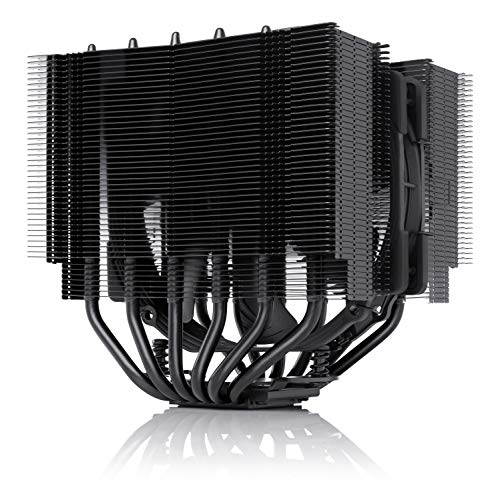
Noctua NH-D15S chromax.Black — Overkill, knowingly
Let us acknowledge the absurdity and then defend it. The NH-D15S is a flagship-class tower — 160mm tall, six heatpipes, a single large fan nestled between two fin stacks in the asymmetric D15S layout — and fitting one to a retired socket is, by the numbers, more cooler than any 1151 processor requires. But some 1151 machines are not being kept alive out of thrift. They are the household’s quiet workstation, the machine in the study that runs all day beside someone working, the build in the big old tower case with room for anything. For that machine, the question is not “what is sufficient” but “what is silent”, and a flagship tower loafing at low fan speed is the quietest air cooling money buys.
The S variant’s asymmetry is the detail that makes it plausible here. By offsetting the fin stacks, Noctua bought clearance over the top PCIe slot — the slot your graphics card occupies — which is precisely the collision that rules the symmetrical flagship out of many builds, old and new. The single-fan layout also keeps memory clearance civilised compared with twin-fan arrangements. None of this matters if your case cannot take 160mm of height, and many period cases cannot, so the tape measure comes out before the order goes in, as it should for every cooler but especially for this one.
Why spend flagship money on an old platform at all? Because the cooler is the one component here that can outlive the machine. Noctua’s mounting kits have historically followed owners across sockets, and a tower bought for a beloved 1151 build today is a tower that can be re-bracketed into whatever replaces it. Bought in that spirit — as a long-term asset that happens to start its service on a legacy socket — the D15S stops being overkill and becomes the most rational purchase on the page. Bought as a desperate attempt to make an old processor fast, it is money misread. The distinction is yours to make, and this guide trusts you to make it.
- Format: dual-tower air cooler, single fan, offset design
- Height: 160mm — measure the case before anything else
- Heatpipes: 6
- Fan: one 140mm-class PWM fan between the stacks
- Finish: chromax.Black throughout
Strengths
- Flagship fin area delivers near-silent running on any 1151 chip.
- Offset layout protects the top expansion slot from the usual collision.
- A genuine long-term asset that can follow you to a future platform.
Trade-offs
- 160mm of height excludes a large share of period cases outright.
- The spending only makes sense if the cooler outlives this build.
- Its mass demands care when the finished PC is moved or shipped.
Best for: big-case 1151 workstations where quiet is the actual requirement. Not suited for: compact cases, thrift-driven repairs, or anyone expecting it to make an old chip young.

be quiet! Pure Rock 3 LX Black — Quiet with light
The Pure Rock line is be quiet!’s answer for buyers who want the brand’s manners without its flagship dimensions, and this LX Black version adds an ARGB fan to the recipe — a small, tasteful concession to the glass side panels that even older builds increasingly wear. Under the lighting sits a proper specification: four 6mm heatpipes with direct-touch mounting at the base, a silent 120mm PWM fan, and a maker’s wattage claim we will treat the way this site treats all such claims, as the brand’s own number rather than a cross-brand yardstick.
On a 1151 machine, its personality fits a specific room: the living-room or bedroom PC, the one whose previous stock cooler could be heard during quiet film scenes. be quiet! tunes for exactly that listener. The fan’s job in this design is to disappear, and the heatpipe base — heatpipes contacting the processor’s heat spreader directly rather than through a separate plate — is a legitimate engineering route to responsive cooling at this size, provided the mounting pressure is even. Take your time with the bracket screws, alternating in small turns, and the design rewards you.
The ARGB element needs one honest note for legacy builders: your 1151-era motherboard may have no ARGB header at all, since the addressable standard arrived as the platform was retiring. Without one, the fan still cools perfectly and simply does not perform its light show, or needs a separate controller. Check your board’s headers while you are checking the listing’s socket list — the current production of this cooler covers Intel’s range broadly, and the 115x pattern check remains the buyer’s standing duty on this page. Neither caveat dents the core offer: a well-mannered tower from a brand that thinks about noise first.
- Format: single-tower air cooler
- Heatpipes: 4 × 6mm, direct-touch base
- Fan: 120mm PWM ARGB, silence-tuned
- Lighting: addressable RGB — needs a board header or controller
- Sockets: confirm Intel 115x coverage in the listing’s socket list
Strengths
- Silence-first tuning suits living-room and bedroom machines.
- Direct-touch heatpipe base responds quickly at this size class.
- ARGB fan refreshes the look of a glass-sided older build.
Trade-offs
- Many 1151 boards lack an ARGB header, so the lighting may sit unused.
- Direct-touch bases reward careful, even mounting pressure.
- The maker’s wattage figure is a brand claim, not a comparison tool.
Best for: quiet-room 1151 machines in glass cases, where looks and manners both count. Not suited for: header-less boards whose owners specifically want the lighting to work on day one.

ARCTIC Freezer 36 — Push-pull compact
Most single towers make do with one fan; the Freezer 36 arrives with two of ARCTIC’s pressure-optimised 120mm P fans in push-pull, one feeding the fin stack and one pulling air through it. That arrangement is a thoughtful answer for the cases 1151 machines actually inhabit — mid-towers of modest airflow, sometimes with a single intake fan doing its best — because pressure-optimised fans are designed to keep moving air through resistance rather than merely in open space. The fans run on fluid dynamic bearings across a wide 200–1800 RPM range, which gives the motherboard’s fan control plenty of room to be gentle.
Four heatpipes carry heat into the stack, and the whole cooler has the compact, squared proportions that make installation in a crowded older case a one-person job. ARCTIC has long built its reputation on this kind of unglamorous competence: sensible fans, honest mounting, prices that assume competition exists. For the owner of an ageing tower whose stock cooler has started to rattle, the Freezer 36 is the “fit it and forget it for the machine’s remaining years” option, with the second fan as insurance for hot rooms and dusty environments where a single fan would slowly lose the argument.
Socket diligence applies here as everywhere on this page. ARCTIC’s current listings speak the language of today’s platforms first, and the Freezer line’s Intel mounting has covered the 115x pattern across its generations — but the sentence that protects you is the one on the listing in front of you, so read its socket list and confirm before the order. While you are in the BIOS afterwards, set the fan header to PWM mode; two fans sharing a splitter will follow one curve, and a curve with a calm floor turns this cooler’s wide speed range into silence at idle and composure under load.
- Format: single-tower air cooler, dual-fan push-pull
- Heatpipes: 4
- Fans: two 120mm P-series, fluid dynamic bearing, 200–1800 RPM
- Character: pressure-optimised for restrictive cases
- Sockets: confirm Intel 115x coverage in the listing’s socket list
Strengths
- Push-pull fans keep airflow honest in restrictive, older cases.
- Wide, fluid-bearing fan range tunes from near-silent to serious.
- Compact body keeps installation and memory access easy.
Trade-offs
- Two fans mean two cables to manage in a small case.
- Its talents are wasted on an already well-ventilated build.
- Listing language leads with modern sockets; the 115x check is yours.
Best for: stuffy period mid-towers and warm rooms, where airflow needs help. Not suited for: showcase builds chasing a particular aesthetic, or the hottest unlocked chips.

ID-COOLING SE-214-XT V2 Black — Clearest 115x listing
Sometimes a product earns its place in a guide by removing a worry, and the SE-214-XT V2 does exactly that for this one: its listing states Intel LGA1851/1700/1200/115X support in plain text. On a page where every other pick asks you to verify the fine print, this cooler prints the fine print in the headline. If your overriding feeling about upgrading an old machine is “I want the bracket to be in the box”, start here.
The cooler behind that clarity is a thoroughly modern budget tower: four heatpipes, a single 120mm fan, a black finish, and a design the listing describes as giving full memory clearance — the fin stack is shaped so the fan and fins stay clear of the memory slots rather than overhanging them. That last point matters on 1151 boards, whose slot spacing belongs to an era before coolers grew wide. Add the brand’s stated wattage figure, which we record as the maker’s own claim rather than a ranking tool, and you have the specification of a cooler pitched squarely at sensible upgrades.
In service, expect the modern budget-tower experience: dramatically better manners than the stock cooler it replaces, a straightforward bracket install, and headroom sized for the locked and mainstream chips that make up nearly every surviving 1151 machine. ID-COOLING’s following among small-form-factor and budget builders was built on this exact formula — compact towers that fit where others argue. For a legacy build, that heritage is reassuring: this is a company whose products are routinely wedged into tight spaces by people who measure first, and a 1151 mid-tower is, by their standards, a ballroom.
- Format: single-tower air cooler
- Heatpipes: 4
- Fan: one 120mm PWM
- Clearance: full memory clearance design per listing
- Sockets: Intel LGA115X stated explicitly in the listing; AMD AM5/AM4 also listed
Strengths
- Explicit 115X support removes the bracket guesswork entirely.
- Memory-clearance shaping suits the tighter boards of the era.
- Modern budget pricing keeps the repair economics honest.
Trade-offs
- Single-tower, single-fan ceiling is real for unlocked flagship chips.
- The brand’s presentation is functional rather than premium.
- Wattage figure is the maker’s claim, not a cross-brand measure.
Best for: 1151 owners who want the least ambiguous purchase on this page. Not suited for: heavy overclocking experiments on a retired platform — a pursuit this guide gently questions anyway.
What About the NH-U12S Redux, the Cooler This Era Chose?
Any honest history of 1151 cooling includes the Noctua NH-U12S, and its redux edition — plainer, greyer, built around the same single-tower formula with Noctua’s mounting and a fan chosen for value — was the default recommendation of the platform’s later years. It appears here in prose because its current listing did not come through this guide’s verified pool, and we do not link what we have not verified in this round. The assessment, though, can be given plainly: if you find one through your own searching, it remains a deeply sensible cooler for a 1151 machine, sized for real cases, quiet in the way its maker specialises in, and supported by mounting hardware with a long memory. Treat any listing you find with the same socket-list check applied throughout this guide, and remember that on the second-hand market the bracket in the box matters as much as the tower.
How Do You Revive an Old Build’s Cooling, Step by Step?
Begin with the machine off, unplugged, and opened on a table with room to work. Photograph the interior before touching anything; on a build you have not opened in years, that photo is your map home. Remove the old cooler by releasing its push-pins or screws in a cross pattern, twisting gently if the old paste resists — never lever against the motherboard. Clean both the processor’s heat spreader and, if you are keeping it as a spare, the old cooler’s base with isopropyl alcohol and a lint-free cloth until no grey residue remains. On a machine of this age, budget ten unhurried minutes for this stage; dried paste from 2017 does not wipe, it persuades.
Fit the new cooler’s backplate and brackets while the board is easy to reach, checking orientation against the instructions twice, because every brand’s arrows point their own way. Seat memory before the tower if the cooler overhangs the slots. Apply a small pea of fresh paste, lower the tower squarely, and tighten in small alternating turns until snug and even. Connect the fan to the CPU_FAN header — on a two-fan cooler, use the included splitter so both fans share the header — and route the cable where it cannot droop into the fan blades.
Close up, boot into the BIOS, and confirm the fan is recognised and set to PWM control where the board offers the choice. Then shape a curve for an old machine’s life: calm through the temperatures of browsing and documents, rising steadily through the range of games or exports, and full speed only near the top. Save, boot into your operating system, and run something familiar and heavy for fifteen minutes while you listen from your usual chair. That listening test is the acceptance test. An old PC restored to quiet usefulness announces itself by not announcing itself at all.
Comparison Table
| Cooler | Shape | Defining trait | Watch out for |
|---|---|---|---|
| Cooler Master Hyper 212 Black II | Single tower | The era’s own favourite, in current dress | Confirm 115x bracket in the listing |
| Thermalright Assassin X 120 R SE | Single tower | Modern S-FDB fan at a keeper’s budget | Confirm 115x coverage before ordering |
| Noctua NH-D15S chromax.Black | Dual tower, offset | Flagship quiet that can outlive the platform | 160mm height; only sensible as a long-term asset |
| be quiet! Pure Rock 3 LX Black | Single tower | Silence tuning with an ARGB flourish | Old boards may lack the lighting header |
| ARCTIC Freezer 36 | Single tower, dual fan | Push-pull pressure for stuffy cases | Two fan cables to route neatly |
| ID-COOLING SE-214-XT V2 Black | Single tower | LGA115X printed in the listing itself | Ceiling sized for mainstream chips |
Which Mistakes Shorten an Old PC’s Second Life?
The saddest mistake is replacing the cooler and reusing the old paste because the tube that came in the box looked small. The paste is the bridge between chip and cooler; a dried, disturbed old layer under a new heatsink is worse than either alone. Clean fully, apply fresh, every time. The second mistake is forgetting the rest of the cooling system while the case is open: case fans of the same age carry the same bearing wear, and a build whose intake fan has seized will make its shiny new CPU cooler look guilty. Spin every fan by hand while you are in there; any that grind or wobble join the replacement list.
Dust discipline comes third. Owners clean the old cooler’s felted fins, install the new one, and close the case onto dust-covered intake filters and a carpet of fluff in the power supply grille. Spend the extra fifteen minutes with a soft brush and short bursts of air — holding fan blades still while you blow, so they do not spin up like turbines — and the whole machine benefits, not just the processor. Finally, resist overtightening. Old motherboards have survived a decade of heat cycles; mounting screws need snug and even, not heroic. A cracked trace turns a cooling upgrade into a platform replacement, which is the one bill this entire guide exists to postpone.
Which 1151 Processors Actually Need Cooling Help?
Not every chip on this socket asks the same of a cooler, and knowing your processor’s temperament helps you spend correctly. The platform’s life spanned several Intel generations — the Skylake and Kaby Lake years, then the Coffee Lake designs that raised core counts — and the heat story changed along the way. The locked, mainstream processors that filled most desktops, the Core i5 and i7 models without the K suffix, were always modest heat producers by modern standards; their bundled coolers were adequate when new and merely become inadequate as fans and paste age. For these machines, every pick in this guide is, strictly, more heatsink than the silicon demands, and the purchase is really about quiet and longevity.
The unlocked K processors are the other story. A top-tier Coffee Lake chip with six cores, pushed by an owner who overclocked it in its youth, can ask genuinely hard questions of a cooler under sustained load — the sort of questions the NH-D15S in this guide answers without breathing hard and the compact towers answer with rising fan speed. If your 1151 machine carries one of these and still does heavy work, buy toward the larger end of the list and check the case’s height clearance with real care. If it carries anything else, buy toward the middle, where the value lives, and let the flagship money wait for the platform that eventually replaces this one.
There is also the integrated-graphics question, which surprises owners who add a graphics card years later. A machine that spent its life on the processor’s built-in graphics distributed its heat differently from the same machine after a card arrives: the card warms the case’s interior, the cooler’s intake air arrives pre-heated, and a marginal cooling setup announces itself in the first gaming summer after the upgrade. If a graphics card is in your old build’s future, choose the cooler with that warmer future in mind — one more reason the right-sized pick today is the one with a little headroom, honestly bought, rather than the largest object the case can be persuaded to hold.
What Else Deserves Attention While the Case Is Open?
A cooler swap is the best excuse a decade-old PC will ever give you for a general inspection, and the inspection is worth more than the swap. Start with the power supply, the component whose age matters most and whose condition is least visible: listen for fan noise from it, look for bulging or leaking capacitors if it is a model you can inspect safely from outside, and be honest about its years. A cooling upgrade that extends a machine’s life makes the power supply the next most likely failure, and knowing that in advance turns a future emergency into a planned purchase.
Look at the motherboard with the same clear eyes. Dust in the VRM area, a CMOS battery of unknown age, case fans whose blades carry a felt of grime — all of these are five-minute jobs while the panels are off and half-day mysteries when they fail later with the panels on. Check that every fan in the case still spins freely and quietly, that the front intake filter is washed or brushed clean, and that cables have not sagged into fan paths over the years. Old builds drift; connectors loosen by millimetres, and a cable tie applied now prevents the rattle you would otherwise hunt in November.
Finish with the software side of the same kindness. An old machine’s fans surge partly because its background load has grown barnacles over the years — updaters, launchers, forgotten utilities waking at intervals to demand the processor’s attention. While the new cooler makes the hardware quiet, a pass through the startup list makes the workload quiet, and the two together produce the transformation owners describe as “like a new machine”. It is not a new machine. It is the old one, maintained — which, for a build that has served since the last decade, is the more satisfying sentence.
A Note on Second-Hand Coolers and Missing Brackets
Legacy platforms attract second-hand hardware, and coolers are among the safest used purchases in computing — a heatsink has no firmware, no battery and no memory of its previous life. The risks are specific and checkable. The first is the bracket: a used tower is only as useful as the mounting hardware in its box, and the Intel 115x backplate and standoffs are precisely the small parts that vanish into a previous owner’s parts drawer. Before buying any used cooler for this socket, confirm in writing that the Intel mounting kit is complete; a tower without it is a paperweight with fins. The second risk is the fan, the one wear part, which a seller’s photograph cannot vouch for — spin it by hand on arrival and listen for the roughness that means its quiet years are behind it.
Paste and pads complete the checklist. Any used cooler needs fresh thermal paste, since whatever film survives on its base is a contaminant, not a bonus. Inspect the base itself for deep scratches or a warped coldplate, either of which argues for walking away. And give the fin stack a proper cleaning before installation rather than after: years of another household’s dust, once disturbed inside your case, becomes your dust. Bought with those four checks — bracket complete, fan smooth, base sound, fins cleaned — a second-hand example of any design in this guide can serve an old build honourably, and the platform’s economics often make that the smartest version of the purchase.
What Does the Swap Feel Like, Week One and Year One?
In the first week, the change is mostly acoustic and slightly theatrical. The machine you have heard strain for years stops straining; loads that used to announce themselves pass silently; you find yourself glancing at the case during a game or an export, checking that it is really working. Temperatures, if you watch them, sit lower and move less, but the lived experience is the quiet. Owners often describe a brief, irrational suspicion that something must be wrong — a fan unplugged, a sensor lying — before accepting that this is simply what the machine was supposed to sound like when its cooling was young.
By year one, the swap has become invisible, which is its final success. The cooler has survived its first summer, the paste has settled, the fan curve you shaped in the first fortnight has handled everything the household schedules. What remains is the discipline the swap should have started: a glance at the intake filter each season, a soft brush across the fins when the case is open for any reason, an ear kept half-open for the fan’s first roughness years from now. A cooler bought for a legacy build is not an event; it is the beginning of a maintenance rhythm gentle enough to keep a 2015 machine respectable deep into its second decade — and that, in the end, is the whole argument of this guide, made one quiet week at a time.
What Should You Know About Paste and Old Heat Spreaders?
A decade-old processor presents its new cooler with a surface that has lived a life. The heat spreader’s nickel plating may carry faint staining from the old cooler’s base, the old paste may have baked into a residue that laughs at a dry cloth, and the owner’s instinct — to polish the spreader until it shines like a mirror — should be gently restrained. Isopropyl alcohol, a lint-free cloth and patience will lift the residue without scratching; abrasives and metal polish trade a clean surface for a damaged one, and the thermal paste’s entire job is to fill microscopic imperfections, not to demand a perfect mirror beneath it. Clean, dry and unscratched beats gleaming and gouged, every time.
As for the paste itself, the tube or syringe included with any cooler in this guide is formulated for exactly this job and will serve for years. The aftermarket’s exotic compounds promise differences that, on a retired platform’s mainstream chips, live well below the threshold of anything you could hear or feel. Spend the difference on the cooler’s bracket being right. Application follows the same unglamorous logic: a small pea at the centre of the spreader, the cooler lowered squarely, pressure applied in a cross pattern, and then — the discipline old hands preach — leave it alone. Every curious remount to inspect the spread disturbs the layer and invites air, and on a machine you intend to close for years, the paste you never inspected will outperform the paste you admired twice.
Which BIOS Quirks Do Old Boards Bring to a New Cooler?
Boards of the 1151 era speak fan control in older dialects, and a few translations help. Some expose only DC and PWM modes buried in a monitoring page, and a new PWM fan left under DC control may refuse to spin down to its quiet floor — find the mode setting and match it to the fan before judging the cooler’s manners. Some boards tie the CPU header’s curve to a sensor that reads the motherboard rather than the processor by default, producing a fan that seems oddly indifferent to load; the cure is selecting the processor as the source, an option the era’s BIOS designers hid with varying enthusiasm. And some boards of the period have a minimum duty floor that keeps any fan at a third of its speed regardless of curve, a fact worth knowing before you blame a cooler for an idle hum that is actually a motherboard’s policy.
None of these quirks is a reason to replace a board that otherwise serves. They are reasons to spend the first evening with the manual open — the PDF survives on the maker’s site long after the paper copy has vanished — and to treat the BIOS session as part of the installation rather than an optional refinement. The generation of builders who ran these boards new learned their dialects by necessity. The keeper of a surviving machine inherits that homework along with the hardware, and it is an hour’s work that pays out every evening the machine runs quietly thereafter.
How Do You Decide Between Repair and Replacement, One Last Time?
Because this guide serves a retired platform, it owes you the decision rule in one place, stated plainly. Keep the machine, and cool it properly, when three things are true: the processor still runs your software at a pace you accept, the rest of the platform — board, memory, storage — is sound or cheaply made sound, and the machine has a defined job rather than a vague hope. Under those conditions the coolers in this guide are among the highest-value purchases in computing, converting a small sum into years of quiet service. Replace the platform when any one of them fails: when the software itself has outgrown the silicon, when the board shows the instability that no cooler can forgive, or when the machine’s job has quietly ended and it persists from habit. A cooler cannot fix those, and money spent pretending otherwise is money taken from the replacement that would.
There is a middle path worth naming for the undecided: cool the machine now, cheaply and well, with one of the value picks, and let the next year of use cast the deciding vote. A quiet, reliable old PC has a way of finding new jobs — the media box, the child’s first computer, the workshop’s reference screen — and a machine that still annoys its owner after its cooling is restored has told you, honestly and at low cost, that the platform itself is the problem. Either answer is a good outcome. The only bad outcome is the unexamined one, and a reader who has come this far has already declined it.
One Last Check Before You Order
Run the short list aloud, the way pilots do. Socket: the listing’s own text confirms the 115x bracket, or you have chosen the pick whose listing prints 115X outright. Case: its stated cooler clearance exceeds your pick’s height with margin to spare, and the NH-D15S’s 160mm has been measured rather than assumed. Memory: ordinary height, or a design here that respects it. Board: the fan header located, its control mode known, the curve planned. Paste: fresh, and the old residue’s removal scheduled with time to do it slowly. Five answers, all knowable today, and the difference between an upgrade that takes an afternoon and a saga that takes a month is nothing more than having asked them in this order, before the box arrived.
Final Recommendation
For most surviving 1151 machines, the Hyper 212 Black II is the restoration in a box: familiar, right-sized and calm. The SE-214-XT V2 is the pick when bracket certainty matters most, the Assassin X when the budget is firm and the fan technology should be new, and the Freezer 36 when the case itself breathes badly. The Pure Rock 3 LX serves the quiet glass-sided machine, and the NH-D15S serves the owner who is really buying a cooler for the next decade that happens to start here. Whichever you choose, pair it with clean surfaces, fresh paste and a patient fan curve — and may the old machine’s reward be the finest one a computer can earn: several more years of being completely unremarkable, every single day.
Frequently Asked Questions
Is it worth spending anything on cooling a socket from 2015–2019?
If the machine’s job still suits its processor, yes — a cooler, fresh paste and clean fans restore quiet and reliability for a small fraction of a new platform’s cost. If the processor itself is the bottleneck for your software, save the money toward the replacement instead. The cooler fixes heat and noise, not age.
How can I be sure a cooler fits LGA1151?
Look for LGA115x or 1151 in the listing’s own socket list — the 115x family shares one mounting pattern, and listings that state it, like the SE-214-XT V2’s, are the certain ones. Where a headline emphasises newer sockets, read the full list before ordering; bracket contents can change between production runs.
My old cooler used push-pins. Are screw mounts better?
Generally, yes. A backplate-and-screw mount spreads pressure evenly and stays secure for years, while ageing plastic push-pins can loosen or crack. Every pick in this guide uses a proper mounting system, which is part of why a swap improves an old build beyond the heatsink itself.
The new cooler is fitted but the PC is still loud. Why?
Check the other fans before blaming the new one — case and power-supply fans of the same vintage wear out on the same schedule, and a graphics card fan can dominate the noise entirely. Also confirm the fan curve in the BIOS; an old board’s default profile may run any cooler aggressively.
Should I overclock my 1151 chip now that it runs cooler?
That is a hobby decision, not a maintenance one. A bigger cooler gives an unlocked chip thermal room, but the platform’s age, the board’s power delivery and the value of the hardware argue for enjoying the quiet instead. This guide’s picks were chosen for longevity, not for one last benchmark run.
What do I do with the old stock cooler?
Clean it, keep it in the new cooler’s box if you have the space. A working spare cooler is genuinely useful for testing a future fault — swapping it in takes ten minutes and can prove whether a problem is cooling or something worse.
Can I carry one of these coolers over to a newer platform later?
Often, yes, and it is worth planning for. Most of the towers above also list current Intel and AMD sockets alongside the 115x family, because makers kept the same cold-plate and frame designs while refreshing the bracket bags. Keep every leftover bracket, backplate and screw from the box rather than binning them: the difference between a free platform swap and a new cooler is usually one small steel bracket. Where a brand later changed its mounting standard, several sell or send low-cost upgrade kits for older flagship coolers, so a well-kept NH-D15S or Peerless Assassin bought for an 1151 build can plausibly outlive two more motherboards. Check the maker’s socket list for your exact model before assuming, since a few budget coolers quietly dropped older brackets in later production runs.
Related Guides
For the wider picture, read best 10 cpu coolers for the current flagship landscape, best 120mm cpu air coolers for the single-tower class these picks come from, and best 240mm aio cpu coolers if a newer build in the household is heading toward liquid.
Related guides
- Best Direct Thermal Printers: Shipping-Label Machines and Professional Label Systems
- Best 4K UHD HDR HDMI Extenders: 4K60, Long-Run and 4K120 Kits Compared
- Best 25–35 Inch Monitors With Lowest Display Lag: An Honest Ranking Without Invented Numbers
- Best Color Product Label Printers: Six Desktop Machines for Short-Run Product Labels



[…] researching with our companion coverage: best 360mm cpu coolers for a deeper liquid and large-format comparison, best 240mm aio cpu coolers if your case cannot […]