What's inside
- Key Takeaways
- Quick Picks
- How These Picks Were Chosen
- i7 Became Ultra 7: The Rename, Explained Once and Properly
- The ThinkPad Keyboard and the Business Feature Set, Taken Seriously
- Performance Expectations Across the Generations in This Guide
- Comparison Table
- Displays in This Class: Work Panels and One Showpiece
- What Does the i7 Tier Actually Do Better?
- Business Laptop Versus Premium Consumer: The T14 and XPS Divide
- Security Features Are Part of This Tier’s Job Description
- Battery and Travel in the Professional Size
- How Do You Shop the Renewed Market Without Getting Burned?
- Docking, Monitors and the Desk Half of a Business Laptop’s Life
- Warranties and Support: The Specification Nobody Searches For
- Common Mistakes
- Longevity and the Total Cost of a Professional Machine
- Final Recommendation
- Who Buys This Class, and What Do They Know That Others Don’t?
- The i9 and Ultra 9 Question, Briefly Answered
- FAQ
- Reading Any Future Listing in This Class: A Transferable Checklist
- A Note for IT Buyers and the Self-Employed Alike
- Setup and Migration: Starting Life on a Business Machine
- Why This Guide Is Shorter on Picks and Longer on Warnings
- Related Guides
As an Amazon Associate I earn from qualifying purchases. This post may contain affiliate links at no extra cost to you.
gizmoverdict.com is reader-supported. When you buy through links on our site, we may earn an affiliate commission.
Where to buy: Links below lead to each laptop’s current Amazon listing. This class is dominated by refurbished channels, so read the condition line on any listing — ours included — and confirm the exact memory and storage configuration before ordering.
Searching for the best 14 inch i7 laptops in 2026 requires understanding one fact before any product can be judged: Intel renamed the badge. The Core i7 line that buyers have trusted for a decade has been succeeded by Core Ultra 7, and the modern 14-inch performance laptop increasingly wears the new name rather than the old one. This guide therefore does two jobs at once. It presents the genuine Core i7 machines that can still be bought as clean listings — two configurations of Lenovo’s ThinkPad T14 business line — and it presents the Ultra 7 successor class honestly, with Dell’s XPS 14 framed as the descendant of the i7 idea rather than mislabelled as an i7 machine. A guide that called the XPS an i7 to match a search term would be lying for clicks; this one would rather teach the rename and let you shop the real market.
The second fact is that this class’s clean pool is thin for a structural reason: the refurbishment channel owns it. Business fleets bought 14-inch i7 laptops in enormous volume, retired them on schedule, and flooded the renewed market with capable machines at tempting figures. Most listings a search returns for this class are those renewed units. Our linked picks are deliberately few — three — because only three listings met the standard of a clean offer with an accurately described configuration. The prose-only entries cover the rest of the honest landscape: the Ultra 7 ThinkPad generation whose listing carries marketing claims we will not repeat, an AMD counterweight from ASUS, and the renewed T14 market itself, treated as a channel to enter knowingly rather than a trap to fall into.
What does the i7 tier buy, in whichever naming generation? It buys the professional mainstream: enough processor for heavy multitasking, data work, development and light creative tasks, in business-grade chassis built to be carried, docked, serviced and kept. Fourteen inches is the professional’s size — the largest screen that travels without negotiation and the smallest that works all day without apology — and the T14 is its reference design. Read the two T14 configurations below as one machine at two specification levels, because that is what they are, and choose between them on memory and storage rather than imagining they are different laptops.
Key Takeaways
- Intel renamed i7 to Core Ultra 7; the XPS 14 here is the i7 class’s Ultra 7 successor, not an i7 machine, and is framed that way.
- Only three linked picks exist because the renewed channel dominates this class; quality of listing beat quantity here.
- The two linked ThinkPad T14s are one model at two configurations: 16GB with 512GB, and 40GB with 2TB.
- The renewed T14 market is legitimate when entered knowingly — condition, warranty and battery checks are the price of admission.
- An AMD alternative exists in the ASUS Zenbook 14 Ryzen AI line, discussed as the class’s counterweight without a link.
Quick Picks
- Best classic i7 business pick: Lenovo ThinkPad T14 with Core i7, 16GB RAM and 512GB SSD — the reference configuration.
- Best high-capacity i7 pick: Lenovo ThinkPad T14 with Core i7, 40GB RAM and 2TB SSD — the same machine, specified for heavy data.
- Best modern successor: Dell XPS 14 Premium — Core Ultra 7 255H, 32GB, 1TB and a 3.2K OLED touch display.
- Best next-generation ThinkPad route: Lenovo ThinkPad T14 Gen 5 with Ultra 7 — discussed without a link, claims in its listing not repeated.
- Best AMD counterweight: ASUS Zenbook 14 with Ryzen AI — the alternative platform for this performance tier, prose-only.
- Best value channel: The renewed ThinkPad T14 market — entered knowingly, with the checks this guide teaches.
How These Picks Were Chosen
The filter for this guide was the strictest in the batch, because the class demanded it. Linked picks had to be clean, non-renewed listings, verified through the site’s product data, whose titles describe a genuine Core i7 machine — or, in the XPS’s case, an honestly framed Ultra 7 successor — in the 14-inch class. That filter passed exactly three listings, and we publish three rather than padding the list with renewed units wearing recommendation links. The T14 Gen 5 Ultra 7 ThinkPad is prose-only because its listing’s title carries a comparative marketing claim, and our rule is never to build a linked recommendation on a claim we would not print ourselves. The renewed market section is prose-only by definition: it describes a channel, not a unit, and no honest link can point at a channel.
Within the linked three, the ordering is by fidelity to the search itself: the true i7 machines first, in their two configurations, and the successor second-generation answer after them, labelled as what it is. Readers who finish this guide understanding the rename will shop the entire category better than readers handed a longer, looser list.
i7 Became Ultra 7: The Rename, Explained Once and Properly
Intel’s Core branding ran for over a decade on a simple ladder — i3, i5, i7, i9 — that buyers learned to read at a glance. The Core Ultra generation restructured that ladder: the mainstream performance tier formerly called i7 is now Core Ultra 7, built on newer architectures with integrated AI acceleration and substantially improved efficiency. The silicon is the legitimate heir of the i7 idea — the professional tier below the halo Ultra 9 — but the badge on the lid and the words in the listing changed, and search behaviour has not caught up. That gap between the name buyers type and the name manufacturers print is exactly where confusion and mis-selling breed, which is why this guide states the mapping at the top and repeats it at the point of every relevant pick.
Practically, the rename means a 2026 shopper with an i7 brief should consider three pools: remaining genuine i7 machines, like the T14 configurations linked here; Ultra 7 machines, which are the same brief answered by the current generation; and the renewed pool of both. It also means treating any listing that blurs the two names with suspicion — an Ultra 7 sold as an i7, or an old i7 dressed in Ultra language, is a listing that has failed its first honesty test.
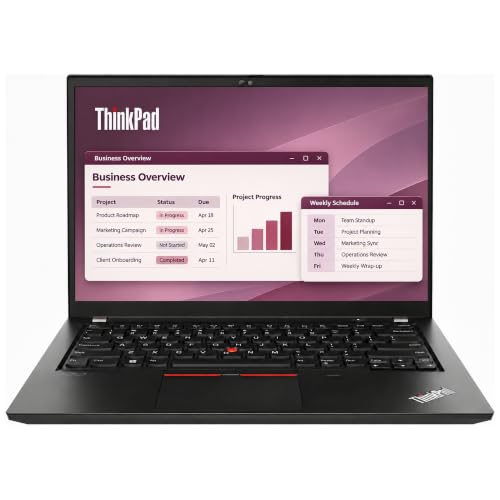
Lenovo ThinkPad T14 with Core i7, 16GB and 512GB — Best Classic i7 Business Pick
Badge: Best classic i7 business pick
The Lenovo ThinkPad T14 Business Laptop with an Intel Core i7, 16GB of RAM and a 512GB SSD is the reference configuration of this entire guide: a 14-inch Full HD business laptop with a backlit keyboard, a fingerprint reader, WiFi 6 and Thunderbolt 4. This is the machine the i7 search is really about — the professional mainstream in its most recognizable form. The ThinkPad line’s virtues are the ones fleets buy on: a keyboard regarded as the business class’s benchmark, a chassis built for service and travel, security hardware as standard, and a design that assumes docking at a desk and presenting in a client’s office are the same machine’s ordinary week.
Sixteen gigabytes and half a terabyte is the balanced specification for that week: heavy browser and office multitasking, large documents, data work and development environments all sit comfortably inside it. Buyers whose work is defined by virtual machines, very large datasets or years of accumulated local archives should look at the configuration directly below, which is this same laptop answered at a higher specification. Everyone else is looking at the class’s centre of gravity, in a clean listing, with the i7 badge genuinely on the processor inside.
Strengths
- Genuine Core i7 in the business class’s reference design.
- Backlit keyboard, fingerprint reader and Thunderbolt 4.
- Balanced 16GB and 512GB specification for professional work.
Trade-offs
- Full HD panel rather than a higher-resolution display.
- Business design prioritizes function over flair.
- Confirm the exact configuration on the listing before ordering.
Spec box: Display 14-inch Full HD · Processor Intel Core i7 · Memory 16GB · Storage 512GB SSD · Features backlit keyboard, fingerprint reader, WiFi 6, Thunderbolt 4.
Best for: Professionals wanting the classic i7 business laptop, new and clean. Not suited for: Buyers needing maximum memory or a premium display.

Lenovo ThinkPad T14 with Core i7, 40GB and 2TB — Best High-Capacity i7 Pick
Badge: Best high-capacity i7 pick
The second linked pick is the same Lenovo ThinkPad T14 Business Laptop — Intel Core i7, 14-inch Full HD display, backlit keyboard, fingerprint reader, WiFi 6 and Thunderbolt 4 — at a dramatically higher specification: 40GB of RAM and a 2TB SSD. We list it separately, and describe it as a configuration rather than a different model, because honesty about what it is makes the buyer’s decision clearer. This is the T14 for the workloads that break ordinary business laptops: multiple virtual machines, large local datasets, extensive development environments, years of project archives kept locally, or a professional who simply refuses to think about memory and storage ever again.
The decision between the two T14s is therefore refreshingly binary. If your work fits in 16GB — and most professional work does — the first configuration is the rational purchase and the difference is better spent on the dock, monitor and warranty that complete a business setup. If your work demonstrably does not fit, this configuration answers it inside the same trusted chassis, with the same keyboard, security and connectivity, rather than forcing a jump to a different line. What nobody should do is buy the 40GB machine as insurance against a hypothetical workload; memory you never touch is the most expensive kind.
Strengths
- 40GB of memory absorbs virtual machines and heavy data work.
- 2TB of storage ends local archive management.
- Same trusted T14 chassis, keyboard and security as the base pick.
Trade-offs
- Specification exceeds most professional workloads entirely.
- Same Full HD panel as the base configuration.
- Price the premium against a dock and monitor before committing.
Spec box: Display 14-inch Full HD · Processor Intel Core i7 · Memory 40GB · Storage 2TB SSD · Features backlit keyboard, fingerprint reader, WiFi 6, Thunderbolt 4.
Best for: Data-heavy professionals, developers and VM users. Not suited for: Ordinary office workloads that fit in 16GB.
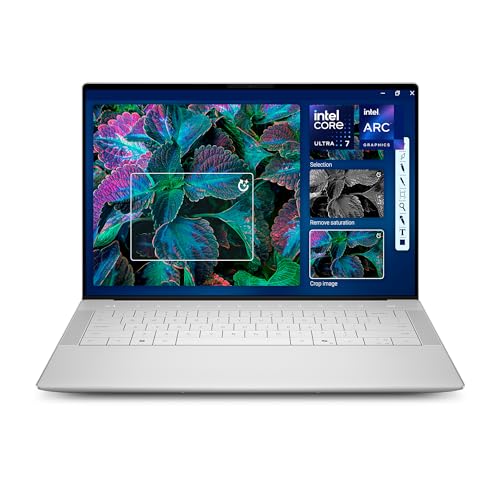
Dell XPS 14 Premium — Best Modern Successor
Badge: Best modern successor
The Dell XPS 14 Premium Laptop DA14250 is included as what it is: the modern answer to the i7 brief, wearing the successor badge. Its specification is a generation beyond the T14s — a 14.5-inch touch display at 3.2K OLED with a 48 to 120Hz range, an Intel Core Ultra 7 255H processor, Intel Arc Graphics, 32GB of memory and a 1TB SSD. Read it as the class’s present tense. The Ultra 7 delivers the professional performance tier the i7 name used to promise, with newer architecture and efficiency, and the XPS wraps it in Dell’s premium design with a display that makes the T14’s workmanlike Full HD panel look like the tool it is.
Two clarities protect the buyer here. First, this machine is not an i7 laptop, and we do not call it one; it is the descendant of that class, offered to readers whose loyalty is to the performance tier rather than the badge. Second, its buyer is different from the T14’s: the XPS suits the professional who values display and design alongside power and works in one ecosystem of modern peripherals, while the ThinkPad suits the professional embedded in business infrastructure, docking standards and IT support. Neither is the other’s upgrade; they are the same tier interpreted by two philosophies, separated by a rename.
Strengths
- Core Ultra 7 255H, the current generation of this performance tier.
- 3.2K OLED touch display with a wide refresh range.
- 32GB of memory and 1TB of storage as standard.
Trade-offs
- It is an Ultra 7 machine, not an i7 — badge loyalists take note.
- Premium positioning above the business mainstream.
- Design-first chassis rather than a fleet-serviceable one.
Spec box: Display 14.5-inch touch 3.2K OLED, 48-120Hz · Processor Intel Core Ultra 7 255H · Memory 32GB · Storage 1TB SSD · Graphics Intel Arc.
Best for: Professionals wanting the i7 tier’s modern generation and display. Not suited for: Anyone who specifically requires the i7 badge itself.
Lenovo ThinkPad T14 Gen 5 with Ultra 7 — Best Next-Generation ThinkPad Route
Badge: Best next-generation ThinkPad route
The Lenovo ThinkPad T14 Gen 5 in its Ultra 7 configuration is the ThinkPad line’s own answer to the rename — the business reference design carried onto Intel’s current platform — and it is discussed here without a link for a reason that reflects this guide’s standards rather than the machine’s quality. The listing available for it carries a comparative marketing claim in its title, and we do not build linked recommendations on claims of that kind or repeat them in our pages. The machine itself, judged on its identity, is exactly what a T14 loyalist should want next: the keyboard, chassis philosophy and business feature set of the linked i7 models, on the Ultra 7 platform that succeeds them.
Readers who prefer the ThinkPad route into the new generation should seek this model through listings whose descriptions they can verify in full, applying the configuration and condition checks this guide teaches. When a clean, plainly described listing is available, it will compete directly with the XPS for the successor slot in this guide — ThinkPad infrastructure against XPS display and design — and that will be a genuinely interesting rematch.
Strengths
- The T14 business formula on the current Ultra 7 platform.
- ThinkPad keyboard, security and docking heritage.
- The natural migration path for existing ThinkPad fleets.
Trade-offs
- No link here; its listing carries a claim we will not repeat.
- Verify configuration and condition carefully when shopping it.
- Ultra 7 naming still confuses buyers anchored to i7.
Spec box: Class 14-inch business laptop · Processor Intel Core Ultra 7 · Line Lenovo ThinkPad T14 Gen 5 · Status discussed without a link; see listing for exact configuration.
Best for: ThinkPad loyalists migrating to the Ultra generation. Not suited for: Buyers who want a verified clean link from this guide.
ASUS Zenbook 14 with Ryzen AI — Best AMD Counterweight
Badge: Best AMD counterweight
Every Intel-defined class deserves its AMD counterweight named, and in this performance tier it is the ASUS Zenbook 14 line in its Ryzen AI configurations. AMD’s Ryzen AI processors compete directly with the Ultra 7 tier on performance and efficiency while carrying their own AI acceleration, and the Zenbook wraps them in ASUS’s slim, display-focused design language. For a buyer whose loyalty is to capability rather than to a badge — the reader this guide has been cultivating — a Ryzen AI Zenbook 14 is a legitimate alternative answer to the same brief as every machine above, sometimes with display quality as its particular argument.
It is prose-only here because this guide’s linked pool is what the verification round produced, not because the machine failed any test of merit. Shoppers who widen their search to it should apply the same disciplines: exact configuration, condition, and a clear-eyed comparison against the T14’s business infrastructure and the XPS’s current-generation polish. Platform competition is the reason this performance tier keeps improving, and an honest guide should say so even inside an Intel-named article.
Strengths
- Ryzen AI performance competing directly with the Ultra tier.
- Zenbook design with a display-focused reputation.
- A genuine alternative platform for badge-neutral buyers.
Trade-offs
- Discussed without a link in this guide’s verified pool.
- Consumer design rather than business-fleet infrastructure.
- Configuration names vary; verify the exact listing.
Spec box: Class 14-inch performance laptop · Processor AMD Ryzen AI family · Line ASUS Zenbook 14 · Status prose-only context in this guide.
Best for: Badge-neutral buyers comparing platforms on capability. Not suited for: Buyers who need this guide to hand them a verified link.
The Renewed ThinkPad T14 Market — Best Value Channel
Badge: Best value channel
The final entry is a market rather than a model, and it may be the most useful one in the guide. A large share of all 14-inch i7 laptops offered for sale are renewed ex-fleet ThinkPads — machines bought by companies, used for a contract term, retired on schedule and resold through refurbishment channels. The hardware case for them is real: a T14 was engineered for exactly the years of service a fleet extracts, and a well-graded unit with a healthy battery remains a capable professional laptop. The channel’s risks are equally real and entirely manageable by a buyer who shops it as a channel: read the condition grade and what it promises, confirm the warranty and who stands behind it, check the battery policy specifically, verify the keyboard layout matches your country, and confirm the exact memory and storage rather than the model name’s reputation.
What this guide will not do is attach a recommendation link to that market, because no link can certify the individual unit a reader will receive. Entered knowingly, with the checks above, the renewed T14 is how thousands of professionals equip themselves well for less. Entered unknowingly — through a listing skimmed for its headline — it is how buyers end up surprised by a used machine. The entire difference is attention, and attention is free.
Strengths
- Business-grade hardware at the market’s most accessible rungs.
- Deep supply of the exact class this guide covers.
- Capable machines with years of service engineered in.
Trade-offs
- Units vary; grading and seller terms decide the outcome.
- Battery condition is the central unknown to verify.
- Warranties are seller-backed and shorter than new.
Spec box: Channel renewed and refurbished business laptops · Typical model Lenovo ThinkPad T14, Core i7 generations · Checks condition grade, warranty, battery, layout, configuration.
Best for: Confident value shoppers who read listings carefully. Not suited for: Anyone who wants a unit this guide has verified.
The ThinkPad Keyboard and the Business Feature Set, Taken Seriously
Business laptops are bought on features that consumer reviews treat as footnotes, so let this guide give them their paragraph. The ThinkPad keyboard’s reputation is earned in the only currency that matters — millions of professional typing hours — with key travel, sculpting and layout that writers and data workers consistently rank first among laptops. The fingerprint reader is not a convenience garnish but part of a security posture that includes firmware protections and manageability for IT departments. Thunderbolt 4 docking means one cable standard across an office’s desks, which is why fleets standardise on machines like the T14 rather than on whichever consumer laptop is fashionable. Even the Full HD panel is a considered choice for fleet life: durable, economical to replace, and matched to the documents and data that fill professional screens. A buyer outside an organisation still benefits from all of it, because infrastructure-grade design does not stop being good when the fleet is a fleet of one.
The XPS answers the same professional brief from the individual’s side: biometrics and security present, but the investment visibly concentrated in the display, the materials and the silence of the machine under load. Neither philosophy is a compromise of the other; they are two mature readings of professional life, and this guide’s refusal to crown one over the other is deliberate.
Performance Expectations Across the Generations in This Guide
Three processor generations share this article, and a reader deserves a calm map of what each delivers in daily professional terms. The genuine Core i7 in the T14 configurations is a proven multitasking engine: office suites, browsers with dozens of tabs, development environments, data tools and video calls run together without the machine rationing attention. The Core Ultra 7 in the XPS adds a newer architecture’s efficiency and integrated AI acceleration, plus graphics headroom that shows in lighter creative work and in the smoothness of its high-refresh display. The renewed pool spans several i7 generations, and the honest rule there is that each step back in generation costs responsiveness at the margins rather than capability at the centre — an older i7 ThinkPad still does professional work, which is precisely why the channel exists. What no machine in this article does is replace a workstation or a gaming laptop, and the reader with those needs will find this batch’s dedicated guides a better use of the same money.
Comparison Table
| Model | Display | Processor | Memory | Storage | Status |
|---|---|---|---|---|---|
| ThinkPad T14 i7 (base) | 14″ Full HD | Intel Core i7 | 16GB | 512GB SSD | Linked |
| ThinkPad T14 i7 (high) | 14″ Full HD | Intel Core i7 | 40GB | 2TB SSD | Linked |
| Dell XPS 14 Premium | 14.5″ 3.2K OLED touch | Core Ultra 7 255H | 32GB | 1TB SSD | Linked |
| ThinkPad T14 Gen 5 Ultra 7 | 14″ class | Core Ultra 7 | See listing | See listing | Prose-only |
| ASUS Zenbook 14 Ryzen AI | 14″ class | AMD Ryzen AI | See listing | See listing | Prose-only |
| Renewed T14 market | 14″ Full HD typical | Core i7 generations | Varies | Varies | Channel |
Displays in This Class: Work Panels and One Showpiece
The display divide in this guide is philosophical as much as technical. The T14 configurations carry 14-inch Full HD panels chosen for professional life: sharp enough for documents and data at this size, economical to power and to replace, and matched to the meeting rooms and spreadsheets that fill a business week. Nobody buys a ThinkPad for its screen, and Lenovo’s fleet customers would not want them to. The XPS 14 inverts the priority entirely, with a 3.2K OLED touch panel whose resolution, contrast and refresh range make it the finest display in this article by a wide margin — a genuine asset for the professional whose work includes image judgement, design review or simply eight daily hours of reading they would like to enjoy. The honest guidance is to know which professional you are. Eyes that live in text and tables lose nothing on the T14’s panel; eyes that judge colour or present creative work gain something real from the XPS every single day, and should not let a badge preference talk them out of it.
What Does the i7 Tier Actually Do Better?
Strip the badges away and the tier’s promise is sustained professional multitasking: many applications genuinely active at once, large files handled without ceremony, development and data tools that assume headroom, and the responsiveness that makes a machine disappear under its work. Below this tier, mainstream processors cover the same tasks one or two at a time; at this tier, the machine stops rationing. That is why the tier became the professional default and why its rename matters commercially — the buyers searching for it are the buyers whose work measurably depends on it. It is also why memory pairing matters as much as the processor itself: an i7 or Ultra 7 behind too little memory is a promise the configuration cannot keep, which is why every linked pick here carries at least 16GB and the guide’s argument between the two T14s is conducted entirely in memory and storage terms.
Business Laptop Versus Premium Consumer: The T14 and XPS Divide
The two linked philosophies in this guide diverge on what a professional laptop is for. The ThinkPad assumes an organisation: IT departments that image and manage fleets, docks that standardise across desks, parts and service measured in years, and a keyboard treated as industrial equipment. The XPS assumes an individual: a professional choosing personally, valuing the display they stare at and the object they carry, with modern peripherals and cloud management. Both assumptions are correct for their buyers, and the price of choosing wrongly is a daily low-grade friction — the fleet professional fighting a design-first machine’s quirks, or the independent professional staring at a utilitarian panel their work never required. Decide which professional you are before you decide which laptop, and the comparison largely settles itself.
Security Features Are Part of This Tier’s Job Description
Professional machines carry professional obligations, and the security hardware threaded through this guide’s picks deserves explicit credit. Fingerprint readers on the T14 configurations put biometric sign-in where a working day needs it — at every wake, without a password typed in a public place. Business platforms add firmware-level protections and manageability that let an employer, or a careful individual, encrypt the drive, control updates and recover a lost machine’s data posture. The XPS brings the individual’s version of the same posture, with biometrics and modern platform security in a consumer shell. None of this is glamorous, and all of it is why this class, rather than a cheaper consumer tier, is the correct purchase for anyone whose laptop holds client data, financial records or a company’s credentials. If your machine’s contents would embarrass or endanger you in the wrong hands, the business feature set is not an upsell; it is the product.
Battery and Travel in the Professional Size
Fourteen inches is the largest size that still behaves in an economy seat and a café, and the machines here are built around that travel reality. Expect a working day of mixed professional use away from the charger from the efficiency-conscious configurations, with the usual honest caveats: video calls, maximum brightness and heavy computation shorten any laptop’s day, and manufacturer figures are measured in kinder conditions than yours. The business traveller’s habits matter more than the model choice — a charger in the bag rather than the hotel, a power bank that speaks USB-C for the longest days, and documents synced before the flight rather than streamed during it. Within those habits, this class’s combination of screen, keyboard and endurance is exactly why it became the professional default: nothing essential is surrendered to portability, and nothing about portability is surrendered to the desk.
How Do You Shop the Renewed Market Without Getting Burned?
Method converts the renewed channel from a gamble into a strategy. Buy from sellers who specialise in business refurbishment and publish their grading standards, because a grade you can read is a promise you can enforce. Treat the battery as the negotiation it is: ask its warranted capacity or the seller’s replacement policy, since the battery is the component whose past life most affects your future one. Confirm the charger is included and correct for the model, the keyboard layout matches your language, and the storage and memory in the description match the configuration in the title — mismatches between the two are the channel’s most common honest error and its least honest trick. Finally, use the return window as an inspection window the moment the machine arrives: run it through a full working day, test every port, and only then let the purchase become final in your mind.
Docking, Monitors and the Desk Half of a Business Laptop’s Life
A 14-inch business laptop lives half its life attached to things, and the picks here are specified for that life. Thunderbolt 4 on the T14 configurations and the XPS’s modern connectivity both support single-cable docking: power, displays, network and peripherals through one connection, so the machine that travels all morning becomes a workstation in the time it takes to sit down. When planning the desk, match the dock to the monitors — their number and resolution decide the dock class — and keep the laptop’s own charger in the travel bag rather than the desk drawer, so packing never means unplugging the workstation. External display support is also where the XPS’s premium shows a second face: driving its own 3.2K panel plus external screens is the kind of mixed workload its Ultra 7 and 32GB were specified for. None of this appears in a search for i7 laptops, and all of it decides whether the purchase feels professional in month six.
Warranties and Support: The Specification Nobody Searches For
Business buyers know that support terms are a specification, and individual buyers of this class should adopt the habit. A new machine’s manufacturer warranty, its accidental-damage options and the availability of parts for a high-volume line like the ThinkPad all have cash value over a four-year ownership. The renewed channel’s seller warranties are shorter and narrower, which is not a scandal but a term to be priced: the discount against new should be large enough to carry the risk difference, and when it is not, the new linked picks in this guide are the rational purchase. Before ordering any machine here, read the warranty line of the exact listing with the same care as the memory line; in this class, of all classes, the two deserve equal attention.
Common Mistakes
- Rejecting Ultra 7 machines because the search said i7, missing the current generation entirely.
- Accepting a listing that calls an Ultra 7 an i7, or the reverse, without noticing.
- Treating the two T14 configurations as different models and comparison-shopping them against each other.
- Buying 40GB of memory as insurance against a workload that has never exceeded 12GB.
- Entering the renewed market by headline instead of by grading, warranty and battery terms.
- Judging the XPS and the T14 as upgrades of each other rather than different philosophies.
Longevity and the Total Cost of a Professional Machine
Judge this class by cost per year rather than cost per purchase and its economics clarify. A business laptop bought new, at the right configuration, commonly serves four to six professional years; its higher rung is recovered in the years where a cheaper machine would have been replaced, reimaged and repurchased. A renewed unit inverts the equation — lower entry, shorter remaining runway, and a battery or warranty event somewhere in the middle — and can still win the arithmetic for a buyer who prices it honestly. The XPS’s premium belongs to the same calculation, with its display and current platform extending the years before the machine feels dated. What never wins is the false economy of the under-specified new machine: an i7 badge behind inadequate memory is the most expensive laptop in this article, because it will be replaced first and regretted longest. Configuration is destiny in this class, and the two T14 listings exist in this guide precisely so that destiny can be chosen at two honest levels.
Final Recommendation
Let the badge question go and the class becomes simple. If you want a genuine Core i7 in a clean listing, the ThinkPad T14 is the class’s reference answer — the 16GB configuration for the professional mainstream, the 40GB configuration for demonstrably heavier data work, chosen by workload rather than by fear. If you want this tier’s current generation, the XPS 14’s Ultra 7 is its premium expression, and the T14 Gen 5 waits for ThinkPad loyalists willing to shop its listings carefully. And if value rules, the renewed T14 market rewards exactly the careful reader this guide has tried to produce. The i7 idea is alive and well in 2026; it simply answers to two names now, and you know both of them. Hold on to that clarity through the purchase itself: the listing that names its processor plainly, states its memory and storage without decoration and describes its condition in a word you can verify is the listing that deserves your money, whichever of this guide’s doors it stands behind. The professionals who buy this class well are not the ones with the largest budgets; they are the ones whose attention never wandered between the search box and the checkout, and this article has been written, from its first paragraph to this one, to keep yours exactly there.
Who Buys This Class, and What Do They Know That Others Don’t?
The typical buyer of a 14-inch i7-class machine is not chasing novelty; they are replacing a predecessor that served for years and expecting the same from its successor. That buyer’s wisdom is worth importing wholesale. They buy the configuration, not the launch — memory and storage sized to a workload they can itemise. They buy the line, not the unit — a model with a service network, a parts supply and a successor they can migrate to. They treat the warranty and the dock as part of the laptop. And they replace on condition and support horizons rather than on announcement cycles, which is why so many of their retired machines still have enough life to stock the renewed market this guide describes. A first-time buyer in this class who adopts those habits will shop it like a fleet manager with a fleet of one, and will end up, as fleet managers do, with a machine that simply works for years while fashion changes around it.
The i9 and Ultra 9 Question, Briefly Answered
Some readers will wonder whether to step above this tier entirely. The tier above exists for sustained heavy computation — rendering, simulation, compilation at scale — and wears i9 or Ultra 9 badges in larger, hotter machines. For the professional mainstream this guide serves, that step buys heat, weight and cost in exchange for performance the workload never requests. The honest boundary is utilisation: if your current machine’s processor is not your bottleneck — and for office, data and development work it rarely is once memory is adequate — the tier above is a donation. Spend the difference on the configuration, the display or the desk, and let the halo badges serve the specialists they were built for.
FAQ
Is Core Ultra 7 the same as i7? It is the successor, not the same badge. Intel renamed its performance tiers with the Core Ultra generation, and Ultra 7 occupies the position i7 held. An Ultra 7 machine answers an i7 brief with newer architecture, but it should never be sold or described as an i7.
Why are there only three linked laptops in this guide? Because the class’s listings are dominated by renewed units and claim-carrying titles, and our linked standard excludes both. Three verified picks and three honestly framed alternatives serve a buyer better than a long list padded with listings we cannot stand behind.
What is the difference between the two ThinkPad T14 picks? Configuration only. Both are the T14 business laptop with a Core i7, a 14-inch Full HD display, backlit keyboard, fingerprint reader, WiFi 6 and Thunderbolt 4. One carries 16GB of memory and a 512GB SSD; the other carries 40GB and 2TB.
Will an i7 laptop bought today be supported for long? The linked T14 configurations run current Windows and sit on a business platform with a long service culture, which is the practical meaning of support for an individual buyer. The Ultra 7 machines stand on Intel’s current platform generation. In both cases, the configuration you choose — memory above all — will decide the useful life more than the badge will.
What should a small business buy for a new hire? The base T14 configuration in this guide is the fleet answer: standard memory and storage, business security, Thunderbolt docking and a line that can be bought identically for the next hire. Add the higher configuration only for roles whose workloads are demonstrably heavier, and standardise the dock at the same time.
Are renewed ThinkPads a good buy? They can be, when bought knowingly from a graded, warrantied seller with a clear battery policy. They are a poor buy when bought unknowingly. This guide discusses the channel without linking it so the decision stays deliberate.
Should I buy an AMD laptop instead? If you are badge-neutral, yes, it belongs on your shortlist — the ASUS Zenbook 14’s Ryzen AI configurations compete directly with this tier. Compare exact configurations and buy the platform whose whole package suits your work.
Can these laptops handle development work and virtual machines? Yes — that is core territory for this tier. The 16GB T14 covers ordinary development comfortably, while the 40GB configuration exists specifically for developers and analysts running multiple virtual machines or large local datasets. The XPS’s 32GB serves the same heavy pattern in the newer generation.
Is the XPS 14 a business laptop like the ThinkPad? It serves professionals, but by a different philosophy: an individual’s premium machine rather than a fleet-standard one. It lacks nothing a solo professional needs, while organisations standardising docks, images and service usually choose the ThinkPad pattern.
How much memory does a professional 14-inch laptop need? Sixteen gigabytes is the working standard for this tier. Forty gigabytes serves virtual machines, large datasets and similarly heavy local work. Buy for the workload you can describe, not the one you can imagine.
Reading Any Future Listing in This Class: A Transferable Checklist
Models will change; the checklist this guide leaves behind will not. One: identify the badge honestly — i7, Ultra 7 or a seller blurring them — and walk away from the blur. Two: pin the configuration, because in this class the same model name spans 16GB starter machines and 40GB data machines. Three: read the condition line as if the purchase depended on it, because in a renewed-dominated class it does. Four: refuse comparative claims in titles as a basis for decision; a machine that needs another machine’s name in its headline to sell itself has told you something. Five: price the whole professional system — warranty, dock, monitor, charger in the bag — against the alternatives. A reader who runs those five checks on any listing in this category, in any year, will buy as well as this guide can buy for them, which is the most a guide should ever promise.
A Note for IT Buyers and the Self-Employed Alike
Two audiences read this class with opposite paperwork and identical needs. The IT buyer standardising a team cares about image deployment, dock compatibility across desks, warranty handling at scale and a model line that will still be sold, identically, at the next refresh — the T14’s entire design brief, and the reason its configurations appear in pairs like the two linked here. The self-employed professional cares about the same machine for mirror reasons: one laptop that must never be the reason a deadline slips, that a local technician can service, that docks at home and presents at clients without adapters multiplying. Both should read the renewed section with professional interest — the IT buyer as the source of that market’s supply discipline, the freelancer as its most natural beneficiary — and both should leave this guide with the rename firmly installed, because procurement documents written around i7 in 2026 will increasingly be filled with Ultra 7 machines whether the writer knows it or not.
Setup and Migration: Starting Life on a Business Machine
The first day with any pick here should be spent on the unglamorous foundations that professionals rely on. Enrol the machine in your organisation’s management where one exists, or, for individuals, complete the equivalent personal version: full-disk encryption on, biometric sign-in configured, updates set to automatic, and backups proven by an actual test restore of one file rather than assumed. Migrate the working set deliberately — current projects and reference material — rather than cloning a decade of accumulation onto a fast new drive. Set up the dock and monitors before the first deadline does it for you, and put the travel charger in the bag on day one so the habit exists before the first trip. A business laptop’s value compounds from a clean start; the machines in this guide are specified to be imaged, standardised and forgotten about, and an owner who starts them that way rarely thinks about the purchase again until the planned replacement years later.
One closing thought for the reader who arrived annoyed that a familiar badge has been retired: renames are annoying precisely because the old name worked, and i7 worked for a decade because the tier it named was the right answer for professional work. That answer has not been withdrawn — it has been rebadged, improved and joined by a thriving second life in the renewed channel. A buyer who understands the map in this article owns the category rather than being confused by it, and will recognise the right machine under either of its names, in either of its channels, at any point in the years ahead when a replacement or a second unit is needed.
Why This Guide Is Shorter on Picks and Longer on Warnings
A reader comparing this article with others in the batch may notice the proportions: fewer linked machines, more method. That is the honest shape of this category in 2026, and manufacturing a longer list would have required exactly the compromises the guide exists to refuse — renewed units linked as if standard, successor machines mislabelled with a retired badge, claims copied from titles into recommendations. A buying guide’s credibility is spent in precisely those moments, and it is spent permanently. We would rather hand you three listings we can defend in full, three alternatives framed without a link and the reasoning exposed, and a checklist that keeps working after every model here is replaced, than a dozen confident links that dissolve under the first careful question. If that trade leaves this guide looking sterner than its siblings, the category made it so. Professional buyers, of all readers, should recognise the posture: it is the same one their own procurement rules take toward suppliers, and for the same reason — because the cost of a careless yes, multiplied across years of daily work, always exceeds the cost of a careful one.
So buy like the class itself works: deliberately, on specification, with the paperwork read. Whether the machine that results wears an i7 badge, an Ultra 7 badge or a refurbishment grade from a seller you have vetted, it will carry the same professional brief the search began with — and it will carry it for years, which was always the point of typing those two characters into a search box in the first place. Everything else — the rename, the channels, the configurations — is commentary on that single durable requirement, and a buyer who keeps it in view cannot be misled by any of them for long. Choose the configuration, verify the listing, respect the channel you are buying from, and let the badge — whichever generation’s badge it is — take care of itself. The machine that arrives will then do what this class has quietly done for a decade of professionals before you: disappear into the work, year after year, until the day its replacement is chosen with exactly the same care. That continuity — machine after machine, badge after badge, the work uninterrupted — is the real product this category sells, and every honest listing in it is a small renewal of the same professional promise. Read the final listing once more before you confirm — processor, memory, storage, condition, warranty, in that order — and then buy with the confidence this class, properly shopped, has always justified. No drama, no badge anxiety, no channel surprises: just a professional tool, correctly specified and honestly bought, ready for the years of unglamorous, essential work that this size and this tier exist to carry. If this guide has a hope beyond the sale, it is that the next time Intel renames a tier — and there will be a next time — its readers will smile, translate, and shop on undisturbed. Badges are marketing’s business; capability, configuration and condition are the buyer’s, and in this class the buyer who keeps that distinction wins every time. That is the whole of the law for this category, and the six entries above — three to buy directly, three to understand — are its complete application to the market as it stands today. When the listings change — and in this channel-rich class they change constantly — the method in these pages will still be standing, ready for the next configuration, the next badge and the next careful reader. Buy the machine your work describes, from the channel you understand, at the configuration you verified — and the i7 question that opened this article will never need to be asked again. That is a promise this guide can actually keep, unlike the ones printed in the titles it refused to quote. Keep it, and go and get the work done — the machine, whichever name it wears, is ready when you are. Order it, image it, dock it, and let the badge debate fade into the background noise it always was. The work never cared what the processor was called; it cared that the machine showed up every morning for years, and every route in this guide leads to a machine that will.
Related Guides
For the broader professional class, read the best workstation laptops; for this size without the badge question, see the best 14 inch convertible laptops; and for endurance-first machines, try the best laptops with long battery life.
Related guides
- Best Direct Thermal Printers: Shipping-Label Machines and Professional Label Systems
- Best 4K UHD HDR HDMI Extenders: 4K60, Long-Run and 4K120 Kits Compared
- Best 25–35 Inch Monitors With Lowest Display Lag: An Honest Ranking Without Invented Numbers
- Best Color Product Label Printers: Six Desktop Machines for Short-Run Product Labels


