What's inside
- Key Takeaways
- Quick Picks
- How These Picks Were Chosen
- Four Modes, Honestly Assessed
- Handwriting, Drawing and Markup: Three Different Pen Jobs
- Weight, Balance and the Lap Test
- Comparison Table
- Generations Within One Name: Reading Convertible Model Years
- Is a Pen Included, and Why Does It Matter So Much?
- Memory and Storage: The Convertible-Specific View
- OLED or IPS in a Convertible?
- What the Specifications Do Not Tell You About Convertibles
- Convertible or Detachable: Which Folding Idea Fits You?
- Battery Life in a Machine With Two Personalities
- Durability and the Care a Hinge Deserves
- Common Mistakes
- Software That Makes the Hinge Worth It
- Buying the Pen Separately: A Short Survival Guide
- Final Recommendation
- Who Should Skip the Convertible and Buy a Clamshell?
- Accessories That Complete a Convertible
- FAQ
- The Student Case for a 14-Inch Convertible
- Longevity: Which of These Ages Best?
- The Presenter’s and Teacher’s Convertible
- A Final Distinction: Convertible Owners Versus Convertible Buyers
- Related Guides
As an Amazon Associate I earn from qualifying purchases. This post may contain affiliate links at no extra cost to you.
gizmoverdict.com is reader-supported. When you buy through links on our site, we may earn an affiliate commission.
Where to buy: Every linked convertible below leads to its current Amazon listing. Convertible lines are sold in many configurations, and pen inclusion varies by listing, so confirm the exact specification — including whether a stylus is in the box — before ordering.
The best 14 inch convertible laptops are built around a single hinge and everything it makes possible: a laptop that folds into a tablet for reading and drawing, tents itself for presentations and video, and returns to a proper keyboard for the long work of writing. Fourteen inches is the size where that trick works best, large enough for split-screen productivity and small enough that tablet mode does not feel like holding a serving tray. This guide’s cast spans the class honestly, from HP’s mainstream Envy x360 to Lenovo’s pen-equipped Yoga 7i and premium OmniBook Ultra Flip, with two generations of Lenovo’s Flex 5 kept carefully distinct — because a convertible guide that blurs model years is selling you yesterday’s machine at today’s expectations.
The axis that organizes this entire guide is the pen. A convertible without a stylus is a laptop that folds; a convertible with one is a notebook, a sketchbook and a markup tool as well. The Yoga 7i in this list names its Yoga Pen in its title — a genuine, checkable advantage — while the other picks require the buyer to verify pen inclusion or plan a separate pen purchase from the listing. We flag that distinction in every review rather than letting readers discover it at unboxing, because the difference between a pen in the box and a pen in a separate parcel is the difference between a tool that gets used from day one and an intention that fades.
Set expectations for tablet mode realistically. A 14-inch convertible is a table-and-lap tablet, wonderful on a desk, a lectern or a sofa, and heavy in one hand compared with a dedicated tablet. Its gift is not replacing your tablet but unifying your devices: one machine for the document, the diagram drawn on it, the form signed and the film watched in tent mode on a train table. Buyers who understand that bargain tend to love this class for years; buyers expecting an iPad’s weight with a laptop’s keyboard tend to blame the hinge for physics.
Key Takeaways
- The pen is the axis of this class: the Yoga 7i includes its Yoga Pen by name; verify pen inclusion on every other listing.
- Two Flex 5 generations appear here — the Ryzen AI 5 340 model and the 2023 Ryzen 5 5500U model — and they are not interchangeable.
- The OmniBook Ultra Flip is the premium pick: 3K OLED touch, Ultra 7, 32GB of memory and 2TB of storage.
- The Envy x360 with Ryzen 5 8640HS is discussed without a link because its current listing is renewed.
- Tablet mode at 14 inches suits desks and laps, not one-handed reading; buy the class for unification, not tablet replacement.
Quick Picks
- Best overall: Lenovo Yoga 7i 2-in-1 — 14-inch OLED touch, Ultra 5, 16GB, 1TB and the Yoga Pen named in its title.
- Best premium: HP OmniBook Ultra Flip — 3K OLED touch, Ultra 7, 32GB and 2TB in a Copilot+ convertible flagship.
- Best mainstream value: HP Envy x360 14 — Core 5 120U, 8GB and 512GB with fingerprint reader and backlit keyboard.
- Best current-generation AMD: Lenovo IdeaPad Flex 5 with Ryzen AI 5 340 — WUXGA IPS touch, 16GB DDR5 and 512GB.
- Best previous-generation value: Lenovo IdeaPad Flex 5 2023 — Ryzen 5 5500U with 16GB and 512GB, clearly labelled by year.
- Best renewed-channel alternative: HP Envy x360 14 with Ryzen 5 8640HS — covered in prose only here, because the listings available today are renewed stock.
How These Picks Were Chosen
Linked picks are current, clean listings verified through the site’s product data, chosen to map the class’s real range: a pen-led flagship value in the Yoga, a premium OLED flagship in the Ultra Flip, a mainstream Intel option in the Envy, and the Flex 5 in both its current Ryzen AI generation and its 2023 predecessor so buyers can see the ladder within one line. The Envy x360 variant with the Ryzen 5 8640HS is prose-only because its current listing is renewed, and Samsung’s Galaxy Book Pro 360 is mentioned only as context because its 16-inch size sits outside this guide’s class. Within the linked five we weighted pen support, display quality — OLED against IPS is a real divide here — hinge solidity, and memory headroom, in that order, because that is the order in which convertible owners feel their machines.
Every review states what is known about its pen situation from the listing information available and what the buyer must confirm. That restraint is deliberate: pen technology, inclusion and compatibility are exactly the details that vary silently between listings of the same model name.
Four Modes, Honestly Assessed
Manufacturers photograph convertibles in four modes, and a truthful guide should grade them. Laptop mode is the home position and must be flawless — keyboard, trackpad and screen at a proper angle — and every pick here is a genuine laptop first. Tent mode earns its keep more than sceptics expect: it is the natural posture for video calls with the camera close, for following a recipe or a tutorial with the keyboard protected behind the screen, and for presenting to two or three people across a table. Stand mode — keyboard face-down, screen forward — is tent’s quieter sibling for media. Tablet mode is the most conditional: excellent for reading in a chair, annotating PDFs and drawing with the machine resting on a surface, and genuinely cumbersome held aloft for long. A convertible bought for the first three modes with the fourth as a bonus is a convertible bought wisely.
Hinge quality decides whether those modes age well. A hinge that is too loose lets the screen nod under touch; too stiff, and one-handed opening disappears. The lines in this guide — Yoga, Envy, Flex, OmniBook — have generations of hinge engineering behind them, which is part of what separates a convertible from a reputable maker from a folding novelty.

Lenovo Yoga 7i 2-in-1 — Best Overall
Badge: Best overall
The Lenovo Yoga 7i 2-in-1 w/ Ultra 5 leads this guide on the strength of the most complete convertible proposition in the list: a 14-inch WUXGA OLED touch display with 100% DCI-P3 coverage and HDR, an Intel Core Ultra 5 226V processor, 16GB of RAM and a 1TB SSD — and, named directly in its title, the Yoga Pen. That last item is not a footnote. It means the pen workflow this class exists for — annotating, sketching, signing, handwritten notes — is available from the first unboxing without a second purchase, a compatibility hunt or a compromise pen. Combined with an OLED panel whose colour coverage suits visual work, the Yoga is the pick for readers whose convertible use is genuinely creative rather than merely flexible.
The balance around the headline is equally sound. Sixteen gigabytes is the right memory tier for a machine expected to serve for years, and a terabyte of storage frees the owner from rationing a media and project library. The Ultra 5 sits in the efficiency-minded tier of Intel’s line, which suits a convertible’s untethered life. If your budget reaches one machine in this guide and your work touches a pen, this is the one we would buy.
Strengths
- Yoga Pen included by name in the title — no second purchase.
- WUXGA OLED touch with full DCI-P3 colour coverage.
- 16GB of memory and 1TB of storage, the comfortable tiers.
Trade-offs
- OLED panels reward care with static content over years.
- Tablet mode is desk-and-lap weight, not one-handed light.
- Confirm the pen and configuration on the exact listing.
Spec box: Display 14-inch WUXGA OLED touch, 100% DCI-P3 HDR · Processor Intel Core Ultra 5 226V · Memory 16GB · Storage 1TB SSD · Pen Yoga Pen included per title.
Best for: Note-takers, annotators and light creative work with a pen. Not suited for: Buyers who will never fold the machine or touch a stylus.

HP Envy x360 14 — Best Mainstream Value
Badge: Best mainstream value
The HP Envy x360 2-in-1 14-inch FHD IPS Touch Laptop is the mainstream heart of this guide: an Intel Core 5 120U, 8GB of RAM and a 512GB SSD, with a fingerprint reader and a backlit keyboard, running Windows 11 Home. The Envy line has been HP’s convertible mainstay for years, and this configuration represents its sensible centre — a machine for the student or professional whose convertible needs are real but ordinary: folding for reading and presenting, touching to navigate, typing the rest of the time. The fingerprint reader and backlit keyboard are small features with outsized daily value, the kind owners notice every single day rather than once in a benchmark.
Two honest notes frame the pick. Eight gigabytes of memory is the floor for a primary machine in this era; the Envy covers today’s mainstream workload well, and heavy multitaskers should look at the 16GB picks around it. And its pen situation must be verified on the listing — Envy models support pen input, but inclusion varies, so a buyer whose heart is set on handwriting should confirm whether a pen is in the box or budget one separately. Judged as the class’s mainstream value with those notes attached, the Envy earns its place.
Strengths
- Proven Envy convertible design at a mainstream rung.
- Fingerprint reader and backlit keyboard for daily convenience.
- 512GB SSD gives a document-and-media library room.
Trade-offs
- 8GB of memory is a floor, not a margin, for heavy use.
- Verify whether a pen is included before assuming.
- FHD IPS panel is good, a step below the OLED picks.
Spec box: Display 14-inch FHD IPS touch · Processor Intel Core 5 120U · Memory 8GB · Storage 512GB SSD · Features fingerprint reader, backlit keyboard · Operating system Windows 11 Home.
Best for: Mainstream users wanting a folding touchscreen for mixed work. Not suited for: Heavy multitaskers or pen-first buyers who skip verification.
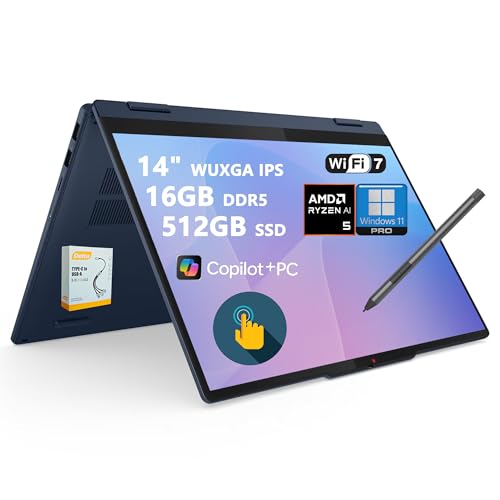
Lenovo IdeaPad Flex 5 with Ryzen AI 5 340 — Best Current-Generation AMD
Badge: Best current-generation AMD
The Lenovo IdeaPad Flex 5 2-in-1 Laptop in its current generation pairs a 14-inch WUXGA IPS touch display with an AMD Ryzen AI 5 340 processor — rated up to 50 TOPS of AI capability in its title — plus 16GB of DDR5 memory and a 512GB SSD, positioned by Lenovo for creator, designer and business use. WUXGA resolution, at 1920 by 1200, gives a little more vertical room than the FHD panels around it, which writers and spreadsheet users feel in every session. The 16GB of DDR5 places it in the comfortable memory tier its Envy rival does not reach, and the Ryzen AI silicon brings modern efficiency and on-device AI features to a mainstream convertible price band.
Keep this machine distinct from the next pick, which shares its name. This is the current Flex 5; the 2023 model below it is its predecessor, with an older processor and a different display specification, sold at a different rung. Lenovo’s habit of carrying model names across generations is exactly why this guide labels years so insistently. For a buyer choosing between them, the decision is freshness and headroom against value, and both answers can be right — but they must be chosen, not stumbled into.
Strengths
- Current Ryzen AI 5 340 with modern efficiency.
- 16GB of DDR5 memory in the comfortable tier.
- WUXGA IPS touch adds useful vertical screen room.
Trade-offs
- IPS panel rather than the OLED of the Yoga and Ultra Flip.
- Verify pen inclusion on the exact listing.
- Shares its name with the 2023 model; check the year.
Spec box: Display 14-inch WUXGA IPS touch · Processor AMD Ryzen AI 5 340, up to 50 TOPS · Memory 16GB DDR5 · Storage 512GB SSD · Class creator, designer and business convertible.
Best for: Buyers wanting current AMD silicon and 16GB in a folding design. Not suited for: OLED seekers or buyers who will not check the model year.

Lenovo IdeaPad Flex 5 2023 — Best Previous-Generation Value
Badge: Best previous-generation value
The Lenovo IdeaPad Flex 5-2023 is this guide’s lesson in buying a generation behind with your eyes open. Its specification remains genuinely respectable: a 14-inch FHD touchscreen, an AMD Ryzen 5 5500U, 16GB of memory and 512GB of storage under Windows 11 Home, in the Abyss Blue finish named in its title. The 16GB figure deserves emphasis — this older model carries the comfortable memory tier that some newer mainstream convertibles have trimmed back to 8GB, which makes it a quietly rational purchase for a buyer whose workload is documents, browsing, media and light creative tasks that have not changed much in two years.
What the buyer accepts is equally clear: an older processor generation with less efficiency and no current AI features, a shorter remaining support horizon than a 2026 model, and a design whose refinements have since been superseded. None of that prevents years of useful service for the right workload. What would be wrong is buying it believing it is the current Flex 5 — so confirm the year in the listing title, price it as the previous generation it is, and let it compete honestly against its own successor above.
Strengths
- 16GB of memory and 512GB of storage at a value rung.
- Ryzen 5 5500U still covers mainstream work comfortably.
- Full convertible touch experience from a proven line.
Trade-offs
- 2023 generation: older efficiency, no current AI features.
- Shorter support horizon than the current Flex 5.
- Must not be mistaken for its newer namesake.
Spec box: Display 14-inch FHD touch · Processor AMD Ryzen 5 5500U · Memory 16GB · Storage 512GB · Operating system Windows 11 Home · Finish Abyss Blue.
Best for: Value buyers whose workloads have not changed with the generations. Not suited for: Anyone wanting current silicon or the longest horizon.

HP OmniBook Ultra Flip — Best Premium
Badge: Best premium
The HP Omnibook Ultra Flip 2-in-1 Laptop 14-inch Touch OLED 3K is the flagship of this guide and reads like one: an Intel Ultra 7 processor, 32GB of memory and a 2TB SSD, Intel Arc Graphics, two Thunderbolt 4 ports, a backlit keyboard and a fingerprint reader, in a Copilot+ PC convertible. Every figure in that specification is the top of its category within this list — the most memory, the most storage, the highest-resolution display — and together they describe a machine for the professional whose convertible is a primary creative and business tool rather than a convenience. The 3K OLED touch panel is the centrepiece: at this size, that resolution and OLED’s contrast make image work, design review and media genuinely pleasurable rather than merely possible.
Premium machines must justify themselves beyond specification, and the Ultra Flip’s case is headroom as a lifestyle: 32GB absorbs the heaviest multitasking a convertible will ever meet, 2TB postpones storage anxiety for years, and Thunderbolt 4 docking turns the machine into a one-cable desk workstation between travels. The honest costs are the obvious ones — this is the top rung of the guide’s ladder, and its capabilities exceed what a mainstream user will ever request. Buy it because your work uses it, not because the numbers impress, and it will feel worth it daily.
Strengths
- 3K OLED touch display, the finest panel in this guide.
- 32GB of memory and 2TB of storage — total headroom.
- Dual Thunderbolt 4 for serious docking and peripherals.
Trade-offs
- Top rung of the ladder; exceeds mainstream needs.
- Verify pen inclusion and terms on the exact listing.
- Premium capability demands premium care in handling.
Spec box: Display 14-inch touch OLED 3K · Processor Intel Core Ultra 7 · Memory 32GB · Storage 2TB · Graphics Intel Arc · Ports 2x Thunderbolt 4 · Class Copilot+ PC.
Best for: Professionals wanting a flagship convertible without compromise. Not suited for: Mainstream budgets or light workloads.
HP Envy x360 14 with Ryzen 5 8640HS — Best Renewed-Channel Alternative
Badge: Best renewed-channel alternative
The HP Envy x360 14 in its Ryzen 5 8640HS configuration is a machine we would happily link in a different listing climate: the 8640HS is a strong processor, and the Envy convertible formula around it is the same one praised in the Intel model above. It appears without a link because its current listing is a renewed one, and this guide’s rule — applied identically across the batch — is that renewed purchases are made knowingly or not at all. The entry exists so the configuration is not invisible: a reader who finds it, reads its condition line, weighs its seller warranty and prices it as used equipment is making a legitimate decision with a genuinely capable machine.
Context completes the picture. Samsung’s Galaxy Book Pro 360, another name readers bring to this category, is a 16-inch machine and therefore belongs to a different size guide entirely; its absence here is geometry, not judgement. Within 14 inches and within clean listings, the five linked convertibles above are the class as it can honestly be offered this round.
Strengths
- Strong Ryzen 5 8640HS performance in a proven Envy design.
- Full convertible touch experience.
- Can represent value when bought knowingly as renewed.
Trade-offs
- Current listing is renewed; condition discipline required.
- Seller-backed warranty rather than manufacturer-standard.
- No verified clean link available in this round.
Spec box: Display 14-inch class touch · Processor AMD Ryzen 5 8640HS · Line HP Envy x360 · Status discussed without a link; see listing for configuration and condition.
Best for: Confident renewed-channel shoppers who read condition lines. Not suited for: Anyone wanting a standard new-machine purchase.
Handwriting, Drawing and Markup: Three Different Pen Jobs
Pen buyers should name their job precisely, because the three common ones ask different things of the machine. Handwriting — lecture notes, meeting notes, journaling — asks for a responsive digitizer, a pen that feels like a pen rather than a stylus-shaped compromise, and software that keeps up with natural writing speed; every pick here with its proper pen serves it, and the Yoga’s included pen makes it the zero-friction start. Markup — annotating PDFs, commenting on documents, signing forms — is the professional’s pen job, less demanding of artistry and more demanding of convenience: the pen must be present, charged and findable at the moment a document arrives, which is an argument for included pens and for machines that store them. Drawing asks the most: pressure response, tilt behaviour and a display whose colour can be trusted, which is why the drawing-focused reader should weigh the Yoga’s DCI-P3 OLED seriously and then read the dedicated drawing guide in this batch, where the class built for artists is compared on its own terms.
Notice that none of these jobs is served by touch alone. Fingers navigate; pens write. A buyer whose convertible plan is entirely finger-based — scrolling, tapping, presenting — can honestly choose any pick here on its other merits and ignore the pen sections, and several of the mainstream configurations make most sense read exactly that way.
Weight, Balance and the Lap Test
Convertibles carry a hidden specification that matters daily: where the weight sits. A folding machine’s screen and base are closer in mass than a clamshell’s, which is why convertibles balance differently on a lap and feel different in tablet mode. Fourteen inches keeps that balance manageable — the machine rests stably across a lap or a desk in every mode in this guide — but buyers graduating from featherweight clamshells should expect a denser object than the dimensions suggest. In tablet mode, plan on two hands, a knee, or a surface; in tent mode, the design’s own geometry does the work and the weight vanishes from attention. The practical test at purchase is simple: if your tablet scenarios are mostly seated, every pick passes; if they involve standing and walking — inspections, ward rounds, site surveys — a detachable or a dedicated tablet deserves a look before the convertible’s other virtues seduce you.
Comparison Table
| Model | Display | Processor | Memory | Storage | Pen note |
|---|---|---|---|---|---|
| Lenovo Yoga 7i | 14″ WUXGA OLED touch | Ultra 5 226V | 16GB | 1TB SSD | Yoga Pen in title |
| HP Envy x360 14 | 14″ FHD IPS touch | Core 5 120U | 8GB | 512GB SSD | Verify inclusion |
| IdeaPad Flex 5 (current) | 14″ WUXGA IPS touch | Ryzen AI 5 340 | 16GB DDR5 | 512GB SSD | Verify inclusion |
| IdeaPad Flex 5 2023 | 14″ FHD touch | Ryzen 5 5500U | 16GB | 512GB | Verify inclusion |
| HP OmniBook Ultra Flip | 14″ OLED 3K touch | Ultra 7 | 32GB | 2TB | Verify inclusion |
| Envy x360 Ryzen (prose) | 14″ touch class | Ryzen 5 8640HS | See listing | See listing | Renewed listing |
Generations Within One Name: Reading Convertible Model Years
The Flex 5 pair in this guide illustrates the convertible market’s most expensive reading habit: assuming a model name is a machine. Manufacturers carry successful names across years, changing processors, displays, memory and ports beneath an unchanged badge, and marketplaces list the generations side by side in the same search results. The defence is a three-part check that takes a minute. Find the year or generation in the listing title — this guide prints it in the pick names themselves where the maker does. Confirm the processor against that year, because the chip is the generation’s fingerprint: a Ryzen AI 5 340 and a Ryzen 5 5500U cannot be the same vintage. Then price the machine against its generation, not its name; a previous-generation convertible at a previous-generation price can be the smartest buy in this entire article, while the same machine at a current-generation price is the category’s quietest rip-off. The 2023 Flex 5 in this guide is offered in exactly that spirit — labelled, priced expectations set, and recommended for the workloads where its specification remains fully alive.
Is a Pen Included, and Why Does It Matter So Much?
A stylus transforms a convertible from a laptop with a folding screen into a writing and drawing instrument, and the transformation only happens if the pen is present, charged and compatible. Included pens — the Yoga 7i’s Yoga Pen is this guide’s clear example — are matched to the machine’s digitizer, often store or charge on the device, and work from the first minute. Separately purchased pens require the buyer to identify the correct pen technology for the model, because stylus standards are not interchangeable, and a pen bought on a guess is a pen returned. Our rule for readers is simple: decide before purchase whether handwriting, drawing or annotation is central to your use; if it is, favour the pick whose pen is named in its title, or confirm the exact pen situation on the listing of any other pick and budget accordingly. Do not let a convertible’s pen be an unboxing surprise in either direction.
Memory and Storage: The Convertible-Specific View
The specification advice from our other guides applies here with one convertible twist: folding machines are opened in more places and used for more kinds of work than clamshells, which quietly increases the workload they meet. The student who bought for essays discovers tablet reading; the professional who bought for documents discovers pen markup and photo review. That mission growth is why we steer primary-machine buyers toward the 16GB picks even when today’s workload looks 8GB-shaped — the Envy remains a fine purchase for a defined, stable brief, but convertible owners’ briefs have a habit of expanding into the hinge’s possibilities. Storage follows the same logic: media, annotated documents and offline reading accumulate on a machine that travels everywhere, and the Yoga’s terabyte and the Ultra Flip’s two terabytes are best understood as insurance against a library that grows in tablet mode as much as at the desk. Buy the convertible for the life it will actually live, which is a larger life than the clamshell it replaces.
OLED or IPS in a Convertible?
This guide contains both, and the choice is a genuine fork rather than a hierarchy. OLED — the Yoga and the Ultra Flip — delivers perfect blacks, vivid colour and, in the Yoga’s case, full DCI-P3 coverage that suits visual work; it rewards users who vary their content and manage brightness sensibly. IPS — the Flex 5 models and the Envy — is the durable all-rounder: bright, accurate enough for mainstream work, and free of any burn-in conversation entirely. Creators judging colour should take OLED seriously; office users living in documents and spreadsheets can take IPS happily and spend the difference elsewhere. Either way, touch is constant across the class, and the digitizer beneath the panel matters more to pen users than the panel technology above it.
What the Specifications Do Not Tell You About Convertibles
Three ownership qualities in this class never appear in a specification table, and each can matter more than a processor tier. The first is palm rejection: how reliably the digitizer ignores your hand while the pen writes, which separates a convertible you can rest your wrist on naturally from one that demands a hover. Reputable lines like those here engineer it well, but pen buyers with the option to test should write a full page before judging. The second is fan behaviour in tablet and tent postures, where vents designed for laptop mode sit against a desk or a lap; efficiency-tier processors, like those in the Yoga and the current Flex 5, sidestep most of this by generating little heat in the first place. The third is speaker placement across modes — a machine that sounds fine as a laptop can muffle itself folded — which media-heavy buyers should weigh in reviews of the specific model. None of these qualities overturns the ranking above; all of them refine it, and they are the reason convertible buying rewards a little more research than clamshell buying does.
A fourth unlisted quality is repairability of the everyday kind: batteries and fans in these mainstream lines are serviceable by competent technicians, and parts circulate because the lines sell in volume to institutions as well as individuals. A convertible is a machine you may keep through a battery replacement, and choosing a high-volume line quietly buys that future.
Convertible or Detachable: Which Folding Idea Fits You?
Convertibles fold; detachables separate. The machines in this guide keep their keyboards permanently attached, which gives them proper laptop ergonomics, balanced weight on a lap and nothing to leave behind in a meeting room. Detachables — covered in their own guide in this batch — offer a true tablet that sheds its keyboard entirely, at the cost of lap stability and often a separate purchase for that keyboard. Choose the convertible when laptop work dominates and tablet moments punctuate it; choose the detachable when tablet life dominates and typing visits. Most professionals, students and creators we aim this guide at live the first pattern, which is why the convertible class is the larger and more competitive one.
Battery Life in a Machine With Two Personalities
Convertible battery behaviour follows the work, not the mode. Writing and reading in any posture are gentle; video calls, bright OLED panels at full output and pen-heavy creative sessions draw harder; and the efficiency-minded processors in the Yoga and the current Flex 5 exist precisely to stretch the untethered day for the mixed use these machines invite. Owners can help materially: OLED panels reward dark themes and sensible brightness with real endurance gains, and tablet-mode reading at moderate brightness is among the lightest work a laptop does. We quote no laboratory hours because your day will not resemble the laboratory’s, but the structural advice is reliable — if untethered endurance is your first priority within this class, favour the efficiency-tier processors and treat the flagship Ultra Flip’s power as a plugged-in advantage that also travels acceptably, rather than the reverse.
Durability and the Care a Hinge Deserves
A convertible has one more moving part than a clamshell, and it deserves one more habit of care. Open and close by the centre of the lid rather than a corner, which twists the panel and stresses one hinge side. Keep the keyboard deck free of the pen, paper clips and crumbs before folding into tablet mode, because the screen meets the deck face-to-face in that position and anything between them becomes a pressure point. Transport the machine closed, in a sleeve, rather than carried by its folded screen. None of this is fragility — the Yoga, Envy, Flex and OmniBook lines are engineered for institutional and professional handling — but hinges reward symmetry and punish leverage, and the owners who fold ten thousand times without issue are the ones whose habits never tested the mechanism’s limits.
Common Mistakes
- Assuming a pen is included because the model supports one.
- Confusing the two Flex 5 generations and pricing one as the other.
- Expecting one-handed tablet use from a 14-inch machine.
- Buying 8GB for heavy multitasking because the hinge distracted from the specification.
- Clicking the renewed Envy listing without reading its condition.
- Choosing OLED or IPS by fashion rather than by the work the screen will show.
Software That Makes the Hinge Worth It
A convertible’s value is unlocked by a handful of application habits worth adopting in the first week. A proper note-taking application that syncs handwriting across devices turns the pen into a system rather than a sketchpad. A PDF reader with genuine annotation tools makes markup the fastest way to review documents rather than the slowest. Presentation software used in tent mode, with the pen as a pointer and annotator, changes small meetings for the better. And the humble discipline of rotating the machine for reading — long documents in portrait-feeling tablet posture — is the use owners report most and advertisements show least. Buyers who install and learn these tools in week one fold their machines daily for years; buyers who never do often discover, at resale time, that they owned a convertible in name only. The hardware in this guide is ready either way; the habit is the owner’s contribution.
Buying the Pen Separately: A Short Survival Guide
For readers who choose a pick whose pen is not in the box, the separate purchase deserves the same rigour as the laptop itself. Identify the pen technology from the manufacturer’s page for the exact model — active pens follow different standards, and compatibility lists, not connector shapes, decide what works. Buy the maker’s own pen for that model where one exists, because pressure behaviour, buttons and charging are all tuned as a system. If the pen charges by USB-C, any cable works; if it uses a replaceable battery, buy a spare with it and the pen will never die mid-lecture. Store the pen where the machine stores it, or in the same sleeve pocket every time, because a pen’s worst specification is its location when needed. And test the pen in the first days of ownership, writing and drawing in the applications you actually use, while returns are still painless. Follow that routine and a separately bought pen becomes indistinguishable from an included one by the second week — which is precisely the outcome the Yoga’s in-box pen delivers by default, and the reason it leads this guide.
Final Recommendation
Let the pen decide first and the processor second. If handwriting, drawing or annotation is central to your work, the Yoga 7i — pen named in its title, OLED beneath it, headroom around it — is the most complete convertible in this guide and our default recommendation. If your folding needs are mainstream and your budget is firm, the Envy x360 covers them with daily conveniences that owners genuinely feel. The two Flex 5 generations offer the same fork at two model years, and the Ultra Flip waits at the top for the professional who will use everything it has. Choose by the mode you will live in, verify the pen before you pay, and the hinge will earn its keep every day. One more encouragement for the reader hesitating between a convertible and a conventional laptop at the same rung: the convertible gives up remarkably little. Its keyboard, screen and performance are those of a proper 14-inch laptop, and the folding mechanism asks only a modest weight and a habit of care in return for an entire second category of use. When the downside is that small and the upside is a machine that reshapes itself around lectures, meetings, sofas and site visits, the burden of proof sits on the fixed screen, not on the hinge.
Who Should Skip the Convertible and Buy a Clamshell?
Honesty about the class includes naming its non-buyers. If your work is entirely keyboard-shaped — long-form writing, coding, data entry, finance — and your media life happens on a television and a phone, a convertible’s hinge buys you nothing you will use, and the same money in a clamshell buys memory, storage or display instead; the 14-inch guides elsewhere in this batch serve that reader directly. Similarly, if your tablet need is truly a tablet need — one-handed reading in bed, a child’s media device, a pilot’s kneeboard — a dedicated tablet does it better and the convertible will feel like a compromise in the hand. The convertible’s buyer is the person in between, whose week genuinely contains both shapes of work: the consultant who presents and annotates, the student who types essays and writes equations by hand, the designer who sketches over screenshots, the teacher who marks work at a desk and shows it standing. For that reader, this class is not a gimmick category but the correct tool, and the picks above are ordered for exactly their week.
Accessories That Complete a Convertible
Three accessories earn their place beside any pick here, and a fourth is a trap. A sleeve matters more for a convertible than for a clamshell, because the machine’s screen is its outer surface in tablet travel. A second charger, left where the machine works away from its home desk, prevents the battery anxiety that makes owners leave the machine behind. And the pen — where it is not included — should be the manufacturer’s matched model, bought with the laptop rather than someday. The trap is the universal stylus sold as compatible with everything: capacitive foam-tip pens write on any touchscreen and satisfy no handwriting standard, and buying one to save money against the proper pen is the class’s most common false economy. Budget the real pen or choose the pick that includes it; there is no third honest option.
FAQ
Do convertible laptops make good tablets? They make good desk, lap and sofa tablets for reading, annotating and drawing. They are heavier than dedicated tablets for one-handed use, so buy them for unification — one device for every mode — rather than as tablet replacements.
Which pen does each model use? The Yoga 7i’s title names its Yoga Pen. For the other picks, pen models and inclusion vary by listing, so check the exact listing for the pen situation and, if buying separately, confirm the pen technology the model requires.
Is the 2023 Flex 5 still worth buying? For mainstream workloads, yes — its 16GB of memory and 512GB of storage remain respectable, provided it is priced as a previous generation and its shorter support horizon fits your plans.
Will the hinge wear out? Quality hinges from these lines are engineered for years of daily folding. Treat the machine by its base rather than its lid corner when moving it, and the mechanism will outlast the battery around it.
Do convertibles cost more than equivalent clamshells? Generally a little, because the hinge, the touch layer and the digitizer are real hardware. The premium buys the modes described throughout this guide; if none of those modes will be used, a clamshell at the same rung returns the difference as memory, storage or screen instead.
What screen size is best for a convertible? Fourteen inches is the balance point this guide is built on: large enough for split-screen work, small enough for comfortable tablet postures. Smaller convertibles favour portability, larger ones favour the desk, and both are covered elsewhere in this batch.
Can I use a convertible for drawing? Yes, with the pen question settled. The Yoga’s OLED and included pen make it this guide’s drawing-first pick; the drawing-focused guide in this batch explores the class built entirely around that use.
Can I charge these convertibles over USB-C? The modern lines here are built around USB-C charging, which lets one charger serve the laptop and your other devices on a trip. Confirm the wattage your model expects and buy a spare charger that meets it, rather than borrowing a low-output phone adapter that charges slowly or not at all under load.
Is a convertible good for a child’s schooling? For older students, yes — handwriting support and textbook reading in tablet mode suit schoolwork well. For younger children, the education-focused smaller machines in this batch’s 11.6-inch guide are tougher and simpler, and a convertible becomes the right answer as the work grows up.
Why is one Envy x360 linked and the other not? The linked Envy is the Intel Core 5 configuration with a clean listing. The Ryzen 5 8640HS configuration’s current listing is renewed, so it is discussed without a link under the same rule applied across this batch.
The Student Case for a 14-Inch Convertible
Students are this class’s natural constituency, and it is worth spelling out why the fit is so exact. Lectures reward handwriting — equations, diagrams, annotations on slides — while assignments reward typing, and a convertible is the only single device that does both without a peripheral’s friction. The 14-inch screen splits between a paper and a source in seminars, tents on a library desk for group work, and folds flat for reading on a train. Parents buying for a degree should weight the pen-included Yoga and the 16GB configurations for a multi-year course, treat 8GB mainstream models as single-degree-cycle purchases, and add the sleeve without debating it. A convertible bought well in the first term is still the student’s main machine at graduation; bought on hinge novelty alone, it becomes an ordinary laptop with an unusual party trick by Christmas.
Longevity: Which of These Ages Best?
Rank the picks by time rather than by launch-day appeal and the order shuffles instructively. The Ultra Flip’s 32GB and 2TB give it the longest useful runway in the guide — it will feel current when machines bought with half its specification feel tired. The Yoga follows, its 16GB and terabyte aligned with a full ownership cycle and its OLED rewarding the whole period. The current Flex 5’s 16GB of DDR5 and modern silicon age nearly as well at a gentler rung. The Envy’s 8GB makes it the pick most likely to be replaced for specification rather than failure, and the 2023 Flex 5 is bought explicitly as a shorter-horizon machine whose value lies in costing less now. None of these horizons is a defect; each is a price-and-time equation stated in the open. The buyer who matches the horizon to their actual replacement habits — honest three-year replacers exist and should buy like it — will always out-shop the buyer who purchases a flagship’s runway and discards it on a mainstream schedule.
The Presenter’s and Teacher’s Convertible
Two professions fold these machines more than any others, and their pattern deserves recording for the buyers who share it. Presenters live in tent mode: the screen close and angled, the keyboard safely behind it, the pen doubling as a pointer and annotator while questions are answered standing. Teachers split their day between desk marking — laptop mode, pen in hand over a stack of digital work — and classroom display, where tent and tablet postures show content at reading distance to small groups. Both professions punish a convertible that is slow to wake, awkward to fold one-handed while carrying papers, or unreliable in its pen, and both reward the mainstream solidity of the Envy and Flex lines as much as the flagship polish of the Yoga and Ultra Flip. If your week matches theirs, buy for hinge confidence and pen reliability first and let the processor be whatever the right configuration includes; you will notice the hinge a hundred times for every time you notice the chip.
A Final Distinction: Convertible Owners Versus Convertible Buyers
There is a recognizable moment, a few weeks after purchase, when a convertible either becomes the centre of its owner’s working life or quietly reverts to being a laptop with an unusual hinge. The difference is never the hardware — every pick here is capable of the full repertoire — but the owner’s first habits: whether the pen was charged and learned, whether the note application was set up, whether the machine was folded in its first real meeting rather than its fiftieth. This guide has done what a guide can do: chosen machines whose hinges, pens and displays reward the habit, flagged the one pen that arrives in the box, and separated the generations so nobody pays new money for old silicon. The rest is a fortnight of deliberate folding. Buyers who give the class that fortnight almost never go back to a fixed screen; the laptop that turns into the shape of the task stops feeling like a feature and starts feeling like the obvious way laptops were always supposed to work.
And if the fortnight of folding reveals that your work was keyboard-shaped all along, nothing has been lost: you own a fine 14-inch laptop whose screen happens to travel further than most, ready for the one presentation, the one signed contract, the one annotated proof that eventually arrives in every professional life. Convertibles are bought for weeks, but they are vindicated in moments — and the moments, spread over years of ownership, add up to a machine that was ready for more of your life than a fixed screen could have been.
Choose well, fold often, and keep the pen charged: a 14-inch convertible rewards exactly the owners who use all of it, and this class — at this size, with these screens and these hinges — is the most convincing argument the laptop industry currently makes that one device can follow the whole shape of a working day without once asking you to switch to something else. That promise — one machine, every posture, no compromises that matter — is what the six entries above were chosen to keep, each at its own rung, each with its pen story told plainly and its generation labelled in the open where a buyer can see it. Read the reviews once more with your own week in mind — the lectures, the site visits, the marked-up proofs, the films in tent mode on evening trains — and the right name will separate itself from the list without any further help from us. Trust that recognition when it happens; in a class defined by how a machine feels across a whole day, the buyer’s own routine is the most accurate benchmark ever published. Then order the configuration you actually chose — pen, memory, storage and year all confirmed on the listing in front of you — and let the machine start proving the decision right, one folded morning, one annotated page and one tent-mode call at a time, across the years it was bought to serve. Few technology purchases repay their research this visibly, and fewer still keep finding new uses in year three that nobody imagined in week one — the convertible’s quiet habit, and the reason this guide exists. Fold it, write on it, present from it, and let a single well-chosen machine carry the whole performance. When the first lecture, inspection or client meeting bends the machine into a shape a clamshell cannot make, the research behind this page will feel very cheap indeed. That is the convertible bargain at its best, and every pick above was chosen to deliver it without a single surprise waiting in the box. Pens verified, generations labelled, renewals flagged: the homework is done, and what remains is the enjoyable part — choosing the machine that will fold itself around your days, from the first lecture of term to the last presentation of the project, and every ordinary working morning in between them all. Choose the pick whose pen story, screen and generation match that life, and the choice will still look obvious years from now, which is the only test that any laptop recommendation ultimately has to pass.
Related Guides
Compare the wider folding class in the best 2 and 1 laptops, step down in size with the best 13 inch laptops, and explore pen-first machines in the best laptops for drawing. Anyone whose camera cards matter as much as the hinge should read the best 13 inch laptops with hdmi and sd card reader before deciding. Touch on a fixed clamshell is ranked separately in the best 15.6 touch screen laptops.



[…] sd card slots next, step up in size with the best 15.6 inch laptops, or consider folding designs in the best 14 inch convertible laptops. The smaller end of the same ladder is compared in the best 11.6 inch laptops, where Chromebooks […]