What's inside
- Where to buy inside this keyword’s budget when the 7-inch Android tablet no longer exists
- Key Takeaways
- Quick Picks
- How did we build a 7-inch guide out of tablets that measure 8 to 9 inches?
- What does this budget actually buy in a small Android tablet in 2026?
- The neighbourhood in one table: sizes, systems and fences
- How do you spend this budget without wasting it? A buyer’s sequence
- What are the recurring errors in this corner of the market?
- What should ride in the same basket: the budget accessories that are not optional
- Setting up a budget tablet for a child, without the usual tears
- When should this budget stretch — and when is stretching a waste?
- What does a week of honest service look like for a tablet in this class?
- Buying one as a gift: how to land it well
- The three complaints every budget tablet owner files — and what they actually mean
- Giving a budget tablet a second life instead of a drawer
- A note on prices in a guide that refuses to print them
- How small is small enough? Placing the heirs against the phones that killed the size
- What if the tablet is for a small business counter rather than a home?
- Final Recommendation
- Frequently Asked Questions
- Related Guides
As an Amazon Associate I earn from qualifying purchases. This post may contain affiliate links at no extra cost to you.
gizmoverdict.com is reader-supported. When you buy through links on our site, we may earn an affiliate commission.
Where to buy inside this keyword’s budget when the 7-inch Android tablet no longer exists
Start with the fact that reorganises everything below: if you are hunting the best 7 inch android tablets under 200, you are hunting a size the industry has stopped making. No major brand currently sells a new 7-inch Android tablet — the last famous resident of the size, Amazon’s little Fire 7, has left the shelves without a clean successor listing, and the great 7-inch machines of the previous decade survive only as second-hand artefacts. What the budget in this keyword can still buy, genuinely and well, is the size’s living neighbourhood: tablets of 8 to 9 inches from Samsung, Lenovo and Amazon that carry the 7-inch idea — small, light, cheap to replace, easy to hand to a child or a grandparent — at prices that sit inside the same budget frame the keyword names. This guide maps that neighbourhood honestly, with every pick’s true size in its heading, and reserves its final two entries for the ghosts themselves, covered in prose so that nobody mistakes a memory for a listing.
Why did 7 inches die while its neighbours lived? Because the phone ate it. A modern phone’s screen, stretched tall and thin, covers much of the reading and video ground a 7-inch tablet once owned, and the tablet that remains worth carrying must be visibly larger than the phone in the other pocket — which pushed the small-tablet floor up to 8 inches and beyond. Panel factories followed the demand, the 7-inch glass lines went quiet, and the size became what 7.9 inches became in the neighbouring guide of this programme: a search phrase with a loyal following and no current product. The shopper’s consolation is real, though. The 8-to-8.7-inch machines below are barely larger in the bag, considerably better as screens, and — this is the budget keyword’s quiet victory — they live in the same price territory the 7-inch class vacated, because small Android tablets are where the industry’s price war never stopped.
The four linked picks divide by household role. Samsung’s Tab A9 at 8.7 inches is the polished all-rounder, the one to buy when the tablet must do a bit of everything for years. Lenovo’s Tab One, also 8.7, is the plain fixture for a named job at the gentlest cost. Amazon’s Fire HD 8 — the 2020 model, labelled with its year everywhere — is the floor-priced streamer for Amazon households. Lenovo’s Tab M9 at 9 inches is the largest and, in memory terms, the most modest: 3GB, stated wherever it appears, suited to single-purpose lives. Behind them stand the two prose-only ghosts: the Fire 7, discontinued and unlisted, and Google’s Nexus 7 of 2013, the machine that defined the size and now defines its nostalgia. Read the sizes, respect the labels, and this budget buys better in 2026 than it ever did when 7 inches was alive — better screens, better support, better survival rates, in exchange for a diagonal the hand forgets within a day and the bag never notices at all.
Key Takeaways
- There is no new 7-inch Android tablet from a major brand; the honest picks in this budget are 8 to 9 inches, each labelled with its true size.
- Samsung’s Tab A9 8.7 is the buy-once answer in the class: polish, update care and microSD expansion inside the keyword’s budget frame.
- Lenovo’s Tab One 8.7 is the fixture pick — a simple HD screen for a named job at the gentlest cost here.
- The Fire HD 8 linked is the 2020 model, labelled with its year; it runs Fire OS without Google Play by default, which matters more than its size.
- Lenovo’s Tab M9 is 9 inches with 3GB of RAM — the memory figure is stated in every position because it fences the jobs it can do.
- The Fire 7 and the Nexus 7 appear as prose-only history: neither has a clean current listing, and second-hand examples carry battery and support warnings.
Quick Picks
| Pick | Badge | Why it earns its place |
|---|---|---|
| Samsung Galaxy Tab A9 — actually 8.7 inches (international listing) | The polished budget all-rounder | The closest thing to a buy-once small Android in this budget: Samsung software, update care and a card slot. |
| Lenovo Tab One — actually 8.7 inches | The plain fixture | A simple HD slate for kitchen, bedside and counter jobs where the role is named and narrow. |
| Amazon Fire HD 8 — 8.0 inches, 2020 model | The floor-priced streamer | Amazon’s world in the hand at the class’s lowest entry cost, bought knowing its year and its fences. |
| Lenovo Tab M9 — actually 9.0 inches, 3GB | The biggest screen, the smallest memory | A 9-inch HD slate for single-app lives — photo frame, manual viewer, supervised first tablet. |
| Amazon Fire 7 — prose-only | The departed resident of 7 inches | Discontinued with no clean current listing; mapped here so shoppers know the size’s last native is gone. |
| Google Nexus 7 (2013) — prose-only | The legend of the size | The tablet that made 7 inches famous, now a collector’s object with a museum-piece support status. |
How did we build a 7-inch guide out of tablets that measure 8 to 9 inches?
By shopping the intent and labelling the inches. The intent inside this keyword is consistent across a decade of searchers: a small Android tablet, cheap enough to buy without a committee, light enough to live in a bag or a child’s hands, honest enough to stream, read and browse without theatre. Every linked pick serves that intent today, inside the keyword’s budget frame, and every one declares its true diagonal in its heading so the substitution is the reader’s informed choice rather than the guide’s sleight of hand. The judging weighted the budget virtues in their real order: software support first, because a cheap tablet abandoned by its maker is expensive at any price; storage and its expansion second, because small tablets fill like small cupboards; screen adequacy third; and pace last, because nothing in this class is fast and the differences are smaller than the similarities.
The two prose-only entries are the guide’s conscience. Shoppers will meet the Fire 7’s name in old reviews and the Nexus 7’s in legend, and some will go hunting them on second-hand shelves believing the size still lives there in usable form. It does not — not safely, not supported, not with batteries a stranger can vouch for — and the entries below explain exactly what a determined buyer is accepting. A guide that only listed the living picks and stayed silent about the ghosts would be leaving its readers to learn the ghosts’ terms from the ghosts’ sellers.
What does this budget actually buy in a small Android tablet in 2026?
More than nostalgia suggests, and less than the listings imply. It buys a genuinely good screen for video and reading — the class’s panels are bright, colour-honest HD or better, and at 8 to 9 inches they show a film the way a 7-inch screen never could. It buys all-day battery for mixed light use, because small screens sip. It buys the full Android app world on the Samsung and Lenovo picks, with the Fire as the labelled exception. It buys a camera adequate for video calls and document snaps, speakers adequate for a kitchen, and build quality that shrugs off household life in a way the 7-inch generation, bless it, often could not.
What it does not buy is speed, and the whole class should be forgiven in advance on terms this guide will state once and clearly: these are one-leading-app machines. The browser will reload its far tabs, the big games will decline or sulk, split-screen is a courtesy feature rather than a workflow. It does not buy longevity of the flagship kind either — the support runways here are measured in a few years, with Samsung’s the longest — nor storage luxury, which is why the microSD slot recurs in this guide like a chorus. Buy within those fences and the budget is honestly spent; the picks below were chosen because each one makes its fences visible rather than painting them to look like features.
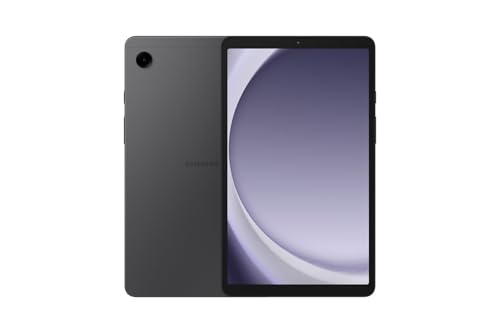
Samsung Galaxy Tab A9 — Actually 8.7 inches: the polished all-rounder (international listing)
If the budget in this keyword is going to be spent once, on a tablet expected to serve a household for years, the Tab A9 is where this guide spends it. At 8.7 inches it is the size the 7-inch shopper actually wants once they hold it — big enough for a film to feel like a film and a web page to stop pinching, small enough for a coat pocket and a child’s two hands — and Samsung wraps it in the most finished software and the longest update care in this class. The household repertoire runs whole here: streaming, reading, school platforms, video calls, the browser used sensibly, the card slot swallowing the library. Nothing about it is exciting in the flagship sense, and that is its virtue; it is the small Android tablet as reliable appliance.
The listing note follows this model through the programme and belongs in the open: the verified listing is an international one, and on a WiFi tablet the homework is warranty routing and region setup at first boot, not networks. Performance is the class’s honest modest — 4GB of memory, one leading app, a supporting cast that waits — and the screen resolution is the gentle grade of its tier. Buyers who need the tablet to be a laptop will be disappointed by everything in this guide equally; buyers who need it to be a tablet will find the A9 the hardest to fault, which in a budget class is the highest available praise.
- True size: 8.7 inches — the living heir of the 7-inch intent
- Memory: 4GB RAM, matched to one-leading-app use
- Capacity: 64GB, with the card slot carrying the household library
- Listing note: an international variant — warranty path and first-boot region want checking
- Software: One UI, with the longest update commitment in this guide
- Build: light, slim, pocketable, child-survivable in a case
Strengths
- Polish and patch support no rival here matches at the budget.
- Size splits book and video duties better than 7 inches ever did.
- microSD slot defuses the 64GB storage ceiling.
Trade-offs
- It is not 7 inches, and no current tablet is — stated, not hidden.
- Modest pace under multitasking, like everything in the class.
- International listing adds a pre-purchase paperwork minute.
Best for: the household’s one small Android — mixed duties, several years, minimal drama.
Not suited for: a buyer needing Google’s heaviest apps juggled simultaneously, or a true 7-inch body at any cost.

Lenovo Tab One — Actually 8.7 inches: the plain fixture for named jobs
The Tab One is the budget’s pragmatist. Same 8.7-inch diagonal as the Samsung, a plainer HD panel, simpler software, and a brief that never pretends to be an all-rounder’s: this is the tablet for a place. On the kitchen bracket it is recipes and timers; on the bedside table, the reading and radio machine; in the small shop, the menu and loyalty screen; in the workshop, the manual that lives on the bench. Its 4GB of memory is correctly sized for a life of one app, and its price — the gentlest among the full Android picks here — reflects a machine that declined to pay for ambitions it would never be asked to fulfil.
The fences are the expected ones and are stated without varnish: the HD screen softens fine print, so devoted readers of small type should take the A9; the hardware will not grow into new roles; the cameras and speakers are functionaries. What the Tab One offers in exchange is the budget class’s most underrated virtue — appropriateness. A household that buys it for its named job will still be using it, uncomplaining, when fancier purchases have been replaced, because nothing about its daily life ever promised more than it delivers. In a guide built on honest labelling, that consistency is a feature worth a pick of its own.
- Diagonal: 8.7 inches behind an HD-grade panel
- Memory: 4GB, proportioned to a one-app existence
- Capacity: 64GB, expandable by card
- Software: uncluttered Android that novices settle into quickly
- Form: small enough for brackets, stands and crowded counters
- Role in this list: the install-and-forget option
Strengths
- The gentlest full-Android cost in this guide.
- Simplicity suits elders, children and installations alike.
- microSD keeps a media library off the internal storage.
Trade-offs
- HD softness shows in long small-print sessions.
- No headroom for role growth or heavy apps.
- Unremarkable speakers and cameras.
Best for: a named, narrow job bought once and forgotten about — kitchen, bedside, bench, counter.
Not suited for: the family’s only tablet, where the job description mutates hourly.
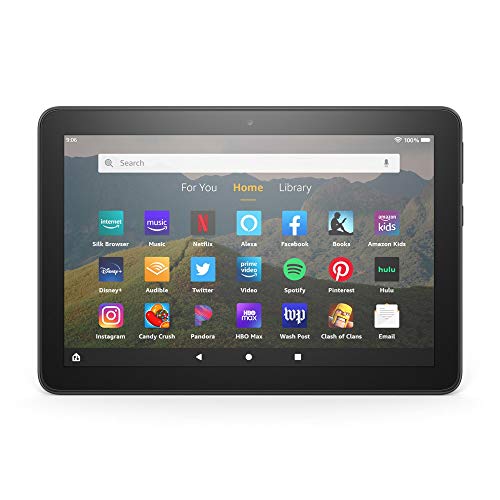
Amazon Fire HD 8 (2020) — 8.0 inches, 2020 model: the floor-priced streamer
The year stays in the name: this is Amazon’s Fire HD 8 from 2020, measuring a true 8.0 inches — the closest living listing to the 7-inch ghost — and priced at the floor of the whole category. Inside Amazon’s world it remains a pleasant object: the video services Amazon promotes on its home screen, the Kindle library a touch away, its voice assistant answering from the corner, and an interface kind to owners who find full Android bewildering. As a holiday tablet, a child’s supervised streamer, a guest-room spare or a kitchen screen, its proposition is the oldest one in budget technology: most of the experience for a fraction of the money, provided your life fits inside its fences.
The fences, stated as plainly as the year: Fire OS carries no Google Play Store by default, so the app world is Amazon’s storefront and the workarounds are projects, not purchases. The hardware is 2020 hardware — 32GB of storage that wants its memory card immediately, a processor that was modest when the decade opened — and its software support is a wasting asset that buyers should treat as nearly spent. None of this makes it a bad buy; it makes it a bounded one. The household that knows it lives in Amazon’s ecosystem gets a bargain. The household that discovers the fences on the first evening was failed by whoever sold it to them without the labels this pick wears here.
- Diagonal: 8.0 inches, the closest a living listing gets to the old size
- Year of manufacture: 2020 — the label travels with the pick
- Software world: Amazon’s Fire OS, its own storefront, Google’s store absent unless sideloaded
- Capacity: 32GB inside, with a card slot that should be filled on day one
- Duties it handles: streamed video, Kindle books, voice-assistant chores
- Temperament: the cheerful spare you lend without a speech
Strengths
- Lowest entry cost to a decent small screen in this guide.
- Kind, simple interface for less technical owners.
- Amazon streaming and Kindle are native and effortless.
Trade-offs
- Google’s app world is fenced out by default.
- Age shows in pace, storage and support runway.
- Not a school-platform or general Android machine.
Best for: Prime households buying a light-duty spare, holiday or child’s streaming tablet.
Not suited for: anyone whose essential app lives in Google’s store, or who needs years of updates.

Lenovo Tab M9 — Actually 9.0 inches, and 3GB: the big screen with the small memory
The M9 is this guide’s exercise in reading a specification sheet whole. Its screen is the largest here — 9.0 inches of HD panel, the most comfortable canvas in the list for video and large-type reading — and its memory is the smallest: 3GB, a figure this pick states in its heading because it governs everything the machine can be. With 3GB, the tablet lives one app at a time with unusual strictness: the browser surrenders tabs early, background apps close eagerly, and the owner’s happiness depends entirely on whether their use is serial. For the roles that are serial by nature — a photo frame with a clock, a permanently open manual, a supervised child’s single streaming app, a big-type reader for an elder — the M9’s screen-per-budget arithmetic is genuinely attractive.
Outside those roles, the honest sentence is that the step up to the 4GB picks above is the best-value move in the entire category, and this guide would rather lose the M9 a sale than gain it a return. Its 32GB of storage also demands the memory card from the first day, and its software support expectations should be set modestly. None of that makes it a villain; it makes it a specialist wearing a generalist’s size. Buy it for the fixed single job and it will serve quietly for years. Buy it as the family tablet and the memory figure in its heading will introduce itself nightly.
- Diagonal: 9.0 inches of HD glass — the broadest canvas in the guide
- Memory: 3GB, the ceiling on its ambitions, printed rather than whispered
- Capacity: 32GB before the card slot is asked to help
- Software: Lenovo’s restrained take on Android
- Happiest roles: one app on display, large-type pages, a young child’s supervised screen
- Temperament: a narrow tool wearing a family tablet’s dimensions
Strengths
- The most screen per budget unit in the guide.
- Big-type and video duties suit its panel and pace.
- A memory card turns its cramped storage into a workable media library.
Trade-offs
- 3GB enforces one-app living more strictly than any pick here.
- 32GB fills fast without a card fitted from day one.
- Not a multitasker, a school machine or a long-horizon buy.
Best for: a mounted or single-job screen — frame, manual, big-type reader — at the class’s gentlest large-screen cost.
Not suited for: general family duty, where its memory becomes the household’s nightly negotiation.
Amazon Fire 7 — Prose-only: the last native of the size, discontinued
The Fire 7 was, for years, the default answer to this entire keyword: a 7-inch tablet so cheap it was bought in pairs and lost without grief, the device that put a screen in every room and every child’s hands. It earns its prose-only entry here for a simple reason — there is no clean current listing for it in this guide’s verified pool, the model having been discontinued without a like-for-like successor — and a guide that linked a stale or third-party listing to fill the gap would be selling the reader a lottery ticket. What remains in the wild is old stock and second-hand units, and they should be priced and judged as such.
For the determined buyer, the terms are these. Even when new, the Fire 7 was the most fenced and modest machine in Amazon’s line: Fire OS without Google’s store, a low-resolution screen, minimal storage. Age has added the usual battery lottery and a finished support story. As a disposable spare bought for very little, with a returns window, it can still stream and read. As anything resembling a main tablet, the 8-inch successor above — itself a labelled 2020 veteran — is the saner purchase at every point of comparison. The size’s last native deserves its paragraph of respect; it does not deserve your household’s dependence.
- True size: 7.0 inches — the genuine article
- Status: discontinued; no clean current listing, prose-only here
- System: Fire OS, support concluded
- Storage: minimal by modern standards; card expansion on later revisions
- Role fit: disposable spare duties only, bought cheaply with returns cover
- Character: the departed default, remembered accurately
Strengths
- The only true 7-inch Amazon experience, while examples last.
- Second-hand prices can be trivially low.
- Simple interface remains kind to light users.
Trade-offs
- No clean listing and no support — the buyer is the warranty.
- Battery condition is a stranger’s promise.
- Fire OS fences plus vintage hardware narrow it to the lightest duties.
Best for: the nostalgic tinkerer who wants the size’s last native as a spare, bought cheaply and knowingly.
Not suited for: any household role that matters, or any price approaching the living picks above.
Google Nexus 7 (2013) — Prose-only: the legend that defined 7 inches
Every dead size has a golden-age machine, and 7 inches has the Nexus 7 of 2013: the tablet that proved a small Android slate could be sharp, fast and desirable, that reviewers used as a yardstick for half a decade, and that a generation of readers still measures the category against. It closes this guide without a link because its story is finished — a 2013 device in 2026 is a collector’s object, its software support a closed book, its battery a historical document, its app compatibility a shrinking island. Prose is the correct format for a legend: it can be honoured accurately without being sold.
What would a buyer today actually receive? A beautiful-for-its-era screen that modern budget panels match or beat, a processor outpaced by everything linked above, and an Android version old enough that many current apps simply decline the introduction. As a desk clock, an offline reader loaded by cable, or a shelf piece for the design-minded, it retains a real charm — the object itself was that good. As a tablet, in the functional sense this keyword means, its successors at 8 and 8.7 inches have inherited everything it stood for except the number. Honour it here, in prose, and then buy its heirs.
- True size: 7.0 inches — the size at its best
- Status: 2013 model; collector’s object, prose-only here
- System: legacy Android, support long concluded
- Role fit: offline reading, display piece, tinkering
- App reality: many current apps no longer support it
- Character: the yardstick of a vanished era
Strengths
- A design and screen that defined a category’s ambitions.
- Genuine charm as an offline reader or collector’s piece.
- Cheap to acquire for the curious.
Trade-offs
- Functionally retired: apps, support and battery have all moved on.
- No link, no warranty, no illusions available here.
- Every linked pick above outperforms it at its own brief.
Best for: collectors and romantics who want the artifact itself, for offline and decorative duties.
Not suited for: any buyer who needs a working modern tablet — that buyer has four linked heirs above.
The neighbourhood in one table: sizes, systems and fences
| Pick | True size | System | Memory | The fence to know |
|---|---|---|---|---|
| Galaxy Tab A9 (international) | 8.7-inch | Android | 4GB | International listing checks |
| Lenovo Tab One | 8.7-inch | Android | 4GB | HD screen, single-role pace |
| Fire HD 8 (2020) | 8.0-inch | Fire OS | Modest | No Google Play by default; 2020 vintage |
| Lenovo Tab M9 | 9.0-inch | Android | 3GB | One-app living, strictly |
| Fire 7 (prose-only) | 7.0-inch | Fire OS | Minimal | Discontinued; no clean listing |
| Nexus 7 2013 (prose-only) | 7.0-inch | Legacy Android | 2GB-era | Collector’s object, support closed |
The two 7.0-inch rows are the two without links, and the four living rows are all larger than the keyword’s number — which is not the guide evading the assignment but reporting it, in a market where the assignment’s size has retired and its budget has not. That is the whole story of this category in one glance — the size is history, the budget is alive, and the heirs are labelled.
How do you spend this budget without wasting it? A buyer’s sequence
First, name the role in a sentence — “the kitchen screen”, “Mia’s first tablet”, “the spare for the guest room” — because in this class the role is the specification. Second, check the fence that role cannot cross: if the sentence contains a Google app, the Fire rows leave the list; if it contains school platforms, the M9’s memory leaves it; if it contains the word “years”, the Samsung’s support story enters it. Third, price the whole purchase, not the tablet: the memory card for the 32 and 64GB picks, the case for anything a child will hold, the stand for anything a counter will host. A budget honoured in the basket and broken in the accessories is not honoured. Fourth, set the machine up deliberately in its first hour — card fitted, updates run, home screen arranged around the role, the store accounts signed in by someone who will remember the passwords — because budget tablets are disproportionately abandoned in a drawer after a chaotic first week, and the drawer is the only truly wasted spend in this entire guide.
Finally, keep the receipt and the perspective together. These are inexpensive machines doing honest work; a scuff is not a tragedy, a reload is not a defect, and a tablet that serves its named role for two or three years has repaid its budget several times over in evenings, journeys and quiet kitchens. The class rewards households that buy it the way it asks to be bought — by role, with labels read — and punishes only the pretence that it is something else.
What are the recurring errors in this corner of the market?
The first is hunting the ghost at retail: paying a premium for “new old stock” of a discontinued 7-inch model, when the money buys a supported 8.7-inch machine outright. The second is fence-blindness — the Fire bought for a Google classroom, the 3GB machine bought for a multitasking teenager — each a mismatch a heading in this guide exists to prevent. The third is storage amnesia, discovering in month three that 32GB and a streaming cache are enemies, when the card slot was the designed answer all along. The fourth is buying the tablet as a gift without the setup: an unconfigured budget tablet handed to an elder is a puzzle presented as a present. The fifth is subtler and sadder — replacing a perfectly serviceable small tablet because a listing convinced its owner that a newer budget model is a transformation, when the honest difference is a year and a fraction of an inch. This class improves by inches in every sense; buy when the role demands it, not when the adjectives do.
What should ride in the same basket: the budget accessories that are not optional
Budget arithmetic fails most often at the accessories, because the tablet’s price is the headline and the kit around it is the reality. The memory card comes first in this class: three of the four linked picks start at 64GB or below, and the card is the difference between a tablet that hosts a library and one that negotiates with its own cache every month. Buy it in the same order, fit it in the first hour, and set downloads to land on it while the setup screens are still warm. The case comes second, with the specification depending on the hands: a folio for the adult reader, a bumper with real corners for the child, a stand-case for the kitchen and counter machines. A cheap tablet in a decent case outlives an expensive tablet naked, in this class above all, because the class’s whole economics assume the device survives its environment.
Third, the charger that stays with the tablet. Budget machines migrate around houses and their cables migrate faster; a dedicated cable and plug, kept where the tablet sleeps, prevents the slow battery abuse of random chargers and the nightly archaeology of hunting one. Fourth — and this one is free — a label with a name and a phone number on the back, because small cheap tablets are the most losable objects in technology and the most findable when labelled. Add these to the basket and the purchase is complete; skip them and the budget reasserts itself later, in replacements, at worse prices and worse moments.
Setting up a budget tablet for a child, without the usual tears
The setup is the product, for a child’s tablet, and it deserves the same deliberateness as the purchase. Begin before the child sees the box: create the child’s account under the family’s supervision system — Google’s family tools on the Android picks, Amazon’s household profiles on the Fire — set the age fences, and disable in-app purchasing with a password the child will not guess by Friday. Then curate rather than install: a shelf of downloaded books, shows and games chosen by an adult beats an open store browsed by a hopeful seven-year-old, and on these modest machines a curated shelf is also the faster, calmer experience. Download the library on home WiFi so the tablet works in the car, the cottage and the grandparent’s house without a network negotiation.
Then set the physical and household rules while goodwill is fresh. The case goes on before the first journey. Charging happens in a named place, not a bedroom, if that is the family’s rule — decide it now, because rules retrofitted to a beloved object are negotiations, and rules present from the first hour are furniture. Agree what the tablet is for in the child’s hearing, in positive terms: books, shows, the drawing app, the call with grandparents. A budget tablet set up this way delivers the class’s best self — a calm, bounded, replaceable window — and the parent’s hour of setup buys a year of not thinking about it, which is the real luxury this budget can purchase.
When should this budget stretch — and when is stretching a waste?
Stretch when the role is secretly a main role. If the “spare” tablet will actually carry a student’s school day, a parent’s only computing, or a small business’s till, the honest purchase is a step above this class entirely — more memory, a longer support runway — and the kindest reading of this keyword’s budget is that it was a guess made before the role was named. Stretch, likewise, when the buyer is a keeper: a household that runs devices for five years buys support and storage now or buys a replacement sooner, and the arithmetic favours the former. The Samsung in this list is the stretch that stays inside the frame; beyond it, the programme’s other guides take over, and there is no shame in graduating.
Refuse to stretch when the role is genuinely fixed and light. A kitchen screen does not become a better kitchen screen with double the memory; a photo frame’s frame rate is a statistic without a constituency; a holiday tablet’s virtue is precisely that its loss would be a shrug. Money kept from those purchases is not under-spending — it is the budget working as designed, funding the case, the card and the next named role elsewhere in the house. The discipline this whole guide argues for is symmetrical: never buy below the role, never buy above it, and read the labels either way.
What does a week of honest service look like for a tablet in this class?
Monday it is the kitchen’s morning screen — headlines over coffee, the weather, a recipe pinned by nine — and it is flawless, because the morning asks serial things of it. Tuesday evening it is a child’s supervised hour, the downloaded shelf doing its calm work, the case earning its corners once on the stairs. Wednesday it rides in a bag to a waiting room and holds a novel and then a programme, and the smallness that the spec sheet apologised for becomes the entire point. Thursday it is borrowed for a video call and performs without comment, which for a call is the highest praise. Friday it meets its ceiling, as every week arranges once: a heavy web page, a second app, a tab too many — and the reload tax is paid with a sigh rather than a crisis, because the household has learned the machine’s manners and the machine has learned the household’s.
That rhythm — six days of quiet adequacy, one moment of visible ceiling — is the true product description of this class, and households that expect it report a satisfaction that puzzles reviewers who benchmark. The tablet is not competing with flagships in that week; it is competing with the drawer, the borrowed phone, the television’s schedule — and against those rivals it wins daily. Buy the week, not the benchmark, and the budget in this keyword buys exactly what its searchers always hoped it would.
Buying one as a gift: how to land it well
Gift purchases fail in this class for social rather than technical reasons: the tablet arrives unconfigured, the recipient is an elder or a child, and the first evening becomes a password recovery ceremony. Land it properly and the same object becomes the year’s most-used present. Configure it before wrapping — accounts created with the recipient or their parent, the home screen arranged around three or four honest uses, the library started, the case fitted, the card installed. Include the charger that lives with it and, for an elder, a single handwritten page: how to charge it, how to call the family, how to make the letters bigger. That page is worth more than any specification in this guide, and its absence is the difference between a gift and a homework assignment.
Choose the model by the recipient’s fences, not your own nostalgia. The Amazon household gets the Fire with its world pre-arranged; the Android family gets the A9 or the Tab One; nobody gets the second-hand 7-inch relic, however fond the giver’s memories, because a gift whose battery is a stranger’s promise gives the recipient a problem wearing a bow. Given well, a budget small tablet is the rare present that is used the same evening and every evening after — which is more than most gifts at any budget can claim.
The three complaints every budget tablet owner files — and what they actually mean
“It got slow” is the first, and it usually means it got full. Budget tablets accumulate caches, downloaded episodes nobody deleted and app updates that each demand working room; when storage crosses the point where the system can breathe, everything slows together and the owner blames age. The cure is the quarterly eviction described elsewhere in this programme — largest files reviewed, the card carrying the library, a fifth of the space kept empty as a matter of policy. “The battery isn’t what it was” is the second, and it is usually true in the mildest sense: small batteries cycled daily age in dog years, and the honest mitigations are charging habits — off the charger when full where practical, a decent cable, no overnight baking on a pillow — plus the acceptance that a budget machine in year three is a day device, not a weekend device. “This app won’t install” is the third, and it is the support story arriving in person: the app has moved past the tablet’s Android version, which is the signal to freeze the machine’s role around the apps it still runs rather than chase the frontier. A fixed-role tablet whose apps are settled can serve for years after that signal; a general-purpose one is telling its owner the replacement conversation has begun.
None of these complaints is a scandal, and a guide that treated them as such would mislead worse than any listing. They are the maintenance schedule of inexpensive technology, knowable in advance — which is precisely why they belong in a buying guide rather than a troubleshooting forum. The buyer who has read them here will meet each one, in its season, with a shrug and a procedure instead of a grievance.
Giving a budget tablet a second life instead of a drawer
When a pick from this list is eventually outgrown — the child graduates, the household upgrades — its story need not end in the drawer of retired screens every home accumulates. The fixed roles that opened this guide are also its afterlife: the kitchen display, the photo frame with the family archive on a card, the bedside radio and reading machine, the workshop manual viewer, the donated-and-reset tablet for a relative whose needs are a video call and the news. A factory reset between lives, a fresh account, a role named on day one of the second life — that is the whole ceremony, and it converts an electronic-waste statistic into several more years of service. The budget class, bought honestly and retired usefully, has the best lifetime economics in the entire tablet market; the drawer is the only outcome that wastes it, and the drawer is a decision, not a fate.
A note on prices in a guide that refuses to print them
Readers may wonder why a guide organised around a budget never quotes a figure for any pick, and the answer is the same honesty that governs its sizes and years. Prices in this class move with seasons, bundles and stock clearances faster than any article can responsibly track, and a number printed here would be a small lie by the time it was read — too high in a sale week, too low when stock thins. What this guide can promise is positional rather than numerical: the four linked picks were selected because they live inside the budget frame the keyword names, ordered from the floor-priced Fire through the fixture and the big-screen specialist to the polished Samsung at the frame’s upper reaches. Check the live figure at purchase, in the basket with the card and case included, and judge it against the frame rather than against a number a webpage once printed. That habit — budgets as frames, labels as facts, live prices checked live — will serve the reader in every category this programme covers, long after the 7-inch question itself is forgotten.
How small is small enough? Placing the heirs against the phones that killed the size
Stand any pick here beside a modern phone and the reason for the category’s survival becomes visible. The phone’s screen is tall and narrow — magnificent for feeds, cramped for pages — while even the 8-inch Fire offers a wider, squarer canvas on which a book page, a recipe, a video frame and a video call all sit more naturally. The tablet is not competing with the phone’s power or its camera; it is competing with its shape, and winning on shape alone, at a price that lets it be the second screen rather than the precious one. That is the durable logic the 7-inch pioneers discovered and the 8-inch heirs inherited: a household does not need two phones, but it perpetually needs a page. As long as pages exist — in kitchens, in waiting rooms, in children’s hands and elders’ laps — the small cheap tablet has a job, whatever diagonal the factories settle on next.
What if the tablet is for a small business counter rather than a home?
A meaningful share of this budget’s buyers are not households at all but cafés, salons, market stalls and clinics needing one screen that shows a menu, takes a booking, runs a loyalty app or plays the waiting-room loop. The class serves them well — with the same fences, read commercially. The Fire’s app fences matter most here, because business apps live in Google’s world more often than in Amazon’s; the Android picks are the counter-safe choices. The Tab One on a stand is the classic installation: one app, pinned, bright enough, cheap enough that a coffee spill is an incident rather than a claim. The A9 is the step up where the screen faces customers all day and its polish is part of the shop’s furniture. The M9’s big panel tempts for menus and its memory is irrelevant to a pinned single app — a legitimate commercial use of its specialist shape. What the class cannot do is grow into the business: the moment the counter needs a second app, a card reader integration and a reporting dashboard in parallel, the role has graduated beyond this budget, and the business guides elsewhere in the programme take over. Inside its fences, though, a small cheap tablet on a stand is one of the highest-return objects a small business can buy, and it is bought from exactly this shelf.
Final Recommendation
Spend the budget on the heirs and let the ghosts rest. The Tab A9 is the buy-once small Android of this class — the tablet for the household that wants the 7-inch idea with years of support under it. The Tab One serves the named-job buyer, the 2020 Fire HD 8 serves the Amazon household at the floor, and the M9 serves the single fixed screen with the biggest canvas and the strictest memory. The Fire 7 and the Nexus 7 remain where this guide placed them: in prose, in respect, and in the past. A small, cheap, honest tablet is still one of the best purchases in technology — it simply measures eight inches and change now, and a buyer who accepts the real figures gets a better machine than the 7-inch era ever managed to sell at this money. Buy the role, fit the card, wear the year labels proudly, and the budget will do what budgets are for: disappear into years of unremarkable, daily usefulness.
Frequently Asked Questions
What is the single best buy here if I cannot decide?
The Tab A9, with a memory card in the same basket. Indecision in this class usually means the role is general — a bit of everything, for a household, for years — and that is precisely the brief the Samsung was built and supported for. The specialists above it in the guide win their named contests; the A9 wins the undecided one, which is the most common contest of all.
Why are there no true 7-inch tablets in a 7-inch guide?
Because no major brand makes one anymore. Phones absorbed the size from below and small tablets settled at 8 inches and above, so the honest guide maps the living neighbourhood — 8 to 9 inches, labelled — and covers the true 7-inch machines as the discontinued history they are.
Is an 8.7-inch tablet too big if I wanted 7 inches?
Hold one before deciding. The difference in the bag is small, the difference on the screen is generous, and most 7-inch loyalists convert within a day. The hand that truly cannot manage it should look at the 8.0-inch Fire — with its Fire OS fences read first.
Can these tablets run school apps?
The Samsung and Lenovo Android picks run the mainstream school platforms, with the M9’s 3GB memory making it the weakest candidate. The Fire models, without Google’s store by default, are the wrong tool for most school ecosystems.
How long will a budget small tablet last?
Physically, years; in support terms, a few — Samsung’s runway is the longest here. In a fixed role with a static app, the useful life stretches furthest, which is why this guide keeps steering budget buyers toward named roles.
Does the budget include the case and memory card, or just the tablet?
Honest budgeting includes them, because in this class they are functional parts of the product: the card is the library’s home on the 32 and 64GB picks, and the case is the survival plan for anything a child or a counter will host. Price the basket whole at purchase — tablet, card, case, the charger that stays with it — and judge that total against the keyword’s frame. A tablet bought alone at the frame’s ceiling and completed later at accessory prices is the class’s most common false economy.
Should I buy a second-hand 7-inch tablet instead?
Only as a knowingly disposable spare, cheaply, with a returns window — and never as a main device. The battery and support stories of the Fire 7 and Nexus 7 generations are closed, and the living picks above outperform them at their own brief.
Related Guides
Keep browsing with our small Android tablet roundup, the best tablets for children on a budget and budget tablets we’d actually buy for our own families.
Related guides
- Best 3D Art Tablets
- Best Canon Point and Shoot Digital Cameras: PowerShot Picks From Pocket Compacts to Travel Zooms
- Best Balancing Stabilizers for Mirrorless Cameras: Payload, Balancing and Native Vertical Shooting
- Best Basic Phones Camera Buyers Can Trust: Flip Phones and Simple Handsets That Still Take a Photograph



[…] their true starting point reads the table above as a map rather than a riddle. Browse onward to small Android tablets that still fit a pocket, the best tablets for reading in bed and our favourite compact tablets for […]