What's inside
- Key Takeaways
- Quick Picks
- How Did We Sort the 120mm Class?
- Which 120mm Towers Deserve a Detailed Look?
- What About the Redux and the V5?
- Single Fan or Two — Does Push-Pull Matter at 120mm?
- How Do You Measure a Case for a 120mm Tower?
- Comparison Table
- What Goes Wrong Most Often With This Class?
- How Does a 120mm Tower Behave Across a Working Day?
- What Should You Check on the Motherboard Before Buying?
- What About Dust, Pets and Real Rooms?
- Choosing Among the Six, Build by Build
- What Happens When the Fan Eventually Wears Out?
- What About a 120mm Tower in a Smaller Case?
- How Should You Set the Curve on Day One?
- A Word on Buying the Exact Model
- Final Recommendation
- Frequently Asked Questions
- Related Guides
As an Amazon Associate I earn from qualifying purchases. This post may contain affiliate links at no extra cost to you.
gizmoverdict.com is reader-supported. When you buy through links on our site, we may earn an affiliate commission.
Where to buy: All six coolers below link to their Amazon listings, where the dimensions and socket lists live. For this category more than most, the listing’s height figure is the single most important line on the page — read it before the reviews, ours included.
The best 120mm cpu air coolers occupy the sensible centre of PC cooling, and the “120mm” in the name refers to the fan, not the tower. That one dimension quietly dictates everything else about these products. A 120mm fan is large enough to move serious air at civilised speeds, small enough to fit the mainstream mid-tower cases most people own, and standard enough that if it ever wears out, a replacement costs little and arrives in days. Around that fan, manufacturers build single towers with one fan, single towers with two, and occasionally something stranger — and the six picks below were chosen to show the class at its varied best rather than six copies of one idea.
What actually decides satisfaction in this class is rarely cooling power, because almost any competent 120mm tower cools a mainstream processor adequately. It is geometry. Tower height decides whether your side panel closes. Fin-stack width and fan placement decide whether your memory fits underneath or the fan must ride up and add height back. The distance to the first expansion slot decides whether a thick graphics card backplate argues with the cooler. Buyers who measure those three things are almost never disappointed; buyers who shop by heatpipe count alone occasionally are. This guide therefore talks about shape as much as strength.
Two prose-only names complete the picture. The Noctua NH-U12S redux is the premium-bred single tower this class is measured against, and the Vetroo V5 is the budget fixture that a generation of first-time builders met at the bottom of the price ladder. Neither came through this guide’s verified pool with a linkable listing, so both are discussed honestly, without links, after the main six — because a guide to 120mm air coolers that pretended they did not exist would be leaving out part of the story readers will meet elsewhere.
Key Takeaways
- “120mm” describes the fan. Judge these coolers by tower height and memory clearance, the two measurements that decide whether a build closes up happily.
- A single tower with one good fan covers most mainstream processors; push-pull second fans and ARGB are refinements, not requirements.
- The Assassin X 120-A Dark spins its fan to a 2400 RPM ceiling — headroom you will probably tune away with a fan curve in exchange for quiet.
- The Assassin Spirit 120 EVO Black names LGA1151 among its supported sockets outright, a useful clarity for owners of older boards.
- Every cooler here is a four-heatpipe design; at this size, fin quality, fan character and mounting matter more than pipe-count one-upmanship.
Quick Picks
| Pick | Badge | Why it earns its place |
|---|---|---|
| Thermalright Assassin X 120-A Dark | All-black, high-ceiling fan | A 151mm dark tower whose fan has speed in reserve for hot chips and hot rooms. |
| ARCTIC Freezer 36 | Push-pull pair | Two pressure-optimised fans bracketing one stack, built for cases that breathe reluctantly. |
| ID-COOLING SE-214-XT V2 Black | Memory-friendly | A clearance-first design that keeps its fins and fan out of the memory slots’ airspace. |
| Cooler Master Hyper 212 Black II | The familiar name | The class’s longest-running recommendation, refreshed with current sockets and a black finish. |
| Thermalright Assassin Spirit 120 EVO Black | ARGB, broad sockets | Addressable lighting and a socket list that still speaks to older Intel boards by name. |
| Thermaltake UX400 ARGB | Copper-pipe classic shape | Four 6mm copper heatpipes and a wide, gentle fan range from an established case-and-cooling brand. |
Notice what this table is not: it is not a ladder. The first cooler is not “better” than the sixth in any universal sense. Each leads on a different axis — fan ceiling, airflow arrangement, clearance, familiarity, lighting with legacy sockets, or brand ecosystem — and the detailed reviews exist to tell you which axis your build actually cares about. A first-time builder with tall RGB memory and a shallow case has a different correct answer from a sim-racer with a deep tower and a hot unlocked chip, and both answers are on this page.
How Did We Sort the 120mm Class?
We began by excluding anything that treats 120mm as a starting point for excess — dual towers wearing 120mm fans appear in our flagship guide, and compact 92mm coolers belong to small-form-factor coverage. What remained is the honest mainstream: single towers built around one 120mm fan position, with variations in fan count, lighting and mounting. Within that field we prized three things. First, stated dimensions a buyer can plan around, because a class defined by fit must publish its fit. Second, fan quality, since in a single-fan cooler the fan is the product — its bearing, its speed range and its behaviour at low PWM are the ownership experience. Third, socket breadth, because a 120mm tower is exactly the cooler people carry between builds.
We did not rank by manufacturer wattage claims, and you will see a couple of those figures mentioned in spec lists below strictly as the makers’ own statements. Brands test differently, publish differently and round differently; a guide that lined those numbers up as a league table would be manufacturing certainty. Likewise we have not repeated temperature figures from around the internet. A 120mm tower’s cooling in your case depends on your case’s intake, your ambient temperature and your fan curve, and any guide quoting you a precise degree is quoting you somebody else’s room.
What we can say with confidence is structural. Four heatpipes is the class standard because it matches the heat spread of mainstream processor lids well. A fin stack’s depth and density decide how much fan pressure it wants. And a mounting system that applies even pressure matters more than the last heatpipe — a lesson the detailed reviews return to, because it is the variable buyers control least and suffer from most.
Which 120mm Towers Deserve a Detailed Look?
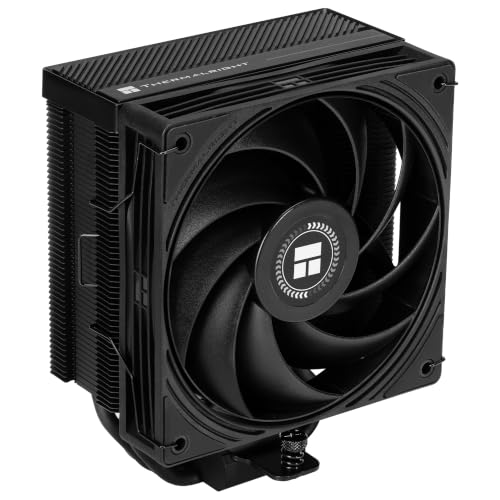
Thermalright Assassin X 120-A Dark — All-black, high-ceiling fan
Thermalright builds a lot of variations on the Assassin theme, and the 120-A Dark is the brooding one: a 151mm all-black single tower, four heatpipes, and a fan rated to 2400 RPM with an airflow figure the listing puts at up to 85.35 CFM. Those are brisk numbers for this class, and they tell you the design intent — this is the 120mm tower for a processor that runs hot for its size, or a case that sits in a warm room, or a builder who simply likes knowing the fan has somewhere left to go when a summer afternoon and a game update arrive together.
The mature way to own that headroom is to tune most of it away. Set a fan curve that keeps the Assassin X loafing through desktop work and gaming loads you actually play, and let the top few hundred RPM exist as insurance you rarely hear. Owners who leave a 2400 RPM fan on an aggressive motherboard default often conclude the cooler is loud, when in truth they are hearing a curve, not a cooler. Given ten minutes in the BIOS, the same hardware becomes a quiet tower with an unusually deep reserve — the best of both personalities from one purchase.
At 151mm, the Dark asks the standard question of its class and asks it honestly: check your case’s stated cooler clearance, remembering that a fan clipped slightly high to clear memory adds millimetres. Its blacked-out treatment is more than paint-deep styling for some buyers — in a windowed build themed around dark components, a silver tower shouts, and this one was clearly designed by people who understand that the absence of colour is itself a colour choice. For the builder who wants the class’s strongest fan ceiling without leaving the single-tower format, this is the natural first look.
- Heatsink: single tower, 151mm overall height
- Heatpipes: 4 running through the stack
- Fan: 120mm PWM, ceiling of 2400 RPM per the listing
- Airflow claim: up to 85.35 CFM, as stated by the maker
- Finish: black throughout, top cover included
Strengths
- Fan ceiling gives genuine reserve for hot chips and warm rooms.
- Coherent all-black design suits themed windowed builds.
- 151mm height stays within reach of many mainstream cases.
Trade-offs
- Untuned, that fan ceiling is audible; a curve session is mandatory.
- Tall memory can push the fan up and consume your clearance margin.
- Thermalright’s many similar models demand care to order this exact one.
Best for: warm-room builds and hotter mainstream chips that need fan reserve. Not suited for: shallow cases, or buyers who will never open the BIOS to shape a curve.

ARCTIC Freezer 36 — Push-pull pair
Ask what limits a single tower and the honest answer is often not the fins but the air arriving at them. The Freezer 36 attacks that limit directly, shipping with a pair of ARCTIC’s P-series 120mm fans arranged either side of its four-heatpipe stack, one pushing air in and one pulling it out the back. Pressure-optimised fan designs earn their name in exactly this situation: a dense fin stack is resistance, a restrictive case front is resistance, and fans shaped to keep their composure against resistance keep the whole system breathing when airflow-optimised fans would fade.
The supporting details are the ones ARCTIC regulars expect. Fluid dynamic bearings in both fans, a broad speed span from a 200 RPM crawl to 1800 RPM, and mounting hardware that treats the installer as an adult. Two fans also share the work, which has an acoustic consequence worth understanding: at a given airflow, two fans turning moderately usually sound easier than one fan straining, and the pair can idle down to speeds where the machine’s storage and case fans become the loudest remaining voices. In a restrictive case, that is not a marginal gain; it is the difference between a PC you tune once and one you keep apologising for.
Choose it knowing the small costs. There are two fan cables to route or split, and in a truly tiny case the rear fan’s appetite for space behind the stack deserves a glance at your motherboard’s rear I/O shroud and the case’s exhaust fan position. None of that is difficult; it is simply the planning tax this design levies in exchange for its airflow honesty. For the mainstream case with a mesh-challenged front panel — a description that fits a surprising share of PCs sold in the last decade — the Freezer 36 is the pick that solves the actual problem.
- Heatsink: single tower wearing a fan on each face
- Heatpipes: 4 feeding the fin stack
- Fans: two 120mm P-series units, fluid dynamic bearings
- Speed span: roughly 200 to 1800 RPM across the pair
- Temperament: built for resistance, not open-air benches
Strengths
- Push-pull layout sustains airflow through dense fins and dull cases.
- Shared workload lets both fans stay in their quiet register.
- Bearing choice suits a cooler meant to run for years unattended.
Trade-offs
- Extra fan adds cabling and a little rear clearance to plan.
- In a breezy modern case its special talent goes partly unused.
- Aesthetics are functional; there is no lighting to discuss.
Best for: restrictive cases, warm cupboards-under-desks, and quiet seekers with mainstream chips. Not suited for: micro cases where every millimetre behind the stack is already spoken for.

ID-COOLING SE-214-XT V2 Black — Memory-friendly
Every class has a product designed around the complaint its rivals generate, and in the 120mm class the complaint is memory. Tall sticks with sculpted heatspreaders and light bars collide with overhanging fins and front fans so reliably that “RAM clearance” became a specification in its own right. The SE-214-XT V2’s listing leads with full memory clearance, and the design backs the words: the tower is kept narrow over the slots so the memory you bought remains the memory you can install, in all four slots, without sliding a fan upward and renegotiating your case clearance.
That clarity runs through the rest of the listing. Socket support is printed expansively — Intel’s current generations and the 115X family, AMD’s AM5 and AM4 — which makes this a cooler that can start life in one machine and retire in another, a real consideration at this price tier where hand-me-down builds are the norm. Four heatpipes and a single 120mm fan keep the formula orthodox, and the maker’s wattage statement sits on the box as brand claims do, noted here without being drafted into a ranking it cannot honestly serve.
In the hand and in the case, it is the modern budget tower done tidily: black finish, straightforward bracket, no ceremony. What you are buying is the absence of the two classic budget-cooler anxieties — will it clear my RAM, and will the bracket fit my next board. Builders assembling a family PC, a student machine or a spare-parts special will recognise that absence as the feature. The ceiling is the class ceiling: this is a mainstream cooler’s headroom, honestly delivered, and an aggressively overclocked flagship chip belongs under a bigger tower from our flagship guide instead.
- Heatsink: single tower shaped to clear the memory slots
- Heatpipes: 4 in the standard layout for this size
- Fan: one 120mm PWM unit in black
- Socket text: current Intel plus 115X, and AM5/AM4, per the listing
- Intent: clearance and compatibility before decoration
Strengths
- Full memory clearance removes the class’s most common fitting fight.
- Broad printed socket support suits a cooler that will change builds.
- Tidy black presentation at a budget-builder’s price position.
Trade-offs
- Headroom is mainstream; hot unlocked chips will find its limit.
- A single fan leaves no airflow redundancy if it ever falters.
- Presentation is plain beside the ARGB picks in this same guide.
Best for: builds with tall memory, mixed-generation parts bins, and first-time installers. Not suited for: maximum-load flagship processors or lighting-led showcase briefs.

Cooler Master Hyper 212 Black II — The familiar name
There is a reason the Hyper 212 name has survived longer than most of the processors it has cooled: the formula — a four-heatpipe tower, a single 120mm fan, a price that respects the rest of the build — matched what most PCs actually need, and kept matching it as sockets changed around it. This Black II generation dresses the tower in black, refreshes the mounting for the current era and lists support running to AMD AM5/AM4 and Intel LGA1851/1700, which means the recommendation your older sibling gave you a decade ago can still be acted on today, in a form that belongs in a modern parts list.
Within this guide its role is the reference point. Measure the other five against it: the Assassin X Dark offers a faster fan, the Freezer 36 a second one, the SE-214-XT a clearance guarantee, the Spirit a light show with legacy sockets, the UX400 a different brand’s take on the same copper-pipe idea. The Hyper 212 offers the fewest surprises of any kind, which for a nervous first-time builder or a PC being assembled for someone else is a genuine virtue. Its install is the one described in the largest number of forum posts and videos on earth; if you get stuck, the internet has already been stuck there and written it up.
Age cuts both ways, and honesty requires the other edge. The design’s headroom is the class’s traditional headroom, sized for the mainstream chips it has always served; the newest generations of high-end processors, which run hotter than their ancestors, can lean on it in sustained work in a way that would have been unthinkable in its glory years. Buy it for the build it suits — and that is still most builds — rather than as a nostalgic reflex for a flagship chip. Judged on its own ground, nothing in this guide displaces it as the default answer, and defaults earn that status by disappointing almost nobody.
- Heatsink: the archetypal single tower, blacked out
- Heatpipes: 4 contacting the base in classic fashion
- Fan: a single 120mm PWM spinner
- Socket text: AM5 and AM4, LGA1851 and 1700, per the listing
- Support trail: the most documented install in the category
Strengths
- Unmatched depth of community knowledge for installation help.
- Balanced manners for the mainstream chips most people own.
- Current-socket listing keeps a classic genuinely recommendable.
Trade-offs
- Traditional headroom meets unusually hot modern flagships poorly.
- No lighting, no second fan, no novelty of any description.
- Its fame attracts imitators; order the exact Black II model.
Best for: first builds, gifts, office fleets and mainstream gaming PCs. Not suited for: sustained all-core work on top-tier processors in warm rooms.

Thermalright Assassin Spirit 120 EVO Black — ARGB, broad sockets
The Assassin Spirit 120 EVO Black is Thermalright’s answer to a buyer the rest of this guide underserves: someone who wants their modest tower to glow politely and to fit the board they already own. Its 120mm fan carries addressable RGB lighting, its heatsink uses the company’s fourth-generation AGHP heatpipe technology across four pipes, and its socket list is unusually nostalgic for a current product — Intel LGA1700 alongside 1150, 1151 and 1200, with AMD AM4 in the text as well. In plain terms, Thermalright kept the older Intel mounts in the box while rivals were quietly dropping them.
That socket breadth changes who this cooler is for. An owner refreshing a few-years-old build gets a lighting upgrade and a cooling upgrade in one box, with the bracket question answered in the listing rather than in a support email. A new builder gets the same product with a future of hand-me-down duty ahead of it. Either way the lighting deserves its honest framing: ARGB needs a compatible header or controller on the motherboard, it does nothing for temperatures, and in a windowless case it is money spent on an audience of none. In a glass-sided build, though, a lit fan on the tower is the cheapest large splash of colour in the whole system, and this is the pick that provides it without leaving the sensible end of the class.
Cooling character is the family’s familiar one: a competently dense stack, a quiet-leaning PWM fan, and headroom aimed at the mainstream. The EVO’s black top treatment keeps the unlit parts of the design coherent, so the cooler looks deliberate even with the lighting off — a small mercy for the day the motherboard’s RGB software inevitably argues with something. As with its Assassin X cousin, confirm you are ordering the Spirit EVO specifically; Thermalright’s catalogue is a family reunion of similar names, and the socket list you are counting on belongs to this one.
- Heatsink: single tower with black top cover
- Heatpipes: 4, AGHP fourth-generation design
- Fan: 120mm PWM with addressable RGB
- Socket text: LGA1700/1200/1151/1150 and AM4 per the listing
- Lighting need: ARGB header or controller on the board
Strengths
- Older Intel sockets named outright — rare and welcome clarity.
- ARGB fan gives windowed builds colour at the sensible end.
- Blacked-out body keeps the design tidy with lights off.
Trade-offs
- Boards without an ARGB header need a controller for the show.
- Catalogue similarity makes precise ordering essential.
- Mainstream headroom, as with every pick in this class.
Best for: refreshing a glass-sided build on a recent-but-not-new board. Not suited for: closed cases, or buyers chasing the class’s maximum fan speed.

Thermaltake UX400 ARGB — Copper-pipe classic shape
Thermaltake has been selling cases and cooling to mainstream builders for long enough that its UX line reads like a checklist of what that market asks for, and the UX400 delivers it plainly: four copper heatpipes of 6mm diameter, a single tower, a 120mm PWM fan spanning a gentle 700 to 1800 RPM, ARGB lighting, and compatibility across Intel and AMD sockets. The brand’s wattage statement rides on the box as such statements do; the substance here is the shape, the fan range and the name behind the warranty.
The fan’s floor deserves a word, because 700 RPM as a starting point tells a tuning story. A fan that begins its range that low is meant to spend desktop hours turning almost inaudibly, and Thermaltake’s mainstream audience — family PCs, school machines, sensible gaming builds — values that starting point more than a dramatic ceiling. Paired with a motherboard curve that respects the floor, the UX400 disappears during the workday and speaks up only in games, which is the correct personality for its market. The copper heatpipes, meanwhile, are the traditional material choice at the base, conducting heat from the spreader into the stack with the reliability that made the whole category.
Why choose it over the near-identical formulas elsewhere in this guide? Ecosystem and availability are legitimate answers: a builder whose case, fans and lighting already speak Thermaltake keeps one software dialect and one support door to knock on, and the UX line’s wide distribution means the exact model is easy to find and easy to replace like-for-like years later. Those are unglamorous virtues, and mainstream building runs on unglamorous virtues. The UX400 is the pick for the builder who values a known badge and a gentle fan more than a spec-sheet duel.
- Heatsink: single tower in the classic UX silhouette
- Heatpipes: 4 copper pipes of 6mm diameter
- Fan: 120mm PWM, spanning roughly 700–1800 RPM
- Lighting: ARGB fan for synchronised builds
- Compatibility: Intel and AMD sockets per the listing
Strengths
- Low fan floor suits quiet daytime and family-room machines.
- Established brand ecosystem simplifies lighting sync and support.
- Copper heatpipe base follows the category’s proven recipe.
Trade-offs
- Fan ceiling is modest; very hot chips get less reserve.
- Formula is deliberately conventional, with no standout trick.
- Brand wattage figure is a claim, not a comparison standard.
Best for: mainstream builders inside the Thermaltake ecosystem, and quiet daytime PCs. Not suited for: overclocked flagships or buyers wanting the fastest-spinning fan in class.
What About the Redux and the V5?
Two familiar names sit outside this guide’s linked six, and both deserve their paragraph. The Noctua NH-U12S redux is the single tower from cooling’s most fastidious brand, distilled: the same design discipline as its premium sibling, a plainer fan and finish, and mounting hardware that treats installation as a craft. It is the pick for buyers who rank a decade of quiet service above every other line in a specification, and its absence from our linked list reflects this round’s pool rather than its merit — find it through your own searching and apply the same dimension checks as any pick here.
The Vetroo V5 sits at the opposite pole: the budget fixture with a lit fan that introduced a generation of first-time builders to tower cooling for the price of a takeaway. Its honest assessment is that it cools mainstream chips acceptably, looks cheerful doing it, and asks its owner to accept fit-and-finish that matches its station. For a build assembled from sales and spare parts, that trade can be exactly right. It is prose-only here because its listing did not come through the verified pool, and this guide links only what it has verified in this round.
Single Fan or Two — Does Push-Pull Matter at 120mm?
Less than marketing suggests, and more than sceptics admit. A second fan on a single tower does not double anything; it recovers some of the airflow the fin stack’s resistance steals, and it lets the pair share work at lower individual speeds. In an open, well-ventilated case with a mainstream chip, the practical difference between the Freezer 36’s arrangement and a good single-fan tower is small enough that other factors — clearance, lighting, price position — should decide. In a restrictive case, or with a chip that holds high loads for hours, the second fan’s contribution becomes audible in the best way: the system stays in a calmer register for longer.
There is a subtler point about fan quality hiding inside this question. In a single-fan cooler, the fan is the whole acoustic product, so its bearing and blade design deserve more scrutiny than the heatsink’s. A fluid-dynamic bearing fan from any of these makers will out-quiet and out-last a bargain sleeve-bearing fan even if the bargain fan spins faster on paper. When you compare listings, compare bearings and speed ranges before you compare the fourth decimal of anyone’s airflow claim — the numbers you will live with are the ones measured in years and in decibels at your chair, neither of which appears in a specification table.
How Do You Measure a Case for a 120mm Tower?
Open the case and take three measurements with the motherboard installed. First, from the processor’s surface — approximate it from the socket — straight out to where the side panel sits: that is your height budget, and the tallest pick here wants 151mm of it, with a couple of millimetres of grace rather than a panel pressed against heatpipe caps. Second, from the socket’s centre to the nearest memory slot, compared against the cooler’s published width over the slots; if the numbers are close, a clearance-first design like the SE-214-XT removes the gamble. Third, look downward: the gap between the socket and the first expansion slot, where a thick graphics card backplate can meet a wide fin stack.
Then read your shortlist’s listings for exactly those three figures and cross out any cooler that fails one. This sounds basic, and it is, yet the majority of cooler returns and forum complaints trace back to one of these three measurements never being taken. Manufacturers publish dimensions precisely so that a buyer with a ruler can be certain; the five minutes is the cheapest insurance in the entire build, and it converts the purchase from a hope into a plan.
Comparison Table
| Cooler | Fans | Defining trait | Watch out for |
|---|---|---|---|
| Thermalright Assassin X 120-A Dark | One, fast | 2400 RPM ceiling in a 151mm black tower | Needs a tuned curve to stay civilised |
| ARCTIC Freezer 36 | Two, push-pull | Pressure-optimised pair for dull cases | Extra cable and rear space to plan |
| ID-COOLING SE-214-XT V2 Black | One | Full memory clearance, broad socket text | Mainstream headroom only |
| Cooler Master Hyper 212 Black II | One | The documented default of the class | Hot modern flagships can lean on it |
| Thermalright Assassin Spirit 120 EVO Black | One, lit | ARGB with older Intel sockets named | Lighting needs a header or controller |
| Thermaltake UX400 ARGB | One, lit | Gentle 700 RPM floor, copper pipes | Modest ceiling for very hot chips |
What Goes Wrong Most Often With This Class?
The recurring failure is the fan clipped in the wrong place. Many towers let the fan sit at different heights on the stack, and a fan mounted a few millimetres high to clear memory silently converts a cooler that fit into a cooler that almost fits. Decide the fan position before the side panel goes on, and if memory forces the fan upward, re-measure the total height rather than assuming. The second failure is orientation: a tower’s fan should blow toward the case’s rear exhaust, and every year builders install one blowing at the front or the roof and then wonder why temperatures sulk. Check the fan’s airflow arrow against the case’s exhaust before the paste stage, not after.
Paste and pressure mistakes follow. Too much paste is mostly harmless but messy; uneven screw pressure is neither, tilting the base and spoiling contact on one side of the heat spreader. Tighten in a cross pattern, a little at a time. And give the finished build its BIOS ten minutes: select PWM control, set a curve with a calm floor, and the class’s modest fans will reward you by vanishing from your attention, which was the point of buying any of them.
How Does a 120mm Tower Behave Across a Working Day?
Follow a mainstream PC through its day and you follow its cooler through four different jobs. The morning’s first job is the boot storm: operating system, launchers, cloud drives and browsers all demanding the processor at once for two minutes, a spike that a badly tuned fan curve answers with a roar and a well-tuned one ignores completely, because two minutes of burst does not need airflow so much as patience. The second job is the long middle — documents, calls, tabs, the occasional compile or export — where the cooler should be inaudible and mostly is, provided its fan has the low floor the picks in this guide were chosen for.
The third job is the evening’s: a game, which loads the processor unevenly and the graphics card heavily, warming the case air the cooler must drink. This is where the class’s honest differences appear — the push-pull Freezer pulling through the warm fog steadily, the Assassin X Dark spending some of its fan ceiling, the compact towers accepting a warmer processor as the price of the room’s entertainment. None of them fails the evening; they simply narrate it at different volumes, and your tolerance for narration is a personal specification no review can set for you.
The fourth job is the one nobody schedules: the background marathon, when a game downloads and decompresses overnight, a photo library indexes itself, or an update rebuilds the world at 3 a.m. A cooler with a sane curve treats the marathon as a middle gear, audible only to someone awake to hear it. A cooler left on a racing default treats it as an alarm. When owners say a 120mm tower “changed the machine”, they usually mean jobs one and four — the spikes and the marathons — because those are the moments the old cooler used to announce and the new one declines to.
What Should You Check on the Motherboard Before Buying?
Three features of your board decide how happy any of these coolers will be. The first is the fan header situation: a modern board offers a CPU_FAN header with PWM control and enough current for a splitter; older or budget boards occasionally offer fewer headers or voltage-only control, which changes how gracefully a fan’s low end behaves. The picks here are PWM citizens, and a board that can speak PWM fluently — check its manual for the header’s mode settings — gets the silence they were designed to give.
The second is the geography around the socket, which you can inspect in a photograph of your exact board model before ordering anything. How tall are the VRM heatsinks on the top and left edges? Does an M.2 cover or a decorative shroud crowd the first memory slot? Where does the first expansion slot sit relative to the socket’s centre? Tower coolers are drawn as rectangles, but boards are landscapes, and the cooler’s rectangle must land on your landscape. The clearance-led designs in this guide exist because this geography varies; measuring yours converts their marketing into your answer.
The third is the board’s own fan software, in the BIOS or its desktop utility, because that software is the cooler’s permanent conductor. Look for the ability to set a custom curve, to choose the temperature source, and ideally to add a ramp delay. A board generous with these controls flatters every cooler in this guide; a board with only three preset profiles asks you to choose the least-wrong preset and accept its personality. None of this requires a new motherboard — it requires knowing the one you have, which is the cheapest research in the entire purchase.
What About Dust, Pets and Real Rooms?
Review benches live in clean laboratories; your PC lives in a room with a carpet, a window that opens, and possibly a cat with strong opinions about warm objects. A tower cooler in a real room ingests that room, slowly, and its fin stack becomes a filter nobody designed. The practical consequences are gentle but real. A home with pets or smokers will felt a fin stack in a fraction of the time a clean office does, and the cooler’s fans will climb their curve a little higher each season to push air through the felt — a decline so gradual that owners blame the processor’s age for what is actually housekeeping.
The defence is boring and total: a case with filtered intakes, positive pressure if you can arrange it, and a cleaning rhythm matched to your room rather than to a calendar printed somewhere else. Pet households should look at intake filters monthly and expect to brush the tower’s leading fins twice a year; clean offices can halve that and forget the rest. When you do clean, work with the machine off, hold the fan blades still against the brush or the air, and remember that the goal is the fin edges, where the dust mats, not a showroom shine. A 120mm tower forgives this maintenance better than most hardware — its stack is accessible, its fan unclips, and ten honest minutes restore the cooler you reviewed on the day it arrived.
Choosing Among the Six, Build by Build
Walk the archetypes and the list sorts itself. The student build — tight budget, tall memory bought on sale, a case of unknown generosity — belongs to the SE-214-XT, whose clearance guarantee removes the two gambles that build cannot afford. The family PC in the living room, asked to be invisible during films and adequate during a teenager’s games, belongs to the UX400’s gentle fan floor or the Hyper 212’s documented calm, chosen by whether the household already speaks Thermaltake. The warm spare-room gaming rig, where the sun hits the case at four in the afternoon, belongs to the Assassin X Dark and its ceiling of fan speed, tuned by an owner willing to spend ten minutes in the BIOS.
The stuffy under-desk tower with a solid front panel belongs to the Freezer 36, the only pick here designed around the case’s failure rather than the processor’s heat. The glass-sided refresh of a three-year-old build, whose owner wants light and a bracket that remembers older sockets, belongs to the Spirit EVO as if it were drawn for the brief — because it was. And the gift build, assembled for someone else and supported by phone for a year, belongs to the Hyper 212 Black II, whose every installation question has already been asked and answered somewhere findable. Six coolers, six households; the category’s maturity is that the mapping exists at all.
What Happens When the Fan Eventually Wears Out?
Years from now, the most likely failure in any of these coolers announces itself politely: a faint roughness at start-up, a ticking that comes and goes, a fan that needs a flick of courage to begin its morning. This is the moment the 120mm class quietly justifies itself, because the failed part is a standard object. A 120mm PWM fan of sane quality is sold everywhere, costs little, and fits the clips or screws your tower already owns. Measure the original fan’s thickness before ordering its successor — most are the standard depth, but a slimmer or thicker replacement changes the clip geometry and possibly your side-panel clearance — and match the connector, four-pin PWM, so the new fan obeys the curve the old one grew up with.
The replacement is also an opportunity disguised as a chore. Fan design did not stand still while your cooler aged, and a current fluid-bearing fan from any reputable maker will likely run quieter than the original did on its best day. Owners of push-pull designs like the Freezer 36 should replace fans as a matched pair if one fails late in life, so the two voices stay in tune; single-fan towers ask no such diplomacy. And keep the old fan if it still spins at all — a working spare fan, like a spare cooler, is diagnostic gold on the day a future build misbehaves and you need to know whether the fault is airflow or something worse.
Set against that small, standardised future, the heatsink itself simply continues. This is the deep economic argument of the whole category, worth stating once in full: a 120mm tower is a near-permanent heatsink plus a replaceable fan, bought for one modest sum, serviceable with universal parts, transferable between sockets with a bracket. The liquid alternatives in this site’s other guides offer their own genuine virtues, but none of them can make that sentence true. For the builder who keeps machines a long time and fixes them in place, the class in this guide is not the budget option. It is the ownership philosophy that happens to be inexpensive.
What About a 120mm Tower in a Smaller Case?
Not every reader’s case is a mainstream mid-tower, and the class’s edge cases deserve their hearing. In a compact case — the kind sold as a small office tower or a media-centre enclosure — the governing measurement shrinks from generous to personal, and the 151mm of the tallest pick here may simply not exist. The correct response is not to force this guide’s list into a space it was not drawn for, but to take its method with you: measure the height budget from the socket, measure the memory’s neighbourhood, and then shop the shorter towers and low-profile designs that exist precisely for that geometry, several of them built around this same 120mm fan turned on its side. The fan size travels; the tower’s posture changes.
For the borderline case — the one whose clearance sits within a few millimetres of a pick’s height — resist the temptation to plan on luck. Manufacturing tolerances, a side panel that bows slightly inward, a fan clipped a notch high for memory: each takes its small tax, and taxes compound. Choose the cooler that fits with margin, and let the margin be your overclock. A build that closes calmly and runs a degree warmer is a better machine than a build whose panel touches its heatpipes, in every way that a person living with it can measure.
How Should You Set the Curve on Day One?
Give the new cooler its voice in one deliberate sitting. Enter the BIOS, set the CPU header to PWM, and draw a curve in three acts: a flat, low line across the temperatures of idle and desktop work, so the fan holds one calm speed and the machine sounds switched off while it thinks; a steady climb through the temperatures of games and exports, steep enough to matter and smooth enough to avoid steps you can hear; and a firm ceiling reserved for the temperatures only a genuine stress load produces. Add ramp delay if the board offers it — a few seconds of patience that lets the processor’s constant brief spikes pass beneath the fans’ notice entirely. Save the profile, then test it against your real evening: a game, a download unpacking itself, a video call with the screen shared. Listen from your chair and adjust once, from the chair, because the chair is where the cooler will perform for the rest of its life. Ten minutes, once, is the whole tuition this class charges for its silence.
A Word on Buying the Exact Model
This class suffers from a peculiar shopping hazard: its best products have near-identical siblings. Thermalright alone fields a small regiment of Assassins whose names differ by a suffix and whose fans, sockets and dimensions differ with them, and every maker here revises models in place across the years. The defence is unglamorous — order by the full model name and the listing you actually read, then check the box that arrives against it before the paste comes out. The socket list, fan and finish you researched belong to one precise variant; a warehouse substitution or a marketplace lookalike quietly spends the research you did. Two minutes of verification at the door protects the entire purchase, and in a category this mature, it is the last skill the buyer needs to learn.
Final Recommendation
Start with your case, not with this list: measure it, then let the geometry choose. If the numbers are tight over the memory, the SE-214-XT V2 is the calm purchase. If the case breathes badly, the Freezer 36’s pair earns its cables. If your chip runs hot and your room runs warm, the Assassin X Dark’s reserve is the honest answer, and if your board is a few years old and your case has a window, the Spirit EVO was designed for you. The Hyper 212 Black II remains the recommendation we would give a stranger, and the UX400 the one for a builder already speaking Thermaltake. Pick the tower whose particular virtue matches your particular build, and the 120mm class will do what it has quietly done for a decade — disappear into the machine, leaving only the work and the play behind.
Frequently Asked Questions
Does 120mm describe the whole cooler or just the fan?
Just the fan. Towers built around that fan vary in height, depth and fin design, which is why this guide keeps returning to published dimensions. Two coolers can share the 120mm label and differ by enough millimetres to decide whether your side panel closes.
Are four heatpipes enough for a modern processor?
For mainstream processors, yes — four pipes match the heat output and lid size of the chips these coolers are designed for. The hottest flagship models, especially under sustained all-core loads, are better served by the dual towers and liquid coolers in our flagship coverage.
Will tall RGB memory fit under these towers?
It depends on the design, which is why clearance is a headline feature on picks like the SE-214-XT V2. With overhanging designs, the front fan can often slide upward to clear a tall stick, but that adds to total height — check both numbers against your case before ordering.
Do I need an ARGB header for the lit picks to cool properly?
No. The header only powers the lighting. The Assassin Spirit and UX400 cool exactly the same with their lights unplugged; you simply lose the colour. If the lighting matters to you, confirm your board has an addressable header or budget for a controller.
How loud should a 120mm tower be at idle?
With a sane fan curve, effectively silent from your chair — the fans in this guide all have low floors, and a few hundred RPM under no load is below the ambient noise of most rooms. If a new install is audible at idle, the curve, not the cooler, is the first suspect.
Can I replace the fan on one of these towers later?
Usually yes — the fans clip or screw onto standard 120mm mountings, which is part of this class’s long-term charm. A worn fan years from now is a small, standard purchase rather than a new cooler, provided you match the PWM connector and rough dimensions of the original.
Related Guides
Continue with best 10 cpu coolers for the flagship end of air and liquid, best 1151 cpu air coolers if the build in question is a legacy Intel machine, and best 240mm aio cpu coolers for the next size step into liquid cooling.



[…] the wider picture, read best 10 cpu coolers for the current flagship landscape, best 120mm cpu air coolers for the single-tower class these […]