What's inside
- Key Takeaways
- Quick Picks
- How Did We Rank Kits That All Promise the Same Picture?
- Why Does a Wired Kit Still Beat Wireless for Most Vehicles?
- How Do the Six Kits Compare Directly?
- How Do You Install a Wired Backup Camera Without Regrets?
- What Mistakes Do Backup Camera Buyers Keep Making?
- Does a Backup Camera Replace Mirrors and Looking?
- Which Kit Fits Which Vehicle, Honestly?
- What Maintenance Keeps a Backup Camera Trustworthy?
- How Do Regulations and Safety Standards Frame This Purchase?
- What Does Living With One Actually Change?
- How Should You Choose Between a Monitor Kit and a Mirror Kit?
- A Short Buyer’s Checklist to Run Before Ordering
- What About Vehicles With Existing Screens?
- Why Do Some Drivers Distrust Their Camera After a Month?
- One More Consideration: Teaching the Household the New Ritual
- What Does a Good Result Look Like After a Month?
- A Note for Parents of New Drivers
- What If Your Vehicle Already Has Sensors but No Camera?
- Final Recommendation
- Frequently Asked Questions
- Related Guides
As an Amazon Associate I earn from qualifying purchases. This post may contain affiliate links at no extra cost to you.
gizmoverdict.com is reader-supported. When you buy through links on our site, we may earn an affiliate commission.
Where to buy: all six kits below link to their Amazon listings, so you can compare monitor sizes and cable lengths directly. Drivers searching for the best aftermarket back up cameras usually share one of three vehicles: an older car that predates factory cameras, a truck or RV whose length makes mirrors feel like rumors, or a work vehicle where a single avoided collision pays for the kit many times over. The good news is that this is among the most solvable problems in car electronics. A camera at the license plate, a screen where your eyes already go, and an afternoon of installation transform reversing from negotiation into observation.
The kits here divide by display philosophy. Dashboard monitors of seven inches serve trucks, vans, and RVs where dash space is generous and distances are long. Compact four-point-three-inch displays, several built into replacement rearview mirrors, suit ordinary cars whose owners want the screen to vanish into the cabin’s existing furniture. Wired connections dominate this guide deliberately: a cable cannot suffer interference, pairing failures, or the lag that makes a driver distrust the image at the exact moment trust matters.
Installation honesty belongs at the front of any such guide. Every wired kit asks you to route a cable from the rear plate to the cabin and tap power, often from a reverse-light circuit so the screen wakes automatically in reverse gear. Handy owners finish in an afternoon; everyone else should budget for a professional installer and consider that cost part of the purchase. A cheap kit installed badly is worse than no kit, because a camera that fails intermittently teaches a driver to ignore it entirely.
Key Takeaways
- Seven-inch wired kits suit trucks and RVs; mirror-integrated displays suit cars wanting an invisible installation.
- Wired signals mean zero lag and no wireless interference, at the cost of cable routing during installation.
- Night-vision claims need scrutiny: LED-assisted cameras help at plate distance, not across a dark field.
- Grid lines are parking guides, not measurements, and each kit’s lines need calibrating against real distances.
- The reverse-light power tap is what makes a kit feel factory-fitted, waking the screen automatically in reverse.
Quick Picks
| Pick | Badge | Why it earns a slot |
|---|---|---|
| Heavy-Duty Truck Backup Camera Kit with 7-inch Screen | Long-vehicle workhorse | A sixty-six-foot extension cable and waterproof night-vision camera were specified for buses, vans, and freight work. |
| eRapta Backup Camera for Truck with 7-inch 2K Monitor | Sharpest truck display | Its 2K monitor and IP69-rated camera bring clarity and sealing that commercial duty appreciates daily. |
| 2K Backup Camera Kit with 7-inch Monitor | Zero-lag wired clarity | A wired 2K pipeline promises immediate response, the quality that decides trust while reversing toward obstacles. |
| HD 1080P Backup Camera Plug & Play Kit | Easiest afternoon install | Sixty-frame smoothness and a claimed twenty-five-minute setup court owners allergic to complicated wiring. |
| Peojek Backup Camera and 4.3-inch Mirror Monitor Kit | Budget mirror display | Nine night LEDs and a mirror-mounted screen deliver the essentials for small cars at minimal cost. |
| AUTO-VOX OEM Rear View Mirror Camera with 4.3-inch Monitor | Factory-look finish | An OEM-style replacement mirror hides the display completely until reverse gear summons it. |
How Did We Rank Kits That All Promise the Same Picture?
Every box in this category claims night vision, wide angle, and waterproofing, so ranking leaned on the variables that actually diverge: cable length against vehicle length, monitor size against cabin space, sealing ratings against weather reality, and the smoothness of the image when the vehicle is moving. A backup camera is judged in the worst second of its life — rain, darkness, a child-height obstacle, a driver in a hurry — and specifications that survive that second earned their places here.
We also weighted the honesty of each listing’s framing. Kits designed openly for trucks were judged as truck kits, not penalized for being oversized for a hatchback. Mirror kits were judged on how completely they disappear when not reversing, since that invisibility is their entire reason to exist. Frame-rate and latency claims received special attention because a beautiful image arriving late is a hazard wearing a feature’s clothing; wired kits begin with an inherent advantage there that no wireless convenience fully repays.
Support and documentation formed the final filter. Installation is half the product in this category, and kits whose makers explain routing, tapping, and aiming clearly produce safer outcomes than marginally sharper cameras with cryptic instructions. Where a listing’s own description was the only source for a claim, this guide attributes it as the kit’s stated design rather than laboratory fact, and the sections below keep that discipline throughout.
Why Does a Wired Kit Still Beat Wireless for Most Vehicles?
Because reversing is a real-time task. A wireless signal crossing a long vehicle can stutter behind metal, suffer interference in crowded radio environments, and introduce delay that misplaces a moving obstacle on screen. A cable’s electrons do not negotiate with physics in that way: the image arrives when it should, every time, in rain and RF chaos alike. For a camera consulted in the three seconds before a possible collision, that determinism is not an old-fashioned preference but a safety argument.
The cable’s cost is paid once, during installation, while wireless convenience is repaid in small uncertainties forever. Routing sixty feet of cable through an RV is genuinely laborious, and this guide will not pretend otherwise in the installation section below. Yet owners who complete it describe the same conversion experience: the screen becomes boring in its reliability, and boring is the highest praise a safety device can earn. Save wireless experiments for short cars and temporary needs; give permanent vehicles permanent wiring.

Heavy-Duty Truck Backup Camera Kit with 7-inch Screen — Long-vehicle workhorse
Start with the kit that treats length as the problem it is. Sixty-six feet of extension cable means the camera at the back of a bus, box van, or long RV and the seven-inch screen at the driver’s elbow belong to the same wired conversation, with signal integrity that wireless links across such distances rarely sustain. The camera itself is built to the brief its name announces: waterproof housing, night-vision assistance for unlit loading areas, and a wide-angle view that shows the dock edge and the bollard in the same frame.
In working life, this kit’s value shows in maneuvers its owners previously needed a spotter for. Reversing a van toward a warehouse door becomes a solo task. Hitching and yard positioning in depots stop consuming a second employee’s time. The seven-inch display is sized for a glance rather than a squint, important when the driver is also managing mirrors, steering angle, and a radio. Image quality serves the job — obstacles, lines, and people read clearly — without pretending to be a cinema screen competing for your attention.
Installation is the substantial caveat. Routing that much cable along a commercial vehicle’s frame, protected from chafing and heat, is a half-day project for a methodical owner and a routine job for a professional. Cars and short pickups gain nothing from the surplus cable and oversized intent; this is specialized equipment that happens to be affordable, not a universal recommendation. Fleets and RV owners, though, will recognize the specification immediately as the one written for them, at a price that undercuts the cost of a single reversed-into loading dock.
- Display: seven-inch monitor sized for cabs and large dashboards
- Cable: sixty-six-foot extension included for long vehicles
- Camera character: waterproof, night-vision assisted, wide-angle rear view
- Intended habitat: buses, vans, RVs, trucks, and freight work
Strengths
- Cable length solves the distance problem that defeats lesser kits on long vehicles.
- Large display keeps the image legible at a glance in busy cabs.
- Heavy-duty intent suits daily commercial reversing, not just occasional parking.
Trade-offs
- Routing the long cable is a serious installation project on big vehicles.
- Oversized for ordinary cars, where its bulk buys nothing.
- Work-focused image tuning will not impress buyers seeking display sharpness records.
Best for: RV owners, van drivers, and small fleets reversing long vehicles daily. Not suited for: compact-car owners wanting a subtle, minimal installation.

eRapta Backup Camera for Truck with 7-inch 2K Monitor — Sharpest truck display
eRapta’s kit argues that a working truck deserves a sharper picture than the category’s grainy tradition. Its seven-inch monitor presents a 2K image, and the difference registers exactly where it matters: reading the edge of a trailer, judging a pallet’s corner, distinguishing a coiled hose from a shadow at dusk. The camera carries an IP69 waterproof rating, the sterner end of sealing claims, aimed at pressure-washed, weather-beaten commercial life rather than a sheltered sedan’s gentle existence.
Front and rear view flexibility broadens the kit beyond reversing. Owners of long trucks use the second view to watch a front bumper’s blind zone or monitor a load, and the DIY grid lines let you paint parking guides matched to your vehicle’s actual width rather than accepting a generic overlay. That configurability marks the kit as equipment for people who will set it up once, carefully, and then rely on it for years of daily service.
The honest costs are installation effort and dashboard presence. A seven-inch 2K monitor occupies real estate that smaller cabs may begrudge, and extracting the kit’s configurability requires reading, aiming, and testing rather than plugging and forgetting. Buyers of ordinary cars should look down this list toward the mirror kits. Buyers of trucks, RVs, tractors, and semis — the vehicles eRapta names — will find the sharpest, most configurable picture in this guide waiting for them here, at a working vehicle’s price rather than an electronics boutique’s.
- Display: seven-inch monitor with 2K resolution and front/rear capability
- Camera sealing: IP69 waterproof rating for harsh, washed-down environments
- Guides: DIY grid lines adjustable to the vehicle
- Intended habitat: trucks, RVs, tractors, buses, and semi rigs
Strengths
- 2K clarity resolves dock edges, hitches, and small obstacles confidently.
- Severe sealing rating suits vehicles that live outdoors and get pressure-washed.
- Adjustable grid lines calibrate guidance to your vehicle’s real dimensions.
Trade-offs
- Large monitor crowds smaller dashboards and invites theft glances.
- Configuration options demand setup patience to deliver their value.
- Truck-first design is wasted on a small car’s simpler needs.
Best for: truck and RV owners wanting the clearest wired picture and calibrated guides. Not suited for: drivers seeking an invisible, mirror-based installation.

2K Backup Camera Kit with 7-inch Monitor — Zero-lag wired clarity
This kit’s entire pitch fits in two words its listing emphasizes: zero lag. A wired 2K pipeline moves the image from plate to seven-inch screen without the compression-and-transmission delay that haunts wireless rivals, and in reversing, immediacy is safety. When a cyclist crosses behind your vehicle, the screen should show the cyclist now, not a half-second ago. Drivers who have tried a laggy kit and felt that queasy mismatch between mirrors and screen will understand why this specification leads the section.
Beyond latency, the package follows the proven truck-and-family formula: a seven-inch display big enough for aging eyes and divided attention, night-vision assistance for unlit driveways, and a camera view wide enough to cover the blind wedge behind a tall tailgate. The 2K resolution earns its keep in fine judgments — the distance between bumper and garage door, the toddler-height tricycle at the frame’s edge — where softer images force a driver to guess, and guessing is what the camera was bought to eliminate.
As with every wired entry here, the installation afternoon is the toll. There is no app, no pairing, no firmware personality to manage afterward, which many owners will count as the kit’s second-best feature. It competes closely with the eRapta above; the choice between them turns on whether you value eRapta’s configurability and sealing pedigree or this kit’s single-minded emphasis on an immediate, clean 2K picture. Either way, long vehicles and safety-first drivers are the audience, and they are well served by both.
- Display: seven-inch monitor fed by a wired 2K camera pipeline
- Latency character: wired connection promoted as zero-lag
- Night work: night-vision assistance for dark reversing areas
- Intended habitat: cars, trucks, and family vehicles wanting wired certainty
Strengths
- Immediate image response builds the trust that makes drivers actually use it.
- 2K detail sharpens the small-distance judgments reversing constantly demands.
- No wireless pairing, interference, or app layer to fail at the critical second.
Trade-offs
- Wired installation time is unavoidable and scales with vehicle length.
- Seven-inch screen presence will not suit minimal, factory-look cabins.
- Fewer configuration flourishes than the eRapta rival above it.
Best for: safety-first drivers of larger vehicles who rank immediacy above all. Not suited for: anyone unwilling to route a cable through their vehicle.

HD 1080P Backup Camera Plug & Play Kit — Easiest afternoon install
Some buyers stall not on price but on dread — of dashboards opened, wires fished, and a Sunday consumed. This kit addresses the dread directly: a plug-and-play design, a stated installation time measured in tens of minutes, and a monitor setup meant to be obvious rather than impressive. The camera delivers 1080P clarity at a smooth sixty frames per second, a specification that sounds like gaming trivia until you reverse while a child on a bicycle crosses the frame; smoothness is what makes moving obstacles readable instead of strobing.
The image character suits its mission. Bright, clear night performance from its LED-assisted camera covers driveways and parking rows, and the real-time view avoids the hesitation lag that undermines confidence. For the enormous population of older sedans, hatchbacks, and first cars that predate factory cameras, this is the lowest-friction route from no camera to a genuinely useful one, and low friction is a safety feature in itself because it converts intention into installation.
Temper the twenty-five-minute claim with the usual realism: your vehicle’s trim, your experience, and your standards for hidden cabling will stretch it, and a careful routing job that looks factory-tidy takes longer than a functional one draped along sills. Resolution also sits a step below the 2K kits when fine detail matters most. Yet for renters of their own patience — owners who know a complicated kit would still be in its box next spring — this is the wisest money in the guide, because an installed 1080P camera outperforms an uninstalled 2K masterpiece perfectly.
- Resolution: HD 1080P camera feeding a smooth 60FPS real-time view
- Installation character: plug-and-play design with a short stated setup time
- Night work: bright night-vision assistance for driveways and parking areas
- Intended habitat: older cars and first-time installers
Strengths
- Approachable installation converts hesitant buyers into camera owners.
- Sixty-frame smoothness keeps crossing pedestrians and cyclists readable.
- Real-time wired response avoids the distrust lag creates.
Trade-offs
- Stated install speed assumes an easy vehicle and tolerant cable routing.
- 1080P detail trails the 2K kits in fine distance judgments.
- Monitor styling is functional rather than cabin-flattering.
Best for: first-time installers adding a camera to an older car in one afternoon. Not suited for: perfectionists wanting maximum resolution and invisible cabling throughout.
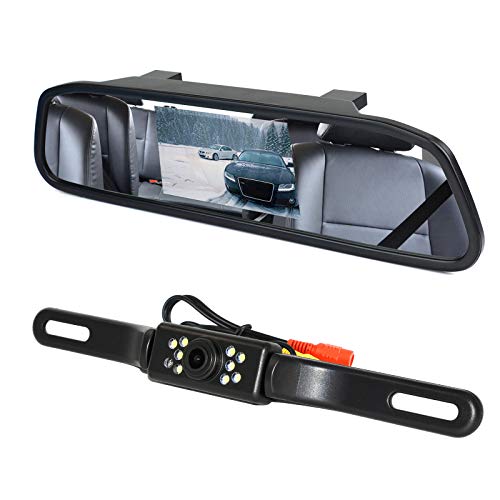
Peojek Backup Camera and 4.3-inch Mirror Monitor Kit — Budget mirror display
Peojek’s kit answers a specific aesthetic objection: many car owners refuse to bolt a glowing rectangle onto a dashboard they like. Its four-point-three-inch display lives in a mirror monitor that mounts at the rearview position, where a reversing screen belongs anatomically — your eyes travel there by decades of habit. When the camera is idle, the unit behaves like a mirror; in reverse, the image appears within it, a small conjuring trick that keeps older cabins looking unmodified.
The camera side keeps the budget honest: a waterproof rear camera with nine LED lights for night assistance, feeding the mirror over a wired connection. Nine LEDs will not turn night into day, but at the distances a backup camera actually judges — the few meters behind a bumper — they lift obstacles, curbs, and pets out of the dark adequately for careful reversing. The wide view covers the blind wedge behind a small car or SUV, which is the entire job description at this price.
Expect the compromises of both budget and format. A four-point-three-inch image is a reference, not a panorama, and drivers of long vehicles should climb this list toward the seven-inch kits. Mirror displays also share their surface with actual mirror duty, so brightness and viewing angle matter more than in a dedicated monitor; bright sun can compete with the image. For a small car, a tight budget, and an owner who values a clean cabin, though, Peojek delivers the essential safety upgrade with the least visual and financial intrusion in this guide.
- Display: 4.3-inch screen integrated into a rearview mirror monitor
- Camera: waterproof rear camera with nine-LED night assistance
- Connection: wired kit for cars and small SUVs
- Character: budget essentials with an unmodified-cabin look
Strengths
- Mirror placement puts the image where reversing eyes already travel.
- Nine LEDs give honest close-range help in dark driveways.
- Lowest-intrusion route to a camera for small, tidy cabins.
Trade-offs
- Small display limits fine detail and long-vehicle confidence.
- Sun glare can fight the image on a shared mirror surface.
- Night illumination reaches plate distances, not whole parking fields.
Best for: small-car owners wanting budget safety without dashboard clutter. Not suited for: trucks, RVs, or drivers needing a large, detailed picture.

AUTO-VOX OEM Rear View Mirror Camera with 4.3-inch Monitor — Factory-look finish
AUTO-VOX takes the mirror concept to its logical conclusion: instead of clipping a monitor over your existing mirror, this kit replaces it with an OEM-style mirror whose four-point-three-inch display hides behind the glass until reverse gear wakes it. Visitors to the car will not know a camera exists. The driver gets a smooth live view with an IP68-waterproof camera at the rear and night performance the maker emphasizes as a specialty, tuned for the unlit suburban driveways where this product will spend its life.
The installation sits a notch above the clip-on approach, since mirror replacement involves the mounting stem and wiring routed through the headliner’s edge, but the result justifies it every day afterward. Nothing rattles, nothing slides, nothing announces itself to thieves scouting dashboards. The image quality serves close reversing with calm competence, and the automatic wake in reverse preserves the illusion completely — mirror when driving, camera when backing, no buttons mediating between the two states.
Choose it with eyes open about format limits shared with the Peojek: the display is modest, the view is for reversing rather than recording, and this is a monitor, not a dash cam — a distinction the companion guide to mirror backup cameras explores in depth for buyers tempted to conflate the two. Within its brief, though, the AUTO-VOX is the connoisseur’s answer: the backup camera for people who hate how backup cameras look, executed with the finish of equipment the factory might have installed itself.
- Display: 4.3-inch monitor concealed in an OEM-style replacement mirror
- Camera sealing: IP68 waterproof rear camera
- Night work: enhanced night vision emphasized in the kit’s design
- Character: invisible installation, automatic wake in reverse gear
Strengths
- Replacement-mirror finish looks factory-installed rather than accessory-added.
- Automatic reverse activation keeps daily use completely frictionless.
- Strong sealing and night tuning suit year-round suburban duty.
Trade-offs
- Mirror replacement is a step more involved than clip-on rivals.
- Display size remains modest for large vehicles and fine judgments.
- It monitors only; buyers wanting recording must shop dash cams instead.
Best for: car owners wanting a discreet, permanent, factory-style reversing camera. Not suited for: anyone wanting recording features or a large display.
How Do the Six Kits Compare Directly?
| Kit | Display approach | Principal caution |
|---|---|---|
| Heavy-Duty Truck Kit | Seven-inch monitor, sixty-six-foot cable | Installation effort scales with vehicle size |
| eRapta Truck Kit | Seven-inch 2K monitor, adjustable guides | Dashboard presence and setup patience required |
| 2K Zero-Lag Kit | Seven-inch wired monitor, immediacy first | Fewer configuration flourishes |
| HD 1080P Plug & Play | Monitor kit tuned for fast installation | Resolution a step below the 2K pair |
| Peojek Mirror Kit | 4.3-inch display in a mirror monitor | Small image, glare on bright days |
| AUTO-VOX Mirror | 4.3-inch display hidden in OEM-style mirror | Replacement install, monitor only |
The pattern underneath the table is a single trade: screen size against cabin invisibility. Large monitors serve vehicles whose reversing is work; mirror displays serve cars whose owners prize an unaltered interior. Resolution and latency refine the choice within each family, while installation willingness decides whether any of it happens at all. A driver who answers those three questions honestly — vehicle size, cabin vanity, installation appetite — has effectively chosen their kit before reading a single detailed section.
How Do You Install a Wired Backup Camera Without Regrets?
Plan the cable’s journey before touching a trim panel. The camera mounts at the license plate, so trace a protected path from there — through an existing grommet if fortune provides one — along the vehicle’s sill or headliner edge to the monitor’s position, keeping clear of airbag routes, seat rails, and exhaust heat. Dry-fit everything on the ground first: connect the full kit on a bench, power it from a spare battery or the vehicle’s accessory socket, and confirm the image, the guides, and the reverse-trigger behavior while mistakes are still free.
Power strategy decides daily satisfaction. Tapping the reverse-light circuit makes the screen wake automatically in reverse, which is how factory systems behave and how aftermarket kits earn trust. Constant power with a manual switch suits drivers who also want a rear view while driving forward with a trailer. Either way, solder or use proper taps rather than twisted wires, fuse the addition sensibly, and test before reassembling trim. Aim the camera last, with the vehicle on level ground and a helper standing at measured distances, so the grid lines correspond to reality instead of optimism.
Know when to hand the job to a professional. Airbag-adjacent routing, drilling through firewalls, and late-model vehicles with sensitive electronics all justify an installer’s fee, which remains small beside the cost of the collision the camera exists to prevent. A good installer also aims and calibrates, the step amateurs most often skip. Whether you DIY or delegate, finish with a deliberate test: reverse toward a soft obstacle at walking pace, in daylight and after dark, and confirm the screen’s story matches the mirrors’ story before trusting either.
What Mistakes Do Backup Camera Buyers Keep Making?
Buying screen size by ego rather than vehicle tops the list; a seven-inch monitor in a small hatchback becomes glare, clutter, and theft bait. The reverse error — a tiny mirror display on a long RV — is worse, because it under-serves a genuinely hard reversing task. Second comes trusting grid lines as measurements. Lines are guides projected from an assumed camera position; after any mounting variation they lie politely, and only calibration against real distances makes them honest.
Third, owners neglect the lens. A backup camera lives in the road’s filth stream, and a month of winter driving coats it in a film that turns night images into fog. A thumb-wipe during fuel stops is the entire maintenance regime, and skipping it convinces owners their camera has failed when it has merely been blindfolded. Fourth, some drivers abandon mirrors entirely once a camera arrives, which the next section addresses as the safety issue it is. Finally, bargain hunters who buy wireless for a long vehicle to dodge installation usually pay twice — once for the wireless kit they abandon, once for the wired kit in this guide.
Does a Backup Camera Replace Mirrors and Looking?
No, and the guide would be negligent not to insist on it. A camera shows the wedge directly behind the bumper superbly, but its wide lens compresses distances, its edges distort, and it cannot see the cyclist approaching from the side street or the neighbor’s cat darting from behind a wheelie bin at an angle. The safe ritual combines all three sources: a physical look before entering the vehicle when children are near, mirrors for the flanks while reversing, and the camera for the blind wedge and final distance judgment.
Taught that way, especially to new drivers in households adding a first camera, the technology raises total awareness instead of replacing it. Several jurisdictions now mandate cameras on new vehicles precisely because the wedge behind a tall tailgate hides real children from mirrors alone. The aftermarket kits here bring older vehicles up to that standard. Use them as the third eye they are, not as the only one, and they will quietly prevent the worst driveway statistic there is.
Which Kit Fits Which Vehicle, Honestly?
Recreational vehicles and long vans live at the hard end of reversing. Their blind wedge can hide an entire car, their turning geometry punishes corrections, and campground maneuvers happen at dusk among bicycles and fire rings. Give them the long cable and the big screen without debate: the heavy-duty kit or eRapta, installed patiently along the chassis, aimed to include the rear corners, and supplemented by the mirrors for the flanks. RV owners who tow should also consider where a second camera would watch the trailer, a need the front/rear-capable kits anticipate.
Pickup trucks split by use. Working trucks that hitch weekly belong with the seven-inch 2K kits, whose guides can be calibrated to the hitch ball’s position until solo coupling becomes a party trick. Suburban pickups used as family cars can honestly choose the mirror kits, trading screen size for cabin calm, since their reversing is mostly driveways and school lots where the wedge is short. Either way, tailgate-down driving changes the camera’s world if the camera rides the gate — plate-mounted cameras keep their view regardless, another argument for plate mounting as the default.
Ordinary cars and small SUVs are the mirror kits’ homeland, with the plug-and-play monitor kit as the bridge for owners who want a larger image without replacing a mirror. Renters and leaseholders should weigh reversibility: a clip-on mirror monitor and carefully surface-routed cable leave no trace at hand-back, while a replacement mirror and drilled grommets are a conversation with the leasing company. Classic cars deserve a mention too — their owners use mirror kits precisely because the installation vanishes, preserving a period dashboard while quietly adding a modern safety net behind a chrome bumper.
What Maintenance Keeps a Backup Camera Trustworthy?
Almost none, performed regularly. The lens wipe has already been preached; add a seasonal check of the cable’s exposed sections for chafing where it passes hinges and tailgate jambs, since flexing points are where insulation eventually surrenders. Inspect the camera’s seal if the image fogs internally — condensation inside the housing announces a failed gasket, and catching it early sometimes allows a warranty conversation instead of a replacement purchase. Mirror-display owners should confirm the automatic wake still triggers crisply as reverse-light bulbs age, because a dimming bulb can underfeed a tapped circuit.
Troubleshooting follows a mercifully short logic. No image at all points to power or a disconnected cable, in that order. A blue or black screen with guides visible means the monitor lives but the camera signal is lost, so walk the cable. Rolling lines or interference suggest a ground problem, the classic gremlin of amateur automotive wiring, cured by a cleaner ground point rather than a new camera. Snowy night images usually mean a dirty lens or one failed LED bank. Work that list before shopping for a replacement, and most kits return to service for the price of an hour’s patience.
How Do Regulations and Safety Standards Frame This Purchase?
New vehicles sold in major markets now arrive with backup cameras by law, a regulatory verdict on the technology’s value that aftermarket buyers can borrow as confidence. The mandate exists because the blind wedge behind tall vehicles proved lethal in driveways at a rate mirrors could not fix, and children were disproportionately the victims. Retrofitting an older vehicle is therefore not a gadget indulgence but the closing of a known safety gap, which reframes the installation afternoon as one of the higher-value hours a car owner can spend.
Workplace rules push the same direction for commercial vehicles, where reversing incidents dominate yard accidents and insurers increasingly ask what aids a fleet fits. None of this obliges any private owner to buy anything, and this guide sells no fear. It simply notes that the kits above implement, for older vehicles, the same observational principle regulators already judged essential for new ones — and that a driver who has reversed with a camera for a month rarely volunteers to go back to guessing.
What Does Living With One Actually Change?
The first week is novelty: you reverse theatrically into spaces you once avoided, narrating distances like a docking pilot. The second month is when the camera rewires habit. Parallel parking tightens because the curb’s distance is a fact rather than a feeling. The driveway departure stops beginning with a prayer when neighborhood children are audible but invisible. Hitching, as noted, becomes a solo skill. Drivers consistently report that the deepest change is calm — reversing sheds the low-grade dread that used to accompany it, especially in rain, darkness, and crowded lots where mirrors fog and patience thins.
There are subtler dividends. Passengers stop being conscripted as spotters in holiday traffic. Insurance conversations after a disputed parking nudge gain a calmer tone when a driver can describe exactly what the screen showed, even though these monitor kits do not record — a limitation worth remembering, and one the mirror dash cam category exists to answer. And resale shoppers increasingly expect a camera in any vehicle new enough to have a screen-shaped hole in its life, so a tidy installation quietly supports the asking price when the car eventually changes hands.
How Should You Choose Between a Monitor Kit and a Mirror Kit?
Interrogate your dashboard and your eyes. A dashboard monitor wins when the vehicle is large, the driver wears bifocals that make small images a strain, or a second view — front camera, trailer camera — is on the roadmap. It loses when the cabin is small, the windshield already hosts a phone mount and a toll tag, or the car’s interior design is a point of pride its owner refuses to clutter. Neither answer is a compromise; they are different vehicles’ correct answers wearing similar boxes.
The mirror kit wins on glance ergonomics more often than its screen size suggests, because the rearview mirror is where a reversing driver’s eyes were trained to go for decades before cameras existed. Habits are interface, and interfaces that match habits get used in the stressful second when a decision matters. If two household members share the car, ask the less technical one which display they would trust at midnight in the rain; their answer, not the spec sheet, should usually settle the purchase, because a camera its driver ignores is decoration.
A Short Buyer’s Checklist to Run Before Ordering
Measure your vehicle’s length against the cable in the box, remembering that cables travel along bends and sills rather than in surveyor’s straight lines, so order headroom rather than arithmetic equality. Confirm where the camera will mount and that your plate area offers the access its bracket expects. Decide the power strategy in advance — reverse-light tap for automatic waking, or a switched feed for on-demand rear viewing — and check whether your comfort with that wiring is DIY-shaped or installer-shaped, pricing the installer into the budget now rather than resenting it later.
Then interrogate the display decision one final time with the car in front of you. Sit in the driver’s seat, look where a seven-inch monitor would live, and look where the mirror already is. Imagine both at midnight, in rain, with a passenger talking. The right answer is usually embarrassingly obvious from that seat, and it is personal in a way no comparison chart can overrule. Finally, read the kit’s return terms before ordering, because the rare dead-on-arrival unit is a logistics event, not a tragedy, when the paperwork was checked in advance.
What About Vehicles With Existing Screens?
Some older cars carry factory displays that accept auxiliary video through adapters, letting a camera feed the built-in screen and skip an add-on monitor entirely. When that path exists for your model, it produces the cleanest installation of all, though the adapters and coding sometimes cost more than a complete monitor kit and age the project beyond an afternoon. The kits in this guide were chosen for universality — they bring their own screens precisely so that any vehicle, screen or no screen, can join the camera era. If your car does have a compatible display, treat these kits as the benchmark of price and simplicity that the adapter route must beat to justify itself.
Why Do Some Drivers Distrust Their Camera After a Month?
Almost always, the cause is calibration debt. The kit was installed, the picture appeared, everyone celebrated — and nobody aimed the camera against measured distances or checked what the grid lines meant on that particular vehicle. The first time the screen’s implied distance disagreed with reality by half a meter, trust cracked, and cracked trust in a safety device is worse than absence because the driver now hesitates between two information sources. The remedy is embarrassingly cheap: one level parking spot, one helper, one tape measure, and twenty minutes of aligning the camera’s story with the world’s. Do it the week the kit goes in, repeat it after any tailgate or bumper work, and the screen remains what it was bought to be — the most believable witness in the car.
The second cause is a filthy or fogged lens mistaken for electronic decline, already covered above but worth repeating because it ends more camera careers than component failure does. Build the wipe into the fuel-stop ritual and the image stays startling for years. These devices ask for almost nothing; the little they ask for is everything.
One More Consideration: Teaching the Household the New Ritual
A camera changes a shared car’s culture, and households that talk about it for two minutes get more safety from it than those that let each driver improvise. Agree that the screen supplements rather than replaces the walk-around when children or pets are unaccounted for. Agree who wipes the lens and when. Show the least technical driver the calibration result — stand at the red line’s real distance so they can feel what the color means — because embodied knowledge survives stress better than a manual’s diagram. The kit is hardware; the ritual around it is the actual safety system, and it is installed by conversation, not by cable.
What Does a Good Result Look Like After a Month?
You stop thinking about the camera entirely, which is the technology’s final compliment. Reverse gear summons the picture, your eyes flick to it as naturally as to a mirror, distances feel known rather than estimated, and passengers assume the car always had it. The kits that achieve that invisibility differ in screen size and resolution, but they share the virtues this guide kept returning to: an immediate wired image, a calibrated aim, a clean lens, and an installation tidy enough to forget. Judge your purchase a month later by that standard — not by the unboxing, not by the specification sheet, but by whether reversing has become the calmest maneuver in your driving day.
A Note for Parents of New Drivers
If the car receiving the camera belongs to a teenager, install it together. The afternoon of routing and aiming teaches vehicle anatomy no classroom matches, and a young driver who helped calibrate the grid lines understands their limits viscerally rather than treating the screen as an oracle. Pair the technology with the ritual from the safety section — look, mirrors, then screen — and you have given them a habit stack that will protect every vehicle they ever drive, including the ones with factory systems whose marketing encourages more faith than any camera deserves.
What If Your Vehicle Already Has Sensors but No Camera?
Parking sensors and cameras answer different questions — proximity versus identity — and households often discover the beeps alone leave them blind to what is approaching, how fast, and from which side. A camera kit complements sensors beautifully, giving the audible warning a visible subject, and the combination is what most modern vehicles ship from the factory. If your older car beeps already, do not let that talk you out of seeing; the first time the screen reveals the beep’s cause is a low tricycle rather than a high wall, the difference between the two information types will make itself permanently obvious.
Final Recommendation
Long vehicles should start at the top of this list: the heavy-duty kit for sheer cable reach and working toughness, the eRapta for the sharpest configurable picture, and the zero-lag 2K kit for drivers who prize immediacy above ornament. Ordinary cars divide by taste — the plug-and-play 1080P kit for the installation-shy, the Peojek for budget mirror convenience, and the AUTO-VOX for owners who want the camera to disappear into a factory-looking mirror. Whichever you choose, install it properly, calibrate its lines against real distances, and wipe its lens when you fuel up. A backup camera is among the few car purchases that can plausibly pay for itself in a single avoided second, and the kits above earn that chance honestly.
Frequently Asked Questions
Can I install one of these kits myself?
Most owners with basic tools and patience can, particularly the plug-and-play style kits on older cars. The tasks are routing a cable, mounting a camera at the plate, and tapping power, ideally from the reverse-light circuit. Vehicles with airbags along the routing path or complex electronics justify a professional, whose fee is modest compared with the safety value at stake. Either way, test the complete system on the ground before a single trim panel comes off, because discovering a dead camera after the cable is routed converts a satisfying project into an archaeological dig through your own dashboard.
Do these kits work with manual transmissions and older electrics?
Yes. The camera cares only about a power source and a place to mount, and the reverse-light tap works on any vehicle with reverse lamps, manual or automatic. Very old vehicles with six-volt systems or positive-ground electrics are the rare exception needing a specialist’s advice, and owners of such classics usually already have that specialist on speed dial for everything else.
Why do wired kits dominate this guide?
Because reversing is a real-time safety task and a cable delivers the image without interference, pairing failures, or meaningful delay. Wireless kits have their place on short vehicles and temporary setups, but permanent installations on working vehicles repay the one-time routing effort with years of deterministic reliability, which is what a driver needs in the seconds before a possible impact.
What do the grid lines actually tell me?
They project an approximate path and distance zones based on where the camera sits, nothing more. After installation, verify them by reversing toward a soft marker placed at known distances and noting where the lines fall. Recheck after any camera adjustment, after suspension work, and after anyone borrows the car and returns the seat — and therefore the viewpoint — to a different position. Treated as calibrated guides rather than guarantees, they become genuinely useful for judging the final meters.
Is a bigger monitor always safer?
Only up to the point where the driver can absorb the image in a glance. Beyond that, size adds glare at night, obstruction of the windshield, and temptation to stare rather than sweep mirrors and screen in rhythm. Match the display to the vehicle’s scale and the driver’s eyesight, and remember that a well-aimed modest screen outperforms a huge one mounted where sunlight washes it out at noon.
How well do these cameras really see at night?
Well enough for their job, with limits. LED assistance and sensitive sensors reveal obstacles, curbs, and people within the few meters behind the bumper, especially where reverse lights add illumination. They will not light a whole unlit field, and a dirty lens degrades night performance first, so keep it wiped and your expectations set to the reversing zone rather than the horizon.
How long does a wired installation really take?
On a cooperative older car with accessible trim, an experienced owner can finish in a couple of hours, and the plug-and-play kit in this guide advertises far less for its simplest route. Long vehicles, stubborn trim clips, and a perfectionist cable path stretch the job toward a full day. Professionals compress all of that with lifts, trim tools, and repetition. Whichever route you choose, reserve unhurried time: installations rushed against darkness produce the pinched cables and mystery grounds that haunt forums.
Can a backup camera drain my battery?
A correctly wired kit draws power only when the vehicle or the reverse circuit is live, so a healthy installation cannot drain a parked car. Battery drain stories trace back to kits wired to constant power with a monitor left awake, or to taps made carelessly into always-on circuits. This is another argument for the reverse-light strategy: the camera sleeps whenever the car is not actively reversing, which is nearly all of its life.
What should I do if the image looks mirrored or upside down?
Check the kit’s settings before touching hardware, because many cameras and monitors include orientation and mirror toggles meant for front-camera use, and a unit may ship in the wrong mode. If the image is physically inverted, the camera itself is likely mounted rotated on its bracket. Both fixes take minutes once you know they exist, and both are common enough that manuals bury them in troubleshooting tables owners rarely reach.
Will a backup camera help with trailer hitching?
Enormously, and for many truck owners it quickly becomes the kit’s single most-loved everyday use. A camera aimed to include the hitch area lets a solo driver align ball and coupler in one or two calm attempts instead of a dozen door-opening checks in the rain. The seven-inch kits with adjustable guides serve this best, and marking the hitch position within the frame during calibration makes the trick repeatable.
Related Guides
If you are still undecided between doing this now or later, consider the arithmetic of regret: the installation takes an afternoon, the camera serves for the remaining life of the vehicle, and the event it exists to prevent needs to happen only once to outweigh both. Older vehicles are not getting younger or easier to see out of, and the drivers sharing your driveway are not getting more predictable. Drivers drawn to the mirror displays above should continue with our dedicated mirror backup camera comparison, anyone upgrading an older car’s whole cabin can browse the aftermarket head unit and camera pairing guide, and RV owners may want our rundown of observation cameras for long rigs before committing to a cable route.


