What's inside
- Key Takeaways
- Quick Picks
- How Did We Choose These Picks?
- How Does a Wireless Webcam Actually Send Its Picture?
- How Do the Six Compare Side by Side?
- Which Wireless Pattern Fits Your Desk?
- How Do You Set Up a Wireless Webcam Well?
- What Mistakes Do Buyers Make in This Category?
- What Should You Check on the Listing Before Ordering?
- Does Wireless Video Cost You Picture Quality?
- Final Recommendation
- Frequently Asked Questions
- Related Guides
As an Amazon Associate I earn from qualifying purchases. This post may contain affiliate links at no extra cost to you.
gizmoverdict.com is reader-supported. When you buy through links on our site, we may earn an affiliate commission.
Where to buy: The six cameras below each link to a checked listing, and this guide describes each one’s connection exactly as its listing title presents it — no mechanism upgraded, no radio invented. Where a title says “wireless” and nothing more, the spec box under that pick says the mechanism is not stated in the title, because that gap is the most important fact in this entire category.
Start with the truth, because the best blue tooth webcams are not what the search term promises. Almost no webcam sends its video over Bluetooth. Bluetooth was designed for modest data rates — headsets, keyboards, speakers — and a live 1080p video feed asks for a sustained stream far beyond what Bluetooth profiles for cameras were ever built to carry. So when a camera is marketed as wireless, the video almost always travels by a different road: a Wi-Fi link, typically on the 2.4GHz band, or a dedicated USB receiver dongle paired to the camera at the factory. Bluetooth, where it appears in this product class at all, usually serves the audio side — the speakerphone half of a conference device — while the picture rides the other radio. Any guide that skips this paragraph is setting you up to buy the wrong thing confidently.
That honesty reframes what the six picks below actually are. Five are presented in their titles as wireless 1080p webcams from TOALLIN, Gsou and an unbranded listing; the sixth, the EMEET C980 Pro, is a 3-in-1 conference camera with microphone and speaker whose title makes no wireless claim at all — it is included because it answers the need hiding underneath the Bluetooth search, which is rarely “Bluetooth” itself. People typing this keyword usually want one of three things: a camera free to sit where the desk cable cannot reach, a camera that can move between rooms without a tether, or a single device that handles picture and meeting audio together. Those are real needs. They are just delivered by Wi-Fi links, USB receivers and conference speakerphone design — and the picks are assessed below on how credibly each title supports the job, with every unstated mechanism flagged rather than filled in.
One practical consequence follows immediately. A wireless camera is a battery device or a powered device, never a free one: it either carries a battery that must be charged — one pick below advertises half-day use in its title, which tells you the scale honestly — or it draws power over USB while sending video without a data cable, which is what the USB-powered pick in this list describes. Wireless describes the picture’s journey, not an escape from energy. Planning for charging and placement delivers the freedom imagined; expecting a camera that simply floats, untethered in every sense, leads to discovering the truth during the third meeting of the day.
Key Takeaways
- Webcam video essentially never travels over Bluetooth; wireless models use Wi-Fi or a USB receiver, and Bluetooth in this class serves audio when it appears at all.
- Four of the six titles say “wireless” without naming the mechanism — treat the mechanism as unverified until the listing itself confirms it.
- Wireless still means power: a battery to charge, as in the half-day-use Gsou, or USB power with a cable-free picture, as in the USB-powered pick.
- All six picks are 1080p-class cameras; nothing here claims 4K, and none should be bought expecting it.
- The EMEET C980 Pro is the conference answer in the list — camera, microphone and speaker in one unit, with a 60°–98° field of view stated in its title.
- Manual focus, privacy covers and noise-reducing microphones are the differentiators that the titles actually support.
Quick Picks
| Pick | Badge | Why it is here |
|---|---|---|
| TOALLIN 1080P HD Wireless Webcam | Best noise-cancelling brief | Wireless 1080p with a built-in noise-canceling microphone headline for call-heavy desks. |
| Gsou Wireless Webcam with Auto Privacy Cover | Best privacy design | Automatic privacy cover, half-day battery use and a manual focus ring in one wireless body. |
| Gsou Wireless Webcam 1080P HD | Best plug-and-play brief | 1080p wireless calling and streaming with plug-and-play setup and an adjustable design. |
| Gsou Wireless Webcam for PC | Best streaming-leaning Gsou | Positions itself for both PC calls and wireless streaming, with USB plug and play in the title. |
| 1080P Wireless Webcam with Noise-Reducing Mic | Best USB-powered option | Wireless picture with USB power, so no battery routine, plus a noise-reducing microphone. |
| EMEET C980 Pro 3-in-1 Webcam | Best conference all-in-one | Camera, microphone and speaker combined, with a 60°–98° field of view for small meeting spaces. |
How Did We Choose These Picks?
The first filter was the keyword’s own honesty problem. Listings claiming Bluetooth video outright, with no plausible mechanism behind the claim, were treated as marketing fog and left aside; the six that remain either describe themselves as wireless without inventing a protocol, or — in the EMEET’s case — make a different, verifiable promise altogether. That may sound like a low bar, but in this corner of the camera market it eliminates a surprising share of what a search returns, and it is the reason this guide can describe every pick’s connection without crossing its fingers.
The second filter was differentiation the titles can support. Three Gsou models sit in this list, and they are not interchangeable: one leads with an automatic privacy cover, battery use and a manual focus ring; one with plug-and-play calling and streaming; one with a PC-and-streaming brief and USB plug and play. The TOALLIN and the unbranded 1080p model both lead with microphone noise handling, described in slightly different words in their titles, while the EMEET stands apart as a wired-class conference device with a speaker built in. Where titles overlap, the sections below say so, because pretending six near neighbours are six distant cousins would be its own kind of dishonesty.
Third, every connection statement in this guide is graded. A title that names a mechanism earns a named description. A title that says only “wireless” earns exactly that word and a flag in the spec box: mechanism not stated in the title, verify on the listing. This grading is the guide’s main service, because the difference between a Wi-Fi camera and a dongle camera decides real things — whether the camera can sit beyond a wall from the computer, whether it joins the home network, whether a lost receiver orphans it — and no buyer should have to discover which one arrived by opening the box.
How Does a Wireless Webcam Actually Send Its Picture?
Three roads exist, and the differences govern placement. A USB receiver system pairs the camera with a small dongle that plugs into the computer; the camera talks to its dongle over a private radio link, the computer sees an ordinary webcam, and no network configuration happens at all. Range is a room-scale affair, walls tax it, and the dongle is a small object with an outsized importance — lose it, and in many designs the camera has nothing to talk to. A Wi-Fi camera joins the local network, typically the 2.4GHz band because that band travels farther through buildings than 5GHz, and sends its picture across the network to the computer or service. That road reaches farther and frees placement almost entirely, at the price of setup: passwords, network quality and the occasional router argument.
Bluetooth’s real role in this product class is the third road, and it carries sound. Conference devices pair audio over Bluetooth because a voice channel fits comfortably inside Bluetooth’s abilities, letting a speakerphone sit untethered on a table while its camera half may still connect by cable or another radio. That division of labour — picture by the capacious road, voice by the convenient one — is sensible engineering, and it is why “Bluetooth webcam” survives as a search term despite describing almost no product accurately. The term names the feeling of a cable-free meeting, and the engineering delivers that feeling by other means.
Battery arithmetic completes the picture. A camera transmitting video continuously is doing two expensive things at once — imaging and radio — and physics collects its fee in hours, not days. The half-day figure in one title below should be read as the category’s honest scale: enough for a working session away from the desk, not enough for a permanent installation that nobody wants to visit with a charging cable. Buyers planning a fixed wireless position should prefer the USB-powered pattern, where the picture is wireless but the energy arrives by wire and never runs out mid-meeting.

TOALLIN 1080P HD Wireless Webcam — Best noise-cancelling brief
The TOALLIN’s title makes two promises and keeps its counsel on a third. The promises are 1080p HD video and a built-in noise-canceling microphone; the silence is the wireless mechanism, which the title asserts without naming. Take the microphone promise first, because for the desk this camera imagines — calls through the day, a household or office continuing audibly around them — the microphone’s behaviour shapes the meeting more than another increment of picture ever could. Noise cancellation in a webcam microphone works on the steady, predictable sounds of a room: fan hum, air conditioning, the drone of a nearby road. It earns its keep against exactly those, and the people at the other end of the call hear a voice lifted out of the room’s floor noise rather than competing with it.
Set the limits of that promise fairly. Cancellation tuned for steady noise does little against a dog announcing a delivery or a colleague’s conversation at the next desk, because those are not noise in the algorithm’s sense — they are other signals, as structured as your own voice. The TOALLIN’s pitch is therefore best read as comfort for ordinary rooms, not isolation from lively ones. Within that reading it is a coherent one: a wireless 1080p camera for PC calling whose headline investment sits in the audio path, aimed at the worker whose picture is already adequate and whose voice is what colleagues actually judge.
The wireless claim itself must be bought with the verification this guide keeps repeating. The title does not say Wi-Fi, does not say receiver, does not state a battery figure, and each of those unknowns changes how the camera would live on your desk. Read the listing for the mechanism and the power arrangement before ordering, and treat the answers as the real specification: a dongle-based TOALLIN is a desk camera with placement freedom inside one room, while a Wi-Fi-based one is a camera that can sit wherever the network reaches. Either could suit you. Only the listing can say which one is on offer, and checking first means being pleased by whichever arrives, while assuming may mean being surprised by the same box.
- Resolution: 1080P HD, as stated in the listing title
- Connection mechanism: Not stated in the listing title — verify with TOALLIN documentation
- Microphone: built-in noise-canceling mic, per the listing title
- Power arrangement: Not stated in the listing title — verify with TOALLIN documentation
- Focus: Not stated in the listing title — verify with TOALLIN documentation
Strengths:
- Noise-canceling microphone headline suits call-heavy days in ordinary, humming rooms.
- 1080p picture matches what calling platforms deliver in practice.
- Wireless placement frees the camera from the desk’s cable geography.
Trade-offs:
- The wireless mechanism is unnamed in the title and must be confirmed on the listing.
- Cancellation handles steady room noise, not nearby voices or interruptions.
- Power arrangement is unstated in the title, so charging routine is unknown until checked.
Best for: a buyer seeking clearer call audio from a wireless 1080p desk camera. Not suited for: a buyer seeking a named, verified connection protocol before purchase.
There is a subtler benefit to a microphone-led spec in a wireless camera, and it is about where the camera can go. A wired webcam’s microphone sits wherever the cable leaves the camera, usually close to the screen and far from ideal; a wireless camera can be placed nearer the speaker — on the desk’s edge, on a side table at conversational distance — and every metre closer to the mouth improves the voice more than processing can. Thinking of the TOALLIN as a microphone that happens to have a camera, and placing it by ear rather than by eye, extracts more from it than mounting it by habit atop the monitor ever will.

Gsou Wireless Webcam with Auto Privacy Cover — Best privacy design
This Gsou’s title reads like a list of answers to complaints. Wireless cameras provoke one specific unease — a lens that might be watching — and the automatic privacy cover answers it physically: a shutter that closes over the lens is a guarantee no software indicator light can match, because it works even when every other system has failed. For a camera that may live in a bedroom office or a shared family space, that physical certainty is not a garnish. It is the feature that decides whether the camera gets to stay in the room at all, and Gsou putting it in the title suggests the brand understands its own product’s social problem.
Half-day use is the title’s second answer, and it deserves respect for its candour. Rather than a battery figure in milliamp-hours that no buyer can translate, half a day is a unit of life: a morning of calls away from the desk, a training session in another room, an afternoon presenting from the comfortable chair. It also quietly defines the product — this is a session camera, carried to where the work is and returned to charge, not a permanent fixture. A usage pattern matching that rhythm makes the honesty useful; an always-on wireless sentinel is a job the title is quietly declining.
The manual focus ring completes the trio, and it is the connoisseur’s detail. Autofocus systems hunt — refocusing when a hand gestures, when a face turns, when light shifts — and a manual ring ends the hunting by fixing focus at the presenter’s working distance. For a seated caller who stays at one distance, set-once focus is simply sharper behaviour than an algorithm’s perpetual opinion. Combined with the cover and the battery candour, the picture is of a camera designed by people who listed what annoys users about wireless webcams and answered the list in order. Its resolution is not stated in the title — the spec box flags that — so confirm the sensor figure on the listing if 1080p is a requirement rather than an assumption.
- Resolution: Not stated in the listing title — verify with Gsou documentation
- Privacy: auto privacy cover, per the listing title
- Battery: half-day use, as stated in the listing title
- Focus: manual focus ring, per the listing title
- Connection mechanism: Not stated in the listing title — verify with Gsou documentation
Strengths:
- Physical privacy shutter gives certainty no indicator light can offer.
- Half-day battery described in units of real life, honestly scoped.
- Manual focus ring ends autofocus hunting for a seated presenter.
Trade-offs:
- Resolution is absent from the title and needs a listing check.
- Half-day endurance rules out permanent, unattended placement.
- Manual focus punishes presenters who move between distances.
Best for: a buyer seeking a privacy-first wireless camera for session-based calls. Not suited for: a buyer seeking an always-installed camera with stated-in-title resolution.
The cover has one more audience: the employer’s camera, in the employer’s time, in your home. A shuttered lens draws a bright line between the working day and the evening that software settings blur, and households negotiate that line more easily when it is physical. If the camera will live where life happens after hours — the spare room that is also a guest room, the kitchen table that doubles as a desk — the cover stops being a specification and becomes the terms on which the device is welcome. That welcome, sustained over months, is worth more than a sharper sensor in a camera the household resents.

Gsou Wireless Webcam 1080P HD — Best plug-and-play brief
The second Gsou strips the pitch to the essentials a first-time wireless buyer actually asks about: 1080p HD video, video calling and streaming, plug and play, and an adjustable design. Plug and play is the load-bearing phrase. It promises that the camera presents itself to the computer without a driver ritual, and in the wireless context it hints — no more than hints, since the title names no mechanism — at the receiver pattern, where a factory-paired dongle makes the wireless link invisible to the user. Whether that hint is accurate for this model is a listing question, and the spec box records the mechanism as unstated; but the design intent is clear, which is a camera whose wireless nature should feel like no nature at all.
Adjustability is the quiet second feature, and on a wireless camera it matters more than on a tethered one. A cable disciplines placement: the camera lives where the lead reaches and points where the mount allows. A wireless camera can perch on a shelf, a book stack, a side table — and each of those perches has a different height and angle, so a body that tilts and adjusts is what turns placement freedom into framing freedom. The buyer imagining the camera on top of the monitor should picture it instead across the room on a cabinet, aimed properly by its own adjustment, and judge this pick by that picture.
Against its Gsou siblings, this model is the generalist. It lacks the privacy cover and focus ring of the first Gsou and the streaming emphasis of the third, and in exchange it asks the least of its owner: no focus decisions, no feature learning curve, a camera that joins a call the way a wired one does. Generalists are easy to undersell in a guide, but most desks are generalist desks. If your requirement is a wireless 1080p camera for calls and the occasional stream, with setup measured in minutes, this is the Gsou whose title was written for you — subject to the same mechanism check on the listing that every wireless pick here carries.
- Resolution: 1080P HD, as stated in the listing title
- Setup: plug and play, per the listing title
- Design: adjustable, per the listing title
- Connection mechanism: Not stated in the listing title — verify with Gsou documentation
- Microphone details: Not stated in the listing title — verify with Gsou documentation
Strengths:
- Plug-and-play promise suits first-time wireless buyers.
- Adjustable body converts placement freedom into framing freedom.
- Calling and streaming both named, covering the common desk uses.
Trade-offs:
- No privacy cover or manual focus is claimed in the title.
- Mechanism and microphone specifics wait on the listing.
- Generalist design offers no specialist feature to fall in love with.
Best for: a buyer seeking the simplest wireless 1080p route into calls and streams. Not suited for: a buyer seeking a physical privacy shutter or manual focus control.
It is worth pausing on who should skip this model, because generalists disappoint two specific buyers. The privacy-conscious buyer gets no shutter here and will feel the absence daily in a shared room. The image-quality maximalist gets the same 1080p ceiling as everything in this guide and no special optics story to soften it. Both are better served elsewhere in the six. Everyone between those poles — the ordinary run of callers and occasional streamers — is precisely the audience a plug-and-play generalist exists for, and serving that audience without fuss is a legitimate design achievement rather than a lack of ambition.

Gsou Wireless Webcam for PC — Best streaming-leaning Gsou
The third Gsou divides its title between two loyalties: PC webcams and the wireless streaming camera. That second phrase is the differentiator. Streaming asks things of a camera that calling does not — sustained sessions rather than half-hour meetings, a picture that sits inside a composed scene with overlays and other sources, and placement dictated by the shot rather than by the desk. A wireless camera in a streaming setup earns its freedom differently: the streamer can put the camera where the scene wants it, on the workshop bench or the kitchen counter of a cooking stream, without running a cable across the set and into the frame.
USB plug and play, the title’s closing claim, sits interestingly beside the wireless claim, and the pairing is worth reading carefully rather than suspiciously. The most natural reconciliation is the receiver pattern — wireless between camera and dongle, USB between dongle and PC — which would make both phrases true at once and would explain why the title can promise plug-and-play simplicity for a radio product. This guide cannot certify that reconciliation from the title alone, and the spec box keeps the mechanism flagged as unstated. But a buyer cross-checking the listing should look for exactly that arrangement, because it is the one that makes this camera’s whole pitch cohere.
Streaming also reframes the battery question, if this model carries one — the title does not say. A stream runs longer than a call and stops for nobody’s charging schedule, so a streamer adopting any battery wireless camera builds the session around its endurance or keeps power attached during long broadcasts. The half-day candour of the sibling Gsou is the realistic scale to plan against. For call-length streaming — a lesson, a live Q&A, a community hangout — that scale is ample. For marathon broadcasts, treat wireless as the camera for the secondary angle and keep a tethered camera on the main shot, a division of labour many working streamers already use.
- Resolution: 1080P HD, as stated in the listing title
- Positioning: PC webcam and wireless streaming camera, per the listing title
- Setup: USB plug and play, per the listing title
- Connection mechanism: Not stated in the listing title — verify with Gsou documentation
- Battery: Not stated in the listing title — verify with Gsou documentation
Strengths:
- Streaming named outright, suiting scene-based placement away from the desk.
- USB plug and play promises a painless path into the PC.
- Wireless freedom helps secondary angles and non-desk sets.
Trade-offs:
- The wireless mechanism behind the USB claim needs listing confirmation.
- Battery arrangements are unstated in the title; long streams need a power plan.
- 1080p is the ceiling, as across this whole list.
Best for: a buyer seeking a wireless camera that splits duty between PC calls and streams. Not suited for: a buyer seeking marathon-length untethered broadcasting.
A streaming setup also tests a camera’s manners under software. Broadcast tools mix sources, resize them and composite them live, and a camera that behaves as a standard video device — which the USB plug-and-play claim implies — drops into that workflow without plug-in archaeology. Streamers keep a mental list of hardware that simply appears when asked, and hardware that needs persuasion; the second list gets replaced. If this Gsou’s listing confirms the receiver pattern its title hints at, it stands a good chance of living on the first list, and for a working streamer that reliability compounds across hundreds of sessions into the only specification that finally matters.

1080P Wireless Webcam with Noise-Reducing Mic — Best USB-powered option
The unbranded pick in this list makes the most quietly sensible engineering claim of the six: wireless picture, USB power. Splitting the two journeys — video travelling without a data cable, electricity arriving by one — dissolves the battery problem entirely. There is nothing to charge, nothing to run flat in the third meeting, no session length to plan around. The camera can live permanently in its chosen spot, on a shelf or a side monitor, behaving with the reliability of a wired camera while keeping the placement freedom that made wireless attractive in the first place. For a fixed installation, this is arguably the correct architecture, and it is refreshing to see it stated plainly in a title.
The honest caveat is that the freedom is partial, and the title’s own words prove it: a power cable still runs to the camera, so the chosen spot needs to be within cable reach of a USB power source even though no data path to the computer is required. In practice that is a much easier geography — power can come from a monitor’s USB port, a hub, or a charger near the perch, none of which need to be the meeting computer itself. A camera across the room from the PC but beside a powered hub is fully served by this design, and that is a placement no ordinary wired webcam can offer.
The noise-reducing microphone pairs with the TOALLIN at the audio-conscious end of the list, described in the gentler dialect of “reducing” rather than “canceling” — a distinction in wording this guide will not over-interpret, since both describe the same family of processing aimed at steady room sound. What can be said is that the combination on offer here, permanent power plus voice-clarity processing plus 1080p, describes a set-and-forget call camera for a fixed spot. The brand anonymity cuts the other way: support, documentation and the listing’s own detail carry more weight when no maker’s name stands behind the title, so read that listing with more care, not less, and confirm the wireless mechanism there as with every pick in this guide.
- Resolution: 1080P, as stated in the listing title
- Power: USB-powered, per the listing title
- Microphone: noise-reducing mic, per the listing title
- Connection mechanism: Not stated in the listing title — verify with the listing documentation
- Focus: Not stated in the listing title — verify with the listing documentation
Strengths:
- USB power removes charging and battery endurance from the routine entirely.
- Permanent placement suits a fixed call spot away from the computer.
- Noise-reducing microphone supports clear everyday call audio.
Trade-offs:
- A power cable still constrains the perch to somewhere near a USB source.
- Unbranded listing puts extra weight on reading its details carefully.
- Wireless mechanism remains unnamed in the title.
Best for: a buyer seeking a permanently placed wireless camera with no battery routine. Not suited for: a buyer seeking a camera that can roam between rooms all day.
Placement discipline still applies, power cable or not. This design invites a shelf or cabinet perch, and shelves sit at heights chosen for books, not faces; a small riser or an angled mount under the camera can be the difference between a flattering frame and an upward view nobody enjoys. The wireless picture also tempts owners to place the camera for the room’s convenience and forget the light, and a perch facing a window will silhouette the speaker as faithfully as any wired camera would. Give this pick a face-level perch and light from behind the camera’s position, and its set-and-forget character becomes a daily pleasure rather than a daily compromise.
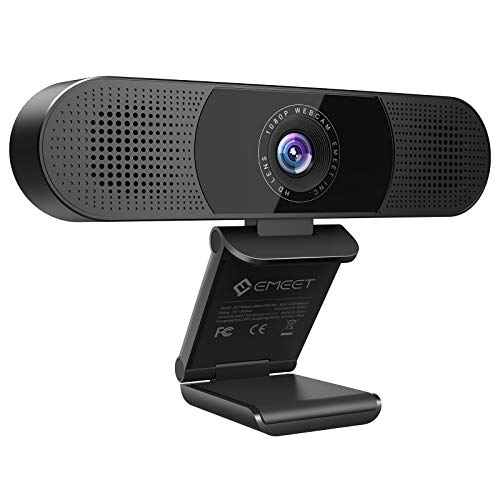
EMEET C980 Pro 3-in-1 Webcam — Best conference all-in-one
The EMEET is the odd one in this list and knows it: its title claims no wireless anything. What it claims is integration — a 1080p webcam, a microphone and a speaker in one 3-in-1 unit, with a field of view adjustable across 60° to 98°. It belongs in a Bluetooth-webcam guide because the desire underneath that search, half the time, is a meeting device that does not sprawl across the table in three cabled pieces. The C980 Pro answers with a single unit that sits in front of a small group and handles seeing, hearing and being heard. If Bluetooth’s appeal was tidiness, this is tidiness by consolidation instead of by radio.
The field-of-view range is the specification with daily consequences. At the narrow end, around 60°, the camera frames one person at a desk without swallowing the room behind them. Widened toward 98°, the same unit takes in a small group around a table — the huddle room, the team stand-up, the family call where three people share one screen. A fixed wide camera forces the group setting on every call; a fixed narrow one excludes the group forever. A range, chosen per meeting, is the grown-up answer, and EMEET stating the numbers in the title lets a buyer match them against their table before any money moves.
The speaker is the component webcam guides usually ignore and meeting participants never do. Hearing the far end through a laptop’s small speakers, from wherever the laptop happens to sit, is the ordinary misery of hybrid meetings; a speaker built into the device at the table’s centre puts voices where the faces are, at a volume meant for a room. Combined with its microphone, the C980 Pro behaves like the speakerphones that conference rooms adopted years ago, with a camera folded in. Its connection is not described as wireless in the title, and buyers should expect a conventional setup confirmed on the listing — the trade for the integration is accepting one well-placed unit rather than a roaming camera, and for small meeting spaces that trade is usually the right one.
- Resolution: 1080P, as stated in the listing title
- Field of view: 60°–98°, as stated in the listing title
- Audio: microphone and speaker built in, per the 3-in-1 title description
- Format: 3-in-1 conference webcam unit
- Connection: Not stated in the listing title — verify with EMEET documentation
Strengths:
- Camera, microphone and speaker in one unit clears the table of separate devices.
- Adjustable 60°–98° field of view covers solo desks and small groups.
- A centred speaker puts the far end’s voices where the participants sit.
Trade-offs:
- No wireless claim in the title; expect a conventional connection to confirm.
- One fixed unit cannot roam the way the battery picks can.
- Group framing tops out at small rooms; large tables need wider solutions.
Best for: a buyer seeking one tidy device for a small meeting space. Not suited for: a buyer seeking a cable-free camera to carry between rooms.
One boundary of the all-in-one pattern deserves stating before you choose it. A combined unit ties three upgrades together: when the camera generation moves on, the microphone and speaker are replaced with it, and a household keeping devices for years may prefer separates for that reason alone. The counterweight is the table in front of you today — one device, one position, no cable negotiation — and for the small rooms this unit addresses, today’s tidiness usually outvotes tomorrow’s upgrade path. Buy it as a room’s meeting appliance, keep the box for the day the room is rearranged, and the C980 Pro will justify its place on the strength of the meetings it simplifies rather than the specifications it stacks.
How Do the Six Compare Side by Side?
| Pick | Resolution (title) | Connection as titled | Defining feature |
|---|---|---|---|
| TOALLIN 1080P HD Wireless | 1080P HD | Wireless, mechanism not stated | Noise-canceling microphone |
| Gsou with Auto Privacy Cover | Not stated in title | Wireless, mechanism not stated | Privacy cover, half-day use, manual focus ring |
| Gsou 1080P HD Plug and Play | 1080P HD | Wireless, mechanism not stated | Plug and play, adjustable body |
| Gsou for PC / Streaming | 1080P HD | Wireless with USB plug and play | Streaming positioning |
| 1080P Wireless, USB-Powered | 1080P | Wireless picture, USB power | No battery routine; noise-reducing mic |
| EMEET C980 Pro 3-in-1 | 1080P | Not stated in title | Mic and speaker built in; 60°–98° FOV |
The table’s most honest column is the third. Five titles assert wirelessness and none names its mechanism in the words available here, while the sixth asserts integration instead. Buyers should treat the listing pages as the second half of every title in this category — the half where the radio, the battery and the receiver are either confirmed or quietly absent.
Which Wireless Pattern Fits Your Desk?
Decide first whether the camera moves or stays. A camera that stays — one perch, one framing, every day — should be powered permanently, which points to the USB-powered pick or the EMEET’s consolidated unit, and its wireless link then exists purely to spare a data cable across the room. A camera that moves — between rooms, between the desk and the presenting corner — must be a battery design, which points to the Gsou with its half-day candour, and its owner accepts a charging rhythm as the price of roaming. Confusing the two patterns is the common failure: a battery camera installed permanently dies at the wrong moment, and a powered camera bought for roaming never leaves its cable’s neighbourhood.
Decide second how much verification you are willing to do. Every wireless pick here requires one listing check to name its mechanism, and that check takes minutes. A buyer unwilling to make it should be honest about the gamble being taken: the camera that arrives will be one of the two wireless architectures, and if it is the other one, the placement plan built around the assumption collapses. There is no version of this category where the mechanism does not matter, which is why this guide has flagged it six times rather than once — repetition being the only emphasis available when the titles themselves decline to help.
There is a third question, quieter than the other two, about the room’s other occupants. A camera that can sit anywhere can also be pointed from anywhere, and in a home the convenience of the person on calls is not the only interest in the room. The privacy-cover Gsou exists because this question has a physical answer; the other picks answer it socially, by being placed visibly, announced honestly, and switched off when the workday ends. Wireless freedom handled with that courtesy is sustainable indefinitely. Handled carelessly, it produces the one-star reviews about households at war with a webcam — a failure mode no specification sheet will warn you about and no firmware update can fix.
How Do You Set Up a Wireless Webcam Well?
Start with the radio’s environment, not the camera’s perch. Walk the room with the meeting computer in mind: where does the camera want to sit for its picture, and what stands between that spot and the machine — walls, a metal cabinet, the bulk of a television? Every obstacle on that line is a tax on the link, and rearranging the perch by half a metre to clear one obstacle is the cheapest performance upgrade in this entire category, costing nothing but the willingness to test two positions before settling. If the listing confirms a receiver system, keep the path between camera and dongle short and uncluttered; a dongle on a short extension lead, raised out from behind the computer’s metal case, receives better than one buried in a rear port. If the listing confirms Wi-Fi, the 2.4GHz band’s reach is your friend, but place the camera where the network is strong rather than merely present, and expect a router at the far end of a large home to tax any wireless camera’s consistency.
Then solve power as a routine, not an event. Battery models belong on a charger in a fixed home — the same shelf, the same cable — so returning them is automatic at the day’s end. USB-powered models deserve a power source that is awake when meetings happen; a sleeping monitor’s port can leave a camera dead at nine in the morning. Finally, run a test call to a patient colleague before the first real meeting, from the camera’s actual position, and listen to what they hear. Wireless setups fail in the specific, never in the abstract, and a five-minute rehearsal finds the specific while it is still cheap.
What Mistakes Do Buyers Make in This Category?
One more error deserves naming because it is so easy to make in a shop full of radios: assuming every wireless device in the room cooperates. A camera, a headset, a speaker and a keyboard can crowd the same airspace, and while modern equipment is generally polite about sharing, a marginal link gets worse in crowded air. If a wireless camera stutters, before condemning it, move the receiver away from other transmitters, give the camera a clearer path, and retest — a surprising share of “faulty” wireless cameras are simply cameras asked to shout through a crowd from behind a metal box.
The founding mistake is believing the keyword
: expecting Bluetooth to carry video, then judging every real product against a fantasy. The second is buying “wireless” without naming the mechanism, and building a placement plan on an assumption the box never made. Third comes battery optimism — reading a best-case endurance figure as a typical one, and scheduling a full day on a half-day device. Fourth, buyers forget that wireless cameras still need light and framing like any camera; a radio link does not rescue a backlit perch. And fifth, in shared or sensitive spaces, buyers overlook the privacy question entirely, which the Gsou’s physical cover exists to answer: a lens that can be shuttered is a lens a household can live with.
What Should You Check on the Listing Before Ordering?
Four checks convert this category from a gamble into a purchase. First, the mechanism: find the words Wi-Fi, receiver or dongle in the listing’s description or images, and if none appear, ask the seller directly and keep the answer. Second, the power story: battery capacity described in hours of use, or a USB-powered statement like the fifth pick’s title makes, so the charging routine is known before the camera arrives. Third, the computer side: a receiver model needs a free USB port at the machine, permanently, and a crowded hub may need rearranging. Fourth, the returns window, because a wireless camera’s behaviour in your building — through your walls, on your network — cannot be fully predicted from any listing, and the honest sellers in this category price that uncertainty into an easy return.
Run the same four checks in reverse when a camera disappoints. Most wireless webcam complaints trace back to one of them: a mechanism assumed rather than confirmed, a battery asked to outlast its design, a receiver smothered behind a metal case, a room whose network reaches the camera weakly. The products in this list are modest devices honestly described at title level; the disappointments happen in the gap between the title and the buyer’s assumptions, and four checks, ten minutes, close that gap almost every time.
Does Wireless Video Cost You Picture Quality?
Less than folklore suggests, and the reasons are worth understanding. A calling platform compresses your picture heavily before anyone sees it, and that compression — not the short radio hop across your room — sets the ceiling on what colleagues receive. A wireless camera delivering a clean 1080p feed to the computer gives the platform the same material a wired camera would, and the delivered call is correspondingly similar. Where wireless can lose ground is consistency rather than quality: a weak radio path introduces the occasional stutter or dropped frame that a cable never would, which is why placement and signal strength, covered in the setup section, matter more to the result than the wired-versus-wireless label on the box.
Latency deserves a separate word, because streamers feel it and callers do not. A radio link can add a small delay between the camera and the computer; in a meeting, a fraction of a second is invisible inside the platform’s own delays, but in a stream where the camera picture must synchronise with a separate microphone and a game feed, small delays become an alignment task. Broadcast software provides delay controls for exactly this, and streamers adopting a wireless camera should expect one calibration session, matching the picture to the voice by ear, after which the offset stays fixed. It is a chore, not an obstacle — but it is a chore wired cameras largely spare you, and it belongs in an honest account of the wireless bargain.
Final Recommendation
Choose by the need underneath the search term. For a small meeting space seeking one tidy device, the EMEET C980 Pro’s camera-microphone-speaker integration and wide field-of-view range make it the most complete answer here. For a fixed call spot freed from a data cable, the USB-powered 1080p model offers wireless placement with no battery to babysit. For roaming between rooms, the Gsou with the privacy cover and manual focus ring is the most thoughtfully specified of the battery designs, while its two Gsou siblings serve the plug-and-play generalist and the streaming-leaning desk respectively, and the TOALLIN suits the caller whose priority is a noise-canceling microphone. None of them sends video over Bluetooth, and a guide that pretended otherwise would fail you at the first unboxing — buy the mechanism the listing confirms, and the camera that arrives will be the camera you planned for.
Frequently Asked Questions
Is there any webcam that truly streams video over Bluetooth?
Essentially no, not as a mainstream product. Bluetooth’s design targets low-rate data and audio, so wireless webcams send video over Wi-Fi or a dedicated USB receiver link instead. Where Bluetooth appears in meeting devices, it typically carries the speakerphone audio while the picture uses another path.
How can I tell whether a wireless webcam uses Wi-Fi or a dongle?
Read the listing beyond its title. A receiver system will show or describe a USB dongle and promise plug-and-play pairing; a Wi-Fi model will describe network setup and an app or browser step. If neither is described anywhere, treat the mechanism as unknown and ask the seller before ordering.
How long do wireless webcam batteries realistically last?
Plan in sessions, not days. The most candid title in this list advertises half-day use, which is the right scale for continuous video transmission. Shorter calls with idle gaps stretch that considerably, but a full working day of back-to-back video is beyond what this product class promises.
Does a noise-canceling microphone make a home office silent to callers?
No. Cancellation suppresses steady, predictable sound — fans, air conditioning, road hum — and callers will hear your voice more clearly against those. Sudden sounds and other voices pass through largely untouched, so a quiet room still matters; the processing is an improvement, not an isolation booth.
Why include the EMEET C980 Pro if its title claims no wireless feature?
Because the need behind most Bluetooth-webcam searches is a tidier meeting setup, and a 3-in-1 camera, microphone and speaker answers that need by consolidation. It is labelled here exactly as its title presents it, so buyers choosing it do so for integration, not for a radio it never claimed.
Can I leave a wireless webcam plugged in and charging all the time?
For the USB-powered pattern, that is the intended life. For battery models, permanent charging is generally tolerated by modern battery management, but the cleaner habit is the fixed charging home described in the setup section — the camera returns there nightly, stays ready, and avoids living at either extreme of its battery for months on end.
Will a wireless webcam work through a wall from the computer?
It depends on the mechanism, which is why the mechanism matters. Wi-Fi models generally handle a wall if the network signal there is strong. Receiver-dongle models are shorter-range and lose reliability through obstructions. Confirm which architecture a model uses before planning a through-wall placement.
Related Guides
Wireless freedom pairs well with the right framing and reach, so you may also find our guides to PTZ webcams with remote control, webcams for live streaming on Facebook and high quality webcams for everyday calls helpful when finishing the setup.


