What's inside
- Key Takeaways
- Quick Picks
- How Did We Choose These Voice Controlled Televisions?
- What Does Voice Control Actually Do Well on a Television?
- Where Does Voice Control Still Disappoint?
- How Do the Six Picks Stack Up Against Each Other?
- How Do You Set Up Voice Control Properly on Day One?
- Which Platform’s Voice Suits Which Household?
- How Does Voice Control Change Everyday Viewing Habits?
- What Should Privacy-Minded Buyers Understand About Voice Remotes?
- How Do You Choose Between HD, Full HD and 4K in This Lineup?
- What Does Voice Add in Kitchens, Bedrooms and Shared Houses?
- How Long Will a Voice Platform Stay Current?
- What Commands Should Every Owner Learn in the First Week?
- How Should You Judge a Voice Television in a Shop or Listing?
- Why Do Two Televisions With the Same Voice Sound So Different in Use?
- How Does Voice Control Serve Older Viewers and Mixed-Ability Households?
- What Should You Do When the Television Mishears You?
- How Does Voice Control Interact With Soundbars, Headphones and Other Remotes?
- Which of These Televisions Belongs in a Rental, a Dorm or a Second Home?
- What Role Does Voice Play in a Household With Several Televisions?
- What Are the Most Common Voice Television Mistakes?
- Final Recommendation
- Frequently Asked Questions
- Related Guides
As an Amazon Associate I earn from qualifying purchases. This post may contain affiliate links at no extra cost to you.
gizmoverdict.com is reader-supported. When you buy through links on our site, we may earn an affiliate commission.
Where to buy: Follow the Amazon links in this guide to each listing, and read the remote description there carefully, because in this category the remote in the box, not the panel on the wall, decides how the voice experience actually works.
The best voice controlled tvs are really three different products wearing one label. Four of the six sets below take orders through an Alexa voice remote on Amazon’s Fire TV platform, one listens through a Roku voice remote, and one speaks Samsung’s own assistant language on its Tizen system. In every case the honest mechanism is a microphone in a handheld remote that you raise and speak into, not a television that hears the room on its own. That distinction, remote voice versus far-field voice, is the single most misunderstood line in this category, and this guide will not blur it: no pick here is credited with hands-free room listening its listing does not claim.
There is also a generational current under this category that listings never mention. Viewers raised on phones already speak to their devices as a reflex, while viewers raised on channel buttons often need one good experience to convert, after which they convert completely. A voice television is frequently the purchase that reconciles those generations in one living room, because it asks nothing of the traditionalist, the buttons still work exactly as they always did, while giving the speaker a door they already know how to open.
Why bother with voice at all? Because the remote-control tasks it replaces are the worst ones in television. Typing a film title letter by letter with arrow keys, hunting through a settings menu for the sleep timer, spelling a password on an on-screen keyboard: voice deletes those chores. It does not make a bad panel good or a slow platform fast, so this guide judges picture and platform alongside the microphone, and treats voice as what it is, a superb input method bolted onto televisions that still have to earn their place as televisions.
Key Takeaways
- Every pick here listens through a remote’s microphone; none should be bought expecting a smart speaker’s far-field ears.
- Fire TV dominates this lineup with four Insignia sets, so Alexa households get the deepest bench of sizes and panel tiers.
- The two 55-inch Insignia models differ by panel, plain LED against QLED, not by voice, since both use an Alexa remote.
- Roku’s entry argues for simplicity and a Bluetooth headphone mode, a private-listening trick none of the Fire TV picks name.
- Samsung’s set is the route for households that prefer its Tizen system and its own assistant over Amazon’s or Roku’s.
Quick Picks
| Pick | Badge | Why it earns its place |
|---|---|---|
| INSIGNIA 32-Inch F20 Fire TV | Small-room Alexa starter | The cheapest way into remote-voice Fire TV at a size that fits kitchens, dorms and spare rooms. |
| INSIGNIA 40-Inch F40 Fire TV | Full HD step up | Forty inches and full HD resolution for bedrooms where a 32 looks lost on the wall. |
| INSIGNIA 55-Inch F50 Fire TV | Big-screen value in 4K | The mainstream living-room answer, 4K LED with the Alexa remote doing the searching. |
| INSIGNIA 55-Inch QF QLED Fire TV | Panel upgrade at 55 inches | QLED colour layered over the same Fire TV voice experience as its F50 sibling. |
| Roku 32-Inch Select Series TV | Simplest interface here | Roku’s calm home screen, a voice remote and Bluetooth headphone mode for quiet nights. |
| Samsung 32-Inch H5000F Smart TV | The Samsung-ecosystem pick | Tizen, HDR and Samsung’s own assistant route for buyers who live outside Amazon’s world. |
How Did We Choose These Voice Controlled Televisions?
We required the voice path to be visible in the listing itself: a voice remote named in the title, an Alexa remote named in the title, or a platform whose assistant is the manufacturer’s own and clearly part of the product. That rule sounds obvious, yet it eliminates a fog of televisions whose marketing photographs show a microphone button the shipped remote does not have. We then spread the picks across the three living platforms, weighted toward Fire TV because that is where the verified listings concentrated, and across sizes from 32 to 55 inches so the guide serves a kitchen counter and a living room with the same honesty.
We also listened for what the listings did not say. Silence about a voice remote on a smart television usually means the remote in the box is an ordinary one, whatever the marketing photographs imply, and silence about far-field microphones always means there are none, since no manufacturer forgets to boast about a television that hears a room unaided.
Panel quality still counted. The 55-inch pair was kept deliberately as a pair, because the LED-versus-QLED decision at the same size and on the same platform is the most instructive comparison in the whole guide. Resolution counted too, and the listings state it plainly: HD at the small end, full HD in the middle, 4K where the screens grow large enough for it to matter. Readers whose priority is screen rather than speech might cross-shop our best 75 inch 4k tvs roundup, where voice is a footnote and panel acreage is the entire argument.
What Does Voice Control Actually Do Well on a Television?
Search is the headline act. Asking for a programme by name, an actor, or even a half-remembered description collapses a minute of arrow-key typing into three seconds of speech, and the platforms here search across their installed services rather than inside one app alone. Launching is the second act: opening an app by name beats scrolling a grid, particularly for children, grandparents and anyone whose hands are occupied. Playback commands form the third act, pause, resume, skip forward, the small mercies during a film. Settings form the quiet fourth act that owners grow to love: sleep timers set by sentence, picture modes swapped without menu archaeology, inputs changed by name.
Voice also quietly serves accessibility. A viewer with limited dexterity, low vision or simple exhaustion at the end of the day gets a control method that asks for speech instead of precision button work. None of that requires the television to listen constantly, and on these remote-based systems it does not: the microphone wakes when its button is pressed, which is a privacy posture many households actively prefer over an always-listening appliance. Understanding that trade, deliberate press-to-talk against ambient convenience, helps a buyer choose a platform rather than merely a screen.
Where Does Voice Control Still Disappoint?
Honesty requires the other ledger. Voice search inherits each platform’s commercial priorities, so results can favour the services the platform promotes. Accents, children’s voices and noisy rooms all degrade recognition, and a command issued over a loud action scene may need repeating at a pause. Voice cannot fix a missing app, a service the platform does not carry stays missing however eloquently you ask for it. And the remote itself becomes a single point of failure: a voice remote lost inside a sofa is a television returned to button-pushing until the cushions surrender it. Replacement remotes exist as accessories for every platform here, and that is all they are, accessories; this guide’s picks are televisions, never the spare remotes that orbit them.

INSIGNIA 32-Inch F20 Fire TV — Small-room Alexa starter
Thirty-two inches of HD Fire TV with a voice remote carrying Alexa is the entry ticket to this entire category, and the F20 spends it sensibly. The rooms that suit it, kitchens, dormitories, spare bedrooms, caravans and small flats, are exactly the rooms where a viewer’s hands are busy, wet, floury or full, which makes press-and-speak control more valuable here than in a cinema room. Fire TV’s free and live television offerings, named in the listing, give the set something to show the moment it connects, without a single subscription decision.
As a television it is an HD LED panel, and at thirty-two inches HD remains a defensible resolution because the pixels are small enough that seating distance forgives them. The argument for this pick is not spectacle; it is that voice control, live channels and a mainstream platform arrive together at the size small rooms actually need. Buyers who later move it to a kitchen wall will find the voice remote earning its keep daily, changing channels over a chopping board without a greasy thumb ever touching a button.
- Screen: 32 inches, LED HD resolution
- Platform: Fire TV with free and live TV included
- Voice: remote with Alexa, press-to-talk
- Panel class: F20 series, the range’s small-size line
- Best rooms: kitchen, dorm, spare bedroom
Strengths
- Voice control where it helps most, in hands-busy small rooms.
- Fire TV’s live and free content softens the need for instant subscriptions.
- Thirty-two inches fits the furniture small rooms actually contain.
Trade-offs
- HD resolution caps its future as anything larger than a secondary screen.
- Voice means the Alexa remote; lose it and the set’s headline feature is in the sofa.
- Small-panel sound suits dialogue, not film-night immersion.
Best for: secondary rooms and first smart televisions where voice is the upgrade that matters. Not suited for: main living rooms or anyone shopping for 4K detail.

INSIGNIA 40-Inch F40 Fire TV — Full HD step up
The F40’s forty inches and full HD resolution occupy the most under-served territory in television: bigger than a bedroom token, smaller than a living-room commitment. On a bedroom wall or in a modest flat, forty inches fills the view the way a 32 never quite does, and full HD at this size looks clean from bed distance. The voice story is identical to its smaller sibling, an Alexa remote on Fire TV, which is precisely the point of a series: the control experience stays constant while the canvas grows.
That consistency has a household benefit worth naming. A family that learns Fire TV voice commands on this set already knows them on every other Insignia in this guide, and a guest in the spare room needs no new instructions. The listing again names free and live television, so the set arrives with something watchable before accounts are signed into. For buyers torn between the two smaller Insignias, the deciding question is purely the wall: measure the room, honour the viewing distance, and let the panel size follow.
- Screen: 40 inches, LED full HD resolution
- Platform: Fire TV with free and live TV included
- Voice: remote with Alexa, press-to-talk
- Panel class: F40 series, the full HD step in the range
- Best rooms: bedrooms, small living rooms, flats
Strengths
- Full HD at forty inches is the bedroom sweet spot of size and sharpness.
- Identical voice experience to the rest of the Fire TV family here.
- Large enough to anchor a small living room without dominating it.
Trade-offs
- Still a step below 4K for buyers planning a long ownership run.
- Forty inches is an uncommon size that some mounts and stands fit awkwardly.
- Voice remains remote-bound Alexa, with no far-field option in the box.
Best for: bedrooms and compact living rooms wanting one size up from the small-screen class. Not suited for: 4K seekers or very large rooms.

INSIGNIA 55-Inch F50 Fire TV — Big-screen value in 4K
The F50 is the set most households picturing this category actually mean: fifty-five inches, 4K UHD resolution, Fire TV inside and an Alexa voice remote in the hand. At this size the voice argument matures, because a main television accumulates apps, inputs and viewers, and spoken search becomes the household’s shared shortcut rather than one person’s trick. The model number in the listing, NS-55F501NA26, marks it as the current F50 generation, and the series sits as Insignia’s mainstream 4K LED line.
LED without the QLED layer is this pick’s defining compromise, and the next pick exists to price that compromise. For news, sport, streaming drama and family film nights, a modern 4K LED panel at fifty-five inches delivers the experience most viewers describe as excellent, and the money saved against the QLED sibling can fund the soundbar such a screen eventually wants. Voice control cannot rescue a dull panel, but it does not need to here; the F50’s proposition is balance, a big 4K canvas, the full Fire TV catalogue and Alexa on the remote, with no single extravagance.
- Screen: 55 inches, LED 4K UHD resolution
- Platform: Fire TV
- Voice: Alexa voice remote included
- Model: NS-55F501NA26 per the listing title
- Best rooms: main living rooms
Strengths
- The complete mainstream package: size, 4K, platform and voice together.
- Alexa search scales gracefully as a household’s app collection grows.
- Leaves budget room for the sound upgrade big screens eventually request.
Trade-offs
- Plain LED colour is visibly a tier below its QLED sibling side by side.
- Fifty-five inches demands a wall or stand of corresponding seriousness.
- Fire TV’s interface promotes its own ecosystem, which not every viewer loves.
Best for: the default living-room upgrade for Alexa-friendly households. Not suited for: colour purists, who should read the next review first.

INSIGNIA 55-Inch QF QLED Fire TV — Panel upgrade at 55 inches
Same size, same platform, same Alexa remote, different panel: the QF series swaps the F50’s LED for QLED, and the entire review is that sentence expanded. QLED’s quantum-dot colour layer produces a wider, richer colour palette, the difference showing in animated films, nature documentaries and games, where saturated colour is the content rather than a garnish. If the two sets hang side by side, this is the one your eye chooses; if only one hangs in your living room, the F50’s picture will rarely feel lacking. That is the honest shape of the decision, and it is a budget decision disguised as a technology one.
Everything else about the QF mirrors its sibling, Fire TV’s catalogue, the free and live offerings of the platform, and voice through the Alexa remote with the same press-to-talk discipline. Model NS55-UQFL26 in the listing identifies the set precisely for buyers comparing across sellers. Households that keep televisions for many years often find the panel upgrade the wiser spend, because platforms can be supplemented by a stick later while a panel is forever; households that upgrade often can rationally choose the reverse. Either way, the voice experience, the reason this guide exists, is identical twins.
- Screen: 55 inches, QLED 4K UHD resolution
- Platform: Fire TV
- Voice: Alexa voice remote included
- Model: NS55-UQFL26 per the listing title
- Best rooms: main living rooms with colour-hungry viewing
Strengths
- QLED colour is a genuine, visible step beyond the F50’s LED panel.
- All the Fire TV voice strengths of its sibling, unchanged.
- The long-ownership pick: panels outlast platforms in a television’s life.
Trade-offs
- The premium buys colour, not size, speed or extra voice ability.
- Viewers who mostly watch news and sport may never cash the upgrade.
- Same remote-dependence as every Fire TV pick here.
Best for: film, nature and gaming households keeping a set for the long haul. Not suited for: buyers whose budget would rather grow the screen or add sound.
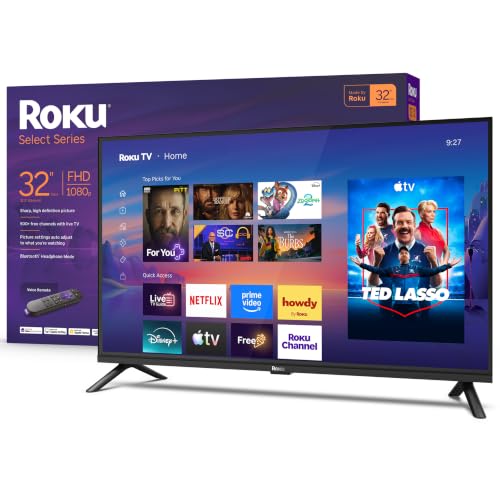
Roku 32-Inch Select Series TV — Simplest interface here
Roku’s Select Series television argues that the best voice experience is the one attached to the calmest interface in the business. Roku’s home screen remains a grid of honest tiles rather than a billboard, its voice remote searches across services with a neutrality Amazon’s platform does not attempt, and the listing adds a feature none of the Fire TV picks name: Bluetooth headphone mode, which sends the television’s audio to wireless headphones for private listening. In a shared house, that feature can matter more than the microphone.
The panel is a 32-inch full HD screen, a resolution step above the same-size Insignia, and the listing dates the model to the 2026 Select Series line. Roku voice control covers search, app launching and playback commands in the platform’s straightforward dialect, and the remote’s simplicity suits viewers who find Alexa’s broader smart-home ambitions surplus to requirements. Buyers furnishing a child’s room with an ear toward simple controls might also browse our best tvs for kids room guide, where physical fit leads and platforms follow; here, the Roku is the pick for the viewer who wants television first and an ecosystem never.
- Screen: 32 inches, 1080p full HD resolution
- Platform: Roku TV
- Voice: Roku voice remote included
- Audio extra: Bluetooth headphone mode for private listening
- Best rooms: bedrooms, guest rooms, shared houses
Strengths
- The least cluttered interface in this guide, with even-handed search.
- Bluetooth headphone mode is a genuinely differentiating household feature.
- Full HD resolution edges out the same-size HD competition.
Trade-offs
- Roku voice does not run an Alexa smart home; the ecosystems do not mix.
- Thirty-two inches keeps it in secondary-room territory.
- No larger Select sibling appears in this verified lineup for living rooms.
Best for: interface minimalists and households with late-night headphone viewers. Not suited for: Alexa smart-home households wanting one voice everywhere.

Samsung 32-Inch H5000F Smart TV — The Samsung-ecosystem pick
Samsung’s entry plays by different rules, and its listing says so: a 32-inch HD television running One UI on Tizen, with HDR, Object Tracking Sound Lite and Knox security named among its features. Its voice route is Samsung’s own assistant rather than Alexa or Roku voice, and the listing does not headline a voice remote, so buyers should confirm the exact remote and microphone arrangement on the listing before ordering. That caution is not a dismissal; it is the correct way to buy any television whose voice story is told by its platform rather than by a named remote.
What the Samsung offers instead is the polish of the world’s largest television maker at small size: HDR support unusual in the 32-inch HD class, a sound feature that attempts to follow on-screen action, and a security platform, Knox, that treats the television as the networked computer it is. For a household already inside Samsung’s phone and appliance world, that coherence is the argument. As a second television in a bedroom or kitchen, it brings a different flavour of smart to a guide dominated by Amazon, and some buyers will prefer exactly that independence.
- Screen: 32 inches, HD resolution with HDR support
- Platform: One UI Tizen, Samsung’s own system
- Voice: Samsung’s own assistant route; confirm remote details on the listing
- Audio: Object Tracking Sound Lite
- Security: Samsung Knox named in the listing
Strengths
- HDR at this size and class is a cut above the small-screen norm.
- An independent ecosystem for households avoiding Amazon’s platform.
- Samsung’s build and software polish in a compact, current-year model.
Trade-offs
- The voice hardware story needs listing confirmation before purchase.
- HD resolution, like the F20, suits secondary rooms best.
- Tizen’s app catalogue differs from Fire TV’s; check your essential services.
Best for: Samsung households and buyers who want a non-Amazon smart platform. Not suited for: shoppers who want the voice remote’s presence guaranteed by the title itself.
How Do the Six Picks Stack Up Against Each Other?
| Pick | Screen | Platform | Voice route | Distinguishing extra |
|---|---|---|---|---|
| INSIGNIA 32-Inch F20 Fire TV | 32-inch HD LED | Fire TV | Alexa voice remote | Free and live TV emphasis |
| INSIGNIA 40-Inch F40 Fire TV | 40-inch full HD LED | Fire TV | Alexa voice remote | The in-between size |
| INSIGNIA 55-Inch F50 Fire TV | 55-inch 4K LED | Fire TV | Alexa voice remote | Mainstream 4K balance |
| INSIGNIA 55-Inch QF QLED Fire TV | 55-inch 4K QLED | Fire TV | Alexa voice remote | QLED colour layer |
| Roku 32-Inch Select Series TV | 32-inch 1080p | Roku TV | Roku voice remote | Bluetooth headphone mode |
| Samsung 32-Inch H5000F | 32-inch HD, HDR | Tizen One UI | Samsung assistant route | Knox security, OTS Lite |
The table’s voice column is deliberately repetitive for four rows, and that repetition is information: within Fire TV, voice is a constant and the televisions differ as televisions. The real platform decision happens between the rows’ ecosystems, and it should be made on the household’s existing accounts, phones and smart-home loyalties, because switching voice ecosystems costs more friction than switching panel brands ever will.
How Do You Set Up Voice Control Properly on Day One?
Begin with the platform account, signed in before the television demands it mid-setup, and with the remote’s batteries confirmed fresh, since a weak remote masquerades as broken voice recognition. Run the platform’s own voice tutorial where one exists, speak three or four real searches aloud, and watch what the system returns; this calibrates your expectations and your phrasing together. Set the sleep timer by voice once, launch every installed app by voice once, and fix the household’s profile and content settings while the menus are still fresh in mind.
One small ritual separates delighted owners from disappointed ones: the household’s first voice search should be for something genuinely wanted that evening, a film already agreed upon, so the feature’s first memory is a success at a real task rather than a parlour demonstration. Let each person in the house issue that first search in turn, stumbles included, because the remote that has been laughed with once is never again treated as fragile laboratory equipment. Confidence, once installed alongside the accounts, tends to persist for the life of the television.
Then teach the humans. Voice control fails socially before it fails technically: a household where one person knows the commands and everyone else pokes at menus has bought half a feature. A two-minute demonstration, search, launch, pause, timer, converts sceptics, particularly the viewers who insisted the old remote was fine. Finally, place the remote’s home deliberately, a single habitual spot, because a press-to-talk system’s entire convenience evaporates when the microphone is inside the sofa. Households that also run voice through a phone app gain a backup remote on every handset, worth configuring on day one rather than during the first lost-remote emergency.
Which Platform’s Voice Suits Which Household?
Alexa’s case rests on breadth beyond the television: the same voice that finds a film can dim compatible lights, answer a doorbell camera or run a smart-home routine, so a house already speaking Alexa gains a screen that joins the conversation. Roku’s case rests on restraint: its voice does television things, thoroughly and neutrally, and declines to become a household operating system, which many viewers experience as peace. Samsung’s case rests on coherence with its own phones, appliances and services, a single manufacturer’s ecosystem with its assistant woven through.
None of these cases is objectively strongest; each is strongest inside a different house. The mistake is buying the panel first and discovering the ecosystem afterwards, because the ecosystem is what you will touch daily for years. Audit your home honestly: which assistant already answers your questions, which accounts already hold your watchlists, which phones sit on the coffee table. The answers point at a row of the comparison table more reliably than any picture specification. Readers setting up a workplace screen, where voice is rarely the point, will find the commercial angle covered in our best tvs for offices guide instead.
How Does Voice Control Change Everyday Viewing Habits?
Owners consistently report the same evolution: the first week is novelty, the second is habit, and by the second month the on-screen keyboard feels like a punishment from an earlier era. Channel and app surfing increases, because the cost of curiosity falls to a sentence; households discover programmes they would never have typed toward. Timers and playback commands become reflexes. Children adopt voice fastest and most fearlessly, which is delightful and occasionally chaotic when a shouted title interrupts a parent’s film, a household-governance question rather than a technical one.
There is a subtler effect on the remote itself. When speech handles search and settings, the physical remote’s remaining jobs shrink to volume, pause and power, and its design burden lightens accordingly. That is why these platforms’ remotes keep shrinking and why losing one feels so disabling: the small stick in the sofa cushions has become the television’s front door. Treat it accordingly, a named spot, fresh batteries, and a phone-app backup configured before it is needed.
What Should Privacy-Minded Buyers Understand About Voice Remotes?
The press-to-talk design shared by the Fire TV and Roku picks is, from a privacy standpoint, the conservative architecture. The microphone in the remote is active when its button summons it, rather than continuously sampling the room the way a smart speaker’s far-field array does. For households that declined smart speakers on principle, a voice remote is often the acceptable middle ground: the convenience of spoken search, purchased without an always-listening device. Platform accounts still record the requests you make, as they record typed searches, and each platform’s privacy dashboard lets account holders review and delete voice history, a settings page worth visiting in the first week rather than the first scandal.
Samsung’s arrangement deserves the same calm scrutiny rather than suspicion. Its assistant lives inside a platform that also carries the Knox security branding named in the listing, and the sensible buyer’s steps are identical across all three ecosystems: read the voice section of the listing, set up the account’s privacy controls at installation, and decide as a household which conveniences are switched on. Voice control is a feature with settings, not a surveillance sentence, and the owners who enjoy it most are the ones who configured it deliberately instead of accepting every default at speed.
Children change the privacy conversation in a practical direction. A voice remote lets a child summon content without an adult typing, which is liberating in a family room and worth governing in a bedroom. Platform parental controls, purchase PINs and viewing profiles exist on all three systems here and belong in the day-one setup list alongside the voice tutorial. The microphone is not the risk; the unsupervised account behind it is, and that is entirely within the buyer’s power to arrange.
How Do You Choose Between HD, Full HD and 4K in This Lineup?
Resolution in this guide follows screen size with unusual tidiness, and the logic is worth understanding rather than memorising. At thirty-two inches, the HD sets, the F20 and the Samsung, sit close enough in small rooms that their pixel count rarely becomes the complaint; the Roku’s full HD at the same size is a genuine refinement for viewers who sit near, at a desk or in a caravan. Forty inches earns full HD honestly, the F40’s specification, because the larger canvas starts to expose a lesser panel. At fifty-five inches, 4K stops being a luxury and becomes the correct match between canvas and content, which both big Insignias provide.
The buyer’s error to avoid is resolution shopping detached from distance. A 4K badge on a small screen viewed from across a room buys nothing visible, while an HD badge on a large screen viewed closely disappoints daily. Streaming services also gate their best streams behind their own tiers and connection speeds, so the panel’s ceiling is only one term in the equation. Judge the complete chain, screen size, viewing distance, service tier and platform, and the voice platform that organises it all, and the six picks sort themselves with surprising ease.
What Does Voice Add in Kitchens, Bedrooms and Shared Houses?
The kitchen is voice control’s finest room. Hands covered in flour, a pan demanding attention, a recipe video to pause and a timer to set: the F20 or the Samsung on a kitchen wall, spoken to rather than touched, behaves like an appliance designed for the room rather than a television visiting it. News at breakfast, a cooking programme at dinner, the weather asked aloud while the kettle boils; small screens with voice remotes collect these micro-uses until they become the most-used television in the house, a title big living-room sets rarely win.
Bedrooms reward a different command set: the sleep timer spoken from under a blanket, volume nudged without sitting up, a familiar series resumed by name in the dark. The F40’s extra inches serve the bed-distance viewer, and the Roku’s Bluetooth headphone mode serves the partner who fell asleep an hour ago, which may be the most marriage-friendly specification in this entire guide. Shared houses add the final scenario, the lounge where nobody’s account should dominate; Roku’s neutrality and any platform’s profile system both answer it, and a voice remote passed hand to hand is a more democratic interface than a phone app locked to one person’s account.
How Long Will a Voice Platform Stay Current?
Televisions outlive their software support more often than their panels, so the question deserves a direct answer in class terms. Mainstream platforms from Amazon, Roku and Samsung receive updates for years, and a set whose platform eventually slows can be supplemented by an external streaming device plugged into HDMI, which is an accessory route, never a pick in this guide, but a legitimate second life for a good panel. That upgrade path is another argument for buying the panel well: the QF’s QLED screen will still reward a future streaming box long after its built-in software ages, while a weak panel stays weak under every source.
Voice features themselves evolve by software rather than hardware, so today’s remote generally gains tomorrow’s commands through updates. The microphone does not wear out, the button does not become obsolete, and the household’s learned habits transfer. What dates a voice television is rarely its voice; it is the panel, the ports and the platform’s app catalogue, in that order, and the picks here were chosen to age gracefully on all three counts within their sizes.
What Commands Should Every Owner Learn in the First Week?
Start with search by title, then search by person, because the second teaches the platform’s breadth: asking for films with a favourite actor assembles a filmography faster than any browsing. Learn to launch apps by name and to switch inputs by name, the two commands that eliminate the home screen entirely for routine viewing. Master the playback vocabulary next, pause, resume, rewind a stated amount, skip ahead, since these are the commands used hourly rather than daily. Add the sleep timer, the volume in absolute terms where the platform allows it, and the settings shortcuts for captions and picture mode, which rescue film nights from menu expeditions.
Households with smart lighting or other Alexa-compatible equipment gain a second curriculum on the Fire TV picks: scenes and routines spoken from the sofa. That expansion should be deliberate, one device group at a time, tested from the chair where it will actually be used. Roku households trade that breadth for focus, and their curriculum is correspondingly shorter and, some owners insist, better learned. Samsung households sit between, with the manufacturer’s own device family the natural first additions. In every ecosystem, the pattern is the same: a dozen mastered commands transform the television, while a hundred half-known ones merely decorate a manual nobody opens.
How Should You Judge a Voice Television in a Shop or Listing?
Read the listing the way this guide was built: remote first, platform second, panel third. Confirm the remote is described as a voice remote in words, not merely photographed with a microphone icon, and note which assistant it summons. Confirm the platform and check your essential services against its catalogue, because a voice that cannot call your programmes is a parlour trick. Then judge the television as a television, size against room, resolution against distance, panel tier against the films you love. A shop demonstration adds one more test: speak a search at the volume of a real living room, over real background noise, and watch whether the system hears the sentence you actually say at home.
Price promotions scramble this order deliberately, putting a discounted panel in front of buyers whose ecosystem it does not fit. Resist by pricing the whole arrangement: the television, the years of platform friction or ease, and the accessories the setup implies. The cheapest set in this guide, bought in the wrong ecosystem, costs more across five years of daily use than the right platform bought at full price, a sum paid in irritation rather than currency and therefore easy to overlook at the till.
Why Do Two Televisions With the Same Voice Sound So Different in Use?
Because voice is an interaction, not a component, and interactions inherit everything around them: the platform’s speed, the remote’s button placement, the account’s profiles, the room’s noise and the household’s habits. Two Fire TV sets in this guide share a voice system yet serve a kitchen and a living room so differently that their owners would describe different products. This is why the guide resists crowning a single winner and instead maps each pick to the room and viewer it suits. The microphone is identical; the life around it is not, and buying well means matching the life, not merely the microphone.
It also explains why voice control reviews written from a test bench miss the point. Recognition accuracy measured in a quiet studio tells a buyer little about a remote used over a boiling kettle or a sleeping baby. The honest measures are domestic: how many commands survive your kitchen, how quickly a grandparent learns the system, how gracefully it fails when it mishears. Every pick here was chosen to fail gracefully, returning editable search text rather than confident nonsense, which across a year of evenings is the difference between a feature and a frustration.
How Does Voice Control Serve Older Viewers and Mixed-Ability Households?
Remote controls have been shrinking for decades while the eyes and hands using them have not, and voice quietly reverses that mismatch. A viewer who cannot read a crowded on-screen keyboard can still say a programme’s name. A viewer whose hands ache can still hold a remote loosely and press one button. Families buying a television for an older relative consistently rank this quality first once they witness it, because it returns independent channel-changing to someone who had begun asking for help, and independence, not resolution, is the luxury good in that purchase. The F20 and the Roku Select, small and uncomplicated, are the picks most often suited to that role, with the Roku’s plain grid giving it a particular following among viewers who dislike being marketed at by their own television.
Setup, in these households, is a family task with a long fuse: configure the account, the profiles and the favourite apps before the television is gifted, then teach five commands rather than fifty. Write the commands on a card that lives with the remote, in large print, without embarrassment; the card will be used for a fortnight and then, usually, not at all, because spoken search is learned by the voice and the hands together. Follow up in a month to add the timer and the headphone trick where the platform offers it. Voice control’s reputation as a young person’s toy survives mostly among people who have not watched a grandparent order a beloved old film by name and settle back, remote down, entirely in charge.
What Should You Do When the Television Mishears You?
First, shorten the sentence. Voice systems parse titles and names best when the request is mostly title: say the programme, then the service if needed, and let the results screen handle ambiguity. Second, move the remote nearer your mouth and lower the room’s competing noise for the three seconds the command takes; recognition is a signal problem before it is a software problem. Third, check the boring culprits, remote batteries fading, a platform update pending, a profile signed in that lacks the service being requested. Each of these masquerades as deafness and each is cured in minutes.
Persistent mishearing of one person’s voice is usually an accent or pitch the system handles less well, and the remedies are patience, alternative phrasings and the platform’s voice-training options where offered. What should not happen is the household abandoning the feature after a bad first evening; recognition improves as users unconsciously adapt their phrasing, and the second week of voice control is measurably smoother than the first in almost every home. Judge the feature across a fortnight, as you would a new pair of shoes, rather than across the unboxing hour when everything about the television is unfamiliar at once.
How Does Voice Control Interact With Soundbars, Headphones and Other Remotes?
A living-room television rarely controls only itself for long. A soundbar arrives, and with it the question of whose volume the voice remote commands; where the television and bar are linked by HDMI with consumer-electronics control enabled, the television’s remote, voice included, usually conducts the whole arrangement, which is the setup to aim for and to test on installation day. The Roku’s Bluetooth headphone mode answers the opposite situation, sound privatised rather than amplified, and it does so without extra hardware, a trick the Fire TV picks do not claim in their listings and which headphone households should weigh seriously at the 32-inch size.
Universal remotes and platform phone apps complicate the picture helpfully. The app remotes replicate voice on platforms that support it through the phone’s own microphone, giving every household member a personal voice remote and the lost-remote problem a standing solution. What none of these arrangements changes is the picks themselves: the televisions above remain the purchases, and every bar, handset and spare remote is supporting cast. Buy the screen and platform first, integrate the sound second, and the voice experience will feel designed rather than accumulated.
Which of These Televisions Belongs in a Rental, a Dorm or a Second Home?
Shared and temporary housing sharpens the platform question, because accounts follow people home. In a rental property, a voice television signed into the owner’s accounts is a small liability and a confusion for guests; the clean arrangement is a platform signed into a household account created for the property, with purchase controls locked, or a set guests drive from their own devices. Roku’s guest-friendly simplicity gives the Select Series a following in this role, while the F20’s size suits the spare-room television that guests actually use. Dorm rooms reward the same small picks plus the headphone consideration, where the Roku’s Bluetooth mode again distinguishes itself in a building full of sleeping neighbours.
Second homes add the power-cut problem: a television that wakes after an outage demanding updates and sign-ins tests holiday patience, so choose the platform your household already knows, since re-entering familiar accounts is minutes rather than an evening. Voice control, in these occasional-use settings, earns disproportionate gratitude, because nobody remembers where anything lives in a menu they visit six weekends a year, while saying the programme’s name works on the first evening of every stay.
What Role Does Voice Play in a Household With Several Televisions?
Multi-set homes discover a consistency dividend: when every television speaks the same platform’s language, the household learns one dialect and every room obeys it. A guest moving from the F50 in the lounge to the F20 in the kitchen carries their habits with them, and children stop re-learning the house at every doorway. Mixed-platform homes are not doomed, plenty run happily, but each additional dialect taxes exactly the viewers voice was meant to help, the occasional user who never builds fluency. Where a home already owns one platform’s set and likes it, that loyalty is a legitimate, even decisive, argument when the next screen is chosen, and it is why this guide groups its verdicts by ecosystem as much as by screen.
The counter-argument deserves its sentence too: rooms have genuinely different needs, and a Samsung in the study for its ecosystem fit, beside Fire TV in the lounge, is a rational mosaic rather than a failure of discipline. The line between mosaic and muddle is whether each choice was made for a room’s reason or by accident of a passing discount. Voice control rewards intention; it forgives very little drift, because drift is paid for in the small daily currency of the wrong assistant answering from the wrong screen.
What Are the Most Common Voice Television Mistakes?
The expensive mistake is expecting a smart speaker. Buyers who imagine calling across the room at these televisions, hands-free, have purchased a press-to-talk remote system and will feel cheated by a limitation the listings never hid. Read the voice route before ordering, and if far-field listening is truly the requirement, shop that specific feature by name rather than assuming it. The second mistake is platform blindness, choosing a panel on a deal and inheriting an ecosystem the household dislikes, a friction paid daily. The third is neglecting the remote: dead batteries blamed on the television, a lost remote blamed on the platform, when both are housekeeping.
Fourth comes the unexamined account. A voice platform signed into the wrong household profile fills recommendations with a teenager’s viewing history and answers with the wrong watchlist, so set profiles up deliberately at installation. Fifth, buyers forget that voice search cannot summon services the platform lacks; verify your essential apps exist on the chosen system before the box is opened, not during the first film night. Each of these mistakes is a sentence of reading prevented, which is the cheapest insurance in consumer electronics.
Final Recommendation
For most living rooms, the F50 is the balanced answer, 4K size with Alexa doing the searching, while the QF QLED earns its premium for viewers who will keep the set long enough for colour to repay them daily. Smaller rooms divide by taste: the F20 for Fire TV value, the Roku Select for interface calm and headphone nights, the Samsung for households loyal to its ecosystem, and the F40 when a bedroom wall simply wants more canvas. Whichever row of the table you choose, choose it for the voice you already speak at home, and the television will feel less like a new gadget and more like a household member who finally listens.
Frequently Asked Questions
Do any of these televisions listen to the room hands-free?
Not on the evidence of their listings. The Fire TV and Roku picks take voice through a microphone in the remote, pressed and spoken into, and the Samsung routes voice through its own assistant arrangement, which buyers should confirm on its listing. If a set offered far-field microphones, that would be a headline feature; its absence from these titles is the answer.
Can Alexa on these televisions control my smart home?
The Fire TV picks speak through Alexa, the same assistant ecosystem that runs Amazon’s smart speakers, so compatible smart-home control is part of the platform’s design. The depth of control depends on the devices in your home and your account setup, and the television’s remote becomes one more Alexa microphone among them, a deliberate, button-pressed one.
What happens when the voice remote is lost or its batteries die?
The television keeps working through its platform’s phone app and whatever basic controls remain, and replacement remotes for each platform are sold as accessories. That is also why this guide never lists a remote as a pick: the accessory restores a television’s voice, but the television is the purchase that matters, and configuring the phone app on day one is the free insurance.
Is voice search better on one platform than the others?
They differ in temperament more than competence. Fire TV’s search leans into Amazon’s ecosystem, Roku’s is famously even-handed across services, and Samsung’s serves its own platform’s catalogue. All three handle titles, actors and app launching well; the better search is the one whose results match the services your household actually subscribes to.
Does voice control help viewers with accessibility needs?
Genuinely, yes. Speaking a title is easier than typing it with arrow keys for many viewers, and commands for playback, timers and inputs reduce the fine motor work a traditional remote demands. It is not a complete accessibility solution, and platform screen-reader and magnification features matter alongside it, but as one layer of independence it earns its place.
Does a voice remote need Wi-Fi to work at all?
The remote’s button presses travel to the television directly, but the voice request itself is processed with the help of the platform’s online services, so a working home network connection is part of the arrangement. When the internet drops, these televisions fall back to behaving like ordinary sets: channels and inputs still change, while spoken search waits for the connection to return. Buyers in homes with unreliable broadband should weigh that dependency honestly, and everyone should learn the manual path to their favourite channel before the first outage teaches it under pressure, mid-final, with the whole household watching the troubleshooter instead of the match.
Should I choose the F50 or the QF QLED at 55 inches?
Choose by what you watch and how long you keep televisions. Colour-rich film, animation and games repay the QLED panel daily, while news, sport and general streaming look satisfying on the F50’s LED and leave money for sound. The voice experience is identical, so the decision is honestly about the picture and the budget, never the microphone.
Related Guides
When screen size outranks speech, our best 75 inch 4k tvs roundup covers the giants, and for screens bought for small viewers rather than voice, see the best tvs for kids room guide.
For the screen that travels to the parking lot instead, best tailgating tvs ranks the battery-powered options.
Related guides
- Best 1080p IP Cameras: PoE Domes, Turrets, Bullets and a PTZ That Earn Their Cable
- Best 43 1080p TVs: Why 43 Inches Went 4K — and Where True Full HD Survives
- Best Doorbell Cameras No Subscription: Local Storage Picks, and the Ring/Blink Truth
- Best AC Powered Wireless Security Cameras: Wi-Fi Data, Mains Power, Zero Sleep


