What's inside
- Key Takeaways
- Quick Picks
- How Did We Choose These Signage Screens?
- What Actually Makes a Display a Signage Display?
- How Bright Does a Shop Screen Really Need to Be?
- Which of These Six Screens Fits Your Counter, Window or Wall?
- What Does a Content-Management System Actually Do All Day?
- Portrait, Landscape or Split Screen — Which Layout Earns Its Wall?
- How Do the Six Signage Picks Compare Side by Side?
- How Do You Set Up a Signage Screen That Staff Will Actually Maintain?
- What Mistakes Do First-Time Signage Buyers Keep Making?
- What Does Signage Really Cost Once the Screen Is on the Wall?
- Which Size Screen Reads Best from Which Distance?
- How Should the Content Itself Be Designed So People Read It?
- How Do Network and Security Choices Affect a Signage Screen?
- What Changes When One Screen Becomes Five?
- Final Recommendation
- Frequently Asked Questions
- Related Guides
As an Amazon Associate I earn from qualifying purchases. This post may contain affiliate links at no extra cost to you.
gizmoverdict.com is reader-supported. When you buy through links on our site, we may earn an affiliate commission.
Where to buy: Every screen below links to its Amazon listing, where you should read the mounting pattern, the warranty terms and the exact model code before ordering, because commercial displays are sold in families whose members differ by a single letter and a very different feature set.
Finding the best inexpensive tvs for digital signage starts with admitting what the job actually is. A menu board above a café counter, a daily-specials screen in a shop window, a welcome display in a salon reception — none of these is a television in the living-room sense. The screen runs from opening to closing, shows content that barely changes for hours at a time, gets read from two metres away by people who are standing up, and is managed by whoever on staff drew the short straw. A cheap consumer set can do that job for a few months. The screens gathered here are the affordable end of the commercial display world, built to do it for years: they carry content-management software or compatibility with it, they mount flat and in some cases vertically, and several are bright enough to stay legible under shop lighting that would wash a lounge panel grey.
Inexpensive, in this guide, is a relative term and we use it honestly. Commercial signage displays cost more than a same-size television from a supermarket shelf, because the panel, the power supply and the warranty are specified for daily duty rather than evening viewing. What makes these six the inexpensive end is that they stop short of the flagship signage lines: no video-wall processors, no outdoor enclosures, no exotic sizes. If your need is a lobby screen that also hosts meetings, our companion guide to the best tvs for offices covers that neighbouring job; this page is about retail and menu-board duty specifically, where the content matters more than the conference call.
Key Takeaways
- The content-management system is the real product here: a screen with a built-in CMS or a free CMS tier saves a separate player box, a subscription, or both.
- Only two picks state a brightness figure in their listings — 1,000 nits on the Canlarriz and on the 43-inch menu-board display — so treat every other panel’s brightness in class terms and check the listing before a window installation.
- Portrait mounting separates genuine signage hardware from televisions pressed into service, and it matters most for menus, directories and tall promotional artwork.
- Two picks are 75-inch screens; the rest sit at 43 to 55 inches, which is where most counters, windows and café walls actually land.
- Scheduled on and off times, set once in the CMS, quietly save more staff effort than any single picture specification on this page.
Quick Picks
| Pick | Badge | Why it earns its place |
|---|---|---|
| Samsung 50-Inch QMC Commercial Display | Most polished mid-size board | Samsung’s QMC line in a slim 50-inch body, with the calibration and remote-management polish a chain of shops would appreciate. |
| Samsung 55-Inch BEFX-H Business Pro TV | Easiest first signage screen | A business television that speaks CMS out of the box, for owners who want signage without learning a new trade. |
| Canlarriz 50-Inch Digital Signage Display | Brightness-led value | A stated 1,000-nit panel with Android onboard and a free CMS for remote content, aimed squarely at restaurants and retail. |
| HORION 75-Inch Commercial Display | Big-wall statement | Seventy-five inches of all-in-one signage with wireless casting, for a feature wall that has to be read across a showroom. |
| LG 75-Inch PK340S Commercial TV | Platform pick at large size | LG’s webOS 25 signage platform with a built-in CMS, in the largest size here, from a maker with deep commercial support. |
| 43-Inch 4K Digital Signage Display | Menu-board specialist | A 1,000-nit Android 14 board with split-screen layout tools, sized and specced for the wall above a service counter. |
How Did We Choose These Signage Screens?
We began from a simple filter: could a small business run this screen all day, every day, showing content it controls, without bolting a separate media player to the back? Models that answered yes through a built-in content-management system, a vendor CMS platform, or an onboard Android system with a bundled CMS made the shortlist. Models that were ordinary televisions with a signage-flavoured marketing line did not, however low their price, because the hidden costs arrive later — a player box to buy, a subscription to feed, a consumer warranty that excludes exactly the use you bought it for.
Brightness was judged only on evidence. Two listings state a figure, 1,000 nits, and those two picks may claim it. The Samsung and LG panels state no nit number in their titles, so this guide describes them the way a careful buyer should think of them: commercial panels intended for lit interiors, whose exact output you confirm on the listing and in the maker’s documentation before committing one to a sunlit window. Any guide that prints brightness numbers a listing never gave is inventing them, and invented numbers on a purchase this size are how shops end up with a screen nobody can read at noon.
Size coverage was the third test. Signage fails at both extremes: too small and the menu is a rumour, too large and the mount, the wall and the budget all protest. The six picks span 43 to 75 inches so that a coffee counter, a salon window and a car showroom can each find a proportionate answer, and the two big screens are here because some spaces — a gym floor, a dealership — genuinely read better at that scale.
What Actually Makes a Display a Signage Display?
The panel is the least of it. What separates a signage display from a television is the system around the glass: software that decides what appears, a schedule that decides when, and hardware that tolerates being asked the same question twelve hours a day. A television expects a viewer with a remote. A signage display expects an owner with a content calendar, and everything in its design follows from that difference.
Content management is the centre of gravity. In practice it means you prepare a playlist — menu pages, photographs, a video loop, a notice about holiday hours — and the screen cycles it without anyone touching a remote. The better systems let you change that playlist from a phone or a laptop in another building, which is why the picks here emphasise built-in CMS platforms and CMS compatibility rather than raw picture specifications. A franchise owner updating prices across three locations cares about that remote edit more than about any colour metric.
The second separator is orientation. Televisions are landscape objects. Signage often is not: a directory beside a lift, a tall promotional panel in a window, a menu column beside a till all want portrait. Commercial displays are built and warrantied to run rotated, with bezels and cooling arranged for it. If your layout is portrait, that single fact should steer you to genuine commercial hardware and away from a rotated consumer set whose maker never agreed to that arrangement.
Finally there is the matter of hours. A screen above a counter may run from before the first customer to after the last, seven days a week, showing a menu whose pixels mostly sit still. Commercial panels are specified, powered and cooled with that duty in mind, and their warranties say so. The honest framing is not that a cheap television will fail on a known date; it is that its maker never promised it would not, and the commercial premium is largely the price of that promise.
How Bright Does a Shop Screen Really Need to Be?
Brightness questions cause more signage regret than any other, usually because the buyer pictured the screen in the room as it felt at viewing time and forgot the room as it is at midday. A panel that looks rich under evening lighting can turn to milk when a low sun comes through the storefront. The two picks that state 1,000 nits — the Canlarriz and the 43-inch menu-board display — are stating a figure aimed at exactly that hostile case, bright interiors and window-adjacent mounting. For a screen on an interior wall away from direct sun, a commercial panel of unstated but conventional output is generally adequate, and the money saved can go to a second screen.
There is a trap in the opposite direction, too. Maximum brightness run all day costs electricity, generates heat in a slim enclosure, and can make a small café feel like an airport at night. Most CMS platforms let you schedule brightness by time of day, brightening for the lunch rush and easing off in the evening. Set that schedule once and the screen adapts to the room’s rhythm instead of fighting it, which is a more useful feature than a few extra nits nobody needed after dark.
Legibility is not brightness alone. Text size, contrast between lettering and background, and the distance of the furthest reader decide whether a menu works. A 50-inch screen with generous type beats a 65-inch screen crammed with small print, and the split-screen layouts offered by the Android boards below are only helpful if each zone stays readable. Design your content at the size the wall demands, then choose the panel; reversing that order is how businesses buy big screens that still cannot be read from the queue.
Which of These Six Screens Fits Your Counter, Window or Wall?

Samsung 50-Inch QMC Commercial Display — Most polished mid-size board
The QMC is Samsung’s considered answer to the mid-size signage brief: a 50-inch commercial panel, notably slim at 28.5 mm of depth according to its listing, with Dynamic Crystal Color and a Quantum Processor Lite 4K driving the picture. In a boutique, a clinic reception or an estate agency window, that shallow profile matters more than it sounds — the screen sits close to the glass or the wall, reads as part of the architecture rather than as equipment, and leaves the space in front of it for the merchandise that pays the rent.
What lifts the QMC above a generic board is the management layer Samsung wraps around it: SmartView+ and Smart Calibration appear in the listing because shops running several screens need them to agree with each other. Two panels side by side showing the same brand colour at slightly different temperatures look like a mistake even to customers who cannot name what is wrong. A single polished location may never touch calibration tools; a small chain will bless them the first time a promotion has to look identical in three windows. Buy this one when the screen is part of your brand presentation, not merely a noticeboard.
Consider how the QMC behaves across an ordinary trading week, because that rhythm is what you are buying. In the morning the schedule wakes it before the first delivery arrives, showing the day’s opening content without anyone fetching a remote from a drawer. Through the day the playlist rotates promotions between the permanent notices, and when head office — or the owner, from a laptop at home — pushes a price change, the screen takes it in stride. At close of business it dims and sleeps on its own. None of that requires the QMC specifically; it requires a managed commercial platform, and Samsung’s implementation is simply one of the most practised. The premium over a generic board buys the confidence that each of those small events happens unremarked, every day, which is the entire point of signage that a business can forget about.
- Size and resolution: 50 inches, 4K UHD commercial panel
- Depth: 28.5 mm as stated in the listing
- Colour and processing: Dynamic Crystal Color, Quantum Processor Lite 4K
- Management features named in the listing: SmartView+, Smart Calibration
- Model code: LH50QMCEBGCXGO — confirm the exact variant on the listing
Strengths
- Slim cabinet suits window and wall mounting where a chunky housing would intrude
- Calibration tooling keeps multiple screens visually consistent across a small estate
- Samsung’s commercial line carries the support structure a business buyer actually uses
Trade-offs
- No brightness figure is stated in the listing, so a sun-struck window needs verification first
- Fifty inches is mid-size: a long counter may still want the larger boards below
- Its polish is wasted on a back-room notice screen nobody photographs
Best for: brand-conscious shops and clinics wanting one refined screen per location. Not suited for: buyers whose first requirement is a stated high-brightness figure for direct sun.

Samsung 55-Inch BEFX-H Business Pro TV — Easiest first signage screen
Some owners want signage results without adopting signage as a hobby, and the BEFX-H is built for them. It is a 55-inch 4K business television whose listing leads with CMS compatibility — the screen is designed to work with content-management platforms rather than demanding a dedicated player and a learning curve. For a first installation in a café, a gym or a places-of-worship foyer, that compatibility is the difference between content updated weekly and content that froze in the month the screen was installed.
The television heritage is a feature here, not a compromise. Staff already understand a TV-shaped object: it has speakers, it can show a match on a big afternoon, it behaves familiarly when the signage playlist is not running. The business layer — the CMS pathway, the commercial positioning — sits underneath that familiarity. If your venue mixes duties, signage by day and live sport or a presentation in the evening, this hybrid character fits the real pattern of use better than a purist display that does one job sternly.
- Size and resolution: 55 inches, 4K UHD
- Signage pathway: CMS-compatible, per the listing title
- Line: Samsung Business Pro TV, BEFX-H series
- Model code: LH55BEFHLGFXGO — check regional variant before ordering
- Form factor: television-style with built-in speakers
Strengths
- CMS compatibility without a separate player keeps the first installation simple
- Fifty-five inches reads well across a café or a gym floor without dominating either
- Familiar television behaviour lowers the training burden on rotating staff
Trade-offs
- Purist signage features such as elaborate scheduling depth depend on the CMS you pair with it
- No nit figure is offered in the listing, so window duty needs a listing check
- A dedicated display like the QMC offers finer multi-screen calibration tooling
Best for: a first signage installation where staff confidence matters as much as specifications. Not suited for: multi-site estates needing the deepest built-in management platform.

Canlarriz 50-Inch Digital Signage Display — Brightness-led value
The Canlarriz makes its argument in one number its listing is willing to print: 1,000 nits. That is brightness aimed at lit retail floors and windows where lesser panels fade, and pairing it with a 50-inch 4K panel, an Android system with 4GB of memory and 32GB of storage, and a free CMS for remote content management produces a package clearly aimed at restaurants and shops that want capability without a platform subscription. The listing says as much, naming retail, restaurants and business advertising as its home ground.
Android onboard changes the daily experience in a practical way. Content apps, menu tools and the CMS live on the screen itself; updating a price means opening the management interface, not finding the one laptop with the right file on it. The free CMS is the headline for budget-conscious buyers, but read its terms on the listing as you would any software offer, and confirm the remote-management features your sites need are inside the free tier rather than behind an upgrade. Hardware this open also rewards a tidy setup: remove demo applications, lock the settings behind a PIN, and the board becomes a appliance rather than a gadget.
- Size and resolution: 50 inches, 4K UHD commercial screen
- Brightness: 1,000 nits as stated in the listing
- System: Android, 4GB RAM, 32GB storage
- Software: free CMS for remote content management, per the listing
- Intended settings named by the maker: retail, restaurants, business advertising
Strengths
- Stated four-figure brightness suits bright floors and window-adjacent walls
- Onboard Android plus a bundled CMS removes the separate player from the budget
- Remote content management fits owners who run more than one premises
Trade-offs
- A lesser-known brand means support runs through the seller rather than a national commercial network
- The free CMS tier’s limits must be checked against your number of screens
- Android openness needs locking down so customers cannot wander into settings
Best for: restaurants and retailers who need legibility under strong light and remote updates. Not suited for: buyers who want a global brand’s on-site commercial warranty behind the panel.
HORION 75-Inch Commercial Display — Big-wall statement
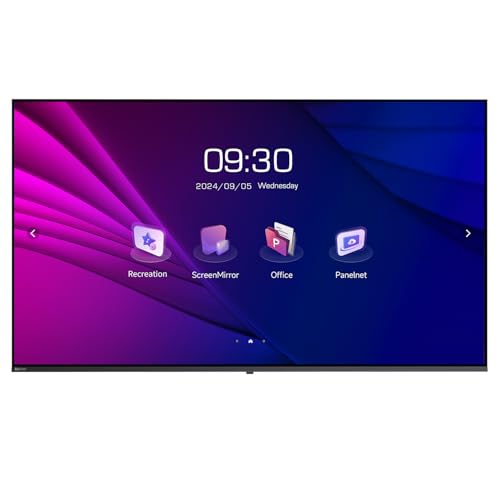
Scale is this HORION’s whole proposition: 75 inches of 4K commercial display, presented by its maker as an all-in-one signage and conference monitor with wireless casting, HDMI, WiFi and built-in speakers. In a car showroom, a gym, a large café or a training room, a screen this size stops being a notice and becomes part of the room’s furniture — timetables, promotional films and class schedules all read from the far wall without squinting, and the casting support lets the same screen take a laptop’s output when the space turns from display to meeting.
An all-in-one at this size also simplifies the installation bill. Speakers are inside, the smart system is inside, the casting receiver is inside; the installer hangs one object, connects power and network, and leaves. The counterweight is that 75 inches is a commitment — wall structure, viewing distance and the sheer presence of the thing all need a room that was ready for it. Measure the wall, stand where the furthest viewer stands, and be honest about whether the space flatters a panel this large or is bullied by it.
- Size and resolution: 75 inches, 4K UHD commercial display
- Connectivity named in the listing: wireless casting, HDMI, WiFi
- Audio: built-in speakers
- Roles named by the maker: digital signage and conference monitor
- Settings named by the maker: business office, retail, classroom
Strengths
- Seventy-five inches carries content across large rooms without a second screen
- All-in-one design with casting covers signage and presentation with one installation
- Built-in speakers avoid an audio run for announcements and ambient video
Trade-offs
- Needs a wall and a room proportioned for it; small premises should look at the 50-inch picks
- No brightness figure appears in the listing for window-duty calculations
- At this size, delivery and mounting are two-person, plan-ahead jobs
Best for: showrooms, gyms and large hospitality spaces with one dominant wall. Not suited for: narrow counters or any room where viewers stand within a metre or two of the glass.

LG 75-Inch PK340S Commercial TV — Platform pick at large size
LG’s entry pairs the joint-largest panel here with the platform argument: webOS 25 in its Smart Signage form, a built-in CMS, and HDR10 on a 75-inch UHD screen. Where the HORION sells the all-in-one hardware bundle, the PK340S sells the operating system and the ecosystem behind it. webOS signage is a known quantity to installers and IT staff, content tools for it are plentiful, and a business already running LG commercial screens elsewhere adds this one to an existing workflow instead of learning a second.
The built-in CMS deserves its emphasis. Content scheduling, playlist management and screen control living inside the television removes the external player that so often becomes the failure point — the forgotten box, the dead subscription, the HDMI input nobody remembers selecting. For hospitality and office-adjacent signage, a lobby directory or a floor-by-floor welcome rotation, that self-containment keeps the system understandable to whoever inherits it. Staff turnover is a real factor in signage; platforms that a new manager can comprehend in an afternoon outlast cleverer systems that only their installer understood.
There is a hospitality scenario where this LG makes particular sense, and it is worth picturing. A hotel or a large venue runs a welcome rotation in the lobby, event listings by the lifts, and a function-room directory that changes with the day’s bookings. Three different content shapes, one platform, updated from the reception desk or a manager’s office. A 75-inch screen anchors the lobby end of that system with genuine presence, while the platform habits the staff learn on it transfer to every smaller LG board the venue adds later. Buy the PK340S as the flagship of a system and its size reads as leadership; buy it as a lone trophy for a small room and the same size reads as excess. Context, as ever, is the specification that decides.
- Size and resolution: 75 inches, UHD 4K commercial TV
- Platform: webOS 25 Smart Signage, per the listing
- Software: built-in CMS named in the listing title
- HDR: HDR10 stated in the listing
- Settings named by the maker: business, hospitality, office use
Strengths
- webOS signage platform is widely understood by installers and content providers
- Built-in CMS removes the external player and its subscription from the chain
- Large-format presence with a mainstream commercial brand behind it
Trade-offs
- Seventy-five inches demands the same wall and distance checks as any big panel
- The listing states no nit figure, so storefront-window use needs verification
- Platform depth exceeds what a single static menu board will ever use
Best for: businesses standardising on LG’s signage platform across one or more sites. Not suited for: a tiny venue where a 43-inch board and a simple playlist would do the whole job.

43-Inch 4K Digital Signage Display — Menu-board specialist
Every element of this unbranded 43-inch board points at the wall above a counter. The listing states 1,000 nits of brightness, a 4K UHD panel, Android 14.0, 4GB of memory with 64GB of storage, wall mounting, and a smart split-screen feature — a combination that reads like a checklist written by someone who has watched a lunch queue squint at a dim menu. Split-screen matters in this setting more than anywhere: mains on the left, drinks and prices on the right, a promotional photograph cycling in the third zone, all from one screen and one content file.
Forty-three inches is also the honest size for a great many counters. It hangs where a row of printed boards hung before, reads from the queue’s length, and leaves budget for the second screen a growing menu eventually needs. Android 14 onboard means menu applications and the owner’s content tools run natively, and the generous storage holds video loops locally so a broadband hiccup does not blank the board mid-service. For a single-site restaurant or takeaway, this is the pick that behaves most like a purpose-bought appliance.
- Size and resolution: 43 inches, 4K UHD advertising screen
- Brightness: 1,000 nits as stated in the listing
- System: Android 14.0, 4GB RAM, 64GB storage
- Layout feature: smart split screen named in the listing
- Mounting: wall mount orientation, for menu-board installation
Strengths
- Stated high brightness keeps menus legible under counter lighting and daylight spill
- Split-screen layouts combine menu, prices and promotion on a single panel
- Large local storage keeps video content playing through connection dropouts
Trade-offs
- Unbranded hardware means documentation and support are thinner than Samsung or LG
- Forty-three inches is counter scale; a showroom wall will swallow it
- Menu software quality depends on the application you choose to run on it
Best for: restaurants, cafés and takeaways replacing printed menu boards. Not suited for: estates needing a vendor-managed platform with central calibration across dozens of sites.
What Does a Content-Management System Actually Do All Day?
Owners nod at the letters CMS in the showroom and then discover, a month later, that the software is the job. Strip the jargon away and a content-management system performs four chores. It stores your content — menu pages, photographs, price lists, short videos — in one organised library. It arranges that content into playlists, deciding what follows what and for how long each item holds the screen. It schedules those playlists against the clock and the calendar, so breakfast disappears at eleven and the Christmas opening hours appear in December without a human remembering either. And it reports back, confirming which screens are alive, what they are showing, and whether one of them has quietly gone dark.
Each chore hides a practical question worth asking before purchase. Storage: does content live on the screen, in the maker’s cloud, or both — and what happens to a board whose internet drops mid-service? The Android picks with generous local storage keep playing through an outage because the playlist already sits on the device; a purely streamed system shows a spinner where the soup of the day should be. Arrangement: can the playlist mix a photograph, a video and a designed page, or does the system only rotate images? Restaurants increasingly shoot a ten-second clip of the special being plated, and a CMS that cannot schedule video beside stills will frustrate that instinct within weeks.
Scheduling depth separates the platforms more honestly than any feature list. A single café needs dayparts — morning, lunch, evening — and a holiday override. A gym needs class timetables that change by weekday. A chain needs the same promotion to land in every window on the same morning and expire everywhere at once. The Samsung and LG platforms were built by companies that sell into those multi-site estates, and their scheduling shows it. The bundled free CMS on the Canlarriz covers the single-site and small-chain pattern well; the discipline is to map your real calendar against the software before the screens multiply, because migrating a dozen boards between platforms is nobody’s idea of a quiet week.
Reporting is the chore nobody values until a screen fails silently. A dashboard that shows a red dot beside the board in your second location saves the embarrassment of a customer mentioning that the menu has been black since Tuesday. Even a simple heartbeat check — the screen confirming it is alive and current — justifies the platform approach over a USB stick. When you compare the six picks, you are really comparing how much of this invisible labour each system absorbs, and the cheapest screen to buy is occasionally the most expensive one to babysit.
Portrait, Landscape or Split Screen — Which Layout Earns Its Wall?
Orientation is a content decision disguised as a hardware decision. Landscape suits menus that read like documents — items in columns, prices aligned, a photograph anchoring one side — and it suits video, which is born wide. Portrait suits anything that behaves like a poster: a tall promotional image, a directory, a price column for a barber or a salon, a social-media-style feed. The commercial panels here are built to run either way, which frees you to choose by content rather than by what the bracket allows. Design the artwork first, on paper, at the wall’s real proportions; the orientation usually announces itself.
Split-screen layouts deserve a cooler head than showrooms give them. Dividing a 43-inch board into three zones makes each zone small, and small zones punish small type. The menu-board pick’s split feature earns its keep when the zones have genuinely different jobs — the menu static on the left, a rotating special on the right, perhaps a thin banner with the Wi-Fi code or a queue number along the bottom. It fails when owners split for the pleasure of splitting and produce a screen that looks busy from the door and says nothing from the queue. One message per glance is the rule; a passer-by gives a board about three seconds, and a board that spends those seconds on five messages has spent them on none.
There is also the question of the second screen. Two 50-inch boards side by side often serve a long counter better than one 75-inch panel, because the content can separate — food on one, drinks on the other — and because a failure darkens half the menu rather than all of it. The estate thinking matters here: identical mid-size screens are easier to calibrate to match, easier to replace, and easier to re-deploy when the business rearranges its floor. Buy the wall you have, but think in screens you can shuffle.
How Do the Six Signage Picks Compare Side by Side?
| Pick | Size | Content system | Stated brightness | Natural home |
|---|---|---|---|---|
| Samsung QMC | 50-inch | Samsung signage platform with SmartView+ | Not stated in listing | Boutiques and clinics |
| Samsung BEFX-H | 55-inch | CMS-compatible business TV | Not stated in listing | First-time signage venues |
| Canlarriz | 50-inch | Android with free CMS | 1,000 nits | Bright retail and restaurants |
| HORION | 75-inch | All-in-one with wireless casting | Not stated in listing | Showrooms and gyms |
| LG PK340S | 75-inch | webOS 25 with built-in CMS | Not stated in listing | Hospitality and multi-site estates |
| 43-inch menu board | 43-inch | Android 14 with split screen | 1,000 nits | Counters and takeaways |
Read the table by content system first and size second. Two businesses can need the same 50 inches and entirely different software: the QMC’s calibration-led platform serves brand presentation, the Canlarriz’s Android openness serves owners who manage content themselves from a phone. The 75-inch pair splits the same way — casting-led hardware against platform-led software — and the right answer depends on who will run the screen in year two, not on who installs it in week one.
How Do You Set Up a Signage Screen That Staff Will Actually Maintain?
Begin with the mount and the power, because content questions are moot if the screen hangs crooked or its socket is shared with the vacuum cleaner. Use a commercial-rated wall mount matched to the panel’s VESA pattern and weight, route power and network so neither cable drapes across a walkway, and photograph the finished installation with the cabling visible — that photograph is gold the first time anything needs servicing. For portrait layouts, confirm the mount rotates and locks rather than relying on a landscape bracket and optimism.
Then build the smallest content system that covers your real week. One playlist for normal trading, one for promotions, a schedule that wakes the screen before opening and sleeps it after closing. Resist launching with twelve zones and a news ticker; complexity is why signage falls out of date. The owner who updates two zones weekly beats the owner who built a masterpiece in January and never touched it again. Readers planning a classroom-style information screen as well may also find our guide to the best tvs for classroom useful, since timetables and notices share much of this discipline.
Finish with ownership paperwork: a note, kept where staff can find it, recording the CMS login route, the playlist locations, the brightness schedule and who to call when the screen misbehaves. Signage fails socially more often than electronically — the person who knew the password leaves, and the board shows a summer menu in November. Thirty minutes of documentation at installation prevents the most common signage failure there is.
What Mistakes Do First-Time Signage Buyers Keep Making?
The classic error is buying a domestic television because the panel looked identical and the price did not. The differences that matter — duty rating, warranty terms for commercial use, orientation support, management software — are invisible in a showroom and decisive in month nine. A close second is designing content on a laptop at arm’s length and discovering at installation that the type is half the size the queue needs; always proof the menu at the real distance, on the real wall, in the real light.
Neglecting the update path is the third. A screen whose content requires a USB stick, a ladder and the manager’s day off will carry stale prices within a quarter, and stale prices on a menu board are worse than a printed board because customers reasonably trust the glowing one. Choose the CMS route at purchase time, even if the first playlist is simple. Finally, buyers forget the room: glare from a window behind the queue, a speaker position that blasts the nearest table, a screen hung so high that only the tall can read the bottom line. Walk the customer’s path before the installer drills anything.
What Does Signage Really Cost Once the Screen Is on the Wall?
The panel price is the visible fraction. Around it gather the mount, the installation labour, any electrical work to put a socket where the screen hangs, the network drop or a reliable Wi-Fi path, and the hours spent building the first playlists. Software subscriptions, where a platform charges them, recur monthly and deserve a line in the budget rather than a surprise in the second year. None of this argues against signage — a board that replaces printed menus pays its way the first time prices change without a print run — but the honest total is the screen plus everything that makes the screen useful, and the inexpensive picks here earn the label partly by shrinking that surrounding bill: built-in speakers, onboard systems, bundled or platform CMS tools, no separate player to purchase.
Electricity is the quiet line item. A commercial screen running long daily hours draws real power across a year, and brightness is the throttle. Scheduling brightness down in the evening and switching the panel off entirely overnight — a setting every platform here supports in some form — trims both the bill and the panel’s workload. A screen left glowing at full output in an empty shop at 3 a.m. is spending money to advertise to the street cleaner, and aging itself doing so.
Plan the replacement horizon while you are at it. Commercial warranties on these lines are written for business duty, which is precisely their advantage over a domestic set, but panels still age, platforms still evolve, and a sensible owner treats five to seven years as the working life to budget around. Buying a recognised platform — or at least a screen whose content system exports your playlists in ordinary image and video files — protects the real asset, which is not the glass. It is the library of menus and promotions you will have built by then, and that library should be portable to whatever hangs on the wall next.
Which Size Screen Reads Best from Which Distance?
Viewing distance decides size more reliably than budget does. Menus are read from the queue, typically two to five metres from the glass, by people who will not step closer to decipher small print — they will simply order the thing they can read, or ask a member of staff, defeating the board. As a working pattern, a 43-inch screen carries a focused menu at counter distances, 50 to 55 inches carries a fuller menu or a café’s whole offer, and 75 inches belongs where the audience stands well back: across a showroom, down a gym floor, over a waiting area. Promotional content plays by looser rules because a photograph and five words read at almost any distance, which is why window screens can be smaller than menu boards serving the same shop.
Height matters as much as diagonal. A board mounted with its centre near standing eye level reads effortlessly; the same board perched above a doorway forces an upward squint and shortens the comfortable reading zone. Where the ceiling forces a high mount, tilt the bracket so the glass faces the reader rather than the floor, and raise the type size a step to compensate for the angle. These are five-minute decisions at installation that no specification sheet can rescue afterwards, and they are worth a ladder, a colleague standing in the queue’s position, and ten honest minutes before the drill comes out.
How Should the Content Itself Be Designed So People Read It?
Hardware buyers obsess over panels and then hand the screen a menu designed like a spreadsheet. The content rules are unglamorous and decisive. Type comes first: a menu item should be readable by the oldest customer you serve, from the back of the queue, without glasses being fished from a pocket. That means fewer items per screen than the printed board carried, generous line spacing, and prices set in the same weight as the dishes they belong to — a price rendered timidly small reads as a price the shop is embarrassed by, and customers notice.
Contrast is the second discipline. Dark lettering on a pale ground, or the reverse, survives bright rooms; mid-tone text over a photograph survives nothing. If a dish photograph must sit behind words, darken the image or move the words. Motion is the third: a screen that changes every few seconds trains customers to wait for the page they need and annoys them while they wait. Hold each menu page long enough to be read twice — in a queue, that patience is the difference between a board that speeds ordering and one that slows it while everyone watches the carousel come back around.
Photographs deserve honesty too. One appetising image of a real dish outsells a grid of stock pictures nobody believes, and a board that rotates a short loop of the kitchen at work gives the queue something true to watch. Keep a folder of seasonal images ready before the season arrives, and the screen becomes the easiest marketing channel the business owns: no print deadline, no delivery wait, just an edit in the CMS and a fresh window by morning.
How Do Network and Security Choices Affect a Signage Screen?
A signage display is a computer on your wall, and it joins your network like one. Where the premises offer a separate network for devices — many modern business routers do — the screens belong on it, away from the card machines and the office laptops. The Android-based boards especially should be treated as managed devices: change default credentials, apply updates when the maker offers them, and remove any preinstalled application the business does not use. Ten minutes of tidying at installation is the whole security programme for most small estates, but it is ten minutes that has to actually happen.
Connectivity planning prevents the commonest installation-day embarrassment: a screen mounted beautifully on a wall where the Wi-Fi barely reaches. Test the signal at the exact mounting position before the bracket is drilled, holding the measuring device where the panel’s antennas will sit, because a screen’s receiver tucked behind a large metal-backed panel hears the room differently from a phone held in open air. Where the signal is marginal, a wired connection is the grown-up answer — one cable during installation saves a year of intermittent dropouts, frozen playlists and ladders.
Remote management access deserves the same care as the content itself. The account that can rewrite every menu in the estate should have a strong, unique password and, where the platform supports it, a second verification step. Share a view-only login with staff who merely need to confirm screens are alive. The goal is a system any trusted employee can check and very few can alter, which mirrors how the business already treats its till.
What Changes When One Screen Becomes Five?
A second location transforms signage from a gadget into a system, and the questions change with it. Consistency leads: the same promotion, the same prices where the estate prices centrally, the same brand colours on every panel — which is where the calibration tooling on the QMC and the platform depth of the LG stop being luxuries. Scheduling becomes centralised labour: one person publishes to every screen, local managers lose the ability to improvise, and the business gains a single source of truth for what its windows are saying today.
Hardware standardisation pays for itself at this stage. Identical models share mounts, settings files and spare units; a failed screen is swapped for its twin and the playlist lands unchanged. Mixed fleets, bought opportunistically whenever a deal appeared, cost their savings back in mismatched colours, divergent software and staff who must learn three systems to change one price. If growth is even a possibility, the first screen should be chosen as the template for the fifth — another reason the platform picks in this guide suit expanding businesses better than a one-off bargain with no siblings available next year.
Access control grows teeth as well. Five screens mean more hands near the settings, and the CMS should distinguish between the person who may change a price and the person who may only check that the board is alive. Lock the panels’ own menus behind the platform’s controls, keep the master login with one named owner, and record it in the operations file described earlier. Estates rarely lose control of their signage dramatically; they lose it gradually, one shared password at a time.
Final Recommendation
Match the screen to the content system you will genuinely run. A single restaurant or takeaway should start with the 43-inch menu-board display or the Canlarriz, where stated brightness and onboard Android keep the whole operation in one box and one login. Shops that present a brand, and chains that must keep screens in agreement, belong with the Samsung QMC or the LG PK340S and their deeper platforms. The BEFX-H is the gentlest on-ramp for a venue new to signage, and the HORION owns the big-wall brief. Before ordering, do one last piece of homework that costs nothing: stand in your own premises at the brightest hour of the trading day, hold a tape measure against the intended wall, and read an imaginary menu from the furthest point a customer will stand. That small rehearsal confirms the size, exposes the glare, and tells you whether a stated-brightness pick belongs on your shortlist — three answers no specification table can give you from a desk. Buy the mount, the schedule and the update habit along with the panel, and a modest screen will outperform an expensive one that nobody maintains — in a small café on a rainy Tuesday, the board that gets read is the one somebody remembered to update, and that memory is a feature you choose today.
Frequently Asked Questions
Can I just use a cheap television as a menu board?
You can, and many cafés do for a while. The risks are a warranty that may exclude commercial use, no rated duty for all-day static content, no portrait support, and content that needs a separate player. The picks here exist because those four gaps eventually cost more than the saving.
Do I need a separate media player with these screens?
Generally no. Each pick carries its content system onboard — a built-in CMS, CMS compatibility, or an Android system with a bundled CMS. External signage players remain an accessory option for exotic multi-screen synchronisation, not a requirement for a single board.
How do I update prices on a screen in another shop?
Through the CMS. Cloud or remote content management is the feature to verify on the listing for the Canlarriz and the platform screens: log in from anywhere, edit the playlist, and the screen refreshes on its schedule. Confirm the remote tier covers your number of locations before buying several.
Is portrait mounting safe for any of these displays?
Commercial signage displays are designed and sold for landscape or portrait installation, which is one of their defining differences from televisions. Confirm the specific model’s orientation support and use a mount rated for rotated loads, especially on the 75-inch pair.
How long should a commercial signage screen last in daily service?
Budget around a working life of five to seven years of daily trading, with the caveat that the software platform may age faster than the glass. A panel whose CMS stops receiving updates can keep showing a stored playlist long after its cloud features fade, which is why keeping your content library in ordinary image and video files matters: the artwork outlives any one screen, and moving it to a successor panel should take an afternoon, not a redesign.
Should the screen stay on overnight?
Almost never. Scheduling the panel off outside trading hours saves electricity, rests the panel and removes the odd sight of a glowing menu in a dark street. Every platform here supports scheduled power in some form; set it during installation and let the screen keep shop hours like everyone else.
Can one screen show the menu and promotions at the same time?
Yes, through split-screen or zoned layouts — the 43-inch board names a smart split-screen feature, and the platform CMS tools on the Samsung and LG picks build zoned playlists. Keep each zone’s job distinct and its type large; a zone too small to read is decoration, not communication.
What size screen suits a café menu?
Most counters land between 43 and 55 inches, read from a queue a few metres long. The 43-inch split-screen board and the 50-inch picks fit that geometry; step up only when the furthest reader stands well back or the menu itself is unusually long.
Related Guides
For the neighbouring workplace brief, read our guide to the best tvs for offices, and for screens bought mainly to watch the game rather than sell it, see the best tvs for viewing sports. If your signage wall doubles as a teaching surface, the best tvs for classroom roundup covers that crossover in depth.
Voice control belongs to the living-room side of the catalogue, where best voice controlled tvs compares the platforms.


