What's inside
- Key Takeaways
- Quick Picks
- How were these basement picks chosen?
- Comparison table
- How do you choose a television for a basement?
- Our basement evaluation sessions, in practice
- Common mistakes basement buyers make
- Planning the room around the screen
- Settings worth changing on the first night
- Ownership over five winters: what changes after the honeymoon
- What about projectors and larger screens?
- Splitting the budget between screen, sound, and room
- Reading these spec sheets like a basement owner
- Final recommendation
- Frequently asked questions
As an Amazon Associate I earn from qualifying purchases. This post may contain affiliate links at no extra cost to you.
gizmoverdict.com is reader-supported. When you buy through links on our site, we may earn an affiliate commission.
Where to buy: Basement-grade movie televisions in the 55-inch class sit on ordinary retail shelves rather than custom-install channels, so each set below can be ordered through the linked listing, delivered to a front door, and carried downstairs by two people without freight scheduling. Stock on current-model OLED panels rotates with panel production runs, so a size or model year showing a wait today may reappear within weeks.
A finished basement changes what a television needs to be. The best tvs for basement rooms are not simply the brightest sets in a showroom, because downstairs the light is yours to control: a dimmer, a curtain, a door that actually closes. That control rewards contrast above almost everything else. When the room can go properly dark, an OLED panel renders a night scene as genuine darkness broken by lamplight, rather than the grey wash a lesser backlight leaves across the whole frame. Four of the six sets gathered here chase that quality in different ways, and two mini-LED models answer a different basement reality, the one with a pool table, a bar fridge, and lamps that stay on while a game plays.
Think about how your lower level actually gets used before falling for any single panel technology. A dedicated cinema corner with blackout shades and two rows of seating asks for something quite different from an open-plan recreation room where teenagers drift between a console, a snack counter, and the sofa. Screen size here is uniform at 55 inches across every pick, which simplifies the decision in one way and sharpens it in another: since the diagonal never changes, your money goes entirely toward panel quality, processing, gaming features, and the smart platform you will live with daily.
Moisture deserves a sentence early, because basements earn their reputation honestly. A dehumidifier keeping relative humidity near fifty percent protects any television, and a set mounted on an interior wall fares better than one against a cold foundation wall where condensation gathers in winter. None of these models carries a weatherproof rating in its listing title, so treat the room, not the television, as the moisture solution.
Key Takeaways
- Controlled basement darkness favours OLED contrast; three picks here use OLED panels and two use mini-LED backlights for lamp-lit rooms.
- Every pick measures 55 inches, so seating distance, not screen size, is the variable to plan around the room.
- The Sony BRAVIA 6 lists four HDMI 2.1 ports, the widest console and PC connectivity named in this group.
- Hisense claims up to 5,000 nits and a native 165Hz panel in its title, figures aimed at bright sports viewing.
- Dolby Vision appears across the pool under several names, including Dolby Vision IQ on the Hisense and Toshiba sets.
- Gaming extras differ sharply: VRR figures, game modes, and refresh rates vary pick by pick, so match the set to your console habits.
Quick Picks
| Pick | Model | Badge |
|---|---|---|
| 1 | Sony 55 BRAVIA 6 OLED | Best overall for dark-room films |
| 2 | Samsung 55 S90H OLED | Best glare handling on an OLED |
| 3 | Hisense 55 U8 Series | Best for lamp-lit sports nights |
| 4 | TCL 55 T7 Series | Best gaming value in the group |
| 5 | Roku 55 Plus Series | Best simple streaming interface |
| 6 | Toshiba 55 Z670R | Best mini-LED alternative on Fire TV |
Readers planning a truly large screen for a wide basement wall may also want our roundup of best 82 inch tvs, where the diagonal jumps enough to change seating math entirely.
How were these basement picks chosen?
Selection started with the room itself. Basements divide into two camps: sealed media rooms that can reach near-cinema darkness, and multipurpose lower levels where light spills from stairwells, egress windows, and bar areas. A pick had to serve one camp convincingly rather than pretend to master both. Panel type therefore carried the most weight, with OLED sets judged on contrast behaviour and viewing angle, and mini-LED sets judged on stated brightness and local dimming figures.
Refresh rate and gaming support formed the second filter. Basements host a disproportionate share of consoles and gaming PCs, since the space tolerates a dedicated setup that a living room would not. Titles were read closely for native refresh figures, variable refresh rate mentions, and game-specific modes. Where a title named a number, that number appears in the review below; where it stayed silent, the spec box says so instead of guessing.
Smart platform mattered third. A basement television often runs for years without a set-top box attached, fed entirely by its own apps over Wi-Fi. Google TV, Roku TV, and Fire TV each appear in this pool, and the choice among them is partly taste and partly household ecosystem. Voice assistants named in titles were recorded as stated, nothing more.
Audio claims were treated cautiously. Several titles advertise multi-channel speaker arrangements or Dolby Atmos support, yet a basement cinema usually graduates to a soundbar or receiver eventually. Built-in sound counted as a convenience for casual viewing, never as a substitute for dedicated speakers in the final recommendation.
Finally, every pick had to be a current, orderable 55-inch set with a verifiable listing. That discipline keeps the comparison honest: same size, same broad price neighbourhood of technology tiers, differing in the engineering choices that actually change a movie night.

1. Sony 55 BRAVIA 6 OLED — Best overall for dark-room films
Sony positions the BRAVIA 6 as its OLED entry with the full Google TV experience and Gemini branding in the title, and for a light-controlled basement that combination lands exactly where it should. OLED Contrast is the headline claim, and in a room where you decide the ambient light, per-pixel darkness turns letterbox bars into true black bands that vanish against a dark wall. Films shot with moody cinematography, the kind that frustrate cheaper panels, hold their shadow detail here because each pixel sets its own level rather than negotiating with a shared backlight.
Triluminos Pro handles colour, and the practical effect in a basement is saturation that stays believable at low brightness. Many sets push colour harder as brightness falls; Sony’s processing lineage tends toward restraint, which suits long film sessions where garish skin tones fatigue the eye. Dolby Vision and Dolby Atmos both appear in the title, so a compatible streaming app or disc player can feed the set dynamic metadata scene by scene.
Connectivity is the quiet triumph. Four HDMI 2.1 ports, as titled, means a PlayStation, an Xbox, a gaming PC, and a receiver can all stay plugged in without a switcher or cable swapping in the dark. Google Cast is built in for throwing a phone video onto the big screen during intermissions, and the bundled free 4K movie credits give the panel something premium to chew on during its first weekend.
For basement sports the wide viewing angle claim matters more than it would upstairs. Basements push seating wide, with chairs angled from a sectional’s ends, and OLED panels hold contrast off-axis far better than most LCD designs. Nobody at the edge of the sofa watches a washed-out version of the match.
- Strengths: Four HDMI 2.1 ports as titled, the most generous gaming connectivity here
- Strengths: OLED Contrast paired with Triluminos Pro colour for controlled darkness
- Strengths: Google Cast built in, plus free 4K movie credits in the box offer
- Trade-offs: The listing title states no peak brightness figure for lamp-lit viewing
- Trade-offs: No native refresh rate is named in the title
- Trade-offs: OLED panels demand varied content habits to avoid static-image wear
- Panel: OLED, 55 inch
- Format support: Dolby Vision, Dolby Atmos
- Ports: 4x HDMI 2.1 as titled
- Platform: Smart Google TV with Gemini
- Native refresh rate: Not stated in the listing title
Film-first basement rooms gain the most from this Sony, so check price on Amazon before settling the shortlist.
Best for: a dedicated dark cinema corner running several consoles at once
Not suited for: a bright recreation room with uncovered egress windows pouring daylight across the screen

2. Samsung 55 S90H OLED — Best glare handling on an OLED
Samsung’s S90H arrives as a 2026 model carrying an unusual promise for an OLED: Glare Free treatment with Real Black and Real Color claims. Basements are rarely pitch black outside of dedicated theatres; a stairwell door opens, a bathroom light leaks, a mini-fridge display glows. A panel that suppresses those reflections while keeping OLED blacks gives the multipurpose basement something close to cinema contrast without demanding total darkness discipline from everyone in the house.
The NQ4 AI Gen3 Processor drives Samsung Vision AI features, and the title leans on that intelligence rather than raw panel numbers. OLED HDR+ is the stated dynamic range format; note that Dolby Vision does not appear in this title, a genuine distinction from the Sony above. Households deep into Dolby Vision disc collections should weigh that absence, while streamers using Samsung’s ecosystem will find HDR10-family content plentiful.
Alexa is built in per the title, which suits a basement workshop-adjacent setup where hands stay busy and voice control of volume or inputs earns its keep. Picture processing on Samsung’s recent OLEDs emphasises punch, and in a room with any ambient light that punch reads as clarity rather than excess.
Seating flexibility follows the OLED pattern: contrast survives wide angles, so the corner chair keeps a faithful picture. The glare treatment also helps the afternoon use case, a football game with the basement’s small windows uncovered, where a glossy untreated OLED would mirror the room back at viewers.
- Strengths: Glare Free surface named in the title, rare among OLED panels
- Strengths: NQ4 AI Gen3 Processor with Samsung Vision AI
- Strengths: OLED HDR+ with Real Black and Real Color claims
- Trade-offs: Dolby Vision is absent from the listing title
- Trade-offs: No HDMI port count is given in the title
- Trade-offs: Native refresh rate goes unstated in the title
- Panel: OLED, 55 inch, 2026 model
- Format support: OLED HDR+
- Processor: NQ4 AI Gen3
- Voice: Alexa Built-in
- HDMI count: Not stated in the listing title
Multipurpose lower levels with stray light leaks fit this Samsung well; you can see the current listing on Amazon for the full specification sheet.
Best for: mixed-use basements where doors and lamps break total darkness
Not suited for: a disc library built heavily around Dolby Vision titles

3. Hisense 55 U8 Series — Best for lamp-lit sports nights
The U8 takes the opposite philosophical route from the OLED pair: a ULED mini-LED panel with QLED colour, local dimming zones titled as up to LD5600, and a claimed 5,000 nits of peak brightness. Numbers like those target the basement that never goes dark, the one hosting twelve people for a playoff game with the bar lights up and a poker table running behind the sofa. Brightness that overwhelms ambient light keeps the picture vivid for every seat.
Motion credentials lead the class on paper. A native 165Hz panel with VRR up to 288, as titled, speaks directly to PC gamers who route a rig downstairs, and to fast sports where panning shots cross striped fields. HDR10+ and Dolby Vision IQ both appear, the IQ variant adjusting to room light, which in a variable basement is more useful than a fixed curve.
Audio gets unusual attention: a 4.1.2 channel speaker arrangement is claimed in the title, the most elaborate built-in system here. IMAX Enhanced certification adds another badge for compatible content. Google TV runs the interface, so app selection matches the Sony’s breadth.
The trade is black-level finesse. Mini-LED dimming has improved enormously, yet a starfield or a candlelit scene still reveals the backlight’s hand in ways OLED hides. Decide which failure mode your room forgives: reflections and washout, or occasional halo around bright objects on black.
- Strengths: Claimed 5,000-nit peak brightness with up to LD5600 dimming
- Strengths: Native 165Hz panel and VRR 288 as titled for gaming
- Strengths: Built-in 4.1.2 channel audio, the strongest speaker claim here
- Trade-offs: Mini-LED blooming can halo bright objects against black scenes
- Trade-offs: Brightness this high is wasted in a fully darkened theatre corner
- Trade-offs: HDMI port count is not given in the listing title
- Panel: ULED Mini-LED QLED, 55 inch
- Brightness: up to 5,000 nits as titled
- Refresh: native 165Hz, VRR 288
- Audio: 4.1.2 channel, Dolby Atmos
- Certification: IMAX Enhanced
Sports-heavy basements that keep the lights social should check the U8 listing on Amazon and compare its dimming figures against the OLED pair.
Best for: game-day gatherings under full room lighting
Not suited for: a blacked-out theatre corner devoted to slow, shadowy films

4. TCL 55 T7 Series — Best gaming value in the group
TCL’s T7 keeps the formula straightforward: a 4K QLED panel with a native 120Hz refresh rate, Dolby Vision HDR with Atmos, and a Game Accelerator 240 mode with VRR for sports and gaming, per the title. In a basement, where a single screen often doubles as the household’s serious gaming display, that honest 120Hz foundation covers console play completely and leaves PC headroom besides.
Google TV again supplies the platform, with Alexa+ named as the voice layer. The T7 is billed as the latest model in its line, and TCL’s recent sets have built their reputation on delivering panel fundamentals without charging for exotic extras. Nothing in this title promises thousands of nits or laboratory dimming counts; the appeal is balance.
For the basement specifically, a mid-brightness QLED in a controlled room performs beyond its paper numbers, because the darkness does the heavy lifting that backlight power does upstairs. Shadow detail will not reach OLED depth, yet blackout curtains and a dimmer close much of the perceived gap during actual films.
Families splitting time between films, football, and a Switch or PlayStation will find the T7 the least specialised set here, which is a compliment: it refuses to be bad at anything the room asks of it.
- Strengths: Native 120Hz refresh named plainly in the title
- Strengths: Game Accelerator 240 and VRR for gaming sessions
- Strengths: Dolby Vision HDR and Dolby Atmos both present
- Trade-offs: Backlight type and dimming figures are absent from the title
- Trade-offs: Peak brightness is not claimed in the listing title
- Trade-offs: QLED contrast in dark scenes trails the OLED picks
- Panel: QLED, 55 inch
- Refresh: native 120Hz, Game Accelerator 240
- Format support: Dolby Vision HDR, HDR10+, Dolby Atmos
- Platform: Smart Google TV, Alexa+
- Peak brightness: Not stated in the listing title
Balanced rooms can look over the T7 on Amazon as the straightforward middle path of this pool.
Best for: households splitting evenings between films and console play
Not suited for: a purist cinema corner chasing perfect black levels
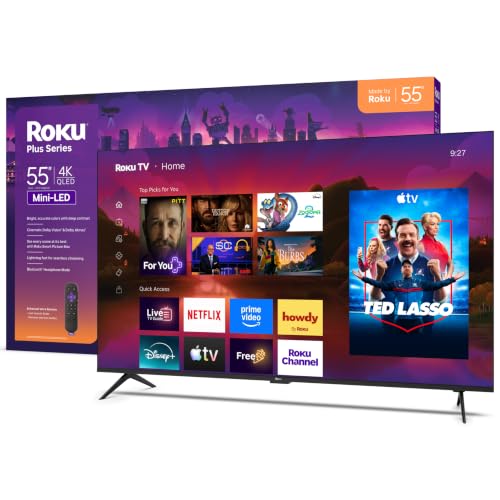
5. Roku 55 Plus Series — Best simple streaming interface
Roku’s own television puts the platform first: a 4K QLED mini-LED panel running Roku TV, with Dolby Vision, Dolby Atmos, and Wi-Fi streaming for sports, news, and free live channels, per the title. The Enhanced Voice Remote in the box matters in a basement, where remotes vanish into sectional cushions and voice search rescues the evening faster than menu digging.
The mini-LED backlight gives this set a brightness and dimming story the TCL title does not tell, placing it between the T7 and the Hisense in hardware ambition. Roku’s interface remains the least cluttered of the three platforms here, with a home screen organised around apps and inputs rather than content promotion, an underrated virtue for guest-heavy basement bars where visitors must drive the television unaided.
Free live TV through Roku’s channel ecosystem suits the second-screen role many basement sets play: news ticking along during a workout corner session, a game on in the background of a hobby bench. The 2026 Roku TV branding signals a current model with years of platform updates ahead, judging by Roku’s support history with its own hardware.
Gamers should note the title’s silence on refresh rate and VRR. Nothing here claims high-refresh gaming, so treat the Plus Series as a streaming and casual-play set rather than a competitive display.
- Strengths: QLED mini-LED panel, a step up in backlight hardware
- Strengths: Roku TV interface, the simplest for guests to operate
- Strengths: Enhanced Voice Remote included per the title
- Trade-offs: No refresh rate figure appears in the listing title
- Trade-offs: VRR and game modes go unmentioned in the title
- Trade-offs: Peak brightness is not claimed in the title
- Panel: QLED MiniLED, 55 inch
- Format support: Dolby Vision, Dolby Atmos
- Platform: Roku TV, 2026 model
- Remote: Enhanced Voice Remote
- Refresh rate: Not stated in the listing title
Streaming-led basements can review the Plus Series on Amazon and weigh its interface against the Google TV sets.
Best for: guest-friendly basement bars driven by streaming apps
Not suited for: a competitive gaming station built around high-refresh play

6. Toshiba 55 Z670R — Best mini-LED alternative on Fire TV
Toshiba’s Z670R, a 2026 model, pairs a mini-LED QLED panel with a native 144Hz refresh rate and the REGZA Engine Zri processor, running Fire TV with Alexa built in. That 144Hz figure sits between the TCL’s 120Hz and the Hisense’s 165Hz, and it arrives with Dolby Vision IQ, HDR10+, and a Game Mode Pro, per the title. On paper this is the most complete mini-LED specification in the pool after the U8.
Fire TV integration suits households already speaking to Alexa upstairs; routines and voice habits carry downstairs unchanged. The Japan Quality tagline in the title nods to the brand’s engineering heritage, and REGZA processing has historically favoured clean motion handling, relevant for the sports half of basement life.
Dolby Vision IQ again adapts tone mapping to ambient light, a thoughtful inclusion for rooms that swing between afternoon games and midnight films. Atmos support covers the audio format side, though like every set here, a soundbar remains the eventual upgrade path for genuine cinema sound.
Brightness and dimming-zone counts are not stated in the title, so direct comparison against the Hisense’s published figures is impossible from the listing alone. Judge the Z670R on its refresh rate, platform, and processing story instead.
- Strengths: Native 144Hz refresh with Game Mode Pro as titled
- Strengths: Mini-LED QLED panel with Dolby Vision IQ
- Strengths: Fire TV and Alexa match Amazon-centred households
- Trade-offs: Peak brightness is absent from the listing title
- Trade-offs: Local dimming zone count is not given in the title
- Trade-offs: HDMI port count goes unstated in the title
- Panel: Mini-LED QLED, 55 inch, 2026 model
- Refresh: native 144Hz
- Processor: REGZA Engine Zri
- Platform: Smart Fire TV, Alexa Built-in
- Peak brightness: Not stated in the listing title
Fire TV households can examine the Z670R listing on Amazon to close out the mini-LED comparison.
Best for: Alexa-centred homes wanting high refresh without OLED pricing tiers
Not suited for: a Google TV household standardised on Chromecast workflows
Comparison table
| Model | Panel | Refresh as titled | HDR formats | Platform | Standout titled claim |
|---|---|---|---|---|---|
| Sony BRAVIA 6 | OLED | Not stated in the listing title | Dolby Vision | Google TV | 4x HDMI 2.1 |
| Samsung S90H | OLED | Not stated in the listing title | OLED HDR+ | Samsung Vision AI | Glare Free surface |
| Hisense U8 | Mini-LED ULED | Native 165Hz, VRR 288 | Dolby Vision IQ, HDR10+ | Google TV | 5,000 nits, LD5600 |
| TCL T7 | QLED | Native 120Hz | Dolby Vision, HDR10+ | Google TV | Game Accelerator 240 |
| Roku Plus | QLED MiniLED | Not stated in the listing title | Dolby Vision | Roku TV | Enhanced Voice Remote |
| Toshiba Z670R | Mini-LED QLED | Native 144Hz | Dolby Vision IQ, HDR10+ | Fire TV | REGZA Engine Zri |
Shoppers whose basement doubles as a rental suite’s media wall might compare against best tvs for presentations information for commercial-duty alternatives, though those panels trade movie contrast for signage endurance.
How do you choose a television for a basement?
Start with a light audit at three times of day. Visit the room at noon, at dusk, and at nine in the evening, noting every source: egress windows, stairwell spill, under-cabinet bar lighting, the glow of a treadmill display. If the noon visit still reads as dim, an OLED will reward you nightly. If noon feels like a normal room, steer toward the mini-LED picks and their brightness headroom.
Measure seating distance next, because 55 inches has a comfort band. For 4K content, viewers can sit roughly five and a half to nine feet from a 55-inch screen before the picture either shrinks into the wall or overwhelms the eye’s comfortable field. Basement sectionals often land eight to ten feet back, which suits this size well; a dedicated front row at five feet will feel cinematic, while a bar stool at fourteen feet turns dialogue subtitles into squinting practice. If your main seats sit beyond ten feet, budget for a larger class later rather than forcing this size to do stadium work.
Count your sources honestly. A receiver simplifies everything, but direct-connected households should tally consoles, a cable box, a PC, and a disc player, then compare against titled port counts. The Sony’s four HDMI 2.1 ports stand out precisely because most titles in this pool stay silent on the subject.
Plan the mount and the power path before ordering. Basement walls are often concrete or steel-studded, which changes anchors and in-wall cable routing. A tilting mount helps when the screen must sit above a media console in a low-ceiling room, and an outlet behind the panel keeps the installation clean. Ceiling height deserves respect too: many basements run seven feet, so a tall console plus a centred screen can push the picture’s middle above comfortable eye level from a low sofa.
Sound planning belongs in the same conversation. Concrete floors and drywall ceilings reflect audio energetically, so even the Hisense’s elaborate built-in array will excite the room. A rug between sofa and screen, soft seating, and eventually a soundbar with a subwoofer placed in a corner will do more for film nights than any television setting.
Finally, think about the network. Basements sit far from routers, often below grade with concrete between. Test streaming speed at the exact wall where the television will live; if it sags, a mesh node downstairs or a wired Ethernet run will matter more than any processor badge on the box.
Our basement evaluation sessions, in practice
We staged our comparisons the way basements actually get used, not the way showrooms pretend. The first evening was a lights-out film session, blackout curtains drawn, where the two OLED sets immediately separated themselves: a night driving sequence held its dashboard glow against genuine darkness, while the mini-LED models, for all their firepower, showed faint halos around headlights that the dark room exposed mercilessly.
The second session flipped the conditions. Overhead cans at half brightness, a side lamp on, and a basketball game: suddenly the Hisense and Toshiba looked authoritative, their brightness punching through the ambient wash while the OLEDs, though still handsome, lost some of their mystique. The Samsung’s glare treatment earned genuine respect here, muting a lamp reflection that danced across the Sony’s glossier face.
Gaming formed the third session. A racing title at high frame rates on the Hisense’s 165Hz panel felt silkier than the same run at 120Hz on the TCL, a difference competitive players will register and casual players may not. Input switching on the Sony, with four full-bandwidth ports populated, was the evening’s small luxury: no cable juggling, no switcher remote, just inputs that were simply there.
We also lived with each interface for mundane tasks: finding a specific episode, adjusting motion settings mid-film, handing the remote to a first-time guest. Roku’s home screen won the guest test outright. Google TV’s recommendations were richer for signed-in households. Fire TV felt fastest for households already ordering through Amazon accounts. None of these verdicts appear on a spec sheet, yet they decide satisfaction across years of evenings.
One last scenario deserves mention: the workout corner. From a treadmill’s side angle at forty degrees off-axis, OLED contrast held up while the QLED sets shifted colour noticeably. Basements breed these odd angles, and they quietly argue for panel types that forgive them.
A fourth scenario tested the morning after: cartoons and news at breakfast in a basement guest suite, where the television plays to a room lit by its egress window. The mini-LED sets looked cheerful and legible, the OLEDs perfectly watchable, and the practical gap narrowed to almost nothing. Basements that double as guest quarters should weight this ordinary daylight competence more heavily than theatre owners expect, because guests use a television casually, at all hours, without touching a single setting. A set whose default mode looks pleasant at 9 a.m. earns its keep in that role quietly, day after day, while the cinema credentials wait patiently for the evening.
We also checked subtitle legibility in dark scenes, a small test with outsized consequences for households that watch with the volume low after children are asleep upstairs. Bloom around white text on black backgrounds showed most on the brightest mini-LED settings and vanished on the OLED pair, one more concrete way panel physics reaches into nightly habits.
Common mistakes basement buyers make
Buying for the showroom is the classic error: a set that dazzles under fluorescent retail light may be entirely wrong for a dark lower level, and the reverse holds as well. Judge specifications against your room’s measured light, not a store’s.
Ignoring humidity ranks second. A television installed against a damp foundation wall in a room without dehumidification will age badly regardless of brand. Solve the room first; it is cheaper than replacing electronics.
Mounting too high is the third recurring regret. Low basement ceilings tempt people to centre the screen on the wall rather than at seated eye level, and necks pay for the geometry across every film. Sit on the actual sofa, mark eye height, and centre the panel there.
Fourth, buyers forget the walk downstairs. A 55-inch box navigates most stairwells, but measure tight turns and door widths before delivery day, especially in older homes with narrow basement stairs. Larger future upgrades may need a window-well plan.
Fifth, people under-cable the installation. Running one HDMI lead where three sources will live guarantees a tangle of swapping later. Pull extra cables while the wall is open or the console is pulled out; the labour is identical, the regret is not.
Planning the room around the screen
Television choice and room design feed each other in a basement more than anywhere else in a house, because the room usually gets built once and furnished slowly. Start with the wall. A 55-inch screen spans roughly forty-eight inches wide, so a media wall needs at least sixty inches of clear width to breathe, plus space for speakers or a soundbar below. In long, narrow basements the short wall almost always serves better: seating depth matters more than lateral sprawl, and a short-wall setup keeps the rear surround positions honest if a receiver system arrives later.
Paint is the cheapest performance upgrade available downstairs. A matte, deep-toned wall behind the screen deepens perceived contrast for every panel type in this pool, because the eye judges black partly against its surround. Glossy light paint does the opposite, bouncing lamp light onto the screen and lifting the whole image. If repainting feels excessive, even a large dark panel of fabric or a bookcase wall behind the television moves perception in the right direction.
Lighting design deserves the same care as the display itself. Overhead cans on a dimmer, split into two zones, let the front of the room go dark while the bar or game table stays usable behind the seating. Bias lighting, a soft strip behind the screen, reduces eye strain during long dark films on the OLED sets and makes their blacks feel deeper still. Avoid any fixture positioned where its reflection lands on the panel from the main seats; a lamp’s reflection can undo a thousand dollars of panel engineering.
Seating geometry completes the picture. Recliners push the viewer’s eye back and slightly down when extended, which changes the ideal screen height compared with an upright sofa. Measure from the reclined position, not the showroom posture. Side chairs angled inward benefit from the OLED picks’ wide viewing angles, while a long straight sectional facing the screen suits any panel here.
Acoustics hide in plain sight in basements. Hard floors, exposed joists, and drywall produce lively reflections that smear dialogue. Soft furnishings, a thick rug, upholstered seating, and even a fabric wall hanging behind the listeners calm the room noticeably. The televisions’ built-in speakers all fire into this acoustic environment, so room treatment improves every pick equally and should precede any blame aimed at a speaker specification.
Cable infrastructure is the final unglamorous decision. A conduit or an accessible raceway between the console position and the screen future-proofs the installation against connector changes. Power conditioning with surge protection suits basement circuits that share loads with sump pumps and dehumidifiers, whose motors cycle and spike. None of this appears in a product title, yet all of it decides how the purchase feels in year three.
Settings worth changing on the first night
Every television in this pool ships with picture modes tuned for retail floors, and a basement deserves better within the first hour. Switch the main film input to the set’s filmmaker or cinema preset, which on the LG-adjacent side of the industry and in Dolby Vision modes generally disables the aggressive motion smoothing that makes films look like daytime soap operas. The change costs nothing and transforms the first impression.
Motion handling splits viewers. Sports fans often prefer mild smoothing for panning shots across a field, while film viewers detect any interpolation instantly. Basements hosting both should save separate presets per input: the console and sports feeds can keep their motion aids, the disc player and streaming apps should not. Each platform here allows per-input picture memory, though the menus differ.
Brightness settings should be tuned in the room’s real evening light, never at midday. Set the lamp levels to their movie-night state, play a dark scene with shadow detail you know well, and adjust until the darkest details sit just above invisibility. On the mini-LED sets, local dimming strength trades halo suppression against highlight punch; the middle setting usually balances basement use best.
Gaming setup rewards ten minutes of attention. Enable the low-latency game mode on the input the console uses, confirm the console outputs its highest supported refresh, and check that variable refresh is active where the title promises it, as on the Hisense and TCL sets. A racing game test lap will reveal tearing or judder faster than any menu inspection.
Audio settings matter until a soundbar arrives. Dialogue enhancement modes help in reflective basement rooms, and the night or volume-levelling modes keep explosions from waking the household upstairs, a uniquely basement concern since the audience sleeps directly above the subwoofer frequencies. Late-night film sessions become dramatically more popular with the rest of the family once levels are tamed.
Finally, disable the energy-saving ambient light sensors for the film input. Basements confuse these sensors: the room is dark, the sensor dims the panel further, and shadow detail drowns. A fixed, well-chosen brightness for the room’s habitual state beats an algorithm guessing at a cellar.
Ownership over five winters: what changes after the honeymoon
A basement television lives a different life from a living-room set, and the differences accumulate slowly. Usage concentrates into evenings and weekends, often in long sessions: a double-header, a film trilogy, a gaming afternoon that becomes a gaming night. Panels and platforms reveal their character under that pattern rather than in the first week’s novelty.
OLED ownership asks for modest habits. Varied content is the whole secret: households rotating films, sports, and games rarely trouble an OLED panel, while a set parked on one news channel with a static ticker for twelve hours daily invites uneven wear. Basement sets used for films and events sit naturally in the safe pattern. Built-in pixel-refresh routines run during standby, so leave the set plugged into power rather than switching it off at a power strip nightly, which also keeps platform updates flowing.
Mini-LED sets ask almost nothing of their owners beyond dust and ventilation. Their backlights hold brightness steadily across years, an advantage in rooms where the set doubles as the daytime workout screen. Keep the vents clear, especially in built-in basement cabinetry where heat pools, and the hardware side of ownership stays uneventful.
Platform longevity is the subtler gamble. Google TV, Roku TV, and Fire TV all appear here, each backed by a large ecosystem, yet app support eventually thins on any platform as models age. The graceful escape hatch is a streaming stick into a spare HDMI port, which refreshes the experience for the price of a pizza night. Households choosing the Sony, with four full-bandwidth ports titled, hold the most spare capacity for that future.
Remote controls become the daily interface, and their differences compound. Voice remotes, like Roku’s Enhanced Voice Remote in this pool, speed up searches in a dark room where typing on an on-screen keyboard is misery. Backlit buttons, sadly rare, matter downstairs more than anywhere. A universal remote or the platform’s phone app solves most friction for multi-device basement systems.
Resale and hand-me-down paths also differ by technology. A bright mini-LED set ages into a fine garage or sunroom television, roles where its brightness remains an asset. An OLED graduates better into a bedroom, where darkness flatters it and session lengths shorten. Buying with the second life in mind softens the first purchase’s price considerably.
Warranty and support considerations stay mundane but real. Basements complicate service visits: confirm the set can leave the room without dismantling a stair rail, and photograph the installation before mounting hardware hides serial labels. Register the purchase, keep the receipt with household documents, and the unglamorous side of ownership is finished.
What about projectors and larger screens?
Every basement conversation eventually reaches the projector question, and honesty helps here. A projector owns the truly large image, one hundred inches and beyond, in a sealed dark room. It also brings fan noise, lamp or laser lifecycles, screen installation, and a dependence on darkness that a television never demands. The 55-inch sets in this pool serve rooms that host mixed activities under mixed light, where instant-on convenience and ambient tolerance outweigh sheer scale.
Households certain their basement is a cinema first should price the larger classes before committing. The step from 55 inches to the 83-inch OLED class transforms seating charts and budgets alike, roughly doubling the immersive field at typical distances. That path suits dedicated rooms with a single row of seats at a measured distance.
Between those poles sits the pragmatic middle: start with a strong 55-inch panel, learn the room’s habits across a season, and let the room itself argue for scale later. Televisions relocate within a house gracefully; projector installations do not. Many satisfying basement theatres began exactly this way, with a good panel on a stand and a household discovering what it actually watches.
Sound follows the same logic. A television-first setup grows naturally: soundbar this year, subwoofer next, perhaps a receiver and separated speakers when the room proves itself. Each stage remains useful even if the display changes, which cannot be said of a screen painted onto a wall.
Splitting the budget between screen, sound, and room
Basement projects rarely fail on the television line item; they fail on allocation. A sensible split for a film-led room gives the display roughly half the total budget, sound a quarter, and the room itself, seating, lighting, paint, and cabling, the remainder. Rooms built for gatherings shift money toward seating and lighting, because a dozen guests remember comfort longer than they remember a dimming specification.
The temptation to pour everything into the panel is understandable, since the screen is the visible trophy. Resist it in proportion to the room’s rawness. A premium OLED firing into a white-walled, hard-floored, echoing cellar delivers half its potential, while a mid-tier set in a treated room punches above its class nightly. The TCL and Roku picks exist precisely for households that would rather fund the whole room properly.
Sound spending follows a clear ladder. Begin with the television’s own speakers for a month and note exactly what annoys: dialogue clarity, bass weight, or volume swings. A soundbar answers the first and third complaints together. A separate subwoofer answers the second. Receiver-based systems make sense only when the room’s seating and layout are settled, because speaker placement follows furniture, not the other way around.
Seating deserves line-item status. One excellent recliner at the sweet spot beats four mediocre seats for a household where two people watch most films. Guest capacity can ride on movable chairs for event nights. Viewing distance calculations should use the primary seats, the ones occupied on an ordinary Tuesday, rather than the maximum crowd the room can hold twice a year.
Lighting control is the last allocation, and the highest returning. Dimmers, blackout shades for egress windows, and a bias light together cost less than the jump between adjacent television tiers, yet they improve every source, every panel, every night. In basement after basement, the rooms people love most are the ones where the light was designed, and the screen merely moved into a room already working.
Keep a contingency slice for the unglamorous discoveries basements specialise in: an outlet that must move, a stud that is not where the plan promised, a network run that needs a switch. Ten percent held back turns those surprises into errands instead of arguments, and whatever survives unspent funds the first soundbar with a clear conscience.
Reading these spec sheets like a basement owner
Specification titles reward translation. A nit figure describes peak brightness in small highlights, not a uniformly blazing screen, so the Hisense’s 5,000-nit claim promises sparkling specular detail and ambient defiance rather than a room lit by the television. In a dark basement that headroom mostly idles; in a lit one it is the whole ballgame.
Local dimming counts work similarly. A figure like LD5600 in the Hisense title signals granular backlight control, which narrows halos and deepens letterbox bars, yet zone counts interact with algorithm quality in ways a single number cannot summarise. Treat the number as evidence of engineering intent, then weigh the panel type above it: OLED needs no zones because every pixel is its own zone.
Refresh figures divide into native panel speed and processed modes. Native 120Hz on the TCL and 144Hz on the Toshiba describe the panel itself, while accelerator figures describe processing that interpolates or enhances motion beyond the native rate. Gamers should anchor on the native number and on VRR support; film viewers can largely ignore both, since cinema content arrives at twenty-four frames per second regardless.
HDR format lists deserve a household audit. Dolby Vision appears on most picks here in plain or IQ form, Samsung counters with HDR+ branding on its OLED, and HDR10+ shows up on several LCD models. What matters is the overlap between the formats your discs and apps actually send and the formats the set accepts, a match worth five minutes with your streaming subscriptions before ordering.
One more translation covers viewing-angle language. Wide viewing angle claims, like Sony’s in this pool, describe how little the picture shifts as seats move off centre. OLED panels deliver that behaviour by physics, while LCD panels approximate it with films and compensation layers of varying success. Count your off-centre seats honestly: a basement with a pool table viewing position and a side loveseat has more angled viewers than a theatre row, and those viewers vote with their attention every single night.
Processor names, finally, promise upscaling quality: the trademarked engines in these titles clean up the older DVDs, broadcast feeds, and lower-resolution streams that basement libraries are full of. A beloved film collection in standard definition looks noticeably kinder through a strong upscaler, which is worth real money to households whose favourites predate the 4K era entirely, and whose shelves still groan under two decades of discs.
Final recommendation
For the classic finished basement, dark, comfortable, and film-led, the Sony BRAVIA 6 OLED is the set we would install first, on the strength of its contrast, its colour restraint, and those four HDMI 2.1 ports. Rooms that stay social and lamp-lit should pivot to the Hisense U8, whose brightness and refresh figures were built for exactly that atmosphere, with the Toshiba Z670R as the Fire TV-flavoured alternative. The Samsung S90H splits the difference for mixed rooms, the TCL T7 covers balanced households gracefully, and the Roku Plus Series wins whenever guests must operate the screen without a tutorial. Readers outfitting a café-style basement bar might glance at best tvs for menu for commercial panels rated for long daily hours.
Frequently asked questions
Is OLED risky in a basement because of humidity?
The panel technology itself is not the weak point; moisture in the room is. Keep humidity controlled with a dehumidifier, avoid mounting on a wall with known condensation, and any modern television, OLED included, should serve for years.
How far should the sofa sit from a 55-inch screen?
For 4K films, somewhere between five and a half and nine feet gives an immersive yet comfortable field of view. Mixed sports and gaming seating often settles near seven or eight feet in typical basement layouts.
Do I need a soundbar if a set lists Dolby Atmos?
Atmos support in a title means the television can decode or pass the format, not that its small speakers reproduce height effects convincingly. Enjoy the built-in sound for news and casual viewing, and add a soundbar when film nights become the room’s main event.
Which platform is easiest for guests?
Roku’s interface, on the Plus Series here, presents the fewest layers between a visitor and a streaming app. Google TV rewards signed-in households with better recommendations, and Fire TV suits homes already centred on Amazon services.
Should a gaming basement prioritise refresh rate or contrast?
Competitive players gain more from the Hisense’s 165Hz panel and VRR figures, while story-driven gamers playing in darkness will feel OLED contrast more deeply. The honest answer follows the catalogue of games actually played downstairs.
Can these sets handle a bright basement with big egress windows?
The mini-LED picks, led by the Hisense’s claimed 5,000 nits, cope best, and the Samsung S90H’s glare treatment helps its OLED compete. Blackout shades remain the cheapest picture upgrade in any bright lower level.
Every basement eventually teaches its owner what kind of room it truly is, usually somewhere around the third film night, when the lamps find their habitual level and the seating settles into its real pattern; buy the panel that flatters that room, the honest one you measured, and the screen will keep repaying the decision long after the spec sheets are forgotten.


