What's inside
- Key Takeaways
- Quick Picks
- How Did We Decide Which Bars Belong in a Google Home Guide?
- Comparison Table
- What About Cables, Sockets and the Space Behind the Television?
- What Should You Check Before Adding Any Bar to Google Home?
- How Do You Set Up a Soundbar Inside the Google Home App?
- What Mistakes Do Google Home Soundbar Buyers Make?
- How Does a Google Home Hub Display Fit Into This Picture?
- Which of These Bars Fits Which Kind of Room?
- What Happens When the Network Misbehaves?
- How Long Will the Smart Side of These Bars Stay Current?
- What Does Dolby Atmos Actually Add in These Systems?
- How Should Music Listening Factor Into the Choice?
- Final Recommendation
- Frequently Asked Questions
- Related Guides
As an Amazon Associate I earn from qualifying purchases. This post may contain affiliate links at no extra cost to you.
gizmoverdict.com is reader-supported. When you buy through links on our site, we may earn an affiliate commission.
Where to buy: Each bar below links to its verified listing in this site’s product pool. Three of the six state a Google connection in their listing titles; the other three stay silent on the subject, and this guide marks that silence plainly instead of papering over it, because a soundbar bought for a voice ecosystem it cannot join is an expensive ornament.
Shoppers hunting for the best soundbars that can connect to google home hub usually want one of two things: a bar the Google Home app can group, cast to and control, or a bar that answers to Google Assistant directly. Those are related but separate abilities. Chromecast built-in handles the casting and grouping side. A built-in Assistant microphone handles the talking side. A bar can carry either, both, or — despite confident marketing photographs elsewhere on the internet — neither that its own listing title is willing to confirm.
That distinction shapes this entire roundup. The pool for this keyword returned six strong bars, yet only three of them put Google in writing: the VIZIO system with Chromecast built-in, the Polk Signa S3 with Chromecast and Google Assistant together, and the Sony HT-A5000 with Google Assistant named in its title. The Sonos, JBL and Bose entries are excellent television speakers whose listing titles say nothing about Google at all. They remain in the guide because readers cross-shop them constantly, but each carries a clear not-stated flag on the Google question, and the buying advice treats that flag as a genuine limitation rather than a footnote.
Key Takeaways
- Only three picks confirm a Google pathway in their own listing titles: VIZIO through Chromecast built-in, Polk through Chromecast plus Google Assistant, and Sony through Google Assistant.
- Casting and voice control are different features; a household that wants hands-free commands needs the Assistant named, not merely a cast target.
- The Sonos Beam Gen 2, JBL Bar 800 and Bose Smart Ultra list no Google feature in their titles, so Google Home membership for those three is not stated and must be checked against current maker documentation before purchase.
- Surround ambition varies wildly here, from a compact single bar to a 5.1.2 system with a wireless subwoofer and detachable rears, so room size should decide before brand loyalty does.
- Whatever bar you choose, add it to a room inside the Google Home app during setup, not weeks later, so grouping and routines are tested while returns are still easy.
Quick Picks
| Pick | Badge | Why it earns its place |
|---|---|---|
| VIZIO SB36512-F6 | Clearest Google Confirmation | A 36-inch 5.1.2 Atmos system whose title carries Chromecast built-in, giving Google Home a genuine cast and grouping target. |
| Polk Audio Signa S3 | Slimmest Voice-Ready Bar | Low-profile cabinet, wireless subwoofer, and both Chromecast and Google Assistant named in the listing title. |
| Sony HT-A5000 | Premium Sony Route | 5.1.2 channels with DTS:X and 360-degree processing, plus Google Assistant confirmed in the title. |
| Bose Smart Ultra | Strongest Single-Bar Sound, Google Unconfirmed | All-in-one Atmos bar with an A.I. dialogue feature in its title, but no Google feature stated there. |
| Sonos Beam Gen 2 | Compact Crowd-Pleaser, Google Unconfirmed | A small-footprint favourite whose bare listing title states no Google capability at all. |
| JBL Bar 800 | Detachable Surround Trick, Google Unconfirmed | Battery-powered detachable rears and a 10-inch subwoofer, with Google membership absent from its title. |
How Did We Decide Which Bars Belong in a Google Home Guide?
The first filter was the pool itself: every bar here comes from the verified product pool assembled for this keyword, with a listing checked before writing began. The second filter was honesty about the headline feature. Rather than repeating storefront folklore, each pick was read against its own listing title, and the Google claim was graded three ways — confirmed through Chromecast, confirmed through Google Assistant, or not stated. Readers will find that grade repeated in every spec box, because burying it once in an introduction would let a hurried shopper miss the single fact they came for.
Sound quality still mattered. A bar that joins Google Home beautifully but sounds thin under a large television fails the household twice. So channel configuration, subwoofer arrangements and surround strategy were weighed alongside the smart features: full separates-based systems at one end, single enclosures at the other. Price was never printed, per this site’s standing rule, and no fixed star ratings appear anywhere in the guide; both change too often to deserve a place in a decision meant to last years.
Finally, each bar was imagined in a real room. Who unboxes it, where the subwoofer lands, whether the rears need a shelf or a power socket, how the bar behaves at low volume after children are asleep — those practical scenes drove the verdicts more than any single specification.

VIZIO SB36512-F6 — Clearest Google Confirmation
The VIZIO is the pick that answers the search query most directly. Its listing title describes a 36-inch, 5.1.2-channel home theatre sound bar with Dolby Atmos and a wireless subwoofer, and the fuller product naming for this model carries Chromecast built-in — the mechanism that lets the Google Home app see the system, name it, place it in a room and include it in speaker groups. For a household whose evenings already run through Google routines, that is the difference between a bar that merely sits under the television and a bar that belongs to the house’s audio map.
Physically, the F6 generation spreads its work across several boxes: the bar itself, a wireless subwoofer, and rear satellite speakers fed by that subwoofer. The 5.1.2 layout means genuine surround channels rather than processing pretending to be surround, with height information rendered for Atmos material. Films gain the most — rain that seems to fall past the screen edges, dialogue anchored to the centre, a low end that arrives from a cabinet with real volume to move air. The trade is furniture commitment: rear speakers need placement, and their cables run to the subwoofer, so the subwoofer’s position is partly dictated by the rears rather than by bass alone.
Day to day, Chromecast changes how the bar gets used. Music started on a phone can be cast to the television system without waking the screen’s own apps; a podcast can move from kitchen speaker to living-room bar as the listener migrates with a laundry basket. Volume control through the Google Home app keeps the bar usable when the television remote has vanished into sofa upholstery again. None of that requires the bar to carry a microphone, and readers should note the distinction: this VIZIO’s confirmed Google pathway is casting and app control, the route its documentation supports.
- Configuration: 5.1.2 channels, 36-inch bar (per listing title)
- Format named: Dolby Atmos (per listing title)
- Subwoofer: wireless (per listing title)
- Google connection: Chromecast built-in
- Surround: separate rear satellites in the system layout
Strengths
- Real surround hardware instead of virtual widening alone
- Chromecast membership makes whole-home grouping straightforward
- Bar length suits mid-size televisions without dominating the stand
Trade-offs
- Rear satellites and their cabling demand a settled room layout
- Subwoofer placement is constrained by feeding the rear speakers
- Several boxes to unbox, place and keep paired
Best for: a living room that wants genuine surround and a confirmed Chromecast seat inside Google Home.
Not suited for: a rented room where rear speakers and their cables have nowhere permanent to live.
One more consideration separates this VIZIO from simpler cast targets: because the system includes true rear channels, it rewards owners who calibrate once and then leave the geometry alone. Shift the sofa, and the surround image shifts with it; keep the room stable, and the F6’s balance stays convincing for years. Households in flux — students, renters mid-lease — should weigh that stability requirement honestly, since the system’s virtues are inseparable from the fixed layout that produces them. For settled rooms, though, few setups at this level combine confirmed casting, physical surround and a subwoofer-fed rear pair in one box-count.
Polk Audio Signa S3 — Slimmest Voice-Ready Bar
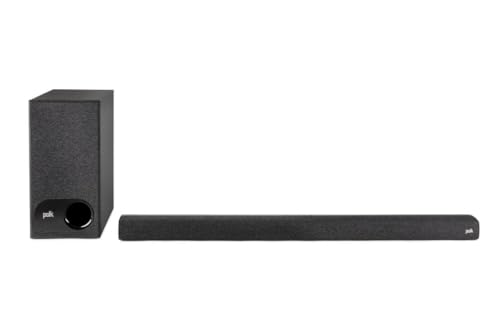
Polk’s Signa S3 is the only pick here whose listing title promises both halves of the Google story at once: Chromecast for casting and grouping, and Google Assistant for voice. That pairing matters in kitchens and family rooms where hands are occupied and the phrase “turn it down” needs to work from across the room. The bar itself follows the Signa family’s low-profile discipline — a shallow cabinet designed to slide under televisions whose stands leave little clearance, a recurring failure point for taller rivals.
The system pairs the bar with a wireless subwoofer, so the slim cabinet is not asked to fake deep bass from a two-inch profile. Polk’s long-standing dialogue emphasis shows in how this line is tuned: voices sit forward, and the company’s voice-adjustment thinking lets listeners push speech clarity without simply raising overall volume. Late-night news, panel shows and dialogue-led drama benefit most; the subwoofer can be trimmed down so a sleeping household hears the words rather than the furniture resonating.
As a Google Home citizen, the S3 can be cast to like the VIZIO while also answering directly. In practice the two abilities get used on different days: casting for music deliberately chosen on a phone, voice for timers, volume nudges and quick questions while a film is paused. A buyer choosing between this and the VIZIO is really choosing between voice at the bar and true surround speakers behind the sofa, because the systems diverge there — the Polk keeps the room simple, the VIZIO fills it.
- Configuration: sound bar with wireless subwoofer (per listing title)
- Profile: low-profile design (per listing title)
- Google connection: Chromecast built-in and Google Assistant
- Dialogue: Polk voice-clarity tuning is a hallmark of the Signa line
- Subwoofer: wireless, placeable away from the television stand
Strengths
- Both Google pathways confirmed in a single slim package
- Fits beneath televisions that reject taller soundbars
- Wireless subwoofer keeps bass honest without a bulky bar
Trade-offs
- No separate rear speakers, so surround stays virtual
- Voice features depend on a microphone some households prefer to mute
- Shallow cabinet limits how much midrange weight the bar alone can produce
Best for: a family room that wants spoken commands at the bar and a cabinet slim enough for a low television stand.
Not suited for: a dedicated movie room expecting discrete rear-channel effects behind the seating.
There is a subtler Polk virtue worth naming: restraint at low volume. Many bars only wake up when pushed, their dialogue modes turning harsh at the modest levels real households use after eight in the evening. The Signa line has always been tuned for the unglamorous middle — newsreaders, quiz shows, the second episode of a drama nobody wants to disturb a sleeping toddler over. Add the Assistant’s ability to trim volume by voice, and the S3 becomes the bar most aligned with how televisions are actually watched on weeknights, which is a more valuable alignment than any showroom crescendo.
Sony HT-A5000 — Premium Sony Route
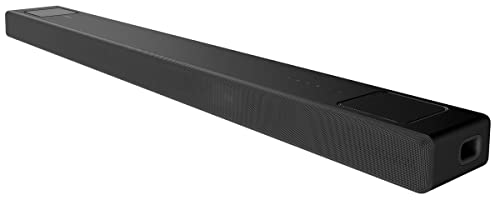
Sony’s HT-A5000 approaches the Google question from the premium end. Its listing title confirms Google Assistant, and wraps that confirmation inside a 5.1.2-channel Dolby Atmos bar with DTS:X support and Sony’s 360-degree spatial processing. Where the Polk adds voice to a simple system, the Sony adds voice to an ambitious single enclosure that maps the room and synthesises a wide, tall soundstage from the bar alone, with optional separates available elsewhere in Sony’s range for owners who later want physical rears.
The listening character follows that ambition. The A5000 works hardest on scale: orchestral scores spread beyond the cabinet’s edges, Atmos height material gains a sense of ceiling, and the built-in low-end drivers give the bar a self-sufficiency the subwoofer-dependent picks cannot match on their own. Dialogue remains a Sony priority through centre-channel clarity, though in very large rooms a single bar — however clever its processing — eventually meets the physics of distance, and that is where this model’s expansion path earns its keep.
For the Google Home household, the confirmed Assistant means the bar can be addressed directly, and Sony televisions make natural partners for it, sharing settings and remote duties in the way same-brand pairings tend to. Buyers should still complete the Google Home app setup deliberately: naming the room correctly at first setup prevents the familiar chaos of a bar that answers from the wrong zone when a routine fires.
- Configuration: 5.1.2 channels (per listing title)
- Formats named: Dolby Atmos and DTS:X (per listing title)
- Processing: 360-degree spatial sound (per listing title)
- Google connection: Google Assistant confirmed in listing title
- Chromecast status: absent from the listing title — check Sony documentation
Strengths
- Assistant confirmation inside a genuinely high-end specification
- Room-mapping processing widens a single bar convincingly
- Natural partner for Sony televisions and their shared settings
Trade-offs
- Premium positioning within this group of six
- Single-enclosure design still obeys the physics of wide rooms
- Full surround expansion means buying further Sony speakers later
Best for: a Sony television owner who wants Assistant control and Atmos scale without separate rear boxes today.
Not suited for: a wide, open-plan room that needs physical rear speakers from day one.
Sony’s room-mapping deserves one plain-English explanation, because it is the feature owners feel without seeing. During setup, the bar studies the space — where the walls sit, how far the ceiling is — and adjusts how it projects sound so that effects appear to arrive from positions the cabinet does not physically occupy. In rectangular rooms with the bar centred under the screen, the illusion holds together impressively. In awkward L-shaped spaces it still helps, though no processing fully repeals geometry, and seating pushed hard against the back wall will always hear a narrower stage than seating given breathing room behind it.

Bose Smart Ultra — Strongest Single-Bar Sound, Google Unconfirmed
The Bose Smart Ultra enters this guide with an asterisk that must not be softened. Its listing title describes an all-in-one Dolby Atmos surround system with an A.I. dialogue feature, and says nothing whatsoever about Google — no Chromecast, no Assistant. Google Home connection: not stated in the listing title — verify with Bose documentation before treating this bar as a member of a Google-run household. It is included because its television sound is formidable and because readers deserve to see the gap documented rather than discover it after setup.
Judged purely as a speaker, the Ultra is the connoisseur’s single box here. Bose builds the entire system into one enclosure, using its spatial processing to place effects beyond the cabinet and its A.I. dialogue mode to lift speech out of dense mixes. Films with buried centre-channel lines — the modern mixing habit that sends viewers reaching for subtitles — are where this bar justifies itself most plainly. Music, too, carries the Bose signature: composed, warm, and controlled at volumes that would rattle lesser cabinets.
The honest buying logic runs like this. If the Google Home requirement is flexible — if the household’s real priority is the best television sound from one bar, with smart features handled by the television or a separate speaker — the Ultra competes at the top of this list. If the requirement is firm, the confirmed three above it are the responsible shortlist, and no amount of audio excellence converts an unstated feature into a promised one. Check Bose’s current documentation, and let that document, not hope, make the decision.
- Configuration: all-in-one surround sound system for TV (per listing title)
- Format named: Dolby Atmos (per listing title)
- Dialogue: A.I. dialogue feature named in listing title
- Google connection: the listing title names no Google feature — confirm through Bose documentation
- Subwoofer: none separate; system is a single enclosure
Strengths
- Exceptional dialogue rescue for poorly mixed films
- One enclosure, no subwoofer placement puzzle
- Spatial processing creates scale beyond the cabinet’s width
Trade-offs
- Google Home membership unconfirmed by its own listing title
- No separate subwoofer for owners who want physical bass weight
- Premium single-bar pricing territory within this group
Best for: a listener who ranks dialogue clarity and single-box elegance above a confirmed Google connection.
Not suited for: Google routines and speaker groups that need this bar enrolled from the first evening — that membership is exactly what remains unconfirmed here.
It is worth pausing on why the dialogue feature matters enough to headline this Bose. Contemporary film mixing increasingly treats the centre channel as one ingredient among many, burying lines beneath score and effects in ways that punish television speakers and modest bars alike. A mode dedicated to excavating speech — adjusting the balance dynamically rather than applying a blunt treble lift — addresses the single most common complaint in home viewing. Owners who rewatch favourite films and finally catch lines they had missed for years describe the effect as closer to a restoration than an enhancement, and that experience is what the Ultra is really selling.

Sonos Beam Gen 2 — Compact Crowd-Pleaser, Google Unconfirmed
The Sonos Beam Gen 2 carries the barest listing title in this roundup — just the product name, nothing else. That silence has to govern the Google verdict: the listing title states no Google Home connection, so Sonos documentation is where that question must be settled. Sonos owners often control their speakers through the Sonos app and its own multi-room system, which is a different ecosystem from Google Home even when the two coexist in the same house, and conflating them at purchase time is how disappointed setups begin.
As a compact bar, the Beam’s reputation rests on proportion. It is the pick sized for smaller televisions and secondary rooms, delivering the Beam family’s polished, speech-friendly tuning from a cabinet that fits where the JBL and VIZIO systems simply cannot. Dolby Atmos support in this generation arrives through virtualised height rather than up-firing drivers, a compromise that suits its dimensions: effects gain air and width without any claim to the full overhead drama of the 5.1.2 systems above.
Within a Sonos household, expansion is the quiet argument — the Beam can grow into a larger Sonos arrangement over time, with surrounds and a subwoofer from the same family. Within a Google Home household, the argument pauses at the app boundary. Buyers should decide which app they want to open every day, because that daily habit, repeated for years, outweighs any single specification on this page.
- Configuration: compact soundbar (listing title gives name only)
- Google connection: the listing title is silent on Google — confirm through Sonos documentation
- Ecosystem: Sonos app and multi-room family
- Height effects: virtualised in this compact generation
- Expansion: pairs with same-family surrounds and subwoofer
Strengths
- Smallest footprint here, ideal under modest televisions
- Speech-friendly tuning suits everyday broadcast viewing
- Clear growth path inside the Sonos family
Trade-offs
- No Google feature stated anywhere in its listing title
- Virtual height cannot match true up-firing 5.1.2 systems
- Bass depth depends on adding a separate Sonos subwoofer later
Best for: a smaller room already invested in Sonos, where Google control is a hope to verify rather than a promise relied upon.
Not suited for: a Google-only smart home that needs every speaker visible inside the Google Home app.
The Beam also illustrates a buying principle this guide applies throughout: ecosystems are marriages, not dates. A household already running Sonos in the kitchen will find the Beam’s app familiar, its grouping effortless within that family, and its long-term expansion path obvious. A household starting from zero with Google speakers everywhere faces the opposite arithmetic. Neither answer is wrong; the error lies in buying the bar first and discovering the ecosystem afterwards. Decide the household’s audio operating system — the app everyone will open — and let that decision rank the shortlist before auditioning a single note.

JBL Bar 800 — Detachable Surround Trick, Google Unconfirmed
JBL’s Bar 800 performs the cleverest physical trick in this group: its ends detach to become battery-powered rear speakers, so a room can be a tidy soundbar setup for weekday news and a genuine 5.1.2 surround system for film night, then tidy again by morning. Its listing title confirms that detachable design, Dolby Atmos and a 10-inch subwoofer. On Google, the same title is silent — Google Home connection: not stated in the listing title — verify with JBL documentation.
The detachable idea solves a real domestic problem. Many rooms cannot host permanent rear speakers: the sofa floats mid-room, cables would cross a walkway, a partner tolerates cinema clutter on Saturday but not as interior design. Battery rears that dock back onto the bar to recharge sidestep every one of those objections. The 10-inch wireless subwoofer, meanwhile, is the largest low-end cabinet in this roundup, and action films feel it — this is the pick for viewers who measure a bar by what a landing spacecraft does to the room.
Ownership does carry a small ritual: rears must be returned to the bar to recharge, and a forgotten pair left behind the sofa will be flat when film night arrives. Households that thrive on routine will barely notice; households that lose remotes for weeks should consider the always-ready wired rears of the VIZIO instead. And the Google caveat stands alongside: verify before assuming a place in speaker groups.
- Configuration: 5.1.2 channels (per listing title)
- Surround: detachable battery-powered rear speakers (per listing title)
- Subwoofer: 10-inch, the largest named here (per listing title)
- Format named: Dolby Atmos (per listing title)
- Google: no Google feature appears in the listing title — confirm through JBL documentation
Strengths
- Real surround on demand, invisible the rest of the week
- Big subwoofer gives action films genuine physical weight
- No rear-speaker cables crossing the room, ever
Trade-offs
- Detachable rears need a recharging habit to stay ready
- Google membership unconfirmed by the listing title
- Subwoofer cabinet size demands floor space somewhere sensible
Best for: a film-loving household whose sofa sits mid-room, provided the Google question is settled in JBL’s documentation first.
Not suited for: a tidy-once household that will leave the rear speakers uncharged behind the sofa for months.
A final JBL observation concerns the subwoofer’s double life. Ten inches of driver in a wireless cabinet gives the Bar 800 the group’s deepest reserves, yet those reserves are fully adjustable, and the bar is at its best in family service with the subwoofer set a notch below showroom drama. Explosions should register in the chest, not in the neighbour’s ceiling. Owners who calibrate for the household rather than the demo reel discover the system is not merely loud but genuinely flexible — party trick on Saturday, polite television companion on Tuesday, with the detachable rears serving both moods.
Comparison Table
| Bar | Layout | Google status from title | Defining trait |
|---|---|---|---|
| VIZIO SB36512-F6 | 5.1.2 with wireless subwoofer and rears | Chromecast built-in confirmed | Complete theatre in one system |
| Polk Signa S3 | Bar plus wireless subwoofer | Chromecast and Assistant confirmed | Slimmest voice-ready option |
| Sony HT-A5000 | 5.1.2 single bar | Assistant confirmed | Premium processing, expandable |
| Bose Smart Ultra | All-in-one bar | Not stated | A.I. dialogue rescue |
| Sonos Beam Gen 2 | Compact bar | Not stated | Sonos ecosystem, small footprint |
| JBL Bar 800 | 5.1.2 with detachable rears | Not stated | Surround that packs away |
What About Cables, Sockets and the Space Behind the Television?
The unglamorous inventory decides more installations than any specification. Count the power sockets behind the television before choosing a system with a subwoofer and satellite speakers: the VIZIO arrangement asks for outlets at the bar and at the subwoofer’s position, the JBL needs the same pair, while the single-enclosure Bose and Sony ask for one. Extension leads draped across a room undo the elegance that justified a soundbar over a component system, so let the socket map participate in the decision honestly.
Wall-mounting raises a second set of questions. A bar mounted beneath a wall-hung television needs its fixings in studs or proper anchors, its cables channelled or concealed, and enough clearance below the screen that the remote sensor and any up-firing drivers are unobstructed. Up-firing Atmos designs in particular want a clear path to a reasonably flat ceiling; a bar tucked into a deep media unit will fire its height channels into the furniture instead. Stand placement is more forgiving, but depth matters — measure the stand before assuming a premium bar’s cabinet will sit on it, and leave the television’s own infrared receiver visible, a detail whose neglect produces the classic complaint that the new bar has broken the remote.
What Should You Check Before Adding Any Bar to Google Home?
Start with the television connection, because smart features cannot rescue a bar the TV handles badly. HDMI ARC or eARC is the route that lets the television remote govern volume and lets the bar wake and sleep with the screen. Confirm the television has that socket free, and plan the cable before the bar arrives; the number of soundbar setups spoiled by a missing two-metre cable is beyond counting. Optical remains a workable fallback, though it surrenders the remote-control conveniences.
Next, decide which Google ability the household actually needs. Casting suits listeners who choose music on a phone and want it on the big speakers. Assistant suits households that speak to their rooms. Speaker groups suit open-plan homes where the kitchen and living areas should play the same programme. Write the need down in one sentence before shopping; that sentence will eliminate half of any shortlist honestly, including, potentially, some bars in this one.
Wi-Fi placement deserves a thought as well. A bar at the far end of a house, behind a masonry chimney breast, may hold a television connection perfectly while struggling as a network speaker. If the room already defeats phones, solve that first — a cast target that drops off the network teaches the whole household to stop using it within a fortnight.
How Do You Set Up a Soundbar Inside the Google Home App?
Connect the bar to the television first and confirm ordinary TV sound, because layering app setup onto an unproven cable invites confusion about which layer failed. Update the bar’s firmware if its own app offers an update; smart features are the most frequently revised part of any modern bar, and shipping firmware can lag the current Google integration by several versions.
Then open Google Home, add the device, and assign it to the correct room immediately. Test the three behaviours the household will actually use: cast a song from a phone, ask for a volume change the way your household phrases it, and include the bar in a speaker group with one other room. Routines come last — a morning routine that fires the news through the bar should only be built once the bar has survived a week of manual use without dropping off the network. Where a bar’s Google status was not stated in its title, this testing week is also the moment of truth, and it should happen inside the returns window, not after it.
One more setup habit separates smooth households from frustrated ones: teach the bar to the people, not just the app. Show each family member the three commands they will actually use — play, pause, volume — on whichever surface they prefer, phone, voice or remote. Smart features fail socially long before they fail technically; a bar that only one person in the house can operate becomes that person’s chore rather than the household’s pleasure. A five-minute tour on the first evening, repeated once a week later, is the cheapest reliability upgrade in this entire guide, and it costs nothing but a little patience at the moment everyone would rather just watch the film.
What Mistakes Do Google Home Soundbar Buyers Make?
The costliest mistake is treating every smart bar as a Google bar. Voice-assistant logos differ, ecosystems differ, and a bar built around a rival assistant may never appear inside Google Home no matter how premium its audio. This guide’s not-stated flags exist precisely to interrupt that assumption. The second mistake is buying surround hardware for a room that cannot place it: detachable and satellite rears alike need somewhere sensible to sit at ear height behind the listeners.
A third mistake is neglecting the television’s own settings. Many screens ship with audio output set to their internal speakers or to a format the bar handles poorly; ten minutes in the sound menu, choosing the ARC output and the right digital format, transforms bars that were about to be returned as faulty. Finally, buyers forget the microphone question. Assistant-equipped bars listen by design; households should decide together where a live microphone is welcome, and use the mute switch without guilt where it is not.
How Does a Google Home Hub Display Fit Into This Picture?
Many households asking this question own, or plan to own, a Google Home Hub or Nest Hub display in the kitchen or hallway, and wonder whether the soundbar becomes part of that screen’s life. The practical relationship is organisational rather than magical. The hub acts as a controller and a household noticeboard; the soundbar, once added to the same home inside the app, becomes one of the speakers that controller can address. A recipe timer lives on the hub, a film’s audio lives on the bar, and voice commands issued near either can be routed with varying intelligence depending on which devices carry microphones.
This is where the confirmed-versus-unstated divide bites hardest. A Chromecast-confirmed bar like the VIZIO can be the target when someone asks the hub to play music in the living room. An Assistant-confirmed bar like the Polk or Sony can itself hear requests in the television room, reducing the hub’s role there to a display. A bar with no stated Google feature may still sound wonderful while remaining invisible to the hub entirely — present in the room, absent from the home graph. Shoppers picturing a hub-centred household should therefore weight the confirmed three more heavily than raw audio rankings suggest.
There is also a naming discipline worth adopting on day one. Give the bar a room name the whole household will actually say aloud. “Living room speaker” survives; a clever name invented during setup will be forgotten by the second week, and voice control that requires remembering a label is voice control that quietly stops being used.
Which of These Bars Fits Which Kind of Room?
Consider first the flat with a 43-inch television on a low stand and neighbours below. The Polk Signa S3 was practically drawn for it: shallow cabinet, subwoofer that can be tucked beside the sofa and turned down, voice control for the moments when the remote is across the room. Nothing about the setup requires drilling, cabling across floors, or apologising to the people downstairs, and the confirmed Assistant means the small room gains a voice point without another puck-shaped device on the shelf.
Now the family living room where film night is a genuine event and the sofa faces a large screen. The VIZIO system’s physical rears reward that room directly, because children sprawled on the floor end up inside the surround field rather than in front of two speakers doing impressions of it. The subwoofer-fed satellites keep cables short, the Chromecast seat in Google Home lets a parent cast the pre-film playlist from the kitchen, and the whole arrangement stays put once installed — this is a set-and-keep system, not a weekly rearrangement.
The JBL Bar 800 belongs to the room that refuses to commit: the rented house, the multi-use space where the sofa becomes a guest bed. Detachable rears appear for the Saturday film and vanish into the bar afterwards, and the big subwoofer delivers the occasion’s drama. Its owner must simply accept the charging ritual and settle the Google question in JBL’s documentation before relying on group playback with other rooms.
For the design-led room where the television hangs on a clean wall and every visible object is negotiated, the Bose Smart Ultra and Sony HT-A5000 divide the honours. The Sony brings confirmed Assistant and its room-mapping processing; the Bose brings its dialogue rescue and a single sculpted enclosure, with the Google caveat attached. The Sonos Beam, finally, is the bedroom and study bar of the group — the second television, the smaller screen, the room where a full system would be absurd — and its ecosystem question matters least where it will mostly serve one screen well.
What Happens When the Network Misbehaves?
Every smart feature in this guide rides on the home network, and networks have moods. The commonest failure is quiet: the bar plays television sound flawlessly while vanishing from the app, because the television path is a cable and the smart path is Wi-Fi. When that happens, the fix sequence is boring and effective — check the bar is on the same network band the phone uses, restart the bar fully rather than sleeping it, and only then blame firmware. Bars positioned inside closed cabinets or behind the television panel itself can suffer weakened reception; a few centimetres of relocation often outperforms an hour of settings archaeology.
App updates occasionally reshuffle device names or room assignments, which is why the naming discipline described earlier matters: after any major Google Home update, spend two minutes confirming the bar still sits in its room and its groups before a household event depends on it. And keep the television remote relationship healthy regardless — HDMI control means the bar remains a pleasure on the days the network is down, which is the correct hierarchy: sound first, smart second, always.
How Long Will the Smart Side of These Bars Stay Current?
Television speakers age slowly; smart platforms age quickly. A bar bought today will very likely still sound respectable in eight years, while the app ecosystem around it will have been redesigned several times in that span. That asymmetry argues for a particular buying posture: choose the audio hardware on its merits for the decade, and treat the smart integration as a renewable bonus for the next few years rather than a permanent guarantee. The confirmed Google pathways in this guide describe the products as listed now; platform owners revise features, and manufacturers revise firmware, sometimes adding abilities and occasionally retiring them.
Practically, this means two habits protect the purchase. First, keep the bar’s firmware updated and its maker’s app installed, because integration fixes arrive through those channels long after the box is recycled. Second, avoid building irreplaceable household routines on any single device. A morning routine that can fall back to a small smart speaker when the bar is updating is a routine that survives; one hard-wired to a single product eventually breaks at an inconvenient dawn. Households that hold smart features lightly and audio quality firmly tend to keep their bars longest — which, given the environmental and financial cost of churning electronics, is its own quiet argument for the confirmed, well-built end of this list.
It also reframes the not-stated trio one last time. Their audio cases do not expire with platform fashion, and a buyer who loves the Bose’s dialogue work or the JBL’s detachable theatre can purchase either with clear eyes, knowing the sound is the durable part of the deal. What no buyer should do is pay a premium specifically for a Google future that the product’s own title never promised.
What Does Dolby Atmos Actually Add in These Systems?
Four of the six titles name Dolby Atmos, and the term deserves deflating before it inflates expectations. Atmos is an audio format that carries height information — the sense that a helicopter passes overhead rather than merely across. What a given bar does with that information depends entirely on its hardware. The VIZIO and JBL systems, with genuine 5.1.2 layouts, dedicate real channels to the task and place surround speakers where surround sound belongs. The Sony projects height from a single enclosure using its spatial processing, an illusion that works best in regular rooms. The Bose folds everything into one cabinet with its own processing philosophy. The Beam virtualises height within a compact frame. Same logo on the box, four different physical realities.
Content matters as much as hardware. Streaming services reserve Atmos mixes for selected films and series, usually behind their higher subscription tiers, and broadcast television almost never carries it. A household that mostly watches news, sport and standard drama will hear these bars’ Atmos abilities only occasionally, which is why this guide weighs everyday dialogue and music behaviour so heavily. Conversely, a household with a growing library of Atmos-streamed films will feel the difference between the true 5.1.2 systems and the virtualised ones within the first big action sequence — rain scenes are the traditional moment of revelation.
There is a setup corollary: the television and the streaming app must both pass the Atmos signal to the bar, which is another argument for the eARC connection where available. A premium bar fed a downmixed stereo signal through a misconfigured screen is premium in name only, and the ten minutes spent confirming the audio path will repay themselves on every film night that follows.
How Should Music Listening Factor Into the Choice?
Soundbars increasingly serve as the household’s main music system, and in a Google Home context that role grows: the bar becomes the room’s cast destination for everything from morning radio to party playlists. Musical priorities reorder this list somewhat. The Bose’s composed, warm presentation flatters long listening sessions. The Sonos, whatever its Google caveat, was designed by a company whose entire identity is multi-room music. The JBL’s subwoofer gives electronic and hip-hop material a physical foundation the smaller systems cannot counterfeit, provided its level is set with restraint. The VIZIO and Polk handle music capably as part of broader systems, and the Sony’s wide stage suits listeners who want a concert-hall spread from a single unit.
Two practical music tests are worth performing during any returns window. Play a familiar vocal recording at conversation level and check whether the singer stays intelligible and centred while other rooms go about their business; then play something bass-led and walk to the room’s corners, listening for the one-note boom that reveals a subwoofer arguing with the architecture. Bars that pass both tests in your actual room will be loved for years. Bars that only impress in a showroom’s opening thirty seconds often become expensive television-only appliances, their music role quietly abandoned — a waste, in a Google Home, of the very grouping features that justified the shortlist.
Final Recommendation
For a confirmed Google path with real surround, the VIZIO SB36512-F6 is the straightforward answer: Chromecast built-in, physical rears, and a system that asks only for a room willing to host it. For voice at the bar in a slim cabinet, the Polk Signa S3 stands alone here in confirming both Chromecast and Assistant in its title. The Sony HT-A5000 serves buyers who want the premium single-bar experience with Assistant confirmed and expansion possible later.
The Bose, Sonos and JBL picks are fine speakers carrying an honest warning label. Choose one only with the Google question resolved in the maker’s current documentation, or with the requirement consciously set aside. In the end, the best soundbar for a Google Home is the one still being cast to in six months — and in this house, the bar that earns that future is the VIZIO, because it never asked anyone to take its Google membership on faith.
Frequently Asked Questions
Does Chromecast built-in mean a bar has Google Assistant?
No. Chromecast makes the bar a target that phones and the Google Home app can send audio to and organise into groups. Assistant is the listening, answering feature, and it is named separately — as the Polk Signa S3’s title does — when a bar includes it.
Can a soundbar join a Google speaker group with smaller smart speakers?
A Chromecast-confirmed bar can be grouped with other cast targets in the Google Home app, letting several rooms play together. Bars whose titles state no Google feature should be treated as unconfirmed for grouping until the maker’s documentation says otherwise.
Why are bars with no Google feature in their title included at all?
Because shoppers cross-shop them constantly, and a guide that silently omitted them would leave readers to assume the feature exists. Marking the gap beside the Bose, Sonos and JBL entries turns a possible purchasing error into an informed choice.
Will the Google Home app control volume on these bars?
For cast sessions, app volume control is part of the Chromecast experience. For ordinary television sound, volume normally flows through the TV remote over HDMI ARC or eARC, which is why that cable connection matters more than any app setting.
What should I do first if a bar refuses to appear in Google Home?
Confirm the bar and phone share the same Wi-Fi network, update the bar’s firmware, and restart both bar and router. If the bar’s Google support was never stated in its listing, check the maker’s current documentation before spending an evening on network surgery.
Why does the television remote sometimes stop controlling the bar?
Remote control travels over the HDMI connection’s CEC channel, and CEC is the industry’s most temperamental handshake. A television update, a new streaming stick, or a changed cable can break it without warning. Re-seating the HDMI cable at both ends, confirming CEC is enabled in the television’s settings under whatever brand name that maker uses, and powering the whole chain down for a minute resolves most cases. The Google Home app volume slider remains a useful fallback during cast sessions while the remote relationship is repaired.
Can two of these bars work in the same house?
Yes, and multi-bar households are increasingly normal — a full system in the living room and a compact bar in the bedroom. Inside Google Home, give each a distinct room assignment and a name that cannot be misheard, because voice commands route by those labels. Keep ecosystems in mind: two bars from the confirmed Google group will share grouping behaviour, while mixing a confirmed bar with an unstated one may leave the second room outside group playback.
Is a separate subwoofer always better than an all-in-one bar?
Not automatically. A separate subwoofer offers placement freedom and deeper reserves, which the VIZIO, Polk and JBL systems exploit in different ways. An all-in-one design like the Bose removes a box, a power socket and a pairing relationship from the room, and modern processing extracts surprising weight from a single cabinet. The honest answer depends on room size, neighbour proximity and how much of the household’s listening is film spectacle versus everyday television. Listeners in flats with shared walls often discover that a well-controlled all-in-one bar, played at modest levels with its dialogue mode engaged, delivers more usable clarity than a powerful subwoofer system permanently restrained to a whisper by circumstance and courtesy.
Related Guides
Readers weighing the wider living-room picture may also find our guides to soundbars chosen for clear dialogue, compact soundbars for smaller televisions and soundbars that work with Alexa useful companions to this one.


