Our Top Picks



What's inside
- Why the Bip line still earns attention
- The generations in sequence
- Displays: transflective memory versus AMOLED colour
- Battery life and the forces that shape it
- Satellite positioning: built in, connected, and why the distinction matters
- Health sensors: heart rate, blood oxygen, stress, and sleep
- Water resistance, case build, weight, and straps
- The Zepp application and phone compatibility
- Model by model: who each generation suits
- Choosing by routine rather than by headline
- Mistakes to avoid when buying a Bip
- Questions buyers ask most often
- Watch faces, notifications, and daily interface habits
- Exercise modes and record keeping in practice
- Buying used, checking stock, and long term care
- How the Bip compares with the wider lightweight field
- Check prices on Amazon
- Verdict
As an Amazon Associate I earn from qualifying purchases. This post may contain affiliate links at no extra cost to you.
The Amazfit Bip name covers far more than a single watch. Since the original model appeared, the label has been applied to a small family of light, square faced watches that share a design philosophy while differing sharply in display technology, satellite positioning, health sensors, and expected battery life. A buyer who treats every Bip as interchangeable will almost certainly end up with the wrong generation, because a watch built around a transflective panel and multi week endurance behaves very differently from a later model with a bright AMOLED screen, larger case, and far shorter intervals between charges. This guide works through the published record for each generation, explains what the specifications actually imply for daily wear, and sets out a calm method for choosing among them without relying on guesswork or on features that a given model never offered.
Three ideas run through the whole line. First, weight stays low. Published figures for most Bip models cluster around the low thirties of grams with a strap fitted, and even the larger Bip 5 remains modest beside many full sized smartwatches. Second, the watches lean on a phone for much of their intelligence, handing music, detailed maps, and heavy interaction to the handset while the wrist device handles time, notifications, activity, and health readings. Third, endurance has always been a selling point, although the meaning of that claim changed once AMOLED panels and brighter backlighting entered the range. Understanding those three threads makes the rest of the comparison far easier to follow.
Readers who want a broader view before narrowing down can start with best all around smartwatches and then return here for the generation by generation detail that general roundups rarely have room to cover. The Bip story rewards that slower approach. Small differences in sensor hardware, for example, decide whether blood oxygen readings exist at all, and a single letter in a model name can signal the presence or absence of built in satellite positioning. Paying attention to those details at the buying stage is much cheaper than discovering them after the watch is already on your wrist.
Why the Bip line still earns attention
Plenty of inexpensive watches promise long battery life, yet few have sustained a recognisable line across so many generations. The Bip endured because its makers kept solving a particular problem well: how to give a wearer continuous time display, dependable notifications, step and sleep records, and heart rate readings without demanding a charge every second night. For commuters, students, office staff, and walkers who dislike the ritual of nightly charging, that bargain remains attractive even as rival watches add ever larger screens and ever hungrier processors.
The square case also helps. A rectangular face shows several lines of message text at once, presents lists without excessive scrolling, and sits neatly under a shirt cuff. Round watches may look closer to traditional timepieces, but the Bip shape is honest about being a small information display. Watch faces in the companion app exploit that geometry, packing complications such as weather, battery percentage, step totals, and a second time zone into corners that a circular dial would crop away.
Price positioning, described here only in relative terms because no figures are quoted in this guide, placed most Bip models below the mid tier of the wider market. That placement shaped expectations in a healthy way. Owners were not promised premium metal cases or downloadable application stores. They were promised competence at a defined set of jobs, delivered for weeks at a time. When a generation added a sensor or a sharper panel, the addition felt meaningful precisely because the baseline was so clearly understood.
Longevity of support matters too. The Zepp application, which succeeded earlier companion software, continues to present activity history in a consistent layout across generations. A wearer moving from a Bip S to a Bip 5 does not need to relearn where sleep stages live or how a workout record is exported. That continuity softens the upgrade path and helps explain why the line retains loyal users who skip several generations and then return when a battery finally fades or a strap lug cracks after years of service.
The generations in sequence
The original Bip set the template. It paired a 1.28 inch transflective colour display with a resolution of 176 by 176 pixels, built in satellite positioning covering GPS and GLONASS, a heart rate sensor, and a published typical use endurance figure that reached well beyond a month under light conditions. Its case used polycarbonate, the strap was a standard quick release design, and water protection was rated to IP68 in early documentation, a detail worth noting because later models moved to an ATM based rating. For its era, the combination of always visible time, satellite tracked runs, and month scale endurance was unusual at any level.
Bip Lite trimmed the formula. Satellite hardware disappeared, so outdoor sessions relied on a connected phone for route maps, while the transflective display and long endurance stayed. The Lite suits a buyer whose exercise happens indoors or whose phone is always along for the walk anyway. Removing the satellite receiver also removed one of the largest power draws in the design, which is why Lite battery claims remained generous despite a similar case and cell. Confusing the Lite with the standard model is one of the most common buying errors in the whole family, and it is entirely avoidable by reading the positioning line of the specification sheet.
Bip S refined rather than reinvented. The display grew slightly in clarity, the case gained a 5 ATM rating, and the sensor set kept heart rate at its core while the software added richer activity modes. Published weight figures dropped to roughly thirty one grams with strap for some variants, underlining how seriously the designers treated all day comfort. The S also introduced a Lite sibling of its own in certain markets, which further complicates second hand listings, so the exact suffix on the box matters as much as the headline name.
Bip U and Bip U Pro moved the line toward health measurement. The panel became a 1.43 inch TFT colour display with 320 by 302 pixels, blood oxygen measurement joined heart rate, and stress and sleep tracking received more prominent placement in the app. The Pro added built in GPS and a microphone linked to a voice assistant feature on compatible phones, while the standard U relied on connected positioning. Battery claims settled near nine days of typical use, a clear signal that brighter panels and richer sensors were trading endurance for capability. That trade defines the middle period of the line.
Bip 3 and Bip 3 Pro enlarged the screen to 1.69 inches, kept a TFT panel, and pushed the case design toward the look of larger contemporary watches. The Pro again carried its own satellite receiver, while the standard model used the phone. Blood oxygen, heart rate, stress, and sleep tools were standard across both, the water rating stayed at 5 ATM, and typical endurance was published at up to fourteen days depending on settings. For many buyers the 3 Pro represents the balance point of the family: a big readable face, independent route recording, and a fortnight scale charge interval.
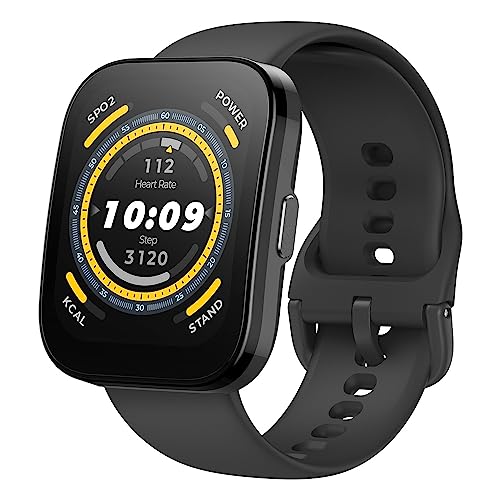
Bip 5 broke with several traditions at once. Its 1.91 inch AMOLED display is far larger and far richer than anything earlier in the range, satellite support covers multiple systems, and the watch runs a newer software platform with a wider set of installable faces and mini applications through the Zepp environment. Published typical endurance falls to around ten days, with heavy use figures lower still. The 5 is the Bip for a buyer who wants a modern bright screen and accepts charging roughly weekly, while earlier generations remain better answers for someone whose first priority is forgetting where the charging cable lives.
Displays: transflective memory versus AMOLED colour
No single decision separates the generations more clearly than the screen. Transflective panels on the early Bip, Bip Lite, and Bip S reflect ambient light back through the display layer, so the face grows clearer as surroundings brighten. Outdoors at noon, those watches are at their best. Indoors, a front light or a wrist raise gesture supplies the missing illumination, and colours look muted beside a phone screen. The reward for accepting that restraint is remarkable frugality, because a transflective panel showing a static watch face consumes very little energy.
TFT panels in the U and 3 families behave more like small phone screens. They need backlighting to be seen, they render colour with greater saturation, and they allow larger, more detailed interfaces. Resolution climbed with each step, reaching 320 by 380 pixels on the Bip 3 display according to published sheets, which makes message text smoother and charts easier to read at a glance. The cost shows up whenever the screen wakes often. A wearer who checks notifications forty times a day will notice the difference in charge interval between a TFT model and an older transflective one, even if headline battery claims look close on paper.
AMOLED in the Bip 5 changes the character again. Individual pixels emit their own light, black areas draw almost nothing, and contrast stays strong in both shade and sun. Published brightness and the automatic adjustment linked to an ambient sensor help the big panel remain legible on a bright pavement. Dark watch faces are not merely a style preference on this hardware; they are an energy strategy. Choosing a face with a black background and modest complications can add meaningful time between charges, whereas a white, animation heavy face will pull the endurance figure down toward the heavy use end of the published range.
Always on behaviour also differs. Transflective models are effectively always on by nature, showing the time continuously without a wake gesture. AMOLED and TFT models offer an always on mode as a setting, and enabling it carries a documented cost. Buyers who value a glanceable wrist while cycling, carrying shopping, or holding a rail on a train should weigh that setting honestly. If always on display is non negotiable and charging patience is limited, an older transflective Bip may serve better than a newer, nominally superior model.
Touch response and glass deserve a mention. Specification sheets list tempered glass with anti fingerprint coating on several generations, and the flat panel geometry keeps edge swipes predictable. None of the Bip displays should be expected to match the scratch resistance of sapphire, which the line has never claimed. A screen protector remains a sensible, inexpensive precaution for anyone whose work brings the wrist near brickwork, metal shelving, or gym equipment, regardless of generation.
Battery life and the forces that shape it
Headline endurance figures only make sense when the conditions behind them are understood. Manufacturers publish typical use values built from a defined mix of screen wakes, heart rate sampling intervals, notification volume, and workout time. Change any of those variables and real intervals move. Continuous satellite tracking is the single largest drain across every generation that offers it, because the receiver must listen to faint signals and record positions repeatedly for the length of a session. A long Sunday ride can consume more energy than several ordinary weekdays combined.
Display choice ranks second. As the display sections above explain, transflective panels sip power while AMOLED and TFT panels spend it in exchange for colour and brightness. Third comes sensor sampling. Continuous heart rate measurement, frequent blood oxygen checks, and detailed sleep analysis all require the optical array on the case back to fire its lights and read the reflections. Lengthening the sampling interval in settings is one of the most effective changes an owner can make, and the app presents those intervals clearly enough that the trade between detail and endurance can be tuned rather than guessed.
Notifications are a quieter factor. Each alert wakes the screen, runs the vibration motor, and lights pixels for several seconds. A busy group chat day can therefore shorten a charge noticeably, especially on the Bip 5 with its large bright panel. Filtering which applications may push to the wrist is both a sanity measure and a battery measure. Most owners find that messages, calls, calendar reminders, and a small set of essentials are enough, and that silencing the rest improves focus as much as it improves endurance.
Temperature plays a part as well. Lithium cells deliver less usable capacity in deep cold, and a watch worn outside a sleeve on a winter run will show it. Conversely, heat during charging should be avoided, and the magnetic charging contacts used across later generations should be kept clean so that a session finishes promptly instead of lingering warm for hours. None of this is unique to the Bip line, but the line’s long intervals make the effects more visible, because a drop from thirty days to twenty four is easier to notice than a drop from two days to one and a half.
Charging hardware changed across the family. Early models used a cradle style charger, while later generations adopted magnetic cables that snap to contacts on the case back. The practical advice is simple: confirm which charger a second hand watch includes before buying, keep a spare cable where you travel most, and remember that a proprietary connector means a forgotten cable cannot be replaced by a phone lead borrowed at short notice. That small logistical point has ended more holidays runs than any sensor limitation ever did.
Satellite positioning: built in, connected, and why the distinction matters
A watch with its own satellite receiver records a route wherever it goes, phone present or not. A watch using connected positioning borrows the phone receiver and draws the map from that data, which works well until the phone battery dies, the handset is left at home, or signal handling on the phone interrupts the feed. For runners and cyclists who like to leave the handset behind, built in reception is a genuine functional divide, not a marketing flourish. In the Bip family that divide runs between standard and Pro models in the U and 3 generations, between the original Bip and the Lite, and it disappears at the top, where the Bip 5 carries multi system support as standard.
Multi system support deserves a plain explanation. Different constellations place satellites in different orbits, so a receiver that can listen to GPS alongside other systems has more chances to maintain a fix between tall buildings or under tree cover. Published material for the Bip 5 describes support for several global systems, and the practical benefit is steadier tracks in awkward places rather than magically perfect lines on every map. Urban canyons still produce wobbles. Expecting survey grade accuracy from a wrist device leads only to disappointment.
Lock on time is another lived difference. A receiver that has been used recently in the same area, with fresh assistance data delivered through the app, finds its position quickly. A watch that has travelled across time zones or sat unused for weeks may take longer at the start of a session. The sensible routine is to begin the workout screen while still preparing to leave, giving the receiver a head start, rather than pressing start at the exact moment of stepping through the door and then blaming the first minute of the track.
Buyers comparing across brands while weighing satellite needs will find useful context in best affordable android smartwatches because several rival models make the same standard versus Pro split and the reasoning transfers directly. Within the Bip range itself, the question to answer is narrow: will you regularly exercise without a phone nearby? If the honest answer is no, connected positioning is adequate and the money saved can go toward a strap you actually enjoy wearing. If the answer is yes, the Pro tier or the Bip 5 stops being optional.
Health sensors: heart rate, blood oxygen, stress, and sleep
Every Bip generation centres on an optical heart rate sensor pressed against the wrist by the strap. Published sheets for later models name the sensor generations used, and the software builds resting rate trends, workout zones, and alerts for unusually high or low readings on top of that signal. Optical measurement depends on fit. A strap worn loosely enough to slide will produce gaps and spikes, particularly during arm swinging exercise, while a snug fit one notch tighter for workouts gives the lights a stable view. Chest straps remain the reference for interval sessions, and no Bip claims to replace them.
Blood oxygen measurement arrived with the U family and continued through the 3 and 5. The reading estimates saturation from reflected light and is presented as a wellness indicator, not a medical determination. Cold fingers, movement, tattoos in the sensor path, and a loose strap all degrade the result. The most reliable routine is to sit still, rest the arm on a table, and let the watch complete its cycle without talking or shifting. Spot checks taken that way are far more comparable across days than hurried readings grabbed while walking.
Stress scoring in the Zepp environment draws on heart rate variability, the small changes in timing between beats. Later Bip models present an all day stress picture with prompts for guided breathing when levels stay elevated. Used sensibly, the value lies in pattern spotting: noticing that poor sleep, late caffeine, and a difficult commute stack into the same afternoon tells a wearer something actionable. Treating any single hourly score as a verdict on your character helps nobody, and the app documentation frames the metric as an estimate, which is exactly how it should be read.
Sleep tracking follows the familiar pattern of estimating light, deep, and rapid eye movement phases from movement and cardiac signals, then adding a score and, on later models, detail about breathing quality and naps. Readers who care most about this side of ownership should also look at best smartwatches with sleep tracking to see how the wider field handles staging claims, because every wrist based system estimates stages rather than measuring brain activity directly. Within the Bip line, the advantage of the newer models is breadth of reporting, not a different category of measurement. Consistent wear, a charged battery before bed, and a strap comfortable enough to forget are what turn sleep features from a novelty into a useful record.
Activity recognition rounds out the sensor story. Published mode lists grew from a handful of basics on the original watch to well over a hundred sport profiles on the Bip 5, although the underlying measurements remain time, heart rate, movement, and position where available. A long mode list mainly saves labelling effort after a session. It does not add sensors, and a yoga session recorded under a generic indoor mode still captures duration and cardiac effort perfectly well.
Water resistance, case build, weight, and straps
Most of the line from the Bip S onward carries a 5 ATM rating. That figure refers to pressure equivalent to a depth of fifty metres under standard test conditions, and manufacturer guidance treats such watches as suitable for showering, rain, and pool swimming. It does not invite high speed water sports, hot tubs, or sauna use, where heat and dynamic pressure behave differently from a calm test tank. The original Bip documentation used an IP68 description instead, which addresses dust and immersion under its own conditions, so owners of that generation should follow the guidance printed for their model rather than borrowing rules from later ones.
Buttons and water need care. Pressing a physical button while the watch is submerged can compromise seals on many designs, and brand guidance commonly advises against it. The Bip range relies heavily on touch input with a side button for wake and navigation duties, so the practical routine is to set a swim session up before entering the water and leave controls alone until you are dry again. Rinsing the watch in fresh water after pool or sea exposure, then drying the contacts before charging, keeps both seals and electrical points in better condition.
Case materials stay deliberately light. Polycarbonate and similar polymers dominate, with aluminium alloy appearing on the Bip 5 bezel area in published descriptions. Plastic cases attract criticism from buyers who equate weight with quality, yet on a product designed to be worn during sleep and exercise, low mass is a feature. A watch in the low thirty gram range disappears on the wrist in a way that a heavy steel device never will, and that disappearance is precisely what makes twenty four hour wear, and therefore continuous health records, realistic for many owners.
Strap compatibility is one of the quiet strengths of the family. Quick release spring bars in common widths, twenty millimetres on many earlier models and twenty two on the larger Bip 5 according to published dimensions, open the door to silicone, woven nylon, leather, and metal replacements from countless makers. The stock silicone strap is soft and washable, ideal for sport, but it can trap sweat in hot weather. A woven strap breathes better for office wear, while leather should be kept away from swim sessions. Changing straps takes seconds with the quick release pins, so owning two and rotating them is a realistic habit rather than a hobbyist ritual.
Skin comfort deserves direct words. Any watch worn continuously can irritate if moisture and soap residue collect beneath the strap. The fix is mundane: rinse the strap, dry the wrist fully, loosen the fit by a notch at night if the sensor record allows, and give the skin a short break during charging. Because Bip charge intervals are long, that break may need to be scheduled deliberately, perhaps while showering, so the routine survives even when the battery does not demand attention for weeks.
The Zepp application and phone compatibility
A Bip watch without its companion application is only half a product. The Zepp app handles pairing, watch face selection, notification permissions, health history, workout records, firmware updates, and settings for sampling intervals and alerts. Published compatibility notes describe support for Android and iPhone handsets within stated system version ranges, which shift over time as the app evolves, so checking the current listing against your phone version is a necessary step before buying an older generation. A watch that pairs happily with a recent handset may not suit a phone stuck on a very old system release.
iPhone owners should set expectations carefully. The Bip line works with iPhones for notifications, health records, and activity tracking, but reply options and some notification actions are more limited than on a watch built by the phone maker itself. Cross platform shoppers will find the trade offs laid out in best android smartwatches for ios and the same logic applies here: a Bip gives an iPhone user endurance and a light case in exchange for shallower integration with messages and calls. Many owners accept that exchange gladly, but nobody should discover it by surprise.
Data presentation in the app has improved steadily. Home screens summarise readiness style scores, sleep, activity rings, and recent workouts, while deeper pages hold the long term charts that make months of records worthwhile. Export and sharing options connect with popular fitness platforms in many regions, although the exact list varies by territory and over time. Before committing a training history to any ecosystem, confirm that your preferred platform appears in the current version of the app rather than relying on a review written for an earlier release.
Firmware updates arrive through the app and should be installed with the watch charged and near the phone. Updates have historically refined satellite behaviour, added activity modes, and corrected translation or display quirks. Skipping them for months rarely causes harm, but installing them eventually keeps the watch aligned with phone system changes. A failed update is usually recovered by restarting both devices and retrying on a stable connection, and the small size of Bip firmware makes the process quick compared with full smartwatch platforms.
Privacy controls sit in the same menus. Owners can review which health metrics are recorded, manage cloud synchronisation, and delete stored data through account tools. Because the Bip collects sleep, cardiac, and location linked workout information, taking ten minutes to read those settings once is time well spent. The watches themselves hold recent records locally, while long term history lives with the account, so signing out or changing phones should be planned rather than improvised if a continuous record matters to you.
Model by model: who each generation suits
Original Bip
The first model remains a lesson in focus. Its transflective face, satellite receiver, and exceptional endurance still make sense for a walker or runner who wants route records and almost no charging routine. Limits are equally clear: the display looks dated beside modern panels, the interface is basic, blood oxygen measurement does not exist, and new units are now scarce, so most purchases involve older stock or used examples whose battery history is unknown. Buy it for its strengths, with open eyes about age, and it can still serve well.
Bip Lite
Lite ownership suits a person whose activity is steps, sleep, and heart rate rather than mapped routes. Indoor workers, treadmill walkers, and anyone whose phone accompanies every outing lose little by giving up the satellite receiver. The danger lies in assuming the Lite badge means a smaller version of the same hardware. It does not. Listings sometimes shorten names, so verify the full model designation and the positioning entry in the specification table before paying, especially in marketplaces where titles are truncated.
Bip S
The S generation fits a swimmer on a modest budget who also wants a transflective face. The 5 ATM rating, improved display clarity, and low weight form a coherent package for pool regulars who dislike charging. Its sensor set predates the blood oxygen push, so a buyer whose main interest is respiratory wellness metrics should look later in the line. As a straightforward activity watch with strong endurance, though, the S remains easy to recommend in principle wherever sound stock exists.
Bip U and Bip U Pro
These models mark the point where the line became a health watch first and an endurance watch second. Blood oxygen spot checks, stress scoring, breathing exercises, and a brighter colour panel serve desk workers and carers who want a fuller daily health picture. Choose the Pro if independent route recording or the microphone linked assistant feature matters; choose the standard U if the phone is always present and simplicity appeals. Either way, plan on charging roughly weekly, and judge the purchase against that rhythm rather than against the month long claims of earlier generations.
Bip 3 and Bip 3 Pro
A larger face changes who a watch suits. The 1.69 inch display helps readers who struggle with small text, presents workout fields generously, and makes notification reading less of a squint. The Pro version, with its own satellite receiver and fourteen day class endurance in published typical use terms, is arguably the most balanced Bip ever sold. The standard 3 serves phone carrying walkers who want screen size without paying for positioning hardware they will rarely engage.
Bip 5
The flagship of the family targets a different buyer entirely: someone who wants a big AMOLED canvas, downloadable faces, richer applications through the Zepp platform, multi system positioning, and a speaker and microphone arrangement that supports call handling through a connected phone where the feature is enabled. That breadth brings the Bip name into direct conversation with mainstream smartwatches. It also brings mainstream expectations, including weekly charging and a larger case that will not suit every wrist. Small wrists should try the dimensions on paper against a current watch before ordering, because forty six millimetre class cases wear noticeably bigger than the compact bodies earlier in the line.
Choosing by routine rather than by headline
Start with your charging tolerance. If the idea of a weekly charge feels like a burden, the transflective and TFT generations deserve priority, and the Bip 5 should be admired from a distance. If charging sits naturally in a Sunday routine, the newer hardware opens up. Next, settle the positioning question honestly, using the phone carrying test described earlier. Then rank the health metrics you will actually review weekly. A sensor checked twice and forgotten should not drive a purchase; a metric you discuss with a clinician or use to pace training deserves real weight.
Wrist size and sleep wear come after that. A watch bought for sleep records must be comfortable at 3 a.m., not merely acceptable in a shop at noon. Light weight helps every generation here, but case diameter and strap material decide the outcome. Woven straps often win at night. Finally, consider longevity. A current generation model will receive application support and faces for longer than a discontinued one, so a buyer planning to keep a watch for many years should factor support horizon alongside purchase cost and headline specifications.
Gift buying adds one more filter. A Bip makes a kind gift for a relative who wants steps, sleep, and large time digits without a complicated platform, provided the giver helps with pairing and notification setup on the day. Handing over a sealed box without that help often leads to a drawer. The watches are simple by smartwatch standards, yet the first hour still involves accounts, permissions, and phone settings that are easier with a patient guide beside the recipient.
Mistakes to avoid when buying a Bip
The first mistake is confusing generations with similar names, already mentioned but worth repeating because it causes the most regret. Bip, Bip Lite, Bip S, Bip S Lite, Bip U, Bip 3, and Bip 5 are distinct products. A listing photo showing a bright colour screen does not prove which model sits inside the box. Match the model number from the case back or settings page against the manufacturer specification sheet before concluding that a bargain is real.
Expecting an application store on early models is the second classic error. The Bip 5, running its newer platform, offers a selection of mini applications and faces through the Zepp environment. Earlier generations offer faces and settings, not a general store, and they cannot install phone style applications. Likewise, call handling differs: most earlier models show incoming call alerts and allow rejection, but they have no speaker for conversation. A buyer who needs to speak through the wrist should verify that specific capability on the specific model rather than assuming the whole line shares it.
Third, do not treat water ratings as lifetime guarantees. Seals age, impacts shift gaskets, and a watch that survived swims when new may not do so after a hard drop years later. Fourth, beware of judging battery health on a used watch from a single charge. Lithium wear shows up over weeks, so a used purchase should include a return window long enough to observe at least one full cycle under your own routine.
Fifth, avoid enabling every notification and every continuous sensor on day one and then declaring endurance disappointing. The published figures assume a measured configuration. Set the watch up in layers: essentials first, then add metrics one at a time and watch the effect. That method also reveals which features genuinely change your behaviour, which is the real test of any health device. A feature that never alters a decision is decoration, however impressive its chart looks.
Finally, do not ignore strap and charger logistics. Confirm the strap width for your generation before ordering replacements, confirm the charger type in the box, and store the cable somewhere memorable. These unglamorous checks prevent the small frustrations that colour an otherwise sound purchase, and they cost nothing but a minute of attention at the right moment.
Questions buyers ask most often
Can a Bip work without a phone nearby?
Time, alarms, timers, step counting, heart rate, and stored workout recording all function away from the handset on models equipped for them. Weather refreshes, notification delivery, and assistance data for faster satellite fixes need the connection. A Pro model or a Bip 5 can record a run independently and synchronise later; a connected positioning model can record time and cardiac data but will lack a route map for that session.
Does the line track naps?
Later models within the Zepp environment report nap detection as part of sleep reporting, with duration thresholds described in app documentation. Earlier generations concentrate on the main night period. Anyone whose work involves shifts and daytime sleep should check the current app description for the exact model under consideration, because sleep features have evolved through software as much as through hardware.
How accurate are the health readings?
Readings are estimates from optical and movement sensors, suitable for trends, training zones, and general awareness. They are not clinical measurements. Fit, skin contact, motion, and temperature influence results, and the manufacturer documentation says as much in its own wording. A consistent routine, same wrist, similar tightness, readings taken at rest, produces the most comparable record over time.
Will a Bip suit a small wrist?
Earlier generations wear compactly and their low weight helps further. The Bip 5 is a larger object and may overhang narrow wrists, which affects both appearance and sensor contact. Compare case dimensions and lug to lug length with a watch you already wear comfortably, and remember that an overhanging case rocks during exercise, degrading optical readings as well as comfort.
What happens when a generation is discontinued?
The watch continues to work, and the app generally retains support for older models for a considerable period, but new faces, features, and fixes slow down. Straps and chargers remain available through third parties for popular generations. A discontinued model at a fair price can be a rational purchase for a defined need; it is a poorer choice as a long term platform.
Watch faces, notifications, and daily interface habits
The watch face is the screen you will see hundreds of times each week, so its layout deserves more thought than its decoration. A good Bip face puts the time in the largest digits, keeps the date legible without squinting, and reserves complications for data you genuinely check outdoors. Battery percentage, step progress, and current heart rate cover most needs. Weather icons help in the morning but add clutter by afternoon. Analogue styles look elegant in photographs yet often slow down a quick glance, because reading hands takes longer than reading numerals when you are carrying bags or holding a dog lead.
Owners of transflective models should favour high contrast faces with bold strokes. Thin grey lettering that looks refined indoors can vanish in mixed light, while black numerals on a pale ground remain readable at arm length. AMOLED owners face the opposite temptation: colourful artwork and animated elements are enjoyable for a day, then become visual noise and an energy cost. A restrained dark face with white digits and one accent colour usually survives longest before being changed, and it also reduces the glow that can disturb a partner when the wrist turns during sleep.
Notification handling follows a similar pattern of restraint. The Bip interface shows incoming alerts in a list that can be cleared in batches, and vibration strength can be adjusted on later models. A short, distinct vibration for calls and a gentler pulse for messages helps the wrist communicate priority without a glance. During meetings, enabling a do not disturb window through the app prevents embarrassment while still recording activity quietly in the background. During exercise, most owners prefer workout data to stay on screen, with alerts paused until the session ends.
Text size and message length vary by generation. Larger TFT and AMOLED panels display more lines before truncation, which matters for delivery notices, two factor prompts, and calendar entries with location details. Earlier compact screens show enough to decide whether reaching for the phone is worthwhile, and that triage role is honestly their main notification job. Judging a small Bip harshly for failing to show a full email misses the design intent; it was built to filter attention, not to replace the handset in your pocket.
Exercise modes and record keeping in practice
Workout recording across the family follows a consistent grammar. You choose a mode, wait for any positioning fix if the session is outdoors, start the timer, and review splits, heart rate zones, pace or speed, and a map where positioning data exists. Indoor modes rely on movement and cardiac signals, estimating distance for treadmill work from arm motion calibrated over time. Accuracy improves when stride information in the app profile is honest, because height, weight, age, and sex entries all feed the estimates that turn wrist movement into distance figures.
Pause behaviour matters on real routes. Traffic lights, conversations, and a shoelace stop can distort average pace if the timer keeps running. Some modes offer automatic pause in the app settings for later models, while others expect a manual press. Learning which behaviour your generation uses before an important event avoids a record that looks slower than the effort felt. Equally, remember to end a session properly rather than letting it run during the drive home, a classic error that inflates distance and confuses weekly totals for anyone reviewing training load later.
Long term records are where the Zepp history earns loyalty. Monthly views reveal whether step averages collapse during busy work periods, whether resting heart rate drifts upward during illness or heavy training blocks, and whether sleep duration shortens across a stressful season. Those trends are more valuable than any single workout file. Exporting or screenshotting a summary at the end of each season gives you a personal archive that survives phone changes, app redesigns, and the eventual retirement of the watch itself.
Buying used, checking stock, and long term care
Because several Bip generations are discontinued, used and old stock purchases form a large share of ownership. A careful check sequence protects you. First, confirm the model number and region variant. Second, inspect the case back sensor window for deep scratches that could scatter the optical signal. Third, ask the seller to show the watch charging and holding a connection through a full afternoon. Fourth, check that the strap pins sit firmly, because a worn spring bar can release a watch over hard ground without warning.
Battery ageing is the main unknown in any used example. A watch that once lasted a month may now manage two weeks, which could still suit your routine perfectly if the price reflects it. The honest question is not whether capacity has faded, since all lithium cells fade, but whether the remaining endurance clears your personal threshold with margin. Someone who charges weekly anyway can accept a tired Bip 3 happily; someone buying specifically for month long intervals should insist on newer stock or a current generation instead.
Care routines are simple and cheap. Wipe the case back after workouts so dried sweat does not cloud the sensor window. Keep the charging contacts dry and free of sunscreen. Store a spare strap pin and the charging cable together in one pouch when travelling. Avoid leaving the watch on a hot dashboard or a cold windowsill for long periods. None of these habits requires special products, and together they explain why some five year old examples still look tidy while neglected newer watches feel shabby within a season.
Accessories should be bought for a problem you actually have. A hard travel case helps if the watch rides in a gym bag beside keys. A longer strap helps if the stock length barely reaches the last hole over a jacket cuff. A protective bumper helps if your work involves masonry or metal stockrooms. Buying bundles of extras before the watch arrives usually produces a drawer of unused plastic, because the standard package already covers the ordinary week for most owners in most climates.
How the Bip compares with the wider lightweight field
Set against the broader lightweight category, the Bip line occupies a distinctive middle ground. Basic bands from several makers cost less and track steps competently, but their narrow screens cramp notifications and their workout records lack the depth that Bip owners receive through Zepp charts. Full smartwatches from phone makers offer richer replies, voice calls, and payment features, yet they demand frequent charging and weigh noticeably more during sleep. The Bip proposition sits between those poles, offering a proper watch face, credible health records, and endurance that neither extreme matches at the same time.
That middle position explains both the praise and the criticism the family attracts. Reviewers who judge by feature count alone find the earlier generations sparse. Owners who judge by whether a device stays worn, charged, and useful across a busy month often reach the opposite conclusion. A watch abandoned in a drawer records nothing, however advanced its sensor array may be. By staying light, legible, and undemanding, Bip models tend to stay on wrists, and continuous wear quietly produces the long, unbroken data sets that make health tracking worthwhile in the first place.
Future proofing should be weighed with similar realism. The Bip 5 platform will age more gracefully than discontinued generations because its software environment remains active and its face library keeps growing. Yet an older model bought for a narrow job, such as pool sessions or step challenges at work, does not need a growing library to succeed. Matching the support horizon to the job length keeps spending proportionate and prevents the common trap of buying flagship hardware for a task that a simpler generation performs identically.
One final consideration is resale and hand me down value within a household. A Bip that no longer suits your own training can serve a teenager counting steps for school sport, a parent who wants large time digits and fall free simplicity, or a partner curious about sleep records without committing to a premium device. Resetting the watch, unpairing it cleanly from your account, and passing along the correct charging cable turns an upgrade into a gift rather than electronic clutter, and it extends the useful life that the low power design made possible from the start.
Check prices on Amazon
Live listings for the shortlist in this guide are pulled from Amazon below, so prices and availability are always current at the moment you look.




Verdict
The Bip family rewards buyers who match a generation to a routine. Choose transflective models for endurance and outdoor clarity, the U and 3 families for a balance of health tools and screen size, a Pro whenever independent route recording matters, and the Bip 5 when a modern AMOLED experience matters more than long intervals between charges. No generation is best in the abstract. Each is best at a particular mixture of compromises, and the specification sheets, read carefully, tell you exactly which mixture you are getting.
As a disclosure for this guide, every recommendation above rests on published specifications, specification sheets, and manufacturer documents supplied for each generation, not on hands-on use of the watches, and where a reader buys through retailer links connected with this site, the site may receive a commission from the retailer while the price paid by that reader stays unchanged.
For the walker who charges a watch only when the calendar page turns, the oldest Bip virtues still shine brightest of all.


