What's inside
- Key Takeaways
- Quick Picks
- How We Chose These Picks
- Why Are So Many 32-Inch TVs Secretly 720p?
- When Does a 32-Inch TV Work as a Monitor Substitute?
- Which Rooms Does a 32-Inch Screen Actually Fit?
- How Should You Set Up a Small-Room TV in the First Ten Minutes?
- What About Sound, Light and Everyday Annoyances at This Size?
- How Long Does a 32-Inch 1080p TV Stay the Right Answer?
- How Do You Read a Small-TV Listing Without Being Fooled?
- What Actually Differs Between These Six on an Ordinary Evening?
- The Six at a Glance for Small Rooms
- How Do You Avoid the Classic 32-Inch Buying Errors?
- Final Recommendation
- Frequently Asked Questions
- Related Guides
As an Amazon Associate I earn from qualifying purchases. This post may contain affiliate links at no extra cost to you.
gizmoverdict.com is reader-supported. When you buy through links on our site, we may earn an affiliate commission.
Where to buy: Links in this guide go to the Amazon listing for the precise model under discussion, and that precision matters more than usual here: several televisions in this size wear nearly identical names in 720p and 1080p versions, so check the resolution line on the listing page against the model named below before you pay.
The search for the best 1080p 32in TVs begins with a trap, and it is better to meet it in the first paragraph than at the checkout. A large share of the 32-inch televisions on sale — including some from famous brands, sold at tempting prices under a bold HD banner — are not 1080p at all. They carry 1366 by 768 or 1280 by 720 panels, roughly half the pixels, and the word HD on the box is doing heavy, legal, misleading work. Every television recommended below has been checked to a native 1920 by 1080 panel. That single fact is the spine of this guide.
Why insist on 1080p at a size where many shoppers happily accept less? Because 32 inches is the crossroads size. It is the largest television that still fits a kitchen counter, a caravan, a student desk or the foot of a bed, and the smallest that works as a genuine living-room screen in a flat. At the distances those rooms impose — often well under two metres — the step from 720p to 1080p is not a spec-sheet nicety. Text sharpens, faces stop swimming, a laptop connected over HDMI shows a desktop you can actually work on, and a console renders at the resolution it was designed to output. The premium for the full panel is usually small; the difference in daily use is not.
The six sets below divide by platform and temperament rather than by picture, because at this size the panels are closer than the marketing suggests. What separates them is the software they run, the care in their tuning, the ports on the back and the honesty of their specification pages. Read the warnings as carefully as the recommendations: the section on the 720p problem names the pattern to avoid wherever you end up buying.
Key Takeaways
- Plenty of 32-inch sets labelled HD are secretly 720p; the six here are verified native 1920 × 1080 panels.
- At 32 inches, 1080p earns its keep in small rooms where viewers sit close enough to see every pixel a 720p set lacks.
- The same size doubles as a workable monitor substitute, which a 720p panel at this size cannot honestly claim.
- Platform, ports and tuning separate these picks far more than raw picture quality does.
- Check the resolution line on any listing yourself, because model families often span both resolutions under one name.
Quick Picks
| Pick | Badge | Why it earns its place |
|---|---|---|
| Roku 32 Select | First choice for most rooms | A current 1080p panel behind the friendliest interface in the class, equally at home in a kitchen or a bedroom. |
| TCL 32 S3 | Google TV all-rounder | The widest app catalogue and built-in Chromecast make it the most flexible small-room screen here. |
| Samsung 32 F6000 | Most polished picture | Samsung’s tuning gives films and sport a refinement the budget sets below it do not match. |
| Vizio 32 D-Series | Simple panel, honest price | A long-running Full HD design that keeps its smart layer light and its specification page truthful. |
| Insignia 32 F40 | Fire TV favourite | Alexa voice control and the full Amazon app shelf on a genuine 1080p panel, unlike its 720p F20 sibling. |
| Hisense 32 A4 | Lowest-cost true 1080p | The cheapest route in this guide to a verified Full HD panel, with Fire TV included. |
How We Chose These Picks
Resolution verification came before everything, and it was less trivial than it sounds. Manufacturer pages, retailer listings and the boxes themselves use HD, Full HD, FHD and 1080p with varying discipline, and the same model family can include both a 720p and a 1080p variant sold under adjacent names. Each pick below was confirmed at 1920 by 1080 from its specification, not from its headline. The Insignia range illustrates why: the F20 line at this size is a 720p product, while the F40 is the 1080p one — one digit apart in the name, a full resolution class apart on the wall.
With the panel settled, the judging turned to small-room life. Viewing distances in the rooms these sets serve are short, so pixel density mattered: at 32 inches, 1080p yields a density that holds up at a metre and a half, while 720p visibly frays. Sound mattered too, because small rooms rarely get soundbars, so the television’s own speakers carry films and matches unaided. Port counts were checked against realistic small-room loads — a console, a streaming stick, perhaps a laptop — and the platforms were weighed for the things a kitchen or bedroom set actually does: waking fast, resuming a series, and not demanding attention.
Finally, we favoured sets whose makers publish full specifications. In a category riddled with vague labelling, a brand that states its panel resolution plainly has earned a measure of trust, and every pick here passes that test.
Weight and mounting were checked as well, because small-room sets get carried, wall-mounted in rented flats and fitted into caravans in ways a living-room flagship never is. All six picks are light enough for one person to handle and support standard VESA mounts, and none requires a proprietary bracket. Power consumption, rarely printed in reviews, matters in the caravan and off-grid cases; small LED sets of this class draw modest wattage, another quiet reason the size persists in those settings. Where a specification could not be confirmed from the maker’s own material, the set did not enter the shortlist at all — in a category with this much label fog, unverifiable was treated as a failing grade.
A note on what did not decide the ranking: HDR badges. All six accept HDR signals, none has the brightness or local dimming to display HDR with real impact, and treating the badge as a buying reason at this size would repeat the HD label’s trick at a higher level. Judge these sets as the good SDR televisions they are.
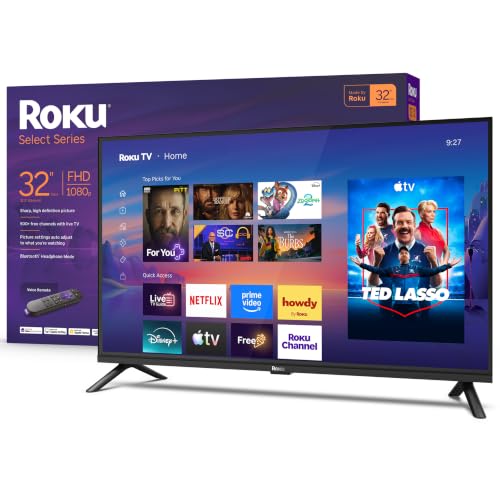
Roku 32 Select — First choice for most rooms
Roku’s own-brand Select television tops this ranking because the small-room virtues are the ones Roku has always prioritised: it wakes quickly, the home screen is a calm grid that a grandparent or a guest can navigate without instruction, and the 1080p panel behind it is a current design rather than a leftover. In a kitchen it is the set you glance at for the news while cooking; in a bedroom it resumes last night’s episode in two button presses; on a student desk it takes a laptop’s HDMI feed and shows a desktop with legible text, which is precisely where its 720p rivals fall apart.
The picture itself is well judged for the size. Colours arrive natural rather than showroom-loud, the panel is bright enough for a normally lit room, and uniformity on the samples this line is known for is tidy at the price. Roku’s software also treats connected devices gracefully: inputs appear as tiles, renaming them takes seconds, and the set can be told to start on the last input, a kindness for a screen that serves one laptop or one console most days.
Ownership extras round it out. The Roku mobile app gives every phone in the house remote duties and a keyboard, private listening routes audio to earbuds for late viewing, and the platform’s content search spans services instead of favouring one store. There is no gaming branding and no pretension to cinema; there is simply a correct panel, honest software and a price that respects the room it will live in. For most 32-inch buyers, the search can reasonably end here.
Consider the caravan and the spare-room test, two duties this size class serves constantly. The Select is light enough to mount on the kind of bracket a caravan wall accepts, its power draw is modest, and Roku’s interface works happily on a phone hotspot when the site Wi-Fi falters, because the platform was designed for modest bandwidths. In a spare room it behaves like good guest furniture: obvious to operate, undemanding to keep, and new enough in its model cycle that software support should run for years. Longevity of support is an underrated specification in a category where some rivals ship designs old enough to be nearing the end of theirs.
- Panel: 32-inch, 1920 × 1080 native
- Platform: Roku TV, voice remote included
- Inputs: HDMI for console, laptop and stick, plus antenna tuner
- Audio: built-in speakers; headphone listening through the Roku app
- Smart home: compatible with Alexa, Google Assistant and HomeKit
Strengths
- A verified full-resolution panel, in a size class where that verification genuinely fails elsewhere.
- The calmest software in the group for shared and guest use.
- Text stays crisp at desk distance, so the monitor-substitute role is real.
Trade-offs
- The home screen carries Roku’s content promotion, visible though not aggressive.
- No frills for gamers beyond a picture mode; players should read the gaming guide in this batch.
- Peak brightness suits ordinary rooms, not a conservatory at noon.
Best for: the majority of small rooms, where one screen must serve viewing, guests and the occasional laptop.
Not suited for: a sun-drenched room where brightness, not resolution, is the binding constraint.

TCL 32 S3 — Google TV all-rounder
TCL’s S3 is the pick for the household whose small television works hardest. Google TV brings the Play Store’s full catalogue, so the niche streaming service, the fitness app and the foreign-language channel that other platforms lack are all present, and Chromecast is built in for the phone-first viewer who would rather cast than browse. The panel is the same honest 1080p proposition as the Roku’s, and TCL’s tuning leans a touch more vivid, which flatters animation and sport in a bright kitchen.
As a desk-adjacent screen it has a second talent: TCL markets a Game Accelerator on this model, aimed at console response, and while this guide’s focus is the size class rather than gaming, the underlying short processing path also suits a laptop driving the panel at its native resolution. Text rendering at 1080p over HDMI is clean, the set remembers per-input settings, and Google TV’s profiles let a shared screen keep separate recommendations for separate people — a feature that earns its keep in a family kitchen.
The cautions are platform-shaped. Google TV’s home screen is a recommendation engine first and a menu second, and owners who prefer Roku’s plain grid sometimes find it busy. The remote’s Google Assistant button is useful or ignored depending on the household. Neither point touches the panel, which is the purchase; on panel, platform breadth and price together, the S3 is the strongest alternative to the Roku and the better buy for app-hungry homes.
There is a family angle worth naming. Google TV’s kids’ profiles are the most developed in this group, with viewing limits, content filtering and a separate home screen, so a 32-inch set destined for a shared family space or a child’s room under supervision carries its parental tools built in rather than bolted on. Combined with the casting that lets a parent send a chosen programme from their own phone, the S3 handles the realities of household viewing with less improvisation than its rivals manage.
- Panel: 32-inch, 1920 × 1080 native
- Platform: Google TV with Chromecast built in
- Inputs: HDMI ports for console and computer, USB for media
- Audio: built-in stereo speakers, Bluetooth audio out
- Extras: Google Assistant voice remote, individual user profiles
Strengths
- The broadest app catalogue available at this size, full stop.
- Profiles keep a shared kitchen or family set civilised.
- Vivid default tuning suits bright rooms and daytime viewing.
Trade-offs
- The recommendation-heavy home screen will not suit minimalists.
- Google TV can feel slower to settle after a cold start than Roku’s interface.
- Like every pick here, its HDR support is acceptance of the signal, not display of it.
Best for: app collectors and casting households that want the small screen to do everything the big one does.
Not suited for: a buyer who wants the television’s menus to disappear entirely behind the content.

Samsung 32 F6000 — Most polished picture
Some buyers simply trust Samsung, and the F6000 is the set that justifies the instinct at 32 inches. Its panel is a genuine Full HD design, its colour tuning is the most film-literate in this group, and the whole product — remote, menus, stand, bezel — feels assembled by people who also make flagship televisions. In a small living room that serves as the household’s real television room, rather than a secondary space, that polish is the difference between a compromise and a choice.
Tizen is the platform, with Samsung TV Plus adding a shelf of free channels that suits a set used for casual daytime viewing. Motion handling on sport is a quiet strength: Samsung’s processing at this level is restrained, keeping football watchable without the soap-opera sheen cheaper sets sometimes impose. Skin tones, the easiest thing for a budget panel to ruin, stay believable, and for film nights in a bedsit or a small flat this is the screen in the group that flatters the material most.
Price is the counterweight. The F6000 typically asks more than the Hisense and Insignia while sharing their resolution, and Samsung’s badge buys tuning and finish rather than extra capability. Tizen also carries its own promotional rows. Buyers paying the premium should do so for the picture manners and the brand’s support network, both real, rather than for any feature on a comparison chart, where the cheaper sets match it line for line.
One more consideration separates the F6000 in practice: resale and hand-me-down value. A Samsung badge on a small television keeps it desirable second-hand and welcome when it migrates to a relative’s spare room, in a way house-brand sets rarely manage. Households that rotate screens between rooms and generations — the main set demoted to the bedroom, the bedroom set to the student flat — will find the F6000 the pick that holds its place in that chain longest, which is a form of value no specification table captures.
- Panel: 32-inch, 1920 × 1080 native
- Platform: Samsung Tizen with Samsung TV Plus free channels
- Inputs: HDMI for external devices, USB media playback
- Audio: built-in speakers, Bluetooth for external audio
- Ecosystem: SmartThings app control, phone mirroring
Strengths
- Colour and motion manners a clear step above the budget brands.
- Free TV Plus channels suit a set that idles on during the day.
- Brand support and resale confidence the house brands cannot offer.
Trade-offs
- The highest typical price in this group for the same pixel count.
- Tizen’s interface promotes Samsung’s own content rows.
- Feature-for-feature, the cheaper Fire TV sets match its chart exactly.
Best for: a small flat’s main screen, where picture quality is the daily experience rather than a footnote.
Not suited for: a utility room or rental where the premium would buy nothing the occupants will notice.

Vizio 32 D-Series — Simple panel, honest price
Vizio’s D-Series earns its slot by being the television equivalent of a well-made basic tool. The specification page states the Full HD panel plainly, the SmartCast platform covers the major services without theatrical extras, and the set concentrates its modest budget on the screen itself. For a bedroom or a spare room where the television is furniture that occasionally shows programmes, that concentration is exactly right.
Daily behaviour is undemanding. It can start on the last input, it accepts casting from both major phone ecosystems, and its remote does not attempt to be a wand, a keyboard or a games controller. Picture performance in a dim room is respectable, with contrast that flatters evening viewing, and the optical audio output lets an older soundbar or speaker system join in — a pairing small rooms benefit from, since Vizio’s own speakers, like all the speakers here, are clear rather than rich.
Age is the honest asterisk. This line has been on sale for years, its interface is the plainest in the group, and its app shelf is the shortest. Buyers who stream from the television itself all evening may feel those limits; buyers whose viewing comes through a console, a stick or an aerial will not. As a panel purchase, the D-Series remains one of the most sensible ways to put a true 1080p screen in a small room.
The D-Series also suits the aerial-and-nothing-else household, a real constituency at this size. Its tuner and channel guide are straightforward, its free WatchFree+ service adds streaming channels without an account, and the whole set can be run for years without the owner ever engaging with an app store. In an age when every screen wants a login, a television that still respects broadcast viewing has a constituency of its own, and Vizio serves it more faithfully than any other maker here.
- Panel: 32-inch, 1920 × 1080 native
- Platform: Vizio SmartCast, Chromecast and AirPlay casting
- Inputs: HDMI ports, optical audio output, antenna tuner
- Audio: built-in speakers; optical feed for an external soundbar
- Extras: voice remote, free WatchFree+ channels
Strengths
- Specification honesty that this size class badly needs more of.
- Optical output rescues older audio gear the HDMI-only sets strand.
- Evening contrast is a pleasant surprise at the price.
Trade-offs
- The platform feels its age beside Roku and Google TV.
- App breadth is the narrowest here; a stick may join it sooner than rivals.
- Side-angle viewing washes out, so wide seating sees a poorer picture.
Best for: a calm bedroom or spare room fed by an aerial, a console or a stick.
Not suited for: a heavy native-app streamer who lives inside the television’s own interface.

Insignia 32 F40 — Fire TV favourite
The F40 exists in this guide partly as a warning made good. Insignia’s F20 line at 32 inches — the set a hurried shopper is most likely to grab — is a 720p television. The F40 is the same brand’s genuine 1080p answer at the same size, running the same Fire TV platform, and the difference on the wall is exactly the difference this whole guide is about: menus render sharply, a connected laptop shows a usable desktop, and programmes stop looking like they are being viewed through gauze. If you take one lesson from this page, take the model-number discipline the F40 represents.
As a television in its own right, the F40 is a competent Fire TV set. Alexa voice control handles searching, input switching and smart-home duties, the app catalogue is Amazon’s full shelf, and the Luna cloud-gaming app is present for households that want casual games without a console. Picture quality is mid-pack: adequate brightness, honest colour, nothing that embarrasses and nothing that headlines. In a child’s room, a kitchen or a first flat, mid-pack at this price is a fair description of success.
The platform’s personality is the price of admission. Fire TV promotes Amazon content and partner apps across its home screen, and owners who dislike being marketed to by their television should look at the Roku instead. For an Amazon household — Prime Video central, Echo speakers present, Alexa already running the lights — the F40 slots in as if designed for the house, because it was.
Practical ownership is helped by Insignia’s retail footprint. As a Best Buy house brand, the F40 is a set you can often see running in a store before buying, return to a physical counter if it disappoints, and find on promotion with a regularity the online-only brands do not match. None of that appears in a specification table, yet for a category defined by a labelling trap, being able to stand in front of the exact model and read its box in person is a genuinely useful property.
- Panel: 32-inch, 1920 × 1080 native — not the 720p of the F20 line
- Platform: Amazon Fire TV with Alexa voice remote
- Inputs: HDMI ports for console and laptop, USB
- Audio: built-in speakers, Bluetooth headphone support
- Extras: Luna cloud gaming app, Echo smart-home integration
Strengths
- The true-1080p member of a model family whose cheaper sibling causes endless confusion.
- Alexa households gain voice control over viewing and the wider smart home.
- Fire TV’s catalogue covers every mainstream service at this size.
Trade-offs
- The most advertising-forward home screen among the six picks.
- Picture tuning is serviceable rather than distinguished.
- Shoppers must double-check the model number; the 720p sibling looks near-identical.
Best for: an Amazon-centred household that wants voice control and a genuine Full HD panel together.
Not suited for: viewers irritated daily by a promotional home screen.

Hisense 32 A4 — Lowest-cost true 1080p
The A4’s argument is arithmetic. It delivers the verified 1920 by 1080 panel that defines this guide, on the full Fire TV platform, at a price that routinely undercuts every other pick on the page. For a buyer whose shortlist is governed by a fixed budget — furnishing a rental, equipping a student house, replacing a dead kitchen set — the A4 is the point where the non-negotiables stop costing extra.
Checked against the Insignia F40, its closest rival, the A4 matches the platform and the resolution and differs in the details of tuning and finish. Default colours run cooler, the plastics feel built down to the price, and motion on fast sport is the least assured here. None of these are the things a small second room punishes; all of them are visible if you go looking. The set also carries the usual Fire TV behaviours, good and bad: a complete app shelf, Luna access, and a home screen that promotes content with enthusiasm.
Ranked last, the A4 is still recommended without embarrassment, because its compromise is located in finish rather than in the panel. A cheap 720p set saves a little more and gives up the entire point; the A4 saves nearly as much and gives up polish. That is the right way round, and buyers on a hard budget should take the deal it offers.
Think of the settings where the A4 will actually live: a landlord equipping three bedrooms, a parent replacing a broken set this week rather than next month, a workshop that wants the match on in the corner. In each case the buyer is purchasing coverage, not connoisseurship, and the A4 covers the requirement — a real Full HD panel, a complete smart platform, a warranty from an established maker — at the lowest total outlay in this guide. Judged against its actual job description rather than against the Samsung’s polish, it is not the weakest pick here at all; it is the most efficient one.
- Panel: 32-inch, 1920 × 1080 native
- Platform: Amazon Fire TV with voice remote
- Inputs: HDMI ports, USB, antenna tuner
- Audio: built-in speakers, headphone output
- Extras: phone screen mirroring, Luna cloud gaming via Fire TV
Strengths
- The lowest typical price in the guide for a verified Full HD panel.
- Full Fire TV catalogue and features, identical in kind to pricier sets.
- Light, simple and easy to redeploy around the house later.
Trade-offs
- Cool default colours and modest plastics show the saving.
- Fast sport reveals the weakest motion handling of the six.
- Fire TV’s promotional interface comes along, as it does on the Insignia.
Best for: hard budgets that refuse to compromise on the panel itself.
Not suited for: a sports-heavy main room where motion handling is watched closely every single week.
Why Are So Many 32-Inch TVs Secretly 720p?
Because the economics reward it and the labelling allows it. A 1366 by 768 or 720p panel costs less to make, the difference is invisible on a brightly lit shop floor showing a cartoon, and the word HD — which technically describes 720p — lets the box sound respectable. The category grew up serving kitchens and bedrooms at a time when broadcast television itself was mostly 720p or interlaced, and the habit stuck long after sources moved on. Streaming services, consoles and laptops now all speak 1080p as their baseline language; the panels in the bargain bin simply never caught up.
The tell is always in the specification, never in the headline. Look for the native resolution line and accept only 1920 by 1080 for a set in this guide’s class. Treat phrases like HD, HD-ready, and supports 1080p input as what they are: descriptions of what the television can accept or approximate, not what it can show. A 720p set accepts a 1080p signal happily and then downscales it, throwing away the detail you paid the source for. Insignia’s own range is the cleanest illustration on the current shelf — the F20 at this size is 720p, the F40 is 1080p — and the price gap between them is small enough to prove that the saving was never the point for the buyer, only for the maker.
Does 720p ever make sense at 32 inches? At long viewing distances with purely broadcast content, it can pass. But the price difference has narrowed to the point where choosing it deliberately means saving very little to give up sharpness in every menu, every laptop session and every game. This guide’s position is simple: at 32 inches, buy the full panel or buy a smaller television.
When Does a 32-Inch TV Work as a Monitor Substitute?
More often than monitor snobbery admits. A 1080p 32-inch panel on a desk delivers the same pixel count as a 24-inch 1080p monitor spread over a larger area, which suits some eyes better than it suits others: text is bigger, windows are roomier, and anyone whose vision dislikes small type gets a workspace that feels generous rather than dense. For office documents, browsing, video calls and media, the substitution is comfortable, and every pick here accepts a computer over HDMI without argument.
The limits are equally definable. Pixel density at this size and resolution is low by monitor standards, so fine text shows its edges at close range, colour accuracy is television-grade rather than design-grade, and there is no ergonomic stand, no USB-C single-cable connection and no high refresh rate. A programmer reading code all day or a designer correcting colour will feel each of those. A home worker splitting time between documents and video, or a student whose desk screen doubles as the room’s television, will feel the benefit instead: one screen, two jobs, no second purchase.
Practical setup decides most of the experience. Set the computer’s output to exactly 1920 by 1080, disable overscan on the television’s input, choose its game or PC picture mode to shorten the processing path, and sit a little further back than you would from a monitor. Do those four things and the arrangement stops feeling like a compromise within a day. The dedicated monitor guide in this batch goes deeper for readers whose desk is their main workplace.
Which Rooms Does a 32-Inch Screen Actually Fit?
Room fit is where this size earns its living, so it deserves specifics rather than gestures. In a kitchen, 32 inches is the largest screen that mounts under a cabinet run or on the short wall without dominating the workspace, and at the one-to-two-metre distances kitchen viewing involves, the 1080p panel keeps recipe text and news tickers sharp. In a bedroom, it is the size that reads clearly from the bed without turning the room into a cinema at midnight; on a dresser or a low-profile wall mount it disappears into the furniture in daylight. In a student room it performs the double duty this guide keeps returning to — television in the evening, second monitor by day — on a desk that could never hold both devices separately.
The caravan, camper and boat cabin form a fourth constituency with their own logic. Space is measured in centimetres, seating is close, and a 32-inch set is often the absolute ceiling; some owners will step down to the 24-inch class discussed in the 12-volt guide in this batch. For a static caravan or a large motorhome, though, the 32-inch 1080p screen is the sweet spot, big enough for evening viewing from the dinette and sharp enough that the closeness of the seating never exposes it.
Where the size fails is equally clear. A through-lounge in a family house, seating four metres from the screen, makes 32 inches feel like watching through a letterbox, and a shared student house living room will outgrow it within a term. The honest boundary of this category is the room of one or two people; beyond that, the correct move is a larger panel, bought with the same resolution discipline at 4K.
How Should You Set Up a Small-Room TV in the First Ten Minutes?
Placement before settings. Put the screen at seated eye height, close enough that it fills a comfortable slice of vision — for most viewers, between one and two metres at this size — and square to the main seat, because every panel here loses contrast at an angle. If the set is wall-mounted in a kitchen, tilt it down toward the standing viewer rather than leaving it flat to the wall like a picture.
Then the picture menu. Choose the standard or movie preset rather than the vivid shop-floor mode, reduce sharpness until text edges stop fringing, and switch off motion smoothing for films while leaving it available for sport if you like its effect there. Connect the Wi-Fi, run the platform’s update check before signing into anything — small televisions often ship several software versions behind — and rename the inputs after the devices actually attached, which future-you will appreciate every time the source button is pressed.
Finish with the unglamorous checks that prevent returns. Confirm the resolution from a connected laptop or console’s info screen reads 1920 by 1080, test the speakers with dialogue rather than music, and keep the box until the panel has survived a week of evenings. A 32-inch set bought with this ten-minute discipline tends to stay bought.
What About Sound, Light and Everyday Annoyances at This Size?
A 32-inch television’s speakers are constrained by physics the marketing cannot repeal: small drivers in a thin cabinet produce clear midrange and very little else. In the rooms these sets serve, that trade mostly succeeds. Kitchen listening is speech and background music, bedroom listening is dialogue at modest volume, and both are handled without strain by every pick here. The failures arrive with film soundtracks in a bedsit that doubles as a cinema, where a compact soundbar — or the Vizio’s optical link to speakers you already own — repays its shelf space quickly.
Light is the second everyday variable. None of these panels is bright enough to fight direct sun, and a kitchen with a south-facing window will wash any of them out at midday; the practical fixes are placement away from the window’s line and, where that is impossible, preferring the more vivid default tuning of the TCL. At night the reverse problem appears: a bright panel in a dark bedroom, where the Roku’s and Samsung’s gentler presets and a simple backlight setting earn their keep. Screen finish matters too; these are mostly semi-matte panels that handle lamps and windows more gracefully than glossy monitor glass would in the same spot.
The annoyances are small but real, and worth listing because reviews rarely do. Remotes get lost in bedding; the phone-app remotes on Roku, Google TV and Fire TV solve that permanently. Feet on some sets are wide-set, which can overhang a narrow dresser, so check the stand width against the furniture before ordering. Standby lights, captive power cables and slow cold starts all vary by brand in ways no specification lists. None of these decides a purchase alone; together they decide whether a television feels fitted to its room, which at this size is most of the battle.
How Long Does a 32-Inch 1080p TV Stay the Right Answer?
For the rooms in this guide, the answer is measured in many years, because the constraints that chose the set do not change. The kitchen wall will not grow, the caravan will not widen, the student desk will not deepen. A 1080p panel matched to a fixed small room ages more gracefully than a main-room television, whose size and resolution are always being renegotiated against new consoles and new standards. Broadcast and streaming at 1080p are not disappearing; if anything, the small screen’s resolution is the most stable target in the whole television market.
The smart platform ages first, as it does everywhere, and the remedy is by now standard: a current streaming stick restores a tired interface in minutes, using the television as the fine panel it remains. Budget for that possibility in five or six years and the set’s economics improve further. The panel itself, with no exotic backlight or fragile finish, is the most durable part of the purchase.
That durability reframes the buying decision one final time. Because a 32-inch 1080p set will likely serve a decade in descending rooms, the small premium for the verified panel and the platform your household prefers is amortised into pennies per month, while the saving from a 720p bargain is spent once and regretted at leisure. Buy the right small television once, and this is a category you may not need to think about again for years.
How Do You Read a Small-TV Listing Without Being Fooled?
Reviewers develop a routine for this category, and it transfers to any buyer willing to spend three minutes. Begin at the specification table, not the headline, and extract four numbers: native resolution, refresh rate, HDMI count and stand width. Native resolution must read 1920 by 1080 for a set in this guide’s class; refresh will read 60Hz on every honest small television, and any larger number attached to a motion-rate or effective-refresh label is a processing claim, not a panel property. HDMI count tells you whether the household’s devices fit without a switcher, and stand width tells you whether the set fits the furniture, the most common cause of an avoidable return in this size.
Continue with the words around the numbers. Dynamic contrast ratios with six or seven digits are unstandardised marketing and can be ignored entirely. HDR in the feature list means the set accepts the signal. A model year buried in the listing matters more than either, because small televisions are reissued under recycled names; the picks in this guide are current or long-running designs whose support status is known, which is itself a selection criterion.
Finish with the questions the listing hopes you will not ask. Does the maker publish a full manual online? Are replacement remotes available and cheap? Has the model been on sale long enough for a pattern of owner complaints to exist? A television that survives those three questions, in a category built on vague labelling, has demonstrated the only kind of quality that can be verified before the box arrives — the quality of being honestly described.
What Actually Differs Between These Six on an Ordinary Evening?
Strip away the launch language and an ordinary evening with any of these sets looks like this: a programme streams in 1080p, the picture is sharp at the room’s distance, the sound is adequate, and the credits roll. The differences live at the edges of that evening. They live in the three seconds one interface takes to wake against another’s five, in whether the home screen greets you with your last series or with an advertisement for somebody else’s, in whether the remote’s voice button finds the programme you mumbled or asks you to repeat yourself.
They also live in the second year. Software updates arrive on different schedules, app stores age at different speeds, and a platform backed by Roku, Google or Amazon has a different support horizon from a manufacturer’s own effort. The sets ranked highest here are not the ones with the most dramatic first evening; they are the ones whose fiftieth evening still feels unremarkable, which in a small room is the highest praise a television can earn.
Buyers choosing between the top few should therefore choose by household, not by hierarchy. An Amazon house takes the Insignia and never notices the advertising that would irritate a Roku house; a casting house takes the TCL; a broadcast house takes the Vizio and its honest tuner. The ranking orders the sets for a generic buyer who does not exist; your household does, and it should cast the deciding vote.
The Six at a Glance for Small Rooms
| Television | Panel | Platform | Small-room strength | Keep in mind |
|---|---|---|---|---|
| Roku 32 Select | 32″ 1080p | Roku TV | Calmest interface for shared rooms and guests | Modest brightness in very bright rooms |
| TCL 32 S3 | 32″ 1080p | Google TV | Widest app catalogue, Chromecast built in | Recommendation-heavy home screen |
| Samsung 32 F6000 | 32″ 1080p | Tizen | Best colour and motion manners | Highest typical price of the six |
| Vizio 32 D-Series | 32″ 1080p | SmartCast | Optical audio output, plain honest spec | Platform and app shelf feel dated |
| Insignia 32 F40 | 32″ 1080p | Fire TV | Alexa control in an Amazon household | 720p F20 sibling invites mix-ups |
| Hisense 32 A4 | 32″ 1080p | Fire TV | Lowest price for a verified Full HD panel | Coolest colours, weakest sport motion |
How Do You Avoid the Classic 32-Inch Buying Errors?
Start by refusing to trust the largest word on the box. HD is not a resolution promise, and at this size it is more often a warning than a feature. Open the specification tab, find the native resolution, and walk away from anything that does not say 1920 by 1080. That one habit eliminates the worst purchase in the category.
Next, measure the room before the screen. A 32-inch set in a kitchen viewed from a metre is generous; the same set across a long living room is a postage stamp, and no resolution fixes geometry. Buyers tempted to stretch to a larger cheap screen should know that the 720p problem and the thin-panel problem both worsen with size, so the discipline of this guide matters more, not less, as screens grow.
Then count the devices honestly. A set with too few HDMI ports for the console, stick and laptop it will host creates a daily cable shuffle that no picture quality redeems. Finally, ignore the HDR badge at this size entirely, and spend the attention it saves on the panel, the platform and the ports — the three things you will actually live with.
Final Recommendation
Take the Roku 32 Select unless your household points elsewhere: it pairs the verified panel with the interface least likely to annoy anyone, and it handles the desk, the bedroom and the kitchen without favouring one over the others. Google TV households and app collectors should take the TCL S3, Amazon households the Insignia F40, and picture-first buyers in small flats the Samsung F6000. The Vizio remains the quiet panel-purist’s choice, and the Hisense A4 is the correct answer when the budget is genuinely fixed.
Above all, hold the line this guide opened with: at 32 inches, the resolution line in the specification is the purchase, and everything else is preference — a 720p set at a bargain price is not a smaller saving, it is a different and lesser television wearing the same sized box.
If a retailer makes the choice awkward — the 1080p model out of stock, the 720p model discounted hard, a bundle waving a soundbar at you — remember what the room will ask of the screen for the next several years: sharp text, honest menus, a laptop that looks right, a console at its designed resolution. Those are daily experiences, and the discount is a single afternoon’s. The buyers who write to guides like this one regretting a small television almost never regret the platform or the brand; they regret the panel they talked themselves into.
Frequently Asked Questions
Is 1080p noticeably better than 720p on a 32-inch screen?
Yes, at the distances small rooms impose. Menus, text and faces gain clear definition, a connected computer becomes genuinely usable, and games render at their designed resolution. From across a large room the gap narrows, but 32-inch sets are rarely watched from across large rooms.
How can I tell whether a 32-inch TV is really 1080p?
Find the native resolution in the specifications and look for 1920 × 1080. Labels such as HD, HD-ready or 1080p-supported describe input handling, not the panel. If a listing will not state the panel resolution plainly, treat that silence as your answer.
Can I use a 32-inch 1080p TV as my only screen in a small flat?
Comfortably. It is large enough for films and sport at bedsit distances, sharp enough for a laptop, and small enough for the room to remain a room. The Samsung F6000 and Roku Select are the two picks tuned most clearly for that dual life.
Do these TVs need a soundbar in a small room?
Not for everyday viewing; dialogue and general programmes are clear from the built-in speakers. Film lovers in a bedsit may still enjoy a compact soundbar, and the Vizio’s optical output makes adding an older one especially easy.
Which of these is best for a kitchen?
The Roku Select for its quick wake and glanceable interface, or the TCL S3 if the kitchen set doubles as the household’s recipe-video and casting screen. Both are bright enough for daytime rooms and simple enough to use with floury hands via voice or the phone app.
What distance should I sit from a 32-inch 1080p TV?
Between roughly one and two metres covers most viewers: close enough for the picture to feel substantial, far enough that individual pixels stay invisible in ordinary viewing. Desk use sits at the near end of that range, bed and sofa viewing at the far end, and both are comfortable with the panels in this guide.
Is a 32-inch TV big enough for a living room?
In a small flat’s living area, yes — seating distances there are short, and a 1080p panel at two metres looks sharp and substantial. In a family house lounge with seating three or four metres away, it will feel undersized regardless of resolution, and the correct purchase is a larger 4K set bought with the same specification discipline.
Should I wall-mount a 32-inch TV or use the stand?
Either works; all six picks support VESA mounting, and small rooms often gain real space by mounting. Check the stand’s width against your furniture if you choose the feet, since wide-set stands are common in this class and can overhang a narrow dresser.
Why does the same brand sell both 720p and 1080p sets at 32 inches?
Because the cheaper panel serves a price point that retailers still want on the shelf, and the model names are kept close so the ranges look continuous. Insignia’s F20 and F40 lines are the textbook case: always check which of the pair you are actually buying.
Related Guides
Gamers narrowing this same shelf by response rather than size should read our guide to 1080p gaming TVs, while desk workers will find the detailed verdict in our test of 1080p TVs as PC monitors. The smart-platform comparison across these models is covered in our roundup of 1080p smart TVs.



[…] weighing the same panels for other jobs should look at our roundup of 1080p 32-inch TVs for small rooms, and anyone tempted to put one of these screens on a desk will want the guide to using a 1080p TV […]