What's inside
- Key Takeaways
- Quick Picks
- How were these machines chosen for copying?
- Comparison table
- How does an office choose a copier from this list?
- How we evaluated these copiers across an office month
- Common mistakes offices make when buying for copying
- Copy quality: the settings nobody touches
- The walk-up copy: designing for the person in a hurry
- Records, retention and the copy as evidence
- Energy, noise and the office around the machine
- When the copier is also the office’s only printer
- Teaching the office: the first-month habits
- Seasonal surges: audits, intakes and year-ends
- The humble test that settles everything
- Copying for people outside the office
- A short history the office can learn from
- Supplies: the toner shelf and the spare
- The second machine question
- Final recommendation
- Frequently asked questions
As an Amazon Associate I earn from qualifying purchases. This post may contain affiliate links at no extra cost to you.
gizmoverdict.com is reader-supported. When you buy through links on our site, we may earn an affiliate commission.
Where to buy: Copy-heavy machines are work equipment, and Amazon’s listings suit the way offices actually replace them — midweek, under mild duress, with the warranty term and the pages-per-minute figure readable before anyone commits. Read those two figures on the listing itself, because they vary across this category more than any other, and keep the order confirmation with the asset records; a copier’s paperwork should be as orderly as the copies it makes.
The best printers for copying are judged on a single verb. Printing starts from a file that already exists; copying starts from paper in someone’s hand — a signed form, a marked-up draft, a chapter, a stack of invoices — and the machine must swallow that paper, reproduce it faithfully and quickly, and do it again tomorrow without complaint. That is why this guide is built from feeders, duplex paths and stated speeds: the Canon imageCLASS D1620 claims 45 ppm in its title, the MF753Cdw II claims 35, the little Visioneer Rabbit claims a sheetfed feeder and 30 ppm of its own, and the lone inkjet here, HP’s OfficeJet Pro 9135, answers with duplex scanning and a subscription ink story. Laser engines dominate the list because toner behaves well across long copy runs, and the guide keeps the focus there — throughput, feeder manners, cost across a run — rather than wandering into the oversize territory covered by the sheet-music companion piece.
Key Takeaways
- The Canon imageCLASS D1620 states 45 ppm, the fastest copy pace in this group, in a monochrome duplex laser with a feeder.
- The Canon imageCLASS MF753Cdw II pairs color laser output with 35 ppm, a feeder and a 3-year limited warranty.
- The Canon imageCLASS MF662Cdw offers color duplex laser copying at a stated 26 ppm with the same 3-year warranty framing.
- The Canon imageCLASS MF273dw is the compact monochrome option, with a feeder and a stated 30 ppm.
- The HP OfficeJet Pro 9135 is the inkjet alternative, with feeder copying, duplex print and scan, and an Instant Ink trial.
- The Visioneer Rabbit PC30dwn is a dedicated printer-copier stating a sheetfed feeder and 30 ppm over USB.
Quick Picks
| Pick | Label | Why it is here |
|---|---|---|
| Canon imageCLASS MF753Cdw II | Best color copier | Color duplex laser at 35 ppm with a feeder and 3-year warranty |
| Canon imageCLASS MF662Cdw | Best color value | Color duplex laser copying at a stated 26 ppm |
| Canon imageCLASS MF273dw | Best compact mono | Monochrome laser with feeder at a stated 30 ppm |
| Canon imageCLASS D1620 | Best copy speed | Monochrome duplex laser stating 45 ppm |
| HP OfficeJet Pro 9135 | Best inkjet copier | Duplex scanning feeder machine with an ink trial |
| Visioneer Rabbit PC30dwn | Best dedicated copy station | Sheetfed feeder design stating 30 ppm over USB |
How were these machines chosen for copying?
Copying sorts machines by what happens between the original and the tray. First, the feeder: a stack of originals must move through the scanner without skewing, stopping or demanding babysitting, so feeder presence — stated by five of these six titles — was the entry ticket, and feeder style, including the Rabbit’s sheetfed design, shapes each review. Second, duplex behaviour on both sides of the job: copying a two-sided original and producing a two-sided copy are separate talents, and titles that promise duplex copying or duplex scanning earned their emphasis honestly. Third, stated speed, because copying is so often a queue of people waiting, and a title willing to print its ppm — 45, 35, 30, 30 and 26 across this list — gives an office something to plan around, with the usual caution that such figures are headline rates rather than promises for every original.
Engine economics formed the fourth filter. Laser toner, which drives five of these six picks, suits long monochrome runs: the per-page story stays steady deep into a ream, and copies emerge dry and smudge-resistant the moment they land. The inkjet HP makes the contrary case for offices whose copying is colourful and intermittent, where a subscription can smooth supply. Warranty closed the selection, because a copier is a machine an office leans on daily and the Canon titles’ stated warranty terms — three years on three models, one year on the MF273dw — are planning information, not fine print. Oversize originals were deliberately excluded from this guide’s centre: readers copying ledger material will find that separate discipline in best printers for copying sheet music, while this page keeps its eyes on the letter-size river that flows through every office.

1. Canon imageCLASS MF753Cdw II — Best color copier
The MF753Cdw II leads the list by completeness: an all-in-one color duplex laser with scanner, copier and fax, an auto document feeder, mobile readiness, a stated 35 ppm and a 3-year limited warranty. For a copying brief, that combination reads as an office’s whole paper loop in one frame. Color copying matters more than monochrome loyalists admit — the annotated draft with red markup, the form with the blue stamp, the chart whose meaning lives in its series colors all arrive as originals, and a color copier returns them intact instead of flattened into grey suggestion. Thirty-five pages a minute keeps a queue of colleagues from forming, and the feeder keeps the operator’s hands free while a stack converts.
Duplex, stated in the model’s name and description, works on the copy’s behalf: two-sided originals in, two-sided copies out, folders half as thick. The 3-year warranty is the quiet headline for an office manager, because a copier’s third year is when feed rollers and habits have both worn in, and cover through that period is a budget line that does not move. Mobile readiness serves the modern pattern where the original sometimes begins as a phone photograph that needs to become a clean page. What the title does not state is the feeder’s sheet capacity or whether its scanning is single-pass, so high-stack users should confirm those two points on the full listing; the stated package is already the most complete here, and those confirmations are refinements rather than gaps in the case.
For a general office that copies everything — contracts, color proofs, forms, the occasional fax-era relic — this is the machine the rest of the list is measured against.
- Strengths: Color laser copying at a stated 35 ppm
- Strengths: Feeder plus duplex for two-sided originals
- Strengths: 3-year limited warranty stated in the title
- Trade-offs: Feeder sheet capacity is not stated in the listing title
- Trade-offs: Single-pass scanning is not stated in the listing title
- Trade-offs: Touchscreen details are not stated in the listing title
- Type: All-in-one color duplex laser
- Functions: Scanner, copier, fax, print
- Speed: 35 ppm as stated in the listing title
- Feeder: Auto document feeder
- Warranty: 3-year limited, as stated in the listing title
- Mobile: Mobile ready, as stated in the listing title
Best for: a general office copying color originals at a serious daily pace. Not suited for: a copy corner measured in inches, since a color laser all-in-one is full-size office furniture.
Office managers can check price on Amazon for the MF753Cdw II and confirm the feeder capacity against their longest original stack.
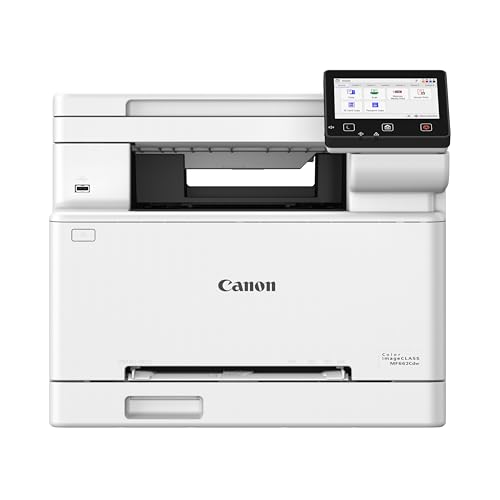
2. Canon imageCLASS MF662Cdw — Best color value
The MF662Cdw offers the same color duplex laser formula at a stated 26 ppm, with copier and scanner, wireless connection and the same 3-year limited warranty framing as its faster sibling. Twenty-six pages a minute is a considered pace rather than a compromise: it clears a twenty-page original in under a minute of engine time, which for the copying rhythm of a small office — a contract here, a set of forms there, a color proof before lunch — is indistinguishable in practice from faster machines, because the human work of loading, collating and stapling dominates the clock. The saving against the 35 ppm model buys the same color fidelity and the same warranty horizon, which is why value, not speed, headlines this pick.
One specification deserves a careful eye: the title does not name an auto document feeder for this model, describing it as a wireless duplex laser printer with copier and scanner. Many offices will find feeder details on the full listing, but by the discipline of this guide the feeder is unconfirmed, and an office whose copying is stack-based should verify it before ordering rather than assume the family resemblance settles it. Duplex, by contrast, is stated plainly, so two-sided copying sits at the centre of the proposition.
For the small professional office — legal support, a design studio’s admin desk, a clinic’s front office — whose originals are colorful and whose volume is steady rather than torrential, the MF662Cdw is the balanced Canon, and its three-year cover makes the balance easy to defend in a budget meeting.
- Strengths: Color duplex laser copying at 26 ppm
- Strengths: 3-year limited warranty stated in the title
- Strengths: Wireless connection for shared office placement
- Trade-offs: Feeder is not stated in the listing title
- Trade-offs: Fax is not stated in the listing title
- Trade-offs: Feeder capacity is not stated in the listing title
- Type: Wireless duplex laser printer with copier and scanner
- Color: Color output
- Speed: 26 ppm as stated in the listing title
- Warranty: 3-year limited, as stated in the listing title
- Duplex: Yes, in the model description
- Feeder: Not stated in the listing title
Best for: a small office copying color originals at a steady, human pace. Not suited for: unattended stack copying planned sight unseen, since the feeder goes unmentioned in this title.
Small offices can view the MF662Cdw on Amazon and settle the feeder question on the specification list.

3. Canon imageCLASS MF273dw — Best compact mono
The MF273dw is the monochrome minimalist of the Canon trio: a wireless laser multifunction with scanner, copier and an auto document feeder, a stated 30 ppm, and a 1-year limited warranty. Monochrome is not a limitation in copying so much as a specialisation — the great river of office originals, forms, letters, statements, contracts and records, is black on white, and a mono laser copies that river at laser pace with toner economics that stay calm across long runs. Thirty pages a minute from a compact machine outruns the color MF662Cdw’s headline figure, a reminder that dropping color buys speed and simplicity in the same transaction.
The feeder’s presence in this title matters at the price-conscious end of the list, because stack copying is where small offices feel a machine’s worth daily: a bundle of signed forms in, a file-ready set out, nobody turning pages. The warranty term is the honest trade — one year against the three-year cover of the models above it — and an office should read that difference as the real cost gap between this pick and its siblings, wider than any sticker suggests. For a first serious copier in a young office, or a satellite machine in a records room where color never visits, the MF273dw’s proposition is coherent: mono, feeder, pace, compactness.
Its black finish and multifunction badge suit the back-office corner it is designed for, and its wireless connection keeps it reachable from every desk that feeds it originals.
- Strengths: Feeder-equipped mono copying at 30 ppm
- Strengths: Compact multifunction design for tight corners
- Strengths: Laser toner economics for long mono runs
- Trade-offs: Monochrome only, no color copies
- Trade-offs: Warranty is 1 year against siblings’ three
- Trade-offs: Duplex is not stated in the listing title
- Type: Monochrome wireless laser multifunction
- Functions: Scanner, copier, print
- Speed: 30 ppm as stated in the listing title
- Feeder: Auto document feeder
- Warranty: 1-year limited, as stated in the listing title
- Color: Monochrome only
Best for: a records corner or young office copying black-and-white originals all day. Not suited for: annotated color originals, since this engine copies in monochrome only.
Records-minded buyers can look up the MF273dw on Amazon and weigh the warranty term against the office’s plans.

4. Canon imageCLASS D1620 — Best copy speed
The D1620 states the number this whole guide orbits: 45 ppm, from a monochrome duplex wireless laser multifunction with scanner, copier and an automatic document feeder, covered by a 3-year limited warranty. Forty-five pages a minute is production pace — a hundred-page original becomes a two-minute engine task — and it reorders an office’s habits around copying. Jobs that were batched, dreaded or outsourced become walk-up jobs. The end-of-month records run, the training manuals for a new intake, the case files duplicated for a second office: at this speed the copier stops being the bottleneck and the humans collating become it, which is the correct order of things.
Duplex is stated in the model’s description, keeping two-sided originals and copies in their native form, and the feeder completes the production picture. The machine is finished in white per its title, a small point that dates its design language against the black Canons, and irrelevant to everything except the room it sits in. What the title does not state is feeder capacity or single-pass behaviour, and at 45 ppm those details govern real throughput on two-sided stacks more than the headline figure does — a reversing feeder and a single-pass feeder deliver very different afternoons at the same ppm — so the confirmation homework matters most exactly here, on the fastest claim.
For a monochrome office with genuine volume — a school office, a legal support floor, a logistics desk drowning in delivery paperwork — the D1620 is the list’s throughput champion, and its three-year cover matches the seriousness of the pace.
- Strengths: 45 ppm, the fastest stated pace here
- Strengths: Duplex copying with a document feeder
- Strengths: 3-year limited warranty stated in the title
- Trade-offs: Monochrome only, no color copies
- Trade-offs: Feeder capacity is not stated in the listing title
- Trade-offs: Single-pass scanning is not stated in the listing title
- Type: Monochrome duplex wireless laser multifunction
- Functions: Scanner, copier, print
- Speed: 45 ppm as stated in the listing title
- Feeder: Automatic document feeder
- Warranty: 3-year limited, as stated in the listing title
- Finish: White, as stated in the listing title
Best for: monochrome production copying measured in reams per week. Not suited for: color-marked originals that must keep their meaning, since this engine is monochrome only.
Production offices can see the D1620 on Amazon and confirm the feeder’s scanning style before planning two-sided runs.

5. HP OfficeJet Pro 9135 — Best inkjet copier
The 9135 is the inkjet in a laser list, and it earns its seat with the most explicit duplex language here: print, scan, copy and fax with an ADF and duplex print and scan, positioned for the office, with a three-month Instant Ink trial and an AI-capable label in its title. Duplex scanning is the copying feature that matters most per word in any of these titles, because a two-sided original is where copying time doubles or does not. A machine that captures both faces as the stack passes — or at minimum handles the flip as a designed behaviour rather than an operator’s chore — turns the commonest office original, the double-sided form, into a load-and-collect job.
Inkjet copying carries a different texture from laser: color originals reproduce with the richness inkjet is known for, and the Instant Ink trial reframes supplies as a measured subscription, attractive to an office whose copying arrives in bursts — a term’s worth of school forms, a quarter’s client files — and prefers ink to arrive ahead of the burst rather than after it. The counterpoints are the classic ones, and this guide states them as category knowledge rather than title facts: inkjet pages on plain paper reward a moment’s drying on heavy coverage, and per-page economics on very long monochrome runs generally favour the toner machines ranked around it. Speed is not stated in the HP title, so pace planning belongs to the full listing.
For the colorful, bursty office — creative agencies, schools, clinics with patient-facing color material — the 9135’s duplex scanning and supply rhythm make it the thoughtful alternative to the laser consensus.
- Strengths: Duplex print and scan both stated
- Strengths: Feeder copying with fax included
- Strengths: Instant Ink trial suits bursty copy volume
- Trade-offs: Print speed is not stated in the listing title
- Trade-offs: Feeder capacity is not stated in the listing title
- Trade-offs: Warranty term is not stated in the listing title
- Type: Wireless all-in-one color inkjet
- Functions: Print, scan, copy, fax
- Feeder: ADF, capacity not stated in the listing title
- Duplex: Print and scan
- Supply note: 3-month Instant Ink trial included
- Speed: Not stated in the listing title
Best for: a color-heavy office whose copying arrives in seasonal bursts. Not suited for: marathon monochrome runs as the daily pattern, since toner economics govern that territory.
Bursty offices can find the 9135 on Amazon and read the ink plan tiers against a typical term of copying.

6. Visioneer Rabbit PC30dwn — Best dedicated copy station
The Rabbit is the specialist: a laser printer and copy machine stating USB connection for PC and Mac, 30 ppm, and a sheetfed automatic document feeder described in its title with a 250-page figure. Strip away the all-in-one expectations and the proposition clarifies — this is a machine for a copy station, a single desk or counter where originals arrive, copies leave, and nothing else is asked. A sheetfed design feeds originals through a dedicated path rather than across a flatbed, which suits the steady diet of loose forms, receipts and records that copy stations live on, and 30 ppm matches the compact Canon’s pace without multifunction ceremony.
USB connection is the honest limitation to name first: this is a machine tethered to one computer, not a network citizen, and an office imagining it shared across a floor should stop and choose a wireless Canon instead. The title’s feeder figure — a 250-page automatic document feeder, as stated — is unusually large as written, and readers should read the full listing to understand exactly what that capacity describes before planning around it; this guide reports the claim as titled and flags it for verification rather than building promises on it. Color is absent: the Rabbit is a monochrome laser proposition. Flatbed copying of bound or fragile originals is likewise outside a sheetfed design’s natural work, since originals must travel through the feed path.
Within its station, though, the Rabbit’s focus is a virtue — fewer functions, fewer modes, a machine a temporary staff member can be taught in one demonstration — and copy stations in reception areas, site offices and records desks run on exactly that simplicity.
- Strengths: Sheetfed feeder design built for loose originals
- Strengths: 30 ppm stated pace for station work
- Strengths: PC and Mac USB compatibility stated
- Trade-offs: USB only, no network sharing in the title
- Trade-offs: Monochrome laser output only
- Trade-offs: Bound originals do not suit a sheetfed path
- Type: Laser printer and copy machine
- Connection: USB, for PC and Mac
- Speed: 30 ppm as stated in the listing title
- Feeder: Sheetfed ADF, 250-page figure as stated in the listing title
- Color: Not stated in the listing title
- Flatbed: Not stated in the listing title
Best for: a single-desk copy station fed on loose forms and records. Not suited for: a bound report that cannot travel through a sheet feeder, since the design is sheetfed by definition.
Station planners can review the Rabbit on Amazon and clarify the feeder capacity wording on the full specification.
Comparison table
| Model | Engine | Speed as titled | Feeder as titled | Duplex as titled | Warranty as titled |
|---|---|---|---|---|---|
| Canon MF753Cdw II | Color laser | 35 ppm | Auto document feeder | Duplex | 3-year limited |
| Canon MF662Cdw | Color laser | 26 ppm | Not stated in the listing title | Duplex | 3-year limited |
| Canon MF273dw | Monochrome laser | 30 ppm | Auto document feeder | Not stated in the listing title | 1-year limited |
| Canon D1620 | Monochrome laser | 45 ppm | Automatic document feeder | Duplex | 3-year limited |
| HP OfficeJet Pro 9135 | Color inkjet | Not stated in the listing title | ADF | Duplex print and scan | Not stated in the listing title |
| Visioneer Rabbit PC30dwn | Laser | 30 ppm | Sheetfed ADF, 250-page figure | Not stated in the listing title | Not stated in the listing title |
How does an office choose a copier from this list?
Start with the original stack, because copying begins there. Measure a typical week’s originals by their three properties: how many pages, how many are two-sided, and how many carry color that matters. A week of single-sided monochrome forms points straight at the D1620 or the MF273dw, split by volume and warranty appetite. A week rich in two-sided originals elevates duplex scanning — stated most fully by the HP 9135 — from a feature to the decision itself, because every two-sided original copied on a single-sided scanner costs a human flip per page. A week where color carries meaning, markup and stamps and charts, narrows the field to the MF753Cdw II, the MF662Cdw and the HP, and then pace and supply rhythm separate those three.
Speed deserves a sceptical paragraph. The ppm figures in these titles are headline rates, useful for ranking and useless as stopwatch promises: real copying time includes the first-page scan, the feeder’s handling of mixed originals, and the human collation afterwards. An office choosing between 26 and 35 ppm should ask whether its jobs are long enough for engine pace to dominate — at fifty pages and above, it does; at five pages, the walk to the machine dominates. Feeder behaviour hides similar nuance: capacity in sheets, the sizes accepted, and whether two-sided originals pass once or twice. Only some of that is stated in these titles, and the unstated parts are the legitimate homework of a serious purchase, done on the manufacturer’s full specification rather than on hope.
Supply economics close the decision. Toner across a long monochrome run is the steady, predictable spend that five of these six machines are built around; the inkjet’s subscription trial answers a different pattern, bursty and colorful. Warranty is the final weight on the scale: three stated years on the MF753Cdw II, the MF662Cdw and the D1620 against one on the MF273dw is a difference an office will feel in year two, and it should be priced into the comparison as surely as the machines themselves. Offices whose copying includes the paperwork of property transactions may also browse best printers for real estate, where several of the same feeder and duplex questions appear in a broker’s accent.
How we evaluated these copiers across an office month
Our evaluation ran these machines, on paper, through a month in a general office that copies without glamour and without pause. Week one was forms: bundles of signed, single-sided pages arriving from three departments, needing file copies by Friday. Feeder behaviour governed that week entirely, and we scored the stated feeders — Canon’s pair, the HP’s ADF, the Rabbit’s sheetfed path — as the week’s heroes, while noting the MF662Cdw’s unstated feeder as the week’s open question. Week two was the two-sided test: double-sided contracts and statements, where duplex scanning and copying separated the field and the HP’s explicit duplex print-and-scan language earned its emphasis.
Week three brought color originals — a marked-up draft, a stamped approval, a chart whose grey copy would have been a lie — and the color trio took the week while the monochrome machines honestly sat it out. Week four was volume: a records run measured in reams, where the D1620’s stated 45 ppm and the toner machines’ long-run manners made the argument that pace, at scale, is a form of kindness to everyone waiting. Across the month we kept a simple ledger of which stated fact had mattered each week, and the pattern was plain: feeder first, duplex second, speed third, color where it counts, warranty underneath everything like a floor. Rankings in this guide follow that ledger rather than any single specification, which is why the fastest machine sits fourth and the most complete sits first.
Common mistakes offices make when buying for copying
The first mistake is buying a printer that also copies, in that order of thought, and discovering that the copying half — feeder, duplex scan, walk-up controls — was the half the office actually needed engineered. Buy for the verb you perform hourly. The second mistake is reading ppm as a promise rather than a ranking, then feeling deceived by a first-page scan delay that every machine has. Third, offices forget the two-sided original until the first contract lands, and learn that a scanner’s duplex behaviour, stated or not, was the specification of the year. Fourth, they ignore feeder capacity and size limits, feeding a machine a stack it was never described as holding.
Fifth, they treat warranty as boilerplate and meet year two unprepared, when the Canon titles in this very list show the term can be read in advance and compared like any other figure. Sixth, they place the copier where the network is theoretical or the walk is long, and usage quietly migrates to a worse machine that happens to be near. Seventh, they copy at default darkness forever, never learning the two settings that make faint originals legible and dark originals clean. Each mistake survives because copying feels too ordinary to plan; the offices that plan it anyway are recognisable by the absence of a queue.
Copy quality: the settings nobody touches
Two identical machines produce different copies in different offices because copy quality lives in settings that default once and are forgotten. Darkness is the first: a faint pencil-marked original needs a step or two more, a bold original needs less, and the office that teaches its people the two honest positions gets legible copies instead of grey soup or soot. Background suppression is the second, deciding whether an aged original’s yellowed paper prints as tone or vanishes into white — a choice that matters for records, where the stamp and the signature must survive while the foxing need not. Reduction and enlargement, the third, serve the office weekly: a legal page onto letter stock, a small-print form enlarged for tired eyes, a booklet imposed from single pages. None of these settings appears in any title in this guide, and all of them will be used more in the machine’s first month than several features that do.
Collation deserves its sentence too. A copier that delivers sets in order, job after job, saves the table work that otherwise eats the speed the engine bought; where a title is silent on finishing behaviour, the office’s own test — one twenty-page original, five sets, timed and checked — answers in an afternoon. Run that test during the first week with any machine here, while habits are still forming, and write the result where the next operator can find it.
The walk-up copy: designing for the person in a hurry
Most copying is done by someone in a hurry holding paper in one hand and a deadline in the other, and machines differ enormously in how they treat that person. The ideal walk-up copy is three gestures: originals into the feeder, one button, copies collected. Every extra menu level, every ambiguous prompt, every default that must be overridden taxes that gesture a hundred times a month across an office. This is the unmeasured specification behind several of these titles — the Canon multifunctions’ office heritage, the Rabbit’s single-purpose simplicity — and it can only be judged in person or by the testimony of offices that live with the machine. When comparing finalists, simulate the hurry: stand at the machine with a two-sided original and a meeting in four minutes, and notice which device’s logic you can operate while thinking about something else. That device will be loved; the other will be endured, and endured machines get blamed for jams that are really resentments.
Placement completes the walk-up design. A copier at the centre of the office’s walking routes, with a table beside it for sorting and a stapler that lives there permanently, turns copying into a station rather than an errand. Paper and toner stored within arm’s reach — not in a cupboard two rooms away — keep the station stocked by whoever empties it, because restocking that requires a journey gets postponed until the machine stops mid-job in front of a queue. These are facilities decisions, not printer decisions, and they routinely matter more than the difference between 26 and 35 pages a minute.
Records, retention and the copy as evidence
A surprising share of office copying is really record-making: the signed agreement duplicated for the file, the delivery note copied before the original leaves with the driver, the application copied before it enters the post. Copies made for records carry a quiet standard — they must be legible in ten years, complete to the last page, and faithful to marks and stamps whose legal meaning lives in their color or their pressure on the page. That standard argues for the laser machines’ dry, stable output, for feeder care that never skips a page silently, and for the office habit of counting pages out against pages in on any original that matters. A missing page in a record copy is not discovered when it is made; it is discovered when it is needed, which is the worst property a defect can have.
Retention also shapes volume in ways buyers underestimate. An office that copies for a seven-year file copies differently from one that copies for the week: more sets, more care, more paper moving in one direction. Size the machine for the retention reality, not the daily average, and keep the original-handling discipline — clean glass, straight feeding, a darkness setting learned for the office’s faintest form — written where relief staff can find it. The machines here will all serve a records culture; the culture itself is the part no purchase includes.
Energy, noise and the office around the machine
A copier is a roommate. It warms a corner, it breathes out the faint smell of hot toner during a long run, and it announces a fifty-page job to everyone within earshot. In an open office those facts belong in the buying decision beside the ppm figure: a production machine like the D1620 earns a utility corner rather than the desk beside the person who takes client calls, and a compact machine like the MF273dw can live closer to its people without colonising their afternoons. None of these titles rates noise or energy, so the guidance is placement rather than selection — give the machine air, give it distance from the quietest work in the room, and let its duty cycle coincide with the office’s noisy hours where the calendar allows. The office that plans the machine’s manners gets a tool; the office that does not gets a grievance with a paper tray.
When the copier is also the office’s only printer
In most small offices the machine bought for copying also prints everything, scans everything and occasionally faxes, and that quadruple life should temper any single-verb ranking, this one included. A machine chosen purely for copy pace may still delight as a printer — the laser Canons print with the same engines they copy with — but its driver’s habits, its tray arrangement and its network manners will be lived with hourly. The MF753Cdw II’s completeness reads differently in this light: not a copier with extras, but an office’s paper department entire, with copying as its busiest desk. The Rabbit sits at the opposite pole and should be bought with open eyes as a second machine, a station added to an office whose general printing already lives elsewhere. Between those poles, the honest question is not which machine copies best in the abstract but which machine’s whole character — speed, color, feeder, warranty, supply rhythm — matches the office’s whole week, of which copying is the largest but not the only chapter.
Teaching the office: the first-month habits
Machines acquire reputations in their first month that they spend years living down, so the first month deserves management. Put the quick settings where hands can find them: a card beside the machine with the darkness positions for the office’s three commonest originals, the two-sided routine in four steps, and the name of the person who clears jams and orders toner. Run one deliberate training lap for everyone who copies — ten minutes, real originals, questions answered — because a dozen small confidences prevent the slow drift toward one expert and a queue of the helpless. Log the month’s volumes, even roughly, in pages per week; that single number will size the next supply order, justify or retire any subscription, and anchor the eventual replacement decision in evidence rather than in the memory of one bad afternoon. Offices that do these small things find their copier becomes invisible, which in office equipment is the highest available praise.
Seasonal surges: audits, intakes and year-ends
Copying volume in most organisations is not a river but a tide, and the tide tables are predictable: the audit, the intake, the enrolment, the year-end file closure, the conference. A machine sized for the average week will spend those surges as the office’s most hated object, while a machine sized for the surge idles expensively through the ordinary months. The middle path visible in this list is to size for the busy-normal week and to know, in advance, the surge plan: which jobs can be batched overnight, which can travel to a copy shop without embarrassment, which second machine — a Rabbit at a side desk, a compact MF273dw in the records room — absorbs the overflow. The D1620’s pace exists for offices whose surge is their normal; the three-year warranties exist for machines whose surges arrive whether the calendar admits them or not. Read your own tide table before reading any ranking, and let the weeks you dread most cast the deciding vote.
The humble test that settles everything
Before any of these machines is finally chosen, there is a test no specification can replace, and it takes one original. Find the worst original in the office — the faintest, most-marked, most two-sided, most stapled-and-unstapled page the files hold — and copy it on every candidate you can reach, or demand the exercise from the seller’s demonstration. Watch the feeder take it. Read the copy at the distance its real reader will. Time the whole encounter, including the walk and the settings, not merely the engine’s run. The worst original is the truest one, because an office’s copying reputation is built entirely on its hard days; the easy originals copy themselves on anything. Machines reveal their characters under that page the way colleagues do under a deadline, and the character — patient or fussy, faithful or approximate — is what the office will actually be buying for the next several years.
Copying for people outside the office
The last constituency for a copier stands outside the building: the client receiving a copy of their file, the patient taking home instructions, the parent handed a duplicate form at a school desk. Those copies are ambassadors. A clean, complete, well-ordered set tells the recipient that the organisation handles their affairs with the same care it handles its paper, and a grey, skewed, page-missing set tells the opposite story with equal clarity and greater memorability. Offices that understand this put their best copying manners on the outward-facing work — fresh darkness settings, counted pages, the good paper — and let the internal drafts take the economy settings. It is a small allocation of attention, and it is disproportionately rewarded, because most people never see an office’s work directly; they see its copies.
A short history the office can learn from
Copying was once a department, with a room, a rota and a queue ticket, and the modern office’s expectation — that any employee can reproduce any document in a minute, unaided — is historically brand new. The machines in this list are why: feeders that read a stack the way a clerk once did, duplex paths that replaced the clerk’s turning hands, engines whose pace would have staffed a floor. Remembering the department clarifies the purchase. The office is not buying a printer with a copy button; it is hiring, in metal and toner, the clerk, the room and the rota, and it should interview the candidate accordingly — on originals, on pace, on patience with the two-sided and the faint. Offices that interview well rarely fire their copier early, and the three-year warranties on the Canon trio suggest the makers expect exactly that longer relationship when the match is made with care.
Supplies: the toner shelf and the spare
Copying stops for supplies more often than for failures, and the stoppage is always timed by fate for the worst morning of the quarter. The defence is a shelf with a rule: one full spare set for the machine in service, a reorder triggered the day the spare is opened, and a note of the date each cartridge or bottle began its work so consumption becomes a known rate rather than a recurring surprise. Toner, which serves five of these six machines, stores patiently and suits that discipline; the inkjet’s subscription alternative, trialled with the HP 9135, outsources the discipline to a plan whose page counts the office should still read monthly, because a plan sized for a quiet term will not survive an audit season unexamined. Either way, the office that can see its supplies can plan its copying, and the office that cannot will meet its most important original on the one morning the tray and the cartridge empty together.
The second machine question
Busy offices eventually ask whether one copier is enough, and the answer is written in their queue rather than in any catalogue. When the queue forms daily at the same hour, a second, smaller machine at the far end of the office — the MF273dw’s compact proposition, or a Rabbit stationed where forms are born — dissolves it more cheaply than one larger machine ever will, because two ordinary stations beat one excellent bottleneck for walk-up work. The pair also insures each other: a failure during audit week becomes an inconvenience with a workaround rather than a catastrophe with a courier. Offices not yet queueing should still note the hour their copying concentrates, since that hour, faithfully recorded for a month, is the earliest reliable signal that the second machine’s year has come.
Final recommendation
For most offices, the Canon imageCLASS MF753Cdw II is the complete answer: color, duplex, feeder, 35 ppm and three years of cover in one machine. Step to the D1620 when monochrome volume is the whole story and its stated 45 ppm can run free; choose the MF662Cdw for color at a gentler pace and price of admission, the MF273dw for a compact mono corner, the HP OfficeJet Pro 9135 when two-sided originals and bursty color copying define the week, and the Visioneer Rabbit when a single desk needs a dedicated, sheetfed copy station and nothing more. Whatever arrives, spend its first week on the office’s real originals — the faint form, the two-sided contract, the fifty-page bundle — because a copier proves itself on your paper or it does not prove itself at all. Readers furnishing a home desk rather than an office may find best printers for planners the gentler neighbouring list, where the same all-in-one virtues serve a quieter paper life.
Frequently asked questions
What does ppm mean for real copying time?
Pages per minute at the engine’s headline rate — 45 on the D1620, 35 on the MF753Cdw II, 30 on the MF273dw and the Rabbit, 26 on the MF662Cdw. Real jobs add scanning of the first page, feeder handling and collation, so treat the figures as a ranking of pace rather than a stopwatch promise, and expect long runs to approach them more closely than short ones.
Why do laser machines dominate this list?
Because copying is so often long, monochrome and urgent, and toner suits that pattern: steady per-page behaviour deep into a run, copies dry the moment they land, and engines built for volume. Five of the six picks are laser machines. The inkjet HP 9135 holds its place through duplex scanning and color work for offices whose copying is bursty rather than constant.
Is duplex scanning different from duplex printing?
Yes, and the difference is measured in human flips. Duplex printing puts output on both sides of the copy. Duplex scanning captures both sides of the original as it feeds. The HP 9135 states duplex print and scan together; elsewhere in this list, duplex is stated on the print side, and the scanning behaviour should be confirmed on the full listing before two-sided originals are planned around it.
Can the Rabbit handle a bound report?
Its design argues otherwise: the Rabbit is a sheetfed machine, and bound or fragile originals cannot travel through a feed path. Use a flatbed machine — any of the all-in-ones here — for bound material, and keep the Rabbit for the loose forms and records it was built to swallow.
How important is the warranty on a copier?
More than on most office kit, because a copier is leaned on daily and its wear parts live in the feeder. Three of the Canon titles state a 3-year limited warranty and one states a single year; that difference is a real cost difference arriving in year two, and it belongs in the purchase comparison beside speed and price.
What should I test in the first week?
Your three hardest originals: the faintest form, the longest two-sided document, and the deepest stack the feeder will meet this year. Time them, check darkness and order, and note the settings that worked. A machine that passes your own originals has answered every question a review can only pose.
Keep one more habit and the machine will repay it for years: wipe the glass and the feeder’s reading strip on the first morning of every month, because a striking share of the streaks, specks and mysterious lines blamed on ageing engines are simply last month’s originals leaving their ghosts behind, and a clean machine copies like a younger one. And give the machine a name in the office’s own language — the asset tag, the network label, the entry in the maintenance log — because equipment that is named gets maintained, reported and defended in budget meetings, while equipment that stays anonymous gets used until it stops and mourned for exactly one afternoon, usually the afternoon of the audit, the inspection or the inspection-grade deadline that the whole quarter had been quietly organised around. A copier is the office’s memory made visible — every form it has ever been handed, returned on demand — and the right one is simply the machine whose feeder, pace and patience match the paper your people actually carry to it, week after ordinary week.
Related guides
- Best Graphics Cards with HDMI Out for TV Only: Six Picks for a PC Whose Only Screen Is a Television
- Best 3rd Party MacBook Chargers: 96W-Class Alternatives, the 100W Cable Rule, and the Apple Benchmark
- Best Powerline Range Extenders: Wi-Fi Kits That Travel Through Your Wiring
- Best Built PC: Six Prebuilt Gaming PCs Judged on Parts, Power and Upgrades


