What's inside
- Key Takeaways
- Quick Picks
- How Did We Choose These Phone Photo Printers?
- Why Does Dye-Sublimation Suit Phone Photographs So Well?
- How Do You Get the Best Prints Out of a Phone Photo Printer?
- What Should You Know About Refills Before the First Kit Runs Out?
- How Do These Printers Compare With Instant Cameras and the Photo Lab?
- How Do the Six Phone Photo Printers Compare Side by Side?
- What Mistakes Do First-Time Photo Printer Owners Make?
- How Do You Choose Which Phone Photographs Deserve to Become Prints?
- Final Recommendation
- Frequently Asked Questions
- Related Guides
As an Amazon Associate I earn from qualifying purchases. This post may contain affiliate links at no extra cost to you.
gizmoverdict.com is reader-supported. When you buy through links on our site, we may earn an affiliate commission.
Where to buy: Every printer below links to its Amazon listing, and the listing is where you confirm which bundle is in the box — sheet counts and cartridge counts differ between these kits, and the title of each listing spells its own contents out. Check price on Amazon from the headings or the Quick Picks table; this guide quotes no prices, because the kits change too often for a printed figure to stay honest.
The camera roll on a modern phone holds thousands of photographs, and almost none of them ever become objects. The best picture printers for your phone exist to close that gap: small machines that take a photograph from the screen and return it as a physical 4×6 print you can hand to someone, pin to a board or slide into an album while the moment is still warm. All six picks in this guide print at the 4×6 size, and all six build the image with dye-sublimation or the closely related 4PASS process rather than ink — a deliberate pattern, because dye-sub prints emerge dry, sealed under a clear overcoat, and ready to pass around a table without a smudge.
What separates the six is everything around that shared print engine. Two connect by Wi-Fi, one creates its own hotspot, one docks the phone physically and charges it while it prints, and one trades the home network for Bluetooth and adds sticker sheets to the box. The bundles differ just as much: the sheet counts in these titles run from fifty to well over a hundred, with one, two or three cartridges or ribbons alongside. Since this guide makes no running-cost claims, the comparison below treats bundle contents as a convenience story — how long the box lasts before the first reorder — rather than an arithmetic one. Read the titles as contracts, as always here: what each spec box states is what the listing states, and anything beyond it is marked for verification instead of being guessed at.
Our Top Picks
Key Takeaways
- All six picks print 4×6 photographs from a phone, and all six use dye-sublimation or 4PASS technology as titled — no inkjets, no instant film, no mini 2×3 prints in this guide.
- Bundle sizes are part of each pick’s identity: the HP kit leads the sheet count as titled, the KODAK kit is the smallest, and the Liene Amber M110 splits its box between ordinary sheets and square sticker sheets.
- Connection splits three ways — Wi-Fi on the Liene M100, HP and Yoton; a built-in Wi-Fi hotspot on the HPRT; Bluetooth on the KODAK Dock Plus and the Liene Amber M110.
- The KODAK Dock Plus is the only pick that physically docks the phone and charges it during printing, and the only title that claims water, fingerprint and fade resistance for the finished print.
- The Yoton is the sole pick with AR video printing in its title — a feature that links a printed still to a moving clip through the maker’s app.
Quick Picks
| Pick | Badge | Why it earns its place |
|---|---|---|
| Liene M100 4×6 (100-sheet kit) | Balanced starter kit | A hundred sheets and three cartridges over Wi-Fi make this the straightforward home photo printer of the group. |
| KODAK Dock Plus 4×6 | Dock and charge | The phone sits in the printer, charges while it prints, and the 4PASS output is titled as resistant to water, fingerprints and fading. |
| HP Sprocket Studio Plus 4×6 | Largest titled bundle | The biggest sheet-and-cartridge kit in this guide, with Wi-Fi and an editing app for shaping photos before they print. |
| Yoton Photo Printer 4×6 | AR video printing | 4PASS dye-sublimation plus an augmented-reality video feature that ties a paper print back to a phone clip. |
| HPRT Photo Printer 4×6 (108-sheet kit) | Own hotspot built in | Generates its own Wi-Fi hotspot, so it prints at venues and gatherings where no network exists to join. |
| Liene Amber M110 (Bluetooth) | Stickers in the box | Bluetooth pairing and a bundle that mixes standard 4×6 sheets with twenty square sticker sheets. |
How Did We Choose These Phone Photo Printers?
The first filter was print size, applied without mercy. The phone-printer market is crowded with pocket machines that produce small 2×3 prints, and those are charming objects, but they are not what a 4×6 frame, a standard album sleeve or a noticeboard expects. Every pick here prints the full 4×6, so a photograph that leaves one of these machines can go anywhere a lab print can go. The second filter was technology: dye-sublimation and 4PASS listings only, because the sealed, dry output suits the pass-it-around social life of a phone photograph, and because a single technology family makes the comparison honest — the differences that remain are connection, bundle and handling, not incompatible print chemistry.
The third filter was the phone relationship itself. A printer in this category lives or dies by how frictionlessly it takes a photograph off a handset, so titles were read for their connection story: Wi-Fi for the home network, Bluetooth for direct pairing, a built-in hotspot for places with no network at all, and one physical dock that removes pairing from the equation entirely. iPhone and Android compatibility is stated in most of these titles, and where a title adds a computer to the guest list, that is noted in its section. Bundle contents were recorded exactly as titled — sheets, cartridges, ribbons — because the size of the starter kit decides how the first month with the printer feels, and because inventing running-cost arithmetic from those numbers would require price claims this guide does not make.
Finally, each pick had to offer a distinct reason to exist. A guide with six near-identical Wi-Fi boxes would be a disservice, so the six that survived divide the territory: the balanced kit, the dock, the big bundle, the AR experiment, the hotspot traveller and the sticker-friendly Bluetooth model. If two machines in your own shortlist seem interchangeable after reading their sections, that is the signal to decide on bundle size and connection alone — the print technology underneath them is the same family throughout.
Why Does Dye-Sublimation Suit Phone Photographs So Well?
Dye-sublimation builds a photograph in passes. The printer heats a ribbon carrying panels of dye and lays the colours down one at a time, letting each colour’s intensity vary continuously rather than arriving as dots of fixed density. That continuous tone is why skin, skies and evening light — the subjects phone cameras shoot most — come out of these small machines looking smooth instead of stippled. The final pass is the one that matters most for a social print: a clear protective layer seals the image, and the photograph emerges dry, glossy and tolerant of the handling a passed-around print receives. The KODAK title makes the resulting durability explicit with its water, fingerprint and fade resistance claim; the other titles leave the overcoat unmentioned, and their sections say so rather than borrowing the claim across brands.
The 4PASS name on the KODAK and Yoton titles refers to that same multi-pass architecture counted out loud — colour passes plus the protective finish. Knowing the mechanism recalibrates expectations in two useful ways. First, printing is not instant: each photograph takes its time through the passes, and a batch of twenty party prints is a small ceremony rather than a burst. Second, the consumable is a matched pair — paper and ribbon or cartridge are engineered together and consumed together, which is why these printers are sold as kits and why the sheet and cartridge counts in a title always belong in the same sentence. Readers weighing this whole category against the smaller instant formats can compare formats in our roundup of the best 6×4 photo printers, which covers the same print size across a wider field.

Liene M100 4×6 (100-sheet kit) — Balanced starter kit
The Liene M100 is the pick that makes the fewest demands on its owner, and that is a considered compliment. Its title assembles the category’s essentials without ornament: thermal dye sublimation, Wi-Fi, a hundred sheets of paper and three cartridges in the box, and compatibility with both iPhone and Android handsets. A hundred sheets is a psychologically important number for a first photo printer. It is enough to print the holiday, the birthday and the new baby’s first month without the reorder conversation arriving before the habit forms, and three cartridges against those hundred sheets tells you the consumables are staged to run out together rather than stranding paper without dye or dye without paper.
The word portable appears in its title too, and it should be read in the household sense rather than the pocket sense — this is a machine that moves from kitchen counter to living room to a relative’s house, printing over Wi-Fi wherever it lands. Nothing in the title promises a battery, a dock or a sticker mode, and the M100 does not pretend otherwise; its argument is that the core job, turning phone photographs into sealed 4×6 prints on the home network, deserves a kit sized generously enough to enjoy from the first evening. Households printing for albums and frames, in batches after trips and gatherings, are its natural constituency. The full-colour claim in the title is worth a small nod as well: in a category where some machines lean on novelty, a plain statement of full-colour photo output is the specification that actually matters.
- Print size and technology: 4×6, thermal dye sublimation (as titled)
- Bundle: 100 sheets and 3 cartridges (as titled)
- Connection: Wi-Fi; for iPhone and Android (as titled)
- Battery or dock: Not stated in the listing title — verify with the maker’s documentation
- Print speed per photo: Not stated in the listing title — verify with the maker’s documentation
Strengths
- A hundred-sheet starter kit postpones the first consumable reorder until the printing habit is established.
- Wi-Fi connection suits a fixed home spot where the whole household’s phones can reach it.
- Both major phone platforms are named in the title, so mixed iPhone-and-Android homes are covered.
Trade-offs
- No Bluetooth is named in the title, so printing away from a Wi-Fi network is not its titled strength.
- The title lists no editing or novelty features — the appeal is the core print job, plainly done.
- Sticker media is not part of this bundle as titled; the hundred sheets are standard photo paper.
Best for: a household printing trip and family photographs to album size on the home network, in relaxed batches. Check price on Amazon, and glance at the listing’s consumable section so the reorder pack is identified before the first kit runs low.
Not suited for: printing at a venue with no Wi-Fi to join — the title names no hotspot of its own and no Bluetooth fallback, so the connection story ends at the home network.
KODAK Dock Plus 4×6 — Dock and charge
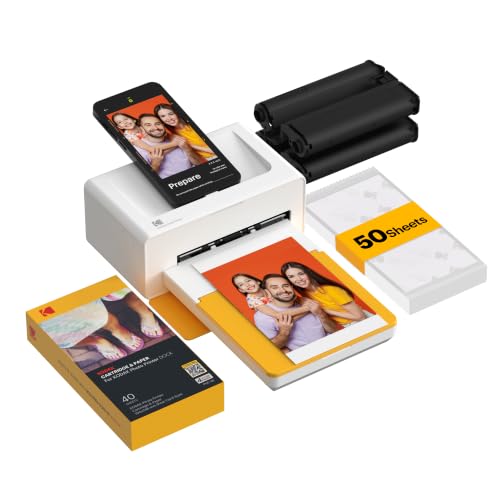
The KODAK Dock Plus replaces the pairing ritual with furniture. The phone sits down in the dock, the connection is physical, and the handset charges while the photograph prints — a small piece of theatre that solves two party problems at once, since the phone that has been taking pictures all evening is usually the phone whose battery is circling empty. Its title is also the most claim-rich of the six: 4PASS technology, fifty sheets in the kit, Bluetooth alongside the dock, compatibility with iPhone and Android, and a finished print described as resistant to water, fingerprints and fading. That resistance trio is doing real work in the title. A print that shrugs off a damp thumbprint and a splash at the table is a print that can live on a fridge door or a workshop wall instead of being filed away for its own protection.
The fifty-sheet bundle is the smallest in this guide, and it should be read as a starter ration rather than a flaw — the dock format is aimed at the countertop where prints happen a few at a time, printed for the people standing there, rather than at hundred-print album sessions. Bluetooth matters more than it first appears in a dock design: it frees guests’ phones from the dock itself, so the host’s handset can stay seated and charging while a visitor’s photograph prints from across the room. The combination gives the Dock Plus the strongest social profile of the six — it behaves less like a peripheral and more like a piece of party equipment, a machine whose presence invites printing instead of merely permitting it. KODAK’s long history in consumer photography hovers behind the name, but the title earns the pick on its own stated mechanics: dock, charge, 4PASS, resistant output.
- Print size and technology: 4×6, 4PASS (as titled)
- Bundle: 50 sheets (as titled)
- Connection: Smartphone docking with charging while printing; Bluetooth (as titled)
- Print durability: Water, fingerprint and fade resistant (as titled)
- Wi-Fi: Not stated in the listing title — verify with the maker’s documentation
Strengths
- Docking removes pairing friction entirely and returns the phone charged as a side effect.
- The titled resistance to water, fingerprints and fading suits prints that live on walls and fridge doors.
- Bluetooth covers the phones that are not sitting in the dock, including guests’ handsets.
Trade-offs
- Fifty sheets is the smallest bundle here, so a heavy first month reaches the reorder point sooner.
- The dock format anchors the printer to a counter; it is the least travel-shaped design of the six.
- No Wi-Fi is claimed in the title, so whole-household network printing is not its stated route.
Best for: a kitchen counter or party host whose printing is social, a few photographs at a time, with the phone charging between shots. Check price on Amazon, and note the sheet count so a refill pack can ride along in the same order if the first gathering is a big one.
Not suited for: a hundred-print album session in one sitting — the titled fifty-sheet bundle runs dry halfway through that job, mid-album and mid-evening.

HP Sprocket Studio Plus 4×6 — Largest titled bundle
HP’s entry argues with arithmetic of the permitted kind: counts. Its title carries the largest bundle in this guide — a hundred and eighteen sheets with three cartridges — and pairs that depth with Wi-Fi, premium dye sublimation wording and an editing app for shaping photographs before they print. The bundle size changes the ownership experience in a way that is easy to underrate. A photo printer’s first kit is its honeymoon; when the sheets run out early, the machine’s second act depends on a reorder that many owners never get around to, and the printer joins the drawer of good intentions. A hundred and eighteen sheets pushes that reckoning far enough out that printing becomes a settled household habit first, with a standing place on a shelf and a known reorder pack.
The editing app deserves its paragraph, because it marks a different philosophy from the dock’s physical simplicity. Sprocket’s pitch is that the photograph benefits from a moment of attention before it becomes an object — a crop tightened, a border added, the fun edits its title mentions — and the app is where that attention happens. For scrapbookers and journal keepers, that pre-print stage is not overhead; it is the craft itself, and the print is the final step of a small creative act rather than a photocopy of the camera roll. The compact home-use framing in the title places the machine honestly: a shelf at home, on Wi-Fi, printing considered photographs one deliberate session at a time. It does not claim a dock, a hotspot or sticker media, and its section of this guide claims none of those on its behalf.
- Print size and technology: 4×6, dye sublimation (as titled)
- Bundle: 118 sheets and 3 cartridges (as titled)
- Connection: Wi-Fi (as titled)
- Software: Editing app for fun photos (as titled)
- Bluetooth or hotspot: Not stated in the listing title — verify with the maker’s documentation
Strengths
- The largest titled bundle of the six defers the first reorder further than any rival here.
- An editing app supports considered, craft-oriented printing rather than straight camera-roll output.
- Wi-Fi placement lets the machine live on a shelf and serve the household’s phones from there.
Trade-offs
- No docking or charging feature is titled, so the phone fends for its own battery during a session.
- The title names no Bluetooth, leaving network-free printing unaddressed by the listing.
- Its app-centred flow adds a step for households that simply want a photograph printed untouched.
Best for: a scrapbooker or journal keeper printing edited photographs at home, where the session is unhurried and the big kit keeps pace. Check price on Amazon, and confirm the current bundle count on the listing, since kit contents are the detail most likely to vary between listings of the same machine.
Not suited for: printing during a power-cut road trip or a venue session away from any network — the title’s connection story is Wi-Fi alone, with no hotspot or Bluetooth route stated.

Yoton Photo Printer 4×6 — AR video printing
The Yoton carries the one feature in this guide that sounds like a magic trick: AR video printing. The idea, as its title frames it, is that a printed still photograph can stand in for a short video — the print is scanned with the maker’s app and the moving clip plays over it, so the birthday photograph carries the birthday song inside it. Scepticism is healthy here, and the feature’s value depends entirely on the app’s longevity and on recipients bothering to scan, but for the specific job of sending a grandparent a photograph that sings, or giving a travel print the sound of the waterfall it depicts, nothing else in this guide attempts anything like it. The title also ties the feature to a gift framing — a printer for travel and memories — which is the correct shelf for it: this is a machine bought to make keepsakes with a trick up their sleeve.
Underneath the novelty sits a conventional and respectable specification: 4PASS dye-sublimation, a fifty-four-sheet bundle with one ink ribbon, Wi-Fi printing, and compatibility that stretches beyond phones to the PC as well, the widest device list in any title here. One ribbon against fifty-four sheets is the tightest consumable staging of the six, worth knowing before a long trip. The green finish named in the title is a small but real differentiator in a category of white and black boxes — a printer that lives on a desk or a dresser is a visible object, and colour is a legitimate reason to choose between otherwise similar machines. Judge the Yoton as two purchases in one: a sound 4PASS printer for ordinary photographs, and an experiment in prints that point back at videos. If the experiment delights, it has no rival here; if it fades, the ordinary printer underneath remains.
- Print size and technology: 4×6, 4PASS dye-sublimation (as titled)
- Bundle: 54 sheets and 1 ink ribbon (as titled)
- Connection: Wi-Fi; for iPhone, Android and PC (as titled)
- Signature feature: AR video printing (as titled)
- Finish: Green (as titled)
Strengths
- AR video printing links a paper photograph to a phone clip, a keepsake trick none of the other five attempt.
- PC compatibility in the title widens its sources beyond the phone in the household’s pocket.
- The green finish gives a desk-dwelling machine a deliberate, chosen look rather than appliance anonymity.
Trade-offs
- One ribbon in the bundle is the leanest consumable staging here, so the reorder arrives earliest.
- The AR feature’s life is tied to the maker’s app remaining available and supported.
- No Bluetooth or dock is titled; connection runs through Wi-Fi as listed.
Best for: a gift-giver or memory-keeper printing travel and family photographs that carry a video secret for the recipient to unlock. Check price on Amazon, and weigh the single-ribbon bundle against how many prints the first trip home is likely to demand.
Not suited for: a high-volume album project — fifty-four sheets and one ribbon are a keepsake ration, and the bundle empties long before a wedding album is filled.

HPRT Photo Printer 4×6 (108-sheet kit) — Own hotspot built in
The HPRT solves the problem that quietly defeats the other Wi-Fi machines: the room with no network. Its title states Wi-Fi with a built-in hotspot, which means the printer broadcasts its own small network for phones to join, and printing proceeds in a hired hall, a holiday rental with the router locked in a cupboard, a market stall or a relative’s house where nobody remembers the Wi-Fi password. That single titled feature relocates the entire category — a phone photo printer stops being a home appliance and becomes event equipment. The bundle backs the ambition with a hundred and eight sheets and two ribbons, the second-largest kit in this guide, sized for an afternoon of printing for a crowd rather than an evening of printing for a family.
Portability is claimed in the title and the hotspot is what makes the claim meaningful; a portable printer that still begs for a network is portable in shape only. Dye sublimation is the stated technology, keeping its output in the same sealed, dry family as the rest of the guide. What the title does not discuss is a battery, so the honest reading is a machine that travels between power outlets rather than printing untethered in a field — the documentation check in the spec box covers that question, and event users should settle it before promising prints at an outdoor venue. For weddings, school events, club gatherings and family reunions, though, the pattern is compelling: arrive, switch on, let guests join the hotspot, and hand people their photographs before the evening ends, while the memory is still the subject of conversation. That immediacy is the entire romance of phone printing, and this is the pick engineered around delivering it away from home.
- Print size and technology: 4×6, dye sublimation (as titled)
- Bundle: 108 sheets and 2 ribbons (as titled)
- Connection: Wi-Fi with built-in hotspot (as titled)
- Use framing: Portable, home use (as titled)
- Battery: Not stated in the listing title — verify with the maker’s documentation
Strengths
- A built-in hotspot frees printing from venue networks, passwords and router archaeology.
- A hundred and eight sheets suit event-scale printing for a crowd, not just a household.
- Dye-sublimation output stays dry and sealed, ready to hand over the moment it emerges.
Trade-offs
- The title is silent on a battery, so off-grid printing cannot be promised from the listing.
- Two ribbons against a hundred and eight sheets means ribbon supply is the pacing item at big events.
- No Bluetooth or dock is named; guest phones join through the hotspot route the title describes.
Best for: an event host or club organiser printing guest photographs on site, where the venue’s network cannot be relied on. Check price on Amazon, and settle the battery question in the maker’s documentation before advertising prints at an outdoor venue.
Not suited for: a fully untethered field session with no power outlet in reach — the title claims a hotspot and portability, but no battery, so mains power remains an assumption until the documentation says otherwise.

Liene Amber M110 (Bluetooth) — Stickers in the box
The Liene Amber M110 is the playful end of this guide, and its bundle tells the story before anything else does: eighty sheets in total, divided between sixty standard 4×6 sheets and twenty 3-inch square sticker sheets, with two cartridges alongside. That split is a small manifesto. The standard sheets serve the album-and-frame duty every pick here performs, while the sticker sheets serve the journal page, the laptop lid, the water bottle and the birthday card envelope — the places a generation raised on phone photography actually puts pictures. A printer whose box contains both is a printer that understands its output has two lives, one kept and one stuck.
Bluetooth is its titled connection, and the pairing model fits the sticker use case neatly: no network to join, no household infrastructure, just a direct link between the phone in hand and the printer on the desk, which is exactly the geometry of a bedroom, a dorm room or a craft table. Thermal dye sublimation is the stated technology, so the sticker prints carry the same sealed finish as their full-size siblings — a point worth pausing on, because a sticker that cannot survive a damp water bottle is a short-lived joke, and the dye-sub overcoat is the right starting point for media that lives on objects. The title names the iPhone specifically; Android households should confirm handset support in the documentation, and the spec box marks that rather than smoothing it over. Within the Liene family in this guide, the M110 is the personality pick against the M100’s household steadiness: smaller standard-sheet count, an extra medium to play with, and a connection that belongs to one person and one desk rather than to a whole home network.
- Print technology: Thermal dye sublimation (as titled)
- Bundle: 80 sheets — 60 sheets at 4×6 inch and 20 square sticker sheets at 3 inch — with 2 cartridges (as titled)
- Connection: Bluetooth (as titled)
- Phone named in the title: iPhone
- Wi-Fi: Not stated in the listing title — verify with the maker’s documentation
Strengths
- Sticker sheets in the box open journal, craft and labelling uses that plain photo paper cannot serve.
- Bluetooth pairing needs no network, suiting a dorm desk or craft table with a single user.
- Dye-sublimation sealing gives the sticker prints the same protective finish as the 4×6 output.
Trade-offs
- Only sixty of the eighty sheets are standard 4×6, so album printing draws on the smaller portion.
- The title names the iPhone alone, leaving Android support a documentation question.
- No Wi-Fi is titled, so the printer serves the phone beside it rather than the whole household.
Best for: a journal keeper, student or crafter printing a mix of keepsake photographs and stickers from a single desk. Check price on Amazon, and confirm handset compatibility in the documentation if the household’s phones run the platform the title does not name.
Not suited for: a shared family printing station — Bluetooth pairing to one phone at a time and no titled Wi-Fi make it a personal machine, and a household queue forms quickly around a personal machine.
How Do You Get the Best Prints Out of a Phone Photo Printer?
Start before the printer, in the camera roll. A 4×6 print is forgiving of many phone-photography sins, but it cannot invent detail that a heavily cropped or digitally zoomed shot never captured, so choose the original frame over the pinch-zoomed crop whenever a print is planned. Brighten the photograph a touch beyond what looks right on the phone screen: screens glow and paper does not, so an image that looks perfect on a backlit display prints slightly darker than expected, and a small lift in exposure and shadows in the phone’s editor compensates. The editing app in the HP pick’s title exists for exactly this moment of attention. Then print one copy and judge it under the light the print will actually live in — daylight by a window flatters differently from a warm kitchen bulb — before committing to a batch.
Handling decides the rest. Load paper with the printable side oriented as the manual directs, keep the stack in its packaging until the session starts so dust and fingerprints stay off the surface the dye will land on, and let each finished print rest for a few seconds before stacking a pile of them face to face. When the session ends, prints that matter go straight into sleeves, an album or a frame; the sealed surface resists casual handling well, but a photograph left loose in a kitchen drawer is being archived by someone with low standards. These small disciplines are the difference between a phone printer that produces keepsakes and one that produces novelties, and they cost nothing but attention. Readers whose printing ambitions run larger than 4×6 can survey the next size up in the best 8 5 x 11 photo printers guide, where phone snapshots give way to full-page output.
One more habit separates the keepers from the casualties: write on the back. A pencil note — names, place, month and year — takes ten seconds on the day of printing and becomes priceless information within a decade, when the faces are familiar but the occasion has blurred. Dye-sub prints take a soft pencil on the reverse without disturbing the sealed face, and a household that dates its prints is building an archive rather than a pile. The machines in this guide make the object; the pencil makes it evidence.
Finally, keep the printer somewhere it will be seen. A photo printer stored in a cupboard prints nothing, however generous its bundle, while one living on the sideboard gets used in the ordinary course of evenings — the technology’s whole advantage is presence, and presence begins with a permanent place in the room.
What Should You Know About Refills Before the First Kit Runs Out?
A dye-sublimation printer consumes its paper and its colour source as a matched pair, and that single fact organises everything about refills. The ribbon or cartridge carries exactly the dye panels the paper pack expects, in the sequence the passes require, which is why these kits are counted the way they are in the titles — sheets and cartridges stated together, like movements of one mechanism. When a title pairs a hundred sheets with three cartridges, it is telling you the staging the maker intends; when the Yoton pairs fifty-four sheets with a single ribbon, it is telling you the same thing in a leaner dialect. The practical lesson is to treat the bundle ratio as part of the specification, as real as the connection type, and to identify the exact refill pack for your machine while the printer is still new — refill packs are model-specific, and the wrong pack discovered on a Friday evening is a weekend without prints.
Storage of refills matters more than owners expect. The paper’s coated surface is the canvas the dye lands on, and it records fingerprints and dust faithfully, so unopened packs should stay sealed until a session begins and opened stacks should live in the printer or in a clean sleeve rather than on a shelf gathering kitchen air. Ribbons and cartridges dislike heat for the opposite reason — the dye is designed to move under controlled warmth, and a cartridge stored against a sunny windowsill ages before its time. None of this requires a climate-controlled vault; a drawer away from radiators and direct sun serves perfectly. The deeper point is rhythm: households that keep one refill pack in reserve print without anxiety and reorder at leisure, while households that run the kit to the last sheet discover that the photograph they most want to print always seems to arrive the day after the paper runs out.
How Do These Printers Compare With Instant Cameras and the Photo Lab?
The phone photo printer occupies a deliberate middle ground between two older rituals. The instant camera commits at the moment of capture: one frame, one print, no choosing, and a chemistry-set charm that includes the frames that fail. The lab, at the other extreme, offers choosing without immediacy — hundreds of frames uploaded, prints arriving days later in an envelope, by which time the gathering they depict has dispersed. A dye-sublimation phone printer keeps the choosing and restores the immediacy. The photograph can be reviewed, cropped and brightened on the phone, then printed while the people in it are still in the room, and printed again for the second person who asks. That reprint ability quietly changes the social contract of a photograph: a print stops being a scarce artefact one person keeps and becomes a handout, closer to a song played twice than to a painting carried home.
Quality comparisons deserve honesty in both directions. A good lab print on quality paper remains a fine object, and the largest formats belong to the lab and to bigger machines entirely — nothing in this guide pretends a 4×6 dye-sub box replaces a framed enlargement. What the phone printer wins is the loop between taking and holding, measured in minutes, and the consistency of a sealed, dry print that can be handled immediately by the people it depicts. Instant cameras win on spontaneity theatre and lose on selection; labs win on scale and lose on presence. The six machines here are for the household that has decided the photograph’s natural home is the hand and the album rather than the cloud — a decision the camera roll, with its thousands of unprinted frames, has usually already made on the household’s behalf.
How Do the Six Phone Photo Printers Compare Side by Side?
| Pick | Bundle as titled | Connection as titled | Technology as titled | Signature point |
|---|---|---|---|---|
| Liene M100 | 100 sheets, 3 cartridges | Wi-Fi | Thermal dye sublimation | Balanced home kit |
| KODAK Dock Plus | 50 sheets | Dock with charging, Bluetooth | 4PASS | Water, fingerprint and fade resistant prints |
| HP Sprocket Studio Plus | 118 sheets, 3 cartridges | Wi-Fi | Dye sublimation | Editing app |
| Yoton | 54 sheets, 1 ribbon | Wi-Fi | 4PASS dye-sublimation | AR video printing |
| HPRT | 108 sheets, 2 ribbons | Wi-Fi with built-in hotspot | Dye sublimation | Prints without a venue network |
| Liene Amber M110 | 60 sheets at 4×6 plus 20 sticker sheets, 2 cartridges | Bluetooth | Thermal dye sublimation | Sticker media in the box |
Read the table by connection first and bundle second. The connection decides where the printer can work — home network, any room with power, one desk — and the bundle decides how long the honeymoon lasts before the first reorder. Technology barely separates them, by design: the whole field shares the dye family, which is why the guide could spend its attention on the differences that actually change an evening. The sticker and AR rows stand apart as the two genuine format experiments, and the dock row as the one piece of furniture among peripherals. Our wider survey of the best dye sublimation printers follows the same technology into larger and more specialised machines.
What Mistakes Do First-Time Photo Printer Owners Make?
The classic mistake is judging the printer by the first print and the bundle by the first evening. Dye-sublimation output improves in the owner’s estimation as technique improves — the exposure lift, the uncropped original, the clean paper — so a machine condemned on day one is often a workflow condemned unfairly. The second mistake is ignoring the bundle arithmetic that the titles state plainly: sheets and ribbons or cartridges are consumed together, and a kit with one ribbon is a kit with a near-term reorder inside it, however generous the sheet count looks. Owners who identify the matching refill pack on the day the printer arrives never face the dead-printer weekend that owners who wing it eventually meet.
The third mistake is printing everything. A phone roll contains thousands of frames because storage is free; paper is not, and a printer used as a contact-sheet machine produces a shoebox of indifference. The owners who love these machines print selectively — the dozen frames from the trip that carry the trip — and the discipline of choosing is part of the pleasure. The fourth mistake is treating all six connection types as interchangeable. A Wi-Fi printer bought for event work fails in the hall with no network, a Bluetooth printer bought for a household becomes a bottleneck at one phone at a time, and a hotspot machine bought for a quiet desk leaves its best feature unused. Match the connection to the room the printing will happen in, and most ownership regrets never occur. The fifth is storing prints loose in sunlight on the strength of one title’s fade-resistance claim; that claim belongs to the KODAK listing alone, and even there, sleeves and albums remain the archivist’s answer.
How Do You Choose Which Phone Photographs Deserve to Become Prints?
The hardest setting on any of these machines is not in the app; it is the discipline of selection, and it is worth developing deliberately because it decides whether the printer produces a shoebox or a legacy. A workable rule is to print people over places. Landscapes and landmarks age into postcards, while a print of a person at a kitchen table gathers value every year it survives, and the album that future family members will actually open is the one dense with faces. Within a single event, print the frame where something is happening — the laugh mid-sentence, the hands mid-task — over the arranged line-up, because the candid frame is the one that restarts the conversation when it is pulled from a drawer in five years. Duplicates and near-duplicates should be culled on the phone without mercy: printing three versions of the same sunset teaches the household that prints are cheap in the worst sense, and the box fills with evidence of indecision.
A second rule protects the printer itself: print in sessions, not in drips. A session — twenty photographs chosen from a trip on a Sunday afternoon, say — justifies loading fresh paper, warming the ritual up and judging the first print’s brightness before the batch proceeds. Drip printing, one photograph at a time across a week, wastes the setup attention each time and produces singles that scatter around the house instead of accumulating into albums. Tie the sessions to a destination: an album being filled in order, a rotating frame by the door, a envelope of prints posted monthly to a relative who does not use a smartphone. A printer with a destination stays in use; a printer printing into the void joins the drawer of abandoned hobbies, and the difference is never the hardware. All six machines in this guide are capable of the legacy outcome — the choosing is the part they cannot do for you.
Keep the culled frames too, on the phone or in an archive folder, because selection is a judgement made with today’s eyes and the outtake occasionally becomes the favourite in ten years. The print discipline is about what earns paper now, not about deleting the record; the album and the archive serve different masters, and a healthy household keeps both.
Final Recommendation
Choose by room and ritual. For the family shelf at home, the HP Sprocket Studio Plus pairs the largest bundle with an editing habit that suits album printing, while the Liene M100 offers the same Wi-Fi pattern in a plainer, balanced kit. For the social counter, the KODAK Dock Plus turns printing into part of the evening and charges the phone as it goes. For the venue with no network, the HPRT’s built-in hotspot stands alone in this guide. For the desk where prints become stickers and journal entries, the Liene Amber M110 is the only bundle built for that double life, and for the keepsake with a hidden video inside, the Yoton’s AR printing has no rival here. Whichever machine you settle on, order its refill pack in the same basket as the printer — a photo printer’s first empty evening is the moment good intentions go to die, and a spare kit on the shelf is what turns a novelty purchase into a household habit that is still printing next year.
Frequently Asked Questions
Are all six of these printers the same print size?
Yes, with one footnote. Every pick prints standard 4×6 photographs, and the Liene Amber M110 adds a second medium — its bundle includes twenty 3-inch square sticker sheets alongside sixty ordinary 4×6 sheets. That shared 4×6 base is deliberate: it is the size frames, album sleeves and photo wallets are built around.
What is the difference between dye-sublimation and 4PASS in these listings?
Less than the branding suggests. Both describe a multi-pass dye process that lays colours down in sequence and finishes with a clear protective coat, and 4PASS simply counts the passes in the name. The KODAK and Yoton titles use the 4PASS label; the others say dye-sublimation or thermal dye sublimation. Judge between them on connection, bundle and handling rather than on the process name.
Can I print from a computer as well as a phone?
Only one title promises it outright: the Yoton lists the PC among its compatible sources alongside iPhone and Android. The other five frame themselves around phones, so computer printing with them is a documentation question rather than a listed feature. If computer output matters, let that single titled claim steer the shortlist.
Which pick works where there is no Wi-Fi network?
Two routes exist. The HPRT creates its own Wi-Fi hotspot, so phones join the printer directly at a venue. The KODAK Dock Plus and the Liene Amber M110 use Bluetooth, which never needed a network in the first place. The remaining three are home-network machines as titled.
How long does one photograph take to print on these machines?
None of the six titles states a per-print time, so treat any exact figure from elsewhere with suspicion and check the maker’s documentation for the model you favour. What the technology itself guarantees is a multi-pass process rather than an instant ejection: the colours go down in sequence and the protective coat finishes the job, so a photograph is a small event of well under a party’s attention span, while a batch of thirty is a session to plan around refreshments rather than a burst between courses. Owners consistently report that the wait becomes part of the ritual — the print emerging in stages is watched the way a photograph in a developing tray once was.
Can guests print from their own phones at a gathering?
On three of the six, easily, as titled. The HPRT’s built-in hotspot lets any guest’s phone join the printer directly, the KODAK Dock Plus accepts Bluetooth jobs from handsets other than the one in its dock, and the Liene Amber M110 pairs by Bluetooth to the phone brought to it. The Wi-Fi trio can serve guests too, once the guests are on the household network — which is precisely the password-sharing step the hotspot and Bluetooth routes exist to skip.
Do the prints from these machines last?
The process itself is the archivist’s friend: dye-sublimation seals the image under a clear coat, and the KODAK title goes further by claiming resistance to water, fingerprints and fading. Beyond that titled claim, longevity is a storage story — sleeved, albumed and kept out of harsh sunlight, prints from any of these six should outlast the phone that took the photograph.
Related Guides
Phone printing touches several neighbouring crafts. The sticker half of the M110’s bundle is explored in the best printers for photos and stickers roundup, event hosts printing for a crowd can compare dedicated machines in the best event photo printers guide, and readers curious where phone printing ends and studio art printing begins will find the boundary mapped in our own cluster companion, the best laser printers for artists.


