What's inside
- Key Takeaways
- Quick Picks
- How Did We Choose These Pharmacy Label Printers?
- Why Does Direct Thermal Rule the Dispensary Counter?
- How Do You Set Up a Pharmacy Label Workflow That Survives the Rush?
- How Do Label Stock and Counter Conditions Affect What Comes Out?
- Which of These Printers Fits Which Kind of Pharmacy Counter?
- How Do the Six Pharmacy Picks Compare Side by Side?
- What Happens Between the Dispensing Software and the Finished Label?
- What Mistakes Do Pharmacies Make When Choosing a Label Printer?
- How Do You Plan Label Supply So the Counter Never Stops Mid-Rush?
- Final Recommendation
- Frequently Asked Questions
- Related Guides
As an Amazon Associate I earn from qualifying purchases. This post may contain affiliate links at no extra cost to you.
gizmoverdict.com is reader-supported. When you buy through links on our site, we may earn an affiliate commission.
Where to buy: The six machines below link to their Amazon listings, and the listing page is where you confirm the exact configuration — this family of printers sells in several connectivity and resolution variants under near-identical names, so the variant in the cart deserves a second look. Check price on Amazon from the pick headings or the Quick Picks table; no prices are quoted in this guide.
Ask a pharmacist what a printer does all day and the answer is not documents. It is labels: the small adhesive rectangles that carry a patient’s name, a drug, a dose and a set of directions onto a vial, thousands of times a year, in a workflow where a smudged line or a peeling corner is not an aesthetic problem but a dispensing problem. So the best pharmacy printers are not office lasers at all. They are direct-thermal label printers, machines that print by heating coated label stock rather than by laying down ink or toner, and every pick in this guide belongs to that family. The labels themselves — the rolls of blank stock that flood any search for this topic — are consumables, not printers, and they appear here only as supplies the machines consume.
One boundary must be drawn before any ranking begins, and this guide draws it in permanent ink. A printer is a piece of hardware; it prints what the pharmacy’s software sends it. Nothing in this guide claims, implies or hints that any machine here satisfies any regulation, standard or legal requirement — printers do not carry that kind of property, and any seller suggesting a label printer confers regulatory standing on a pharmacy is selling something that does not exist. What can be judged, and what this guide judges, is workflow fit: label width, print resolution, connection options and the mechanics of feeding label stock all day without drama. Those are the axes the listing titles actually describe, and they are the axes that decide whether a dispensary counter runs smoothly at the evening rush.
Key Takeaways
- All six picks are direct-thermal label printers; four are Zebra and DYMO desktop label machines, and the Brother TD-4550DNWB rounds out the field — no lasers, no inkjets, no ink or toner in any of them.
- Resolution is the sharpest dividing line in the group: two ZD421 variants state 203 dpi and 300 dpi respectively, and small label text is where that difference shows itself.
- The ZD421t is the only pick whose title adds thermal transfer alongside direct thermal, which matters for labels expected to survive heat, light or a long shelf life.
- The DYMO LabelWriter 550 title states compatibility with DYMO-branded labels and automatic label recognition — a consumable commitment that belongs in the purchase decision.
- The Brother TD-4550DNWB carries the widest connection list in its title: USB, Ethernet, Wi-Fi and Bluetooth on one machine.
Quick Picks
| Pick | Badge | Why it earns its place |
|---|---|---|
| Zebra ZD421 Direct Thermal (203 dpi) | Dispensary workhorse | The fullest connection set in the ZD421 family — Bluetooth, Ethernet and USB — at the resolution most label work uses. |
| Zebra ZD421 Direct Thermal (300 dpi) | Finer small print | Steps the same platform up to 300 dpi for labels crowded with small type and dense codes. |
| Zebra ZD421t Thermal Transfer | Two print methods | Adds thermal transfer to direct thermal, covering labels that must outlast the vial’s journey through heat and light. |
| DYMO LabelWriter 550 | Guided simplicity | Automatic recognition of DYMO-branded labels trims setup decisions at a busy counter. |
| DYMO LabelWriter 550 Turbo | Speed and a network port | High-speed direct thermal with USB and LAN, aimed at a counter where the queue is measured in waiting patients. |
| Brother TD-4550DNWB | Every connection at once | USB, Ethernet, Wi-Fi and Bluetooth in one desktop label printer for counters with mixed infrastructure. |
How Did We Choose These Pharmacy Label Printers?
The selection began by refusing the category error. Searches for pharmacy printers return office lasers, receipt printers and oceans of blank label rolls, and a guide that ranked those together would be comparing a printing press with its paper. The picks here are the machines a dispensary actually deploys for its central printing task: direct-thermal desktop label printers from the three makers whose names recur in professional label work, verified listing by listing with full titles. Within that family, the axes of judgement were taken from the titles themselves — resolution where stated, label width where stated, connectivity in full, and print method where a title distinguishes direct thermal from thermal transfer.
Resolution earned its prominence because pharmacy labels are a worst case for small type: directions, warnings and codes compressed onto a vial label leave no room for fuzzy edges, and the gap between 203 and 300 dots per inch is visible precisely at those sizes. Connectivity earned its place because dispensary counters are archaeological sites of infrastructure — a workstation on Ethernet here, a laptop on Wi-Fi there, a legacy system on USB — and a printer that speaks several of those languages survives renovations that strand a single-connection machine. Print method mattered because direct thermal’s simplicity (no ink, no ribbon, heat on coated stock) carries a known weakness: the image is itself heat-sensitive, so labels destined for hot delivery vans or sunlit shelves argue for the one thermal-transfer pick in the group.
What was deliberately not judged is just as important. No pick was credited with software compatibility the title does not state, no dispensing-system integration was assumed, and no regulatory property was attributed to any machine, because a printer’s fitness for a pharmacy is a workflow question — settled by the pharmacy’s own software, stock and procedures — and not a certification a box can carry. The guide’s job is narrower and more useful: to lay out what each machine’s title actually promises, in the vocabulary of the counter where it will work.
Why Does Direct Thermal Rule the Dispensary Counter?
Direct thermal printing has no ink, no toner and no ribbon in its ordinary form. The print head heats selected points on specially coated label stock, and the coating darkens where the heat lands. For a pharmacy, that mechanism deletes an entire category of counter friction: there is no cartridge to run dry mid-rush, no ribbon to thread, and no print quality mystery that traces back to a third-party ink. The consumable is the label roll itself, and changing it is the work of seconds — a fact the Zebra titles underline with their plain “no ink required” phrasing. A mechanism with one moving supply is a mechanism a busy counter can keep fed.
The same chemistry explains the technology’s limits, and a good guide states them in the same breath. A direct-thermal image is created by heat, so heat can unmake it: labels stored against a hot surface or in direct sun fade faster than toner or transfer-printed labels, and the stock’s coating can darken wholesale if a roll is stored somewhere warm. For the standard pharmacy journey — printed at the counter, applied to a vial, carried home, kept in a cabinet — that lifespan is comfortably sufficient, which is why the technology dominates. For the exceptions, the guide includes its one thermal-transfer machine, whose ribbon-based image is the durable alternative. Understanding which journey your labels take is the real selection skill in this category, and it is a question about your patients’ shelves, not about printer brochures. The broader family background sits in our survey of the best direct thermal printers, which follows the same mechanism into shipping and retail work.

Zebra ZD421 Direct Thermal (203 dpi) — Dispensary workhorse
The ZD421 in its 203 dpi, full-connectivity configuration is the reference point of this guide — the machine against which the other five are variations. Its title is unusually complete: direct thermal printing at 203 dpi, a 4×6 label envelope that covers vial labels and far larger formats besides, no ink required, and a connection trio of Bluetooth, Ethernet and USB that lets the same model serve a wired workstation, a counter laptop and a tablet without negotiation. A two-year warranty is stated in the title as well, a detail worth more in a dispensary than in most settings, because a label printer’s failure at a pharmacy is not an inconvenience postponed to a quieter day; it is a queue forming at the counter while prescriptions wait for their identities.
The 203 dpi figure deserves framing rather than apology. At vial-label sizes, 203 dpi renders ordinary label text, directions and standard barcodes cleanly, and it has been the working resolution of the label industry for decades for a reason: the limiting factor on a small label is usually layout, not dot density. Where 203 dpi begins to show its edges is in very small type and in dense two-dimensional codes squeezed into tight label real estate — which is precisely the case the 300 dpi sibling below exists to answer. Choose this variant when the label templates are established, the codes are standard and the priority is a connected, warrantied machine that any workstation in the building can reach. In the ZD421 family portrait, this is the configuration a purchasing manager would call the default, and defaults earn that status by disappointing nobody.
- Print method: Direct thermal, no ink required (as titled)
- Resolution: 203 dpi (as titled)
- Label size in the title: 4×6 class
- Connectivity: Bluetooth, Ethernet, USB (as titled)
- Warranty: 2-year warranty (as titled)
Strengths
- The broadest ZD421 connection set here — Bluetooth, Ethernet and USB cover wired, wireless and direct workstation links.
- A stated two-year warranty matches the counter’s intolerance for downtime.
- Direct thermal’s single consumable keeps the supply shelf down to label rolls alone.
Trade-offs
- At 203 dpi, the smallest label type and densest codes render less crisply than the 300 dpi variant offers.
- Direct thermal only — labels facing heat or strong light on their journey have no transfer-printed option on this unit.
- The title frames it as a shipping label machine as much as a pharmacy one, so label templates come from your software, not the box.
Best for: a dispensary standardising on one label printer model across several workstations with mixed connections. Check price on Amazon, and match the variant code in the listing title against the configuration your counter requires before ordering.
Not suited for: labels printed with micro-type auxiliary warnings at the smallest sizes — 203 dpi is the ceiling this title states, and tiny type is exactly where that ceiling presses.

Zebra ZD421 Direct Thermal (300 dpi) — Finer small print
This ZD421 variant exists for one reason, and its title states the reason in three characters: 300. The step from 203 to 300 dpi is not a luxury increment on a label printer; it is the difference between small print that is merely legible and small print that is crisp, and pharmacy labels are among the few everyday documents where that difference carries weight. Directions paragraphs, auxiliary warning stickers and compact two-dimensional codes all live at type sizes where dot density is destiny. A pharmacy whose label template crowds a vial — multi-line directions, several warnings, a code, a logo — is the natural home of this configuration, because it buys back the clarity that crowding spends.
The rest of the title shows what the resolution costs in configuration terms: connectivity here is Bluetooth and USB, with Ethernet absent from the list, where its 203 dpi sibling carries all three. That trade is the variant game in miniature — Zebra sells this platform in combinations, and the listings state each combination plainly for anyone reading titles instead of assuming them. The two-year warranty carries over, the 4×6 label class carries over, and the direct-thermal, no-ink mechanism is unchanged. So the decision between the two ZD421 direct-thermal picks is unusually clean: if the counter’s workstations reach the printer by Ethernet, the 203 dpi full-connectivity model is the fit; if the labels are dense and the connection can be Bluetooth or USB, this finer-printing variant earns its place. Neither answer is a compromise — they are two different counters being served by two honest configurations of one platform.
- Print method: Direct thermal, no ink required (as titled)
- Resolution: 300 dpi (as titled)
- Label size in the title: 4×6 class
- Connectivity: Bluetooth, USB (as titled)
- Warranty: 2-year warranty (as titled)
Strengths
- 300 dpi renders crowded vial labels — small directions, warnings and dense codes — with visibly cleaner edges.
- Shares the platform and two-year warranty of its sibling, so the resolution step changes nothing else operationally.
- Bluetooth plus USB covers the laptop-and-workstation pattern of a compact dispensary.
Trade-offs
- Ethernet is not in this title’s connection list, so a wired-network counter cannot reach it directly.
- Direct thermal only, with the same heat-and-light sensitivity as every direct-thermal pick here.
- The finer resolution buys nothing on large, simple labels, where 203 dpi already renders everything cleanly.
Best for: a pharmacy whose vial labels carry dense small print and whose printer connection runs over Bluetooth or USB. Check price on Amazon, confirming the 300 dpi variant code, since the two ZD421 listings differ by a few characters and a whole resolution class.
Not suited for: a counter whose only available printer link is a wired Ethernet drop — this title lists Bluetooth and USB, and no network port appears in it.

Zebra ZD421t Thermal Transfer — Two print methods
The little “t” in ZD421t is the most consequential letter in this guide. It marks the variant that prints two ways: direct thermal for the everyday run, and thermal transfer — where a heated ribbon melts its coating onto the label — for the labels that must endure. Transfer printing is the answer to direct thermal’s one structural weakness, because a transferred image is not a heat-sensitive coating waiting to fade; it is a layer of solid material bonded to the label face, tolerant of the hot delivery van, the sunny windowsill and the long stay in a warehouse of finished goods. A pharmacy that mails prescriptions into summer climates, labels stock for storage, or prints anything expected to stay legible for years rather than months has a genuine technical reason to keep this machine on the counter.
Its title gives 203 dpi, a 4-inch print width and a connection set of USB, Ethernet and Bluetooth — the full trio, matching the best-connected variant here. The dual mechanism does introduce the one consumable direct thermal abolished: ribbon. Transfer mode consumes ribbon alongside labels, and the counter inherits a second supply to stock and a threading step the direct-thermal picks never ask for. That is the honest price of durability, and it is optional per job — the same machine prints direct thermal all morning and switches methods only for the labels whose journey demands it. In a guide organised by workflow fit, the ZD421t is the insurance policy: bought for the exceptions, used daily for the ordinary, and never regretted on the day a heat-faded label would otherwise have come back to the counter with a question attached.
- Print methods: Direct thermal and thermal transfer (as titled)
- Resolution: 203 dpi (as titled)
- Print width: 4 inches (as titled)
- Connectivity: USB, Ethernet, Bluetooth (as titled)
- Ribbon requirement in transfer mode: Not stated in the listing title — verify with the maker’s documentation
Strengths
- Thermal transfer covers the labels whose storage or shipping journey would fade a direct-thermal image.
- The full connection trio — USB, Ethernet, Bluetooth — matches the best-connected pick in this guide.
- Direct thermal remains available on the same unit, so the everyday run keeps its one-consumable simplicity.
Trade-offs
- Transfer mode reintroduces ribbon as a second consumable to stock, thread and reorder.
- Resolution stays at 203 dpi, so the densest small-print work still belongs to the 300 dpi variant.
- Two mechanisms mean two sets of settings for staff to learn at the counter.
Best for: a pharmacy that mails into hot climates or labels long-storage stock, where label survival is a stated requirement. Check price on Amazon, and plan the ribbon supply alongside the label rolls from the first order.
Not suited for: a counter determined to stock exactly one consumable — transfer mode’s ribbon is a second supply by design, and a pharmacy unwilling to shelf it loses this pick’s reason to exist.

DYMO LabelWriter 550 — Guided simplicity
The DYMO LabelWriter 550 argues for a different virtue than the Zebras: the removal of decisions. Its title leads with compatibility with DYMO-branded labels and automatic recognition of them — the printer identifies the label roll it has been fed and configures itself accordingly, which at a dispensary counter translates into fewer wrong-size prints, fewer wasted labels at a roll change and a machine a relief staff member can operate without a tutorial. The title also claims low-waste, optimised direct thermal printing and plastic-free packaging, a combination that frames the 550 as the tidy, guided option in a field of configurable industrial tools.
The branded-label commitment is the decision inside the decision, and this guide states it as plainly as the title does: the 550’s recognition system is built around DYMO-branded labels, so choosing this printer means choosing that consumable ecosystem. For some pharmacies that is a fair trade — a single known label source, recognised automatically, with sizes the printer already understands. For others, particularly operations that buy label stock in bulk from varied suppliers, it is a genuine constraint to weigh before purchase rather than discover after. Neither reading is a flaw in the machine; it is a fork in the purchasing road, and the title, to its credit, signposts it clearly. What the title does not state is a resolution figure or a connection list, and the spec box marks both as documentation questions rather than letting the DYMO name fill the silence with assumptions.
- Print method: Direct thermal printing (as titled)
- Label system: DYMO-branded label compatibility with automatic recognition (as titled)
- Waste framing: Low-waste, optimised printing; plastic-free packaging (as titled)
- Resolution: Not stated in the listing title — verify with the maker’s documentation
- Connectivity: Not stated in the listing title — verify with the maker’s documentation
Strengths
- Automatic label recognition removes the size-configuration step at every roll change.
- Low-waste optimisation suits a counter where a misprinted run of labels is a recurring small cost.
- The guided, single-ecosystem design shortens the learning curve for rotating counter staff.
Trade-offs
- The titled system is built on DYMO-branded labels, narrowing the label-stock sourcing the printer accepts.
- The title states no resolution figure, so small-print performance must be verified in documentation.
- No connectivity list appears in the title, leaving workstation fit an open question until checked.
Best for: a smaller pharmacy or a single-counter operation that values roll-change simplicity over configuration depth. Check price on Amazon, and price the DYMO-branded label supply in the same sitting, since the ecosystem is part of the purchase.
Not suited for: a pharmacy sourcing generic label stock in bulk from multiple suppliers — the title’s own words tie this printer to DYMO-branded labels with automatic recognition, and that tie is the product.
DYMO LabelWriter 550 Turbo — Speed and a network port
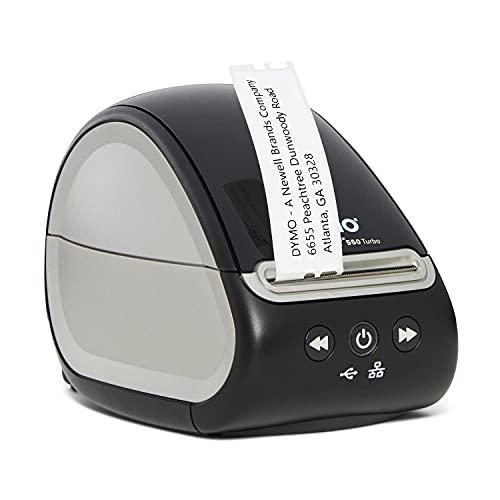
The Turbo badge on this LabelWriter variant is a promise about the queue. Its title claims high-speed direct thermal printing and adds LAN network connectivity alongside USB — the two facts a high-volume counter cares about most, because at the evening rush the label printer’s speed is measured in patients kept waiting, and its connection decides whether one workstation owns it or the whole dispensary shares it. A LAN port turns a desktop label printer into a network resource: the filling station, the checking station and the counselling counter can all send labels to the one machine, and the Turbo’s speed claim is what makes that sharing survivable at peak hour.
The title also repeats the family’s no-ink, no-toner framing and names shipping, mailing and postage among its duties — a reminder that the 550 line is a general label platform that a pharmacy adopts, rather than a pharmacy-only instrument. That generality is not a weakness at the counter; shipping and mailing labels are part of a modern pharmacy’s output too, particularly one that posts prescriptions. What the title leaves unstated mirrors its sibling: no resolution figure, and the branded-label ecosystem of the 550 series is the context the purchase inherits, so the same label-supply conversation belongs in this pick’s decision. Read together, the two DYMO picks divide by temperament — the standard 550 sells guidance and simplicity, the Turbo sells pace and a network jack — and a counter that already knows its bottleneck will know which temperament it is shopping for.
- Print method: High-speed direct thermal printing (as titled)
- Connectivity: USB and LAN network connectivity (as titled)
- Consumables: No ink or toner needed (as titled)
- Duties named in the title: Shipping, mailing, postage
- Resolution: Not stated in the listing title — verify with the maker’s documentation
Strengths
- High-speed positioning answers the rush-hour queue, the counter’s most expensive minutes.
- LAN connectivity lets several workstations share one label printer as a network resource.
- The family’s direct-thermal simplicity keeps the consumable list at label rolls.
Trade-offs
- No resolution is titled, so dense small-print rendering stays unverified from the listing.
- The title names no wireless or Bluetooth, so the network link is a cable, not the air.
- As a general label platform, its pharmacy fit depends on your software’s templates, not on pharmacy-specific features in the box.
Best for: a busy dispensary sharing one fast label printer across workstations on a wired network. Check price on Amazon, and confirm the label ecosystem and resolution in the documentation before it joins the network.
Not suited for: a counter with no wired network point near the printer’s station — the title’s network claim is LAN, a cable connection, and no wireless alternative is stated.
Brother TD-4550DNWB — Every connection at once
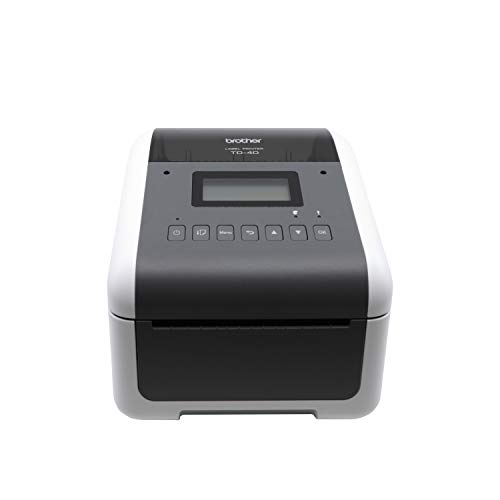
Brother’s TD-4550DNWB makes its case in a single line of its title: USB, Ethernet, Wi-Fi and Bluetooth, all four, on one desktop thermal label printer. No other pick here lists all four connection types, and in a dispensary whose infrastructure is a palimpsest — an Ethernet workstation from one era, a Wi-Fi laptop from another, a Bluetooth tablet from a third — that completeness is not a luxury. It is the difference between a printer that survives the next workstation refresh and one that gets stranded by it. The model name itself reads like the connection list compressed, a string of initials each standing for a way in.
Beyond that headline, the title describes an advanced thermal desktop label printer and stops — no resolution figure, no label width, no warranty period — and this section respects that brevity rather than decorating it. The documentation questions are therefore larger for this pick than for the Zebras, and a pharmacy shortlisting it should settle resolution and supported label widths before the order, exactly as the spec box directs. What can be said from the title is strategic: Brother’s TD line is its professional label family, the desktop format suits a counter, and the four-way connectivity makes this the natural pick where the printer must be reachable from everything, including the device that has not been bought yet. In a guide where most picks specialise — resolution, durability, speed, guidance — the Brother specialises in never being unreachable.
- Print method: Thermal label printing, desktop format (as titled)
- Connectivity: USB, Ethernet, Wi-Fi and Bluetooth (as titled)
- Resolution: Not stated in the listing title — verify with the maker’s documentation
- Label widths: Not stated in the listing title — verify with the maker’s documentation
- Warranty: Not stated in the listing title — verify with the maker’s documentation
Strengths
- All four connection types in one title — the only pick here reachable by cable, network and air simultaneously.
- Desktop format and professional-line positioning fit the dispensary counter’s space and duty.
- Connectivity depth future-proofs the purchase against workstation and network changes.
Trade-offs
- The title states no resolution, so small-print quality is a documentation check, not a given.
- Label width support is likewise unstated in the title, and vial-label fit must be confirmed before purchase.
- A connection-rich machine invites a shared role, which a small counter may never use enough to justify.
Best for: a pharmacy with mixed workstation infrastructure that wants one label printer reachable from every device it owns. Check price on Amazon after the documentation confirms the resolution and label widths your templates require.
Not suited for: a purchase decided on resolution evidence from the listing alone — this title publishes no dpi figure, so a small-print decision cannot rest on the listing’s own words.
How Do You Set Up a Pharmacy Label Workflow That Survives the Rush?
Begin with the label, not the printer. Fix the vial label’s size and layout first — the fields your dispensing software prints, the smallest type size in the template, the code density — because those decisions determine the resolution and width class the printer must satisfy, and they are far cheaper to make on paper than after a machine arrives. Print a sample template at both resolutions under consideration, on the actual vial sizes in use, and read it at arm’s length in the counter’s real lighting: the legibility test that matters is the one a tired technician passes at seven in the evening, not the one a brochure passes at noon. Then audit the journey your labels take. Labels that live in cabinets argue for direct thermal’s simplicity; labels that ride in hot vehicles or sit on sunny shelves argue for the transfer-capable machine, and the audit takes an afternoon at most.
Placement and supply discipline finish the setup. The printer belongs within one step of the filling station, on the network connection the whole dispensary can share, with the spare label rolls stored in the same cupboard as the vials rather than across the room — a printer that waits for supplies during the rush is a bottleneck with a power light. Keep one full spare roll at the printer and reorder when the spare is opened, not when the loaded roll ends; the two-roll rule has saved more evening rushes than any speed specification. Finally, test the failure: unplug the printer on a quiet morning and rehearse the fallback, whether that is a second workstation’s route to the same machine or a backup unit, because the counter that has rehearsed a printer failure treats it as a drill, and the counter that has not treats it as an emergency. Pharmacies building the wider label operation around the dispensary will find the neighbouring territory mapped in our guide to the best label printers small business operations rely on.
One last setup habit separates smooth counters from struggling ones: name the printer’s owner. Not its purchaser — its owner, the staff member responsible for the spare-roll trigger, the head-cleaning schedule and the template test whenever the software updates. Shared equipment without a named owner degrades by diffusion, each person assuming another has the roll count in hand, until the evening the assumption fails in front of a full waiting area. The machines in this guide are reliable enough that ownership, not hardware, is the variable that decides their reputation inside a pharmacy — a printer with an owner is a printer that is always loaded, always clean and always where the filling happens.
How Do Label Stock and Counter Conditions Affect What Comes Out?
A label printer is only half of a printed label; the other half is the roll it was fed, and pharmacies that blame machines for stock problems chase faults in the wrong direction. Direct-thermal stock carries its image-forming chemistry in its coating, so a roll stored in a warm stockroom or in sunlight through a window is a roll pre-aged before it prints — the coating darkens unevenly, contrast falls, and the printer gets blamed for a warehousing decision. Rolls belong in a cool, dark cupboard, in their wrapping, with the oldest stock used first, and the roll loaded in the machine should be the roll in active use rather than a museum of half-finished sizes. Adhesive behaviour matters as much as image quality: a vial label lives on a curved surface, often a small one, and a label whose adhesive or stiffness suits a flat carton will lift at the edges of a narrow vial within the hour, however crisp its printing.
The counter environment writes the rest of the story. Print heads accumulate adhesive residue and paper dust at the feed path’s pinch points, and the symptom — a pale stripe down every label, a feed that stutters — is cured by the cleaning routine the maker’s documentation prescribes, performed on a schedule rather than after a failure. Humidity swells label stock and changes its feed manners; a dispensary whose stock cupboard sits against an exterior wall in a damp climate learns this seasonally. None of these factors appears in any listing title, which is exactly why this guide keeps returning to the same discipline: the title tells you the machine, the documentation and the counter tell you the outcome. A pharmacy that audits stock storage, head cleaning and label-to-vial fit during a quiet week will get better labels out of any of these six machines than a pharmacy that buys the finest resolution and neglects all three.
Which of These Printers Fits Which Kind of Pharmacy Counter?
The independent community pharmacy, where one counter does everything and the staff count is small, is the natural home of the guided end of this guide. The DYMO LabelWriter 550’s automatic label recognition trims the small decisions that interrupt a two-person operation, and the standard ZD421 serves the same counter when its workstations are varied enough to want the full connection trio. What these counters share is an intolerance for setup friction: the printer is operated by whoever is free, including relief staff, so machines that configure themselves at a roll change and connect without argument earn their counter space in saved minutes rather than in specifications.
The high-volume dispensary — a busy chain counter or a central-fill operation — shops from the other end of the list. There the queue is the enemy, several workstations print at once, and the DYMO 550 Turbo’s speed framing and LAN connection, or the Brother’s four-way connectivity feeding a shared pool, match the load pattern. Mail-order and central-dispensing operations add the label-journey question in its strongest form: labels ride in delivery vehicles and sit in transit, so the ZD421t’s transfer mode stops being an insurance policy and becomes the specification, with ribbon stocking absorbed as a routine cost of durable output. Compounding and specialty counters, whose labels carry long directions and dense auxiliary text, are where the 300 dpi variant’s finer print justifies itself template by template. None of these profiles is a ranking — the same machine that is overkill at a village counter is undersized at a central-fill bench — and the guide’s six picks were chosen so that each profile finds its machine described in its own terms.
How Do the Six Pharmacy Picks Compare Side by Side?
| Pick | Method as titled | Resolution as titled | Connectivity as titled | Defining trait |
|---|---|---|---|---|
| Zebra ZD421 (203 dpi) | Direct thermal | 203 dpi | Bluetooth, Ethernet, USB | Full connections, 2-year warranty |
| Zebra ZD421 (300 dpi) | Direct thermal | 300 dpi | Bluetooth, USB | Finest small print |
| Zebra ZD421t | Direct thermal and thermal transfer | 203 dpi | USB, Ethernet, Bluetooth | Labels that endure heat and light |
| DYMO LabelWriter 550 | Direct thermal | Not stated | Not stated | Automatic recognition of branded labels |
| DYMO LabelWriter 550 Turbo | Direct thermal, high-speed | Not stated | USB, LAN | Speed for shared counters |
| Brother TD-4550DNWB | Thermal | Not stated | USB, Ethernet, Wi-Fi, Bluetooth | Four connection types at once |
The table’s empty cells are information too. The Zebra titles publish their resolutions and full connection lists; the DYMO and Brother titles spend their words on recognition, speed and connectivity breadth instead, leaving resolution to the documentation. Neither habit is better — but a shortlist built from this table should carry its documentation questions with it, pick by pick. For the barcode-heavy end of the same craft, our roundup of the best barcode printers covers machines chosen for code work first.
What Happens Between the Dispensing Software and the Finished Label?
Every label in this guide begins life as a template inside the pharmacy’s dispensing software, and the template is where most label quality is decided before the printer is consulted. Type size is the first decision: the template sets the smallest characters on the label, and that minimum — not the average text — is the figure the printer’s resolution must serve. A template whose warning line sits at a size that strains 203 dpi will strain it on every vial, every day, which is why this guide’s recurring advice is to print the real template, from the real software, on the real vial, before the hardware decision hardens. Margins are the second decision, and the less glamorous one: a template that crowds the label’s edges leaves no tolerance for the small feed variations every roll-fed machine exhibits, so a label that occasionally clips its last character is usually a template fault wearing a printer’s clothes.
The test-print ritual that resolves these questions takes twenty minutes and should be treated as part of the purchase. Load the candidate stock, print the full set of templates the counter uses — the standard vial label, the auxiliary warnings, the receipt or counselling sheet if the same machine produces them — and examine them under the counter’s lighting, at reading distance, on the smallest vial in the building. Check the densest code with the counter’s own scanner, since a code that prints beautifully and scans reluctantly is a failure wearing good typography. Only then does the hardware comparison in this guide become decisive, because the six machines differ exactly where the test looks: resolution for the small type, connectivity for the workstations sending the jobs, method for the labels travelling furthest. Pharmacies that run this ritual once buy printers the way they dispense — verified, labelled and without surprises.
What Mistakes Do Pharmacies Make When Choosing a Label Printer?
The first mistake is shopping for a document printer to do a label printer’s job. An office laser asked to print sheets of adhesive labels wastes most of each sheet, risks adhesive contamination in a hot paper path, and turns a two-second task into a printing project; the dispensary’s printing is labels, and labels want a label machine. The second mistake is choosing resolution by habit rather than by template. A pharmacy whose labels carry dense codes and small directions that buys 203 dpi to save a step will read fuzzy print all day, while a pharmacy with large, simple labels that buys 300 dpi has purchased clarity it cannot see. Print the actual template at both resolutions and let your own labels decide.
The third mistake is ignoring the consumable ecosystem until after the hardware arrives — the DYMO picks make the point concretely, since their recognition system is built around branded labels, but the general form applies everywhere: label stock, its sizes and its sourcing are a standing commitment that outlives the printer’s warranty. The fourth mistake is placing the printer where the network is rather than where the filling happens, adding a walk to every prescription. The fifth is believing any suggestion that a printer purchase settles a regulatory question. It does not and cannot; compliance lives in a pharmacy’s software, procedures and professional practice, and hardware is chosen for workflow fit alone. The sixth mistake is buying one printer for a counter that cannot pause: the two-roll rule and a rehearsed fallback are cheap, and a single un-backed-up label printer at a busy dispensary is a queue waiting for its moment.
How Do You Plan Label Supply So the Counter Never Stops Mid-Rush?
Supply planning for a label printer is unglamorous arithmetic, and it is the difference between a dispensary that prints through its busiest hour and one that discovers an empty roll at the worst moment of the week. Count a normal week’s label consumption honestly — including the auxiliary labels, the reprints and the mistakes, not just the prescriptions — and let that count set the standing stock: the loaded roll, a full spare at the printer, and a reserve in the cupboard sized to cover the supplier’s delivery interval plus a margin for the week that is not normal. The reorder trigger is the opening of the printer-side spare, never the end of the loaded roll, because a trigger pulled at empty is a trigger pulled a delivery cycle too late. Pharmacies running the ZD421t in transfer mode track two consumables on the same rule, since a ribbon that ends mid-batch stops the machine as completely as a missing roll.
Stock rotation deserves the same discipline as the medicines’ own shelves, for the same chemical reason: direct-thermal coating ages, and the roll that sat at the back of the cupboard through a hot summer prints greyer than the roll that arrived last month. Date the boxes on arrival, use the oldest first, and keep the storage spot away from the heat sources and sunlit glass that pre-age the coating. When a new label stock or a new supplier is introduced, qualify it on a quiet morning — a full template set, a scanner check, a vial-wrap test left overnight to judge the adhesive — rather than during the rush that will punish an unqualified change. Supply discipline sounds like housekeeping because it is, and housekeeping is precisely what a rush hour tests.
Final Recommendation
Start from the label and the counter, and the shortlist builds itself. The Zebra ZD421 at 203 dpi with its full connection set and stated warranty is the default dispensary machine, the one to beat. Move to the 300 dpi variant when your own printed template shows small type straining at the lower resolution, and to the ZD421t when labels must survive heat, light or long storage. Choose the DYMO LabelWriter 550 where roll-change simplicity rules a small counter and the branded label supply is acceptable, the 550 Turbo where rush-hour speed and a LAN connection serve several workstations, and the Brother TD-4550DNWB where four connection types must all reach one desktop. In every case, print your real template on the real vial before the purchase is final — the label your software produces is the only reviewer whose opinion a patient will ever read.
Frequently Asked Questions
Why are there no laser or inkjet printers in this guide?
Because the pharmacy’s defining print job is the adhesive label, and direct-thermal label printers do that job with one consumable, no ink and a feed path built for label stock. Sheet-label printing through an office laser wastes stock and risks adhesive meeting a hot fuser. The document printing a pharmacy also does — letters, leaflets, reports — is a separate purchase with separate criteria.
Does any printer in this guide carry a compliance certification?
No, and the question itself deserves a clear answer: printers are hardware, and regulatory compliance is a property of a pharmacy’s systems and procedures, not of a label printer. This guide makes no compliance claim for any pick, and you should discount any seller who suggests a machine confers one. Choose on workflow fit — resolution, connectivity, label handling — and let your professional obligations be met by the systems designed for them.
Is 203 dpi enough for prescription vial labels?
For most established label templates, yes — 203 dpi has rendered standard directions and barcodes cleanly for decades. The case for 300 dpi is specific: very small type, dense two-dimensional codes and crowded multi-field labels. Print your own template at both resolutions and compare them on your smallest vial; that ten-minute test answers the question for your pharmacy better than any general rule.
What is the practical difference between direct thermal and thermal transfer?
Direct thermal darkens coated label stock with heat and needs no other consumable, but the image remains heat-sensitive and fades faster under heat and strong light. Thermal transfer melts a ribbon’s coating onto the label, producing a tougher image that tolerates hot vehicles, sunlight and long storage, at the cost of stocking and threading ribbon. The ZD421t is the pick here that offers both methods in one machine.
Do direct-thermal labels fade too quickly for pharmacy use?
For the ordinary journey — printed at the counter, applied to a vial, kept in a home cabinet — direct-thermal output lasts comfortably beyond the life of the prescription it labels, which is why the technology dominates dispensary counters. The fading risk concentrates in heat and strong light: labels stored against hot surfaces, left on sunny dashboards or shipped through hot vehicles age faster. A pharmacy whose labels regularly take that harsher journey is the case the thermal-transfer ZD421t exists for, and the choice is made by auditing the journey rather than by worrying in the abstract.
How many label printers does one dispensary actually need?
One per filling line is the working rule, plus a rehearsed answer to the question of what happens when it stops. A small counter can share a single networked machine — the LAN-connected Turbo and the four-connection Brother are both titled for that shared role — while a busy dispensary usually finds that a second, simpler unit at the checking station pays for itself in steps saved. The unacceptable configuration is one printer, no spare roll discipline and no fallback plan, whatever the machine’s warranty says.
A satellite or branch counter inherits the same logic at smaller scale: one machine matched to its own template and connection reality, supplied from the same stock discipline, rather than a hand-me-down chosen because it was spare. Branch counters fail quietly when their printer is an afterthought, and the patients at a small branch deserve the same legible label as the flagship’s.
The same applies in miniature to the counselling desk and the vaccination corner: any station that hands a labelled container to a patient is a printing station, and it should be planned as one from the start.
Can these printers also handle shipping labels for posted prescriptions?
The Zebra titles state a 4×6 label class outright, and the DYMO Turbo’s title names shipping, mailing and postage among its duties, so the format side is covered. The workflow side — which machine sits near the packing bench and which software sends the job — is a placement decision the setup section of this guide walks through.
Related Guides
The dispensary counter sits inside a wider label operation. High-volume shipping work is compared in the best industrial label printers guide, wireless label printing for flexible counters appears in the best bluetooth label printers roundup, and the postage-and-parcel side of a mail-order pharmacy is covered by the best shipping label printers.