What's inside
- Where to buy
- Key Takeaways
- Quick Picks
- How did we choose these monitors for trading desks?
- Which 49-inch canvas should anchor a serious trading desk?
- Is a triple-monitor array still better than one ultrawide?
- How do the six trading setups compare side by side?
- How much desk — and what layout — does a fast trading setup really need?
- Which trading style fits which screen in this guide?
- What should a trader actually look for in a monitor?
- If refresh rate is not the bottleneck, what actually is?
- How do you set up a trading desk that stays fast all session?
- Should a trading desk add a small second screen instead of going wider?
- What mistakes do traders make when buying monitors?
- How long should a trading monitor last, and when is it time to upgrade?
- Final Recommendation
- Frequently Asked Questions
- Related Guides
As an Amazon Associate I earn from qualifying purchases. This post may contain affiliate links at no extra cost to you.
gizmoverdict.com is reader-supported. When you buy through links on our site, we may earn an affiliate commission.
Where to buy
Every screen in this guide links to its Amazon listing, and for trading hardware that listing page is worth reading twice: once for the panel, and once for the unglamorous details that decide whether a desk actually works at 9:29 in the morning — the port list, the stand’s height range, whether picture-by-picture is supported, and whether the USB-C input carries enough power for the laptop driving it. The best monitors for fast trading are rarely the ones with the most dramatic gaming numbers, so resist the urge to sort by refresh rate and buy the top result. Sort by canvas first, window management second, and everything else after that.
Here is the premise this whole guide is built on, stated plainly because most roundups get it wrong: a candlestick chart does not care whether your panel refreshes at 60Hz or 240Hz. Price bars update when trades print, order-book ladders repaint a handful of times per second at most, and your platform’s own data feed — not your monitor — is the slowest link in that chain. Spending money on hertz buys you smoother mouse movement and nothing else. What actually makes a trading desk feel fast is information density: how many charts, ladders, scanners and news windows you can keep visible at once without alt-tabbing, and how painlessly you can rearrange them when a quiet morning turns into a volatile open. That is why four of the six picks below are ultrawides, why the two 34-inch models earn their places through split-screen software rather than speed, and why the final pick is a modest 27-inch panel meant to be bought three at a time.
The fork in this category is real and worth deciding before you fall in love with any single model. One 49-inch dual-QHD canvas gives you a seamless wall of charts with no bezels and one power cable, but it is a single point of failure and it demands a deep desk. A triple-monitor array built from smaller panels costs less per inch, lets you angle the side screens, and survives one panel dying mid-week — but it multiplies cables, mounts and calibration drift. Neither answer is wrong. They suit different desks, different platforms and different temperaments, and the reviews below keep returning to that choice because it matters more than any specification printed on a box.
Key Takeaways
- Charts repaint when trades print, not sixty times a second, so panel size and split-screen tooling — not refresh rate — are what make a trading setup feel fast.
- A 49-inch DQHD ultrawide at 5120×1440 is two 27-inch QHD monitors fused into one bezel-free canvas; a triple 27-inch array is the cheaper, more repairable alternative.
- Picture-by-picture and vendor window-splitting software matter more than most traders expect, because they decide how two computers or six windows share one screen.
- The 240Hz CRUA earns its place through its 49-inch VA canvas and split-screen features, not through its headline refresh number.
- Curve radius is a comfort spec on screens this wide: a tighter 1500R curve keeps the far corners of a 49-inch panel at a more even viewing distance.
- Whatever you buy, budget desk depth and a proper mount into the decision — a 49-inch ultrawide on a shallow desk is a neck problem wearing a spec sheet.
Quick Picks
| Pick | Badge | Why it earns its place |
|---|---|---|
| INNOCN 49-Inch 5K2K Ultrawide | Best single-canvas desk | A full 5120×1440 workspace with USB-C input and a gentler 1800R curve, for traders who want one screen to hold the entire morning. |
| CRUA 49-Inch DQHD 240Hz Ultrawide | Best height-adjustable 49 | The same dual-QHD canvas on a stand that actually adjusts for height, with FreeSync and built-in speakers rounding out a complete desk. |
| LG 34WR55QK-B 34-Inch UltraWide | Best window-management software | LG’s OnScreen Control splits the 3440×1440 panel into tidy chart grids, and USB-C keeps a laptop-based desk to one cable. |
| Sceptre 34-Inch Curved Ultrawide WQHD | Best dual-input 34 | Two DisplayPort inputs and a tight 1500R curve make it the 34-inch pick for traders switching between two machines. |
| Samsung 27-Inch S30GD Essential | Best array building block | A plain, eye-care-focused IPS panel priced and sized for buying in threes and mounting as a wraparound chart wall. |
| Viewedge 49-Inch DQHD Ultrawide | Best color-leaning 49 | 5120×1440 with 110% sRGB coverage for traders whose side work involves charts they publish, screenshot and annotate. |
How did we choose these monitors for trading desks?
We started from the trading platform outward rather than from the monitor market inward. A typical active setup — two to four charts at different timeframes, a depth-of-market ladder, a scanner or watchlist, a positions window and a news feed — needs roughly seven million pixels before anything feels spacious, which is why dual-QHD and WQHD panels dominate this list and why no 1080p screen appears in it. From there we weighed how each monitor handles multiple windows and multiple inputs: picture-by-picture support, vendor splitting software, the number and type of ports, and whether a laptop can drive the panel over a single USB-C cable. Stand ergonomics counted heavily, because a screen you stare at from before the open to after the close has to sit at the right height without a stack of ream paper under it. Panel type and curve came next, and refresh rate came last — deliberately. Where a listing advertises a gaming-class refresh figure, we treated it as a bonus for cursor smoothness and judged the monitor on its canvas, its tooling and its comfort instead.
We also applied an honesty filter to the category’s marketing. Any monitor whose appeal rested mainly on a millisecond response claim or a hertz figure, without the resolution or the window tools to back it up, did not make the cut. Conversely, the Samsung 27-inch pick looks unremarkable on paper and stays in this guide precisely because arrays of ordinary panels are how a large share of real trading desks are actually built.
Finally, we sanity-checked every pick against the unglamorous constraints of a home or small-office desk: can a normal graphics output drive it, can one person unbox and place it safely, does it leave room for a keyboard, a notebook and a coffee without crowding? A 49-inch panel is a two-person lift and a tape-measure exercise, and this guide treats that as part of the product rather than fine print. The result is a list with no exotic outliers — six screens a trader could order today and build a working desk around this week.
Which 49-inch canvas should anchor a serious trading desk?

INNOCN 49-Inch 5K2K Ultrawide — Best single-canvas desk
Put a full trading platform on this panel and the first thing you notice is what disappears: the bezel seam that normally runs through the middle of your workspace, and the mental bookkeeping of which chart lives on which monitor. At 5120×1440 the INNOCN gives you the pixel estate of two 27-inch QHD screens side by side, and a platform laid out across it — daily chart left, intraday chart centre, ladder and scanner right — reads as one continuous instrument rather than three separate ones. For traders whose method depends on glancing between timeframes dozens of times an hour, that continuity is the entire argument, and it is a strong one.
The supporting details suit a working desk rather than a gaming rig. The 1800R curve is gentler than the 1500R bend on several rivals here, which keeps text at the far edges looking less keystoned when you sit at a normal distance. USB-C input means a laptop can drive the whole canvas and charge from the same cable, a real quality-of-life point for anyone whose trading machine is a MacBook or a thin Windows ultrabook that travels. HDR400 and 99% sRGB coverage are more than charting requires, but they make the panel pleasant for the research, reading and video that fill the hours between trades. Its 120Hz refresh is, for this job, simply headroom — the honest reason to buy this screen is the canvas, and on canvas it delivers completely.
One working detail deserves emphasis for platform choice: a single DQHD screen rewards platforms with strong layout systems. Software that saves named workspaces — most professional platforms do — turns this panel into several virtual desks you can flip between: a scalping layout, a swing-review layout, a pre-market scanner layout, all on the same glass. Traders coming from two separate monitors sometimes miss the physical separation for the first week, then find the saved-workspace habit faster than walking their eyes across a bezel ever was. If your platform’s layout handling is weak, the array pick later in this guide may suit you better than any ultrawide.
- Panel: 49-inch, 5120×1440 (32:9), 1800R curve
- Refresh: 120Hz
- Colour: 99% sRGB, HDR400
- Inputs: USB-C, DisplayPort, HDMI
- Best suited role: one-screen platform layout
Strengths
- Two QHD monitors’ worth of pixels with no centre bezel interrupting your main chart.
- USB-C input lets a single cable carry picture and power to a laptop-based desk.
- The shallower 1800R curve keeps edge-of-panel text calmer than tighter bends do.
Trade-offs
- A 49-inch panel needs genuine desk depth; sit too close and the corners demand head turns.
- One screen is one point of failure — if it goes dark, the whole platform goes with it.
- Driving 5120×1440 asks more of an older laptop’s graphics than a single QHD panel would.
Best for: traders who want the entire platform on one seamless canvas and have the desk depth to sit back from it. Not suited for: anyone working from a shallow desk, or anyone who needs a second machine’s output visible beside the first without picture-by-picture compromises.

CRUA 49-Inch DQHD 240Hz Ultrawide — Best height-adjustable 49
The CRUA matches the INNOCN pixel for pixel — the same 5120×1440 dual-QHD estate across a 49-inch diagonal — and then wins its place in this guide on a specification traders underrate until their neck files a complaint: the stand adjusts for height. A screen this wide fixes your seating position for hours at a stretch, and being able to raise the panel so its centre sits at proper eye level, rather than propping it on whatever is handy, is the difference between a desk that works all session and one that slowly punishes you. The tighter 1500R curve also pulls the far corners of the VA panel closer to a uniform distance from your eyes, which helps keep small ladder numbers legible at the edges.
About that headline figure: 240Hz will not make a single fill arrive sooner, and this guide will not pretend otherwise. What the CRUA’s gaming heritage genuinely contributes is a responsive VA panel with 3000:1 contrast — deep blacks that make dark-mode platform themes look properly dark — FreeSync support, built-in speakers adequate for alert sounds and squawk, and 120% sRGB coverage that keeps chart colour-coding vivid. Buy it for the adjustable stand, the contrast and the canvas. Let the refresh rate be the free extra it honestly is.
Consider also how the CRUA behaves across a full trading day rather than a spec-sheet moment. VA panels hold their contrast in bright rooms better than their reputation suggests, and this one’s specified 3000:1 ratio keeps a dark chart theme readable even with daylight behind you — a common desk reality that glossy IPS setups handle worse. The built-in speakers, easy to dismiss, earn their keep at the open: platform alert tones, a news channel murmuring at low volume, and the closing-bell routine all run without a separate audio setup competing for the same crowded desk. Small mercies, compounded over two hundred and fifty trading days a year.
- Panel: 49-inch VA, 5120×1440 (32:9), 1500R curve
- Refresh: up to 240Hz, FreeSync
- Contrast: 3000:1; colour 120% sRGB
- Extras: built-in speakers, height-adjustable stand
- Best suited role: long sessions at a fixed desk
Strengths
- Height adjustment on a 49-inch panel is rarer than it should be, and it transforms long sessions.
- VA contrast makes dark platform themes and evening sessions easy on the eyes.
- Built-in speakers cover alerts and news audio without extra desk clutter.
Trade-offs
- You pay for a 240Hz ceiling that charting software will never approach.
- VA panels shift colour slightly at extreme side angles, noticeable on a screen this wide.
- The aggressive 1500R curve can make spreadsheet-style grids at the edges feel bowed.
Best for: full-time traders at a permanent desk who value posture and contrast over a second input machine. Not suited for: traders who regularly run two computers side by side on one panel, or anyone whose desk cannot spare the width.

LG 34WR55QK-B 34-Inch UltraWide — Best window-management software
Not every trading desk needs a 49-inch wall, and the LG is the pick for traders who would rather have one well-organised 34-inch screen than a panorama they must swivel to read. Its 3440×1440 resolution in a 21:9 frame fits a main chart, a ladder and a watchlist in a row without shrinking any of them below usefulness, and LG’s OnScreen Control software is the quiet star: it carves the panel into preset grids and snaps platform windows into them, so your layout survives reboots and resolution changes instead of dissolving into a pile of overlapping windows every Monday morning. For traders, that software is worth more than a hundred extra hertz.
The rest of the specification reads like it was chosen by someone who works at the screen. USB-C input keeps a laptop desk to a single cable. Reader Mode and LG’s eye-comfort tuning suit the long stretches of research and journal review that surround actual trading hours. HDR10 and 99% sRGB coverage keep charts and documents looking clean, and the 1800R curve is mild enough that straight grid lines on a spreadsheet still look straight. At 100Hz the panel is smoother than an office monitor and entirely sufficient for data that updates when trades print.
There is a second, quieter audience for this LG: traders who share the desk. A 34-inch screen leaves room for a laptop beside it, a notebook in front of it and a second person pulling up a chair to review the day’s trades — none of which a 49-inch panel permits gracefully. It is also the easiest pick here to drive: integrated graphics in any recent laptop handle 3440×1440 without complaint, where DQHD panels occasionally expose the limits of older machines and docks. If your trading is serious but your hardware budget must also cover the computer itself, this is the monitor that leaves money where it belongs.
- Panel: 34-inch, 3440×1440 (21:9), 1800R curve
- Refresh: 100Hz
- Software: OnScreen Control window splitting
- Colour: 99% sRGB (Typ.), HDR10
- Inputs: USB-C, plus standard video inputs
Strengths
- OnScreen Control’s snap-to-grid layouts are the best window discipline in this guide.
- Single-cable USB-C suits laptop traders who dock and undock daily.
- A manageable footprint for desks that cannot host a 49-inch panel.
Trade-offs
- 3440×1440 is a chart, a ladder and a list — a full multi-timeframe platform will feel snug.
- Traders who later want a second screen start the bezel problem this guide’s 49-inch picks avoid.
- Its comforts are software and ergonomics; raw panel drama is not its game.
Best for: laptop-based traders and part-time traders who want one tidy, well-managed screen. Not suited for: multi-market traders running six or more live windows, who will outgrow the canvas within a month.

Sceptre 34-Inch Curved Ultrawide WQHD — Best dual-input 34
The Sceptre covers the desk layout the LG does not: two machines. Many active traders keep a dedicated trading PC and a separate laptop for research, communication and everything that should never share a desktop with live orders, and this panel’s pair of DisplayPort inputs — alongside its 3440×1440 canvas — makes it the natural hub for that arrangement. Run the trading box at full width during the session, then hand the screen to the laptop for the evening’s journal work, without a cable swap or a separate monitor competing for desk space.
Its 1500R curve is the tightest among the 34-inch picks here, wrapping the WQHD panel noticeably around your field of view; chart readers who sit close tend to like it, while anyone who also edits long documents should know the bend is present in every straight line. The listing advertises up to 180Hz, and in keeping with this guide’s premise we will simply note that the number exists and move on — the Sceptre’s case rests on its inputs, its curve and 99% sRGB coverage, with built-in speakers handling alert chimes. As a value-leaning route into ultrawide trading that still respects a two-computer workflow, it is well judged.
A practical note on running two machines through one panel: give each machine a fixed input and learn the monitor’s input-switching shortcut until it is muscle memory, because the changeover happens at predictable moments — the close, the lunch lull, the evening review — and fumbling through an on-screen menu at those moments is a small daily tax. The Sceptre’s dual DisplayPort arrangement also leaves its HDMI free for a third occasional source, such as a streaming stick for financial television, which some traders like in peripheral vision during slow sessions. It is a flexible hub disguised as a value monitor.
- Panel: 34-inch, 3440×1440 (21:9), 1500R curve
- Refresh: up to 180Hz
- Inputs: DisplayPort ×2, plus HDMI
- Colour: 99% sRGB
- Extras: built-in speakers
Strengths
- Two DisplayPort inputs serve a trading PC and a second machine without adapters.
- The tight curve keeps a close-sitting trader’s charts inside comfortable peripheral vision.
- Speakers are built in, so platform alert sounds need no extra hardware.
Trade-offs
- No USB-C input, so a laptop desk needs a dock or an adapter cable.
- The pronounced bend divides opinion among text-heavy users.
- Window-splitting software is not its strength; your platform’s own layouts must do that work.
Best for: two-computer traders who want one ultrawide to serve both machines across the day. Not suited for: single-cable laptop minimalists, who should take the LG above instead.
Is a triple-monitor array still better than one ultrawide?

Samsung 27-Inch S30GD Essential — Best array building block
Judged alone, this is an unremarkable monitor: a 27-inch IPS panel, 100Hz, a tilt-only stand. Judged the way traders actually buy it — three at a time, on a triple mount, angled into a shallow arc — it becomes the most practical pick in this guide. Three of these give you three independent canvases, and that independence has operational value no ultrawide can match: charts on the left screen, execution in the centre, news and communication on the right, each full-screen, each immune to the others’ window accidents. If one panel fails on a Wednesday, you trade on two and replace it on Thursday; the platform never goes entirely dark.
Samsung’s eye-care tuning is the other half of the case. A triple array surrounds you with lit panel for the whole session, and flicker-conscious backlights plus the Advanced Eye Care features in this Essential line are aimed squarely at people who sit inside that glow for six or more hours. The tilt-only stand looks like a weakness on the spec sheet and is irrelevant in practice, because an array belongs on a mount arm anyway — the stand comes off and the VESA pattern does the work. Buy one and you have bought an ordinary office monitor. Buy three and you have bought the classic trading desk, at a total outlay below most single 49-inch panels.
Arrays also scale in a way ultrawides cannot. Start with two S30GD panels while you learn whether your method truly needs a third; add the third when the scanner earns a permanent home; retire the oldest into a spare or a family desk years later. Each step is a small purchase rather than a flagship commitment, and each panel remains useful alone in a way half an ultrawide never could be. For traders building a desk incrementally out of profits — a common and honourable pattern — that modularity is not a compromise at all. It is the strategy.
- Panel: 27-inch IPS
- Refresh: 100Hz
- Stand: tilt only — plan on a mount for array use
- Features: Advanced Eye Care, Game Mode
- Best suited role: centre or wings of a three-screen array
Strengths
- Three independent screens keep execution, charts and news physically separated.
- Array economics: a full wraparound desk for less than one flagship ultrawide.
- Eye-care features matter when panels surround you for entire sessions.
Trade-offs
- Bezels return — two seams cross your peripheral workspace.
- Three panels mean three power leads, three video cables and a mount to buy.
- Colour and brightness matching across units takes a few minutes of menu work.
Best for: traders who think in separate full-screen workspaces and value redundancy over seamlessness. Not suited for: minimalists who want one cable and a clean desk, or anyone renting a desk too small for a triple mount.
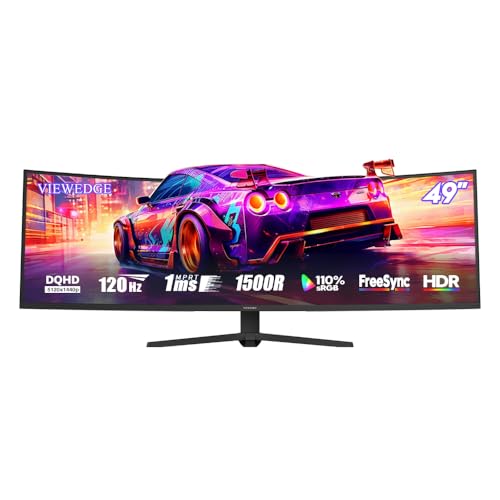
Viewedge 49-Inch DQHD Ultrawide — Best color-leaning 49
The Viewedge brings the same 5120×1440 dual-QHD estate as the INNOCN and CRUA above, wrapped in a 1500R curve, and distinguishes itself with 110% sRGB coverage — a figure that matters to a specific and growing kind of trader: the one who publishes. If your charts end up in a newsletter, a video breakdown or a community post, colour that renders consistently and slightly beyond standard sRGB keeps your annotations, highlights and marked-up levels looking the way you intended when they leave your desk. For pure private charting the extra gamut is a luxury; for trader-educators it is a working tool.
Elsewhere the panel follows the sensible 49-inch pattern: 120Hz refresh that this guide counts as headroom rather than a trading feature, 1ms response claims that belong to gaming marketing, and DisplayPort plus HDMI inputs for a trading PC and a second source. The tighter curve suits a single seated position in front of a very wide screen, keeping the scanner at the far right from washing out at an oblique angle. If your shortlist is the three DQHD 49-inch models in this guide, choose the INNOCN for its gentler curve and USB-C, the CRUA for its stand, and this Viewedge when the colour of exported charts is part of your livelihood.
Even traders who never publish should understand what the Viewedge’s colour headroom does to everyday charting: nothing harmful. Charts use a handful of saturated colours that any sRGB panel renders correctly, so the extra gamut is dormant during the session and wakes up for photography, video and design work around it. Think of this pick as the 49-inch canvas for a desk that moonlights — the trading platform by day, a content workstation by evening, one panel serving both without asking its owner to choose which identity matters more.
- Panel: 49-inch, 5120×1440 (32:9), 1500R curve
- Refresh: 120Hz
- Colour: 110% sRGB
- Inputs: DisplayPort, HDMI
- Best suited role: trading plus chart publishing
Strengths
- Wide colour coverage keeps published and recorded charts faithful.
- The full DQHD canvas matches the biggest layouts in this guide.
- A 1500R bend keeps the far ends of the panel readable from one seat.
Trade-offs
- No USB-C input in the listing, so laptop users need a dock or adapter.
- Colour beyond sRGB is wasted on traders who never export an image.
- Same single-point-of-failure caveat as every 49-inch one-screen desk.
Best for: traders who teach, publish or record their charts and need the canvas and the colour together. Not suited for: laptop-first desks wanting single-cable connection, which the INNOCN serves better.
How do the six trading setups compare side by side?
| Monitor | Canvas | Resolution | Refresh | Defining trait |
|---|---|---|---|---|
| INNOCN 49-Inch 5K2K Ultrawide | 49-inch 32:9 | 5120×1440 | 120Hz | USB-C and a gentle 1800R curve on the full dual-QHD estate |
| CRUA 49-Inch DQHD 240Hz Ultrawide | 49-inch 32:9 VA | 5120×1440 | 240Hz | Height-adjustable stand and 3000:1 contrast |
| LG 34WR55QK-B 34-Inch UltraWide | 34-inch 21:9 | 3440×1440 | 100Hz | OnScreen Control window grids and USB-C |
| Sceptre 34-Inch Curved Ultrawide WQHD | 34-inch 21:9 | 3440×1440 | Up to 180Hz | Twin DisplayPort inputs for two machines |
| Samsung 27-Inch S30GD Essential | 27-inch 16:9 IPS | Full HD class | 100Hz | Built to be bought three at a time for an array |
| Viewedge 49-Inch DQHD Ultrawide | 49-inch 32:9 | 5120×1440 | 120Hz | 110% sRGB for traders who publish charts |
How much desk — and what layout — does a fast trading setup really need?
Desk geometry decides more trading comfort than any panel specification. A 49-inch panel spans roughly a metre and a fifth of curved glass; on a desk shallower than about 80 centimetres you will sit close enough that the centre of the screen feels near and the corners feel nearer, which is precisely backwards. Measure before ordering, and if the tape says your desk is shallow, either deepen the desk, wall-mount the panel to reclaim the stand’s footprint, or step down to a 34-inch pick or an array whose wing panels can angle away. Traders routinely spend flagship money on a screen and then blame the screen for a furniture problem.
Layout deserves the same forethought. Sketch your platform on paper at the resolution you are considering: draw the main chart at the size you actually read it, not the size you shrink it to today. Add the ladder at full depth, the scanner at readable row height, the positions window, the news feed. If the sketch needs sticky notes hanging off the edges, the canvas is too small and no refresh rate will rescue it. Most traders who do this exercise honestly discover their layout wants either the full DQHD width or three separate screens, which is why this guide’s centre of gravity sits exactly there.
Lighting finishes the physical picture. A window behind the monitor forces your eyes to fight glare all morning; a window behind you reflects in curved glass. Matte-leaning panels and sensible desk orientation beat brightness arms races. And keep the desk’s cable story boring: one power strip, labelled cables, a spare DisplayPort lead in the drawer. Trading speed is a system, and the monitor is only its most visible component.
Which trading style fits which screen in this guide?
Scalpers live in the ladder and one intraday chart, and they need both large, central and unmoving. For them the 49-inch picks earn their width not through window count but through window size: a full-height ladder beside a full-height chart, with the scanner demoted to a strip along the bottom. The CRUA’s contrast and stand suit the long, fixed, forward stare of that style. Day traders running several instruments at once are the natural DQHD audience in full — four charts across, execution centre, news at the edge — and should choose between the INNOCN’s USB-C ease and the Viewedge’s colour based on whether a laptop or publishing shares the desk.
Swing and position traders trade less and research more, and their honest best fit may be the LG 34: one chart large, research beside it, a screen that also serves documents and spreadsheets gracefully outside market hours. Multi-asset traders watching futures, forex and equities across separate platforms are the array’s people, because separate platforms deserve separate glass. There is no universal best monitor for fast trading; there is a best match between a method and a canvas, and naming your method first is the whole trick of this category.
What should a trader actually look for in a monitor?
Start with pixels, counted honestly. Add up the windows your platform shows at the open — charts, ladders, scanners, positions, news — and give each one a realistic size rather than the postage-stamp version you tolerate today. Most active traders land between five and eight million pixels of genuine need, which maps to one DQHD ultrawide, one WQHD ultrawide plus a side screen, or three modest panels. Buying less canvas than your layout needs does not save money; it taxes every session with window shuffling, and the tax compounds daily.
Next, interrogate window management, because that is where “fast” actually lives. On a single ultrawide, look for picture-by-picture if you run two machines, and for splitting software — LG’s OnScreen Control is the example in this guide — that snaps windows into remembered grids. On any setup, learn your platform’s own layout saving and your operating system’s snap shortcuts before blaming the hardware. Then check the physical desk: measure its depth, because a 49-inch panel wants you sitting roughly an arm’s length and a half away, and confirm your graphics output can drive the resolution you are buying — older laptops occasionally cap external displays below DQHD, and discovering that after delivery is a miserable afternoon.
Ergonomics close the checklist. Height adjustment, or a VESA mount that provides it, is non-negotiable for screens you face all session. Eye-comfort features — flicker-free backlights, low-blue-light modes — sound like marketing until the third consecutive six-hour day. And keep refresh rate in its proper place at the bottom of the list: above 100Hz it buys cursor smoothness and gaming fun after hours, and it has never once improved a fill.
Two smaller checks save disproportionate grief. First, count your computer’s outputs against the desk you are planning: an array of three panels needs three working video outputs or a dock that genuinely provides them, and an ultrawide needs one output that supports its full resolution at its full refresh. Second, read the listing’s stand description as carefully as its panel description. Tilt-only stands are common at the value end — fine if a mount is planned, limiting if not — and the difference between a desk that fits your posture and one that almost fits is paid daily, in your shoulders.
If refresh rate is not the bottleneck, what actually is?
Follow a price update on its journey and count the delays that are genuinely yours to fix. The exchange prints a trade; your data vendor aggregates and forwards it; your internet connection carries it; your platform renders it; your monitor displays it. The monitor’s share of that journey is a few milliseconds at any refresh rate sold today, and the panel is the last place money improves the total. The honest speed upgrades, in order, are a wired network connection instead of Wi-Fi, a data feed tier that matches your market’s pace, a computer that is not swapping to disk under your platform’s load, and only then display hardware — chosen, as this guide keeps insisting, for canvas rather than quickness.
This matters because the gaming-monitor market has trained buyers to read “fast” as a hertz figure, and trading inherits that vocabulary unfairly. A trader who buys a small 360Hz panel for the desk has purchased excellence at a task the desk never performs, while starving the task it performs thousands of times a day: showing more of the market at once. If you remember one sentence from this guide when the gaming listings start shouting, make it that one. The picks above were chosen by reversing the priority — canvas, tooling, comfort, and refresh last — and any monitor you consider outside this list should be interrogated in the same order.
There is one partial exception worth naming fairly. Traders who read fast-moving ladders for hours sometimes report that higher-refresh panels feel calmer to watch, because every repaint of the book arrives in smaller, more frequent steps rather than visible jumps. That is a comfort effect, not an information effect — the same data, delivered no sooner — and if your eyes value it after long sessions, the CRUA’s headroom is there. But it is a reason to break a tie between two big canvases, never a reason to buy a small screen.
How do you set up a trading desk that stays fast all session?
Begin with one layout and save it everywhere it can be saved: in your platform’s workspace settings, in your monitor’s splitting software, and as a screenshot for the day something resets. Assign fixed homes to fixed jobs — execution always centre, charts always left, news always right — because speed in trading is mostly memory, and memory needs landmarks that never move. If you run an ultrawide, decide your grid before the open and practise snapping windows into it during a quiet afternoon, not during the first volatile candle of the day.
Then reduce friction ruthlessly. Put order entry on the screen directly in front of you, never on a wing panel you must turn toward. Route alert sounds to speakers that stay on, and test them. Keep a spare cable and, if you run a single ultrawide, a fallback plan — a laptop screen layout saved and ready — for the day hardware fails mid-session. Finally, revisit the setup monthly: platforms add windows, strategies add indicators, and a layout that was fast in January quietly becomes cluttered by June. Ten minutes of tidying restores the speed you paid for.
Calibrate your expectations about scaling while you are at it. At 5120×1440 on a 49-inch panel, text lands at a comfortable native size and most traders run no scaling at all, which keeps every pixel working. On smaller high-resolution screens you may prefer interface scaling in your platform or operating system; set it once, deliberately, rather than living with a default that makes ladder numbers a squint. And position the top of the screen at or just below eye level, the centre of your main chart in your natural line of sight — the layout you designed on paper deserves a physical placement that honours it.
Should a trading desk add a small second screen instead of going wider?
There is a hybrid worth considering before you commit to any single answer above: one strong main canvas — the LG 34 or even a 49 — plus one small, cheap secondary screen dedicated to the things that must never be covered by a chart. Communication, the economic calendar, a broker’s web page, a stream of the session’s news: these are glanceable, low-priority and constant, which makes them perfect tenants for a modest second panel and poor tenants for prime ultrawide real estate. Many traders find this two-tier arrangement calmer than either extreme, because the main canvas stays purely about the market while life happens one screen over.
The array pick serves this pattern too: two S30GD panels now, the main one for platform and charts, the second for everything else, with the option of a third when the method grows. What matters is the discipline of roles. The moment the chat window migrates onto the main screen “just for today”, the layout’s speed — which was always really its predictability — starts to leak. Choose the arrangement that protects your execution screen’s purity, whether that is width, separation or a strict second display.
Budget honestly for the whole pattern, not the panel alone. A mount arm, two good cables, perhaps a dock, and a desk deep enough to hold the result are part of the purchase, and a flagship screen starved of those accessories underperforms a mid-range screen properly installed. The picks in this guide were ordered with that total in mind: the array and the 34-inch models leave room in a budget for the hardware that makes them work, while the 49-inch models ask you to fund the desk around them as seriously as the panel itself.
Sound belongs in that budget conversation too, quietly. Alert tones are information, and a desk that relies on a laptop’s buried speakers will eventually miss one that mattered. Two picks here carry built-in speakers that handle the job adequately; on the others, any small powered speaker you already own closes the gap. It is the cheapest speed upgrade in this entire guide, because an alert heard is a chart you did not have to be watching.
What mistakes do traders make when buying monitors?
The classic error is buying refresh rate with money that should have bought resolution — a small, fast panel that forces constant window switching is a slow desk wearing a gaming badge. Close behind is ignoring desk depth: a 49-inch ultrawide placed on a shallow desk puts its corners too close and its centre too near, and the owner concludes wrongly that ultrawides are uncomfortable. A third mistake is forgetting the second machine — traders who run separate trading and research computers should count inputs before falling for a panel, or they will live with a cable-swapping ritual twice a day. Fourth: skipping the mount. Propping a wide panel on books to reach eye level works until it doesn’t, usually audibly. And finally, buying three mismatched bargain panels for an array, then spending a year annoyed that the same chart renders in three slightly different whites. Uniformity across an array is worth a modest premium per screen.
Two quieter mistakes deserve naming. Traders buy for the strategy they wish they traded — a scalper’s wall of ladders for a swing method that needs one chart and a research pane — and end up with an impressive desk mismatched to its actual work. And they forget the unglamorous failure drill: no spare cable, no saved fallback layout, no plan for the morning a panel or a dock dies at 9:25. Screens are reliable until they are not, and the traders who shrug off that morning are the ones who rehearsed it. Buy for your real method, and keep the boring spares in the drawer.
How long should a trading monitor last, and when is it time to upgrade?
A trading monitor’s useful life is set less by its backlight than by your platform’s appetite. Panels in this class routinely serve five years and more; what ages them is the slow growth of the layout around them — an added scanner here, a second timeframe there — until one day the canvas that felt generous feels like the old desk all over again. That is the honest upgrade trigger: not a newer panel technology, but a layout that no longer fits. Traders who upgrade on that signal spend rarely and well. Traders who upgrade on launch cycles spend often and notice little.
When the day comes, the modular choices in this guide age most gracefully. An array absorbs a new panel one at a time; a 34-inch ultrawide retires into an excellent second screen beside its 49-inch successor; even a replaced 49 becomes a formidable research or family display. Buy with the second life in mind and the category’s prices sting less. And whatever you replace, keep the old panel boxed in a corner for a month — as the failure drill in the mistakes section argued, a spare screen you own beats a delivery you are waiting for on the morning the market will not wait.
Final Recommendation
Step back from the individual models for a moment and notice what this shortlist is really telling you: every route to a genuinely fast-feeling desk — the seamless 49, the managed 34, the triple array — spends its money on space and order, and none of them spends it on the specification the gaming aisle shouts loudest. That is not an accident of this particular selection. It is the shape of the category once you strip the marketing away, and it is why traders who upgrade their canvas almost always report a faster desk, while traders who upgrade only their refresh rate almost always report a prettier receipt.
For most traders reading this, the INNOCN 49-inch is the desk to build around: the full dual-QHD canvas, a curve that respects text, and USB-C for the laptop years. Choose the CRUA instead if you sit at one fixed desk all day and want its adjustable stand and deeper contrast. Laptop traders with tidy habits should take the LG 34 and its window grids; two-machine traders, the Sceptre. And if your method thinks in separate full-screen workspaces, three Samsung S30GD panels on a mount remain the professional’s bargain. Buy the canvas your layout needs, manage its windows deliberately, and let the gamers keep the hertz — your charts were never waiting on them.
Frequently Asked Questions
Do I need 240Hz for day trading?
No. Charts and order books repaint when market data arrives, which happens far less often than even a 60Hz panel refreshes. A high-refresh monitor makes mouse movement feel smoother and helps if you game on the same screen after the close, but it does not speed up data, orders or fills. Spend first on resolution and window management.
Is one 49-inch ultrawide better than three 27-inch monitors?
They solve different problems. The ultrawide gives one seamless canvas with no bezels and simpler cabling, ideal for a single platform layout. Three separate panels give independent full-screen workspaces, redundancy if one fails, and a lower total cost, at the price of bezels and more cables. Method decides: flowing multi-chart layouts favour the ultrawide; strict separation of execution, charts and news favours the array.
How much resolution does a trading platform really need?
Enough that every window you keep open during the session is readable without overlap. For most active traders that works out to at least WQHD ultrawide territory — 3440×1440 — and comfortably to DQHD at 5120×1440 when scanners, ladders and multiple timeframes run together. If you are alt-tabbing during the open, you are under-pixeled.
Can my laptop drive a 5120×1440 monitor?
Most recent laptops with USB-C or DisplayPort output can, but older machines and some docks cap external resolution below DQHD. Check your exact model’s external-display specification before ordering, and prefer a direct cable over an ageing dock for the first test.
Does a curved monitor distort charts?
Lines near the edges of a strongly curved panel do bend slightly with the glass. In practice traders adapt within a day, and the curve’s benefit — keeping a very wide screen’s corners at an even distance — outweighs it. If you also do precision layout work, choose a gentler 1800R curve like the INNOCN’s.
What is picture-by-picture, and do I need it?
Picture-by-picture lets one monitor show two computers’ outputs side by side, each in its own half. You need it only if two machines must be visible simultaneously on a single screen. If your second machine is for after-hours work, simple input switching — as on the Sceptre — is enough.
Are ultrawides or arrays better for eye strain?
Neither wins by format alone. Strain follows viewing distance, screen height, brightness matched to the room and how often you look away. An ultrawide at proper depth with eye-care settings and an array angled so its wings sit at the same distance as its centre are both comfortable; either one crammed onto a shallow desk is not. Set the geometry first, then enable the panel’s eye-comfort mode and keep room lighting even.
How do I keep three array panels looking identical?
Set all three to the same picture mode, brightness and colour temperature in their menus, then fine-tune by eye with the same test chart displayed on each. Panels of the same model bought together usually sit close enough that ten minutes of menu work aligns them; if one unit drifts visibly warmer over the years, swap it to a wing position where the difference matters least.
Should I match my monitor purchase to my platform or my broker?
To your platform’s layout system, yes; to your broker, no. Any monitor here works with any broker’s web platform. What matters is whether your desktop platform saves workspaces, supports detached windows across a wide canvas, and scales its fonts well at high resolution — check those three behaviours in your software before choosing between an ultrawide and an array.
Is a touchscreen useful for trading?
Rarely. Reaching to touch a chart is slower than a mouse for order work and smears the glass you read all day. Touch belongs on a separate small device for news or chat, not on the main trading canvas.
Related Guides
Traders building out a full desk may also be weighing screens for the hours after the close and the work that surrounds the session: see the best monitors for gaming and programming for hybrid desks, the best monitors for macbook pro and pc if a MacBook drives your setup, the best color calibrated monitors for publishing-grade colour, the best 32 inch 4k monitors for a single sharp all-rounder, and the best 49 inch monitors for the full ultrawide field beyond trading.


