What's inside
- Key Takeaways
- Quick Picks
- How Did We Choose These Picks?
- What Should You Check Before Any SIM Router Purchase?
- How Does a Cellular Connection Behave Across a Working Week?
- What Should Travellers Know About Borders and Bands?
- How Do Antennas Change the Story at the Edge of Coverage?
- What Does a Sensible Data Budget Look Like on SIM Internet?
- How Do the Six Picks Map to Real Journeys?
- How Should You Squeeze the Best From a Cellular Connection?
- What Mistakes Do SIM Router Buyers Keep Making?
- Which Households Should Choose Cellular First, Not Second?
- Final Recommendation
- Frequently Asked Questions
- Related Guides
As an Amazon Associate I earn from qualifying purchases. This post may contain affiliate links at no extra cost to you.
gizmoverdict.com is reader-supported. When you buy through links on our site, we may earn an affiliate commission.
Where to buy: Every pick in this roundup was drawn from the verified pool for this site. Cellular routers live or die by carrier compatibility, so before choosing, match the router to your network and your plan’s terms for router use; a bargain router on the wrong bands is a paperweight with a SIM slot.
The best mobile routers for SIM card use answer a question the fixed-line world never asks: what if the internet could be posted through your letterbox? A SIM card carries your connection in your wallet, and a router built around one turns that card into a household network wherever a mobile signal reaches: a rural home beyond the cable map, a van that is sometimes an office, a market stall taking card payments, a relative’s house during a long stay, or a city flat whose owner refuses to wait three weeks for an installation appointment. The freedom is real, and so are its conditions, because a cellular connection is governed by signal, by plan terms and by the router’s radio category in ways fixed broadband never taught you.
Three facts decide whether a given pick will make you happy. First, bands and carrier certification: a router must speak your carrier’s frequencies, and listings that name certified carriers deserve more trust than listings that promise the world. Second, the LTE or 5G category, which sets the modem’s ceiling and its talent for combining channels into a faster whole. Third, the plan itself, because many mobile plans treat router traffic differently from phone traffic, and no hardware can repeal a contract. This guide grades the six picks on those facts first and on Wi-Fi glitter second, which is the opposite of how they are usually sold.
The set spans the category’s whole personality range. Two fixed-style routers, from Cudy and Hitron, treat a SIM as the household’s main connection, one on 4G and one on 5G. Two GL.iNet machines bring open software and travel craft, one a dual-SIM installation for serious mobility and one a pocket router with its own battery. A NETGEAR hotspot represents the premium portable tradition, and a humble TP-Link closes the list as the budget doorway into the entire idea. Somewhere in that spread is the shape of your own mobility; the sections below exist to help you recognise it.
Key Takeaways
- Carrier bands and certification matter more than any Wi-Fi specification.
- Your plan’s rules for router use can matter more than the router.
- 5G models future-proof, while good 4G routers remain the value centre.
- Dual-SIM and failover features serve people whose connection is their livelihood.
- Battery portables trade endurance and speed for genuine pocket freedom.
- Antenna options decide performance at the edge of coverage more than price does.
Quick Picks
| Pick | Badge | Why it earns its place |
|---|---|---|
| Cudy LT500 | Household 4G anchor | AC1200 router with nano SIM slot and four wired ports for a fixed cellular home. |
| Hitron D60 5G | Certified 5G core | AX3000 Wi-Fi 6 router listing certification with three major carriers and eSIM failover. |
| GL.iNet GL-X2000 Spitz Plus | Dual-SIM traveller | CAT 12 Wi-Fi 6 router with two SIM slots and OpenWrt underneath. |
| GL.iNet GL-E750V2 MUDI | Pocket companion | Portable 4G router with an eight-hour battery claim and travel software. |
| NETGEAR Nighthawk M6 | Premium hotspot | Unlocked 5G mobile hotspot speaking Wi-Fi 6 at up to 2.5Gbps class. |
| TP-Link TL-MR100 | Budget doorway | A simple 300Mbps 4G router that proves the concept for the least commitment. |
How Did We Choose These Picks?
Compatibility evidence came first. Picks whose listings name carriers, SIM formats or regional limits in plain language ranked above vaguer rivals, because a cellular router purchase begins with a compatibility question and honest listings respect that. Modem category came next, then the router around the modem: wired ports for fixed installations, battery and size for portable ones, software depth for owners who will manage the connection actively. Wi-Fi generation was scored last and honestly, since the cellular link, not the local wireless, is the bottleneck in nearly every real deployment of these devices.
Each pick was also assigned its truthful habitat before its virtues were described. A pocket router judged as a household core would fail unfairly; a fixed 5G router judged as a travel companion would fail absurdly. The verdicts below grade each machine inside its own habitat and then state, in the not-suited line, which habitat to avoid.
What Should You Check Before Any SIM Router Purchase?
Start with your phone, standing where the router will live. The signal there, on your carrier, at the hours you will work, is the raw material every pick in this guide must cook with; a router with better antennas can improve on a phone’s reception meaningfully, but it cannot invent a signal the tower never sent. Note the bands your carrier uses in your region and compare them with the router’s listing or documentation. Check the SIM format, nano or otherwise, and whether your plan permits router or hotspot use at the volume you intend, because discovering a throttle written into the contract is a miserable second-week experience.
Then decide the connection’s job. A primary household connection wants wired ports, antenna options and stability. A backup connection wants failover manners and a modest appetite. A travelling connection wants battery, size and painless captive-portal handling at hotels and sites. The six picks divide those jobs among themselves, and the rest of this guide is essentially an extended argument about matching job to machine.
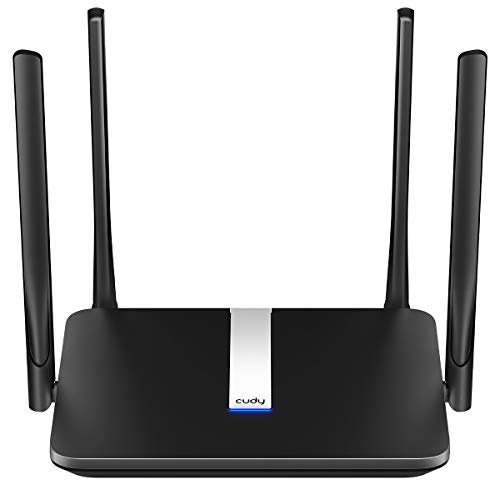
Cudy LT500 — Household 4G anchor
The LT500 is shaped like the router it replaces, and that is its thesis. The listing describes a 4G AC1200 dual-band router with a nano SIM slot, four 100M wired ports, multiple VPN server and client options, and application plus cloud control. In plain terms: a household whose broadband arrives by SIM can run it exactly like a normal home network, televisions and consoles wired, phones on Wi-Fi 5 dual band, with a VPN available at the router rather than per device. For a rural home or a small office beyond fixed-line reach, that normality is the luxury being sold.
Its limits are printed in its own specification for anyone who reads. The wired ports are 100M rather than gigabit, which caps local wired transfers and sits comfortably only because most 4G connections deliver less than that anyway; the day a faster service arrives, the ports become the ceiling. Wi-Fi 5 similarly matches the connection’s realistic pace. Judge the LT500 as a system balanced around 4G reality and it is coherent; judge it as future-proofing and it was never pretending.
Deployment craft matters more than settings here. Site it high, near a window on the tower’s side of the house, and resist the cupboard. The VPN support gives a small business a respectable trick, a site-to-site or client tunnel from a premises with no wired internet at all. For the household that simply needs the internet to arrive, behave and be forgotten, the Cudy is the category’s calm centre.
- Cellular: 4G LTE with nano SIM slot
- Wireless: Wi-Fi 5 dual band, AC1200 class
- Wired: four 100M ports per listing
- Software: VPN server and client, app and cloud control
- Habitat: fixed home or small office on cellular
Strengths
- Normal-router experience for a SIM-based household.
- VPN at the router suits small business premises.
- Four wired ports anchor televisions and desktops properly.
Trade-offs
- 100M ports cap any future faster connection.
- Wi-Fi 5 trails the rest of this list.
- No battery, so the connection stays where the socket is.
There is a dignity in the LT500’s restraint worth naming. It does not ask a rural household to become network engineers; it asks them to plug in a SIM and have Tuesday evening work. In regions where 4G is the settled reality and 5G a distant press release, buying precisely for that reality, at a price that leaves room for a good antenna, is not settling. It is the most literate purchase in the room.
Best for: fixed homes and offices running entirely on 4G. Not suited for: anyone expecting a 5G upgrade path in the same box.
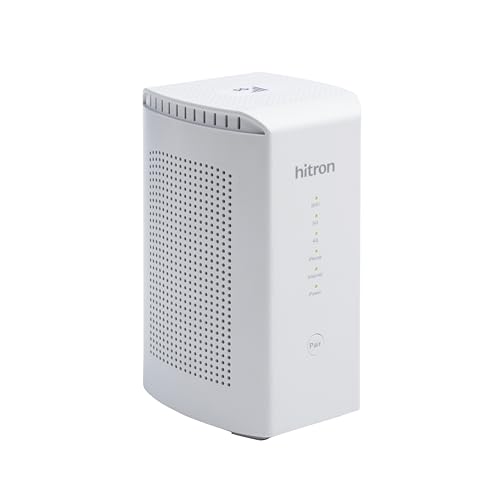
Hitron D60 5G — Certified 5G core
The D60’s listing does the most reassuring thing a cellular router can do: it names names. This AX3000 Wi-Fi 6 router with mesh capability is described as certified with T-Mobile, AT&T and US Cellular, with a nano SIM, an eSIM for dual failover capability, and a stated model identity. Certification language matters in this category because carriers test and approve devices for their networks, and a certified router is a known citizen rather than a hopeful immigrant. For a household betting its main connection on 5G, that citizenship is worth more than a headline speed.
The dual failover idea deserves unpacking. With a physical SIM and an eSIM aboard, the router can hold two carrier relationships and lean on the second when the first falters, which transforms 5G home internet from a single point of failure into a small, managed system. Wi-Fi 6 at AX3000 with mesh potential gives the local network modern manners, so the cellular core does not arrive wrapped in yesterday’s wireless. This is the fixed-installation flagship of the guide, aimed at a house that wants cellular as a serious primary service.
Its cautions are about homework rather than hardware. Certification lists evolve, plan eligibility for router use is a contract question, and 5G coverage quality varies street by street in ways no router can out-argue. Verify your address’s real-world signal, ideally with a phone on the intended carrier at the router’s intended window, before the purchase. Do that, and the D60 is the most grown-up answer here to the question of a SIM as the household’s main line.
- Cellular: 5G with nano SIM plus eSIM
- Wireless: Wi-Fi 6, AX3000, mesh capable
- Certification: three major US carriers named
- Failover: dual SIM and eSIM arrangement per listing
- Habitat: fixed home betting primarily on 5G
Strengths
- Carrier certification reduces the compatibility gamble.
- Two carrier relationships enable genuine failover.
- Modern Wi-Fi matches the connection’s ambition.
Trade-offs
- Value collapses where 5G signal is weak.
- Plan rules for router use still govern the experience.
- Fixed design offers nothing to the traveller.
The D60 also invites a household to think like a small network operator, in the best sense: two carrier relationships, a mesh that can grow, a core that reports its own health. Families who adopt that posture early find later upgrades boring, because the architecture already expects change. Boring, in infrastructure, is the sound of a decision aging well.
Best for: households adopting 5G as their primary home internet. Not suited for: areas where 5G coverage is a rumour.

GL.iNet GL-X2000 Spitz Plus — Dual-SIM traveller
The Spitz Plus is built for motion with consequences: boats, site cabins, vehicles and rural premises where the connection must survive a carrier’s bad day. Its listing describes a 4G LTE CAT 12 Wi-Fi 6 router with detachable antennas, dual-SIM capability, certification for T-Mobile and AT&T IoT use, OpenWrt with VPN, and an explicit North America only warning that honest listings provide and wise buyers obey. CAT 12 matters because it describes a modem that can combine channels for meaningfully faster 4G than the budget tier, extracting the best a mature 4G network still offers.
Dual-SIM is the soul of the machine. Two carriers in one router means a dead zone for one network is a shrug rather than a crisis, and the failover between them can be automatic. Detachable antennas invite the other serious mobility trick: external antennas mounted where the signal actually lives, on a roof or a mast, while the router stays warm inside. Add GL.iNet’s OpenWrt foundation and its VPN fluency, and the Spitz Plus becomes less a router than a small communications policy for people who work wherever they park.
The regional warning cuts both ways: it is exactly the honesty this guide rewards, and it absolutely excludes the reader shopping for another continent. CAT 12 4G also has a ceiling that 5G picks exceed where 5G exists. Within its stated world, North American roads and waters with two carriers in the drawer, the Spitz Plus is the most professional traveller here.
- Cellular: 4G LTE CAT 12, dual-SIM
- Wireless: Wi-Fi 6
- Antennas: detachable, external options invited
- Software: OpenWrt foundation with VPN
- Region: North America only per listing
Strengths
- Two carriers turn dead zones into inconveniences.
- Antenna flexibility suits vehicles and remote buildings.
- Open software rewards active connection management.
Trade-offs
- Regional limit excludes international itineraries.
- 4G ceiling applies where 5G is strong.
- Serious features ask a serious setup evening.
Picture the Spitz Plus in its natural week: a surveyor’s truck on Monday, a lakeside cabin office on Wednesday, a marina berth by Friday, the router moving its allegiance between carriers as the map dictates and holding a VPN open to the office throughout. Equipment earns professional status by surviving weeks like that without becoming the story, and the dual-SIM, antenna-friendly design exists precisely to disappear into the work.
Best for: North American mobile workers who cannot afford dead zones. Not suited for: travellers whose routes leave its stated region.

GL.iNet GL-E750V2 MUDI — Pocket companion
The MUDI is the router as travel accessory: a 4G LTE portable with a SIM slot, OpenWrt with OpenVPN and WireGuard, a 7000mAh battery the listing credits with eight hours, combined Wi-Fi figures of 300 plus 433 Mbps, and a 285 gram pocketable body. Everything about that specification is a negotiation with physics conducted honestly. The speeds are modest because the mission is not speed; the mission is a private, VPN-wrapped network that appears wherever you open your bag, in a café, a site office or a holiday rental whose own router you would rather not trust.
Its software is the grown-up part. GL.iNet’s travel craft, repeating a hotel network, applying a VPN to every device at once, managing the connection from a friendly interface over an open core, turns a pocket modem into a small security policy. The laptop, phone and tablet all inherit the tunnel without individual configuration, which is precisely the convenience that makes travellers actually use protection instead of intending to.
Battery arithmetic governs its life: eight claimed hours is a working day of meetings, not a festival weekend, and heavy use will argue with the claim. Carry the cable. Carry also realistic expectations of pocket Wi-Fi range, which serves a room rather than a house. Within those honest borders, the MUDI is the most charming object in this guide and, for the security-conscious traveller, possibly the most useful.
- Cellular: 4G LTE with SIM slot
- Battery: 7000mAh, up to eight hours claimed
- Wireless: 300 plus 433 Mbps combined
- Software: OpenWrt, OpenVPN and WireGuard
- Body: 285g pocket travel size per listing
Strengths
- Genuine pocketability with a real battery aboard.
- VPN for every device without per-device setup.
- Travel software handles hotel networks gracefully.
Trade-offs
- Modest wireless speeds serve a room, not a house.
- Battery claims shrink under heavy continuous use.
- 4G only, in a guide with 5G options.
The MUDI’s other quiet talent is diplomatic: it gives every device you own the same, known network name wherever you wake up, so phones and laptops join a familiar room rather than a stranger’s. Familiarity is a security feature in disguise, because devices that find their expected network stop prompting their owners to make exceptions, and exceptions are where travel security goes to die.
Best for: security-minded travellers wanting a private network anywhere. Not suited for: a household seeking its main home connection.

NETGEAR Nighthawk M6 — Premium hotspot
The Nighthawk M6 carries the hotspot category’s flagship manners. Its listing describes a 5G mobile hotspot and router with a SIM slot, unlocked for Verizon, AT&T and T-Mobile, speaking Wi-Fi 6 at up to 2.5Gbps class, model MR6150. Unlocked is the operative word: where carrier-sold hotspots arrive loyal to one network, the M6 lets its owner choose and later change the carrier relationship, a freedom that compounds over years of travel and tariff changes. NETGEAR’s hotspot lineage also brings the polish of a product line built for exactly this object, screen, battery management and application included.
As a network centre it punches above hotspot weight. Wi-Fi 6 at that class serves a small team, a family in a rental, or a home office riding out a fixed-line outage with dignity, and the device can anchor a temporary office in a way pocket routers cannot. It is the pick for the professional whose connectivity is billable: consultants, crews, event staff, anyone whose afternoon depends on a network they brought with them.
Premium is the caution and the description. The M6 costs flagship money for a device whose performance still bows to local 5G reality, and its battery, like every hotspot’s, is a day-scale resource under load rather than a weekend one. Buyers should also confirm the specific bands and plan terms for their intended carrier, unlocked or not. For the reader who has already done that homework, the M6 is the hotspot perfected rather than reinvented, which in mature categories is the compliment that matters.
- Cellular: 5G, unlocked for three named carriers
- Wireless: Wi-Fi 6, up to 2.5Gbps class
- Format: mobile hotspot with router duties
- Model: MR6150 per listing
- Habitat: professional travel and temporary offices
Strengths
- Unlocked freedom to choose and change carriers.
- Hotspot polish from a dedicated product line.
- Strong enough to centre a small working team.
Trade-offs
- Flagship pricing for a signal-dependent device.
- Battery endurance remains a day-scale affair.
- No wired estate for a permanent installation.
Teams notice the M6 difference in a specific moment: the pop-up office, the site cabin, the exhibition stand, where five laptops and a card terminal all need the network now and the venue’s offering is a queue at a captive portal. A flagship hotspot turns that moment into a non-event. Its price is really the price of the non-event, repeated across a working year, and professionals who bill by the day do that arithmetic quickly.
Best for: professionals whose travel network is billable equipment. Not suited for: casual users who need occasional data only.

TP-Link TL-MR100 — Budget doorway
Every category needs its honest minimum, and the TL-MR100 is this one’s. The listing is almost austere: a 300Mbps wireless N 4G LTE router with a SIM slot. No Wi-Fi 6, no 5G, no certification poetry. What it offers is the concept itself, working, for the smallest commitment in the guide: insert SIM, enjoy a home network. For a spare room, a site hut, a grandparent’s cottage, a backup connection that exists to carry messages and calls when the main line dies, that austerity is not a flaw. It is correct sizing.
The 300Mbps wireless N ceiling deserves its honest sentence: local wireless is yesterday’s standard, and several devices streaming at once will find its edges. But the cellular link feeding it is usually the narrower pipe anyway, and for the duties named above the MR100’s manners are sufficient. TP-Link’s setup is undemanding, which suits a device often bought by people who have never configured a router and should not have to start with a difficult one.
Buy it as a doorway or a backup, not as a destination. Households that discover cellular internet is their long-term answer will graduate to the Cudy, the Hitron or the Spitz with clearer requirements for having lived the simple version first. As tuition in an entire way of connecting, the MR100 charges the lowest fees in the guide.
- Cellular: 4G LTE with SIM slot
- Wireless: 300Mbps wireless N
- Positioning: simplest fixed SIM router here
- Setup: undemanding consumer flow
- Habitat: backup duty, cottages, first experiments
Strengths
- Lowest commitment way to test SIM-based internet.
- Perfectly sized for backup and light-duty roles.
- Simple setup for first-time router owners.
Trade-offs
- Wireless N ages poorly beside modern devices.
- No failover, 5G or advanced management story.
- A growing household will outgrow it knowingly.
The MR100 also makes an unusually good gift of competence: the relative in the countryside, the friend whose fixed line fails monthly, the small charity office with one computer and a till. It asks nothing of them beyond a SIM and a socket, and it teaches the category’s central lesson, that connectivity can be a card and a small white box, without a single engineer visit. Doorways matter most to the people standing outside them.
Best for: backups, cottages and cautious first experiments. Not suited for: a busy household’s permanent main connection.
How Does a Cellular Connection Behave Across a Working Week?
Unlike fixed broadband, a mobile connection has weather of its own, made of other people’s movements. The tower serving a rural valley breathes easily at dawn, labours when the school run and the commuters arrive, and settles again late. A coastal town’s network in August carries a population its January infrastructure never met. Living well on SIM internet means learning your tower’s temperament the way satellite households learn their sky: heavy downloads scheduled into the quiet hours, expectations set by the clock, and a router whose reporting lets you see the pattern instead of merely suffering it.
This is also why the failover picks matter beyond emergencies. A second carrier’s tower keeps a different social schedule from the first, and a router that can move between them is arbitraging two neighbourhoods’ habits. Even a single-carrier household gains from the diary habit: note the hours when the connection sags, align the household’s appetites, and the same hardware suddenly feels a tier faster, because timing is a specification no box can print.
What Should Travellers Know About Borders and Bands?
Radio spectrum is national property, divided differently by every regulator, which is why the Spitz Plus prints its region in its listing and why unlocked on the M6 means unlocked among carriers, not omniscient across continents. A router that is perfect in North America may be deaf to a European carrier’s favourite band, and the time to learn that is before the ferry, not after it. Serious international travellers build their kit around the destinations they actually repeat, keep a local SIM habit at each, and treat any router’s band list as a passport to be checked against each border.
Plans have borders too. Roaming terms that flatter a phone’s fortnight abroad can sour quickly under a router’s appetite, and some carriers distinguish sharply between a handset visiting and a household moving in. The honest traveller reads the fair-use clauses with the same care as the band list. Freedom, in this category, is real but documentary, and the readers who thrive on mobile internet are the ones who file the documents before they need them.
How Do Antennas Change the Story at the Edge of Coverage?
At the centre of coverage, antennas are furniture. At the edge, they are the product. A router’s internal antennas negotiate with a distant tower through walls, weather and foliage, and every improvement in their position or quality returns as stability rather than as a headline speed: fewer dropouts in rain, a connection that survives the evening peak, a call that does not dissolve when a lorry parks in the wrong place. This is why the Spitz Plus’s detachable antennas and the fixed picks’ siting flexibility deserve more of a buyer’s attention than a second Wi-Fi band ever will in this category.
The craft is mostly patience and height. Test the router in several positions over several days, because a single afternoon’s winner can be a fair-weather friend. Where an external antenna is possible, mount it where the signal lives, usually high and outside, and keep the cable run as short as the building allows, since long cables spend the signal they were bought to save. Rural households already know this discipline from television aerials and satellite dishes; the SIM router simply joins the family of devices that reward a ladder and a notebook.
What Does a Sensible Data Budget Look Like on SIM Internet?
Households new to cellular connections often discover their consumption the way travellers discover a minibar bill, at checkout. Prevention is a fortnight of measurement: let the router’s reporting, or the carrier’s application, show what an ordinary week actually costs when nobody is being careful. Then assign the big appetites their hours and qualities, teach the consoles and computers to update on schedule, and set the streaming services to the quality the screen size honestly needs. Most households find a third of their traffic was habit rather than desire, which is the cheapest capacity upgrade in this entire guide.
Children and guests deserve the same honest framing as in the satellite guide: tell them the connection is metered, give them the guest network where a pick allows it, and let the router’s limits handle the devices whose owners forget. A SIM household that budgets together argues less than one that discovers overages together, and the equipment above, at its best, exists to make the budget visible before it becomes a bill.
How Do the Six Picks Map to Real Journeys?
| Pick | Network | Form | Natural habitat |
|---|---|---|---|
| Cudy LT500 | 4G | Fixed router | Cellular household anchor |
| Hitron D60 | 5G | Fixed router | Primary 5G home internet |
| GL.iNet Spitz Plus | 4G CAT 12 | Mobile install | Vehicles, boats, site work |
| GL.iNet MUDI | 4G | Pocket portable | Personal travel security |
| NETGEAR M6 | 5G | Hotspot | Professional temporary offices |
| TP-Link MR100 | 4G | Fixed router | Backup and first steps |
Form is destiny in this category. Decide whether the connection lives in a house, a vehicle or a jacket before comparing a single specification, and half the table eliminates itself honestly.
How Should You Squeeze the Best From a Cellular Connection?
Placement is the first optimisation and the cheapest. The router belongs high, near a window facing the serving tower if you know it, away from metal cabinets and the tangle behind a television. Walk the house with the router and a laptop during setup, testing the realistic spots, because one metre of position can be worth more than a price tier of hardware. Where a pick offers detachable antennas, treat external antenna placement as the serious second step for fixed installations at coverage’s edge, mounted high and outside where possible.
Then manage appetite. Cellular plans reward households that schedule heavy downloads thoughtfully, set streaming quality deliberately, and keep an eye on the router’s usage reporting where offered. A SIM connection is a metered relationship even when the marketing calls it generous, and the households that thrive on one are those that learned its rhythm in the first month rather than its limits in the second.
What Mistakes Do SIM Router Buyers Keep Making?
The classic is buying the router before checking the signal, then blaming hardware for geography. Second comes ignoring the plan’s router terms, discovering throttles or prohibitions after the hardware is unreturnable. Third is choosing by Wi-Fi specification, paying for wireless the cellular link can never feed. Fourth is forgetting the SIM’s format or the router’s region, small print with total consequences, which is why this guide praised the listings that print such limits loudly. Each mistake is a reading failure before it is a shopping failure, and each is avoidable in an evening with a phone, a window and the carrier’s own coverage tools.
A fifth mistake is subtler: treating a backup connection as set-and-forget. SIMs expire, plans change, batteries swell in drawers. A backup that is never tested is a story you tell yourself. Test it monthly, briefly, the way you would a torch in a storm-prone house.
Security on a mobile connection deserves its own paragraph, because the SIM router is often deployed exactly where networks are least trustworthy: rentals, sites, vehicles, temporary premises. Change the administrative password and the Wi-Fi credentials before the first journey, keep firmware current, and prefer the picks whose VPN support lets the whole travelling network tunnel home or to a trusted service. The GL.iNet pair make that posture their identity; the hotspot and fixed picks support it in their own dialects. A connection you carry is a connection you are responsible for in public, and the responsibility is manageable precisely because these devices were designed for the road.
Power is the traveller’s second network. The MUDI’s battery, the M6’s internal cell, a vehicle’s twelve-volt supply, a site cabin’s temperamental sockets: each pick’s real endurance is set by the electricity around it as much as by its specification. Carry the cables, carry a respectable power bank for the portables, and learn each device’s appetite at home before trusting it at a distance. Connectivity that dies at four in the afternoon for want of a charger is not a network failure; it is a packing failure, and it is entirely preventable.
There is a social pattern worth copying from people who live on these connections professionally: they keep a small connectivity kit as a single object, router, cables, a spare SIM from a second carrier, and a notebook with the account details and the settings that worked at the places they revisit. The kit goes in the vehicle or the bag as one decision, not as a scavenger hunt. Households adopting SIM internet as a primary service can borrow the pattern at home, keeping the spare card and the documentation with the router, so that a failure at an awkward hour is met with a drawer, not a search.
Expect the relationship with your carrier to become oddly personal on a SIM connection. You will learn the tower’s location, the maintenance rhythms, the week in August when the town doubles and the speeds halve. That intimacy is the category’s hidden curriculum, and households that embrace it stop comparing their connection with a cousin’s fibre in the city and start comparing it with their own last month, which is the only comparison that ever improved a network.
When the connection falters, diagnose in the order the signal travels: sky and tower first, by testing a phone beside the router; then the router’s position and antennas; then the plan’s remaining allowance and any throttling the contract promised in small print; and only then the local Wi-Fi, which is rarely the culprit in this category despite being the part with the most impressive numbers on the box. That order, memorised, will save more evenings than any single feature in this guide.
Finally, keep the fixed-line dream in proportion. Some households buy a SIM router as a bridge to a wired future that keeps receding, and spend the bridge years apologising for a connection that is, in truth, serving them. A well-sited cellular router with a fair plan is not a consolation prize; for millions of homes, vehicles and small businesses it is simply the internet, arrived by a different road. Equip it properly, budget it honestly, and let it be what it is.
Which Households Should Choose Cellular First, Not Second?
Renters who move yearly, households in the long shadow of promised infrastructure works, small businesses testing a location before signing for wired services, families with a second home used hard for three seasons: all of them can rationally put a SIM first. The connection moves when they move, installs in an afternoon, and asks no landlord’s permission. For those households the fixed picks in this guide are not backups or novelties but the main event, and they should buy accordingly, favouring the certified 5G core or the dual-carrier traveller over the doorway models.
The same logic, inverted, tells the settled household with good fixed options to buy the SIM router as insurance and size it honestly as such. A backup does not need AX3000 wireless; it needs to work on the worst day of the year. The MR100 and the MUDI serve that doctrine at two sizes, and the money saved against a flagship hotspot can fund the second carrier’s card that makes the insurance real.
A word about sharing: a SIM connection in a shared house or a small block raises the same questions as any scarce resource, sharpened by the meter running visibly. Agree the heavy habits early, downloads at night, streaming at sensible quality, and let the router’s guest tools carry the diplomacy where they exist. The technology in this guide can divide a connection; only the household can divide it fairly, and the households that talk about it in the first week rarely argue about it in the sixth.
Installation day for a fixed SIM router should end with three small ceremonies. Photograph the final position and the signal readings there, so a later move can be undone. Label the SIM with its carrier and plan in the household notebook, because a card the size of a fingernail carries no biography of its own. And run the evening test, the family’s real traffic at the real hour, before declaring the migration complete. Households that perform those ceremonies own their connection; households that skip them rent their luck.
For the travelling picks, the ceremony is a rehearsal at home: join the router, run the VPN, make the calls, pack the kit while everything works, and note what the bag still lacks. Travel forgives many things but not improvisation with unfamiliar equipment in a field at dusk. The MUDI and the M6 both reward the rehearsed owner with an almost unfair calm on arrival, which is, in the end, the sensation every product in this guide is really selling.
One more frontier deserves a glance before the verdict: vehicles as premises. The camper, the boat, the food truck and the site office all blur the line between travelling and living, and the Spitz Plus’s dual-SIM patience or the M6’s team-sized hotspot serve those hybrids better than any fixed router wired to a building they keep leaving. If your address has wheels or a hull, grade every pick in this guide by its manners under motion and its tolerance for improvised power, and the ranking reshuffles itself in your favour.
Weather writes a footnote here too. Heavy rain, wet foliage and the occasional tower fault all tax a cellular link in ways a fixed line never notices, and a household at coverage’s edge will learn its connection’s meteorological moods within a season. The defences are the familiar ones from this batch’s other difficult-connection guides: antenna height, honest expectations, a second carrier where the work justifies it, and heavy downloads scheduled away from the storm hours. None of that diminishes the category. It simply marks the difference between a connection bought as magic and one managed as infrastructure.
And when visitors ask, as they will, whether the little box is really the whole internet, enjoy the moment. A generation ago the same household would have waited months for a line and a man with a ladder. Now the connection arrives in the post, lives where the signal is kindest, and leaves in a bag when the household does. The six picks above are six temperaments of that idea; the right one makes the idea feel ordinary, which is the highest achievement available to infrastructure.
Small businesses should also price the invisible accessory: a second pair of hands’ worth of documentation. Write the carrier account numbers, the router’s admin details and the failover steps on one page kept with the till or the site file. A connection that only one person understands is a connection with a single point of failure wearing a uniform, and SIM routers, precisely because they travel, meet more single points of failure than equipment that never leaves a cupboard.
There is also the question of the household’s other screens: a SIM connection feeding a smart television, a doorbell and a houseful of phones will meet the data budget as a committee, not as individuals. Audit the committee once, in the router’s client list, and evict or schedule the members nobody remembers inviting. The audit takes ten minutes and routinely discovers the forgotten tablet syncing a photo library the size of a wedding, which is the cellular equivalent of finding a window open in winter.
Keep the packaging for the first month, whatever the pick. Cellular purchases carry a compatibility risk that no other category in this batch quite matches, because the decisive variables, your tower, your plan, your walls, cannot be fully known until the router is sitting in its window living your evenings. A return path kept open is not pessimism; it is the correct respect for a category whose truth is local.
One last habit separates the households that love these routers from those that merely own them: they name their connection’s job in a single sentence and tape it, mentally, to the box. This is the house’s internet. This is the van’s office. This is the backup that must never be borrowed for a festival. Jobs named that clearly make every later decision, plan, antenna, upgrade, a matter of reading the sentence again. Jobs left vague invite the slow mission creep that ends with a pocket router expected to run a farm.
The category will keep moving, 5G spreading down the price ladder, eSIM dissolving the physical card that gives this guide its title, satellite messengers nibbling at the remotest use cases. None of that urgency should hurry today’s purchase. A SIM router bought for a named job, on a verified signal, under a read contract, will serve its sentence of years without apology, whatever the next season’s boxes promise.
And if the job is a person’s livelihood on the road, spend the extra on the second carrier before spending it on the faster radio. Coverage is the currency of mobile work; speed is small change by comparison. The dual-SIM philosophy running through this guide’s professional picks exists because every veteran of mobile connectivity has a story about the valley, the marina or the exhibition hall where one network simply was not there, and the other, unglamorous card in the second slot quietly saved the day and the invoice.
That story, repeated across a working life, is why this category inspires a loyalty out of proportion to its hardware. These are small boxes, but they stand between their owners and isolation in places where isolation still exists. Choose yours with the seriousness that role deserves, and it will repay the seriousness in the only currency that matters out there: a connection, present again, exactly when it was needed.
Keep that loyalty reciprocal. Update the firmware when the maker offers it, retire batteries before they swell, and write the next owner a note if the router is sold on, because a used SIM router without its band story and its quirks is only half a product. Equipment that travels accumulates knowledge about the world; passing the knowledge with the box is the category’s small tradition, and it costs nothing but a page in the notebook this guide keeps asking you to keep.
The notebook, in fact, is the thread that ties this entire batch of difficult-connection guides together: satellite households logging their sky, VoIP households logging their calls, and now mobile households logging their towers. Infrastructure that arrives without a wire demands a little more attention than infrastructure that arrives through a wall, and the attention, once organised into a page of notes, stops feeling like a burden and starts feeling like local knowledge, the kind neighbours borrow.
Borrowed knowledge cuts both ways: before the first trip or the first winter, ask around your own valley, marina or trade about which carrier actually performs there, because a neighbour’s year of lived signal outweighs any national coverage map ever printed. Then verify it at your own window, with your own phone, at your own working hour, and the purchase that follows will be the least speculative technology decision you make all year, grounded in your own geography rather than in a manufacturer’s optimism about a continent you do not live on.
Still on the fence about trying one: borrow before you buy where you can, a friend’s hotspot, a carrier’s trial, a weekend with a phone standing in the router’s window. Cellular truth is local and lived, and two days of your own evenings outweigh every review ever written.
Final Recommendation
For a fixed home on cellular, the Hitron D60 is the serious 5G core and the Cudy LT500 its 4G counterpart where budgets or coverage argue older and calmer. For motion with consequences, the Spitz Plus is the professional’s dual-SIM answer in its stated region, the MUDI is the traveller’s private pocket network, and the Nighthawk M6 is the premium hotspot for people whose work follows them. The MR100 opens the door for the cautious. Check your signal, read your plan, then choose the machine whose habitat matches your life, and the SIM in your wallet becomes the most flexible internet connection you have ever owned.
Frequently Asked Questions
Can a SIM router replace home broadband entirely?
Yes, where signal is strong and the plan permits router use at household volumes; the Cudy and Hitron in this guide are built for exactly that. The honest test is a phone on the same carrier, at the router’s spot, during your busiest hour.
Will any SIM card work in any of these routers?
No. The card’s carrier must use bands the router supports, the SIM format must fit, and the plan must allow the use you intend. Listings naming certified carriers or regions are giving you the compatibility shortlist; respect it.
Is 5G always better than 4G for a home router?
Only where 5G coverage is genuinely strong. A solid 4G signal with a CAT 12 modem can outperform a marginal 5G signal in daily reliability, and 4G routers cost less. Signal quality at your window outranks generation on the box.
Can I use one of these as a backup for my main connection?
Absolutely, and a mobile router shines as a standby connection, ranking among the strongest reasons to own one in this whole category. The dual-SIM and failover-minded picks manage the switchover most gracefully, while even the MR100 can serve as a manually deployed lifeline. Test the backup monthly so it remains a plan rather than a hope.
Why does my plan mention hotspots separately?
Many carriers price and throttle router or hotspot traffic differently from phone traffic, because a router feeds a household rather than a handset. That contract detail can matter more than any hardware choice, so read it before buying either the plan or the router.
Can I put my phone’s SIM into one of these routers?
Physically, often yes; contractually, read first. Many phone plans restrict or throttle sustained router use, and a card that works for a day may be slowed or flagged at household volumes. A dedicated data or router plan, matched to the carrier the router is certified for, is the durable arrangement.
Do these routers work in a vehicle?
The portable and dual-SIM picks are designed with motion in mind, and the fixed picks can work in a parked vehicle with suitable power. Remember that a moving connection hands over between towers, which brief interruptions can accompany, and secure the hardware against the road’s vibration and heat.
How long do the portable picks really run on battery?
Treat every battery figure, including the MUDI’s stated eight hours, as a fair-weather estimate for moderate use. Continuous heavy traffic, weak signal that makes the modem work harder, and several busy clients all shorten the day. For work that matters, plan power as deliberately as signal: a vehicle supply, a power bank, or a socket within reach turns the estimate from a deadline into a detail.
Related Guides
Cellular is one way off the beaten track; compare it with the satellite internet router guide, keep calls alive on it with the VoIP router roundup, and manage the household behind it using the guest access and easy management guide.


