What's inside
- Where to Buy a Dorm Printer That Survives Freshman Year
- Key Takeaways
- Quick Picks
- How Did We Rank Printers for Rooms Measured in Square Feet?
- What Should a Student Actually Know About Campus Networks and Ink Plans?
- Desk Space, Toner and Duplexing: How Do the Six Dorm Contenders Divide?
- How Do You Set Up a Dorm Printer Without Falling Out With Your Roommate?
- Which Dorm Printing Habits Waste the Most Money by Christmas?
- How Does the Right Choice Change With Your Degree?
- What Paper, Storage and Binder Habits Make a Small Printer Feel Big?
- How Should Group Projects and Deadline Week Change Your Printing Manners?
- When Is the Smart Time to Buy, and What Should Second Years Do Differently?
- How Do You Print From Learning Platforms and Phones Without the Usual Chaos?
- What Does Responsible Printing Look Like in a Building Full of Students?
- How Does the Four-Year Cost Story Actually Unfold, Term by Term?
- How Can a Printer Change the Way You Actually Study?
- Final Recommendation
- Frequently Asked Questions
- Related Guides
As an Amazon Associate I earn from qualifying purchases. This post may contain affiliate links at no extra cost to you.
gizmoverdict.com is reader-supported. When you buy through links on our site, we may earn an affiliate commission.
Where to Buy a Dorm Printer That Survives Freshman Year
The best college dorm printers are chosen under constraints no home-office guide respects: a desk the size of a cafeteria tray, a roommate sleeping four feet away, a campus network with opinions about what may connect to it, and a printing workload that idles for weeks then demands forty pages at midnight before a morning deadline. The six machines below were picked inside that reality. Five are compact colour inkjet all-in-ones from HP and Epson, built for small rooms and phone-led printing lives, and one is a monochrome Brother laser that plays a completely different game: essays, readings and problem sets at laser speed and toner economy, with no colour and no apologies.
Before any of them, a word about whether a dorm printer should exist in your life at all. Campus libraries print, department labs print, and for a student whose course loads are light and whose deadlines are well managed, those queues are a perfectly rational system. The personal printer earns its keep in the specific hours when the rational system is closed, full or across a rainy campus at 1 a.m. It also earns its keep socially: the roommate with a working printer holds a small, friendly currency in every residence hall ever built. Buy one for those hours and that currency, in the size your desk can spare, and it will justify itself by October.
The honest divisions in this list are three. Colour inkjets print everything adequately, including the occasional photo handout and the colour-coded revision chart, and they scan and copy the forms that student bureaucracy generates in surprising volume. The mono laser prints text superbly and nothing else, and for a humanities or social-science workload that trade can be the smartest money on the page. And across all six, the running-cost story, cartridges, subscriptions and toner, matters more than the purchase decision, because a student’s printer budget is really a four-year stream of small ambushes.
Key Takeaways
- The HP DeskJet 2855e is the default dorm answer: compact, wireless, and able to print, scan and copy from a phone without ceremony.
- The Brother HL-L2460DW is the essay-volume specialist, a duplex monochrome laser whose toner economics suit reading-heavy degrees.
- Two HP Envy models, the 6155 and 6555e, add automatic two-sided printing, the feature that halves both paper costs and backpack weight.
- The Epson Expression Home XP-5200 brings borderless photo printing and brisk document pace to students whose courses are visual.
- Check your residence hall’s network policy before buying anything wireless, because some campus systems require registration or discourage personal printers.
Quick Picks
| Pick | Badge | Why it earns its slot |
|---|---|---|
| HP DeskJet 2855e | Best overall | The compact all-rounder that prints, scans and copies from a phone and asks for very little desk in return. |
| HP Envy 6155 | Best for photo handouts | A duplexing all-in-one with an Instant Ink trial that flatters colour coursework and presentation pages. |
| Brother HL-L2460DW | Best for essay volume | A compact mono laser with duplex printing and toner patience for reading-heavy semesters. |
| Epson Expression Home XP-5200 | Best all-in-one value | Fourteen-page-per-minute document pace, automatic two-sided printing and borderless photos in one tidy body. |
| HP Envy 6555e | Best with auto duplex | An Envy all-in-one whose automatic two-sided printing quietly halves a student’s paper budget. |
| HP DeskJet 2923 | Budget pick | The lowest-commitment route to having any printer at all in a first-year room. |
How Did We Rank Printers for Rooms Measured in Square Feet?
Footprint came first, and not the manufacturer’s optimistic footprint with trays closed, but the working footprint with paper loaded and the output tray expecting a page. Every machine here can live on a dorm desk or a sturdy shelf, yet they differ in how rudely they interrupt the space around them, and in a room shared with another human, manners are specifications. Noise came second, judged by class rather than by laboratory numbers: inkjets murmur and shuffle, lasers hum and fan, and either can be the wrong sound at 3 a.m. in a room where someone else has a 9 a.m. exam.
Phone compatibility came third, because students print from phones the way earlier generations printed from laptops, often directly from a learning-platform app with the document never touching a computer. All six picks speak wireless fluently, with the Brother adding voice-assistant compatibility through Alexa and the HPs leaning on their app ecosystems. Fourth came the four-year cost story: cartridge yield against subscription plans for the inkjets, toner longevity for the laser, and the price of the paper habit that duplex printing disciplines.
What we deliberately ignored was top speed as a headline. A dorm printer’s busiest minute involves a twenty-page reading, not a print farm’s quota, and every machine here clears that bar. The differences that survive a semester are duplexing, running cost, network behaviour and the grace with which a machine handles being unplugged, moved, stored over summer and recommissioned by a slightly older student in a different room.
What Should a Student Actually Know About Campus Networks and Ink Plans?
Campus Wi-Fi is not home Wi-Fi with a grander name. Many universities run enterprise networks that cannot see a printer’s setup broadcast, require devices to be registered by their hardware address, or route each dorm room through its own wired port and a small personal router policy. None of this is insurmountable, and every pick here can also print over a direct wireless connection from phone to printer when the campus network declines to cooperate, but the student who reads the residence IT page before move-in day saves the student who would otherwise discover it during freshers’ week with an essay due. USB cables, unfashionable and utterly reliable, remain the dorm printer’s emergency exit, and packing one costs nothing.
Ink subscriptions are the second piece of adult print literacy. HP’s Instant Ink, which several picks here introduce through trial offers, charges by pages printed rather than by ink consumed and mails cartridges before the installed ones empty. For a student whose printing arrives in deadline-shaped bursts, a page-based plan converts a spiky, panic-priced cost into a flat, budgetable one, and the rollover of unused pages softens the quiet months. For a student who prints three pages a semester, the same plan is a subscription to nothing. The laser avoids the question entirely: a toner cartridge simply lasts, across semesters and summers, without drying in the way idle inkjet cartridges can, which is the Brother’s quietest and strongest argument.
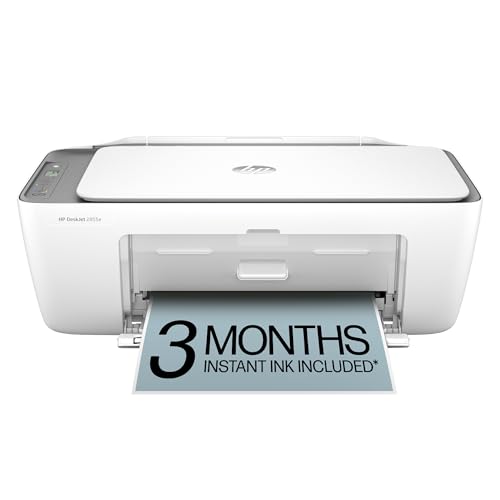
HP DeskJet 2855e — Best overall
The 2855e is the printer equivalent of the roommate who is easy to live with. It is a compact wireless colour all-in-one covering print, scan and copy, aimed by its maker at easy home printing and mobile compatibility, and in a dorm those plain virtues compound. Coursework arrives as PDFs on a phone, forms arrive as paper that must be scanned back into PDFs, and the occasional group-project handout arrives as a colour emergency at an hour when the library queue is a rumour. The DeskJet handles the whole repertoire without demanding a desk of its own or a computer science minor to administer it.
Its limits are the class limits, honestly shared: cartridge ink rewards light, steady use and punishes both neglect and sudden volume, and there is no automatic duplexing to halve your paper stack, so two-sided printing is a manual, flip-the-stack discipline. For the median student, whose printing is a reading here, a worksheet there and a boarding pass at term’s end, those limits rarely bite. Buy it as the default, and let the more specialised picks below argue you out of it only if your degree gives them evidence.
- Functions: colour print, scan and copy in one compact body
- Connectivity: wireless with mobile printing through HP’s app route
- Character: easy-setup home machine that translates cleanly to dorm life
- Running story: cartridge ink; consider a page-based plan if bursts are frequent
Strengths
- Small working footprint leaves room on the desk for the actual studying.
- Scanning covers the bursary forms, signed letters and ID copies student life generates.
- Phone-led setup matches how students actually send documents to print.
Trade-offs
- No automatic two-sided printing, so paper discipline is a manual habit.
- Cartridges are happiest with regular light use rather than semester-long sleeps.
- Colour output is coursework grade, not a photo student’s portfolio tool.
Best for: the typical first-year student wanting one compact machine that does everything adequately. Not suited for: reading-heavy degrees printing hundreds of text pages a month, who should meet the Brother below.

HP Envy 6155 — Best for photo handouts
The Envy line is HP’s step up in finish and colour manners, and the 6155 brings that polish into the dorm with print, scan and copy, duplex printing and a three-month trial of Instant Ink folded into the listing. The duplexing is the feature a student feels weekly: readings emerge two-sided without supervision, paper consumption halves, and the ring binder stops gaining weight like it is training for something. The trial months are well timed if they cover the first semester, when printing habits form and the true monthly page count reveals itself honestly enough to choose a plan size with evidence.
Colour is this machine’s second language. Design, media, architecture and marketing students live among mood boards, annotated images and presentation pages where colour is content rather than decoration, and the Envy family handles that work with more grace than the DeskJet class below it. The listing’s AI-capable label refers to HP’s software assistance around printing tasks; treat it as a convenience layer rather than a reason to buy, and let the duplexing, the colour and the trial carry the argument, as they comfortably do.
- Functions: wireless colour all-in-one with duplex printing
- Included: three-month trial of Instant Ink in the listing
- Software: HP app workflow with AI-assisted printing features
- Character: the polished handout and presentation-page machine
Strengths
- Automatic duplexing disciplines both paper budget and backpack weight.
- Colour quality flatters visual coursework, slides printed as handouts and society posters.
- Trial ink months let a new student measure real usage before committing to a plan.
Trade-offs
- Step-up pricing buys polish that text-only degrees will never notice.
- Subscription value depends entirely on printing regularly enough to use the pages.
- Still a cartridge inkjet, with the same idle-week sensitivities as its siblings.
Best for: students in visual subjects and society organisers who print colour often and value duplexing. Not suited for: minimalists who print a dozen pages a term and should spend accordingly.

Brother HL-L2460DW — Best for essay volume
Every cohort contains a student whose degree is, functionally, a reading marathon with essays at the end: law, history, English, philosophy, medicine’s theoretical years. The HL-L2460DW is that student’s printer. It is a compact wireless monochrome laser with duplex printing and mobile printing, and its entire personality is throughput without drama. Toner does not dry over the summer break. Pages emerge fast, dry and smudge-proof under a highlighter, which matters when the reading itself is the workspace and annotations are the study method. The listing’s Refresh subscription trial offers an automatic toner top-up route for those who want it, and Alexa compatibility lets the machine take voice instructions in a smart-speakered room.
The sacrifices are printed on the box in spirit: no colour, no scanner, no copier. A form that needs scanning sends you to a phone scanning app, which most students already use competently, and a colour handout sends you to the library, which is a fair trade when it happens twice a term and an annoying one when it happens twice a week. Judge this pick by your syllabus rather than your hopes. If ninety percent of your printing is black text on white paper, the laser is not the austere choice; it is the indulgent one, buying speed, reliability and four years of toner calm.
- Functions: monochrome laser printing only, with automatic duplex
- Connectivity: wireless, mobile printing, works with Alexa
- Included: Refresh subscription trial for toner replenishment
- Character: the reading-heavy degree’s highlighter-proof workhorse
Strengths
- Toner survives idle summers that would punish inkjet cartridges.
- Duplex laser pace turns a forty-page reading into a short errand.
- Text emerges dry and annotation-friendly, ideal for close-reading study habits.
Trade-offs
- No colour output for charts, posters or presentation handouts.
- No scanner or copier, so paperwork leans on phone scanning apps.
- Laser warm-up fan noise is a different roommate negotiation from inkjet shuffle.
Best for: humanities, law and social-science students whose printing is overwhelmingly text. Not suited for: design and media students, or anyone whose coursework speaks in colour.

Epson Expression Home XP-5200 — Best all-in-one value
Epson’s entry argues that a dorm all-in-one can be quick as well as small. The XP-5200 prints, scans and copies at up to fourteen pages per minute, with automatic two-sided printing and borderless photo output, a combination that covers the essay, the form and the photograph without asking the owner to choose a personality. That borderless photo ability is not a toy in student hands: societies print event photos, art students print contact sheets, and everyone eventually prints the one picture from the field trip that deserves a wall.
The value case is about how many dorm scenarios end at this machine. It duplexes, so the paper budget behaves. It is brisk, so the midnight reading is a short interruption. It scans, so the signed tenancy document goes back to the landlord from the desk. Epson’s ink system follows the cartridge pattern of its class, with the same advice attached: print something every week or two, and the machine stays sweet; abandon it for a semester and expect a cleaning cycle’s worth of ink to be spent on reunion formalities. As a single purchase asked to be adequate at everything for four years, the XP-5200 is the hardest pick here to argue against.
- Functions: colour print, scan and copy with auto two-sided printing
- Speed: up to 14 pages per minute on document work
- Photo: borderless printing for wall-worthy student photography
- Character: the brisk all-rounder at a value position
Strengths
- Document pace leads the inkjets here, shortening deadline-night queues of one.
- Borderless photos widen the machine’s social usefulness beyond coursework.
- Automatic duplexing arrives without stepping up to premium pricing tiers.
Trade-offs
- Cartridge economy still trails the laser for very heavy text volume.
- Epson’s app ecosystem is capable but less hand-holding than HP’s for beginners.
- Photo ambitions beyond casual prints belong to dedicated photo machines.
Best for: students wanting one brisk, duplexing all-in-one that also respects their photographs. Not suited for: extreme text volume, where toner arithmetic eventually wins any argument.
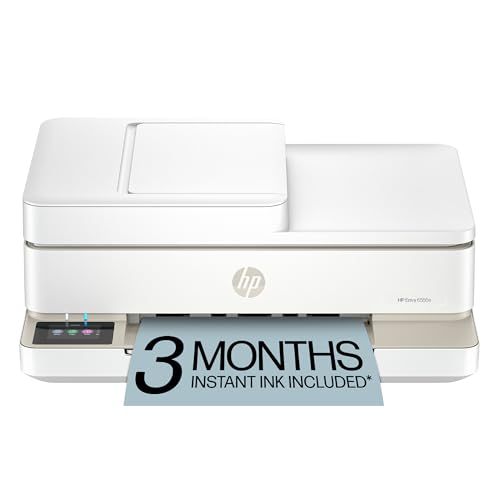
HP Envy 6555e — Best with auto duplex
The 6555e is the Envy for students who have already decided that duplexing is non-negotiable and want the rest of the Envy experience arranged around it. It is a wireless colour all-in-one for print, scan and copy with mobile compatibility through the HP Smart app, positioned by its maker for easy home printing of colour documents, and its automatic two-sided printing is the headline that matters in a dorm. A semester of readings at half the paper weight is not a marginal gain; it is the difference between a binder that travels and a binder that lives accusingly on the floor.
Against its 6155 sibling, the choice is about emphasis and current listing value rather than a different philosophy. Both are Envy all-in-ones with duplex; the 6555e’s listing leans on the core all-in-one promise, while the 6155 carries the trial and software extras in its title. A student choosing between them should compare what is actually bundled on the day of purchase and let that arithmetic, not badge anxiety, settle it. Either way, the owner gets colour that respects visual coursework and an app-led setup that treats the phone as the main computer, which in a dorm it usually is.
- Functions: colour printing with scanning and copying, all wireless
- Duplex: automatic two-sided printing as the headline feature
- Mobile: HP Smart app printing and management
- Character: the duplex-first Envy for paper-conscious students
Strengths
- Auto duplex makes two-sided readings the default rather than a project.
- Envy colour handling suits charts, slides and society publicity alike.
- App-first controls fit phone-centric student workflows without friction.
Trade-offs
- Overlaps heavily with its Envy sibling, so value depends on the day’s bundle.
- Cartridge costs still reward a page plan for students in heavy colour courses.
- No advantage for the pure-text student over the laser’s running economy.
Best for: paper-conscious students who want duplexing plus Envy colour in one desk-friendly body. Not suited for: buyers who would never use colour and are paying for it monthly in cartridges.

HP DeskJet 2923 — Budget pick
There is a student for whom the correct printer budget is the smallest number that results in a printer, and the DeskJet 2923 exists for that student without condescension. It covers the same fundamental repertoire as its 2855e sibling, wireless colour printing with scan and copy for home use, in the DeskJet family’s compact form, and it asks the least commitment of any pick here. For a first year spent testing whether personal printing matters to your particular degree, that low commitment is a rational experimental design: one year of evidence, bought cheaply.
Manage expectations and the 2923 manages the workload. It is a light-duty machine for light-duty lives, happiest printing the worksheet, the ticket and the ten-page reading rather than the dissertation appendix. Cartridges in this class carry modest yields, so the per-page cost of heavy use climbs quickly, which is precisely why the pick is framed as a starter: students who discover heavy habits graduate to the Envy or the Brother with their eyes open, and students who discover light habits have spent exactly what their habits deserved.
- Functions: colour printing with scanning and copying, all wireless
- Position: the DeskJet family’s lowest-commitment dorm entry
- Character: light-duty machine for light-duty printing lives
- Running story: modest cartridge yields reward gentle use
Strengths
- Smallest financial commitment that still covers print, scan and copy.
- Compact DeskJet form fits the desks and shelves of first-year rooms.
- Wireless phone printing keeps setup to an evening rather than a project.
Trade-offs
- Heavy users will outgrow its cartridge economy within a semester.
- No automatic duplexing, so two-sided printing stays a manual routine.
- Build and pace are tuned for occasional jobs, not deadline marathons.
Best for: first-year students testing whether personal printing suits their degree at all. Not suited for: anyone already certain they print weekly volume, who should start higher up this list.
Desk Space, Toner and Duplexing: How Do the Six Dorm Contenders Divide?
| Pick | Type | Scan and copy | Auto duplex | Running-cost story |
|---|---|---|---|---|
| HP DeskJet 2855e | Colour inkjet | Yes | No | Cartridges, plan optional |
| HP Envy 6155 | Colour inkjet | Yes | Yes | Cartridges, trial plan included |
| Brother HL-L2460DW | Mono laser | No | Yes | Long-life toner |
| Epson XP-5200 | Colour inkjet | Yes | Yes | Cartridges |
| HP Envy 6555e | Colour inkjet | Yes | Yes | Cartridges, plan optional |
| HP DeskJet 2923 | Colour inkjet | Yes | No | Modest-yield cartridges |
The table hides one column that matters at 2 a.m.: forgiveness. The laser forgives neglect, the inkjets forgive variety, and none of them forgive being fed the wrong paper or left powered off through a damp summer in a storage unit. Choose the forgiveness your habits need, because a dorm printer’s real specification sheet is written by its owner’s calendar, and the calendar of student life is the most interrupted document in the world.
How Do You Set Up a Dorm Printer Without Falling Out With Your Roommate?
Negotiate before you plug in. Agree where the machine lives, whose paper and ink it eats, whether it is a shared resource with a contributions jar or a private appliance with a lending custom, and what hours are quiet hours for printing. These sound like jokes until the first 3 a.m. forty-page incident, after which they sound like the constitution they always were. A printer placed on a shared shelf with a small stack of communal paper prevents most conflicts by making generosity the path of least resistance.
Technically, set up twice: once on the campus network if your residence allows it, following the IT registration steps exactly, and once as a direct wireless connection from your phone, so a network outage or a policy change never strands a deadline. Print a test page in the first week, not the first deadline, and tape the machine’s direct-connection name inside a desk drawer where a stressed future self can find it. Stock the drawer like a pit crew: spare paper, the USB cable of last resort, and the cartridge or toner information written down rather than screenshotted into oblivion.
Finally, adopt the weekly page habit. One small print every week or so keeps inkjet nozzles honest, proves the network path still works, and turns maintenance from an emergency into a background rhythm of student life, like laundry, with which it shares a surprising number of properties.
Which Dorm Printing Habits Waste the Most Money by Christmas?
Printing single-sided out of habit is the champion waster, doubling paper consumption and binder weight for want of a default setting changed once. Printing entire slide decks in full colour to annotate three slides is the runner-up; the handout view exists, and it exists for your cartridge. The third waster is panic purchasing: the overpriced cartridge bought at the campus shop at midnight because no spare lived in the drawer, a tax on improvisation that a plan subscription or a toner machine structurally avoids.
Neglect completes the set. An inkjet abandoned from May to September returns to a student who must spend its first evening and a meaningful share of a cartridge persuading it to print cleanly again. The laser’s immunity to that particular tax is worth real money to students whose printing is seasonal, and it is the least advertised reason the Brother appears in a list otherwise dominated by colour all-in-ones.
How Does the Right Choice Change With Your Degree?
Read your timetable before you read any listing, because degree programmes print in different dialects. The essay disciplines print long, linear text and annotate it by hand, which is why this guide keeps returning them to the Brother: a semester of seminar readings through a duplex laser costs a fraction of the same mountain through cartridges, and the pages survive highlighters, margin notes and the coffee that fuels both. Add the library’s colour machines for the twice-a-term chart, and the degree is served completely.
The laboratory sciences print in bursts of protocol, data and graph. Colour matters here in a specific way: a chart whose series are distinguished only by hue becomes misinformation in monochrome, so the inkjet all-in-ones earn their place, and the duplexing Envy and Epson models earn it twice over when a lab report’s appendix runs to thirty pages. Scanning matters too, because bench notebooks and signed safety forms shuttle between paper and the learning platform all term long.
The visual and performing disciplines print least predictably and most publicly. Posters, programmes, portfolio drafts and audition sides arrive in odd sizes of urgency, and while the serious portfolio work belongs to department facilities, the dorm machine handles the drafts, the call sheets and the society’s publicity with a grace the XP-5200’s borderless photos and the Envys’ colour both respect. Business and economics students split the difference: text-heavy terms argue laser, presentation-heavy terms argue Envy, and the honest answer for a first year in either is the DeskJet 2855e’s refusal to specialise before the degree does.
Education and nursing students deserve their own sentence, because placements generate paperwork with legal weight: forms to scan, reflections to print, identification to copy, often the night before a dawn start at a placement across town. For them the all-in-one’s scanner is not a bonus feature but the point of the purchase, and reliability at 5 a.m. outranks every other line in this guide.
What Paper, Storage and Binder Habits Make a Small Printer Feel Big?
Buy paper by the ream and store it vertically in the driest spot the room offers, which in a dorm is rarely the floor and never the windowsill in condensation season. Damp paper is the silent cause of half the jams blamed on innocent machines; a ream kept in its wrapper until needed, on a shelf above radiator height, behaves like a different and better material. Keep one small pack of heavier stock for the title pages and CVs that deserve it, because a single sheet of good paper at the front of an essay changes how the whole document is received, fairly or not.
Print management is the other half of the system. Default every driver and app you own to two-sided, greyscale for drafts, and the handout layout for slides, and the savings arrive without a single act of willpower later. Keep a drafts tray and a finals tray, even if both are shoeboxes, so the midnight reprint of page nine does not shuffle the good copy of pages one to forty into archaeological order. Label the binder by week rather than by module; deadlines are chronological even when syllabuses pretend otherwise, and the student searching by week finds the reading while the student searching by theme finds a philosophy seminar.
At term’s end, resist the storage-unit shrug. Print a test page, note the cartridge or toner state on a card taped to the machine, and photograph your cable and drawer setup so September’s reassembly takes minutes. Students treat move-out as an ending and move-in as a beginning, but a printer experiences them as one long interruption, and the machines in this guide that are still printing in fourth year are overwhelmingly the ones whose owners wrote things down in first year.
How Should Group Projects and Deadline Week Change Your Printing Manners?
Deadline week turns a dorm printer into public infrastructure, and the students who navigate it gracefully follow rules nobody taught them. Send the job before you walk to the machine, because a queue of PDFs discovered one at a time is how a corridor’s goodwill evaporates. Collect promptly; a printer tray full of other people’s essays is a privacy incident wearing a paper costume. And never, in any circumstances, cancel a stranger’s job because yours feels more urgent: in the moral economy of a residence hall, that act is remembered longer than most coursework.
Group projects deserve a printing plan agreed at the first meeting, in the same breath as the slide design and the bibliography. Decide whose machine prints the handouts, whether costs split by page or by pizza, and what the fallback is when the chosen machine fails at the traditional hour. Groups that answer those questions in week two present in week ten like professionals; groups that improvise them at midnight present like a documentary. The Envy and Epson picks, with duplexing and colour, are the natural group machines, while the laser owner in a group becomes the readings-and-appendices specialist, a division of labour that mirrors the machines’ own characters.
There is also a kindness economy worth naming. The student who prints a stranded neighbour’s boarding pass or thesis chapter at 2 a.m. has made a friend whose gratitude will outlast the degree. Owning a printer in a dorm is partly owning a small lighthouse, and the picks in this guide differ less in whether they can perform that office than in how much each act of rescue costs in ink, which is one more reason the running-cost sections above deserve a second reading before the purchase.
When Is the Smart Time to Buy, and What Should Second Years Do Differently?
The tempting moment is the back-to-school rush, when every retailer bundles printers with laptops and the discounts shout. It is not a bad moment, but it is a blind one: you are buying before you know your reading load, your network policy or your roommate’s existing machine, and a corridor needs one printer per friendship group more than it needs one per bed. The genuinely smart moment for many students is week three of the first term, purchasing with a syllabus in one hand and a page count in the other, by which time the DeskJet-versus-laser question has usually answered itself in ink.
Second years inherit a machine and a set of habits, and the upgrade question should be asked in that order. Most disappointments blamed on first-year printers are habit failures: single-sided defaults, damp paper, a machine that slept from May to September. Fix the habits for one term before replacing the hardware, and only the true mismatches remain, the colour student on a laser, the reading student on modest cartridges, and those two students, in every hall, should simply trade machines and both graduate happier.
Final years print less and more importantly: the dissertation, the applications, the documents whose loss would matter. Redundancy becomes the virtue, a library account in good standing behind the dorm machine, files backed up in two places, and a test print of the great document’s first chapter long before the binding deadline. The printer that carried you here, whichever of the six it is, deserves that gentle final term, and so, in every sense that a long degree can measure, do you.
How Do You Print From Learning Platforms and Phones Without the Usual Chaos?
The modern dorm print job begins inside an app that was not designed by printer people, and the chaos lives in the gap. Download the document rather than printing from the preview whenever the platform allows it, because previews paginate by their own private logic and the downloaded file is the one the lecturer actually made. Check the page count before sending, every time, since the difference between the twelve-page article you wanted and the ninety-page thesis it was bundled with is one inattentive tap, and your cartridge has opinions about that difference even if you do not.
Keep a single folder on your phone named for printing, and let everything destined for paper pass through it. The folder becomes an audit trail during deadline week, proof of what was sent and when, and it rescues the classic situation in which a document exists in a chat thread, a downloads pile and a lecturer’s portal simultaneously in three different versions. Print the version in the folder. Future you, at the binder, will be grateful in a language present you cannot yet speak.
Learn your machine’s direct wireless name and keep it in your phone’s saved networks, so the night the campus system goes down for maintenance, which is always a deadline night by some law of the universe, your printing continues like a rumour the outage never heard. And keep the humble USB cable in the drawer regardless, because the final fallback of every digital system is a wire, and the student holding the wire at 1 a.m. holds the corridor’s fate in a very small hand.
What Does Responsible Printing Look Like in a Building Full of Students?
It looks like defaults, mostly. Two-sided as the standing setting, greyscale for drafts, handout layouts for slides, and a drafts box that feeds scrap paper back through for notes and workings, since most dorm printing is read once by one person and owes the planet nothing more than legibility. It looks like cartridges returned through the maker’s recycling route rather than binned, a habit several of the subscription and toner programmes here quietly support, and like a corridor culture in which the library’s heavy machines take the hundred-page jobs they were built for, sparing a desk machine a task outside its design.
It also looks like printing less by reading better. The student who previews before sending, who prints the article rather than the database, who asks whether the seminar actually requires paper this week, spends less money and less forest than any technology choice can arrange. The printers in this guide are tools for a paper workflow that still, in the age of the tablet, teaches certain minds better than glass does. Use them deliberately, duplexed and proofread, and they remain what they should be in a small room: quiet servants of the degree, not its landlords.
How Does the Four-Year Cost Story Actually Unfold, Term by Term?
Year one is discovery, and its costs are tuition in every sense. The inkjet owner learns their true page count, usually in the week a cartridge empties mid-reading, and learns whether a page-based plan would have been cheaper, which is a question with a numerical answer by Christmas. The laser owner learns almost nothing about costs in year one, which is itself the laser’s lesson: toner removes printing from the monthly emotional budget, and for students whose anxiety is already fully subscribed, that removal has a value no spreadsheet captures.
Years two and three are the steady state, where habits set in year one either compound quietly or bill loudly. The duplex default, once set, saves its paper every single week without asking permission. The communal corridor arrangement, once agreed, spreads one machine’s costs across the friendships that use it. The student who chose against their degree’s grain feels the friction here, not at purchase: the cartridge machine groaning under a law degree’s readings, the laser owner visiting the library for every colour chart in an economics degree that turned out to be made of them.
Year four is the audit. Add the machine, its cartridges or toner, its paper and its midnight emergency purchases, and compare against four years of library printing at your real volume, remembering to price the library honestly too, in queues and weather and closed doors at the hours that mattered. Most owners of the picks in this guide come out ahead in money or in sanity, and the ones who come out behind almost always bought the right printer for a degree they did not end up taking. That is not a purchasing failure. It is education, itemised.
How Can a Printer Change the Way You Actually Study?
Some minds learn from paper in a way screens never quite replicate, and a dorm printer is that learning style’s enabling technology. Print the reading and annotate in the margin, where the argument with the author happens in handwriting your examination self will remember spatially, page three, left side, beside the coffee ring. Print practice problems without their solutions and work them at the desk like an exam, because a problem set attempted under honest conditions teaches twice what the same set teaches with the answers one scroll away. Print flashcards for the languages and the anatomy terms, cut them with the corridor’s shared scissors, and carry a deck whose making was itself a revision session.
The machines differ in how they serve these rituals. The laser’s dry, smudge-resistant pages take highlighter and pencil like they were designed for each other, which for study purposes they effectively were. The all-in-ones scan annotated pages back into digital notes, closing a loop that lets a student keep both the paper memory and the searchable archive. The colour machines print the diagrams and timelines that memory palaces are built from, in the hues that make one pathway distinguishable from another at revision speed. None of this appears in a specification table, and all of it is why the printer question, in a dorm, is really a question about how its owner learns.
So buy for your study method as much as for your syllabus. The annotator belongs on toner, the visual organiser on colour, the form-besieged placement student on anything with a scanner, and everyone, whatever the badge, on a machine small enough that the desk still has room for the open book, the notebook and the mug that constitute the actual university.
Final Recommendation
Start with the HP DeskJet 2855e if your degree is undeclared, mixed or simply normal, because it covers the whole student repertoire at a sane commitment. Choose the Brother HL-L2460DW if your syllabus is a mountain of text and your highlighter is always warm, the Epson XP-5200 if you want brisk all-in-one value with photographs respected, and either Envy if colour coursework and duplexing both matter, letting the day’s bundle decide between them. Take the DeskJet 2923 if the honest budget is the smallest one that prints. And whichever machine lands on your desk, register it with campus IT in the first week and print something small every week after, because the printer that saves your deadline in November is the one you were kind to in September, registered properly, stocked plainly and understood as what it is: not a gadget competing for your attention, but a quiet piece of academic infrastructure, as unglamorous and as indispensable as the library card, the kettle and the corridor’s one reliable extension lead.
And a small, practical benediction for whichever machine you choose: name it something kind in your phone’s printer list. You will meet that name at the worst hours of your degree, when the essay is finally, finally finished and the only thing between you and sleep is one clean print run. The students who sail through those hours are not the ones with the fastest printer in the hall. They are the ones whose printer was set up in September, fed sensibly, duplexed by default and forgiven its small noises, stocked with a spare cartridge nobody had to bless, and who therefore never had to think about it at all in the moment when thinking was needed elsewhere, which is the highest praise any machine in a student’s room can honestly earn.
Frequently Asked Questions
Are personal printers allowed in most dorm rooms?
Usually yes as physical objects, with the complications living in the network rather than the furniture. Residence policies may require registering the device, forbid personal routers, or leave the campus Wi-Fi unable to host printer setup, in which case direct wireless printing from your phone still works. Read your housing IT page before purchase, because it describes your actual setup evening more accurately than any product listing.
Is a laser printer too big or loud for a dorm room?
The compact mono class represented by the Brother here is built for desks not much larger than a dorm’s, and its working sounds are a fan and a page rhythm rather than anything industrial. It is more noticeable than an inkjet for the minute a job runs and silent for the months between toner changes. Roommates object to surprises, not decibels, so the quiet-hours agreement matters more than the technology.
Should I choose an ink subscription as a student?
Choose it with data. Print for a month, count your pages honestly, including the group project’s copies you printed for everyone, and compare that count with plan sizes. Bursty, regular printing usually wins under a page-based plan; three pages a month never does. Several HPs here include trial months precisely so the decision can be made from evidence rather than from the sales page’s optimism.
Can I share one printer between roommates fairly?
Yes, with a paper-and-ink kitty and a shared understanding about queues during deadline week. Technically every pick here accepts jobs from multiple phones once set up, and socially the arrangement works when contributions are as casual as the borrowing. Put the agreement in the roommate contract, between the dishes clause and the guests clause, where all durable peace treaties live.
What happens to my printer over summer break?
Ideally it travels home or into dry storage with its cartridges installed and a test print scheduled for its return. Inkjets prefer not to sit for months, lasers barely notice, and both prefer a drawer-kept record of their supplies to a September guessing game. If storage is a damp basement or a hot attic, bring the machine home instead; printers forgive many things, but not weather.
Can a dorm printer print on both sides automatically, and does it matter?
Four of the six picks here can: both Envy models, the Epson XP-5200 and the Brother laser. It matters more than any speed figure in this guide, because student printing is dominated by readings and drafts whose natural state is two-sided. Halved paper cost, halved binder weight and halved shelf demand follow from one checkbox, which is why this guide treats duplexing as a headline feature rather than a footnote.
What if my roommate already owns a printer?
Then your best purchase may be a contribution rather than a machine: share of cartridges, the paper supply, and the snacks that keep goodwill liquid. Corridors need fewer printers than students imagine and more agreements than they write down. If the existing machine is a colour all-in-one and your printing is heavy text, the Brother can still earn a second desk as the readings specialist, but let a month of real usage, not move-in enthusiasm, make that case.
Is it worth bringing a printer from home instead of buying new?
Often, yes, if the home machine is compact, wireless and young enough that its cartridges are still sold everywhere, and if it has not spent years running a family’s worth of ink through its heads. Test it before term with a full colour page and a long document, pack its cable and a spare cartridge, and it can serve a degree as loyally as anything on this page. The picks here are for students starting from zero, replacing a casualty, returning a borrowed machine to the family shelf where it always belonged, or correcting a mismatch between machine and degree that home could not reasonably have predicted in advance.
How loud is too loud for printing at night?
Judge by the sleeper in the next bed, not by the specification sheet or the showroom demonstration. A short inkjet job during agreed hours bothers almost nobody, while a long laser run with its fan cycling at 3 a.m. can strain the most generous roommate treaty. The practical rule in most halls is simple: big jobs before midnight, emergencies only after, and a warning text message whenever an emergency is coming, because forewarned roommates sleep through noises that ambush them awake, and because the message costs nothing at all and buys real and genuinely lasting corridor peace.
Related Guides
Students furnishing the rest of the desk may also want our guide to compact laptops and study tech for small dorm desks, the companion roundup of budget laser printers for heavy reading workloads, and our practical walkthrough of setting up phone printing on campus networks before the first deadline arrives.
Related guides
- Best 3rd Party MacBook Chargers: 96W-Class Alternatives, the 100W Cable Rule, and the Apple Benchmark
- Best Built PC: Six Prebuilt Gaming PCs Judged on Parts, Power and Upgrades
- Best Affordable Wireless Printers
- Best Hard Drives for Mac Backups: Time Machine Drives From a Slim 2TB to an 8TB Household Vault


