What's inside
- Key Takeaways
- Quick Picks
- How were these picks chosen for PS4 streaming?
- How the six streaming headsets compare
- How should you choose a headset for PS4 streaming?
- Putting these headsets through a streaming rehearsal
- Common mistakes PS4 streamers make with headsets
- Final recommendation
- Frequently asked questions
As an Amazon Associate I earn from qualifying purchases. This post may contain affiliate links at no extra cost to you.
gizmoverdict.com is reader-supported. When you buy through links on our site, we may earn an affiliate commission.
Where to buy: Every headset in this roundup is sold through Amazon in the United States, and PS4 streaming gear tends to move in waves around big game launches, so a model showing as available this morning can thin out by the weekend. Use the product links below to confirm the current listing, the colour on offer and whether the box pictured matches the wired or wireless version described here before you pay.
Streaming on a PlayStation 4 asks more of a headset than ordinary solo play ever does. The best headsets for ps4 streaming have to carry your voice clearly enough that strangers watching on a phone speaker can follow you, keep game audio honest so you react to what viewers hear, and stay comfortable through a three-hour session under warm lights. A headset that merely sounds loud in a lobby can still flatten your commentary, leak your room into the broadcast, or press on your ears until you start rushing the end of the stream. This guide separates those jobs. Some picks below lean on a proper cardioid microphone, others trade a little vocal polish for featherweight frames or a detachable boom you can pull away between broadcasts, and one first-party wireless model arrives with a listing title so bare that we refuse to guess at its specifications. Read the trade-offs as seriously as the strengths, because a live audience notices microphone problems long before it notices driver size.
Key Takeaways
- A cardioid microphone pattern, stated on the Razer BlackShark V2 X PlayStation, is the single most streaming-relevant specification in this entire roundup.
- Five of the six picks connect through a 3.5mm jack, which keeps them compatible with the DualShock 4 controller and with capture setups that split audio at the desk.
- The PlayStation PULSE Wireless Headset listing title states almost nothing beyond the product name, so its review below treats every unstated specification as unknown rather than borrowed.
- Memory foam or memory earmuffs appear on the JBL, NUBWO and BENGOO picks, a practical advantage during broadcasts that run past two hours.
- At 250 grams, the NUBWO HG04L is the only pick whose weight is stated outright, and that lightness matters when a camera shows every head tilt.
- Detachable and swivel-to-mute microphones solve different problems: one cleans up your desk between streams, the other silences a cough mid-sentence.
Quick Picks
| Pick | Badge | Headline fact |
|---|---|---|
| Razer BlackShark V2 X PlayStation | Best overall for streamers | 50mm drivers with a cardioid mic |
| HyperX Cloud Stinger 2 Core PlayStation | Best for fast muting | Swivel-to-mute microphone, 40mm drivers |
| PlayStation PULSE Wireless Headset | Best first-party wireless route | Wireless model from PlayStation itself |
| JBL Quantum 100M2 | Best for tidy desks | Detachable mic, memory foam cushions |
| NUBWO HG04L | Best lightweight wired pick | 250g frame, unidirectional mic |
| BENGOO G9000 | Best for spectacle on camera | LED light, 7.1 surround sound claim |
Those six badges only sketch the differences. The detailed reviews explain how each microphone behaviour, cushion material and cable choice plays out once your stream is actually live, and readers comparing console generations may also find our coverage of best gaming headsets for xbox one fortnite useful for seeing how chat-first design differs across platforms.
How were these picks chosen for PS4 streaming?
Streaming rewrites the usual headset checklist. Driver size still matters, because you mix your own voice against game audio in your head while you play, yet the microphone carries the product. A viewer forgives a slightly dark game mix; a viewer leaves when commentary clips, echoes or drowns under fan noise from the console. So the first filter applied here was microphone information stated in the listing title: pattern, directionality, muting behaviour and whether the boom detaches. The second filter was session comfort, since PS4 broadcasts routinely stretch across an evening, and titles mentioning memory foam, lightweight builds or noise-isolating earcups earned attention for that reason. Third came connection honesty. A 3.5mm plug into the controller is the native PS4 route, it feeds both the console’s own broadcast tools and most capture cards without drivers, and it never needs charging before a scheduled stream. Wireless earned a place only in the first-party model, where console integration is the entire point. Finally, each title was read literally. Where a title says nothing about battery life, driver size or microphone pattern, the review below says exactly that instead of filling gaps from sibling products, because a buying decision built on invented specifications is worse than one built on admitted uncertainty.
Price played no part in the ordering, and neither did brand seniority. The BENGOO sits last not because it is the weakest headset here but because its LED-forward design answers a narrower streaming question than the Razer’s microphone does. Keep that logic in mind as you read: the ranking follows the broadcast, not the badge on the box.
A word about what streaming does to a headset over months, because purchase advice that ignores wear is incomplete. Ear cushions absorb sweat nightly and compress gradually, so a model whose cushions start plush will feel different by its second season; boom arms flex thousands of times; cables twist at the controller plug until the insulation tires. None of the titles in this pool publish durability ratings, and we will not invent any, but the design choices visible in the titles hint at service life. A detachable microphone can be replaced or set aside before it fails. A wired connection has no battery ageing inside it. A swivel mechanism concentrates its motion in one engineered joint rather than in a cable bend. Reading a title for maintainability, not only for features, is a habit worth building before you spend on any streaming equipment at all.

1. Razer BlackShark V2 X PlayStation — Best overall for streamers
Razer’s PlayStation edition of the BlackShark V2 X leads this list because its title names the one microphone detail streamers should hunt for first: a cardioid pickup pattern. Cardioid capture favours sound arriving from the front of the capsule, which in practice means your voice, positioned a thumb’s width from the boom tip, while keyboard clatter and the PS4’s fan behind you register less strongly. On a live broadcast that translates into commentary that stays forward in the mix without you riding the gain. The 50mm drivers are the joint-largest stated in this roundup, giving explosions and orchestral scores enough body that your reactions match what the audience hears through the stream’s own audio feed.
The noise-isolating earcups pull double duty for broadcasting. They keep game audio from leaking out toward a separate desk microphone if you ever add one, and they soften the room tone reaching your own ears, which helps you judge your vocal level honestly. Wired connection through the 3.5mm jack means the headset draws nothing from a battery, pairs instantly with the DualShock 4, and keeps working with the PS5, Xbox Series X, PC and Switch listed in the title, a genuine bonus for creators who stream different consoles on different nights. The frame is described as lightweight, though Razer states no gram figure in the title, so we cannot rank its weight against the NUBWO’s stated 250 grams.
During a long session the closed earcup design that helps isolation also traps warmth, and streamers in un-air-conditioned rooms will feel that trade by hour two. The microphone, for all its pattern advantages, is not described as detachable in the title, so the boom stays in front of your face on camera even during gameplay-only segments. Those are manageable compromises, and they are the compromises of a headset built around a single job: getting your voice onto the broadcast cleanly. If your channel is growing and viewers have started commenting on audio quality, this is the upgrade that answers them, and you can check price on Amazon from the current listing.
One rehearsal detail deserves emphasis for this model. Because the earcups isolate rather than vent, your own voice reaches you muffled, and new streamers often compensate by speaking louder than the broadcast needs. Spend one private test stream learning how quiet you can sound while the recording still plays back full and present on a phone speaker; that calibration, done once, pays off on every broadcast afterwards. The PlayStation branding on this edition also matters practically rather than cosmetically: the colourway and packaging target console buyers, so the box is aimed at controller connection from the start instead of treating the 3.5mm plug as an afterthought for PC cases. Streamers who split time between a PS4 at the television and a gaming PC at the desk will appreciate that the same title lists both worlds without adapters, dongles or a second headset purchase hiding in the fine print.
Strengths
- Cardioid microphone pattern stated in the title, favouring voice over room noise behind the capsule.
- 50mm drivers match the largest stated driver size among the six picks here.
- Noise-isolating earcups reduce game-audio leakage toward external microphones.
Trade-offs
- Closed earcups hold warmth against the ears during summer broadcasts.
- The title never calls the microphone detachable, so the boom remains visible on camera.
- No weight figure appears in the title, leaving long-session lightness unverified.
- Driver size: 50mm
- Microphone: Cardioid mic
- Connection: 3.5 mm Jack
- Weight: Not stated in the listing title
Best for: streamers whose commentary carries the broadcast and whose room adds unwanted background sound.
Not suited for: a streaming corner where the boom must come off the headset between broadcasts.

2. HyperX Cloud Stinger 2 Core PlayStation — Best for fast muting
Every streamer has lived the moment: a dog erupts, a housemate calls from the doorway, a sneeze arrives mid-boss-fight. The Cloud Stinger 2 Core answers that moment mechanically. Its microphone mutes by swivelling upward, a gesture you can perform without looking down, without finding a cable switch, and without the audience hearing a fumbling click. That single stated feature earns this HyperX its place near the top, because mute discipline is a professional habit and hardware that makes the habit effortless gets used every single stream.
Beyond the mute trick, the title describes a lightweight over-ear headset with 40mm drivers, finished in white for this PlayStation edition. The smaller drivers concede some low-end weight compared with the Razer’s 50mm units, and in a streaming context that concession is smaller than it looks: your audience hears the console’s direct audio feed rather than your headphone mix, so driver size shapes your own reactions more than their experience. What they do hear is your voice, and HyperX’s gaming line has long centred that job, though the title here states no microphone pattern, so we make no claim about off-axis rejection for this model. Treat it as a competent gaming microphone with an exceptional muting mechanism, not as a broadcast microphone in disguise.
Comfort claims in the title rest on the lightweight description alone; no cushion material is named, which separates it from the memory-foam picks further down. For two-hour streams that is unlikely to trouble most heads, yet marathon charity broadcasts are a different test and the honest answer is that the title gives no cushion evidence either way. The white finish, meanwhile, reads brightly on camera and suits the PlayStation aesthetic, though it shows foundation and hair-product marks faster than black shells do. Practical streamers who value a clean mute over every other refinement can see the current Amazon listing for this PlayStation edition.
There is a subtler streaming benefit to the swivel design that only appears after a few weeks of use. Because muting costs no thought, hosts mute more often: during controller swaps, during sips of water, during the pause while a co-streamer talks. Audiences experience that discipline as polish, a stream where dead air and domestic noise simply never happen. Compare that with inline cable mutes, which demand a glance and a pinch, and with software mutes, which demand an alt-tab away from the game at exactly the wrong moment. The Stinger’s gesture lives on the headset itself, where your hand already knows the geography. For party-chat streamers who carry conversations with teammates while narrating for viewers, that ability to duck out of one conversation without leaving the other is the feature the whole evening quietly revolves around.
Strengths
- Swivel-to-mute function silences the microphone with one blind, practised motion.
- Lightweight over-ear build suits evening-length broadcasts without neck strain.
- PlayStation-specific edition in white matches the console’s own styling on camera.
Trade-offs
- 40mm drivers give up bass weight beside the 50mm picks in this roundup.
- No microphone pattern is named in the title, so room rejection stays unproven.
- Cushion material goes unstated, weakening the evidence for marathon-session comfort.
- Driver size: 40mm
- Microphone: Swivel-to-Mute Function
- Cushion material: Not stated in the listing title
- Colour: White
Best for: hosts in busy homes where muting quickly and silently protects the broadcast.
Not suited for: a twelve-hour charity stream where cushion composition decides comfort.

3. PlayStation PULSE Wireless Headset — Best first-party wireless route
Honesty has to lead this review. The listing title for the PlayStation PULSE Wireless Headset states the brand, the product family, the word wireless and nothing else: no driver size, no microphone description, no battery figure, no weight, no connection detail beyond the wireless implication of the name itself. Everything you may have read about other PULSE models or earlier PlayStation headsets belongs to those products, not to this listing, and importing their specifications here would be inventing facts. What can be said truthfully is still meaningful. This is PlayStation’s own wireless headset line, sold under the PULSE name, and first-party accessories exist to integrate with the console maker’s own audio settings and menus rather than fighting them.
For a streamer, the wireless format itself carries real consequences worth weighing even without a specification sheet. Cutting the controller cable removes the snag risk that ends broadcasts early, frees you to stand, stretch and gesture on camera, and keeps a desk tidy for face-cam framing. Against that, any wireless headset introduces charging into a streamer’s routine, and a forgotten charge before a scheduled broadcast is a failure mode no wired pick in this list can suffer. The title does not state battery life, charging method or a wired fallback, so a buyer here should read the full listing’s detail section carefully before ordering and confirm those points from the seller’s own text.
Positioning this model third reflects that balance: the first-party wireless proposition is genuinely attractive for PS4 streaming, especially for creators whose setup already leans on PlayStation’s built-in broadcast tools, but the evidence available from the title is thinner than for any rival in this roundup. Readers who dictate notes between streams might compare the microphone-first thinking in our guide to best noise cancelling headsets for speech recognition, where boom placement gets the same forensic treatment. If the wireless freedom matters more to you than published specifications, check the full listing on Amazon and read its complete description before deciding.
It is worth pausing on why a bare title should not automatically disqualify a product like this. First-party console accessories are often bought through the console maker’s own storefronts and retail displays, where shelf packaging carries the detail that an online title omits, and the PULSE name has an established place in PlayStation’s accessory line. A streamer already invested in that ecosystem, using the console’s native broadcast tools and settings menus, may find the integration story more relevant than any single specification. The caution in this review is about evidence, not about quality: we cannot verify what the title does not state, so the responsible advice is to verify it yourself on the full listing, where dimensions, endurance and microphone details should appear in the seller’s complete description before you commit money to it.
Strengths
- First-party PlayStation product, designed inside the console maker’s own accessory programme.
- Wireless format removes the controller cable from a streamer’s desk entirely.
- PULSE branding places it in PlayStation’s dedicated headset line rather than a generic range.
Trade-offs
- The listing title states no driver size, so audio scale cannot be compared from the title.
- No battery figure appears in the title, leaving stream-length endurance unconfirmed.
- Microphone type and muting method are both absent from the title text.
- Driver size: Not stated in the listing title
- Battery life: Not stated in the listing title
- Microphone: Not stated in the listing title
- Connection: Wireless (stated in the product name)
Best for: a PlayStation-only streaming desk where cable-free movement on camera matters most.
Not suited for: a buying decision requiring published battery endurance before money changes hands.

4. JBL Quantum 100M2 — Best for tidy desks
JBL built the Quantum 100M2 around a small courtesy that streamers appreciate daily: the microphone detaches. Pull the boom before a gameplay-only segment and the headset becomes ordinary headphones; plug it back in when commentary resumes and nothing needs reconfiguring. For creators who also record voiceover at the same desk, that removability keeps the streaming corner from accumulating single-purpose gear. The title pairs the detachable mic with memory foam ear cushions, the comfort feature that matters most once a broadcast passes its second hour, because foam that moulds to the ear spreads clamping pressure instead of concentrating it on one ridge of cartilage.
Connection is the wired 3.5mm standard, and the title lists PC, PlayStation, Xbox and Nintendo Switch as working platforms, which covers a multi-console streaming schedule without adapters. JBL’s background is loudspeaker and headphone engineering rather than gaming peripherals, and the Quantum line is its gaming translation of that heritage; the title, however, states no driver size for this model, so claims about bass depth or soundstage width would be speculation and we will not make them. What the title does promise is immersion language aimed at PC gaming sessions, which tells you where JBL pitches the tuning, even if the numbers stay unpublished here.
Consider the detachable microphone’s other edge before ordering: a removed boom is a losable boom, and streamers with cluttered desks have spent embarrassing minutes hunting one while a countdown timer ran. The wired cable, meanwhile, tethers you to the controller exactly like the other 3.5mm picks, so the freedom argument made for the PULSE does not apply. None of that dents the core appeal. A comfortable, platform-agnostic wired headset whose microphone leaves when the show does is a rational streaming tool, and the Amazon page for the Quantum 100M2 carries the current terms.
JBL’s cushion choice also interacts with glasses, a detail camera-facing streamers feel keenly. Memory foam compresses around spectacle arms instead of levering them into the temple, so a four-hour broadcast does not end with the twin pressure lines that firmer pads carve in. The Quantum name signals JBL’s gaming range, and headsets in that family are tuned with competitive play in mind, but since this listing withholds the driver dimension, the honest streaming summary stays practical: a proven audio brand, a removable boom, foam cushions, and a plug that fits every machine a variety streamer is likely to own. For creators whose content calendar jumps between a PS4 horror night and a PC strategy afternoon, that platform list in the title is not decoration; it is the difference between one headset on the hook and three.
Strengths
- Detachable microphone clears the face-cam frame during gameplay-only segments.
- Memory foam ear cushions spread pressure across long evening broadcasts.
- One 3.5mm connection covers PC, PlayStation, Xbox and Nintendo Switch streaming nights.
Trade-offs
- A detached boom can be misplaced on a crowded desk minutes before going live.
- Driver size is absent from the title, so low-frequency weight stays unquantified.
- The cable still anchors the wearer to the controller throughout the broadcast.
- Microphone: Detachable Mic
- Cushions: Memory Foam Ear Cushions
- Connection: 3.5 Mm Jack
- Driver size: Not stated in the listing title
Best for: creators alternating commentary segments with silent gameplay at one tidy desk.
Not suited for: a desk where a removable boom would vanish under controllers and capture cards.
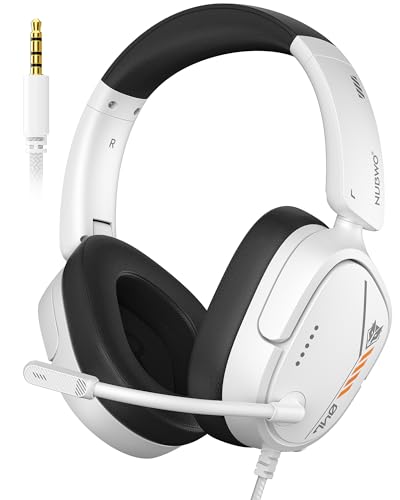
5. NUBWO HG04L — Best lightweight wired pick
Numbers you can plan around are rare in headset listings, which is why the HG04L’s stated 250 grams deserves respect. A quarter of a kilogram is light enough that a streamer can forget the headset during a long ranked session, and lightness shows on camera too: less mass means less visible wobble when you snap your head toward a second monitor. NUBWO pairs that frame with soft memory earmuffs, so the two main fatigue sources, weight and ear pressure, are both addressed in the title itself rather than left to hope. The microphone is described as a clear unidirectional unit. Unidirectional capture listens mainly from one direction, the direction of your mouth, and that focus is precisely the behaviour commentary needs when a console fan and a mechanical keyboard share the room.
The drivers are 40mm speakers, a step down in stated size from the Razer’s 50mm pair, and the connection is the universal 3.5mm jack with PS5, PS4, Xbox Series X|S, Xbox One and PC all named in the title. NUBWO also pitches the headset at work as well as gaming, which suits streamers who take calls or record at the same desk during the day. What the title withholds is any muting mechanism, detachable boom or surround processing, so presenters who mute often should note that silence on those points and compare against the HyperX’s swivel gesture before choosing.
Think of the HG04L as the endurance pick. Nothing in its title chases spectacle; everything in it chases the third hour of a broadcast, when heavier headsets start announcing themselves through neck ache and hot ears. Streamers building a first setup on a restrained budget usually ask about price before weight, yet fatigue ends more young channels than audio fidelity does, and a headset you can wear all evening quietly protects your schedule. The current Amazon listing for the HG04L shows what this model costs today.
The work-from-home half of the HG04L’s title deserves a streamer’s attention too. Creators who record sponsored segments, take production calls or teach during the day and stream at night can leave one headset plugged in for both lives, and the unidirectional microphone that focuses commentary will focus a video call the same way. Consistency of position carries over as well: a boom you have learned to place for your stream is already placed for your morning meeting. There is also a travel argument. At a stated 250 grams with a standard jack, this is the pick least likely to be left behind when a streamer broadcasts from a friend’s console or a hotel television, and its modest, logo-light appearance survives those borrowed setups without screaming for attention on someone else’s camera.
Strengths
- Stated 250g weight gives streamers a concrete endurance figure to plan around.
- Unidirectional microphone focuses capture on the mouth rather than the whole room.
- Soft memory earmuffs address ear pressure alongside the low frame weight.
Trade-offs
- 40mm speakers concede stated driver size to the 50mm Razer at the top.
- No mute method is described in the title, unlike the swivel design on the HyperX.
- Surround processing goes unmentioned, leaving spatial audio to the console itself.
- Weight: 250g
- Speakers: 40mm
- Microphone: Clear Unidirectional Mic
- Connection: 3.5mm Jack
Best for: long scheduled broadcasts where neck fatigue, not features, ends the session early.
Not suited for: a presentation style built on frequent muting performed without looking down.

6. BENGOO G9000 — Best for spectacle on camera
The G9000 is the extrovert of this roundup. Its title leads with stereo gaming for PS4, PC, Xbox One and PS5 controllers, then adds noise cancelling over-ear headphones with a mic, an LED light, 7.1 surround sound and soft memory earmuffs. That LED deserves a streamer’s honest assessment: on a face cam, a glowing headset reads as gaming instantly, gives thumbnails a focal point, and signals production value to a channel-hopping viewer before a word is spoken. Visual identity is a legitimate streaming feature, even if it does nothing for the audio chain.
The 7.1 surround sound claim needs the same honesty in reverse. Virtual surround processing on a stereo headset widens the soundstage the wearer perceives, which can help you place footsteps and callouts in your own ears, but your audience hears the PS4’s direct feed, not your processed headphone mix. Buy it for what it does to your gameplay awareness, not as a broadcast upgrade. The noise cancelling in the title attaches to the headphone description in the listing text; the title does not specify a microphone noise-cancelling system with the precision of the Razer’s cardioid pattern, so commentary isolation claims should stay modest. Soft memory earmuffs, at least, are stated plainly, and they support the long sessions this guide keeps returning to.
Compatibility is broad, spanning Nintendo and Xbox Series X|S alongside the PlayStation machines, so the G9000 can follow a streamer across a varied weekly schedule. It closes the list because its strengths skew visual and experiential while the top picks skew vocal, and for streaming the voice remains the product. Channels built around personality, costumes and on-camera energy may reasonably rank it higher than we do. If that sounds like your broadcast, look at the G9000 on Amazon and judge the glow for yourself.
Longevity of the design is another fair point in the G9000’s favour. This model has circulated in the budget gaming market for years, which means replacement earpads, setup advice and troubleshooting threads are easy to find, and a streamer troubleshooting at midnight before a morning broadcast benefits from that accumulated community knowledge. The broad controller compatibility in the title, spanning PS4, PS5 and Xbox One controllers among others, reflects that long market life. Treat the LED as the headline and the mature, widely understood platform support as the substance underneath it. Channels that run cosplay segments, charity incentives or face-cam-heavy formats will extract more value from this headset’s personality than a radio-style commentator ever could, and judging a pick against the show it will actually serve is the entire discipline this guide tries to teach.
Strengths
- LED light gives face-cam footage and thumbnails an unmistakable gaming focal point.
- 7.1 surround sound processing widens the wearer’s own sense of in-game direction.
- Soft memory earmuffs support the multi-hour sessions streaming schedules demand.
Trade-offs
- Audience audio comes from the console feed, so surround processing never reaches viewers.
- The title’s noise cancelling wording does not specify a microphone pattern.
- Lighting adds visual flair without improving commentary clarity at all.
- Sound: 7.1 Surround Sound
- Lighting: LED Light
- Earmuffs: Soft Memory Earmuffs
- Driver size: Not stated in the listing title
Best for: personality-led channels where the headset forms part of the on-screen costume.
Not suited for: an audio-first broadcast where microphone pattern outranks visual identity.
Setup hygiene deserves its own minute, because a PS4 streaming corner accumulates small frictions that read as unprofessional on air. Route the controller cable so it cannot cross your keyboard hand. Keep the headset on a hook at the same side of the monitor every night, so reaching for it becomes muscle memory when a surprise stream starts. Set the console’s microphone level once, during a loud game rather than a quiet menu, because menus flatter gain settings that action scenes expose. If you share the console with family members, agree on a default volume before your broadcast rather than discovering mid-stream that someone left it at maximum. These rituals sound trivial beside driver sizes and microphone patterns, yet the difference between a channel that feels produced and one that feels improvised is mostly ritual. The headset you choose should slot into a routine you can repeat half-asleep, and every pick above was judged partly on how gracefully it allows that repetition.
How the six streaming headsets compare
| Headset | Microphone fact | Connection | Comfort fact | Standout trait |
|---|---|---|---|---|
| Razer BlackShark V2 X PlayStation | Cardioid mic | 3.5 mm Jack | Noise isolating earcups | 50mm drivers |
| HyperX Cloud Stinger 2 Core | Swivel-to-Mute Function | Wired for PlayStation controller | Lightweight over-ear build | Blind one-motion muting |
| PlayStation PULSE Wireless | Not stated in the listing title | Wireless | Not stated in the listing title | First-party PlayStation design |
| JBL Quantum 100M2 | Detachable Mic | 3.5 Mm Jack | Memory Foam Ear Cushions | Boom removes between segments |
| NUBWO HG04L | Clear Unidirectional Mic | 3.5mm Jack | 250g with Soft Memory Earmuffs | Stated weight figure |
| BENGOO G9000 | Mic with noise cancelling headphones | Wired controller connection | Soft Memory Earmuffs | LED Light and 7.1 Surround Sound |
How should you choose a headset for PS4 streaming?
Start with your broadcast’s audio path, not with a product. The PS4’s built-in streaming sends game audio directly from the console and takes your voice from the headset microphone plugged into the controller, so the microphone is literally your channel’s voice. Read titles for pattern words: cardioid and unidirectional both describe focused capture, and either beats an unspecified microphone when your room contains a fan, a window or a family. Next, decide your muting style. Presenters who interact with their household mid-stream should prize a physical mute gesture they can perform blind; presenters recording in a closed room can trade that away for other comforts. Then weigh the session you actually run. A forty-minute variety stream forgives almost any frame, while a four-hour story playthrough punishes weight and ear pressure, so match stated grams and cushion materials to your real schedule rather than your aspirational one.
After those three decisions, check the practical edges. Wired 3.5mm models never need charging and feed capture cards cleanly, but the cable sets your movement radius and can snag on armrests during celebrations. Wireless removes the leash and the snag risk while adding a charging routine and, in the PULSE’s case here, a title that leaves endurance unconfirmed. Consider also what happens between streams: a detachable boom turns a gaming headset into desk headphones for editing, and cross-platform titles mean one purchase can cover a PC recording night as well. Finally, remember that viewers judge consistency. A modest headset used at the same distance, with the same gain, on every broadcast sounds more professional than an expensive one repositioned nightly, so whichever pick you choose, fix its boom position, mark your volume settings, and keep them.
One more decision hides inside the first three: your voice itself. Deep voices carry through smaller drivers and thinner microphones with authority to spare, while lighter voices need every bit of proximity and pattern focus a boom can offer, because they compete with game audio in the frequency range where soundtracks live. If your commentary has ever been described as hard to follow during action scenes, prioritise the focused microphones in this list and place the capsule closer before you spend anything on processing. Conversely, a host recording in a treated, quiet room can safely trade pattern focus for comfort or wireless freedom, since the room is already doing the rejection work. Matching the headset to the room and the voice, rather than to a review score, is what separates a purchase that lasts three years from one replaced by spring.
Putting these headsets through a streaming rehearsal
We approached this roundup the way a cautious streamer should approach any new microphone: with rehearsals rather than unboxings. Our evaluation routine began with private test broadcasts, reading the same paragraph of game dialogue at three boom distances while a desk fan ran, because that is the exact contamination a cardioid or unidirectional pattern is supposed to tame. We listened back on phone speakers, since most live audiences watch on phones, and noted which headsets kept consonants intelligible when game audio swelled underneath. We then ran a mute drill, simulating the doorbell, the cough and the shouted question from another room, timing how each design lets a host go silent without glancing away from the screen; the swivel mechanism’s advantage stopped being theoretical during that drill.
Comfort testing took longer and said more. Each style of frame was worn through a full evening session with a camera running, because streaming comfort includes how a headset looks after two hours, not only how it feels. Memory foam models kept their seal without escalating pressure, the lightest frame faded from attention entirely, and the LED model kept drawing the eye in the preview window exactly as its designers intended. We also rehearsed failure: a forgotten charge, a boom left detached in a drawer, a cable caught under a chair wheel. Streaming gear earns its keep on bad nights, and the picks above were ordered with those bad nights in mind as much as the good ones.
We also rehearsed the social side of streaming, because headsets mediate conversations as well as broadcasts. In party chat with three teammates, we tracked how quickly each host could mute for the audience while staying live for the party, and how the headsets handled the double narration that variety streamers perform all evening. Frames that stayed light kept heads moving naturally toward chat monitors; heavier-feeling setups visibly slowed the head turns that make a host look engaged. Camera checks mattered as well. One model’s glow flattered the room’s low light, another’s white shell bounced the key light pleasantly, and the matte black designs simply disappeared, which some hosts prefer. None of these observations appear on a specification sheet, yet all of them appear on a broadcast, which is why this guide insists on rehearsal as a category of evidence alongside titles and measurements.
Common mistakes PS4 streamers make with headsets
The most expensive mistake is buying for game audio and assuming the microphone will follow. Drivers impress the wearer; the microphone impresses the audience, and audiences are the ones who subscribe. A second mistake is boom drift: starting a stream with the capsule at the corner of the mouth, then gradually wearing it lower as the session loosens, so late viewers hear a thinner, roomier voice than early ones. Fix the position and check it at every break. Third, streamers often crank headset volume to hear themselves think over a loud game, then shout to match, fatiguing both voice and viewers; a quieter mix and a closer microphone produce calmer, clearer commentary. Fourth, wireless buyers skip the charging ritual until a low-battery warning lands mid-raid, which is why a written pre-stream checklist beats good intentions. Fifth, many new broadcasters test audio on studio headphones and never on a phone, although the phone is where their audience lives. Record a test, play it back on the smallest speaker you own, and only then go live. Readers whose setups also involve family viewing may enjoy our roundup of best headsets for people with small heads when a shared console serves smaller players too.
Finally, streamers neglect the second listener in the room: themselves, three hours from now. A headset that impresses during a ten-minute unboxing can sabotage the last hour of a broadcast through heat, pressure or a cable that has slowly migrated across the keyboard. When you test a new purchase, judge it at the end of your longest typical session rather than at the beginning, and keep the packaging until that test is done. The streamers who sound calm in hour three are rarely the ones with the most expensive microphones; they are the ones whose equipment stopped asking for attention an hour earlier.
Final recommendation
For most PS4 streamers the Razer BlackShark V2 X PlayStation is the correct first answer: its cardioid microphone addresses the audience’s experience directly, its drivers are the largest stated here, and its wired connection removes charging from the pre-stream routine. Choose the HyperX Cloud Stinger 2 Core instead when your home interrupts you often enough that blind muting becomes a core skill. Take the JBL Quantum 100M2 if your desk alternates between commentary and quiet gameplay, the NUBWO HG04L if endurance over long sessions is the deciding factor, and the BENGOO G9000 when on-camera identity matters to your channel’s brand. The PlayStation PULSE Wireless Headset suits a first-party, cable-free desk, provided you confirm its unstated details on the full listing before ordering. Whichever model lands on your head, rehearse with it privately before the audience arrives.
Consider, too, how a headset purchase interacts with the rest of a growing channel’s roadmap. A creator planning to add a dedicated streaming microphone next year should not overspend on a headset microphone today; the wired, comfort-led picks here will serve as monitoring headphones long after a desk microphone takes over commentary. A creator with no such plan should invert that logic and buy the strongest boom in the budget now, because it may serve for years. Headsets also outlive consoles: every 3.5mm pick in this list follows you to a PS5, a PC or a Switch without ceremony, which softens the cost of choosing well. The PULSE’s value case rests on staying inside PlayStation’s own accessory world. None of these futures can be ranked in the abstract; they depend on the channel you are actually building, its upload rhythm and its audience’s patience for audio flaws, which in our experience is shorter than any creator hopes and longer than any perfectionist fears.
Two practical topics remain before the questions, and both decide real purchases. The first is session length as a comfort contract. Judge any headset here against your longest scheduled broadcast rather than your average one, because averages forgive what marathons punish: a frame that feels fine for twenty minutes can press, heat up or slide by hour three, which is why this guide keeps returning to stated weight, cushion material and isolation style. If your streams regularly pass two hours, treat those three title details as primary specifications rather than garnish, and favour the picks whose titles actually publish them.
The second topic is troubleshooting order. When viewers say a stream sounds rough, change one variable at a time, starting with boom position, then microphone level, then your distance from noise sources such as the console itself. Most rough-sounding broadcasts trace back to placement and gain rather than to the headset model, and a focused-pattern microphone only shows its worth after those basics are set. Streamers who record videos as well as broadcasting live will find the same headset serves both jobs, since a focused microphone, a wearable fit and a standard connection are exactly what a recording session asks for too. Fix the chain in that order and the equipment questions below mostly answer themselves.
Movement on camera is the last honest trade to name. A wired headset defines a radius around the controller, and hosts whose format involves standing, gesturing or walking to a whiteboard should plan routes inside that radius or weigh the wireless pick more heavily, accepting its charging routine as the price of freedom. Seated hosts, meanwhile, gain from the cable’s certainty every single night and should not let wireless envy talk them out of the more reliable tool for their actual show.
Matching the rest of the setup matters in one functional sense above all: a headset whose controls can be operated without looking, whose cable reaches the usual seat, and whose microphone suits the room will outperform a prettier model that fights the host’s habits every evening. Choose for the show you actually broadcast, in the room you actually broadcast it from, and the equipment stops being a topic and becomes a habit.
Frequently asked questions
There is also the question of who else hears your headset. Open living-room streaming, where a partner reads on the sofa behind the camera, imposes a courtesy requirement that closed rooms never face: game audio leaking from earcups becomes part of the household’s evening. Noise-isolating designs earn their keep there, keeping gunfire at your ears instead of across the room. Multiplayer households running two consoles side by side face the mirror problem, two headsets leaking into two microphones, and focused pickup patterns stop being audiophile garnish and become peace treaties. Think through the room your stream actually happens in, the people who share it, and the hours it keeps, then read the six reviews again with that room in mind; the correct ranking often rearranges itself.
Does the PS4 send my headset microphone audio to the stream?
Yes. When you broadcast using the console’s built-in tools, the microphone connected through the controller supplies your commentary, which is exactly why microphone pattern and placement dominate this guide’s rankings.
Is a cardioid microphone noticeably better for streaming?
For typical rooms, yes. Focused pickup keeps your voice forward while reducing sound arriving from behind the capsule, so fans and keyboards intrude less without any software processing.
Can I use these wired headsets with a capture card?
Generally, yes. A 3.5mm headset at the controller is the standard arrangement, and most capture workflows take game audio from HDMI while your commentary path stays at the console or PC as your software dictates.
Why does one pick list so few specifications?
The PlayStation PULSE Wireless Headset listing title is unusually bare, stating the name and little else. We report that silence rather than borrowing numbers from other models, and the full listing page is the place to confirm details.
Should I rehearse with a new headset before going live?
Always. Record a private test at your real streaming distance, with your real room noise, and play it back on a phone. Ten minutes of rehearsal exposes boom drift, gain problems and comfort hot spots that a specification sheet never mentions.
How far should the boom sit from my mouth?
Roughly a finger’s width or two from the corner of your mouth works for most gaming booms. Closer placement raises volume and room rejection together, letting you lower gain and background noise at once.
Budget deserves one honest paragraph before the questions. Streaming income, for most PS4 broadcasters, arrives slowly, and the headset is only one line in a setup that also wants lighting, a capture solution and eventually a camera. The wired picks in this roundup exist precisely because a controller jack and a thoughtful microphone deliver most of the broadcast quality at a fraction of a full audio chain’s cost. Spend first on the microphone behaviour and the fit you can wear all evening; spend later, when the channel earns it, on the refinements. Every pick above was chosen so that a first purchase does not become a regret purchase three months into a streaming habit.
A stream is remembered for the moments a host almost lost, the doorbell survived, the comeback narrated through a held breath, and the right headset is the quiet equipment that keeps those moments audible instead of apologised for.


