What's inside
- Key Takeaways
- Quick Picks
- How Did We Choose These Six PS4 Headsets?
- What Actually Cuts Background Noise: Your Ears Versus Your Microphone
- How Do the Six Picks Compare Side by Side?
- How Should You Set Up a PS4 Headset So the Noise Control Actually Works?
- Which Mistakes Turn a Quiet Headset Into a Noisy One?
- How Does the Controller Jack Shape What a PS4 Headset Can Do?
- Which Fit and Cushion Choices Matter Most in a Busy Room?
- How Can You Test a New Headset Against Your Own Room Before the Return Window Closes?
- What Does a Sensible Care Routine Look Like for a Wired PS4 Headset?
- How Should Your Game Mix Influence Which of the Six You Buy?
- Final Recommendation
- Frequently Asked Questions
- Related Guides
As an Amazon Associate I earn from qualifying purchases. This post may contain affiliate links at no extra cost to you.
gizmoverdict.com is reader-supported. When you buy through links on our site, we may earn an affiliate commission.
Where to buy: All six headsets below are wired models sold through the linked listings in this site’s verified product pool, and every one of them plugs into a DualShock 4 or DualSense controller with a plain 3.5 mm jack — no dongles to charge, no pairing menus, nothing between you and the game except a cable you can replace for pocket change.
The search for the best headsets for ps4 that cut out background nosie — background noise, in plain spelling — actually hides two different problems, and confusing them is why so many purchases disappoint. The first problem is the noise reaching your own ears: a television in the next room, a fan, a household that keeps living its life while you play. The second problem is the noise reaching your teammates: everything your microphone swallows and forwards into the party chat, where a barking dog or a rattling keyboard becomes everybody’s soundtrack. A headset can be excellent at one and mediocre at the other, because the fixes live in different places. What you hear is handled by earcup seal and isolation. What your squad hears is handled by the microphone’s pickup pattern and, on one pick here, by active mic-side noise cancelling.
That split runs through the whole guide. The Razer BlackShark V2 X attacks the second problem with a cardioid microphone, a design that listens mostly in front of itself and turns down the room behind it. The SteelSeries Arctis Nova 1P attacks it with a noise-cancelling mic, stated plainly in its listing title. The remaining four lean harder on the first problem — closed earcups, memory foam seals and, in the Turtle Beach case, amplification that lets you keep game volume low enough that quiet dialogue survives a noisy kitchen. None of these headsets is wireless, and that is deliberate rather than a gap: on PS4, a wired 3.5 mm connection is the zero-latency, zero-battery option, and every pick below was verified for this pool with PS4 named in its listing.
Read the picks with your room in mind. A solo player in a loud flat needs isolation first. A squad player whose flatmates complain — or whose teammates do — needs the microphone story first. The guide sections after the detailed reviews explain how isolation actually works, how to set the PS4’s own mic and sidetone controls so the hardware can do its job, and which buying mistakes turn a good headset into a noisy one.
Key Takeaways
- Noise control splits in two: earcup isolation protects your ears, while microphone pickup pattern protects your teammates — judge each pick on both.
- The BlackShark V2 X’s cardioid mic and the Arctis Nova 1P’s noise-cancelling mic are the two picks aimed squarely at a loud room behind you.
- Every pick here is wired 3.5 mm, so there is no battery to die mid-session and no wireless latency to manage on PS4.
- Amplification, on the Recon 200 Gen 2, fights noise by making quiet game audio audible at lower volumes rather than by blocking sound.
- The PS4’s own settings — mic level, sidetone and output-to-headphones — decide half the result; the setup section walks through them.
- Where a listing title stays silent on a feature, the spec boxes say so instead of guessing, and that silence is itself useful buying information.
- Fit is a noise feature: a seal that survives head movement and a full evening isolates better than a laboratory figure on a still head.
Quick Picks
| Pick | Badge | Why it earns its place |
|---|---|---|
| Razer BlackShark V2 X | Best mic for loud rooms | Its HyperClear cardioid microphone is built to favour your voice and slight the room behind you, and at 240 g it stays comfortable through long sessions. |
| HyperX Cloud II | Best proven all-rounder | A long-running design with memory foam pads, an aluminium frame and 7.1 surround in its package — the safe pair of hands in this group. |
| HyperX Cloud Stinger 2 (PlayStation) | Best PlayStation-tuned starter | A wired PlayStation edition from HyperX’s comfort-first Stinger line, with an adjustable headband and the brand’s signature fit. |
| Turtle Beach Recon 200 Gen 2 | Best amplified pick | Built-in amplification lifts quiet game sound above a noisy room, and it covers PS4, PS5, Xbox, Switch and PC in one purchase. |
| SteelSeries Arctis Nova 1P | Best noise-cancelling mic | The listing states a noise-cancelling microphone outright, paired with Hi-Fi drivers and 360° spatial audio in a lightweight white shell. |
| Logitech G Astro A10 Gen 2 (PS Edition) | Best flip-to-mute simplicity | A flip-to-mute mic you can silence mid-sentence without finding a button, tuned as the PlayStation edition of Astro’s entry line. |
How Did We Choose These Six PS4 Headsets?
Every candidate had to clear three gates before its noise story was even considered. First, PS4 support had to be stated in the verified listing title — not implied by a platform list on a retailer’s page, but present in the API-returned title this pool is built from. Second, the connection had to suit the console’s reality: the DualShock 4’s 3.5 mm jack is the universal route, so wired headsets that name that jack, or that name PS4 directly, took priority over wireless models whose dongles add cost and failure points. Third, the headset needed a genuine noise angle — an isolating earcup design, a directional or noise-cancelling microphone, or amplification — because a headset that merely plays sound loudly is not an answer to a background-noise question.
Beyond the gates, we weighed the things that decide whether a headset survives a year of daily play: frame materials, stated weight where the title gives it, ear cushion type, and how the microphone behaves when it is not wanted — flipping up, detaching, or muting cleanly. We also kept the price-free discipline this site applies everywhere: no pick is ranked by a number that will change next week, and no star ratings appear anywhere in this guide, because ratings drift and a printed figure would be stale before the ink dried. What remains is judgement about fit, isolation and mic behaviour, which is the judgement that actually matters for this keyword.
One more filter deserves stating. Several well-known PS4 headsets circulate in renewed or marketplace listings with titles that do not confirm their configuration. Where a listing title left a feature unstated — a detachable mic, a battery figure, a surround mode’s platform limits — we did not fill the gap from memory of the product line. The spec boxes below mark those points as not stated in the listing title, and the prose sticks to what the title supports plus general explanation of how the technology works. That restraint is deliberate: a buying guide that invents specifications is worse than one that admits a silence.
We also weighted the order of the six by the keyword itself. This is a background-noise guide before it is a general headset guide, so the picks with an explicit noise mechanism — a named pickup pattern, a stated noise-cancelling microphone, amplification — sit ahead of picks whose noise contribution is fit alone, even where a fit-led pick might be the better general purchase for a quiet home. If your room is already calm, read the order loosely and buy for comfort and durability. If your room is the problem the keyword describes, the order is the advice.
What Actually Cuts Background Noise: Your Ears Versus Your Microphone
Start with your own ears. A closed-back earcup with a soft cushion works as a gasket: the seal against your head blocks a band of mid and high frequency sound — voices, television dialogue, keyboard clatter — before it ever reaches the driver. Seal quality matters more than cup size, which is why memory foam, named in the Cloud II’s title, is a noise feature and not just a comfort feature: it moulds around glasses arms and jaw lines that break the seal on stiffer pads. Isolation is passive, needs no power and never runs out of battery, but it has limits. Low-frequency rumble — a washing machine’s spin cycle, traffic through a wall — passes through passive seals almost untouched, and no headset in this guide claims active noise cancelling for the wearer’s ears, whatever their microphones do.
Now the microphone side, which is where party-chat reputations are made. A cardioid pickup pattern, the design in the BlackShark V2 X’s HyperClear mic, is most sensitive directly in front of the capsule and progressively deafer to the sides and rear. Positioned at the corner of your mouth, it hears your voice at full strength and the television across the room at a fraction of it. A noise-cancelling microphone, as the Arctis Nova 1P’s title states, goes further, using additional capsule information to suppress steady ambient sound electronically. Neither design performs miracles against a dog barking in the same room — physics is physics — but both shift the balance decisively toward voice, and the difference is audible to teammates within one session.
The third lever is volume itself. If your game audio is too quiet relative to the room, you turn it up, the earcup seal works harder, and long sessions fatigue your ears. Amplification, the Recon 200 Gen 2’s headline feature, attacks that chain at the start: powered amplification raises game sound cleanly so dialogue and footsteps stay intelligible at moderate levels. It is a different philosophy from isolation — not blocking the room, but making the game easier to hear over it — and for players whose noise is intermittent rather than constant, it can be the more comfortable answer.

Razer BlackShark V2 X — Best mic for loud rooms
The BlackShark V2 X is the pick that takes the microphone problem most seriously, and its listing title reads like a checklist for this exact keyword: TriForce Titanium 50 mm drivers for the game sound, a HyperClear cardioid mic for the voice, noise-isolating earcups for the room, and a stated weight of 240 g that puts it at the light end of full-size gaming headsets. On PS4 it connects by the 3.5 mm jack named in the title, straight into the controller, and the title names PS4 among its platforms outright — no compatibility detective work required.
The cardioid pattern is the heart of it. Because the capsule favours sound arriving from the front, the practical technique matters: bend the boom so the mic sits at the corner of your mouth, roughly two finger-widths away, and the geometry does the rest, demoting the television, the fan and the flatmate to background in the literal sense. Razer’s noise-isolating earcups handle your side of the bargain with a closed seal, and the 50 mm drivers give footsteps and directional cues enough body that you are not tempted to crank volume to compensate for a noisy room — the habit that quietly ruins both comfort and hearing over long sessions.
- Connection: 3.5 mm wired, per the listing title
- Drivers: TriForce Titanium 50 mm, per the listing title
- Microphone: HyperClear cardioid, per the listing title
- Weight: 240 g, per the listing title
- Surround format: Not stated in the listing title — verify with the maker’s documentation
- Microphone detachability: The listing title does not say — check Razer’s documentation before buying
Strengths
- Cardioid pickup is the single most effective passive tool for keeping a loud room out of party chat.
- At 240 g, it asks very little of your neck across a three-hour session.
- Noise-isolating earcups and a stated PS4 platform listing remove both kinds of guesswork.
Trade-offs
- The wired-only design gives you no option to roam to the kitchen between matches.
- Isolation is passive, so low rumble from appliances still seeps through the seal.
- Its mic advantage depends on boom position; worn carelessly, the cardioid edge is wasted.
Best for: a squad player in a shared flat whose teammates currently hear the whole household. Not suited for: a player whose main noise problem is bass rumble through a wall, which no passive seal in this guide will stop.

HyperX Cloud II — Best proven all-rounder
Few gaming headsets have been in production long enough to become a default recommendation, and the Cloud II is one of them. Its verified title lists the pillars of that longevity: 7.1 surround sound, memory foam ear pads, a durable aluminium frame, and a platform list that names PC, PS4 and PS4 Pro alongside the Xbox family. The memory foam is doing double duty here — comfort across long sessions, and a seal that conforms around glasses and uneven jaw lines, which is where background noise usually leaks into a lesser headset’s sound.
The aluminium frame matters for a noise reason that is easy to miss: clamp force stays consistent as a headset ages. Plastic frames creep and loosen over a year of use, the seal softens, and isolation quietly degrades; a metal frame holds its shape and its seal far longer. On the surround question, honesty is required. The title states 7.1 surround sound as a feature of the headset’s package, but surround processing on this class of headset is delivered through its USB path on PC, while the PS4 connection is the controller’s 3.5 mm jack — so treat the PS4 experience as high-quality stereo with strong isolation, and read the maker’s documentation for exactly how the surround feature maps to each platform before counting on it.
- Connection: Multi-platform wired; PS4 and PS4 Pro named in the listing title
- Surround: 7.1 surround sound stated in the listing title; platform delivery varies — verify with the maker’s documentation
- Ear pads: Memory foam, per the listing title
- Frame: Aluminium, per the listing title
- Microphone type and pattern: Not stated in the listing title — verify with the maker’s documentation
- Weight: The listing title does not give one — check HyperX’s documentation
Strengths
- Memory foam seal is a genuine noise feature, especially for glasses wearers.
- Aluminium frame keeps clamp and seal consistent over years, not months.
- A decade of production means replacement pads and cables are easy to find.
Trade-offs
- The surround headline does not transfer whole to the PS4’s controller jack.
- Its design predates modern lightweight trends, so it feels substantial on the head.
- The title leaves the microphone specification unstated, so mic-critical buyers must check the documentation.
Best for: a PS4 owner who wants one durable headset for story games and chat alike, bought once and kept for years. Not suited for: a squad leader choosing strictly by published microphone patterns, since this listing leaves that specification unstated.

HyperX Cloud Stinger 2 (PlayStation) — Best PlayStation-tuned starter
The Stinger line is HyperX’s answer to a simpler question: what does a first serious gaming headset need, and what can it leave out? This PlayStation edition answers with wired connectivity, the brand’s signature comfort and an adjustable headband, all stated in the title. That brevity is worth reading correctly. The Stinger 2 does not compete on specification theatre; it competes on the fit that makes a new player actually wear the thing for a whole evening, and a headset that stays on your head isolates immeasurably better than a fancier one hanging around your neck.
For background noise specifically, the Stinger 2’s contribution is the closed, comfortable fit rather than any electronic trickery, and its spec box below is correspondingly honest about what the listing does not claim. That makes it the right pick for a particular household: the noise is moderate — another room’s television, street sound through a window — and the player is a younger or newer gamer whose sessions are measured in an hour or two, not marathons. The adjustable headband earns its mention because fit range is what lets one headset serve a teenager and an adult in the same house, each getting a real seal instead of a perched, leaking one.
- Connection: Wired, per the listing title; PlayStation edition
- Fit: Adjustable headband and signature comfort, per the listing title
- Driver size: Not stated in the listing title — verify with the maker’s documentation
- Microphone pattern: The listing title does not say — check HyperX’s documentation before buying
- Noise features: No electronic noise feature is claimed in the listing title; isolation is by fit and seal
- Weight: Not stated in the listing title
Strengths
- Comfort-first design that newer players will actually keep on for full sessions.
- A PlayStation edition, so platform fit is the product’s whole premise.
- Simple wired design with nothing to charge, pair or update.
Trade-offs
- No microphone noise technology is claimed, so a loud same-room environment will reach your party.
- The short title leaves several specifications to the maker’s documentation.
- It is a starter-class headset; heavy daily players will eventually want more.
Best for: a first headset for a PS4 in a moderately noisy home, or a shared family console. Not suited for: a streamer or squad leader whose microphone has to reject a loud room, a job this listing never claims to do.

Turtle Beach Recon 200 Gen 2 — Best amplified pick
The Recon 200 Gen 2 takes the third road to the noise problem: amplification. Its title leads with the word, and the idea deserves explaining because it is genuinely different from isolation. An amplified headset carries powered electronics that raise the game audio cleanly, so the crackle of a reloading weapon or a whispered line of dialogue sits clearly above the room’s noise floor without you pushing overall volume into fatiguing territory. For players whose background noise is intermittent — a household that is loud at seven and quiet at nine — that lift can matter more than a perfect seal.
Power implies a battery, and the title is silent on battery life, so the spec box records that honestly; check Turtle Beach’s documentation for the figure and for what the headset does when the charge runs out. The platform list is the broadest in this guide — PS4, PS5, Xbox Series X|S and One, Nintendo Switch and PC — which makes the Recon the natural pick for a multi-console household that wants one headset to travel between machines. Its amplified character also suits players who game on a television across the room, where the television’s own speakers were previously the competition the headset had to beat.
- Connection: Amplified wired headset; PS4 named first in the listing title’s platform list
- Platforms: PS4, PS5, Xbox Series X|S and One, Nintendo Switch, PC — per the listing title
- Amplification: Stated in the listing title; powered design
- Battery life: Not stated in the listing title — verify with the maker’s documentation
- Microphone behaviour: The listing title does not describe it — check Turtle Beach’s documentation
- Driver size: Not stated in the listing title
Strengths
- Amplification lifts quiet game detail over household noise without raw volume.
- The widest platform list here — one headset for every console in the house.
- A television-distance player’s upgrade path from TV speakers to real directional audio.
Trade-offs
- Powered amplification means a battery to manage, with its life unstated in the title.
- Amplification raises the game, not the barrier; a truly loud room still competes.
- Anyone set on a fit-and-forget wired headset may prefer the unpowered picks.
Best for: a multi-console household playing in a living room that is busy in the early evening. Not suited for: a player who refuses to charge anything and plays in long unattended stretches, where an unpowered pick removes the question entirely.

SteelSeries Arctis Nova 1P — Best noise-cancelling mic
Only one title in this pool uses the words noise-cancelling about its microphone, and it is this one. The Arctis Nova 1P pairs that mic with Hi-Fi drivers and 360° spatial audio, wrapped in a comfort-focused, lightweight design in white, with PS5 and PS4 named at the head of its platform list. For a player whose problem is specifically that the party hears the household, this is the most direct answer on the page: the suppression is a stated feature of the product, not an inference from a pickup pattern.
The spatial audio claim deserves the same platform honesty applied to the Cloud II. The title states 360° spatial audio as a capability of the headset; on PS4, spatial rendering is substantially a console-side feature, delivered through the controller’s output, and the headset’s job is to present it cleanly with drivers that resolve direction well. Read the pick that way — a headset voiced and built to make the PS4’s own audio presentation legible — and the claim is fair. The white finish and comfort design also mark this as the pick for players who wear a headset on camera or simply prefer gear that does not shout gamer at the room.
- Connection: Multi-system wired; PS5/PS4 named first in the listing title
- Microphone: Noise-cancelling, stated outright in the listing title
- Drivers: Hi-Fi drivers, per the listing title
- Audio: 360° spatial audio stated in the listing title; console-side delivery on PS4
- Colour: White, per the listing title
- Weight figure: Described as lightweight in the listing title; no gram figure stated — verify with the maker’s documentation
Strengths
- The only explicitly noise-cancelling microphone in this pool.
- Comfort design and light build suit long, camera-on sessions.
- PlayStation platforms lead its compatibility list rather than trailing it.
Trade-offs
- White shows wear and make-up transfer faster than the black picks here.
- Spatial audio on PS4 depends on the console’s rendering, not the headset alone.
- The title gives no numeric weight, so spec-led buyers must check the documentation.
Best for: a PS4 player whose teammates complain about household noise bleeding into chat. Not suited for: a spec-sheet purist who needs a named pickup pattern in print, since the title states the noise-cancelling function without giving one.
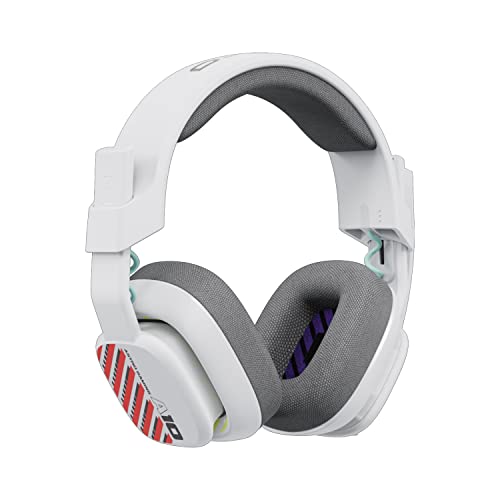
Logitech G Astro A10 Gen 2 (PS Edition) — Best flip-to-mute simplicity
The A10 Gen 2’s contribution to a quieter party chat is a gesture: flip the microphone up and you are muted. It sounds like a small thing until you picture the moments that actually embarrass players — a doorbell, a parent calling up the stairs, a sneeze — each handled by the flip-to-mute mic the title names, instantly and silently, without a settings menu or a fumbled inline button. Noise control is partly about what never gets transmitted at all, and a mute that lives in muscle memory transmits far less household life than one buried in software.
The rest of the title is workmanlike in the best way: 32 mm drivers, a 3.5 mm jack, cross-platform support spanning PS5 and PS4, Xbox Series X|S, Nintendo Switch and PC, in the white PlayStation edition finish. Astro’s entry line has always traded on durability — headsets that survive being dropped on desks and sat on by accident — and while the title does not make durability claims we can quote, the A10’s place in this guide is as the robust, simple option: the headset a household buys when the previous one died from handling rather than from sound. For noise, its closed over-ear fit, stated in the title, provides the passive seal; the flip gesture provides the discipline.
- Connection: 3.5 mm jack, per the listing title
- Drivers: 32 mm, per the listing title
- Microphone: Flip-to-mute, per the listing title
- Fit: Over-ear, per the listing title
- Platforms: PS5/4, Xbox Series X|S, Nintendo Switch, PC — per the listing title
- Microphone pickup pattern: Not stated in the listing title — verify with the maker’s documentation
Strengths
- Flip-to-mute is the fastest, most reliable household-noise defence ever fitted to a headset.
- PlayStation edition tuning and finish, with genuine cross-platform range behind it.
- Simple, robust design language aimed at daily handling rather than a glass case.
Trade-offs
- No noise-cancelling or cardioid claim appears in the title, so same-room noise still reaches the mic while it is live.
- 32 mm drivers are the smallest here; bass-heavy players may want more.
- Its virtues are practical rather than premium, which spec hunters may underrate.
Best for: a family PS4 where the headset is shared, handled roughly and muted often. Not suited for: a player in a constantly loud room who needs active mic suppression while speaking, where the Arctis Nova 1P is the honest answer.
How Do the Six Picks Compare Side by Side?
| Pick | Main noise lever | Mic story | Connection |
|---|---|---|---|
| Razer BlackShark V2 X | Isolating earcups | HyperClear cardioid | 3.5 mm wired |
| HyperX Cloud II | Memory foam seal | Not stated in title | Wired, multi-platform |
| HyperX Cloud Stinger 2 (PS) | Closed comfort fit | Not stated in title | Wired |
| Turtle Beach Recon 200 Gen 2 | Amplification | Not stated in title | Amplified wired |
| SteelSeries Arctis Nova 1P | Closed comfort design | Noise-cancelling, stated | Wired, multi-system |
| Logitech G Astro A10 Gen 2 | Over-ear seal | Flip-to-mute | 3.5 mm wired |
Read the table by your room, not by the badge column. If the noise is behind you and your friends hear it, the microphone column decides: BlackShark for pattern, Arctis for stated suppression, A10 for the mute gesture. If the noise is around you and you hear it, the lever column decides: seal quality on the two HyperX picks and the Razer, or amplification on the Turtle Beach. Most households have a bit of both, which is why the all-round Cloud II — strong seal, durable frame — remains the recommendation for anyone who cannot decide which problem they have.
How Should You Set Up a PS4 Headset So the Noise Control Actually Works?
Hardware is half the system; the PS4’s audio settings are the other half, and they ship in a state that flatters nobody. Begin with the microphone level. Hold the PS button, open the sound and devices settings, and use the microphone level adjustment screen: speak at your normal gaming volume and set the level so your voice peaks in the screen’s good zone rather than its maximum. Every notch above that zone is gain applied to the room as well as to you, and it undoes a cardioid mic’s careful geometry. If teammates say you are clear but the room is loud, the fix is almost always level down and mic closer, never level up.
Next, sidetone — the PS4 calls it the sidetone volume in the same menu family — which feeds your own voice back into your ears. Set it just high enough that you can hear yourself at conversational level. Sidetone stops the slow shout that creeps into late-night sessions, and a player who is not shouting needs less isolation from their own household’s complaints, which is a noise problem of a social kind. Then set output to headphones to all audio rather than chat audio only, so game sound comes through the sealed earcups instead of the television — a television playing game audio across the room is background noise you are manufacturing yourself, and your microphone will faithfully forward it to the party as echo.
Finally, the physical routine. Charge nothing — these are wired picks — but inspect the cable and the controller jack monthly, because a worn jack crackles, and crackle reads to teammates exactly like noise. Route the cable so it does not drag across your clothing; fabric rustle against a boom mic is the most common mystery noise in party chat, and it is cured by a cable clip or a different drape, not by a new headset. Store the headset on a hook rather than a desk pile: ear pads compressed unevenly in storage lose their seal shape, and the isolation you paid for leaks away one squashed cushion at a time.
Which Mistakes Turn a Quiet Headset Into a Noisy One?
The commonest mistake is buying for the wrong noise. A player tormented by a loud television buys the headset with the famous microphone, discovers their own ears are still unprotected, and concludes the category is a scam. Name your noise first — yours or theirs — and the shortlist writes itself. The second mistake is gain staging by feel: microphone level at maximum because quiet felt risky, which amplifies the room, the controller’s handling sounds and the player’s own breathing into a constant wash under every sentence. The PS4 gives you a meter; use it once, properly, and leave it alone.
Third, wearing the headset wrong. A seal is a fit, and fit is adjustable: headband length set so the cups sit over the ears rather than on them, glasses arms routed over the pads where the design allows, hair tucked out of the seal line. Fourth, expecting passive isolation to handle low-frequency noise. If your room’s problem is a boiler, a washing machine or traffic rumble, no pick in this guide will erase it, and the honest upgrades are distance, a closed door and session timing — not a more expensive headset. Fifth, ignoring the renewed and marketplace fog around popular models: buy the exact listing you researched, because a familiar name in a different configuration is a different product.
How Does the Controller Jack Shape What a PS4 Headset Can Do?
Every pick in this guide funnels through a small analogue hole in the bottom of a controller, and understanding that bottleneck explains most of the honest limitations stated in the spec boxes. The DualShock 4’s 3.5 mm jack carries stereo audio out and microphone audio in, powered and processed by the controller itself. That is why the connection is so gloriously universal — any wired headset with the right plug simply works — and why features that need digital processing, like the Cloud II’s surround path, historically live on a USB connection to a computer instead. The console was designed around a simple contract: the headset is a transducer, the console is the brain.
The DualSense that ships with the PS5 keeps the same jack and the same contract, which is why every title in this pool that names PS5 also names PS4 or the shared jack. For a buyer, the practical consequences are threefold. First, there is no headset-side equaliser to speak of on this connection class; tone is the console’s and the game’s, so a headset whose natural voicing you like matters more than one advertising adjustment you cannot reach. Second, microphone quality is bounded by the controller’s input stage, which is competent but not studio-grade — another reason pickup pattern and positioning, the things a headset maker controls, dominate real-world chat clarity. Third, the cable is a wear item in a way no wireless link is: it flexes at the plug thousands of times, and when crackle arrives it is usually the cable or the jack, diagnosable in seconds by gently rotating the plug while listening.
None of this is an argument against the jack. It is an argument for buying the headset whose strengths live where the jack lets them live: seal, comfort, driver voicing and microphone geometry. Notice that those are precisely the strengths the six picks divide among themselves, and precisely the properties no firmware update will ever change — which is why a well-chosen wired PS4 headset ages better than its specification sheet suggests.
Which Fit and Cushion Choices Matter Most in a Busy Room?
Isolation lives or dies at the cushion, and cushion choice is a three-way negotiation between seal, heat and session length. Memory foam, the Cloud II’s stated material, wins on seal: it compresses where your head is irregular — jaw hinge, glasses arm, earring — and holds a continuous gasket line. Its cost is heat. A sealed foam cushion in a warm room becomes uncomfortable somewhere in the second hour for many players, and discomfort breaks isolation more surely than any specification, because the player shifts the headset, breaks the seal to cool an ear, or gives up and uses the television speakers.
Fabric and hybrid cushions breathe better and seal slightly worse; leatherette seals best when new and can crack with age and sweat. The honest advice is to match cushion to climate and session shape. Short evening sessions in a cool room: prioritise seal, and the foam picks shine. Long sessions in a warm flat: prioritise the comfort designs — the Arctis Nova 1P’s stated comfort focus, the Stinger 2’s signature comfort brief — accepting a decibel or two of theoretical isolation in exchange for a headset that stays correctly positioned for four hours, which in practice isolates more.
Clamp force is the cushion’s partner variable. Too light and the seal breaks when you turn your head; too strong and the headset becomes a headache with speakers. None of the six titles publishes a clamp figure — that is normal for the category — so the practical test is the first-week one: wear the headset for your longest typical session before deciding, turn your head sharply mid-game, and notice whether the seal’s sound signature changes. A seal that survives movement is worth more than a seal that measures well on a still head, because nobody plays statue-still, least of all in the loud, lived-in rooms this guide is written for.
How Can You Test a New Headset Against Your Own Room Before the Return Window Closes?
Every household’s noise has a signature, and no review can reproduce yours, so run a deliberate test evening while returns are still easy. Start with the solo test: play a dialogue-heavy scene at your normal volume while the household does its loudest normal thing — cooking, television in the next room, a call in the kitchen. You are listening for two failures: dialogue sinking under the room, which points at seal or amplification, and your own voice rising to compensate, which you will feel in your throat before you notice it consciously. A headset that passes lets you finish the scene at the volume you started with.
Then the party test, which needs one honest friend. Join a chat, have the household noise running, and speak at match volume while your friend reports what the room contributes. Swap roles mentally through the checklist: is your voice in front of the noise or inside it? Does the noise swell between your sentences, a sign the console’s level is set so high that the room floods every gap? Adjust the microphone level down one step at a time and repeat a sentence at each step; there is a point where your voice stays clear and the room falls away, and finding it in the test week means never hunting for it mid-match. Note the setting. Consoles get reset, controllers get swapped, and a written-down level is a small insurance policy.
Finish with the comfort audit, because isolation you cannot wear is a specification, not a result. Wear the headset for your longest realistic session without a break you would not normally take. Mark where pressure gathers — crown, jaw, the tops of the ears — and whether the cushions’ heat builds to distraction. Check the cable’s reach in your real chair, with your real posture, including the lean-back position nobody admits to. A headset that passes all three tests in your room, with your household, has earned its place in a way no laboratory figure can argue with, and one that fails has told you so while the fix is still a return label rather than a regret.
What Does a Sensible Care Routine Look Like for a Wired PS4 Headset?
Wired headsets die of neglect in predictable places, and a light routine keeps both the sound and the seal at their first-month standard. The cushions come first. Skin oil and sweat migrate into foam and fabric, stiffening the surface that makes the seal; a weekly wipe with a barely damp cloth, followed by air drying away from radiators, slows that hardening considerably. When cushions do flatten or crack — a year or two in, depending on use — replacements restore the isolation almost to new, and the long production runs of designs like the Cloud II make those replacements easy to source. Treat cushions as tyres: consumables whose replacement is maintenance, not failure.
The cable is the second consumable. Coil it loosely for storage, never wrap it tightly around the headset, and give the plug a gentle straight pull rather than a sideways yank when disconnecting. If crackle appears, isolate the culprit before replacing anything: rotate the plug slowly in the jack, flex the cable gently along its length while listening, and try the headset in a phone or a second controller. Nine times in ten the fault is one replaceable element, and finding which one takes three minutes. The microphone boom, on models that bend, should be repositioned by its flexible section rather than levered at its base, and the flip-to-mute hinge on the A10 should be moved by the mic body, not flicked by its tip.
Storage closes the routine. A hook or stand keeps cushions uncompressed and the headband at its natural arc; a desk drawer compresses one cushion against the other and slowly teaches the seal a lopsided shape. Keep the headset out of direct sun, which ages leatherette and fades finishes — the white picks in this guide will show neglect fastest — and keep it away from the radiator that warms the gaming corner, for the same reason. None of this is preciousness. It is the difference between a headset whose noise performance in year two matches the review you read, and one whose slow decline gets blamed on the product rather than the pile it slept in.
How Should Your Game Mix Influence Which of the Six You Buy?
Genre quietly rearranges the priorities this guide has treated as fixed. A competitive shooter player lives on directional cues and voice clarity under stress: footsteps must separate from gunfire, and callouts must survive a room at its loudest. For that player the microphone column of the comparison table outranks everything, and the shortlist is the BlackShark V2 X for its cardioid geometry or the Arctis Nova 1P for its stated noise cancelling, with isolation as the supporting act that keeps the game’s own quiet cues audible. Session lengths are shorter and more intense, so heat build-up matters less than seal stability during sudden head movement.
A story-game player inverts the weighting. Dialogue intelligibility across a three-hour evening is the whole game, the microphone may go unused for weeks, and comfort compounds: a headset that is merely acceptable at minute twenty can be unwearable at hour three. That player should start from the comfort-led picks — the Cloud II’s memory foam, the Stinger 2’s easy fit, the Arctis’s comfort design — and treat the Recon 200 Gen 2’s amplification as a serious alternative if the household’s early-evening noise regularly swallows quiet scenes. The microphone still matters for the occasional co-op night, but it no longer leads the decision.
The co-op and family player sits between the two, with an extra variable: other people. A headset shared between a parent and a teenager must adjust across head sizes, survive mixed handling, and mute fast when real life interrupts — the A10 Gen 2’s flip gesture and robust brief fit that household precisely, and its cross-platform range means the same headset serves the family Switch. The multi-genre household that cannot specialise should take the Cloud II’s all-round durability as the compromise: no single category won outright, no category lost either, and a seal that flatters every genre’s quiet moments. Choosing by genre is really choosing which failure you refuse to tolerate — a missed callout, a lost line of dialogue, or a headset nobody wants to wear — and each of the six maps to one of those refusals.
Final Recommendation
If one headset has to be named for the keyword as written, it is the Razer BlackShark V2 X: the cardioid microphone and isolating earcups address both halves of the background-noise problem, its PS4 support is printed in its own title, and its 240 g weight means the solution stays on your head all evening. The SteelSeries Arctis Nova 1P runs it close for anyone who wants the noise-cancelling microphone stated outright, and the HyperX Cloud II remains the buy-it-for-years answer when durability and seal matter more than mic technology. Choose by the noise you actually live with, set the console’s levels once with the meter in front of you, and the loudest thing in your party chat will go back to being the game.
Frequently Asked Questions
Do any of these headsets have active noise cancelling for my own ears?
None of the six titles claims wearer-side active noise cancelling. The noise tools here are passive earcup isolation, directional or noise-cancelling microphones for your teammates’ benefit, and amplification on the Recon 200 Gen 2. If silent personal listening in a loud room is the whole goal, that is a different product category; these picks solve the gaming version of the problem.
Will a cardioid microphone remove a television playing in the same room?
It will reduce it substantially, not erase it. A cardioid capsule favours your voice at close range and de-emphasises sound arriving from the sides and rear, so a television across the room drops well behind your voice in the mix. Distance and mic position decide the margin: boom at the corner of your mouth, television behind the mic’s deaf side, and the effect is strong.
Does the Cloud II’s 7.1 surround work on PS4?
The listing title states 7.1 surround sound as a feature of the headset, but surround processing in this class is delivered through the USB path used with a PC, while the PS4 connects through the controller’s 3.5 mm jack. Expect excellent stereo with strong isolation on PS4, and verify the surround platform details in HyperX’s documentation if that feature is central to your purchase.
Why are all six picks wired?
Because the PS4’s controller offers a universal 3.5 mm jack, wired headsets need no dongle, no pairing and no battery management, and they carry zero wireless latency. For a noise-focused guide, wired also removes a variable: a crackling wireless link is itself a noise source. Players who value roaming over those certainties should look at wireless separately, knowing the trade they are making.
How do I stop my party hearing my controller and keyboard sounds?
Lower the microphone level using the PS4’s adjustment screen until your voice peaks in the good zone, move the boom closer to your mouth so the level can stay low, and keep the controller below and behind the microphone’s pickup axis. Directional mics like the BlackShark’s cardioid help most when the noisy objects sit outside their favoured direction.
What should I check in the first week with a new headset?
Test the seal with glasses on and off, run one party session and ask directly how the room sounds behind you, check the flip or mute control until it is muscle memory, and confirm the cable reaches your playing position without tension. A headset that fails any of these in week one will not improve with age.
Can I use one of these headsets on a PS5 later?
Yes — the platform lists in these titles name PS5 alongside PS4 for the Cloud II’s wider family, the Recon 200 Gen 2, the Arctis Nova 1P and the A10 Gen 2, and the shared 3.5 mm controller jack is the reason. A wired headset bought for a PS4 today carries forward to the DualSense without an adapter, which is one more argument for choosing on fit and microphone rather than on console-specific electronics.
My room is only loud at certain hours. Which pick handles a changing room best?
The Recon 200 Gen 2’s amplification is the flexible tool: it lifts game audio over noise when the house is busy and simply matters less when the house quietens, without any change of gear. Pair it with the console’s mic level set once for the loud hours, and the same setup serves both versions of your evening. If your loud hours involve a lot of party chat instead, the BlackShark’s cardioid mic is the more forgiving choice, since it rejects the room whenever the room happens to be loud.
Related Guides
Headsets are one corner of a wider setup. If your voice chain matters as much as your game sound, our guide to VR headsets that run without a PC covers the other way players are rebuilding their gaming corner this year, the call-center VoIP headset guide applies the same microphone discipline to a working day, and the film production intercom roundup shows what happens when headset communication becomes a whole crew’s lifeline.


