What's inside
- Key Takeaways
- Quick Picks: Wireless and Wired Gaming Mice at a Glance
- How Did We Choose These Hybrid Mice?
- How Does the Hybrid Arrangement Actually Work Day to Day?
- What Should You Know About Polling Rates and Extra Receivers?
- What Makes a Good Wired Mode, Beyond Merely Existing?
- How Should You Place the Receiver and Handle Interference?
- Which Grip and Hand Sizes Do These Hybrids Suit?
- The Six Hybrid Gaming Mice, Reviewed in Detail
- How Do the Six Compare Side by Side?
- How Do You Manage Battery Life Without Thinking About It?
- What Mistakes Do Hybrid Mouse Buyers Make?
- How Do You Troubleshoot a Hybrid Mouse That Feels Wrong?
- How Long Will a Hybrid Mouse Serve You?
- Why Has the Hybrid Design Won the Argument?
- How Should You Care for a Mouse With Two Lives?
- What Does the Cable Teach You About Your Own Play?
- How Do You Choose Between These Six in Ten Minutes?
- What Should You Know About Charging Speeds and Battery Types?
- Is a Hybrid Mouse a Good First Serious Mouse for a Young Player?
- Does One Hybrid Mouse Beat Owning a Wired and a Wireless Mouse?
- How Does a Hybrid Mouse Fit a Shared Family Desk?
- How Do Hybrid Mice Change Travel and LAN Play?
- What About Software Profiles for Each Mode?
- Final Recommendation
- Frequently Asked Questions
- Related Guides
As an Amazon Associate I earn from qualifying purchases. This post may contain affiliate links at no extra cost to you.
gizmoverdict.com is reader-supported. When you buy through links on our site, we may earn an affiliate commission.
Where to buy: each hybrid mouse below links to its Amazon listing, where you can confirm whether a charging cable is included, which receiver ships in the box and what the current variant offers; use the listing to check price on Amazon before ordering.
The best wireless and wired gaming mouse is really one mouse living both lives well. Modern hybrid designs connect by a fast 2.4GHz wireless link for everyday play, then plug in by USB-C when the battery fades, charging while you keep playing, so the cable becomes a pit stop rather than a personality. That dual nature solves the last honest objection to wireless gaming, the dead battery at the worst moment, and it gives one mouse two homes: untethered on the main desk, wired to a laptop or a spare PC without pairing rituals.
The six mice in this guide were chosen from the hybrid field for the jobs players actually give them. Two are esports instruments that happen to plug in. Two are ergonomic and all-round designs for long mixed days. One is a honeycombed lightweight with a wired fallback, and one is an MMO command centre with nineteen buttons and a battery that seems to run on optimism. Each review states plainly how the mouse behaves in both modes, because a hybrid that is brilliant wireless and miserable wired, with a stiff bundled cable and an awkward port, has only kept half its promise.
Key Takeaways
- A true hybrid plays identically in both modes: the wired connection should feel like the wireless one with a charging bonus, not like a downgrade.
- Charge-while-you-play is the feature that ends battery anxiety, so check that the mouse works over its cable rather than merely sipping power through it.
- Battery figures assume ordinary use; high polling rates and lighting drink faster, and the wired mode is your insurance either way.
- The very highest polling rates on some models require a separate receiver accessory, so read listings carefully before counting on them.
- Button count divides this guide: five or six for the esports shapes, nine for the all-rounder, nineteen for the MMO specialist.
Quick Picks: Wireless and Wired Gaming Mice at a Glance
| Pick | Badge | Why it made the cut |
|---|---|---|
| Logitech G Pro X Superlight 2 Lightspeed Wireless Gaming Mouse | Hybrid esports benchmark | The tournament shape with hybrid switches, flagship wireless and a wired mode for charging mid-session without a pause. |
| Razer DeathAdder V3 HyperSpeed Ergonomic Wireless Gaming Mouse | Lightest ergonomic hybrid | The DeathAdder curve at 55 grams, wireless for play and wired for charging, built for palm players who hate cables and weight equally. |
| Razer Viper V3 HyperSpeed Wireless Gaming Mouse | Endurance hybrid | A symmetrical esports shell with battery life measured in weeks, so the wired mode becomes a rare event rather than a routine. |
| Razer Basilisk V3 X HyperSpeed Customizable Wireless Gaming Mouse | All-round hybrid | Nine programmable buttons and dual wireless modes on an ergonomic shell, for players whose mouse works as hard as it plays. |
| GLORIOUS Model O Classic Wireless Gaming Mouse | Honeycomb lightweight hybrid | A 69-gram perforated shell with 2.4GHz wireless and a wired fallback, for fingertip players who like their mice airy. |
| Razer Naga V2 HyperSpeed Wireless MMO Gaming Mouse | MMO hybrid command centre | Nineteen programmable buttons and up to 400 hours of battery for players whose action bars need their own postcode. |
How Did We Choose These Hybrid Mice?
The first filter was genuine duality. A candidate had to offer a proper 2.4GHz gaming wireless connection, not Bluetooth alone, and a wired mode that carries full input while charging, so the mouse never has to sit out a session. We then examined the charging experience as a feature in its own right: the port’s position at the nose of the mouse, the flexibility of typical cables used with it, and whether the mouse stays balanced and usable while tethered. A hybrid that becomes nose-heavy and awkward on its cable fails the brief it was sold on.
Battery honesty came second. Manufacturers quote endurance at gentle settings, and we treated the biggest numbers as best-case weather while noting which designs use replaceable cells, which sip power through efficient sensors, and which offer Bluetooth as a low-energy second mode for work. Third came the familiar fundamentals, shape, weight, switches and software, judged with the same rigour as any gaming mouse, because hybrid convenience cannot excuse a shell that fights your hand. The six survivors span the field’s real variety rather than six versions of the same esports thought.
One more consideration shaped the list: travel and multi-machine life. Hybrid mice earn their keep in laptop bags and shared homes, so receiver storage, pairing manners and the ability to fall back to a cable at a foreign desk all counted. The mouse that needs its one true receiver, left in another city, and cannot work wired would be a poor hybrid indeed, and none of the six below commits that sin.
How Does the Hybrid Arrangement Actually Work Day to Day?
In practice, most owners live wirelessly ninety percent of the time. The receiver stays in the main PC, the mouse wakes instantly, and play feels identical to a wired mouse because modern 2.4GHz links from the major makers are, for human purposes, instantaneous. The cable lives coiled nearby or in a drawer. When the battery indicator finally blinks, often after days or weeks depending on the model and your polling settings, you plug in and continue the same session while the cell refills, then unplug at your leisure. The psychological shift is the real product: charging stops being an event you schedule and becomes a non-event you barely notice.
The wired mode earns its keep in quieter ways too. It is the troubleshooting mode, eliminating wireless variables when something feels wrong. It is the tournament and travel mode, working at any machine without pairing or receiver custody. And it is the longevity mode, because a hybrid mouse whose battery has aged after years of service can still live a full life on its cable, rather than becoming e-waste the day its cell fades. When you judge the picks below, judge that whole biography, not just the wireless honeymoon.
What Should You Know About Polling Rates and Extra Receivers?
Standard wireless polling on every mouse here is already fast enough that the cursor path feels direct and honest. Some models advertise much higher polling rates, and a few competitive players value the smoother path those rates draw on high-refresh monitors. The catch this guide insists on naming: on certain models the highest rates require a dedicated high-polling receiver sold separately from the mouse in the box. That is not a scandal, but it is a budget line, and a buyer counting on the headline rate should confirm from the listing exactly what ships and what costs extra.
Battery life is the other side of that coin. Higher polling asks the radio to talk more often, and endurance falls accordingly, sometimes dramatically. The sensible pattern for most players is ordinary polling for daily play, which keeps these mice running for days or weeks, and the exotic rates, where available, reserved for the competitive sessions that justify them. The wired mode, of course, polls as fast as the connection allows while charging, which is one more reason the hybrid arrangement suits players who chase these refinements: plug in for the tournament, unplug for the week.
What Makes a Good Wired Mode, Beyond Merely Existing?
Three details separate a graceful wired mode from a grudging one. The port should sit centred at the nose, deeply enough that the plug does not wobble, so the cable leaves the mouse along its natural line of travel. The cable itself should be soft and light; a stiff lead turns the mouse’s nose into a sail and you will feel every desk edge it catches. And the mouse should keep its manners while tethered, same sensitivity stages, same profiles, same click feel, because a hybrid that becomes a different, dumber mouse on its cable teaches its owner to dread the battery light. The six picks here were chosen with those three tests in mind, and the reviews note where a model’s wired life is a pleasure rather than a penalty.
There is also the question of what the cable is for besides charging. On a hybrid, the wired mode doubles as the universal donor: it works at a friend’s PC, a work laptop with no spare ports for receivers, a console that accepts mouse input, and a tournament machine you are not allowed to pair anything with. Players who travel to play should rehearse that life before they need it, cable packed with the mouse, settings stored on the device where the model allows, so that a foreign desk becomes home in ninety seconds.
How Should You Place the Receiver and Handle Interference?
Wireless links are robust, but they obey physics with the rest of us. Keep the receiver close to the mouse’s territory, ideally on a short extension that lifts it onto the desk rather than buried behind a metal PC case. Keep it away from busy USB hubs and external drives where possible, since crowded radio neighbourhoods are where the rare stutter is born. If you ever feel a hitch, the diagnostic order matters: move the receiver first, test the wired mode second to confirm the mouse itself is innocent, and only then suspect software. Nine times out of ten the receiver’s new home ends the story.
Households with several wireless devices should give each its own geography rather than clustering every receiver in one hub like a tiny antenna farm. The hybrid advantage appears here too: the machine that matters most on a given evening can simply go wired, leaving the airwaves to everyone else. Interference, in a hybrid household, is a problem with a plug-shaped solution permanently attached to the mouse.
Which Grip and Hand Sizes Do These Hybrids Suit?
The symmetrical pair, the Superlight 2 and the Viper V3 HyperSpeed, serve claw and fingertip players of medium hands, and palm players who like a lower profile. The DeathAdder and Basilisk serve the right-handed palm and relaxed claw world, the DeathAdder at a weight that still surprises people who remember the line’s heavier ancestors. The Model O Classic’s honeycomb suits fingertip players in warm rooms and smaller-to-medium hands, while the Naga’s bulk is a deliberate workstation for a thumb that plays piano on its side grid.
Hand size remains the quiet decider it is in every mouse category. A hybrid’s extra hardware, battery and radio, can add grams and millimetres that a purely wired mouse would not carry, so smaller hands should start their shortlist with the lighter picks here and larger hands with the ergonomic pair. Measure your hand, be honest about your grip, and remember that the wired mode forgives many things but cannot shrink a shell.
The Six Hybrid Gaming Mice, Reviewed in Detail

Logitech G Pro X Superlight 2 Lightspeed Wireless Gaming Mouse — Hybrid esports benchmark
As a hybrid, the Superlight 2’s story is about continuity. Its LIGHTSPEED wireless is the connection professional players trust, its LIGHTFORCE hybrid switches blend optical speed with a mechanical break, and when the battery finally asks, the USB-C cable turns it into a wired mouse mid-match without a settings page or a prayer. The HERO 2 sensor, tracking up to 32,000 DPI, performs identically in both modes, which is the entire point: the mode should be invisible to your aim.
Daily life with it is a study in low maintenance. Battery endurance stretches across many heavy days, the five-button layout keeps the esports brief pure, and the medium symmetrical shell remains the shape by which rivals are judged. Its hybrid weakness is only that it offers no Bluetooth for a work laptop’s second pairing, so the cable or the receiver must travel with it. For a competitive player wanting one mouse that is simply always ready, in either mode, this remains the reference design.
- Modes: LIGHTSPEED wireless at the desk, USB-C cable when charging or travelling
- Tracking: HERO 2 sensor with a 32,000 DPI ceiling
- Click feel: LIGHTFORCE hybrids, mechanical in sensation, optical in actuation
- Layout: five buttons, kept deliberately focused
- Body: mid-sized symmetrical shell in the ultralight class
Strengths
- Seamless mode switching with identical tracking in both lives.
- Hybrid switches that feel mechanical and age like optical ones.
- A competition-proven shell that suits nearly every grip.
Trade-offs
- No Bluetooth, so multi-device workers juggle the receiver or cable.
- Five buttons will not satisfy macro-heavy players.
- High polling beyond standard may require accessory receivers; check the listing.
Best for: competitive players wanting one always-ready mouse for desk and tournament. Not suited for: MMO players or multi-device workers needing Bluetooth pairing.

Razer DeathAdder V3 HyperSpeed Ergonomic Wireless Gaming Mouse — Lightest ergonomic hybrid
The DeathAdder V3 HyperSpeed takes the famous ergonomic curve wireless at a remarkable 55 grams, then keeps the cable in the story for charging and wired play. Its Focus X optical sensor reaches 26,000 DPI, the third-generation optical switches snap with authority, and the shape does what DeathAdders have always done: it lets a right palm rest, aim with the arm and forget the mouse exists. In hybrid terms it is the answer for palm players who envied the ultralight crowd their freedom but refused their flat, neutral shells.
Battery behaviour suits the ergonomic brief, lasting through long work-and-play days between charges, with the wired mode arriving as a graceful intermission rather than an emergency. The honest limits are the family’s usual ones: right-handed only, a focused button count rather than a festival, and a shape whose pronounced curve will always divide opinion. If the curve is yours, this may be the most comfortable hybrid in the guide, and the one your wrist votes for after hour three.
- Modes: HyperSpeed wireless, with wired play while the cell refills
- Mass: 55 grams, remarkable for an ergonomic shape
- Tracking: Focus X optical sensor, 26,000 DPI ceiling
- Click feel: third-generation optical switches
- Body: sculpted for the right hand only
Strengths
- Ergonomic comfort at a weight the symmetrical ultralights would envy.
- Optical switches and a flagship-grade sensor in both modes.
- Graceful charge-while-playing keeps long sessions unbroken.
Trade-offs
- Right-handed shell only, with no mirrored alternative.
- The sculpted curve will not suit fingertip players who like neutrality.
- Button count stays focused rather than generous.
Best for: right-handed palm and relaxed-claw players wanting wireless ergonomic comfort. Not suited for: left-handers or fingertip specialists.

Razer Viper V3 HyperSpeed Wireless Gaming Mouse — Endurance hybrid
The Viper V3 HyperSpeed redefines the hybrid bargain by making the wired half almost unnecessary. Its battery endurance stretches toward 280 hours of play, which in real households means the cable comes out a few times a season rather than every week. The symmetrical shell is Razer’s esports reference, the Focus Pro sensor reaches 30,000 DPI, and second-generation mechanical switches give a tactile, deliberate click that many players prefer to optical detachment. At 82 grams it carries more presence than the featherweights, and that presence buys the endurance.
When charging finally comes, the wired mode performs its duty without drama, and the mouse returns to its long wireless leash. This is the hybrid for players whose desks are far from sockets, whose laptops roam, or who simply dislike device chores intensely enough to pay for their absence. The trade-offs are weight for fingertip purists and mechanical switches that, while characterful, lack the optical designs’ immunity to wear. As an ownership experience, few mice in any category ask so little of their owners.
- Modes: HyperSpeed wireless for everyday play, cable for charging and events
- Mass: 82 grams, the price of its endurance
- Tracking: Focus Pro optical sensor, 30,000 DPI ceiling
- Endurance: as much as 280 hours between charges
- Click feel: tactile second-generation mechanical switches
Strengths
- Battery endurance that demotes charging to a seasonal chore.
- A proven symmetrical esports shape with flagship tracking.
- Wired mode on standby for tournaments, travel and troubleshooting.
Trade-offs
- Heavier than the ultralight hybrids, by design and by battery.
- Mechanical switches age differently from the optical rivals here.
- Side buttons follow the usual left-flank arrangement.
Best for: players who want wireless freedom with almost no charging routine. Not suited for: gram-counters or players wanting the lightest possible shell.

Razer Basilisk V3 X HyperSpeed Customizable Wireless Gaming Mouse — All-round hybrid
The Basilisk V3 X is the hybrid for people whose mouse has a day job. Its ergonomic shell carries nine programmable buttons, its 5G Advanced optical sensor reaches 18,000 DPI, and it speaks two wireless languages: HyperSpeed 2.4GHz for gaming and Bluetooth for the long, frugal hours of work, with the wired mode waiting as the third option when the battery or the situation demands. That triple life suits the hybrid brief better than raw esports numbers ever could.
In practice it becomes the mouse that migrates: gaming at the desk on the fast link, documents on Bluetooth sipping power, a cable at a borrowed machine. The second-generation mechanical switches feel substantial, the shape supports palm and claw through mixed days, and Razer’s software manages the personalities. It is heavier and less single-minded than the esports picks, and its sensor ceiling is lower on paper while remaining far beyond need. For the one-mouse household desk, it is arguably the most complete answer in this guide.
- Connections: HyperSpeed 2.4GHz, Bluetooth and wired
- Sensor: 5G Advanced optical, up to 18,000 DPI
- Buttons: nine programmable
- Switches: mechanical, second generation
- Shell: right-handed ergonomic
Strengths
- Three connection personalities covering gaming, work and emergencies.
- Nine buttons serve mixed gaming and productivity bindings.
- Bluetooth mode stretches battery life across working weeks.
Trade-offs
- Heavier than the esports hybrids, with a busier shell.
- Right-handed shape only, like most ergonomic designs.
- Sensor figures trail the flagships while exceeding any real need.
Best for: mixed work-and-play desks wanting one mouse for everything. Not suited for: competitive fingertip players chasing minimum weight.
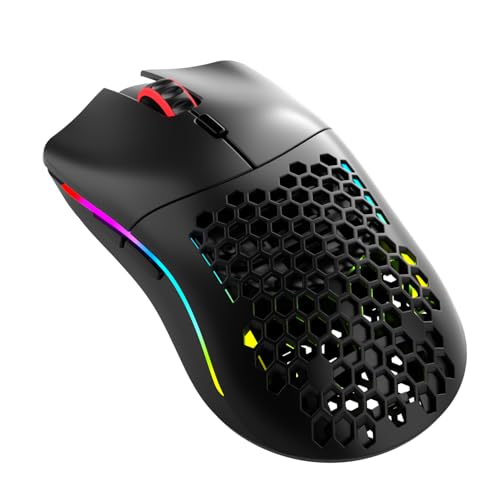
GLORIOUS Model O Classic Wireless Gaming Mouse — Honeycomb lightweight hybrid
Glorious built its name on perforated shells, and the Model O Classic Wireless brings that honeycomb lightness, 69 grams of it, to the hybrid brief with 2.4GHz wireless and a wired mode for charging and travel. The 19,000 DPI sensor tracks well beyond the settings its fingertip audience uses, and the mechanical switches carry a 100-million-click rating that speaks to owners who keep hardware for years. The symmetrical shape is the classic Model O geometry that a generation of players learned on.
The honeycomb is a genuine preference divider: it shaves grams and breathes in warm rooms, and it also admits dust and divides players who dislike texture under the palm. Glorious’s software handles the lighting and bindings without fuss. As a hybrid it behaves exactly as promised, wireless at the desk and wired when the battery or a foreign PC calls, and its value positioning makes it the easiest route into this entire category for players who already know they love the shape.
- Connections: 2.4GHz wireless and wired
- Weight: 69 grams
- Sensor: up to 19,000 DPI
- Switches: mechanical, rated to 100 million clicks
- Shell: symmetrical honeycomb
Strengths
- A light, airy shell that fingertip players adopt instantly.
- Long-rated switches suit owners who keep mice for years.
- Straightforward hybrid manners at an accessible position in the class.
Trade-offs
- The perforated shell admits dust and divides opinion under the palm.
- No Bluetooth for a second, frugal work connection.
- Mechanical switches lack the optical picks’ wear immunity.
Best for: fingertip and claw players who love the honeycomb feel. Not suited for: players who want a sealed shell or Bluetooth pairing.

Razer Naga V2 HyperSpeed Wireless MMO Gaming Mouse — MMO hybrid command centre
The Naga V2 HyperSpeed exists for a different sport entirely. Nineteen programmable buttons, including the famous side grid, put an MMO’s worth of abilities under one thumb, while HyperScroll technology lets the wheel sprint through inventories and documents. Battery life stretches toward 400 hours on the frugal connection, and the Focus Pro 30K sensor means the one specification MMO players are told to ignore is, in fact, flagship-grade. The hybrid wired mode keeps a raid night alive when the battery finally blinks after its marathon.
Everything about it is a specialisation, stated proudly. It is heavier and busier than anything else here, its shape serves the thumb grid before all other gods, and shooter players will find it a handful in every sense. But for the MMO, MOBA and strategy players it was built for, no other pick in this guide is even a substitute, and its wireless endurance means the command centre rarely has to dock. Judge it as the category’s specialist instrument and it is superb; judge it as an all-rounder and you have misunderstood the assignment it so clearly declares.
- Connections: HyperSpeed 2.4GHz wireless and wired
- Buttons: nineteen programmable, with side grid
- Sensor: Focus Pro optical, up to 30,000 DPI
- Battery life: up to 400 hours on the efficient mode
- Wheel: HyperScroll technology
Strengths
- An unmatched button arsenal for MMO and strategy bindings.
- Enormous battery endurance for a mouse doing this much.
- Flagship sensor performance beneath the specialist layout.
Trade-offs
- Heavy and busy for shooters or minimalist tastes.
- The side grid has a learning curve measured in weeks.
- Right-handed, specialist shape with no interest in versatility.
Best for: MMO, MOBA and strategy players who bind entire rotations to the mouse. Not suited for: FPS players or anyone wanting a light, simple shell.
How Do the Six Compare Side by Side?
| Mouse | Wireless modes | Buttons | Character |
|---|---|---|---|
| Logitech G Pro X Superlight 2 | 2.4GHz | 5 | The esports reference |
| Razer DeathAdder V3 HyperSpeed | 2.4GHz | Focused set | Ergonomic and feather-light |
| Razer Viper V3 HyperSpeed | 2.4GHz | Standard set | The endurance champion |
| Razer Basilisk V3 X HyperSpeed | 2.4GHz and Bluetooth | 9 | The triple-life all-rounder |
| GLORIOUS Model O Classic Wireless | 2.4GHz | Standard set | The honeycomb lightweight |
| Razer Naga V2 HyperSpeed | 2.4GHz | 19 | The MMO command centre |
The table’s shape tells the story: four mice compete on the esports and all-round ground with different weights and button counts, one adds Bluetooth to the hybrid idea, and one leaves the mainstream entirely to serve the button maximalists. All six share the defining trait, a wired life that rescues the wireless one.
How Do You Manage Battery Life Without Thinking About It?
The secret is rhythm rather than vigilance. Pick a charging moment that already exists in your week, a particular evening, a work-from-home day when the mouse sits at a desk near a socket, and plug in then whether the battery begs or not. Keep the cable somewhere it can be reached without standing up, because a cable in another room is a charging habit that dies. Turn lighting down or off in the software, since illumination is the thirstiest cosmetic in any wireless mouse, and let the mouse’s sleep settings stay at their defaults unless you have a reason to argue.
Know your mouse’s warning signs and respect the first one. A blinking indicator during a quiet moment is information; the same blink during a boss fight is a crisis you scheduled yourself. Players who use the highest polling rates should treat the wired mode as part of the feature rather than as a defeat: plug in for the sessions that demand the exotic settings, and let the battery live its long, calm life the rest of the week. Managed this way, a hybrid’s battery becomes the least interesting part of the setup, which is the highest compliment a battery can earn.
What Mistakes Do Hybrid Mouse Buyers Make?
The first is assuming every wireless mouse with a charging port is a true hybrid. Some designs charge by cable but cannot play over it, or throttle their performance while tethered, and the distinction only appears when you need it most. Every pick in this guide plays fully over its cable; verify that property in any listing you consider elsewhere. The second mistake is losing the receiver and discovering the mouse has no Bluetooth fallback and the cable is in a drawer in another building. Keep the cable with the mouse, in the same bag, as a rule of travel.
Third, buyers chase headline polling rates without checking whether the required receiver is in the box, then feel misled by a purchase that was merely incompletely read. Fourth, they judge battery life by the box figure and panic when high settings halve it, when the figure was always a best case at gentle settings. Fifth, they forget that a wired mode extends a mouse’s life by years, and replace an ageing hybrid whose battery faded when its cable life had barely begun. Read the fine print, keep the cable close, and the hybrid arrangement rewards you with the least peripheral drama in gaming.
How Do You Troubleshoot a Hybrid Mouse That Feels Wrong?
Use the duality as your diagnostic instrument, because it splits every problem in half. If the mouse stutters wirelessly but runs perfectly on its cable, the fault lives in the air: receiver position, interference or a dying battery. If it misbehaves in both modes identically, the fault lives in the mouse or its settings: clean the sensor lens, check the surface, reset the profile. If it works on one computer and not another in the same mode, the fault lives in the machine: ports, drivers or a jealous piece of software. That three-way sort, impossible with a single-mode mouse, resolves most mysteries in minutes and is an underappreciated reason professionals favour hybrids as their travel tools.
Keep a tiny ritual for the worst evenings: cable in, receiver out, software closed, game relaunched. That sequence strips the setup to its simplest working form, and from there you can reintroduce one variable at a time until the culprit confesses. Panic is the only troubleshooting method that never works, and a hybrid gives you too many calm options to need it.
How Long Will a Hybrid Mouse Serve You?
Longer than a purely wireless one, as a rule, because its failure modes arrive one at a time and each has a workaround. Switches wear first on mechanical designs, which is why the optical and hybrid-switch picks carry a longevity argument. Batteries fade second, across years, and the wired mode converts that fade from a death sentence into a lifestyle change. Glide feet wear third and are replaceable. A hybrid bought well today can reasonably serve through several PCs, ending its career as the wired mouse on a spare desk, still accurate, still honest, long after its wireless prime. That long tail of usefulness is part of what you are paying for, and it rarely appears in a specification table.
Why Has the Hybrid Design Won the Argument?
Step back and the category’s history explains itself. Wired mice were the original gaming tools, trusted and tethered. Wireless mice spent years as the convenience option with an asterisk, until the major makers’ fast links erased the performance gap and left only the battery question standing. The hybrid is the answer to that last question, and it is why the flagship end of the market now assumes both connections as a matter of course. What remains genuinely variable between the six here is not the concept but its execution for different hands and games, which is exactly where a buyer should want the differences to live.
That maturity is good news for anyone shopping today. You are not betting on an experiment; you are choosing among proven interpretations of a settled idea, each with a public track record and a community of owners whose complaints, where they exist, are already documented. Buy the interpretation that fits your hand and your evenings, and the technology will do what mature technology does: disappear.
How Should You Care for a Mouse With Two Lives?
Care splits by mode. The wireless life asks for a clean sensor lens, a receiver kept in its appointed place and a battery treated with the mild kindness described earlier. The wired life asks for cable respect: no tight wraps, no pinches under monitor stands, no yanking the plug out by its lead when a session ends badly. The shell’s care is common to both: a barely damp cloth, air for the crevices, and glide feet replaced when the slide turns scratchy, which on a hybrid can happen in either mode and be diagnosed in whichever you prefer.
Store the mouse the way you would store a good tool rather than a gadget: out of direct sun, away from the blast radius of drinks, with its cable loosely coiled beside it and its receiver either in the PC or in the mouse’s own keeping. Owners who treat the pair, mouse and cable, as one instrument tend to be the ones still using it happily when its fifth birthday arrives, by which time it has usually served two computers and outlived at least one keyboard.
What Does the Cable Teach You About Your Own Play?
An unexpected benefit of hybrid ownership is the experiment it invites. Play the same game, at the same settings, for an evening in each mode and compare honestly. Most players discover the difference they feared, cable drag, has been engineered down to a whisper by modern soft leads, and the difference they did not expect, the slight freedom of movement in wireless play during wide sweeps, is the one they actually feel. That knowledge permanently retires a decade of forum arguments for you personally, and it tells you which mode deserves your competitive sessions and which deserves your travel bag.
The experiment has a second lesson hidden in it. If your aim changes dramatically between modes, the variable is rarely the connection; it is the cable’s routing, the receiver’s placement or a sensitivity profile that differs between them. Fix those, rerun the evening, and watch the gap close. A hybrid mouse, used curiously, becomes a small laboratory for understanding your own setup, which is more self-knowledge than most peripherals ever offer.
How Do You Choose Between These Six in Ten Minutes?
Answer three questions and the guide narrows itself. First, what do your evenings consist of: ranked shooters, long campaigns, mixed work and play, or one MMO that has become a second address? That answer selects the family, esports, ergonomic, all-round or specialist. Second, how much do you hate charging? If the honest answer is deeply, the Viper’s and Naga’s endurance figures move to the top of your page; if charging is a shrug, the lighter mice reclaim their advantage. Third, which hand and grip are yours, and how large is the hand in question? That answer vetoes shells regardless of their other virtues, and it should be allowed to, because you will hold this object for thousands of hours and consult its specification sheet never again after the first week.
Run your three answers against the comparison table and one or two names will remain standing. Between two finalists, choose by the click you prefer and the software you would rather live in, because those are the daily textures of ownership. Then stop researching. The hybrid category’s whole promise is a mouse that removes itself from your attention, and the research process should honour that promise by ending.
What Should You Know About Charging Speeds and Battery Types?
Hybrid batteries divide into two philosophies. Built-in rechargeable cells keep the mouse sealed, balanced and light, and they ask for a cable session every so often, which this entire category exists to make painless. A few designs in the wider market use replaceable cells, trading elegance for the ability to swap in a fresh battery in seconds and never think about cell ageing. The six here favour the built-in route, with endurance ranging from many days to the Viper’s and Naga’s marathons, so the practical difference between the philosophies shrinks: when a mouse runs for weeks per charge, the ceremony of charging it matters less than the fact that wired play continues through it.
Charging speed itself is a minor character. Most of these mice recover a useful charge during a single wired session, which is the only metric that matters in real life: plug in when the light blinks, play, unplug later with a mouse that has forgotten the incident. Owners who want to be kind to a cell avoid leaving it pinned at full charge on the cable for weeks at a time, and avoid running it to absolute zero as a habit, but modern battery management forgives ordinary behaviour generously. The hybrid design’s deepest battery virtue remains the simplest: when the cell finally ages years from now, the mouse does not retire. It just becomes a wired mouse with a distinguished past.
Is a Hybrid Mouse a Good First Serious Mouse for a Young Player?
It can be the wisest first purchase in the whole category, because it forgives the two mistakes beginners reliably make: forgetting to charge, and discovering that a purely wireless mouse at a friend’s house or a school club is a pairing puzzle. The cable rescues both situations without a lecture. A young player also grows through grip styles and games quickly, and a mainstream hybrid shape like the Basilisk V3 X or the Model O Classic will follow that growth further than a narrow specialist would. Parents should set up the profiles once, label the cable’s home, and let the mouse teach the rest.
Durability expectations should follow the household rule: a hybrid that lives in a school bag needs its cable coiled kindly and its receiver pocketed, and it will repay that minimal care with years of service across more machines than a single-mode mouse would ever meet.
Does One Hybrid Mouse Beat Owning a Wired and a Wireless Mouse?
For most players, yes, and the reason is habit rather than hardware. Aim is a trained consistency, and every hour on a second mouse with a different shape is an hour your hand spends maintaining two calibrations. One hybrid gives you one shape, one weight and one click feel across every situation, with the connection changing instead of the instrument. The two-mouse household still makes sense when the two mice serve genuinely different jobs, an esports shape and an MMO grid, for instance, which is why the Naga in this guide can coexist honourably beside any other pick.
Economics nod the same way. A single good hybrid usually costs less than two good specialists, occupies one receiver and one cable in the drawer, and ages as one device to maintain rather than two. The exception is the household with two simultaneous players, where one mouse, however versatile, cannot be in two hands at once, and a second, humbler mouse joins the family fleet.
How Does a Hybrid Mouse Fit a Shared Family Desk?
Beautifully, because its modes map onto the family’s moods. Wireless for the parent working in the morning, gliding between rooms. Wired for the teenager’s evening session, when the battery’s state is nobody’s job to have checked and the cable guarantees the mouse simply works. A second profile per person, where the software allows, ends the sensitivity arguments, and the mouse’s indifference to which machine it serves ends the receiver arguments. The Basilisk V3 X, with its Bluetooth work mode, is the natural mayor of such a desk, though any pick here will serve a household that keeps the cable coiled within reach rather than in a legendary drawer.
Durability in family service follows the familiar script: the mouse that can plug in survives the week a receiver goes missing, and the mouse with optical or hybrid switches survives the click volume of several owners. Buy the hybrid as household infrastructure, not as one person’s jewel, and its cost per happy evening becomes very small indeed.
How Do Hybrid Mice Change Travel and LAN Play?
A hybrid mouse is the traveller’s argument against packing two mice. In the bag it rides wireless for the hotel desk and the café table, and at a LAN or a friend’s house the cable makes it a citizen of any machine in the room without pairing negotiations. Keep the receiver in the mouse’s own storage or a fixed pocket of the bag, because receivers are the size of a thumbnail and have the survival instincts of a sock in a laundry. Players who attend events should also learn their mouse’s behaviour on a completely fresh PC: which settings live on the device, which need the software, and how the sensitivity feels before any profile loads. Rehearsed once, that knowledge turns setup at a strange desk into a ritual instead of a research project.
There is a courtesy angle too. A wired mouse at a shared or borrowed machine asks nothing of its host, no pairing, no drivers beyond the universal ones, no battery roulette. The hybrid owner can be the guest who plugs in, plays well and leaves no configuration behind, which is the kind of guest gaming households invite back.
What About Software Profiles for Each Mode?
Most owners need exactly two thoughtful profiles rather than a library: a gaming profile with your sensitivity, bindings and any lighting you enjoy, and a work profile with gentler settings and the lights calmed. The better ecosystems here store profiles on the mouse itself, so the device carries its personality between machines and modes, while app-dependent setups tie your configuration to one installation. Check where your chosen model keeps its memory before you fall in love with a configuration, especially if your life spans a desktop, a laptop and the occasional borrowed machine.
Lighting deserves a hybrid-specific note: it is the first thing to disable when battery life matters and the last thing to miss when it is gone. Several owners run their mice dark for months and rediscover the glow only when a photograph is due. Treat illumination as the dessert of the feature list, delicious, optional and entirely unrelated to the meal.
Final Recommendation
Competitive players should start with the Logitech G Pro X Superlight 2 for its proven shape and seamless modes, or the Razer DeathAdder V3 HyperSpeed if their hand prefers an ergonomic curve at the same featherweight. The Viper V3 HyperSpeed is the choice for players who want charging to nearly vanish from their lives, the Basilisk V3 X for households whose mouse works and plays in equal measure, and the Model O Classic Wireless for honeycomb loyalists entering the hybrid world. The Naga V2 HyperSpeed stands alone for MMO players, as it should.
Whichever hybrid you choose, spend its first week deliberately in both modes: a wireless day, a wired day, a charge during play, a session at a second machine, and one honest evening of your most demanding game played each way while the return window is still open and the packaging is still in the corner where you left it. A mouse that feels like itself in all of those situations has kept the hybrid promise in full, and it will go on keeping it quietly for years, through new PCs, new desks and new games whose names neither of us knows yet, which is the most unglamorous and most valuable thing gaming hardware can do.
Frequently Asked Questions
Does playing while charging harm the battery?
Modern mice manage their cells sensibly, and occasional charge-while-playing sessions are a designed feature of every pick here, not an abuse. Battery ageing is driven mostly by total cycles and heat over years. Use the wired mode when you need it without guilt, and unplug when the charge is full if you want to be extra kind.
Is the wired mode slower or faster than wireless on these mice?
For human purposes they are equivalent on the models in this guide, which is the point of a true hybrid. Any differences live far below perception. Choose the mode by convenience, battery and setting, never by fear that one of them is secretly the slow one.
What happens if I lose the wireless receiver?
The wired mode keeps you playing immediately on every pick here, and the Basilisk V3 X adds Bluetooth as a second wireless path. Replacement receivers can usually be obtained from the maker for popular models. Keeping the cable with the mouse turns a lost receiver from a crisis into an errand.
Why do some models need a separate receiver for the highest polling?
Very high polling rates demand a radio conversation the standard receiver was not built to sustain, so some makers offer a dedicated receiver as an accessory. The standard connection in the box already exceeds what most players can perceive. Confirm from the listing what is included before budgeting around the headline rate.
Should I keep the mouse plugged in all the time to save the battery?
You can, and the mouse will simply live as a wired one, but you would be spending the hybrid’s freedom for no real gain. Modern battery care is handled by the device, and ordinary cycles of wireless use and occasional charging suit both the cell and the player better than permanent tethering. Plug in for sessions and charges; roam the rest of the time, as the design intends.
How often will I actually need the cable?
Far less than wireless sceptics expect. With the endurance figures in this guide, most players plug in for a session every week or two, and the marathon models stretch that to a monthly non-event. The cable’s other appearances are voluntary: tournaments, travel, troubleshooting and the high-polling sessions where wired play is simply the easiest route to the exotic settings.
Do hybrid mice work with consoles and handheld PCs?
Generally yes, wherever the platform accepts standard mouse input: the wired mode behaves like any USB mouse, and wireless receivers work on many consoles and docks in compatible titles. Support is decided by each game and platform rather than by the mouse, so check your specific title, and default to the cable for the fewest surprises.
Can I use one hybrid mouse with two computers?
Yes, in the practical hybrid way: wireless on the main machine, wired on the second, swapping the cable as you move. The Basilisk V3 X makes it easiest with its Bluetooth mode for the second machine. Fully simultaneous multi-device pairing remains rare in gaming mice, and the cable is the honest workaround.
Related Guides
Explore the neighbouring categories, compare shapes with your own hand resting honestly on the desk in front of you rather than posed for a photograph, measure that hand if you have never done it, and keep your hybrid’s cable somewhere your future self, blinking battery light and all, will actually find it at the exact moment it is needed, with our companions: our complete guide to the best gaming mice, our ambidextrous mouse roundup for players of either hand and our budget gaming mouse guide for strict wallets. You may also want our guide to best gaming mice. You may also want our guide to best gaming mice for $10.
Related guides
- Best 4K UHD HDR HDMI Extenders: 4K60, Long-Run and 4K120 Kits Compared
- Best 25–35 Inch Monitors With Lowest Display Lag: An Honest Ranking Without Invented Numbers
- Best Enterprise SATA SSDs: Endurance Classes, Power-Loss Protection and Fleet Sense
- Best Color Product Label Printers: Six Desktop Machines for Short-Run Product Labels



[…] dollar graphics cards, and anyone whose 1440p ambitions survived the FAQ above should continue to the best 1440p graphics cards for the cards designed for that canvas. You may also want our guide to best 1080p graphics […]