What's inside
- Key Takeaways
- Quick Picks
- How Did We Choose These Picks?
- Why Does Size Rule Everything in a Mini-ITX Build?
- Which Card Fits Which Case? The Six at a Glance
- How Do You Measure a Case for a Graphics Card Properly?
- How Should You Cool a Compact Card in a Small Case?
- What Mistakes Do Mini-ITX Builders Make When Choosing a Card?
- Which Card Suits Which Family of ITX Case?
- What Should You Know About Riser Cables and Sandwich Layouts?
- What About the Power Supply in a Small Build?
- 4060 or 4060 Ti in a Small Case: How Do You Decide?
- In What Order Should You Assemble a Small Build Around the Card?
- How Quiet Can a Small Gaming PC Honestly Be?
- Final Recommendation
- Frequently Asked Questions
- Related Guides
As an Amazon Associate I earn from qualifying purchases. This post may contain affiliate links at no extra cost to you.
gizmoverdict.com is reader-supported. When you buy through links on our site, we may earn an affiliate commission.
Where to buy: Each card below links to a listing verified in this site’s product pool. They were chosen for one shared trait before any other: they physically fit, and can breathe, inside the small cases this guide is about.
Choosing the best graphics cards for mini ITX cases is a different discipline from choosing a graphics card generally, because the case votes first. A mini-ITX enclosure publishes a maximum graphics card length, often a maximum thickness measured in slots, and sometimes a height limit where a power connector or a side panel intrudes — and any card exceeding any one of those numbers is not a tight fit or a squeeze, it is simply not going in. Builders learn this the expensive way when a beautiful full-length card meets a front panel two centimetres too soon. So this guide works the problem in the order the case imposes it: geometry, then cooling, then performance, because in a small case that is the order in which mistakes become irreversible.
The good news is that the modern compact card market is genuinely strong. The RTX 4060 generation in particular was almost designed for small builds: efficient chips that partner brands package into short twin-fan boards with real gaming power at 1440p and excellent 1080p pace. Below them sits a layer of single-fan and ITX-native designs — an 8GB RTX 3050, an RX 6400, an RX 6500 XT Challenger ITX — for the truly tiny enclosures, the console-style boxes and repurposed slim cases where even a short twin-fan card is a rumour. The six picks below span that whole staircase of size classes, so that wherever your case’s limit falls, there is a deliberate choice waiting at that line rather than a compromise you backed into.
One habit will save you money before you read another word: find your case’s stated GPU clearance now, in millimetres, and keep it beside you. Every pick below is discussed against the class of case it suits, but your case’s number is the only one that counts, and manufacturers measure from different points. Measure the physical space too, from the rear bracket to the first obstruction, because a published figure sometimes assumes a front fan removed or a drive cage relocated. Ten minutes with a tape measure is the cheapest component in any small build.
Key Takeaways
- Your case’s GPU length, thickness and height limits decide the shortlist before performance does — measure the real space, not just the published figure.
- The RTX 4060 in short twin-fan form is the sweet spot of this category: genuine 1440p ability in a board most ITX cases accept.
- Single-fan and ITX-native cards serve the smallest enclosures, trading some cooling headroom and memory for a fit nothing else achieves.
- Compact cards concentrate heat; a small case with a deliberate intake fan keeps any of these picks behaving at full speed.
- Check where the power connector sits on the board — a top-edge socket needs height clearance a compact case may not have.
- An 8GB memory buffer is the sensible floor for a new compact gaming build in this list.
Quick Picks
| Pick | Badge | Why it is here |
|---|---|---|
| MSI Gaming GeForce RTX 3050 8GB | Best single-fan step down | An 8GB RTX 3050 in a compact single-fan design with an 1807 MHz boost clock, for tighter cases and lighter budgets. |
| Zotac Gaming GeForce RTX 4060 Twin Edge | Best compact all-rounder | Zotac built its name on small cards, and this short twin-fan 4060 brings 8GB and DLSS 3 generation features to ITX cases. |
| ZOTAC Gaming GeForce RTX 4060 Ti 8GB Twin Edge | Most power in a short board | The 4060 Ti step up, still in Twin Edge compact form, for small builds that refuse to think small. |
| PNY GeForce RTX 4060 8GB Verto Dual Fan | Best value twin-fan | PNY’s straightforward dual-fan 4060 with DLSS 3, for builders who want the chip without paying for decoration. |
| MSI Gaming Radeon RX 6400 | Smallest and simplest | A single-fan Torx design with 4GB, DP and HDMI, for the tiniest cases and the lightest gaming duties. |
| ASRock Radeon RX 6500 XT Challenger ITX 4GB OC | True ITX native | A Challenger board built at ITX length with a 2815 MHz boost clock, for enclosures where length is the law. |
How Did We Choose These Picks?
We began with the tape measure. A card earned consideration only if its design class — short twin-fan, single-fan compact, or ITX-native — maps to a real family of mini-ITX enclosures, because a “compact” card that still needs a mid-tower’s clearance is a marketing adjective, not a category. Within each size class we then ranked by the things small-build owners actually live with: memory capacity, because compact builds are kept for years and 4GB ages faster than 8GB; cooler design, because a small case gives a card less air to work with; and the connector layout, because in a tight enclosure the position of the power socket and display outputs decides whether the build is merely snug or genuinely impossible.
One more filter deserves stating, because it excluded several famous cards: availability of honest dimensions. A compact card whose maker does not publish its length, thickness and height clearly is a gamble in this form factor, however fast it is, and this guide preferred boards whose specifications a buyer can check against a tape measure before money moves. In a category defined by millimetres, a maker who hides the millimetres has told you something about the card’s intended home — and it is not a 17cm motherboard’s neighbourhood.
We also weighted the brands’ track records in small cards. Zotac has made miniaturised performance its identity for years, ASRock’s Challenger ITX line exists specifically for this form factor, and MSI and PNY both publish compact designs with honest dimensions. That history matters because small-card engineering is a discipline of its own: shroud shaping, fan sizing and heat-pipe routing inside a two-slot, short-length envelope is not a full-size cooler photocopied smaller. The ranking below reflects fit class first and speed second, which is the opposite of a normal graphics card guide and exactly right for this one.
Why Does Size Rule Everything in a Mini-ITX Build?
A mini-ITX motherboard is a 17cm square, and the cases built around it divide into families with very different appetites. Cube cases with a horizontal layout often accept surprisingly long cards. Sandwich-style cases, where the card sits behind the motherboard on a riser cable, impose strict thickness and height limits. Console-style cases lying flat under a television restrict height above all. Slim repurposed office enclosures restrict everything at once. The phrase “fits ITX” therefore means nothing until it is followed by a family and a number, and a responsible guide has to keep asking which small case you mean.
Thickness is the dimension builders forget. A card described as dual-slot may have a shroud that bulges past two slots, and in a sandwich case that bulge meets a side panel with no appeal process. Height betrays people too: a tall card with a top-edge power connector needs the connector’s height plus the cable’s bend radius, and in a low case that sum quietly exceeds the panel line. Length gets the attention because it is the number cases advertise, but experienced small-build owners check all three dimensions and the connector position as a set, the way you would check a sofa against a doorway, a hallway turn and a ceiling, not just the door.
Cooling completes the triangle. A compact card exhausts its heat into a small volume of air, and if the case cannot exchange that air, the card’s fans work harder, clocks settle lower, and the build becomes the loud, warm object its owner was trying to avoid. This is why this guide treats case airflow as part of the graphics card decision: the same RTX 4060 is a delight in a ventilated cube and a misery in a sealed box, and no benchmark chart will warn you about the difference.
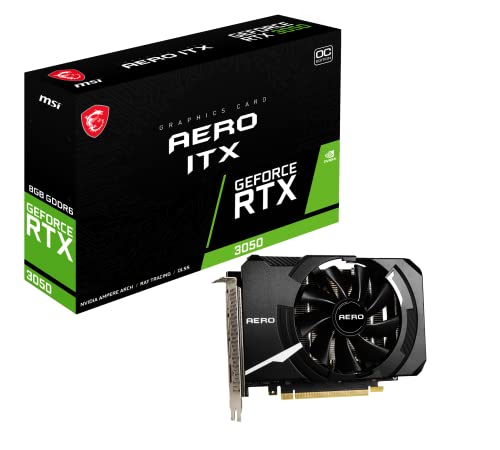
MSI Gaming GeForce RTX 3050 8GB — Best single-fan step down
Not every small case can host a twin-fan card, and not every small build needs one. MSI’s compact RTX 3050 — the title describes an 8GB GDDR6 card on a 128-bit bus with a boost clock of 1807 MHz, HDMI and DisplayPort outputs, PCIe 4 and a single-fan design — occupies the step where the enclosure shrinks or the budget does, without surrendering the two things that age worst: memory and features. The 8GB version of the 3050 is the one to have, doubling the buffer of the 6GB variant that dominates the slot-power world, and in a compact build intended to serve for years that headroom is worth more than a few percent of clock speed.
Expect honest 1080p gaming: esports titles fast, major releases comfortable at sensible settings with DLSS assisting, and an encoder on board for recording and streaming that the Radeon picks below cannot match. The single fan is the honest cost. One fan moving air for the whole card will be more audible under sustained load than the twin-fan designs elsewhere in this guide, and in a warm case it has less margin. In return the board is shorter and simpler to house, and for the many ITX enclosures in the genuinely-small class — the ones whose owners measured and winced at the twin-fan lengths — this is the strongest card that respects the measurement.
- Chip: NVIDIA GeForce RTX 3050
- Memory: 8GB GDDR6, 128-bit, per the listing title
- Boost clock: 1807 MHz, per the listing title
- Outputs and interface: HDMI/DP, PCIe 4, per the listing title
- Format class: compact single-fan design
Strengths
- 8GB of memory at a size and price step below the 4060 cards, which ages gracefully.
- Single-fan compact board fits cases the twin-fan picks cannot enter.
- DLSS and NVIDIA’s encoder keep features modern despite the step down.
Trade-offs
- One fan means more noise under load than the dual-fan designs in this guide.
- Raw performance is a clear tier below the 4060 pair; 1440p is an occasional treat, not a home.
- Its cooler has less thermal margin in a poorly ventilated enclosure.
Best for: a compact build with a shorter card bay or a tighter budget that still wants 8GB and current features. Not suited for: a silent-PC project in a warm case, where a single hard-working fan will make itself known.

Zotac Gaming GeForce RTX 4060 Twin Edge — Best compact all-rounder
Zotac’s Twin Edge treatment of the RTX 4060 is close to the ideal this category imagines: a current-generation NVIDIA chip with 8GB of GDDR6 memory, in a shortened dual-fan board from the brand that has specialised in exactly this trick longer than anyone. The 4060 generation suits small builds in its bones — it is an efficient design that does not ask its cooler to perform heroics — and the Twin Edge format packages that efficiency at a length the mainstream ITX cases were designed around. For the builder whose case accepts a short twin-fan card, this is where the search can reasonably stop.
The gaming substance matches the packaging. At 1080p this card is fast outright; at 1440p it is genuinely capable, with DLSS upscaling and frame generation from its generation’s feature set extending it into titles that would otherwise demand a bigger card and a bigger case. It also carries NVIDIA’s mature encoder for recording and streaming, which matters in small builds more than people expect: the compact second PC by the television often doubles as the household’s capture and stream box. Two fans on an efficient chip also means the fans can loaf, and a quiet small PC is a markedly nicer object than a loud one, especially in a living room.
- Chip: NVIDIA GeForce RTX 4060
- Memory: 8GB GDDR6, per the listing title
- Cooling: Twin Edge dual-fan compact design
- Format class: short twin-fan board for mini-ITX cases with standard compact clearance
- Features: DLSS generation feature set and NVIDIA hardware encoding
Strengths
- The strongest balance of size, memory and features for the largest family of ITX cases.
- An efficient chip lets the compact cooler run quietly rather than merely adequately.
- 8GB of memory gives the build years of texture headroom at 1080p and sensible 1440p.
Trade-offs
- Still too long and thick for the slimmest console-style and sandwich enclosures.
- Its price sits in the middle of this list, above the single-fan step-down picks.
- Two slots of thickness is a real commitment in a case that shares space with storage.
Best for: a mainstream mini-ITX gaming build in a cube or tower-style small case with room for a short dual-fan card. Not suited for: enclosures with a strict sub-two-slot thickness limit or very short card bay, where the ITX-native picks below are the physically possible choices.

ZOTAC Gaming GeForce RTX 4060 Ti 8GB Twin Edge — Most power in a short board
If the Twin Edge 4060 is the sensible summit, this is the ambitious one: the RTX 4060 Ti, again in Zotac’s compact Twin Edge form. The title fills in the specification — 8GB of GDDR6 on a 128-bit bus at 18 Gbps, PCIe 4.0, and DLSS 3 among its features. The Ti step buys meaningful extra frame rate at 1440p and more headroom at 1080p for high-refresh monitors, and it buys them without asking for a longer case, which is the entire point. A small build with this card inside is not a compromise machine that happens to be small; it is a fast machine that happens to be small, and those are different objects to live with.
The considerations are thermal and financial. The Ti draws more power than its sibling, so the compact cooler works harder and the case’s airflow matters more; a ventilated enclosure with a real intake path is part of this purchase whether it appears on the invoice or not. The 8GB buffer is the same as the plain 4060’s, so at 1440p the card’s extra shading power occasionally arrives before its memory does in the newest titles, and settings need the same intelligence. None of that dents its position here: for a builder whose case fits the Twin Edge format and whose monitor is a 1440p or high-refresh 1080p panel, this is the most performance per litre in the guide.
- Chip: NVIDIA GeForce RTX 4060 Ti
- Memory: 8GB GDDR6, 128-bit, 18 Gbps, per the listing title
- Interface: PCIe 4.0, per the listing title
- Features: DLSS 3, per the listing title
- Format class: Twin Edge compact dual-fan board
Strengths
- The fastest gaming performance in this guide, delivered at compact-card length.
- DLSS 3 frame generation stretches it further at 1440p than raw power suggests.
- Keeps the same case-friendly Twin Edge footprint as its 4060 sibling.
Trade-offs
- The highest power and heat of the six, so case ventilation stops being optional.
- 8GB of memory is shared with the cheaper 4060, and texture-heavy 1440p play notices.
- The premium over the plain 4060 buys frames, not a longer-lived memory buffer.
Best for: a well-ventilated ITX build driving a 1440p or high-refresh 1080p monitor, where performance leads and size must follow. Not suited for: a sealed or passively inclined enclosure, whose airflow cannot feed this card’s extra appetite.

PNY GeForce RTX 4060 8GB Verto Dual Fan — Best value twin-fan
PNY’s Verto line has a particular personality: the specification of the moment, presented without theatre. This card is the RTX 4060 with 8GB of memory — the title confirms GDDR6, a 128-bit bus, PCIe 4.0 and DLSS 3 — in a dual-fan Verto design, and that plainness is its virtue for small builds. Compact cases punish decoration; a shroud shaped for shelf appeal wastes the millimetres a builder needs for a fan or a drive. The Verto spends its volume on the cooler itself, and for an ITX owner comparing two 4060s that fit, “the same chip, sensibly packaged, at the keener price” is a complete argument.
Living with it mirrors the Zotac 4060’s story with the accents in different places. The gaming performance is the 4060’s performance — strong at 1080p, capable at 1440p with DLSS — and the dual-fan cooler keeps the efficient chip composed in a ventilated small case. Where the twins part is in the details a buyer should verify rather than assume: exact card length and thickness against your case’s limits, and the power connector’s position, since routing a cable in a packed ITX interior is a puzzle whose difficulty the connector’s edge decides. Check PNY’s published dimensions for this model against your tape measure, and if they pass, the Verto is the value route to this guide’s sweet-spot chip.
- Chip: NVIDIA GeForce RTX 4060
- Memory: 8GB GDDR6, 128-bit, per the listing title
- Interface: PCIe 4.0, per the listing title
- Features: DLSS 3, per the listing title
- Format class: Verto dual-fan compact design — verify exact dimensions for your case
Strengths
- The sweet-spot 4060 specification without a premium charged for styling.
- Dual-fan cooling suits sustained gaming in ventilated compact cases.
- 8GB and DLSS 3 give it the same longevity argument as pricier 4060 boards.
Trade-offs
- Exact dimensions must be confirmed model by model; do not assume a twin-fan 4060’s fit.
- A plainer presentation means fewer extras in the box and less elaborate cooling trim.
- Like every dual-fan pick here, it is excluded from the very slimmest enclosures.
Best for: a value-led ITX build whose case accepts a compact dual-fan card and whose owner verifies dimensions before ordering. Not suited for: an enclosure whose card length and thickness cannot be confirmed before ordering, where a published ITX-native design is the safer purchase.
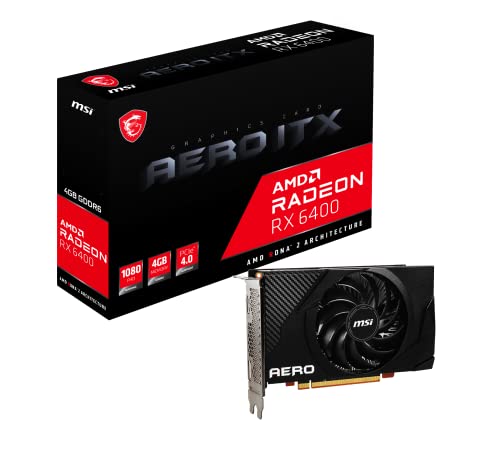
MSI Gaming Radeon RX 6400 — Smallest and simplest
The RX 6400 is the end of the line in this guide’s direction of travel: the smallest, coolest-running genuine gaming card concept in the list. MSI’s version, per its title, pairs the chip with 4GB of GDDR6 on a 64-bit bus, DisplayPort and HDMI outputs, PCIe 4, a Torx single-fan cooler and FreeSync support. Cards of this design are frequently low-profile or near it, sip power at a level that lets them live from the slot in many implementations, and ask almost nothing of a case’s airflow. For the truly tiny build — a mini PC for the spare room, a child’s first games machine in a compact case, a living-room box for indie and older titles — that simplicity is not a compromise but the brief itself.
Set the gaming expectation at light and it will be met completely: esports staples, platformers, strategy and the back catalogue run happily at 1080p, and FreeSync pairing with a compatible monitor smooths the modest frame rates this tier produces into something that feels better than the numbers read. The boundaries are equally clear. Four gigabytes and a narrow memory bus cap what newer large games can do, and this Radeon tier’s encoder limitations rule it out for streamers. Verify the exact board’s dimensions and power arrangement in MSI’s specification, as implementations of this chip vary, then buy it for the machine whose first requirement is that a card fit at all — in that machine, it is not the weakest pick here but the correct one.
- Chip: AMD Radeon RX 6400
- Memory: 4GB GDDR6, 64-bit, per the listing title
- Outputs and interface: DP/HDMI, PCIe 4, per the listing title
- Cooling: Torx single-fan design, per the listing title
- Features: FreeSync support, per the listing title
Strengths
- The least demanding card here in size, power and heat — it fits where nothing else does.
- FreeSync support pairs well with affordable adaptive-sync monitors at this tier.
- Perfectly matched to light 1080p gaming, indie libraries and older titles.
Trade-offs
- The narrow 64-bit bus and 4GB buffer set the lowest performance ceiling in the guide.
- Not a recording or streaming card; its media feature set is minimal.
- Keen gamers will replace it sooner than any other pick here.
Best for: ultra-compact and low-power small builds whose gaming is light and whose space is measured in millimetres. Not suited for: a primary gaming rig for current major releases, where the 4060-class picks are the honest starting point.

ASRock Radeon RX 6500 XT Challenger ITX 4GB OC — True ITX native
Some cards are shortened for ITX; the Challenger ITX line is conceived for it. ASRock’s RX 6500 XT Challenger ITX OC states its case plainly in the title: a 4GB card with a 2815 MHz boost clock on AMD’s RDNA architecture, in a board whose length respects the mini-ITX form factor’s own dimensions. That last point is the pick’s whole identity. In the smallest enclosures — the console-style boxes, the sandwich cases at their strictest, the slim builds where the graphics card shares a wall with the power supply — a card designed at ITX length is not the small option, it is the only option, and having a proper gaming chip at that length is what makes those builds games machines at all.
The performance brief is 1080p with judgement. The 6500 XT chip is a willing raster gamer for esports and mainstream titles, the factory overclock in this OC edition is genuinely brisk for the class, and RDNA efficiency keeps its heat modest — a real virtue where the card’s exhaust has nowhere grand to go. The limits are the familiar ones of its tier: 4GB of memory asks for texture discipline in the newest games, and this Radeon generation’s media features are narrow, so recording and streaming ambitions belong with the NVIDIA picks. Buy it as what it is — the key that unlocks gaming in the cases nothing else fits — and it is excellent value in the only currency that matters there, millimetres.
- Chip: AMD Radeon RX 6500 XT
- Memory: 4GB, per the listing title
- Boost clock: 2815 MHz, per the listing title
- Format class: Challenger ITX-native length
- Edition: factory overclocked (OC) model
Strengths
- Genuine ITX length fits the enclosure class that excludes every twin-fan card here.
- A high stated boost clock for its tier, so the small board is not a detuned one.
- Modest heat output suits enclosures with limited exhaust paths.
Trade-offs
- 4GB of memory is the binding constraint in newer titles at any setting level.
- Media encoding is this tier’s weak flank; streamers should choose an NVIDIA pick.
- In a roomy case its defining virtue is wasted and larger cards serve better.
Best for: the smallest ITX enclosures — console-style and strict sandwich layouts — where card length is measured against the motherboard itself. Not suited for: a build whose case accepts a twin-fan card, where the 8GB picks offer a longer gaming life for the same slot.
Which Card Fits Which Case? The Six at a Glance
| Pick | Memory | Format class | Strongest suit |
|---|---|---|---|
| MSI RTX 3050 8GB | 8GB GDDR6 | Compact single-fan | Shorter bay, lighter budget, full memory |
| Zotac RTX 4060 Twin Edge | 8GB GDDR6 | Short twin-fan | All-round compact gaming |
| ZOTAC RTX 4060 Ti Twin Edge | 8GB GDDR6 | Short twin-fan | Most performance per litre |
| PNY RTX 4060 Verto Dual Fan | 8GB GDDR6 | Compact twin-fan | Value route to the sweet-spot chip |
| MSI Radeon RX 6400 | 4GB GDDR6 | Smallest single-fan | Tiniest cases, lightest duties |
| ASRock RX 6500 XT Challenger ITX | 4GB | ITX-native | Gaming at genuine ITX length |
The table’s real message is that this category is a staircase, not a contest. Each step down trades memory or cooling for millimetres, and the correct step is the one your case’s measurements select. Builders who start from the measurement end up on the right step the first time; builders who start from the benchmark end up fluent in the returns process.
How Do You Measure a Case for a Graphics Card Properly?
Measure three dimensions and one position. Length runs from the inside face of the rear bracket to the first fixed obstruction — a front fan, a drive cage, a radiator — with any removable parts in the configuration you will actually run. Thickness is counted in slots at the bracket, then checked against the shroud’s real depth, because a cooler can overhang its slot count. Height runs from the motherboard’s surface to the side panel, and must include the power connector and its cable bend if the socket sits on the card’s top edge; a connector that fits with the cable kinked hard against the panel is a fault waiting for a warm day. The position check is the outputs: in some slim cases the bracket sits close to a case edge, and a chunky DisplayPort plug needs its own few millimetres of honesty.
Photograph the empty bay with the tape in frame before you order. It sounds like overkill until the card arrives and a dimension is disputed between your memory and the case; the photograph settles it, and it also becomes the reference you use when a future upgrade asks the same questions. Small-build owners accumulate these small disciplines the way sailors accumulate knots — each one learned from a specific, preventable afternoon.
Then compare your numbers with the card maker’s published dimensions for the exact model, keeping a small margin rather than planning to the last millimetre. Foam pads, cable looms and manufacturing tolerance all live in that margin. If a card fails one dimension, it fails; the discipline of this form factor is that there is no partial credit. The consolation is that this guide’s staircase exists precisely so a failed dimension moves you one step, not back to the beginning.
How Should You Cool a Compact Card in a Small Case?
Give the card a supply of fresh air and a way out for the warm kind. In practice that means at least one intake fan positioned so its air reaches the card’s fans — in many ITX cases that is a bottom or front intake directly feeding the GPU — and an unobstructed exhaust path, whether through a rear fan, a vented top, or the power supply’s own exhaust in older layouts. Cards in this guide mostly exhaust into the case interior rather than out of the rear bracket, which makes case airflow the card’s second cooler. Ignore it and even an efficient 4060 will recycle its own heat until clocks and noise both move the wrong way.
Temperature targets deserve a plain word, because new small-build owners often panic at numbers a tower owner would accept. A compact card under gaming load runs warmer than the same chip in a tower — that is physics, not failure. What matters is stability: clocks that hold, fans that settle rather than hunt, and no throttling dips in the games themselves. Judge the build by its behaviour over an hour, not by a single peak reading in the first minute, and let a stable, slightly warm card be what it is: a small machine working exactly as designed.
Cable tidiness is cooling, in a small case. A loom of cables draped across the card’s intake fans is a blanket, and ten minutes spent routing cables along the case’s edges pays for itself in temperature and in the ability to close the panel without sitting on it. Dust discipline matters faster here too: small cases with filtered intakes reward a monthly filter check, because a clogged filter in a low-volume enclosure raises temperatures sooner than the same neglect in a tower. None of this is exotic — it is the ordinary craft of small builds, and it is why two owners of the same card can report different noise, different temperatures and different opinions.
What Mistakes Do Mini-ITX Builders Make When Choosing a Card?
The first is buying the card before the case, or before measuring either. The second is trusting a case’s headline GPU clearance without learning its conditions — many figures assume a front fan removed or a specific drive configuration, and the number that governs your build is the one for the layout you will actually run. The third is forgetting the riser: sandwich cases route the card through a PCIe riser cable, and the riser’s generation and the BIOS’s link settings occasionally need aligning with a PCIe 4.0 card before the machine will boot reliably with it fitted.
The fourth mistake is treating thickness as a rounding error. A card a few millimetres over two slots in a case built for exactly two slots does not fit “with pressure”; it fits with a panel that will not close, which is the same as not fitting. And the fifth is planning the build around a future longer card. ITX cases do not grow. Buy the card that fits the case you own, at the step of the staircase your games need, and the build will be finished — which, in this form factor, is the highest praise a parts list can earn.
Which Card Suits Which Family of ITX Case?
Start with the cube. Cube cases lay the motherboard flat or stand the build in a compact tower shape, and they are the most forgiving family: most accept a short twin-fan card, many accept a modest intake fan in exactly the position a graphics card wants, and their interiors forgive a first-time builder’s cable routing. The Zotac 4060 Twin Edge and the PNY Verto were practically drawn for this family, and the 4060 Ti Twin Edge is its performance option. If your small build lives in a cube and games at 1440p, you are in the guide’s happiest territory.
Sandwich cases are the aristocrats and the disciplinarians. With the card mounted behind the motherboard on a riser, thickness becomes law: the card’s slot count and shroud depth must respect the case’s stated limit exactly, and height is capped by the spine of the case. Short twin-fan cards fit the generous members of this family; the MSI 3050 single-fan and the ASRock Challenger ITX fit the strict ones. Cooling in a sandwich is a partnership between the card’s fans and the case’s vented panels, so a card whose fans sit close to a perforated side panel behaves better than its cooler size suggests — one reason efficient chips rule this family.
Console-style cases, flat boxes meant to lie beneath a television, restrict height first and length second, and they reward the cards at the bottom of this guide’s staircase: the Challenger ITX, the RX 6400, and low-profile designs where the case demands them. Their gaming brief is usually the living room’s brief — indie games, party titles, emulation-adjacent back catalogues and streaming — which the smaller picks serve completely. The mistake in this family is ambition: a console case with a twin-fan card wedged against its lid is a loud, hot object in the room where the household goes to relax.
Finally there are the repurposed and budget small towers, the mini cases sold with office builds. Their card bays vary wildly, their power supplies are modest, and their owners are often upgrading rather than building. Measure everything, respect the supply, and let the staircase do its work: these machines most often land on the MSI 3050 or the RX 6400, and they are transformed by either, because the baseline they start from is integrated graphics and hope.
What Should You Know About Riser Cables and Sandwich Layouts?
A riser cable is a flexible extension of the PCIe slot, and in sandwich cases it is what lets the graphics card fold behind the motherboard like a page. Three ownership facts follow. First, the riser is a component with a specification: its PCIe generation should match the card’s where possible, and a mismatch is the first suspect when a new build boots inconsistently — the BIOS setting that forces the slot to the riser’s generation cures most such cases. Second, the riser hates sharp bends and trapped routes; a cable pinched between a fan and a frame can produce faults that look exactly like a dying graphics card. Third, the card in a riser build hangs in its own chamber, which is thermally separate from the processor’s — good for both, provided each chamber’s panels can breathe.
None of this should scare a buyer off the layout, which produces the smallest high-performance PCs that exist. It should simply move the riser from “cable” to “component” in the buyer’s mind: chosen deliberately, routed kindly, and suspected early when a sandwich build misbehaves. Owners who treat it that way find the layout entirely reliable, and their reward is a 4060 Ti in a box the size of a hardback novel.
What About the Power Supply in a Small Build?
Mini-ITX cases usually take SFX or SFX-L supplies, or arrive with a unit fitted, and the graphics card is the component that decides whether that supply is comfortable. The cards in this guide span a wide appetite range: the RX 6400 class asks very little, the 4060 pair sit in the modest middle that small supplies were designed around, and the 4060 Ti asks the most of the six while remaining a reasonable citizen by modern standards. The discipline is totals, not terror: add the processor’s realistic draw, the card’s, and a margin for everything else, and compare it honestly with the supply’s stated capacity, favouring a quality unit run in the middle of its range over a cheap one run at its edge.
Connector logistics matter as much as wattage in a small case. Check that the supply provides the PCIe power lead your chosen card needs, and plan the cable’s route before the card is fitted, because in a packed ITX interior the power cable’s path can cross the card’s intake fans or block a panel. Modular SFX supplies earn their price here precisely because unused cables can stay in the box instead of being folded into the case’s airflow. And if your build reuses an older small supply, treat the graphics card upgrade as the moment to inspect it: a supply that has run hot and dusty for years is the one component whose failure can take the new card with it.
4060 or 4060 Ti in a Small Case: How Do You Decide?
The decision turns on three questions, in this order. What resolution and refresh rate does your monitor actually run? At 1080p and 60–144 Hz, the plain 4060 already serves so well that the Ti’s extra pace is mostly headroom; at 1440p, or at 1080p with a very high refresh target in competitive titles, the Ti’s advantage becomes visible in the games themselves rather than in charts. How good is your case’s airflow? The Ti’s extra performance arrives with extra heat, and a ventilated cube will shrug it off while a sealed sandwich will not — in a thermally strict case, the cooler-running card can be the faster card in practice after an hour of play, because it never has to slow down.
And what else competes for the budget? The price gap between the two cards is also a case fan, a larger drive, or the difference between a basic and a quality SFX supply — components that shape the whole machine’s manners. Small builds are systems in miniature, and the mature ITX decision is the one that balances the system rather than maximising a single line of it. Buyers who ask all three questions rarely regret either answer; buyers who ask only the first one sometimes build a fast card into a loud, warm box and regret the box.
In What Order Should You Assemble a Small Build Around the Card?
Order matters more in ITX than in any tower, because later components routinely block earlier ones. The reliable sequence begins on the motherboard outside the case: processor, cooler where the design allows, memory and the M.2 drive all fitted on the desk, where your fingers have room. The graphics card goes into the case late but should be test-fitted early — seat it, confirm the bracket, the connector clearances and the panel closure, then remove it while cables are routed. That single rehearsal is the difference between discovering a 3mm conflict with the case open on a table and discovering it with the build otherwise finished.
Route the card’s power cable before the final fitting, leaving the connector accessible, and connect the display cables last of all, after the panel has closed once successfully. Keep the case’s spare screws, the card’s alternative bracket if one is supplied, and the riser’s documentation together in one bag; small builds get reopened for upgrades more often than towers do, and the owner who can find the low-profile bracket two years later is the owner who stored it deliberately. Finish with a thermal soak — a game or a benchmark loop for twenty minutes while you watch temperatures and listen — because a small build announces its problems early and politely if you give it the chance before the desk is tidied.
How Quiet Can a Small Gaming PC Honestly Be?
Quiet enough to forget, if the build is honest about where noise comes from. In a compact gaming PC the graphics card’s fans are usually the loudest moving part under load, and their speed is set by temperature, which is set by airflow, which is set by choices made before the card was ordered. That chain is why this guide treats ventilation as a graphics card feature: the same Twin Edge 4060 that murmurs in a perforated cube will sing in a sealed designer box, and the difference is not the card’s character but its circumstances. Owners chasing silence should favour the efficient chips, the twin-fan coolers run at gentle speeds, and cases whose panels are vented where the card’s fans sit.
Fan curves are the owner’s final tool. Every modern card allows a custom curve through its maker’s software or general utilities, and a curve that accepts a few extra degrees in exchange for lower fan speeds transforms a small build’s manners in films and quiet games, at no cost during loud ones. Combined with an undervolt — a small, well-documented tuning step that reduces the card’s power draw at the same performance — a compact build can be made startlingly civilised. These are refinements, not requirements; the picks above are civilised out of the box in a decent case. But the owner who learns them owns the difference between a small PC that is merely tolerated in the living room and one that is welcome there.
Final Recommendation
Measure your case, then climb only as far up the staircase as the measurement allows. For most ITX builders that landing is the Zotac RTX 4060 Twin Edge: the sweet-spot chip in the format its maker does best. Take the 4060 Ti Twin Edge if your monitor and your ventilation both justify it, the PNY Verto if value leads, and step down to the MSI 3050 8GB, the ASRock Challenger ITX or the MSI RX 6400 as your enclosure’s millimetres dictate. In a big tower, the best card is the fastest one you can afford; in a mini-ITX case, the best card is the fastest one that fits — and the builders who internalise that sentence never have to return anything. There is a particular satisfaction waiting at the end of that discipline: a machine the size of a shoebox that plays like a tower, sits quietly under a television or in the corner of a desk, and was never once a source of buyer’s remorse, because every millimetre of it was decided before it was purchased.
Frequently Asked Questions
What is the maximum card length in a typical mini-ITX case?
There is no single typical figure, which is the point of measuring. Mainstream cube-style ITX cases often accept cards in the short twin-fan class, sandwich cases impose stricter length and thickness limits, and console-style enclosures may only accept ITX-native or low-profile boards. Your case maker’s specification, checked against your own tape measurement of the actual bay, is the only number that should govern a purchase.
Does a twin-fan card always run cooler than a single-fan card?
On the same chip in the same case, generally yes: more fan area moves the same air more slowly and quietly. Across different chips the comparison dissolves — a single fan cooling an efficient low-power chip can run quieter than twins cooling a hotter one. Judge the pairing of chip and cooler together, and remember the case’s airflow is a third partner in every result.
Can I use a PCIe riser cable with these cards?
Yes; sandwich-style ITX cases require one. Match the riser’s PCIe generation to the card where you can, and if a PCIe 4.0 card misbehaves through an older riser, setting the slot to Gen 3 in the BIOS is the standard, reliable workaround with negligible real-world cost at these card tiers. Route the riser without sharp folds, since a kinked riser is a common hidden cause of an unbootable small build.
Is 8GB of memory enough for a compact gaming build?
For 1080p it is a comfortable buffer today, and at 1440p it serves well with sensible texture settings in most titles. It is the capacity this guide treats as the floor for a new build meant to last, which is why the 4060-class and 3050 8GB picks carry it. The 4GB cards here are chosen for fit, not longevity, and their sections say so plainly.
Will a compact card be louder than a full-size one?
It can be, because a smaller cooler has less surface and smaller fans, but chip efficiency matters more than size alone. The 4060 generation’s modest heat output lets compact coolers run gently in a ventilated case, while a hard-working single fan on any chip will be heard. Case airflow is the owner’s lever: feed the card cool air and most compact builds are living-room civilised.
Should I choose the case or the card first?
The case, always, in this form factor — or at minimum, measure the case before the card is ordered. The enclosure’s three dimensions and connector clearances define the staircase of possible cards, and choosing within that staircase is a pleasant decision. Choosing outside it is a return label. If you are planning both from scratch, pick the case whose card bay matches the tier of card you want, then buy the card that the bay selects.
Can I fit a card that is a few millimetres longer than the stated limit by removing a fan?
Sometimes, and the case maker’s clearance figure often tells you so — many publish two numbers, one with the front fan fitted and one without. Removing an intake fan to admit a longer card trades the card’s cooling supply for the card itself, which is occasionally the right bargain with an efficient chip and a well-vented panel, and usually the wrong one with a hotter card. If you make that trade, watch temperatures under a long gaming load before declaring victory, and consider a slim-profile fan as the middle path that keeps both.
Do compact cards hold their value or performance worse over time?
The chip inside a compact card is the same silicon as in a full-size board, so its performance ageing is identical; what differs is the thermal environment it has lived in. A compact card run for years in a hot, unventilated case has had a harder life than the same chip in a cool tower, which is another argument for the airflow habits this guide keeps returning to. Buy the compact card your case selects, cool it properly, and there is no longevity penalty for building small.
Related Guides
Small builds raise companion questions, and three of our other roundups answer them: the guide to graphics cards that do not require an external PSU covers the lowest-power end of compact upgrades, our Ryzen 7 5800X graphics card pairings help if the ITX build is growing around that processor, and the Photoshop and Premiere picks suit the small workstation that edits more than it games.


