Our Top Picks




What's inside
- Why the Alta uses a spring clip instead of a socket
- Why Charge and Flex cables do not fit
- One cable serves both the Alta and the Alta HR
- The electrical side: 5 volts, modest current, one to two hours
- The restart button that copies usually leave out
- Where these cables fail: springs, pins, and the cable neck
- Judging a third-party replacement cable
- Charging habits that suit a very small lithium cell
- A methodical troubleshooting order for a tracker that will not charge
- Telling a genuine cable from a copy before it arrives
- Charging methods that do not work on an Alta
- A practical buying checklist, in order
- Caring for the cable itself
- The Alta HR sensor, the pads, and why seating depth matters
- Spares, travel, and multi-tracker households
- What a healthy charge cycle looks like, stage by stage
- Check prices on Amazon
- A note on markings, materials, and what certification covers
As an Amazon Associate I earn from qualifying purchases. This post may contain affiliate links at no extra cost to you.
A lost or broken charging cable turns a Fitbit Alta into a paperweight within about five days, because the tracker carries no standard charging socket of its own. Unlike a phone, the Alta and Alta HR draw power through a proprietary spring clip that grips the body of the tracker and presses two small electrical contacts against pads on its underside. That single design decision explains almost everything about shopping for a replacement: the cable is not a generic lead with a familiar plug, it is a shaped mechanical part that must match the tracker’s body, its contact spacing, and its contact polarity before any electricity flows at all. This guide works through the connector design, the published electrical figures, the restart button that only the genuine cable carries, the failure points that kill these cables, and the checks that separate a dependable third-party replacement from one that shows a charging icon while delivering almost nothing.
The stakes are modest but real. The Alta family sold in large numbers, the trackers remain in daily use on many wrists, and the original cables are now years old, with springs that have cycled thousands of times and contacts that have lived against skin, sweat, and sunscreen. A replacement cable costs very little compared with a new tracker, yet a badly made one can leave the battery chronically undercharged, overheat at the clip, or fail to make contact at all. Because the genuine article and the cheapest copies look nearly identical in a product photograph, the useful differences are dimensional and electrical rather than visual, and those differences are exactly what the sections below unpack.
Why the Alta uses a spring clip instead of a socket
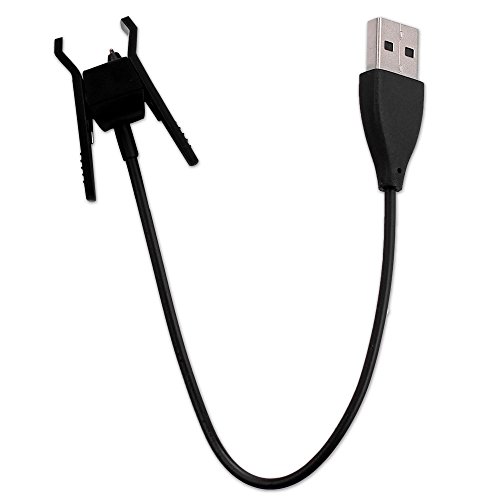
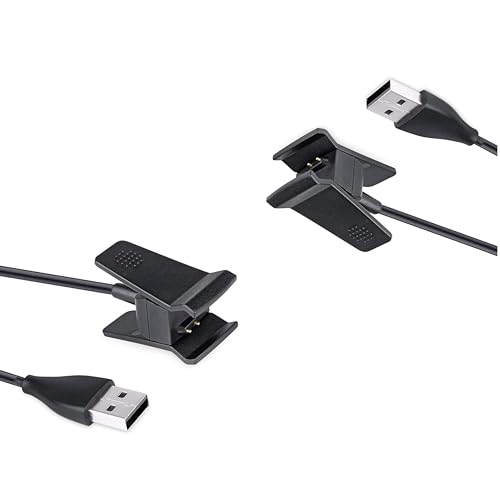
The Alta is a slim band-style tracker, roughly the width of a finger, and its industrial design left no room for a recessed USB socket with a waterproof cover. The manufacturer’s solution was to move the connector off the tracker almost entirely. The tracker itself carries only two flat metal contact pads on its rear face, set into the housing near one end, plus the optical heart-rate sensor window on Alta HR models. Everything else — the spring, the pins, the alignment geometry — lives in the cable. The cable terminates in a clamp whose jaws open when the sides are squeezed and close around the tracker body, and inside the clamp sit two spring-loaded contact pins, often called pogo pins, that land on the tracker’s pads when the jaws close.
Alignment is mechanical rather than magnetic. The clamp is moulded to the cross-section of the Alta body, so the tracker seats in only one orientation, and the pins meet the pads only when the body is fully home in the jaws. A tracker pushed in at a slight angle, or stopped a millimetre short, leaves one pin resting on the plastic housing instead of its pad, and no charge flows even though the clip feels attached. This is the first diagnostic worth remembering: a large share of “dead cable” reports are actually seating problems, cured by removing the tracker, checking the pads for debris, and reseating it until the clamp closes squarely.
The two-pin arrangement also defines the electrical contract. One pin carries the positive 5-volt feed and the other the ground return, and the spacing between the pads on the tracker is fixed by the housing moulding. Any replacement clip whose pins sit even slightly wider or narrower will bridge, miss, or bear on the pad edges, producing intermittent contact that comes and goes as the cable moves. Pin spacing is therefore the single most important dimension on a replacement, ahead of cable length, colour, or the shape of the USB plug at the other end.
Why Charge and Flex cables do not fit
Owners who already have a drawer of older Fitbit cables often ask whether another model’s lead will do. The answer, documented in the manufacturer’s support material, is no, and the reasons are physical. The Charge family used a different clamp with a different jaw profile and a different contact arrangement. The Flex used a small cradle into which the removable pebble tracker dropped, a completely different mechanism. Later Versa and Charge models moved to yet another clamp geometry sized for wider watch-style bodies. Each generation’s clip was moulded around a specific housing, and none of those housings share the Alta’s cross-section or pad spacing.
Forcing a near-fit is worse than no fit. A clamp that grips the Alta body at the wrong points can press its pins against the heart-rate sensor window or the housing seam, and a pin that lands across both pads at once creates a short across the 5-volt feed. USB ports and power adapters normally limit current, so a short usually ends with a warm cable and a port that shuts down rather than a fire, but the tracker gains nothing and the clip’s pins can be damaged. The practical rule is simple: the cable must be sold specifically for the Alta or Alta HR, and listings that claim one clip fits a long list of unrelated models deserve suspicion, because no single moulded clamp can match several different housings at once.
One cable serves both the Alta and the Alta HR
The Alta HR added a continuous heart-rate sensor to the original Alta formula, but the manufacturer kept the same body shell, the same contact pad layout, and the same charging clip. The published support documentation lists a single charging cable for both models, and the cables are interchangeable in practice: an Alta cable charges an Alta HR and vice versa. The heart-rate sensor sits in the centre of the rear face, while the charging pads sit offset towards one end, so the clip’s pins never bear on the sensor window when the tracker is seated correctly.
Confusion arises because the wider Fitbit catalogue contains several other slim trackers with similar-looking clips. The Alta’s successor lines changed the housing enough that their cables, although they share the same general clamp idea, do not seat on an Alta body. When shopping, the reliable identifiers are the model names printed in the listing — Alta and Alta HR, stated together — and the shape of the clamp, which is a narrow jaw sized for a band-width tracker rather than the broader cradle used by watch-style models. A listing that names only “Fitbit” without the model, or that illustrates the cable on a watch-shaped device, is describing a different part.
There is also a generational detail worth noting for anyone buying a used genuine cable. The clip design stayed constant across the Alta’s production life, so age matters more than revision: a genuine cable from any production year fits, but its spring tension and pin plating will reflect its years of use. A used cable that charges reliably when held still but drops the connection when the desk is bumped is showing worn pins or a tired spring, faults covered in detail further below.
The electrical side: 5 volts, modest current, one to two hours
The Alta’s charging system is deliberately ordinary. The manual states that the cable plugs into a USB port and that a full charge takes about one to two hours. The feed is the standard 5 volts that every USB port provides, and the tracker’s internal charge circuit draws only a small current, appropriate to a very small lithium cell. There is no fast-charge negotiation, no higher-voltage mode, and no benefit whatsoever from a high-output adapter: the tracker takes what its charge controller is set to take, and a larger adapter simply idles at the same 5 volts. Anyone hoping a powerful phone charger will shorten the one-to-two-hour window will be disappointed, because the limit sits inside the tracker, not in the supply.
The same modesty makes the Alta forgiving about its power source. A computer USB port, a powered hub, or a basic certified wall adapter all serve equally well, provided the voltage is a stable 5 volts. The manual’s guidance to use a USB port or a properly certified adapter is worth following literally, because the tracker has no way to protect itself against a badly regulated supply. Very cheap unbranded adapters are the ones most likely to deliver noisy or off-spec voltage, and while the absolute energy involved is small, a small lithium cell deserves a clean feed. Pairing a replacement cable with a certified adapter from a known maker is the sensible combination, a point this guide returns to when discussing third-party bundles. Readers comparing adapter options may also find the background in best 2 port usb chargers useful, since a shared bedside adapter often ends up feeding a tracker cable alongside a phone.
Battery life frames how often any of this matters. The manufacturer’s published figure for the Alta family is up to about five days of use per charge, depending on settings and how heavily features such as heart-rate sampling and notifications are used. In practice that means the cable comes out roughly once or twice a week, and each session lasts an hour or two. The duty cycle is gentle, which is why a healthy cable lasts for years — and why failures, when they arrive, tend to be mechanical wear at the clip rather than electrical failure along the cable’s length.
What the charging display actually confirms
When contact is made, the tracker shows a battery icon indicating that charging is under way, and a tap on the display during charging shows the progress state. That icon confirms only that the tracker sees voltage on its pads; it does not certify that meaningful current is flowing. A corroded pin or a high-resistance copy cable can present enough voltage to trigger the icon while delivering a trickle so small that the percentage barely moves over hours. The dependable check is progress over time: a healthy setup visibly advances the charge level within half an hour and completes within the published one-to-two-hour window. A tracker that displays the charging icon at bedtime and shows the same level in the morning has a contact or cable problem, not a battery that suddenly grew larger.
The restart button that copies usually leave out
The genuine Alta charging cable carries a small round button on the underside of its USB plug housing, and that button does something no amount of re-plugging can substitute for. The manufacturer’s restart procedure for an unresponsive Alta reads, in substance, as follows: plug the charging cable into a USB port, attach the tracker, then press the button on the cable three times within a few seconds, pausing briefly between presses. The tracker restarts, signalled by the logo appearing on its display. The button momentarily interrupts and reapplies power in a pattern the tracker’s firmware treats as a restart command, which is why the procedure works even when the tracker itself is frozen and ignoring taps.
Most third-party replacement cables omit this button entirely. Their plugs are plain housings with no switch inside, because the button adds cost and because many copy makers either never knew its function or assumed it was decorative. The consequence only becomes clear on the worst day of ownership: a frozen Alta attached to a buttonless cable cannot be restarted by the documented method. The remaining options are to wait for the battery to run completely flat — up to five days, per the published battery figure — and then recharge, or to borrow a genuine cable for thirty seconds. Neither is catastrophic, but both are needless if the omission is spotted at purchase time.
Checking for the button is easy and should sit near the top of any buying checklist. Product photographs of genuine-style cables show a small circular button on the flat underside of the USB plug; listings for cables that include the restart function usually mention the reset or restart button in their feature text. A cable described only as a “charging cable” or “charger lead” with photographs showing a smooth plug underside will charge perfectly well day to day, and for a second cable kept in a travel bag that may be enough. For the one cable an owner relies on at home, the button is worth insisting on, because the restart procedure is the documented fix for the most common Alta fault of all — a tracker that has stopped responding.
Where these cables fail: springs, pins, and the cable neck
Replacement cables have a predictable autopsy. The first failure is spring fatigue in the clamp. The jaws are opened and closed for every charge cycle, and the small spring or flexing plastic hinge that provides clamping force weakens with use and with heat. A tired clamp still closes, but it no longer presses the pins into the pads with the original force, so contact becomes marginal: charging starts, then stops when the cable shifts, or works only when the tracker is laid in one particular position. The tell-tale sign is a clip that feels loose on the tracker body compared with its original snug fit, or one that can be wiggled side to side once closed.
The second failure is at the pins themselves. Pogo pins are usually plated to resist corrosion, but the plating is thin, and the Alta’s pads live against skin. Sweat is salty and mildly acidic, sunscreen and soap residue are common on the rear face of a worn tracker, and all of it transfers to the pins and pads over months of contact. The result is a dull, darkened, or greenish contact surface with rising electrical resistance. Charging slows, becomes intermittent, or stops, even though every part looks mechanically sound. The pads on the tracker suffer the same film, which is why cleaning only one side of the interface often disappoints.
The third failure hides inside the cable at the point where it enters the clamp housing — the neck. Every charge cycle involves flexing the cable near that rigid housing as the clip is squeezed and the tracker is laid down, and the conductors inside eventually fatigue and break strand by strand at exactly that bend point. A cable with a neck fracture typically works when held in one curve and fails when straightened, or charges only while someone holds the clip at an angle. There is no repair worth attempting on a moulded cable; a confirmed neck fracture means replacement.
Cleaning the contacts correctly
Before condemning a cable or a tracker, the contact interface deserves a proper clean, because a large fraction of charging faults are nothing more than film on the pads. The manufacturer’s care guidance and general electronics practice agree on the method. Power everything down and unplug the cable. Wipe the pads on the back of the tracker with a soft, dry, lint-free cloth or a dry cotton swab. For stubborn residue, a cotton swab barely dampened with isopropyl alcohol lifts sweat salts and sunscreen film effectively; the swab should be damp, never dripping, and the tracker should be left to dry fully before the clip goes back on. The pins inside the clamp get the same treatment, worked gently so the spring plungers are not bent sideways. Metal tools, abrasive pads, and household cleaners have no place here: scratching through the thin plating on a pad or pin exposes base metal that corrodes faster than the original surface did, trading a one-time cleaning problem for a permanent one.
Prevention is simpler than cure. Rinsing and drying the tracker after sweaty workouts, as the care guidance suggests for the band and housing generally, keeps salt off the pads. Storing the cable loose rather than wound tightly around the clamp reduces neck fatigue. And seating the tracker fully in the jaws, rather than letting it hang by the cable, keeps bending loads off the neck joint during the one to two hours of each charge.
Judging a third-party replacement cable
Because the genuine cable is no longer the easiest part to buy new, third-party replacements fill most of the market, and their quality spans a wide range. The checks that matter follow directly from the mechanism described above. First, clamp fit: the jaws should close on the tracker with firm, even pressure and no sideways play, and the tracker should not rock once seated. A clamp that needs to be held shut by hand, or that grips only at one edge, will deliver intermittent charging no matter how good its cable is. Second, pin alignment and polarity: the two pins must land centred on the tracker’s pads, and the positive and ground pins must be the right way round. Polarity cannot be seen from outside, which is one reason to favour established accessory brands whose tooling is consistent, over the very cheapest unbranded listings whose internal wiring varies between production runs.
Third, the plug end deserves the same scrutiny as the clip end. The restart button, discussed above, is the headline feature, but build details matter too: a plug housing that flexes or creaks suggests thin mouldings and strained solder joints inside, and a cable that exits the plug without a proper strain-relief sleeve will fatigue at that joint just as the originals fatigue at the clamp neck. Cable length is a genuine practical choice rather than a specification to maximise. Short cables around 30 centimetres suit a laptop port on a desk and travel well; cables near a metre reach a bedside adapter more comfortably. Excess length coiled beside a bed is harmless electrically, since the currents involved are tiny and voltage drop over these distances is negligible for this application.
Fourth, consider what the cable will be plugged into, because a replacement cable is only half of the charging chain. Bundles that include a wall adapter shift the safety question to that adapter. A bundled adapter should carry recognisable safety certification marks from bodies such as UL, ETL, CE, or FCC, printed on the adapter itself rather than only claimed in a listing. An adapter with no marks, a featherweight feel, and a price that seems impossible is the weakest link in the whole setup, and the prudent move is to discard the bundle adapter and use a certified one already in the house. The same logic applies to multi-port adapters shared with other devices; the roundup at best 4 port chargers covers the port-sharing behaviour that matters when several gadgets charge overnight from one block.
The “shows charging but never fills” trap
The most deceptive failure of cheap copy cables is the one mentioned earlier: the tracker displays its charging icon, yet the battery level creeps upward over many hours or not at all. The mechanism is resistance. Undersized conductors, poorly crimped pin connections, and thin pin plating all add resistance in series with the tracker, and the tracker’s charge controller, seeing a sagging supply at its pads, reduces its draw or cycles on and off. Voltage is present — enough for the icon — but the energy transfer is a fraction of what a sound cable delivers. The diagnostic is timing, not appearance: a charge that has not completed well beyond the published one-to-two-hour window, on a clean, correctly seated connection, indicts the cable. Swapping in any known-good cable for a single charge cycle confirms the diagnosis before money is spent, which is a strong argument for owning two cables rather than one.
Heat is the other warning sign that should end an experiment with a cheap cable immediately. The clip, the plug, and the cable itself should all stay at room temperature during charging; the currents are so small that a healthy setup generates no perceptible warmth anywhere. A clip or plug that feels warm to the touch indicates resistance concentrated at a poor joint, and continued use risks damage to the tracker’s pads and its small cell. Warmth, a flickering charge icon, or a connection that drops when the cable is touched are all reasons to retire a cable on the spot rather than nurse it along.
Charging habits that suit a very small lithium cell
The Alta’s battery is a tiny lithium cell, and small cells reward gentle treatment because they have so little capacity to spare as they age. The chemistry dislikes two things above all: heat and long periods held at extremes of charge. The practical habits follow from those two dislikes. Charge the tracker somewhere cool and ventilated rather than on a sunny windowsill or beside a radiator, and avoid leaving it clipped to the cable in a hot car. Take the tracker off the charger once it is full rather than leaving it attached for days; the charge controller stops the charge properly, but a cell held at full voltage in a warm room ages faster than one resting at a partial charge on a wrist, where it is at least doing its job.
Overnight charging deserves a balanced word. The published one-to-two-hour charge time means a tracker clipped on at bedtime spends most of the night sitting full on the charger. Occasionally, that is harmless. As a nightly routine for years, it is a habit the cell would not choose, and owners who charge while getting ready in the morning, or during an evening at a desk, give the battery an easier life with no real inconvenience, since an hour restores most of the capacity and the published runtime of up to five days leaves generous margin. Shallow, frequent charges suit this chemistry well; there is no memory effect to defeat and no benefit in running the tracker to empty before charging. In fact, repeated deep discharges to the point where the tracker shuts down are among the harder cycles a small cell can be asked to perform.
Storage follows the same logic for anyone with a spare tracker or a seasonal routine. A lithium cell stored for months keeps best at a partial charge, in a cool dry place, rather than full or empty. The Alta’s five-day runtime makes full storage charge easy to arrange by accident: charge it, leave it in a drawer, and it sits at full voltage slowly ageing. Half-charging before storage takes a few minutes and is kinder. Finally, a note on the adapter habit that ties this section to the rest of the guide: a tracker charged from a laptop port during the working day is a tracker that never meets a dubious wall adapter at all, and for many owners that is the simplest safe routine available. For cars and travel, the considerations in best 18w car chargers apply to the adapter side of the chain, while the cable side still demands the Alta-specific clip described throughout this guide.
A methodical troubleshooting order for a tracker that will not charge
When an Alta refuses to charge, the temptation is to order a new cable immediately. A short sequence of checks, ordered from the most common cause to the least, usually finds the fault first and sometimes fixes it for free. Step one is seating: remove the tracker from the clip, look at the pads, and reseat it firmly, confirming that the clamp closes squarely and the charging icon appears. Step two is the interface clean described earlier — pads and pins both — because film on the contacts outnumbers every other electrical fault. Step three is the power source: move the cable to a different USB port or a different certified adapter, since a single dead port or a failed adapter imitates a dead cable perfectly. A computer port that has gone to sleep, or a hub port shared with hungry peripherals, can deliver too little for the tracker to begin charging even though the port works for a mouse.
Step four is the cable itself, tested by substitution where possible. Borrowing any Alta cable for one charge cycle separates cable faults from tracker faults conclusively. Step five, if the tracker still shows nothing, is the documented restart: genuine cable attached, button pressed three times in a few seconds, watching for the logo that signals a reboot. A tracker that restarts and then charges had a firmware freeze, not a hardware fault. Only after those five steps should suspicion settle on the tracker’s battery or internal circuitry, at which point the published support channels are the remaining route, because the Alta’s cell is sealed inside the housing and is not a user-replaceable part.
Two patterns deserve specific mention because they mislead owners into replacing the wrong component. The first is the tracker that charges normally but empties within a day instead of the published figure of up to five days. That pattern points at the battery’s capacity or at a setting that keeps the tracker busy — constant heart-rate sampling and heavy notification traffic both draw on the cell — rather than at the cable, which has done its job once the tracker reads full. The second is the tracker that charges only when the cable is propped at an angle with a book or an elastic band. That pattern is the classic signature of a neck fracture or worn pins in the cable, and no cleaning will cure it; the cable has reached the end of its mechanical life and a replacement is the correct spend.
Telling a genuine cable from a copy before it arrives
Photographs in listings are unreliable witnesses, since copy makers routinely illustrate their products with images of the genuine article. The details that survive this deception are textual and structural. A genuine-specification cable has the restart button, and honest listings for such cables say so, often using the words reset or restart. The clamp in photographs should show two distinct pins inside the jaws rather than a flat contact plate, because the Alta’s interface is built around two spring pins. The listing should name the Alta and Alta HR specifically and should not promise compatibility with the Charge, Versa, or Inspire families, whose clips differ. A listing that promises one clip for many unrelated models is describing a physical impossibility, and its other claims deserve the same trust.
Price carries information too. The genuine cable was always a modestly priced accessory, and well-made third-party versions cluster near that territory because the clamp tooling, spring pins, and button all cost money to produce. Listings priced at a small fraction of that level are telling the buyer, in advance, which components were left out: usually the button first, then pin plating quality, then conductor thickness. None of that makes a cheap cable useless as an emergency spare kept in a gym bag, but it does mean the cheap cable should not be the only cable, and it should be watched for the warmth and flickering-icon warnings described earlier during its first few charges.
Packaging and markings offer a final check once a cable arrives. Genuine cables carry moulded branding and regulatory markings on the plug housing; reputable third-party brands print their own names and certification marks. A completely unmarked plug, with no maker, no model, and no marks of any kind, has passed through no visible quality system at all, and returning it is a better use of time than testing it against a tracker that cannot be repaired if the experiment goes wrong.
Charging methods that do not work on an Alta
Because the Alta’s interface is two exposed pads and nothing else, several familiar charging methods simply have nothing to connect to. Wireless charging is the most common false hope. The tracker contains no receiving coil, so placing it on a charging pad does nothing at all, however the pad performs with phones and earbuds; readers curious about that separate technology will find it covered in best 10w wireless chargers, but no pad can help an Alta. Magnetic snap cables sold for other tracker and watch brands are equally irrelevant: their magnets align contacts spaced for a different device, and the Alta’s pads will not meet them. USB-C and micro-USB leads have no socket to enter. Even the charging cases and docks sold for earbuds-style gadgets assume a device that drops into a shaped well with contacts in standard places, which the Alta is not.
The one alternative that does work, within limits, is a generic two-pin pogo cable of the sort sold for children’s smartwatches and no-name fitness bands. A few of those cables share a similar pin spacing by coincidence, and an owner in a remote place might find one that makes contact. The risks are the ones already covered: unknown polarity, unknown pin spacing tolerance, and no restart button. Polarity is the serious one, because a reversed feed applies voltage the wrong way to the tracker’s pads. Anyone forced into this experiment should treat it as a last resort, watch the first minutes of charging continuously, and stop at the first sign of warmth or a flickering display. The correct Alta cable is inexpensive and widely stocked; improvisation is rarely worth it outside genuine emergencies.
A practical buying checklist, in order
The whole guide condenses into a short sequence of checks that can be run against any listing in a couple of minutes. First, confirm the listing names the Alta and Alta HR and no incompatible models. Second, confirm the restart button appears in the photographs or the feature list; treat its absence as a deliberate economy, acceptable only in a spare. Third, look for two spring pins inside the clamp in the product images, and for a clamp described as sized for the Alta body rather than a universal grip. Fourth, choose the length for the intended station — short for a desk or laptop bag, longer for a bedside adapter — and prefer a plug housing with moulded strain relief at both ends of the cable. Fifth, if an adapter is bundled, check for printed safety certification marks and be ready to substitute a certified adapter already owned. Sixth, plan to own two cables if the tracker is worn daily: one at home, one where the tracker is most often away from home, so that a single failure or a forgotten cable never leaves the tracker dead for days.
On arrival, the first charge is a small acceptance test. Clean the tracker’s pads, seat it carefully, and time the charge. A sound cable on a healthy tracker completes within the published one-to-two-hour window, stays cool at every point, holds the connection when the desk is lightly bumped, and lets the tracker restart through the three-press button procedure. A cable that passes those four checks has demonstrated everything that matters about it, and the brand name on the plug becomes irrelevant. A cable that fails any of them should go back while the return window is open, because none of those faults improve with age.
One last ownership note concerns the tracker end of the partnership. The pads on the Alta are part of a sealed, ageing device, and their plating wears a little with every clip cycle and every cleaning. Treating the interface gently — no scraping, no abrasive cleaning, no forcing of foreign clips — preserves the one component in the system that cannot be replaced at accessory prices. The cable is the consumable; the tracker is not.
Caring for the cable itself
A charging cable leads a harder life than its simplicity suggests. It is squeezed, coiled, dropped into bags, trapped under laptop lids, and left plugged into adapters behind furniture where heat and dust collect. A few habits extend its working life considerably. Coil it loosely in large loops rather than winding it tightly around the clamp or the adapter, because tight winding concentrates bending exactly at the two rigid housings where conductors fatigue. Keep the clamp jaws closed when the cable is stored, so the spring rests in its least stressed position and the pins are sheltered inside the jaws instead of exposed to bag lint and grit. If the pins do collect fluff, a dry cotton swab or a puff of air clears it; probing inside the clamp with a metal pin risks bending a plunger or shorting the pins against each other.
Heat and moisture are the cable’s other enemies. A cable left permanently in a bathroom charges a tracker in the most humid room of the house, and the pin plating pays for it over time. A cable draped over a radiator or left on a car dashboard in summer ages its insulation and its spring alike. None of this requires elaborate precautions — a drawer or a desk hook in a dry room is an ideal home — but the difference between a cable stored that way and one living in a steamy bathroom routinely shows up as a year or more of service life.
The USB plug end also benefits from occasional attention. Plugs accumulate pocket lint and desk dust in the shell, and a plug that no longer seats fully in a port can imitate a cable fault. A visual check and a gentle puff of air solve it. Plugs should be pulled out by the housing, never by the cable, because the conductors terminate immediately behind the housing and every tug-by-the-cord spends some of their fatigue life. These are small disciplines, but the Alta’s cable is asked to work for years on a device with a five-day charging rhythm, and small disciplines are exactly what multi-year service is made of.
The Alta HR sensor, the pads, and why seating depth matters
The rear face of the Alta HR packs three features into a small area: the optical heart-rate sensor in the centre, with its green light emitters and receiver, and the two charging pads towards one end. The clamp is shaped so that its pins reach the pads while the jaws clear the raised sensor housing. This geometry explains a subtle failure that puzzles owners of the HR model in particular. A clamp from a copy maker, moulded a fraction too shallow, can ride up on the sensor housing and hold the pins a hair’s breadth off the pads. The clip feels closed, the tracker sits still, and yet the pins float above their contacts or touch them so lightly that any vibration breaks the circuit. The charging icon may flash as the tracker is set down and vanish once hands are removed.
The cure, short of replacing the cable, is to seat the tracker and then confirm the icon persists after letting go, and to charge the tracker on a still surface rather than dangling from a port. The real lesson is about tolerances: the Alta interface works because a few tenths of a millimetre are held consistently across millions of clamps and trackers, and copy tooling that drifts by even that small amount produces exactly this class of maddening, intermittent fault. It is also why a cable that charged an original Alta perfectly is not guaranteed to sit as happily on an Alta HR, despite the shared specification — the sensor housing gives a marginal clamp something extra to ride on.
Skin-side cleanliness matters here as well. The sensor window and the pads share the same environment of sweat, soap, and lotion. Residue that would merely cloud the heart-rate readings on the window can insulate a charging pad outright, because the pad needs bare metal-to-metal contact rather than a view through a film. The cleaning routine described earlier in this guide therefore serves both functions of the rear face at once, and owners who charge an HR model should treat pad cleaning as part of the same habit as wiping the sensor after exercise.
Spares, travel, and multi-tracker households
A household with two Alta wearers, or one wearer who travels for work, quickly discovers that the cable is the accessory most often in the wrong building. The economics favour spares: a second cable costs little, weighs almost nothing, and converts a forgotten-cable week from a dead tracker into a non-event. The sensible arrangement is one fully specified cable — with the restart button — at home, and a plainer charging-only cable in the travel kit or office drawer, where its missing button matters less because the home cable exists for the rare frozen-tracker day. Labelling the two, or choosing different colours where the maker offers them, prevents the buttonless cable from quietly becoming the only one at home after a trip.
Travel charging itself is undemanding. The cable runs from any USB source, including the low-output ports in aircraft seats and train carriages, because the tracker’s current draw is small. Those sources charge slowly in absolute terms for power-hungry devices, but the Alta’s cell is tiny, and even a weak port fills it within a reasonable multiple of the published one-to-two-hour figure. A small power bank is the most flexible travel source of all, and the tracker can be charged from one several times over before the bank itself needs attention. Owners charging from a shared hotel adapter should simply remember the earlier guidance: the cable is only half the chain, and the adapter half should be a certified one, carried from home rather than borrowed from an unknown bedside table.
Finally, a word about the end of the Alta’s own road. Batteries in sealed trackers eventually lose enough capacity that even a perfect cable cannot restore a five-day rhythm, and at that point continued spending on cables is good money after bad. The honest sequence is the troubleshooting order given above: clean, reseat, substitute the source, substitute the cable, restart — and only then conclude that the tracker itself has aged out. Owners who follow that order will rarely buy a cable they did not need, and will know, when the time does come, that the fault was in the device and not in a ten-dollar lead.
What a healthy charge cycle looks like, stage by stage
Knowing the normal rhythm of a charge makes abnormal behaviour easy to spot. In the first minutes after the clip closes, the tracker wakes its display, shows the charging indicator, and begins drawing current at its highest rate of the session, because a lithium cell in the middle of its charge range accepts energy fastest. Through the middle of the session the level climbs steadily; owners who tap the display at intervals see a percentage, or a battery graphic, that has clearly moved since the last check. Towards the end, the charge controller tapers the current as the cell approaches full voltage, so the last portion of the charge takes disproportionately long compared with the first portion. This taper is normal lithium behaviour and is built into the tracker, not the cable: the final stretch from nearly full to full always crawls relative to the brisk early climb.
That rhythm gives owners a practical yardstick that needs no instruments. A tracker clipped on at a quarter charge should show obvious progress within twenty minutes and should be finished, or nearly so, inside ninety minutes. A tracker that sits at the same indicated level for forty minutes has a problem in the chain, and the troubleshooting order in this guide applies. A tracker that reaches full suspiciously fast — a few minutes from empty to full — is reporting a cell whose real capacity has shrunk with age, since the controller judges fullness by voltage, and an aged cell reaches that voltage after accepting very little energy. Both extremes are diagnostic gold, and both are visible only to an owner who knows what the healthy middle looks like.
Temperature threads through the whole cycle. A cell charges most contentedly at ordinary room temperature. In a cold room or a cold car, the same charge takes longer and the controller may limit current to protect the cell; in a hot environment the charge completes but at a cost to longevity, as discussed earlier. The Alta’s small size makes it quick to adopt the temperature of its surroundings, so simply moving the charging spot from a cold windowsill or a warm equipment shelf to an ordinary desk changes the conditions of every charge for the better.
Check prices on Amazon
Live listings for the shortlist in this guide are pulled from Amazon below, so prices and availability are always current at the moment you look.
A note on markings, materials, and what certification covers
Replacement cables sit at the unglamorous end of the electronics market, where certification is often treated as decoration. It is worth being precise about what the marks do and do not promise. Safety certification of a wall adapter, by a body such as UL or ETL, addresses the adapter’s isolation from mains voltage, its behaviour under fault, and the flammability of its materials. That matters because the adapter is the one component in the charging chain connected to the mains. The cable itself operates only at 5 volts and carries no mains risk; its quality questions are mechanical and metallurgical — pin plating, conductor gauge, moulding tolerances — and no certification mark answers those. This division explains the buying advice running through this guide: insist on certification where mains voltage is involved, and judge the low-voltage cable by fit, finish, and first-charge behaviour instead.
Materials leave clues for anyone willing to look. A clamp moulded in a decent engineering plastic has crisp edges, even colour, and no sharp flashing along the mould split lines. Pins with proper plating have a bright, even finish rather than a dull or patchy one. Cable insulation that feels rubbery and recovers from bending, rather than stiff and plasticky, generally covers conductors with better fatigue life at the neck. None of these observations requires expertise; they are the same judgements a buyer makes about any small manufactured object, applied to a part whose failure modes this guide has now enumerated. A cable that looks carelessly made usually is, and in a component built around tenths of a millimetre, carelessness is the whole story.
One small habit ties several of these threads together: charging at a fixed station. A tracker that always charges at the same desk or bedside spot, from the same certified adapter, with the same cable kept loosely coiled beside it, lives in the gentlest conditions this guide can arrange — clean contacts checked by routine, a spring that is never strained by travel, a neck that is never bent around luggage, and an owner who notices immediately when the familiar rhythm of the charge changes. Most cable failures announce themselves early to an owner with a routine, and early notice is the difference between ordering a replacement calmly and losing a week of activity records to a dead wrist.
Some of the links in this guide are affiliate links. If a reader buys through one of them, the editorial team may earn a commission from the seller, while the price paid by the buyer stays exactly the same.
Choose the cable that matches the clip, carries the button, and finishes the charge inside two hours, and an Alta will keep its quiet five-day rhythm for years beyond the life of its first lead.