What's inside
- Where to buy
- Key Takeaways
- Quick Picks
- Why does screen size belong in a camera guide?
- How do the six big-screen camera systems compare?
- What makes a display good for photography, beyond size?
- How should you handle a big phone as a camera?
- What mistakes do big-screen buyers make?
- How does a big screen change phone video?
- Which big-screen life is yours?
- What should you test in the first week with a big-screen camera?
- Which photographic genres gain most from the big canvas?
- How should you read display claims on a listing?
- What accessories earn their place with a big camera phone?
- What do battery and heat do on a long big-screen shoot?
- Is there an accessibility case for the biggest screens?
- How should you set up a big screen for serious editing?
- Where do foldables fit in the big-screen camera story?
- Can two shooting days show the difference?
- What does the big-screen category cost you, honestly?
- Final Recommendation
- Frequently Asked Questions
- Related Guides
As an Amazon Associate I earn from qualifying purchases. This post may contain affiliate links at no extra cost to you.
gizmoverdict.com is reader-supported. When you buy through links on our site, we may earn an affiliate commission.
Where to buy
Five phones below link to verified Amazon US listings; the sixth, Apple’s largest iPhone, is covered in prose for the by-now familiar reason that Amazon US stocks it renewed-only at present, while new units sell through Apple and the carriers. The best camera big screen phones occupy a peculiar and wonderful niche: the screen is not packaging around the camera, it is part of the camera. A 6.7-to-6.9-inch class display is simultaneously the largest viewfinder most photographers will ever use, a light table for culling a day’s shoot, and an editing desk where cropping decisions get made at a size that reveals the truth.
That triple role changes what a buyer should optimise for. Brightness matters because viewfinders are used outdoors; size matters because focus is judged on it; and the camera system matters in a new way, because a big, honest screen exposes mediocre files mercilessly. A soft photograph on a small phone is a disappointment. The same photograph on a 6.9-inch panel is an education. The picks below were chosen as systems — lens array plus the glass it is judged on — and the guide that follows the reviews treats the display as photographic equipment throughout, because on these phones it is.
Two listings deserve their customary flag. The Galaxy S25 Ultra here is the international dual-SIM GSM version, and the Xperia 1 VIII is likewise an international GSM model; both ask US buyers to verify carrier compatibility, and both repay the homework with hardware no US-version listing in this pool duplicates. The S26 Ultra and S25 FE, by contrast, carry US warranty wording on their listings, for buyers who prefer the paperwork simple.
Key Takeaways
- Samsung’s Galaxy S26 Ultra tops the list as the current US-version flagship: Privacy Display, Galaxy AI and an AI camera system on the listing, with a US warranty behind it.
- The S25 Ultra international brings the 200MP camera and a 6.9-inch 120Hz AMOLED, the reach-and-resolution route for buyers who clear the GSM check.
- OnePlus’s 15 pairs its big-screen brief with a 7300mAh battery and Snapdragon 8 Elite Gen 5 pace, the endurance flagship of the group.
- Sony’s Xperia 1 VIII is the tall-screen purist’s choice, a 6.5-inch 120Hz OLED shaped for the viewfinder rather than the video feed.
- The Galaxy S25 FE is the accessible big screen: a large display and 4900mAh battery with US warranty wording, per its listing.
- Apple’s iPhone 17 Pro Max, in the 6.9-inch class, is the prose-only benchmark — renewed-only on Amazon US at present.
Quick Picks
| Pick | Badge | Why it is here |
|---|---|---|
| Samsung Galaxy S26 Ultra | The current flagship canvas | Samsung’s newest Ultra hardware with a privacy-minded display and US warranty on the listing. |
| Samsung Galaxy S25 Ultra | The resolution route | A 200MP camera judged on a 6.9-inch AMOLED, in an international dual-SIM listing. |
| OnePlus 15 | The endurance flagship | A huge battery and flagship silicon for shooters whose editing desk is also their phone. |
| Sony Xperia 1 VIII | The viewfinder purist | A tall 120Hz OLED and a photographer’s layout for deliberate, two-handed work. |
| Samsung Galaxy S25 FE | The accessible big screen | Large display, AI photo edits and US warranty wording without the Ultra commitment. |
| Apple iPhone 17 Pro Max | Benchmark, prose only | The 6.9-inch class reference, described without a link because Amazon US stock is renewed-only. |
Why does screen size belong in a camera guide?
Because photography is a loop, not an event: compose, capture, judge, adjust, capture again. Small screens compress the judging stage until it lies — focus looks fine, exposure looks fine, and the file’s actual softness waits until a television or a print exposes it. A big, bright, high-refresh panel restores the loop’s honesty. You see the missed focus while the subject is still in front of you, which is the only moment the knowledge is worth anything. Editors feel the same advantage in reverse: cropping, levelling and culling on a 6.9-inch canvas is a craft activity; on a small screen it is an act of faith.
Our selection therefore weighted the display claims a listing actually makes — size, refresh rate, panel type — alongside the camera system, and treated brightness and colour claims as maker claims where the listing phrases them that way. We also kept the ergonomics honest: these are two-handed devices, and the guide says so wherever a pick’s size becomes a genuine cost rather than a spec-sheet boast.
A final selection note concerns what we excluded. Plenty of large phones carry mediocre cameras, and plenty of superb camera phones are merely average in size; the intersection is smaller than marketing suggests, and it is the intersection this guide maps. A pick had to argue for its screen and its camera in the same breath — which is why one famous name appears in prose as a benchmark rather than padding the linked list, and why no pick below is present for its diagonal alone.
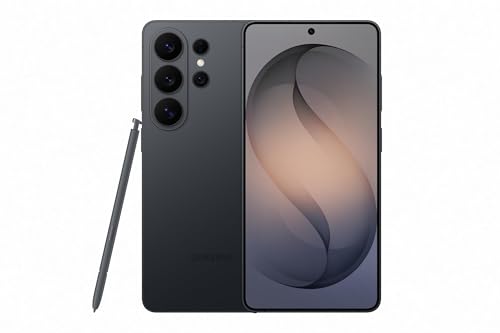
Samsung Galaxy S26 Ultra — The current flagship canvas
The newest Ultra arrives with a listing that reads like a summary of where Samsung thinks the flagship argument now lives: a Privacy Display, Galaxy AI, an AI camera, Super Fast Charging 3.0 and a durable battery, in a 256GB unlocked US model with a one-year US warranty. The Privacy Display deserves the photographer’s attention first. A screen that narrows its viewing angles is usually sold as a security feature for trains and cafés, but its photographic consequence is subtler: the person composing and culling in public keeps the work private, and the display’s engineering exists to keep a big canvas usable in the real, overlooked world.
As a camera platform, the Ultra formula is abundance in service of the loop described above — a multi-lens system for framing, flagship processing for the files, and the largest, most considered canvas in Samsung’s line for judging them. The maker presents its AI camera features as part of the listing, and we treat those as maker claims; the structural point stands without them, which is that this phone assumes its owner will shoot, review and edit in one continuous session on one device, and it is built to make that session feel like a workstation rather than a compromise.
The US warranty wording distinguishes this listing from its international sibling below, and for many buyers that distinction will settle the choice between the two Ultras before any camera argument begins. Buyers who want the current generation, the domestic paperwork and the privacy-minded panel can check the S26 Ultra listing for its full configuration details.
There is a workflow detail that separates this generation’s pitch from its ancestors: the phone increasingly assumes the edit happens on-device, minutes after the shot, at full size. A big privacy-aware canvas plus the maker’s AI editing story is a studio that fits in a coat — with the photographer’s judgement, not the hardware, as the limiting reagent. Owners who publish from the field, filing the day’s images before the day ends, are the audience that design centre serves, and they will feel the difference in their evenings before they can name it in their photographs.
- Configuration on the listing: 256GB, Black
- Display wording on the listing: Privacy Display
- Camera wording on the listing: AI camera, Galaxy AI
- Version on the listing: US model, US 1-year warranty
Strengths
- The current Ultra generation with domestic warranty paperwork.
- A privacy-engineered display that suits shooting and culling in public.
- The full flagship loop — capture, review, edit — on one large canvas.
Trade-offs
- Ultra dimensions demand two hands and a tolerant pocket.
- Privacy displays trade viewing-angle generosity for discretion.
- The flagship tier’s commitment is the largest in this guide.
Best for: photographers who want the newest Samsung canvas with US paperwork. Not suited for: one-handed shooters or anyone downsizing from a big phone on purpose.

Samsung Galaxy S25 Ultra — The resolution route
One generation back, the same idea arrives wearing international clothes. This S25 Ultra listing specifies a 200MP camera, a 6.9-inch 120Hz AMOLED display, 256GB with 12GB of RAM and dual SIM, as a factory-unlocked GSM international version in Titanium Silver Blue. The photographic proposition is the resolution route in full: a sensor whose files tolerate aggressive cropping, a zoom system for framing at distance, and a screen large enough to inspect the results at something approaching honesty.
On a big-screen brief, that inspection point is the review. Cropping is editing, and editing at 6.9 inches is where the 200MP file justifies its storage appetite — you can see what a crop keeps and what it throws away, at the scene, while a second framing is still possible. Photographers who shoot landscapes, architecture and distant detail will feel this pairing of resolution and canvas as a single feature, because in practice it is one.
The international GSM status is the toll. US buyers must match the listing’s network language to their carrier, and the warranty path differs from the US-version model above. Buyers on GSM networks who clear that check gain the resolution flagship at a generational step down. They can read the S25 Ultra listing with the carrier question open in another tab, which is the correct way to read it.
A note on the colour of the thing, because photographers notice: the Titanium Silver Blue finish on this listing is the kind of muted, blue-grey tone that disappears against travel clothing and rental cars, which matters more than it should on street assignments where the camera’s discretion is part of the method. The Ultra is a large object regardless of finish, but a quiet one attracts less negotiation with the world it photographs — a small, real advantage that no laboratory will ever quantify and every working shooter will recognise.
- Configuration on the listing: 256GB, 12GB RAM, dual SIM
- Camera figure on the listing: 200MP
- Panel on the listing: 6.9-inch 120Hz AMOLED
- Version on the listing: international, factory unlocked GSM
Strengths
- Resolution that turns the big screen into a genuine cropping desk.
- The deepest framing reach in this guide for distant subjects.
- Dual SIM practicality for travelling photographers.
Trade-offs
- International GSM listing requires carrier verification for US buyers.
- Size and weight are the tax on the optics and the canvas.
- A generation behind the S26’s display and charging story.
Best for: landscape, architecture and detail photographers on GSM networks. Not suited for: CDMA-network buyers or anyone prioritising a light phone.

OnePlus 15 — The endurance flagship
Big screens drink power, and the OnePlus 15’s listing answers with the largest battery figure in this guide: 7300mAh, alongside 16GB of RAM, 512GB of storage, dual SIM and a Snapdragon 8 Elite Gen 5, in Infinite Black. Read those numbers as a photographer’s specification rather than a gamer’s. A shooting day that ends with an editing session — culling on the train, toning in the café, uploading from the hotel — is a battery endurance event, and this is the only pick whose listing treats endurance as the headline act.
The storage figure plays the same supporting role. Half a terabyte means the big screen’s editing desk never delivers the session-ending news that the device is full, and the flagship silicon keeps multi-frame processing and gallery work at the speed the 120Hz-class experience promises. OnePlus’s camera story in this generation leans on its flagship hardware rather than a named partnership in this listing, so we describe it structurally: a top-tier system whose files are judged, as this guide insists, on the largest canvas the owner owns — the phone itself.
Dual-SIM flexibility adds the traveller’s footnote, and the absence of US-warranty wording on the listing is worth a buyer’s attention in the usual way. For shooters whose photographic life is long days away from sockets, the OnePlus 15 listing makes the endurance argument more plainly than any rival here.
Heat is the unlisted specification that big-screen shooting exposes, and endurance hardware is partly a heat strategy: a large battery working at a gentle fraction of its capacity, in a large body with area to spare, sustains long sessions of screen-on editing and multi-frame capture more gracefully than a small phone sprinting at its limits. We make no laboratory claims here — only the structural observation that the 15’s proportions and capacity were chosen by engineers who understood the assignment, and that photographers who shoot summer festivals and long wedding days are the ones who collect on that understanding.
- Configuration on the listing: 512GB, 16GB RAM, dual-SIM
- Battery on the listing: 7300mAh
- Chip on the listing: Snapdragon 8 Elite Gen 5
- Finish on the listing: Infinite Black
Strengths
- The battery figure this guide’s shooting-and-editing days demand.
- Storage and silicon that keep the editing desk responsive.
- Dual-SIM flexibility for photographers who work across borders.
Trade-offs
- Endurance hardware makes for a substantial handset.
- Camera identity is less distinctive than the Sony or Samsung stories.
- Check the listing’s warranty and network wording carefully.
Best for: travel photographers and heavy editors who live away from chargers. Not suited for: buyers who want a named camera partnership or the lightest big phone.

Sony Xperia 1 VIII — The viewfinder purist
Every other pick in this guide treats the big screen as a rectangle that grew. Sony treats it as a shape with a philosophy. The Xperia 1 VIII’s listing specifies a 6.5-inch 120Hz OLED, a 48MP camera, 256GB with 12GB of RAM and SIM plus eSIM in an international GSM Graphite Black model — the smallest diagonal here, included because its tall proportions make it the most viewfinder-like surface in the group. A tall screen holds the image large while keeping controls along the edges, exactly the layout a camera viewfinder evolved toward over decades.
That shape has a second photographic consequence: the phone is narrower in the hand than its rivals, so the two-handed grip this category demands feels less like holding a tablet and more like holding an instrument. Photographers coming from dedicated cameras consistently read the Xperia’s proportions as intentional, because they are — this line is designed around the act of framing, and the display’s aspect is part of the camera, not a media concession.
The international GSM wording applies, as it does across the Xperia family, and Sony’s computational rescue remains the group’s most modest. Buyers who frame deliberately and edit honestly will not miss it. Those who recognise their own priorities in that sentence can look at the Xperia 1 VIII listing and check its SIM arrangement against their carrier.
Editors should note what the tall canvas does to the finishing stage. Vertical photographs — the format of portraits, architecture and most phone publishing — fill this screen the way they fill a gallery wall, large enough to judge skin texture and sky gradients without pinching into a postage stamp. Horizontal images letterbox, as they do on every tall phone, but the Xperia’s proportions make the trade consciously: this is a photographer’s portrait-format instrument in a landscape-video world, and its owners tend to find that description flattering rather than limiting.
- Configuration on the listing: 256GB, 12GB RAM, SIM + e-SIM
- Camera figure on the listing: 48MP
- Panel on the listing: 6.5-inch 120Hz OLED
- Version on the listing: international, factory unlocked GSM
Strengths
- A tall canvas proportioned for framing rather than feeds.
- The narrowest grip here, kindest to long handheld sessions.
- The photographer’s control layout this publication keeps praising.
Trade-offs
- The smallest screen in a big-screen guide, by design.
- International GSM status needs the carrier check.
- Automatic processing will not rescue careless exposures.
Best for: deliberate photographers who frame in a tall format and edit their files. Not suited for: buyers wanting the largest possible rectangle or the strongest automation.

Samsung Galaxy S25 FE — The accessible big screen
The FE line exists to answer a fair question: how much of the flagship big-screen experience survives at a friendlier commitment? This S25 FE listing specifies a large display, a high-resolution camera, AI photo edits, a 4900mAh battery and durability, in a 128GB unlocked US model in JetBlack with a US one-year warranty. The photographic translation is that the loop survives intact — a generous canvas for composing and judging, a capable camera system behind it, and the maker’s AI editing features named on the listing for owners who finish photographs on the phone.
What the FE trades away is the extremes: not the Ultra’s resolution, not its zoom ladder, not its display exoticism. For a large class of photographers those extremes were never the point. The point was a screen big enough to compose on confidently and cull on honestly, attached to a camera that handles the everyday portfolio without drama, in a package whose paperwork is domestic and simple. Judged on that brief, the FE is not a diminished Ultra; it is the correctly sized answer for its audience.
Storage is the configuration to interrogate — 128GB on this listing asks video-heavy shooters to plan their offloads, as it does everywhere in this guide’s lower configurations. Buyers whose shooting is stills-led and whose priority is the big-screen loop at an accessible tier can see the S25 FE listing for its current configuration and warranty wording.
The FE also plays a family role worth naming: it is the big screen most likely to be handed around. Its size makes it the household’s shared viewer — grandparents pinch less, children find the game and the gallery without instruction, and the photographs taken on it are reviewed communally rather than privately. A camera whose results are enjoyed at the size they were composed is a camera that gets used at full seriousness, and in family archives that social fact outweighs a surprising amount of specification.
- Configuration on the listing: 128GB, JetBlack
- Battery on the listing: 4900mAh
- Camera wording on the listing: high-resolution camera, AI photo edits
- Version on the listing: US model, US 1-year warranty
Strengths
- The big-screen photographic loop without the Ultra commitment.
- US version with US warranty keeps ownership simple.
- On-phone AI editing features named on the listing.
Trade-offs
- No Ultra-grade zoom or resolution for distant detail.
- 128GB is the configuration to outgrow first.
- Display refinements trail the flagship pair above.
Best for: photographers who want the large-canvas experience accessibly and domestically. Not suited for: reach-dependent shooters or heavy on-device video archives.
Apple iPhone 17 Pro Max — Benchmark, prose only
The largest iPhone belongs in any big-screen camera conversation, and it is here in prose for the reason this batch states wherever it applies: Amazon US currently offers this model as renewed stock only, while new units are sold by Apple and the carriers. A guide that linked a renewed handset while describing the new flagship experience would be trading on a confusion, so there is no link and no product image in this section — only the benchmark, described.
As a benchmark it is formidable in exactly this guide’s terms. A 6.9-inch-class canvas, Apple’s camera system and an ecosystem of editing tools make the Pro Max the reference implementation of the phone-as-photographic-workstation idea: compose on the big screen, judge on the big screen, finish on the big screen. Buyers inside Apple’s world, purchasing through Apple’s channels, should weigh it directly against the S26 Ultra as the alternative flagship canvas. Buyers shopping Amazon for a clean new listing should take the five linked picks as the actionable shortlist.
One more consideration for the renewed-curious reader, stated once for this guide: a renewed big-screen phone’s display is its biography. Screen wear, battery health and any history of replacement panels matter doubly when the screen is half the product’s purpose, which is why this guide’s prose treatment — admire the benchmark, buy it new through its maker’s channels — is the proportionate advice rather than a dismissal of the device itself.
- Availability note: renewed-only on Amazon US at present
- Sold new through: Apple and carrier stores
- Screen class: 6.9-inch class, per the model’s positioning
- Link status: prose-only, deliberately unlinked
Strengths
- The reference big-screen camera experience in Apple’s ecosystem.
- Editing and sharing tools of unusual depth on the device itself.
- Video pedigree that big-screen shooters consistently respect.
Trade-offs
- Amazon US currently offers it renewed-only, so there is nothing clean to link.
- Purchasing new runs through Apple or a carrier, on their terms.
- The largest iPhone is, inevitably, a two-handed commitment.
Best for: Apple-ecosystem photographers buying through Apple or a carrier. Not suited for: Amazon-first shoppers who want a factory-new listing from this guide. It appears in prose because Amazon US currently lists it renewed-only, so compare it at Apple’s store against the linked flagships above.
How do the six big-screen camera systems compare?
| Phone | Canvas character | Listing headline | Watch out for |
|---|---|---|---|
| Samsung Galaxy S26 Ultra | Current flagship, privacy-minded | Privacy Display, Galaxy AI camera | Two-handed size |
| Samsung Galaxy S25 Ultra | Resolution and reach | 200MP camera, 6.9-inch AMOLED | International GSM listing |
| OnePlus 15 | Endurance editing desk | 7300mAh battery, 512GB storage | Substantial handset |
| Sony Xperia 1 VIII | Tall viewfinder format | 48MP camera, 6.5-inch OLED | International GSM listing |
| Samsung Galaxy S25 FE | Accessible large display | Large display, AI photo edits | 128GB configuration |
| Apple iPhone 17 Pro Max | Ecosystem benchmark | Prose-only; renewed-only on Amazon US | Buy new via Apple or carriers |
The pattern in the table is a division of the big-screen idea into temperaments: Samsung’s pair splits into the current canvas and the resolution route, OnePlus claims the working day, Sony claims the viewfinder, the FE claims accessibility, and Apple stands as the unlinked reference. None of these is the big-screen phone; each is a big-screen philosophy, and the buyer’s hands, carrier and editing habits — not a ranking — should arbitrate between them.
What makes a display good for photography, beyond size?
Brightness first, because a viewfinder that washes out in sunlight is a rumour of a viewfinder. Listings phrase brightness as maker claims where they mention it at all, so treat the figures as positioning and weight the panel type and your own first-week testing more heavily. Refresh rate second: a 120Hz panel, specified on several listings here, keeps the live view smooth while panning and makes the culling swipe feel like turning pages rather than dragging them. Colour honesty third — a screen that oversaturates flatters every photograph into the same lie, and the photographer discovers the truth at print time, which is the worst classroom.
Aspect ratio is the quiet fourth factor, and it is why the Xperia belongs in this guide despite the smallest diagonal. A tall screen fits a photograph’s editing interface — image above, tools below — without amputating either, and it fits the hand that must hold the camera steady. Judge displays, in other words, the way you judge lenses: by the work they enable, not by the single largest number in their description.
How should you handle a big phone as a camera?
Two hands, always, and a grip that treats the phone like the camera it now is: left hand cradling, right hand working, elbows finding your ribs when the light drops. Big phones punish the one-handed jab — the frame tilts, the tap shakes, the horizon drifts — and reward a shooter’s stance disproportionately, because their size magnifies every tremor across a larger lever. A wrist strap is not paranoia at this scale; it is the cheapest insurance in photography.
Compose with the screen’s honesty. Zoom with your feet before the lens when the subject allows, review at full size rather than in the thumbnail strip, and use the big canvas to check the edges of the frame — the stray elbow, the tilted lamp — that small screens hide until the edit. The photographers who get the most from these devices are the ones who slow down to the speed the screen invites: it is a view camera’s ground glass, reborn as glass of another kind, and it rewards the same patience.
One more handling habit separates owners from photographers at this size: the deliberate half-press pause. Big phones encourage a compose-review-recompose rhythm that smaller devices rush past, and building a breath into that rhythm — look, breathe, check the corners, then shoot — converts the screen’s size from a statistic into a style. Your archive will show the difference within a month, in horizons that level themselves and edges that stop surprising you.
What mistakes do big-screen buyers make?
Buying the diagonal and forgetting the hand is the classic. A 6.9-inch phone that lives in a drawer because it is tiresome to hold takes worse photographs than the smaller phone that goes everywhere, and no specification table records that outcome. The second mistake is assuming the biggest screen is automatically the best editing surface — colour honesty and brightness, covered above, outrank raw inches for finishing work.
Third, neglecting the listing variant: this guide contains two international GSM models whose cameras are superb and whose radios may not suit a given US buyer, and the network paragraph is part of the camera buying decision whether shoppers enjoy that fact or not. Fourth, filling the phone: big-screen editors generate big archives, and the 128GB configuration in this guide will introduce its owner to storage management sooner than the 512GB OnePlus introduces its owner to anything at all.
A fifth mistake is subtler and belongs to the editing stage: trusting the phone screen as the final word on colour and brightness for work destined elsewhere. The big canvas is a superb working surface and an imperfect reference; before a photograph is printed, published or sent to a client, glance at it on one other screen — a laptop, a television, anything with a different personality — and let the disagreement between the two teach you your phone’s particular flattery. Every display has one; professionals simply know theirs by name.
How does a big screen change phone video?
Filming on a large canvas is a different sport from filming on a small one. Monitoring is honest: focus peaking by eye, exposure judged at a size where a blown highlight cannot hide, the frame’s edges patrolled in real time. Directors who shoot on phones professionally choose the biggest monitors available for exactly these reasons, and the picks above put a respectable monitor in the same object as the camera. The cost is conspicuousness — a big glowing rectangle announces a recording in progress — and battery, because the monitor is the hungriest component in the system, which loops back to the OnePlus’s endurance argument.
Stabilisation interacts with size in the shooter’s favour. A heavier, two-handed device sways less than a small phone pinched in fingertips, and the large view lets the operator correct drift while it is still a suggestion rather than a ruined take. None of this appears on a specification sheet, and all of it appears in the footage, which is why this guide keeps insisting that the screen is camera equipment rather than packaging.
Which big-screen life is yours?
The field editor — journalist, inspector, estate agent, anyone whose phone is a filing cabinet with a lens — belongs to the endurance and storage end of this guide: the OnePlus 15’s battery and half-terabyte, or the S26 Ultra’s domestic flagship completeness. Their screen is a desk, and desks should be large, powered and unembarrassed.
The deliberate framer — the hobbyist who walks for photographs — belongs to the Xperia’s tall viewfinder or the S25 Ultra’s resolution, depending on whether their pleasure is the composing or the cropping. The family archivist, whose screen is a shared hearth for reviewing the week, belongs to the FE’s accessible canvas or, inside Apple’s world, to the prose-only benchmark bought through Apple’s own store. Sorting by life rather than by ladder is, once again, the entire method — the screens are all big, so the decision was never really about size.
What should you test in the first week with a big-screen camera?
Sunlight first: compose at noon in the brightest conditions you can find and learn whether the viewfinder stays a viewfinder. Then an evening of real use — shoot, cull and edit a full session on the device alone, noting where your hands tire, where the battery stands at bedtime, and whether the screen’s colour flattered files that a television later judges more coolly. Photograph a white wall and a night sky to meet your individual panel’s character while exchanges are painless.
Finally, live with the size honestly. Carry it in your actual pockets, on your actual commute, in the coat you wear to the places you photograph. Big-screen photography fails socially before it fails technically — the phone left at home composes nothing — and the first week is when that verdict is still free to appeal.
Which photographic genres gain most from the big canvas?
Landscape and architecture gain first, because their decisions live at the frame’s edges — the tree intruding at the left, the horizon’s one-degree tilt — and edges are exactly what a large, bright viewfinder patrols best. Travel photography gains next, for the opposite reason: the editing happens in transit, on the device, and a big honest screen turns a train hour into a finished album rather than a deferred chore.
Portraiture gains in the reviewing rather than the taking. Skin, catchlights and the precise frame where an expression peaked are judgements made while scrolling a burst, and they are made better at 6.9 inches than at any size a pocket used to allow. Event and family photography gains least in capture — speed rules there — but most in the sharing, because the big screen is the one the family gathers around in the kitchen afterwards. A genre audit of your own archive, five minutes with last year’s photographs, will tell you which of these gains is yours to collect.
Documentary and workplace photography deserves its line in that audit as well: the inspector, surveyor or nurse photographing conditions for the record gains from a screen on which a detail can be verified with a supervisor on the spot, rather than discovered wanting back at the office — a professional use of the canvas that this category serves better than any other in phones.
How should you read display claims on a listing?
With the same scepticism this guide applies to megapixels. A listing’s verifiable display facts are size, resolution class where stated, refresh rate and panel technology; beyond those, brightness and colour language is maker positioning, phrased to glow. The S26 Ultra’s Privacy Display is a feature claim you can test in a shop in ten seconds — tilt the phone and watch the angles close. The Xperia’s tall format is a fact of geometry. Prefer, always, the claims with a geometry or a number you can verify, and let the adjectives wash past like weather.
There is a second reading skill: noticing what a listing does not claim. A big-screen phone whose listing is silent on refresh rate is telling you the panel is ordinary; a camera section silent on stabilisation is telling you something similar. Silence on a listing page is data, and photographers — professional readers of negatives — are well equipped to use it.
Apply the same reading to your own shortlist before ordering: lay the two finalists’ listings side by side and mark every claim one makes that the other omits. The pattern of omissions usually describes the phones more truthfully than the pattern of boasts, and on a purchase measured in years of daily handling, truthfulness about the gaps is worth more than enthusiasm about the peaks.
What accessories earn their place with a big camera phone?
A grip, before anything decorative. Big phones are held for hours in shooting positions their designers’ hands never endured, and a slim grip case or a finger loop converts the device from a bar of soap into an instrument — test that any case preserves button feel and wireless charging before committing. A pocket tripod follows, for the long-exposure and group-selfie duties these phones perform weekly. A matte screen protector tempts viewfinder purists for its glare behaviour, at a small cost in perceived sharpness; photographers split honestly on it, and the reversible nature of the experiment makes it worth trying.
Skip the clip-on lens drawer. A camera system designed as a whole, judged on a screen this honest, gains nothing from a second piece of glass parked in front of the first — the big display will show you the degradation in real time, which is perhaps the most elegant argument this guide can make for its own thesis.
What do battery and heat do on a long big-screen shoot?
The display is the power budget’s main event, and camera work keeps it lit at full brightness for minutes at a time — composing, reviewing, editing — in a way scrolling never does. This is why the battery figures on the listings matter photographically: the OnePlus 15’s 7300mAh is a statement about screen-on endurance, and the FE’s 4900mAh frames a lighter duty cycle. Photographers planning festival days, wedding coverage or fieldwork should read battery capacity as viewfinder hours, because that is what it buys.
Charging belongs in the same conversation, because a big-screen shooter’s day often includes a midday top-up. The S26 Ultra’s listing names its Super Fast Charging generation; whatever your pick, learn its real-world recovery behaviour in the first week — how much viewfinder time twenty plugged-in minutes buys — and plan festival days and travel days around that exchange rate rather than around hope.
Heat follows the same logic. Sustained capture plus a bright panel warms any handset, and warm handsets protect themselves by dimming the screen and slowing processing — the two things a photographer can least spare at golden hour. Large bodies shed heat more gracefully than small ones, another quiet dividend of this category’s size, and the practical habits help: shade the phone between scenes, close the editing app during pure shooting, and let the device cool before a long video take rather than during it.
Is there an accessibility case for the biggest screens?
A strong one, and it deserves more than a footnote. Larger type, larger touch targets in the camera interface, a viewfinder that does not demand squinting — for photographers with tired eyes, reduced vision or hands that find small controls fiddly, the big-screen category is not an indulgence but the difference between a camera that includes them and one that quietly excludes them. The FE’s accessibility at a friendlier tier matters here precisely because accessibility should not be a flagship-only feature.
The counterweight is weight itself, and honesty requires naming it: arthritic hands may find a heavy phone’s grip the greater barrier, which is why this guide keeps returning to handling as a first-week test. Accessibility is personal geometry. The right answer is the device whose size helps your particular hands and eyes, and both directions of that answer are represented in this guide’s picks.
How should you set up a big screen for serious editing?
Calibrate your habits before your sliders. Set the display to its most natural colour mode for editing sessions, whatever the vivid default is called, because decisions made on a saturated screen export as disappointment. Work at a consistent brightness — ideally matched to the room you usually edit in — so that exposure judgements transfer between sessions instead of drifting with the afternoon. Photographers who keep a dedicated camera will recognise the ritual: it is monitor discipline, shrunk to a coat pocket.
Organise the desk itself. Keep the editor you trust on the home screen beside the camera, build the culling habit into the same session as the shooting while memory can still caption the frames, and let the big screen’s size serve a two-pass method — a fast pass for focus and moment, a slow pass for crop and tone. The hardware in this guide can support a genuinely professional finishing workflow; what it cannot supply is the routine, and the routine, as ever, is the photographer’s to build in the first fortnight.
Where do foldables fit in the big-screen camera story?
Honestly, and briefly: not in this guide’s linked picks, because no foldable with a clean listing met this batch’s pool standard for a camera-first recommendation. The category’s promise is obvious — a tablet’s canvas folded into a phone — and its photographic compromises are equally obvious: camera systems that share space with a hinge, and screens whose crease crosses the editing desk. Buyers whose priority is the canvas above the camera may shop that category happily; buyers following this guide’s brief, where the camera leads and the screen serves it, are better matched by the six slabs above. Naming the omission is the guide’s honesty policy applied to itself, and readers who do choose a foldable for its canvas should judge its cameras by this guide’s usual tests — processing, stabilisation, support horizon — rather than by the novelty of the hinge.
Can two shooting days show the difference?
Day one: a landscape photographer above a harbour at dawn, working a tripod and a thermos. The S25 Ultra’s resolution and canvas turn the session into a conversation — frame, inspect at full size, discover the buoy rope intruding at the corner, recompose while the light still agrees. The OnePlus shooter on the next headland works faster and longer, battery an afterthought, filing edited frames before the cafés open. The Xperia photographer between them shoots least and deliberates most, the tall screen held like a view camera’s back. Three excellent mornings, three different instruments, one harbour — the guide’s argument in a single scene.
Day two: a family wedding, shot by a guest with no duties and a good seat. Here the big screen’s social life takes over — the couple reviewing the ceremony photographs on the FE’s canvas at the reception, at the size the photographer composed them; the S26 Ultra’s owner culling a burst of the first dance on the train home, the privacy display keeping the couple’s day theirs a little longer. Nobody at either event asked about a sensor. Everybody understood the screen, because the screen is where the photographs became real to them.
What does the big-screen category cost you, honestly?
Discretion, first. A large phone photographs like a small billboard; street subjects notice it, security staff notice it, and the candid economy changes in ways a smaller device never negotiates. Portability, second: these phones colonise pockets, demand their own logistics in summer clothing, and turn every outing into a small packing decision. Money, third, in the quiet forms — the larger case, the replaced screen protector sized like a placemat, the repair bill that scales with the glass.
None of that argues against the category; it argues for entering it with the accounting done. The photographers who thrive with big phones are the ones who wanted the canvas enough to pay its social and physical rent gladly, because their work — the editing, the judging, the sharing — collects the dividend daily. Buyers who merely drifted into the size, following a trend, pay the same rent and collect nothing. This guide exists so that its readers are the first kind.
Final Recommendation
Let your dominant activity choose. If you compose, cull and publish from one device all day, the S26 Ultra’s current canvas and domestic warranty make it the straightforward flagship answer, with the OnePlus 15 overtaking it the moment battery anxiety enters your shooting life. If your photography is resolution and reach, the S25 Ultra’s international listing is the connoisseur’s route, carrier check and all. Framers and editors of the deliberate school should take the Xperia’s tall viewfinder seriously, households wanting the loop without the flagship commitment should take the FE, and Apple loyalists already know where their benchmark is sold. A big screen is not a luxury bolted to these cameras; used properly, it is the part of the camera you look through, judge with and finish on — buy the one your eyes and hands agree on.
Bring one discipline home with whichever you choose: review at full size, at the scene, every time it matters. That single habit is what the big canvas is for, and the photographers who build it will extract more quality from any pick in this guide than a spec-chaser will extract from the flagship — because they will see their mistakes while the world is still arranged to correct them.
Frequently Asked Questions
Does a bigger screen actually improve photographs?
Indirectly and genuinely. It improves the judging stage — focus, exposure and edge-checking at the scene, while a reshoot is still possible — and the editing stage, where honest size produces honest decisions. The sensor captures the same file; the photographer simply makes fewer mistakes around it.
Why is the iPhone 17 Pro Max not linked?
Amazon US currently stocks it as renewed units only. Rather than link renewed stock inside a new-phone guide, we cover it in prose and point Apple buyers to Apple and carrier stores for new units.
Is the Xperia’s 6.5-inch screen too small for this guide?
No — its tall proportions make it the most viewfinder-shaped surface here, and the guide’s criterion is the photographic usefulness of the canvas, not the largest diagonal. Buyers who want maximum area should look to the 6.9-inch class picks.
Are the international listings in this guide safe for US buyers?
They are legitimate factory-unlocked GSM listings whose compatibility depends on your carrier’s bands. Verify the network wording against your carrier before ordering, particularly for the S25 Ultra and Xperia 1 VIII.
Should I choose the S26 Ultra or the S25 Ultra?
Choose by paperwork and generation. The S26 Ultra’s listing is the current model with US warranty wording and the Privacy Display; the S25 Ultra’s listing is the international dual-SIM route to a 200MP camera and the same 6.9-inch class canvas. GSM travellers may prefer the elder’s flexibility; domestic buyers will usually prefer the newer phone’s warranty and display.
How much storage does a big-screen editor need?
More than a casual shooter, because the same device is camera, archive and editing desk. Treat 256GB as comfortable and 512GB — the OnePlus 15’s configuration — as the no-anxiety tier for video-heavy work.
Does the S26 Ultra’s Privacy Display affect photo editing?
Its viewing-angle narrowing is the point to test: colours and brightness are judged on-axis by the person holding the phone, which is how photographers work, while neighbours see a darkened panel. If you habitually show photographs to someone beside you, weigh that social cost in the shop, tilting the phone together before you buy.
Will a phone this size fit my life?
Handle one before deciding, if you can. These are two-handed, pocket-filling devices; photographers who accept that gain the best viewfinders in the business, and those who resent it should buy smaller and shoot more.
Related Guides
Readers drawn to the biggest canvases often shoot after dark as well, so continue to Best Camera Phones for Low Light for the night brief. Those who want this flagship context without the size requirement should read Best 5G Flagship Phones, and anyone whose budget trims the canvas can apply the same loop logic at a lower tier in Best Camera Phones Under 500 Dollars. Shooting performances rather than stills is the subject of the best camera phones for music video production.
Related guides
- Best 3D Art Tablets
- Best Canon Point and Shoot Digital Cameras: PowerShot Picks From Pocket Compacts to Travel Zooms
- Best Balancing Stabilizers for Mirrorless Cameras: Payload, Balancing and Native Vertical Shooting
- Best Basic Phones Camera Buyers Can Trust: Flip Phones and Simple Handsets That Still Take a Photograph


