What's inside
- Where to buy
- Key Takeaways
- Quick Picks
- How did we judge cameras in this price band?
- How do the six compare as cameras?
- What actually separates cameras in this band?
- How can you get better photographs from a mid-range camera?
- What buying mistakes haunt this price band?
- Should you stretch to a flagship instead?
- Which of these fits your kind of photography?
- What should you double-check at the listing before paying?
- How has this tier changed, and what does that mean for timing?
- What does video look like in this tier?
- How should you care for a mid-range camera phone over four years?
- Does the rest of the phone keep up with these cameras?
- Why does this guide contain no renewed bargains?
- Can three imaginary shoppers settle the shortlist?
- How can you test your new camera’s keeper rate in the first week?
- Final Recommendation
- Frequently Asked Questions
- Related Guides
As an Amazon Associate I earn from qualifying purchases. This post may contain affiliate links at no extra cost to you.
gizmoverdict.com is reader-supported. When you buy through links on our site, we may earn an affiliate commission.
Our Top Picks
Where to buy
Every phone in this guide sits in the under-500-dollars tier as this guide is written, and every one links to a verified Amazon US listing — but you will not find a single price printed below. That is a deliberate editorial rule, not an oversight. Prices in this band move weekly, drift between storage variants and expire the moment a promotion ends, so the honest way to shop the best camera phones under 500 dollars is to treat the band as a neighbourhood rather than a number: use the listings’ own check-price buttons to see today’s figure, and use this guide to decide which camera deserves the money at whatever figure you find.
Here is the tier’s open secret. Below this band, camera compromises are structural — small sensors, decorative extra lenses, processing that gives up in dim rooms. Inside it, the compromises become matters of emphasis. You are no longer asking whether a phone can photograph your life; you are asking which photographic talent you would like it to specialise in. This guide’s six picks divide cleanly into three talents: computational processing that rescues ordinary moments, consistency across several matched cameras, and versatility from a genuine multi-lens spread — plus one stylus-equipped outlier whose camera plays second act to its pen, and which is honest about that billing.
Two listings carry international wording and deserve a careful read before anything else: the Galaxy A56 is a dual-SIM international model, and the Nothing Phone (2) describes itself as GSM only. Neither fact is a flaw. Both are the kind of fine print that decides whether a bargain is a bargain for your specific carrier, and both are flagged inside their reviews rather than left for the delivery day to reveal.
Key Takeaways
- Google’s Pixel 10a is the processing champion of this tier: its computational pipeline and Camera Coach produce the most reliable everyday photographs here.
- Nothing’s Phone (3) bets on consistency, spreading four 50MP cameras across the system so no lens is the embarrassing one.
- Samsung’s Galaxy A56 is the versatility pick, a triple-camera arrangement on a big 120Hz AMOLED in an international dual-SIM listing.
- The Galaxy A37 is the straightforward US-version route: triple camera, IP68 sealing and a US warranty, per its listing.
- Motorola’s Moto G Stylus 2025 is the pen-first outlier whose 50MP camera is a strong second act rather than the headline.
- Nothing’s Phone (2) is the previous-generation value play, with a dual camera whose 50MP main unit carries OIS, plus an LTPO OLED, in a GSM-only listing.
Quick Picks
| Pick | Badge | Why it is here |
|---|---|---|
| Google Pixel 10a | The processing pick | Google’s computational camera and coaching features do the work your technique does not have to. |
| Nothing Phone (3) | The consistency pick | Four 50MP cameras mean the front, wide and main lenses all speak the same language. |
| Samsung Galaxy A56 5G | The versatility pick | A triple-camera spread and a large 120Hz AMOLED in a dual-SIM international package. |
| Samsung Galaxy A37 5G | The US-version pick | Triple camera, IP68 rating and US warranty wording for buyers avoiding import fine print. |
| Motorola Moto G Stylus 2025 | The stylus outlier | A 50MP camera riding along with the tier’s only built-in pen for notes and sketches. |
| Nothing Phone (2) | The previous-generation value | A 50MP dual camera with OIS and an LTPO OLED from Nothing’s earlier flagship effort. |
How did we judge cameras in this price band?
By refusing to judge them against flagships. A phone in this tier should be measured against the photographs its owner actually takes — family, food, travel, the dog, the occasional sunset — and against the other phones competing for the same money, not against a device costing twice as much in a laboratory. Within that frame we weighted three things: how the main camera behaves in ordinary indoor light, because that is where this tier historically collapses; whether the secondary cameras are tools or decorations; and how long the software will keep improving the camera after purchase, because a mid-range phone kept for four years lives or dies by its update policy.
We also enforced listing honesty. Every pick is a clean, current listing; no renewed stock is presented as new, and the two internationally-flavoured listings are described as what they are. Prices were excluded entirely, as the introduction promised — the tier is the frame, and readers check the live figure at the listing. What remains is a comparison of photographic character, which is the only comparison in this band that stays true for longer than a promotion cycle.
Character, in this context, is not a euphemism for weakness. It is the recognition that six competent cameras aimed at six different lives will each be the best phone in this guide for somebody, and that the reviewer’s job is to draw the map honestly rather than crown a winner the reader’s life would overrule. The picks below are therefore written as portraits, not rankings — read for the life that resembles yours, and let the specification tables play their proper supporting role.

Google Pixel 10a — The processing pick
The Pixel 10a’s argument can be summarised in one domestic scene. A child blows out birthday candles in a room lit by the candles themselves; you have one hand on the phone and the other holding a plate; the moment lasts four seconds. Most phones in this tier hand you a smeared, orange guess at that memory. Google’s phone hands you the photograph, because its entire camera philosophy is to spend computation where other makers spend glass. The listing names Camera Coach among its features, alongside a 30-plus-hour battery and seven years of Pixel Drops, and each of those is secretly a camera feature: coaching improves the photographer, endurance keeps the camera available, and the update window means the processing you buy this year is the worst version you will ever own.
Understand what you are not buying. There is no telephoto drama here, no exotic lens array; the 128GB configuration on this listing asks photo-heavy travellers to manage storage like adults. The 10a’s excellence is concentrated in the main camera’s judgement — exposure, colour, the rescue of mixed indoor light — and for the majority of photographs taken in this price band, judgement is the whole game. Buyers who photograph people in real rooms will get more keepers from this phone than from any rival in the guide.
That keeper rate is the metric this tier should be sold on and almost never is. A camera that returns eight good frames from ten attempts beats a more versatile camera that returns five, because memories do not offer retakes. Parents, grandparents and anyone whose camera roll is a family archive should start here and only move on if a specific missing talent — reach, a stylus, a bigger screen — genuinely describes their shooting. Everyone else can check the Pixel 10a’s current listing and spend the savings on the birthday cake.
There is a longer game being played here that budget guides rarely mention. A buyer in this tier typically keeps the phone through several years of family history, and the camera that matters is the one operating in year three, not the one unboxed in week one. Google’s support promise means the 10a’s processing in year three will likely be better than at purchase, an unusual direction for a depreciating object. Rival picks may start level and finish behind simply because their makers stopped teaching them. Keeper rate today, improvement tomorrow — the Pixel’s case is really those two sentences, and in this band nobody else makes both.
- Configuration on the listing: 128GB, Obsidian
- Battery wording on the listing: 30+ hours
- Support wording on the listing: 7 years of Pixel Drops
- Camera help on the listing: Camera Coach
Strengths
- The highest keeper rate in the guide for ordinary indoor family photography.
- Seven years of software drops keeps the camera improving long after rivals freeze.
- Camera Coach quietly trains new photographers while they shoot.
Trade-offs
- No meaningful zoom reach for stages, sports or wildlife.
- 128GB is tight for video-heavy holidays without cloud offloading.
- The design and display play second fiddle to the camera story.
Best for: families and everyday shooters who value reliability over versatility. Not suited for: zoom-dependent photographers or anyone who hoards 4K video on-device.

Nothing Phone (3) — The consistency pick
Nothing looked at the mid-range camera problem and identified a different villain: not the main camera, which is usually fine, but the moment you switch away from it. The ultra-wide that turns group shots to mush, the front camera that makes video calls look like witness protection footage — every phone in this tier has a lens it is ashamed of. The Phone (3)’s listing states four 50MP cameras, and the design intent is legible: remove the weak link entirely, so the camera you reach for is the camera you get, whichever direction it points.
The rest of the specification supports a phone meant to be used socially and constantly — a Snapdragon 8s Gen 4 keeping the interface quick, 256GB for a generous local archive, a 5150mAh battery for long days out, and the Glyph Interface providing the soft fill light for close portraits that this guide praised in the low-light context. Nothing’s processing does not out-rescue Google’s in the darkest rooms, and pretending otherwise would insult both phones. What it offers instead is evenness: colour and detail that stay recognisably related as you move between lenses, which makes albums look authored rather than assembled.
There is a buyer’s temperament this suits precisely — the organiser, the group-chat photographer, the person whose friends all ask for the originals because their copies look better. If your camera roll is a social document and your frustration is inconsistency rather than darkness, the Phone (3) listing describes the most coherent answer in this band.
Consistency has a video chapter too. Vloggers and callers live on the front camera, the lens most tiers treat as an afterthought specified by whatever sensor was left in the parts bin. A front camera in the same resolution class as the rears changes the social maths: the person filming the group is no longer exiled from its quality. For creators filming themselves at arm’s length — the defining shot of the era — that parity may matter more than every other specification in this review, and it is the Phone (3)’s most under-sold argument.
- Configuration on the listing: 256GB, Android 15
- Camera wording on the listing: four 50MP cameras
- Battery on the listing: 5150mAh
- Chip on the listing: Snapdragon 8s Gen 4
Strengths
- Matched resolution across the system erases the usual weak-lens embarrassment.
- Glyph lighting flatters close portraits more kindly than a bare flash.
- Generous storage and battery suit the designated group photographer.
Trade-offs
- Darkest-scene processing still trails the Pixel’s stacking.
- The transparent aesthetic collects fingerprints and strong opinions.
- No long zoom for distant subjects; consistency was bought instead.
Best for: social photographers and video callers who use every lens including the front one. Not suited for: telephoto shooters or buyers who want the absolute strongest night rescue.

Samsung Galaxy A56 5G — The versatility pick
Samsung’s A-series exists to answer a specific shopper: the one who wants the flagship’s shape of life — big screen, several cameras, a familiar interface — without the flagship’s invoice. The A56’s listing specifies 8GB of RAM with 256GB of storage, a 6.7-inch 120Hz AMOLED panel, water resistance, Android 15 and dual SIM, in an international Graphite model. The camera system is described around a triple arrangement, and versatility is the honest summary: a main camera for the everyday, width for the group, and the flexibility to frame a scene three ways before deciding.
Versatility is a real photographic virtue at this tier, because buyers here usually own exactly one camera. The phone must be the landscape camera on holiday, the portrait camera at lunch and the document scanner on weekdays, and a genuine multi-lens spread serves that portfolio better than one brilliant lens surrounded by excuses. Samsung’s processing leans vivid — colours with their sleeves rolled up — which flatters travel and food photography and can be tamed in settings by those who prefer restraint.
The international status is the section’s necessary paragraph. Dual SIM is a genuine asset for travellers and two-line households, but the listing is not a US-version model, so carrier band compatibility must be confirmed against your network before the camera conversation even starts. GSM-family carriers are the natural home for listings of this kind. Buyers who clear that check gain the most flagship-shaped all-rounder in this guide, and one whose camera system asks the least explanation when a family member picks it up cold — a social virtue in a shared household device that spec sheets never capture but living rooms reward daily; the A56 listing rewards a careful read of its network and configuration lines.
The display deserves its sentence in a camera review, because on a phone the screen is the darkroom. A 6.7-inch 120Hz AMOLED at this tier means photographs are reviewed on a panel large and smooth enough to judge focus honestly before deciding whether to reshoot — a decision point where smaller, dimmer screens lie by omission. Editors working in the gallery app, cropping and levelling a day’s take on a train, will feel the difference daily. Versatility, in the A56’s case, extends from the lenses through to the surface the results are finished on.
- Configuration on the listing: 8GB RAM, 256GB storage, dual SIM
- Panel on the listing: 6.7-inch 120Hz AMOLED
- Software on the listing: Android 15
- Version on the listing: international, unlocked
Strengths
- A genuine multi-lens spread for the one-camera household.
- Large, smooth display that makes reviewing and editing pleasant.
- Dual SIM flexibility for travel or a second line.
Trade-offs
- International model: US buyers must verify carrier bands first.
- Vivid default colour will not suit every photographer’s taste.
- Processing in dim rooms is competent rather than class-leading.
Best for: travellers and all-rounders who need one phone to cover every genre. Not suited for: buyers on incompatible networks, or processing purists.
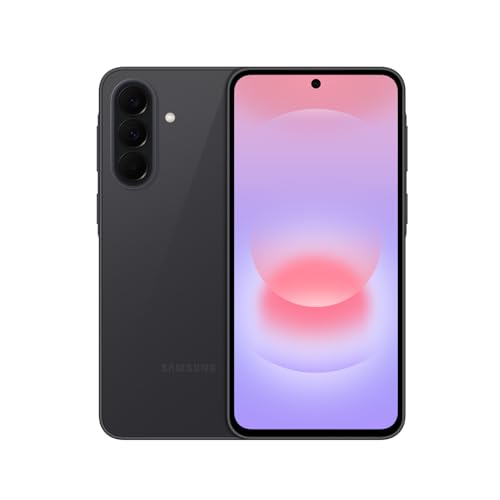
Samsung Galaxy A37 5G — The US-version pick
Some buyers read the A56’s international fine print and feel their shoulders rise. This pick is for them. The A37’s listing is a study in reassurance: a US version with a US one-year warranty, a triple camera, IP68 sealing, a 5000mAh battery and 128GB of storage, in a slim Awesome Charcoal body. Nothing in that paragraph requires a compatibility spreadsheet. For a large class of shoppers — parents buying for teenagers, small businesses buying for staff, anyone purchasing a gift — that absence of homework is worth more than a specification advantage they would never notice.
The camera itself plays the sensible hand. A triple arrangement covers the everyday portfolio, Samsung’s processing delivers the bright, shareable look most owners actually want, and IP68 sealing quietly upgrades the camera’s real-world range: rain at the soccer match, spray at the beach, the poolside photograph other phones watch from a towel. Durability rarely appears in camera comparisons, yet more photographs are lost to water anxiety than to sensor size, and a sealed phone simply gets carried into more of life.
Set expectations at the tier’s honest level. The A37 will not out-process the Pixel in a dark restaurant or out-resolve anything with a flagship badge, and its 128GB asks the same storage discipline as the 10a. What it offers is the complete, warrantied, carrier-simple package — the camera phone as appliance, in the complimentary sense. Households that value that completeness can review the A37 listing and note how much of its specification is about removing friction rather than winning arguments.
Consider the gift scenario in full, because it is this phone’s natural habitat. The purchaser wants no support calls afterwards: no carrier surprises, no warranty ambiguity, no exotic interface for a relative to decode at Christmas. The A37’s listing is the only one in this guide that reads as a complete answer to that brief — US version, US warranty, sealed against the weather, sized generously, wearing a name the recipient already trusts. Camera quality inside that scenario is table stakes, and the A37 clears them; the differentiator is everything around the camera, and Samsung’s distribution machine has spent decades learning exactly that.
- Configuration on the listing: 128GB, Awesome Charcoal
- Camera wording on the listing: triple camera
- Sealing on the listing: IP68
- Version on the listing: US version, US 1-year warranty
Strengths
- US version with US warranty removes the import question entirely.
- IP68 sealing extends the camera’s usable world to rain and poolsides.
- A balanced triple-camera package with no configuration homework.
Trade-offs
- Low-light processing is a step behind the Pixel’s in this guide.
- 128GB storage needs managing on video-heavy trips.
- The safe choice rarely thrills; character was traded for completeness.
Best for: gift buyers, families and anyone who wants the warrantied default. Not suited for: enthusiasts chasing the strongest processing or exotic features.

Motorola Moto G Stylus 2025 — The stylus outlier
Every comparison needs the pick that is honest about not really competing, and this guide’s is a compliment to Motorola’s clarity. The Moto G Stylus 2025’s listing leads with its identity — an unlocked, made-for-US handset with 8GB of RAM, 256GB of storage and a 50MP camera, in Pantone Surf The Web — and the stylus in its name is the actual headline. This is a note-taking, sketching, document-marking phone whose camera was specified generously enough to hold up its end of the bargain, and judged as a camera-first device it would be misunderstood.
Judged correctly, though, the camera earns respect. A 50MP main camera in this tier, backed by Motorola’s straightforward processing, covers the real portfolio — whiteboards, site photographs, family moments, the occasional landscape — without drama. And the stylus turns out to have a photographer’s use nobody advertises: marking up photographs. Circling the detail in a contractor’s progress shot, annotating a screenshot for a colleague, sketching a composition over a location photo — the pen makes the phone a light table as well as a camera, and for working photographers of the practical kind that combination is quietly powerful.
Be clear-eyed about the ceiling. Low-light ambition, lens variety and long software horizons are other picks’ territories; Motorola’s value lines play a shorter, simpler game. Buyers whose day is measured in notes, signatures and marked-up images, and whose camera needs are honest rather than artistic, will find this the most useful phone in the guide. That constituency can check the Moto G Stylus listing for its storage and colour configuration.
Students form the other natural constituency. A lecture photographed from the back row, notes sketched over the slide, a whiteboard captured and annotated before the next class — the Moto’s day is a relay between its camera and its pen, and neither half makes sense alone. Motorola has kept this line alive across many generations while rivals abandoned the built-in stylus, and that persistence suggests the constituency is loyal and underserved. If your own days rhyme with that relay, the other five picks are asking you to admire cameras; this one is offering to help with the homework.
- Configuration on the listing: 8GB RAM, 256GB storage
- Camera figure on the listing: 50MP
- Version on the listing: unlocked, made for US
- Defining feature on the listing: built-in stylus
Strengths
- The tier’s only built-in pen, turning the camera roll into a workspace.
- A competent 50MP main camera that covers everyday documentation well.
- Roomy storage for a phone bought primarily as a tool.
Trade-offs
- Camera ambition is deliberately second to the stylus story.
- Dim-light results trail the processing-led picks.
- Update horizons on value lines run shorter than Google’s promise.
Best for: note-takers, field workers and students who annotate everything. Not suited for: photography-led buyers, for whom the pen is a toy and the camera a compromise.

Nothing Phone (2) — The previous-generation value
The smart money in any tier reads last year’s flagship brief at this year’s friendlier position, and the Phone (2) is that read in handset form. Its listing specifies a 50MP dual camera with OIS, a 6.7-inch LTPO OLED display, 256GB with 12GB of RAM, a 4700mAh battery, IP54 resistance and the Glyph Interface, as a GSM-only Android phone in White. Two details separate it from the generic mid-range crowd: optical stabilisation on the main camera, which is a genuine low-light and video asset rather than a spec-sheet garnish, and an LTPO panel, a flagship display technology that varies its refresh rate to save power while staying smooth.
As a camera, the Phone (2) offers the disciplined version of the Nothing idea before the four-camera expansion: one stabilised main camera doing the heavy work, an ultra-wide for company, and processing with the same clean, uncluttered character as its successor’s. Photographers who shoot mostly on the main lens — which is to say, most photographers — may find almost nothing here they miss from the newer model, and the Glyph lights still perform their portrait-softening party trick.
The caveats are the listing’s own words and the calendar’s. GSM only means the carrier check comes first, exactly as with the A56, and an earlier-generation phone owns a shorter remaining update runway than a current one. Buyers who accept both, and who photograph mainly with a main camera, get the most flagship-flavoured hardware in this guide. They can inspect the Phone (2) listing to confirm the GSM wording against their carrier.
There is also a design dividend that camera talk usually skips. The Phone (2) was built as a flagship, and flagships receive the industrial-design budget: tolerances, materials, the way the camera plateau meets the body. A year or two later that polish does not depreciate the way processing does, and it is a large part of why previous-generation flagships feel like the tier’s cheat code. The camera benefits indirectly — a phone that feels precious gets carried carefully and used constantly, and constant use, once again, is what produces archives.
- Configuration on the listing: 256GB, 12GB RAM, White
- Camera wording on the listing: 50MP dual camera with OIS
- Panel on the listing: 6.7-inch LTPO OLED
- Network wording on the listing: GSM only
Strengths
- Optical stabilisation on the main camera, rare honesty in this tier.
- An LTPO OLED display that outclasses the band’s usual panels.
- Flagship-generation polish in design, interface and the Glyph system.
Trade-offs
- GSM-only listing excludes incompatible carriers outright.
- An older generation means a shorter software future.
- Dual camera only; the versatility crown stays with the A56.
Best for: main-lens shooters who value stabilisation and display quality. Not suited for: buyers needing the longest support window or multi-lens flexibility.
How do the six compare as cameras?
| Phone | Camera talent | Listing headline | Watch out for |
|---|---|---|---|
| Google Pixel 10a | Processing and reliability | Camera Coach, 7 years of Pixel Drops | 128GB storage, no zoom reach |
| Nothing Phone (3) | Consistency across lenses | Four 50MP cameras | Night rescue trails the Pixel |
| Samsung Galaxy A56 5G | Versatility | Triple camera on a large AMOLED panel | International model; check bands |
| Samsung Galaxy A37 5G | Warrantied completeness | Triple camera, IP68, US version | Processing a step behind leaders |
| Motorola Moto G Stylus 2025 | Documentation plus pen | 50MP camera, built-in stylus | Camera is the second act |
| Nothing Phone (2) | Stabilised main camera | Stabilised 50MP dual camera | GSM only; older generation |
The table’s real lesson is that this tier has stopped being a compromise ladder and become a row of specialisations. Processing, consistency, versatility, warranty, pen, stabilisation — each pick leads with a different noun, and the right purchase is the one whose noun matches the verb of your photographic life. Shoppers who cannot name their noun yet should default to the Pixel’s reliability, because keeper rate is the talent that serves every genre a little.
What actually separates cameras in this band?
Processing, first and by a distance. The sensors in this tier are closer to each other than the marketing implies, and the visible differences in finished photographs — how a face survives a tungsten-lit kitchen, whether a sunset keeps its gradient — are written by software. That is Google’s structural advantage and the reason the Pixel leads this guide despite an unremarkable lens list. Second comes stabilisation: the Phone (2)’s OIS is worth more at dusk than a second decorative lens, because sharpness at slow shutter speeds is the currency dim rooms trade in.
Third, and most neglected, is time. A camera phone’s processing improves or freezes according to its maker’s update commitment, so a four-year owner is really buying four years of camera development or the absence of it. The Pixel’s seven-year promise, stated on its listing, is the extreme case; every other pick should be interrogated on the same axis before purchase. Megapixels, for the record, rank below all three — a tiebreaker at best, a distraction at worst.
How can you get better photographs from a mid-range camera?
Start by giving the processing something to work with. Indoors, move your subject toward the light instead of asking the camera to invent it — two steps closer to a window outperforms any night mode. Tap and hold to lock focus and exposure on faces at events, so the phone stops renegotiating brightness every time a stranger crosses the frame. Shoot two frames of everything that matters; processing varies subtly between them and the second is often the keeper.
Learn your phone’s portrait mode’s honest distance, too — every system in this tier has a range where its subject separation looks natural and a range where it dissolves hair into the background, and twenty minutes of experimentation at home will map yours more reliably than any review, including this one.
Then mind the boring multipliers. A clean lens — genuinely clean, wiped on cotton rather than smeared by a thumb — removes the haze that makes mid-range night shots look cheap. The grid overlay teaches composition faster than any tutorial. And the edit you already own, the exposure and warmth sliders in the gallery app, rescues more photographs per minute than any accessory. Mid-range cameras reward technique at a higher exchange rate than flagships do, because the flagship’s software hides the technique’s absence. Owners who learn on this tier become better photographers than owners who never had to.
What buying mistakes haunt this price band?
Chasing a printed price is the first, and this guide’s refusal to print any is the vaccine: figures in this tier expire, vary by configuration and differ between the search result and the cart, so the only honest number is the one on the listing at the moment you buy. The second mistake is counting lenses instead of reading them — a triple camera with two decorative sensors loses to a dual camera with stabilisation every evening of the week.
Third, skipping the network paragraph on the international and GSM-only listings, which converts a bargain into a return. Fourth, buying storage by optimism: 128GB is a workable size for a stills-led life with cloud backup and a genuine constraint for anyone shooting their kids’ entire sports season in video. Fifth, ignoring the update horizon and discovering in year three that your camera stopped improving two years ago. Each mistake is cheap to avoid at the listing stage and expensive afterwards, which is the entire economics of reading carefully.
A sixth mistake belongs to the comparison stage itself: reading a tier guide like this one as a league table and buying the first entry. The order above is an order of talents, not of merit — the last pick, the Phone (2), is the first choice for a stabilisation-led shooter, and the fourth, the A37, is the first choice for most gift buyers. Readers who finish this guide with a name matched to their own scenes have used it correctly; readers who finish with only a name have merely been marketed to by a longer route.
Should you stretch to a flagship instead?
Sometimes, and the honest cases are specific. Stretch if your photography lives at a distance — school stages, wildlife, sports — because telephoto quality is the one flagship talent this tier does not counterfeit. Stretch if night video is your medium, where per-frame exposure budgets punish smaller sensors. Stretch if you keep phones for five or six years, where flagship support windows and battery sizing repay patience.
Stay if your archive looks like most archives: people, places, food and daylight, with evenings handled by processing. For that portfolio the gap between this tier’s best and a flagship is narrower than the price difference suggests, and it narrows further every year as processing trickles down. The money not spent is also a photographic budget — a trip taken, a class attended, a pocket tripod bought. Cameras record lives; the livelier the life, the better every camera in this guide performs.
There is a middle path worth naming for the genuinely torn: buy from this tier now, from the pick matched to your scenes, and set a calendar note for eighteen months. If the note finds you still frustrated by the same specific limit — reach, darkness, video — you have identified a flagship feature you will actually use, and the upgrade will be a purchase rather than a hope. If the note finds the frustration forgotten, the tier has saved you money twice: once at the till, and once in the lesson.
Which of these fits your kind of photography?
Sort yourself by scene rather than by specification. The school-and-family photographer, whose decisive moments happen indoors under indifferent lighting, belongs to the Pixel 10a without further discussion; its processing was built in that exact gymnasium. The friend-group documentarian, forever switching between the group, the selfie and the story format, belongs to the Phone (3), whose matched cameras refuse to let any of those formats look like the poor relation.
The traveller with one bag and two SIMs belongs to the A56, provided the bands agree, while the traveller who wants the carrier question answered by the box belongs to the A37. The professional documenter — sites, stock, signatures, sketches — belongs to the Moto, and the aesthete on a budget, who shoots mainly with the main lens and notices displays, belongs to the Phone (2). Six picks, six lives. The guide’s only insistence is that you choose by the life, because every camera here is good enough to be ruined by the wrong one.
What should you double-check at the listing before paying?
Four items, quickly. The configuration: storage figures differ across variants of the same model, and the camera you researched may share a page with a smaller sibling. The network language: two listings in this guide carry international or GSM-only wording that decides carrier compatibility outright. The version: US version and warranty wording on the A37 contrast with the A56’s international status, and the difference matters at service time, not at unboxing. And the live figure itself, since this guide prints none — the number you act on should be the one displayed when you act, in the configuration you selected, not a figure remembered from a search result.
None of this requires expertise, only sequence: choose the talent first from this guide, then verify the listing’s fine print, then look at the price last, when it can inform the decision instead of replacing it. Shoppers who reverse that sequence — figure first, justification later — are how decorative lenses get sold.
How has this tier changed, and what does that mean for timing?
Five years ago this band bought a decent main camera and an apology. The shift since is mostly software’s descent: stacking, scene recognition and portrait processing that once justified flagships now ship in this tier within a generation, which is why the differences in this guide are about emphasis rather than adequacy. Hardware trickles too — stabilisation and LTPO panels, both present here via the Phone (2), were flagship signatures recently.
The timing consequence is liberating. There is no bad season to buy in this band and no imminent generation that invalidates the current one, because the improvements arrive as refinements of processing rather than revolutions of optics. Buy when the old phone fails, frustrates or fills; the tier will hand you a camera your archive will thank you for, whichever month it happens to be.
What does video look like in this tier?
Stills get the glory in this band, but video is where many owners actually live — school plays, first steps, the dog’s entire personality. The honest summary is that mid-range video has become respectable without becoming cinematic: stabilisation and processing now keep handheld clips watchable, while the per-frame limits of smaller sensors still show in dark rooms and fast pans. The Phone (2)’s optical stabilisation is the structural advantage here, because video cannot borrow time the way stacked stills can; a steady sensor at capture beats a clever algorithm afterwards.
Practical counsel follows from that. Shoot video in the best light available rather than the most convenient, because this tier’s video has less rescue headroom than its stills. Keep clips shorter and steadier than your enthusiasm suggests, and let the Pixel’s processing do for moving images what it does for stills by choosing it when the scene is dim and the subject is yours. And whatever you record, offload it — video is the storage predator in every configuration discussion above, and the 128GB picks in particular will introduce you to your cloud plan’s upload button.
How should you care for a mid-range camera phone over four years?
The ownership arc in this tier is long, and cameras age in specific ways. The lens cover glass accumulates micro-scratches that flare against bright light; a case with a raised lip and a pocket kept free of keys slows that decade of wear into something negligible. Battery health shapes camera endurance on trip days, so the boring virtues — avoiding overnight heat, not living at either charge extreme — translate directly into photographs taken in year four.
Software care matters as much. Keep the updates flowing, because in this tier the updates are the camera roadmap; clear the cache of photographs you have backed up before the phone’s storage pressure starts slowing the camera itself; and revisit your gallery habits annually, deleting the duplicates that make finding the good frames a chore. A mid-range phone maintained this way does not merely survive four years — its camera, uniquely among your possessions, can finish the period better than it began.
Does the rest of the phone keep up with these cameras?
A camera phone is still a phone, and this tier’s supporting casts differ in ways that touch the camera indirectly. Display quality decides how honestly you can judge a photograph before reshooting; the A56’s big AMOLED and the Phone (2)’s LTPO panel lead here, and both make in-the-field culling a pleasure rather than a squint. Battery sizing decides whether the camera is available at the day’s last, best hour — the Phone (3)’s 5150mAh and the A37’s 5000mAh are the listings’ own figures and both are sized for a full day’s shooting without rationing.
Performance headroom matters in a subtler way: processing-heavy photography, burst review and on-device editing all draw on the same silicon, and the Nothing pair’s generous RAM configurations and the Pixel’s efficiency-first design keep the camera app responsive when a lesser phone would start to stutter. None of these qualities photographs anything by itself. All of them decide whether the camera you bought is the camera that shows up, charged, responsive and honest, at the moment the light turns.
Why does this guide contain no renewed bargains?
Because a camera guide lives or dies on condition honesty. Renewed phones can be excellent value — this publication covers them where they are the story — but a renewed unit’s camera history is unknowable: the lens may be pristine or micro-scratched, the battery fresh or tired, and those variables are precisely the ones a camera buyer is paying to control. In a band where clean new listings exist for every talent that matters, steering readers to them is the defensible editorial choice, and it keeps every comparison in this guide a comparison of equals.
Readers who do shop renewed elsewhere should import this guide’s framework intact: judge the processing, check the stabilisation, interrogate the update horizon, and add one inspection of their own — photograph a plain bright surface at arm’s length and look for the smearing that betrays a worn lens cover. The framework travels; only the condition guarantee stays behind, and for a camera — an instrument whose entire output depends on the state of one small window of glass — that guarantee is worth more than its price difference usually suggests.
Can three imaginary shoppers settle the shortlist?
Consider a nurse working nights, photographing a newborn nephew on weekend visits and a garden in the hours everyone else wastes. Her camera lives indoors and at odd hours, her budget is firm, and her patience for settings is zero. The guide hands her the Pixel 10a without a contest: processing for the dim rooms, coaching she will actually enjoy, and a support window that outlasts the nephew’s toddlerhood. Every other pick asks her to care about something she has told us she does not.
Consider a delivery fleet supervisor equipping six drivers. The photographs are evidence — damage, doorsteps, documents — the phones will be dropped, rained on and replaced on a cycle, and the purchase must survive a procurement conversation. The A37’s US warranty, sealing and absence of configuration drama win that meeting, with the Moto G Stylus as the alternative if the company’s paperwork runs on annotation. Camera artistry never enters the room, and a guide that insisted on it would be serving itself rather than the buyer.
Consider finally a student with a film-society habit and a social calendar, shooting everything from society formals to a short film for a course. Her shortlist is the Nothing pair: the Phone (3) if the front camera and lens consistency serve the vlog, the Phone (2) if the stabilised main camera and the display serve the film. That the same brand brackets her choice is a coincidence of the tier; that both choices are defensible is the tier’s whole story in miniature.
How can you test your new camera’s keeper rate in the first week?
Give the phone your real life at full difficulty. Photograph the dimmest room you regularly inhabit, a moving child or pet, a group at a table, a bright window with a person in front of it, and one scene at arm’s length for the front camera. Count keepers honestly — a keeper is a frame you would send, not a frame you can excuse — and let that ratio, not any review’s gallery, grade the purchase while returns are still simple.
Then repeat the two hardest scenes with the runner-up technique from this guide: subject moved toward the light, lens freshly wiped, second frame taken. If the keeper rate jumps, the phone was never the limit and you have bought well at this tier. If it does not, the limit is hardware or processing, and the exchange window exists precisely for that discovery. Either way, a week of deliberate testing converts a purchase into a decision you can defend to yourself in year three, which is more than most camera buying ever achieves.
Final Recommendation
Buy the talent, not the tier. The Pixel 10a for the family archive and the highest keeper rate; the Nothing Phone (3) for the social photographer tired of weak lenses; the A56 for the traveller who needs every framing in one sealed, dual-SIM package; the A37 for the household that wants a US warranty and no homework; the Moto G Stylus for the annotator whose camera is a work tool; the Phone (2) for the main-lens purist who values stabilisation. Check the live figure at whichever listing you choose, confirm the network wording where it applies, and remember the principle this whole guide runs on: in this band, the camera is no longer the compromise — choosing without reading is.
Keep the receipt of your reasoning, too: a note of which talent you bought and why. When the next phone tempts you — and in this band, something shinier always arrives by spring — that note is the difference between upgrading toward a purpose and drifting toward a novelty. The photographers with the best archives in this tier are rarely the ones with the newest phones; they are the ones whose purchases kept agreeing with their lives.
Frequently Asked Questions
Why are there no prices in this guide?
Because prices in this band change constantly and differ between configurations. Printing one would mislead within weeks. The tier framing is stable; the live figure on each listing is the only number worth trusting, so every pick links to its listing for a check-price look.
Which of these takes the best photos in a dark restaurant?
The Pixel 10a, on the strength of its processing. The Phone (2)’s stabilised main camera is the runner-up, and the Phone (3) handles group tables most consistently across its lenses.
Are the international and GSM-only listings risky?
They are legitimate listings with explicit network language. The risk is only mismatch: confirm your carrier’s compatibility with the listing’s wording before ordering, and the bargain is safe.
Is 128GB enough for a camera phone?
For a stills-led life with cloud backup, yes. For heavy video — sports seasons, travel films, work documentation — choose a 256GB configuration from this guide and spare yourself the monthly deletion ritual.
Does the stylus phone take photos seriously?
Seriously enough for documentation and everyday life, by design. Its 50MP camera is a strong second act; photography-led buyers should choose the Pixel or a Nothing instead and let the Moto serve the annotators.
Which pick is best for video calls and selfies?
The Nothing Phone (3), because its four-camera consistency extends to the front camera’s resolution class — the lens video calls and selfies actually use. The Pixel 10a remains the better choice when the selfies happen in poor light and processing must rescue them.
Should I wait for the next generation in this band?
Only if your current phone can comfortably wait with you. Improvements in this tier now arrive as processing refinements, so the cost of buying today is small and the cost of photographing a year of life with a failing camera is large. Buy for the scenes already scheduled — the trip, the baby, the season — rather than for a launch calendar.
How long will these cameras keep improving?
As long as their software support lasts. The Pixel’s listing promises seven years of Pixel Drops, the longest horizon here; other makers’ windows are shorter, so weigh your keeping period against each listing’s support story.
Related Guides
Readers whose budget stretches beyond this band can see what the extra money buys in Best Camera Big Screen Phones, while those whose photography happens after dark should continue to Best Camera Phones for Low Light. If the shortlist here feels too Samsung-heavy for your taste, Best Camera Phones Not Samsung rebuilds it without a single Samsung pick.
Related guides
- Best 3D Art Tablets
- Best Canon Point and Shoot Digital Cameras: PowerShot Picks From Pocket Compacts to Travel Zooms
- Best Balancing Stabilizers for Mirrorless Cameras: Payload, Balancing and Native Vertical Shooting
- Best Basic Phones Camera Buyers Can Trust: Flip Phones and Simple Handsets That Still Take a Photograph



[…] For the broader landscape beyond this tier, start with Best 5G Phones, and if two numbers are your whole reason for shopping, go straight to Best Dual Sim 5G Phones; camera-led readers in this budget neighbourhood will also want Best Camera Phones Under 500 Dollars. […]