What's inside
- Key Takeaways
- Quick Picks
- How Did We Choose These Headsets for Reception Desks?
- Why Does a Receptionist Need One Ear Free?
- Which Connection Does Your Front Desk Actually Have?
- The Six Picks in Detail
- What Does a Full Shift Ask of a Reception Headset?
- How Should Cords Be Managed at a Busy Front Desk?
- What About DECT and Other Wireless Desk Systems?
- How Do You Handle Shared Headsets and Hygiene?
- How Do the Six Picks Compare at a Glance?
- How Do You Set Up a Reception Headset Correctly?
- What Can a Headset Not Do? Transfers, Lines and the Phone Itself
- How Does the Right Pick Change by Kind of Front Desk?
- Which Mistakes Do Offices Make Buying Reception Headsets?
- What Does Your Headset Sound Like to the Caller?
- How Do You Train a New Receptionist on the Headset in One Morning?
- When Should a Reception Headset Be Replaced?
- Final Recommendation
- Frequently Asked Questions
- Related Guides
As an Amazon Associate I earn from qualifying purchases. This post may contain affiliate links at no extra cost to you.
gizmoverdict.com is reader-supported. When you buy through links on our site, we may earn an affiliate commission.
Where to buy: all six headsets below are sold through Amazon, and the linked names lead to the listings we verified. Receptionist gear is frequently sold in mono and stereo, corded and cordless variants under near-identical names, so confirm the variant on the listing page matches the connection type your front desk actually needs before ordering.
Searching for the best bluetooth headsets receptionist buyers can rely on teaches you something about front desks within the first page of results: most of the headsets that survive reception work are not Bluetooth at all. A receptionist’s headset has an unusual job description. It must leave one ear open to the room — the visitor at the counter, the colleague calling across the office, the delivery driver at the door — while carrying a caller in the other. It must be light enough to wear from the first call of the morning to the last, because it rarely comes off. And it must connect to whatever the business actually uses, which is as often a corded desk phone with a handset jack as it is a computer running a softphone. So this guide is honest about the keyword: it contains exactly one Bluetooth mono headset, the Yealink BH70, for desks that are truly computer-and-mobile based, and surrounds it with the wired USB and desk-phone headsets that receptionists actually wear all day. If your search was really for wireless freedom, the BH70 analysis explains what Bluetooth buys and costs at a front desk. If your search was for a headset that will simply work, every pick here qualifies, and the connection guide below will match one to your phone system.
Key Takeaways
- Reception work is mono work: one ear for the caller, one ear for the room, all day.
- Only one pick here is Bluetooth; the rest are wired USB or desk-phone headsets, because that is what front desks genuinely run.
- Connection type is the first decision — QD or RJ9 for desk phones, USB for softphones, Bluetooth for computer-plus-mobile desks.
- Weight is a receptionist specification, not a comfort extra; the YHS34 listing states 72 g.
- Quick-disconnect cords let a receptionist leave the desk mid-call without removing the headset or dropping the caller.
Quick Picks
| Pick | Badge | Why it is here |
|---|---|---|
| Yealink UH34 Mono Headset | Best USB all-rounder | A Teams and Zoom certified single-ear USB headset with inline controls, the safest default for a computer-based front desk. |
| Yealink YHS34 Desk Phone Headset | Best for desk phones | A 72 g QD-to-RJ9 headset with a 2.1 m cable, built to plug into the handset port of ordinary office phones. |
| Jabra Engage 50 Mono | Best for noisy lobbies | A three-microphone system designed to strip out background noise, for desks that sit in echoing public spaces. |
| Plantronics HW510 EncorePro Mono | The proven workhorse | The EncorePro pattern that call centres standardised on for years: durable, repairable, unremarkable in the best way. |
| Arama USB Mono Headset | Best simple spare | A lightweight USB mono headset with inline controls that a small office can keep in a drawer for temps and breakdowns. |
| Yealink BH70 Mono Bluetooth | The actual Bluetooth pick | A 91 g Teams-certified Bluetooth mono headset with a talk-time claim of up to 35 hours, for desks that live on computer and mobile. |
How Did We Choose These Headsets for Reception Desks?
We filtered for mono first and were ruthless about it. Stereo headsets crowd the results for every headset search, and they are wrong for this job: a receptionist sealed into two earcups cannot hear the room they are responsible for, and will spend the day lifting one cup off an ear, which is how headsets get dropped and broken. Every pick here is single-ear by design. Our second filter was connection coverage. A guide that only served USB desks would fail every office still running desk phones, so the pool deliberately spans the three real reception connections: quick-disconnect desk-phone headsets, plug-and-play USB, and one Bluetooth model. If your phone system appears in the compatibility discussion below, its pick is here.
Third, we weighted the unglamorous virtues: weight in grams where a listing states it, cable length where a receptionist must reach a filing cabinet mid-call, inline controls that answer and mute without touching the phone, and microphones that reject lobby noise rather than amplifying it. We excluded stereo call-centre headsets even when they were excellent, excluded speakerphones and handset lifters as accessories rather than headsets, and treated every talk-time figure in a title as a seller claim. What remains is a shortlist a practice manager, office manager or solo receptionist can order from without a telecommunications degree.
Why Does a Receptionist Need One Ear Free?
Because the room is also the job. A receptionist is simultaneously a telephone operator and a physical presence: greeting arrivals, signing for parcels, hearing a waiting patient or client call their name, noticing when a conversation at the counter needs intercepting. Two-ear coverage optimises for the call at the expense of everything else the role exists for. Mono headsets are not a compromise version of stereo; they are the correct tool, in the same way a stethoscope is not a compromise version of headphones. This is also why call-centre logic does not transfer directly to reception: a call-centre agent’s whole world is the queue, while a receptionist’s world is split, deliberately, between the line and the lobby.
Consider also what the open ear does for the caller’s wait. A receptionist wearing mono can hear a colleague’s shouted answer, a door opening for the person the caller is chasing, the printer finishing the document under discussion. The call becomes a live window into a working office rather than a sealed booth, and queries resolve in real time. Experienced receptionists describe the open ear as their second screen, and once a desk has worked that way, handing its staff a stereo headset feels — and measurably performs — like taking a tool away.
There is a safety and service dimension too. A fire alarm, a distressed visitor, a child wandering towards a door — these announce themselves through the open ear. And callers benefit as well: a receptionist who can hear a colleague answer their shouted question resolves the caller’s query in one call instead of promising a callback. When you read the picks, notice how many design decisions flow from this single fact: light weight because the headset is worn constantly, controls on the cord because the hands are busy with the room, and microphones tuned to reject the room’s noise precisely because the room is always there.
Which Connection Does Your Front Desk Actually Have?
Answer this before falling for any headset. Walk to the desk and look at the phone. If it is a traditional desk phone, find the handset: headsets for these phones typically connect either into a dedicated headset port or by unplugging the coiled handset cord and inserting the headset’s cord in its place, using an RJ9 plug. Many professional desk-phone headsets, the YHS34 and HW510 among them, use a quick-disconnect, or QD, fitting partway down the cord: the headset half separates from the bottom cable half, so the wearer can walk away mid-call while the caller stays connected to the phone. The bottom cable is phone-specific, which is why compatibility lists name phone brands, and why the YHS34’s listing names the desk-phone families it suits.
If the desk runs calls through a computer — Teams, Zoom, a browser softphone — the connection is USB, and life is simpler: plug in, select the headset in the app, work. The UH34 and Arama live here, and certification badges like Teams or Zoom certified mean the call-control buttons on the cord are expected to cooperate with that software. If the desk’s calls arrive on a mix of computer and a mobile phone, or the receptionist roams a large space untethered, Bluetooth enters the picture, and with it batteries, pairing and range. The BH70 is this guide’s representative of that world. Readers equipping a wider office can cross-check the broader category in our guide to the best mono bluetooth headsets, and those with traditional handsets may also want our best corded headsets for office phone roundup before deciding.
One trap deserves naming: a QD headset and its bottom cable are separate purchases in many professional lines, and a headset alone may arrive unable to plug into anything. Check what the listing includes. A receptionist unboxing a headset at 8 a.m. with the phones lighting up at 8:05 has no patience for a missing cable, and neither should you.
The Six Picks in Detail
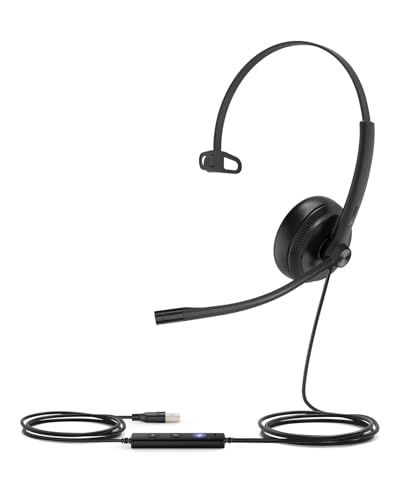
Yealink UH34 Mono Headset — Best USB all-rounder
The UH34 is what a modern, computer-based front desk should default to. It is a single-ear USB-A headset with a noise-cancelling microphone and inline controls, and its listing carries Teams and Zoom certification, which matters for a specific practical reason: on certified headsets, the buttons on the cord — answer, end, mute, volume — are designed to talk to the software, so the receptionist manages calls from the cord rather than hunting a mouse across two monitors while a caller waits. Plug and play is the other half of its pitch: no drivers, no pairing, no settings archaeology when a temp sits down at the desk.
The on-ear, single-ear format suits reception rhythms. It goes on and off in one motion, dozens of times a day, without the hair rearrangement a big over-ear stereo headset demands, and the open side keeps the lobby audible. Yealink sells this line in mono and stereo, single and dual variants, so the mono discipline is on you: order the mono, because the stereo version of this same headset is the wrong tool wearing the right name. For a small or mid-sized office whose phones are really a laptop app, this is the pick with the fewest ways to go wrong, and the one we would standardise on for a row of desks.
- Connection: USB-A wired, plug and play
- Design: mono, single-ear, on-ear
- Microphone: noise-cancelling
- Controls: inline call controls
- Certification: Teams and Zoom certified per listing
Strengths
- Certified call controls mean the cord buttons and the softphone agree with each other.
- USB plug-and-play makes it the easiest headset in this guide to hand to a new starter.
- The mono on-ear format matches the on-off rhythm of a working front desk.
Trade-offs
- It serves computer desks only; a traditional desk phone cannot use it.
- On-ear fit is less cushioned for very long unbroken wear than over-ear designs.
- USB-A assumes a port of that shape; newer laptops may need the adapter drawer.
Best for: reception desks running Teams, Zoom or a browser softphone on a PC or laptop. Not suited for: offices whose calls arrive on a physical desk phone, where the YHS34 or HW510 belong.

Yealink YHS34 Desk Phone Headset — Best for desk phones
The YHS34 exists for the millions of front desks where the phone is a phone. Its listing describes a QD-to-RJ9 wired headset with leather ear pads, compatibility with desk phones from makers such as Poly, Snom and Grandstream, a weight of 72 g and a cable length of 2.1 m. Each of those details is a reception feature in disguise. The 72 g is a headset that can be worn for a full shift without becoming the shift’s main event. The 2.1 m of cable is the difference between reaching the printer, the appointment book or the low filing drawer while staying on the call, and performing the apologetic please-hold dance instead.
The quick-disconnect is the professional heart of it. Mid-call, the receptionist separates the headset at the QD, leaving the bottom cable — and the caller’s connection — with the phone, walks to the cabinet, returns, clicks back in. No headset removal, no dropped caller, no handset juggling. The honest homework is compatibility: QD bottom cables are matched to phone families, and the listing’s named brands are the ones to check yours against. If your desk phone is not in the family, the HW510 below walks the same QD path with a different ecosystem of bottom cables. Get the pairing right once and a desk-phone headset like this will outlast several generations of the office’s computers.
- Connection: QD to RJ9 wired, for desk phones
- Design: mono, single-ear
- Weight: 72 g as stated in the listing title
- Cable: 2.1 m as stated in the listing title
- Ear pads: leather per listing
Strengths
- The quick-disconnect lets the wearer step away mid-call without ending or dropping it.
- At a stated 72 g, it is the lightest full-shift option in this guide.
- The long cable turns the whole desk area into the conversation area.
Trade-offs
- It only works within its desk-phone compatibility family; the wrong bottom cable means no connection.
- There is no USB life for this headset if the office later moves to softphones.
- Leather pads wear with daily use and become a consumable to budget for.
Best for: front desks with traditional desk phones from mainstream office phone brands, staffed all day. Not suited for: computer-softphone desks, or buyers unwilling to verify phone compatibility before ordering.

Jabra Engage 50 Mono — Best for noisy lobbies
Some front desks sit in quiet suites. Others sit in marble lobbies, clinic waiting rooms, school entrances and car showrooms, where every footstep echoes and the caller’s experience of your business is the sound of your lobby leaking down the line. The Engage 50 Mono was built for that problem: its listing describes a three-microphone system designed to block background noise and keep the wearer’s voice in focus, along with hearing-protection features aimed at all-day call work. Three microphones are not a luxury specification here; they are how the headset tells your voice from the room’s, using the extra elements to sample the noise and subtract it.
This is a wired, premium, mono headset from Jabra’s professional line, and it behaves like one: the construction assumes daily professional use, the microphone performance assumes a difficult acoustic, and the price class assumes an employer buying for a role rather than a hobbyist buying for a desk. If your reception sits in a calm office, its talents are surplus and the UH34 will serve you for less fuss. If your callers currently hear your waiting room more clearly than your receptionist, this is the pick that changes what your business sounds like on the phone. Busy multi-line desks comparing across the category may also want the noise analysis in our best call center headsets noise cancelling guide, keeping in mind those picks are stereo and call-centre oriented.
- Connection: wired, computer-oriented professional connection
- Design: mono, single-ear
- Microphone: 3-microphone system per listing
- Focus: background-noise blocking and hearing protection per listing
- Intended use: professional call work in noisy spaces
Strengths
- The multi-microphone array attacks lobby echo and chatter at the source, before the caller hears it.
- Hearing-protection design suits staff who take calls continuously for full shifts.
- Professional-line build quality assumes years of daily desk use.
Trade-offs
- Its noise talents are wasted in a quiet office, where simpler picks match it.
- Premium professional pricing makes it a deliberate purchase, not a drawer spare.
- It is computer-focused; traditional desk-phone desks should look to the QD picks.
Best for: reception desks in echoing lobbies, waiting rooms and showrooms where callers currently hear the room. Not suited for: quiet suites, tight budgets, or desk-phone systems.

Plantronics HW510 EncorePro Mono — The proven workhorse
The HW510 is the headset equivalent of a reliable estate car: the EncorePro line from Plantronics — now under the Poly brand — became the default head in call centres and offices for years, and the mono HW510 is its reception-shaped member. Its listing is terse: a noise-cancelling, over-head monaural headset. What that terseness hides is an ecosystem. EncorePro headsets are QD headsets, designed to pair with bottom cables and amplifiers matched to specific phones, and the installed base is enormous, which means spare cables, spare cushions and replacements are easy to source years after purchase — a virtue no spec sheet captures and every office manager eventually appreciates.
Choose the HW510 when the desk phone is a traditional one and the priority is a headset that can be maintained rather than replaced. The over-head mono design with a proper boom puts the microphone where reception voices need it, and the noise-cancelling microphone keeps a lived-in office out of the call. The homework mirrors the YHS34’s: confirm the bottom cable or amplifier your phone needs, because the QD system is a two-part connection and the headset half alone does not plug into a phone. Offices that standardised on this family years ago will find this listing the simplest like-for-like refresh in the guide.
- Connection: QD wired system for desk phones (bottom cable matched to phone)
- Design: mono, over-head, single-ear
- Microphone: noise-cancelling boom
- Line: EncorePro professional family
- Intended use: office and call-handling desks with desk phones
Strengths
- A huge installed base means cables, cushions and spares stay easy to find.
- The QD system supports the step-away-mid-call routine reception work demands.
- Its design has been refined by years of full-shift professional use.
Trade-offs
- The two-part QD connection requires the correct bottom cable for your phone, sold as part of the system.
- The listing’s brevity means specifications must be confirmed against the manufacturer’s documentation.
- It belongs to the desk-phone world and has no softphone role.
Best for: established offices with desk phones that value maintainability and a known quantity. Not suited for: USB softphone desks, or buyers who want everything in one box with no compatibility step.

Arama USB Mono Headset — Best simple spare
Every front desk needs a headset strategy for the bad morning: the main headset’s cable fails, a temp arrives, two people must cover one desk through a training week. The Arama is that strategy in product form — a single-ear USB headset with a noise-cancelling microphone, inline controls and a lightweight build, described in its listing for call centre, office and remote work. It asks nothing of the buyer: plug into USB, select it in the calling app, work. For a small business, that simplicity is the feature, and keeping one boxed in the drawer converts a headset failure from a crisis into a thirty-second swap.
As a main headset, it covers the reception fundamentals honestly: one ear open, a boom microphone with noise cancelling for ordinary office sound, and cord controls for the mute-and-volume moments. What it does not bring is the professional QD ecosystem, certification badges or the multi-microphone noise engineering of the Jabra. In a quiet-to-moderate office it will simply do the job, and there are thousands of small front desks — clinics, salons, trades offices, studios — for whom the job is exactly this size. Buy it as a main headset for a modest desk or as the spare for an important one; either way it earns its drawer space. Desks comparing USB options broadly can cross-check our best call center headsets usb roundup, remembering that reception wants the mono members of that family.
- Connection: USB wired, plug and play
- Design: single-ear mono, lightweight
- Microphone: noise-cancelling
- Controls: inline controls
- Intended use: office, call centre and remote-work desks
Strengths
- The simplest possible deployment: one USB plug between the box and a working desk.
- Lightweight mono design matches reception’s on-off, one-ear-open rhythm.
- Affordable-class positioning makes it the natural spare-headset purchase.
Trade-offs
- No certification badges, so call-control cooperation with softphones is not promised.
- Its noise cancelling is single-microphone class, outmatched by the Jabra in loud lobbies.
- It serves USB desks only, with no desk-phone path.
Best for: small offices on softphones, and as the boxed spare for any USB front desk. Not suited for: noisy public lobbies, or desk-phone systems.
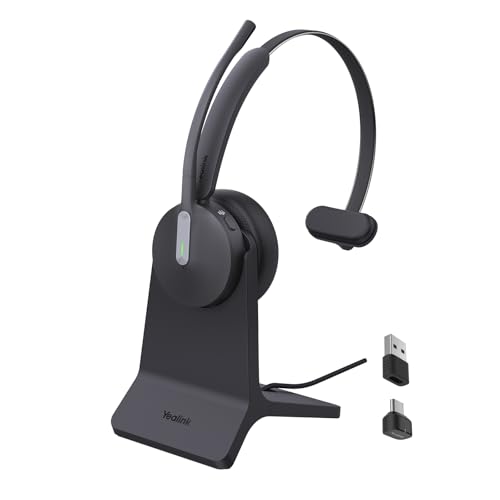
Yealink BH70 Mono Bluetooth — The actual Bluetooth pick
Here is the headset the keyword literally asked for. The BH70 is a mono Bluetooth headset for work, Teams certified per its listing, with a stated weight of 91 g and a talk-time claim of up to 35 hours, connecting by USB-C to A arrangements for computer use alongside ordinary Bluetooth pairing. In reception terms, Bluetooth buys three things: no cord to catch on the desk edge or the chair arm, the freedom to stand, file, greet and move within range while a call continues, and one headset that serves both the computer softphone and the mobile phone in the receptionist’s pocket. For a roaming role — a showroom host, a clinic coordinator moving between rooms, a one-person office that is also the warehouse — those are not luxuries.
The costs are the familiar wireless ones, and a front desk feels them sharply. A battery is now part of the morning routine; a headset forgotten off its charger is a desk without a headset. Pairing is a state that can be lost, usually at the worst moment, and Bluetooth range ends where walls begin, so the roam has a radius. The mono design and light weight keep it honest reception equipment rather than a gadget, and the claimed talk time, treated as a seller’s best case, still describes multi-day endurance for typical call volumes. If your desk is fixed and your phone is corded, the wired picks remain the wiser money. If your receptionist’s job happens on their feet, this is the pick that follows them.
- Connection: Bluetooth, with USB-C to A computer arrangement per listing
- Design: mono, single-ear
- Weight: 91 g as stated in the listing title
- Talk time: up to 35 hours as claimed in the listing title
- Certification: Teams certified per listing
Strengths
- True cordless freedom for receptionists whose role moves around the premises.
- One headset pairs across the computer and a mobile phone.
- At a stated 91 g, it stays comfortable through a full shift of intermittent calls.
Trade-offs
- Battery discipline becomes part of the job; a flat headset is a silent desk.
- Bluetooth range and pairing quirks add failure modes a cord never has.
- It cannot serve a traditional corded desk phone at all.
Best for: roaming reception roles on softphone-plus-mobile setups, in spaces where the desk is a base rather than a post. Not suited for: fixed desks with corded phones, or offices that want zero daily charging routine.
What Does a Full Shift Ask of a Reception Headset?
Picture the shift honestly and the specifications reorder themselves. The headset goes on at opening and effectively lives on the wearer’s head through hundreds of micro-interactions: a ten-second call about opening hours, a long call with an insurer, a call transferred, a call parked while a visitor is signed in. Between calls it may rest around the neck or stay in place, and every transition is a chance for a cord to snag, a cushion to catch hair, or a Bluetooth unit to be set down and forgotten. This is why reception veterans judge headsets by transitions survived rather than features listed. The wired QD picks excel here precisely because they are boring: nothing to pair, nothing to charge, a disconnect that works the same at 4 p.m. as at 8 a.m.
Voice fatigue is the shift’s second demand. A receptionist speaks for a living, and a microphone positioned consistently at the mouth’s corner lets them speak at conversational volume all day. Booms that drift — sliding down, swinging loose — force the voice up to compensate, and by Friday the strain is audible to callers. When you set up any pick in this guide, check the boom’s resistance: it should hold the position you give it against the small knocks of a working day. The third demand is social: the headset is part of the uniform visitors see. A tidy mono headset reads as professional readiness; a huge stereo gaming-style unit reads as someone who would rather be elsewhere. Front desks are theatre as well as telephony, and the modest profiles in this pool are partly chosen for how they look across a counter.
How Should Cords Be Managed at a Busy Front Desk?
Five of these six picks are corded, and a cord at a front desk lives a hard life: rolled over by chair castors, trapped in drawers, yanked when the wearer stands without disconnecting. Cord management is therefore not tidiness but equipment survival. Route the cable so its slack pools on the desk rather than hanging in the chair’s path, keep the QD or the inline control block where the seated wearer’s hand falls naturally, and give the cable one deliberate service loop — a gentle coil secured at the desk’s rear — so a sudden stand pulls against the loop instead of the connector. The 2.1 m cable on the YHS34 is an asset only if its extra length is managed rather than left to wander the floor.
Inspect cords monthly with your fingers, not your eyes: run the length through a loose grip and feel for the flat spots, kinks and soft sections that precede a failure. A cord caught early is a cheap part; a cord that fails audibly mid-call teaches the whole office the price of skipping the check. Desks with a cleaner who moves equipment nightly should agree a parked position for the headset, because half of all front-desk cable damage happens outside working hours, inflicted innocently by vacuum cleaners and chair shuffling.
What About DECT and Other Wireless Desk Systems?
Thoroughness requires naming the technology this pool does not contain. Many established offices run wireless reception headsets on DECT, a cordless standard built for voice, where the headset talks to a base station plugged into the desk phone. DECT systems offer long range within a building and a base that often includes a handset lifter for answering away from the desk. They are a legitimate, mature answer for desk-phone wireless, and if your office already owns such a base, its compatible headsets are your shortlist, not this guide’s.
Why, then, does this guide’s wireless seat go to Bluetooth? Because the modern front desk increasingly runs on a computer and a mobile rather than a desk phone, and Bluetooth is the wireless those devices speak natively. The BH70 needs no base station, no lifter, no phone-port negotiation; it pairs with the machines the calls already live on. The honest summary is that wireless reception splits by phone system, exactly as wired does: DECT for desk-phone estates, Bluetooth for computer-and-mobile desks. Buying across that line is the expensive mistake, and it is avoidable in one question — where do our calls actually arrive?
How Do You Handle Shared Headsets and Hygiene?
Reception desks run across shifts, and shifts share equipment. A headset’s ear cushion and microphone windscreen are personal-contact surfaces, and offices that ignore that discover it through staff reluctance and, occasionally, through illness doing the rounds. The practical protocol is simple: issue cushions per person where the design allows swapping, keep spare windscreens in the same drawer as the spare headset, and wipe down shared units between shifts with the cleaning method the manufacturer permits. QD and USB designs both help here, because the wearer-facing part can be separated or swapped without disturbing the desk’s cabling.
There is also a dignity point worth making to employers: a receptionist given their own headset, fitted to them, treats it better and wears it more consistently than one handed a communal unit of unknown history. Where budgets allow one indulgence in this entire category, personal issue is the one. It costs little against a salary, it shows up in how the desk sounds and looks, and it quietly removes the most common reason staff resist wearing the headset at all — which matters, because a headset in a drawer answers no calls.
How Do the Six Picks Compare at a Glance?
| Headset | Connects to | Connection type | Defining trait | Choose it when |
|---|---|---|---|---|
| Yealink UH34 Mono | Computer softphone | USB-A wired | Teams and Zoom certified controls | Your phones are a laptop app |
| Yealink YHS34 | Desk phone | QD to RJ9 wired | Stated 72 g, 2.1 m cable | Your desk phone is a mainstream office model |
| Jabra Engage 50 Mono | Computer | Wired professional | Three-microphone noise system | Your lobby is loud and callers hear it |
| Plantronics HW510 EncorePro | Desk phone | QD wired system | Maintainable professional ecosystem | You want spares and cables available for years |
| Arama USB Mono | Computer softphone | USB wired | Simplicity itself | You need a spare or run a modest desk |
| Yealink BH70 Mono | Computer and mobile | Bluetooth | Stated 91 g, cordless | Your receptionist works on their feet |
The table’s first column of substance — connects to — is the whole buying decision in miniature. Identify your phone reality honestly and the shortlist collapses to two or three names; everything after that is preference.
How Do You Set Up a Reception Headset Correctly?
For USB headsets, setup is a two-minute ritual: plug in before opening the calling app, then select the headset explicitly as both speaker and microphone inside the app’s audio settings, because operating systems love defaulting to laptop speakers at the worst moment. Make one test call to a colleague and ask the only question that matters — how do I sound — while walking the headset through its paces: normal voice, turning away, typing. Adjust the boom to sit a finger’s width from the corner of the mouth; a boom left pointing at a cheek makes the noise cancelling work against your own voice.
For QD desk-phone headsets, the ritual is about the bottom cable. Connect the cable matched to your phone model, route it so the QD sits within easy reach of the seated receptionist, and practise the disconnect twice: answer, separate at the QD, walk, return, reconnect, confirm the caller is still there. That rehearsal, done calmly on day one, is what makes the feature real on day thirty. Check whether your phone needs the headset to use the handset port or a dedicated headset port, and whether a headset button on the phone must be enabled; desk phones hide these settings cheerfully.
For the BH70, setup adds pairing order and charging geography. Pair to the computer arrangement first, the phone second, then decide where the headset lives when idle — a fixed spot with its charger, visible from the door, so the end-of-day routine is automatic. Set a calendar nudge for the first month if the role is new to wireless; habits, once formed, make the battery a non-issue. Finally, whatever the connection, brief the humans: a laminated card at the desk with the mute control’s location and the spare headset’s drawer prevents more lost calls than any feature in this guide. Offices standardising their whole phone setup may also find our best telephone headsets overview useful context.
What Can a Headset Not Do? Transfers, Lines and the Phone Itself
New buyers sometimes expect the headset to modernise the phone system, so let us be plain about the division of labour. The headset carries sound and a few controls: answer, end, mute, volume, and on QD systems the freedom to step away. Everything else — holding, transferring, conferencing, voicemail, line selection — belongs to the phone or the softphone, and no headset in this guide adds those powers to a system that lacks them. What a good headset does is make the phone’s powers usable at speed: a receptionist who can mute from the cord while greeting a visitor, or step to a cabinet mid-call on a QD, operates the same phone system visibly better than one fumbling with a handset. Judge headsets as instruments of fluency, not as upgrades to the exchange.
This division also explains why the compatibility questions in this guide are all about connection rather than features. A headset that cannot connect to your phone’s port or your computer’s software delivers none of its virtues, however impressive its microphone. Conversely, a modest headset correctly connected — the Arama on the right laptop, the YHS34 on the right phone — will outperform a premium one improvising through adapters. Reception is a reliability discipline wearing a hospitality costume, and reliability begins at the plug.
How Does the Right Pick Change by Kind of Front Desk?
A medical or dental reception adds confidentiality and pace: calls carry personal details, the waiting room is full, and the headset’s microphone must keep the receptionist’s voice clear at low volume, because speaking quietly is a privacy tool. Noise-cancelling booms and the Jabra’s multi-microphone focus earn their keep here, as does the discipline of the open ear for the patient standing at the desk with a form. A legal or financial office adds formality and call length; conversations are longer, transfers are frequent, and the QD step-away becomes a daily feature rather than an occasional one, pushing the desk-phone picks forward. A salon, gym or studio desk adds movement and ambient music: the BH70’s cordless mono starts to look less like a luxury and more like the only design that survives a role performed standing, walking and demonstrating, with the caveat that music-filled rooms test every microphone’s noise rejection.
A school front office adds safeguarding awareness — the open ear again — plus a parade of in-person queries that outnumber the calls, which argues for the lightest, most forgettable headset in the pool rather than the most capable. A trades or logistics office adds dust, yard noise through an open door, and calls taken while moving between office and workshop; cable length and durability climb the list, and a spare stops being optional. The six picks do not change across these desks, but their ranking does, and ranking by your room rather than by a generic league table is the habit this guide has been teaching from its first section.
Which Mistakes Do Offices Make Buying Reception Headsets?
The classic error is buying stereo because it looked more premium, then watching the receptionist wear one cup off an ear for a year. Mono is not the budget option; it is the correct design, and this guide’s insistence on it is the whole ballgame. The second error is skipping the compatibility step on QD headsets — ordering the headset, discovering the bottom cable question at unboxing, and running the desk on a handset for a week. The third is buying for the phone system you plan to have next year rather than the one bolted to the desk today; headsets are cheap enough to re-buy at migration, and useless if they cannot connect this morning.
Fourth, offices forget the spare. A front desk is a single point of failure with a human attached, and a boxed Arama or a second UH34 is inexpensive insurance against the day the main headset dies at 9 a.m. Fifth, they ignore the wearer: the receptionist who will live in the headset should sit in on the decision, because fit and glasses and hairstyles are as individual here as anywhere — our glasses guide’s lesson about hour-two comfort applies at the front desk with interest. Sixth, they buy Bluetooth for a fixed desk because wireless felt modern, then manage batteries forever to gain a freedom nobody uses. Match the technology to the role’s actual movement, not its imagined one.
What Does Your Headset Sound Like to the Caller?
Every judgement in this guide has a mirror image: the caller’s experience. Callers cannot see your tidy desk or your professional headset; they hear a voice, a room and a level of attentiveness, and they form the organisation’s reputation from those three ingredients in the first ten seconds. A well-positioned boom gives them a voice that is close and steady. Noise cancelling gives them a room that sounds controlled rather than chaotic. Consistent volume — the product of a microphone that stays where it was put — gives them the subconscious sense that the business is run by people who have their arrangements in order. None of this requires premium equipment. The Arama, correctly set up, delivers all three to an ordinary office’s callers; the Jabra exists for rooms where physics fights back harder.
Test this the way callers experience it: ring your own front desk from a mobile, from another room, and listen as a stranger. You will hear things no internal test reveals — the hold music’s volume against your receptionist’s voice, the echo your lobby adds, the rustle when the headset is adjusted. Do it after any equipment change and quarterly otherwise. It takes four minutes and it is the closest thing this field has to a secret weapon, because almost nobody does it. While you are listening, note the small sounds too: the keyboard under a call, the chair squeak, the door. Callers forgive all of these individually, but together they compose an impression, and the headset’s microphone placement decides how much of that composition reaches the line. An office that has once heard itself as its customers do rarely needs persuading about boom position again.
How Do You Train a New Receptionist on the Headset in One Morning?
Headset fluency is a morning’s teaching, and desks that skip it pay in small daily frictions for years. Start with fit and boom position, because a new starter will wear a badly positioned headset silently for months rather than mention it. Then the controls, by touch, eyes closed if necessary: mute, volume, answer and end must be findable without looking, because the moment they are needed the eyes are busy with a visitor or a screen. Then rehearse the three choreographies of the role: answering while greeting someone at the counter, placing a caller on hold politely to handle the room, and — on QD systems — stepping away and returning mid-call. Each takes two practice runs to become unremarkable.
Finish with the failure drills, which are what separate a trained desk from a lucky one. The headset dies mid-call: what do you pick up, and where is it? The Bluetooth unit will not pair: what is the wired fallback at this desk? The caller cannot hear you: what is the thirty-second check — boom position, mute state, software selection — in order? Write the answers on the laminated card mentioned earlier. A receptionist who has rehearsed the bad moments handles them as routine, and callers never learn that anything went wrong, which is the entire standard of the profession.
When Should a Reception Headset Be Replaced?
By symptom, not by calendar. A cable that crackles when moved is announcing its retirement and should be believed the first time, because it will choose a busier moment to finish dying. Cushions that have flattened or split change both comfort and microphone distance, and on most professional designs they are replaceable parts — replace the part before blaming the whole. A boom that no longer holds position is a voice-fatigue machine and, if it cannot be tightened, ends the headset’s useful life at a front desk even if it still technically works. Bluetooth units add a battery symptom: when a full charge stops covering a shift with margin, the headset is telling you its remaining lifespan in the only language it has.
One environmental note belongs in the replacement conversation: a headset discarded for a worn cushion or a single failed cable is mostly good material in a landfill. The professional lines in this guide — the QD families especially — were designed in an era when equipment was serviced, and their spare-part ecosystems are the greener as well as the cheaper path. Offices with sustainability reporting will find that maintaining two QD headsets for five years beats landfilling five disposable ones, and the front desk will not notice any difference except fewer bad mornings.
Keep the retired unit, if it half-works, as the emergency spare rather than discarding it, and log the failure mode when you replace it. Offices that track why headsets died discover their own patterns — a chair that eats cables, a desk edge that abrades cords — and fix causes instead of repeatedly buying replacements. The headset budget of a well-run front desk is small and boring, which is exactly what it should be.
Final Recommendation
Decide by phone, then by room, then by movement.
Computer desk in a normal office: the UH34, with an Arama in the drawer. Desk phone: the YHS34 if your phone is in its family, the HW510 if you value the deepest spare-parts ecosystem. Loud lobby: the Engage 50 Mono, because what your callers hear is your reputation. A receptionist who genuinely roams: the BH70, with a charging spot treated as sacred. Every one of these choices keeps one ear on the room and one on the caller, which is the entire job. The front desk is the first voice your organisation ever speaks with, so give that voice a headset chosen for the room it actually sits in — and it will repay you in every single call that sounds calm, clear, unhurried and unmistakably attended to.
Frequently Asked Questions
Why do receptionists not just use the stereo headsets everyone else buys?
Because their job includes the physical room. Stereo coverage seals the wearer into the call and shuts out visitors, alarms and colleagues, which are all part of a receptionist’s responsibilities. Mono is the professional standard at front desks for the same reason security staff use single-ear radios: awareness is a feature, not a compromise.
What is a QD connection and why does it matter?
QD, or quick disconnect, is a break point partway down a professional headset’s cord. Separating it leaves the call connected to the phone while the wearer walks away wearing the headset, then clicks back in to resume. For a receptionist who must fetch files, greet arrivals or check a back room mid-call, it converts a dropped-call risk into a routine. The bottom cable below the QD is matched to specific phone models, which is the compatibility step to verify before ordering.
Can a Bluetooth headset work with a normal desk phone?
Generally not directly. Traditional desk phones speak in cords — handset ports and RJ9 plugs — and a Bluetooth headset like the BH70 is built for computers and mobiles. Offices wanting wireless on a desk-phone system enter a different product category involving bases and lifters, which is beyond this guide’s pool; for the desk phones themselves, the QD wired picks are the dependable route.
How do I know if my desk phone suits the YHS34 or HW510?
Check the phone’s brand and model against the headset listing’s compatibility information, and confirm which bottom cable or connection arrangement that model requires. The YHS34’s listing names phone families including Poly, Snom and Grandstream. If your phone is absent from a listing’s named families, contact the seller or manufacturer with the exact model before ordering rather than hoping; QD systems reward precision.
Is Teams certification just a badge?
It has a practical core: certified headsets are built so their inline call controls — answer, end, mute — cooperate with the named software. At a front desk, answering from the cord instead of the mouse is a real, repeated saving of seconds and fluster. It does not guarantee audio quality, which is why this guide treats certification as a workflow feature, not a sound verdict.
Can a receptionist use a headset with hearing aids or glasses?
Often, yes, with fit attention. Mono on-ear designs sit on the ear rather than around it, which can suit hearing-aid wearers depending on the aid’s style, and the light weights in this pool reduce the pressure that makes glasses ache over a shift. Individual geometry decides, so the wearer should test at full-shift length before the office standardises, and the QD and USB picks here are all returnable experiments rather than installations.
How many headsets should a front desk own?
One per receptionist on shift, plus one boxed spare that connects the same way. Headsets fail by cable and cushion, usually mid-morning, and a spare that needs a different connection type is only half a spare. The spare can be the simplest pick in the family — that is precisely the Arama’s role in this guide. Label the spare with its connection type and the date it was checked, and test it on the same quarterly rhythm as the ring-your-own-desk check above, because a spare that has silently died in its drawer is a story every office manager tells exactly once before changing their habits.
Related Guides
For the desk-phone world beyond headsets alone, our guide to the best bluetooth headsets for making phone calls covers the mobile-first side of call audio. And if the person staffing your desk also fields the company’s meeting load, the stereo options in our best headsets for teams and zoom roundup make a sensible second headset for that different job.
The front desk is quiet by comparison; best wireless headsets for construction workers covers headsets that add hearing protection and radios.


