What's inside
- Key Takeaways
- Quick Picks
- How Did We Choose the Best Call Center Headsets Noise Cancelling Picks?
- What Does “Noise Cancelling” Actually Mean on a Call Center Headset?
- Which Headset Fits Your Phone System?
- How Do the Six Picks Compare Side by Side?
- How Should You Set Up a Headset So Callers Actually Hear the Benefit?
- What Mistakes Do Buyers Make With Call Center Headsets?
- Final Recommendation
- How Does a Noise-Cancelling Microphone Actually Reject the Room?
- What Should a Full Shift Teach You About Fit?
- Which Wearing Style Suits Which Kind of Floor?
- How Do You Roll Headsets Out Across a Whole Team Without Chaos?
- Why Does Wired Still Win in Most Call Centers?
- How Long Should a Call Center Headset Last, and How Do You Make It Last?
- How Do You Test a Headset Before You Commit the Whole Floor?
- Frequently Asked Questions
- Related Guides
As an Amazon Associate I earn from qualifying purchases. This post may contain affiliate links at no extra cost to you.
gizmoverdict.com is reader-supported. When you buy through links on our site, we may earn an affiliate commission.
Where to buy: Every linked pick below points to its Amazon listing, where you can check the current configuration, the included cables, and whether a quick-disconnect bottom cable is bundled or sold separately. Two of the six picks are wired desk-phone headsets that need a specific phone system to work at all, so read the compatibility notes before you order anything.
The phrase best call center headsets noise cancelling hides a misunderstanding that costs buyers real money, so let us clear it up in the first paragraph. On nearly every headset in this class, “noise cancelling” describes the microphone, not your ears. The microphone is engineered and processed so that the person on the other end of the call hears your voice instead of your office. It does almost nothing to quiet the room for you. If you want silence around your own ears, you are shopping for active noise cancelling headphones, which are a different product with different trade-offs, and most of them are poor tools for eight hours of back-to-back calls. A call center headset is judged by what the caller hears, how it treats your head and ears across a full shift, and whether it plugs into the phone or computer already sitting on your desk.
That last point matters more than most listings admit. This class splits into three families that do not interchange. Quick-disconnect desk-phone headsets are built for hardware phones from specific makers and need the matching bottom cable. RJ9 headsets plug straight into the headset port of a desk phone, again only for the phone families they are wired for. USB headsets belong to computers and softphones. A headset that is excellent on the wrong connector is not a bargain; it is a return. The six picks below cover all three families, and each one names the systems it actually fits.
Key Takeaways
- The noise cancelling that matters here happens in the microphone. Your caller stops hearing the agent at the next desk; you still hear the room, and for floor awareness and safety that is usually what a call center wants.
- Connector first, comfort second, brand third. Decide whether your seat runs a desk phone with a quick-disconnect lead, a desk phone with an RJ9 headset jack, or a computer softphone on USB, because that decision eliminates half the catalogue before features enter the conversation.
- A quick-disconnect headset is only half a product until the bottom cable matches your phone model. Budget for the cable and confirm your exact phone before ordering, not after the box arrives.
- Monaural headsets keep one ear on the floor for coaching, questions, and alarms. Stereo headsets shut the room out and suit focused call work at a computer. Neither is better in the abstract; they answer different floor policies.
- Sellers sometimes quote noise-reduction percentages for microphones. There is no shared test standard behind those numbers, so treat them as marketing and judge a headset by its connector, fit system, and warranty instead.
Quick Picks
| Pick | Badge | Why it earns its seat |
|---|---|---|
| Plantronics EncorePro HW510 | Best for QD desk phones | The long-serving monaural workhorse for Plantronics-style quick-disconnect phone systems, built for fleets and shared desks. |
| MAIRDI Phone Headset with RJ9 | Best dual-jack flexibility | Ships with both RJ9 and 3.5mm connections, so one headset can move between a desk phone and a phone or laptop with a round jack. |
| Wantek Cisco Phone Headset | Best for Cisco desks | Wired and voiced for the named Cisco office phone families, for seats that live on Cisco hardware all day. |
| EKSA H8 USB Headset | Best stereo USB pick | An over-ear stereo computer headset with in-line controls and both USB and 3.5mm routes into a PC or laptop. |
| JIAMQISHI USB Headset | Best light on-ear USB | A lighter on-ear computer headset for softphone users who dislike the sealed-in feeling of big over-ear cups. |
| Arama USB Mono Headset | Best one-ear USB | A single-ear USB headset that keeps softphone callers clear while leaving one ear open to the room. |
How Did We Choose the Best Call Center Headsets Noise Cancelling Picks?
We started from the floor outward rather than from a brand list inward. A call center seat is defined by its phone system, its shift length, and its policy on whether agents may have both ears covered, so the shortlist had to contain a genuine answer for each of the three wiring families: quick-disconnect desk phone, direct RJ9 desk phone, and USB softphone. Any headset that could not state plainly which systems it fits was dropped, however impressive its microphone claims sounded, because vague compatibility is the number one cause of returns in this category.
Within each family we weighed the microphone first, since that is the half of the conversation your customer experiences. Noise-cancelling microphone design, boom placement discipline, and the ability to position the mic consistently call after call matter more than exotic features. Next came wearability across a shift: weight distribution, ear cushion style, headband pressure, and whether the headset survives being put on and taken off dozens of times a day. Finally we looked at the ownership picture — replaceable cushions, the availability of the right bottom cables, and whether the maker supports fleet buyers — because a headset bought two hundred at a time is a different purchase from a headset bought once.
One filter deserves its own sentence. Listings in this category sometimes attach percentage figures to microphone noise reduction. Those figures come from each seller’s own test setup, with no shared standard between brands, so a higher percentage on one listing does not mean a quieter microphone than a lower percentage on another. We noted the claims exist, refused to rank by them, and chose on connector fit, wearing style, and build instead.
What Does “Noise Cancelling” Actually Mean on a Call Center Headset?
On a call center headset the term describes a microphone system designed to favour the voice in front of it over the room around it. The boom places the microphone close to the corner of your mouth, the capsule is directional so it listens hardest along the boom’s axis, and on many models processing trims steady background sound further. The combined effect is that a caller hears you clearly while the neighbouring agent’s call, the air conditioning, and the keyboard clatter recede. Nothing in that chain quietens the room for the wearer. Your own ears receive the office at full volume unless the ear cups physically block some of it, which is passive isolation, a separate and much weaker effect.
This is not a trick, even though listings blur it. Floor managers generally want agents to hear the room: a supervisor’s instruction, a colleague’s quick question, a fire alarm. A headset that sealed an agent into silence would be a safety and coaching problem. So the honest buying question is never “how quiet will my office feel” but “how clean will I sound to the person who called us.” Judge demo recordings and microphone placement, not headphone-style cancellation claims.
There is a second blurring to watch for. Some listings borrow the vocabulary of consumer ANC headphones — decibel figures, percentages, hybrid cancellation — and apply it to a microphone. The physics and the purpose are different, and the numbers are not measured the same way across sellers. Treat any such figure as decoration. The verifiable facts on a listing are the connector, the wearing style, the cable, and the phone models named as compatible, and those are the facts the rest of this guide is built on.
Which Headset Fits Your Phone System?
Before the detailed reviews, settle the wiring question, because it decides which third of this guide is even available to you. If your desk has a hardware phone with a dedicated headset port and your organisation issues Plantronics-style quick-disconnect leads, you are in QD territory: the headset ends in a quick-disconnect plug, and a separate bottom cable translates that plug for your phone model. The system exists so an agent can stand up mid-shift by separating the disconnect, leaving the cable with the phone, and so a fleet can stock one headset model across several phone types by swapping cables. If your phone has an RJ9 headset jack and no QD infrastructure, a direct RJ9 headset is the simpler path — one cable, no adapter chain — provided the headset is wired for your phone family, because RJ9 describes the plug shape, not a universal wiring standard. Different phone makers wire those four contacts differently, which is why honest listings name phone models.
If your calls run through a computer — a softphone, a browser-based dialer, a contact-center app — you are in USB territory, and the desk phone’s wiring stops mattering. USB headsets carry their own audio processing, present themselves to the computer as a sound device, and usually add in-line controls for volume, mute, and sometimes call answer where the softphone supports it. The stereo-versus-mono choice then becomes your main decision, and it is a policy decision as much as a comfort one: some floors require an open ear, others prize concentration. Read the three desk-phone picks if you have phone hardware, the three USB picks if you live in a softphone, and do not let a tempting price pull you across that line.

Plantronics EncorePro HW510 — Best for QD Desk Phones
The EncorePro HW510 is the headset that fleet managers reach for when a floor runs on quick-disconnect infrastructure, and its design explains why the type endures. It is a monaural, over-the-head headset: one ear covered, one ear open to the room, with a noise-cancelling microphone boom that rotates so the headset can be worn on either side. For a supervisor walking a row of agents, that open ear is the point. Agents hear a coaching whisper or a raised hand’s question without lifting a cup, and the wearer can hold a conversation with the person standing at the desk while still wearing the tool of the job.
The HW510’s microphone discipline is its real credential. The boom is built to be positioned at a consistent distance from the mouth, and the noise-cancelling capsule favours that near voice over the agent in the next seat — which, in a dense floor, is the exact interference pattern that ruins calls. The headset end of the connection is the Plantronics quick disconnect, so the working life of the headset is tied to the bottom cable matched to your phone. That modularity is a strength for organisations and a trap for individuals: buy the headset alone for a phone it has no cable for and you own a well-made paperweight. Confirm the cable for your exact phone model as part of the same order.
- Connection: Plantronics quick disconnect (QD); requires the correct QD bottom cable for your phone
- Wearing style: monaural over-the-head, boom can swing for left or right ear wear
- Microphone: noise-cancelling boom microphone
- Intended systems: desk phones equipped for Plantronics-style QD headset leads
- Fit notes: adjustable headband and cushioned ear contact for long shifts
Strengths
- The quick-disconnect system lets an agent break away from the desk without removing the headset or disturbing the phone’s cable, which adds up across hundreds of small moments in a shift.
- One open ear keeps floor communication natural, so coaching, escalation questions, and alarms reach the agent without anyone tapping a shoulder.
- The model has a long service life in professional fleets, which means cushions, cables, and replacements are easy to source compared with short-lived consumer models.
Trade-offs
- It is not a complete purchase on its own: the matching bottom cable for your phone is essential and may be a separate line item.
- There is no USB path here, so a seat that migrates to a softphone needs a different headset or a QD-to-USB adapter solution.
- A single ear cup offers little isolation from a loud floor, so agents in genuinely noisy rooms will still hear plenty of the room.
Best for: established call centers running QD-equipped desk phones, especially shared-desk operations that value the breakaway disconnect. Not suited for: softphone-only seats, or buyers who want a headset that works the day it arrives with no cable matching homework.

MAIRDI Phone Headset with RJ9 — Best Dual-Jack Flexibility
The MAIRDI headset answers a practical problem that pure QD and pure USB headsets both ignore: the worker whose calls happen in two places. Its listing is built around two connection routes — an RJ9 plug for a desk phone’s headset port and a 3.5mm jack for a cell phone, PC, or laptop — so the same headset can sit on the office desk phone in the morning and plug into a phone for calls from a quieter room later. For small offices and hybrid seats without QD infrastructure, that flexibility is the whole argument, and it is a legitimate one.
It is a single-ear design with a noise-cancelling microphone, which fits the small-office pattern: answer the desk phone, still hear the door, the colleague, the delivery driver. The honest caution is the RJ9 one that applies across this entire category. RJ9 is a plug shape shared by many phone makers who wire it differently, so “RJ9 headset” is not a promise of working with every desk phone ever made. Check the listing’s named compatibility against your phone model, and if your phone is not named, ask before ordering rather than assuming the plug fitting means the audio will follow. When the fit is right, the MAIRDI is a sensibly simple tool: no drivers, no charging, no pairing, just a wired headset that goes where the calls are.
- Connection: RJ9 plug for desk phones plus 3.5mm jack for phones, PCs, and laptops
- Wearing style: single-ear over-the-head with adjustable band
- Microphone: noise-cancelling microphone on a flexible boom
- Intended systems: desk phones with an RJ9 headset port among the listing’s compatible models; any device with a 3.5mm headset jack
- Controls: in-line volume and mute on the cable
Strengths
- Two plugs cover the two places a small-office worker actually takes calls, without buying a second headset for the mobile or laptop.
- The wired design never needs charging and never drops a pairing, which suits desks where the headset must simply work every morning.
- In-line controls put mute and volume at the hand during a call, rather than on the phone’s menus.
Trade-offs
- RJ9 wiring is not universal across phone brands, so compatibility homework is mandatory and an unlisted phone is a gamble.
- The 3.5mm route into a modern laptop depends on a combined headset jack; machines with separate mic and headphone sockets need a splitter.
- As a value-brand headset it lacks the fleet support ecosystem — spare cables and cushions are generic rather than a managed catalogue.
Best for: small offices and home workers whose calls split between a desk phone and a phone or laptop. Not suited for: QD-infrastructure call centers, or buyers whose desk phone model is nowhere in the compatibility list.

Wantek Cisco Phone Headset — Best for Cisco Desks
Cisco desk phones dominate a great many office floors, and this Wantek headset is wired and voiced specifically for them. The listing names its territory precisely — Cisco office phone families including the 7940, 7942, 7945, 7960, 7962, and 7965 — and that specificity is exactly what a buyer should want from an RJ9 headset, because it replaces the category’s usual compatibility shrug with a checkable list. If your desk phone’s model number is on it, the wiring question that haunts this category is settled before you pay.
The headset itself follows the classic call-center pattern: a single earpiece with a noise-cancelling microphone boom, worn over the head, cabled straight to the phone’s headset port. There is no battery and no software. For a Cisco-fleet office equipping a row of identical desks, that plainness is the feature — every seat behaves the same, training is one sentence long, and a spare headset from the cupboard works on any desk. The noise-cancelling microphone is aimed at the usual open-office interference: the next desk’s conversation arriving in your caller’s ear. Position the boom a couple of finger-widths from the corner of the mouth and it does its best work; wear it dangling at chin level and no microphone in this price class will rescue the call.
- Connection: RJ9 plug for the desk phone headset port
- Wearing style: single-ear over-the-head
- Microphone: noise-cancelling boom microphone
- Intended systems: Cisco office phones named in the listing, including 7940, 7942, 7945, 7960, 7962, and 7965 families
- Power: none — fully wired, no charging or pairing
Strengths
- The named Cisco model list removes the guesswork that makes generic RJ9 headsets a lottery on Cisco wiring.
- A single wired design keeps a fleet uniform: no batteries to manage, no Bluetooth to troubleshoot, identical behaviour at every desk.
- The monaural fit leaves an ear free for the room, matching how Cisco-desk teams usually work side by side.
Trade-offs
- Its loyalty is narrow by design: move to a different phone brand and this headset’s wiring may not follow you.
- There is no computer route, so softphone and meeting use needs a second headset.
- Buyers with newer Cisco models outside the named families must verify fit rather than assume the brand name covers them.
Best for: offices standardised on the named Cisco desk phone families equipping multiple seats. Not suited for: mixed-brand phone fleets, or anyone whose calls have moved to a computer softphone.

EKSA H8 USB Headset — Best Stereo USB Pick
The EKSA H8 belongs to the other call center — the one that exists inside a computer. It is a stereo over-ear wired headset with a noise-cancelling microphone, in-line controls, and both USB (in USB-C and USB-A form) and 3.5mm routes into the machine. For agents whose dialer, meeting platform, and training videos all live on one PC, stereo coverage is a genuine working advantage: both ears on the caller makes speech easier to follow at lower volume, and the sealed-over-ear fit trims the room’s distractions in a way a mono headset deliberately does not.
That advantage comes with the stereo bargain, and a floor manager should choose it knowingly. An agent in closed stereo cups is harder to coach mid-call and slower to notice the room. Many home-based and small-team operations accept that trade happily because concentration is their bottleneck; a supervised floor with live coaching usually does not. The H8’s practical strengths are its connection manners: USB presents it to the computer as its own audio device, the in-line control keeps mute and volume under the fingers, and the 3.5mm fallback covers a laptop jack or a phone when the USB route is occupied. Keep the microphone boom close and consistent, and callers hear the near-voice clarity the noise-cancelling mic is built for.
- Connection: USB (USB-C/USB-A) plus 3.5mm jack
- Wearing style: stereo over-ear with padded cups
- Microphone: noise-cancelling microphone for caller-side clarity
- Controls: in-line volume and mute
- Intended systems: PC and laptop softphones, meeting platforms, and contact-center web apps
Strengths
- Two connection routes mean the headset keeps working when you change machines, docks, or ports mid-week.
- Stereo cups help an agent follow a soft-spoken caller without pushing volume, which protects hearing across long shifts.
- USB audio sidesteps a laptop’s noisy built-in jack and gives the softphone a single obvious device to select.
Trade-offs
- Both ears covered works against live floor coaching and room awareness, so it suits independent seats better than supervised rows.
- Over-ear stereo headsets run warmer over a full shift than a light mono headset, especially in summer offices.
- It cannot connect to a desk phone’s RJ9 port, so hybrid desks still need a phone headset as well.
Best for: softphone agents and home-based call workers who want stereo focus at a computer. Not suited for: coached call-center floors that require an open ear, or desk-phone seats.
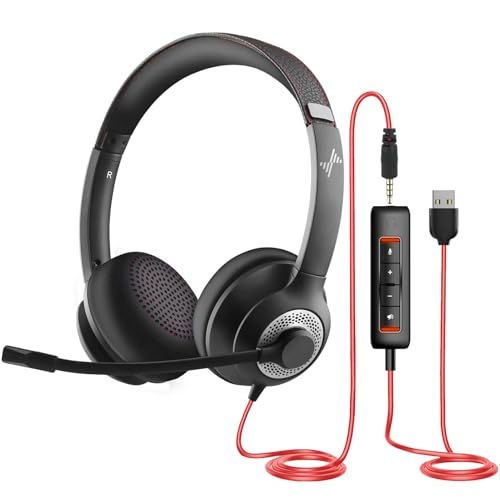
JIAMQISHI USB Headset — Best Light On-Ear USB
Not every computer call worker wants to spend the day inside large over-ear cups. The JIAMQISHI USB headset takes the on-ear route: lighter pads that rest on the ears rather than around them, a noise-cancelling microphone, in-line controls, and a USB connection aimed at PC and laptop calling — home office work, online meetings, and softphone queues. The on-ear format breathes better and presses less over hours, and for workers who split the day between calls and other screen work, a headset that goes on and off without a sense of ceremony gets worn more consistently, which quietly improves call audio all by itself.
The compromises are the mirror image of the stereo over-ear pick. On-ear pads block less of the room, so a loud household or office leaks into your listening even though the noise-cancelling microphone still protects your caller from most of it. Pad pressure is also a personal thing: some ears tolerate on-ear pads all day, others ache by lunch, and no listing can tell you which ears you have. What the JIAMQISHI offers is a straightforward, affordable shape of the softphone headset — wired so there is nothing to charge, light enough to forget between calls, and controlled from the cable rather than a software panel.
- Connection: USB for PC and laptop
- Wearing style: on-ear stereo, lightweight frame
- Microphone: noise-cancelling microphone with in-line control unit
- Controls: in-line volume and mute
- Intended systems: computer softphones, online meetings, home office calling
Strengths
- The lighter on-ear build suits workers who find sealed over-ear headsets hot or clamping across a full day.
- A wired USB connection is set up once and then simply exists — no pairing menus, no battery anxiety before a long queue.
- In-line mute gives a cough, a doorbell, or a dog a one-press answer that callers never hear about.
Trade-offs
- On-ear pads isolate less than over-ear cups, so your own listening suffers in a loud room even while your caller stays protected.
- Pad comfort varies sharply by ear shape; sensitive ears may prefer a larger cup that spreads pressure.
- USB-only means no desk-phone use and no quick route into a phone’s 3.5mm jack without an adapter.
Best for: home-office and small-team softphone users who prefer a light on-ear fit. Not suited for: very noisy rooms where the listener also needs isolation, or desk-phone seats.

Arama USB Mono Headset — Best One-Ear USB
The Arama takes the oldest idea in this guide — one ear on the call, one ear on the room — and wires it for the softphone era. It is a single-ear USB headset with a noise-cancelling microphone and in-line controls, built for call center and office work that happens through a computer. The mono format is not a cut-down stereo headset; it is a deliberate choice for people whose job includes the room as well as the call: the home worker listening for a child, the office agent who fields questions from the next desk, the support worker who talks to a technician standing beside them while the customer is on the line.
Lightness is the mono headset’s quiet virtue, and the Arama leans on it. With one cup instead of two, the headset carries less weight on the headband and leaves the uncovered ear completely free of pressure, which many agents find is what makes the difference between wearing a headset for the whole shift and quietly taking it off between calls. The noise-cancelling microphone keeps the caller’s side of the bargain: your voice forward, the room pushed back. In-line controls handle volume and mute from the cable. As with every USB pick here, the boundary is absolute — this is a computer headset, and a desk phone will never know it exists.
- Connection: USB for PC and laptop
- Wearing style: single-ear mono, lightweight
- Microphone: noise-cancelling microphone
- Controls: in-line volume and mute
- Intended systems: computer softphones and call-center applications
Strengths
- The open ear preserves room awareness for home workers and collaborative desks while the call stays private in the covered ear.
- Less hardware on the head means less fatigue and a headset agents actually keep wearing between calls.
- USB plug-and-play suits hot-desking computers, where the headset must work on whichever machine is free.
Trade-offs
- A single ear gives callers’ voices less presence in a loud room; you may raise volume to compensate.
- Music, training video, and meeting stereo content all collapse to one ear, which some users find tiring in a different way.
- No desk-phone compatibility at all — the USB plug is the whole story.
Best for: softphone agents who must keep an ear on their surroundings. Not suited for: workers in loud rooms who need both ears on the call, or any desk-phone setup.
How Do the Six Picks Compare Side by Side?
| Headset | Connects to | Ears | Deciding trait |
|---|---|---|---|
| Plantronics EncorePro HW510 | Desk phone via QD bottom cable | Mono | Fleet-proven QD system with breakaway disconnect |
| MAIRDI Phone Headset | Desk phone (RJ9) and 3.5mm devices | Mono | Two plugs for desk and mobile work |
| Wantek Cisco Headset | Cisco desk phones (RJ9) | Mono | Named Cisco model compatibility |
| EKSA H8 | Computer via USB or 3.5mm | Stereo | Over-ear focus for softphone work |
| JIAMQISHI USB Headset | Computer via USB | Stereo on-ear | Light fit for all-day computer calling |
| Arama USB Mono | Computer via USB | Mono | One-ear awareness on a softphone |
Read the table by rows of infrastructure, not by preference. The top three rows belong to phone hardware and are separated by which phone and which plug; the bottom three belong to computers and are separated by how much of the room you want to hear. Crossing between those halves is not an upgrade or a downgrade — it is a different job.
How Should You Set Up a Headset So Callers Actually Hear the Benefit?
The noise-cancelling microphone only earns its name when the boom is placed with intent. Bring the microphone to the corner of your mouth, roughly two finger-widths away, and keep it there. A boom parked at chin level or swung up by the cheek hears the room as loudly as it hears you, and no processing fully recovers that geometry. Make placement part of the start-of-shift ritual, the same motion as logging into the dialer, because the first call of the day deserves the same clarity as the fiftieth.
On a computer, select the headset explicitly as both the input and output device inside your softphone, not just in the operating system. Many “bad headset” reports are really a laptop using its built-in microphone — the one next to the fan — while the agent hears through the headset and never realises the caller is listening to the room mic. Do a test call to a colleague or a recording service after any change of machine, port, or dock. On desk phones, confirm the headset port is enabled and the volume set on the phone itself; several phone families ship with headset mode needing a menu setting. Finally, keep spare cushions and a spare cable at the floor level. Headsets rarely die outright; they fray, crackle, and lose cushions, and a two-minute swap beats a day of an agent apologising for their audio.
What Mistakes Do Buyers Make With Call Center Headsets?
The expensive mistake is buying the microphone’s marketing and ignoring the plug. A headset chosen for its cancellation claims that cannot connect to your phone system is worth nothing, and this category’s returns pile up precisely there. The second mistake is assuming an RJ9 plug means universal desk-phone fit: the plug is standard, the wiring is not, which is why the honest picks in this guide name their phone families. Third, buyers forget the bottom cable on QD systems and discover at unboxing that the headset is one component of a two-part product. Fourth, floors buy stereo headsets for coached teams and then wonder why agents miss instructions; match the ear coverage to the supervision model. Fifth, individuals buy fleet headsets for a single home desk and overpay for modularity they will never use, when a direct-wired headset would have served better for less fuss. Every one of these mistakes is a reading mistake, not a product defect, and each is avoidable in the five minutes before checkout.
One more pattern deserves naming because it hides inside otherwise careful purchases: buying for the phone system you are migrating away from. Floors in the middle of a move from desk phones to softphones often equip the old system one last time, then discover the new headsets cannot follow the migration. If a move is scheduled within the headset’s expected life, say so in the purchase decision and weigh dual-route picks — the MAIRDI’s two plugs, the EKSA’s USB and 3.5mm routes — more heavily than their single-system rivals. A headset that survives a platform change is worth a small premium over one that becomes e-waste the month the dialer changes, and the time to price that in is before the order, not during the migration weekend.
Final Recommendation
Start with your infrastructure and let it choose your shortlist. QD floors should standardise on the EncorePro HW510 and manage its bottom cables as the consumable they are. Cisco desks get the simplest answer in the Wantek Cisco headset, and mixed desk-and-mobile workers get the MAIRDI’s two-plug flexibility. On computers, choose your ear policy: the EKSA H8 for sealed stereo focus, the JIAMQISHI for a lighter on-ear day, and the Arama when one ear must stay on the room. Whichever you pick, place the boom properly and test it before the queue opens. A call center is a promise that a stranger will be understood the first time they explain their problem — the headset is where that promise is kept or broken, one clear sentence at a time.
How Does a Noise-Cancelling Microphone Actually Reject the Room?
Understanding the mechanism helps you use the tool properly, because most of the effect is geometry rather than electronics. A directional microphone capsule is most sensitive to sound arriving along the axis it points along and progressively less sensitive to sound arriving from the sides and behind. Your voice, a few centimetres from the capsule and squarely on axis, arrives enormously louder than a colleague’s voice three metres away — sound falls off fast with distance, so the near voice dominates the signal before any processing runs. The boom’s job is to hold that geometry steady for eight hours, which is why a stiff, well-damped boom that stays where you put it is worth more than a floppy one attached to a fancier capsule.
Many headsets in this class add a second element to the trick. Some use two microphone elements and subtract the part of the signal that both hear equally — the room — from the part only the near element hears strongly, which is you. Others apply digital processing in a USB controller or the headset itself, trimming steady sounds like fan noise that sit underneath speech. Each approach has the same boundary: they all exploit the fact that you are close and the room is far. Move the microphone away from your mouth and the ratio collapses, which is why the single most effective “feature” in this category is the habit of placing the boom correctly on every single call.
There is one more consequence worth knowing. Because the system is tuned to favour a near voice, it also favours anything else near the microphone — a sip of coffee, a pen tapped against the boom, a deep sigh. Experienced agents learn microphone manners the way radio presenters do: mute for the cough, keep the cup away from the boom, breathe quietly through the difficult customer. Training a team on those three habits does more for perceived call quality than upgrading every headset on the floor by one price tier.
What Should a Full Shift Teach You About Fit?
Comfort in this category is not a luxury rating; it is an audio-quality feature, because a headset that hurts comes off, and a headset that is off delivers no cancellation at all. The fit variables that matter over eight hours are weight, clamp force, cushion material, and how the headband distributes pressure across the top of the head. A light headset with a firm clamp can ache at the ears by mid-afternoon, while a slightly heavier one with soft, deep cushions disappears. This is why experienced buyers trial a headset for a full shift rather than a five-minute desk test — the first twenty minutes of almost any headset feel fine.
Ear cushion style interacts with your floor. Leatherette-style cushions seal a little better and wipe clean, which matters for shared headsets across shifts, but they run warmer. Fabric or velour-style cushions breathe and stay comfortable in warm rooms, at the cost of absorbing more of the room’s sound leakage into your listening and being harder to sanitise between users. If your operation shares headsets across shifts, hygiene is a purchasing specification, not an afterthought: look for replaceable cushions, issue personal cushion sets where budgets allow, and pick models whose cushions are actually stocked as spares. The picks in this guide were chosen partly on that ownership logic — a headset whose wear parts cannot be replaced becomes a disposable product on a two-year cycle.
Glasses wearers should test with their glasses on. A cup or pad pressing a spectacle arm into the side of the head is the most common fit complaint in any headset category, and it only shows up after an hour. Mono headsets have an underrated answer to this: the uncovered side carries no pressure at all, and many glasses wearers find one free temple is the difference between a headset they tolerate and one they enjoy.
Which Wearing Style Suits Which Kind of Floor?
Supervised inbound floors, where coaches walk the rows and agents escalate by catching an eye, belong to mono headsets. The open ear is a communication channel the operation runs on, and sealing it degrades the floor’s real product, which is fast help. The QD and RJ9 mono picks in this guide exist for exactly this world, and their breakaway cables and named phone compatibility matter more there than any listening refinement.
Outbound and focused-casework teams sit at the other pole. Their calls are long, their need for floor chatter is low, and the stereo USB picks serve them better: both ears on the customer, the room pushed to the background, concentration protected. Between the poles sit hybrid teams — technical support desks where an agent may need a colleague’s ear mid-call — and those teams often standardise on mono USB, the Arama pattern, so the open ear survives the move to softphones. The mistake is letting the headset catalogue make this decision by default. Decide the floor’s communication model first; the wearing style follows from it in one step.
Home-based agents deserve a sentence of their own, because their “floor” is a household. A mono headset leaves an ear for the doorbell, the child, and the dog that is about to feature in the call, while a stereo headset protects concentration in a noisy flat. Neither is wrong; the honest question is which interruption the agent would rather manage. Many home workers end up owning the decision the other way round from office logic — they choose mono precisely because their room is unpredictable.
How Do You Roll Headsets Out Across a Whole Team Without Chaos?
For a fleet purchase, pilot before you commit. Put the shortlisted model on five agents for two full weeks, including your longest-shift staff and at least one glasses wearer, and collect complaints in writing. Headset problems are intensely personal and oddly specific — a headband that one agent loves will give another a headache by Thursday — and a pilot surfaces the pattern while the order is still small. Record which phone models and cable types each seat needs during the pilot, because that spreadsheet, not the headset box, is what makes the full rollout boring in the best way.
Buy spares as part of the same order: a sensible fleet keeps spare headsets, spare bottom cables for QD systems, and spare cushions on the shelf, because the failure mode of this equipment is a frayed cable on a Tuesday morning, not a dramatic breakdown. Label each headset with its seat or owner, keep the cable pairing with the phone it was bought for, and store the pilot notes with the purchase record so the next buyer inherits the reasoning. None of this is glamorous, and all of it is the difference between a headset programme and a drawer of tangled regrets.
Why Does Wired Still Win in Most Call Centers?
New buyers often ask why this guide is entirely wired when wireless headsets exist for the same desks. The answer is operational rather than nostalgic. A wired headset has no battery to fade in year two, no pairing to break when a computer updates, no radio congestion when two hundred headsets share one floor, and no per-seat charging routine for a night-shift manager to enforce. Its failure modes are visible — a frayed cable, a cracked boom — and its spares are cheap and interchangeable. For an individual home worker, wireless freedom can absolutely be the right call, and Bluetooth office headsets have their own guide in this cluster. For a floor buying by the hundred, every wireless convenience arrives with a management cost attached, and the wired picks here are what the industry still runs on for that reason.
Wired also keeps the audio path honest. A USB or QD connection does not compress your voice through a Bluetooth codec, does not drop to a lower-quality mode when a second device connects, and does not introduce the small delay that makes talkers overlap each other. Callers rarely identify that delay consciously; they just experience the conversation as slightly harder work. On a support call that is already about a problem, removing friction you cannot see is worth more than removing a cable you can.
How Long Should a Call Center Headset Last, and How Do You Make It Last?
A professional wired headset in daily service should be planned as a multi-year tool, with its wear parts treated as consumables on a shorter cycle. Ear cushions compress and crack first — plan on replacing them when they stop springing back, because a flattened cushion changes both comfort and microphone geometry by letting the headset sit differently. Cables fail at the strain reliefs, where they bend every time the headset is picked up; routing the cable so it does not drape over the desk edge at a sharp angle, and never wrapping it tightly around the headset for storage, extends its life more than any other habit. The quick-disconnect on a QD system is itself a wear point, and agents who separate it by pulling the cable rather than the plug housings will kill it early — a thirty-second demonstration during onboarding prevents the most common fleet repair.
Cleaning is the other half of longevity, and for shared headsets it is also a health matter. Cushions should be wiped or swapped between users, microphone windscreens replaced when they clog, and headsets stored on a hook or stand rather than in a drawer tangle. Assign headsets to named agents where your operation allows it; equipment with an owner is treated measurably better than equipment from a communal pool, and the replacement budget notices the difference within a year. When a headset does develop crackle or intermittent audio, diagnose in order: swap the cable first, then the cushion-side contact points, then the headset itself. Fleets that replace the whole unit at the first crackle spend several times what fleets with a swap order spend, for the same working seats.
Finally, keep the purchasing record honest. Note which models were bought for which phone systems, which cables pair with them, and which agents reported fit problems during pilots. That record turns the next purchase from a research project into a reorder, and it is the quiet advantage established operations have over new ones. The headset itself is a small part of a call center’s costs; the thinking around it is what separates a floor that sounds professional from one that is always apologising for its audio.
How Do You Test a Headset Before You Commit the Whole Floor?
Do not judge any of these headsets by how music sounds through them, and do not judge them in a quiet room. The honest test is a live call placed from the actual seat, at the actual hour, with the floor at its actual volume. Call a colleague on the system the customers use — the real phone system or the real softphone, not a pristine recording app — and read a paragraph of ordinary text at your ordinary pace. Have the listener grade three things: whether your words are effortless to follow, how much of the room they can identify behind you, and whether your voice sounds natural rather than squeezed or distant. Then swap roles, because the agent’s own listening experience is half the product and the easiest half to forget to test.
Deliberately stress the setup during the test. Type while you talk, because keyboard noise near the boom is the interference your callers will actually meet. Turn your head, look down at notes, take the sip of water — the small movements of a real call — and note whether the microphone level stays steady or wanders with your posture. On a QD system, separate and reconnect the disconnect mid-call to confirm the breakaway behaves and the call survives as your phone system intends. On USB, unplug and replug once and check that the softphone re-selects the headset without a settings expedition. These are five-minute tests, and they predict the complaints of the next two years better than any specification sheet.
Write the results down per model, per phone system, per tester. A headset that delights the day-shift tester on one phone family may disappoint on another, and the note you make today is the evidence that settles the argument when the fleet order is questioned next quarter. Testing is the cheapest stage of a headset programme to do well and the most expensive to skip.
Frequently Asked Questions
Will a noise-cancelling call center headset make my office sound quieter to me?
No. The cancellation works in the microphone, for the caller’s benefit. Your ears still hear the office, apart from whatever modest blocking the ear cup itself provides. If you need quiet around your own ears, that is a different product category — and on a coached floor, an open ear is usually required anyway.
Can I plug an RJ9 headset into any desk phone with a headset jack?
The plug will fit many phones, but the wiring behind the jack differs between makers, so fitting is not the same as working. Buy a headset whose listing names your phone model or family, as the Cisco-specific pick in this guide does, or be prepared for an adapter or a return.
What else do I need with a quick-disconnect headset?
The matching bottom cable for your phone model. The QD headset ends in a quick-disconnect plug; the bottom cable connects that plug to your phone and is phone-specific. Treat headset plus cable as one purchase and verify the phone model before ordering either part.
Should our team choose mono or stereo headsets?
Choose mono when agents must hear the room — coaching, collaboration, safety — and stereo when agents work independently at computers and concentration is the priority. It is a supervision and environment decision first, and a comfort decision second.
Can a USB headset work with a desk phone?
Generally no. USB headsets are computer audio devices. A few desk phones accept USB headsets, but that is a feature of specific phone models, not a standard. Assume USB means computer unless your phone’s documentation explicitly says otherwise.
Why do some listings quote a percentage for noise cancellation?
Those figures come from each seller’s own test method, and there is no shared standard that makes one brand’s percentage comparable with another’s. Read them as marketing emphasis, and choose on connector fit, wearing style, and support instead.
How many headsets should a small team order as spares?
Keep at least one spare headset and one spare cable for every ten seats, plus a full set of replacement cushions. Failures cluster on cables and cushions rather than the headset body, so a small, cheap spares shelf prevents the most common outage: an agent starting a shift with crackling audio and no working replacement within reach.
Related Guides
Continue with best corded headsets for office phone for a deeper look at wired desk-phone wiring, compare wireless options in best bluetooth headsets for noisy office, or see the two-ear landline options in best cordless phone dual earpiece headsets.
The wired desk-phone versions of these headsets are compared in best corded headsets for office phone.


