What's inside
- Where to buy
- Key Takeaways
- Quick Picks
- How Did We Verify Which Pens Are Really Wacom Technology?
- EMR, AES, MPP and USI: What Do These Pen Systems Feel Like Side by Side?
- How Do You Test a Digitizer Before You Commit to It?
- Four Pen Families, Six Picks: The Digitizer Table
- Which Digitizer Shopping Mistakes Cost Buyers the Most?
- How Do Tilt, Hover and Palm Rejection Behave in Real EMR Work?
- What Do Nibs, Spare Pens and Ownership Cost Over the Years?
- How Do You Set Up an EMR Tablet Differently for Notes and for Art?
- Why Did Wacom’s Technology End Up Inside Samsung’s Tablets?
- Who Should Skip EMR Entirely and Choose Another Pen Family?
- How Long Does a Good Digitizer Tablet Stay Good?
- Final Recommendation
- Frequently Asked Questions
- Related Guides
As an Amazon Associate I earn from qualifying purchases. This post may contain affiliate links at no extra cost to you.
gizmoverdict.com is reader-supported. When you buy through links on our site, we may earn an affiliate commission.
Where to buy
Here is the misunderstanding this entire guide exists to correct, stated in its first breath: when shoppers search for the best affordable tablets with wacom digitizer, most of them picture a Wacom logo on the box — and almost none of the tablets they should buy have one. What they actually want, whether they know it or not, is Wacom’s pen technology, and on standalone tablets that technology travels under a different name: EMR, electromagnetic resonance, licensed by Wacom to Samsung, whose S Pen is built on it. The Galaxy Tabs in this guide do not imitate a Wacom digitizer. Under the glass, in the only sense engineering recognises, they are one.
The pen world runs on four rival systems, and the intro of a digitizer guide owes you the map. EMR (Wacom’s, and Samsung’s S Pen) puts the intelligence in a grid beneath the screen: the pen needs no battery and no charging, draws its power from the display itself, and delivers the light, precise feel artists associate with Wacom’s own professional tablets. AES, from Wacom’s other division, is the active-pen system in many Windows convertibles — the pen carries a battery and the feel is firmer, more pencil-on-glass. MPP is Microsoft’s protocol, the Surface Pen’s language. USI is the open standard behind many Chromebooks and budget styluses, competent and improving, but a different lineage entirely. Pens do not cross between these systems. A digitizer is a marriage, not a accessory choice.
Price language in this guide stays in tiers for the usual honest reason — pen tablets are discounted in waves and a printed figure would rot — but the ladder’s shape is stable and worth memorising: the same EMR bloodline runs from the student tier to the flagship, and what climbs with price is screen, speed and size, never the legitimacy of the digitizer itself. That shape is the category’s best news, and it is why an affordable guide to Wacom technology can exist at all without apologising for its premise.
So this guide is organised by bloodline. Four picks carry true Wacom-lineage EMR through Samsung’s S Pen, at four sizes and tiers. One pick — TCL’s NXTPAPER — is included with a warning label in its heading: its bundled stylus is a 4096-level pen on TCL’s own system, not Wacom technology, and it earns its chair on reading comfort, not on digitizer pedigree. And one pick is prose-only: Wacom’s own MovinkPad, the company’s Android tablet, discussed without a buying link because our verified pool does not carry it — a fact stated openly rather than papered over with an invented listing. Read the bloodlines first and the badges second, and this category finally makes sense.
Key Takeaways
- On standalone tablets, “Wacom digitizer” in practice means EMR — the Wacom-licensed technology inside Samsung’s S Pen, battery-free and pressure-sensitive.
- EMR, AES, MPP and USI are incompatible pen systems; a stylus from one family will not work on another’s screen.
- Every Samsung pick here includes its S Pen in the box, so the digitizer experience costs nothing extra.
- The Galaxy Tab S10+ is the flagship EMR experience in the guide; the S6 Lite is the same bloodline at the friendliest tier.
- The TCL NXTPAPER’s stylus is NOT Wacom technology — it is TCL’s own 4096-level pen, labelled as such wherever it appears.
- Wacom’s own MovinkPad is discussed prose-only as the reference point; Wacom’s pen displays like the Movink 13 and Wacom One are computer peripherals, not standalone tablets.
Quick Picks
| Pick | Badge | Why it earns its place |
|---|---|---|
| Samsung Galaxy Tab S10 FE | EMR sweet spot | Wacom-lineage S Pen digitizer on a 10.9-inch screen at a midrange tier — the balanced way to buy this technology. |
| Samsung Galaxy Tab S6 Lite (2024) | EMR on the smallest budget | The same battery-free S Pen system at the guide’s friendliest tier, in a 10.4-inch student-friendly body. |
| Samsung Galaxy Tab S10+ | Flagship EMR, AMOLED canvas | A 12.4-inch AMOLED screen over the EMR grid — the finest drawing and note surface Samsung sells below the Ultra. |
| Samsung Galaxy Tab S10 FE+ | EMR at full-page size | 13.1 inches of S Pen canvas for artists and annotators whose work is measured in pages, not sticky notes. |
| TCL NXTPAPER 11 Plus | Not Wacom — matte reader with its own stylus | A paper-like 11.5-inch screen and a 4096-level TCL stylus; a reading pick, included with its non-Wacom label intact. |
| Wacom MovinkPad (prose-only) | Wacom’s own tablet, discussed without a link | The reference point: Wacom’s own Android slate with genuine Wacom pen technology, covered honestly from our verified pool’s limits. |
How Did We Verify Which Pens Are Really Wacom Technology?
By tracing each stylus to its protocol rather than its marketing. A pen system is a fact of engineering, not a vibe: the digitizer grid in the screen and the pen that speaks to it share a technology with a name, a licence and a lineage. For every candidate we asked one question — what system does this pen actually use? Samsung’s S Pen answered EMR, the technology Wacom created and licenses, which is why the S Pen needs no battery and why its feel tracks Wacom’s own pen tablets so closely. TCL’s bundled stylus answered honestly with its own system and pressure specification, and it is labelled accordingly rather than allowed to borrow Wacom’s name by proximity.
We also policed the category’s borders. Wacom’s famous pen displays — the Movink 13, the Wacom One line — are superb instruments that are not tablets: they are screens for a computer, and including them as tablet picks would repeat the exact confusion this guide exists to dissolve. They appear here as prose contrast only. Likewise, no pick was credited with “Wacom feel” as a compliment; feel is reported per pick, in the hand, as its own evidence. The digitizer claim itself is binary and was treated as such.
A note on evidence, since this category runs on folklore: pen feel is reported constantly and measured rarely, so we leaned on the behaviours that can be checked by any buyer in any shop — diagonal-line steadiness, light-pressure control, hover tracking, palm rejection under a resting hand. A pick that performs those four in public has nothing to hide in private. Where a manufacturer’s own specification was the only source for a claim, the text says so or stays qualitative; a digitizer guide that invents precision would be committing the exact sin it was written to correct.
Within the true EMR family, the picks were then separated by the things that actually differ between them: screen size and panel type, processor headroom for large canvases, and price tier. The digitizer bloodline is shared; the machines wearing it are not interchangeable, and the sections below argue each one’s case on its own evidence.

Samsung Galaxy Tab S10 FE — EMR sweet spot
The S10 FE is where the Wacom digitizer story and the ordinary tablet story meet most comfortably. Beneath its 10.9-inch screen sits the EMR grid; above it hovers the S Pen, drawing power wirelessly from that grid, registering pressure and tilt, and asking for nothing — no charging cable, no pairing menu, no battery anxiety in the middle of a drawing. That zero-maintenance relationship is EMR’s signature advantage and it is easy to underrate until you have owned an active pen that died mid-lecture. The S Pen cannot die. It can only be lost, which is why Samsung sells spares cheaply and why the tablet notices and nags when you walk away without it.
The drawing and writing feel is the Wacom lineage made tangible: a fine nib with a whisper of rubbery drag, lines that start exactly where the tip lands, palm rejection that lets a hand rest on the glass like paper. In Samsung Notes, Clip Studio Paint and the note apps students actually live in, the experience is complete rather than approximated. The midrange processor keeps large canvases and layered files moving, the screen is bright and even, and the whole machine doubles as a thoroughly civilised Android tablet when the pen goes back in its place — media, browsing and split-screen study all handled without ceremony.
Its compromises are the platform’s, not the digitizer’s. Android’s professional art shelf, while strong, lacks a few iPadOS exclusives; the screen is LCD where the S10+ below offers AMOLED; and the tablet sits a tier above the S6 Lite for buyers counting carefully. None of that touches the central claim: if you came to this guide wanting a genuine Wacom-technology digitizer in a standalone tablet at a sane price, this is the pick the search was for, wearing Samsung’s name because that is how Wacom’s technology reaches this category.
- Digitizer: EMR (Wacom-licensed technology), S Pen included
- Display: 10.9-inch LCD
- Pen: battery-free, pressure and tilt sensitive, replaceable nibs
- System: Android with Google Play Store
- Storage: 128GB plus microSD expansion
Strengths
- Genuine EMR digitizer with a pen that never needs charging
- Balanced size, screen and processor for drawing and notes
- Spare S Pens are inexpensive and the tablet warns if you leave yours
Trade-offs
- LCD panel where the flagship sibling offers AMOLED
- Android’s art app shelf trails iPadOS at the specialist edge
- A tier above the S6 Lite for the same digitizer bloodline
Best for: the pen-first generalist — genuine EMR, a balanced screen, an everyday tablet wrapped around both.
Not suited for: artists who need AMOLED contrast or iPad-only art apps.

Samsung Galaxy Tab S6 Lite (2024) — EMR on the smallest budget
Every technology has a cheapest honest door, and for Wacom’s EMR on a standalone tablet, this is it. The S6 Lite’s digitizer is the same bloodline as the flagship’s — the grid under the 10.4-inch screen, the battery-free S Pen in the box — delivered in a modest body at the friendliest tier in this guide. Students annotating lecture slides, journal-keepers, sketchers and note-takers are not buying a diluted digitizer here; they are buying the genuine system with a smaller screen and a humbler processor wrapped around it. The pen does not know it was discounted.
In the hand, the experience holds up where it matters. Handwriting is crisp and lag stays low enough that script keeps its natural rhythm; sketching carries the same fine-nib control as its siblings; palm rejection behaves through long note sessions. The places the budget shows are around the pen rather than in it: the processor pauses over very large art files, the screen is less bright outdoors, and Samsung’s update commitment for this line runs shorter than the flagships’. A student who fills notebooks will hit none of those walls in a semester. An illustrator building poster-size canvases will hit the first one weekly.
Treat the S6 Lite as the digitizer’s apprenticeship. It teaches your hand EMR’s feel — the drag, the hover cursor, the pressure curve — on real work, and every one of those skills transfers intact if you later climb to the S10+ or to a Wacom pen display at a desk. Technologies are learned through tools, and the cheapest genuine tool beats an expensive imitation at every stage of learning. That is the whole argument, and at this tier it is enough.
- Digitizer: EMR (Wacom-licensed technology), S Pen included
- Display: 10.4-inch LCD
- Pen: battery-free, pressure sensitive, replaceable nibs
- System: Android with Google Play Store
- Storage: 64GB plus microSD expansion
Strengths
- Genuine EMR digitizer at the guide’s friendliest tier
- Pen in the box; handwriting feel matches its pricier siblings
- Headphone jack and card slot suit student life
Trade-offs
- Modest processor labours over very large art files
- Screen brightness is indoor-class
- Shorter software support window than the FE and flagship lines
Best for: students and note-takers who want real EMR without the flagship bill.
Not suited for: illustrators whose canvases are large, layered and livelihood-critical.

Samsung Galaxy Tab S10+ — Flagship EMR, AMOLED canvas
If the digitizer is the argument, the S10+ is the argument presented in its best suit. The same EMR grid and S Pen system as its siblings now work over a 12.4-inch AMOLED panel, and the pairing changes the drawing experience in ways a specification cannot quite say: blacks go truly black, so ink and shadow sit on the page with print-like conviction; colours carry the saturation digital painters actually mix; and the larger canvas gives the arm room to draw from the shoulder, the way art teachers keep demanding. This is the standalone tablet a working illustrator can take seriously as a primary instrument rather than a travel compromise.
Power matches the presentation. The flagship-class processor treats layered files, big brushes and reference windows as routine; memory headroom keeps the whole studio open at once; and the S Pen’s hover and pressure behaviour stays consistent at canvas sizes where budget machines begin to negotiate. Samsung’s software adds the polish of a mature pen platform — note organisation, handwriting search, quick tools that appear when the pen approaches — and the tablet’s build and speakers make it a pleasure in its off-duty media hours as well.
The costs are the flagship’s customary ones, collected without flinching: a price tier well above the FE models for what is, at the digitizer level, the same licensed technology; a size that belongs on desks and laps rather than in one hand on a train; and the same Android app-shelf ceiling every Samsung pick shares. Buy the S10+ when the canvas is the workplace and its quality is a professional input. Buy the S10 FE when the digitizer is the point and the canvas merely needs to be good. Both decisions are defensible; confusing them is the only error.
- Digitizer: EMR (Wacom-licensed technology), S Pen included
- Display: 12.4-inch AMOLED
- Pen: battery-free, pressure and tilt sensitive
- System: Android with Google Play Store
- Storage: 256GB plus microSD expansion
Strengths
- AMOLED canvas gives EMR drawing print-like contrast and colour
- Flagship power keeps huge layered files fluid
- Large screen suits shoulder-driven drawing and split reference views
Trade-offs
- Flagship tier for the same underlying digitizer technology
- Size and weight belong to desks and laps, not one-handed reading
- Android’s specialist art shelf still trails iPadOS in places
Best for: illustrators and serious note-takers who want EMR on a flagship canvas.
Not suited for: buyers paying for digitizer quality on a strict budget — the FE delivers it cheaper.
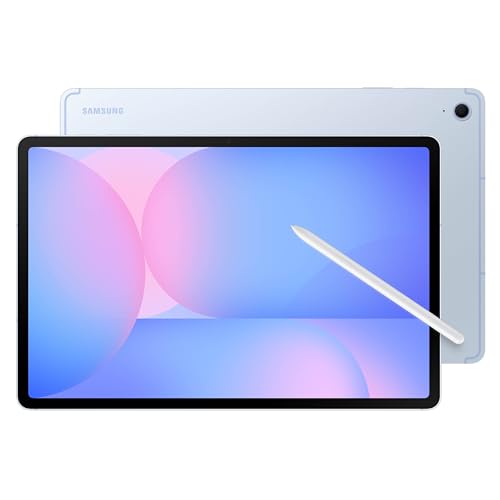
Samsung Galaxy Tab S10 FE+ — EMR at full-page size
Some pen work is measured in pages: contracts annotated end to end, sheet music marked up, lecture PDFs, architectural sketches, comic pages. For page-shaped work, digitizer quality is only half the experience — the other half is not having to zoom. The FE+ stretches the EMR system across 13.1 inches, enough glass to hold a full document page at something like its printed size, with the S Pen writing in the margins at natural scale. Annotators who have spent years pinching and panning on ten-inch screens tend to describe this size the way tall people describe a longer bed: not a luxury, a correction.
Everything else about the FE+ follows the FE recipe this guide has already praised — battery-free S Pen, midrange processor equal to documents and sketching, microSD room for a library of PDFs, a bright even panel — simply scaled. The pen experience at this size gains one subtle advantage: handwriting has room to be handwriting, with full signatures, margin diagrams and arrows that travel. In split view, a reference document and a notebook share the screen at sizes that keep both honest, which is the two-page desk recreated in glass.
The taxes are size’s usual ones. This is a desk-and-lap instrument that wants a stand for long sessions and a bag that respects its dimensions; one-handed reading is a brief experiment, not a posture. Its tier also sits above the standard FE’s for buyers who are, in the end, purchasing diagonal inches. If your pen work is notes and sketches, the smaller FE serves you identically and cheaper. If your pen work is pages — read, marked and signed at full size — the FE+ is the EMR pick shaped like your job.
- Digitizer: EMR (Wacom-licensed technology), S Pen included
- Display: 13.1-inch LCD
- Pen: battery-free, pressure and tilt sensitive
- System: Android with Google Play Store
- Storage: 128GB plus microSD expansion
Strengths
- Full-page annotation without zooming or panning
- Split view holds document and notebook at honest sizes
- Same zero-maintenance EMR pen as the flagship line
Trade-offs
- Desk-and-lap size; not a one-handed device
- Premium over the FE buys inches, not processor
- Wants a stand and a roomier bag
Best for: annotators, teachers and page-workers who live in documents.
Not suited for: note-takers who travel light and sketch small.

TCL NXTPAPER 11 Plus — Not Wacom: matte reader with its own stylus
The label, one more time, because this guide’s integrity lives in it: the NXTPAPER’s bundled stylus is not a Wacom pen, does not use EMR, and does not pretend to once you read past a marketplace headline. It is TCL’s own stylus system with 4096 levels of pressure sensitivity, paired to an 11.5-inch matte NXTPAPER display. It appears in a Wacom digitizer guide for one transparent reason — shoppers cross-shop it against the Samsung picks constantly, and somebody ought to tell them, in the pick itself rather than in fine print, that they are comparing two different pen technologies.
Judged as its own thing rather than as a failed Samsung, the TCL has a real case. The matte, paper-like screen is the kindest reading surface in this guide, and for handwriting-heavy days — journaling, lecture notes, marking documents — the stylus tracks accurately with a pleasant paper-adjacent feel. Pressure response suits writing and sketching honestly. Where the EMR pens pull ahead is refinement: finer low-pressure control for drawing, tilt behaviour, the hover cursor’s precision, and the sheer depth of apps tuned for the S Pen. A note-taker may never feel the gap. A digital painter will feel it in the first hour.
So the NXTPAPER’s verdict is a fork. If your search for a “Wacom digitizer” was really a search for comfortable pen-and-paper reading and writing at a fair tier, this tablet answers the need underneath the words, and its eye-friendly screen may serve you better than the genuine article. If the words themselves were the point — if you want Wacom’s actual technology, its feel and its app ecosystem — then this pick exists to be respectfully declined, and the Samsungs above are your list. Both outcomes are this section working as intended.
- Digitizer: TCL’s own stylus system — NOT Wacom EMR (4096 pressure levels)
- Display: 11.5-inch NXTPAPER matte, paper-like
- Pen: stylus included, battery-based active pen class
- System: Android with Google Play Store
- Storage: 256GB fitted in this configuration
Strengths
- Matte screen is superb for long reading and writing sessions
- Stylus included and perfectly capable for notes and sketching
- Generous storage at a fair tier
Trade-offs
- Not Wacom technology — the defining fact of this pick
- Pen refinement trails EMR for serious digital painting
- Fewer apps tuned for its stylus than for the S Pen
Best for: readers and note-takers who want paper comfort more than pen pedigree.
Not suited for: anyone specifically shopping for Wacom’s EMR technology itself.
Wacom MovinkPad — Wacom’s own tablet, discussed prose-only
It would be strange to write this guide without addressing the name itself, so here it is, without a purchase link: Wacom does sell a standalone Android tablet, the MovinkPad line, built around the company’s own pen technology, with the drawing experience tuned by the people who invented this category. As a reference point it matters enormously — it is the proof that “a tablet with a Wacom digitizer” can be a literal product and not only a licensing arrangement — and artists loyal to Wacom’s pens, nibs and driver habits have a genuine reason to look at it before any Samsung.
Why prose-only, then? Because this guide’s links are drawn exclusively from a verified product pool, and the MovinkPad is not in it. Rather than invent a listing, borrow an unverified one or quietly omit the elephant, we state the position plainly: the machine exists, it is the category’s reference point, and readers who want Wacom’s own hardware should research it through Wacom’s own channels with the same care this guide applies elsewhere — checking which exact model, pen and regional support apply to them. Honesty about a pool’s limits is worth more than a complete-looking table.
The contrast that matters for buyers is this. Wacom’s own tablet stakes everything on the pen — its feel, its professional drawing software story, its artist-first design — while Samsung’s EMR picks are general tablets that happen to carry Wacom-lineage digitizers, with the broader app stores, media polish and household versatility that generality brings. Neither is the fake version of the other. And Wacom’s pen displays — the Movink 13 OLED and the Wacom One line — sit outside the tablet question entirely: magnificent drawing screens that require a computer, belonging in a desk-setup guide rather than this one. Knowing which of the three Wacom-flavoured things you actually want is, in the end, the whole skill this category demands.
- Digitizer: Wacom’s own pen technology (genuine Wacom hardware)
- System: Android standalone tablet
- Availability in this guide: prose-only — not in the verified pool, no link offered
- Relatives: Movink 13 and Wacom One are pen displays needing a computer, not tablets
- Character: artist-first design from the category’s inventor
Strengths
- The genuine article: Wacom’s own pen technology in Wacom’s own tablet
- Artist-first tuning of pen feel and drawing software
- Sets the reference standard the EMR picks are judged against
Trade-offs
- Not available through this guide’s verified pool — research it via Wacom directly
- Artist-first focus means a narrower general-tablet story than Samsung’s
- Smaller retail and accessory footprint than the Galaxy line
Best for: Wacom loyalists who want the company’s own tablet and pen ecosystem.
Not suited for: shoppers who want a linked, pool-verified purchase from this guide.
EMR, AES, MPP and USI: What Do These Pen Systems Feel Like Side by Side?
EMR, the system in every Samsung pick, feels like the pen is being read by the page itself. Because the grid lives under the screen, the pen hovers with a visible cursor before it touches, tracks with very low parallax in the hand, and never asks for power. Its nibs are soft-tipped and slightly grippy, and its pressure curve is at its best in the light-touch range where sketching lives. Artists raised on Wacom’s desk tablets recognise the feel instantly, because it is, mechanically, the same feel.
AES — Wacom’s active-pen sibling, common in Windows convertibles — moves the electronics into the pen, which therefore carries a battery and a firmer, more glassy nib feel. It is precise and widely supported, and many note-takers prefer its pencil-like firmness; its costs are charging discipline and a slightly less organic drawing drag. MPP, Microsoft’s system, behaves like a close cousin of AES with its own pen ecosystem around Surface devices. USI, the open standard, trades some refinement for universality across Chromebooks and budget tablets — TCL-class pens live in this neighbourhood of the map, competent for writing, less nuanced for art.
The practical moral is not that one system wins, but that pens are not interchangeable and ecosystems are sticky. Nibs, spare pens, app tuning and muscle memory all accumulate inside one system. Choosing a digitizer family is therefore a small marriage decision disguised as a specification, and the cheapest time to choose deliberately is before the first purchase — which is, of course, the moment you are in.
How Do You Test a Digitizer Before You Commit to It?
Draw the three diagnostic shapes, in a shop or during a return window, and the digitizer will confess everything. First, slow diagonal lines, corner to corner: cheap digitizers wobble on diagonals, and the wobble prints directly into your drawing style if you let it. Second, tapering strokes that begin and end at a whisper: the quality of a pen system lives in how it handles the lightest five percent of pressure, where construction lines and handwriting flourishes happen. Third, write your own name at natural speed, then rest your palm and write again — handwriting exposes latency and palm rejection faster than any drawing test.
Add two working tests. Hover the pen a centimetre above the screen and move it: EMR systems show a cursor that should track steadily, a small miracle that makes precision work possible. Then open the app you actually intend to live in — not the demo drawing app — and perform your real workflow for ten minutes: the notebook layout, the comic page, the annotation routine. Digitizers are bought for software marriages, and the rehearsal should use the actual partner. A system that passes your handwriting, your diagonals and your app has passed; headline pressure numbers were never on the examination.
Four Pen Families, Six Picks: The Digitizer Table
| Pick | Pen system | Wacom technology? | Pen power | Screen |
|---|---|---|---|---|
| Galaxy Tab S10 FE | EMR (S Pen) | Yes — licensed EMR | Battery-free | 10.9″ LCD |
| Galaxy Tab S6 Lite (2024) | EMR (S Pen) | Yes — licensed EMR | Battery-free | 10.4″ LCD |
| Galaxy Tab S10+ | EMR (S Pen) | Yes — licensed EMR | Battery-free | 12.4″ AMOLED |
| Galaxy Tab S10 FE+ | EMR (S Pen) | Yes — licensed EMR | Battery-free | 13.1″ LCD |
| TCL NXTPAPER 11 Plus | TCL stylus system | No — labelled clearly | Active pen class | 11.5″ matte |
| Wacom MovinkPad (prose-only) | Wacom native | Yes — Wacom’s own | Battery-free class | Artist-class panel |
Which Digitizer Shopping Mistakes Cost Buyers the Most?
Assuming the logo is the technology is the founding error of this category. Buyers search for Wacom, find a listing whose headline writer was generous with the word, and receive a competent USI or house-brand stylus that was never Wacom’s system at all. The defence is the question this guide opened with: what protocol does the pen use? If the answer is not EMR (or Wacom’s own hardware), the tablet does not contain a Wacom digitizer, whatever the headline implies. Ask it of every listing, including — especially — the ones that shout the name loudest.
Buying a pen display while wanting a tablet runs second. Wacom’s own marketing neighbourhood mixes the MovinkPad with the Movink 13 and Wacom One, and every season buyers order a beautiful drawing screen and discover it needs a computer they did not budget for. The machines are excellent; the surprise is not. A standalone tablet computes. A pen display displays. The sentence is short enough to tape to a monitor, and it would save this category’s buyers a fortune in returns.
The third mistake is subtler: choosing the digitizer and forgetting the software shelf it feeds. An EMR tablet lives inside Android’s app world; Wacom’s own tablet inside its artist-focused one; an AES convertible inside Windows. The pen gets you into the room, but the apps are the furniture you will touch daily. Artists should name their two essential apps and verify the marriage before the hardware ships — the finest digitizer ever licensed cannot draw in an application that does not exist on its platform.
How Do Tilt, Hover and Palm Rejection Behave in Real EMR Work?
Three supporting behaviours decide whether a digitizer feels professional across a working day, and EMR’s history shows in all three. Tilt lets the pen report its angle, so a virtual pencil shades with its side and a calligraphy brush swells honestly; the Samsung EMR picks support it, and painters who work tonally will use it hourly while note-takers never notice its existence. Neither reaction is wrong — tilt is a painter’s feature wearing a general specification’s clothing.
Hover is EMR’s quiet superpower. Because the grid senses the pen before contact, the screen shows a cursor tracking your hand a centimetre above the glass. That preview transforms precision work: you can aim a line’s start the way a mouse aims, hover over tiny interface targets without committing ink, and rest assured that the mark will begin where the cursor promised. Active-pen systems approximate hover unevenly; on EMR it is simply how the world works, inherited from decades of professional pen displays where artists demanded it.
Palm rejection completes the trio, and it is really a negotiation between the digitizer and the touchscreen sharing one surface. Done well — as on the Samsung picks — the tablet reads the pen’s field as authority and ignores the resting hand entirely, so writing feels like paper rather than like negotiating with a machine. Done badly, stray marks bloom under your wrist. Test it the way the earlier section advised: palm down, natural writing, no hovering your hand in the apologetic claw that bad digitizers train into people. A system that lets your hand forget the glass is a system doing its founding job.
What Do Nibs, Spare Pens and Ownership Cost Over the Years?
Digitizer shoppers compare tablets and forget that pens are consumables with a small, steady appetite. EMR nibs wear — faster on matte films, slower on bare glass — and a heavy writer can round a nib in a season. The good news is structural: S Pen nibs are inexpensive, sold in multipacks, and replaced in seconds with the little extractor tool Samsung includes. Budget a trivial annual sum and the pen feels new forever; ignore the nib until it is a chisel and every line quietly degrades while you blame your hand.
Spare pens follow the same happy economics on the EMR side. Because the pen carries no battery or pairing identity, a replacement S Pen is a modest purchase that works the moment it approaches the screen — no setup, no firmware courtship. Compare the active-pen world, where a lost stylus can be a serious purchase with a charging ritual attached, and EMR’s ownership story becomes one of its strongest arguments for students and field workers. Losing a pen should be an annoyance with a price tag in the small numbers, and on this platform it is.
The TCL’s active stylus sits between the worlds: tips are replaceable, but the pen itself is a battery device whose replacement costs more and whose charge must be minded. None of this is ruinous; all of it belongs in a total-cost comparison that this category’s shoppers rarely run. The tablet’s price is the cover charge. Nibs, spares, cases and pen replacements are the bar tab, and EMR’s tab is the shortest in the pen world — one more reason the technology, not the logo, deserves your loyalty.
How Do You Set Up an EMR Tablet Differently for Notes and for Art?
For notes, optimise for invisibility. Choose one notebook app and resist collecting five; set the pen button to the eraser or the lasso, the two tools handwriting actually reaches for; turn on handwriting search so your archive becomes findable; and pick a page template — ruled, dotted, blank — that matches your hand’s habits. The goal is a system that opens to a blank page faster than paper can be found, because note-taking tools are abandoned at exactly the speed of their friction. EMR’s instant, batteryless readiness is built for this job; the setup merely has to not get in its way.
For art, optimise for control. Calibrate the pressure curve in your drawing app with a page of tapering strokes until the lightest line you can intend is the lightest line that appears. Map the pen button and your free hand’s shortcuts to undo and brush size, the two commands art consumes by the thousand. Decide your canvas habits early — resolution, layer naming, a colour profile you trust — and save a blank template so every piece starts from order rather than improvisation. The S10+ rewards this discipline with its AMOLED truth; the S6 Lite forgives its absence at student scale; both are running the same Wacom-lineage heart.
Both setups share one closing ritual: back the work up where a lost tablet cannot take it. Notes sync to the cloud by default in the major apps — verify it once, on purpose, by opening yesterday’s page on a second device. Art files deserve the same treatment with versioned folders. A digitizer this good makes the tablet the home of irreplaceable handwriting and drawing; treat that home with the seriousness of a sketchbook you cannot re-draw, because that is exactly what it is.
Why Did Wacom’s Technology End Up Inside Samsung’s Tablets?
The arrangement surprises shoppers only until they see it from Wacom’s side of the table. Wacom’s genius was always the digitizer itself — the grid, the pen, the feel — and the company’s own hardware has historically aimed at professional desks. Licensing EMR to a giant like Samsung put that technology into millions of pockets and lecture halls that Wacom’s own product line would never have reached, while Samsung gained the one thing its tablets could not grow internally: a pen system with decades of artist trust behind it. The S Pen’s quality is not Samsung imitating Wacom well. It is the sound of a licensing deal working exactly as both parties hoped.
For buyers, the history carries a practical lesson about where pen quality comes from. Digitizers improve through installed base and iteration — nib materials, pressure curves, palm-rejection tuning refined across generations of devices in millions of hands. A house-brand stylus launched last year, however glossy its listing, stands at the beginning of that road. EMR stands forty years down it. When this guide insists on bloodlines over logos, it is really insisting on that accumulated iteration, which no headline can counterfeit and no newcomer can shortcut.
It also explains the category’s strange shape: the strongest “Wacom tablets” for most people wear Samsung’s name, the strongest Wacom-branded drawing tools are peripherals for computers, and Wacom’s own standalone tablet is a specialist’s choice rather than the default. Strange, but legible — once you follow the technology instead of the trademark, every product in this guide is standing exactly where the engineering put it.
Who Should Skip EMR Entirely and Choose Another Pen Family?
Honesty about a favourite technology includes naming its non-customers. If your working life is Windows — desktop art software, a convertible laptop workflow, files that live in a PC’s folders — an AES or MPP convertible may serve you better than any tablet in this guide, because the digitizer question there is answered inside a computer you already need. The pen feel differs from EMR’s, but the ecosystem fit can outweigh feel, and pretending otherwise would be this guide doing marketing instead of advice.
Likewise, if your pen is purely a pointing device — tapping, highlighting, the occasional signature — the digitizer families converge into irrelevance, and a cheaper USI or house-stylus tablet like the NXTPAPER may be the rational purchase. EMR earns its premium in pressure, hover and drawing refinement; a buyer who will never draw is paying for a concert piano to hold sheet music. And if your art life is entirely iPadOS — its apps, its Pencil, its ecosystem — Apple’s own pen system, neither EMR nor any family discussed here, is a complete world that needs no apology for existing outside this guide’s map.
The pattern in all three cases is the same: the digitizer serves the work, not the reverse. Choose the software world first, the screen second, and let the pen family be what it honestly is — the signature on a decision already made by your actual life. Buyers who shop in that order rarely return tablets. Buyers who shop by logo alone keep the couriers busy, and this guide would rather lose the sale than earn the return.
How Long Does a Good Digitizer Tablet Stay Good?
Longer than most technology, because the core of the experience does not age. A pressure curve that felt right in year one feels right in year five; handwriting does not receive annual feature updates; the EMR grid in a well-kept screen is as precise on its thousandth day as its first. What ages around the digitizer is the ordinary tablet stuff — battery stamina, app support, processor headroom against growing software — and those clocks run at different speeds per pick: the flagship S10+ buys the most years, the S6 Lite the fewest, with the FE models between. Buyers who understand they are purchasing a pen system with a tablet attached tend to keep these machines a long time, replacing nibs and batteries’ patience rather than the instrument itself.
There is also a skills argument for longevity. Your hand learns one pen system the way it learns one instrument — pressure habits, hover instincts, shortcut reflexes — and that learning compounds inside a family. Staying with EMR across a tablet upgrade keeps the capital; switching families spends some of it on relearning. It is a soft cost and a real one, and it is the final reason this guide treats the digitizer decision as a small marriage: the technology you choose at the affordable end is, with luck, the technology your hand will still be fluent in a decade from now.
Final Recommendation
For most buyers who typed this search, the Galaxy Tab S10 FE is the answer wearing its working clothes: genuine Wacom-licensed EMR, pen in the box, a balanced screen and a sane tier. The S6 Lite delivers the same digitizer bloodline to students and note-takers for less; the S10+ crowns it with an AMOLED canvas for artists whose work justifies flagship money; the FE+ stretches it across a full page for annotators. The NXTPAPER is the honest alternative for readers who value matte comfort over pedigree, and the MovinkPad stands as Wacom’s own reference point, researched through Wacom’s channels by the loyalists it was built for.
Whichever name lands on your desk, run the handwriting test in your first evening — your name, a slow diagonal, a page of real notes — and let your own hand confirm what this guide has argued in words: that the right digitizer disappears, and only the line remains. Keep the receipt until the hand has voted; in this category more than most, the hand is the only reviewer whose verdict you cannot argue with, and it should be given the final word while changing your mind is still free.
Frequently Asked Questions
Is the Samsung S Pen really a Wacom pen?
In technology, yes. The S Pen system is built on EMR — electromagnetic resonance — which is Wacom’s technology, licensed to Samsung. That is why the S Pen needs no battery, why its pressure behaviour mirrors Wacom’s own pen tablets, and why artists describe the feel as familiar. It is not a Wacom-branded product, and Wacom’s own pens are not interchangeable with it, but the digitizer lineage is genuinely Wacom’s.
Will a Wacom pen from a drawing tablet work on a Galaxy Tab?
Generally, no. Pens are matched to their digitizer generation and device family; a pen built for a Wacom pen display will not write on a Galaxy Tab’s EMR grid, and an S Pen will not drive a Wacom pen display. Buy spare pens specified for your exact tablet model. The shared EMR ancestry is about technology licensing, not cross-compatibility.
What is the difference between a Wacom tablet and a Wacom pen display?
A Wacom tablet — the MovinkPad, or the Samsung EMR picks in spirit — is a standalone computer you draw on. A Wacom pen display, like the Movink 13 or Wacom One, is a screen peripheral: it draws beautifully but only when connected to a PC or Mac that runs the software. Confusing the two is this category’s most expensive misunderstanding, and it is entirely avoidable by asking one question: does it work with no computer attached?
Does the TCL NXTPAPER’s stylus work like an S Pen?
It works well, but it is a different system. The TCL stylus offers 4096 pressure levels and perfectly serviceable writing and sketching on a uniquely comfortable matte screen. What it does not offer is EMR’s battery-free design, hover behaviour and low-pressure refinement, because it is not Wacom technology. For notes and reading, many users will be content; for serious digital painting, the EMR picks are the honest recommendation.
Why does the S Pen never need charging?
Because EMR moves the power into the screen. The digitizer grid beneath the display generates a field that the pen resonates with and draws energy from, so the pen itself carries no battery. It is the system’s founding elegance: the pen can be slim, light, cheap to replace and permanently ready — and it is a direct inheritance from Wacom’s professional pen technology.
Which EMR tablet is best purely for handwriting and notes?
The S6 Lite, for most hands and budgets: the digitizer and pen are the genuine system, the size suits notebooks and lecture halls, and the tier leaves money for the case and spare nibs a student actually needs. Writers of long documents who annotate at full-page scale should step to the FE+; artists should read the S10+ section. Note-taking itself asks the least of this technology, which is precisely why the cheapest genuine door is the smart buy.
Do matte screen protectors change how an EMR pen feels?
Yes — noticeably, and for many artists desirably. A matte film adds paper-like drag and cuts glare, at the cost of faster nib wear and a slight softening of the display’s crispness. On the Samsung picks the trade is popular with illustrators and heavy writers; note-takers who prize a fast, slick hand often prefer bare glass. The film is cheap and reversible, which makes it the rare accessory decision you can settle by experiment rather than by argument.
Can I use one S Pen across different Samsung tablets?
Largely, yes — S Pens are broadly interchangeable across Samsung’s EMR devices, since the intelligence lives in the screen’s grid rather than in the pen. Button features and Bluetooth extras on the fancier pens are the exceptions: remote-control functions belong to specific models, while the core writing and drawing works wherever the grid is EMR. It is one more ownership dividend of a battery-free, screen-powered system.
What does “4096 levels of pressure” actually tell me?
Less than the headline hopes. Pressure levels count the steps a pen can distinguish between untouched and fully pressed; past the first few thousand, human hands cannot spend the extra resolution, and what matters shifts to how smoothly the curve rises at the light end and how low the activation force is. A well-tuned 4096-level pen writes beautifully; a poorly tuned one with a bigger number still feels like a switch. Judge the curve with the tapering-stroke test, never the number alone.
Is EMR good for left-handed writers?
Yes, and arguably kinder than most systems. Because the digitizer reads the pen rather than interpreting a hand’s shadow, left-handed writers can rest their palm, hook or straighten their wrist as they naturally do, and set the interface to a left-handed layout in the major note apps. The hover cursor is a particular gift to left hands, which cover the nib’s contact point more than right hands do — the cursor shows where the line will land even when the hand hides the tip itself.
Related Guides
Pen people building a full setup can continue with pen displays for desk-based digital art, the companion guide to tablets that include a stylus in the box, or our notes on matte screen protectors and paper-feel drawing films.
Related guides
- Best 3D Art Tablets
- Best Canon Point and Shoot Digital Cameras: PowerShot Picks From Pocket Compacts to Travel Zooms
- Best Balancing Stabilizers for Mirrorless Cameras: Payload, Balancing and Native Vertical Shooting
- Best Basic Phones Camera Buyers Can Trust: Flip Phones and Simple Handsets That Still Take a Photograph



[…] rounding out a portable rig may also want bluetooth page-turn pedals and stand accessories, our look at tablets with matte screens for reading, and usb microphones that pair well with […]