What's inside
- Key Takeaways
- Quick Picks
- How Did We Build a Shortlist for a Size That Vanished?
- Which Specifications Actually Matter at This Size?
- Which of These Six Actually Fits in Your Bag?
- What Does Touch Actually Add on a Laptop This Small?
- How Do You Set Up a Small Touch Laptop for Pen and Tablet Work?
- What Trips Up Buyers Chasing a Vanished Size?
- How Does the Old 10-Inch Brief Change From Buyer to Buyer?
- Final Recommendation
- Frequently Asked Questions
- Related Guides
As an Amazon Associate I earn from qualifying purchases. This post may contain affiliate links at no extra cost to you.
gizmoverdict.com is reader-supported. When you buy through links on our site, we may earn an affiliate commission.
Where to buy: Links to listings checked against this site’s verified product pool sit under five of the six machines below, and the sixth is covered in prose because no honest listing exists for it. Every review prints the panel’s real diagonal in its first lines, since the gap between this keyword and the modern market is exactly the story here.
Search for the best 10 inch touch screen laptops today and you are searching for a category that has quietly left the building. A decade ago the 10-inch Windows laptop was a real shelf: netbooks shrank into detachable tablets, education buyers ordered them by the pallet, and a traveller could buy a keyboarded Windows machine smaller than a hardback novel. That shelf is empty now. No major maker currently sells a new 10-inch touch laptop, and pretending otherwise — padding this page with 13- and 14-inch machines while calling them ten — would waste your money and your afternoon.
So this guide does the useful thing instead. It maps what actually replaced the 10-inch touch laptop, machine by machine, with true sizes printed plainly. The nearest living relative is a 13-inch detachable whose tablet half weighs less than the old netbooks did. Beyond it sit the small convertibles at 14 inches, which inherited the 10-inch brief — one bag, one device, pen and touch and keyboard together — and simply grew into the smallest chassis that modern chips, batteries and keyboards can honestly fill. If your requirement is a literal ten inches, the final pick explains the used and discontinued route and its real risks.
Why did the size die? Three pressures converged. Phone screens grew until a 10-inch tablet felt like a accessory rather than a step up. Display manufacturing consolidated around 13.3- and 14-inch panels, making small laptop panels expensive oddities. And Windows itself became harder to use at 10 inches: desktop software, browser tabs and touch targets all assume more room than the old netbooks offered. The survivors in this guide are the machines that solved those pressures in different ways — by detaching, by folding, or by accepting 14 inches as the new floor for a keyboard you can type a chapter on.
Read the six as a ladder. The first rung is the detachable, for buyers whose ten-inch longing is really about weight and tablet use. The middle rungs are 14-inch convertibles at descending price postures. The last rung is the honest footnote: the true 10-inch machine, available only second-hand, with the caveats that route deserves.
Key Takeaways
- No manufacturer currently sells a new 10-inch touch laptop; the smallest new touch Windows machine with a keyboard story is a 13-inch detachable.
- The Microsoft Surface Pro 11 at 13 inches is the spiritual heir — its tablet half alone is lighter than most historical 10-inch laptops were complete.
- Fourteen inches is the modern floor for a convertible with a full-size keyboard, and four of the six picks live there.
- Every pick below prints its real diagonal; if a fitted case, mount or small hands make size a hard limit, the comparison table is your fastest check.
- The genuine 10-inch option survives only on the used market, covered as the final pick with its battery and support risks stated plainly.
Quick Picks
| Pick | Badge | Why it earns its place |
|---|---|---|
| Microsoft Surface Pro 11 (13-inch, Snapdragon X Plus) | The true heir | A 13-inch detachable whose slate half undercuts the weight of the old 10-inch laptops, with a proper pen and a keyboard that clips on when work starts. |
| Lenovo Yoga 7 14 (OLED Touch) | The small convertible to beat | A 14-inch OLED convertible that takes the one-device brief seriously — tent, tablet and laptop in a chassis still sized for a small tote. |
| HP Envy x360 14 | The value hinge | A 14-inch 360-degree HP with modest memory that undercuts the Yoga’s tier while keeping the same folding trick. |
| ASUS Vivobook Flip 14 (OLED) | The OLED alternative | Another 14-inch folding OLED, this one built around Intel’s efficient Ultra 7 256V and a full terabyte of storage. |
| Dell Inspiron 14 7440 2-in-1 | The mainstream Dell | A 14-inch Dell convertible with a sensible spec sheet and the service network some buyers rank above panel glamour. |
| The discontinued 10-inch class (prose only) | The literal answer | Surface Go-era and education detachables still circulate used; this pick explains when that gamble makes sense and when it does not. |
A shortlist that begins with a confession — the size you asked for no longer exists new — has one advantage over a dishonest one: every recommendation that follows can be trusted about the things that matter more, like hinges, pens and battery behaviour.
How Did We Build a Shortlist for a Size That Vanished?
The selection rule was proximity with honesty. Machines were ranked first by how close their lived experience comes to the old 10-inch brief — carry it all day, use it on a train tray, write on it with a pen, type on it without cramping — and only then by specifications. That ordering puts a 13-inch detachable ahead of 14-inch convertibles, because in the hand the detachable is the smaller device even though its diagonal reads larger. It also excluded several fine 13-inch clamshells with touchscreens: a laptop that cannot fold or detach answers a different keyword, however good it is.
Pen support mattered more than usual here. The historical 10-inch buyer was often a note-taker — a student annotating slides, an inspector filling forms, a sketcher on a train — so every linked pick supports active-pen input, and the reviews note where a pen is bundled, where it is an extra purchase, and how each machine behaves in tablet posture. A convertible that folds flat but wobbles on a desk, or a detachable whose kickstand fights a lap, fails the brief in ways a spec sheet never shows.
Weight was audited as a system, not a headline. For detachables, the number that matters at a café table is the slate alone; the number that matters in a shoulder bag is slate plus keyboard plus pen plus charger. The reviews give the lived version of that arithmetic in words rather than brochure figures, because the old 10-inch machines were bought precisely by people who feel every extra hundred grams by the end of a commute.
Finally, each pick had to justify itself as a new purchase at its ordinary tier. The used-market pick is deliberately quarantined at the end, clearly labelled, because mixing second-hand gambles into a new-buy shortlist without flags is how readers end up with a swollen battery and no warranty. Where a listing’s exact configuration varies — memory, storage, pen inclusion — the review says so rather than inventing a fixed specification.
Which Specifications Actually Matter at This Size?
Small laptops punish weak specifications differently from large ones, because there is no room — thermally or physically — for the machine to brute-force its way past a bad choice. Start with memory. Every linked pick except the Envy carries 16GB, and that figure has become the honest floor for a Windows machine expected to serve five years: browsers grow heavier annually, video calls hold memory permanently, and convertible memory is soldered, so the number you buy is the number you retire. The Envy’s 8GB is workable for light, single-purpose use and limiting for everything else, which is why its review treats the figure as the pick’s defining condition rather than a footnote.
Storage follows the same soldered logic in most thin convertibles. A 512GB drive suits document-and-cloud lives comfortably; the Vivobook Flip’s terabyte suits anyone whose media and photo libraries live locally. What matters more than the headline is the type: every linked pick uses a solid-state drive, which at this size is not a luxury but the reason the machines wake instantly and survive being carried in bags that get knocked about. Spinning drives vanished from small laptops years before the 10-inch size itself did.
Panel choice splits the guide cleanly. OLED screens — on the Yoga and the Vivobook Flip — deliver contrast and colour that transform film and photo work, at some cost in peak brightness and with a reflective gloss that bright rooms expose. LCD panels — on the Envy, the Inspiron and the Surface — trade that drama for calmer behaviour under office lighting. Resolution interacts with size: at 13–14 inches, the step from Full HD to WUXGA or FHD+ is visible in text rendering all day, while 4K at this size mostly buys battery drain. The sensible money stops at the middle resolutions, which is where every pick here lives.
Ports and wireless are the unglamorous deciders. A small laptop is often a travelling laptop, and travelling means hotel televisions, borrowed projectors and conference-room docks: an HDMI port or a reliable USB-C video output, plus a charger that shares its brick with your phone, quietly determine whether the machine feels easy or needy on the road. All six picks handle the modern basics; the buyer’s job is checking the one legacy connection — a specific dock, a wired network, an old printer — that their own routine still depends on.
Finally, weigh the warranty and the hinge. Convertibles concentrate their mechanical risk in one component that cycles dozens of times a week, and detachables concentrate theirs in connectors and kickstand pivots. A maker’s support reputation and parts availability, dismissed as boring in a spec table, are the features most likely to decide whether a five-year plan survives contact with year three.
One more filter deserves naming: repairability of the everyday failures. Small laptops die ordinary deaths — a cracked screen from a bag drop, a hinge loosened by a thousand folds, a battery tired by year four. Models from long-running lines, which describes every linked pick here, keep screens, hinges and batteries available through ordinary channels long after boutique machines become e-waste at the first accident. In a category bought for longevity on a budget, that aftermarket is a specification, and it was weighed as one.

Microsoft Surface Pro 11 (13-inch) — The true heir
Start with the uncomfortable number: this screen measures 13 inches, three more than the keyword promises. Now put the slate on a kitchen scale in your mind. The tablet half of the Surface Pro 11 weighs less than the complete 10-inch laptops of a decade ago, because those machines carried their keyboard, battery and ports in one fixed slab, while the Surface splits the system in two. Detached, it is a pen-first Windows tablet you can hold through a long meeting. Clipped into its keyboard cover, it becomes the smallest serious Windows laptop you can buy new. For most people who type “10 inch” into a search box, what they actually want is this: the feeling of smallness, which the Surface delivers by division rather than by diagonal.
The Snapdragon X Plus inside matters to that feeling. ARM-based Windows machines sip power in standby the way phones do, waking instantly and holding charge across a weekend of intermittent use, and for the note-taking, browsing, document and media work that defines this class, the chip’s performance is not a compromise a typical owner will ever detect. App compatibility, once the ARM caveat, has narrowed to specialist corners — some legacy drivers, some engineering tools, some older games — and the review would be dishonest not to name it. If your work depends on an obscure x86 utility with a hardware dongle, test before committing; if your work is the standard office-and-browser suite, the concern is theoretical.
The pen experience is the best in this guide, and it is not close. Microsoft’s Slim Pen line writes with the low latency and palm rejection that make handwriting feel like handwriting rather than like dragging a cursor, and the 13-inch canvas, while larger than the brief, is the size at which split-screen notes beside a PDF stop being a squeeze. The kickstand remains the design’s argument with itself: superb on desks and counters through a wide arc of angles, awkward on laps and train trays where its edge digs and wobbles. Owners adapt — a lap board, a knee, a different posture — but a buyer whose computing happens mostly in transit seats should weigh that honestly against the folding convertibles below, whose hinges hold any angle on any surface.
The keyboard cover is both the genius and the tax. It protects the screen in a bag, weighs little, and types better than its thinness suggests, with a touchpad that has grown genuinely good in recent generations. It is also, in most listings, a separate purchase, as is the pen — so the honest price of the complete Surface system is the slate plus two accessories, a sum that can approach the convertibles further down this page. Buy it as a system, price it as a system, and the value judgement becomes fair: you are paying for the only design that is a tablet first and a laptop second, rather than the reverse.
- Real size: 13-inch touch display in a detachable slate — no smaller new Windows touch laptop exists
- Processor: Snapdragon X Plus (ARM) — instant-wake, long-standby behaviour; check specialist x86 software
- Form: Kickstand slate plus clip-on keyboard cover; pen and keyboard typically sold separately
- Pen: Surface Slim Pen support with the strongest inking feel in this guide
- Postures: Tablet and laptop; superb on desks, less settled on laps
- Storage and memory: Configuration varies by listing — verify the exact slate on the product page
Strengths
- Lightest complete Windows system here once you count what you actually carry daily
- Pen input that note-takers will prefer over every folding rival below
- Standby behaviour borrowed from phones — open it and it is simply awake
Trade-offs
- Keyboard and pen usually cost extra, lifting the true system price well past the slate’s
- Kickstand works against lap and tray-table use
- ARM processor still asks a compatibility question of niche Windows software
Best for: note-takers, form-fillers and travellers whose “small laptop” wish is really about weight and tablet use.
Not suited for: lap-based commuters and anyone whose essential software is an untested legacy Windows tool.
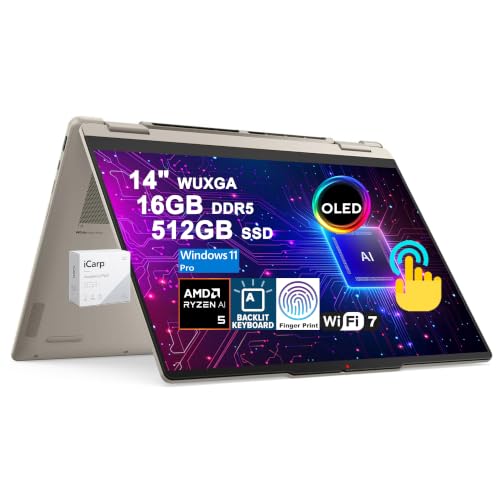
Lenovo Yoga 7 14 (OLED Touch) — The small convertible to beat
Four inches above the keyword, the Yoga 7 14 is where the 10-inch brief went to grow up. Lenovo’s mainstream convertible folds through a full circle — laptop, tent, stand, tablet — on a hinge that holds its angles on laps, trays and sofas alike, which is the practical advantage a folding machine holds over the Surface’s kickstand. The 14-inch WUXGA OLED panel is the visual centrepiece: deep blacks, rich colour and a resolution step above plain Full HD that makes text edges cleaner at the distances a small laptop is actually used. If the detachable’s two-piece life sounds fiddly, this single-piece machine is the answer most former 10-inch buyers end up happiest with.
The Ryzen AI 5 430 configuration in the verified listing pairs modern AMD efficiency with 16GB of memory and a 512GB solid-state drive, a combination aimed squarely at the real workload of a small laptop: dozens of browser tabs, office documents, video calls, light photo work and the occasional large spreadsheet. Nothing in that list strains this hardware, and the OLED’s efficiency at typical brightness helps the machine through a working day of mixed use. It is not a gaming laptop and does not pretend to be; integrated graphics handle casual and older titles, and buyers wanting more should look at entirely different shelves.
Tablet posture in a 14-inch convertible is a compromise the review should describe rather than hide. Folded flat, the Yoga is a thick, two-handed tablet — fine for annotating a document at a desk, reading in an armchair with the machine resting on a cushion, or presenting in tent mode, but not a one-handed reading device like the Surface slate. The keyboard faces outward in tablet mode, a sensation some owners never stop noticing, though the keys disable correctly. Pen support is present and competent for notes and markup; artists wanting the most refined inking should still start at the Surface and work down.
Where the Yoga quietly wins is completeness. Keyboard, hinge, pen support, ports and screen arrive in one box at one price, with no accessory arithmetic, and Lenovo’s convertible line has the long production history that makes cases, chargers and replacement parts easy to find years later. For a buyer replacing a beloved small laptop and wanting the replacement to simply work for five years, that completeness is the argument.
- Real size: 14-inch WUXGA OLED touch panel in a 360-degree convertible chassis
- Processor: AMD Ryzen AI 5 430 with integrated graphics
- Memory and storage: 16GB RAM, 512GB SSD in the verified configuration
- Postures: Laptop, tent, stand and tablet from one hinge — stable on laps and trays
- Pen: Active-pen support for notes and annotation; check the listing for pen inclusion
- Display character: OLED contrast and colour well beyond the LCD panels of the old small-laptop class
Strengths
- One-box completeness — no keyboard or cover purchases hiding behind the headline
- OLED screen makes documents, photos and film all look a class richer
- Hinge stability beats a kickstand anywhere there is no desk
Trade-offs
- Tablet mode is a two-handed, desk-or-lap affair at this size and weight
- Exposed keyboard in tablet posture bothers some owners permanently
- Integrated graphics set a clear ceiling for gaming ambitions
Best for: former small-laptop owners who want one folding machine for desk, sofa and travel without accessory maths.
Not suited for: one-handed tablet readers and buyers chasing the lightest possible carry at any cost.

HP Envy x360 14 — The value hinge
HP’s Envy x360 14 plays the same folding trick as the Yoga at a gentler tier, and the differences between them are a tidy lesson in where money goes in a convertible. The panel here is a Full HD touch LCD rather than an OLED — perfectly serviceable, brighter in some rooms than glossy OLEDs, but without the inky blacks that make films and photos glow. The processor is Intel’s Core 5 120U, an efficiency-minded chip tuned for battery life and quiet fans rather than benchmark headlines, and the verified configuration carries 8GB of memory beside its 512GB drive. That memory figure is the one to read twice: it is adequate for browsing, documents and media, and it is the ceiling — convertible memory is not upgradeable, so a buyer whose habit is forty tabs and three office suites at once should step up to a 16GB machine instead.
In exchange for those economies, the Envy delivers the essential convertible experience intact. The hinge folds fully, the tent and stand modes work for recipes, films and video calls, and the tablet posture suits annotation and reading in the same two-handed way as every 14-inch folder. HP’s keyboard and touchpad manners are well sorted at this tier, and the chassis feels a grade above the bargain shelves — the Envy line sits deliberately between HP’s budget Pavilion convertibles and its premium OmniBook range, and in the hand that positioning is obvious.
The Envy also makes sense as the household second machine: the laptop that lives in the kitchen for homework and recipes, travels in a carry-on without anxiety, and handles the family’s paperwork. Machines in that role are judged on reliability and price posture rather than panel glamour, and the Envy’s specification reads like it was written by someone who understood the assignment — enough storage, a sane processor, a screen that asks nothing of its owner.
One caution belongs to the whole convertible class but lands hardest at value tiers: check the pen situation on the exact listing. Pen support exists across the Envy x360 line, but inclusion varies — some boxes contain a stylus, many do not — and a note-taker budgeting on the assumption of an included pen should verify rather than assume. That single check is the difference between a bargain and a bargain plus an accessory order.
- Real size: 14-inch Full HD touch LCD, 360-degree hinge
- Processor: Intel Core 5 120U — efficiency-first, quiet-running silicon
- Memory and storage: 8GB RAM (fixed — the spec to scrutinise) and 512GB SSD
- Postures: Laptop, tent, stand and tablet, with pen support across the line
- Positioning: HP’s mid-tier convertible — a step above Pavilion, below OmniBook
- Pen inclusion: Varies by listing; verify before relying on it
Strengths
- The full convertible experience at the friendliest price posture among the linked picks
- Quiet, cool running suits shared rooms and long browsing sessions
- Chassis and keyboard feel above its tier
Trade-offs
- 8GB of fixed memory is the genuine limit on heavy multitasking
- LCD panel lacks OLED contrast for film-first buyers
- Pen may be an extra purchase depending on the listing
Best for: households wanting a folding touchscreen for everyday work without paying OLED money.
Not suited for: tab-hoarding multitaskers and buyers who need a pen guaranteed in the box.

ASUS Vivobook Flip 14 (OLED) — The OLED alternative
ASUS and Lenovo have spent years circling each other in the 14-inch convertible class, and the Vivobook Flip 14 is ASUS’s current answer to the Yoga above: same folding form, same OLED ambitions, different silicon and different details. The processor is Intel’s Core Ultra 7 256V from the Lunar Lake generation, a chip designed around efficiency cores and long unplugged stretches, and ASUS pairs it with 16GB of memory and a full terabyte of storage — the most generous drive in this guide. A buyer whose photo library, offline media and document archive travel with them will feel that terabyte as a daily kindness rather than a spec-sheet flourish.
The OLED panel carries the same virtues described for the Yoga — contrast that makes night scenes in films genuinely dark, colour that flatters photo work — and ASUS’s pen support suits notes, markup and casual sketching. Where the Flip differentiates is in the small print of ownership: ASUS’s mainstream lines tend toward lighter chassis and aggressive pricing against Lenovo equivalents, while Lenovo tends to answer with keyboard feel and hinge solidity. Neither is a defect; they are temperaments, and a buyer choosing between picks two and four on this page is really choosing which set of small preferences to live with.
Battery behaviour deserves its own paragraph because the Ultra 7 256V’s efficiency story is real but conditional. Lunar Lake machines sip power in light work — browsing, writing, video — and this Flip can stretch a writing day impressively. Push the OLED to full brightness with video calls and cloud sync running, and the advantage narrows to the class norm. That pattern, efficiency silicon flattered by gentle workloads, describes most modern thin laptops; the Flip simply sits at the favourable end of it.
As a former-10-inch buyer’s machine, the Flip’s appeal is the complete absence of drama. It folds, it inks, it carries a terabyte, it looks sharp doing all three, and it asks its owner to think about nothing except the accessory question every convertible raises — whether a pen is in the box of the specific listing, which the buyer should confirm at the product page as with the Envy above.
- Real size: 14-inch OLED touch panel in a 360-degree convertible
- Processor: Intel Core Ultra 7 256V — an efficiency-led chip for long light-work days
- Memory and storage: 16GB RAM and a class-leading 1TB SSD in the verified listing
- Postures: Full folding range with active-pen support
- Character: The lighter, storage-rich counterpoint to Lenovo’s Yoga 7
- Ownership note: Confirm pen inclusion on the exact listing before ordering
Strengths
- A terabyte of storage removes the external-drive habit for most owners
- Efficiency silicon flatters writers and browsers with long unplugged stretches
- OLED panel matches the Yoga’s visual richness
Trade-offs
- Tablet posture remains a two-handed arrangement, as with all 14-inch folders
- ASUS and Lenovo convertibles overlap so closely that the choice comes down to small preferences
- Peak-brightness video-call days erase much of the battery advantage
Best for: media-heavy owners who want OLED, a terabyte and a folding hinge in one mainstream machine.
Not suited for: buyers who prioritise the absolute lightest slate-style carry over storage and screen.

Dell Inspiron 14 7440 2-in-1 — The mainstream Dell
Dell’s Inspiron 7440 approaches the convertible brief from the direction of the service manual rather than the design studio. The specification in the verified listing — 14-inch FHD+ touch panel, Intel Core 5 processor, 16GB of memory, 512GB of storage — is the class’s sensible centre, and the machine’s appeal is the ecosystem standing behind it: Dell’s support network, parts availability and sheer familiarity to workplace IT departments. For a buyer whose last small laptop was a Dell, or whose employer will only bless certain brands, that institutional comfort is a legitimate feature no benchmark measures.
The FHD+ resolution deserves a kind word. The extra vertical pixels over plain Full HD — a 16:10 shape rather than 16:9 — return a few more lines of every document and web page, and in a small laptop those lines compound across a working day. The panel is an LCD rather than an OLED, trading contrast for a matte-friendly, glare-tolerant character that suits bright offices and classrooms. Touch and pen support cover annotation and navigation; the inking feel is workmanlike rather than luxurious, aimed at markups and signatures more than sketchbooks.
In tablet and tent postures the Inspiron behaves like the honest mainstream machine it is: hinge firm, weight noticeable, experience fine for presentations and shared viewing. It will not seduce anyone away from the Surface for pen work or from the OLED pair for film nights. What it offers instead is the lowest-drama ownership in the guide — the convertible equivalent of buying the car your local mechanic already knows.
That framing also explains who should skip it. Enthusiasts will find the Inspiron plain beside the OLED machines, and travellers counting grams will find it unremarkable. But plainness, in a machine bought to be a household’s or a small office’s dependable folding laptop, is frequently the point — and Dell sells a great many Inspirons to buyers who have learned that lesson from experience.
- Real size: 14-inch FHD+ (16:10) touch LCD in a 2-in-1 chassis
- Processor: Intel Core 5 in the verified configuration
- Memory and storage: 16GB RAM, 512GB SSD — the class’s sensible centre
- Postures: Laptop, tent, stand and tablet with pen support for markup work
- Ownership: Dell’s support and parts network is the quiet headline feature
- Panel character: LCD with a taller 16:10 shape; kinder in bright rooms than glossy OLED
Strengths
- Balanced specification with no single weak line to apologise for
- 16:10 screen returns extra document lines all day long
- Support ecosystem suits workplaces and cautious buyers
Trade-offs
- Design and panel excitement trail the OLED convertibles
- Pen feel targets annotation rather than art
- Weight is unremarkable — neither burden nor boast
Best for: workplaces, students and Dell loyalists wanting a folding touchscreen with institutional backing.
Not suited for: film-first buyers chasing OLED contrast and artists wanting premium inking.
The Discontinued 10-Inch Class — The literal answer, second-hand
Everything above is a successor. This pick is the thing itself: the genuine 10-inch-class touch laptops and detachables of the last decade, typified by Microsoft’s Surface Go line at 10.5 inches and a scattering of education-focused detachables from the major makers, all discontinued and all still circulating on the used and refurbished market. No link is attached, deliberately — stock, condition and pricing on that market change daily, and a buying guide that pretends otherwise is inventing a listing. What can be offered honestly is a field guide to the gamble.
The case for buying one is real. A Surface Go-era machine is genuinely tiny — the whole system, keyboard included, slips into bags that reject every linked pick above — and for a narrow set of jobs it remains sufficient: e-book and PDF reading with pen annotation, form-filling in the field, a kitchen or workshop terminal for recipes and manuals, a child’s first Windows machine for school platforms. Bought cheaply enough, with a healthy battery, it delivers the literal brief that no new machine will.
The risks are equally real and should be priced in. Batteries in machines of this age are consumables nearing their end; a unit that holds two hours is a unit tethered to its charger, which quietly deletes the portability that justified it. The low-power processors of the class were modest when new and feel their age in modern browsers. Windows support windows for the oldest models are closing or closed, and screens, keyboards and chargers for discontinued lines grow scarcer each year. None of this forbids the purchase — it defines the buyer: someone technically comfortable, paying a genuinely low price, for a defined narrow job.
The practical rules are simple. Buy from a seller who states battery health and accepts returns. Favour the later, better-specified examples of any line over the early base models, which were underpowered on day one. Budget for a replacement charger or pen if the listing omits them, and verify the exact screen size — this class includes 10.1-, 10.5- and 10.8-inch panels, and the differences matter for cases. Treat anything priced near the linked convertibles above as a mispricing: the used route only makes sense at used-route money.
- Real size: 10.1 to 10.8 inches depending on model — the only literal matches to the keyword
- Availability: Discontinued; used and refurbished market only, stock varies daily
- Typical silicon: Low-power Intel processors of their era — adequate for narrow jobs, slow in modern browsers
- Battery: The decisive variable; insist on a stated health figure and a returns window
- Support: Software support windows closing on the oldest models — check before buying
- Value rule: Only rational at a small fraction of a new convertible’s price
Strengths
- The only way to own the literal size the keyword describes
- Whole-system weight and footprint beat every new machine in this guide
- Low purchase prices suit narrow, defined jobs
Trade-offs
- Battery wear is the norm, not the exception
- Performance ceilings are low and fixed
- No warranty culture — the buyer is the support department
Best for: technically comfortable buyers with a narrow job and a strict size limit, paying true second-hand money.
Not suited for: anyone buying a primary work machine or paying near-new prices for old hardware.
Which of These Six Actually Fits in Your Bag?
| Pick | Real screen size | Form | Pen | Memory / storage |
|---|---|---|---|---|
| Surface Pro 11 | 13″ | Detachable slate + keyboard cover | Slim Pen, usually separate | Varies by listing |
| Lenovo Yoga 7 14 | 14″ OLED | 360° convertible | Supported; check inclusion | 16GB / 512GB |
| HP Envy x360 14 | 14″ FHD LCD | 360° convertible | Supported; check inclusion | 8GB / 512GB |
| ASUS Vivobook Flip 14 | 14″ OLED | 360° convertible | Supported; check inclusion | 16GB / 1TB |
| Dell Inspiron 7440 | 14″ FHD+ LCD | 2-in-1 convertible | Supported | 16GB / 512GB |
| Discontinued 10″ class | 10.1–10.8″ | Detachable / small laptop | Model-dependent | Model-dependent, modest |
Read the first column of sizes as the guide’s thesis: the honest spread runs from 10.1 inches used to 14 inches new, and every buyer’s job is deciding which end of that spread their bag, hands and workload actually live at.
What Does Touch Actually Add on a Laptop This Small?
It helps to pause on why touch matters here at all, because on a large desktop replacement a touchscreen is a garnish, while at 13–14 inches it changes how the machine is used. Small laptops live close to their owners — on laps, in armchairs, propped on kitchen counters — at distances where reaching for the screen is shorter than reaching for a touchpad. Scrolling a recipe with a knuckle, pinching a map, tapping a dialogue box: these micro-interactions accumulate into a genuinely different relationship with the machine, and they are the reason the old 10-inch class was touch-first from the beginning.
Touch also underwrites the postures. Tent mode is useless without it — the keyboard faces away, so the screen must answer fingers. Presentation, shared viewing and video calls all lean on taps and swipes when a convertible is folded. Buyers who never fold their machine and never touch its screen are paying for a hinge and a digitiser they will not use, and for them a lighter clamshell with a touch panel — a category covered in the companion guide to 13-inch touch laptops — may be the smarter spend. The honest question is not whether touch is good but whether your week contains the postures that use it.
The pen is touch’s serious sibling. Where fingers navigate, pens create: handwriting that converts to searchable text, annotations that sit on top of documents rather than beside them, sketches and diagrams drawn at the speed of thought. On small screens the pen has a second, underrated virtue — precision. Desktop software designed for mouse pointers crowds its controls tightly, and at 13 inches a pen tip lands where a fingertip guesses. Owners who discover this tend to keep the pen closer than the mouse.
None of this is free. Touch panels add a digitiser layer, a little weight and a glossy surface that shows fingerprints and reflects lamps. On the smallest machines those costs are simply the price of the category — the entire class exists because the benefits won the argument a decade ago — but a buyer should still walk in knowing the trade is being made, and knowing which of the three input modes, fingers, pen or keys, will dominate their own day. The picks above are ordered, more than anything, by the answer to that question.
How Do You Set Up a Small Touch Laptop for Pen and Tablet Work?
Begin by telling Windows which posture you are in. Modern convertibles and detachables switch automatically when folded or undocked, but the details reward ten minutes of attention: set the taskbar to its touch-friendly spacing if your fingers are your main cursor, confirm that folding the keyboard disables it rather than merely folding it, and check that your pen pairs and reports its battery before the first meeting rather than during it. These are small calibrations that separate owners who love tablet mode from owners who tried it once.
Build your annotation workflow deliberately. Choose one note application and let it own your handwriting — mixing three guarantees your notes scatter across three silos. Set the pen’s side button to the eraser or the selection tool, whichever your hand reaches for more, and practise the palm-rejection reality of your specific machine: every pick here handles a resting palm well, but the angle at which you write changes the result, and ten minutes of scribbling at home beats discovering your angle mid-lecture.
For detachable owners, rehearse the transitions. Keyboard off, kickstand out, pen in hand should be a five-second motion; if it is a thirty-second fumble, the tablet half will stop leaving its cover. Keep the pen attached or holstered in one consistent place — magnetic edge, keyboard well, or a loop in the bag — because pens are lost at the moment a routine has two possible homes. Convertible owners should rehearse the reverse: the fold into tent mode for video calls, where the camera angle from a folded machine differs from laptop posture and deserves one test call before an important one.
Finish with power habits that suit small machines. These laptops charge from USB-C in most configurations, which means one travel charger can serve laptop and phone; confirm your brick’s wattage clears the laptop’s requirement, because an underpowered phone charger will hold a battery level rather than raise it. And set the machine’s battery saver to engage earlier than the default — at small sizes, the last fifth of a battery is the difference between finishing the document and finishing the search for an outlet.
What Trips Up Buyers Chasing a Vanished Size?
The first trap is trusting search results over spec sheets. Marketplaces are full of listings whose titles stuff every size keyword a seller can think of, and a machine advertised under a 10-inch search may be a 14-inch laptop photographed flatteringly. The panel diagonal is printed in every genuine specification; check it there, never in a title.
The second trap is pricing a detachable by its slate alone. A Surface-style system needs its keyboard cover and, for note-takers, its pen, and the complete basket routinely surprises buyers at checkout. Price the system you will actually carry, for every pick, and the comparisons in this guide become honest ones.
The third trap is romanticising the old class. The 10-inch laptops of memory were slow, dim and cramped even in their prime; nostalgia edits those facts out. A buyer who needs a real work machine will be happier at 14 inches within a week, while a buyer who truly needs ten inches should buy the used pick with eyes open about batteries.
The fourth trap is assuming tablet mode scales. Folding a 14-inch laptop flat produces a 14-inch tablet, with a 14-inch tablet’s weight, and reading habits built on small slates do not transfer. If your use is mostly tablet use, the detachable — or an actual tablet — is the honest route, whatever the diagonal says.
The fifth trap is buying the used pick for a child or a relative and becoming their permanent support line. A discontinued machine with an ageing battery generates questions no new convertible would, and the buyer who gifts one should price in the support role along with the purchase — or choose the Envy and let a warranty carry that weight instead.
How Does the Old 10-Inch Brief Change From Buyer to Buyer?
Students were the old class’s backbone, and their modern brief is the most demanding of the six machines. A student’s laptop is annotated on in lectures, typed on in libraries, folded for films in dorm rooms and carried through weather — which pushes toward the convertibles with 16GB of memory and a pen in hand, the Yoga or the Vivobook Flip, and away from both the 8GB Envy and the two-piece Surface, whose keyboard cover is one more thing to leave in a dorm room. The exception is the dedicated note-taker in a pen-heavy course — mathematics, languages with non-Latin scripts, design sketching — for whom the Surface’s inking justifies its logistics.
Field and frontline workers — inspectors, adjusters, clinicians, surveyors — were the other great 10-inch constituency, and their brief is the one case where the used pick argues seriously against the new machines. A form filled standing up wants a slate, not a folded laptop; a machine that will be dropped, rained on and replaced wants to be cheap. Organisations in this world increasingly buy rugged tablets instead, but an individual practitioner working from a car can still rationally choose a used detachable for the form factor and accept the battery lottery as a cost of the size.
Travellers split by luggage philosophy. The one-bag minimalist counts grams and should start at the Surface, whose slate-plus-cover system undercuts every convertible here, and whose USB-C charging merges with the phone’s brick. The traveller who works from hotel desks and airport lounges, by contrast, gains more from a convertible’s lap-friendly hinge and one-piece simplicity than from the detachable’s saved grams — the Yoga and Flip were designed for exactly that rhythm of trays, desks and sofas.
Households buying a shared machine should read the guide almost in reverse. The kitchen-and-homework laptop does not need OLED, does not need a terabyte, and does not benefit from a detachable keyboard that children will separate from its slate within the week. It needs a firm hinge, a sane price and enough memory — the Envy if budgets lead, the Inspiron if they allow — and the discipline to treat tablet mode as a presentation trick rather than a daily posture. Matching the machine to the household’s actual chaos level is the whole skill.
Final Recommendation
Most readers should land on one of the two OLED convertibles: the Yoga 7 14 for hinge solidity and completeness, the Vivobook Flip 14 for storage and efficiency, with the Envy x360 as the value route and the Inspiron as the institutional one. Buy the Surface Pro 11 when pen and tablet use lead your day and the keyboard is the accessory rather than the main event. Reserve the true 10-inch machines for the narrow, size-absolute jobs they still serve. The size you searched for is gone, but the job it did is fully covered — and a small laptop bought with open eyes about its real dimensions will still be making its owner happy when the next size fashion arrives.
A closing word on timing. Convertible lines refresh on an annual rhythm, and the differences between adjacent generations at this size are usually silicon and panel refinements rather than reinventions. A buyer who finds the current Yoga, Flip or Envy on a favourable listing is not missing a revolution by purchasing now; equally, a buyer whose old machine still serves can wait for the next refresh without anxiety. What neither buyer should do is wait for the 10-inch size itself to return. Panel economics, keyboard physics and interface design all point the same way, and the machines in this guide are not placeholders for a resurrection — they are the category now, in the sizes the market settled on.
Frequently Asked Questions
Does anyone still make a new 10-inch laptop with a touchscreen?
No major manufacturer currently sells one. The class ended as panels consolidated at 13 inches and above; the smallest new touch Windows machines are 13-inch detachables and 14-inch convertibles, which is why this guide is built from successors plus one clearly-labelled used route.
Is a 13-inch detachable really a substitute for a 10-inch laptop?
For weight and tablet use, yes — the slate alone is lighter than complete historical 10-inch laptops. For footprint, no: the screen is genuinely larger, and a fitted 10-inch sleeve or mount will not accept it. Decide which dimension your need actually measures.
Should I buy a used Surface Go instead of a new convertible?
Only for a narrow job at a genuinely low price, with battery health stated and returns accepted. As a primary machine, an ageing low-power processor and a worn battery will frustrate within months; as a dedicated annotation or field terminal, it can still earn its keep.
Do these convertibles include a pen?
Support and inclusion are different things. All the linked convertibles support active pens, but several listings sell the pen separately. The reviews flag this per pick; confirm on the product page before ordering if inking matters to you.
Can a Chromebook fill the 10-inch touch laptop brief?
Partly. Small Chromebooks survive at sizes Windows abandoned, and for a browser-and-documents life they are light, cheap and long-lived. But they are a different operating system with a different app world, so they answer the brief only for buyers whose work already lives entirely in a browser — a real constituency, and a smaller one than the keyword implies.
Why did small laptops disappear while small tablets survived?
A tablet’s interface scales down gracefully; a desktop operating system’s does not. Keyboards also have a physical floor — shrink below roughly 13 inches and full-size keys stop fitting. Tablets kept the small end; laptops consolidated where typing stays honest.
Related Guides
Keep reading around the small-screen shelves: best 13 inch laptops with touchscreens compared, best tablets with keyboards for laptop-style work, and best lightweight laptops for travel.


