What's inside
- Key Takeaways
- Quick Picks: Affordable Wireless Gaming Headsets at a Glance
- How Did We Choose These Wireless Headsets?
- Dongle or Bluetooth: How Should You Actually Play?
- Battery Life, Honestly: What the Listing Figures Mean
- How Do the Six Wireless Headsets Compare Side by Side?
- How Do You Set Up a Wireless Headset So Latency Never Enters the Story?
- What Mistakes Do Wireless Headset Buyers Make?
- Latency, Explained Without a Stopwatch
- One Headset for Work and Play: The Hybrid Week
- Range, Walls and Apartment Reality
- Final Recommendation
- Frequently Asked Questions
- Related Guides
As an Amazon Associate I earn from qualifying purchases. This post may contain affiliate links at no extra cost to you.
gizmoverdict.com is reader-supported. When you buy through links on our site, we may earn an affiliate commission.
Where to buy: follow the Amazon links attached to five of these headsets to check the current price on Amazon, confirm the platform variant in the title, and read the stated battery figure and connection types on the listing itself before ordering. The sixth pick, Razer’s BlackShark V2 HyperSpeed, is deliberately covered in prose only, as the stretch reference this class should be measured against rather than a ranked recommendation within it.
The best affordable wireless gaming headsets are built on a single distinction that matters more than any other in this guide, so it comes first. Wireless gaming audio travels by two different roads. The first is a dedicated 2.4GHz dongle connection — Logitech calls its version Lightspeed — engineered for the lowest possible delay between the game and your ears, because in a shooter the sound of a footstep that arrives late is information that arrives wrong. The second road is Bluetooth: universally compatible, built into every phone and most laptops, wonderful for music and calls and casual play, and measurably laggier, because Bluetooth was designed for convenience rather than for split-second game cues. An affordable wireless headset is a decision about which road you travel, and the best ones in this guide increasingly offer both — the dongle at the desk for the game, Bluetooth for everything else in your life.
Affordable is the other word that needs its frame set. Wireless spends money wired headsets do not: a radio, a battery, the electronics to run them, and the engineering to keep delay down. In the tier above, that spend is absorbed by the price. Here, it is absorbed by trade-offs — in driver size, in materials, in microphone richness — and this guide’s picks are the models whose trade-offs were chosen intelligently. Battery figures quoted are the ones the listings themselves publish, stated as such; real endurance varies with volume, lighting and which radio you are using, and any guide that promises you an exact hour count from its own imagination is writing fiction.
Platform honesty matters in this class more than in any wired guide. A wireless headset is not automatically a universal one: dongles speak to the platforms their makers licensed and designed for, Bluetooth fills many but not all of the gaps — Xbox in particular has historically been the awkward guest for wireless audio — and the listings’ platform lines deserve a literal reading before money moves. The reviews below read them literally, so that the headset you buy is wireless on the machines you actually own.
Key Takeaways
- Decide by radio first: a 2.4GHz dongle connection is the low-latency road for gaming; Bluetooth is the convenience road for everything else.
- Logitech’s G733 remains the class’s style-and-ecosystem flagship, with Lightspeed connection, a suspension headband and Blue VO!CE microphone processing.
- Turtle Beach Stealth 500 is the battery-and-versatility pick, with a 40-hour figure in its listing and Bluetooth alongside its low-latency wireless.
- Logitech’s G325 and G321 are the modern dual-mode value pair — Lightspeed plus Bluetooth — with listing battery figures of 24-plus and 20-plus hours respectively.
- HyperX Cloud Jet is the featherweight new entrant, bringing the Cloud name into affordable wireless with a design aimed at younger and smaller-headed players.
- Razer BlackShark V2 HyperSpeed is covered in prose as the stretch reference: the esports brief gone wireless, priced above this class’s centre.
Quick Picks: Affordable Wireless Gaming Headsets at a Glance
| Pick | Badge | Why it made the cut |
|---|---|---|
| Logitech G733 Lightspeed | Best Established All-Rounder | Lightspeed low-latency wireless, a suspension fit, PRO-G audio and Blue VO!CE mic tools for PC and PlayStation players. |
| Turtle Beach Stealth 500 | Best Battery and Versatility | A 40-hour listing figure, Bluetooth alongside its wireless, memory foam and flip-to-mute across PS, PC and mobile. |
| Logitech G325 Lightspeed | Best Modern Dual-Mode Value | Lightspeed plus Bluetooth, 24-bit audio positioning and a 24-plus-hour listing figure in an all-day comfort design. |
| Logitech G321 Lightspeed | Best Entry Into Lightspeed | The most accessible door into Logitech’s dual-mode wireless, with a 16 kHz boom mic and a 20-plus-hour listing figure. |
| HyperX Cloud Jet Wireless | Best Lightweight Newcomer | The Cloud family’s wireless value entry, shaped light for long sessions and younger players. |
| Razer BlackShark V2 HyperSpeed | Best Stretch Reference (Prose-Only) | The esports BlackShark brief with HyperSpeed wireless — the class’s ceiling marker, covered without a link. |
How Did We Choose These Wireless Headsets?
The first filter was the radio. Any headset whose only wireless road was Bluetooth was excluded from the linked picks, because a gaming guide that recommends Bluetooth-only audio for competitive play has misread its own title; Bluetooth appears here as the second mode, never the only one. The second filter was the maker’s wireless pedigree: low-latency audio is an engineering discipline, and the names in this guide — Logitech’s Lightspeed line above all, Turtle Beach’s long console-wireless history, HyperX’s Cloud ecosystem — have production history in it rather than a first attempt. The third filter was platform legibility: each pick’s listing states its platforms plainly enough for a buyer to match against their own machines.
Razer’s BlackShark V2 HyperSpeed sits in prose deliberately. It is the headset many readers will cross-shop — the famous esports shape with the cable removed — and pretending it does not exist would make the guide less honest. But it is priced as a stretch beyond this class’s centre, so it appears as the reference point it is: the thing the extra money buys, described fairly, and left for the reader whose budget reaches it knowingly rather than by drift.
A final selection note concerns what was left out entirely, because the omissions are also advice. Bluetooth-only headsets at tempting prices were excluded on the latency principle stated above, however handsome their listings. No-name dongle headsets with unverifiable radio claims were excluded on the pedigree principle: a low-latency claim is an engineering promise, and promises from makers with no track record in the discipline are marketing, not engineering. And last generation’s clearance flagships, which drift through this price territory as stock rotates, were left to prose’s cousin — the reader’s own opportunism — because a guide cannot responsibly pin recommendations to listings that may be a different product next month. What remains is a class with a spine: five linked picks whose radios, platforms and batteries are stated plainly, and one reference to stretch toward.
Dongle or Bluetooth: How Should You Actually Play?
Use the dongle for the game, always, when the headset offers one. The 2.4GHz connection in these headsets is engineered to keep audio delay down at levels a player cannot feel, which preserves the timing relationship between what you see and what you hear — the relationship competitive audio entirely consists of. The dongle also tends to be the more stable citizen: it is a private road between your headset and one machine, indifferent to the Bluetooth traffic of a household. Its costs are a USB port and a small receiver to keep track of, and a platform list that must be checked rather than assumed.
Use Bluetooth for the rest of the day, and be glad it is there. Bluetooth is how these headsets earn their keep between sessions: music from the phone, a call taken away from the desk, a handheld or a laptop that has no dongle in it, a film on a tablet. Its delay, irrelevant for a film — where devices compensate by delaying the picture to match — becomes relevant only when a game’s cues must be instantaneous, which is precisely the division of labour the dual-mode picks in this guide are built around. The mistake is not owning Bluetooth; it is gaming on it when a dongle sits in the box. The second mistake is the mirror: dismissing a dual-mode headset’s Bluetooth as a gimmick, when it is the feature that doubles the headset’s working life.
Battery Life, Honestly: What the Listing Figures Mean
The figures in this guide come from the listings and are quoted as the makers state them: the Stealth 500’s listing speaks of 40 hours, the G325’s of 24-plus hours, the G321’s of 20-plus hours. Treat those as the size of the tank under the maker’s test conditions, not as a promise about your week. Volume is the biggest variable — headsets driven loud drink faster — followed by lighting, which on RGB models is a genuine and ongoing tax, and by which radio is in use. A dual-mode headset living on Bluetooth at moderate volume will generally outlast the same headset driven hard over its dongle in a loud game, and both will fall short of the laboratory figure on the box.
The practical translation matters more than the arithmetic. Every pick here, even the most modest figure, covers several full evenings of play between charges, which changes the discipline from the wired world’s none to a light weekly habit: charge on the night you do not play, or during the workday, and the battery disappears as a concern. The players who get caught out are the ones who treat a wireless headset like a wired one for a fortnight. Build the small habit, and endurance differences among these picks become a preference rather than a risk — choose the Stealth 500’s bigger tank if your weeks are chaotic, and any of the others if your routine has a natural charging night in it.

Logitech G733 Lightspeed — Best Established All-Rounder
The G733 has been the affordable wireless class’s front door for years, and its staying power is a design argument. Logitech built it as a lifestyle object as much as a gaming one: a suspension headband that floats the frame, soft dual-layer memory foam, colourways that treat the headset as something worn in the world, and RGB lighting arranged as an accent rather than a lighthouse. Under the styling sits the serious kit — Lightspeed wireless for the low-latency road, PRO-G drivers tuned in Logitech’s house style, and a detachable microphone whose Blue VO!CE processing, run through G Hub, gives PC players real tools for shaping their voice: filters and effects that can make a bedroom sound considerably more like a booth.
Its platform story is PC and PlayStation, per the listing — Switch appears in its compatibility line as well — and that focus is the honest shape of this class: the G733 is a superb citizen of the desk-and-PlayStation household and simply not an Xbox answer, which no amount of wishing changes. Within its world, it does everything well and nothing badly: the fit suits long sessions and smaller heads, the sound flatters games and music alike, and the ecosystem — G Hub profiles shared with Logitech mice and keyboards — rewards the already-Logitech desk. Newer dual-mode rivals below add Bluetooth breadth it lacks; the G733 answers with polish, pedigree and the deepest accessory and colour ecosystem in the class. For most buyers entering affordable wireless, it remains the default against which the others must argue.
Its age in the market cuts in the buyer’s favour in one more way: the G733 is the most understood headset in this guide. Every quirk — how its suspension strap ages, which replacement cushions fit, how its battery behaves in year three — is documented by an army of owners, and its colourways and accessories remain in production because the installed base demands them. A newer rival may be cleverer on paper; the G733 is knowner in the world, and for a device you will wear daily for years, known is a specification. Buy it when you want the class’s centre of gravity, with everything that implies about support, spares and the absence of surprises.
- Connection: Lightspeed 2.4GHz wireless via dongle
- Microphone: detachable, with Blue VO!CE processing on PC
- Fit: suspension headband, dual-layer memory foam
- Platforms: PC, PS5, PS4 and Switch compatible per the listing
Strengths
- The most polished total package in the class — fit, styling, ecosystem and wireless pedigree together.
- Blue VO!CE gives its microphone a second life as a genuinely configurable voice tool.
- Years of production mean deep accessory availability and thoroughly known behaviour.
Trade-offs
- No Bluetooth mode, so phone and tablet life needs another device or a wired fallback.
- Not an Xbox wireless answer; that platform’s players must look to other picks or classes.
- Its lighting, left on, taxes the battery like all RGB in this class.
Best for: PC and PlayStation players who want the class’s most complete, best-supported wireless headset. Not suited for: Xbox players, or anyone who needs Bluetooth for phone use in the same headset.

Turtle Beach Stealth 500 — Best Battery and Versatility
Turtle Beach has made console wireless headsets longer than almost anyone, and the Stealth 500 is that experience distilled into the affordable class. Its listing leads with the number that organises its whole proposition: a 40-hour battery figure, the largest tank in this guide, wrapped around a headset that also carries Bluetooth alongside its low-latency wireless — so the same headset that plays the PlayStation in the evening takes the phone call and the commute music in the morning. Memory foam cushions, an amplified-audio positioning in Turtle Beach’s tradition, and the company’s flip-to-mute microphone complete a brief that reads like a checklist of what console households actually ask for.
The platform list — PS5, PS4, PC and mobile per the listing — again draws the class’s usual border, and again Xbox players should read it literally. Within its platforms, the Stealth 500’s argument is endurance and breadth: the battery that forgives a chaotic week, the Bluetooth that forgives a varied day, and a microphone gesture — flip up, muted — that needs no software and no looking. Against the G733 it trades some ecosystem polish and PC voice tooling for that versatility, and against the newer Logitechs it trades newness for the biggest battery and Turtle Beach’s console-first tuning. Households whose gaming lives on a console and whose days are long will find this the most forgiving pick in the guide.
The Stealth 500 also benefits from Turtle Beach’s control philosophy, which puts the things a console player touches — volume, chat balance, mode — on the earcup in forms a thumb finds without eyes. In a wired guide that would be a footnote; in wireless, where the headset is also its own amplifier and radio, control placement is daily quality of life, and Turtle Beach’s decades of console iterations show. Pair that with the flip-to-mute gesture and the result is a headset that asks the least attention of any pick here while worn — attention being the scarcest resource in any living room where the game, the doorbell and the group chat compete for it.
- Battery: 40-hour figure per the listing — the class’s largest here
- Connection: low-latency wireless plus Bluetooth
- Microphone: flip-to-mute
- Platforms: PS5, PS4, PC and mobile per the listing
Strengths
- The battery figure that ends charging anxiety for all but the most chaotic weeks.
- Dual wireless modes cover game time and phone time in one headset.
- Turtle Beach’s console heritage shows in the controls and tuning priorities.
Trade-offs
- Xbox remains outside its platform list, as with most of this class.
- PC software voice tooling is thinner than Logitech’s Blue VO!CE story.
- The versatility brief means it is not the lightest or most minimal design here.
Best for: PlayStation and PC households wanting maximum battery and one headset for game and phone. Not suited for: Xbox players, or minimalists who want a dongle and nothing else.

Logitech G325 Lightspeed — Best Modern Dual-Mode Value
The G325 is what the affordable wireless class looks like after it grew up. Logitech’s newer design language — cleaner, lighter, less overtly gamer — wraps a thoroughly modern brief: Lightspeed wireless for the game, Bluetooth for the rest of life, 24-bit audio positioning in its listing, a built-in microphone with noise reduction rather than a boom, and a battery figure of 24-plus hours that covers a working week of evenings. The all-day comfort positioning is not decoration; this is a headset designed to be worn for the job, the call and the raid without a costume change, and its restraint is exactly what a growing share of players now want from their gear.
The built-in microphone is the considered trade to understand. Removing the boom slims the design and removes the part most likely to be snapped, and modern noise reduction keeps a voice clear for chat and calls — but a capsule in the earcup will not match a well-placed boom for competitive callout authority, and the BlackShark-shaped stretch pick below exists for players who rank that first. For everyone else, the G325’s balance is the class’s current centre of gravity: dual radios, honest battery, clean looks, Logitech’s wireless pedigree, and a price position inside the affordable frame. If the G733 is the class’s established champion, the G325 is its modern heir, and choosing between them is choosing between polish-plus-ecosystem and breadth-plus-restraint.
The 24-bit audio positioning in its brief deserves a plain-English note, because it is the kind of figure listings weaponise. It describes the resolution of the audio path the headset works with — headroom in the digital signal — and its practical meaning is simply that the G325’s chain is built to current standards rather than legacy ones; it is not a promise that games will sound twice as anything. What your ears will actually register is Logitech’s current tuning: clean, balanced, and friendly to both game audio and the calls and music its dual-mode life includes. Buy the G325 for its arrangement and its manners, and let the bit depth be what it is — evidence of a modern design, not a headline.
- Connection: Lightspeed wireless plus Bluetooth — true dual mode
- Battery: 24-plus-hour figure per the listing
- Microphone: built-in, with noise reduction
- Audio: 24-bit audio positioning per the listing
Strengths
- Dual-mode wireless done by the maker who defined the low-latency category.
- A design that works at a desk, on a call and in a game without looking like a costume.
- Noise-reduced built-in mic keeps the silhouette clean with no boom to break.
Trade-offs
- The built-in microphone trails boom designs for competitive voice authority.
- Battery figure sits below the Stealth 500’s, though it covers a normal week.
- Newer model, so its long-term ownership record is still being written.
Best for: players who want one modern headset for gaming, calls and phone life. Not suited for: competitive players who need a boom microphone’s authority.

Logitech G321 Lightspeed — Best Entry Into Lightspeed
If the G325 is the modern centre of the class, the G321 is its front step — the most accessible way into Logitech’s dual-mode wireless without leaving the affordable frame. The brief mirrors its sibling’s in a slightly lighter key: Lightspeed plus Bluetooth connectivity, a dynamic comfort-and-fit design philosophy, a boom microphone this time — specified at 16 kHz in the listing, a figure that speaks to voice bandwidth rather than game audio — and a battery figure of 20-plus hours. The boom is the interesting divergence: where the G325 hides its microphone for the sake of the silhouette, the G321 keeps the traditional gaming arrangement, and with it the clearer claim on team voice.
Position it against its own family first. Against the G325, you trade some battery and the sleeker built-in-mic design for the boom and the lower step in the range; against the G733, you trade the flagship’s ecosystem depth and Blue VO!CE tooling for dual-mode breadth the older champion lacks. That is a rational set of trades for a first wireless gaming headset, which is the G321’s natural buyer: the player upgrading from wired or from a console’s pack-in solution, who wants the dongle for the game and Bluetooth for the phone, from the maker whose wireless they will not have to think about. Entry-level in this family is a considered product, not a stripped one, and the G321 wears that distinction well.
Its microphone specification invites one clarification for shoppers comparing across this guide. The 16 kHz figure describes the boom microphone’s voice bandwidth — the range of your voice it is built to capture — and a wider voice bandwidth is part of why boom-equipped picks can sound more present in chat than built-in arrangements working with less. It says nothing about the game audio in your ears, which is a separate path entirely. Read in that light, the G321’s sheet is quietly competitive: the family’s dual radios, a voice path specified like a gaming product rather than a call accessory, and a battery that still clears the working week of evenings. The entry step, argued properly, is not the family’s apology; it is its invitation.
- Connection: Lightspeed wireless plus Bluetooth
- Battery: 20-plus-hour figure per the listing
- Microphone: boom design, 16 kHz specification per the listing
- Fit: dynamic comfort and fit design per the listing
Strengths
- The affordable door into genuine dual-mode Lightspeed wireless.
- A proper boom microphone, where its sibling G325 goes built-in.
- Logitech’s wireless reliability and software support at the range’s entry.
Trade-offs
- The smallest battery figure among the Logitech picks here.
- Fewer premium touches than the G733 — the entry step is honest about its place.
- Like the class generally, Xbox wireless is not its story; check platforms literally.
Best for: first-time wireless buyers who want dual-mode done properly on a firm budget. Not suited for: players wanting the flagship ecosystem, or marathon weeks between charges.
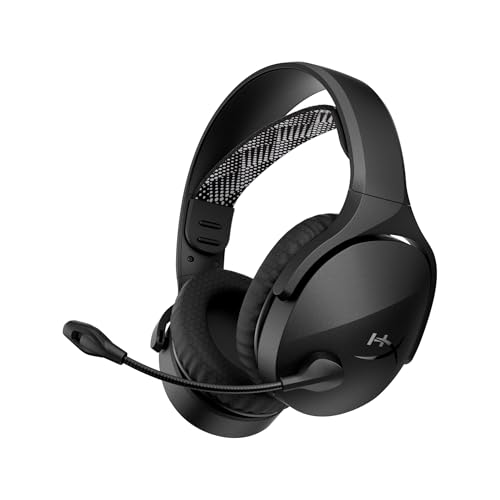
HyperX Cloud Jet Wireless — Best Lightweight Newcomer
HyperX built the Cloud name on wired headsets so comfortable that players forgot the category had a comfort problem, and the Cloud Jet carries that name into affordable wireless with a design emphasis the whole guide can feel: lightness. The Jet is shaped for the players the rest of the class underserves — younger players, smaller heads, anyone for whom the full-size wireless flagships feel like wearing a appliance — and it brings HyperX’s tuning instincts and the Cloud family’s fit philosophy to a wireless brief at the accessible end of the frame. Its listing is spare with technical theatre, and this guide will match that honesty: what the Jet promises is the Cloud experience without the cable, at a weight and price that widen the audience.
Its role in the ranking is the specialist in fit. Against the Logitechs it cannot match the ecosystem depth or the dual-mode story told in as many words, and its newer arrival means its ownership record is young. But a headset that a smaller-headed player can wear for a whole evening beats a better-specified headset that gives them a headache by the second hour — the oldest law in this batch of guides, and the Jet is its wireless expression. Households equipping a young player’s first wireless headset, and adults who have bounced off heavier models, should start their shopping here and only move up the table if the Jet’s particular compromises — ecosystem, newness — matter more than its particular mercy.
There is a gift-buying dimension to the Jet that deserves explicit mention, because first wireless headsets are so often gifts. A giver choosing among this table faces a fit gamble on someone else’s head, and the Jet is the pick that minimises it: light enough not to punish a smaller head, forgiving in its clamp, and carrying a name — Cloud — whose comfort reputation the recipient may already know from the wired world. The dongle discipline it teaches, the charging habit it builds, transfer intact when its owner eventually graduates to the class’s flagships. As a first step into wireless, it is the guide’s most considerate on-ramp.
- Design: lightweight wireless entry in the Cloud family
- Fit philosophy: Cloud-line comfort aimed at smaller heads and long wear
- Positioning: HyperX’s accessible wireless tier
- Audience: younger players and comfort-first buyers
Strengths
- The fit-first design serves players the flagship-sized class overlooks.
- HyperX’s tuning and comfort pedigree, now without the cable.
- An accessible entry into a trusted ecosystem for first wireless buyers.
Trade-offs
- A newer model with a shorter ownership track record than the Logitech establishment.
- Ecosystem and software depth trail the G Hub world.
- Its lightness brief means fewer flagship features than the stretch tier offers.
Best for: younger players, smaller heads, and comfort-led first wireless purchases. Not suited for: ecosystem maximalists or players wanting the class’s biggest battery.
Razer BlackShark V2 HyperSpeed — Best Stretch Reference (Prose-Only)
Every class needs its ceiling marker, and in affordable wireless that marker is Razer’s BlackShark V2 HyperSpeed: the esports BlackShark shape — the featherweight frame, the aviation-inspired design, the microphone discipline the line is famous for — rebuilt around Razer’s HyperSpeed wireless, the company’s low-latency 2.4GHz technology. It answers the question this whole guide circles: what does the competitive brief look like when the cable is removed by the people who made the cable version famous? The answer, by all the line’s established evidence, is the most competition-focused wireless headset a serious player can buy without entering the flagship tier outright.
It is in prose, and fifth in spirit, because its price lives above this class’s centre of gravity, and a guide to affordable wireless serves its readers by describing the stretch honestly rather than smuggling it into the ranking. Who should stretch: the competitive player whose wired BlackShark is already home, whose squad’s communication is their game’s backbone, and who will feel the microphone and the latency engineering every session. Who should not: everyone whose play is broader than ranked queues, for whom the G733’s polish, the Stealth 500’s battery or the G325’s dual-mode breadth return more per unit of currency. The HyperSpeed is the class’s north star — steer by it, and buy it only when your play genuinely points that way.
One more honest note in its favour, because reference points should be complete. The BlackShark line’s microphone culture — the expectation that the boom is a professional tool — survives the transition to wireless here in a way that cannot be said of every esports badge, and for a player whose identity in their group is bound up with being the clear voice in the comms, that continuity has value beyond specifications. This guide keeps it in prose for price discipline, not for quality doubt. If the stretch is made, it should be made with the whole picture in view: the finest competitive wireless brief in reach, bought at a premium the rest of this table exists to help you avoid needing.
- Connection: Razer HyperSpeed low-latency wireless
- Design: BlackShark esports lineage — featherweight frame, pro-grade mic brief
- Positioning: stretch tier above this class’s centre; covered prose-only
- Audience: competitive players standardised on the BlackShark brief
Strengths
- The esports brief — weight, microphone, latency — executed without the cable.
- Razer’s competitive tuning pedigree in its most focused wireless form.
- The natural upgrade for wired BlackShark owners who already know the fit.
Trade-offs
- Priced as a stretch beyond the affordable centre this guide serves.
- Its single-minded brief gives up the lifestyle breadth of the dual-mode picks.
- Platform reach should be verified on the current listing for your exact machines.
Best for: competitive players for whom the BlackShark brief is already home. Not suited for: value-first buyers, for whom the class’s centre delivers more per unit spent.
How Do the Six Wireless Headsets Compare Side by Side?
| Headset | Gaming connection | Second mode | Battery figure (listing) | Defining trait |
|---|---|---|---|---|
| Logitech G733 | Lightspeed dongle | None — dongle only | Not stated in title | The polished all-rounder |
| Turtle Beach Stealth 500 | Low-latency wireless | Bluetooth | 40 hours | The battery and versatility pick |
| Logitech G325 | Lightspeed dongle | Bluetooth | 24+ hours | The modern dual-mode centre |
| Logitech G321 | Lightspeed dongle | Bluetooth | 20+ hours | The dual-mode entry with a boom |
| HyperX Cloud Jet | Wireless (Cloud line) | See current listing | See current listing | The lightweight newcomer |
| Razer BlackShark V2 HyperSpeed | HyperSpeed dongle | Bluetooth class-typical | See current listing | The esports stretch reference |
The table’s lesson is that “wireless” is not a feature but a family of arrangements. Dongle-only polish, dual-mode breadth, battery maximalism and esports minimalism are four different products wearing one adjective, and the right row is the one whose arrangement matches your machines and your week — not the one with the largest single number, since the largest battery attached to the wrong platform list is worth nothing at all.
How Do You Set Up a Wireless Headset So Latency Never Enters the Story?
Start with the dongle’s placement, the most underrated variable in wireless audio. Plug the receiver directly into the machine where you can, or into a front or desk-level port rather than the back of a tower under a desk behind a metal case — the shorter and clearer the radio’s path to your head, the more margin the connection has. If a USB extension or the maker’s adapter is included, use it to give the dongle line of sight to your chair. Keep the dongle away from known radio noise: a nest of USB 3 storage devices and cables is the classic interference neighbourhood for 2.4GHz audio, and moving the receiver one port over has fixed more “wireless problems” than any firmware update.
Then set the discipline. Pair Bluetooth to your phone once, deliberately, and learn the headset’s mode-switching gesture before a match depends on it. Establish the charging ritual in the first week — a cable at the desk, a night of the week — and check for a firmware update once at setup, since wireless products genuinely improve in their first months. Finally, test the failure mode on purpose: walk the headset to the edge of its range, hear where it breaks up, and arrange your play space inside that boundary. Wireless set up this carefully behaves like a wire that happens to be invisible, which is the entire promise of the class.
What Mistakes Do Wireless Headset Buyers Make?
The expensive mistake is platform assumption: buying a headset whose dongle does not serve your console — the Xbox gap in this class being the standing example — and discovering it at unboxing. Read the platform line literally; it is the most important sentence in the listing. The second mistake is gaming over Bluetooth when a dongle is in the box, then reviewing the headset’s latency as if the radio were at fault. The third is battery magical thinking: treating the listing figure as a guarantee, never building the charging habit, and meeting the low-battery warning in the middle of the session it was always going to interrupt.
Two quieter errors complete the set. Buyers lose dongles — the small receiver migrates to a drawer, a different machine, a house move — and some models are far harder to re-pair or replace than others, so give the dongle a home port and leave it there. And buyers chase the stretch tier for a badge, when their actual play — broad, social, console-centred — is served better by the class’s centre. Wireless adds failure modes that wired never has; the buyers who thrive here are the ones who choose the arrangement that fits their machines and habits, set it up once with care, and then enjoy the genuinely liberating thing this class sells: standing up, walking to the kitchen, and hearing the game call you back.
A last mistake is really a category error: judging a wireless headset by wired standards in the first week. The new owner notices the charging, the dongle, the mode-switching — the small administrative tax of freedom — and files the headset as complicated, when the honest comparison is against the month, not the day. By the month, the cable’s absence has become invisible and the rituals have become reflexes, while the wired headset’s own tax — the tug, the tangle, the chair wheel — is still being paid nightly. Every class change feels expensive at first and obvious in retrospect. Give wireless its month before you sentence it, and set it up properly in the first week so the month can make its case.
Latency, Explained Without a Stopwatch
Players hear “low latency” as a spec-sheet incantation, so here is the lived version. Every wireless system takes some time to package your game’s sound, send it, and unpack it at your ears. With a gaming dongle that time is small enough that your brain files sound and picture as simultaneous — a door slams when the door slams. With Bluetooth the packaging is heavier, and the brain starts to notice the seam in fast material: the shot lands a fraction after the muzzle flash, the footstep arrives after the corner is already turned. Films hide the seam by delaying the picture to match the sound, a trick a game cannot perform, because the picture in a game is your own input coming back at you.
Two corollaries follow. First, the dongle’s advantage is largest exactly where players spend money to find it — competitive shooters, rhythm games, anything where sound is a timing instrument — and smallest in the slow, atmospheric play where Bluetooth’s convenience is harmless. Second, latency is a chain, not a component: a fast headset on a television with heavy audio processing can still feel late, which is why game modes on displays matter and why this guide’s setup section treats the whole path. Judge your own sensitivity honestly. Players who have never noticed delay on Bluetooth earbuds during video may game happily on a dual-mode pick’s second radio for half their library — and should still use the dongle for the other half, because it costs nothing to be right.
One Headset for Work and Play: The Hybrid Week
The quiet revolution inside this class is that the gaming headset has become presentable. The G325’s restraint, the G733’s colourways, the Stealth 500’s phone manners — these are headsets that can take a work call at nine and a raid at nine without either audience finding them strange, and for the hybrid worker that consolidation is worth real money: one device to charge, one microphone whose behaviour you know, one fit your head has already accepted. The microphone question decides suitability more than looks do. Boom designs read as gaming on camera but deliver the clearest voice; the G325’s built-in, noise-reduced arrangement reads as office equipment and performs closer to a boom than its size suggests.
Set the hybrid life up deliberately. Keep the dongle in the work machine if that is where your days are anchored, and let Bluetooth serve the phone and the evening’s console, or the reverse if the desk PC owns your evenings — the dual-mode picks tolerate either geography, which is their point. Agree with yourself which device is the headset’s home for updates and charging, because a hybrid headset that lives between two homes gets charged in neither. Done well, this is the class’s best economic story: the affordable wireless headset is no longer a gaming peripheral that moonlights, it is the household’s single set of ears, and its price should be judged against the two or three devices it replaces.
Range, Walls and Apartment Reality
Wireless range claims are measured in open air, and nobody lives in open air. In a real flat, the dongle’s comfortable reach is your gaming room and most of the next one; the kitchen run for a drink usually survives, the far bedroom with two brick walls in between is a negotiation. Bluetooth’s reach behaves similarly with a different failure style — where dongle audio tends to hold and then drop, Bluetooth often degrades at the edges. None of this is a defect in any pick here; it is the physics of a radio class designed for a room, and the correct response is arrangement, not disappointment: dongle placed high and clear, play space inside the reliable boundary, and the phone carried with you when the headset is on Bluetooth and the destination is far.
Interference deserves its sentence too. The 2.4GHz band is a shared street — Wi-Fi, other headsets, a neighbour’s everything — and gaming dongles are engineered to be nimble citizens of it, hopping and retrying in ways that keep game audio clean in all but pathological environments. If your desk sits beside a router, a microwave’s favourite wall and three storage drives, the setup section’s advice about dongle placement is not fussiness; it is the difference between the radio performing as designed and the radio performing as situated. Situate it well, and apartment reality and wireless gaming coexist without drama.
Final Recommendation
For most players entering affordable wireless, the Logitech G733 remains the safest complete answer on PC and PlayStation — polished, proven, and supported like a flagship — while the G325 is the modern choice for players whose headset must also live a phone-and-calls life, and the G321 its boom-microphoned entry point. Take the Turtle Beach Stealth 500 when the battery figure and console-first versatility match a chaotic week, the HyperX Cloud Jet when fit and lightness are the deciding votes, and stretch to the BlackShark V2 HyperSpeed only when competitive play is truly the centre of your gaming life. Whichever name you choose, choose the radio before the brand and the platform list before the radio — because the best affordable wireless gaming headsets are not the ones with the most features in the abstract, they are the ones whose connection fits your machines so completely that, a month from now, the only thing you will remember about the wireless is that you stopped thinking about it entirely — the dongle forgotten in its port, the battery folded into the week’s rhythm, the cable’s absence so complete that sitting down to play feels, in the smallest and most satisfying way, like the future the advertisements always promised and this class, chosen carefully, finally delivers.
Frequently Asked Questions
Is Bluetooth good enough for gaming on these headsets?
For casual, single-player and turn-based play, Bluetooth is perfectly serviceable. For competitive games where sound cues carry timing information, the dongle connection is the right road — it exists precisely because Bluetooth’s delay is audible in that context. Dual-mode picks let you use each where it belongs, and the habit worth building is automatic: dongle at the desk or console where the serious play happens, Bluetooth paired to the phone for everything downstream of the session, so the headset’s two radios stop being a specification you manage and become simply the way the device lives in your day.
Why do so few of these headsets work wirelessly with Xbox?
Xbox uses its own wireless protocol and licensing for headset audio, separate from the standard dongle and Bluetooth arrangements most headsets are built around. Some models and classes address it specifically — usually with a dedicated Xbox variant of a headset, sold as its own product — and in this affordable class the platform lists lean PC and PlayStation, which is why this guide insists on reading them literally. An Xbox household is not excluded from wireless gaming; it is excluded from assuming, and should shop the variants built for its platform by name.
How accurate are the battery figures?
They are the makers’ figures as stated in the listings — 40 hours for the Stealth 500, 24-plus for the G325, 20-plus for the G321 — measured under the makers’ conditions. Your mileage varies with volume, lighting and radio mode, but every figure here translates to several evenings of play, which is the practically important unit. Judge the differences proportionally rather than absolutely: the Stealth’s advantage over the G321 is not twenty hours in the abstract, it is roughly a second week of forgiven charging, and whether that forgiveness matters is a question about your routine, not about the headsets.
Can I use the headset wired if the battery dies?
Many wireless headsets offer a wired fallback or play-while-charging behaviour, but it varies by model and is exactly the kind of detail to verify on the current listing for the pick you choose. Building the charging habit described in this guide makes the question mostly theoretical — and if your routine is genuinely chaotic, let that fact vote: it is the Stealth 500’s larger battery figure, among all the numbers in this guide, that exists precisely for the player who knows the cable will sometimes be forgotten until the warning sounds.
Does the dongle work through a USB hub or dock?
Usually, yes, though a direct port or a desk-level extension gives the radio its cleanest path and is the arrangement to try first if you ever hear dropouts. Keep the dongle away from clusters of USB storage devices, the classic source of 2.4GHz interference, and if your setup runs through a dock for a laptop that travels, consider leaving a second charging cable at the dock so the headset’s home base survives the laptop’s journeys — small logistics, decided once, that keep the wireless life as frictionless as the marketing promised.
Will a wireless headset interfere with my Wi-Fi?
In normal homes, no — the 2.4GHz band is shared by design, and gaming dongles are built to hop and retry around other traffic. Pathological cases exist at very close quarters with heavy storage and networking gear, and the fix is the dongle placement advice in this guide’s setup section: a clear, desk-level position away from clusters of USB devices. If you ever do hear crackle or dropouts, change one variable at a time — the port, the dongle’s height, the distance to the router — because the cause is almost always geography rather than a faulty headset, and geography is free to fix.
How long do wireless headset batteries last over the headset’s life?
Like all rechargeable batteries, capacity fades gradually across years of cycles; a headset that began at several evenings per charge will, years in, ask for the cable a night sooner. Every pick here covers multiple evenings when new, so the fade arrives as a mild inconvenience rather than a failure — and the charging habit this guide recommends treats it as routine long before it matters.
Is the Razer BlackShark V2 HyperSpeed worth stretching for?
For the competitive player whose game is voice and cues, it is the class’s reference for a reason: the BlackShark brief is the most single-minded in gaming audio, and its wireless form removes the brief’s last physical constraint without diluting its priorities. For broader play, the class’s centre — G733 polish, Stealth 500 endurance, G325 breadth — returns more per unit of currency, which is why the Razer appears here as a described reference rather than a ranked pick. Decide by your calendar: the player whose week is ranked queues will feel the stretch paying rent nightly, and the player whose week is everything else will feel it as a badge they bought for a game they occasionally play.
Related Guides
Compare the wired alternatives in best affordable gaming headsets pc, revisit the cross-platform picture in best 100 dollar headsets, and check the floor of the market in best 50 dollar gaming headsets before you commit to the wireless premium. Streamers storing long recordings locally will find the best 8tb external hard drives the relevant capacity class.


