What's inside
- Where to buy
- Key Takeaways
- Quick Picks
- How did we assemble this list of the best 21 inch monitors?
- What separates these six screens when you live with them?
- How do the six compare at a glance?
- Why does 1080p still make sense at exactly this size?
- How do you get a small monitor positioned properly?
- What are the classic errors when buying a monitor this size?
- How should you think about value in a class where everything is affordable?
- Final Recommendation
- What really separates the new generation from the old guard?
- How does a 21.5-inch screen perform as a companion display?
- What does fleet buying teach an individual shopper?
- How long should a screen this size last, and how do you help it?
- How do you decode a small-monitor listing like a professional?
- Where else does this size quietly run the world?
- What does a week of real work reveal that specifications hide?
- Still torn between the VA Dell and the IPS Samsung? Decide like this
- Frequently Asked Questions
- Related Guides
As an Amazon Associate I earn from qualifying purchases. This post may contain affiliate links at no extra cost to you.
gizmoverdict.com is reader-supported. When you buy through links on our site, we may earn an affiliate commission.
Where to buy
Five of the six selections below link to live Amazon US listings that were verified against the manufacturers’ model codes during research. The sixth, AOC’s 22B30HM2, is deliberately covered without a purchase link: its current listing is a renewed offering, and renewed stock deserves a conversation about condition before it deserves a buy button, so this guide discusses the model on its merits and leaves the transaction to your judgement. Two further listings here represent older Samsung business stock — clearly labelled as such in their reviews — where checking the seller and the warranty terms matters as much as the panel itself.
Let us begin with the truth that organises everything about the best 21 inch monitors: there is effectively no such thing as a 21.0-inch monitor. The class shoppers mean by that search is the 21.5-inch panel, a size the industry settled on years ago and sells under a thicket of rounded labels — 21.5, 22-inch class, occasionally just “22”. Every screen in this guide belongs to that family, with viewable diagonals of 21.5 inches, and the sooner a buyer makes peace with the rounding, the sooner the real comparisons can start. Those comparisons matter, because beneath the shared size this is a divided class: brand-new 100Hz panels with modern eye care at one end, and venerable business monitors designed a decade ago, still shipping to offices that value their DVI ports and VESA mounts, at the other.
What unites the class is a particular sharpness bargain. Full HD spread over 21.5 inches yields the densest picture in mainstream desktop monitors — a little over a hundred pixels in every inch — which is why these small screens keep winning text-heavy jobs long after larger displays became cheap. Add modest desk footprints, gentle power draw and prices that undercut everything bigger, and the 21.5-inch monitor remains the default second screen, the default dorm screen and the default answer wherever space is the scarcest resource in the room.
The six entries below are arranged to expose the class’s fault lines rather than hide them. Dell’s current VA offering and Samsung’s current IPS offering represent the modern pole. AOC’s 22B2HM2 brings a gamer-friendly feature set at this size, while its sibling 22B30HM2 appears in prose as the renewed-market route. Between them sit two listings of Samsung’s long-lived SE200 business monitor — included not as filler, but because that model remains a genuine fleet purchase with a three-year warranty and TAA compliance that institutional buyers actively seek, and pretending it does not exist would make this guide less useful to the people who buy the most units in this class.
Key Takeaways
- “21 inch” is a rounding convention: the real class is 21.5 inches viewable, sold variously as 21.5-inch, 22-inch class or plain 22 depending on brand habit.
- At this size, 1080p produces the sharpest text of any mainstream monitor class, which is why small screens keep their grip on reading and coding work.
- Two generations share the shelf — current 100Hz designs with flicker-free backlights, and older business stock built around DVI, VGA and fleet warranties.
- Samsung’s SE200 appears under two listings in this guide because institutions genuinely buy it both ways, as a TAA-compliant procurement item and as general stock.
- AOC’s 22B30HM2 is discussed without a link because its present listing is renewed; the model is sound, the condition question is yours to settle.
- Every panel here is flat; at 21.5 inches curvature would be a gimmick, and no serious maker in this class attempts it.
Quick Picks
| Pick | Badge | Why it earns its place |
|---|---|---|
| Dell SE2225HM | Modern VA benchmark | Current-generation 21.5-inch VA screen at 100Hz with deep contrast and a three-format port selection. |
| Samsung S30GD Essential | Current IPS standard | Samsung’s up-to-date 100Hz IPS entry with eye-care tuning and a game mode, in a tilt-only business frame. |
| Samsung SE200 (S22E200B, TAA listing) | Institutional fleet pick | The long-running business model in its compliance-packaged form, with DVI, VGA and a three-year warranty. |
| Samsung S22E200B (general listing) | Legacy desktop workhorse | The same proven panel through the general retail listing, for buyers who need its older port set without procurement packaging. |
| AOC 22B2HM2 | Feature-rich all-rounder | A 22-inch class screen with 100Hz, Adaptive Sync and an HDR-ready badge at an entry-level posture. |
| AOC 22B30HM2 | Renewed-market route (prose only) | A close AOC sibling whose current availability runs through renewed stock, worth knowing if you buy that way deliberately. |
How did we assemble this list of the best 21 inch monitors?
Eligibility started with the tape measure, applied honestly: panels in the 21.5-inch viewable class, whatever the marketing label claimed. Screens measuring 23.8 inches were turned away even when a listing headline rounded them down, and genuinely smaller hobbyist panels below the class were excluded as a different product. Resolution was not a filter so much as a fact of the territory — Full HD is what this size sells — but refresh rate, panel type and era were all recorded rather than assumed, because this class’s central story is generational.
Each linked entry was then verified through the site’s product data, matching the model code in the listing to the manufacturer’s naming so that a review describes the screen the link actually reaches. That step mattered most for the Samsung business model, which circulates under several listings of differing age and packaging; both included listings were confirmed as the same underlying S22E200B panel, and the reviews below say so openly instead of dressing one listing up as a distinct product.
The prose-only inclusion follows the programme’s honesty rule: where a relevant model’s only current route is a renewed listing, the model is discussed in words, with the condition caveat attached, and no purchase link is offered. Readers who buy renewed knowingly get the information; readers who do not are never steered there by accident. With those gates set, the final ordering weighs what owners actually live with — text quality, panel behaviour, ports across generations, stand and mount provisions, and the warranty standing behind an older design.
What separates these six screens when you live with them?

Dell SE2225HM — Modern VA benchmark
Think of the SE2225HM as the class’s present tense. Dell builds it around a flat 21.5-inch VA panel refreshing at 100Hz, with contrast specified at 3000:1 — three times the figure typical of IPS — and that single number shapes the ownership experience more than any other. Documents sit on truly dark backgrounds in dark-mode applications, video holds its shadows after the room lights drop, and the picture keeps a depth that flat-lit office panels cannot imitate. Response is quoted at 5ms, honest mid-pack territory that suits work and casual play without pretending to esports credentials.
Connectivity is where Dell quietly outclasses the field at this size: HDMI for anything current, DisplayPort for docking stations and desktop graphics, and VGA retained for the legacy machine every small office still owns. That trio means the SE2225HM can be the screen a mixed fleet standardises on, which is precisely Dell’s intent for the SE line. The VA compromises travel with it — sit far off-centre and contrast and colour begin their familiar fade, and the stand’s adjustment range is business-basic. For the centred, single-user desk that dominates this class, those are acceptable trades, and the overall package is the most modern complete answer at 21.5 inches.
- Panel: 21.5-inch VA, flat screen
- Picture: Full HD at 100Hz, 5ms response
- Contrast rating: 3000:1
- Connections: HDMI, DisplayPort, VGA
- Density: roughly 102 PPI — the class’s sharpest tier
Strengths
- Black depth that transforms dark interfaces and evening video at this size.
- Port trio covering three decades of office hardware in one rear panel.
- Current-generation refresh and backlight behaviour, no legacy compromises.
Trade-offs
- Off-centre viewing loses the contrast that justifies the panel choice.
- Stand movement stays minimal; an arm is the upgrade path for posture.
- Not the pick for colour work that will be judged from multiple seats.
Best for: a single user wanting the most up-to-date 21.5-inch screen with real contrast and universal ports. Not suited for: shared viewing angles, or buyers who need height adjustment included.

Samsung S30GD Essential — Current IPS standard
Samsung’s S30GD is the contemporary IPS answer at this size, sold in the 22-inch class with a 21.5-inch-family panel, a 100Hz refresh rate and the Essential line’s tidy business styling. IPS behaviour defines it: colour and brightness hold steady well off-axis, so the screen reads correctly for the person beside you and for the user who slouches, leans and shifts through a working day. Samsung layers its eye-care package over that — the Advanced Eye Care features named in the listing — plus a Game Mode that quickens the picture’s posture for casual play.
The listing is equally clear about the limitation, and this guide respects the honesty: the stand tilts only. Height stays where Samsung put it unless a riser or an arm intervenes, so measure your desk geometry before ordering. Within that constraint, the S30GD is the low-drama choice — current panel, current refresh, a manufacturer with deep service reach, and none of the archaeological port archaeology of the older Samsung below. Buyers cross-shopping it against the Dell are choosing between IPS angle stability and VA contrast, the class’s eternal fork, and should decide by seating and lighting rather than by brand loyalty.
- Panel: IPS in the 22-inch class (21.5-inch family), flat
- Picture: Full HD at 100Hz
- Stand: tilt adjustment only, per the listing
- Extras: Advanced Eye Care features, Game Mode, ergonomic design language
- Model code: LS22D304GANXZA
Strengths
- Colour holds together from the off-centre seats real desks create.
- Modern 100Hz motion without gaming-monitor styling or pricing posture.
- Eye-care tuning aimed at full-shift office deployment.
Trade-offs
- Tilt-only stand is the headline limitation and must be planned around.
- Black levels sit in IPS territory — fine by day, greyer by night.
- Essential trim keeps extras like speakers and hubs off the menu.
Best for: office and home-office users who sit naturally off-centre and want a current, uncomplicated IPS screen. Not suited for: dark-room video enthusiasts, or anyone whose desk demands built-in height adjustment.

Samsung SE200 (S22E200B, TAA listing) — Institutional fleet pick
Now for the class’s elder statesman. The SE200 series — model S22E200B — is a 21.5-inch Full HD business monitor from an earlier design generation, and this listing presents it in the form institutional buyers specify: TAA compliant, backed by a three-year warranty, equipped with DVI and VGA inputs and a VESA mount. Nothing about it chases the modern spec race. Its refresh and response belong to the 60Hz era, its bezels are honest period pieces, and its panel was tuned for spreadsheets in fluorescent offices rather than for films in dark rooms.
Why does it earn a pick in a current guide? Because fleets are bought on different logic than desks. A facilities manager standardising two hundred workstations needs a model that matches the installed base, satisfies procurement compliance, mounts on the existing arms and will be warrantied without argument — and needs those things more than 100Hz. The SE200’s longevity in catalogues is itself the credential: it has been the safe answer for so long that its weaknesses are fully known and priced in. Private buyers should read the next listing instead; this one exists for the purchase-order crowd, and including it is this guide’s acknowledgement that they buy more 21.5-inch monitors than everyone else combined.
- Panel: 21.5-inch, flat, business generation
- Picture: Full HD 1920 by 1080
- Connections: DVI and VGA
- Mounting: VESA mountable
- Compliance and cover: TAA compliant, three-year warranty
Strengths
- Procurement-ready packaging with compliance status institutions require.
- Three-year warranty from a fleet-grade product line.
- Legacy inputs match the installed base it is bought to join.
Trade-offs
- Previous-generation picture behaviour — no high refresh, no modern eye-care suite.
- No HDMI, which exiles it from consoles and many current laptops without adapters.
- Period styling and bezels look their age beside current designs.
Best for: institutional and fleet buyers who need compliant, warrantied units matching an existing SE200 estate. Not suited for: home users, gamers, or anyone whose sources speak only HDMI.
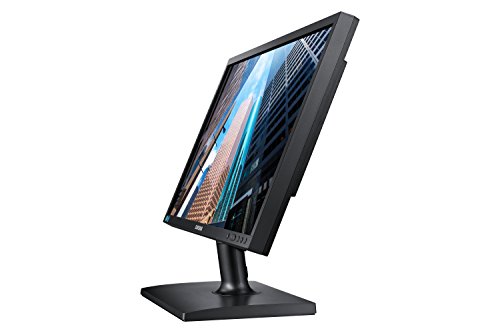
Samsung S22E200B (general listing) — Legacy desktop workhorse
This second listing of the S22E200B is the same monitor wearing its retail clothes: a 21.5-inch widescreen LED panel at 1920 by 1080, 5ms response, VGA and DVI inputs, and a 100 by 100 VESA pattern on the back. It is kept as a separate pick for one reason — buyers encounter both listings, at different prices and from different sellers, and a guide that lists only one leaves readers to guess whether the other is a different product. It is not. The panel, the ports and the purpose are identical; what varies is packaging, seller and sometimes the warranty presentation, all of which deserve a careful read on whichever listing you choose.
As a purchase for an individual, the S22E200B makes sense in a narrow but real set of circumstances: a desktop PC of a certain age whose graphics end at DVI, a workshop or lab bench needing a VESA-mounted screen that nobody will mourn, a point-of-sale or kiosk build where 1080p at 21.5 inches is exactly the requirement and modern inputs are irrelevant. Outside those lanes, the current Dell, Samsung and AOC picks deliver more for similar money. Respect the old campaigner for what it is — a known quantity with a decade of service history — and buy it only when its specific, dated virtues are the ones your setup actually lacks.
- Panel: 21.5-inch widescreen LED, flat
- Picture: 1920 by 1080, 5ms response
- Connections: VGA and DVI
- Mounting: VESA 100 by 100
- Identity: same S22E200B model as the TAA-packaged listing above
Strengths
- Proven, predictable hardware with a long service record behind it.
- DVI input serves older desktops that newer screens have abandoned.
- Standard VESA pattern drops onto existing arms and wall mounts.
Trade-offs
- An older design in every respect — refresh, inputs and styling alike.
- Listing-to-listing variation in seller and terms demands careful checking.
- Modern sources need adapters, eroding the value case quickly.
Best for: legacy desktops, benches and kiosks where DVI and VESA are the requirements that matter. Not suited for: anyone buying a main screen for a current computer — the modern picks above serve that role better.

AOC 22B2HM2 — Feature-rich all-rounder
AOC has built its name in this class by packing tomorrow’s checklist into today’s budget frame, and the 22B2HM2 is that strategy at 22-inch class size. The flat Full HD panel refreshes at 100Hz, Adaptive Sync is on board to smooth variable frame rates, and the listing adds an HDR-ready badge, an earphone output, flicker-free backlighting and low-blue-light modes — a feature density the Dell and Samsung business lines reserve for higher shelves. Inputs cover HDMI and VGA, the stand tilts, and a VESA mount waits behind the panel for owners who outgrow the foot.
Two of those claims deserve the plain-English treatment this guide applies everywhere. HDR-ready on a monitor of this class means the screen can accept and display an HDR signal, not that it owns the brightness and local dimming to reproduce HDR dramatically; expect compatibility, not spectacle. And the panel’s everyday virtues — 100Hz smoothness, sync support for casual gaming, eye-care provisions for long sessions — need no such asterisk. Judged on what it verifiably does, the 22B2HM2 is the pick for a buyer who wants one small screen to cover office days, study nights and weekend games without a specialist purchase for any of them.
- Panel: 22-inch class Full HD, flat
- Picture: 100Hz with Adaptive Sync
- Connections: one HDMI, one VGA, earphone out
- Mounting and stand: VESA mountable, tilt adjustment
- Eye care: flicker-free backlight, low blue light modes
Strengths
- Feature count per dollar leads the class — sync, eye care and mounting included.
- Adaptive Sync gives casual gaming a smoothness the business picks lack.
- Earphone output is a small mercy for shared rooms and open offices.
Trade-offs
- HDR-ready describes signal compatibility, not cinematic HDR performance.
- One HDMI port means source juggling on multi-device desks.
- Brand service reach is thinner than Dell’s or Samsung’s in some regions.
Best for: all-rounders on a budget who split time between work, study and light gaming. Not suited for: buyers expecting true HDR impact, or desks running several HDMI sources at once.
AOC 22B30HM2 — Renewed-market route (prose only)
The 22B30HM2 is AOC’s close sibling to the pick above — a 22-inch class Full HD monitor from the same value-minded family — and it is included because shoppers searching this class will meet it constantly and deserve a straight account of its situation. That situation is simple: the model’s current marketplace presence runs through a renewed listing. The hardware, bought well, is a perfectly serviceable small monitor. The open question is never the model; it is the individual unit’s history, grading and return terms, which no review can inspect on your behalf.
So treat this entry as a buying method rather than a product verdict. If you purchase renewed deliberately — checking the seller’s grading language, confirming the stand, cables and power supply are included, and keeping the return window sacred for a first-week inspection — a model like this can equip a second desk or a child’s room for notably less than new stock. If any of those checks feels like friction you would rather not own, the linked 22B2HM2 above is the same idea bought new, with a warranty, and this guide’s recommendation tilts that way for a main screen. What we will not do is attach a purchase link and pretend the condition question away.
- Panel: 22-inch class Full HD, flat
- Family: AOC value line, sibling to the 22B2HM2
- Availability: current listing is renewed stock
- Purchase route: no link in this guide — condition must be assessed by the buyer
- Sensible roles: second desks, spare rooms, supervised-budget setups
Strengths
- Sound underlying model from a line this guide already recommends new.
- Renewed pricing can undercut new stock meaningfully for secondary roles.
- Gives budget buyers an informed option instead of an accidental one.
Trade-offs
- Unit condition varies in ways a listing summary cannot fully convey.
- Warranty and return terms are the seller’s, not the manufacturer’s showcase.
- Accessories are occasionally incomplete — verify before the return window runs.
Best for: deliberate renewed buyers equipping secondary spaces who will inspect promptly on arrival. Not suited for: a primary work screen bought sight unseen, or anyone who skips return-window checks.
How do the six compare at a glance?
| Monitor | Class size | Panel | Refresh | Defining detail |
|---|---|---|---|---|
| Dell SE2225HM | 21.5-inch | VA, flat | 100Hz | 3000:1 contrast, HDMI/DP/VGA |
| Samsung S30GD | 22-inch class | IPS, flat | 100Hz | Eye care, tilt-only stand |
| Samsung SE200 (TAA) | 21.5-inch | Business panel, flat | Standard | TAA compliance, 3-year warranty |
| Samsung S22E200B | 21.5-inch | LED business panel, flat | Standard | DVI/VGA, VESA 100 |
| AOC 22B2HM2 | 22-inch class | Flat, sync-equipped | 100Hz | Adaptive Sync, HDR-ready badge |
| AOC 22B30HM2 | 22-inch class | Flat | Class-typical | Renewed route, prose only |
Two listings in that table are one product — a fact this guide states in the open rather than disguising, because the honest map of this market includes duplicate listings, generational overlap and a renewed channel. Read the table as that map, not as six interchangeable commodities.
Why does 1080p still make sense at exactly this size?
Because pixel density peaks where this class lives. Divide 1920 horizontal pixels across 21.5 inches and the result, a shade over 100 PPI, sits right at the threshold where ordinary viewing distances stop resolving individual pixels in text. A larger 1080p screen spends the same pixels more thinly; a higher-resolution small screen buys density your eyes cannot spend at arm’s length, at a price your wallet definitely notices. This is the rare specification argument that ends in a draw the small screen wins: at 21.5 inches, Full HD is not a compromise awaiting an upgrade — it is the matched resolution for the size.
The supporting economics agree. Graphics hardware, integrated or otherwise, drives 1080p effortlessly, so a modest laptop powers this class at full refresh without fans staging a protest. Video content is mastered overwhelmingly at or below this resolution for the streaming and conferencing these screens serve. Even the panel industry’s own behaviour testifies: when manufacturers want to showcase a new panel technology cheaply, they launch it at 21.5 or 23.8 inches in Full HD first, because that is where the volume and the scrutiny both live.
Where the argument weakens is workload shape, not quality. Two full documents side by side, a timeline with many tracks, a spreadsheet that must show forty columns — these want width that 21.5 inches cannot give at readable scale, and no density figure rescues them. Buyers with those workloads should treat this class as a second-screen answer and put the width money into a larger main display, a division of labour the final section returns to.
How do you get a small monitor positioned properly?
Small screens forgive much, but they do not forgive height. A 21.5-inch panel on a tilt-only stand places its centre well below eye level for most adults at standard desk height, inviting the slow forward hunch that ends careers in neck pain. Correct it mechanically: a riser, a monitor arm where VESA allows, or a stack of something unglamorous and stable — what matters is that the screen’s centre lands slightly below horizontal eye line at your natural sitting posture, roughly an arm’s length away. The tilt then aims the panel face squarely at you, which VA owners will find also protects contrast, since their panels are happiest viewed head-on.
Cabling deserves ten of the setup minutes. Route the power and signal leads with enough slack that the tilt range stays usable, keep the power brick off the desk surface where its heat and bulk annoy daily, and if two sources share the screen, label the leads at the plug end. Future you, swapping a laptop at midnight, will be grateful. Finally, set the operating system’s scaling deliberately rather than inheriting it: at this density many users settle happily at 100%, but if you catch yourself leaning toward the glass by mid-afternoon, one step of enlargement is a legitimate ergonomic tool, not an admission of defeat.
What are the classic errors when buying a monitor this size?
Believing the label is the first: ordering a “22-inch” screen for a space measured for 22 inches of glass, then discovering class rounding works in the manufacturer’s favour, not yours — always plan around 21.5 inches of viewable picture and the physical width in the specification. The second error is generational blindness, paying modern money for previous-decade stock because the brand is familiar; the SE200 listings in this guide are honestly labelled exceptions, but the wider market is full of old panels in new boxes. Third comes ignoring the input list until the DVI-less laptop meets the HDMI-less monitor. Fourth, assuming a renewed bargain needs no inspection routine. And fifth, forgetting that at this size the stand is half the product — a screen you cannot raise is a posture bill arriving in instalments.
How should you think about value in a class where everything is affordable?
When every serious option sits within a narrow band of money, the cheapest purchase and the best value quietly part company. The correct unit of account is cost per year of service, and on that measure the class’s arithmetic favours buying the current generation once: a screen that serves a decade, warrantied, with ports for the machines you will own in five years, costs less per year than a bargain that needs adapters in year two and replacement in year four. This is the fleet buyer’s logic from earlier in the guide, applied to one desk, and it is why the Dell and Samsung current models anchor the recommendations despite older listings undercutting them.
The exceptions prove the rule by their narrowness. The SE200 listings make sense when their specific dated virtues — compliance, DVI, an installed base to match — are worth more than modern behaviour, because in those settings the alternative is not a newer screen but a small systems project. The renewed AOC makes sense when the role is secondary and the inspection discipline is real. Everywhere else, value in this class means the newest panel your modest budget reaches, mounted properly, cabled once, and then forgotten about for years — the deepest compliment a monitor can earn being that its owner stopped thinking about it entirely.
Final Recommendation
A closing word on confidence: this is the most forgiving category in the entire monitor market in which to buy. The technology is mature, the makers are established, the panels are verified, and the sums involved are small enough that a considered choice carries little risk. What risk remains lives in the avoidable corners — the misread label, the unchecked listing, the uninspected renewed unit — and this guide has flagged each of them where it lives. Step around those, and whichever of these six lands on your desk will very likely still be there, sharp and willing, when the computer beneath it has been replaced twice.
Buy the present unless you have a specific reason to buy the past. The Dell SE2225HM and Samsung S30GD are the class as it now stands — pick VA contrast or IPS angles according to your chair and your lighting — while AOC’s 22B2HM2 adds sync and features for the all-round desk. The SE200 listings serve fleets and legacy desktops with their eyes open, and the 22B30HM2 serves the deliberate renewed buyer. A 21.5-inch screen is a modest purchase that repays modesty poorly when chosen carelessly and richly when chosen exactly, so measure the desk, count the ports, check the stand against your chair, confirm the listing against the model code, and let the smallest honest screen in the building do its sharp, quiet work for the next decade of desks it will outlast. If a single sentence in this long guide deserves to survive the skim, it is that one: the class rewards the buyer who measures, verifies and decides once, and then forgets the purchase entirely while the screen does what twenty years of refinement taught it to do — show sharp text, behave itself, and stay out of the way of the work it was bought to serve.
What really separates the new generation from the old guard?
Put a current pick and an SE200 side by side showing the same photograph and four differences announce themselves in order. First, motion: scrolling a long document on the 100Hz panels feels oiled, while the older screen renders the same gesture in visible steps — a difference nobody called a defect in 2015 and nobody tolerates in a new purchase now. Second, the backlight: modern flicker-free designs hold steady brightness without the pulse-width shimmer that sensitive users feel as fatigue, and they do it across the brightness range rather than only at full output. Third, bezels and bulk: the new screens are slim frames around a picture; the elder is a appliance with a picture in it, deeper, heavier and happier on a fixed mount than on a crowded desk. Fourth, the port map tells the decade — HDMI and DisplayPort facing the future on one side, DVI and VGA facing the installed past on the other.
Less visible, but as real, is the electronics’ housekeeping. Current models sip power, wake instantly from sleep when a laptop opens, and report themselves properly to modern operating systems, scaling and colour profiles included. Older stock occasionally fumbles those handshakes — a screen that needs a power-cycle to notice a new laptop is a period behaviour owners learn to live with. None of this makes the old guard useless; it makes it specific. The SE200’s virtues are administrative — compliance, warranty, matching — while the new generation’s virtues are experiential, and a buyer who knows which currency they are spending will not confuse the two listings’ purposes.
There is also a candour point about panel quality itself. A decade of manufacturing refinement means even the budget IPS and VA panels in the current picks hold uniformity and colour consistency that mid-range screens of the SE200’s era worked to achieve. Progress at the bottom of the market is unglamorous and total, which is why this guide’s default advice leans modern: the entry-level screen of today is, by most measures an owner can feel, the better instrument.
How does a 21.5-inch screen perform as a companion display?
This is the deployment the class was born for. Beside a laptop, a 21.5-inch monitor is large enough to own a full document, a reference browser or a communications stack, yet small enough that the pair still fits a desk a metre wide. The density helps the partnership: at roughly 102 PPI the external screen approximates the perceived sharpness of many laptop panels, so text does not visibly change character as windows cross the boundary — a subtle comfort that mismatched pairings never quite achieve.
Arrangement decides success. Raise the laptop on a stand so its screen’s centre approximates the monitor’s, align the two displays’ top edges in the operating system’s layout, and assign the external panel the primary role for anything read longer than a paragraph. The VA Dell rewards being made the main screen for video calls in dim rooms; the IPS Samsung forgives the angled seating of a shared homework desk. Where the laptop must stay flat — hot-desking, lecture halls — the small monitor still works as the elevated main display with the laptop demoted to a keyboard-side scratchpad, a configuration students in particular should steal.
Power and cable discipline complete the setup. One HDMI lead and the monitor’s own power supply are the whole bill of materials; there is no dock tax at this level unless you choose to pay it. That simplicity is a feature worth protecting — the moment a companion screen needs three adapters and a prayer, it stops being used, and the most capable monitor in this guide is worthless on the days it stays dark.
What does fleet buying teach an individual shopper?
Institutions purchase monitors the way airlines purchase aircraft: total cost across a service life, not the sticker on the day. Their habits translate surprisingly well to a single desk. They standardise on one model so every workstation behaves identically — the home version is buying the same pick twice for a dual setup rather than mixing panels and chasing matched brightness forever. They insist on VESA mounts because desks change faster than screens. They read warranty terms before panel specifications, a priority order that the SE200’s three-year cover rewards and that individual buyers would do well to copy when comparing the current picks. And they keep one spare unit per fleet, a practice a home office can scale down to keeping the box and the old screen until the new one has survived its first month.
Fleet buyers also discount the features individuals overweight. Nobody issuing five hundred units cares about a gaming mode; everybody cares that the stand either adjusts properly or detaches cleanly for arms, that the power supply is a standard part, and that the model will still be orderable in eighteen months when three units fail and one office expands. Judged by those lights, the current Samsung and Dell picks are fleet-shaped objects from business lines, which is precisely why they age well on private desks: they were designed to be supported, mounted and replaced without drama.
The one fleet habit to leave at the office is indifference to the individual picture. An institution accepts a merely adequate panel across a thousand desks; you sit in front of one screen, and its contrast, its angles and its backlight behaviour are your daily environment. Borrow the fleet’s discipline about mounts, warranties and standardisation — then spend the individual buyer’s prerogative on the panel your eyes actually prefer.
How long should a screen this size last, and how do you help it?
Budget for a decade and you will rarely be disappointed. The LED backlights in current panels dim gradually rather than dying dramatically, the electronics have no moving parts to wear, and 1080p over HDMI faces no approaching obsolescence that would strand a healthy screen. The realistic failure points are mundane: a power supply giving up in year six, a stand hinge loosening, a port damaged by a decade of cable swaps performed by feel behind a dark desk. Two of those three are preventable with a power strip’s surge protection and a little care when reconnecting, and the third is what the VESA mount quietly insures against.
Daily handling is the rest of the longevity story. Never press a thumb into the panel while repositioning — tilt from the bezel or the stand, because pressure marks on these thin panels can be permanent. Keep brightness at the level the room needs rather than the maximum the menu allows; backlights age in proportion to how hard they are driven, and the comfortable setting for a home office is seldom near the top of the range. Dust with a dry microfibre, keep drinks at a distance the keyboard would envy, and let the screen sleep when you do. A monitor treated that way does not really get replaced; it gets promoted — to the second desk, the child’s room, the workshop wall — which is the natural biography of nearly every pick in this guide, and the final reason the class refuses to disappear.
How do you decode a small-monitor listing like a professional?
Start at the model code and treat it as the product’s true name. Marketing titles are assembled for search engines and routinely borrow glory from sibling models; the code — LS22D304GANXZA, S22E200B, 22B2HM2 — is what the manufacturer’s support pages, firmware and warranty systems recognise. Paste the code into the maker’s own site and compare the specification there against the marketplace summary. Any disagreement resolves in the manufacturer’s favour, and a listing whose code cannot be found on the maker’s site at all is a listing to walk away from, however attractive the headline numbers look.
Next, translate the three most abused phrases in the category. “22-inch class” means 21.5 inches of viewable picture. “HDR ready” at this level means the screen accepts an HDR signal; it does not promise the brightness or dimming to render HDR with impact. Response-time figures need their method attached — a 1ms claim measured one way and a 5ms claim measured another can describe similar real behaviour, which is why this guide treats response numbers as tier indicators rather than duelling scores. A buyer fluent in those three translations is immune to most of the disappointment this market manufactures.
Finish with the unglamorous boxes: what is physically in the carton. Stands on fleet returns and renewed units are the most commonly missing item in this class, followed by the correct power supply and the HDMI cable the listing photograph implied. Read the includes list literally, screenshot it at purchase time, and check the delivered carton against it before disposing of any packaging. It is clerical work, and it is also the difference between a screen in service by Friday and a fortnight of support tickets.
Where else does this size quietly run the world?
Walk through a retail park, a clinic or a logistics depot and count the 21.5-inch screens: point-of-sale terminals, check-in desks, warehouse packing stations, security monitoring corners, classroom instructor stations. The class persists in those environments for the same reasons it suits a home desk — it fits, it sips power compared with larger panels, it is cheap to replace when a trolley clips it, and its picture is sharp at the distance a counter imposes. That ubiquity has a consumer dividend: accessories, arms, mounts and spare power supplies for this size are everywhere and inexpensive, because the commercial world buys them by the pallet.
The energy angle deserves its sentence too. A modern 21.5-inch panel doing office work draws a fraction of what a large gaming display pulls, and across a full working year the difference is visible on a household bill and meaningful across an office floor. Buyers furnishing several home workstations — a household of remote workers and students, say — will find this class the only one where equipping everyone new, warrantied and identical does not require a financing conversation. Small, in this category, is not the compromise option. It is the considered one, refined by two decades of being the world’s default desk window.
What does a week of real work reveal that specifications hide?
Day one with any of these screens is about geometry — whether the stand, the desk and your chair agree — and it misleads buyers into judging the purchase too early. The informative days are three through five, when novelty fades and the panel’s habits surface. That is when a VA owner discovers whether their evening video habit makes the Dell’s contrast a daily pleasure or whether their habit of reading from a reclined angle turns its off-axis fade into a daily tax. It is when the IPS owner learns whether the Samsung’s angle generosity matters because a partner genuinely shares the screen, or whether it was a virtue purchased for an audience that never arrives.
Text endurance declares itself in the same window. Read for three consecutive evenings at your working font size and keep an honest ledger: leaning in, enlarging, rubbing eyes — each is a measurement. At 21.5 inches the density should carry most readers comfortably, but eyes differ, prescriptions differ, and the return window exists for the minority who discover this size asks slightly more of them than a larger, softer picture would. There is no failure in that outcome; there is only failure in keeping a screen your body has voted against because returning it felt like admin.
By the end of the week, run the checklist this guide keeps returning to, because it is the class in miniature: every input you own tested, the refresh rate confirmed in settings rather than assumed, full-screen colour checks done while exchanges are easy, stand height solved mechanically instead of posturally, and the invoice filed where a warranty claim could find it. A small monitor asks little of its owner beyond that week of attention, and then repays it with years of unremarkable, sharp, reliable service — which, for the screen you will look at more than any other object you own, is the highest available praise.
Still torn between the VA Dell and the IPS Samsung? Decide like this
Answer three questions honestly and the fork resolves itself. First: how do you sit? A disciplined, centred posture in a task chair favours the Dell, whose VA panel saves its best behaviour for the seat directly in front. A sprawling, shifting, sofa-adjacent or standing-desk style favours the Samsung, whose IPS picture barely notices your wanderings. Second: when do you work? Daylight and bright rooms neutralise much of the VA contrast advantage, because ambient light lifts every panel’s blacks toward grey; evening and dim-room workers collect the Dell’s depth in full. Third: who else looks? A screen that only ever serves one pair of eyes can indulge VA’s centred excellence; a screen that briefs a colleague, teaches a child or entertains a roommate owes those viewers the Samsung’s consistency.
Score your answers and the pattern usually lands two-to-one for one panel or the other. The genuinely undecided — centred seat, mixed hours, occasional sharing — should weight the third question heaviest, because seating and lighting can be adjusted after purchase while a second viewer’s bad angle cannot. And remember that both screens share the traits that matter most at this size: the same dense 1080p grid, the same 100Hz smoothness, business-grade backing from makers who will still answer the phone in five years. The fork is real but it is a fork between two good answers, which is the happiest problem this class offers.
Frequently Asked Questions
Is a 21-inch monitor the same as a 21.5-inch monitor?
For shopping purposes, yes. The 21-inch label is the rounded class name; the panels inside measure 21.5 inches viewable, and several brands sell the identical size as “22-inch class”. Compare viewable diagonal and overall dimensions from the specification, never the headline label, when fitting a screen to a space or matching a pair.
Can a monitor this small handle gaming?
Light and casual gaming, comfortably — the 100Hz picks with sync support, AOC’s especially, keep motion smooth at 1080p, a resolution modest graphics hardware drives well. Serious competitive play wants higher refresh and usually a larger canvas, which is a different shopping trip; this class covers the gaming most small-desk owners actually do.
Why would anyone buy the older Samsung SE200 today?
Fleets and legacy setups, mainly. Institutions need TAA-compliant units matching an installed base, warrantied for three years, with DVI for existing desktops and VESA for existing arms. A home buyer with a modern laptop should choose a current model — the guide includes the SE200 because its real buyers are numerous, not because it suits everyone.
Is renewed monitor stock a false economy?
Not inherently — it is a risk transfer. You accept unit-to-unit variation and seller-grade warranties in exchange for a lower price, which can be a fair trade for a secondary screen inspected promptly within its return window. For a primary work display, the price gap to a new AOC or Dell in this class is small enough that most buyers should keep the manufacturer’s warranty instead.
Do I need a monitor arm for a screen this light?
Need is strong, but want is reasonable. These panels are light enough that any basic arm holds them, and an arm solves the height limits of tilt-only stands while freeing the desk footprint the stand occupied. If budget forces a choice, a fixed riser achieves most of the ergonomic benefit; the arm earns its keep when the desk is shared or the screen must swing aside.
Does a smaller screen really save meaningful desk space?
More than the diagonal suggests, because the saving compounds: a 21.5-inch panel is narrower, its stand footprint is smaller, and the whole assembly can sit closer to a wall while keeping the screen at a comfortable distance. On a metre-wide desk the difference between this class and a 27-inch display is the difference between a monitor with room for a notebook, a mug and a lamp beside it, and a monitor that is the desk. Measure the width of your workspace and the width of the screen’s physical body — both figures are in every specification — and the case usually settles itself.
Will one of these work with a games console?
Any pick with an HDMI input will — which covers the Dell, the current Samsung and the AOC, but pointedly not the DVI-and-VGA SE200 listings. Expect a clean 1080p picture at the console’s standard output rates rather than the high-refresh modes of gaming displays, and plan sound separately, since this class rarely includes speakers worth hearing; the AOC’s earphone socket is the honourable exception for late-night sessions in shared rooms.
How do I pair two of these for a dual-screen desk?
Buy the same model twice, from the same listing, ideally in one order. Identical panels match in colour, brightness behaviour and physical height, which removes the three irritations that plague mixed pairs. Set both to the same preset and brightness, align their top edges in the display settings, and if the stands place the panels at slightly different heights on an uneven desk, shim the lower foot rather than tilting one screen to compensate — your neck will notice the difference even if your eyes forgive it.
What should I check first when a second-hand unit arrives?
Run full-screen white, black and grey images to expose stuck pixels, uneven backlighting and corner bleed, then test every input you intend to use and confirm the stand, power supply and cables are all present. Do it on day one, while the return route is wide open, rather than discovering a flaw in week three.
Related Guides
Widening the net slightly? The broader survey of best 21 24 inch monitors adds the 23.8-inch options to this size conversation, and players should read best 22 inch gaming monitors to see which of these compact panels can honestly carry a gaming badge. Competitive players at the other end of the size range should compare the best 25 35 inch monitors with lowest display lag.


