What's inside
- Key Takeaways
- Quick Picks
- How Is Logitech’s 2.1 Range Actually Structured?
- How Do You Choose Between Logitech’s Own Rungs?
- What Does Renewed Actually Mean for a Speaker Purchase?
- How Does Logitech’s House Sound Run Across the Range?
- What Should Existing Logitech Owners Know About Upgrading Within the Brand?
- How Do You Set Up Any Logitech 2.1 System Well?
- Which Logitech 2.1 Suits a Student, a Gamer and a Home Worker?
- What About Spares, Support and the Second-Hand Ecosystem?
- How Does the Brand Handle the Television Question?
- What Changes at Each Rung for Music, Film and Voice?
- Comparison Table
- What Are the Most Common Mistakes When Buying Within One Brand?
- Final Recommendation
- Frequently Asked Questions
- Related Guides
As an Amazon Associate I earn from qualifying purchases. This post may contain affiliate links at no extra cost to you.
gizmoverdict.com is reader-supported. When you buy through links on our site, we may earn an affiliate commission.
Where to buy: Four picks below link to listings verified in this site’s product pool. One of them is a Renewed unit and one is not a 2.1 system at all — both facts are labelled wherever those models appear. Two further Logitech systems are covered in prose only because no listing for them was verified in the pool, and their sections explain that status instead of hiding it.
Restricting a shortlist to the best Logitech 2.1 speakers sounds like a narrowing exercise, but Logitech’s range is wide enough to make it a real decision. The company has sold subwoofer-and-satellite systems for desks for decades, at every step from a compact first system to a THX-certified flagship, and its catalogue also contains models that borrow the family’s looks while changing the formula underneath. That is where a single-brand guide earns its keep: sorting the true 2.1 systems from the near neighbours, the current listings from the discontinued favourites, and the new units from the Renewed ones, so that a loyal buyer can choose inside the brand without tripping over its history.
Two honesty rules govern everything below. First, configuration: only systems with a separate subwoofer count as 2.1, so when a well-known Logitech 2.0 set appears in this guide, it is labelled as exactly that — a smaller alternative from the same brand, not a quiet substitution. Second, condition: the one verified listing for the range’s budget model is a Renewed unit, and it is described that way in the table, in its review and in the comparison, because a refurbished purchase is a different proposition from a new one and deserves to be chosen knowingly. With those rules on the table, the Logitech ladder turns out to be refreshingly logical: each rung exists for a reason, and the sections after the reviews explain how to pick the rung that matches a desk.
Why stay within one brand at all? Owners give practical answers: a control style they already know, a sound signature they already like, satellites and subwoofers styled to match an existing setup, and a support and spares ecosystem that has been in place for years. None of that makes rival brands irrelevant — the wider category guides linked at the end cover them — but it does make a brand-loyal shortlist a legitimate way to shop, provided the guide is honest about the brand’s gaps. Logitech’s gaps are named here too: no hi-fi-style wooden-cabinet 2.1 in the current verified pool, and no optical-equipped television-first model among the linked picks.
Key Takeaways
- The Z623 is Logitech’s 2.1 flagship in this pool: THX certified, wired, and built around the largest subwoofer the brand sells for a desk.
- The Z407 is the brand’s Bluetooth 2.1 answer, adding a wireless control dial that no other Logitech pick here matches.
- The Z313’s verified listing is Renewed — the model is the range’s budget rung, and it is labelled Renewed at every appearance in this guide.
- The Z207 is a 2.0 system with no subwoofer; it is included, clearly labelled, as the brand’s smaller alternative rather than as a 2.1 pick.
- The Z533 and Z625 are covered in prose only: known Logitech 2.1 models whose listings were not verified in this guide’s pool.
- Every true 2.1 Logitech system here is wired between its own components — the choice is about inputs, controls and subwoofer size, not wireless satellites.
Quick Picks
| Pick | Badge | Why it is here |
|---|---|---|
| Logitech Z623 | Flagship 2.1 | The heaviest hitter in the brand’s desk range, THX certified, with volume and bass riding on the right satellite. |
| Logitech Z407 | Bluetooth 2.1 | The wireless-streaming member of the family, run from a dial that can live anywhere on the desk. |
| Logitech Z313 (Renewed) | Budget 2.1 — Renewed | The compact entry rung of the range, available through a Renewed listing and labelled accordingly. |
| Logitech Z207 | Not 2.1 — 2.0 alternative | A subwoofer-free pair for desks with no floor space, included openly as the brand’s smaller option. |
| Logitech Z533 | Prose only — no verified listing | The mid-range multimedia set from the brand’s recent past, discussed without a link because none was verified. |
| Logitech Z625 | Prose only — no verified listing | The optical-equipped relative of the flagship, covered in prose for readers who meet it in older coverage. |
How Is Logitech’s 2.1 Range Actually Structured?
Think of the range as three true 2.1 rungs plus the ghosts of two more. The bottom rung is the compact class represented by the Z313: small subwoofer, small satellites, a pod for control, designed to be an obvious upgrade from laptop sound. The middle is where the Z533 sat and where the Z407 now stands — more output, better controls, and in the Z407’s case a Bluetooth receiver and a wireless dial that modernise the formula. The top rung is the Z623, with the Z625 as its better-connected sibling: THX certification, serious subwoofers, and a fixed-desk brief. Understanding that ladder matters because Logitech’s naming gives no clue to it; the numbers are model codes, not a ranking, and buyers routinely assume a higher number means a higher rung when the range does not work that way.
Two further filters cut across the ladder. The first is condition: the bottom rung’s verified listing is Renewed, so the ladder’s first step is a refurbished step unless a buyer finds new stock elsewhere. The second is configuration drift: the brand sells plenty of speaker sets that are not 2.1 at all, including the Z207 in this guide, and a shopper scanning quickly can easily place a 2.0 pair in a 2.1 mental basket. Neither filter is a criticism of Logitech — the range is large because the company serves every desk budget — but both reward a buyer who reads the configuration and condition lines as carefully as the brand name.
What unifies the true 2.1 models is a house approach: self-amplified systems, controls placed for a seated user, subwoofers voiced to be felt at nearfield distance, and styling that assumes a monitor is nearby. What divides them is how much of the budget went to the subwoofer, and that single allocation predicts most of the listening differences in the reviews below. Logitech’s ladder, read properly, is really a sequence of answers to one question: how much low end does your desk, your room and your neighbours actually want?
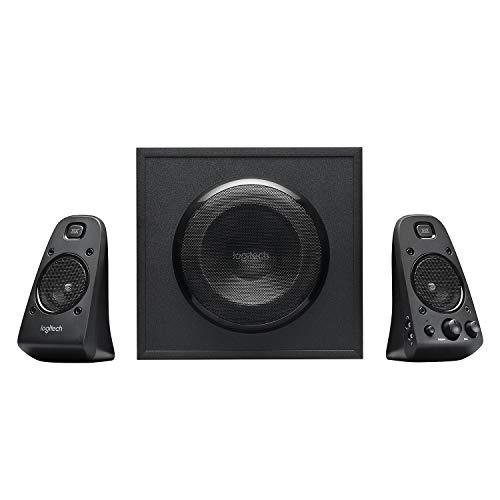
Logitech Z623 — Flagship 2.1
Within Logitech’s own range, the Z623 is the summit: a THX-certified 2.1 system whose verified listing title quotes a 400-watt peak figure and whose subwoofer dwarfs everything else the brand sells for a desk. Its role in the family is to prove what the formula can do when the budget goes to physics — a big cabinet, a serious driver, and amplification with headroom — rather than to features. The satellites are comparatively plain, compact and angled up toward the listener, and they carry the system’s volume and bass controls on the right unit, keeping the flagship’s daily operation as simple as the budget model’s.
The sound is the brand’s most authoritative. Bass reaches low enough to change how film scores and game worlds feel, and it stays organised at volumes where the smaller rungs start to blur. Dialogue and music sit on top of that foundation with the confidence of a system that is never working hard at desk levels. Logitech’s tuning here is mainstream in the best sense: energetic, clear, and forgiving of the compressed audio that streaming and video calls supply. Owners upgrading from the Z313 class describe the same first impression — not just more bass, but less effort everywhere, as if the whole presentation had been given room to breathe.
As the family’s flagship it also defines the family’s limits. The Z623 is wired and analogue in a range that now includes Bluetooth at the rung below, so the brand’s most powerful desk system cannot stream from a phone without a cable — an oddity, but a real one, and a reason some buyers choose the Z407 instead. Its subwoofer also sets the range’s space requirement: if the flagship’s box does not fit your floor plan, no amount of brand loyalty changes the geometry, and the honest move is down a rung. Bought for a fixed desk with room to place it, though, the Z623 is the Logitech 2.1 system against which the rest of this guide is calibrated.
Longevity is part of the flagship’s case within the family. A system built around a substantial subwoofer and simple analogue electronics has few fashionable parts to date, and the Z623’s long presence in the range means its behaviour is thoroughly documented by owners — placement advice, level settings, even the quirks of its satellite controls are common knowledge. A buyer joining that installed base inherits the knowledge with the hardware, an underrated benefit that newer, shorter-lived models cannot offer at any price.
- Format: 2.1 flagship, THX certified, 400W peak per the verified listing title
- Inputs: analogue connections for computer and consoles
- Controls: volume and bass on the right satellite
- Subwoofer: the largest in Logitech’s desk range covered here
- Wireless: none — the flagship is a wired system
Strengths
- The deepest, most composed low end Logitech offers in this format.
- Certification anchors its performance claims in measurement rather than adjectives.
- Controls on the satellite keep the biggest system in the range the simplest to run.
Trade-offs
- No Bluetooth, despite sitting above a cheaper sibling that has it.
- The subwoofer’s size is the range’s most demanding placement requirement.
- Analogue-only inputs leave television owners adapting rather than connecting.
Best for: brand-loyal buyers with a fixed desk and the floor space the flagship needs. Not suited for: phone-first listeners or desks where the subwoofer simply cannot go.
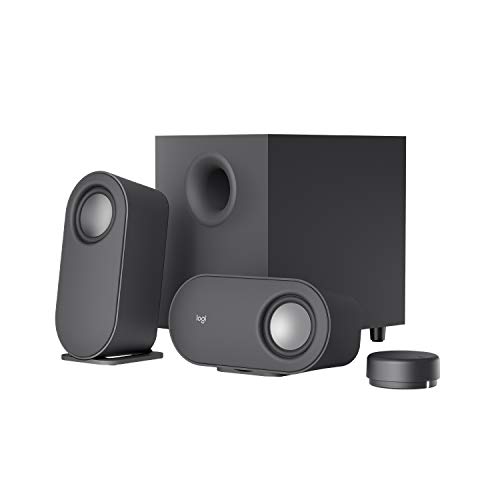
Logitech Z407 — Bluetooth 2.1
If the Z623 is Logitech’s past perfected, the Z407 is the brand’s present: a 2.1 system designed around the way sources behave now, with a Bluetooth receiver for phones and tablets and a wired input for the computer. In the family’s structure it occupies the modern middle — smaller than the flagship, smarter than the budget rung — and it is the only verified Logitech 2.1 in this pool that streams. For the brand-loyal buyer whose phone carries half their listening, that single fact can outweigh the flagship’s extra muscle, and this guide treats that as a legitimate priority rather than a compromise to apologise for.
The wireless control dial is the Z407’s contribution to the family’s design language. Logitech’s other 2.1 systems put their controls on a satellite or a tethered pod; the Z407’s puck is untethered, adjusting volume and playback from wherever it rests, and in doing so it frees the subwoofer from the reach of a cable. The satellites are the neatest in the range, styled to sit quietly beside a monitor, and the voicing is tuned for the nearfield mixture of calls, music and video that a modern desk actually plays. Pairing is remembered, reconnection is automatic, and the system’s manners are those of a mainstream Bluetooth speaker — which, in a family of wired appliances, feels quietly radical.
Its place in the ladder should be chosen with clear eyes. Output is middle-rung output: satisfying at a desk, outgunned by the flagship in a big room. The input list is computer-centred, without the optical connection its prose-only sibling the Z625 offers for televisions. And Bluetooth, for all its convenience, still defers to the cable for games where timing is everything. None of that dents its standing as the range’s most liveable system for a hybrid desk — the Logitech 2.1 for buyers whose listening arrives from more than one device, which is to say most buyers now.
The Z407 also shows how the brand’s thinking about controls has matured. Earlier Logitech systems treated the control as part of the speaker; the dial treats it as part of the desk, an object in its own right that happens to run the speakers. That shift suits the way desks now work — shared, rearranged, half analogue and half digital — and it makes the Z407 feel less like a peripheral and more like furniture. For a brand built on peripherals, that is a meaningful evolution, and it is available only at this rung.
- Format: 2.1 system with subwoofer and compact satellites
- Wireless: Bluetooth receiver built in — the streaming member of this shortlist
- Controls: wireless dial for volume and playback
- Inputs: Bluetooth plus wired computer connection
- Position in range: the modern middle rung
Strengths
- The only linked pick here that lets a phone play without touching a cable.
- Dial control removes the placement tug-of-war between subwoofer and user.
- Satellites are the tidiest in the family for a monitor-crowded desk.
Trade-offs
- Middle-rung output — the flagship plays bigger in every dimension.
- No optical input, so the television role stays secondary.
- Streaming delay means the wired input remains the gaming choice.
Best for: Logitech loyalists whose desks serve a phone and a computer in equal measure. Not suited for: buyers chasing the brand’s maximum output or a television-first setup.

Logitech Z313 (Renewed) — Budget 2.1 — Renewed
The Z313 is where the Logitech 2.1 ladder begins, and its coverage in this guide begins with its condition, because the listing verified in the pool is a Renewed one — a fact stated in the Quick Picks table, in this heading’s badge and again here: the unit on offer through the verified listing is refurbished, not new. That status is not a scandal; it is the natural afterlife of a long-running budget model whose new listing has faded from the checked channel. But it changes the purchase from a commodity buy into a small inspection exercise, and the honest guide says so rather than letting the famous model name do quiet work.
The product underneath the label is the family’s simplest expression: a compact subwoofer, two small satellites and a wired pod carrying volume and a headphone socket. Its sound is scaled to its station — a clear, friendly upgrade over laptop speakers, with enough low-end support to give music body and calls warmth, and with limits that appear when a big soundtrack meets a big room. For a first desk, a spare room or a grandparent’s video-call setup, those limits rarely matter; the system’s job is to make a computer pleasant to listen to, and it has done that job in enormous numbers over its production life.
Buying the Renewed listing well means behaving like an inspector for one afternoon. Run the pod’s volume through its travel and listen for crackle, play a quiet passage through each satellite in turn, give the subwoofer a bass-heavy track and check for rattles, and confirm the pod and cables are all present. Anything wrong goes back inside the returns window, without debate. Anything right means the ladder’s first rung has been climbed at a refurbished price — and many owners will later climb higher within the brand, which is precisely the journey this range was designed to invite.
There is also a household argument for the little Renewed rung. A Z313 on a kitchen counter computer, a child’s homework desk or a workshop bench delivers the brand’s basic virtues — intelligible speech, gentle bass support, a pod that anyone can operate — in places where a flagship would be absurd and a new purchase hard to justify. Renewed stock flowing to those secondary desks is the second-hand market working exactly as it should, provided each unit is checked with the routine its main section describes.
- Format: compact 2.1 system with wired control pod
- Listing status: Renewed — refurbished, labelled Renewed throughout this guide
- Controls: pod with volume and headphone connection
- Subwoofer: smallest in the family’s true 2.1 line here
- Wireless: none fitted
Strengths
- The gentlest entry into the brand’s 2.1 family, in size and in commitment.
- A headphone socket on the pod covers private listening without extra hardware.
- Renewed availability keeps a proven design in circulation at the ladder’s foot.
Trade-offs
- Renewed condition varies by unit — the arrival checks above are part of the purchase.
- Bass depth and headroom are the family’s most modest.
- Buyers wanting a factory-new budget Logitech will need to look beyond the verified pool.
Best for: first systems and secondary desks, bought as the Renewed unit it is. Not suited for: buyers who require new stock or flagship-scale sound.

Logitech Z207 — Not 2.1 — 2.0 alternative
This section carries the guide’s most important label, so it comes first: the Z207 is not a 2.1 system. It is a 2.0 pair — two speakers, no subwoofer — and it appears in a guide to Logitech 2.1 speakers for one declared reason: it is the brand’s smaller alternative for desks where a subwoofer cannot go, and brand-loyal shoppers deserve to see it presented honestly rather than stumble onto it elsewhere and mistake it for the format they searched for. Its verified listing title describes stereo computer speakers with Bluetooth and a 10-watt peak figure, and that description — stereo pair, modest power, Bluetooth on board — is the whole of its identity.
Judged as what it is, the Z207 is a neat piece of desk equipment. The pair is compact and angled for nearfield listening, Bluetooth lets a phone join without a cable, and a wired input covers the computer. The sound is clean and speech-friendly, entirely adequate for calls, podcasts, casual video and background music. What it cannot do is the thing this guide is about: there is no subwoofer, so film effects lose their floor, basslines are sketched rather than stated, and the physical pleasure of the 2.1 format is absent by design. A buyer who knows that, and whose desk genuinely has no floor space, is making a rational trade. A buyer who does not know it has been mis-sold, which is why the label follows this model everywhere in the guide.
Consider the Z207, then, as the family’s escape hatch. If the subwoofer is the obstacle — a standing desk with no safe floor position, a shared room where low end would travel, a minimalist setup that cannot hide a box — the Z207 keeps you inside the brand, keeps Bluetooth, and keeps the desk tidy, at the price of the format’s defining component. If the subwoofer is merely an inconvenience to route around, stay with the true 2.1 picks above; the difference is not subtle, and it is the difference this entire category exists to make.
One more honest use for the Z207 deserves naming: the travelling or temporary desk. A pair that sets up in a minute, streams from a phone and packs into a single small box serves a term-time room, a rental workspace or a spare-room office better than a three-piece system that must be placed, wired and level-matched. Temporary quarters are where the 2.0 trade — convenience over foundation — is most defensible, and the label still applies: it is a good small pair, not a small 2.1.
- Format: 2.0 stereo pair — no subwoofer; not a 2.1 system
- Wireless: Bluetooth, per the verified listing title
- Power note: 10W peak figure as stated in the verified listing title
- Inputs: Bluetooth plus wired connection
- Role in guide: the brand’s smaller alternative, labelled as such
Strengths
- No subwoofer to place — the whole system lives on the desk surface.
- Bluetooth streaming at a smaller scale than the Z407’s full system.
- Clear, tidy nearfield sound for speech and casual listening.
Trade-offs
- It is not 2.1: the low-end foundation of this guide’s format is absent.
- Output and bass are the most limited of any linked pick here.
- Film and game impact cannot be recovered with settings or placement.
Best for: desks with genuinely no subwoofer space, inside a brand-loyal purchase. Not suited for: anyone who came here for 2.1 sound — choose a true 2.1 pick instead.
Logitech Z533 — Prose only — no verified listing
The Z533 is the ghost at this family’s table: a mid-range 2.1 multimedia system that sold in large numbers, styled with exposed drivers, and run from a control pod with volume, bass and a headphone socket. Readers who know Logitech’s range often expect it between the Z313 and the Z623, and in design terms that is exactly where it lived. It is covered here in prose, without a link, because no listing for it was verified in the pool checked for this guide — a status worth stating plainly, since older roundups across the internet still present it as a current click-and-buy option.
Its reputation in its day was consistent: a lively, bass-forward sound, a pod owners genuinely liked, and styling that split opinion between mechanical charm and dust-collecting exposure. Nothing about that reputation has changed; what has changed is the channel. Remaining examples surface as residual stock and marketplace listings in varying condition, so a buyer set on the model should shop it the way the Renewed Z313 is shopped — verify the pod, both satellites and the subwoofer, confirm the exact revision, and weigh the asking price against the verified flagship above it. At a mid-range price, a clean Z533 is a satisfying system. Near flagship money, the Z623’s verified listing makes the decision for you.
Owners who already run a Z533 and land on this guide can take a short answer: nothing in the verified ladder makes your system obsolete. Its role — mid-range multimedia with a proper bass control on the pod — is the role the Z407 now fills with Bluetooth added, and the upgrade case rests on connectivity rather than sound. Keep the Z533 while it works, maintain its pod and cables, and let the ladder’s current rungs be there when replacement day eventually arrives.
- Format: mid-range 2.1 multimedia system with control pod
- Status: no verified listing in this guide’s pool — prose only
- Controls: pod with volume, bass and headphone connection
- Character: lively, bass-forward, gaming-leaning
- Buying route: residual stock and marketplaces, inspected carefully
Strengths
- The missing middle rung many Logitech owners remember fondly.
- Bass control on the pod — the adjustment compact systems most often lack.
- A step up in scale from the Z313 class without flagship bulk.
Trade-offs
- No verified listing here, so condition and availability are the buyer’s research.
- Exposed drivers invite dust and divide aesthetic opinion.
- Value collapses if a listing prices it against the current flagship.
Best for: brand loyalists who find a clean example at a mid-range price. Not suited for: shoppers who want a verified listing and an uncomplicated return.
Logitech Z625 — Prose only — no verified listing
The Z625 is best understood as the flagship’s better-connected sibling: a THX-certified Logitech 2.1 system in the Z623’s class that added an optical digital input, opening the door to televisions and consoles that the analogue-only flagship serves awkwardly. For years it was the answer to the most common Z623 question — same muscle, modern connections — and readers researching the brand will meet it constantly in reviews and forums. It appears here in prose only, because no listing for it was verified in this guide’s pool; the flagship linked above is the verified representative of that class today.
That status creates a practical fork for brand-loyal buyers. If a television connection is essential and a Z625 can be found through a channel you trust, inspected and fairly priced, it remains a coherent purchase — the design’s fundamentals are the flagship’s fundamentals. If the desk is the only destination, the Z623 delivers the same class of performance through a verified listing, and the optical difference never comes into play. What this guide will not do is blur the two models into one recommendation: they are distinct products with distinct connection sets, and conflating them is how buyers end up with a system missing the input they needed.
The Z625’s story also explains a question this guide hears about the flagship class: why the verified pool’s representative lacks the optical input its sibling had. Listing verification follows the channel as it stands on the day of checking, not the range as history remembers it. The practical consequence stands — desk buyers lose nothing, television buyers must hunt wider — and the guide records the sibling precisely so that readers who need that input know the model name their hunt requires.
- Format: flagship-class 2.1 system, THX certified in its line
- Distinguishing feature: optical digital input alongside analogue
- Status: no verified listing in this guide’s pool — prose only
- Relationship: sibling of the Z623, aimed at television and console sources
- Buying route: trusted channels only, with the input set confirmed
Strengths
- Flagship-class output with the digital connection the Z623 lacks.
- The natural Logitech answer for a television in a small room.
- Shares the family’s set-and-forget control simplicity.
Trade-offs
- No verified listing in this pool, so the purchase path is less direct.
- Desk-only buyers gain nothing over the verified flagship.
- Listings under similar names invite confusion with the Z623 — verify carefully.
Best for: Logitech loyalists who need optical input and find a trustworthy listing. Not suited for: buyers who prefer the certainty of the verified pool’s flagship.
How Do You Choose Between Logitech’s Own Rungs?
Start with the floor, not the features. If a subwoofer can be placed properly — under the desk, out of the corner, with air around it — the true 2.1 ladder is open to you, and the choice becomes one of scale: the Z313’s compact answer for a first or spare desk, the Z407’s connected middle for a hybrid desk, the Z623’s flagship weight for a fixed media desk. If a subwoofer cannot be placed, the honest answer inside this brand is the Z207, accepted as the 2.0 system it is. Skipping that first question is how buyers end up with a flagship box wedged behind a pedal bin, sounding worse than the compact system that would have fitted.
Then count your sources. A computer alone points to any rung. A computer plus a phone points to the Z407, the family’s streaming member. A television in the picture points, within the verified pool, toward compromise — the analogue flagship with an adapter cable — or toward the prose-only Z625 hunt, or out of the brand entirely to rivals with optical inputs as standard. Naming the sources before the budget keeps the decision honest, because Logitech’s ladder is climbed by use case at least as much as by money.
What Does Renewed Actually Mean for a Speaker Purchase?
Renewed, in the context of the Z313’s verified listing, means a previously sold unit that has been inspected, tested and restored to working order by the refurbishment programme behind the listing, then sold again as Renewed rather than new. For a speaker system the practical implications are specific: the electronics and drivers have a history, cosmetic marks are possible, and the safety net is the returns window rather than the factory gate. Powered speakers are actually good candidates for refurbishment — they have no batteries to degrade and few moving parts beyond the drivers themselves — provided the individual unit is checked on arrival.
The arrival routine bears repeating because it is the whole skill: controls through their full travel, both channels at low volume, the subwoofer under a bass-heavy track, a headphone through the pod’s socket, and an inventory of every cable and part against the manual. Fifteen minutes, done in the first days, converts a Renewed purchase from a gamble into a discount. The same routine, it is worth adding, serves buyers of the prose-only models in this guide, whose listings live entirely in the second-hand and residual-stock world.
How Does Logitech’s House Sound Run Across the Range?
Brands develop a house sound the way restaurants develop a house style, and Logitech’s is easy to describe: friendly, forward and bass-generous, tuned for the mixed diet of streaming, games and calls that desks actually serve. Across the rungs in this guide the recipe stays recognisable while the ingredients improve — the flagship’s bass is deeper and cleaner than the budget rung’s, the midrange opens up, the treble gains composure — but a listener blind-tested through the range would identify the family before identifying the rung. That consistency is a genuine reason to stay within the brand: an upgrade feels like more of a known pleasure rather than a leap to an unknown tuning.
It also defines who should leave. Listeners who want a leaner, studio-flat presentation, or wooden cabinets and hi-fi inputs, are asking for a different house style, and the wider category guides exist for them. Inside the brand, the honest expectation is consistency with scale: you are buying the same idea executed at different sizes, and the reviews above judge each rung on how completely it executes the idea at its size — not on whether it escapes the family’s character, which none of them tries to do.
What Should Existing Logitech Owners Know About Upgrading Within the Brand?
Upgrading inside a range has its own arithmetic. The jump from the budget rung to the middle buys features as much as sound — Bluetooth, the dial, a calmer presentation at volume — while the jump from the middle to the flagship buys almost pure scale: the same idea with a far larger subwoofer behind it. Owners should also know that accessories do not travel: pods, dials and satellite cables are rung-specific, so an upgrade replaces the whole system rather than building on the old one’s parts. The old system, in turn, is rarely wasted — a Z313 retired from a main desk serves a second room for years, which is how these ranges colonise a household one desk at a time.
Timing an upgrade is simpler than the internet suggests. Replace when a control crackles beyond cleaning, when a channel drops and a cable swap does not cure it, or when the desk’s role changes — a television arrives, a phone becomes the main source, a room grows. Replace for a role change and the new rung feels transformative; replace for a spec sheet and the same money can feel strangely flat, because the family’s house sound, deliberately, stays the same.
How Do You Set Up Any Logitech 2.1 System Well?
The family’s shared design makes a shared routine possible. Satellites at ear height and angled inward, subwoofer on the floor near the desk’s wall, controls checked for full, quiet travel, and then the level ritual: subwoofer volume from zero upward until the low end supports the satellites and no further. Logitech’s bass generosity means the correct setting is usually lower than a new owner’s instinct, especially in flats and small rooms where the floor joins the performance. Give the system a week at that setting before judging it; the brand’s tuning is designed to be lived with, not to win a thirty-second demonstration.
Cable discipline finishes the job. The family’s satellite leads are sized for monitor-centred desks, so plan the subwoofer’s position around them rather than stretching a lead across a walkway. Keep the pod or dial where the dominant hand falls, label nothing, photograph nothing — the Logitech virtue is that a well-set system disappears into the desk’s routine, and the best compliment owners pay these systems, years later, is that they stopped thinking about them entirely.
Which Logitech 2.1 Suits a Student, a Gamer and a Home Worker?
Three archetypal desks make the ladder concrete. The student’s desk is temporary, shared-walled and budget-bound: the Renewed Z313 fits it precisely, small enough to pack, cheap enough in its refurbished form to risk in shared housing, and good enough to make films and calls pleasant — with the Z207 as the fallback if the room truly has no floor for a subwoofer. The gamer’s desk is fixed, single-purpose and volume-honest: the Z623 is its natural citizen, wired for zero delay, certified for output, and controlled from the satellite between matches. The home worker’s desk is the hybrid — laptop by day, phone and tablet woven through it, a film after hours — and it is the Z407’s design brief made flesh, Bluetooth for the rotation of sources and a dial that keeps control wherever the work happens to be.
Notice what the archetypes share: none of them is decided by budget alone. The student with a generous gift budget still should not buy the flagship for a room it cannot fit; the gamer with a tight budget is better served saving toward the flagship than buying the middle and mourning the headroom. Fit the rung to the desk’s life first and the money second, and Logitech’s ladder — unusually among tech ranges — rewards the order of those questions.
What About Spares, Support and the Second-Hand Ecosystem?
A large installed base is an invisible feature. Because Logitech has sold these systems for so long, replacement pods, cables and power supplies circulate through marketplaces, setup videos exist for every rung, and any forum question about a crackling knob or a pairing quirk has been asked and answered many times. That ecosystem matters most at the budget and ghost ends of this guide — the Renewed Z313 and the prose-only Z533 and Z625 — where official channels thin out and community knowledge becomes the support network. It does not resurrect a dead amplifier, but it solves the small failures that actually end most systems’ lives.
The same ecosystem demands a buyer’s caution. Listings borrow model names loosely, photographs migrate between rungs, and a “Z623-style” description is not a Z623. Verify the model number, the control layout and the input panel against the maker’s documentation before paying for any Logitech outside the verified pool — the family’s popularity makes its names valuable to imitators, and the five minutes of checking is the entire defence.
How Does the Brand Handle the Television Question?
Honestly, as a sideline. Logitech’s 2.1 heartland is the desk, and the verified pool reflects that: the linked systems are analogue and computer-first, while the family’s television-ready design, the Z625, sits in prose-only territory without a verified listing here. A small television can still be served — many sets offer a headphone or line output that an analogue system can take, with volume then governed by the television — and for a bedroom set watched at modest levels the result is perfectly pleasant. But a buyer whose primary screen is a television, whose sources are consoles and streaming sticks, and whose seat is a sofa should hear the guide plainly: that brief belongs to soundbars and to rivals with optical inputs and remotes, and brand loyalty is a poor reason to force a desk system into a living-room job.
The exception is the dual-duty room — the studio flat, the student room, the spare room that is office by day and cinema by night — where the screen is a monitor or a small television at desk distance. There the Logitech ladder is entirely at home, the Z407 streaming the evening’s music before the film starts, the Z623 giving the film its weight. Judge the room’s true centre of gravity and the brand either fits it or does not; the guide’s job is to make that judgement easy, not to win it for the logo.
What Changes at Each Rung for Music, Film and Voice?
It helps to trace one evening’s listening up the ladder. A voice call on the budget rung is clear and warm enough that nobody thinks about the speakers — the baseline virtue of the whole family. The same call on the middle rung adds nothing dramatic, because speech was never the bottleneck; what the Z407 adds arrives between calls, when the phone takes over the music without a cable being touched. Film is where the rungs separate: the budget subwoofer suggests a score’s low strings, the middle rung states them, and the flagship gives them physical presence in the desk and floor — the same scene, three depths of conviction. Music separates them by composure rather than by drama: busier mixes stay sorted at higher rungs, quieter passages stay quiet, and the flagship’s headroom shows as ease rather than volume.
The lesson for a buyer is to shop for the content that will actually play. A desk dominated by calls and podcasts gains least from climbing; a desk dominated by films and games gains most. Logitech’s ladder is honest about this in its construction — the money climbs toward the subwoofer and the amplifier, not toward features a speech-heavy desk will never invoke — and matching the rung to the playlist is the whole art of choosing inside this brand.
Finally, a word for the buyer replacing a much-loved older Logitech — perhaps a system from a previous decade whose name is no longer sold in any form. The family’s continuity is your friend: the current ladder’s rungs correspond to the old range’s roles, the controls will feel familiar within a day, and the house sound will greet you like a room you used to live in. Choose the rung that matches the role your old system played, verify its configuration and condition with this guide’s labels in hand, and the replacement will feel less like a purchase and more like a renewal.
Gift buyers inside this brand have an easier brief than most: a Logitech 2.1 is a known quantity in most households, the rungs map cleanly onto recipients — the Renewed compact for a student leaving home, the connected middle for a hybrid worker, the flagship for the gamer whose desk is a shrine — and the family’s set-and-forget nature means the gift will not become a support obligation. Match the rung to the recipient’s room rather than to the occasion’s grandeur, and include the receipt; with Renewed stock especially, the returns window is part of the present.
And a last practical note on warranties and receipts: keep the paperwork for whichever rung you buy, because powered speakers are long-lived enough that a fault in year two is a warranty conversation rather than a replacement decision — one more place where a verified listing, bought through a traceable channel, quietly outperforms a bargain of unknown origin.
Keep that paperwork with the manual, in the box if you keep the box, where a future you will actually find it.
Comparison Table
| Model | Configuration | Condition / status | Connections | Best setting |
|---|---|---|---|---|
| Logitech Z623 | 2.1 — true | Verified listing | Analogue | Fixed media and gaming desks |
| Logitech Z407 | 2.1 — true | Verified listing | Bluetooth plus wired | Hybrid phone and computer desks |
| Logitech Z313 (Renewed) | 2.1 — true | Renewed listing | Analogue | First and spare desks |
| Logitech Z207 | 2.0 — not 2.1 | Verified listing | Bluetooth plus wired | Desks with no subwoofer space |
| Logitech Z533 | 2.1 — true | No verified listing | Analogue | Mid-range desks, clean examples |
| Logitech Z625 | 2.1 — true | No verified listing | Optical plus analogue | Television-capable flagship class |
What Are the Most Common Mistakes When Buying Within One Brand?
The first is number-reading: assuming Logitech’s model numbers rank the range, when the Z207 is a 2.0 pair, the Z313 a budget 2.1 and the Z407 a mid-range system that out-features the higher-numbered flagship in connectivity. The second is configuration drift — placing a 2.0 set in a 2.1 basket because the brand and the styling match. The third is condition drift: seeing a famous model name and missing the word Renewed attached to its listing, then judging a refurbished unit by new-product expectations when it crackles or arrives with a mark.
Fourth is ghost-chasing: spending weeks hunting the discontinued Z533 or Z625 at any price, when the verified ladder covers their roles — the Z407 where the Z533 played, the Z623 where the Z625’s class sits for desk use. Fifth is assuming brand consistency means identical controls and cables across generations; pods, dials and satellite controls differ, and a spare part from one rung rarely fits another. Buy the rung, the configuration and the condition — in that order — and the brand’s size becomes an asset instead of a maze.
Final Recommendation
Inside this brand, the decision tree is short. If the desk is fixed and the floor space exists, the Z623 is the Logitech 2.1 to buy, full stop. If a phone shares the desk, the Z407’s Bluetooth and dial make it the family’s modern answer, and its middle-rung output will satisfy all but the largest rooms. If the budget leads, the Z313 — bought knowingly as the Renewed unit its listing declares — starts the ladder honourably. The Z207 is the right Logitech only when a subwoofer truly cannot be placed, chosen as the 2.0 pair it openly is. And the Z533 and Z625 remain worth knowing, worth finding carefully, and worth never confusing with a verified click. A brand this size rewards the buyer who reads its labels; read them, and the famous name on the satellite will be backed by the right system underneath it, humming quietly under the desk where it belongs.
Frequently Asked Questions
Which Logitech 2.1 system is the most powerful?
In this pool, the Z623: THX certified, with a 400-watt peak figure in its verified listing title and the largest subwoofer in the brand’s desk line covered here. The prose-only Z625 belongs to the same flagship class, with an optical input as its distinguishing addition.
Is the Z207 a 2.1 system?
No. The Z207 is a 2.0 stereo pair with no subwoofer, and it is labelled that way throughout this guide. It is included as Logitech’s smaller alternative for desks without subwoofer space — not as a 2.1 pick.
Why is the Z313 listed as Renewed?
Because the listing verified in this site’s pool is a Renewed listing; the model’s new listing was not available through the checked channel. The guide labels it Renewed everywhere and includes an arrival-inspection routine for buying it well.
Does any Logitech 2.1 here connect to a television properly?
The prose-only Z625, with its optical input, is the family’s television-ready design, but it has no verified listing in this pool. Among linked picks, the systems are computer-first and analogue, so television use involves the television’s analogue output and some compromise.
Z407 or Z623 — which should a gamer choose?
For a fixed gaming desk, the Z623’s output and zero-delay wired path make it the stronger games machine. For a desk that also streams from a phone all day, the Z407’s convenience may matter more than the flagship’s extra headroom; both keep a wired input for timing-critical play.
Are the Z533 and Z625 discontinued?
They have no verified listings in the pool checked for this guide, and they are covered in prose for that reason. Remaining stock and second-hand examples exist in the wider market; buy them inspected, fairly priced, and never confused with the verified models.
Can I mix satellites or subwoofers between Logitech models?
No — each system is designed, crossed over and amplified as a matched set, and its satellites and subwoofer are not interchangeable with another rung’s parts, even when connectors appear similar. A failed component is replaced with the same model’s part or the system is replaced whole; the second-hand ecosystem described earlier makes the first route realistic for the popular rungs, and the arrival-check routine makes the second route safe when it proves necessary.
Related Guides
For the wider field beyond one brand, see our roundup of best 2.1 computer speakers, our honesty-first guide to best 2.1 Bluetooth speakers, and our room-by-room coverage of best 2.1 speakers.


