What's inside
- Key Takeaways
- Quick Picks
- What Makes a 2.1 Computer Speaker System Worth Buying?
- How Do You Set Up a 2.1 System So It Sounds Its Best?
- What Changes Between Music, Games and Calls on the Same System?
- How Much Desk and Floor Space Does This Format Really Need?
- How Do 2.1 Computer Speakers Compare With a Soundbar or Studio Monitors?
- What Should You Know About Power Ratings and Volume at a Desk?
- How Do You Keep a Desk System Sounding Good for Years?
- Which Accessories Actually Help a 2.1 Desk Setup?
- How Should You Budget Across This Category?
- What About Latency, Interference and Other Desk Realities?
- Comparison Table
- What Are the Most Common Mistakes With 2.1 Computer Speakers?
- Final Recommendation
- Frequently Asked Questions
- Related Guides
As an Amazon Associate I earn from qualifying purchases. This post may contain affiliate links at no extra cost to you.
gizmoverdict.com is reader-supported. When you buy through links on our site, we may earn an affiliate commission.
Where to buy: Five systems below link to listings verified through this site’s product pool, including one Renewed listing that is labelled as such every time it appears. The sixth pick is discussed in prose only, because no listing for it was verified in the pool — the reason is stated in its section rather than glossed over.
The best 2.1 computer speakers solve a problem that laptop speakers and monitor speakers keep failing at: they give a desk genuine low end without asking for a receiver, speaker wire or a shelf of separate components. The formula has barely changed in two decades — two compact satellites for the left and right channels, one subwoofer under the desk for everything below the crossover — and it endures because it fits how people actually sit. You are a metre from the screen, the satellites can be small when a subwoofer handles the bass, and the whole system plugs into a single socket on the computer. What separates a good shortlist from a lazy one is not the formula but the tuning: how the subwoofer blends, where the controls live, and whether the system still sounds civilised during a morning of video calls.
This guide covers the class from several directions at once. There is a heavyweight wired flagship that has anchored desks for years, a THX-certified rival with a cult following among gamers, a Bluetooth set for people whose phones join the rotation, a hi-fi-flavoured system that borrows its manners from bookshelf speakers, and a Renewed budget route that needs its condition discussed honestly. A sixth, well-known model appears in prose because its listing status did not check out. Between them they cover the realistic budgets and desk sizes most buyers bring to this category, and the guide sections after the reviews explain placement, setup and the mistakes that make good systems sound bad.
A word about expectations before the table. A 2.1 computer system is a nearfield tool: it is designed to sound complete at the distance of a chair, not to pressurise a hall. Judged on that brief, the best sets below are genuinely satisfying for music, films and games. Judged as party speakers, all of them will run out of road, the small ones sooner than the big ones. Buy for the chair you sit in and the class will reward you; buy for the room you occasionally entertain and you will overspend on the wrong strengths.
Key Takeaways
- The Logitech Z623 and Klipsch ProMedia 2.1 remain the heavyweight wired references — the choice between them is about control layout and bass character more than power.
- Logitech’s Z407 is the pick when Bluetooth streaming from a phone matters as much as the computer connection.
- Edifier’s S351DB is the current model in its line, succeeding the S350DB, and it suits desks that double as small-room entertainment setups.
- The Logitech Z313 listing verified for this guide is a Renewed unit; it is labelled Renewed throughout and priced-by-condition logic applies.
- Subwoofer level, set once and set low, decides whether any of these systems sounds expensive or exhausting.
- Every system here keeps its satellites wired to the subwoofer — plan cable runs before the boxes arrive.
Quick Picks
| Pick | Badge | Why it is here |
|---|---|---|
| Logitech Z623 | Wired flagship | THX-certified muscle with bass and volume on the satellite — the safe heavyweight for a fixed desk. |
| Klipsch ProMedia 2.1 | Gamer’s classic | Horn-loaded satellites and a long-standing reputation for lively, punchy nearfield sound. |
| Logitech Z407 | Bluetooth pick | Wireless streaming plus a desktop control dial for desks shared between computer and phone. |
| Edifier S351DB | Hi-fi leanings | Wooden cabinets, digital inputs and a remote — the desk system that can also run a small television setup. |
| Logitech Z313 (Renewed) | Budget route — Renewed | The compact entry point into the format, sold through a Renewed listing and labelled that way here. |
| Logitech Z533 | Prose only — no verified listing | A popular mid-range 2.1 set covered honestly in prose because its listing was not verified in this guide’s pool. |
What Makes a 2.1 Computer Speaker System Worth Buying?
Start with the crossover, the invisible handover between subwoofer and satellites. In a well-designed system you cannot hear it: a bass guitar slides from the subwoofer’s territory into the satellites’ without changing character, and a male voice keeps its chest resonance without booming. In a cheap system the handover is a cliff — thin voices above, detached thump below — and no amount of equaliser fiddling fully repairs it. This is why established designs with modest specifications routinely outplay newcomers advertising enormous wattage through tiny drivers.
Controls come second, because a computer speaker is adjusted constantly: down for a call, up for a trailer, down again for focus work. The systems that age best put volume within arm’s reach and bass somewhere you can adjust without crawling — a satellite knob, a control pod, a dial or a remote. Amplifier behaviour matters too. A good system stays quiet when the computer sleeps, wakes without pops, and does not hiss audibly at idle in a quiet room; those manners, more than any specification, decide whether speakers feel like part of the desk or like appliances demanding attention.
Finally, judge the physical plan. Satellite footprint decides whether the pair fits beside an ultrawide monitor; cable lengths decide whether the subwoofer can reach the floor position that sounds best; the subwoofer’s own size decides whether that position exists in your room at all. Measure first, and the shortlist below sorts itself quickly, because each pick makes a different trade among output, footprint and features — and the right trade depends on the desk in front of you, not on a league table.
Logitech Z623 — Wired flagship
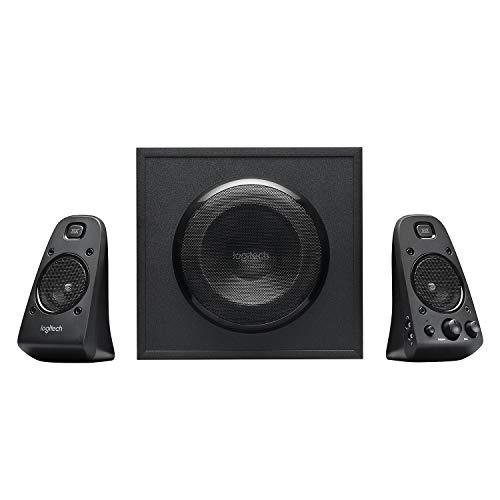
The Z623 is the system other 2.1 sets are still compared against, and its verified listing title carries the two facts that define it: THX certification and a 400-watt peak rating. Certification, in practical terms, means the system was measured against a set of performance targets rather than simply described with enthusiasm, and in the room that translates to output that stays composed when a film soundtrack or a game asks for everything at once. The subwoofer is the centrepiece — a large, heavy box that produces the kind of low end you feel in the desk surface — while the satellites are compact, angled toward the listener and fitted with the system’s controls.
Those controls explain much of the Z623’s staying power. Volume and bass both live on the right satellite, so the two adjustments a 2.1 owner actually makes are always at hand, with no pod to knock off the desk and no remote to lose. The presentation is confident: effects land hard, music plays with a forward, energetic balance, and dialogue stays clear because the satellites are not straining to produce bass they were never sized for. At low evening volumes the system remains coherent provided the bass knob is set with restraint, which is the single piece of setup advice every Z623 owner should follow — the subwoofer can easily be given more work than the room wants.
Its compromises are the compromises of its era and its priorities. Connections are analogue, so a television or a modern console setup is served less elegantly than by the Edifier below. There is no wireless streaming of any kind; a phone joins by cable or not at all. And the subwoofer’s size is non-negotiable — measure the under-desk space before ordering, because a box this capable needs air around it and a floor position that is not a corner. For a fixed gaming or media desk, though, the formula is proven to the point of being boring, and boring reliability is a compliment in powered speakers.
One underappreciated Z623 trait is how it handles the quiet end of the day. Many powerful systems are tuned to impress at demonstration volume and turn vague at the level of a late-evening documentary; this one keeps dialogue anchored and effects proportionate when the bass knob has been set with the restraint its section recommends. That discipline is what separates a flagship from a merely loud product, and it is why the model keeps its place in a guide written years after its launch — the fundamentals it gets right are the fundamentals the category still runs on.
- Format: 2.1 system, THX certified, 400W peak per the verified listing title
- Inputs: analogue connections for computer and other sources
- Controls: volume and bass knobs on the right satellite
- Subwoofer: large floor-standing unit, the system’s defining component
- Wireless: none fitted
Strengths
- Low-end authority that smaller systems imitate with boost and distortion instead.
- Both everyday adjustments sit on the satellite, exactly where a seated user wants them.
- Composure at high volume — it stays organised when soundtracks get busy.
Trade-offs
- The subwoofer demands real floor space and careful level setting in small rooms.
- Analogue-only connections feel dated beside digital-equipped rivals.
- No streaming: phones connect by cable, full stop.
Best for: fixed desks built for games and films, where output and simplicity lead. Not suited for: minimal desks, phone-first listeners, or anyone short on floor space.

Klipsch ProMedia 2.1 — Gamer’s classic
Klipsch brought a hi-fi idea to the computer desk long before it was fashionable: horn-loaded tweeters, the same technology the company uses in its home speakers, miniaturised into desktop satellites. The ProMedia 2.1 carries THX certification in its verified listing title, and its character follows from that horn design — lively, detailed and immediate, with the kind of treble clarity that makes game audio cues, acoustic instruments and film dialogue snap into focus at nearfield distance. It has been the connoisseur’s alternative in this class for years, the set recommended by people who find mainstream computer speakers polite.
The control pod is the ProMedia’s other signature. A separate unit sits on the desk carrying volume and subwoofer controls plus connections for headphones and an auxiliary source, which makes the system a small hub for a gaming setup: headset on for voice chat, headset off and the room hears the game. The subwoofer is more compact than the Logitech flagship’s, which eases placement in tighter rooms, and its output favours punch and definition over sheer depth — basslines are articulate, kick drums are quick, and the system keeps its footing in fast, dense mixes where a slower subwoofer would blur the rhythm.
Ownership notes are worth stating. The design has evolved in details across its long life, so photographs and connector layouts can differ slightly between production runs; check the current listing rather than a decade-old review. The satellites’ horn character is a taste as well as a strength — listeners who prefer a softer, warmer presentation may find the top end assertive at first, though nearfield listening at sensible volumes usually converts them. And like the Z623, this is a wired system through and through, built for a desk that stays put. Within that brief, it remains one of the most engaging ways to hear a computer.
The ProMedia also rewards a small ritual on arrival: run its satellites slightly toed-in toward the listening chair and let the horn tweeters aim at your ears rather than at the wall behind you. Horn designs project more directionally than dome tweeters, so a few degrees of angle changes the perceived detail more than any setting on the pod. Owners who skip that minute often describe the system as bright; owners who take it describe the same system as clear. Few products in this guide illustrate the placement principle more neatly.
- Format: 2.1 THX-certified computer speaker system
- Satellites: horn-loaded tweeter design in the Klipsch tradition
- Controls: desktop pod with volume, subwoofer level, headphone and aux connections
- Subwoofer: compact unit tuned for punch and definition
- Wireless: none fitted
Strengths
- Horn tweeters deliver detail and immediacy that flatter games and dialogue.
- The control pod doubles as a headphone hub, ideal for mixed solo and shared listening.
- A smaller subwoofer footprint than the flagship class, without giving up punch.
Trade-offs
- The lively treble is a flavour — fans of a laid-back sound should listen before committing.
- Details of the design have changed across production runs; old reviews may not match the current unit.
- Wired only, and the pod adds one more object to the desk surface.
Best for: gamers and detail lovers who want a desk system with a hi-fi accent. Not suited for: listeners seeking a soft, warm background-music presentation.
Logitech Z407 — Bluetooth pick
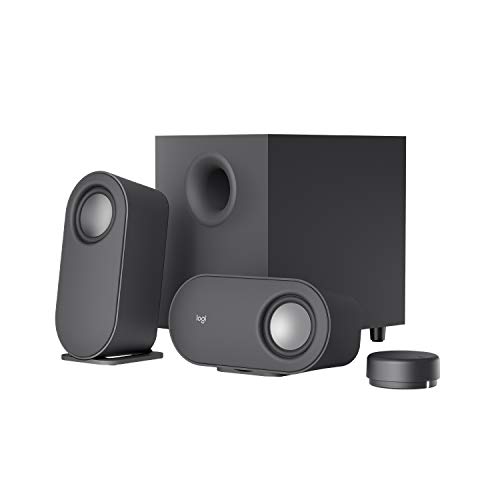
Most computer speakers assume the computer is the only source that matters. The Z407 was designed for desks where that stopped being true: its built-in Bluetooth receiver lets a phone or tablet play directly, while the wired input keeps the computer connected for the workday. The switch between the two is the system’s daily rhythm — spreadsheet silence from the laptop, a playlist from the phone at lunch, a film through the cable in the evening — and Logitech made that rhythm physical with a wireless control dial that handles volume and playback from wherever on the desk it happens to rest.
The dial deserves the attention it gets, because it changes subwoofer placement from a compromise into a choice. In most 2.1 systems the box must sit where the control cable reaches; here it can sit where the bass sounds smoothest, since the dial talks to it wirelessly. The satellites are small, tidy and voiced for close listening, keeping speech clear on calls and podcasts, and the subwoofer supplies enough foundation for music and films at desk scale without pretending to be a home theatre component. Bluetooth pairing is remembered between sessions, so the morning routine is simply sitting down and pressing play.
Set against the two heavyweights above, the Z407 trades raw output for flexibility, and buyers should make that trade consciously. A large room or a taste for very loud gaming will find its limits sooner than the Z623’s. Its input set is also computer-focused, with no optical connection for a television. But for the increasingly common desk that serves work, streaming and casual viewing in rotation, it is the most modern answer in this guide — the one system here designed around how sources actually behave now, rather than how they behaved when the category was invented.
There is a social dimension to the Z407 that wired sets cannot copy. Because pairing is quick and the dial is obvious, the system becomes the desk’s shared speaker — a partner’s podcast while cooking within earshot of the study, a child’s homework playlist, a visitor’s song played without handing over a cable. That casualness sounds trivial in a specification list and turns out to be the feature owners use most. Products earn their place in a home through such unlisted virtues, and the Z407 collects more of them than any other pick here.
- Format: 2.1 system with subwoofer and compact satellites
- Wireless: Bluetooth audio receiver built in
- Controls: wireless desktop dial for volume and playback
- Inputs: Bluetooth plus wired connection for the computer
- Positioning: nearfield desks with mixed computer and phone sources
Strengths
- Phone streaming without cables, dongles or swapping plugs behind the monitor.
- The dial removes the reach constraint that dictates subwoofer placement in rival systems.
- Clear, call-friendly voicing at the modest volumes of a working day.
Trade-offs
- Less maximum output than the wired heavyweights in this guide.
- No digital input, so television use is a secondary role at best.
- Bluetooth delay means the cable is still the right choice for fast games.
Best for: hybrid desks where a phone and a computer share listening duties. Not suited for: large rooms, television-first setups, or maximum-volume gaming.

Edifier S351DB — Hi-fi leanings
Edifier approaches the computer speaker from the opposite direction to the gaming brands: start with a small hi-fi system, then adapt it to the desk. The S351DB pairs bookshelf-style satellites in wooden cabinets with a substantial subwoofer, and its verified listing confirms Bluetooth version 5.1 with aptX among its connections. A clarification that matters for shoppers comparing old reviews: this S351DB is the current model and the direct successor to the S350DB, which no longer has a verified listing in the pool used here. When a comparison site treats the two as the same product, it is the newer one you would actually receive through the link in this guide.
The connection panel tells the versatility story — Bluetooth for streaming, optical and coaxial digital inputs, and analogue for legacy sources — and a full remote runs volume, bass, treble and source selection from across the room. That makes the S351DB the one pick in this guide equally at home under a monitor or under a television, and its sound follows the same dual citizenship: fuller midrange than typical computer satellites, a subwoofer that reaches lower, and enough scale for film nights in a modest living room. At the desk, the satellites want to be treated like the small hi-fi speakers they are, raised toward ear level and given a little air behind them.
The costs of that ambition are size and setup effort. This is the largest footprint in the guide; on a narrow desk the satellites crowd the monitor, and the subwoofer needs a deliberate floor position rather than a leftover gap. Its bass and treble controls also invite fiddling, and the system rewards a patient first evening of adjustment more than a plug-and-shout approach. Buyers with the space get the most complete and flexible system here. Buyers without it will be happier with the compact Logitech sets, and there is no shame in that trade — it is the desk, not the badge, that decides.
Prospective owners should also understand the S351DB’s relationship with its predecessor when reading the wider internet. Reviews of the S350DB describe the same essential system — cabinet style, input philosophy, remote-led control — and most of their conclusions about sound character carry across to the successor. Where they diverge is connectivity generation and current availability. Treat older reviews as background on the design, treat this guide’s listing facts as the present tense, and the two sources together give a fuller picture than either alone.
- Format: 2.1 system, bookshelf satellites plus wooden subwoofer
- Wireless: Bluetooth 5.1 with aptX
- Inputs: Bluetooth, optical, coaxial and analogue
- Controls: remote for volume, bass, treble and source
- Lineage: current model, succeeding the Edifier S350DB
Strengths
- The broadest input set in this guide, covering computer, television and console alike.
- Cabinet volume gives voices and instruments a body that small satellites cannot match.
- Remote control makes it the easiest system here to live with from a sofa.
Trade-offs
- Physical size rules it out for compact desks and monitor arms with small shelves.
- It asks for thoughtful placement and level setting to sound its best.
- Nearfield purists may find its presentation larger than a one-metre listening distance needs.
Best for: desk-and-television double duty in rooms with space to place it properly. Not suited for: cramped desks or buyers who want the smallest possible footprint.

Logitech Z313 (Renewed) — Budget route — Renewed
The Z313 is the gentle on-ramp to this format: a compact subwoofer, two small satellites and a wired control pod, designed to make a laptop or desktop sound obviously better without dominating the desk or the budget. One fact must lead its coverage, and it is repeated wherever the model appears in this guide: the listing verified in this site’s pool is for a Renewed unit. The new version no longer has a clean listing through the checked channel, so the Z313’s presence here is explicitly a refurbished purchase, with everything that implies — inspected and restored by the seller’s programme, but not factory-fresh, and worth buying with the returns window in mind.
Judged as that purchase, the little system makes sense. The control pod puts volume and a headphone socket on the desk, the subwoofer is small enough for genuinely tight under-desk spaces, and the sound is a clear step up from any laptop: fuller voices, some real bass presence, and enough volume for a bedroom or a small study. It does not chase the heavyweights — deep bass is suggested rather than delivered, and busy soundtracks at high volume will find the satellites’ limits — but at the distance of a chair, for music, calls and casual video, it covers the brief that most first-time buyers actually have.
The Renewed label deserves a practical checklist rather than anxiety. On arrival, test every control through its full travel for crackle, play both satellites at low volume to confirm they match, check the subwoofer for rattles with a bass-heavy track, and confirm all cables and the pod are present. Do this in the first days, while returning is effortless. A Renewed example that passes those checks is simply a good small system at a friendlier cost; one that fails goes back, and the format’s other picks remain. What the Z313 should not be bought as is a new product at a new product’s expectations.
It is worth adding that a Renewed Z313, once checked and settled, asks nothing further of its owner. There is no app, no firmware, no account — the pod turns, the satellites play, and the system disappears into the routine of the desk. For a second computer in a household, a teenager’s first setup or a grandparent’s video-call station, that absence of administration is a feature in itself, and it partly explains why this modest design keeps finding buyers long after flashier rivals have been discontinued.
- Format: compact 2.1 system with wired control pod
- Listing status: Renewed — refurbished unit, labelled Renewed throughout this guide
- Controls: pod with volume and headphone connection
- Subwoofer: small footprint for tight desks
- Wireless: none fitted
Strengths
- The smallest, simplest route into real 2.1 desk sound in this guide.
- A headphone socket on the pod keeps late-night listening easy.
- Renewed pricing logic makes it the natural first system for a spare desk.
Trade-offs
- It is a Renewed unit: condition varies, so test promptly and keep the returns option open.
- Bass depth and maximum volume are modest next to the flagship picks.
- No wireless or digital connections of any kind.
Best for: first 2.1 systems, spare desks and small rooms, bought with the Renewed checks above. Not suited for: buyers who want a factory-new unit or room-filling output.
Logitech Z533 — Prose only — no verified listing
The Z533 occupies the middle shelf of Logitech’s 2.1 history: bigger and more assertive than the Z313, styled with exposed drivers and a separate control pod carrying volume, bass and a headphone socket, and aimed squarely at multimedia desks. Many readers will arrive having seen it recommended in older roundups, which is exactly why it is covered here — in prose, without a link, because its listing was not verified in the pool checked for this guide. Treating it as a current, clickable recommendation would misrepresent its status; ignoring it entirely would leave a gap readers would fill with outdated advice.
As a product, its reputation is coherent: a fun, bass-forward presentation, a pod that owners like, and satellite styling that divides opinion between those who enjoy the mechanical look and those who prefer grilles. As a purchase in the present tense, it is a question of what you find and where. Remaining stock and marketplace listings appear under varying conditions and descriptions, so the Renewed-style checklist from the Z313 section applies with even more force — verify the pod, both satellites and the subwoofer, and confirm exactly which revision is being sold. Priced as the mid-tier system it is, a clean example can still serve well; priced near the Z623, the flagship’s verified listing and certification make the safer buy.
Context helps the Z533’s prose-only status make sense. Logitech’s 2.1 range has always overlapped itself — compact, mid-range and flagship systems separated by modest steps — and over time the verified listings consolidate around the strongest sellers. The Z533’s absence from the pool is a statement about listing verification on the day this guide was prepared, not a verdict that the product failed. Readers who already own one lose nothing by keeping it; readers shopping today are simply directed to the picks whose listings could be confirmed.
- Format: mid-range 2.1 multimedia system with control pod
- Status: no verified listing in this guide’s pool — prose coverage only
- Controls: pod with volume, bass and headphone connection
- Character: bass-forward, gaming-leaning presentation
- Buying route: residual stock and marketplaces — inspect carefully
Strengths
- A well-judged middle step between the compact and flagship Logitech systems.
- The pod’s bass control is the adjustment owners of small systems miss most.
- Styling and output suit gaming desks that find the Z313 too small.
Trade-offs
- No verified listing here, so availability and condition are the buyer’s homework.
- Exposed-driver styling is a matter of taste and of household dust.
- Its value depends entirely on the price a given listing asks.
Best for: Logitech fans who find a clean, fairly priced example through a protected channel. Not suited for: buyers who want a verified listing and a straightforward returns path.
How Do You Set Up a 2.1 System So It Sounds Its Best?
Placement first, power second. Satellites belong at ear height when seated, angled slightly toward the chair, and far enough apart that a voice in a video call sits between them rather than inside one box. If the desk forces them low, angle them upward with stands or even sturdy books — tweeter height is the cheapest sound upgrade in this entire category. The subwoofer goes on the floor, near the front wall, out of the corner if the room allows, and then its level is set by ear: start at minimum, raise it until bass notes gain body, and stop before any single note starts to dominate.
Cabling deserves ten unhurried minutes. Route satellite leads so they do not cross power bricks, keep the subwoofer’s cable slack rather than stretched, and decide now which socket the system uses permanently — powered speakers dislike being switched at the wall by accident. Then run three tests: a spoken-word recording for channel balance, a familiar song for the subwoofer blend, and a film scene with quiet dialogue under music for the real-world mix. Adjust once, live with it for a week, and adjust once more; ears calibrate, and most systems end up happiest with slightly less bass than day one suggested.
What Changes Between Music, Games and Calls on the Same System?
Each use stresses a different virtue. Music asks for tonal balance and a subwoofer that supports rather than stars; the Edifier and Klipsch presentations flatter it in different ways, one fuller, one livelier. Games ask for dynamic range and cue clarity — the direction of footsteps, the layering of an explosion — plus zero delay, which is why wired connections rule this use and why the heavyweights earn their desks. Calls ask for the least glamorous virtue of all: midrange clarity at low volume, so a colleague’s voice stays intelligible while you type, and a headphone socket nearby for the meetings that should not be broadcast.
The practical consequence is that a single system can serve all three without modes or presets, provided its basics are right. Avoid systems that advertise gaming or cinema processing for a desk; distance is short, the source material is already mixed for nearfield playback, and processing usually adds delay and colouration. What you are buying is honest reproduction at arm’s length, and the picks above were chosen because each, in its own price and size class, delivers exactly that without asking the listener to manage it.
How Much Desk and Floor Space Does This Format Really Need?
Less than buyers fear, but more than product photographs admit. The satellites are the easy part — most pairs fit in the gaps beside a monitor — yet they still need their few centimetres of clearance and a clear path to your ears, unobstructed by monitor bezels or desk shelves. The subwoofer is the real negotiation. The compact units in this guide tuck under most desks; the flagship boxes need a measured check of width, depth and the swing of your chair’s castors, plus air space so the driver and ports can work. A subwoofer wedged against a modesty panel will rattle the panel and call it bass.
Standing desks add a wrinkle worth planning for: when the surface rises, satellites on the desk rise with it and stay correct, but the subwoofer stays on the floor, so cable slack must cover the full travel of the desk with room to spare. Route leads down a cable spine, test the desk at its highest position before tidying anything away, and the system will follow your working day without tugging at its connections. It is a five-minute foresight that saves a pulled plug mid-call.
How Do 2.1 Computer Speakers Compare With a Soundbar or Studio Monitors?
Readers cross-shopping formats deserve a plain map. A soundbar serves a television first: wide, low and remote-controlled, it assumes a viewer metres away, and at a desk its width crowds the monitor while its tuning aims over your head. Studio monitors serve production work: accurate, often sold singly, happiest on stands at exact ear height, and unforgiving of poor recordings by design. A 2.1 computer system serves the chair: compact satellites, a subwoofer doing the heavy lifting, controls at arm’s reach and a price structure that assumes one listener. None of the three is universally better; each is the right answer to a different room.
The overlaps are where buyers hesitate. A good 2.1 set, the Edifier here especially, can run a small television respectably. A pair of small monitors can serve a desk if a subwoofer is added later and the budget stretches. But the centre of gravity matters: buy the format designed for your seat and the compromises shrink to footnotes, while buying a neighbouring format for its headline feature — a soundbar’s remote, a monitor’s accuracy — imports compromises that follow you daily. The chair test is decisive: if you listen mostly within a metre of a screen, the systems in this guide are the native format for the job.
What Should You Know About Power Ratings and Volume at a Desk?
Peak wattage, the figure listing titles love, describes a momentary ceiling under generous conditions, not the sustained output you will hear. Two systems with similar peak claims can differ audibly in composure, because driver size, cabinet volume and amplifier design decide how cleanly power becomes sound. At a desk, the arithmetic is kinder than buyers expect: nearfield listening needs little power to reach satisfying levels, which is why even the compact picks here fill a study comfortably. What extra money buys in the flagships is not so much loudness as ease — headroom that keeps a film’s climax or a game’s explosion clean instead of strained.
Volume discipline protects both ears and equipment. Powered speakers driven to their limit distort, and distortion at a metre’s distance arrives at your ears with nowhere to hide. If you regularly listen at the top of a system’s range, the correct upgrade is a bigger system, not a braver volume knob. Conversely, a system that only ever whispers can still be the right buy — clarity at low level is a design achievement, and the picks here were chosen partly because they keep their balance turned down, which is where desk systems spend most of their working lives.
How Do You Keep a Desk System Sounding Good for Years?
Powered speakers ask for little: air around the amplifier, dust off the drivers, and controls exercised occasionally so volume knobs do not grow scratchy in one position. The subwoofer’s surround and the satellite cones age slowly indoors, away from direct sunlight and radiators. Cables are the most common failure point — a lead trapped under a chair castor or bent sharply at a plug — and they are also the cheapest fix, so suspect them first when a channel drops. Bluetooth models add one habit: if a phone update ever breaks pairing, removing the system from the phone’s device list and pairing fresh resolves nearly every case.
Software on the computer side matters more than owners expect. Keep the operating system’s output at a healthy level and control listening volume at the speakers, disable any sound “enhancements” you did not choose deliberately, and check after major updates that the output device has not silently switched to the monitor’s speakers — the most common cause of the complaint that good speakers suddenly sound thin. A system treated this way will typically outlast two or three computers, which is why the established designs in this guide, with their long production runs and simple electronics, are such durable value.
Which Accessories Actually Help a 2.1 Desk Setup?
Very few, and that is good news for the budget. Small stands or angled foam pads that lift the satellites’ tweeters to ear level are the one accessory with a guaranteed return, improving imaging more than any cable upgrade. A surge protector is sensible insurance for a system that lives plugged in. A longer satellite lead, where the maker supports it, can free the subwoofer to sit in its best position rather than its nearest one. Beyond that, the accessory industry will happily sell a desk listener things the format does not need: exotic interconnects for metre-long runs, isolation gadgets for subwoofers that sit happily on carpet, and equaliser software compensating for placement that a free repositioning would fix properly.
Spend the saved money on the room instead. A rug between desk and hard floor, curtains on a bare window, books on an empty shelf — these unglamorous surfaces tame the reflections that make any speaker sound harsher and boomier than it is. Owners are often surprised that the same system sounds a class better after a room gains furniture; the speakers did not change, the echoes did. In a category where the electronics are honestly priced, the room is the last free upgrade.
How Should You Budget Across This Category?
The price ladder in 2.1 computer speakers maps unusually honestly onto what the money buys. The first step up from a Renewed or compact system purchases headroom and a subwoofer with genuine authority over its territory. The middle of the ladder purchases control quality — pods, dials, remotes — and cabinets that stop colouring the sound. The top purchases certification, output and the composure that comes with both. What the ladder does not sell, at any rung, is a different format: every system here is two satellites and a subwoofer working at nearfield distance, and the most expensive version of that idea is still that idea, executed better.
That honesty simplifies the decision. Set the budget by the desk’s role — main entertainment centre, working companion, spare-room helper — and buy the rung that matches, rather than stretching for a flagship whose strengths a small room cannot use or skimping on a main desk whose owner will notice the compromise daily. Keep a little back for the placement extras mentioned earlier, stands above all, and the system you choose will perform like the rung above its price.
What About Latency, Interference and Other Desk Realities?
A working desk is an electrically noisy place — monitors, chargers, USB hubs and Wi-Fi all share the air and the power strip — and speaker systems meet that reality in different ways. Wired analogue connections can pick up a faint hum if a cable runs alongside a cheap power brick, cured by rerouting rather than replacing. Bluetooth connections ignore cable-borne noise entirely but share spectrum with everything wireless in the room; the modern implementations in this guide handle a normal home’s traffic without drama. The practical rule is to diagnose before spending: move a cable, change a socket, test with a phone as the source, and the culprit usually names itself within minutes.
Latency, for the wired majority of this guide, is a non-issue — the signal travels at the speed of the cable, and games and films stay in sync by physics rather than by compensation. That quiet advantage is worth remembering when a wireless feature list tempts: for a desk that never moves, the humble analogue lead remains the most reliable connection in the room, and the systems built around it ask the fewest questions of their owners.
Households with more than one listener at the same desk — a couple sharing a study, a parent helping with homework — will also find that 2.1 systems behave kindly at off-centre seats. The stereo image is optimised for the chair in the middle, certainly, but the subwoofer’s contribution is effectively position-independent, so a second listener still hears the full weight of the sound even if the fine imaging belongs to the person in the middle. It is another small way the format suits real rooms better than its laboratory image suggests.
One more scenario deserves a sentence, because it decides real purchases: the desk that is also a bedside or a nursery neighbour. Every system here can play quietly, but they differ in how gracefully — whether the subwoofer can be tamed to a murmur without switching it off entirely, and whether the controls allow a half-asleep adjustment without a bright light or a menu. The satellite-knob and pod designs score well on that test, and it is worth weighing alongside the headline virtues if your listening hours are antisocial.
And if the desk in question belongs to a student heading into shared housing, favour the systems whose parts are all replaceable or at least repositionable, because that desk will be packed, moved and rebuilt more times in four years than a home office desk is in twenty.
Comparison Table
| System | Connection character | Control style | Footprint | Best setting |
|---|---|---|---|---|
| Logitech Z623 | Analogue wired | Knobs on right satellite | Large subwoofer | Fixed media and gaming desks |
| Klipsch ProMedia 2.1 | Analogue wired | Desktop pod with headphone hub | Moderate | Detail-focused gaming and music |
| Logitech Z407 | Bluetooth plus wired | Wireless dial | Compact | Mixed phone and computer desks |
| Edifier S351DB | Bluetooth, optical, coaxial, analogue | Remote | Largest in guide | Desk plus small-room television |
| Logitech Z313 (Renewed) | Analogue wired | Wired pod | Smallest in guide | First systems and spare desks |
| Logitech Z533 | Analogue wired | Pod with bass control | Moderate | Mid-range desks, where a clean example is found |
What Are the Most Common Mistakes With 2.1 Computer Speakers?
The classic error is subwoofer level set by enthusiasm rather than by ear, producing a system that impresses for ten minutes and fatigues for ten months. Close behind is satellite placement by symmetry instead of by ear height — a pair flanking the monitor but firing at the user’s chest will never image properly, however tidy it looks. Third is buying on peak wattage, a figure measured so loosely across the industry that it should be treated as marketing punctuation; the verified listings in this guide are used for identity and connection facts, not as a league table of loudness.
Fourth, buyers forget the headphone question until the first late-night session, then discover their system has no socket and their computer’s is buried at the back. Fifth is condition blindness at the budget end: a Renewed or residual-stock purchase, like the Z313 listing here, is a perfectly good route — provided it is bought as one, tested promptly and returned without hesitation if it crackles, rattles or arrives incomplete. And sixth, owners plug everything into a switched power strip and then troubleshoot a “fault” that is simply the strip being off. The format is forgiving; most disappointments trace back to setup, not to the speakers.
Final Recommendation
Choose by desk, not by spec sheet. A fixed gaming and film desk belongs to the Z623, unless the Klipsch’s horn-lit detail and headphone-friendly pod appeal more, in which case the ProMedia is the connoisseur’s route to the same job. A desk shared with a phone belongs to the Z407; a desk that doubles as the room’s entertainment centre belongs to the S351DB; a first or spare desk belongs to the Z313, bought knowingly as the Renewed unit it is. The Z533 remains a reasonable find rather than a recommendation, its value set by the individual listing. Whichever system lands under your desk, spend its first evening on placement and subwoofer level — because in this category, the difference between a good purchase and a great one is almost never the badge on the satellite, but the care taken in the hour after the box is opened.
Frequently Asked Questions
Is 2.1 enough, or should a desk have 5.1 surround?
For a single listener at a desk, 2.1 covers music, films and games convincingly, and it avoids the rear-speaker cabling that makes desktop surround impractical in most rooms. Surround earns its complexity in a dedicated viewing room with a sofa; at a chair, a well-set 2.1 system is the honest sweet spot.
What does THX certification actually guarantee here?
It means the system was tested against defined performance criteria for output, distortion and frequency response, rather than relying on the maker’s description alone. It does not guarantee you will prefer its tuning — the Klipsch and Logitech flagships are both certified and sound distinctly different — but it does anchor the basics.
Is buying the Renewed Z313 a risk?
It is a managed risk. The listing is Renewed, so the unit is refurbished rather than new; the protection is to test controls, channels and the subwoofer promptly on arrival and use the returns window if anything crackles, rattles or is missing. Bought with that routine, it is a sensible budget route.
Can these systems connect to a television?
Some can, gracefully: the S351DB’s optical input and remote suit television duty directly. The analogue-only systems can take a television’s headphone or line output, but volume control then depends on the television’s behaviour, and the experience is a compromise rather than a design goal.
Where should the subwoofer go in a small bedroom?
On the floor beside or under the desk, near a wall but out of the corner, with its level set lower than your first instinct. Small rooms amplify bass, so restraint is what keeps late-night listening neighbourly and dialogue clear.
Do I need a sound card for speakers like these?
No. Every system here is self-amplified and connects to the ordinary audio output of a computer, laptop or phone. A noisy onboard output can justify an external interface, but that is a fix for a specific hiss or interference problem, not a requirement of the format.
How do these systems handle a second computer or a console?
Most desks accumulate sources — a work laptop beside a personal machine, a console under the monitor — and the graceful systems are those with either multiple inputs or a control pod that accepts an auxiliary lead without unplugging the main one. Where a system offers a single input, an inexpensive switch box or simply swapping one cable at the pod solves the problem; what matters is that the connection point is reachable, which is one more argument for pods and dials over controls buried on a subwoofer. Plan the source count before buying and even the single-input picks remain easy to live with.
Related Guides
For the wireless angle on this format, see our guide to best 2.1 Bluetooth speakers; for a single-brand shortlist, our roundup of best Logitech 2.1 speakers; and for the broader room-by-room picture, our coverage of best 2.1 speakers.


