What's inside
- Key Takeaways
- Quick Picks
- How Did We Judge a Mostly Virtual Category?
- Why Did 7.1 Become a Headphone Feature?
- Comparison Table
- How Do You Get Virtual 7.1 Working Properly?
- What Mistakes Do 7.1 Buyers Make Most Often?
- When Is Virtual 7.1 the Wrong Purchase Entirely?
- How Does Virtual 7.1 Treat Different Genres?
- What Should You Check Before Any of These Cards Arrives?
- How Should You Test a Renderer Before Trusting It?
- How Do the Operating System’s Own Spatial Modes Fit In?
- Final Recommendation
- Frequently Asked Questions
- Related Guides
As an Amazon Associate I earn from qualifying purchases. This post may contain affiliate links at no extra cost to you.
gizmoverdict.com is reader-supported. When you buy through links on our site, we may earn an affiliate commission.
Where to buy: Every card below comes from this site’s verified pool, and this guide begins with the sentence the category usually buries: when you shop for the best 7.1 sound cards, you are almost always shopping for virtual 7.1 — a seven-channel game mix folded into two headphone channels by software — because genuine eight-channel analogue output to seven speakers and a subwoofer is a rarity that barely exists in the modern internal-card market.
That is not a scandal; it is a definition that marketing prefers to leave blurry. Virtual 7.1 can be genuinely excellent. A game renders its world to seven virtual speaker positions plus a subwoofer feed, and the card’s processing translates that layout into the timing and tonal cues your two ears use to locate sounds. Done well, with a clean DAC and a strong amplifier behind it, the result gives a headphone player positional information that a physical speaker array would struggle to deliver in a small room at midnight. Done badly — a cheap effect bolted onto a noisy output — it produces the hollow, swimming sound that gives the whole idea a bad name.
So the honest shopping questions are different from the ones the boxes encourage. Not “how many channels?” but “how good is the fold-down, how clean is the conversion, how strong is the amplifier, and how honest is the labelling?” One pick below is a 5.1 card included deliberately and labelled as below the headline standard, because a buyer cross-shopping this category deserves to see what the money buys when the channel count drops and the price drops with it. Another is a flagship whose control module and conversion quality define the ceiling of the virtual approach.
Read this guide as a translation exercise. Wherever a listing says 7.1, we state what kind. Wherever a card’s strength is fidelity rather than channels, we say that instead. The players who enjoy virtual surround for years are the ones who bought it as a headphone technology with open eyes; the disappointed ones bought it believing seven speakers were somehow folded inside a PCIe bracket.
None of this makes the category a trick. Flight simulators have used binaural rendering for decades because it works, and the games industry adopted channel-based surround mixes precisely so that renderers — in cards, in operating systems, in the games themselves — would have standardised material to fold. The technology is legitimate; only the labelling has been lazy. A guide’s job in such a market is translation, and every pick below has been translated before it was praised.
Key Takeaways
- On sound cards, “7.1” almost always means a virtual headphone fold-down of a seven-channel mix, not eight physical outputs.
- The quality of that illusion depends on the renderer, the DAC and the amplifier — in that order of daily importance.
- A game must actually output a surround mix for virtual 7.1 to have real positional material to work with.
- The Sound Blaster Z SE’s listing says “Virtual 7.1” in plain words, which is the honesty this category needs.
- One pick here is a true 5.1 card, included and labelled as such for buyers weighing price against channels.
- Stacking a game’s own headphone mode under a card’s virtual 7.1 usually sounds worse than either alone.
Quick Picks
| Pick | Badge | Why it is here |
|---|---|---|
| Creative Sound Blaster Z SE | Best Honest All-Rounder | Its listing states virtual 7.1 for headphones and discrete 5.1 for speakers, separating the two ideas most rivals blur. |
| Creative Sound Blaster AE-9 | Best Flagship | Creative’s PCIe flagship with its Audio Control Module, for the cleanest possible feed into serious headphones. |
| Creative Sound Blaster AE-7 | Best Desk Control | A hi-res card whose desktop module makes switching between speakers and the virtual headphone mode a one-touch act. |
| Creative Sound BlasterX AE-5 Plus | Best Sound Quality per Tier | A SABRE32-class DAC and discrete headphone amplifier give virtual surround the cleanest canvas in its class. |
| ASUS Xonar SE | Best Physical-Channel Value — 5.1, Not 7.1 | A genuine 5.1 speaker card at a gentler price, included so buyers can weigh real channels against virtual ones. |
| Creative Sound Blaster Audigy Fx Pro | Best Current Entry Card | The Pro generation of the Audigy Fx line, for a modern build starting its surround journey at a sane tier. |
How Did We Judge a Mostly Virtual Category?
We started by grading the labelling before the listening. A card whose listing distinguishes virtual headphone surround from discrete speaker output earned trust that carried into every other judgement, because a manufacturer willing to name the illusion is usually a manufacturer that engineered it properly. Cards that let “7.1” float unattached to any output description were treated as unknown quantities regardless of brand.
Next we judged the chain the virtual signal must survive. A fold-down renderer computes delicate timing and level differences; a noisy DAC or a weak amplifier smears exactly those differences on the way to the headphone. So conversion quality, published fidelity figures where listings state them, and the presence of a dedicated headphone amplifier stage weighed heavily — arguably more than the surround processing itself, since the finest renderer cannot rescue a signal the hardware then muddies.
Software ecosystems came third. Virtual surround lives in profiles: per-game tuning, adjustable intensity, a clean way to bypass processing for music and for games with their own spatial mix. We favoured platforms whose suites expose those controls plainly and whose update history suggests the profiles will still work after the next Windows generation arrives.
Last, we kept one physical anchor in the list on purpose. The Xonar SE cannot do 7.1 in any sense, and it is here because a real buyer comparing prices will meet it, and deserves a guide that explains the trade — five genuine channels to speakers, at less money — instead of pretending the comparison does not exist.
We also discounted two seductive irrelevancies. The first is sample-rate theatre: a converter’s maximum playback rate says almost nothing about how a game’s ordinary-rate audio will sound through it, and no pick here was promoted for a number of kilohertz. The second is the bundled-effect count — suites advertising dozens of voice morphs and environmental presets — which correlates with nothing a positional player uses after the first weekend. What survived those discounts is what the detailed sections discuss: labelling, conversion, amplification, control, and the quality of the fold itself.
Why Did 7.1 Become a Headphone Feature?
Blame geometry and economics. Seven speakers plus a subwoofer demand a room with space behind the listener, which excludes most desks, most bedrooms and every rented room with a landlord. Meanwhile the games industry standardised on surround mixes as data — a 7.1 bed is just eight channels of audio — and headphones became the default gaming transducer. The industry therefore sells the mix, rendered virtually, rather than the furniture. The card’s job narrowed to receiving that bed and folding it into two channels convincingly.
The physics of hearing makes the fold plausible. Your ears locate sounds by comparing arrival time and volume between left and right, and by the way your outer ear colours sounds from different elevations and from behind. A renderer imitates those colourations. When the imitation matches your ears, virtual 7.1 delivers rear cues that feel external and specific; when it mismatches, sounds collapse into the centre of your head and “behind” becomes merely “quieter and duller”. This is why two players can disagree completely about the same card — they are, in a meaningful sense, listening with different instruments.
It also explains why intensity controls matter. A renderer at full strength maximises the colouration, which maximises both the effect and the mismatch. Many players find their personal sweet spot well below the maximum, where direction is clear but the tonal weirdness recedes. Any suite that locks you to a single aggressive preset is asking your ears to adapt to it, rather than the other way around.
Elevation deserves a footnote, because it is where virtual surround is weakest and marketing is loudest. Sounds above and below are located mostly by outer-ear colouration, which varies more between individuals than left-right cues do, so height impressions through a generic renderer are suggestive at best. Games with true object-based mixes and their own headphone renderers do height more convincingly than channel-based fold-downs. A buyer whose favourite titles support those modes should plan to let the game render and the card amplify — a recurring theme in this guide, because it is the correct architecture for most modern libraries.

Creative Sound Blaster Z SE — Best Honest All-Rounder
The Z SE leads a 7.1 guide for a reason that has little to do with raw power: its listing does the category’s hardest work in a single phrase — “Discrete 5.1 / Virtual 7.1” — telling you that speakers get real channels and headphones get a rendered illusion, with 24-bit/192kHz playback, a 116dB signal-to-noise ratio and Dolby Digital Live plus DTS encoding rounding out the specification. A buyer who reads that one line understands more about surround than most marketing pages teach, and the card behind the line is good enough to justify the trust.
As a virtual 7.1 engine, the Z SE benefits from Creative’s long history with headphone surround: the fold-down is confident, the game profiles are sensible starting points, and the effect holds together in busy scenes where lesser processing turns to soup. Paired with a decent gaming headset or a proper pair of headphones, rear cues read clearly enough for competitive play, and the intensity can be tamed for story games where atmosphere matters more than forensic direction.
Then there is the escape hatch no pure-virtual rival offers: when you tire of illusion, the same card drives five real speakers discretely, or encodes the whole surround bed down an optical cable to a receiver. That makes the Z SE the safest purchase in a category built on a simulation — if the simulation ever disappoints your particular ears, the card still has a physical career waiting. Few components hedge their own premise so gracefully.
Longevity is the quiet footnote to that hedge. This platform has been bought, installed and troubleshooted by so many owners that nearly any configuration question a new buyer can ask already has a documented answer, and its driver expectations are a known quantity rather than a hope. In a category where the software is half the product, a card whose behaviour is thoroughly mapped by its own user base carries a practical advantage that no benchmark records.
- Form factor: Internal PCI-e sound card and DAC
- Headphone surround: Virtual 7.1 (per listing)
- Speaker output: Discrete 5.1 surround (per listing)
- Playback: 24-bit/192kHz, 116dB SNR (per listing)
- Encoding: Dolby Digital Live and DTS (per listing)
Strengths
- The clearest labelling in the category, backed by capable processing.
- Real 5.1 speaker output waits if virtual surround is not for your ears.
- Optical encoding extends the card to receiver-based rooms.
Trade-offs
- Conversion refinement trails the AE-series flagships audibly with fine headphones.
- The control software feels a generation older than the AE suite.
- Its versatility means it is nobody’s absolute specialist.
Best for: The buyer who wants virtual 7.1 with a physical safety net and honest paperwork. Not suited for: The flagship hunter who already owns elite headphones and wants the finest conversion available.

Creative Sound Blaster AE-9 — Best Flagship
The AE-9 is Creative’s PCIe flagship, sold with an Audio Control Module, and its listing in this pool is deliberately terse — the pool records it as the flagship card with its ACM and declines to pad the description with figures the API title did not state. That restraint suits the product’s actual pitch. The AE-9 exists for the listener whose headphones and ears can resolve the last increments of conversion quality, and who wants the virtual surround renderer fed by the cleanest source Creative puts in a PC.
In that role the logic is straightforward. Virtual 7.1 asks a great deal of fine detail: the rear-cue colourations are subtle tonal sculptures, and a flagship converter preserves them with a fidelity that lesser hardware rounds off. The control module completes the flagship brief by putting the system’s command at the desk — volume, connections, switching — so the card’s sophistication does not have to be operated through a thicket of windows while a game waits.
Who should not buy it is equally clear. The AE-9’s virtues are audible in proportion to the headphones downstream and the listener’s attention; a mid-tier gaming headset will bottleneck it into sounding like a much cheaper card, and a player who cannot hear the difference between renderers will not hear the difference between converters either. This is the top of a ladder, priced and purposed accordingly, and it flatters only the setups that were already excellent before it arrived.
There is a discipline flagship ownership teaches, which is that the last increments of fidelity are mostly about removing distractions: the faint noise under a quiet scene, the slight congestion when a mix peaks, the control you reach for and find missing. The AE-9’s proposition is that a virtual soundstage built on a silent foundation feels less like an effect and more like a place. Whether that difference is worth flagship money is a question only the listener’s own reference tracks and games can answer, which is why this guide frames it as the ceiling to audition, not the default to buy.
- Form factor: Internal PCIe flagship sound card
- Control: Audio Control Module included (per listing)
- Position: Flagship of Creative’s PCIe range (per listing)
- Orientation: High-end headphone listening and gaming
- Note: Pool title is abbreviated; specifications are stated conservatively here
Strengths
- The flagship conversion path gives virtual surround its cleanest possible source.
- The desk module makes a sophisticated card effortless to operate daily.
- Built for headphones good enough to justify it — and reveals them fully.
Trade-offs
- Flagship pricing demands flagship headphones to make sense.
- Casual headsets will bottleneck it into ordinariness.
- Its abbreviated pool listing means buyers should confirm fine details before ordering.
Best for: A high-end headphone owner who wants the ceiling of the virtual 7.1 approach. Not suited for: Mainstream headsets, tight budgets, or anyone expecting seven physical outputs.
Creative Sound Blaster AE-7 — Best Desk Control
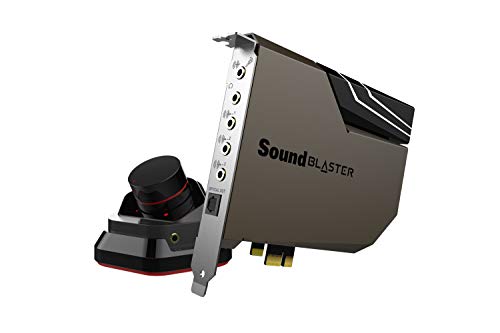
The AE-7’s listing describes a hi-res PCIe gaming sound card with an Audio Control Module and a Xamp headphone amplifier, and in a virtual-surround household that module solves the category’s most frequent daily annoyance. Virtual 7.1 is a mode, and modes need switching: on for the shooter, off for the album, bypassed for the game with its own spatial mix. The AE-7 puts that switching, plus volume and connections, on a physical desk unit, so the mode follows the activity instead of trapping the listener in whichever setting the software last remembered.
The sound behind the convenience is the AE family’s familiar clarity. The Xamp stage drives demanding headphones with the headroom that keeps a busy surround mix organised — footsteps stay separate from the explosion meant to mask them — and the presentation leans analytical, which suits the forensic listening competitive players do inside a virtual soundstage. A rear cue rendered cleanly and amplified properly is the whole product here, and the AE-7 delivers that pairing without fuss.
Its honest limitation is the category’s limitation: everything positional arrives through two headphone drivers, and no amplifier changes that arithmetic. Buyers dreaming of physical rear channels should look at the Z SE’s speaker outputs or the Xonar SE’s value proposition. The AE-7 is for the committed headphone player who switches modes and volume constantly, and for that player its little module is worth more than a spec-sheet increment.
Consider the streaming desk as the extreme case of that player’s life. A streamer rides game volume against voice, ducks music under alerts, and swaps between speakers for the room and headphones for the broadcast, sometimes within a single minute. Every one of those acts is a physical gesture on the AE-7’s module and a window-hunt on a lesser setup. The card understands that virtual surround is not a setting you enable once but a mode you inhabit selectively, and it builds its hardware around the inhabiting.
- Form factor: Internal PCIe sound card with external Audio Control Module
- Headphone stage: Xamp amplifier (per listing)
- Playback class: Hi-res gaming DAC (per listing)
- Control: Desk module for volume, switching and connections
- Orientation: Mode-switching headphone players
Strengths
- Physical switching makes virtual surround a habit instead of a settings dig.
- Xamp amplification keeps dense mixes legible at the headphone.
- Desk connections suit streamers and voice-chat regulars.
Trade-offs
- Still two channels at the ear, however beautifully processed.
- The module consumes desk space and adds a cable.
- Set-and-forget listeners will not use its defining feature.
Best for: Headphone players who move between games, music and calls all evening. Not suited for: Anyone whose surround ambitions are made of wood and speaker wire.
Creative Sound BlasterX AE-5 Plus — Best Sound Quality per Tier
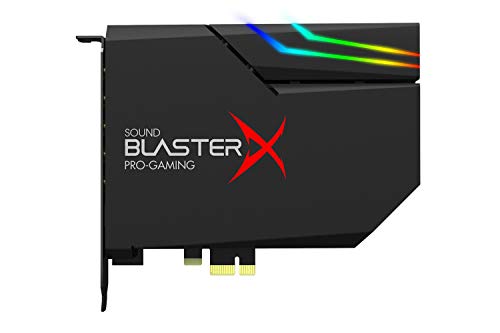
If the AE-9 is the ceiling, the AE-5 Plus is the value-engineered version of the same argument. Its listing specifies a SABRE32-class hi-res 32-bit/384kHz DAC with a 122dB signal-to-noise ratio, the discrete Xamp headphone amplifier, and Dolby Digital plus DTS support. For virtual surround, that specification reads as a promise about the canvas: the renderer’s delicate rear cues will be converted quietly, amplified with headroom, and delivered to the headphone without the hiss and compression that collapse a soundstage into a smear.
Owners consistently find this class of card changes the character of virtual surround from novelty to tool. With a noisy source, the effect feels like a trick played at low volume inside your skull; with a clean, powerful source, the stage opens outward and stays stable when the mix gets loud, which is when positional information matters most. The AE-5 Plus also moonlights superbly as a music DAC with processing bypassed, so the same purchase serves the album collection on the evenings when no one is shooting at you.
The familiar honesty applies: its surround story is the headphone renderer, and its speaker talents are those of a fine stereo-and-encoding source rather than a declared discrete 7.1 array — no such array exists in this guide, because it barely exists anywhere. Judge the AE-5 Plus as the strongest canvas for the virtual art at its tier, and it wins its place without needing the channel-count costume.
The lighting deserves one honest sentence in a guide that has been hard on decoration: in a windowed case this card looks the part of the money, and there is no shame in that being a secondary pleasure. But the order of virtues matters — buy it for the converter and the amplifier, enjoy the glow as a dividend, and the purchase remains sound on the day the lighting software is uninstalled and forgotten.
- Form factor: Internal PCIe sound card and DAC
- Playback class: Hi-res 32-bit/384kHz, SABRE32-class DAC (per listing)
- Signal-to-noise: 122dB (per listing)
- Headphone stage: Xamp discrete dual-amplifier design
- Encoding: Dolby Digital and DTS support (per listing)
Strengths
- Exceptional conversion and amplification for the tier.
- Virtual surround stays composed when scenes get loud.
- Superb with processing off, as a pure music source.
Trade-offs
- No physical multichannel array hides inside it, whatever the category implies.
- Its quality is wasted through a low-end headset.
- Lighting and software add setup before the first match.
Best for: Headphone players who want flagship-adjacent fidelity for virtual surround without the flagship step. Not suited for: Speaker-array builders, who should start at the Z SE.
ASUS Xonar SE — Best Physical-Channel Value (5.1 — Below the 7.1 Standard)
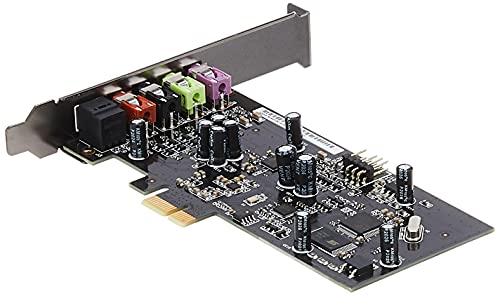
This pick carries its warning in its badge: the Xonar SE is a 5.1 card. Its listing says so plainly — a 5.1-channel PCIe gaming sound card with 192kHz/24-bit hi-res audio and a 116dB signal-to-noise ratio — and no honest guide should dress it as anything else. It cannot produce 7.1, virtual or otherwise, at the standard this page is named for. It is included because it offers the one thing no virtual renderer can: sound that physically originates behind you, from real speakers, at a price below every virtual flagship here.
Weigh the exchange soberly. Five real channels place effects in the room with a certainty that needs no ear-matching and no adaptation period; a first-time listener understands it instantly. What you surrender is the rear pair of the 7.1 layout — sounds directly behind are folded into the side surrounds — plus the headphone refinement of the Creative cards, whose virtual modes and amplifiers outclass this card’s headphone offering comfortably.
For a buyer whose room fits speakers and whose budget does not fit an AE card, that exchange can be the right one, and pretending otherwise would make this guide a brochure rather than advice. But if you arrived shopping for 7.1 headphone play, this is not your card, and its presence here is a signpost, not a recommendation to settle: it marks the fork where physical channels and virtual channels divide, priced so you can see exactly what the fork costs.
One more consideration belongs to households rather than listeners. Physical speakers announce the game to the room — sometimes a feature, when the family watches a film together, and sometimes a diplomatic incident at midnight. The Xonar SE’s path therefore suits the dedicated room and the tolerant household, while the virtual picks suit everyone else. Choosing between them is partly choosing a domestic policy, and the cheapest time to make that choice is before the speakers are screwed to the wall.
- Form factor: Internal PCIe sound card
- Channels: 5.1 discrete — NOT 7.1 in any form (per listing)
- Playback: 192kHz/24-bit hi-res (per listing)
- Signal-to-noise: 116dB (per listing)
- Orientation: Physical speaker surround on a budget
Strengths
- Real channels in real air, with zero adaptation required.
- The gentlest price among the speaker-capable picks here.
- Plain labelling that respects the buyer’s intelligence.
Trade-offs
- Two channels short of this guide’s headline format — permanently.
- Headphone output and processing trail the Creative cards.
- Requires buying and placing an entire speaker set to shine.
Best for: A speaker-first buyer who accepts 5.1 knowingly in exchange for physical surround at a fair price. Not suited for: Anyone who came here for 7.1 — keep reading the picks above instead.

Creative Sound Blaster Audigy Fx Pro — Best Current Entry Card
The Audigy Fx Pro arrives in this guide as the present tense of Creative’s entry line: its listing presents a hi-res PCIe sound card, the Pro generation of the Audigy Fx family rather than the discontinued original. For a newcomer to virtual surround, that positioning is the story. This is the card for a first experiment — a clean, current, affordably-tiered way to leave motherboard audio behind and discover whether processed headphone surround suits your ears before the flagship conversation begins.
That experiment matters more in this category than in most, because virtual 7.1 is partly a property of the listener. Some ears take to the renderer immediately; others never quite believe the rear cues. Spending flagship money to learn that your ears belong to the second group is the category’s classic heartbreak, and an entry card from a living product line is the insurance policy against it. If the effect delights you, the upgrade path through this same catalogue is obvious; if it does not, the card remains a perfectly good hi-res source for stereo and speakers.
Calibrate the expectation to the tier and the card behaves honourably. Its processing and amplification will not match the AE cards’ spaciousness or drive, and its listing does not make the Z SE’s explicit virtual-7.1 declaration, so fastidious buyers should treat the Z SE as the documented surround choice. The Fx Pro’s claim is currency and proportionality: today’s entry card, sensibly priced, from the family that has onboarded more PC listeners than any other.
There is a second, duller virtue to starting here: the experiment is reversible in every direction. The card fits the spare PC, the sibling’s build, the media machine, if the main rig graduates to an AE model; nothing about the purchase becomes waste. Entry components with honourable second careers are how sensible households accumulate good audio across several rooms without ever making a flagship-sized decision, and the Fx Pro is built exactly to that scale of ambition.
- Form factor: Internal PCIe sound card
- Line: Pro generation of the Audigy Fx family (per listing)
- Playback class: Hi-res (per listing)
- Role: Current entry point for new surround listeners
- Orientation: First experiments and modern budget builds
Strengths
- The affordable way to learn whether virtual surround suits your ears.
- Current production line with current software attention.
- Remains a fine stereo source even if the effect never convinces you.
Trade-offs
- Renderer refinement and headphone drive sit below the AE tier.
- Its listing lacks the Z SE’s explicit virtual 7.1 wording.
- Enthusiasts who love the effect will upgrade within the year.
Best for: A first-time surround buyer who wants this year’s entry card and an honest experiment. Not suited for: A committed virtual-surround player ready for AE-grade fidelity.
Comparison Table
| Pick | What its “surround” really is | Headphone stage | Choose it if… |
|---|---|---|---|
| Sound Blaster Z SE | Virtual 7.1 headphones / discrete 5.1 speakers | Standard gaming output | You want the documented, hedged all-rounder. |
| Sound Blaster AE-9 | Flagship-fed virtual rendering | Flagship via control module | Your headphones deserve the ceiling. |
| Sound Blaster AE-7 | Virtual rendering, desk-switched | Xamp amp via module | You switch modes and volume constantly. |
| Sound BlasterX AE-5 Plus | Virtual rendering on a flagship-grade canvas | Xamp discrete amp | Fidelity per tier is the priority. |
| ASUS Xonar SE | Discrete 5.1 speakers only — not 7.1 | Modest integrated stage | Physical channels matter more than the badge. |
| Audigy Fx Pro | Entry-level processed surround | Mainstream headsets | You are running the experiment first. |
How Do You Get Virtual 7.1 Working Properly?
Setup begins with a decision tree, and the first branch is the game’s own audio menu. If the title offers a dedicated headphone or spatial mode, it is usually rendering positions itself, and the card should be set to plain stereo so its job reduces to clean conversion and amplification. If the game offers a surround-speaker output with no headphone rendering, set the game to its 7.1 or 5.1 mode, set Windows to match the layout the card expects, and let the card’s virtualisation do the fold-down. The unforgivable configuration is both at once: a game-rendered binaural signal fed through a second renderer emerges smeared, hollow and directionless, and it has convinced thousands of players that virtual surround is fake.
With a single renderer chosen, tune its intensity like an optician tunes a lens. Start at the middle setting, load a quiet area with a fixed sound source — a fountain, a generator, a looping radio — and walk circles around it. Rear sources should stay behind as you turn, not swing wildly or collapse inward. Nudge the intensity until the geography stabilises for your ears, then stop; the correct setting is the boring one you forget about, not the spectacular one you keep noticing. Save it as a profile, because a Windows update will eventually test whether you wrote it down.
Finish with the amplifier housekeeping. Match the gain range to your headphone’s needs where the software offers it, keep any separate loudness or bass enhancements off while judging direction, and use the same short test scene after every major driver change. Virtual surround is a calibration as much as a feature, and the players who treat it that way are the ones still using it years later.
Headphone fit quietly participates in the calibration. A seal that leaks bass also leaks the low-frequency portion of the renderer’s cues, and a clamp that shifts the drivers between sessions shifts the geometry with them. Players who find virtual surround inconsistent from day to day are often experiencing furniture, not electronics — the same headphone seated differently. Consistency of fit is free accuracy, and it is worth a moment’s attention each session before any setting is blamed.
What Mistakes Do 7.1 Buyers Make Most Often?
The founding mistake is expecting speakers. A buyer who pictures seven physical channels arriving from a slim PCIe card will feel cheated by an excellent product, which is why this guide has repeated the definition until it cannot be missed. The second mistake is the double renderer described above. The third is judging the effect in the first ten minutes: positional hearing through a new cue set is learned, and players who give it a week of ordinary play routinely reverse a verdict they delivered on the first evening.
A fourth mistake is buying the renderer and starving the chain — a flagship card feeding a headset whose drivers cannot resolve the cues it computes. And a fifth is its mirror image: agonising over converter figures while playing games that output plain stereo, where no card on Earth can recover positions the mix never contained. Check the games you actually play for surround output before checking any card’s specifications; the library decides what the hardware is allowed to do.
Finally, beware the demo preset. Maximum intensity, maximum width and a bass boost make a thirty-second impression and a three-hour headache. The settings that survive a season are moderate ones, and any card whose suite makes moderation easy is quietly better designed than one that only knows how to shout.
A sixth mistake hides in the returns data of the whole industry: buying a virtual-surround card for a console-shaped life. These are PC components, married to a PCIe slot and a Windows software ecosystem, and the player whose evenings happen on a sofa with a controller needs a different shopping list altogether. Categories have borders, and the most satisfied buyers are the ones who checked which side of the border their evenings are spent on before spending anything.
When Is Virtual 7.1 the Wrong Purchase Entirely?
When your room and life actually suit speakers, and the household will tolerate them, physical channels remain the more convincing technology — the Z SE’s discrete 5.1 and the Xonar SE’s budget array both testify to that inside this very list. When your games are mostly stereo-mixed indies and older titles, a fine stereo card serves you better than a surround renderer with nothing to render. And when your ears simply reject the illusion after a fair trial — some do, and it is a property of hearing, not a failure of effort — the honest move is to spend the money on the best stereo chain you can, and let other people’s ears enjoy the trick.
There is also the laptop household to consider: none of these internal cards travel, and a player whose gaming happens on a portable machine should be shopping external DACs instead of this entire category. Knowing when a category does not apply to you is the most money-saving sentence in any buying guide, and a 7.1 guide that hides it would be repeating the industry’s favourite omission.
One more honest boundary: competitive players at the highest level often simplify rather than enrich, running plain stereo or a game’s own minimal headphone mix because it is the configuration they have trained on for years. A renderer change rewires learned instincts, and mid-season is no time for it. If your current setup already reads clearly to you, the correct purchase may be no purchase — a sentence this guide can afford to print because the readers it does serve will need the hardware regardless.
How Does Virtual 7.1 Treat Different Genres?
Competitive shooters are the showcase genre, because their mixes are dense with discrete positional events and their players train themselves to read audio as information. A well-tuned renderer on a clean card converts that training into earlier, surer calls — the reload behind the wall, the footsteps one floor down — and the advantage compounds across a season of matches. The requirement is restraint: forensic listening wants clarity, so competitive profiles usually run moderate intensity with enhancements off, the opposite of the demo settings.
Horror and exploration games use the same machinery for the opposite purpose — not information but dread and spaciousness. A virtual soundstage that places a dripping pipe somewhere behind your left shoulder does narrative work no visual can match, and these genres forgive, even reward, a slightly more generous renderer setting. Racing and flight titles sit between the poles: engines and weather want envelopment, while a spotter’s voice wants the dry clarity of the centre. The practical lesson is that one global preset serves no library well, and the per-game profiles in the better suites are the feature that turns a 7.1 card from a purchase into a practice.
Strategy and simulation titles deserve a mention of their own, because their audio is information-dense in a different way: dozens of ambient systems, off-screen events and interface sounds layered over long sessions. Here the renderer’s gift is not drama but separation — the ability to keep a busy world legible for hours without listening fatigue. Players of these genres should weight converter cleanliness and moderate processing even more heavily than shooter players do, since their sessions are longer and their mixes denser, and fatigue, not direction, is their binding constraint.
What Should You Check Before Any of These Cards Arrives?
Three physical facts and one digital one. Physically: a free PCIe slot with actual clearance — a thick graphics card can smother the neighbouring slot a sound card needs; a case interior where the card will not sit directly against a hot GPU backplate if it can be avoided; and headphones worth the signal, since every pick here is ultimately judged through them. Digitally: confirm your games output surround at all. Open the audio menus of your three most-played titles and look for multichannel or spatial options; that five-minute audit predicts your satisfaction with this entire category more accurately than any specification on any box in this guide.
Also decide, before the parcel arrives, which renderer will own your system — the game’s, the operating system’s, or the card’s — and write the decision into your setup notes. Owners who begin with that single-owner rule skip the double-processing swamp entirely, and their first-week impressions of virtual surround are consistently the ones that turn into long-term use.
Keep a small text file of your final configuration — renderer owner, intensity, gain range, per-game exceptions — somewhere outside the PC’s system drive. It feels excessive the day you write it and miraculous the day a reinstall wipes the suite, because a tuned virtual-surround setup is a small body of personal knowledge about your own ears, and like all personal knowledge it is easier to record than to re-derive.
How Should You Test a Renderer Before Trusting It?
Build a small ritual and reuse it forever. Choose a save point in a familiar game with a persistent ambient sound — water, machinery, a crowd — positioned off to one side. Stand still and rotate slowly through a full circle, noting where the sound seems to sit at each quarter turn, first in plain stereo, then through the renderer at moderate intensity. The stereo pass gives you the honest baseline: the sound should live inside your head and swap sides abruptly. The renderer earns its licence only if the same rotation produces a sound that stays planted in the world while you turn, crossing behind you as a location rather than as a volume dip.
Then test the failure mode on purpose. Engage a second processing layer for one rotation and hear the stage smear — knowing that sound intimately inoculates you against the most common misconfiguration in the category. Finish by playing one ordinary session at your chosen settings without touching anything, because a renderer that only impresses during tests but distracts during play has failed the only examination that counts. Write the winning settings down; future you, post-update, will be grateful.
How Do the Operating System’s Own Spatial Modes Fit In?
Modern Windows ships with its own spatial sound options, and premium object-based formats can be licensed on top, which raises a fair question: why buy a card’s renderer at all? The answer is that the card is not only a renderer. The operating system’s processing still exits through whatever hardware you own, and on a motherboard that means the noisy, weakly amplified path this entire category exists to replace. A sound card contributes the clean conversion, the amplifier and the outputs; its renderer is one tenant of a well-built house, and owners are free to let the operating system or the game do the positional work while the card handles the electricity.
That division of labour is, in fact, how many experienced listeners run these cards permanently: the game’s or system’s renderer engaged, the card’s own processing bypassed, the hardware earning its keep on fidelity alone. It is also the strongest argument for buying conversion quality over processing brand — renderers come and go with software fashion, while a quiet DAC and a strong amplifier serve every renderer ever written, including the ones not yet released.
Final Recommendation
A closing thought on value, since this category’s prices span from an entry card to a flagship several times its cost. What the extra money buys is never extra channels — the channel count is identical, and virtual, at every tier. It buys quieter conversion, stronger amplification, better control hardware and more refined rendering, which is to say it buys the quality of an illusion rather than its size. Buyers who understand that sentence shop this category well at any budget; buyers who expect the channel count to grow with the price will be confused at every tier, because the count is the one thing that never changes.
Buy the Z SE if you want the category’s promise with its paperwork in order: virtual 7.1 for the headset, discrete 5.1 if your ears ever vote against the illusion, and encoding for the living room besides. Step up to the AE-5 Plus when your headphones are good enough to hear conversion quality, to the AE-7 when your hand lives on a volume control, and to the AE-9 when the ceiling itself is the point. Let the Fx Pro run the affordable experiment if you are new, and let the Xonar SE remind every reader that five honest speakers can out-surround seven imaginary ones. The channel count was never the product — the product is knowing where the sound came from, and on a good night, with the right card, you will swear it came from the empty air behind your chair.
Frequently Asked Questions
Is virtual 7.1 just a gimmick?
No, though it is often sold as one. The underlying technique — folding a multichannel mix into binaural cues — is the same principle behind the spatial modes built into modern games and operating systems. Its quality varies with the renderer, the hardware chain and the listener’s ears, which is why this guide grades labelling and amplification alongside the effect itself.
The fairest trial is a week, not an evening: pick one renderer, set it moderately, and play your normal rotation of games without adjusting anything. Most listeners who complete that week keep the effect permanently, because their hearing has recalibrated around the new cues and plain stereo begins to sound like the artificial one.
Can a sound card output true 7.1 to speakers?
Almost never in the current internal-card market. The picks here offer discrete 5.1 at most on the speaker side; the 7.1 in their descriptions is a headphone rendering of a seven-channel mix. A buyer who needs eight physical channels should be looking at AV receivers and a different product category entirely.
Even there, read the fine print as carefully as here: receiver channel counts describe amplification channels, and the same labelling games are played with processing channels and powered zones. The habit of asking “which output, in what form” travels well across the whole audio market.
Why include a 5.1 card in a 7.1 guide?
Because buyers meet the Xonar SE while cross-shopping, and its trade — real physical channels, two fewer of them, at a lower price — is a legitimate alternative that deserves honest labelling rather than omission. It is flagged as below the headline standard everywhere it appears in this guide.
The same logic applies in reverse to any future listing you meet: when a card’s surround claim cannot be attached to a named output or a named mode, treat the claim as unwritten until the manufacturer explains it, however impressive the surrounding numbers look.
Should I use the game’s spatial mode or the card’s?
Use one. A game’s own headphone rendering knows its world’s geometry intimately; a card’s renderer works from the channel mix and generalises across titles. Try the game’s mode first where offered, with the card set to clean stereo, and compare against the card’s fold-down of the game’s surround output. Keep whichever places rear sounds more convincingly for your ears.
Record the winner per game in your setup notes, because the answer genuinely varies by title — a renderer that flatters one engine’s mix may clutter another’s — and a per-game table built over a month of play is the closest thing this hobby has to a personal calibration certificate.
Do I need special headphones for virtual 7.1?
No special design is required — the processing happens before the signal reaches any ordinary stereo headphone. Quality still matters: a resolving, comfortable headphone reveals the cues the renderer computed, while a muddy one discards them. Spend on the headphone before the flagship card, always.
Comfort is a specification here too: a virtual soundstage you wear for three hours must sit on a head that forgets it is wearing anything, so weight, clamp and pad material influence positional performance in practice, however strange that looks on a spec sheet.
Does virtual 7.1 add latency?
A small amount of processing time is inherent, but in a well-implemented card or software path it sits far below the delays already present in a game’s audio engine and your display chain, and players do not perceive it as lag. Latency problems in practice usually trace to wireless headsets or to stacked software effects, which is one more reason to keep the processing chain to a single owner.
If you play competitively and remain worried, test it the empirical way: run your familiar rotation test with a stopwatch-minded friend calling directions, and let your own scores, rather than forum anxiety, settle whether the chain is fast enough for your level of play.
Will virtual 7.1 help with films?
Yes, when the film carries a multichannel mix, the same fold-down that serves games will serve the film, and dialogue-heavy scenes benefit from the clarity of a good DAC and amplifier. For stereo sources the processing should be switched off and the card allowed to be a clean stereo source instead.
Films also forgive the renderer more than games do, because the listener is not rotating a character to test the illusion — the camera does the moving, and a stable, spacious presentation reads as cinema rather than as a cue set under examination.
Related Guides
Keep reading with our guide to 3D sound cards and positional audio, our roundup of 5.1 sound cards for PC, and our look at affordable internal sound cards. See also 3d sound cards.
Related guides
- Best Printers for Watercolor: Pigment and Fine-Art Machines for Reproducing Paintings
- Best 4K UHD HDR HDMI Extenders: 4K60, Long-Run and 4K120 Kits Compared
- Best Direct Thermal Printers: Shipping-Label Machines and Professional Label Systems
- Best 25–35 Inch Monitors With Lowest Display Lag: An Honest Ranking Without Invented Numbers


