What's inside
- Key Takeaways
- Quick Picks
- How Did We Decide What “Cheap” Is Allowed to Mean?
- What Do You Actually Give Up as the Price Falls?
- Which of the Best and Cheapest Smartwatches Deserves Your Wrist?
- Comparison Table
- How Should You Set Up a Cheap Smartwatch So It Feels Expensive?
- What Mistakes Do Buyers Make at the Bottom of the Market?
- How Long Will a Cheap Smartwatch Realistically Last?
- Which Features Should a Cheap Watch Never Be Without?
- How Do the Companion Apps Differ Between These Brands?
- What Happens When a Cheap Watch Meets Water, Sweat and Sunscreen?
- How Should You Judge Whether a Bargain Is Real?
- What Does a Week With a Budget Watch Actually Look Like?
- Is a Cheap Smartwatch a Sensible Gift or a First Watch?
- How Can You Compare Two Cheap Watches in Ten Minutes?
- How Well Do Budget Watches Handle Messages and Calls?
- Should You Consider Last Year’s Model Instead?
- What Should You Check During the First Fortnight of Ownership?
- Final Recommendation
- Frequently Asked Questions
- Related Guides
As an Amazon Associate I earn from qualifying purchases. This post may contain affiliate links at no extra cost to you.
gizmoverdict.com is reader-supported. When you buy through links on our site, we may earn an affiliate commission.
Where to buy: Among the six watches below, five link to listings checked against this site’s verified product pool, and the sixth is deliberately left without a link, because the ultra-cheap no-name tier is a category you should understand before you spend anything on it. Where a pick sits above the cheapest tier, that is stated beside its name every time it appears, so nobody mistakes a mid-priced watch for a bargain-bin one.
Searching for the best and cheapest smartwatches sets two words against each other, and the honest way to read the phrase is as a negotiation rather than a contradiction. “Best” asks what a watch does well: tracking activity, showing notifications, surviving a week between charges, pairing cleanly with your phone. “Cheapest” asks how little of that you can give up before the watch stops being worth wearing at all. The useful ground sits between the two, and it is narrower than the marketing suggests, because below a certain point a smartwatch is not a cheap smartwatch but a slow one with a strap.
The good news is that the bottom of the market has genuinely improved. The three Amazfit models in this guide come from a brand that built its name on exactly this territory: big screens, long battery life and prices that undercut the phone brands by a wide margin. Above them sit two watches from Samsung and Fitbit that cost more but buy you a proper app ecosystem or a polished fitness platform. None of the five linked picks is expensive by flagship standards, yet they do not all answer the same question, and treating them as interchangeable because they share a results page is how buyers end up disappointed.
One rule governs everything that follows: no prices are printed in this guide. Prices on these models move constantly, stock rotates, and a figure written here would be wrong by the time you read it. “Cheapest” in this article is a qualitative position inside each brand’s own line-up — the Bip 5 Unity is Amazfit’s lowest rung, the Galaxy Watch FE is Samsung’s entry point — and the links let you check the live figure for yourself before you commit.
Key Takeaways
- The Amazfit Bip 5 Unity is the lowest-priced linked pick here, and it earns that spot by surrendering built-in GPS and Bluetooth calling rather than by cutting the screen or the battery.
- Battery life is where cheap watches beat expensive ones: the Amazfit picks run for well over a week, while the Wear OS watch in this guide needs a charger every day or two.
- The Galaxy Watch FE is the cheapest route into Wear OS in this pool, which matters if you want real apps rather than a fitness band with a big screen.
- The Fitbit Versa 4 sits above the cheapest tier and is labelled that way throughout; what the extra money buys is the Fitbit platform and iPhone compatibility.
- The no-name tier below these brands trades away software support, accurate sensors and any realistic warranty — savings that often cost more than they save.
Quick Picks
| Pick | Badge | Why it is here |
|---|---|---|
| Amazfit Bip 5 Unity | Cheapest linked pick | The floor of sensible buying: a big screen and an 11-day battery, with GPS and calling left behind to reach the price. |
| Amazfit Bip 5 | Cheap and complete | Adds built-in GPS, Alexa and Bluetooth calling to the same formula, for buyers who run without a phone. |
| Amazfit Bip 6 | Newest budget generation | A larger AMOLED screen and GPS in the line’s latest body, for buyers who keep a watch for years. |
| Samsung Galaxy Watch FE | Cheapest Wear OS here | Samsung’s entry watch brings a genuine app store to this price territory, at the cost of daily charging. |
| Fitbit Versa 4 | Above the cheapest tier | A fitness-first watch on the Fitbit platform that also works with iPhones, labelled honestly as a step up in price. |
| No-name ultra-budget watches (prose-only) | The tier to understand first | Sold under rotating brand names with no pool listing; worth reading about precisely so you can decide against most of them. |
How Did We Decide What “Cheap” Is Allowed to Mean?
Every pick had to clear three bars. First, it had to come from a brand with a real companion app, a track record of software updates and a warranty a buyer could actually use; that single test removes most of the rock-bottom listings on any marketplace. Second, it had to do the core jobs — notifications, activity and sleep tracking, heart-rate readings for general wellness, a screen you can read outdoors — without an obvious failure in any one of them. Third, its position in its own maker’s range had to be clear, so the guide can tell you truthfully whether you are looking at a brand’s floor, its middle, or a step above.
Two deliberate exclusions shaped the list. Renewed and refurbished units were left out of this particular guide even where they exist in the wider pool, because a buyer hunting the cheapest watch deserves a clean comparison of new entry-level models rather than a lottery on battery wear. And nothing appears here purely because it is inexpensive: the prose-only sixth pick exists to mark the boundary, not to fill a slot.
What Do You Actually Give Up as the Price Falls?
The sacrifices arrive in a predictable order. The first thing to go is usually built-in GPS, replaced by connected GPS that borrows your phone’s location — fine for a walker who always carries a phone, useless for a runner who leaves it at home. Next goes the speaker and microphone for wrist calls, then the richness of the app store, then the materials: aluminium gives way to plastic, and toughened glass gives way to whatever the spec sheet declines to name. Sensor suites thin out more slowly, which is why cheap watches can still track a week of activity credibly while feeling crude in the hand.
What rarely gets cut, interestingly, is battery life. The budget watches in this guide outlast the premium ones several times over, because their simpler processors, less demanding screens and absence of power-hungry radios sip rather than gulp. For a buyer whose real priority is a watch that simply keeps working — steps counted, sleep logged, notifications shown, charged on Sundays — the cheap end of the market is not a compromise at all. It is arguably the rational end, and the expensive end is the one asking you to justify itself.
Which of the Best and Cheapest Smartwatches Deserves Your Wrist?

Amazfit Bip 5 Unity — Cheapest linked pick
The Bip 5 Unity is what Amazfit builds when it strips the Bip formula down to the parts most people actually use. The screen is the same generous 1.9 inches as its sibling, the battery is rated in the listing at 11 days, and the watch tracks activity, sleep and heart rate for everyday wellness in the way this whole category does. What is missing tells you where the money went: there is no built-in GPS, so outdoor routes are drawn from your phone’s location, and there is no Bluetooth calling, so the watch shows you who is ringing and then keeps quiet about it.
Whether those omissions matter depends entirely on your habits. A commuter who walks the dog with a phone in a coat pocket loses nothing at all — the route still maps, the steps still count, the notifications still arrive. A runner building a phone-free routine loses the one feature the run is built around. Amazfit’s software, meanwhile, is the same Zepp environment the rest of the line uses, which means the cheapest watch in this guide is not running a cut-down imitation of the app; it syncs to the same place, with the same graphs, as watches costing several times more.
- Display: 1.9-inch screen
- Battery: rated up to 11 days in the listing
- Location: connected GPS via your phone, no built-in GPS
- Calls: notifications only, no Bluetooth calling
- Platform: Amazfit Zepp app, works with Android and iPhone
Strengths
- The lowest entry price of any linked pick in this guide, without shrinking the screen to band size.
- Battery life measured in weeks of routine rather than days, so charging never becomes a chore to schedule.
- Full access to the Zepp app and its sleep and activity history, identical to pricier Amazfit models.
Trade-offs
- No built-in GPS, which rules it out for phone-free running and cycling.
- No wrist calling; you can see the call, but the conversation still happens on the phone.
- The finish and materials feel plainly budget when placed beside the Samsung or Fitbit picks.
Best for: first-time smartwatch buyers and phone-always-carried walkers who want the lowest sensible price. Not suited for: runners who leave the phone at home, or anyone who answers calls from the wrist.

Amazfit Bip 5 — Cheap and complete
The standard Bip 5 is the Unity’s more capable twin, and the differences are precisely the two features the Unity surrenders. Built-in GPS means the watch records its own route on a run or a ride, and Bluetooth calling means a speaker and microphone live in the case, so a quick call can happen from the wrist while your hands are full of shopping or steering a trolley. Alexa is built in as well, which sounds like a novelty until you start setting timers and asking about the weather without digging for a phone.
The reason this model anchors so many budget conversations is that it refuses to feel like a punishment purchase. The 1.9-inch screen is big enough for readable notifications and honest watch faces, the battery still stretches far beyond a week in ordinary use, and the watch handles the everyday wellness basics — activity, sleep, heart rate, stress estimates — inside the same Zepp app as the Unity. If the Unity is the floor of sensible buying, the Bip 5 is the point where the word “cheap” stops requiring an apology afterwards.
- Display: 1.9-inch screen
- Location: built-in GPS
- Calls: Bluetooth calling with speaker and microphone
- Assistant: Alexa built in
- Platform: Amazfit Zepp app, works with Android and iPhone
Strengths
- Built-in GPS makes it a genuine phone-free exercise watch, rare at this end of the market.
- Bluetooth calling and Alexa turn it into a small wrist assistant, not just a tracker.
- Battery endurance stays in the multi-day class despite the extra hardware.
Trade-offs
- Costs more than the Unity, and the gap buys features some owners will never switch on.
- The app selection is Amazfit’s own catalogue, far smaller than the Wear OS store on the Galaxy Watch FE.
- The large case wears big on slim wrists, with no smaller size offered in this line.
Best for: runners, cyclists and busy parents who want GPS and wrist calls without leaving the budget tier. Not suited for: buyers who want a deep third-party app store, or very small wrists.

Amazfit Bip 6 — Newest budget generation
The Bip 6 is the line’s next step, and its headline change is the screen: 1.97 inches of AMOLED where the Bip 5 uses a plainer panel. AMOLED matters more on a watch than on almost any other device, because a watch face is mostly black space — deep blacks, crisp numerals and colours that stay legible in sunlight are the difference between glancing and squinting. GPS is built in, and the rest of the formula carries over: the Zepp app, the long battery, the everyday wellness tracking that defines this family.
Choosing the Bip 6 over the Bip 5 is a decision about time horizons. If you replace a watch every couple of years, the older model does nearly everything for less. If you intend to wear one watch until it dies, the newer generation buys you the better display, the more current software base and the longer tail of updates that a fresher model usually enjoys. Neither answer is wrong; they are answers for different owners, and this guide would rather say so than pretend the newest is automatically the best value.
- Display: 1.97-inch AMOLED screen
- Location: built-in GPS
- Generation: successor model to the Bip 5
- Tracking: activity, sleep and heart rate for general wellness
- Platform: Amazfit Zepp app, works with Android and iPhone
Strengths
- The AMOLED screen is the most readable display in the Amazfit trio, especially outdoors.
- Built-in GPS keeps the phone-free exercise story intact from the Bip 5.
- As the current generation, it is the natural pick for a buy-once, wear-for-years owner.
Trade-offs
- It is the priciest of the three Amazfit picks, edging away from the cheapest territory.
- Owners of a working Bip 5 gain a screen, not a transformation, by upgrading.
- Like its siblings, it lives outside the Wear OS and watchOS app ecosystems.
Best for: buyers who keep devices for years and read their watch outdoors all day. Not suited for: bargain hunters for whom every step up in price needs a feature, not a refinement.

Samsung Galaxy Watch FE — Cheapest Wear OS here
The Galaxy Watch FE exists because Samsung knows the Bip-shaped hole in its own range: buyers who want a real smartwatch platform without paying flagship money. The FE runs Wear OS, which changes the character of the device completely. Instead of a fixed set of built-in functions, you get an app store — maps, music, messaging, payment from the wrist — and a watch that behaves like a small extension of an Android phone rather than a tracker with ambitions. In this guide’s pool it is the least expensive way to buy into that world.
The cost of the platform is paid at the charger. Where the Amazfit picks measure battery life in weeks, the FE measures it in a day or so of real use, and owners quickly develop a nightly routine or a desk-charger habit. It also lives most happily beside a Samsung phone: it works with other Android handsets, but some of Samsung’s health features are reserved for Galaxy phones, and it does not pair with an iPhone at all. Judge it as a small smartphone for the wrist at an entry price, and its trade makes sense; judge it as a fitness band, and the Amazfit trio beats it on stamina every time.
- Case: 40mm, Bluetooth model in this listing
- Platform: Wear OS with access to the Play Store on the wrist
- Compatibility: Android phones only, happiest with Samsung Galaxy handsets
- Battery: daily-to-two-day class, charged far more often than the Amazfit picks
- Position: Samsung’s entry-level Galaxy Watch
Strengths
- A genuine app ecosystem at the lowest Wear OS price in this pool.
- Samsung’s build, screen quality and haptics feel a class above the budget brands.
- Deep integration with Android notifications, replies and wrist payments.
Trade-offs
- Battery life is the weakest here; expect a charging routine, not a charging occasion.
- No iPhone support whatsoever, and a few features want a Galaxy phone specifically.
- Sleep tracking means wearing it overnight, which collides with that nightly charge.
Best for: Android owners who want real apps and wrist payments at the lowest platform price. Not suited for: iPhone owners, or anyone who hates charging a watch.
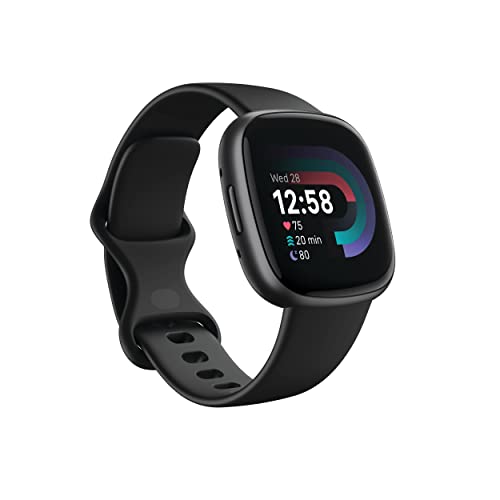
Fitbit Versa 4 — Above the cheapest tier
The Versa 4 is included with a label attached, and the label is the point: this watch sits above the cheapest tier, and pretending otherwise would break the honesty this guide is built on. What the step up buys is the Fitbit platform — the most approachable activity and sleep software in the business, refined over more generations than any rival here — wrapped in a slim, light case that disappears on the wrist in a way the big-screen Amazfits do not. It works with Android phones and iPhones alike, which none of the Samsung hardware here can claim.
Its limits are the mirror image of the Galaxy Watch FE’s. The Versa runs Fitbit’s own system rather than Wear OS, so the third-party app catalogue is thin and the watch leans hard into fitness and wellness rather than general-purpose cleverness. Some of the deeper health insights in the Fitbit app sit behind the Fitbit Premium subscription, which is a running cost a budget buyer should factor in honestly. As a dedicated, comfortable fitness watch from a mature platform, it justifies its tier; as a cheap smartwatch, it is simply not one, and the guide lists it so that buyers tempted upward know exactly what the extra money does and does not purchase.
- Platform: Fitbit OS, with the Fitbit app on Android and iPhone
- Focus: activity, sleep and everyday wellness tracking
- Case: slim, lightweight design worn easily overnight
- Extras: some advanced app insights require a Fitbit Premium subscription
- Position: a step above this guide’s cheapest tier, labelled as such
Strengths
- The most polished activity and sleep software of any pick in this guide.
- Works with iPhones as well as Android, unique among the branded picks here alongside Amazfit.
- Slim and light enough for comfortable all-night sleep tracking.
Trade-offs
- Priced above the cheapest tier — the reason it carries a warning label in this guide.
- A thin third-party app selection compared with Wear OS.
- Part of the app’s deeper analysis is subscription-gated.
Best for: fitness-first buyers who value sleep and activity insight over apps, on either phone platform. Not suited for: strict budget hunters, or buyers who want a wrist app store.
No-Name Ultra-Budget Watches — The tier to understand first (prose-only)
Below the Bip 5 Unity there is another country entirely: watches sold under brand names that change with the season, promising enormous screens, calling, and every sensor imaginable for less than a family pizza. This guide gives them a pick slot without a link, because no listing for them exists in the verified pool — and because the honest advice is that most buyers should walk past. The hardware is rarely the whole problem. The companion apps are often rough, translated badly, hungry for permissions and abandoned within a year, which means the watch on your wrist slowly loses the phone it depends on.
There is a narrow case where this tier makes sense: as a disposable experiment. If you have never worn a smartwatch and want to learn whether you like notifications on your wrist before spending real money, a no-name watch is a cheap tuition fee — provided you treat its health numbers as entertainment, keep it away from your main accounts, and accept that its warranty is theoretical. For anyone who already knows they want a watch, the distance from this tier to the Bip 5 Unity is the best-value jump in the entire market: it buys a real app, real support and a brand that will still exist at Christmas.
- Listings: none in this site’s verified pool — deliberately unlinked
- Software: companion apps of widely varying quality and support life
- Sensors: claims broad, accuracy unverified
- Warranty: frequently nominal rather than usable
- Role in this guide: the boundary marker below the sensible floor
Strengths
- The absolute lowest prices in the category, useful as a trial of the whole idea.
- Feature lists look generous on paper, including calling and large screens.
- No meaningful loss if the experiment ends in a drawer.
Trade-offs
- Companion apps may be abandoned, leaving the watch stranded with newer phones.
- Health and sleep figures should be treated as rough guesses, not records.
- Returns and warranty claims are often impractical to pursue.
Best for: the genuinely curious who want a disposable trial of wrist notifications. Not suited for: anyone who wants records they can trust or a watch supported next year.
Comparison Table
| Pick | Platform | GPS | Battery character | Phone support |
|---|---|---|---|---|
| Amazfit Bip 5 Unity | Zepp app ecosystem | Via phone | Up to 11 days per listing | Android and iPhone |
| Amazfit Bip 5 | Zepp app ecosystem | Built in | Multi-day, over a week typical | Android and iPhone |
| Amazfit Bip 6 | Zepp app ecosystem | Built in | Multi-day class | Android and iPhone |
| Samsung Galaxy Watch FE | Wear OS | Built in | Roughly daily charging | Android only |
| Fitbit Versa 4 | Fitbit OS | Built in | Several days per charge | Android and iPhone |
| No-name ultra-budget | Varies, often unsupported | Claims vary | Varies widely | Claims both, quality varies |
How Should You Set Up a Cheap Smartwatch So It Feels Expensive?
Most disappointment with budget watches is self-inflicted during the first evening. Start by pruning notifications ruthlessly: a cheap watch buzzing for every group chat and news alert feels like a toy, while one that only carries calls, messages and calendar reminders feels like a tool. Choose one clear watch face with large numerals rather than a novelty design, set the screen to wake on wrist raise instead of always-on where the option exists, and let the battery thank you. Then spend a week wearing it overnight before judging sleep tracking; the first nights are always restless in a new device, human or electronic.
Two habits protect the value of the purchase. Keep the companion app updated and the watch’s firmware with it, because budget brands deliver their fixes in batches and a watch left three versions behind develops quirks that look like hardware faults. And learn the charging rhythm that fits your life — the Amazfit picks forgive a forgotten week entirely, while the Galaxy Watch FE rewards a fixed nightly dock beside the bed. A cheap watch that is set up thoughtfully outperforms an expensive one left on factory defaults, every single week.
What Mistakes Do Buyers Make at the Bottom of the Market?
The classic error is buying by feature list. A listing that promises calling, GPS, a huge screen and a dozen sport modes for almost nothing is describing aspirations, not engineering, and the prose-only pick in this guide exists because that tier disappoints so reliably. The second error is the opposite snobbery: assuming the cheapest branded watch must be bad, and overspending on a flagship whose daily charging and delicate glass the buyer then resents. The third is ignoring the phone in your pocket — a Galaxy Watch FE bought for an iPhone household is not a bargain at any price, because it will never pair at all.
Finally, buyers forget the strap, the charger and the ecosystem they are marrying. Proprietary chargers get lost; a watch whose replacement cable is easy to find is cheaper to own than one stranded by a vanished accessory. Bands on the popular budget lines are standard sizes and endlessly replaceable, which quietly extends the watch’s life. Cheap is a property of the whole ownership, not of the checkout screen.
How Long Will a Cheap Smartwatch Realistically Last?
Expect two different clocks to run at once. The hardware clock is generous: a plastic-cased budget watch with no delicate rotating parts will usually survive three or four years of daily wear, with the battery slowly shortening from weeks toward days. The software clock is the risk. A watch depends on its companion app, and the app depends on the brand continuing to maintain it against new phone operating systems. This is the deepest reason this guide steers you toward Amazfit, Samsung and Fitbit rather than the no-name tier: the brands’ apps have survived many phone generations, and that survival is worth more than any single feature.
There is also a resale and hand-me-down reality worth acknowledging: a branded budget watch that still syncs is a genuinely useful gift to a younger sibling or a parent two years later, which quietly returns part of its cost as family goodwill. A watch from the no-name tier has no such second life, because its value depended on an app whose survival was never promised. Longevity, in other words, is not only about how long the device works for you, but how long it remains worth handing to someone else.
You can lengthen both clocks with dull habits. Rinse sweat and sunscreen off the case after summer exercise, keep the watch out of saunas and hot showers even when it carries a water-resistance rating, and avoid letting the battery sit empty for months in a drawer. When the end does come, it usually arrives as an app that no longer syncs rather than a screen that dies — which is your cue to move up one tier, not to abandon the category.
Which Features Should a Cheap Watch Never Be Without?
Strip the category to its skeleton and four things remain non-negotiable. The first is a screen you can read at arm’s length in daylight, because a watch you must shade with your other hand fails at its only job. The second is dependable notification delivery: not merely receiving alerts, but receiving them promptly, in full sentences, without the connection quietly dying between the phone in your pocket and the watch on your wrist. The third is a heart-rate sensor and step counting that behave consistently — absolute precision matters less for general wellness than a watch that reads the same walk the same way every day, so trends mean something. The fourth is water resistance sufficient for rain, handwashing and a sweaty run, because a watch you must remove whenever life gets damp will spend its life in a drawer.
Everything beyond those four is a preference to be priced, not a necessity to be assumed. Music storage matters to the runner who hates carrying a phone and to nobody else. Contactless payment matters in cities where it is universal and not at all where it is rare. A speaker for calls matters to parents with full hands and delivery drivers, and is dead weight to an office worker beside a desk phone. The skill in buying cheap is not finding the watch with the longest feature list; it is knowing which three extras describe your actual week, and refusing to pay for the other nine.
How Do the Companion Apps Differ Between These Brands?
The watch is only half the product; the other half lives on your phone, and at the budget end the app is often where brands quietly diverge. Amazfit’s Zepp app is generous with data: sleep stages, activity history, heart-rate trends and training load are presented without a paywall, and the interface, while busy, rewards a curious owner. Fitbit’s app is the friendliest for a beginner, translating numbers into plain language and gentle goals, but reserves some of its deeper analysis for the Premium subscription, which is a real consideration for a buyer counting costs. Samsung splits its world between the Galaxy Wearable app for setup and Samsung Health for data, a two-app arrangement that feels natural on a Galaxy phone and slightly scattered on anything else.
Why does this matter for a cheap purchase? Because you will open the app a thousand times and the watch face a hundred. A buyer who loves graphs will be happier in Zepp with a modest watch than in a sparse app with a fancy one. A buyer who wants to be told, in words, whether last night’s sleep was good will prefer Fitbit’s tone even at a higher tier. Before choosing, it is worth installing the free app of the brand you favour and browsing it empty: the layout you meet there is the one you are really buying, and the watch is its key.
What Happens When a Cheap Watch Meets Water, Sweat and Sunscreen?
Budget watches carry water-resistance ratings that sound reassuring and deserve translation. A rating in atmospheres or an IP code tells you the watch survived a laboratory test in clean, still water when new; it does not promise survival in a hot shower, where steam and soap attack seals, or in the sea, where salt and movement multiply the pressure. For the everyday purposes of this guide — rain on a run, sweat through a summer, splashes at the sink — every branded pick here is adequately protected, and swimming is supported on the Amazfit and Fitbit lines for pool lengths at easy effort.
The enemies that actually kill cheap watches are chemical and thermal rather than aquatic. Sunscreen and insect repellent soften some strap materials and cloud some cases; a rinse in plain water after a beach day undoes most of it. Heat is worse: a watch left on a car dashboard or worn into a sauna ages its battery and its seals faster than a year of normal use. None of this requires fussiness — it requires the same thirty seconds of care you would give sunglasses, and it is the difference between a cheap watch that lasts four years and one that fogs within two summers.
How Should You Judge Whether a Bargain Is Real?
Marketplace pricing is theatre, and the budget tier is its loudest stage. A permanent “discount” against a recommended price nobody ever charged is not a saving; it is a costume. Judge a bargain instead against the model’s own history and its maker’s range: the Bip 5 Unity is a bargain when it sits clearly below the Bip 5, because the difference between them is two named features you can decide about, not a percentage invented for a banner. Judge it also against time. A model near the end of its generation often falls in price while remaining fully supported, which is the single most reliable pattern in this entire category — last year’s good watch, bought cheap, beats this year’s compromised one at the same money.
Finally, count the whole basket before declaring victory. A watch that needs a proprietary charger you will lose, a subscription to unlock the sleep data you bought it for, or a replacement strap in a non-standard size is quietly billing you later. The picks in this guide were chosen partly on ownership arithmetic: standard straps, chargers that are easy to replace, and apps whose core value is free. A bargain is what a watch costs across the years you wear it, and by that measure the cheapest checkout screen in the category is rarely the cheapest watch.
What Does a Week With a Budget Watch Actually Look Like?
Monday begins with the alarm vibrating against a wrist instead of shouting from a bedside table, a small mercy that owners of every pick in this guide mention more than any specification. Through the working day the watch earns its keep in glances: a message previewed in a meeting and dismissed as unimportant, a calendar reminder caught before it becomes a missed call, a step count that quietly accuses the afternoon of containing too much chair. None of this requires a flagship. It requires a screen, a vibration motor and a connection that holds — the exact skeleton this guide refused to compromise on.
By the weekend the personalities separate. The Amazfit wearer charges nothing, thinks about the battery not at all, and takes the watch on a Saturday run where the Bip 5 and Bip 6 draw their own route maps while the Unity borrows the phone’s. The Galaxy Watch FE wearer has charged twice since Monday, but has also paid for coffee from the wrist, replied to a message by voice, and followed a map with turn prompts on a walk across an unfamiliar neighbourhood. The Versa 4 wearer has the week’s most interesting sleep graph and the least interesting app drawer. A budget watch does not give you a lesser week; it gives you a week shaped by whichever strength you chose, which is why choosing deliberately matters more than spending heavily.
Is a Cheap Smartwatch a Sensible Gift or a First Watch?
For a teenager, a parent returning to exercise, or a partner who has expressed smartwatch curiosity without smartwatch commitment, the budget tier is not merely sensible — it is the correct tier, because the main risk in those purchases is not a missing feature but an abandoned device. A Bip-class watch given as a gift asks little of its new owner: it survives forgetful charging, shrugs off knocks, and teaches the habits of the category — wearing overnight for sleep, glancing instead of reaching for the phone — at a price where indifference is a shrug rather than a waste. If the recipient becomes devoted, the upgrade path is clear and the first watch retires to a spare drawer with honour.
Two cautions apply to gift buying specifically. Buy for the recipient’s phone, not your own: an Android-only watch given into an iPhone household is a return waiting to happen, and the Amazfit and Fitbit picks in this guide are the safe cross-platform gifts for exactly that reason. And resist the no-name tier for gifts even more firmly than for yourself, because a watch whose app vanishes or whose strap irritates reflects on the giver every morning. A modest watch from a real brand says you thought about the person; a spectacular feature list from a vanishing brand says you thought about the listing.
How Can You Compare Two Cheap Watches in Ten Minutes?
When two models sit side by side at similar money — the everyday case being the Bip 5 against the Bip 6, or the Unity against both — ignore the shared ninety percent and interrogate the differences. Put both on your wrist if you can: case size and strap quality decide comfort, and comfort decides whether the watch is worn in month six. Read one full notification on each screen, outdoors if the shop allows, because legibility in daylight separates AMOLED from lesser panels faster than any specification. Then ask the three ownership questions: does it need my phone beside it for the exercise I do, how many days between charges in reviews from ordinary owners rather than the box claim, and what does the app withhold behind a subscription, if anything?
Score the answers against your own week rather than against an abstract ideal. A commuter who walks may find the Unity’s missing GPS irrelevant and its price decisive. A cyclist may find the Bip 5’s built-in GPS worth more than the Bip 6’s screen. A Samsung phone owner tempted by the FE should weigh one honest thing — whether daily charging fits a life that already charges a phone nightly, in which case it costs nothing, or a life that camps, travels and forgets cables, in which case it costs the whole purchase. Ten minutes of this kind of comparison is worth more than ten hours of review-reading, because it prices the differences in the only currency that matters: your own routine.
How Well Do Budget Watches Handle Messages and Calls?
Notification handling is where the tiers quietly reveal themselves, so it deserves plain words. Every branded pick in this guide receives notifications reliably from the apps you choose, shows enough of each message to judge it, and lets you clear or dismiss from the wrist. Replying is where the paths divide. On Android, the Galaxy Watch FE offers the fullest replies — voice, keyboard and canned responses — because Wear OS treats messaging as a core job. The Amazfit models offer quick replies on Android for some apps and read-only notifications on iPhone. The Versa 4 similarly replies on Android and only reads on iOS. None of this is hidden by the makers, but it is rarely headlined either, and a buyer whose dream is answering texts from the wrist should choose with that table in mind.
Calls follow the same pattern. The Bip 5 can hold an actual conversation through its speaker, which is genuinely useful with wet hands, full arms or a steering wheel at a red light, though the whole street will hear both sides. The Unity, lacking the hardware, simply alerts you — an arrangement many owners prefer, since wrist conversations are a pleasure in private and an embarrassment in public. The honest summary is that budget watches have entirely solved the receiving half of communication and partially solved the replying half, and for most owners the receiving half was the point all along.
Should You Consider Last Year’s Model Instead?
Almost always, yes — the previous generation of a good budget line is frequently the smartest purchase in the category. The Bip 5’s position in this very guide proves the point: it sits between its cheaper sibling and its successor, complete in features, mature in software, and priced by a market that has moved on to the newer box. Manufacturers support these lines for years because the app is shared across generations, so a buyer of the older model is not buying abandonment; they are buying the same Zepp environment with a slightly older face. The same logic applies across the industry whenever a new Galaxy Watch or Versa pushes its predecessor down the range.
The exceptions are worth naming. Skip the older model when the new one fixes a flaw that affects you directly — a screen you could not read, a size that did not fit — rather than merely adding polish. Skip it when the price gap has narrowed to almost nothing, which happens late in a generation when the successor is itself discounted. And skip it when the older watch is only available from marketplace sellers of unclear provenance, because the warranty and return rights are part of what you are buying at this tier. Judged with those three tests, last year’s model is not a compromise at all; it is the category’s home turf.
What Should You Check During the First Fortnight of Ownership?
A new watch deserves a deliberate trial while returning it is still easy, and a fortnight is enough to learn everything that matters. In the first days, wear it exactly as you intend to live with it — overnight if sleep tracking matters, in the shower only if its rating invites that, through your real exercise rather than a ceremonial walk around the block. Test the connection where your life actually happens: budget watches occasionally drop their phone link in large buildings, on trains or when the phone sits in another room, and you want to discover that in week one, not month three. Check the strap against your skin for a full sweaty day, because irritation announces itself early and alternative straps are cheap only if you buy them while you still care.
In the second week, interrogate the numbers gently. Walk a route whose distance you know and see whether the watch’s account of it is believable; compare a resting heart-rate reading against a manual pulse count once, not obsessively; look at whether the sleep graph matches your own sense of the night closely enough to be useful as a trend. Perfection is not the standard at this price — consistency is. A watch that reads slightly high every day still shows you the shape of your week truthfully, while one that wanders cannot be trusted even when it happens to be right. If the watch passes the fortnight — comfortable, connected, consistent, and charged on a rhythm you do not resent — it has earned its place, and the question of whether you should have spent more can be closed with confidence.
One more ownership truth belongs in this section, because budget buyers feel it first: accessories and repairs decide whether cheap stays cheap. A lost proprietary charging cable on a popular Amazfit is a minor errand; the same loss on an obscure model can orphan the watch entirely. Before buying any watch in this guide’s territory, search for its replacement charger and its straps the way you would check a car’s tyre size — thirty seconds of foresight that separates a bargain from a booby trap, and one more reason the guide’s floor is drawn at brands with ecosystems around them.
Final Recommendation
For the majority of readers, the Amazfit Bip 5 is the answer this guide was written to find: genuinely cheap, complete with GPS and calling, and free of any daily charging ritual. Drop to the Bip 5 Unity if your phone is always with you and the lowest price is the whole point; step to the Bip 6 if a better screen and a longer ownership horizon justify the newer model. Choose the Galaxy Watch FE when apps matter more than battery, the Versa 4 when fitness software matters more than either — knowing it costs more than the cheapest tier — and let the no-name tier remain what it should be, a story you read rather than a watch you wear, because the cheapest smartwatch worth owning is the one still earning its place on your wrist a year from now.
Frequently Asked Questions
Is the cheapest smartwatch worth buying at all?
Yes, provided “cheapest” means the floor of a real brand’s range, like the Bip 5 Unity, rather than the floor of a marketplace search. A branded budget watch tracks activity and sleep credibly, shows notifications reliably and is supported by an app that will still exist next year. Below that line, the savings shrink while the compromises multiply, which is why this guide draws its floor where it does.
Why do cheap smartwatches have better battery life than expensive ones?
Because they ask less of their batteries. Simpler processors, screens that sleep aggressively, no cellular radio and a lighter operating system all sip power, while a flagship spends its charge on a bright always-on display, fast chips and constant app activity. The budget picks here run for many days; the Wear OS pick runs for about a day. Neither is a defect — they are different bargains struck with the same physics.
Can a cheap smartwatch work with an iPhone?
Several can. The Amazfit trio and the Fitbit Versa 4 in this guide pair with iPhones through their own apps, with the usual caveat that replying to messages and some notification actions are more limited than on Android. The Galaxy Watch FE cannot pair with an iPhone at all. Always check the specific model rather than the brand, because compatibility is decided per watch, not per logo.
Do I need built-in GPS on a budget watch?
Only if you exercise without your phone. Connected GPS, as on the Bip 5 Unity, draws the route from the phone you carry and works perfectly for walks, rides and runs with a phone in a pocket or armband. Built-in GPS, as on the Bip 5 and Bip 6, frees you from carrying anything. Buy for the habit you actually have, not the one you admire.
Should I buy a renewed flagship instead of a new cheap watch?
It is a legitimate strategy this guide chose not to build on, because renewed stock and condition vary too much for a fair comparison. A renewed flagship brings a better screen and platform but an unknown battery history and a shorter remaining software life. A new budget watch brings a fresh battery and a full warranty. Buyers comfortable judging condition often do well renewed; first-time buyers are usually happier new.
How accurate are cheap smartwatches for steps and sleep?
Accurate enough for the purpose they serve, which is trend-spotting rather than measurement. Step counts on the branded budget picks land close to reality on ordinary walking and drift on activities with irregular arm movement, and sleep tracking captures duration and rough stages rather than laboratory detail. For general wellness — am I moving more this month, sleeping less this week — consistency matters more than precision, and these watches are consistent. Anyone who needs clinical-grade data needs a different class of device and professional advice, not a more expensive watch.
Related Guides
Keep reading with our guide to the best Android smartwatches, our round-up of Android smartwatches and fitness trackers on a tight budget, and our advice on choosing a smartwatch for a Samsung phone.


