What's inside
As an Amazon Associate I earn from qualifying purchases. This post may contain affiliate links at no extra cost to you.
The best 3d printers reddit keyword points to the 3D printers that come up again and again in community discussion among hobbyists and beginners. A 3D printer that earns that kind of attention usually does the basics well: it levels itself, it prints reliably, and it has a community that shares settings and fixes. This guide covers six FDM printers that suit a first machine or a dependable daily printer.
A 3D printer is judged by its prints: clean layers, accurate dimensions and a machine that works the same way every day. Build volume, material range and ease of use decide whether a printer suits a beginner or a professional, and an enclosed printer handles different materials from an open-frame one. The printers in this guide cover entry-level FDM printing through to professional machines.
In this guide, we cover six best 3d printers reddit picks in detail, with a comparison table, a buying guide, setup advice, common mistakes and answers to the questions buyers ask most. Each pick is a real model with verified specifications, and the guide explains who each one suits best.
This guide is written for buyers who want a straight answer, not a list of specifications. Whether the build is a first gaming PC, a quiet office machine, a compact desk setup or a professional workstation, the same questions apply: will the parts fit, will it stay cool or print well, and will it last? The six picks below answer those questions for different budgets and different rooms, so most buyers will find a sensible match among them.
Our Top Picks
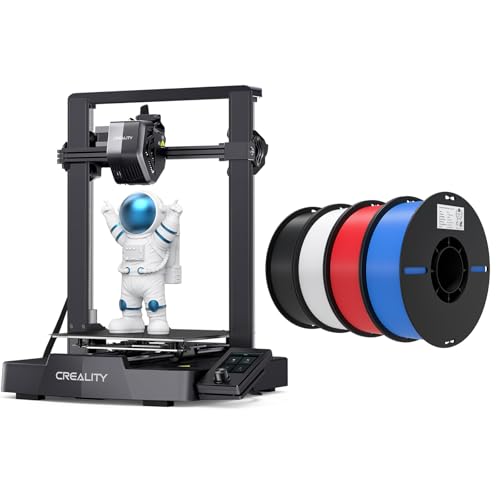
 Creality Ender 3 V3 SE Beginner-Friendly 3D PrinterEnder 3 V3 SE15 x 19.6 x 15 inches19.8 poundsCheck on Amazon
Quick picks: best 3d printers reddit
| # | Product | Where to buy |
|---|---|---|
| 1 | Creality Ender-3 V3 SE | Check on Amazon |
| 2 | Bambu Lab A1 | Check on Amazon |
| 3 | Bambu Lab P1S | Check on Amazon |
| 4 | Prusa MK4S | Check on Amazon |
| 5 | Anycubic Kobra 3 | Check on Amazon |
| 6 | Elegoo Neptune 4 Pro | Check on Amazon |
How the Picks Were Chosen
The picks were chosen for print quality first: reliable bed levelling, a stable frame and a hot end that holds its temperature. Next came ease of use, because a printer that needs constant tuning ends up unused. Material range and build volume were checked last, since a printer that cannot print the material or the size needed is a poor choice whatever its price.
Every pick in this guide was checked against the same list: does it fit the parts it is meant to hold, does it cool or print the way it should, and is it built to last? Models that failed on fit or on basic quality were left out, whatever their reputation. The six that remain cover different sizes, styles and budgets, so the guide has a sensible answer for most buyers rather than a single favourite.
The guide also weighs running costs and longevity, not just the purchase price. A printer that costs little to buy but a lot to run, or one that needs replacing after a single upgrade, is a poor choice whatever its headline features. The picks below were chosen to last through several years of use, with parts and supplies that stay available and a design that does not go out of date quickly.
Best 3D Printers Reddit: The Picks at a Glance
| Pick | Key Spec | Standout | Suits |
|---|---|---|---|
| 1. Creality Ender-3 V3 SE | FDM 3D printer with a 220 by 220 by 250 mm build volume | Very affordable entry into 3D printing | Beginners who want an affordable first 3D printer. |
| 2. Bambu Lab A1 | FDM 3D printer with a 256 mm cubic build volume | Automatic calibration makes good prints easy | Beginners and hobbyists who want easy, fast 3D printing. |
| 3. Bambu Lab P1S | Enclosed FDM 3D printer with a 256 mm cubic build volume | Enclosure allows ABS and ASA printing | Hobbyists and small businesses who print engineering plastics. |
| 4. Prusa MK4S | FDM 3D printer with a 250 by 210 by 220 mm build volume | Excellent print quality with careful engineering | Makers who want a reliable, repairable printer with community support. |
| 5. Anycubic Kobra 3 | FDM 3D printer with a 250 by 250 by 260 mm build volume | Good value for the build volume | Budget hobbyists who want a large build volume. |
| 6. Elegoo Neptune 4 Pro | FDM 3D printer with a 225 by 225 by 265 mm build volume | Strong value for the feature set | Budget hobbyists who want a capable, fast printer. |
Best 3D Printers Reddit: The Picks in Detail
1. Creality Ender-3 V3 SE
The Ender-3 V3 SE is Creality’s affordable entry-level FDM printer, with automatic bed levelling and a direct-drive extruder in an open frame. It suits beginners who want to learn 3D printing without a large budget, backed by a large community. For a first 3D printer, this one is a community favourite for its reliability and ease of use.
The Creality Ender-3 V3 SE is built for regular use, and very affordable entry into 3D printing is what the owner notices first. The fDM 3D printer with a 220 by 220 by 250 mm build volume keeps the printer practical day after day, and the design holds up to the routine of real use rather than just looking good on a specification sheet.
Two details set the Creality Ender-3 V3 SE apart. First, automatic bed levelling, which gives the printer its character. Second, prints PLA, PETG and TPU filaments, which keeps it practical in daily use. The result is a printer that offers automatic levelling makes first prints easier without the drawbacks that usually come with it, and that balance is why it earned a place among the six picks.
Key specs
- FDM 3D printer with a 220 by 220 by 250 mm build volume
- Automatic bed levelling
- Direct-drive extruder
- Prints PLA, PETG and TPU filaments
- Open-frame design
Two specifications deserve a closer look: automatic bed levelling and prints PLA, PETG and TPU filaments. The first sets the character of the printer, and the second decides how practical it is day to day. Together they explain most of what the Creality Ender-3 V3 SE does well.
Strengths
- Very affordable entry into 3D printing
- Automatic levelling makes first prints easier
- Large community shares profiles and upgrades
Trade-offs
- Open frame needs a calm room for best results
- Print quality needs tuning out of the box
- No enclosure for high-temperature filaments
Beginners who want an affordable first 3D printer.
Best for: Entry-level FDM 3D printing.
Not suited for: Engineering filaments or enclosed printing.
Check price on Amazon: Creality Ender-3 V3 SE

2. Bambu Lab A1
The Bambu Lab A1 is an entry-level FDM printer built around automatic calibration, so good prints come with little tuning. Its 256 mm build volume and fast speeds suit hobbyists who want to print often without fussing over settings. For a first 3D printer, this one is a community favourite for its reliability and ease of use.
Owners who choose the Bambu Lab A1 usually do so because of automatic calibration makes good prints easy. In practice that means less fuss, fewer compromises and a printer that does its job without drawing attention to itself. The fDM 3D printer with a 256 mm cubic build volume supports that, and the overall package stays sensible rather than showy.
The Bambu Lab A1 is easy to recommend once automatic bed levelling and flow calibration and fast print speeds for the class are understood. Those two features give the printer its strengths, including fast printing for an entry-level machine, and they explain why it suits the buyers this guide is written for. There are no surprises hiding in the design: what the specifications promise is what the printer delivers.
Key specs
- FDM 3D printer with a 256 mm cubic build volume
- Automatic bed levelling and flow calibration
- Prints PLA, PETG and TPU filaments
- Fast print speeds for the class
- Touchscreen controls
Check automatic bed levelling and flow calibration and fast print speeds for the class against the build before buying. The first decides whether the printer fits the parts, and the second decides whether it fits the room and the routine. Both are straightforward to verify from the specifications.
Strengths
- Automatic calibration makes good prints easy
- Fast printing for an entry-level machine
- Clean, modern design with a small footprint
Trade-offs
- Open frame limits high-temperature filaments
- Needs Bambu filament profiles for best results
- Small parts and accessories cost extra
Beginners and hobbyists who want easy, fast 3D printing.
Best for: Easy entry-level FDM printing.
Not suited for: Engineering filaments or large-format printing.
Check price on Amazon: Bambu Lab A1

3. Bambu Lab P1S
The P1S is Bambu Lab’s enclosed FDM printer, adding a chamber, filtration and a camera to the fast, self-calibrating platform. It suits hobbyists and small businesses who print ABS and ASA parts and want reliable results every time. For a first 3D printer, this one is a community favourite for its reliability and ease of use.
In daily use, the Bambu Lab P1S earns its place through enclosure allows ABS and ASA printing. The enclosed FDM 3D printer with a 256 mm cubic build volume works together with the rest of the design without fuss, and once the build is set up the printer stays out of the way. It is the kind of printer that disappears into the routine, which is the best compliment a printer can earn.
For buyers comparing similar models, automatic bed levelling and flow calibration is the feature to weigh most heavily. Paired with fast print speeds, it gives the Bambu Lab P1S a clear advantage in automatic calibration gives reliable results, and it is the reason this printer appears in this guide rather than a dozen similar models that do not offer the same combination.
Key specs
- Enclosed FDM 3D printer with a 256 mm cubic build volume
- Automatic bed levelling and flow calibration
- Prints PLA, PETG, ABS and ASA filaments
- Fast print speeds
- Built-in camera and air filtration
The automatic bed levelling and flow calibration matters because it decides how the printer behaves in a real build, not just on paper. Paired with fast print speeds, it covers the two details buyers ask about most, and both are worth checking against the parts list before ordering.
Strengths
- Enclosure allows ABS and ASA printing
- Automatic calibration gives reliable results
- Fast speeds with a built-in camera for monitoring
Trade-offs
- Enclosed design costs more than open-frame rivals
- Filament choice matters for enclosed printing
- Replacement parts are brand specific
Hobbyists and small businesses who print engineering plastics.
Best for: Enclosed FDM printing with ABS and ASA.
Not suited for: Very large prints or tight budgets.
Check price on Amazon: Bambu Lab P1S

4. Prusa MK4S
The MK4S is Prusa’s flagship FDM printer, known for reliable print quality and an open-source design that owners can repair and upgrade. It suits makers who print daily and value a machine that lasts for years with community support. For a first 3D printer, this one is a community favourite for its reliability and ease of use.
What stands out about the Prusa MK4S in everyday use is excellent print quality with careful engineering. That quality shows up every time the printer is used, and it is backed by fDM 3D printer with a 250 by 210 by 220 mm build volume. For a buyer choosing between similar models, that everyday reliability matters more than any single specification.
The practical case for the Prusa MK4S rests on automatic bed levelling with a loadcell sensor and open-frame design with an optional enclosure. Those features deliver open-source design with a huge community in everyday use, and they do so without demanding special care or extra parts. A buyer who wants a printer that simply works, day after day, will find that combination hard to beat.
Key specs
- FDM 3D printer with a 250 by 210 by 220 mm build volume
- Automatic bed levelling with a loadcell sensor
- Prints PLA, PETG, ASA and flexible filaments
- Open-frame design with an optional enclosure
- Open-source hardware and software
Two specifications deserve a closer look: automatic bed levelling with a loadcell sensor and open-frame design with an optional enclosure. The first sets the character of the printer, and the second decides how practical it is day to day. Together they explain most of what the Prusa MK4S does well.
Strengths
- Excellent print quality with careful engineering
- Open-source design with a huge community
- Reliable workhorse for daily printing
Trade-offs
- Costs more than budget rivals
- Open frame needs an enclosure for ABS
- Assembly takes time in kit form
Makers who want a reliable, repairable printer with community support.
Best for: Reliable daily FDM printing.
Not suited for: Tight budgets or enclosed printing out of the box.
Check price on Amazon: Prusa MK4S

5. Anycubic Kobra 3
The Kobra 3 is Anycubic’s value FDM printer, offering a large build volume and automatic levelling at a budget price. It suits hobbyists who want to print big models without paying for a premium machine. For a first 3D printer, this one is a community favourite for its reliability and ease of use.
The Anycubic Kobra 3 is built for regular use, and good value for the build volume is what the owner notices first. The fDM 3D printer with a 250 by 250 by 260 mm build volume keeps the printer practical day after day, and the design holds up to the routine of real use rather than just looking good on a specification sheet.
The automatic bed levelling is the detail that decides whether this printer suits the build. It works with fast print speeds for the class to give the printer a clear role: automatic levelling makes setup easy, without asking the owner to compromise on the basics. Builders who check those two details before ordering usually end up happy, because the printer does what they bought it for from the first day.
Key specs
- FDM 3D printer with a 250 by 250 by 260 mm build volume
- Automatic bed levelling
- Prints PLA, PETG and TPU filaments
- Fast print speeds for the class
- Touchscreen controls
Check automatic bed levelling and fast print speeds for the class against the build before buying. The first decides whether the printer fits the parts, and the second decides whether it fits the room and the routine. Both are straightforward to verify from the specifications.
Strengths
- Good value for the build volume
- Automatic levelling makes setup easy
- Fast printing for a budget machine
Trade-offs
- Open frame limits high-temperature filaments
- Print quality needs tuning for fine detail
- Community is smaller than the biggest brands
Budget hobbyists who want a large build volume.
Best for: Value FDM printing with a big build area.
Not suited for: Engineering filaments or enclosed printing.
Check price on Amazon: Anycubic Kobra 3

6. Elegoo Neptune 4 Pro
The Neptune 4 Pro is Elegoo’s value FDM printer, pairing automatic levelling with fast print speeds at a budget price. It suits hobbyists who want a capable machine for PLA and PETG without a premium budget. For a first 3D printer, this one is a community favourite for its reliability and ease of use.
Owners who choose the Elegoo Neptune 4 Pro usually do so because of strong value for the feature set. In practice that means less fuss, fewer compromises and a printer that does its job without drawing attention to itself. The fDM 3D printer with a 225 by 225 by 265 mm build volume supports that, and the overall package stays sensible rather than showy.
Look closely at automatic bed levelling and fast print speeds for the class before deciding. Together they explain why this printer is on the list: automatic levelling speeds up setup, and the rest of the design supports that rather than fighting it. A buyer who values those qualities will find the Elegoo Neptune 4 Pro a straightforward choice, while a buyer who needs something else should look at the other picks in this guide.
Key specs
- FDM 3D printer with a 225 by 225 by 265 mm build volume
- Automatic bed levelling
- Prints PLA, PETG and TPU filaments
- Fast print speeds for the class
- Open-frame design
The automatic bed levelling matters because it decides how the printer behaves in a real build, not just on paper. Paired with fast print speeds for the class, it covers the two details buyers ask about most, and both are worth checking against the parts list before ordering.
Strengths
- Strong value for the feature set
- Automatic levelling speeds up setup
- Good print quality for the price
Trade-offs
- Open frame limits high-temperature filaments
- Fan noise is noticeable at full speed
- Smaller community than the biggest brands
Budget hobbyists who want a capable, fast printer.
Best for: Value FDM printing for hobbyists.
Not suited for: Engineering filaments or quiet rooms.
Check price on Amazon: Elegoo Neptune 4 Pro
Buying Guide
Start with what will be printed. Small decorative models suit an entry-level open-frame printer, while functional parts in ABS or nylon need an enclosed printer. Check the build volume against the largest model planned, and check the material range, since a printer that only handles PLA cannot print strong engineering parts.
- Build volume: check the largest model against the printer’s build volume, and remember that tall models print slower than wide ones.
- Material range: PLA suits beginners, PETG suits stronger parts, and ABS, ASA and nylon need an enclosed printer.
- Bed levelling: automatic levelling makes first prints far easier, especially for beginners.
- Enclosure: an enclosed printer holds its temperature and suits ABS and ASA, while an open frame suits PLA and PETG.
- Print speed: faster printers save hours on large models, but very fast printing can reduce fine detail.
- Ease of use: a touchscreen, automatic calibration and a clear manual matter more than extra features for a first printer.
- Community and parts: a printer with a large community and available spare parts is easier to maintain and upgrade.
- Resin or FDM: resin printers give finer detail for small models, while FDM printers suit larger, stronger parts.
Once the material and size are set, check the total cost. Filament, resin, replacement nozzles and a wash-and-cure station for resin all add to the price, so budget for supplies as well as the machine. A printer that matches the models, the materials and the budget is the right one.
Budget planning deserves the same care as the parts list. Set the total budget first, then decide how much goes to the printer itself and how much stays for the parts, the supplies and any extras such as fans or ink. A printer that takes the whole budget leaves nothing for the parts that actually do the work, while a printer that is too cheap can force a replacement within a year. The picks in this guide span a range of prices, so most budgets have a sensible option among them.
Slicing software matters as much as the printer. A good slicer with tested profiles for the printer and the material gives better results than a fast printer with poor settings. Spend time learning the slicer, and print a small test model before committing to a large, expensive print.
Filament storage is part of printing, not an afterthought. PLA and PETG absorb moisture from the air, and damp filament prints with bubbles and poor layer adhesion. Store filament in sealed bags with desiccant, and dry any spool that has been left out before printing with it.
A first layer decides whether a print succeeds or fails. A level bed, a clean build plate and the right temperature give a first layer that sticks and stays flat. Check the first layer on every print before walking away, because a failed first layer wastes the whole print.
Supplies cost more than the machine over time. Ink or toner, paper and replacement parts add up across a year of printing, so compare the running costs before comparing the prices of the machines themselves. A printer with low running costs is usually the cheaper choice within a year.
Connectivity decides whether a printer gets used. A printer that prints from every phone and computer in the house will be used far more than one that needs a cable and a driver install. Check Wi-Fi, mobile printing and network support before buying.
Paper handling is easy to overlook and annoying to get wrong. A printer that jams on thick paper or curls photo paper will frustrate its owner every week. Test the paper types that will actually be used, and keep paper dry and flat.
A printer needs a place to live. Measure the desk or shelf, check the space for the paper tray and the output, and leave room to open the lid or the front panel. A printer squeezed into a tight space is hard to load, hard to clean and easy to knock.
Print quality starts with the file. A low-resolution image printed large will look soft whatever the printer, and a document saved in the wrong colour mode will print with shifted colours. Check the file resolution and colour settings before blaming the printer for a poor result.
A test print saves paper and ink. Print one copy first, check the colours and the layout, and only then print the full run. For photos, a small test print on plain paper catches layout mistakes before expensive photo paper is used.
Keep spare supplies on the shelf. A printer that runs out of ink or paper during an important job wastes more time than the supplies cost. Keep one spare ink or toner set and a ream of paper nearby, and replace them when they are used rather than when the printer stops.
Firmware updates fix real problems. Makers release updates that improve paper handling, fix connectivity bugs and add features, so check for updates every few months. A printer that is never updated can develop problems that were fixed long ago.
The output tray needs room too. A printer that prints onto a tray with no space for the pages to land will scatter them on the floor, and a tray that is too small for the paper size will curl the output. Check the tray size against the paper that will actually be used.
Scanner glass needs cleaning as often as the print head. A fingerprint or a speck of dust on the glass leaves a mark on every scan and copy until it is wiped away. A soft, dry cloth keeps the glass clear, and harsh cleaners can damage the coating.
Two-sided printing saves paper and looks professional. A printer with automatic two-sided printing handles reports and contracts without manual flipping, and it halves the paper bill over a year. Check that the feature works for the paper weight used most.
Keep the printer driver up to date. An old driver can cause missing features, poor colours or a printer that disappears from the network. Download the driver from the maker’s own site rather than relying on the version that came in the box.
A printer that is shared needs a simple routine. Keep paper stocked, keep spare ink or toner on the shelf, and check the output tray at the end of the day. A shared printer with no routine runs out of supplies at the worst moment, usually during the most important job of the week.
When the shortlist is ready, compare the finalists on the details that matter for this build rather than on features that will never be used. A case or printer that matches the parts, the space and the budget is the right purchase, and the cheapest option is rarely the best value once running costs and longevity are counted.
Setting Up and Looking After Your Printer
Keep the printer clean and calibrated. Clean the build plate after every print, check the bed level weekly, and replace a worn nozzle when prints lose quality. Store filament dry and sealed, since damp filament prints poorly and clogs the nozzle. For resin printers, wear gloves, work in a ventilated space, and wash and cure every print.
Check the moving parts regularly. Lubricate the rails and lead screws as the manual describes, tighten any loose belts, and keep the printer out of draughts, since a cold draught can warp a print. Update the firmware when the maker releases it, and keep a spare nozzle and a spare build plate on hand.
Set aside time for the first setup. Read the manual before starting, lay out the parts and the tools, and work in a clean, well-lit space. A careful first setup saves hours of troubleshooting later, and it gives the owner a clear picture of how the machine works when something eventually needs attention.
Keep the manual and the spare parts that come in the box. Screws, brackets, cables and filters are easy to lose and hard to replace, and the manual holds the clearance limits and the setup steps that matter when the machine is upgraded later. A labelled box with the spares and the manual saves a search when it is needed most.
Common Mistakes to Avoid
Most problems with a new printer come from a small number of avoidable mistakes. The list below covers the ones that appear most often, and avoiding them saves time, money and frustration.
- Printing ABS or nylon in an open-frame printer and wondering why the parts warp.
- Storing filament in a damp room and blaming the printer for poor prints.
- Skipping bed levelling and getting a first layer that will not stick.
- Printing a large model without checking it fits the build volume.
- Handling resin without gloves or ventilation.
- Choosing a printer for its speed and finding the fine detail is poor.
The common thread is preparation. Measure first, read the manual, and check the parts against the specifications before ordering. A little time spent planning is worth far more than the time spent fixing a mistake after the parts have arrived.
One last mistake is rushing the first use. A new printer deserves a careful first run: check the temperatures or the first prints, listen for unusual noise, and confirm that every feature works before the return window closes. A problem found in the first week is far easier to fix than one found months later.
Frequently Asked Questions
Why does community support matter for a 3D printer?
Because every printer needs tuning, and a large community shares print profiles, spare parts and fixes for common problems. A printer with a big community is easier to learn and easier to keep running.
What should a beginner look for in a 3D printer?
Automatic bed levelling, a clear manual, and a machine that prints PLA well out of the box. Those three features matter more than top speed or build volume for a first printer.
What is the easiest material for a beginner?
PLA is the easiest material to start with. It prints at lower temperatures, sticks well to the build plate, and does not need an enclosed printer. PETG is the next step for stronger parts.
Do I need an enclosed printer?
For PLA and PETG, no. For ABS, ASA and nylon, yes, because those materials need a warm, stable chamber to print without warping. An enclosed printer also keeps dust and draughts away from the print.
How long does a 3D print take?
It depends on the size and the detail. A small model can take an hour, while a large, detailed model can take a day or more. Faster printers save time, but the layer height and the infill matter more than the top speed.
How do I know if a printer will fit my desk?
Check the width, depth and height in the specifications, and add room for the paper tray, the output tray and the lid or front panel to open. A printer needs more space than its footprint suggests, since paper has to go in and out freely.
Can I use third-party ink or toner?
It is possible, but the results vary and some makers warn that third-party supplies can affect print quality or the warranty. For important work, the maker’s own supplies give the most predictable results, and for everyday printing the savings need to be weighed against the risk of a clogged print head or a faded print.
How do I stop my printer going offline?
Check the network first: a printer on weak Wi-Fi drops off the network often, and a wired connection or a stronger signal fixes most cases. Give the printer a fixed network address so the router does not move it, and update the firmware, since makers often fix connectivity bugs in updates.
More From GizmoVerdict
For related buying guides on the same site, see our guides to best printers with an auto-feed scanner, best scan-to-email printers, best large resin printers.
Final Recommendation
Our top pick among the six is the Creality Ender-3 V3 SE, because it balances the qualities this guide values most: it fits the parts it is meant to hold, it performs well in daily use, and it is built to last. Buyers who want a safe first choice should start there, and buyers with a specific need should pick the model whose strengths match it. The full comparison table above makes that choice straightforward.
The runner-up, the Bambu Lab A1, deserves a mention for buyers whose priorities differ slightly. It trades a little of the top pick’s balance for a strength of its own, and for some builds that trade is the right one. Compare the two on the details that matter for the build at hand, and choose the one whose strengths line up with the parts, the room and the budget.
Whatever the final choice, the same advice applies: measure the parts, match the cooling or the printing to the workload, and keep the machine clean. A printer that is chosen carefully and looked after properly lasts through several upgrades, and that is the printer worth buying.