What's inside
- Key Takeaways
- Quick Picks
- How were these 144Hz picks chosen?
- Side-by-side comparison
- How do you match a GPU tier to a 144Hz panel?
- Our refresh-rate evaluation routine
- Common mistakes when shopping by refresh rate
- Why 144Hz became the sensible standard
- Settings recipes by tier, without invented numbers
- The network half of a smooth game
- Panel quality beyond the refresh number
- Longevity: which parts of a 144Hz laptop age first
- Desk ergonomics for high-refresh play
- What about 165Hz, 240Hz, and other ceilings?
- Buying during a sale without buying the wrong twin
- First-week setup for a high-refresh laptop
- Final recommendation
- Frequently asked questions
As an Amazon Associate I earn from qualifying purchases. This post may contain affiliate links at no extra cost to you.
gizmoverdict.com is reader-supported. When you buy through links on our site, we may earn an affiliate commission.
Where to buy: High-refresh gaming laptops are stocked on Amazon in deep variant families, where the same chassis appears with three different graphics cards under lookalike titles. The six machines below each link to a specific product page carrying their exact configuration, and that page deserves a careful read before checkout, particularly for memory type and storage size. Match the model code quoted in each review to the code on the page.
A refresh rate is a promise a panel makes and a graphics card must keep. That relationship sits at the center of any honest search for the best gaming laptops 144hz, because a 144Hz screen only shows its advantage when the hardware feeds it frames at something like that pace. This guide therefore treats the panel as the entry ticket, every pick states 144Hz in its title, and the graphics card as the real subject, with tiers running from the RTX 3050 through the 4050 and 5050 up to the RTX 4060. Frame expectations are given as method rather than as invented numbers: esports and competitive titles are built to run fast on modest hardware and will use these panels fully, while demanding AAA releases ask each tier for a different compromise among settings, upscaling, and refresh ambition. A buyer who understands that exchange in advance can shop this entire class calmly, because no listing here hides its tier and no review below inflates one. Memory spans 16GB to a standout 32GB, storage runs 512GB to 1TB, and processors come from both AMD and Intel, so the six finalists differ in far more than their badges.
Key Takeaways
- Every pick states 144Hz in its listing title; that was the entry rule for this guide, not a marketing summary.
- GPU tiers climb from RTX 3050 to RTX 4060, and each review matches its settings advice to its own tier.
- The Lenovo LOQ RTX 4060 configuration stands out with 32GB of DDR5 memory and a 1TB drive.
- Esports titles will exploit these panels most fully; AAA releases trade settings and upscaling for smoothness tier by tier.
- The MSI Cyborg listing bundles a Belkin 6-in-1 GaN dock, an unusual extra worth verifying on the product page.
- Two picks use DDR4 memory and four use DDR5, a distinction the spec boxes keep visible.
Quick Picks
| Pick | Machine | Badge |
|---|---|---|
| 1 | ASUS TUF Gaming A15 RTX 3050 | Best entry into 144Hz play |
| 2 | Lenovo LOQ RTX 4050 | Best connectivity for the tier |
| 3 | MSI Cyborg 15 RTX 5050 | Best bundled-dock value |
| 4 | ASUS TUF Gaming A15 RTX 4060 | Best color-covered 4060 build |
| 5 | Lenovo LOQ RTX 4060 | Best memory and storage specification |
| 6 | HP Victus 15 RTX 4050 | Best understated mainstream design |
How were these 144Hz picks chosen?
The screen came first in screening, by design. Any listing that did not state 144Hz plainly in its title was excluded, however strong its other credentials, because a guide organized around a refresh rate owes readers that literal discipline. With the panel guaranteed, selection turned to the honesty of the pairing: a 144Hz display above an entry card is a fine esports machine and a poor AAA promise, so the field was balanced deliberately across GPU tiers, letting each buyer locate the tier their library actually needs. Two RTX 4060 builds anchor the top, two RTX 4050 builds and an RTX 5050 cover the middle, and a single RTX 3050 machine represents the entry, each labeled without euphemism.
Supporting specifications were audited next. Sixteen gigabytes of memory is the floor across all six, with one 32GB configuration earning explicit credit, and storage splits evenly between 512GB and 1TB builds. Memory type matters more than shoppers expect at this level, so DDR4 versus DDR5 is recorded in every spec box rather than smoothed over. Port selection received unusual attention in this roundup because high-refresh laptops often double as desk machines, and the listings that name Ethernet, USB-C, or HDMI in their titles earned notes for it. Finally, every configuration had to be stated completely enough to verify at checkout by model code, FA506NC-DS53, FA507NV-EH74, and their peers, because refresh-rate shopping attracts variant confusion like few other categories. Readers weighing a previous-generation alternative with the same panel promise can detour through our best rtx 3060 gaming laptops roundup for comparison.
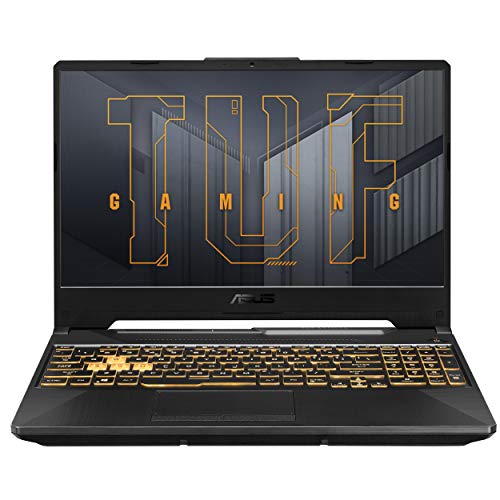
1. ASUS TUF Gaming A15 RTX 3050 — Best entry into 144Hz play
The entry pick in this guide earns its place by refusing to be a stripped machine. ASUS pairs the RTX 3050 with an AMD Ryzen 5 7535HS processor, 16GB of DDR5 memory, and a 512GB PCIe Gen 4 SSD, beneath a 15.6-inch FHD panel in 16:9 at 144Hz, with Wi-Fi 6 and Windows 11 Home completing the title, model FA506NC-DS53. The memory figure matters most: many entry gaming laptops still ship 8GB, and this one’s full 16GB of the current DDR5 standard means the platform around the modest card never becomes the bottleneck that ruins the experience.
The card itself should be matched to the right library, and this review will do the matching plainly. Competitive and esports titles, the games 144Hz panels exist for, are engineered to run quickly on accessible hardware, and the 3050 serves them at 1080p with settings room to spare. Older AAA titles and indie catalogs follow happily. The newest cinematic releases are where the tier shows: expect medium settings, upscaling where offered, and a refresh experience that lives below the panel’s ceiling in those specific games. None of that diminishes the machine’s real identity, which is the most affordable honest doorway in this guide into high-refresh play, wrapped in ASUS’s TUF durability branding. Buyers whose evenings are dominated by competitive titles will find this pick not merely sufficient but well aimed.
There is a strategic comfort in buying the entry tier knowingly. A player whose competitive titles are already chosen, whose settings expectations were formed by this review rather than by a flagship advertisement, will extract full value from this machine for years, because none of its limits intersect with that library. The TUF chassis also leaves the owner a respectable general computer when gaming ends for the evening, with a modern processor generation and memory standard that will not embarrass a coursework load. Entry tiers fail buyers only when they are sold as something else; sold as itself, this A15 is a precise instrument for a defined job.
Strengths
- 16GB of DDR5 memory, the full modern standard, at the entry tier
- Ryzen 5 7535HS keeps everyday and gaming workloads responsive
- 144Hz panel serves competitive titles exactly as intended
Trade-offs
- RTX 3050 is the least powerful card in this guide
- Newest AAA releases require medium settings and upscaling
- 512GB storage follows the class’s modest pattern
- Display: 15.6-inch FHD 16:9, 144Hz
- Processor: AMD Ryzen 5 7535HS
- Graphics: NVIDIA GeForce RTX 3050
- Memory: 16GB DDR5
- Storage: 512GB PCIe Gen 4 SSD
- Wireless: Wi-Fi 6
- Operating system: Windows 11 Home
- Model: FA506NC-DS53
- Weight: Not stated in the listing title
Best for: competitive and esports libraries played at 1080p on a high-refresh panel.
Not suited for: cinematic AAA releases at high settings and full refresh.
TUF A15 variants span several GPU tiers under one name, so confirm FA506NC-DS53 when you check price on Amazon.

2. Lenovo LOQ RTX 4050 — Best connectivity for the tier
Lenovo’s first LOQ in this guide builds its case on the RTX 4050 and an unusually communicative port list. The title names an AMD Ryzen 5 7235HS processor, a 15.6-inch 144Hz FHD display, 16GB of DDR5, a 512GB SSD, Wi-Fi 6, and then keeps going: Ethernet, USB-C, HDMI, and a backlit keyboard, with Windows 11 Home installed. That wired Ethernet port deserves its sentence, because competitive players, the natural audience for a 144Hz machine, treat a cable as equipment rather than as nostalgia, and many rival listings at this tier leave the port unmentioned or absent.
The RTX 4050 steps up from the 3050 in meaningful ways, adding a newer architecture and DLSS frame generation support to the toolkit, which changes the AAA conversation from apology to negotiation: high settings in many titles at 1080p, upscaling and generated frames available when a demanding scene asks, and esports performance that uses the panel thoroughly. The Ryzen 5 7235HS is a focused quad-core-class gaming chip rather than a multitasking flagship, a sensible allocation at this tier where the GPU does the heavy lifting. Storage at 512GB is the shared compromise. As a complete proposition, this LOQ is the tier’s most desk-ready machine, the one that plugs into a wired, monitor-backed setup with the fewest adapters and apologies.
Lenovo’s LOQ philosophy shows clearly in this configuration’s priorities. Rather than spending the whole budget on one glamorous component, the listing distributes it across the chain a competitive player actually touches: the card, the panel, the wired port, the keyboard’s backlight for late sessions. That distribution is why LOQ machines so often become the recommendation for a first serious gaming laptop, because the ownership experience has no obvious missing piece to apologize for in month two. The 4050 build simply executes the philosophy with current parts, and its few limits, storage chief among them, are the kind an external drive answers cheaply when the day comes.
Strengths
- Ethernet, USB-C, and HDMI all named in the title for desk setups
- RTX 4050 brings DLSS frame generation to the middle tier
- DDR5 memory keeps the platform on the current standard
Trade-offs
- Ryzen 5 7235HS prioritizes gaming over heavy multitasking
- 512GB SSD is the middle tier’s common limitation
- Title omits any color-coverage claim for creator work
- Display: 15.6-inch FHD, 144Hz
- Processor: AMD Ryzen 5 7235HS
- Graphics: GeForce RTX 4050
- Memory: 16GB DDR5
- Storage: 512GB SSD
- Wireless: Wi-Fi 6
- Ports named: Ethernet, USB-C, HDMI
- Keyboard: Backlit
- Operating system: Windows 11 Home
- Weight: Not stated in the listing title
Best for: wired competitive play with an external monitor on the desk.
Not suited for: heavy simultaneous streaming, editing, and gaming workloads.
LOQ configurations multiply quickly across GPU tiers, making the RTX 4050 and Ryzen 5 7235HS lines the ones to match as you verify the Amazon price.

3. MSI Cyborg 15 RTX 5050 — Best bundled-dock value
MSI’s Cyborg arrives with the strangest and most practical garnish in this guide: the title promises a free Belkin 6-in-1 GaN dock rated at 130W alongside the laptop, an accessory that directly serves the desk half of a gaming laptop’s life. The machine itself runs an Intel Core i5-13420H beside an RTX 5050 specified with 8GB of graphics memory, 16GB of system RAM, and a 512GB SSD, under a 15.6-inch FHD 144Hz screen in a grey chassis with Windows 11 installed. The Cyborg family’s thin-and-light intent hovers over the design even though this particular title does not use the phrase, and no weight figure is given.
The RTX 5050 is the current generation’s 1080p card, and its review follows the same honesty rules as its tier-mates: high settings in popular titles, DLSS upscaling and frame generation as the mechanisms that stretch it into heavier releases, and no claim on flagship territory. The i5-13420H is a capable, well-understood Intel chip whose behavior Windows handles maturely. What tips this listing into its own niche is the dock. A six-in-one hub converts a portable machine into a one-cable desk citizen, and bundling it removes a purchase that high-refresh laptop owners almost always make within the first month. Verify the bundle’s presence on the product page at checkout, since promotional inclusions can rotate, and the Cyborg becomes the value story of the middle tier: current silicon, the panel the guide requires, and the desk accessory included in the box.
The dock deserves one more paragraph, because its value compounds in ways a spec sheet cannot show. A hub turns the daily arrival at a desk into a single gesture: one cable, and the portable machine inherits the monitor, the keyboard, the mouse, and the wired network of a desktop. That gesture, repeated twice a day for years, is worth more to real satisfaction than a small benchmark margin, and it is normally purchased separately at exactly the moment a new owner is most tired of spending. Receiving it in the box, from a named accessory brand rather than as an anonymous throw-in, makes this Cyborg the most desk-complete package in the guide’s middle tier before a single game is even installed.
Strengths
- Bundled Belkin 6-in-1 GaN dock serves the desk setup immediately
- RTX 5050 with 8GB graphics memory is current-generation 1080p silicon
- Core i5-13420H is a mature, well-supported Intel platform
Trade-offs
- 512GB storage repeats the middle tier’s standard limit
- Bundle contents should be re-verified on the product page
- No weight figure or thin-and-light claim appears in this title
- Display: 15.6-inch FHD, 144Hz
- Processor: Intel Core i5-13420H
- Graphics: GeForce RTX 5050, 8GB
- Memory: 16GB RAM
- Storage: 512GB SSD
- Bundled: Belkin 6-in-1 GaN Dock 130W, per title
- Operating system: Windows 11
- Color: Grey
- Weight: Not stated in the listing title
Best for: a one-cable desk setup built around a current-generation 1080p machine.
Not suited for: a large installed library kept entirely on the internal 512GB drive.
Because the dock is a promotional inclusion, confirm it still appears in the offer when you look at the live Amazon price.

4. ASUS TUF Gaming A15 RTX 4060 — Best color-covered 4060 build
The second TUF A15 in this guide shares a name and a chassis family with the first pick and almost nothing else that matters. This 2023 configuration, model FA507NV-EH74, carries a GeForce RTX 4060, an AMD Ryzen 7 7735HS, 16GB of DDR5, and a 1TB PCIe SSD, beneath a 15.6-inch FHD 144Hz display whose title adds a 100% sRGB coverage claim. That color note elevates the machine beyond gaming duty, because a panel specified for full sRGB coverage can grade photos and edit video credibly, turning the laptop into a creator-capable tool rather than a single-purpose game box.
The 4060 is where this guide’s settings conversation relaxes. At 1080p it handles demanding titles at high settings with DLSS in a supporting rather than starring role, and it feeds the 144Hz panel far more of the time than the tiers below can. Esports players get the full panel experience essentially whenever they ask for it. The terabyte drive removes the storage asterisk that follows most of this guide, and the Ryzen 7 restores multitasking headroom the Ryzen 5 builds ration. Buyers comparing the two TUF A15 listings should treat them as different machines wearing one uniform: the badge is shared, the capability is not, and the model codes, DS53 versus EH74, are the reliable way to tell the twins apart at checkout.
Consider what the color claim quietly unlocks for a household. A student in a media program, a photographer building a portfolio, a streamer cutting highlights: each can treat this laptop as their primary creative machine without the nagging doubt that its screen is misrepresenting their work. Gaming laptops rarely earn that trust, because their panels are specified for speed alone, and the ones that do usually sit far above this guide’s neighborhoods. The EH74’s combination, full sRGB language beside a genuinely strong card and a terabyte of storage, is the kind of specification overlap that makes a machine the household’s default answer to every task for years.
Strengths
- RTX 4060 delivers high settings at 1080p across demanding titles
- 100% sRGB panel claim extends the machine into creator work
- 1TB PCIe SSD doubles the storage of the guide’s 512GB majority
Trade-offs
- Shares its A15 name with the far weaker RTX 3050 configuration
- Ryzen 7 7735HS is a strong but not flagship processor
- Title names no Ethernet port for wired competitive setups
- Display: 15.6-inch FHD, 144Hz, 100% sRGB
- Processor: AMD Ryzen 7 7735HS
- Graphics: GeForce RTX 4060
- Memory: 16GB DDR5
- Storage: 1TB PCIe SSD
- Wireless: Wi-Fi 6
- Operating system: Windows 11
- Model: FA507NV-EH74
- Weight: Not stated in the listing title
Best for: high-settings 1080p gaming mixed with color-sensitive creative work.
Not suited for: a checkout completed without distinguishing the EH74 code from the DS53.
The EH74 suffix is the whole ballgame with this listing, so check it twice as you confirm the price on Amazon.

5. Lenovo LOQ RTX 4060 — Best memory and storage specification
If one listing in this guide reads like it was specified by an owner rather than by a marketing department, it is this LOQ. The RTX 4060 is paired with an Intel 13th-generation i7-13700H, and then the title keeps spending where daily life notices: 32GB of DDR5 RAM, double the guide’s standard, and a 1TB PCIe SSD. The 15.6-inch FHD 144Hz display, webcam, HDMI, RJ45 Ethernet, backlit keyboard, and Wi-Fi 6 complete a specification in a grey chassis with Windows 11 Home that seems determined to leave no common complaint unaddressed.
Thirty-two gigabytes changes the texture of ownership more than any single upgrade in this class. Games stop competing with the browser, the editor, the capture tool, and the voice client for elbow room, and the machine’s useful life stretches because memory pressure is the slow tax that ages laptops most visibly. The i7-13700H is a genuinely powerful processor that will not bottleneck the 4060 in any realistic scenario this guide contemplates, and the Ethernet port repeats the wired virtue praised in its smaller LOQ sibling. Against this completeness, the trade-offs are almost pedantic: the panel claims no special color coverage, and the design is utilitarian grey. As the strongest all-around specification under the 144Hz banner, this is the listing the rest of the guide is measured against.
It is worth stating plainly who should not buy this machine, because its completeness can seduce the wrong owner. A player whose sessions are a single game, a voice client, and nothing else will never touch the second half of its memory, and the premium that memory represents would serve them better saved or spent on peripherals. The LOQ 4060 rewards a specific life: many windows, many roles, one computer. Students running virtual machines, creators rendering while they game, professionals whose laptop is also their workstation, these are its people. Matching a flagship specification to a flagship workload is the entire discipline of this guide, and this listing is the test case at the top of the range.
Strengths
- 32GB of DDR5 memory, double every other pick in this guide
- i7-13700H and RTX 4060 form the strongest pairing here
- 1TB storage plus RJ45 Ethernet cover work and play completely
Trade-offs
- No color-coverage claim accompanies the otherwise strong panel
- Utilitarian grey design prioritizes function over flair
- Specification richness makes sibling LOQ listings easy to confuse with it
- Display: 15.6-inch FHD, 144Hz
- Processor: Intel Core i7-13700H, 13th generation
- Graphics: NVIDIA GeForce RTX 4060
- Memory: 32GB DDR5 RAM
- Storage: 1TB PCIe SSD
- Ports named: HDMI, RJ45 Ethernet
- Keyboard: Backlit
- Wireless: Wi-Fi 6
- Operating system: Windows 11 Home
- Color: Grey
- Weight: Not stated in the listing title
Best for: heavy multitasking alongside high-settings gaming on one machine.
Not suited for: color-grading work that requires a stated coverage specification.
Match the 32GB and 1TB lines carefully when you check the Amazon listing price, since lesser LOQ builds share the family name.

6. HP Victus 15 RTX 4050 — Best understated mainstream design
HP closes the guide with the mainstream interpretation of the 144Hz brief. The Victus 15 in Mica Silver, a 2024 design, pairs an Intel Core i5-13420H with an NVIDIA GeForce RTX 4050 specified at 6GB, 16GB of DDR4 memory, and a 512GB SSD, beneath the required 15.6-inch FHD 144Hz screen. The specification is a study in sufficiency: nothing leads the guide, nothing embarrasses it, and the whole is wrapped in the most office-appropriate styling of the six, a machine that can sit in a meeting at noon and a ranked queue at nine without costume changes.
The DDR4 memory is the detail to register, since four of the six picks here use DDR5. In gaming practice at this tier the difference is modest, because the GPU sets the pace, but buyers comparing long-term platform currency should note it alongside the Victus’s otherwise current 2024 bones. The 4050’s toolkit, DLSS upscaling and frame generation included, matches its Lenovo tier-mate’s, so the settings story is the familiar middle-tier one: esports at full refresh, demanding titles at high settings with software assistance. HP’s mainstream support footprint and the Victus line’s ubiquity complete the case. This is the pick for the 144Hz experience delivered by the most familiar name in the room, with the compromises printed, as everywhere in this guide, on the label.
The Victus’s restraint extends to its ownership story. Mainstream lines accumulate the deepest pools of community knowledge, replacement parts, and IT-department familiarity, so a problem in year three is a solved problem with a searchable answer rather than a research project. For a buyer purchasing a first gaming laptop, or a parent purchasing for a household where the machine will be shared, borrowed, and occasionally mishandled, that boring infrastructure has genuine value that no benchmark records. The 4050 inside still delivers the modern toolkit, so the safety never costs the experience itself. It is the guide’s most conservative recommendation, and conservative, properly understood, is a compliment about risk rather than a criticism of ambition.
Strengths
- Mica Silver styling suits professional and gaming settings equally
- RTX 4050 toolkit includes DLSS frame generation for demanding titles
- 2024 platform from the most mainstream line in this guide
Trade-offs
- DDR4 memory trails the DDR5 in four rival picks
- 512GB SSD matches the class norm without exceeding it
- Title names no Ethernet or special display coverage
- Display: 15.6-inch FHD, 144Hz
- Processor: Intel Core i5-13420H
- Graphics: NVIDIA GeForce RTX 4050, 6GB
- Memory: 16GB DDR4
- Storage: 512GB SSD
- Color: Mica Silver (2024)
- Weight: Not stated in the listing title
Best for: a mixed professional and gaming life in one understated chassis.
Not suited for: a platform specification requiring DDR5 memory as a condition.
Victus listings span several model years, so verify the 2024 Mica Silver build and its i5-13420H when you see the current price on Amazon.
Side-by-side comparison
| Machine | Display | Processor | Graphics | Memory | Storage |
|---|---|---|---|---|---|
| ASUS TUF A15 3050 | 15.6-inch FHD 144Hz | Ryzen 5 7535HS | RTX 3050 | 16GB DDR5 | 512GB PCIe Gen 4 SSD |
| Lenovo LOQ 4050 | 15.6-inch FHD 144Hz | Ryzen 5 7235HS | RTX 4050 | 16GB DDR5 | 512GB SSD |
| MSI Cyborg 15 | 15.6-inch FHD 144Hz | Core i5-13420H | RTX 5050 8GB | 16GB RAM | 512GB SSD |
| ASUS TUF A15 4060 | 15.6-inch FHD 144Hz 100% sRGB | Ryzen 7 7735HS | RTX 4060 | 16GB DDR5 | 1TB PCIe SSD |
| Lenovo LOQ 4060 | 15.6-inch FHD 144Hz | Core i7-13700H | RTX 4060 | 32GB DDR5 | 1TB PCIe SSD |
| HP Victus 15 | 15.6-inch FHD 144Hz | Core i5-13420H | RTX 4050 6GB | 16GB DDR4 | 512GB SSD |
How do you match a GPU tier to a 144Hz panel?
Work from your library outward. Divide the games you play into three honest piles: competitive titles built for speed, mainstream releases of the last several years, and the newest cinematic flagships. If the first pile dominates, every tier in this guide will satisfy you, and the decision can be made on memory, ports, and price positioning instead. If the second pile dominates, the 4050 and 5050 middle becomes the natural home, with the 4060 builds buying insurance. If the third pile dominates, start at the 4060 listings and treat anything below them as a settings negotiation you will repeat with every new release. This library-first method outperforms benchmark shopping because it measures the machine against the workload that actually exists.
Then consider the panel’s second job. A 144Hz screen improves everything a computer displays, scrolling, window motion, cursor feel, so even a tier that cannot fill it in flagship games repays the specification daily in ordinary use; no pick here wastes its panel. Memory deserves the next look, with 16GB as the working standard and the LOQ 4060’s 32GB as the luxury that multitaskers will feel most. Storage follows the familiar arithmetic of install sizes. Finally, decide how the machine will live at a desk: wired Ethernet, a bundled dock, or a color-covered panel each serves a different desk, and the listings here conveniently specialize. Players whose library is dominated by one enormous ray-traced world may also want the tier analysis in our best gaming laptops for cyberpunk 2077 guide before committing.
Our refresh-rate evaluation routine
We judge high-refresh laptops by alternating the two experiences the panel promises. The first session is always a competitive title played on a wired connection where possible, because that is the scenario the specification was invented for: the question is not whether the number 144 appears in a menu, but whether motion feels tracked rather than smeared when the action peaks. We pay attention to the whole chain, panel, GPU headroom, network, and input, since a weak link anywhere taxes the same sensation. The second session is a demanding story game at each machine’s honest settings, where the question inverts: how gracefully does the experience descend when the panel cannot be filled, and do upscaling and frame generation, where the tier offers them, preserve the illusion?
Between those sessions we run the class’s ordinary life. The machines write, browse, join calls, and drive external monitors, because a 144Hz laptop is usually its owner’s only computer and the panel’s smoothness in a spreadsheet is part of what was purchased. We also check the unglamorous physics: whether the WASD zone stays comfortable in hour two, whether the fan pitch distracts in a quiet room, and whether the power adapter’s size matches the portability the chassis implies. We also listen, literally, for the pitch of each machine under load, because a high-refresh session at midnight in a shared home is an acoustic event as much as a visual one, and the difference between a tolerable whoosh and a distracting whine has decided more returns than any benchmark gap in this tier range. The verdict that emerged from this routine is tier-shaped, exactly as the guide’s structure suggests. The panel promise is real at every price here; what changes with money is how much of your library gets to keep it, and how much memory and storage surround the keeping.
Common mistakes when shopping by refresh rate
The defining mistake of this category is treating 144Hz as a performance guarantee rather than as a display specification. The panel refreshes as fast as it is fed, and an entry GPU feeding it a demanding game will deliver a fraction of the headline number while still, confusingly, being a perfectly good machine for competitive play. The second mistake is the mirror image: dismissing a high-refresh panel on a modest card as pointless, when competitive titles and everyday desktop motion both exploit it fully. Third, buyers overlook memory type, treating 16GB as 16GB, when DDR4 and DDR5 mark genuinely different platform generations in this very guide.
Fourth, the twin traps of shared names claim victims here twice over: two TUF A15 listings with different cards, and two LOQ listings with different memory, all sit inside this single roundup, so a careless checkout can easily land the wrong twin. Fifth, shoppers ignore the network, then wonder why their wired-feeling setup stutters, when two of these listings name Ethernet ports precisely because competitive play rewards a cable. Sixth, storage gets forgotten in the excitement of panel specifications, and the 512GB machines fill within a season of modern installs. Each mistake is avoidable by the same act: reading the whole title of the exact listing, slowly, before paying.
Why 144Hz became the sensible standard
A short history explains why this guide exists at this number. Gaming displays spent years at 60Hz because that was what mainstream panels and consoles assumed, and the jump to 144Hz was the first refresh increase large enough for nearly every player to feel within seconds, in a camera pan, in a flick shot, even in a scrolling document. Higher ceilings exist and serve specialists, but 144Hz sits at the knee of the curve: the point where the improvement is unmistakable and the hardware required to feed it is ordinary midrange silicon rather than flagship equipment. That is why the specification appears across every tier in this guide, from the entry 3050 build to the flagship LOQ, because it is the rare premium feature whose benefits survive contact with a modest budget.
The standard also disciplines manufacturers helpfully. A brand that prints 144Hz in a title must pair the panel with a GPU tier that can honor it somewhere in the catalog, which is why this shelf contains no truly incoherent machines, only differently aimed ones. For buyers, the practical consequence is permission to relax about the headline number and spend their attention where this guide spends its own: on the tier, the memory, and the ports. The panel will do its job. The shopping is about everything feeding it.
Settings recipes by tier, without invented numbers
Because this guide refuses to fabricate frame rates, it owes readers a usable substitute: a recipe per tier that reliably produces a good evening. On the RTX 3050 build, begin competitive titles at high settings and story titles at medium, with upscaling engaged where a game offers it, and let the panel’s smoothness in the first category carry the experience. On the 4050 and 5050 machines, start story titles at high, enable DLSS upscaling at Quality, and add frame generation for single-player sessions when the base experience already feels responsive; competitive titles can generally be pushed toward the panel’s ceiling at high settings. On the 4060 pair, begin at high everywhere, treat upscaling as insurance for the heaviest scenes, and reserve reductions for the rare title that still asks.
Three universal adjustments precede any tier recipe. Lower shadow quality one notch before touching anything else, since shadows tax every tier disproportionately for the least motion-visible return. Cap the frame rate a few frames below the panel’s maximum in the driver or the game, a trick that smooths frame pacing noticeably in many titles. And play plugged in, on a hard surface, because a high-refresh laptop on battery is a machine negotiating with itself. Followed in order, these habits extract from each tier the experience its honest specification promises, which is all any buyer can fairly ask.
The network half of a smooth game
Refresh-rate shopping usually stops at the laptop, but the sensation of smoothness is a chain, and its weakest link is frequently the network. A 144Hz panel fed by a jittery wireless connection in a crowded dormitory will feel worse than a modest screen on a clean cable, which is why this guide kept pointing at the Ethernet ports named in the two LOQ titles and the Cyborg’s bundled dock. Competitive players should treat the wired path as part of the machine’s specification, whether it arrives as a built-in RJ45, a dock, or a simple USB adapter bought alongside. The same logic extends to the router’s distance, the household’s evening congestion, and the discipline of pausing cloud backups during ranked sessions.
None of this requires networking expertise, only the recognition that the panel’s promise is delivered by a system. Buyers who audit the whole chain once, cable, router placement, background traffic, will enjoy the high-refresh experience they paid for; buyers who audit only the laptop may spend months blaming hardware for a problem living in the wall. It is the cheapest performance improvement in this entire guide, and the one most often skipped.
Panel quality beyond the refresh number
Two 144Hz screens can differ as much as two engines with the same top speed, and the titles in this guide hint at the variables that matter. Color coverage is the first: the TUF 4060’s 100% sRGB claim marks a panel suitable for creative work, while titles silent on coverage should be assumed to serve gaming first. Brightness and contrast, rarely stated in these titles, decide how a screen behaves in a sunlit room, and buyers in bright spaces should check the product page’s fuller specification. Viewing angles follow the panel technology, with IPS-family screens, named in several of the listings below, holding color better off-axis for shared viewing.
Response behavior is the connoisseur’s variable, the speed with which pixels change that determines whether fast motion stays clean or ghosts. Titles here mostly leave it unstated, so this guide does not rank on it, but the principle is worth carrying to the product page: a high refresh rate paired with slow pixels smears the very motion it advertises. The mature way to read a 144Hz claim is as the beginning of a panel’s description rather than its entirety, and the six listings above were chosen partly because their surrounding specifications, memory, storage, ports, suggest manufacturers who specced the whole machine with similar care.
Longevity: which parts of a 144Hz laptop age first
Ownership of any gaming laptop is a race among its components to become the reason for replacement, and knowing the usual order helps buyers spend correctly today. The graphics card ages fastest in gaming terms, as new releases raise their demands on schedule; that is the argument for buying one tier above a library’s current needs when the budget allows, and for the 4060 pair’s premium within this guide. Memory ages second, not through failure but through the slow growth of everything around the game, which is the 32GB LOQ’s quiet thesis. Storage ages third, through install sizes, and is the easiest aging to postpone with an external drive.
The panel, happily, barely ages at all. A 144Hz screen that delights in year one delights in year five, because human eyes and desktop software do not raise their standards the way game engines do. That asymmetry should comfort every buyer in this guide, including the entry tier: the component named in the keyword is the most durable part of the purchase, and the tiers differ mainly in how long their silicon keeps the panel’s promise across a widening library. Buy the screen with confidence, the tier with judgment, and the memory with foresight, and the machine will reward all three decisions in the right order.
Desk ergonomics for high-refresh play
A fast panel rewards a well-arranged desk more than a slow one does, because the eyes track motion across it for hours. Screen height is the first adjustment: the top of the display near eye level, which for a laptop usually means a stand, and a stand doubles as the thermal favor this class always appreciates. An external keyboard and mouse follow naturally, letting the laptop sit at viewing distance rather than typing distance, and the listings here cooperate variously, the Cyborg through its bundled dock, the LOQ pair through their named ports, the rest through standard connections confirmed on their pages. Lighting completes the arrangement: a room lit evenly, without a window glaring off the panel, preserves the contrast that high settings were purchased to display.
None of these accessories needs to arrive on day one, and this guide’s budget discipline says they should not crowd out the laptop tier itself. They are the second month’s shopping, bought after the machine’s habits are known. What matters at purchase time is only that the chosen listing can grow into the desk, through a dock, a port, or a hub, rather than trapping its owner in a single posture forever. Every pick above passes that test, which is one more reason the tier decision, not the accessory list, deserves the buyer’s full attention today.
What about 165Hz, 240Hz, and other ceilings?
Readers will notice neighboring guides and listings advertising faster panels and may wonder whether 144Hz is already the compromise choice. The honest answer is that refresh benefits arrive in diminishing steps while hardware costs climb in steep ones. The move from 60Hz to 144Hz transforms motion for essentially every player; the move from 144Hz upward refines it for specialists, chiefly competitive players in titles engineered to run extremely fast, and demands GPU tiers well above this guide’s middle to matter. A buyer whose library and budget live in the real world should treat 144Hz as the considered standard rather than as a consolation, especially since the money saved against a faster panel buys the memory and storage that daily satisfaction actually runs on.
There is also a coherence argument. At 1080p, the resolution every pick here uses, 144Hz matches what midrange silicon can genuinely deliver across a broad library, so the specification and the hardware stay in honest proportion. Chasing a much faster panel on a mid-tier card produces a screen that is only ever fully fed by the desktop. This guide’s six listings avoid that incoherence by design, and it is one of the quiet reasons they were chosen.
Buying during a sale without buying the wrong twin
High-refresh laptops headline every major sale event, and the category’s variant density turns those events into a trap for the hurried. The same chassis can appear at three prices with three cards, and the discount percentage, computed against different starting points, tells the shopper almost nothing. The defense is the discipline this guide has repeated until it must feel like a refrain: identify the exact configuration by its model code, confirm the card, the memory type and capacity, and the storage on the product page, and only then judge whether the event pricing flatters it. A genuine bargain on the FA507NV-EH74 is a bargain; a deeper percentage off its DS53 sibling is a different machine wearing a similar headline.
Sale timing has one more wrinkle in this class, because panel and GPU generations rotate on offset schedules, and a listing discounted for an outgoing chassis may still carry a current card, or the reverse. Neither is automatically a mistake; both are decisions that should be made knowingly. The buyer who reads titles completely, the habit this entire guide is secretly about, will find sale seasons genuinely rewarding in this category, since the discounts are real and the only risk is haste. The buyer who shops by thumbnail and percentage will eventually meet the wrong twin at their own front door.
First-week setup for a high-refresh laptop
The first week decides whether a 144Hz laptop ever shows its owner what was purchased, because several of its virtues hide behind settings. Confirm the display is actually running at its full refresh in the operating system’s display settings, since machines occasionally ship or reset to a lower rate, and the difference between a panel’s promise and its configuration is invisible until someone checks. Update the graphics driver through the vendor’s application before installing the library, so the newest optimizations are present from the first session rather than discovered after a disappointing one. Set the power mode for plugged-in performance, and give the machine its permanent home on a hard, ventilated surface.
Then calibrate expectations with the library method from earlier in this guide: one competitive title, one mainstream favorite, one demanding flagship, played in that order across the first evenings. That sequence teaches the owner their machine’s true shape faster than any review, including this one, and it does so while the return window is open and remedies are free. Owners who run the sequence rarely feel deceived by a tier, because they have met its boundaries personally and early. Owners who skip it sometimes spend years believing their laptop is broken when it is merely honest. The setup ritual is short, the knowledge is permanent, and in a category defined by the relationship between a panel and its hardware, it is the most valuable hour in the whole purchase.
Final recommendation
Let your library choose the tier and let this guide’s ordering choose within it. Competitive players on a careful budget should take the TUF A15 RTX 3050 without a backward glance, middle-tier players should decide between the LOQ 4050’s wired completeness, the Cyborg’s bundled dock, and the Victus’s mainstream polish, and demanding players should start at the two 4060 builds, the color-covered TUF for creator-gamers and the 32GB LOQ for multitaskers, which is the strongest all-around specification in this roundup. Every machine here keeps the 144Hz promise in the titles where it matters most; the money simply buys how widely that promise extends across a library. If forced to name one default for a reader who skips every other paragraph, it would be the LOQ RTX 4060 for its completeness, with the TUF A15 RTX 4060 breathing down its neck for color-sensitive work, and the Cyborg as the middle tier’s smartest packaging of silicon and desk gear into a single box. Frequent travelers should also glance at our best gaming laptops lightweight roundup, where the same tiers are judged by the bag instead of the panel.
Frequently asked questions
Will I actually see 144 frames per second on these laptops?
In competitive and esports titles at 1080p, the tiers in this guide are built to approach the panel’s pace, with the 4060 builds succeeding most broadly. In demanding AAA releases, expect lower rates governed by settings and upscaling. The panel also improves everyday desktop motion regardless of any game’s rate.
Is an RTX 3050 enough for a 144Hz screen?
For the competitive and older catalogs the pairing was designed around, yes. The card’s limits appear in the newest cinematic titles, where medium settings and upscaling become the routine. Buyers centered on those releases should start at the 4050 tier or above.
What does DLSS frame generation change on the 4050 and 5050?
It inserts generated frames between rendered ones in supported games, raising displayed smoothness beyond the native rendering rate. The benefit is largest in story-driven titles; competitive players often leave it off for latency. It supplements a healthy base frame rate rather than replacing one.
Why does one pick include 32GB of memory?
The Lenovo LOQ RTX 4060 configuration is specified for heavy multitasking alongside gaming, and its 32GB of DDR5 is the standout figure in this guide. Sixteen gigabytes remains sufficient for gaming-focused use; the larger capacity serves owners who keep editing, streaming, and browsing workloads open simultaneously.
Is a wired connection really necessary for competitive play?
It is the cheapest smoothness upgrade available. Two listings here name Ethernet ports and a third bundles a dock, precisely because competitive titles punish network jitter in ways no panel can mask. Wireless suffices for story games and casual queues; ranked players should cable up.
DDR4 or DDR5: how much should it sway the choice?
Treat it as a platform-currency signal rather than a gaming decider at these tiers. DDR5 machines are built on the newer standard and may age slightly more gracefully; DDR4 picks like the Victus still game credibly because the GPU sets the pace. Let it break ties, not make them.
One parting thought for the reader still torn between two tiers: the difference will be felt most on the worst evening, not the best one. On a good night every machine here delights; on the night a demanding new release lands, the stronger tier simply continues while the weaker one negotiates. Price that worst evening honestly, according to how often your library produces one, and the choice usually resolves itself without further advice from anyone.
Readers who came here for a number can leave with a better souvenir: an understanding of their own library’s appetite, which will outlast this purchase and govern the next two after it. Panels will keep climbing, cards will keep renaming themselves, and the buyer who shops by workload rather than by headline will keep landing, as this guide’s six owners will, on a machine that feels chosen rather than merely bought.
A refresh rate is a relationship between a screen and the hardware feeding it, and the six relationships above are all, in their different price neighborhoods, honest ones, which is the only kind worth bolting to your desk for the next several years.


