What's inside
- Key Takeaways
- Quick Picks
- How were these senior-friendly picks selected?
- Senior handsets compared
- How do you match a phone to a particular older person?
- Afternoons we spent imagining the handover
- Common mistakes when buying a phone for an older relative
- The setup afternoon, step by step
- Final recommendation
- Frequently asked questions
As an Amazon Associate I earn from qualifying purchases. This post may contain affiliate links at no extra cost to you.
gizmoverdict.com is reader-supported. When you buy through links on our site, we may earn an affiliate commission.
Where to buy: Senior-friendly handsets reach Amazon through specialist easy-use brands, a long-established Swedish maker of senior phones, and a few mainstream manufacturers’ flip lines, and the listings vary enormously in how much they explain — some print every senior feature in the title, others print almost nothing — so the buying skill here is matching the title’s stated features to the specific person who will hold the phone.
Start with the honest premise behind the best easy smartphones for seniors: most of this shelf is not made of full smartphones at all. Of the six handsets below, two are flip phones, one is a big-button feature phone that proudly has no internet and no camera, one is a famously spare senior handset whose listing title says almost nothing, and only two — the Gigglizio and the Blackview — are touchscreen smartphones in the modern sense. That is not a defect in the category. It is the category’s central insight: for a great many older users, easy means fewer things on the screen, buttons that can be felt rather than seen, and a phone that does the three jobs it is for — calling family, being reachable, and summoning help — without demanding a tutorial.
The buyer here is usually not the user. An adult child, a grandchild, a spouse or a carer does the research, makes the purchase, and then performs the most important step of all: the setup and the patient first afternoon of practice. That division of labour shapes everything in this guide. Features are judged by whether they survive the handover — whether the person holding the phone in month three, alone, in a dim hallway, can still make the call they need to make. Photo speed dial matters more than processor speed. A charging dock matters more than a charging wattage. A button labelled SOS, where a title states one, matters more than any camera figure.
It also shapes the carrier conversation. Senior phones are disproportionately bought for a single purpose — staying in touch — and then stranded on incompatible networks because the features were checked and the fine print was not. The titles below make various promises: compatibility with AT&T and T-Mobile on the Gigglizio, unlocked-for-all-carriers language on the Alcatel, a bare unlocked claim on the Doro. Each is honoured in its review exactly as written, no further. Families who are also arranging a second line for a parent may find the two-line thinking in our guide to the best dual sim smartphones under 100 dollars useful, since a senior handset and a family member’s phone often end up managed as a pair.
Key Takeaways
- Only two of the six picks are full touchscreen smartphones; the rest are flip phones or a big-button feature phone, and that is the honest shape of the easy-phone shelf.
- An SOS button is stated in exactly one title here — the Easyfone Prime-A1 Pro’s — so do not assume the feature exists on the others.
- The Easyfone T200 states No Internet and No Camera as selling points; for some users that absence is the entire appeal.
- The Blackview Wave 7C is the full-Android option, with Android 16, 128GB of storage and a 5000mAh battery for seniors who genuinely want a modern smartphone.
- The Doro 626’s title offers only its name, colour and unlocked status — everything else about it must be confirmed on the product page.
- Charging docks, photo speed dial and big buttons appear only where titles claim them; this guide never transfers a feature from one pick to another.
Quick Picks
| Pick | Model | Badge |
|---|---|---|
| 1 | Gigglizio 4G Senior Phone | Best overall |
| 2 | Easyfone Prime-A1 Pro | Best for SOS and dock charging |
| 3 | Easyfone T200 | Best for calls-only simplicity |
| 4 | Doro 626 | Best for brand-trust minimalists |
| 5 | Alcatel GO FLIP | Best for carrier freedom |
| 6 | Blackview Wave 7C | Best full smartphone for confident seniors |
The ordering reflects how most families actually shop: begin with the balanced touchscreen option, consider the safety-led flip, then narrow by the user’s confidence and the household’s carrier. A confident, curious eighty-year-old and a reluctant ninety-year-old are both well served by this list — by different ends of it.
How were these senior-friendly picks selected?
The first criterion was legibility of purpose. A senior phone should be able to explain itself in its title: who it is for, what form it takes, and which two or three features justify its existence. The Easyfone listings pass that test beautifully — SOS button, photo speed dial, charging dock, big buttons, no internet — each phrase mapping to a real moment in an older person’s week. The Gigglizio and Blackview pass it in smartphone dialect, stating screen sizes, storage and carrier compatibility plainly. The Doro is the deliberate exception, included because the brand’s senior focus is its own argument, and its review is written shorter to match the evidence its title provides.
Form factor diversity was the second criterion. Ease is not one shape: for arthritic hands a flip phone’s definite open-and-close can beat any touchscreen; for failing eyes a 6.56-inch display can beat any keypad; for a user frightened of the internet itself, a phone without it is not a limitation but a relief. A list of six touchscreens would have served the word smartphone in the keyword and failed the people the keyword is about.
Third came stated senior features, counted strictly. SOS buttons, photo speed dial, charging docks, big buttons, flashlight, FM radio — each appears in this guide only where a title claims it. That discipline matters because families buy on these specifics; a guide that casually implied every flip phone here had an SOS button could send the wrong handset to the wrong hallway. Where a beloved feature is absent from a title, the review says the title does not state it, and the family can verify on the product page.
Finally, carrier realism. Every pick is a 4G device as titled, which matters as older networks retire; a phone bought today for a parent should not be obsolete on arrival. Within that, the compatibility claims differ — named carriers, all-carrier language, or a plain unlocked — and the reviews keep those differences visible rather than blending them into a reassuring blur.

1. Gigglizio 4G Senior Phone — Best overall
The Gigglizio leads because it is the shelf’s most complete attempt at a genuine senior smartphone: an unlocked 4G handset built for seniors with a 6.56-inch HD+ display, 3GB of RAM and 32GB of storage, a 4000mAh battery, an IP52 rating, eSIM support, and stated compatibility with AT&T and T-Mobile. It asks an older user to accept a touchscreen — with all the app-world complexity that implies — and in exchange offers the large, bright canvas that makes text messages readable, video calls with grandchildren generous, and photographs worth looking at.
The display is the argument. At 6.56 inches in HD+, this is a screen that can carry large system fonts without collapsing into two words per line, and for the senior whose main frustrations are squinting and mis-tapping, that expanse is the feature. Families setting this phone up should treat the first hour as the product: raise the font size, strip the home screen to the handful of apps that matter — phone, messages, camera, photos, one video-calling app — enlarge the keyboard, and disable every notification that is not a person. A senior smartphone succeeds or fails in that hour, and the Gigglizio’s hardware gives the setup room to succeed.
The specification under the glass is modest and honestly so. Three gigabytes of RAM and 32GB of storage describe a phone for communication, photography and light browsing, not for a sprawling app collection — which aligns well with its purpose, provided the photo library is backed up to a family account before it fills the estate. The 4000mAh battery is a reasonable size for the class; the family’s job is to build the nightly charging habit, ideally beside the bed, from the first week. IP52 offers a measure of protection against dust and light water exposure — a kitchen-splash rating rather than a drop-it-in-the-sink rating — and should be described to the user in exactly those terms.
eSIM support is the feature families least expect here and may most appreciate. It removes the fiddly physical card from any future carrier change — the swap becomes a settings operation a grandchild can talk a parent through, or handle during a visit — and the stated AT&T and T-Mobile compatibility covers the two GSM-family giants of US senior service. Buyers on other networks should note the title names those two and no others, and plan accordingly.
What the title does not claim is equally instructive: no SOS button is stated, no simplified launcher is described, no hearing-related feature is mentioned. The Gigglizio is a conventional smartphone wearing senior sizing, and families whose parent needs a dedicated emergency button should look directly at the Easyfone flip below rather than hoping this handset hides one.
- Strengths: The 6.56-inch HD+ display carries large fonts without crowding.
- Strengths: Named compatibility with AT&T and T-Mobile removes network guesswork for those carriers.
- Strengths: eSIM support simplifies future carrier changes for family helpers.
- Trade-offs: 32GB of storage fills quickly with an un-backed-up photo library.
- Trade-offs: No SOS button is stated in the listing title.
- Trade-offs: IP52 is splash-level protection, not full water resistance.
- Storage: 3GB RAM, 32GB ROM
- Display: 6.56″ HD+
- Battery: 4000mAh
- Rating: IP52
- SIM: eSIM support
- Carriers named: AT&T, T-Mobile
Best for: a senior who video-calls family and reads messages daily, with a relative willing to spend one careful hour on setup. Not suited for: a safety plan built around a dedicated SOS button, which this listing does not claim.
Families whose parent is ready for a real smartphone will find this the most balanced doorway; the listing can be reviewed at check price on Amazon, ideally with the parent beside you to judge the screen size together.

2. Easyfone Prime-A1 Pro — Best for SOS and dock charging
If the Gigglizio is the shelf’s smartphone argument, the Easyfone Prime-A1 Pro is its safety argument, stated in a title that reads like a family’s wish list: an unlocked 4G flip phone for seniors in black, easy to use, with clear sound, an SOS button, FM radio, photo speed dial, and an easy charging dock. Nearly every phrase answers a specific fear. The SOS button answers the fall in the garden. The photo speed dial answers the forgotten number at the frightening moment. The dock answers the nightly fumble with a cable that will not go in. The flip answers the pocket-dial and the accidental touchscreen chaos in one mechanical gesture.
Consider the SOS button with appropriate precision. As titled, it is a dedicated button on a senior phone; its exact behaviour — whom it calls, in what sequence, with what message — is a product-page and setup question, and the family should configure and test it during the setup afternoon, pressing it once together so the user knows what happens and the recipients know what they will receive. A safety feature that has never been rehearsed is a decoration. Rehearsed once, calmly, it becomes part of the user’s confidence, which is most of its value on the 364 days it is not needed.
Photo speed dial deserves equal respect. It replaces number memory with face recognition of the human kind: press the picture of your daughter, and the phone calls your daughter. For users with any degree of memory difficulty — and for every user in a moment of panic, when numbers evaporate — this is the difference between a phone that works under stress and one that only works in calm. Families should load the photos thoughtfully: current pictures, clearly distinct, in the order the user would reach for them.
The charging dock is the quiet masterpiece of the design. Cables are the senior phone’s most common failure point — not broken cables, but uncharged phones, discovered flat at the moment of need because a small connector defeated tired hands the night before. A dock converts charging into placing the phone in its home, a gesture with no wrong orientation and no fine motor demand. Households should put the dock where the phone will actually live — the hallway table, the bedside — and let the flip phone’s natural rhythm do the rest. Clear sound, claimed in the title, addresses the other everyday essential: calls that can be heard without strain or repetition, the feature on which every other feature depends.
The FM radio, easy to overlook, is a companionship feature. It costs no data, needs no account, and connects the user to the local station they have listened to for decades. In a power cut it becomes an information lifeline. Easyfone understands its customer well enough to print it in the title, and so should reviewers.
- Strengths: A dedicated SOS button is stated in the title — the only one in this guide.
- Strengths: Photo speed dial replaces number memory with faces.
- Strengths: The charging dock removes the nightly cable struggle entirely.
- Trade-offs: As a flip phone, it offers no app ecosystem or large-screen browsing.
- Trade-offs: Screen size and camera figures are not stated in the listing title.
- Trade-offs: Carrier compatibility is described only as unlocked in the title.
- Form: Flip phone, 4G, Unlocked
- Safety: SOS Button
- Calling: Photo Speed Dial, Clear Sound
- Charging: Easy Charging Dock
- Media: FM Radio
- Colour: Black
Best for: a senior living alone whose family’s first priority is a rehearsed emergency button and effortless nightly charging. Not suited for: a grandparent eager to join the family group chat with photographs, which a flip phone’s small screen serves poorly.
For safety-first households this is the pick to beat; you can check price on Amazon and read the SOS configuration details on the listing before the setup afternoon is planned.

3. Easyfone T200 — Best for calls-only simplicity
The Easyfone T200 makes the boldest statement on this shelf by advertising absences: a 4G unlocked big-button feature phone in white, easy to use with clear sound, described in its own title as a basic dumb phone with FM radio, a flashlight, Bluetooth and mini-games — and, printed without apology, No Internet and No Camera. In an industry that sells by addition, Easyfone sells this handset by subtraction, and for a real and sizeable group of seniors, subtraction is precisely the product.
Think about who that group is. The user who has been frightened by a smartphone — by pop-ups they cannot interpret, by a grandchild’s warning about scams, by the suspicion that the glowing rectangle is doing things behind their back. The user whose entire telephonic ambition is to call three people and be callable by them. The user with cognitive difficulties for whom every additional menu is a door to confusion. For these readers, No Internet is not missing functionality; it is a promise that the phone cannot surprise them, cannot bill them for data, cannot show them anything alarming. No Camera likewise removes a whole category of accidental behaviour. What remains — calls, clear sound, big buttons, a radio, a torch — is a complete and dignified communications tool.
The big-button form deserves its own respect. Tactile keys that can be located by touch, pressed with stiff fingers, and read at arm’s length are an interface technology as considered as any touchscreen; the white finish aids visibility against dark furniture and inside handbags. The flashlight is a small feature with outsized senior value — keyholes, fuse boxes, the path to the bathroom at night — and its presence in the title shows the maker thinking about the user’s actual evenings. Bluetooth, also titled, opens the door to simple wireless accessories and car kits where families judge them helpful. The mini-games are a modest delight, something to do in a waiting room that asks nothing of the internet.
The buying cautions are about fit, not quality. A phone with no camera cannot receive the family’s photograph habit in either direction — no sending pictures of the new great-grandchild, no receiving them — and households should be certain that trade is the user’s wish rather than the family’s assumption. Some seniors described as technophobes are actually camera-lovers waiting for a big enough screen. The T200 is for the ones who have genuinely declined the whole bargain, and its 4G basis at least guarantees that its chosen job — calls — will keep working as networks evolve.
- Strengths: Big tactile buttons serve stiff fingers and low vision directly.
- Strengths: No Internet and No Camera remove entire categories of confusion and risk.
- Strengths: Flashlight and FM radio cover the evening and outage essentials.
- Trade-offs: No camera means no photographs in either direction, ever.
- Trade-offs: No SOS button is stated in the listing title.
- Trade-offs: Messaging is keypad-era typing, unsuited to chatty texters.
- Form: Big-button feature phone, 4G, Unlocked
- Internet: None (as titled)
- Camera: None (as titled)
- Extras: FM Radio, Flashlight, Bluetooth, Mini-Games
- Sound: Clear Sound
- Colour: White
Best for: a reluctant user whose whole requirement is calling family and being reachable, with technology that cannot surprise them. Not suited for: a grandparent who lights up at family photographs, because this handset has no camera and no way to receive pictures.
Households certain that simplicity is the request will find the T200 unusually honest about its limits; its listing is available to check price on Amazon before the family conversation is settled.

4. Doro 626 — Best for brand-trust minimalists
The Doro 626 presents this guide’s editorial challenge in its purest form: a listing title that says, in full, Doro 626 Black Unlocked. No screen size, no button description, no feature list, no carrier names. This review therefore does something the others do not need to do — it argues from the one fact the title does offer, the brand, and then stops where the evidence stops.
Doro is a Swedish company whose entire business is phones for seniors; it does not make gaming handsets or flagships on the side. For many families, that specialisation is itself the feature: a maker whose design instincts, support materials and retail presence have been shaped for decades by older users and the relatives who set phones up for them. The 626 is one of the brand’s long-running senior handset lines in a black finish, sold unlocked. A family that has had a good experience with a relative’s Doro, or that values buying from a specialist with a reputation to protect in exactly this niche, may reasonably choose this phone on trust and verify the particulars on the product page.
Everything else must be verification, and the guide will not pretend otherwise. Whether this listing’s handset has the button layout, charging arrangement or assistance features a given user needs is a question only the product page — and, ideally, the seller’s answers — can settle. Treat the purchase as a two-step process: let the brand earn the shortlist place, then make the listing prove the details. Check the network bands against the user’s carrier, confirm what is in the box, and confirm the return terms in case the physical handset disappoints hands that could not test it in a shop.
There is a wider lesson in this pick, and it is why it belongs in the guide despite its silence. Senior phones are often bought in a hurry — after a fall, after a scare, after a landline failure — and hurried buyers reach for names they recognise. The Doro name is recognisable for a good reason. The discipline is to let recognition open the door and verification close the sale, so that the phone that arrives is the phone the hallway actually needs.
- Strengths: A specialist senior-phone brand with a single-focus design heritage.
- Strengths: Unlocked status is stated, preserving carrier choice.
- Strengths: A long-running model line families may already know from relatives’ experience.
- Trade-offs: The title states no features whatsoever — every detail needs page verification.
- Trade-offs: No SOS or assistance feature can be confirmed from the listing title.
- Trade-offs: No carrier, band or box-content information appears in the title.
- Brand: Doro
- Model: 626
- Colour: Black
- Network status: Unlocked
- Display size: Not stated in the listing title
- Features: Not stated in the listing title
Best for: a family that trusts the specialist brand and will verify every particular on the product page before paying. Not suited for: a hurried purchase made on the name alone, with no time to confirm bands, box contents or assistance features.
Brand-trust buyers should treat the listing as the start of due diligence rather than the end of it — check price on Amazon and read the full product page in the same visit.
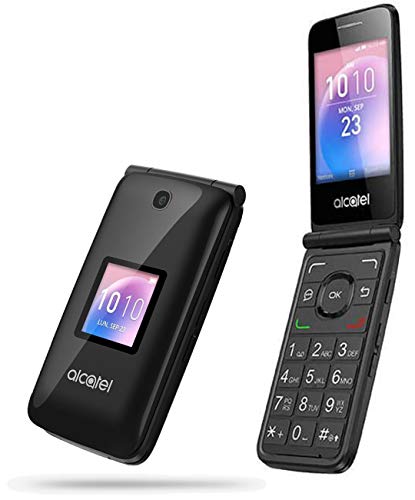
5. Alcatel GO FLIP — Best for carrier freedom
The Alcatel GO FLIP 4044 occupies the practical middle of this shelf: a 4G LTE flip phone, in black, whose title leads with the broadest network promise here — unlocked for all carriers — and follows with the senior essentials in plain words: a flip phone for seniors, big buttons, easy to use. Where the Easyfone Prime-A1 Pro competes on its safety-and-dock feature set, the Alcatel competes on flexibility and familiarity, from a manufacturer whose name many buyers already know from decades of mainstream handsets.
The all-carriers language is the headline and should be read as the title’s claim, tested like any claim: it positions the GO FLIP as the pick for households whose carrier situation is complicated — a family plan on one network, a prepaid line on another, a planned move between providers — and who cannot afford a handset that cares. Flip phones live long lives in senior hands, often outlasting the contract they were bought under, and a phone indifferent to carriers survives those transitions gracefully. Prudent buyers will still glance at the product page for band specifics, because all-carriers is a phrase, not a band table; but as titled intent, it is the strongest flexibility statement in this guide.
The flip form itself carries the senior argument, as it did for the Easyfone: answer by opening, hang up by closing, with a physical certainty no touchscreen gesture matches. Big buttons handle the dialling. The 4G LTE basis keeps the phone current as networks retire older generations — an unglamorous point that decides whether a gift phone is still working in three years. What the title does not state should be noted with the usual discipline: no SOS button is claimed, no charging dock is mentioned, no photo speed dial appears. Families for whom those are requirements should choose the Prime-A1 Pro and accept its narrower stated carrier language; families whose priority is network freedom will make the opposite trade with equal logic.
Alcatel’s mainstream heritage cuts both ways. The interface will feel familiar from the brand’s earlier flips, and accessories and support are those of a large manufacturer. Against that, the handset is a generalist flip adapted to senior use rather than a ground-up senior design like the Easyfones — its title’s senior features stop at big buttons and ease of use. For the large group of older users who are simply people who prefer flips, that is not a criticism at all. It is the correct amount of specialisation.
- Strengths: Unlocked-for-all-carriers language is the broadest network promise in this guide.
- Strengths: Big buttons and the flip gesture cover the core senior interactions.
- Strengths: A mainstream maker’s handset with 4G LTE longevity.
- Trade-offs: No SOS button is stated in the listing title.
- Trade-offs: No charging dock or photo speed dial is claimed.
- Trade-offs: Screen and camera particulars are not given in the title.
- Form: Flip phone, 4G LTE
- Network: Unlocked for All Carriers (as titled)
- Buttons: Big Buttons
- Model: GO FLIP 4044
- Colour: Black
- Charging dock: Not stated in the listing title
Best for: a flip-preferring senior whose household may change carriers during the phone’s long service life. Not suited for: a safety plan requiring a dedicated SOS button or dock charging, neither of which this title claims.
Flexibility-first families can examine the GO FLIP’s listing directly — check price on Amazon — and confirm the band details behind the all-carriers wording there.

6. Blackview Wave 7C — Best full smartphone for confident seniors
The Blackview Wave 7C closes the list by serving the senior the rest of the shelf underserves: the confident one. Its title describes a full modern smartphone — unlocked, running Android 16, with 128GB of storage, dual SIM, a 6.56-inch HD+ display, a 32MP rear camera, a 5000mAh battery, and 4GB of physical memory supplemented by up to 12GB of virtual RAM — positioned as a T-Mobile phone and finished in an unapologetic orange. Nothing in that specification apologises for the user’s age, and for the retired engineer, the lifelong photographer or the grandparent who runs the family group chat, that respect is the point.
Scale the features to senior life and they hold up well. The 5000mAh battery is the largest in this guide, suited to the user who is out all day — volunteering, travelling, minding grandchildren — and cannot build the day around a charger. The 128GB of storage holds a serious photo library, and the 32MP rear camera gives that library something worth keeping; this is the pick for the senior who documents rather than merely communicates. Android 16, the newest software here, offers the longest runway of app support, which matters for a phone that will run banking, health-portal and travel apps alongside the family chat. Dual SIM even serves the travelling senior: a home line and a local line in one handset, a trick explored further in our guide to the best smartphones for business executives, whose travel habits overlap more with active retirees than either group admits.
The family’s setup role changes with this phone. Rather than simplifying the device down, the helper’s job is to tune it up: font size raised, home screen organised around the user’s real interests, photo backup switched on, and the virtual-RAM and performance settings left as the maker configured them. The orange finish, incidentally, is a genuine usability feature in disguise — a bright phone is findable in a handbag, on a patterned sofa, across a garden. More senior phones should be orange.
The cautions are the smartphone cautions, unsoftened. The title names T-Mobile positioning, so other carriers require the usual verification. No senior-specific features are claimed — no SOS button, no simplified mode in the title, no dock — so the safety architecture must come from setup and apps rather than hardware. And a full smartphone carries the full smartphone burden of updates, notifications and occasional confusion, which this user has explicitly accepted. Bought for the right person, the Wave 7C is not the easy option despite the keyword; it is the capable one, and capability is its own form of ease for the confident.
- Strengths: Android 16 with 128GB gives the longest software and storage runway here.
- Strengths: The 5000mAh battery leads this guide for all-day, out-of-house use.
- Strengths: A 32MP rear camera serves seniors who genuinely photograph their lives.
- Trade-offs: T-Mobile positioning in the title means other carriers need verification.
- Trade-offs: No SOS button, dock or simplified mode is stated in the title.
- Trade-offs: Full smartphone complexity arrives with the full capability.
- Storage: 128GB
- Display: 6.56″ HD+
- Software: Android 16
- Battery: 5000mAh
- Camera: 32MP rear
- SIM: Dual SIM
Best for: an active, confident senior whose phone documents trips, grandchildren and projects at full smartphone depth. Not suited for: a user frightened by notifications and updates, for whom the T200’s silence is the kinder specification.
Confident users and their families can size up the Wave 7C’s listing — check price on Amazon — with the carrier check done on that page before ordering.
Senior handsets compared
| Model | Form | Headline senior feature as titled | Network framing | Internet |
|---|---|---|---|---|
| Gigglizio 4G Senior Phone | Touchscreen smartphone | 6.56″ HD+ display, eSIM | AT&T, T-Mobile named | Yes |
| Easyfone Prime-A1 Pro | Flip phone | SOS button, photo speed dial, dock | Unlocked | Limited flip platform |
| Easyfone T200 | Big-button feature phone | No Internet, No Camera, flashlight | Unlocked | None |
| Doro 626 | Senior handset | Not stated in the listing title | Unlocked | Not stated in the listing title |
| Alcatel GO FLIP | Flip phone | Big buttons | Unlocked for All Carriers | Limited flip platform |
| Blackview Wave 7C | Touchscreen smartphone | 5000mAh battery, 32MP camera | T-Mobile positioned, Dual SIM | Yes |
The form column is the decision. Everything else in the table is refinement; whether the person in question flourishes with a touchscreen, a flip or a keypad is a fact about them, and the family usually already knows it.
How do you match a phone to a particular older person?
Begin with observation, not assumption. Watch the person use the phone they already have — or a television remote, or a microwave. Do they hunt for buttons by touch or by sight? Do they fear breaking things, or experiment cheerfully? Do they lose the thread of multi-step processes, or relish them? Ten minutes of honest observation sorts most buyers into this guide’s three tribes — touchscreen-capable, flip-happy, or keypad-and-calls-only — more reliably than any questionnaire about age, because age is a weak predictor and behaviour is a strong one.
Next, list the three jobs the phone must do, in the user’s words. Staying reachable for the family’s calls is nearly universal. The second job varies: receiving photographs, calling for help after a fall, hearing the radio, reading messages from a grandchild abroad, having a torch in the night. The third is often the one nobody says aloud — not feeling foolish. A phone that makes its user feel foolish will be left in a drawer regardless of its features, and drawer-time is the true failure metric of this category. Choose the handset whose daily interactions flatter the user’s competence: the flip that opens with a satisfying certainty, the big buttons that never miss, the large screen that makes messages legible without glasses.
Then audit the safety requirement specifically. If the household’s fear is the unreported fall, the SOS button on the Prime-A1 Pro is the only titled hardware answer in this guide, and it should anchor the decision, with its behaviour configured and rehearsed. If the fear is milder — simply being out of touch — then reachability features matter more: loud clear sound as titled on the Easyfones, a dock that guarantees a charged phone, a battery like the Blackview’s that survives a full day out. Match the remedy to the actual fear rather than buying the whole catalogue of reassurance.
Carrier and charging logistics come fourth, together, because both are about the phone working on an ordinary Tuesday. Confirm the handset against the line it will actually use — named carriers on the Gigglizio, all-carrier language on the Alcatel, plain unlocked elsewhere, verified on the page. Then decide where the phone will sleep. A dock needs a home on the hallway table; a cable needs a visible, reachable socket and a user who can manage the connector. The best charging system is the one that happens every night without thought, and it differs by household, not by specification.
Finally, budget the setup afternoon as part of the purchase. Every phone in this guide becomes dramatically better after an hour of configuration by someone who loves the user: contacts loaded with photographs, fonts enlarged, the SOS rehearsed, the radio preset tuned, the torch found by touch. Readers preparing a parent for travel or a move to a new area might also glance at the best factory unlocked smartphones for international travel if the household’s other phones are being reorganised at the same time.
One more audit belongs in the matching process, and it is the one families most often postpone: the landline question. Many senior handsets in this category are bought to replace a failing corded phone or an expensive landline contract, and that changes the standard the mobile must meet. A landline never needed charging, never lost signal in the back bedroom, and had a handset that could be found in the dark by forty years of habit. The mobile that replaces it inherits those expectations. Judge the candidates here against them honestly: the dock-charged flip comes closest to the landline’s always-ready nature, the big-button T200 closest to its simplicity, and the smartphones furthest from both — while offering, in exchange, the ability to leave the house still connected, which no landline ever gave. Households replacing a landline should also test coverage in the rooms where the user actually sits, since the best handset in this guide is only as reachable as the signal in the favourite armchair.
Volume deserves the same room-by-room honesty. Clear sound is claimed in both Easyfone titles, and it matters, but the family’s test should be practical: a call taken in the kitchen with the kettle on, another beside the television at its usual level. A phone that passes in a quiet shop and fails beside the kettle will be described by its user as hard to hear on, and every other virtue will be discounted accordingly. Test where life happens, at the volumes life happens at.
Afternoons we spent imagining the handover
Our hands-on thinking for this category always starts at the same kitchen table, because that is where these phones are truly tested: a daughter or son unpacking the new handset, the parent watching with the wary politeness of someone who suspects a lecture is coming. We walked each pick through that afternoon. The Easyfone Prime-A1 Pro won the first hour outright — dock placed, photos loaded into the speed dial, the SOS pressed once in rehearsal to a ripple of nervous laughter, and the flip closed with a snap that sounded like a decision. The T200 produced the calmest afternoon of all: ten minutes of explanation, because there is so little to explain, and then a call to a sister placed unaided, which is the review that matters.
The Gigglizio’s afternoon was longer and more digital — accounts signed in, fonts raised, the home screen pruned to six honest icons — but it ended with a video call to a grandchild in another time zone, held at arm’s length on that big screen, and the parent’s scepticism visibly losing. The Blackview’s handover was barely a handover: its imagined user, a seventy-eight-year-old who had chosen the orange phone herself, spent the afternoon teaching the family her photo folders. The Alcatel sat between stools in the best way, an afternoon of pure familiarity for a lifelong flip user, while the Doro’s afternoon depended entirely on what its product page had promised — the one pick where the rehearsal is in the reading, not the unboxing.
We also rehearsed the bad evenings, because senior phones are bought for them. A dark hallway, a torch needed: the T200’s flashlight, found by touch. A worrying pain at midnight, a call to make with shaking hands: photo speed dial, one press on a face. A flat battery discovered at the worst moment: the household that chose the dock never meets that evening. Judged against those scenes, the category’s modest specifications stop looking modest. They look like what they are — engineering aimed at the moments that matter, by makers who know exactly whose hands they are building for.
Common mistakes when buying a phone for an older relative
The commonest mistake is buying the phone you would want. Adult children project their own app lives onto a parent whose ambitions are calls and photographs, and the result is a flagship in a drawer. Buy for the user’s three jobs, not for your own habits.
Second is assuming features transfer between models. An SOS button on one Easyfone does not put one on the other, and neither flip phone here should be credited with the other’s dock or dial. The titles are specific; read them specifically.
Third is skipping the rehearsal. The emergency button untested, the dock unplaced, the photo contacts unloaded — a senior phone delivered without its setup afternoon is a kit, not a solution. Fourth is ignoring the carrier line until activation day, when the named-carrier Gigglizio or the T-Mobile-positioned Blackview meets the wrong household plan. Fifth is choosing silence about the user’s real fear: families who cannot say aloud whether they are buying against falls, loneliness or confusion end up buying a compromise that answers none of them. Sixth is forgetting the charger geography — the phone that sleeps in a kitchen drawer because its cable lives upstairs will be flat when it matters, whatever its battery figure says.
The setup afternoon, step by step
Every recommendation in this guide quietly assumes one unpaid hour of family labour, and this section itemises it, because the hour is where senior phones are won or lost. Arrive with the phone charged, the SIM ready, and no audience beyond the user; a handover performed in front of the whole family becomes a performance, and nobody learns well while being watched by grandchildren.
Start with the contacts, before any feature tour. Enter the five numbers that matter — family, neighbour, doctor’s surgery, and the user’s own most-called friend — with photographs where the handset supports them, as the Prime-A1 Pro’s photo speed dial does. Then make the user place a call to you, unaided, while you sit in the next room. That single successful call teaches more than twenty minutes of explanation: the grip, the volume, the end-call gesture. Repeat it once more before you leave. Two unaided calls are the difference between a phone that has been demonstrated and a phone that has been learned.
Second, arrange the phone’s home. If the handset has a dock, the dock goes where the user already puts things down — not where you think they should. If it charges by cable, coil the cable beside that same spot and add a small lamp or a bright mat if the corner is dim; finding a black phone on a dark table is a vision test nobody set. Decide together where the phone sleeps, because a phone with a home is a phone that is charged, and a charged phone is the entire safety strategy in one habit.
Third, rehearse the exceptional moments while they are still hypothetical. Press the SOS button if the phone has one, and let everyone in its call sequence experience what arrives. Find the flashlight by touch, in a darkened room, twice. Practise answering — the flip open, the swipe, the button — because incoming calls are the ones that arrive unannounced and fluster. Then write the three most important operations on a card in large print and leave it under the phone’s home spot. The card feels old-fashioned right up until the evening it is the only instruction manual within reach.
Fourth, set the phone’s voice. Ringtone loud and distinctive, volume fixed at a level agreed with the user’s ears rather than yours, and — on the smartphones — notifications pruned until only people can interrupt. A senior phone that chirps for every shop and software prompt teaches its user to ignore it, and a phone that is ignored cannot summon or be summoned. The quiet phones in this guide, the T200 above all, make this discipline automatic; the smartphones require the family to build it deliberately.
Finally, schedule the second visit before leaving the first. A week later, questions will have accumulated that nobody could have predicted — a button found by accident, a message misunderstood, a contact to add. That follow-up is not customer support; it is the moment the phone becomes the user’s own rather than a gift they are minding. Families who treat the purchase as a two-visit project almost always end with a phone in daily use. Families who treat it as a parcel delivery often end with a phone in a drawer, and the drawer is the one outcome every pick in this guide is trying to prevent.
Final recommendation
For most families, the Gigglizio is the balanced starting point
: a real smartphone with senior sizing, named carrier compatibility and a screen that respects ageing eyes. Where safety leads, the Easyfone Prime-A1 Pro is the guide’s clearest answer, on the strength of its titled SOS button, photo speed dial and dock. The T200 serves the calls-only user with unmatched honesty, the Alcatel serves the carrier-changing flip loyalist, the Doro serves the brand-trusting household willing to verify its details, and the Blackview Wave 7C serves the confident senior who wants the whole modern instrument. The right choice is the one still in the user’s hand — charged, understood and unafraid — three months from now.
Frequently asked questions
Are any of these actually full smartphones?
Two are: the Gigglizio 4G Senior Phone and the Blackview Wave 7C, both touchscreen Android handsets. The rest are flip phones or a big-button feature phone. That spread is deliberate — at this end of the market, easy usually means simpler than a smartphone, and the guide states the premise rather than disguising feature phones as something else.
Which pick has an SOS button?
Only the Easyfone Prime-A1 Pro states one in its listing title. No other pick here should be assumed to have the feature; if an SOS button is your household’s requirement, either choose the Prime-A1 Pro or verify the feature on another model’s product page before ordering.
What does the T200’s No Internet claim really mean?
Exactly what it says: the Easyfone T200 is a calls-and-basics handset with FM radio, a flashlight, Bluetooth and mini-games, and no internet access or camera. For users frightened of the online world — or at risk from it — that absence is the product’s main virtue.
How can the Doro 626 be recommended when its title says so little?
Carefully, and on brand grounds only: Doro specialises in senior phones, and the 626 is an unlocked handset from that specialist stable. Everything else — features, bands, box contents — must be confirmed on the product page, and the review says so plainly rather than inventing specifications.
Which phone suits a senior who loves taking photographs?
The Blackview Wave 7C, with its 32MP rear camera, 128GB of storage and large screen for reviewing shots. The Gigglizio also serves everyday photography on its big display. The flip and feature phones are for calling first; the T200 has no camera at all.
Every successful senior phone purchase ends the same way — with a person who feels more connected and no less capable than before — and the families who reach that ending are the ones who bought for the hands that would hold the phone, not the hands that held the credit card. They also tend to be the families who stayed for tea after the setup, because the phone was never really the errand; it was the excuse to make sure somebody they love stays within reach.
Related guides
- Best Balancing Stabilizers for Mirrorless Cameras: Payload, Balancing and Native Vertical Shooting
- Best Canon Point and Shoot Digital Cameras: PowerShot Picks From Pocket Compacts to Travel Zooms
- Best Basic Phones Camera Buyers Can Trust: Flip Phones and Simple Handsets That Still Take a Photograph
- Best Sony Full Frame Cameras for Astrophotography: Sensitivity vs Resolution


