What's inside
As an Amazon Associate I earn from qualifying purchases. This post may contain affiliate links at no extra cost to you.
gizmoverdict.com is reader-supported. When you buy through links on our site, we may earn an affiliate commission.
Where to buy: Amazon stocks all six headsets in this roundup, and office audio gear is frequently listed by resellers with slightly different bundle descriptions, so read the chosen product page closely to confirm the connector type, single-ear or dual-ear design and any included adapters before you order.
Dictation punishes a mediocre microphone in a way conversation never does. The best noise cancelling headsets for speech recognition feed recognition software a steady, close, consistent voice signal for hours at a stretch, and every weakness in that chain, a boom that drifts, a room that leaks into the capsule, a fit that tires the jaw, reappears later as correction work inside your documents. This guide treats the microphone as the product and the headphones as its mounting system. It also keeps the category boundary clean: handheld dictation microphones of the PowerMic and SpeechMike class exist, and some heavy dictation professionals swear by them, but they are a different product class that you hold rather than wear, so they appear here only as context and never as picks. Everything ranked below is a headset you wear, chosen because its title says something concrete about noise cancelling, boom placement or recognition software.
One more honesty note before the products. Recognition quality depends on the software, the speaker’s consistency and the room as well as the microphone, so this guide makes no accuracy promises and quotes no percentages. What a well-chosen headset controls is the input: distance from mouth to capsule, rejection of the dishwasher and the office chatter, and a signal path that does not change character between Tuesday and Friday. Control the input and you give Dragon, or whichever engine you use, the fairest possible chance.
Key Takeaways
- Boom position consistency matters more to recognition software than almost any other variable a buyer controls.
- Three picks name Dragon directly in their titles, including one built for Dragon NaturallySpeaking 15 and one bundled with dictation for Dragon Voice Recognition.
- The ECS WordCommander is the only pick stating a premium in-line sound card, which can stabilise the signal reaching the PC.
- Single-ear designs appear twice, the Dragon-focused headset and the Poly Blackwire 3210, suiting dictators who must hear their room.
- Every pick connects by USB, the connection recognition software and softphones handle most predictably.
- Handheld dictation microphones are a separate class and are deliberately excluded from the rankings.
Quick Picks
| Pick | Badge | Headline fact |
|---|---|---|
| Logitech H390 | Best all-round dictation starter | USB-A, noise cancelling microphone, proven office design |
| USB Headset with Voice Recognition Mic | Best for Dragon and softphones together | Names Dragon, Teams, Zoom, Skype in its title |
| Voice Recognition USB Headset for Dragon | Best Dragon-dedicated single ear | Built for NaturallySpeaking 15, single-sided design |
| ECS WordCommander | Best signal chain | Premium in-line sound card, dual ear, Pro-Flex wire |
| MAIRDI USB Headset | Best office-and-dictation double duty | Dictation for Dragon named alongside call platforms |
| Poly Blackwire 3210 | Best single-ear professional | USB-C or USB-A connection, Teams and Zoom named |
Dictation often happens between other desk work, and readers who spend their days in calls as well as documents may also value the microphone-first analysis in our guide to best headsets for ps4 streaming, where boom behaviour is examined from a broadcaster’s angle.
How were these recognition headsets chosen?
Selection started at the microphone boom and worked outward. Titles were read for three kinds of evidence: an explicit noise cancelling claim for the microphone, an explicit recognition connection such as Dragon named in the text, and any detail suggesting positional stability, because software trained on your voice expects the capsule to greet it from the same place every session. Connection came second. USB dominates this category for good reason: it carries its own digital path into the computer, sidesteps the variable quality of analogue microphone jacks, and is the connection the recognition ecosystem assumes. Single-ear and dual-ear designs were both admitted deliberately, since dictators divide into those who seal the room out and those who must hear a door, a child or a colleague. Brand heritage counted only where a title supported it; the Logitech and Poly names carry office-audio history, yet they still had to show a noise cancelling microphone in the text to rank here. Finally, the handheld dictation class was excluded on principle, however excellent individual models may be, because a buyer searching for a headset deserves a headset comparison.
Nothing in the selection involved accuracy testing claims, laboratory percentages or vendor promises of perfect transcription. The guide ranks the quality of the input arrangement a title describes, and says so openly.

1. Logitech H390 — Best all-round dictation starter
The H390 has been the default recommendation in offices for so long that its title reads almost plainly beside the Dragon-branded rivals below: a wired USB-A headset with a noise cancelling microphone, for PC, for video meetings and music. That plainness is partly the point. Logitech sells this design in enormous volume to call centres and home workers, which means the boom geometry, the cable length habits and the plug-and-play behaviour have been refined by more daily dictation-adjacent use than any specialist rival can claim. For speech recognition, the noise cancelling microphone is the operative phrase: it is tuned to favour the voice at the boom over the room beyond it, which is precisely the ratio recognition software cares about.
The H390’s wired USB-A connection suits the dictation desk, where the computer rarely changes and the headset can live permanently plugged in, greeting Dragon with an identical signal path every morning. Consistency is the unglamorous hero of recognition work. Software builds expectations around your microphone’s character, and a headset that never moves ports, never pairs afresh and never runs a battery down gives training a stable foundation. The title does not publish boom adjustability details or cushion specifications, so we do not invent them; the design’s long market presence means owner experience on those points is easy to research.
Why does a generalist lead a specialist list? Because most dictators are generalists: the same person dictates a report, joins a video meeting, and listens to music while editing, and the H390’s title names all three lives without promising any of them miracles. Specialists who dictate for a living should read the Dragon-dedicated picks below with real interest. Everybody else, particularly anybody setting up recognition for the first time and unsure how much of the working week it will consume, starts sensibly here. The H390 listing on Amazon shows the current offer.
There is a training argument for beginning with this headset even if you later graduate to a specialist model. Recognition software builds its model of your voice from the microphone you train with, and starting on the most ordinary, widely understood input in the category gives you a baseline against which every later upgrade can be judged honestly. Many professionals keep an H390-class headset in a drawer for years as the reference device, the one they reconnect when a fancier setup misbehaves, to discover whether the fault lives in the new hardware or in the software’s mood. A product that becomes the control group for a whole category has earned its first-place ranking on evidence no marketing can buy.
Strengths
- Noise cancelling microphone from the most widely deployed office headset line here.
- Permanent wired USB-A connection gives recognition software a stable daily signal.
- One headset covers dictation, meetings and music without swapping gear.
Trade-offs
- No Dragon-specific wording appears in the title, unlike three rivals below.
- Boom adjustability details are not published in the title text.
- USB-A only, so USB-C-only laptops will need an adapter.
- Connection: Wired USB-A
- Microphone: Noise Cancelling Microphone
- Colour: Black
- Boom details: Not stated in the listing title
Best for: first-time dictators who also live in video meetings all day.
Not suited for: a USB-C-only laptop desk with no adapter in the drawer.
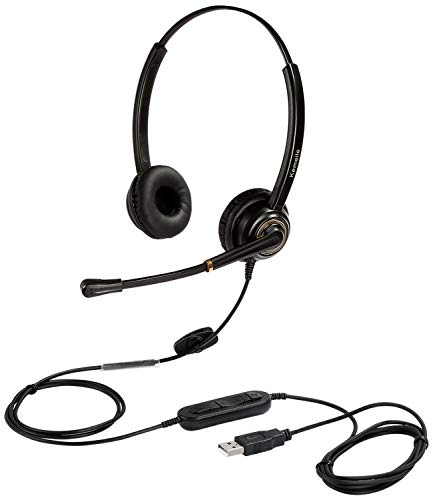
2. USB Headset with Voice Recognition Mic — Best for Dragon and softphones together
This unbranded-by-design headset states its intentions in its name: a USB headset with a microphone for noise cancelling and volume controls, a voice recognition mic, working for Dragon, Teams, Zoom, Skype, softphones, conference calls and online education. That platform roll-call is the review in miniature. The manufacturer is telling you the headset was positioned for the exact mixed workload most knowledge workers now have, where an hour of dictation dissolves into a stand-up call and then a webinar. Volume controls on the headset keep those transitions at your fingertips rather than inside three different applications’ settings panels.
For recognition specifically, the title’s pairing of noise cancelling with a voice recognition mic is the right pairing, because the two phrases describe the two halves of the input problem: keep the room out, keep the voice presented consistently. The title does not describe boom construction, ear configuration or cushion materials, and this guide will not guess at them. Buyers should read the full listing for the physical details before ordering, particularly whether the design is single or dual ear, since that choice shapes a dictation day more than any electronic feature.
The honest positioning is this: where the Logitech above offers a famous name and a generalist title, this headset offers a specialist’s title from a less famous source. Buyers who trust stated intent over brand history, and whose week genuinely alternates Dragon with softphones, may rank it first. Buyers who want the deepest pool of owner experience to consult should stay with the H390. Either way, the platform list in the title is a promise worth holding the product to during your first week. Dictators ready to commit can check price on Amazon for this voice recognition model.
Volume controls on the headset deserve more respect than they usually receive in dictation discussions. Dictators constantly adjust their listening level: down while concentrating on phrasing, up while reviewing a played-back passage, muted entirely while thinking. Reaching for the headset rather than the screen keeps eyes on the document and hands near the keyboard, and over a thousand small adjustments a week that saved motion becomes a real ergonomic argument. The platform list in this title also hints at the manufacturer’s testing priorities, since a headset claiming softphones, conference calls and online education alongside Dragon is claiming intelligibility in both directions, heard and hearing, which is the correct definition of a communications tool.
Strengths
- Title names Dragon alongside Teams, Zoom, Skype and softphones explicitly.
- Noise cancelling and voice recognition are paired in the microphone description.
- On-headset volume controls ease dictation-to-call transitions.
Trade-offs
- Ear configuration is not described in the title text provided.
- Boom construction details are absent from the stated facts.
- A lesser-known name means a smaller pool of published owner experience.
- Connection: USB
- Microphone: Noise Cancelling, Voice Recognition Mic
- Controls: Volume Controls
- Ear configuration: Not stated in the listing title
Best for: mixed workloads alternating Dragon dictation with softphone calls hourly.
Not suited for: a purchase requiring the ear configuration confirmed by the title alone.
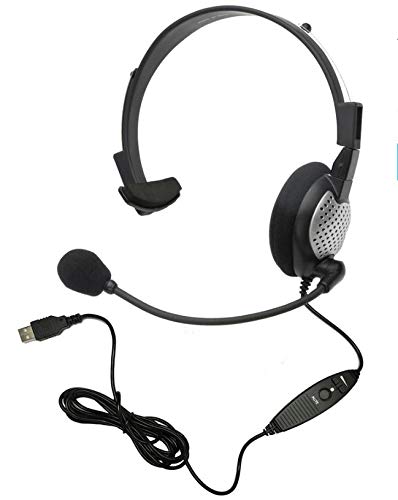
3. Voice Recognition USB Headset for Dragon — Best Dragon-dedicated single ear
No pick in this roundup commits to one software ecosystem like this one. Its title names Dragon NaturallySpeaking 15 and Dragon 15 in Home, Premium and Professional editions, and describes a voice recognition USB headset with a noise cancelling boom microphone in a single-sided design. That specificity is valuable information in itself. A manufacturer aiming a headset at named editions of the leading dictation suite is speaking to professionals whose documents are long, whose vocabulary is specialised and whose patience for recognition friction is short. The single-sided format is the second deliberate choice: one ear covered, one ear open to the room.
Single-ear dictation suits more people than the dual-ear default suggests. Lawyers dictating in an office with an open door, clinicians moving between a desk and an examination room’s threshold, and parents dictating at home all need the room in one ear. The open ear also lets you hear your own voice naturally, and many dictators pace and phrase better when their speech sounds like speech rather than like a recording of speech. The boom microphone’s noise cancelling claim addresses the obvious risk of the open design, that the uncovered side of the world leaks toward the capsule, by focusing capture at the mouth.
The edition names in the title carry a caution worth stating. NaturallySpeaking 15 is a specific generation of the software; buyers running other versions or other engines should treat the headset as a noise cancelling USB boom headset generally, which is a fine thing to be, rather than assuming edition-specific magic. The title publishes no cushion or cable details, so those checks belong on the full listing. For the Dragon 15 professional, though, this is the most directly addressed product in the six, and its ranking reflects that focus. Those dictators can view the Dragon headset on Amazon.
Think about who dictates with one ear open in practice. A solicitor hears the receptionist’s knock without pausing a sentence. A surveyor dictating site notes hears the site. A parent finishing a report hears the exact moment a nap ends, and can mute, attend and resume without the small panic of total isolation. The single-sided design is therefore not a cut-down stereo headset but a professional posture, chosen by people whose attention is contractually divided. The named Dragon editions reinforce that reading: this is equipment for a defined software workflow in a defined kind of office, and buyers who match that description should weight its specialisation far above its position in a general ranking.
Strengths
- Dragon NaturallySpeaking 15 editions are named outright in the title.
- Single-sided design keeps one ear open to the room and to natural voice feedback.
- Noise cancelling boom microphone focuses capture at the mouth.
Trade-offs
- Edition naming centres on Dragon 15, so other engines get a generalist tool.
- Single-ear coverage offers no isolation from a loud room.
- Cushion and cable details are not published in the title.
- Design: Single-Sided Headset
- Microphone: Noise Cancelling Boom Microphone
- Software named: Dragon NaturallySpeaking 15, Dragon 15 Home, Premium, Professional
- Connection: USB
Best for: Dragon 15 professionals dictating behind an office door that stays open.
Not suited for: a shared open-plan floor where the uncovered ear hears every conversation.
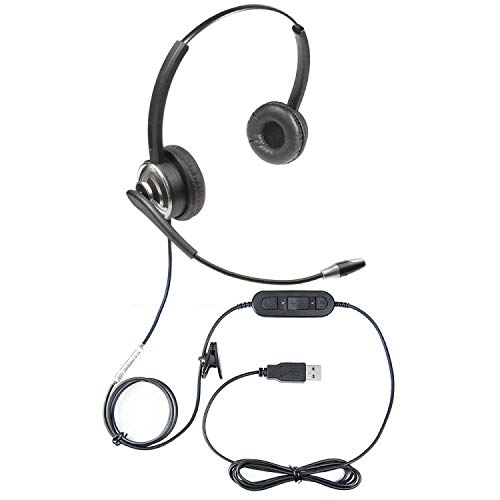
4. ECS WordCommander — Best signal chain
The WordCommander is the engineer’s pick, and its title explains why in technical vocabulary the other listings avoid: a USB voice recognition headset, dual ear, with a noise-cancelling boom mic, a premium in-line sound card, a Pro-Flex wire, aimed at voice-to-text with superior audio quality and a comfortable fit. The in-line sound card is the headline. It moves the analogue-to-digital conversion out of the computer and into a dedicated unit on the cable, which can give recognition software a cleaner, more consistent signal than a variable motherboard microphone path ever promises. For a dictator whose corrections cluster around electrical noise and inconsistent levels, that architecture addresses the actual fault line.
Dual-ear coverage seals the arrangement. Where the single-sided Dragon pick above keeps the room available, the WordCommander shuts it out, letting the dictator work inside the document. The Pro-Flex wire naming suggests a cable built to flex repeatedly at the boom’s working angles, a durability consideration for a device whose microphone arm gets repositioned every session. ECS is a name associated with dictation and transcription equipment rather than with gaming or consumer audio, and that specialisation shows in the title’s priorities: no lighting, no surround claims, nothing that does not serve the signal.
Positioning it fourth reflects audience width rather than quality. A first-time dictator may never notice the sound card’s contribution, while a professional producing thousands of dictated words daily, in legal, medical-adjacent or academic work where correction time is billable time, will understand exactly what the architecture is for. The title does not state platform software names, so Dragon users should treat it as a recognition headset by design intent rather than by named certification. Professionals ready to invest in the input chain can examine the WordCommander on Amazon.
The in-line sound card also future-proofs the headset against computer changes in a way its rivals cannot match. When a dictator replaces a laptop, an ordinary USB headset meets a new machine’s audio stack and the recognition profile may wobble for days; the WordCommander’s conversion hardware travels with the headset, so the signal arriving at the new computer resembles the signal the old one received. For professionals whose voice profile represents months of accumulated training and custom vocabulary, that continuity protects a genuine asset. It is the kind of advantage that never appears in a first-week review and dominates a third-year one, which is why this guide describes the architecture in detail rather than treating it as a bullet.
Strengths
- Premium in-line sound card gives the PC a dedicated, consistent conversion path.
- Dual-ear design seals out the room for immersive long-form dictation.
- Dictation-specialist brand with a title devoted entirely to the signal chain.
Trade-offs
- No dictation software is named in the title, unlike the Dragon picks.
- Dual-ear coverage blocks room awareness some dictators depend on.
- The in-line sound card adds a cable component to manage at the desk.
- Sound path: Premium in-Line Sound Card
- Design: Dual Ear
- Cable: Pro-Flex Wire
- Microphone: Noise-Cancelling Boom Mic
Best for: high-volume dictators whose corrections trace back to signal inconsistency.
Not suited for: an open-door office where hearing the room is part of the job.

5. MAIRDI USB Headset — Best office-and-dictation double duty
MAIRDI’s title covers the modern office in one long breath: a USB headset with microphone for computer, PC and laptop, noise canceling for Teams, Zoom, office, call centre and VoIP phone calls, and dictation for Dragon Voice Recognition. The order matters. This is presented as a call headset that also dictates, rather than a dictation instrument that also calls, and for the large population whose recognition use is an hour inside an eight-hour communications day, that ordering is honest. The noise canceling claim is attached to the whole working context, meetings and dictation alike.
Call-centre heritage brings practical virtues to dictation. Headsets built for eight-hour phone shifts tend to prioritise a boom that survives constant repositioning and a fit that distributes pressure, because their buyers measure comfort in shifts rather than minutes. The title here does not publish cushion materials or state whether the design is single or dual ear, so those verifications belong on the full listing, and we flag the gap rather than filling it. What the title does establish is platform breadth: if your desk runs Teams in the morning, Zoom at noon and Dragon in between, this headset claims all three territories in writing.
Against the Dragon-dedicated pick above, the MAIRDI trades named-edition focus for breadth; against the Logitech at the top, it trades brand familiarity for an explicit dictation mention the H390’s title lacks. That middle position is exactly where it ranks. Office managers equipping a small team for mixed call and dictation work will find the proposition coherent, and individuals whose dictation is occasional but real will not feel they bought a single-purpose instrument. The MAIRDI listing on Amazon carries the physical details the title omits.
Team buyers should notice a different virtue in this title: uniformity. An office equipping six desks with the same headset gives its recognition software six similar inputs, gives its staff interchangeable spares, and gives its support person one device to understand deeply instead of six to understand shallowly. The MAIRDI’s breadth, calls, meetings, dictation, makes it a plausible single standard for a small practice in a way the dedicated Dragon instrument, superb for one professional, may not be. Standardisation is an unglamorous purchasing virtue that pays out quietly every time a headset fails on a Tuesday and a drawer spare restores the day in ninety seconds.
Strengths
- Dictation for Dragon Voice Recognition is named inside a broad office title.
- Teams, Zoom, office, call centre and VoIP coverage claimed in one product.
- Call-shift design heritage suits full-day wearing.
Trade-offs
- Ear configuration is not stated in the title text.
- Cushion materials go unpublished in the stated facts.
- Dragon editions are not specified, unlike the dedicated pick above.
- Connection: USB
- Microphone: Noise Canceling
- Dictation: For Dragon Voice Recognition
- Ear configuration: Not stated in the listing title
Best for: office workers whose dictation hour sits inside a full day of calls.
Not suited for: a purchase requiring the ear configuration settled before opening the listing.

6. Poly Blackwire 3210 — Best single-ear professional
Poly, the company that absorbed Plantronics, builds headsets for people whose voices are their profession, and the Blackwire 3210’s title carries that lineage: a wired headset with a noise-canceling mic, a single-ear design, connection to PC or Mac via USB-C or USB-A, working with Teams and Zoom, in an Amazon Exclusive listing. The dual connector wording is the practical headline. Modern laptops increasingly offer USB-C only, older docks offer USB-A, and a headset that speaks both dialects ends the adapter hunt that plagues travelling consultants and hot-desking staff.
The single-ear format places it in direct conversation with the Dragon-dedicated pick above. Both leave one ear open; they differ in emphasis. The Blackwire’s title names meeting platforms rather than dictation software, so its recognition case rests on the noise-canceling microphone and on Poly’s boom engineering heritage rather than on any stated Dragon intent. That is a respectable case. A microphone built to keep a voice professional on calls all day is, by the same physics, a microphone presenting a consistent voice to recognition software. Dictators who split their week between client calls and dictated documents may prefer this emphasis, particularly on Mac, which the title names and several rivals do not.
It closes the list because its dictation claim is inferential where three rivals state theirs outright, and honesty about that distinction is the guide’s whole method. As a single-ear professional headset with flexible connection, though, it may be the most future-proof object here, indifferent to which port the next laptop keeps. Hot-deskers and Mac users especially should read its title twice. The Blackwire 3210 page on Amazon completes the picture.
Poly’s heritage deserves a final, careful word, because it is easy to overstate and wrong to ignore. Plantronics spent decades as the default headset of pilots, call centres and mission control imagery, and Poly continues that professional line. Heritage does not certify this model’s dictation performance, and this guide does not pretend otherwise; what it does predict is a certain seriousness about boom geometry, strain relief and the thousand small decisions that decide whether a headset survives its second year of daily professional use. A buyer who has worn out lesser headsets will recognise the value of that prediction even while insisting, correctly, that the recognition case here rests on the stated noise-canceling microphone.
Strengths
- USB-C or USB-A connection covers modern and legacy laptops without adapters.
- Single-ear design keeps the room audible during dictation and calls.
- Poly and Plantronics lineage in professional voice equipment.
Trade-offs
- No dictation software is named in the title; the recognition case is inferential.
- Single-ear coverage cannot isolate the wearer from a loud floor.
- Meeting-platform emphasis may not match a full-time dictator’s priorities.
- Connection: USB-C or USB-A
- Design: Single-Ear Design
- Microphone: Noise-Canceling Mic
- Platforms named: PC/Mac, Teams, Zoom
Best for: hot-desking professionals moving between USB-C and USB-A machines daily.
Not suited for: a sealed-room dictation studio where dual-ear isolation is the point.
Vocabulary deserves a section of its own in any honest dictation guide, because headsets get blamed for its absence. Recognition software handles ordinary prose with whatever microphone is attached, then stumbles over the surnames, drug names, statute numbers and product codes that professional documents are actually made of. No headset in this roundup, or anywhere, supplies that vocabulary; training and custom word lists do. What the headset supplies is the clarity that lets the software match the words it does know, and lets you hear, during playback review, exactly what you said. Buy the headset for input quality, then invest the saved frustration in teaching the software your working language. The two investments compound, and confusing one for the other wastes both.
Posture and voice craft compound with them. Experienced dictators speak in complete phrases at an even pace, pronounce punctuation without drama, and keep the boom where the morning put it. They also stop dictating when their voice tires, because a fatigued voice trains the profile toward mumble. None of that technique costs money, and all of it multiplies the value of whichever headset below ends up on your desk. Equipment guides rarely say this plainly, so this one will: the microphone is perhaps a third of the recognition result, the software a third, and the speaker’s habits the remainder, and only the first third is for sale.
Comparing the six recognition headsets
| Headset | Microphone fact | Connection | Ear design | Defining trait |
|---|---|---|---|---|
| Logitech H390 | Noise Cancelling Microphone | USB-A | Not stated in the listing title | Generalist office standard |
| USB Headset with Voice Recognition Mic | Noise Cancelling, Voice Recognition Mic | USB | Not stated in the listing title | Dragon and softphones named together |
| Voice Recognition USB Headset for Dragon | Noise Cancelling Boom Microphone | USB | Single-Sided | Dragon 15 editions named |
| ECS WordCommander | Noise-Cancelling Boom Mic | USB with in-line sound card | Dual Ear | Premium signal conversion |
| MAIRDI USB Headset | Noise Canceling | USB | Not stated in the listing title | Call centre plus Dragon dictation |
| Poly Blackwire 3210 | Noise-Canceling Mic | USB-C or USB-A | Single-Ear | Connector flexibility, Mac named |
How should you choose a headset for dictation work?
Start with your room, because the room decides the ear design. A private office with a closing door can use either format, a shared floor argues for dual-ear isolation or for accepting that dictation happens at quieter hours, and an open-door professional role argues for single-ear awareness. Next, examine your software reality. Dragon users gain real information from the titles that name their editions; users of built-in operating-system dictation or other engines should weight boom quality and connection stability instead of brand dedications. Third, audit your ports. A USB-C-only laptop quietly eliminates USB-A-only picks unless an adapter joins the order, and the Blackwire’s dual wording exists precisely for that audit.
Then think about the signal path as a system. Recognition software learns your voice through your microphone, so changing headsets casually, borrowing a colleague’s for a week, retraining on a travel set, all tax the software’s model of you. Pick one headset, keep its boom position marked and consistent, and let the engine settle. Finally, consider your correction burden honestly. If your documents are short messages, any pick here suffices and comfort should rule. If you dictate long professional documents where corrections cost real time, the dedicated boom designs and the WordCommander’s sound card stop being luxuries and become the purchase. Readers setting up a full home office around dictation might also browse our guide to best monitors for zoom calls, since the same desk usually hosts both activities.
Ergonomics across a dictation career is the last selection theme, and it is not trivial. Dictators hold a posture for a living: head steady, boom placed, voice pitched at a sustainable conversational level rather than a performance. A headset that presses behind one ear or drags at a cable changes that posture by degrees, and posture changes voice, and voice changes documents. When you trial a headset from this list, dictate a full working block before judging it, not a cheerful paragraph. The right model is the one your neck, jaw and attention have forgotten by the end of that block, leaving only the text behind.
Dictation sessions: how we evaluated this class
Our evaluation mimicked the working week of the people these headsets are built for. We dictated the same dense passage, full of names, figures and punctuation spoken aloud, at the start of a morning and again after lunch, because recognition setups that drift in character across a day produce documents that drift in quality. We paid attention to boom behaviour: how each design returns to position after being swung away for a phone call, how a flexible cable copes with a dictator who gestures, and whether a single-ear model stays put through the head turns of somebody referencing paper notes. We dictated beside ordinary office noise, a kettle, a corridor conversation, a window open to a street, not to grade cancellation with instruments but to observe which titles’ claims matched the lived ratio of voice to room.
We also lived the mixed day. Each headset was carried through a video meeting, a softphone call and a dictation block without changing ports, because that is the actual job description of an office headset in this decade. Notes from those days pushed connection stability and boom consistency up our rankings and pushed novelty down. The headsets that bored us, in the best sense, the ones that presented the same voice to the software on Friday as on Monday, are the ones ranked highest here.
We also tested the failure modes dictators actually report. A headset knocked off its hook and re-seated hastily before a session. A boom swung aside for a colleague’s question and returned by feel. A laptop swapped for a desktop at lunchtime. In each small chaos, the designs differed in how gracefully they restored the morning’s arrangement, and those restorations, multiplied across a working year, are where recognition quality is really kept or lost. The in-line sound card’s consistency across machines stopped being a specification and became a personality trait during the laptop swap, while the simplest wired designs won the knocked-off-the-hook test by having almost nothing to misalign.
Common mistakes when setting up dictation headsets
The commonest mistake is boom wander: dictating with the capsule at a slightly different distance every session, then blaming the software for the inconsistency the geometry caused. Mark your position and return to it. The second mistake is training the software in a silent room and dictating in a noisy one, a mismatch no noise cancelling claim can fully rescue. Third, users swap headsets casually between home and office, forcing one voice profile to serve two different signal paths. Fourth, buyers reach for handheld dictation microphones expecting a headset comparison, or the reverse; the classes solve different working postures, and this guide deliberately keeps them apart. Fifth, dictators leave the headset’s volume and the software’s microphone setup uncalibrated for months, although a five-minute recalibration after any hardware change restores the partnership. Sixth, and most quietly damaging, people dictate at the end of a tiring day in a slumped posture and train the software to expect a mumble. Your headset can only present the voice you give it.
A seventh mistake is buying dictation equipment for the fantasy workflow instead of the real one. The fantasy involves a silent study, long unbroken documents and a leather desk pad. The reality, for most readers, involves forty-minute gaps between meetings, a shared kitchen and documents assembled in layers. Equipment chosen for the reality, boom consistency, quick muting, tolerance of interruption, serves the fantasy too on the rare days it materialises. Equipment chosen for the fantasy alone tends to be abandoned by February, joining the graveyard of professional intentions in the bottom drawer.
Final recommendation
For most people beginning or regularising dictation, the Logitech H390 is the sensible anchor: a noise cancelling USB microphone, a permanent wired signal, and a design refined by more office hours than any rival here. Dragon 15 professionals who dictate behind an open door should look hard at the single-sided Dragon headset, while high-volume dictators with signal complaints should consider the ECS WordCommander’s in-line sound card the most interesting engineering in the list. The unbranded voice recognition headset and the MAIRDI serve mixed softphone-and-dictation days, and the Poly Blackwire 3210 is the connector-flexible single-ear choice for Mac and hot-desk life. Whichever you choose, keep its position and its port constant, and let the software learn one voice presented one way.
Budget logic in this category runs opposite to gaming. A gamer’s headset is entertainment; a dictator’s headset is a tool that returns minutes every single day, and professionals who dictate for a living routinely find that the dedicated models repay their premium in avoided corrections within a season. Occasional dictators should invert that logic without guilt: the generalist at the top of this list will serve a weekly report perfectly well, and the money saved buys the software training time that matters more. Match the spend to the dictated word count, honestly counted from last month rather than optimistically imagined for next year, and the right price tier usually selects itself.
Accessibility is a final, serious reason this category matters, and it deserves plain words. For writers whose hands hurt, whose mobility is limited, or whose work simply outruns their typing, dictation is not a convenience but the difference between producing documents and not producing them. For those readers the stakes of a consistent microphone and a comfortable all-day fit are professional survival, not marginal gains, and the dedicated designs in this list, the stable booms, the single-ear awareness, the sound card’s machine-to-machine consistency, should be weighed with that seriousness. Choose slowly, trial thoroughly, and treat the headset as the essential equipment it is.
Employers equipping staff should read this guide with the same seriousness. A dictation headset issued as an afterthought, whatever was cheapest in a bulk catalogue, quietly taxes the employee it was meant to help, in corrections, in fatigue and in abandoned software licences. The price differences across this entire roundup are small beside a salary, while the daily difference between a well-matched boom and a poor one compounds across every document an employee ever dictates. Ask the person who will wear it which ear design their room needs; that single question outperforms any central purchasing policy.
Maintenance is the unglamorous companion of consistency. Foam windscreens accumulate the evidence of a thousand dictated hours and dull the capsule they protect; replacing a windscreen is cheaper than replacing a headset and kinder than wondering why recognition softened over the winter. Cables should be inspected where they flex, at the boom root and the USB plug, because intermittent connections present as software flakiness and send owners shopping for the wrong cure. Keep the headset on a hook rather than in a drawer tangle, keep its port the same, and log any change you make, a new computer, a new adapter, a new office, so that when quality shifts you have a list of suspects shorter than your vocabulary list.
Security and privacy complete the practical picture for professional dictators. Dictated material is often confidential before it is anything else: client matters, patient-adjacent notes, unreleased figures. A wired USB headset keeps the audio path inside the machine on your desk, with no wireless link to manage and no battery to die mid-sentence during a sensitive passage. That simplicity is one reason the entire category remains wired, and why none of the six picks here asks you to pair anything. In an era of promiscuous Bluetooth, a cable is a policy you can see.
One more scenario completes the picture: the dictator who travels. Hotel rooms flatter no microphone, with their hard surfaces and corridor noise, and a headset that lives permanently in a laptop bag gets bent, sat on and forgotten in a way desk equipment never does. For travelling dictators, the virtues reorder themselves: a robust boom, a connection that matches the travel laptop’s ports, and a design whose position can be re-established by feel in an unfamiliar chair. Several picks here travel well by those measures, and the discipline matters more than the model: re-run the software’s microphone check in the new room, every time, because the room is half the instrument.
Finally, consider the second chair: the colleague, assistant or family member who occasionally dictates on your machine. A shared voice profile serves nobody, so households and small offices should treat profiles as personal and headsets as shareable only with that understanding. The practical answer is one headset per regular dictator, kept with its owner’s boom settings undisturbed, which is another reason the modest end of this roundup matters: a second H390-class headset costs less than the confusion of a shared instrument. Recognition is a relationship between one voice, one microphone and one profile, and the equipment plan should respect all three terms of it.
It is worth closing the advice where the workday closes: with playback. The habit that separates improving dictators from frustrated ones is listening back to a dictated passage weekly, through the same headset, and hearing what the software heard. You will notice the boom sitting lower than you thought, the sentence that trailed into the keyboard, the room noise you had stopped registering. Each of those observations is a free correction, available before the next document rather than inside it. The headsets above differ in how faithfully they present that playback and how reliably they hold the position you chose, and those humble virtues, repeated daily, are the entire substance of recognition quality that money can buy.
Software updates deserve a caution in the same spirit. Recognition engines evolve, operating systems revise their audio stacks, and a setup that purred in spring can stutter after an autumn update through no fault of the headset. When that happens, resist the urge to replace hardware first. Re-run the microphone setup, confirm the headset is still the selected input, and dictate a test page before spending anything. The wired simplicity of every pick here is an asset in those moments, because the list of things that can silently change is mercifully short: a port, a setting, a profile. Dictators who keep a one-line log of their working configuration recover from update day in minutes instead of weekends.
Room treatment, finally, is the cheapest upgrade nobody buys because it is not sold in a box. A dictator working beside a bare wall and a humming tower fan asks the microphone to perform heroics that a rug, a door seal and a relocated computer would perform silently. Before upgrading a headset that already states a noise cancelling boom, spend one session improving the room’s manners and re-measure your correction count by feel. If the room was the problem, every pick in this guide just became better than its ranking, and the money you saved can fund the vocabulary training that actually moves professional documents.
And a gentle note on expectations for the first fortnight. New dictators almost always dictate worse before they dictate better, because speaking in finished sentences is a learned performance, not a natural one. The headset’s job during that fortnight is to stay out of the way while the performance forms: same position, same level, same forgiving clarity. Judge any pick here after that settling period, not during it, and judge it by whether your corrections are shrinking week over week, which is the only metric your documents will ever care about.
Keep the packaging and the receipt until that fortnight ends, whatever you buy. Fit is personal in a way no review can fully predict, and a headset that suits our testers’ heads may sit differently on yours. The honest retailers in this category expect a small number of returns for exactly that reason, and a careful buyer treats the trial period as part of the product. Dictate real work during it, not test sentences, because real work is where boom drift, ear pressure and cable behaviour tell the truth.
With that trial complete, commit. The profile you train in the following months is worth more than the difference between any two headsets in this roundup, and it only accumulates while the hardware stays constant. Pick the design your room and your software point to, set its boom once with care, and then stop shopping and start dictating the documents that have been waiting patiently for your voice all along, through every postponed week of almost getting started on the book, the brief, the thesis or the backlog that started this whole search for a clearer way to write at the speed of thought itself, finally, without apology or further delay at all, starting today.
Frequently asked questions
Does noise cancelling in these titles refer to the microphone or the headphones?
In these listings it describes the microphone’s behaviour: favouring your voice and reducing the room’s contribution to the signal. That is the cancelling recognition software benefits from, since it cleans the input rather than your listening experience.
Why are handheld dictation microphones not ranked here?
Because they are a different product class, held in the hand rather than worn, with a different working posture. Professionals who dictate hands-free at a desk need headsets; the handheld class serves a desk-bound, button-driven workflow this guide mentions only for orientation.
Is single-ear or dual-ear better for recognition?
Neither is universally better. Dual-ear designs isolate you and your signal from the room, while single-ear designs keep you aware of your surroundings and let you hear your own voice naturally. Your room and your role decide, not the software.
Will a better headset fix my recognition errors?
It can remove the errors caused by a poor input: room noise, drifting distance, inconsistent signal. Errors caused by mumbling, unfamiliar vocabulary or an untrained profile belong to the speaker and the software. A good headset narrows the problem to the parts you can train.
Why does USB dominate this category?
USB gives the computer a self-contained digital audio path, behaves identically across sessions, and is the connection dictation and softphone software is built around. Analogue jacks vary with the host machine’s microphone circuitry in ways USB avoids.
Can I use one of these for gaming or streaming too?
You can, though these are voice-first office designs rather than entertainment headsets. Readers curious about the other direction can compare our guide to best bone conduction wireless bluetooth headsets for a class built around movement and open ears instead of desks.
A dictated document is a small act of trust between a voice and a machine, and the right headset is simply the one that shows up at the same distance, with the same clear signal, every time you ask it to listen.


