What's inside
- Key Takeaways
- Quick Picks
- How Did We Judge Powerline Kits for This Guide?
- What Do AV1000 and AV1300 Really Deliver?
- Powerline, Mesh or Extender: Which Route Suits a Stubborn Room?
- What Is Electrical Noise, and How Is It Tamed?
- How Do the Six Compare Side by Side?
- Where Does Powerline Work Well, and Where Does It Struggle?
- How Can a Household Grade Its Own Wiring Before Committing?
- Is Powerline Private on Shared Wiring?
- How Should a Powerline Kit Be Installed for the Best Result?
- What About Latency, Calls and Gaming Over Powerline?
- What Mistakes Do Powerline Buyers Make?
- What Should Be Budgeted Beyond the Kit Itself?
- Final Recommendation
- Frequently Asked Questions
- Related Guides
As an Amazon Associate I earn from qualifying purchases. This post may contain affiliate links at no extra cost to you.
gizmoverdict.com is reader-supported. When you buy through links on our site, we may earn an affiliate commission.
Where to buy: For every kit below, the buy link points to a pool listing this site confirmed before shortlisting it. Powerline is a category where the headline number needs translating before any comparison makes sense, so read the first sections before the picks — the translation changes which kit is the right one.
The best powerline range extenders take a route no radio can: through the house’s own mains wiring. A powerline kit places one adapter at the router, plugged into the wall, and a second adapter — in every kit here, one with Wi-Fi built in — in the room the signal never reaches. The network travels the copper between them, indifferent to the thick walls, foil insulation and metalwork that defeat wireless extenders and tax mesh systems. For the stone-walled house, the long flat with the router marooned at one end, and the outbuilding on the same meter, powerline is not a fallback. It is frequently the correct first choice.
One piece of honesty must precede everything else, because the category’s marketing depends on skipping it. The numbers in these titles — AV1000, AV1300, Powerline 1200 — are nominal physical-layer rates: the signalling speed of the connection across the wiring under ideal conditions, not the throughput a device will ever measure. Real powerline throughput in real houses lands at a fraction of the printed figure, varying with the age of the wiring, the distance between adapters, the circuit path between them and the electrical noise on the line. That fraction is still genuinely useful — ample for streaming, calls, browsing and most home working — but a buyer expecting four-digit speeds from an AV1000 kit has been set up by the box, and this guide declines to continue the setup.
The six kits divide by Wi-Fi generation and by wired generosity. Three TP-Link kits pair AV1000 or AV1300 powerline links with AC1200 or AX1500 Wi-Fi at the far end, most with passthrough sockets so the wall outlet survives. A Tenda kit offers AV1000 with a gentler AC650 radio and gigabit ports. A Devolo starter kit arrives with a title so terse that its section below is an exercise in honest not-stated entries. And a TRENDnet unit brings an AC1200 access point with three gigabit ports to the powerline side of the house. All six share the same underlying wager: that the wiring in the walls is a better network cable than the air in the rooms.
Key Takeaways
- AV1000, AV1300 and similar figures are nominal physical-layer rates, not real throughput — expect a useful fraction, varying with the house’s wiring.
- Every kit here puts Wi-Fi at the far end; Ethernet-only adapters are a different product and are not what this roundup covers.
- Adapters belong directly in wall sockets — surge-protecting strips filter out the powerline signal, while passthrough models give the socket back.
- Both adapters work best on the same electrical system and ideally the same side of the consumer unit; wiring topology matters more than distance in metres.
- The far-end radio’s class — AC650, AC1200 or AX1500 — decides the Wi-Fi quality in the rescued room, independently of the powerline rate.
- Devolo’s listing title states almost nothing beyond the kit’s name, and its spec box below records that silence rather than filling it.
Quick Picks
| Pick | Badge | Why it is here |
|---|---|---|
| TP-Link AV1000 Powerline WiFi Extender Kit, Passthrough (TL-WPA7617 KIT) | Balanced starter kit | An AV1000 link feeding an AC1200 dual-band extender with a gigabit port, OneMesh support and a passthrough socket. |
| TP-Link AV1300 Powerline WiFi Extender Kit, Passthrough (TL-WPA8631P KIT) | Strongest powerline link | The fastest nominal link here at AV1300 with 2×2 MIMO, an AC1200 extender and three gigabit ports. |
| TP-Link AV1000 Powerline + AX1500 Wi-Fi 6 Kit (TL-WPA7817 KIT) | Wi-Fi 6 far end | An AV1000 link whose far-end radio is AX1500 Wi-Fi 6, with a gigabit port and EasyMesh support. |
| Tenda AV1000 WiFi Powerline Adapter Kit (PH10) | Simple streaming kit | AV1000 with gigabit ports and AC650 dual-band Wi-Fi, positioned by its title for video streaming and gaming. |
| Devolo Magic 2 WiFi Next Starter Kit | The quiet alternative | A starter kit from powerline’s most established specialist brand, with a listing title that leaves its specifications to be verified. |
| TRENDnet TPL-430AP Wi-Fi Everywhere Powerline 1200 AV2 | Wired ports at the far end | An AC1200 powerline access point with concurrent dual band, three gigabit ports, MIMO and beamforming per its title. |
How Did We Judge Powerline Kits for This Guide?
The judging began by separating the two products fused inside every kit. The powerline link — AV1000, AV1300 — is a property of the wiring path and the adapter pair, and it sets the ceiling for everything the far room can do. The far-end radio — AC650, AC1200, AX1500 — is an ordinary Wi-Fi proposition whose class decides how the rescued room’s devices experience the network. A kit can be strong in one half and modest in the other, and several below are exactly that, in both directions. Scoring the halves separately, and saying so, is the only honest way to compare these boxes.
Sockets and ports came next. Powerline adapters must live directly in wall sockets, and in rooms where sockets are scarce that requirement eats the outlet entirely — which is why the passthrough models in this roundup, with a mains socket built into the adapter’s face, earn a genuine practical advantage rather than a cosmetic one. Gigabit ports were checked with equal care, because a powerline kit whose Ethernet port is slower than its link wastes the link, and because wired devices at the far end — a television, a desk, a console — are half the reason the category exists.
Finally, the titles were read for what they withhold. One listing in this set withholds nearly everything, and it has been kept in the roundup deliberately: a famous specialist brand selling a starter kit behind a bare name is a real market condition, and the correct response is a spec box full of honest not-stated entries and a verdict that prices the uncertainty, rather than a paragraph of borrowed specifications. Where any title in this guide is silent, the silence is reported. Where it speaks — MIMO, passthrough, port counts — the claim is used and attributed to the title.
What Do AV1000 and AV1300 Really Deliver?
The AV figure is the rate at which the adapters signal across the wiring when everything is ideal: short path, clean power, no hostile breakers between the sockets. It is a physical-layer figure, counting signalling overhead, error correction and protocol costs that real data never gets to spend. The throughput a laptop measures at the far end is the figure after all of those costs and all of the house’s imperfections, and in typical housing it lands in the low hundreds of megabits per second for AV1000-class gear on a kind path — less on an unkind one. That is not a scandal; it is the category’s physics, and it remains faster than the internet tiers many homes subscribe to.
What moves a real installation up or down that range is the wiring’s biography. Adapters on the same circuit shake hands easily. Adapters on different circuits of the same consumer unit usually manage well. Paths that cross certain breaker types, travel through a sub-panel in an extension, or share the line with noisy appliances — cheap chargers, dimmers, ageing motors — all pay a toll. None of this is knowable from the listing, which is why experienced powerline advice always ends with the same sentence: the house grades the kit, so buy from a position where trying the actual sockets is possible.
The practical consequence for choosing among these six is liberating. The gap between AV1000 and AV1300 on paper narrows considerably across real wiring, and the far-end differences — the radio class, the ports, the passthrough socket — often matter more to daily life than the link class. A household streaming in one rescued room will not feel the AV1300’s advantage; a household running a wired desk, a console and a television off the far adapter may feel its extra ports every day. Buy the kit whose far end matches the room, and let the link class be the tiebreaker rather than the headline.
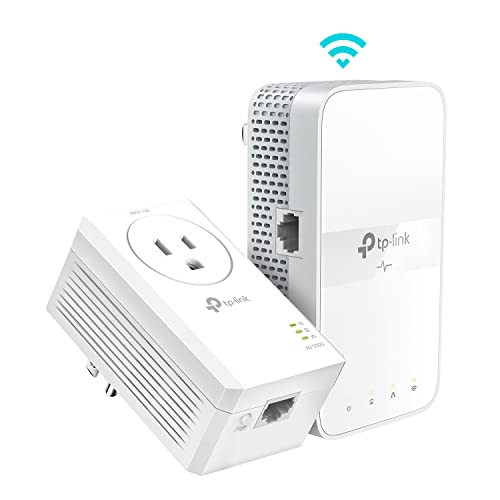
TP-Link AV1000 Powerline WiFi Extender Kit, Passthrough (TL-WPA7617 KIT) — Balanced starter kit
The TL-WPA7617 kit is the roundup’s sensible centre: an AV1000 powerline adapter at the router, an AC1200 dual-band Wi-Fi extender at the far end with a gigabit port, OneMesh support named in the title, and a passthrough socket so the far room does not lose its outlet to the rescue. As a first powerline purchase it asks the fewest questions. The pairing is the standard plug-pair-and-play the title describes, the radio class suits a rescued bedroom, study or television room, and the gigabit port lets the most demanding device in that room — usually the television or a desk — bypass Wi-Fi entirely.
OneMesh deserves its honest footnote. It is TP-Link’s mesh branding, and it means this extender can integrate with a compatible TP-Link OneMesh router for single-name roaming rather than presenting a separate network. Households without such a router lose nothing essential: the kit works standalone with its own Wi-Fi name, cloneable from the main network for simplicity. The passthrough, by contrast, benefits every household identically, and in socket-poor older rooms it is frequently the feature that decides whether the kit can be installed at all.
- Powerline class stated in title: AV1000
- Far-end radio stated in title: AC1200 dual band
- Ports stated in title: gigabit port
- Socket stated in title: passthrough
- Mesh feature stated in title: OneMesh
- Setup stated in title: plug, pair and play
Strengths
- Passthrough socket preserves the wall outlet the adapter occupies.
- AC1200 far-end radio is the right size for a rescued living room or study.
- Gigabit port gives the far room one properly wired device.
Trade-offs
- One gigabit port serves one wired device; a busier far room needs a small switch.
- OneMesh roaming only materialises alongside a compatible TP-Link router.
- AV1000 is the middle link class here, behind the AV1300 kit’s nominal rate.
Best for: a buyer seeking a first powerline kit for one dead room, with the socket preserved and a wired option kept. Not suited for: a buyer seeking several wired devices fed at the far end without adding a switch.
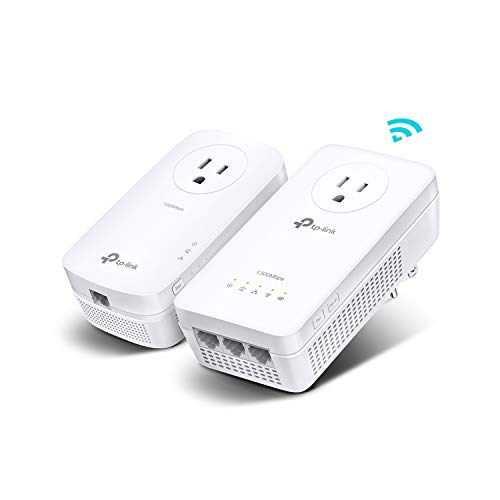
TP-Link AV1300 Powerline WiFi Extender Kit, Passthrough (TL-WPA8631P KIT) — Strongest powerline link
The TL-WPA8631P kit is the maximalist of the TP-Link trio. Its title stacks the roundup’s fastest nominal link — AV1300, with 2×2 MIMO named — together with an AC1200 dual-band extender, three gigabit ports and a passthrough socket. MIMO in a powerline context means the adapters use more of the wiring’s available paths to carry the signal, which is a real technique for squeezing a difficult circuit, and the three ports turn the far adapter into a small wired hub: television, console and desk, all cabled, all bypassing Wi-Fi contention in the rescued room.
This is the kit for the far room that is not a room but a second centre of the house — the garden office, the converted loft, the teenagers’ floor — where several wired devices and a roomful of wireless ones all draw on the link at once. The honesty of the earlier sections applies undiminished: AV1300 across hostile wiring can underperform AV1000 across kind wiring, and no title figure repeals that. But on a fair path, this kit owns the highest ceiling in the set on both halves of the product — link and far end alike — and its port generosity means the ceiling is reachable by cable rather than only by air.
- Powerline class stated in title: AV1300, 2×2 MIMO
- Far-end radio stated in title: AC1200 dual band
- Ports stated in title: 3 gigabit ports
- Socket stated in title: passthrough
- Setup stated in title: plug and play
- Model stated in title: TL-WPA8631P KIT
Strengths
- The highest nominal link rate in the roundup, with MIMO to help difficult circuits.
- Three gigabit ports wire a whole far-end desk or media stack.
- Passthrough keeps the occupied wall socket available for the room.
Trade-offs
- Its advantages concentrate in busier far rooms; a single streaming television uses a fraction of them.
- The far-end radio remains AC1200, a class behind the Wi-Fi 6 kit below.
- Real link performance still answers to the wiring, as with every powerline product.
Best for: a buyer requiring a powerline-fed second hub — garden office, loft floor, media room — with several wired devices. Not suited for: a buyer requiring the newest Wi-Fi generation at the far end, or rescuing one lightly used room.

TP-Link AV1000 Powerline + AX1500 Wi-Fi 6 Kit (TL-WPA7817 KIT) — Wi-Fi 6 far end
The TL-WPA7817 kit makes the opposite allocation from its AV1300 sibling: the link stays at AV1000 while the far-end radio steps up to AX1500 Wi-Fi 6, with a gigabit port and EasyMesh support in the title. That allocation suits the modern rescued room — the home office with a current laptop, the bedroom where new phones and tablets gather — where the devices themselves speak Wi-Fi 6 and the room’s experience is set by the radio in front of them more than by the link behind the wall, provided the internet tier feeding the house sits within the AV1000 link’s real-world reach, as most tiers do.
EasyMesh is the standards-based mesh system, and its presence in the title signals compatibility with other EasyMesh equipment for coordinated networking; as with OneMesh, the kit also works standalone for households outside that world. The deeper point of this pick is generational: powerline links change slowly, but far-end radios age at Wi-Fi’s pace, and a household with devices already moved to Wi-Fi 6 will feel this kit’s modernity every day in the rescued room while noticing its link class only in benchmarks. For a single room rescue on a mainstream internet tier, that is the right trade, knowingly made.
- Powerline class stated in title: AV1000
- Far-end radio stated in title: AX1500 dual-band Wi-Fi 6
- Ports stated in title: gigabit port
- Mesh feature stated in title: EasyMesh
- Setup stated in title: plug and play
- Model stated in title: TL-WPA7817 KIT
Strengths
- The only Wi-Fi 6 far-end radio in the roundup, matched to current devices.
- EasyMesh support offers standards-based mesh integration where the router supports it.
- Gigabit port preserves a wired option for the room’s most demanding device.
Trade-offs
- The title does not claim a passthrough socket, so the far outlet is likely surrendered.
- One gigabit port limits wired ambitions at the far end.
- AV1000 link class sits below the AV1300 kit for multi-device wired loads.
Best for: a buyer seeking a Wi-Fi 6 rescue for a modern home office or bedroom on a mainstream internet tier. Not suited for: a buyer seeking passthrough convenience or a bank of wired ports at the far end.

Tenda AV1000 WiFi Powerline Adapter Kit (PH10) — Simple streaming kit
Tenda’s PH10 kit is the straightforward member of the set: an AV1000 powerline link, gigabit ports named in the title, and an AC650 dual-band Wi-Fi radio at the far end, with the listing positioning the kit for HD and 4K video streaming and gaming. AC650 is the gentlest radio class in this roundup and the kit should be chosen with that understood — it is a radio for a television room, a guest room, a single occupant’s streaming and browsing — rather than a hub for a family’s worth of simultaneous wireless demand.
Within that honest brief, the kit’s emphases make sense. Streaming is a forgiving load: a single high-quality stream needs consistency far more than it needs a huge radio class, and the powerline link’s indifference to walls delivers exactly that consistency to rooms where wireless extenders flicker. The gigabit ports let the television or console — the devices whose streams matter most — sit on wire and leave the modest radio to phones and tablets. Judged as a one-room streaming rescue, the PH10 is coherently specified. Judged as a whole-flat solution, it is under-radioed, and the TP-Link kits above exist for that larger ambition.
- Powerline class stated in title: AV1000
- Far-end radio stated in title: AC650 dual band Wi-Fi
- Ports stated in title: gigabit ports
- Positioning stated in title: HD/3D/4K video streaming and gaming
- Setup stated in title: plug and play
- Socket passthrough: Not stated in the listing title — verify with Tenda documentation
Strengths
- A coherent one-room streaming rescue with wired ports for the screen itself.
- AV1000 link matches the TP-Link kits’ middle class.
- Simplicity of specification suits a set-and-forget installation.
Trade-offs
- AC650 is the weakest far-end radio here and saturates under several busy wireless devices.
- Passthrough is not claimed in the title, so the occupied socket should be assumed lost.
- Its streaming positioning is about consistency, not about competitive gaming latency over powerline.
Best for: a buyer requiring one television room rescued with a wired option for the screen and light wireless duty. Not suited for: a buyer requiring a busy multi-device room served mainly over Wi-Fi.

Devolo Magic 2 WiFi Next Starter Kit — The quiet alternative
Devolo is powerline’s longest-established specialist name, a company that built its reputation on this exact technology while larger networking brands treated it as a sideline — and its listing title says nothing but the product’s name. No link class, no radio class, no port count, no passthrough claim. This guide’s rule is that specifications come from titles, so the spec box below is a column of honest silences, and the pick is included on a different basis: brand specialisation, and the reality that many buyers will consider this kit on reputation and reviews elsewhere.
What can be said without inventing is structural. It is a starter kit, which in this category means the pair of units needed to begin — one for the router end, one Wi-Fi unit for the far end — with expansion by additional units a normal feature of the product family. The Magic 2 generation is Devolo’s current-era platform in its naming, and “WiFi next” in the name promises a wireless far end rather than an Ethernet-only one. Everything beyond that — the numbers that would let it be ranked against the TP-Link kits on merit — must be verified in Devolo’s documentation before purchase, and a buyer unwilling to do that verification is better served by the fully stated kits surrounding this one.
- Kit type stated in title: starter kit
- Brand line stated in title: Devolo Magic 2 WiFi Next
- Powerline class: Not stated in the listing title — verify with Devolo documentation
- Far-end radio class: Not stated in the listing title — verify with Devolo documentation
- Ports: Not stated in the listing title — verify with Devolo documentation
- Socket passthrough: Not stated in the listing title — verify with Devolo documentation
Strengths
- A specialist powerline brand with a long track record in exactly this technology.
- Starter-kit format covers the complete initial installation in one purchase.
- An established platform implies a mature app and expansion ecosystem around it.
Trade-offs
- The listing title verifies nothing, so every specification requires homework before ordering.
- It cannot be ranked against the stated kits on link or radio class from the information given.
- A preference for checkable claims points toward the more forthcoming TP-Link listings.
Best for: a buyer seeking the specialist brand’s platform and willing to verify its specifications in Devolo documentation first. Not suited for: a buyer seeking a purchase decidable from stated figures alone, in one sitting.

TRENDnet TPL-430AP Wi-Fi Everywhere Powerline 1200 AV2 — Wired ports at the far end
TRENDnet’s entry takes the far-end brief furthest on the wired side. Its title describes a Powerline 1200 AV2 unit carrying an AC1200 wireless access point with concurrent dual-band operation, three gigabit ports, MIMO and beamforming. Concurrent dual band means both bands serve at once rather than taking turns, beamforming aims the radio’s energy toward connected devices, and three gigabit ports match the AV1300 TP-Link kit’s wired generosity. As the wireless half of a powerline network, it is the most thoroughly specified far-end in the roundup.
Considered as the centre of a powerline-served wing, the unit has a completeness the simpler kits lack. A converted garage or a rented annexe can hang its whole local network on it — the television and a recorder on two of the wired ports, a desk on the third, phones and a laptop on the AC1200 radio — while the wiring carries the combined load back to the house. Beamforming, often a decorative word in listings, earns its place in exactly this setting, where the far room’s devices sit in known directions from the adapter and the radio can favour them. It is a far-end built for a room that intends to stay connected, rather than a room being rescued for one device.
One structural point needs stating plainly, because the title does not settle it: a powerline network needs a plain adapter at the router end to inject the network into the wiring, and whether this listing’s box contains that companion adapter is not stated in the title. Households already running a compatible powerline network can treat this unit as the Wi-Fi expansion it is designed to be. Households starting from zero should verify the kit contents against TRENDnet’s documentation before ordering, and budget for the router-end adapter if it is not included. That verification is a five-minute task, and it is the difference between an installation and a delay.
- Powerline class stated in title: Powerline 1200 AV2
- Far-end radio stated in title: AC1200, concurrent dual band
- Ports stated in title: 3 gigabit ports
- Radio features stated in title: MIMO, beamforming
- Kit contents: Not stated in the listing title — verify with TRENDnet documentation
- Socket passthrough: Not stated in the listing title — verify with TRENDnet documentation
Strengths
- Three gigabit ports and an AC1200 dual-band radio make a complete far-end hub.
- Beamforming and MIMO are named radio and link refinements, not vague claims.
- The 1200 AV2 link class sits between the AV1000 kits and the AV1300 on paper.
Trade-offs
- Kit contents are unstated in the title, so a from-scratch buyer must verify the router-end adapter.
- No passthrough is claimed, so the wall socket should be assumed occupied.
- Its strengths serve the far end; the link still answers to the house’s wiring like all powerline.
Best for: a buyer requiring a fully featured far-end hub — wired bank plus AC1200 radio — on a powerline network. Not suited for: a buyer seeking a guaranteed complete two-box starter kit without a documentation check.
Powerline, Mesh or Extender: Which Route Suits a Stubborn Room?
The three technologies divide the stubborn-room problem by what the house permits. A wireless extender is the cheapest experiment and the weakest medicine: it helps a room that is merely far, and fails a room that is shielded. Mesh is the strongest wireless answer, spreading radios until one of them stands near the problem — but every mesh radio still has to talk back through the same walls that defeated the router, and in genuinely hostile construction the inter-unit conversation becomes the bottleneck. Powerline declines the conversation entirely. Its signal never enters the air until it is already inside the rescued room, which is why it wins precisely where the other two are weakest.
The counter-considerations are real. Powerline’s performance is a property of a specific house’s wiring and cannot be known in advance, while a mesh system’s behaviour is comparatively predictable from the floor plan. Powerline also serves fixed points — the adapter lives in a socket — whereas mesh covers the spaces between points, the stairs and landings and garden paths where devices travel. Many well-solved houses end up hybrid: mesh for the general territory, one powerline kit spearing through the fortress wall into the study or the annexe. The kits in this roundup coexist with that design happily, since the far-end Wi-Fi they create can carry the main network’s name or a room name of its own.
What Is Electrical Noise, and How Is It Tamed?
Every appliance on a circuit talks a little electrical noise into the wiring, and powerline adapters must hold their conversation over the top of it. The loud talkers are predictable: inexpensive phone and laptop chargers, LED lamps on dimmers, variable-speed motors, ageing fluorescent fittings, and anything with a cheap switching power supply. Their noise does not usually break a powerline link outright; it taxes it, shaving the throughput and, in bad cases, making it vary by the hour as appliances cycle on and off. A link that is fast at noon and slow when the kitchen wakes up is telling a noise story.
Taming is mostly a matter of distance and separation. The adapter should not share its socket pair with a charger or a lamp; a few metres of wiring between the adapter and a known noisy appliance dilutes the interference considerably. Where one appliance is both essential and loud — a workshop machine on the same circuit as the office adapter — the honest options are a different socket on a quieter branch of the circuit, or accepting the tax during the machine’s working hours. Passthrough adapters add a subtle benefit here: the socket on their face is commonly filtered for the appliance plugged into it, which keeps that appliance’s noise out of the line while leaving the adapter’s own path clear. That is the design’s intent, and it is one more reason the passthrough picks suit real rooms.
How Do the Six Compare Side by Side?
| Pick | Link class in title | Far-end radio | Gigabit ports | Passthrough |
|---|---|---|---|---|
| TP-Link TL-WPA7617 KIT | AV1000 | AC1200 | 1 | Yes, stated |
| TP-Link TL-WPA8631P KIT | AV1300, 2×2 MIMO | AC1200 | 3 | Yes, stated |
| TP-Link TL-WPA7817 KIT | AV1000 | AX1500 Wi-Fi 6 | 1 | Not stated in the listing title |
| Tenda PH10 | AV1000 | AC650 | Gigabit ports stated | Not stated in the listing title |
| Devolo Magic 2 WiFi Next | Not stated in the listing title | Not stated in the listing title | Not stated in the listing title | Not stated in the listing title |
| TRENDnet TPL-430AP | Powerline 1200 AV2 | AC1200 concurrent dual band | 3 | Not stated in the listing title |
The table’s most useful column is the last one, because it is where daily friction lives. A passthrough socket is a small thing until the rescued room’s only free outlet disappears behind an adapter and the lamp moves to an extension lead — which the adapter must never share, since filtered strips block the signal. Read the link column with the translation from earlier sections in mind: these are signalling classes across wiring, and the house will have the final word on all of them.
Where Does Powerline Work Well, and Where Does It Struggle?
Powerline thrives in the homes where wireless struggles, and the overlap is not a coincidence. Thick masonry, foil-backed insulation, metal-reinforced floors and long thin flats all punish radio and ignore copper. Detached outbuildings on the same meter — the garage, the garden office, the annexe — are powerline’s signature victory, receiving a network through the cable that already feeds their lights, at distances and through obstacles that would demand bridges or buried Ethernet otherwise. Older housing with simple, direct wiring runs often grades surprisingly well despite its age.
Distance deserves a clarifying word inside all this, because powerline inverts the wireless intuition. A far room on the same circuit can outperform a near room across a hostile breaker; the signal cares about the topology of the wiring — the path back to the consumer unit and what it crosses on the way — far more than about metres of corridor. This is why two houses of identical size can grade the same kit oppositely, and why the advice to test sockets rather than trust distances is not a evasion but the category’s central fact. The wiring is the network; everything else is commentary.
The struggles are equally specific. Homes where the two rooms sit on different consumer units or a three-phase supply can defeat adapters that expect a shared path. Certain breaker types attenuate the signal heavily. Electrically noisy environments — workshops with big motors, lines crowded with cheap switching chargers — tax the link continuously. And a house whose wiring is a palimpsest of extensions and sub-panels gives the signal a maze to cross. None of these can be diagnosed from a listing; all of them are discoverable in an afternoon with a borrowed or returnable kit, which is why the category rewards sellers with painless returns more than most.
How Can a Household Grade Its Own Wiring Before Committing?
Since the house grades the kit, the sensible household examines the house first — and a borrowed, lent or returnable single kit is the examination instrument. The test is an afternoon’s work. Pair the adapters at the router, then carry the far unit on a tour of the candidate sockets: the rescued room’s several outlets, the hallway alternative, the outbuilding. At each, run the household’s real errands — the evening stream, the call, the large file — and note the results against the socket, not against the room. The differences between two sockets in the same room routinely exceed the differences between the kits in this roundup, and discovering that before choosing is the cheapest performance available in the category.
Read the results like an electrician would. Strong performance on one side of a house and weak on the other suggests the weak side hangs off a different part of the consumer unit or a sub-panel. Uniform weakness everywhere suggests noise or a hostile breaker in the common path. Strength that collapses at a particular hour indicts an appliance. Each pattern has its remedy or its verdict, and all of them are more valuable than any review’s throughput figure — including this guide’s careful refusal to print one. A household having run this tour can buy its final kit, from whichever row of the comparison table suits the room, with the uncertainty already retired.
Is Powerline Private on Shared Wiring?
The question arises naturally: the signal travels wiring, and wiring connects neighbours. Two facts answer it. First, the electricity meter and the consumer unit attenuate the powerline signal so severely that a household’s network effectively ends at its own boundary; the conversation is not broadcast down the street in any usable form. Second, the adapters in these kits pair with encryption between themselves — the pairing ritual described in the titles as plug, pair and play is, in part, the two units agreeing on keys that exclude every other adapter on the line. A neighbour’s identical kit cannot join the network without physical access to perform the pairing.
The discipline that remains is the ordinary one. Complete the pairing rather than leaving adapters at any default state, keep the network name and password discipline at the far-end radio as strong as the main router’s, and treat the far room’s Wi-Fi as part of the household network — because it is, with the same reach into shared drives and devices. Powerline does not weaken a home’s security posture when it is set up completely; it merely moves one of the network’s doors to a different room.
How Should a Powerline Kit Be Installed for the Best Result?
Wall sockets, directly, both ends — no extension leads, no surge strips, no adapters stacked on adapters. The surge-protection point deserves emphasis because it is the commonest self-inflicted wound: the filtering that protects equipment from spikes also strips the high-frequency powerline signal, and a kit plugged in through a protected strip can be reduced to a trickle or nothing while appearing correctly installed. If surge protection is non-negotiable in a storm-prone house, protect at the consumer unit level rather than at the adapter’s socket.
Name the far-end network deliberately while the laptop is open. Cloning the main network’s name and password makes the rescued room feel like part of the house, and most devices will simply work there; giving the far end its own name makes its coverage boundary explicit and simplifies troubleshooting, at the cost of devices needing to be introduced to it once. Mesh-branded kits — the OneMesh and EasyMesh TP-Link models — exist to dissolve this choice where a compatible router presides, coordinating the far radio into the main network properly. Households without such a router should pick the cloned-name route for simplicity unless a specific device misbehaves at the boundary.
Pair the adapters in the same room first, confirm they see each other and pass traffic, then carry the far unit to its room and test with real loads — a stream, a call, a file from the house server — at the household’s busy hour rather than in a quiet morning. If the far room underperforms, the diagnostic order is sockets before settings: try the room’s other outlets, since sockets in one room can sit on different circuits, and keep the adapter away from the noisiest neighbours on the line, such as chargers and dimmers sharing its outlet pair. Only after the best socket is found does the Wi-Fi half deserve tuning — name, password, and channel choices at the far end.
What About Latency, Calls and Gaming Over Powerline?
Throughput gets the questions, but consistency decides the experience, and powerline’s consistency is its under-sung virtue. A healthy powerline link adds only a small, stable increment of latency over the house’s connection — the signal’s journey through copper is uneventful compared with a wireless hop through two walls — and, crucially, it does not fluctuate with the neighbours’ activity, the weather or a door closing. Video calls from a powerline-rescued office hold the steady character that wired connections are prized for, which is why the category keeps its following among home workers in difficult houses long after faster wireless options have been tried.
Gaming deserves the calibrated version. Casual and most online play cares about latency stability more than raw bandwidth, and a healthy powerline link supplies that stability respectably; it will not match a direct Ethernet cable to the router, and competitive players in the house will still prefer the cable or a close-range wireless seat. The Tenda kit’s title positions it for gaming, and the fair reading of that claim is the consistency argument, not a promise of tournament-grade response. Downloads of large game files, meanwhile, are a throughput errand, and there the link class and the wiring’s kindness set the pace in the ordinary way.
What Mistakes Do Powerline Buyers Make?
Believing the box is the first, and this guide has spent its length against it: AV figures are signalling classes, and a buyer budgeting for four-digit throughput will feel cheated by a kit performing exactly as physics intends. The second mistake is installation through a surge strip, covered above. The third is judging the kit from one socket pair and condemning it, when the house offered a kinder circuit one room over. Powerline is unusually sensitive to which sockets are chosen, and unusually forgiving once the right ones are found.
There is a subtler version of the socket mistake that deserves naming: installing the far adapter in the room’s most convenient socket rather than its kindest one, then tuning Wi-Fi settings for a week to compensate for a link that was strangled at the wall. Settings cannot repay a bad circuit. The socket tour described earlier — twenty minutes with a streaming laptop — is the entire remedy, and it should precede any judgement about channels, names or the kit itself. Powerline rewards households that debug in the physical order: wiring first, sockets second, radios last.
A fourth mistake is buying the link and forgetting the room: choosing by AV class while ignoring the far-end radio that the rescued room will actually live with, or the port count its devices need. A fifth is expecting powerline to fix a slow internet service — the link distributes the house’s connection, it does not enlarge it, and a struggling tier will struggle identically at the end of a perfect powerline run. The category’s successes are households that matched the kit to the room and tested the wiring before judging either.
What Should Be Budgeted Beyond the Kit Itself?
Very little, which is part of the category’s appeal — but the little deserves listing. A short Ethernet cable for the router-end adapter is sometimes needed beyond the one in the box, and a small switch belongs in the plan for any far room whose wired ambitions outgrow its kit’s ports. Socket arithmetic matters more than money: count the rescued room’s outlets before ordering, note which the adapter will occupy, and decide then whether the passthrough models earn their place in that room. A room left dark or a lamp exiled to an extension lead is a planning failure, not a product failure, and it is entirely foreseeable.
Renters, finally, should note the category’s quiet advantage: nothing here is installed in any permanent sense. Adapters unplug in seconds, leave no holes and no cable runs, and move house in a coat pocket. For a tenant forbidden from drilling yet cursed with a shielded back room, powerline is frequently the only full-strength option the lease allows — a point in its favour that no specification table captures.
The other budget is time, and it is modest: an afternoon for the socket tour and installation, an evening of ordinary use to confirm the result, and a note kept of which sockets won. Households that spend that time once rarely touch the system again, because powerline has no placement to drift, no antennas to knock, and no inter-unit links to renegotiate. Among all the technologies in this guide series, it is the one most likely to be forgotten by its owners — and being forgotten, for infrastructure, is the highest available praise.
Final Recommendation
One discipline governs every recommendation that follows: test the wiring before judging the kits, and judge the kits by their far ends before their link classes. The six products here divide cleanly once those two rules are applied — by radio generation for the room’s devices, by port count for the room’s wired ambitions, by passthrough for the room’s sockets, and only lastly by the AV figure that the house will grade in its own way regardless. A buyer following that order will land on the right row of the comparison table almost mechanically, which is what a mature category should allow.
For most households, the TP-Link TL-WPA7617 kit is the balanced beginning: a stated AV1000 link, an AC1200 far end, a gigabit port and the passthrough socket that keeps the room intact. Step up to the TL-WPA8631P where the far room is a second hub needing three wired ports and the strongest nominal link, and choose the TL-WPA7817 where the rescued room’s devices are Wi-Fi 6 natives. The Tenda PH10 covers the single streaming room with coherence, the TRENDnet serves the far end that wants a full wired bank — after its kit contents are verified — and the Devolo remains the specialist’s choice for buyers content to verify its unstated figures. In every case, let the house grade the wiring first: powerline bought with tested sockets is the most dependable coverage in this entire guide series.
Frequently Asked Questions
Will a powerline kit really deliver the speed in its name?
No — AV1000 and AV1300 are nominal physical-layer signalling rates, not throughput. Real speeds across household wiring land at a useful fraction of the printed figure, depending on circuit path, wiring age and electrical noise. That fraction comfortably covers streaming, calls and home working for most households, which is the honest basis on which to buy.
Can powerline adapters sit on different circuits?
Usually, yes, provided both circuits belong to the same consumer unit — the signal crosses between circuits there, at some cost. Different consumer units, sub-panels and three-phase arrangements are progressively harder, and some breaker types attenuate the signal heavily. The only reliable test is the house itself, socket by socket.
Why must adapters avoid surge-protected strips?
Surge filtering removes high-frequency energy from the line, and the powerline signal is high-frequency energy. An adapter behind a filtered strip may connect at a trickle or not at all. Plug adapters directly into wall sockets; passthrough models return the socket for ordinary use without filtering the adapter’s own connection.
What is the difference between a Wi-Fi powerline kit and an Ethernet-only adapter?
An Ethernet-only adapter delivers a wired port at the far end and nothing else. Every kit in this roundup includes a Wi-Fi radio at the far end as well, so the rescued room gains wireless coverage plus, on most picks, gigabit ports for wired devices. Households whose far room needs only one cabled device can consider Ethernet-only; rooms needing coverage should buy the Wi-Fi kits.
Should the far-end Wi-Fi use the same name as the main network?
Cloning the main name and password is the simplest route and works well for a rescued room that devices visit rather than roam through. A separate name makes the room’s network explicit and can help a device that behaves oddly at the boundary. Where a compatible OneMesh or EasyMesh router is in place, the TP-Link kits here can integrate the far radio into the main network with coordinated behaviour instead of mere name-sharing.
Does powerline work to a garage or garden office?
It is one of the category’s signature uses, provided the outbuilding is fed from the same electrical system and meter as the house. The signal travels the existing power cable, ignoring the distance and obstacles that defeat wireless. Performance depends on the circuit path — a dedicated sub-panel feed can complicate it — so the outbuilding’s sockets deserve the same testing as any room’s.
Does powerline slow down when many appliances are running?
It can, modestly, because appliances inject electrical noise that the adapters must work over. The effect is usually a shaving of throughput rather than a failure, and it follows the household’s rhythms — busiest when the kitchen and workshop are busiest. Keeping adapters out of socket pairs shared with chargers and dimmers, as the noise section describes, recovers most of what noise takes.
Will powerline work in an old house?
Often surprisingly well. Simple, direct wiring runs of the kind older houses frequently have — few sub-panels, short paths back to one consumer unit — suit the signal, and age alone is no disqualification. The genuine risks are later electrical alterations layered over the decades. As everywhere in this category, the afternoon socket tour settles the question for a specific house better than any general rule.
Can more adapters be added later?
Powerline networks generally support additional adapters on the same wiring, letting a successful first kit grow room by room. Compatibility is safest within the same product family and standard generation, so a household expecting to expand should note which family its first kit belongs to and grow inside it.
Related Guides
Powerline is one of three honest routes to a stubborn room; the others are covered in our guides to mesh extenders for whole-home wireless coverage, wifi range extenders for streaming in the rescued room and wifi extenders for 1000 feet between separate buildings.
Related guides
- Best 1440p 165Hz Monitors: One Native 165Hz Pick, Three 180Hz Upgrades, an Overclock Headline and a 160Hz Ultrawide
- Best 13×19 Professional Printers
- Best Graphics Cards with HDMI Out for TV Only: Six Picks for a PC Whose Only Screen Is a Television
- Best TLC SSDs: Six Drives With TLC NAND Confirmed in Their Own Listings


