What's inside
- Where to buy
- Key Takeaways
- Quick Picks
- How did we evaluate cameras that watch your home?
- How do the six compare on pictures, storage and privacy?
- Which of the best 4k indoor cameras fits your household’s rules?
- How do you install an indoor camera without regretting it?
- What is the honest state of 4K indoors in 2026?
- How sharp is sharp enough inside a real home?
- What should a household agree before the first camera is plugged in?
- How do these cameras earn their keep across an ordinary month?
- What does a second camera add once the first has settled in?
- A note on cameras and the people who clean, repair and visit
- A reference photograph of every installed view
- What do indoor camera buyers most often get wrong?
- Final Recommendation
- Frequently Asked Questions
- Related Guides
As an Amazon Associate I earn from qualifying purchases. This post may contain affiliate links at no extra cost to you.
gizmoverdict.com is reader-supported. When you buy through links on our site, we may earn an affiliate commission.
Where to buy
Five cameras below carry verified Amazon listings, and a sixth is covered as prose-only guidance. Indoor cameras deserve slower listing-reading than most gadgets: check what the 4K claim covers, where recordings live, and what the app charges for after the trial ends, because you are buying a small witness for your most private rooms and its terms matter as much as its lens. Each review states its camera’s storage and privacy arrangements in plain words.
The best 4k indoor cameras promise a simple upgrade — the same watchful eye, four times the detail — and at their best they deliver something genuinely useful: a face at the door rendered identifiable rather than suggestive, a pet’s escapade documented in evidence-grade clarity, a nursery feed sharp enough to read breathing-room detail from the sofa. But indoor is the operative word, and it changes the buying equation. A camera inside your home sees birthdays and bad days alike, so resolution shares the podium with privacy design, storage philosophy and the subscription terms that decide what your camera still does in year three.
This guide compares five linked cameras and one prose-only alternative across exactly those axes. Eufy fields two designs — a single-lens pan-and-tilt and a dual-camera flagship — both built on a no-subscription, local-storage creed. Ring brings its new 4K indoor model and the deepest smart-home ecosystem, with a plan-centred storage model described honestly below. Tapo’s C260 adds facial recognition to the pan-and-tilt formula, and Anona’s dual-band camera carries the 4K badge to the value tier. The differences are less about pixels than about what each company believes a camera inside your home should be.
A note on the 4K label itself: every camera here records a genuine 4K-class image from its main sensor, but implementations differ — some pan to follow action, some crop a digital zoom from the 4K frame, and night performance depends on lighting each maker handles differently. The reviews keep those mechanics visible, and the privacy section treats physical shutters, local processing and account security as headline features, because in this category they are.
Key Takeaways
- Eufy’s Indoor Cam E30 is the balanced default: true 4K, pan-and-tilt tracking, colour night vision and local recording with no subscription required.
- Eufy’s S350 pairs two cameras in one body — a wide view plus a zooming telephoto — for the sharpest subject detail here, still subscription-free.
- Ring’s Indoor Cam 4K is the ecosystem pick, with the newest Ring image pipeline and Alexa fluency, but its clip history lives behind Ring’s subscription plan.
- Tapo’s C260 adds on-device facial recognition and person and pet detection to the 4K pan-and-tilt formula, with card storage keeping the core free.
- Anona’s 4K camera brings dual-band Wi-Fi 6 and auto-tracking at the value end, with an app experience a step behind the household names.
- Privacy separates these cameras as much as pixels: prefer physical shutters or lens covers, local storage and two-factor accounts in the rooms that matter most.
Quick Picks
| Pick | Badge | Why it earns its place |
|---|---|---|
| eufy Security Indoor Camera E30 4K | Best overall indoor 4K | True 4K detail, a pan-and-tilt head that follows the action, colour night vision and local storage — no plan required. |
| eufy Security Indoor Cam S350 | Best for subject detail | Two lenses in one body — a 4K wide view and a zooming telephoto — so the camera watches the room and the face at once. |
| Ring Indoor Cam 4K | Best for Ring and Alexa homes | Ring’s newest indoor flagship with its Retinal 4K pipeline and true-colour night vision — inside the ecosystem, on its terms. |
| Tapo C260 4K Pan/Tilt Indoor Camera | Best facial-recognition value | 4K pan-and-tilt with on-device face recognition that learns the household — alerts that know family from stranger. |
| Anona 4K UHD Indoor Camera | Best budget dual-band pick | 4K pan-and-tilt with dual-band Wi-Fi 6 and auto-tracking at the value tier — specifications first, polish second. |
| Lorex 4K Indoor Wi-Fi Camera | Prose only — local-storage specialist | A 4K indoor model from a security-first brand, sold through specialist channels; covered without a link for buyers who shop that route. |
How did we evaluate cameras that watch your home?
Image quality was tested against the jobs indoor cameras actually perform. A 4K badge matters at the moment of identification — the stranger at the door, the child-minder’s face, the licence-plate moment at a window — so we weighted subject detail at conversational distances, the usefulness of each camera’s zoom or tracking for keeping that detail, and night rendering under the dim, warm lighting of real homes rather than laboratory darkness. Colour night vision that needs a porch’s worth of light scores differently indoors than infrared that works in a blacked-out nursery, and the reviews say which is which.
Storage and subscriptions formed the second axis, stated for every camera in words rather than prices: what records with no plan at all, what the plan adds, and whether a memory card quietly keeps the truth if the cloud relationship ends. Companies change plan pricing whenever they please, so this guide deliberately describes the structure — card-first, cloud-first or hybrid — and leaves figures to the day you shop. The structure is what you live with; the figure is a negotiation.
Privacy engineering was the third axis, and it was scored like a feature, because it is one. Physical lens shutters or covers, local processing of sensitive detection, clear recording indicators, guest and household awareness, and account protection all counted. A camera can win this guide on pictures and lose a bedroom recommendation on privacy, and one or two verdicts below turn on exactly that distinction.

eufy Security Indoor Camera E30 4K — Best overall indoor 4K
The E30 is the camera this guide would hand to a friend without a follow-up phone call. Its 4K sensor feeds a pan-and-tilt head that rotates to keep a wandering toddler, a patrolling cat or an unexpected visitor centred in the frame, and the AI tracking is smooth enough that the resulting footage reads as deliberate rather than robotic. Detail is the point of the upgrade and it lands: faces at the far side of a living room are identifiable, the dog’s guilty expression is admissible evidence, and the digital zoom into a 4K frame stays useful far deeper than any 2K camera allows. Colour night vision renders dim rooms in something close to their real palette when a lamp or hallway spill gives it light to work with.
Eufy’s founding argument is storage independence, and the E30 keeps it: recordings live on a memory card in the camera or on the brand’s home hub if you add one, viewable in the app with no subscription in the story. Detection for people, pets and crying babies is processed with the camera’s own intelligence rather than rented back to you monthly. The honest costs are ecosystem ones — the app is capable rather than beloved, smart-home integrations trail Ring’s, and there is no physical shutter, so privacy at home is managed by scheduling, positioning and the camera’s privacy mode rather than by a mechanical eyelid. For a living room or nursery where the camera’s presence is a household agreement, that is a manageable term.
Set against its own sibling below, the E30 is the simpler instrument: one lens, one view, everything it sees rendered at full 4K. Households covering one important room — the nursery, the front-door hall, the room where the dog is definitely not allowed on the sofa — will find it the most complete single answer here, and the absence of a plan means the camera you buy is the camera you still fully own in five years.
E30 ownership settles into a routine owners describe with unusual affection: the camera disappears. Local recording means no renewal emails, the tracking means no blind corners in its room, and the app alerts stay meaningful because the detection distinguishes the household’s cast from genuine novelty. Families using it as a nanny camera value the two-way talk for the midday check-in that reassures everyone, including the nanny. One practical tip from the trenches: aim the camera’s rest position at the room’s most informative default view — door plus play area — because that is the frame it returns to between events, and the frame most clips will open on.
- Resolution: 4K main sensor
- Movement: pan and tilt with AI tracking
- Storage: memory card or eufy hub; no subscription
- Detection: person, pet, baby cry
- Night vision: colour with ambient light; infrared fallback
- Privacy: app privacy mode; no physical shutter
Strengths
- 4K detail plus tracking keeps subjects identifiable
- Local storage removes the subscription question entirely
- Colour night vision flatters real evening rooms
Trade-offs
- No physical lens shutter for mechanical privacy
- App and integrations trail the biggest ecosystems
- Colour night mode still needs some ambient light
Best for: nurseries, living rooms and pet posts wanting maximum detail without a plan.
Not suited for: bedrooms demanding a physical shutter, or Alexa-first households.

eufy Security Indoor Cam S350 — Best for subject detail
The S350 solves the indoor camera’s oldest frustration: the wide view that shows everything and identifies nothing. Inside its swivelling body sit two cameras — a 4K wide-angle that holds the whole room, and a telephoto partner that zooms toward the subject the wide view spotted. The pair work as one instrument: the room view detects the nanny at the door or the cat on the counter, and the zoom view renders them in close-up detail, with hybrid zoom reaching levels that turn a far corner into a portrait. For a nursery, the arrangement is quietly brilliant — one device framing the room while its second eye keeps the crib at readable closeness.
Coverage mechanics match the concept. The body pans through a full circle and tilts to survey floor and shelf, tracking subjects between its two views with a hand-off that mostly feels like a single observant camera. As with the E30, the intelligence — person, pet and cry detection — and the recordings stay local, on card or hub, with no subscription structuring the relationship. Night work is handled in both colour, where light allows, and infrared, and the two lenses give the dark less room to hide in than any single-lens rival here.
The caveats are size, price tier and the same shutter story as its sibling. The S350 is a visibly larger presence on a shelf, its dual-lens sophistication prices it at the top of this guide, and privacy is again a software arrangement rather than a physical cover. Buyers covering one high-value room — the nursery above all — will find the dual view worth every compromise. Buyers covering several rooms should price two E30s against one S350 and let their floor plan arbitrate.
The S350’s dual view changes reviewing habits in a way owners did not expect: incidents get watched twice, once for the story in the wide frame and once for the truth in the zoom. A disputed pet crime, a toddler’s first steps while the adults were in the kitchen, a visitor’s face at the door — the second lens keeps answering the question the first lens raises. The camera also serves large open-plan spaces that defeat single-lens rivals, since its wide eye surveys the whole while the telephoto patrols the details. It is the most surveillance-capable object in this guide, which is exactly why its privacy scheduling deserves the careful setup its review recommends.
- Cameras: dual — 4K wide plus telephoto zoom
- Movement: 360-degree pan with tilt
- Storage: memory card or eufy hub; no subscription
- Zoom: hybrid zoom to 8x
- Detection: person, pet, baby cry
- Night vision: colour and infrared modes
Strengths
- Dual lenses end the wide-view versus detail dilemma
- Full-circle coverage from a single device
- Local storage and detection with no plan attached
Trade-offs
- Largest and priciest body in this guide
- Privacy remains software-managed, no physical shutter
- Dual-lens sophistication is wasted on a small, simple room
Best for: nurseries and main living spaces where one camera must see everything closely.
Not suited for: multi-room coverage on a budget, or shutter-first privacy households.

Ring Indoor Cam 4K — Best for Ring and Alexa homes
Ring’s newest indoor camera is the company’s image-quality flagship, built around what it calls Retinal 4K: a processing pipeline that pairs the 4K sensor with automatic HDR and colour night vision tuned to render dim interiors in true colour rather than infrared grey. In a lamplit living room the effect is the most natural night picture in this guide — faces keep their tones, the cat keeps its markings, and footage looks like the room rather than a surveillance homage. The compact body carries a manually adjustable privacy cover, a physical shutter you slide with a fingertip, which remains the most honest privacy feature any indoor camera can offer and one this guide wishes were universal.
The ecosystem is the second half of the product. Ring cameras converse fluently with Alexa — feeds on Echo Show screens, announcements when motion stirs, routines that tie the camera to lights and locks — and a home already running Ring doorbells meets a familiar app and a single alert language. Detection distinguishes people from general motion with the confidence of a company that has processed a billion doorbell afternoons. For the Ring household, this camera is not a purchase so much as an expansion, and its integration dividend is real.
The terms deserve the plain statement this guide gives every brand: Ring’s model is cloud-centred. Live view and alerts work without a plan, but recorded clip history — the ability to review what happened while you were out — is a function of Ring’s subscription, and the camera offers no memory-card refuge. Footage lives on Ring’s servers, encrypted in transit and at rest, under Ring’s account protections, which include two-factor authentication every owner should enable. Households comfortable inside that structure gain the slickest experience here; households who regard a plan as rent on their own hallway should take the eufy or Tapo road with our blessing.
Ring ownership at its best is invisible in the other direction: the camera joins an existing household system and inherits its habits. If your doorbell already announces visitors and your Alexa already shows the doorstep, this camera’s feed appears in the same places with no new app to teach anyone — a genuine mercy in a multi-generational home. The privacy cover earns daily use in owners’ reports, clicked shut when the family gathers and open when the house empties, a physical ritual people maintain because it is satisfying in a way software toggles are not. Buy it as an ecosystem citizen and it excels; buy it as a standalone and you are paying for a city you do not live in.
- Resolution: 4K with Auto HDR pipeline
- Night vision: true-colour in low light
- Storage: cloud via Ring subscription for history
- Privacy: manual physical privacy cover
- Detection: person and motion, plan-enhanced
- Ecosystem: Alexa and Ring app native
Strengths
- Most natural colour night picture in this guide
- Physical privacy cover sets the class standard
- Deepest smart-home integration of the six
Trade-offs
- Clip history requires the subscription plan
- No local card storage as an alternative
- Fixed-view design at this tier while rivals pan
Best for: Ring and Alexa households wanting the flagship indoor picture.
Not suited for: subscription refuseniks, or rooms needing pan-and-tilt coverage.

Tapo C260 4K Pan/Tilt Indoor Camera — Best facial-recognition value
The C260’s signature is recognition. Where most indoor cameras alert you that a person exists, Tapo’s flagship indoor model learns the faces of the household and labels its alerts accordingly — the difference between ‘person in the kitchen’ and ‘Mum in the kitchen’, between a stranger’s silhouette and your teenager raiding the fridge at midnight. For a family using a camera as a gentle household awareness system — children home from school, an elderly parent moving about, the dog walker arriving — that labelling transforms the alert stream from noise into news. The 4K sensor and full pan-and-tilt movement give the recognition something worth labelling, tracking subjects smoothly around the room.
Detection breadth backs the headline: person and pet detection, baby-cry alerts for the nursery deployment, and motion tracking that keeps the subject framed for the clip that matters. Storage follows the Tapo philosophy this guide has praised before — a memory card in the camera records with no plan required, while an optional cloud tier exists for off-site copies. The privacy design deserves its mention too: Tapo builds a privacy mode that turns the camera to the wall or stands it down on schedule, and face data for recognition is handled within the camera’s own system rather than assembled into an advertising profile — the arrangement household faces deserve.
The compromises are the familiar Tapo ones, honestly restated: Wi-Fi on the crowded band demands a decent router relationship, the app is functional rather than delightful, and the brand’s smart-home reach stops well short of Ring’s. None of them touches the C260’s central gift. If your household’s camera exists to answer ‘who, not just what’, this is the most articulate answer in the guide at its tier.
Face recognition changes a household’s relationship with alerts in a way worth dwelling on: within a fortnight, the C260’s notifications read like a family group chat — arrivals named, the dog walker’s visit confirmed, the one unnamed face at the door given the attention it deserves. Parents of teenagers describe the tone shift from surveillance to awareness, and it matters for household trust. Enrol faces carefully in good light, add the regular carers and grandparents, and prune the list when circumstances change. The feature is only as respectful as the household administering it, and Tapo’s local handling gives that household the custody to administer it well.
- Resolution: 4K main sensor
- Movement: pan and tilt, 360-degree AI motion tracking
- Recognition: on-device facial recognition
- Storage: memory card; optional cloud tier
- Detection: person, pet, baby cry
- Privacy: privacy mode and scheduling
Strengths
- Face recognition turns alerts into named household news
- Card storage keeps core features plan-free
- Full tracking movement at a mid-tier position
Trade-offs
- App polish trails Ring and eufy
- Smart-home ecosystem is narrower than rivals’
- Recognition needs enrolment time to shine
Best for: families wanting alerts that distinguish household from strangers.
Not suited for: Alexa-routine households, or buyers wanting a physical shutter above all.
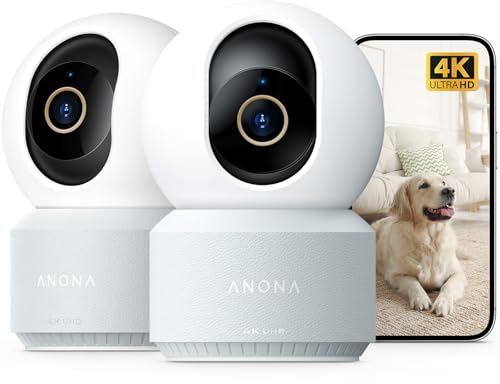
Anona 4K UHD Indoor Camera — Best budget dual-band pick
Anona’s entry reads like a buyer’s wishlist compiled from rival reviews: a 4K sensor, a pan-and-tilt head with auto-tracking, dual-band Wi-Fi including 5GHz on the Wi-Fi 6 standard, and an app that handles pet, dog and baby monitoring duties. In an apartment block where the 2.4GHz band is a rush-hour motorway, that dual-band radio is not a garnish — it is the difference between a feed that stutters and one that flows, and the big brands’ refusal to fit it at friendly tiers is the opening this camera walks through. Daytime detail honours the 4K badge respectably, and the tracking follows a roaming pet with more diligence than the price suggests.
The value tier’s usual taxes apply, and this guide collects them openly. The companion app does its work with less grace than Tapo’s or Ring’s, setup rewards patience, and detection intelligence — motion with human and pet filtering — lacks the semantic refinement, like face recognition or cry analysis, that the flagships advertise. Night vision is infrared-competent across a normal room. Cloud storage is offered as an optional layer while card recording covers the subscription-free basics, an arrangement we always prefer to cloud-only at any price.
Support is the third tax: a smaller brand’s help is an email thread, not an institution, so the Anona suits owners comfortable being their own first line of troubleshooting. For those owners — technically calm, Wi-Fi-congested, budget-aware — it delivers the guide’s essential 4K pan-and-tilt experience at its friendliest tier, and as a second camera for a playroom or pet post it may be the smartest money in this entire roundup.
Anona ownership rewards one specific configuration session: place the camera on the 5GHz band, set the tracking sensitivity against an evening of the pet’s ordinary chaos, and position the unit where its pan range covers the door and the pet’s territory in one sweep. Owners who invest that half hour report a camera that behaves above its tier; owners who skip it meet the app’s rough edges daily. As a second or third camera — the playroom, the workshop, the rented flat — its economics are hard to argue with, and its footage interoperates with nothing, which in a mixed-brand house is simply the honest state of the industry at this price.
- Resolution: 4K UHD
- Movement: 360-degree pan-tilt with auto-tracking
- Wi-Fi: dual-band 2.4/5GHz, Wi-Fi 6
- Storage: card recording; optional cloud
- Detection: motion with person and pet filtering
- Extras: two-way audio via app
Strengths
- Dual-band Wi-Fi 6 escapes congested networks
- Full pan-tilt tracking at the value tier
- Card recording keeps the basics subscription-free
Trade-offs
- App and setup polish trail the household names
- Detection lacks face or cry intelligence
- Small-brand support footprint
Best for: apartments with crowded Wi-Fi and calm, technical owners.
Not suited for: nursery-primary duty, or buyers wanting hand-holding software.
Lorex 4K Indoor Wi-Fi Camera — Prose only — local-storage specialist
Lorex approaches indoor cameras from the opposite direction to the smart-home brands: it is a security company first, raised on recorders and multi-camera systems, and its 4K indoor Wi-Fi models carry that DNA. No verified listing met this guide’s standard, so the camera is covered in prose for readers who buy through security retailers — a channel where its strengths make sense. Those strengths begin with storage philosophy: Lorex builds around local recording, whether to memory card or into the company’s wider recorder ecosystem, and treats the cloud as an accessory rather than the product. For the privacy-minded household, that heritage is the recommendation.
The feature set follows the security brief: 4K detail for identification, person detection to keep alerts meaningful, night vision for unlit rooms, and two-way talk for the doorway conversation. What it does not chase is the smart-home pageant — no face-recognition enrolment, no elaborate routine ecosystem, an app built for reviewing footage rather than delighting influencers. Buyers whose mental model is ‘a camera that records, that I control’ will find the plainness refreshing; buyers wanting their camera to announce visitors to a voice assistant should stay with Ring or Tapo.
Shopping the specialist channel demands the usual verification: confirm the exact model’s sensor and storage options with the retailer, since security brands revise lines quietly, and confirm return terms before ordering. Priced against the linked five, a Lorex indoor 4K earns its place in this guide as the traditionalist’s option — the camera for households who want evidence-grade pictures and their footage kept at home, and who are willing to trade app sparkle to get both.
Lorex’s wider ecosystem is the context that completes this pick: households running a Lorex recorder for outdoor cameras can fold the indoor unit into the same storage and review world, ending the two-app split that plagues mixed systems. Security retailers who stock the line can also advise on the exact current model revision, a human layer of support the online-only brands do not offer. For a buyer building a whole-property system deliberately — outside wired and monitored, inside wireless and local — that coherence is the argument. It will not announce visitors through a voice assistant, and its owners, on the whole, regard that silence as a feature.
- Resolution: 4K class sensor
- Storage: local-first — card or recorder ecosystem
- Detection: person and motion
- Night vision: infrared for unlit rooms
- Ecosystem: security-app centred, smart-home light
- Status: prose-only; specialist retail channel
Strengths
- Local-storage philosophy suits privacy-first homes
- Security-brand build and recorder compatibility
- Identification-grade 4K detail
Trade-offs
- App experience is functional rather than polished
- Smart-home integrations are minimal
- Model revisions require retailer-level verification
Best for: privacy-first households already in, or open to, a recorder ecosystem.
Not suited for: voice-assistant households wanting routines and announcements.
How do the six compare on pictures, storage and privacy?
Three columns decide this category, and resolution is not one of them — every camera here clears the 4K bar. What separates them is where footage lives, how the camera behaves when the household is home, and whether its intelligence names what it sees. Read the table with your most private room in mind; the right answer for a hallway and a nursery may be different cameras, and a mixed pair is a legitimate outcome.
| Model | Movement | Storage model | Signature intelligence | Privacy hardware | Plan needed for history |
|---|---|---|---|---|---|
| eufy Security Indoor Camera E30 4K | Pan and tilt | Local card / hub | Tracking, pet and cry | Software privacy mode | No |
| eufy Security Indoor Cam S350 | Pan and tilt, dual lens | Local card / hub | Dual-view zoom tracking | Software privacy mode | No |
| Ring Indoor Cam 4K | Fixed | Cloud-centred | Person detection, HDR pipeline | Physical cover | Yes |
| Tapo C260 4K Pan/Tilt Indoor Camera | Pan and tilt | Local card; optional cloud | Facial recognition | Privacy mode, scheduling | No |
| Anona 4K UHD Indoor Camera | Pan and tilt | Local card; optional cloud | Auto-tracking | App controls | No |
| Lorex 4K Indoor Wi-Fi Camera | Fixed / model dependent | Local-first, recorder option | Person detection | Local storage by design | No |
The pattern worth memorising: local storage and physical privacy live on opposite shelves in this guide — the card-first cameras manage privacy in software, while the cloud-centred Ring fits the physical shutter. No camera here yet offers every virtue, which is precisely why the choice deserves thought rather than a coin flip. Your room’s sensitivity should arbitrate: the more private the space, the more weight the privacy columns deserve against the picture columns.
Which of the best 4k indoor cameras fits your household’s rules?
Where should footage live — card, cloud, or recorder?
Decide this before comparing a single picture, because it is the decision you cannot reverse without replacing cameras. Card-first designs — both eufys, the Tapo, the Anona — record at home, cost nothing monthly, and keep working if the company’s servers or your subscription lapse; their risk is physical, since a stolen camera takes its card. Cloud-first design, Ring’s way, survives theft and multiplies convenience, at the price of an ongoing plan for history and footage held by a provider. The recorder route, Lorex’s heritage, suits houses already wired for security systems. None is the correct answer for everyone; each is the correct answer for someone, and the reviews name who.
A hybrid instinct is healthy. Many households run a cloud camera at the door, where theft-resistance matters, and card-first cameras in private rooms, where custody matters. The apps multiply, but the principles stay clean.
Which rooms deserve a camera at all?
The honest guide asks this aloud. Entry halls, living rooms and nurseries with a caregiving purpose justify cameras for most households; bedrooms and bathrooms demand a conversation that many homes rightly conclude with ‘no’. Where a camera is justified in a sensitive room — a nursery is the universal example — prefer the strongest privacy arrangement available: physical cover or strict scheduling, local storage, an account with two-factor protection, and a household rule that the camera’s status is never a secret from anyone old enough to ask. Children deserve to grow up knowing where the lens is and why.
Guests reset the calculation temporarily. A visible camera and a sentence of disclosure preserve trust; several models here can be stood down for a weekend with a schedule or a slid cover, and using that feature is good hosting, not paranoia.
Is the 4K upgrade worth it over a good 2K camera?
At the distances indoor cameras work, the honest answer is: for identification, yes; for ambience, no. Knowing the dog is on the sofa needs no resolution at all. Reading a face across a room, cropping into a corner incident, or zooming a nursery feed to check a small detail — these are the moments 4K earns its premium, and they are usually the moments the camera was bought for. Buyers whose need is presence — is anyone home, did the parcel land inside — can save with confidence. Buyers whose need is evidence should buy the resolution and the storage to keep it.
How do you install an indoor camera without regretting it?
Placement and privacy setup on day one
Place the camera high in a corner with the room’s entrances and its purpose in one frame, then open the live view and walk every path a person can take through the room, checking that faces — not scalps — meet the lens. Set detection zones to exclude the television, the window’s passing traffic and the radiator’s heat shimmer, and tune sensitivity against an ordinary evening’s footage before trusting alerts. Then do the privacy work in the same session, not someday: enable two-factor authentication, set the household schedule or privacy mode, position shutters and covers as the room’s rule requires, and tell everyone who lives there what you have installed and where.
Cables and power deserve the same care as angles. A camera trailing a lead across a nursery floor is a hazard wearing a gadget’s clothes; route along walls, use the mounts provided, and keep plugs beyond toddler and pet investigation.
A monthly five-minute camera hygiene routine
Once a month, open each camera’s stored footage and confirm it is actually recording — silent card failures and full cards are this category’s quiet tragedies. Check for firmware updates, wipe the lens with a microfibre cloth, review the shared-access list for people whose access should have ended, and glance at the alert log for patterns worth a zone adjustment. Every few months, change nothing but verify your recovery options: that you can still sign in, that two-factor codes reach you, that the app on a second household phone works.
Treat the routine like smoke-alarm testing — brief, scheduled, and the entire reason the system can be trusted on the one night it matters.
What is the honest state of 4K indoors in 2026?
The resolution race indoors has effectively ended at 4K, because room distances and lens sizes make further pixels a diminishing return; the competition has moved to intelligence and trust. The frontier features in this guide — dual-lens zooming, face recognition, true-colour night pipelines — are all attempts to make the camera understand the room rather than merely photograph it. Expect the next generation’s arguments to be about on-device processing and privacy certification, not megapixels, and buy accordingly: the camera whose intelligence and storage terms you endorse will age better than the one with the largest number on its box.
That is also why this guide refuses to crown a single winner for every room. The category’s maturity means the best answer is a matched answer — and a household that chooses deliberately, room by room, will be happier than one that buys six of anything.
How sharp is sharp enough inside a real home?
Indoor distances are mercifully short, and that shapes what 4K buys you. Across a nursery, the difference between a good 2K camera and these 4K models is the difference between seeing that a blanket moved and seeing how it lies; across a long open-plan room, it is the difference between a figure and a face. The dual-lens S350 cheats the distance problem optically, the tracking cameras cheat it mechanically by following subjects into closer framing, and the fixed Ring relies on its processing to make its single viewpoint count. All three strategies work; they fail differently, which is why placement still matters more than any of them.
Night is the sterner test, and it divides the guide by philosophy. Infrared sees in true darkness and renders a monochrome world that is honest but ghostly; colour night vision needs a whisper of light and repays it with identification-grade detail — clothing colours, hair, the markings that distinguish one visitor from another. Nurseries, kept dark by design, belong to infrared and to the cameras whose colour modes fall back gracefully. Hallways and living rooms, rarely fully dark in real homes, are where the colour pipelines in this guide earn their praise. Match the camera to your rooms’ actual darkness, not the darkness of the showroom test.
What should a household agree before the first camera is plugged in?
Four agreements, made while everyone is calm. First, locations: which rooms, which angles, and which spaces are permanently off-limits to lenses. Second, access: whose phones hold the app, whose accounts are individual rather than shared, and how access ends when a relationship or employment does — the dog walker’s viewing rights should have a planned farewell. Third, retention: how long footage is kept, who may review it, and what happens to clips that capture something sensitive; card-first cameras make retention a household decision, while cloud cameras outsource part of it to a provider’s defaults that deserve reading. Fourth, disclosure: how guests are told, because they will be filmed, and a sentence at the door preserves both the security and the welcome.
These agreements sound formal for a gadget, and they are the opposite of paranoia — they are how a camera stays a household tool instead of becoming a household argument. Every camera in this guide can serve a family well inside such an agreement. None of them can substitute for one.
How do these cameras earn their keep across an ordinary month?
Week one is novelty: the household checks feeds for the pleasure of it, the cat’s secret life is revealed to general astonishment, and the nursery camera’s night picture becomes a family marvel. By week three the novelty has burned off and the cameras settle into their real employment — the glance that confirms the children are home, the alert that names the dog walker, the clip that settles the question of which pet owns the counter. This is the phase the buying decision should be designed for: not the demo, but the Tuesday. Cameras whose alerts stay meaningful — named faces, true pet detection, zones tuned to the room — survive the transition; cameras that cried wolf are muted by it, whatever their resolution.
The month’s incidents write the real review. A parcel brought inside by a neighbour, captured in door-side clarity. A toddler’s first unaided steps, recorded by a tracking camera that happened to be watching when history occurred in the playroom. A pet’s limp noticed on playback a day before it became obvious in person. None of these moments consults a spec sheet, and all of them are why households keep these devices for years. The 4K detail matters precisely here — in the unplanned clip, the cropped frame, the face that needed naming — which is why this guide weighs identification over ambience from its first page.
The month also tests the household’s agreements. A guest asks about the camera in the hall, and the answer given — visible device, named purpose, a cover slid shut for the evening — either builds the trust that keeps the system welcome or starts its quiet exile. A teenager negotiates the playroom camera’s schedule and wins a reasonable boundary, administered in the app in two minutes. These are not edge cases; they are the ordinary governance of a watched home, and the cameras that support it gracefully — scheduling, covers, individual accounts, local custody of footage — are the ones still plugged in at the year’s end.
By month’s end, the successful installation has become invisible in the way of good infrastructure: trusted, occasionally consulted, and forgotten until the moment it is needed. That invisibility is the product. Buy the camera whose storage terms, privacy tools and alert intelligence your household can live with at month six, not the one that dazzles at day six, and the 4K badge will have been the least important part of a very good decision.
What does a second camera add once the first has settled in?
Households that begin with one indoor camera and add a second rarely place it where they originally planned, and the reason is instructive: the first camera teaches them what they actually watch. The feed that gets opened is the children’s room, not the front door; the alert that matters is the pet’s, not the porch’s. A second unit bought after that education lands where the attention already lives — the playroom that became the nursery’s rival, the kitchen where the dog’s afternoons unfold, the hallway that connects every story the first camera starts. This guide’s six models interoperate with nobody, so the second camera is also an ecosystem decision: staying within a brand keeps one app and one alert language, which is worth more than a marginal specification gained by defecting.
There is also a resilience argument that only pairs provide. Cameras get unplugged for sockets, blindsided by furniture moves, and taken down for the firmware update that chooses the worst evening. A household with two posts keeps its awareness through each small outage, and for the families in this guide’s heartland — a baby upstairs, a parent across town, a pet with a medical schedule — that continuity is the difference between a system and a gadget. Buy the first camera for its room; buy the second for the household. The pair, thoughtfully governed, is the mature form of everything this category promises.
A note on cameras and the people who clean, repair and visit
A watched home contains more lives than its residents’. The cleaner who comes on Thursdays, the plumber under the sink, the friend feeding the cat in August — each passes through these cameras’ frames, and the household’s handling of that fact is a measure of its manners. The good practice is boring and kind: mention the cameras, keep them out of the rooms where a visitor’s privacy is absolute, and let the scheduling and covers in this guide do their diplomatic work. Several households we know keep a small, cheerful note by the door; it starts conversations instead of ending them, and it has never yet reduced a camera’s usefulness by a single frame.
Employers of carers should be especially deliberate, because a nanny camera carries legal and ethical weight that varies by place and circumstance. The models in this guide are sold openly as nanny cameras, and their overt use — known to the carer, agreed in the open, focused on the child’s welfare — is both the ethical standard and, in most households, the arrangement that builds the trust the camera was bought to protect. A camera that everyone knows about guards the child and the carer’s reputation alike; that is the deployment this guide endorses, in this category above all others.
A reference photograph of every installed view
Photograph each camera’s final installed view with your phone and keep the picture with the household documents. If a camera is moved for decorating, knocked by a ladder or replaced under warranty, that reference frame restores the exact angle in minutes instead of an evening of trial and error. It also records, for the household’s own governance, precisely what each camera can and cannot see — a small act of transparency that pairs well with every privacy agreement this guide has recommended. Two minutes, once, per camera; the system thanks you for years. File the router password beside those photographs while you are at it, and every future setup in the house becomes calmer, including the day a replacement camera joins the household and needs its bearings at once, without a household treasure hunt through old drawers and forgotten boxes.
What do indoor camera buyers most often get wrong?
Buying resolution and ignoring storage terms. A 4K camera whose history sits behind a plan you will not pay for is a live-view toy. Read the storage column before the sensor column.
Pointing a camera at a window. Daylight through glass destroys exposure and turns the camera into a silhouette machine. Angle across the room’s traffic, never straight at the pane.
Skipping two-factor authentication. The realistic threat to a home camera is a recycled password. Two-factor setup on day one is the highest-value minute in the product’s life.
Installing in private rooms by default. Coverage is not the same as wisdom. Put cameras where their purpose is clear, and give sensitive rooms the strongest privacy arrangement — or none.
Never testing playback. Live view working proves nothing about recording. Play back yesterday’s clip monthly; silent failures are this category’s speciality.
Final Recommendation
For a single recommendation, take the eufy E30: genuine 4K, tracking movement, colour night vision and storage that stays yours without a plan. The S350 upgrades the same creed for the nursery that deserves a zooming second eye, Ring’s 4K owns the Alexa household that accepts its cloud terms, the Tapo C260 speaks to families who want alerts with names attached, and the Anona and Lorex serve the congested-Wi-Fi flat and the local-storage traditionalist respectively. Six cameras, one resolution, genuinely different philosophies — choose the philosophy first and the camera chooses itself.
A camera inside your home should feel like a trusted household tool — visible, understood, and unmistakably working for the people it watches over.
Frequently Asked Questions
Is 4K noticeably better than 2K for an indoor camera?
At identification distances, yes — faces, details and digital zoom all hold up where 2K softens. For simple presence detection the difference vanishes. Most buyers discover their need was identification all along, usually on the first clip they wish were sharper.
Which of these cameras work fully without a subscription?
Both eufy models, the Tapo C260 and the Anona record to local cards and keep their core detection with no plan; Lorex is local-first by design. Ring’s camera views live and alerts without a plan, but its recorded history is a subscription feature.
How do these cameras handle privacy when we are home?
By different tools: Ring fits a physical cover you slide shut; the eufy and Tapo models offer privacy modes and schedules that stand the camera down; all benefit from geofenced or timed routines where the app supports them. Choose the mechanism your household will actually use — the best privacy feature is the one that is on.
Can an indoor 4K camera work as a baby monitor?
Yes — the eufy pair and the Tapo C260 are built for it, with cry detection, pan-and-tilt framing and two-way talk. Use a dedicated audio monitor as backup for overnight sleeping if you want belt and braces, and keep the camera’s cable routed entirely out of the crib’s reach.
Does facial recognition mean my family’s faces leave the house?
On the Tapo C260, recognition is designed to run within the camera’s own system, with enrolment handled locally through the app — one reason this guide scores on-device processing as a privacy feature. Whatever camera you choose, read its recognition terms before enrolling a single face.
What memory card should I buy for continuous 4K recording?
A high-endurance card of generous capacity, formatted in the camera. 4K writes relentlessly, and endurance-rated media is built for exactly that punishment; rotate or replace cards on a schedule if you record around the clock.
Related Guides
More from our indoor-camera desk: best 2-pack indoor cameras for two rooms home camera privacy — a household guide local vs cloud recording, honestly compared.


