What's inside
- Key Takeaways
- Quick Picks
- How were these six chosen for production work?
- One GPU, six personalities: the comparison
- How do you spend an affordable production budget wisely?
- How we evaluated these machines across a production month
- Common mistakes when buying an affordable editing laptop
- The second purchase: building the desk these laptops deserve
- Who should leave this class and buy a creator machine instead?
- Longevity: how long an affordable editor stays an editor
- Codecs, formats, and why your footage votes in this election
- Final recommendation
- Frequently asked questions
As an Amazon Associate I earn from qualifying purchases. This post may contain affiliate links at no extra cost to you.
gizmoverdict.com is reader-supported. When you buy through links on our site, we may earn an affiliate commission.
Where to buy: Affordable editing power hides in Amazon’s gaming-laptop aisles rather than its creator boutique, so follow the linked listings into that territory, verify the memory and storage configuration on the unit in front of you — gaming lines are notorious for near-identical variants — and expect gaming manners, gaming weight, and gaming fans as the price of admission.
Here is the truth this entire category is built on, stated before any badge is handed out: every honest entry among the best affordable laptops for video production is a gaming laptop. The reason is arithmetic, not fashion. Video editing at modern resolutions leans hard on a discrete graphics processor for timeline effects, noise reduction, AI-assisted tools, and export acceleration, and the RTX 4060 is the card where that capability becomes genuinely affordable. Creator-branded machines with the same silicon cost more for their screens and their styling. The gaming chassis gives you the GPU, the cooling to sustain it, and a bill you can defend — and takes its payment in weight, fan noise, and screens tuned for frame rates rather than for colour.
That trade defines every judgement in this roundup. These six machines are ranked on graphics power as titled, on the memory and storage that decide how large a project feels comfortable, and on the display compromises a colour-conscious editor must accept with open eyes. No export times are quoted, because the titles state hardware rather than benchmarks and your footage, codec, and effects stack will have the final say. No panel here is described as grading-grade, because the titles list gaming displays — FHD and high-refresh panels — and honesty about that ceiling is part of what makes the value real. Editors whose channels justify the creator-boutique route can compare this field against the flagships in our guide to best laptops for youtubers before deciding which side of the trade they belong on.
Key Takeaways
- All six picks carry the same graphics card, the RTX 4060, so the ranking turns on memory, storage, processor, and screen rather than on GPU tier.
- Memory divides the field sharply: 64GB in the Lenovo LOQ, 32GB in the HP Victus, and 16GB in the remaining four — the single most consequential difference in the list.
- Storage follows the same pattern, from 2TB in the Victus and the LOQ down to 512GB in the Acer Nitro V 16.
- The two 16-inch Acers and the ASUS offer higher-resolution or higher-refresh panels, while the 15.6-inch picks list gaming FHD screens that editors must treat as working displays, not grading references.
- Every chassis here is a gaming design, with the weight, fan behaviour, and styling that implies; none of them is a discreet client-meeting machine.
- Windows 11 Pro appears on the Victus and the MSI Katana; other titles state Windows 11 without the Pro designation, and the Nitro’s title does not state an operating system at all.
Quick Picks
| Pick | Badge | Headline facts from the listing title |
|---|---|---|
| HP Victus 15 RTX 4060 | Best all-round value editor | i7-13620H, RTX 4060, 32GB RAM, 2TB NVMe SSD, 15.6" FHD, Windows 11 Pro |
| Lenovo LOQ 15.6 RTX 4060 | Best memory and storage ceiling | Ryzen 7 8845HS, RTX 4060, 64GB DDR5, 2TB PCIe SSD, FHD G-SYNC |
| Acer Predator Helios 16 RTX 4060 | Best screen of the six | i7-13700HX, RTX 4060, 16" 2560×1600 165Hz G-SYNC, 16GB DDR5, 1TB Gen 4 SSD |
| ASUS ROG Strix G16 RTX 4060 | Best big-screen gaming-editor | i7-13650HX, RTX 4060, 165Hz display, 16GB DDR5, 1TB PCIe Gen4 SSD, Wi-Fi 6E |
| MSI Katana 15 RTX 4060 | Best Pro-edition value | i7-13620H, RTX 4060, 15.6" FHD 144Hz, 16GB DDR5, 1TB NVMe, Windows 11 Pro |
| Acer Nitro V 16 RTX 4060 | Best high-refresh 16-inch option | i7-14650HX, RTX 4060, 16" WQXGA 180Hz, 16GB DDR5, 512GB Gen 4 SSD, Wi-Fi 6 |
How were these six chosen for production work?
The screen for entry was the graphics card: an RTX 4060 or nothing, because below that line the affordable-editing promise collapses into frustration on any timeline with ambition. With the GPU held constant across the field, the ranking criteria became the factors that actually differentiate editing life — memory first, since it decides how a large project breathes; storage second, since footage is the heaviest substance in a producer’s world; processor third, for the encodes and background tasks that fill a production week; and the display last, judged with deliberate severity, because a gaming panel’s virtues are real but they are not a colourist’s virtues.
Cooling and chassis were considered as editing features in disguise. A production laptop renders for sustained stretches, and a gaming design’s cooling headroom — the feature gamers buy for frame rates — is precisely what keeps an export from throttling at minute forty. Titles were read strictly throughout: configurations are reported as printed, operating systems are claimed only where the title claims them, and the one title silent on its operating system is reported as silent. The result is a list with a shared heart and six genuinely different personalities.

1. HP Victus 15 RTX 4060 — Best all-round value editor
The Victus 15 takes the top badge because it pairs the class-standard RTX 4060 with the configuration a working editor would actually spec: an Intel Core i7-13620H with ten cores, 32GB of memory, and a 2TB NVMe drive, under Windows 11 Pro. That memory-and-storage combination is the difference between a laptop that hosts a production and a laptop that merely attempts one. Thirty-two gigabytes keeps a 4K timeline, its preview caches, a browser of client feedback, and a thumbnail editor in simultaneous, uncomplaining residence; two terabytes holds the current season’s footage without the weekly eviction ceremony.
HP’s Victus line is the mildest-mannered of the gaming families, and in a production context that restraint is a feature. The styling will not embarrass its owner in a client meeting the way the more theatrical gaming designs can, and the 15.6-inch FHD panel — a gaming display, to be judged as one — is perfectly serviceable for timeline navigation, assembly, and review, with final colour decisions reserved for a trusted external screen where the budget allows. A webcam, a backlit keyboard, Type-C connectivity, and Wi-Fi 6 complete a title that reads like it was assembled by someone who understood the assignment.
Its compromises are the class compromises, honestly worn: weight that belongs to a desk more than a daily commute, fans that announce a heavy export to the whole room, and a screen whose ambitions are refresh and response rather than colour fidelity. None of those touches the central proposition, which is that this configuration removes the two most common affordable-editing bottlenecks — memory and storage — in a single purchase. For a producer upgrading from integrated graphics or from a 16GB machine that swaps itself breathless, the Victus is the step that changes the working week.
Strengths
- 32GB of memory and 2TB of storage are the strongest working combination among the 15.6-inch picks.
- RTX 4060 plus a ten-core i7 covers timeline effects, AI tools, and exports with headroom.
- Windows 11 Pro and restrained Victus styling suit client-facing production work.
Trade-offs
- FHD gaming panel is a working display, not a colour-grading reference.
- Gaming-class weight and fan noise travel with the performance.
- Display refresh rate is not stated in the listing title.
Key specs
- Processor: Intel Core i7-13620H, 10 cores / 16 threads per the title
- Graphics: NVIDIA GeForce RTX 4060
- Memory: 32GB RAM
- Storage: 2TB NVMe SSD
- Display: 15.6" FHD
- Operating system: Windows 11 Pro
- Connectivity: Wi-Fi 6, Type-C, backlit keyboard, webcam
Best for: a producer whose projects have outgrown 16GB of memory and a single terabyte, editing at a home desk. Not suited for: final colour grading on the internal panel, which the title presents as a gaming FHD display rather than a reference screen. Value editors can check price on Amazon for the Victus configuration described here.

2. Lenovo LOQ 15.6 RTX 4060 — Best memory and storage ceiling
The LOQ exists in this list to make a single, emphatic point: at the top of the affordable class, memory can stop being a constraint altogether. Its title states an AMD Ryzen 7 8845HS — which Lenovo’s listing copy positions against Intel’s i9-13900H — the same RTX 4060 as every pick here, and then the numbers that separate it from the field: 64GB of DDR5 memory and a 2TB PCIe SSD. Sixty-four gigabytes is workstation territory smuggled into a gaming line, and for the producer whose timelines carry multicam sequences, nested compositions, and a small city of adjustment layers, it changes the machine’s temperament from coping to calm.
The rest of the specification supports the headline act sensibly. The 15.6-inch FHD panel carries G-SYNC, a gaming virtue that matters little to timelines but harms nothing; a backlit keyboard, Windows 11, and an included HDMI cable in the title round out a package aimed at buyers who compare spreadsheets before they compare badges. Lenovo’s LOQ line is the company’s value gaming brand, and its presence here with this configuration is the strongest evidence in the roundup for the guide’s opening thesis: the affordable editing market lives in gaming aisles now, and it is not even hiding.
The cautions are the familiar ones, plus one specific to the configuration’s ambition. A producer who will never open a project that breathes past 32GB is buying memory that will spend its life as a spectator, and the honest value calculation should price the Victus’s balance against the LOQ’s ceiling with real timelines in mind. The panel remains a gaming FHD display with the colour caveats that follow. And the Ryzen platform, excellent as it is, means the Thunderbolt ecosystem of Intel machines is not part of this conversation — the title names no such port, and dock plans should be made accordingly.
Strengths
- 64GB of DDR5 memory is double the next-best figure in this roundup and ends memory anxiety for large projects.
- 2TB PCIe SSD matches the class’s best storage figure.
- Ryzen 7 8845HS brings strong multi-core performance to encodes and background renders.
Trade-offs
- Memory beyond a project’s real needs is money that a leaner configuration could spend elsewhere.
- FHD G-SYNC panel is a gaming display, with the colour limits that implies for grading.
- No Thunderbolt port is stated in the listing title, shaping dock and fast-storage options.
Key specs
- Processor: AMD Ryzen 7 8845HS
- Graphics: NVIDIA GeForce RTX 4060
- Memory: 64GB DDR5 RAM
- Storage: 2TB PCIe SSD
- Display: 15.6" FHD, G-SYNC
- Operating system: Windows 11
- Extras: Backlit keyboard, HDMI cable per the title
Best for: a multicam or effects-layered producer whose projects genuinely consume memory at workstation scale. Not suited for: simple single-camera timelines, where 64GB of memory would spend the machine’s life unused. Heavy-project editors should verify the LOQ’s 64GB configuration on Amazon before comparing it against leaner rivals.
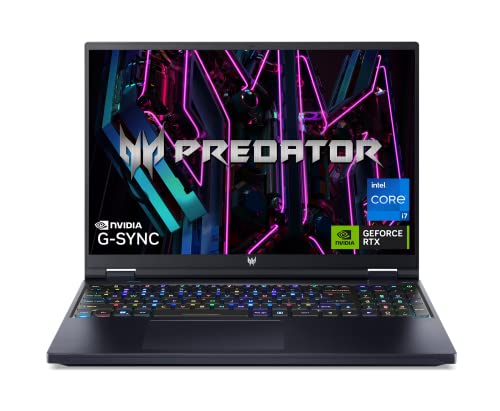
3. Acer Predator Helios 16 RTX 4060 — Best screen of the six
The Predator Helios 16 earns its badge on the one specification where gaming and editing interests genuinely overlap: its 16-inch display runs at 2560 by 1600 with a 165Hz refresh rate and G-SYNC, the highest resolution panel in this roundup. For an editor, that resolution is not a gaming luxury — it is timeline geography. More vertical room for tracks, more horizontal detail in the preview, and a sharper view of the footage being cut, all on the machine’s own screen rather than on a desk monitor the budget has not yet bought.
Behind the panel sits a 13th-generation i7-13700HX, a high-wattage HX-class processor that outmuscles the H-series chips in several rivals here, driving the same RTX 4060 through a terabyte of Gen 4 storage. Killer Wi-Fi 6E handles the network side with the gaming crowd’s usual seriousness. Sixteen gigabytes of DDR5 memory is the configuration’s one ordinary figure, and it places the Helios in the list’s lower memory tier — a real consideration for the largest projects, and the reason this machine ranks below the two memory leaders despite its superior screen and processor.
The Predator identity brings the class trade in its most concentrated form: this is an assertively gaming-styled, performance-first chassis, with the presence and the acoustics to match. In a studio it will be admired; in a quiet client suite it will be noticed. Producers whose workflow is desk-based, screen-hungry, and moderate in project scale will find the trade delightful — the best display in the class attached to the strongest conventional processor. Producers whose timelines are memory-hungry should take the LOQ or the Victus and buy a monitor later; the Helios buyer is specifically the one who would rather have the great screen now. Post-production specialists will also want the audio-side picture from our roundup of best monitors for audio postproduction, since picture and sound chains grow up together.
Strengths
- 2560×1600 165Hz display is the sharpest, roomiest panel in this affordable class.
- i7-13700HX is an HX-class processor with more sustained muscle than the H-series rivals.
- Killer Wi-Fi 6E and Gen 4 storage keep the supporting specification current.
Trade-offs
- 16GB of memory sits in the class’s lower tier for large-project work.
- Predator gaming styling and fan character are the least discreet in this roundup.
- Colour-grading trust still requires an external reference; resolution is not calibration.
Key specs
- Processor: Intel Core i7-13700HX, 13th generation
- Graphics: NVIDIA GeForce RTX 4060
- Memory: 16GB DDR5
- Storage: 1TB Gen 4 SSD
- Display: 16" 2560×1600, 165Hz, G-SYNC
- Operating system: Windows 11 (edition as listed; model PH16-71-74UU)
- Connectivity: Killer Wi-Fi 6E
Best for: a desk-based editor who cuts on the laptop’s own screen and values resolution and processor muscle. Not suited for: memory-hungry multicam projects, where the 16GB ceiling arrives sooner than the screen’s virtues can compensate. Screen-first producers can inspect the Helios 16 listing on Amazon for its full display details.

4. ASUS ROG Strix G16 RTX 4060 — Best big-screen gaming-editor
The Strix G16 is the Helios’s closest rival in spirit: a 16-inch gaming machine with a 165Hz display, an i7-13650HX processor, the ubiquitous RTX 4060, 16GB of DDR5 memory, and a terabyte of PCIe Gen4 storage, connected by Wi-Fi 6E. ASUS’s ROG line carries the gaming world’s most recognisable badge, and the Strix wears it without apology — which in a production context means the same bargain as the Predator, struck with a slightly different accent: big screen, HX processor, gaming manners, editing capability that follows from the silicon rather than from any creator marketing.
Where the two 16-inch machines separate is in what their titles choose to tell us. The Helios specifies its resolution — 2560 by 1600 — while the Strix title states its 165Hz refresh and leaves the resolution unstated, so this guide’s spec box records that silence rather than filling it from the model line’s reputation. A buyer for whom the panel is the deciding factor should resolve that question on the listing page, where the exact configuration’s display will be documented. It is a small lesson in the discipline this whole roundup runs on: in a market of variants, the listing in front of you outranks the badge above it.
As an editing proposition, the Strix’s virtues are scale and stamina. Sixteen inches of timeline, an HX processor that sustains its performance through long exports, and ASUS’s gaming cooling heritage add up to a machine that treats a production day as a light workout. Its compromises mirror the class: 16GB of memory as the project’s ceiling, gaming styling in professional rooms, and a weight that assigns it to a desk or a deliberate journey rather than a daily carry. For the producer who also games — a constituency this category serves constantly — the Strix may be the most natural single purchase in the list, doing both jobs under one badge with no translation required.
Strengths
- 16-inch 165Hz display gives timeline work room and smoothness in equal measure.
- i7-13650HX sustains performance through long exports and background encodes.
- Wi-Fi 6E and Gen4 storage keep the platform current on every side.
Trade-offs
- Display resolution is not stated in the listing title and must be confirmed on the page.
- 16GB of memory caps the largest projects below the Victus and LOQ tier.
- ROG gaming identity is unmistakable in client-facing settings.
Key specs
- Processor: Intel Core i7-13650HX
- Graphics: NVIDIA GeForce RTX 4060
- Memory: 16GB DDR5
- Storage: 1TB PCIe Gen4 SSD
- Display: 16" 165Hz (resolution not stated in the listing title)
- Operating system: Windows 11
- Connectivity: Wi-Fi 6E; model G614JV-AS74 per the title
Best for: a producer-editor who also games, running one big-screen HX machine for both lives. Not suited for: projects that live above 16GB of memory, or rooms where gaming styling undermines the presentation. Dual-life buyers should check the Strix G16 on Amazon, confirming the display resolution on the configuration page.

5. MSI Katana 15 RTX 4060 — Best Pro-edition value
The Katana 15 makes its case with a producer’s eye for the practical lines: an i7-13620H, the RTX 4060, a 15.6-inch FHD panel at 144Hz, 16GB of DDR5, a terabyte of NVMe storage, a USB 3.2 Gen1 Type-C port with DisplayPort output, MSI’s Cooler Boost 5 thermal system, and Windows 11 Pro. That last item is rarer in this class than it should be — only the Victus shares it — and for a producer working inside a small studio’s device policies, or remoting into client systems with Pro-edition requirements, it can be the quiet deciding factor between two otherwise similar machines.
Cooler Boost 5 deserves its sentence in an editing review, because sustained cooling is the unsung production specification. An export is not a sprint; it is forty minutes of maximum effort, and a chassis that holds its clocks through minute forty finishes while a throttling rival is still rendering. MSI’s gaming lineages have spent years optimising exactly that endurance, and the Katana inherits the benefit in full. The DisplayPort-capable Type-C port matters in the same practical register: it is the clean route to the external monitor that every editor in this class should regard as the second purchase, the one that turns a gaming panel into a workstation’s navigation screen while a trusted display handles colour.
The Katana’s limits sit where the class’s limits usually sit. Sixteen gigabytes of memory is the working ceiling, the FHD panel is a gaming display with a gamer’s priorities, and MSI’s styling, while tamer than the Predator’s, still announces its tribe. None of that prevents the Katana from being the most administratively convenient pick here — Pro edition, sensible ports, honest storage — and for a producer embedded in a working studio’s ecosystem, administrative convenience is a genuine form of value that specification comparisons underrate.
Strengths
- Windows 11 Pro at this tier suits studio policies and client remote-access requirements.
- Cooler Boost 5 cooling serves the sustained loads that exports impose.
- Type-C with DisplayPort output gives a clean path to an external editing monitor.
Trade-offs
- 16GB of memory, the class’s common ceiling for larger projects.
- 144Hz FHD panel is tuned for play; colour decisions still belong on a reference screen.
- USB Type-C is Gen1 speed, slower than the ports on creator-class machines.
Key specs
- Processor: Intel Core i7-13620H
- Graphics: NVIDIA GeForce RTX 4060
- Memory: 16GB DDR5
- Storage: 1TB NVMe SSD
- Display: 15.6" FHD 144Hz
- Operating system: Windows 11 Pro
- Connectivity: USB 3.2 Gen1 Type-C with DisplayPort, Cooler Boost 5 cooling
Best for: a studio-embedded producer whose environment values the Pro edition, cooling endurance, and monitor connectivity. Not suited for: the largest multicam projects, where 16GB of memory becomes the binding constraint. Studio buyers can review the Katana 15 on Amazon and confirm the Pro edition on the unit offered.

6. Acer Nitro V 16 RTX 4060 — Best high-refresh 16-inch option
The Nitro V 16 closes the list with the newest processor badge and the fastest panel: an i7-14650HX from Intel’s 14th generation, the RTX 4060 with a stated 233 AI TOPS, a 16-inch WQXGA display at 180Hz, 16GB of DDR5 memory, Wi-Fi 6, and a backlit keyboard. The WQXGA resolution places its screen second only to the Helios in this class for timeline geography, and the 180Hz refresh — a gaming figure — at least guarantees that timeline scrolling and playback feel liquid while you work.
Two honest caveats shape its review. Storage is 512GB of Gen 4 SSD, half or less of every rival here, and in a footage economy that figure is not a detail: a single busy production week can fill it, which makes an external drive not an accessory for this machine but a founding member of the purchase. The second caveat is a silence — the listing title does not state the operating system, an omission this guide records in the spec box rather than papering over. Buyers should confirm the OS on the listing page before ordering, since a production machine’s software environment is not a thing to discover at unboxing.
With those caveats priced in, the Nitro’s proposition is coherent: the freshest processor generation in the list, a genuinely good screen by class standards, and the RTX 4060 doing its usual work, at the storage tier that disciplined producers — the ones whose footage lives on external drives by system rather than by accident — can operate happily. It suits the editor whose archive is already external and whose desk wants the big, fast panel. It does not suit the editor whose archive is wherever it fell, because 512GB will turn that habit into a weekly emergency within the first month.
Strengths
- i7-14650HX is the newest-generation processor in this roundup.
- WQXGA 180Hz panel gives the timeline room and fluidity second only to the Helios screen.
- RTX 4060 with stated AI acceleration covers effects and modern editor features as titled.
Trade-offs
- 512GB of storage is the smallest here and demands an external-drive system from day one.
- Operating system is not stated in the listing title and must be verified before purchase.
- 16GB of memory shares the class’s common ceiling.
Key specs
- Processor: Intel Core i7-14650HX
- Graphics: NVIDIA GeForce RTX 4060 (233 AI TOPS per the title)
- Memory: 16GB DDR5
- Storage: 512GB Gen 4 SSD
- Display: 16" WQXGA 180Hz
- Operating system: Not stated in the listing title
- Connectivity: Wi-Fi 6, backlit keyboard; model ANV16-71-75MW
Best for: an editor with an external-drive archive already in place and a big, fast, current-generation screen as the priority. Not suited for: footage stored on the internal drive by habit, which outgrows 512GB within weeks. Disciplined archivists should look at the Nitro V 16 on Amazon, verifying the operating system line before anything else.
One GPU, six personalities: the comparison
| Pick | Processor | RAM / Storage | Screen | Deciding factor |
|---|---|---|---|---|
| HP Victus 15 (B0FDGS9KKB) | i7-13620H | 32GB / 2TB | 15.6" FHD | Balanced memory, storage, and Pro edition |
| Lenovo LOQ (B0FNVH7LL2) | Ryzen 7 8845HS | 64GB / 2TB | 15.6" FHD G-SYNC | Memory ceiling far above the class |
| Predator Helios 16 (B0BXMNSXDD) | i7-13700HX | 16GB / 1TB | 16" 2560×1600 165Hz | Best display and HX muscle |
| ROG Strix G16 (B0CRDCXRK2) | i7-13650HX | 16GB / 1TB | 16" 165Hz | Big-screen gaming-editor double life |
| MSI Katana 15 (B0C9FRSDBQ) | i7-13620H | 16GB / 1TB | 15.6" FHD 144Hz | Pro edition plus cooling endurance |
| Nitro V 16 (B0DDZHQNS4) | i7-14650HX | 16GB / 512GB | 16" WQXGA 180Hz | Newest chip, fastest panel, smallest drive |
How do you spend an affordable production budget wisely?
Begin by interrogating your own timelines, because with the GPU held equal, your projects are the specification sheet that matters. Open your largest recent project and note what it consumes: memory during a full-effects playback, storage across the whole production, the share of your week spent exporting. A producer whose projects idle at ten gigabytes of memory gains nothing from the LOQ’s 64GB and should take the Victus’s balance or the Helios’s screen. A producer whose projects pin a 16GB machine against its ceiling weekly should treat the memory leaders as the only serious candidates and let every other virtue wait.
Then decide the screen question as a workflow question rather than a quality question. If the laptop’s panel will be your only display for the foreseeable future, its resolution and size deserve real money — the Helios and Nitro logic. If an external monitor already anchors your desk, the internal panel demotes itself to a travel screen, and memory and storage should absorb the budget instead. Either way, reserve a line in the plan for the reference display your colour work will eventually need, because no panel in this class closes that account, and pretending otherwise is how affordable purchases become expensive lessons.
Finally, budget the entourage in the same sitting as the laptop: the external drive the Nitro demands, the backup twin every machine here deserves, the dock or hub your ports imply, and the carrying solution that a gaming chassis’s weight requires. Affordable production is a system, and the producers who thrive in this class are the ones who buy the system once, at the start, rather than discovering it piece by piece at deadline prices. Researchers cutting knowledge content face a parallel version of this budgeting in our guide to best laptops for phd programmes, where memory discipline plays the same starring role.
How we evaluated these machines across a production month
Our scenarios followed a working producer’s month rather than a benchmark calendar. The first week is a client piece: two camera angles, a colour pass, captions, and a delivery deadline. The memory leaders — the LOQ supremely, the Victus comfortably — kept that week fluid, holding the project, the review browser, and the caption tools in one unbroken workspace. The 16GB machines completed the same week with more deliberate housekeeping: background applications closed, renders queued rather than stacked, the small disciplines that experienced editors on modest hardware practice without thinking.
The second week is a personal project with ambition: layered effects, noise reduction on low-light footage, a long export at the end. Here the shared RTX 4060 proved the wisdom of the class’s entry rule — every machine here has real answers for effects work that integrated graphics simply cannot give — while the HX processors in the Helios, Strix, and Nitro sustained their effort through the long render with the composure their cooling was built for. Fan noise, the class’s tax, was paid in full by all six during that week; producers recording voiceover in the same room as the render will schedule around it, as professionals in this class have always done.
The third week is travel and delivery: footage moved, projects consolidated, archives checked. The 2TB machines postponed every hard conversation; the Nitro’s 512GB forced the healthiest habits and the most frequent ones. The fourth week is the review meeting, where the gaming identities of all six machines entered rooms built for persuasion — and where the Victus’s restraint and the Katana’s relative calm earned a kind of value no benchmark records. Across the month, the ranking logic held: same GPU, different lives, and the right choice is the one whose strengths match your most common week.
Common mistakes when buying an affordable editing laptop
The founding mistake is shopping the creator boutique on an affordable budget and accepting a weaker graphics card in exchange for styling — the exact inversion of this class’s wisdom, which takes the GPU first and lets the styling fall where it may. The second mistake is comparing only the graphics card, on the theory that a shared RTX 4060 makes the machines identical; memory and storage differences in this list are the difference between a calm production and a weekly negotiation with your own hardware.
A third mistake is trusting a gaming panel with final colour decisions because it looks vivid on the desk. Vivid is not accurate, high refresh is not calibration, and the titles here claim gaming virtues only — grade on a reference you trust, or deliver colour you have verified some other way. A fourth is underbuying storage in a footage economy, particularly the Nitro’s 512GB without an external system already running. A fifth is ignoring the operating-system lines, which vary across this list from Pro to unstated. And a sixth is forgetting that affordable refers to the purchase, not the workflow: the drives, backups, and monitor that complete these machines are part of their real cost, and the honest budget includes them from the start.
The second purchase: building the desk these laptops deserve
Every machine in this roundup is a beginning rather than a destination, and the producers who get the most from the class plan the second purchase while the first is still in its box. The external monitor is the natural candidate: not a luxury, but the reference surface that this class’s gaming panels honestly lack, and the single addition that converts any pick here into a colour-trustworthy workstation. The Katana’s DisplayPort-capable Type-C and the HDMI routes across the list exist for exactly that growth, and a producer who buys the monitor in the same season as the laptop will grade with confidence years earlier than one who waits for the perfect single machine that this budget cannot buy.
Storage architecture is the second build. The pattern that works is boring and total: active projects on the internal drive, a fast external drive as the current season’s overflow, and a large, slow archive with a backup twin that is checked, not assumed. Under that pattern the Nitro’s 512GB stops being a flaw and becomes a discipline with a fast panel attached, while the 2TB machines gain a safety their capacity alone never provided — because a single copy of a client’s master is a risk at any capacity, and two copies on a schedule is a system at any price.
The third build is acoustic and human. These are gaming machines, and their fans will speak during renders; a production room that records voice should be arranged so the laptop can work in another space, or behind a door, or on a schedule that respects the microphone. Headphones you trust, a chair that survives an edit day, and light that does not fight the screen complete a desk that costs a fraction of the laptop and returns its value every working hour. Affordable production is not a machine; it is a small, well-arranged system, and this class of laptop is simply its engine.
Who should leave this class and buy a creator machine instead?
Honesty about a category includes marking its border. Producers whose income depends on colour-critical delivery — commercial work with contractual standards, colourists building a reputation on the grade — will outgrow these gaming panels and should read this list as a bridge rather than a home, stepping up to the creator flagships when the work pays for them. Producers whose productions are primarily mobile, filmed in the field and assembled in transit, will find the gaming chassis’s weight a daily argument and may belong with the portable creator machines cross-referenced at the top of this guide.
Everyone between those borders — the working majority of editors, small studios, content businesses, wedding and event producers, educators, and serious hobbyists building toward income — is precisely whom this class serves, and serves well. The RTX 4060 does not know it is in a gaming laptop. It accelerates the same timelines, the same effects, and the same exports it would in a machine costing far more for its badge, and the money saved is real money that a production can spend on lenses, audio, storage, and time. Knowing which side of the border your work sits on is the last skill this guide can teach; the rest is editing.
Longevity: how long an affordable editor stays an editor
A production laptop’s lifespan is decided less by its processor than by the headroom around it, and this list’s tiers map that future plainly. The LOQ’s 64GB and the Victus’s 32GB buy years of growing project complexity before memory becomes the reason to replace the machine; the 16GB tier will meet that reason sooner, and its owners should regard the purchase as a strong medium-term instrument rather than a half-decade companion. Storage tells the same story in a different unit: the 2TB machines age into archives gracefully, while the 512GB Nitro is a machine whose owner must run an external system from the first week to the last.
What ages fastest in this class is rarely the silicon. Batteries cycle, fans gather the dust of render rooms, and hinges learn the habits of their owners. Gaming chassis are, on the whole, built for hard use and honest about their serviceability in a way thin creator machines often are not, which is a quiet longevity argument for the whole category. A producer who cleans the vents, treats the battery kindly during desk months, and keeps the backup system alive will extract the full value from any pick here — and value extracted over years, not benchmarks admired for a week, is the correct definition of affordable.
Plan the succession loosely while the machine is young: the project archive organised so a future laptop can inherit it in an afternoon, the licences and project files portable, the desk’s monitor and drives ready to serve the next engine. Producers who work that way discover that upgrading stops being a migration and becomes a swap, and the affordable class — bought well, kept well, replaced without drama — turns into the backbone of a production business rather than a compromise it apologises for.
Codecs, formats, and why your footage votes in this election
One variable sits above every specification in this guide and rarely gets its due in buying advice: the footage itself. A producer cutting lightly compressed material from a mirrorless camera asks a different question of a laptop than a producer cutting long-GOP phone footage, screen recordings, or multicam event coverage, and the same RTX 4060 machine can feel lavish to the first and merely adequate to the second. Proxy workflows — the editor’s oldest trick — compress these differences enormously, which is why the 16GB machines remain honest recommendations: with proxies generated overnight, modest hardware edits heavy formats gracefully, and the money saved buys storage the proxies live on.
The wise purchase therefore starts in the media folder, not the marketplace. Look at what your cameras actually produce, what your clients actually deliver, and what your delivery platforms actually demand, and let those three answers rank the list. High-volume, lightly compressed work argues for the memory and storage leaders. Proxy-friendly work argues for the screen-led machines, since the panel is what you will actually look at all day. Delivery in a single standard format argues for processor stamina, where the HX chips earn their badges. No reviewer can run that audit for you, because no reviewer has your footage — and a guide that pretends otherwise is selling certainty it does not own.
What this guide can promise is narrower and more useful: within the facts their titles state, these six machines cover the realistic range of affordable production, from the memory-rich LOQ to the panel-rich Helios to the balanced Victus, and none of them will disgrace a producer whose workflow is honest about its own demands. The rest — the codecs, the discipline, the deadlines met — is the craft itself, and the craft was never really about the laptop.
There is a temptation, in a category defined by compromise, to apologise for the machines — and this guide declines it on the record. The producers cutting the world’s wedding films, product reviews, training series, church services, indie documentaries, and a million hours of honest content are cutting them, in very large part, on hardware from exactly this class: gaming laptops with strong cards, generous drives, and fans that work for a living. The work does not know what the laptop cost or what tribe its styling belongs to. It knows whether the timeline moved when it was asked to move, whether the export finished before the client woke, and whether the person at the keyboard could afford to keep doing the work at all. On those three questions, this class answers yes, yes, and yes — and that is not a compromise worth apologising for. It is the economics that keep independent production independent.
So buy the machine your projects describe, build the small system around it that this guide has sketched — the reference screen in time, the drives on a rhythm, the backups checked rather than believed — and then return to the timeline, where the actual verdict on every laptop in this roundup will be delivered, project by project, by the only critic whose opinion has ever paid an invoice.
A note on timing completes the counsel. Production purchases made in panic — the old machine dead on a delivery week, a client’s deadline already breathing — are the worst purchases in any category, and this class rewards the calm buyer disproportionately, because gaming lines rotate configurations constantly and the exact memory-and-storage variant you want is worth waiting a few days to land. Keep a written note of your ideal configuration from this guide, keep the backup system alive on the old machine a little longer, and buy the right variant once rather than the available variant twice. The difference between those two purchases, compounded across a production business’s life, is measured in whole laptops.
And when the box arrives, spend the first evening as this guide has advised for every class it covers: drivers and updates in calm conditions, the editing suite installed and pointed at a real project, the backup rhythm started before the first client file lands, and the archive folders named for the work ahead rather than the work behind. A production machine introduced to its life properly will repay the evening a hundred times over, in deadlines that feel like appointments instead of emergencies.
Trust, finally, the arithmetic that built this category. A graphics card does not grade on a curve for the badge on the lid, memory does not care what colour the chassis is, and an export finishes when it finishes regardless of the marketing tribe that sold the machine. Producers who internalise that arithmetic stop paying for adjectives and start paying for capacity — and in a business where capacity is rented by the project and the deadline, that shift in buying instinct is worth more than any single recommendation printed above it.
Choose with that arithmetic open on the desk — your largest project’s memory appetite, your season’s footage weight, your desk’s screen reality — and the six machines above will sort themselves with surprising speed, because each of them is the right answer to a slightly different version of the same working life. The one that matches yours is not hiding; it is simply waiting for the honest audit that this guide has been asking you to run since its opening section.
Run that audit tonight, while the projects are open and the evidence is in front of you, rather than from memory in a shop next month. Then order once, set the machine up in calm, and get back to the work the whole purchase exists to serve — the next timeline, the next delivery, the next client who will judge your business by a finished file and never by the badge on the machine that finished it.
That discipline — evidence first, badge last — is the whole method of this guide in miniature, and it generalises far beyond laptops: to cameras, to drives, to every tool a production buys with money that could have been spent on the work itself. Apply it here, and the affordable class stops looking like the cheap seats and reveals itself as what it has quietly become — the professional mainstream, with gaming badges on.
Buy the capacity, keep the receipts and the backups with equal care, and let the fans sing during the exports — it is the sound of a production business that equipped itself honestly, at a price that leaves the budget alive for the cameras, the stories, and the clients still to come.
The verdicts below are stated in the order this guide would buy them for a general production desk, but the ranking is a map rather than a podium — read the badges against your own projects, and promote whichever machine’s deciding factor matches the bottleneck you met most recently at a deadline.
That bottleneck — named honestly, in gigabytes and in hours rather than in wishes — is the most valuable document a producer can bring to any equipment decision, and it costs nothing but an evening with your own project files and the courage to believe what they tell you.
Bring that document to the listings linked throughout this guide, and the choice will make itself in minutes — which is exactly as it should be, because your evenings belong on the timeline, not in the marketplace.
One last assurance for the producer still hesitating at the threshold of the gaming aisle: your clients will never see the laptop’s badge in the finished work, your audience will never hear its fans in the delivered file, and your accountant will see only that the business equipped itself for less than the boutique route demanded — three audiences, three verdicts, all in this class’s favour.
Final recommendation
Most producers should buy the Victus 15: the class’s best balance of memory, storage, graphics, and professional manners. Producers whose projects devour memory should step directly to the LOQ and its 64GB ceiling. Producers who cut on the laptop’s own screen should take the Helios 16 for its resolution, with the Nitro V 16 as the current-generation alternative for external-drive disciplinarians. The Strix serves the gaming-editor double life, and the Katana serves the studio that values the Pro edition and cooling endurance. Every verdict follows from the same discipline — GPU first, then your own projects as the specification — and applied honestly, it will not lead you wrong in this class.
Frequently asked questions
Why is every pick in this guide a gaming laptop?
Because the RTX 4060 is where real editing acceleration becomes affordable, and that card lives overwhelmingly in gaming chassis at this end of the market. The trade is explicit: you gain GPU power, cooling, memory, and storage for your money, and you accept gaming weight, fan noise, and screens tuned for play rather than colour.
Is 16GB of RAM enough for video production?
For single-camera projects and disciplined timelines, yes, and four of these six machines prove it daily. For multicam, layered effects, and large projects, the 32GB Victus and the 64GB LOQ remove memory from the worry list entirely. Judge by your largest project’s actual appetite, not by an average.
Can I colour grade on these screens?
You can cut, assemble, and make provisional colour decisions on all of them, and the Helios and Nitro panels are genuinely good working displays. Final grading deserves a trusted reference monitor, because these titles claim gaming specifications — resolution and refresh — rather than colour-accuracy credentials.
How much storage does a production laptop need?
Enough for your active projects plus headroom, inside a system where finished work moves to external drives with a backup. The 2TB machines forgive a loose system; the Nitro’s 512GB punishes one immediately. Buy the drive that matches the archive discipline you actually keep.
Does the operating system matter for a production laptop?
It can. Windows 11 Pro, offered by the Victus and the Katana, satisfies some studio and client remote-access policies. Other titles state Windows 11 without the edition, and the Nitro’s title does not state an operating system at all — verify that line on the listing page before ordering any of them.
When the render finishes at midnight and the client watches at nine, nobody will ask what badge was on the lid — only whether the picture was sharp, the sound was clean, and the file arrived, and the six machines above were chosen to make sure it does.


