What's inside
- Key Takeaways
- Quick Picks
- How did we choose laptops for two different creator jobs?
- The creator field, compared honestly
- How do you choose between editing power and filming freedom?
- How we evaluated these machines across a channel’s month
- Common mistakes creators make when buying an edit laptop
- The desk around the edit: monitors, drives, and sound
- Channels at different sizes need different machines
- Colour honesty: what an OLED panel can and cannot promise
- Upload day, and the unglamorous virtues that decide it
- Final recommendation
- Frequently asked questions
As an Amazon Associate I earn from qualifying purchases. This post may contain affiliate links at no extra cost to you.
gizmoverdict.com is reader-supported. When you buy through links on our site, we may earn an affiliate commission.
Where to buy: Creator laptops move through Amazon’s storefront in small, shifting configuration runs, so work from the linked listings and read the memory, storage, and graphics lines on the exact unit in front of you — in this class a single model name can hide several materially different machines, and the listing page, not the badge, is the contract.
Two different jobs hide inside the phrase best laptops for youtubers, and confusing them is the most expensive mistake in this category. The first job is the edit: timelines stacked with 4K footage, colour decisions made on a screen that must not lie, exports running while the next script gets written. The second job is everything around the edit — filming days where the laptop is a monitor, a teleprompter stand-in, a notes machine and a backup drive; travel to collaborations; live-adjacent work in rooms with terrible light. A channel needs both jobs done, but rarely by the same specification, and this roundup is organised around that honest split.
The editing half of the list is judged on graphics power, memory, storage, and above all the screen, because a YouTube audience watches your colour choices on a thousand different displays and the only defence is a panel whose stated resolution and OLED technology you can trust while grading. The portability half is judged on weight, flexibility, and battery-friendly formats. One framing note applies to the whole list: the Lenovo Legion below is a gaming chassis doing creator duty, and it is reviewed as exactly that — its strengths and its compromises both follow from the double life. Creators at the research end of the platform might also browse our guide to best laptops for phd candidates for the writing side of a knowledge channel.
Key Takeaways
- Three ASUS ProArt machines anchor the editing class, topped by the P16 with an RTX 5070, 64GB of memory, 4TB of storage, and a 4K OLED touchscreen.
- The Legion Pro 7i brings the strongest graphics card here — an RTX 5080 — inside a gaming chassis, with a 240Hz OLED panel built for play as much as for timelines.
- Memory reaches 64GB on both big ProArt models, the figure that keeps large 4K projects fluid; the portable picks settle at 16GB or 32GB.
- The PZ13 is a detachable Snapdragon machine for filming-adjacent work, and its ARM platform means desktop editing software compatibility must be checked title by title.
- Every pick uses an OLED or AMOLED display as titled, so colour-critical work starts from a strong panel across the entire list.
- No render-time figures are quoted anywhere in this guide, because the listing titles state hardware, not benchmarks, and export speed depends on your footage and effects stack.
Quick Picks
| Pick | Badge | Headline facts from the listing title |
|---|---|---|
| ASUS ProArt PX13 3K OLED | Best compact editing powerhouse | Ryzen AI Max+ 395, 64GB, 2TB, 13.3" 3K OLED touch, 126 TOPS, MicroSD reader |
| ASUS ProArt P16 4K OLED RTX 5070 | Best full-size editing desk | Ryzen AI 9 HX 370, RTX 5070, 64GB LPDDR5X, 4TB SSD, 16" 4K OLED touch |
| Lenovo Legion Pro 7i OLED RTX 5080 | Best graphics muscle | Ultra 9 275HX, RTX 5080, 16" WQXGA OLED 240Hz, 1TB Gen 5 SSD |
| ASUS Vivobook S16 OLED (2026) | Best mainstream creator balance | Ryzen AI 9 465, Radeon graphics, 32GB RAM, 1TB SSD, WUXGA OLED, Wi-Fi 6 |
| ASUS ProArt PZ13 Detachable 2-in-1 | Best filming-day companion | Snapdragon X Plus, 16GB, 1TB, 13.3" 2.8K AMOLED touch, detachable, Wi-Fi 7 |
| ASUS Zenbook 14 OLED Touch | Best travel-light creator laptop | Ryzen AI 9 465, 16GB RAM, 512GB SSD, 2K OLED 500 nits HDR, ultra light |
How did we choose laptops for two different creator jobs?
The editing picks were screened on the timeline’s terms: a discrete or powerful integrated graphics solution, memory at the level large projects demand, storage that swallows a season of footage without daily evictions, and a display whose resolution and panel type are stated plainly enough to grade against. The portability picks were screened on the filming day’s terms: weight, convertible or detachable formats, card readers and ports that meet cameras halfway, and screens bright and accurate enough to judge a shot on location.
Across both halves, titles were read strictly. Where a specification is ambiguous in the title — and one below genuinely is, on memory — the review reports the ambiguity instead of resolving it by wishful thinking. Where a machine’s heritage is gaming rather than creator, the review says so and prices the compromise honestly. And throughout, no export times, render scores, or colour-accuracy certifications have been invented: the titles state hardware, and the judgements here stay within what hardware facts can support.

1. ASUS ProArt PX13 3K OLED (Ryzen AI Max+ 395) — Best compact editing powerhouse
The PX13 compresses a specification that reads like a desktop replacement into a 13.3-inch 2-in-1 body, and that compression is its entire argument. AMD’s Ryzen AI Max+ 395 brings sixteen cores and a headline 126 TOPS of AI performance; 64GB of memory and a 2TB drive sit behind it; the 3K OLED touchscreen fronts it; and a MicroSD reader — a small line in the title that working creators will read first — lets camera cards unload without a dongle ceremony. For a creator whose studio is a desk this week and a collaborator’s spare room next week, this is editing power that travels in a small bag.
The 2-in-1 format earns its place in creator workflows in specific ways. Tent the machine beside a camera and it becomes a reference monitor and shot list. Fold it toward a client or a brand partner and a rough cut becomes a shared screen. Flip it fully and the timeline review turns into a couch activity with touch scrubbing. None of that replaces a calibrated desk setup, but channels are rarely made at desks alone anymore, and the PX13’s flexibility acknowledges where footage is actually reviewed, approved, and re-cut.
The compromises are thermal and dimensional, and both are honest consequences of the design. Sustained exports in a compact chassis will always manage heat more delicately than a large machine with room to breathe, and a 13.3-inch timeline is a focussed workspace rather than a sprawling one — editors who live in multi-panel layouts will dock this machine at home, which its performance fully justifies. Wi-Fi 7, Bluetooth 5.4, and a stated webcam round out a listing that omits little. As a single-machine channel headquarters for a travelling creator, it is the most complete answer in this roundup.
Strengths
- 64GB of memory and a 2TB drive give large 4K projects genuine working room in a 13.3-inch body.
- 3K OLED touchscreen serves both colour-critical grading and flexible review formats.
- MicroSD reader built in, meeting camera media without adapters.
Trade-offs
- Compact chassis must manage sustained export heat in far less volume than the 16-inch picks.
- 13.3-inch timeline space is tight for editors who spread panels widely.
- The specification’s ambition concentrates the whole channel budget in one small machine.
Key specs
- Processor: AMD Ryzen AI Max+ 395, 16-core, 126 TOPS per the title
- Memory: 64GB
- Storage: 2TB
- Display: 13.3" 3K OLED touch, 2-in-1
- Operating system: Windows 11 Pro
- Connectivity: Wi-Fi 7, Bluetooth 5.4, MicroSD reader, webcam
- Graphics detail beyond the integrated platform: Not stated in the listing title
Best for: a travelling creator who edits seriously, carrying desktop-class memory and storage in a carry-on footprint. Not suited for: a permanent multi-panel editing desk, where the 13.3-inch screen becomes the limiting surface. Mobile editors can check price on Amazon for the PX13’s current configuration.
2. ASUS ProArt P16 4K OLED RTX 5070 — Best full-size editing desk
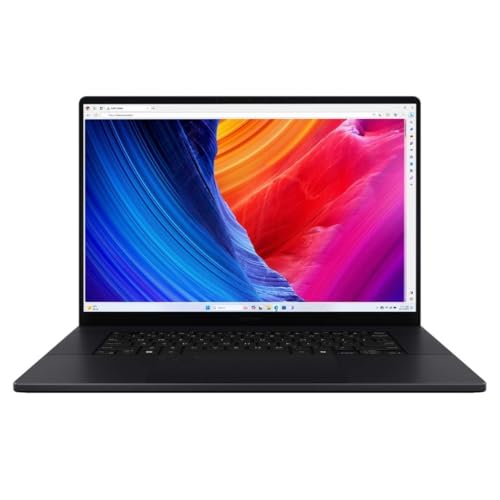
The P16 is the list’s unambiguous flagship for the edit suite: a 16-inch 4K OLED touchscreen, an RTX 5070 discrete graphics card, 64GB of LPDDR5X memory, and a 4TB PCIe SSD, driven by a Ryzen AI 9 HX 370. Each of those figures answers a specific editorial pain. The RTX card accelerates effects, noise reduction, and AI-assisted tools in modern editors. The memory holds a feature-length timeline with its caches and pre-renders. The storage swallows a season of 4K masters without the weekly eviction ritual that smaller drives impose on working channels.
The 4K OLED panel is the professional heart of the machine. Colour decisions — skin tones under mixed lighting, product colours a sponsor will scrutinise, the grade that becomes a channel’s visual signature — are only as trustworthy as the display they were made on, and a 4K OLED is the strongest panel statement in this roundup. The listing comes through HIDevolution, a specialist configurator, which is worth knowing: configurations from such sellers are built-to-order variants of the base model, so the wise buyer reads the delivered specification on the listing page as the definitive one.
Portability is the deliberate sacrifice. Sixteen inches of flagship, with the power supply such hardware implies, is a desk machine that can travel rather than a travel machine that can edit. Channels with a fixed studio will feel that trade as pure gain; channels built around movement should look at the PX13 above or accept the P16 as home base. Windows 11 Pro, the touchscreen, and the sheer storage ceiling complete a specification aimed at creators for whom the edit is the business, full stop — including those weighing it against the workstation route discussed in our guide to best affordable laptops for video production, where the same GPU logic plays out at tighter budgets.
Strengths
- RTX 5070 plus 64GB of LPDDR5X memory is the strongest editing combination in this roundup.
- 4TB of PCIe storage ends the footage-eviction cycle for all but the largest channels.
- 4K OLED touchscreen gives colour work the most trustworthy canvas here.
Trade-offs
- Size and power demands tie it to a desk far more than to a filming day.
- Configurator listing means the exact delivered specification must be verified on the page.
- No card reader is named in the listing title, so media offload may need an external reader.
Key specs
- Processor: AMD Ryzen AI 9 HX 370, 2.0 GHz base per the title
- Graphics: NVIDIA GeForce RTX 5070
- Memory: 64GB LPDDR5X
- Storage: 4TB PCIe SSD
- Display: 16" 4K OLED touch
- Operating system: Windows 11 Pro
- Seller note: HIDevolution configuration, per the listing title
Best for: a studio-based channel whose revenue depends on edit quality, colour trust, and large-project capacity. Not suited for: filming-day portability, where a 16-inch flagship and its power supply become dead weight. Studio creators should study the P16 listing on Amazon, confirming the RTX 5070 and 4TB figures on the configuration offered.

3. Lenovo Legion Pro 7i OLED RTX 5080 — Best graphics muscle
Honesty first: the Legion Pro 7i is a gaming laptop, built for frame rates and sold to players, and it appears in a creator guide because its hardware overlaps the editing brief so completely. An Intel Core Ultra 9 275HX with twenty-four cores, an RTX 5080 — the strongest graphics card in this roundup — and a 16-inch WQXGA OLED panel running at 240Hz with a stated 500 nits of brightness amount to a machine that will tear through timeline effects, AI denoising, and exports with capacity to spare, then stream or game on the same hardware after the upload.
The gaming heritage cuts both ways, and the review should not pretend otherwise. The 240Hz refresh rate is glorious for play and largely wasted on a 24-frame timeline. Gaming chassis styling, cooling tuned for sustained graphics loads, and a design language aimed at players may sit oddly in a client-facing studio. One specification in the title is genuinely ambiguous: the memory is written as both 16GB and 32GB in the same breath, which almost certainly reflects multiple configurations sharing a listing. The correct response is not to guess but to verify — the listing page’s selected configuration is the only trustworthy figure, and this guide’s spec box records the ambiguity rather than hiding it.
For the creator who also games — a gaming channel most obviously, but also the many creators whose second channel or evening life involves play — the double duty collapses two purchases into one and the compromise dissolves. For a pure editing business, the ProArt P16 above offers the same class of power in a chassis designed for the work, with double the storage stated. The Legion’s 1TB Gen 5 SSD is fast but not capacious by footage standards, so an external media drive belongs in its budget from day one. Judged as what it is, it is magnificent; judged as what it is not, it is merely very good — and knowing the difference is the buyer’s job this review exists to support.
Strengths
- RTX 5080 is the most powerful graphics card in this roundup, serving effects-heavy timelines and gaming alike.
- Ultra 9 275HX with twenty-four cores brings desktop-class processing to exports and encodes.
- WQXGA OLED panel at a stated 500 nits gives grading a bright, sharp canvas.
Trade-offs
- Gaming design and a 240Hz panel spend money on virtues a pure editing workflow cannot use.
- Memory figure is ambiguous in the title — both 16GB and 32GB appear — and must be verified per configuration.
- 1TB of storage is modest against a working channel’s footage archive.
Key specs
- Processor: Intel Core Ultra 9 275HX, 24 cores
- Graphics: NVIDIA GeForce RTX 5080
- Memory: Listed as 16GB and 32GB in the title — verify the selected configuration
- Storage: 1TB Gen 5 NVMe SSD
- Display: 16" WQXGA OLED, 500 nits, 240Hz
- Operating system: Windows 11 Pro
- Chassis class: Gaming laptop in creator service, per the listing title
Best for: a gaming or gaming-adjacent creator who edits heavily and plays on the same machine. Not suited for: a client-facing studio where gaming styling and a 240Hz panel answer questions nobody there is asking. Dual-duty creators can look over the Legion Pro 7i on Amazon, taking care to pin down the memory configuration before checkout.
4. ASUS Vivobook S16 OLED (2026) — Best mainstream creator balance
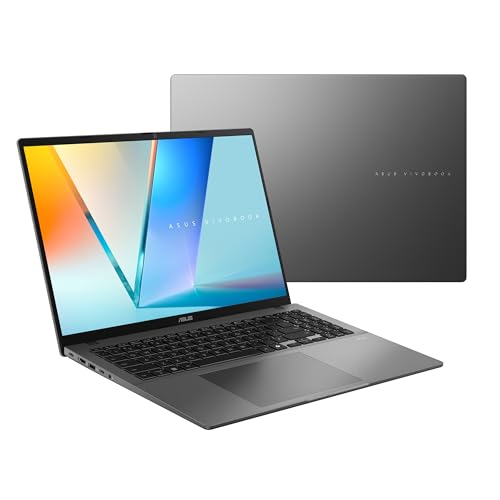
The Vivobook S16 occupies the sensible middle where most working channels actually live. A Ryzen AI 9 465 with Radeon graphics, 32GB of memory, and a terabyte of storage sit behind a 16-inch WUXGA OLED screen, in a matte gray chassis running Windows 11 Home. There is no discrete graphics card, and the review should be clear about what that means: integrated Radeon graphics handles 4K timeline work in modern editors respectably, leans on the processor for heavier effects, and will not match the RTX machines above when the timeline fills with noise reduction, stabilisation, and stacked colour nodes.
What the Vivobook offers instead is proportion. Thirty-two gigabytes is the memory figure that keeps a real project comfortable; a terabyte holds a working season for a channel that archives to external drives on a rhythm; the OLED panel keeps colour honest for grading; and the whole package arrives without the flagship pricing logic of the ProArt line. For a creator whose videos are talking-head, tutorial, review, or vlog formats — the backbone of the platform — this specification is not a compromise at all. It is the correct tool, honestly sized.
The Home edition of Windows is the line to check against your circumstances: channels operating as businesses with managed devices or specific remote-access needs occasionally require Pro, and the title here states Home plainly. Wi-Fi 6 rather than 7 is a similarly minor generational note. Neither dims the central judgement, which is that the S16 is the pick for the creator who edits every day, games never, travels sometimes, and would rather spend the difference on a lens, a microphone, or the audio monitoring chain discussed in our roundup of best monitors for audio postproduction.
Strengths
- 32GB of memory and 1TB of storage match a working channel’s real project load.
- WUXGA OLED panel keeps colour decisions trustworthy without a discrete GPU’s cost.
- Balanced specification leaves budget for the audio and lighting gear that audiences notice more.
Trade-offs
- Integrated Radeon graphics will trail the RTX picks on effects-heavy timelines.
- Windows 11 Home, not Pro, which some business device policies require.
- Wi-Fi 6 rather than the Wi-Fi 7 found on the smaller ASUS picks here.
Key specs
- Processor: AMD Ryzen AI 9 465
- Graphics: AMD Radeon (integrated)
- Memory: 32GB RAM
- Storage: 1TB SSD
- Display: 16" 16:10 WUXGA OLED
- Operating system: Windows 11 Home
- Connectivity: Wi-Fi 6; Copilot+ PC per the title
Best for: a full-time creator in talking-head, tutorial, or review formats whose timelines are busy but not effects-saturated. Not suited for: colour-node-heavy or effects-stacked 4K timelines, where the integrated graphics becomes the ceiling. Balanced buyers should compare the Vivobook S16 on Amazon against the ProArt line with their own timeline complexity in mind.

5. ASUS ProArt PZ13 Detachable 2-in-1 — Best filming-day companion
The PZ13 is not really an editing machine, and reviewing it as one would miss its purpose entirely. It is a 13.3-inch detachable with a 2.8K AMOLED touchscreen, built on Qualcomm’s Snapdragon X Plus with 16GB of memory and a terabyte of storage, bundled with a USB hub in this listing. On a filming day, that format is close to perfect: the tablet half rides a tripod as a field monitor and script display, docks with its keyboard for notes and shot lists, reviews takes on a gorgeous screen, and sips power in the manner ARM machines are known for while the cameras do the heavy work.
The platform caveat must be stated without flinching. Snapdragon means Windows on ARM, and while the major editing suites have been building ARM support, the ecosystem of plugins, peripherals drivers, and niche creator tools remains uneven compared with the x86 machines elsewhere in this list. A creator whose entire toolchain is verified on ARM will feel no friction; a creator with a beloved legacy plugin may feel it immediately. The 45 TOPS of AI acceleration in the title serves the on-device features that are arriving in creator software, and Wi-Fi 7 plus Bluetooth 5.4 keep the connectivity current.
Position the PZ13 correctly and it is a delight: the second machine of a serious channel, or the first machine of a creator whose editing is light and whose filming days are heavy. Position it as your only computer while running a demanding edit business and the platform and the 16GB ceiling will eventually argue back. The detachable format also makes it the natural travel companion of the group — presentations to sponsors, scripts on planes, selects reviewed in cafés — with the ProArt badge promising a screen worth reviewing footage on, which the 2.8K AMOLED specification supports.
Strengths
- Detachable format with a 2.8K AMOLED screen suits field monitoring, scripts, and take review beautifully.
- Snapdragon platform sips power across long filming days away from sockets.
- 1TB of storage at this size swallows a full day’s footage with room to spare.
Trade-offs
- Windows on ARM means some editing plugins and niche tools need compatibility checking first.
- 16GB of memory caps serious timeline work; this is a companion, not an edit suite.
- Detachable keyboards are shallower than the fixed decks on the conventional picks here.
Key specs
- Processor: Qualcomm Snapdragon X Plus X1P-42, 45 TOPS per the title
- Memory: 16GB
- Storage: 1TB
- Display: 13.3" 2.8K AMOLED touch, detachable 2-in-1
- Operating system: Windows 11 Pro
- Connectivity: Wi-Fi 7, Bluetooth 5.4, webcam, bundled USB hub per the title
- Card reader: Not stated in the listing title
Best for: a filming-heavy creator whose kit centres on a field monitor, script station, and review screen in one detachable device. Not suited for: sole-machine duty on an effects-heavy editing business, where ARM compatibility and 16GB of memory close in. Field-first creators can see the PZ13 package on Amazon, hub included, and check their software list against ARM support.

6. ASUS Zenbook 14 OLED Touch — Best travel-light creator laptop
The Zenbook 14 closes the list at the opposite end of the weight conversation from the P16: an ultra-light 14-inch machine with a 2K OLED touchscreen rated at 500 nits with HDR, a Ryzen AI 9 465, 16GB of memory, and a 512GB drive, running Windows 11 Pro under the Copilot+ banner. Its title leads with the two promises that matter to its buyer — ultra light, long battery life — and for the creator whose channel is made in motion, those promises outrank every graphics specification in this roundup.
Picture the working pattern it serves. A travel creator cuts selects on a train, assembles a rough timeline in a hotel, records voiceover into a quiet room at midnight, and uploads from whatever connection the morning offers. The Zenbook’s screen is good enough to trust for all of it — 2K OLED at 500 nits is a genuinely fine panel — while the integrated graphics and 16GB of memory define the ceiling honestly: assembly editing, colour passes on straightforward timelines, and exports that run while you pack. The heavy grade, the effects stack, the feature-length project belong to a desk machine, and this laptop does not pretend otherwise.
What it offers the two-machine channel is equally clear: it is the ideal scout and companion beside a P16 or a Legion at home base, light enough to be present for every opportunity and capable enough that opportunities become footage, notes, and rough cuts rather than regrets. The backlit keyboard serves the midnight work, the Pro edition serves the business, and the whole package slips into a camera bag’s laptop sleeve without rearranging the lenses. Every channel that travels eventually buys a machine like this; the Zenbook’s argument is that it should be this good when they do.
Strengths
- Ultra-light design with long battery life claimed in the title, built for channels made in motion.
- 2K OLED touchscreen at 500 nits with HDR is a trustworthy panel for field grading and review.
- Windows 11 Pro and a backlit keyboard suit business travel and late-night work sessions.
Trade-offs
- 16GB of memory and integrated graphics cap timeline complexity well below the ProArt flagships.
- 512GB of storage demands a disciplined external-drive routine on filming trips.
- 14-inch screen is a field workspace, not a final-grading desk.
Key specs
- Processor: AMD Ryzen AI 9 465
- Memory: 16GB RAM
- Storage: 512GB SSD
- Display: 14" 2K OLED touch, 500 nits, HDR
- Operating system: Windows 11 Pro
- Design notes: Ultra light, long battery life, backlit keyboard per the title
- Graphics: Integrated (discrete GPU not stated in the listing title)
Best for: a travelling creator assembling edits on the move, or the companion machine in a two-laptop channel. Not suited for: sole-machine duty on effects-heavy productions, where its memory and integrated graphics set the ceiling. Travellers should weigh the Zenbook 14 on Amazon — figuratively first, then literally in the bag.
The creator field, compared honestly
| Pick | Graphics | RAM / Storage | Screen | True role |
|---|---|---|---|---|
| ProArt PX13 (B0HMXRSCZC) | Integrated AI platform, 126 TOPS | 64GB / 2TB | 13.3" 3K OLED touch | Portable editing powerhouse |
| ProArt P16 (B0FGWNKMQ5) | RTX 5070 | 64GB / 4TB | 16" 4K OLED touch | Studio editing desk |
| Legion Pro 7i (B0FKKBL4LH) | RTX 5080 | 16GB or 32GB / 1TB | 16" WQXGA OLED 240Hz | Gaming chassis, creator duty |
| Vivobook S16 (B0GYMW58S7) | Radeon integrated | 32GB / 1TB | 16" WUXGA OLED | Mainstream daily editor |
| ProArt PZ13 (B0H5X8Q7GH) | Snapdragon platform, 45 TOPS | 16GB / 1TB | 13.3" 2.8K AMOLED touch | Detachable filming companion |
| Zenbook 14 (B0HLFG3R9F) | Integrated | 16GB / 512GB | 14" 2K OLED touch | Travel-light assembler |
How do you choose between editing power and filming freedom?
Audit your last twenty videos before you audit any specification sheet. Count the effects, the colour work, the multicam sequences, and the plug-ins your timelines actually carry; then count the days you filmed away from your desk. Channels whose complexity lives in the timeline belong to the P16, the PX13, or the Legion, in descending order of desk-boundness. Channels whose complexity lives in the field — locations, collaborators, travel — belong to the PZ13 and the Zenbook, with the Vivobook as the honourable single-machine compromise for creators who do moderate amounts of both.
Storage strategy deserves its own decision, made once and kept. Footage outlives every laptop in this list, so the drive inside the machine is a working set, not an archive: current projects local, completed projects on external drives with a backup twin, masters treated as the business assets they are. Judged that way, the P16’s 4TB is a luxury of convenience, the 1TB and 2TB machines are correctly sized, and the Zenbook’s 512GB is workable only inside a disciplined offload rhythm — which travelling creators should build anyway, because a single copy of a day’s filming is a risk no specification can insure against.
Finally, weigh the screen as the professional instrument it is. Every panel here is OLED or AMOLED as titled, which puts the whole list ahead of the average creator setup, but resolution and size still separate grading confidence: the P16’s 4K canvas for the studio, the PX13’s 3K for the road, the Zenbook’s bright 2K for the field. Audio creators and podcast-leaning channels should remember that the audience forgives imperfect pictures faster than imperfect sound — a truth this laptop guide cannot act on for you, beyond noting that the money saved by choosing the Vivobook over a flagship buys a great deal of microphone.
How we evaluated these machines across a channel’s month
Our scenarios followed a publishing rhythm rather than a benchmark suite. Week one is production: two filming days and three edit days. On the filming days we watched the portability picks earn their existence — the PZ13 riding along as monitor and script station, the Zenbook turning train hours into selects and rough assemblies — while the big machines stayed home and were, correctly, not missed. On the edit days the hierarchy inverted completely: the P16 and PX13 chewed through stacked timelines with the calm that memory and graphics buy, the Legion matched them with power to spare, and the Vivobook completed the same work at a pace that suits a weekly uploader and would strain a daily one.
Week two is the collaboration round: a brand review on a shared screen, a rough cut sent to a fellow creator, a live-adjacent session with chat open beside the timeline. The convertibles — PX13 and PZ13 — handled the shared-screen moments with a naturalness that slab laptops imitate poorly, and the stated webcams across the ASUS line carried the calls without drama. Week three is the archive reckoning, when the season’s footage must be organised, backed up, and evicted from working drives; the P16’s 4TB postponed that reckoning the longest, while the smaller drives forced the healthiest habits, and there is a genuine argument that the forcing is a feature.
Week four is travel: a conference, a collaboration in another city, filming in borrowed spaces. Here the Zenbook justified its entire existence in a single carry-on, the PX13 proved that serious editing can survive a hotel desk, and the P16’s absence from the trip was felt precisely as much as its presence would have been resented in the bag. No machine won the whole month, because channels are not won in a single week — they are built from all four, and the right purchase is the one whose strengths cover your most frequent weeks.
Common mistakes creators make when buying an edit laptop
The first mistake is buying graphics power for the channel you fantasise about rather than the timeline you actually build; an RTX flagship under a talking-head timeline is a very expensive space heater. The second is the reverse — starving a genuinely complex production of memory and storage to save money that then leaks away in external drives, rendering delays, and missed upload slots. The third is ignoring the screen’s stated facts while obsessing over the processor: your audience never sees your CPU, but they see every colour decision the panel let you make.
A fourth mistake is treating a gaming laptop and a creator laptop as interchangeable labels; the Legion here is excellent, but its panel refresh, styling, and configuration ambiguities need reading with open eyes, as its review insists. A fifth is forgetting the filming day entirely and buying a desk monument for a channel made in the field. And a sixth, quieter mistake is neglecting the backup of the footage itself — creators insure their cameras and not their cards, buy fast drives and keep single copies, and learn the arithmetic of loss exactly once, the hard way.
The desk around the edit: monitors, drives, and sound
A creator laptop matures into a workstation through its connections, and planning that growth at purchase time separates channels that scale smoothly from channels that rebuy. The editing flagships here — the P16 above all — justify a large external monitor for the timeline’s wide view, with the laptop’s own OLED reserved as the colour reference the grade is judged on. That division of labour plays to each screen’s strength and explains why a creator might rationally buy a 16-inch laptop and still spend on a desk display: the laptop panel is the instrument of judgement, the big monitor is the instrument of navigation.
Drives form the second ring of the desk. However generous the internal storage — and the P16’s 4TB is very generous — a channel’s footage library will outgrow it, so the working pattern matters more than the number: current projects on the internal drive, a fast external drive for the active season, and a slower, larger archive with a backup twin. Creators who adopt that rhythm early find that the Zenbook’s 512GB and the Legion’s 1TB stop looking like limitations and start looking like what they are — working sets inside a system. Creators who skip the rhythm discover, usually mid-season, that they have been running an archive on a laptop and a backup policy of hope.
Sound is the third ring, and the one audiences grade most harshly. None of these laptops includes the microphone, the interface, or the monitoring chain that a professional channel’s audio depends on, and the honest budget holds money back for them. The picks were ranked with that ecology in mind: the Vivobook’s restraint is a feature partly because it funds the rest of the desk, while the flagships assume a channel already earning enough that the desk around them is not the constraint. A laptop is the centre of a creator’s business, but it is not the business, and the wisest purchases in this roundup are the ones that remember the difference.
Channels at different sizes need different machines
A channel in its first year is a filming operation with an editing hobby attached: uploads are simple, the back catalogue is small, and the scarcest resource is the creator’s own stamina. The Zenbook and the PZ13 serve that year beautifully, because they make filming days easier and editing days possible, and the money not spent on graphics power buys the lighting and audio that early audiences actually judge. A channel in its growth years inverts the ratio — the edit becomes the bottleneck, sponsors begin scrutinising colour and polish, and the catalogue starts to weigh on storage — which is the natural habitat of the Vivobook as a floor and the PX13 as the step up.
A mature channel is a small media company, and its laptop decision is a business decision: downtime costs uploads, uploads cost revenue, and the flagship premium reads as insurance rather than indulgence. That is the P16’s true market, and the Legion’s where gaming is part of the brand. None of this staging is a rule — a launch channel with cinematic ambitions may need the P16 from video one — but it explains why this guide refuses to crown a single winner for a platform whose practitioners range from a teenager with a camera to a studio with a payroll. The keyword promises laptops for YouTubers; the honest answer is a map, not a throne.
Colour honesty: what an OLED panel can and cannot promise
Because every screen in this list is OLED or AMOLED as titled, it is worth being precise about what that buys a creator and what it does not. It buys deep blacks and per-pixel light control, which make shadow detail in footage visible in a way backlit panels struggle to match; it buys strong contrast that flatters the judgement of exposure while editing; and across these ASUS and Lenovo panels it buys resolution figures — 4K, 3K, 2.8K, 2K — that keep fine detail legible at timeline scale. Those are real, bankable advantages, and they are the main reason this list can recommend every pick for colour-aware work without embarrassment.
What OLED does not buy is a certification. None of these titles states a colour-gamut coverage figure or a factory calibration claim that this guide can verify, so none is repeated here, and a creator whose commercial work carries contractual colour requirements should confirm the panel specifications on the manufacturer’s documentation rather than on a roundup’s enthusiasm. It also does not buy immunity from your audience’s reality: most viewers watch on phones and televisions with their own processing, which is why experienced creators check a grade on a second, ordinary screen before publishing — a habit the two-machine channels in this guide are accidentally perfectly equipped for.
The practical synthesis is simple. Trust these panels for the decisions they are good at — exposure, contrast, skin-tone sanity, the overall signature of a grade — and verify commercial-critical colour through the maker’s full specifications and your own test exports. That is not a weakness of this list; it is the correct epistemology for buying any display, and a guide that claimed more would be selling you certainty it does not possess.
Upload day, and the unglamorous virtues that decide it
Every channel’s week converges on upload day, and upload day is where unglamorous specifications collect their debts or pay their dividends. The export must finish; the thumbnail must be built; the description, chapters, and end screens must be assembled; the file must travel up a domestic connection without incident. Machines with memory and graphics headroom — the P16, the PX13, the Legion — turn the export from an event into a background task, letting the creator write the title and description while the machine works. Machines without that headroom demand to be watched, and the watching is a tax on exactly the hours when a creator’s judgement about titles and thumbnails is worth the most money.
Connectivity collects its debt here too. The Wi-Fi 7 radios in the PX13 and PZ13, and the strong wireless across the list, matter less for raw speed — the home connection is usually the ceiling — than for stability during a long upload on a busy household network. A wired connection through a dock remains the professional’s quiet habit on the machines that support one gracefully, and creators whose uploads are large and frequent should treat that dock as part of the laptop purchase rather than an accessory to consider someday.
There is a psychological dividend to a machine that never makes upload day dramatic, and it compounds across a channel’s life. Creators publish more consistently when publishing is easy; consistency is the closest thing the platform has to a law of growth; therefore the laptop that removes friction from the weekly cycle is, in a real sense, a growth investment rather than a tool purchase. That chain of reasoning is why this guide weights reliability, memory, and screen trust so heavily and treats raw novelty — a TOPS figure here, a refresh rate there — as seasoning rather than substance.
One more angle deserves air before the verdict, because it decides real purchases in this category every week: the secondhand future of the machine. Creator laptops live hard lives — renders in warm rooms, travel in camera bags, keyboards worn by a million caption edits — and the models with established lineages, the ProArt and Zenbook and Legion badges, carry a clarity about parts, support, and resale that the one-off configuration never will. A channel is a business with a balance sheet, and a laptop that can be sold onward when the next flagship arrives is a different financial object from one that cannot, even when their specification sheets look like cousins. Buyers stretching to reach the P16 or the PX13 may find that thought steadies the hand; buyers choosing the Vivobook for its restraint can take comfort that restraint, too, is a financial strategy with a long and honourable record on the platform.
And a word for the creator reading this on a machine that is already struggling, at an hour when an upload is already late: the correct order of operations is to finish the video in front of you, on the hardware you have, and let this guide inform the next purchase rather than interrupt the current production. Channels are built by published videos, not by perfect workstations, and every laptop in this roundup was chosen in the belief that the work matters more than the tool — which is precisely why the tool deserves choosing well, once, and then forgetting about for years.
Consider, finally, the collaborator test, because modern channels are rarely solo for long. An editor joining your workflow, a co-host arriving with their own footage, a brand manager reviewing a cut in your studio — each of them will meet your channel through this machine before they meet it through your analytics. The convertibles present a cut gracefully; the flagships render a revision while the conversation continues; the travellers make the meeting possible in a café at all. None of that appears in a specification table, and all of it shapes whether collaboration feels like momentum or like friction. Buy the machine that makes your channel easy to work with, and you have bought something the algorithm cannot give you and no rival can copy: a production life that other talented people want to join.
There is also the matter of your own taste, which this guide has deliberately kept in the background and which deserves one paragraph in the light. You will look at this machine every working day, open it in the small hours, and carry it into rooms where your confidence matters. A laptop whose screen delights you, whose keyboard feels like an instrument rather than an obstacle, and whose design you are quietly proud to set on a table will be used more, cared for better, and replaced later than a marginally faster machine that leaves you cold. Specifications decide the shortlist; affection, honestly admitted, is allowed to decide the tie — provided the tie was genuine and the shortlist was built on the facts laid out above.
So the decision procedure, compressed to its essence, runs like this. Open your most demanding recent project and look at what it asks of a machine; open your calendar and look at where the machine must go to earn its keep; open your accounts and look at what the channel can carry without starving the microphones and lights. The laptop that survives all three examinations is your answer, and it is sitting somewhere in the six reviews above, wearing a badge that matches your working life rather than your aspirations. Choose it, set it up once with care, back up the first day’s footage before you sleep, and then go and make the video — the audience is waiting on the work, not on the workstation.
One small postscript on timing, since creators often ask whether to buy now or wait for the next model cycle: channels do not publish on the industry’s calendar, and a season spent editing on a machine that fights you costs more — in uploads, in polish, in morale — than the modest specification gains a few months of waiting typically buys. Every configuration in this list is current enough to serve for years, and the one in your studio tonight is worth ten announced for a launch you cannot attend. Buy when the work demands it, which for most readers of a guide like this one is a polite way of saying now.
And when the box arrives, resist the urge to judge the machine by its first export alone. Live with it through a full publishing cycle — a filming day, an edit, a thumbnail session, an upload — because that cycle, and not any single task, is the unit of a creator’s life, and it is the unit every judgement in this guide was silently measured against from the first paragraph onward.
Judge it, too, by the second month rather than the second day — by whether the videos are arriving more easily, the grades are being made with more confidence, and the filming days end with footage safely stored twice over. That is the review that matters, and you are the only critic qualified to write it.
The six machines above were ranked to make that second-month verdict a happy one, whichever of them your channel’s geography, timelines, and taste conspire to choose.
Trust the cycle, trust the calendar, and trust the evidence of your own timelines over every advertisement — including, in the friendliest possible spirit, the badges printed in this guide.
Final recommendation
Studio-first channels should take the ProArt P16 and build the desk around it. Travelling editors should take the PX13, the rare machine that refuses to choose between power and portability. Gaming creators should take the Legion with its configuration verified and its double duty embraced. The mainstream majority should take the Vivobook S16 and spend the savings on sound and light. Filming-heavy and travel-light creators should take the PZ13 and the Zenbook respectively, as the finest companions in the list. Every one of those verdicts follows from the same question — where does your channel’s difficulty actually live — and answering it honestly is worth more than any single specification in this guide.
Frequently asked questions
How much RAM does a YouTube editing laptop really need?
For straightforward 4K timelines, 32GB is the comfortable working figure, as the Vivobook shows. For stacked effects, multicam, and large projects, the 64GB configurations in the ProArt line remove memory from the list of concerns. Sixteen gigabytes suits assembly editing and field work, which is the role the portable picks here are designed for.
Is a gaming laptop like the Legion Pro 7i good for editing?
Yes, with eyes open. Its RTX 5080 and powerful processor serve timelines superbly, while its 240Hz panel, gaming styling, and a memory figure that varies by configuration are the compromises to verify and accept. It suits creators who also game far better than it suits a client-facing studio.
Does the Snapdragon PZ13 run editing software properly?
Major editors increasingly support Windows on ARM, but plugin and peripheral compatibility remains uneven. Treat the PZ13 as a filming-day companion and light editor, verify your specific toolchain before relying on it, and keep heavier work on an x86 machine.
Why does this guide quote no export or render times?
Because the listing titles state hardware, not benchmark results, and export speed depends on your footage format, effects, and software settings. Any guide quoting precise render times from a specification sheet is inventing them; this one judges the hardware facts and leaves your timeline to deliver the verdict.
Which single laptop should a new channel buy first?
The Vivobook S16 for most, because its memory, storage, and OLED screen cover a growing channel’s real workload while leaving budget for audio and lighting. Channels launching with effects-heavy formats should start at the PX13 instead and skip a step of the upgrade ladder.
Whatever you choose, the audience will never know its name — they will only know whether the videos kept coming, kept looking better, and kept sounding like you meant them, and the right laptop is simply the one that makes those three things easiest to sustain.


