What's inside
- Key Takeaways
- Quick Picks
- How Did We Choose Bars for Televisions That Pre-Date ARC?
- Which Socket on Your Television Decides Everything?
- Which Bar Matches Your Television’s Back Panel?
- How Do the Six Compare by Connection?
- What If Your Set Has None of These Outputs?
- How Do You Connect a Bar to an Older Television, Step by Step?
- How Does a Bar Help When the Problem Is Hearing, Not the Television?
- What Mistakes Do Older-Television Owners Make?
- Final Recommendation
- Frequently Asked Questions
- Related Guides
As an Amazon Associate I earn from qualifying purchases. This post may contain affiliate links at no extra cost to you.
gizmoverdict.com is reader-supported. When you buy through links on our site, we may earn an affiliate commission.
Where to buy: In the Quick Picks table, and again inside every detailed review, each bar carries a link through to its Amazon listing. Everything in this guide turns on one question — what audio outputs your television actually has — so each review names the connections its title supports and marks the rest for verification, because with an older set the cable is the product.
The search for the best soundbars for older tvs usually begins with a television that has done nothing wrong. The picture is still good, the panel has years left, but the speakers have faded into thinness — or the household’s hearing has changed, which amounts to the same thing — and modern soundbars, designed around the newest connection standards, seem to speak a language the set never learned. The reassuring truth is that older televisions are often easier to serve than new ones. For two decades, sets carried a generous spread of audio outputs: optical digital, analogue AUX and RCA, headphone sockets. The bars in this guide are the ones that still speak those languages fluently.
Three connection routes organise everything below. Optical is the finest of the older standards: a single digital cable carrying clean sound from the television to the bar, fitted to sets well over a decade old. Analogue routes — AUX and RCA — are the universal fallback, present on sets older still, and one pick in this pool even titles its AUX-to-RCA provision outright. HDMI ARC is the boundary case: many older sets have HDMI sockets without ARC, and a bar that offers only ARC and optical, like the Bose in this list, will serve a set with optical beautifully and a set with neither not at all without a converter. Knowing which side of that boundary your television sits on is the whole purchase.
The picks therefore run from the connection-rich to the deliberately simple. Two BESTISAN-family bars and an Assistrust cover the analogue-and-optical heartland; one bar leads with optical in its very name; one includes the AUX-to-RCA route in its title for the oldest sets; and the Bose TV Speaker represents the premium simple option for sets that do carry optical or ARC. Check your television’s back panel against this guide before falling for any of them — the panel, not the catalogue, is the shortlist.
Key Takeaways
- Optical is the best connection most older televisions offer, and every pick here except the oldest-set specialist treats it as home ground.
- One pick titles its AUX-to-RCA provision outright — the route for sets too old for optical.
- The Bose TV Speaker offers HDMI-ARC and optical only, per its evidence; a set with neither needs a converter box between set and bar.
- HDMI sockets alone do not mean ARC: many older sets carry HDMI without the audio-return feature.
- Analogue connections cannot carry remote-control signals, so expect the bar’s own remote to run volume on AUX and RCA setups.
- Photograph your television’s back panel before ordering; its sockets decide the shortlist more honestly than any review.
Quick Picks
| Pick | Badge | Why it is here |
|---|---|---|
| TV Sound Bar with Optical Input | Best Optical-First Pick | A compact bar that leads with optical in its own title, with Bluetooth for the household’s phones as well. |
| BESTISAN 50 Watts Soundbar | Best Connection Coverage | HDMI, optical, AUX, USB and a subwoofer output named in one title — the widest net for an unknown back panel. |
| Bluetooth Wireless Surround Sound Bar with AUX to RCA | Best for the Oldest Sets | The pick whose title names the AUX-to-RCA route, for televisions from before the optical era. |
| Bose TV Speaker | Best Premium Simple Bar | Bose’s television speaker for sets with HDMI-ARC or optical, with the brand’s dialogue-first voicing. |
| Bestisan 16-inch 50W Small Soundbar | Best Compact Pick | A 16-inch, 50-watt bar for the smaller older television in a bedroom or kitchen. |
| Assistrust Sound Bar for Smart TV | Best with Auto Volume | Bluetooth, ARC, optical and AUX in the title, plus auto volume to tame loud adverts on older broadcasts. |
How Did We Choose Bars for Televisions That Pre-Date ARC?
By starting at the back panel rather than the brochure. The shortlist was built from the outputs older sets actually carry: optical first, because it is digital, clean and nearly universal on sets from the last fifteen years; analogue AUX and RCA next, because they reach back further than optical and appear on sets optical never visited; and ARC last, as a welcome bonus rather than a requirement. A bar whose title named those connections earned its place on evidence. A bar whose title was silent about the analogue routes could still qualify — the Bose is the case in point — but only with its limits stated as loudly as its virtues.
Simplicity was the second filter, and it is not a condescension. Older-television households frequently include the viewers least interested in menu archaeology, and a bar for such a set should connect once, respond to a plain remote, and then disappear from attention for years. Auto volume, dialogue clarity and a compact footprint all scored under this filter, because they address the actual complaints — loud adverts, mumbled dialogue, a set on a small stand — that send people shopping for an older television’s sound in the first place.
The third filter was candour about the boundary cases, and it shaped the guide’s structure. Some sets are too old for every bar here without a converter; some bars in the pool cannot serve some sets in the readership. Rather than hide those edges, the reviews name them at the point of decision, because a guide that sells a Bose to a household whose television has only RCA outputs has failed at the one job it had.
That candour has a commercial cost this guide accepts deliberately: some readers will close this page and buy nothing, because their panel defeats the pool or their honest pick is the cheapest one. A guide’s reputation is built on exactly those readers — the ones it talked out of the wrong purchase — and in a category where the wrong purchase is silent on installation day, the willingness to say so is the entire value of the exercise.
Which Socket on Your Television Decides Everything?
Find the optical output first. It is a small square socket, often labelled Digital Audio Out or Optical, sometimes with a tiny hinged door or a removable plug. If your set has one, your search is nearly over: optical carries clean digital stereo and surround data, it is immune to the hum and interference analogue cables can pick up, and every bar in this guide that names optical — most of them — will connect in minutes. What optical cannot do is carry volume commands from the television remote, so plan on the bar’s remote for volume, or check whether the bar can learn your television remote’s signals.
If there is no optical socket, look for the analogue pair: red and white RCA sockets labelled Audio Out, or a single 3.5mm AUX or headphone socket. RCA audio out is the classic route and the one the AUX-to-RCA pick in this guide is built around. A headphone socket also works — it is a variable analogue output, controlled by the television’s volume — with the caveat that the set’s own speakers usually mute while it is occupied, which in this arrangement is precisely what you want. Confirm the RCA sockets are outputs, not inputs; older sets carry both, and the inputs will sit in expectant silence forever.
Labels deserve a translator’s note, because manufacturers named these sockets inconsistently across the decades. Audio Out, Line Out, Monitor Out and TV Out all describe the same generous idea — sound leaving the set for another device — while the identical-looking sockets in an input cluster will be labelled with the input they serve. When in doubt, the manual’s diagram is the authority, and manuals for most sets of the last twenty-five years survive online; five minutes with the right diagram settles what twenty minutes of squinting at the panel cannot.
HDMI ARC is the socket to treat with suspicion on an older set. The television may carry three HDMI sockets and not one of them ARC-capable, because ARC arrived partway through HDMI’s history and was often fitted to only the first socket when fitted at all. The socket’s label tells the truth — ARC is printed beside the ones that have it. If your set has an ARC socket, the Bose and the ARC-named picks open up, with television-remote volume control as the prize. If it does not, cross ARC off the list and shop the optical and analogue picks with a clear conscience; you are missing convenience, not sound quality.
One more inspection while you are behind the set: note whether the outputs are grouped with a particular input or are truly global. Most televisions route every source’s sound to their audio outputs, but a minority tie an output to one input’s use. A thirty-second check with two sources — broadcast and a DVD or stick — confirms the bar will hear everything the household watches, and it is far better done with the photograph and a torch than discovered during the first film night.
And note the set’s age in the only way that matters: not its year, but its remaining picture life. A bar is a five-to-ten-year purchase that will very likely outlive the television it was bought for, which argues for the connection-rich picks when the decision is close — the bar that speaks optical, analogue and ARC will greet the next television, whatever it is, as fluently as it greeted this one.
Which Bar Matches Your Television’s Back Panel?

TV Sound Bar with Optical Input — Best Optical-First Pick
Some listings bury their most important fact; this one leads with it. Optical input is the first claim in the title, followed by the compact smart-TV-friendly description and Bluetooth surround language, and for the older-television shopper that ordering is a gift: the connection that matters most is the one the maker chose to headline. If your set has the little square optical socket, this bar was designed around it — a compact unit that takes the television’s digital output and returns forward-firing, room-filling sound in place of the set’s faded speakers.
The compact form suits the furniture older televisions live on. Sets of the optical era sit on stands and cabinets sized generously by modern standards, but their owners rarely want a metre-wide bar sprawled across them; a compact bar restores the sound while respecting the room’s existing arrangement. Bluetooth covers the household’s other audio — a phone’s radio stream, a tablet’s video — without disturbing the television connection, which matters in the kitchens, dens and spare rooms where older sets so often serve their second careers.
Set the expectations the title sets honestly. This is a clarity-and-convenience bar, not a home-theatre system; its surround language describes processing breadth, not rear speakers. For the set it suits — optical-equipped, in a modest room, watched at ordinary volumes — that is the entire requirement met in one small box, and the headline connection means you can verify the match from the title alone before any documentation is opened.
There is a second, quieter suitability worth registering: optical connections are electrically isolated by design, since the signal travels as light. Older houses with older wiring occasionally give analogue audio a faint background hum through ground loops, and an optical link simply cannot carry it. For a set in an older house, the optical-first route is sometimes chosen as much for its silence between sounds as for the sounds themselves.
- Connection headlined in the title: optical input
- Wireless: Bluetooth, as titled
- Form: compact bar for smart and older televisions alike
- Analogue AUX or RCA provision: Not stated in the listing title — verify with the maker’s documentation
- ARC provision: Not stated in the listing title — verify with the maker’s documentation
Strengths
- The decisive connection is stated in the title itself
- Compact footprint respects older furniture arrangements
- Bluetooth serves phones without touching the TV connection
Trade-offs
- Analogue routes for pre-optical sets are not stated
- Compact scale means compact bass
- Surround is processing language, not physical rear speakers
Best for: an optical-equipped older television in a modest room. Not suited for: a pre-optical set with only analogue outputs, unless documentation confirms an analogue input.

BESTISAN 50 Watts Soundbar — Best Connection Coverage
Read this title as a checklist and it covers the older-television problem almost completely: HDMI, optical, AUX, USB, a subwoofer output and Bluetooth, in a 50-watt bar. That spread is why it anchors this guide. A household unable to identify its television’s outputs — or that may move the bar between sets over the years — is insured by a bar that speaks every language the back panel might offer. Buy it once, and the connection question is answered for this television and the next two.
Two provisions deserve specific attention. The AUX input is the analogue lifeline: through it, sets too old for optical still reach the bar, and the same socket serves laptops, older phones and portable players. The subwoofer output — Sub Out in the title — is rarer and more forward-looking: it lets a powered subwoofer join later if film bass becomes a priority, turning a simple bar into the front of a growing system without replacing it. USB, meanwhile, covers the quiet use case of playing audio files directly, a feature older-set households with music on memory sticks use more than streaming-era guides expect.
The bar’s sound brief matches its connection brief: breadth and adequacy across every ordinary duty — broadcast television, films, music — at the volumes modest rooms use. It will not out-voice the Bose on dialogue or out-feature the Assistrust on auto volume, but no other pick here can walk up to an unknown television and be this certain of connecting. In a guide organised around a back panel, that certainty is the headline feature.
The migration point deserves one more emphasis, because it is how these bars actually live. A bar bought for the living-room set migrates to the bedroom when the living room upgrades, then perhaps to a child’s room or a holiday flat, meeting a new back panel at every move. A connection-rich bar survives every migration without an adapter hunt, and over a decade of such moves the breadth that looked like over-insurance at purchase becomes the reason the bar is still in service.
- Output: 50 watts, per the listing title
- Connections named in the title: HDMI, optical, AUX, USB, Sub Out and Bluetooth
- Subwoofer provision: a sub-out socket for adding a powered subwoofer later
- Maker: BESTISAN, also written Bestisan across its line
- ARC behaviour on the HDMI input: verify with BESTISAN documentation for your set
Strengths
- Widest connection coverage in the guide, all stated in the title
- Sub-out leaves a genuine upgrade path open
- One bar can migrate between televisions over the years
Trade-offs
- Breadth trades against the specialists’ single-minded virtues
- Remote will run volume on analogue connections
- No auto-volume feature is claimed in the title
Best for: a household unsure of its set’s outputs, or one that rotates equipment between rooms. Not suited for: dialogue voicing prioritised above connection insurance.

Bluetooth Wireless Surround Sound Bar with AUX to RCA — Best for the Oldest Sets
This is the pick the whole guide bends toward, because its title names the provision the oldest televisions need: AUX to RCA. Sets from before the optical era — and a great many early flat panels — offer their audio through red-and-white RCA outputs, and a bar that titles its AUX-to-RCA route is telling those owners, in so many words, that they were thought of. If your television’s back panel shows the RCA pair and no optical socket, this is your bar, and the search can honestly stop here.
The rest of the title describes a compact smart-TV-era bar with Bluetooth wireless and surround processing language, which gives the pick its double life: the oldest set in the house connects by cable, while phones and tablets reach it wirelessly. That combination suits the rooms pre-optical sets inhabit — the family room that never upgraded, the grandparent’s house, the holiday home — where the television is old but the phones are new, and the bar becomes the meeting point of both generations of equipment.
Analogue honesty applies. An RCA connection carries stereo, not digital surround formats, and its quality depends on a sound cable run kept away from power leads to avoid hum. The bar’s surround language is processing applied to that stereo, widening it pleasantly. None of this diminishes the pick for its intended sets, whose alternative is their own speakers; it merely sets the terms. For the oldest televisions in this guide’s readership, no other pick speaks their language in its title.
A practical note on the cable itself: the AUX-to-RCA lead is the one accessory this guide will actively recommend buying well. A sound, shielded cable of the right length — measured, not guessed — prevents the hum and crackle that give analogue a bad name it does not deserve. It costs little, it is bought once, and it is the difference between an analogue setup that sounds clean for a decade and one that buzzes through every quiet scene.
- Connection headlined for older sets: AUX to RCA, per the listing title
- Wireless: Bluetooth, as titled
- Form: compact bar in the smart TV class
- Optical provision: Not stated in the listing title — verify with the maker’s documentation
- Signal carried by the RCA route: analogue stereo
Strengths
- The only title here that names the RCA-era route outright
- Bluetooth bridges the old set and the household’s new devices
- Compact size suits the rooms older sets live in
Trade-offs
- Analogue stereo only; no digital surround formats
- Cable runs need care to avoid hum
- Optical provision is not stated for newer sets
Best for: a pre-optical television with RCA audio outputs. Not suited for: an optical-equipped set that could feed a bar digitally instead.

Bose TV Speaker — Best Premium Simple Bar
The Bose TV Speaker is the prestige pick of this guide, and its review must begin with its boundary, stated as plainly as Bose states its purpose: this bar connects by HDMI-ARC or optical. Those are its routes. A television with an optical output — a great many older sets — will feed it beautifully. A television with neither optical nor an ARC-labelled HDMI socket will not feed it at all without a separate converter box between set and bar, and this guide will not soften that sentence, because it is the most important one in this review.
Inside that boundary, the Bose proposition is the strongest simple-bar case in the pool. Bose built this product for exactly one job — making television sound clear — and the company’s dialogue-first voicing is the relevant luxury for older-set households, where the complaint is rarely insufficient spectacle and almost always insufficient clarity. Speech sits forward and intelligible; the bar’s compact form disappears under the screen; the whole object radiates the confidence of a maker that expects to be judged on voices in quiet rooms. For the news, drama and sport diet of a typical older television, that focus is worth more than a page of features.
So the Bose decision is a two-step: verify the socket, then buy the voicing. Photograph the back panel, find the optical socket or the ARC label, and if either is present, this is the finest simple bar in the guide. If neither is present, the honest options are the analogue picks above — or a converter, which adds a box, a power supply and a failure point to save a mismatch. Choose the bar that speaks your television’s language natively.
One more audience should be named for this pick, because it is large and underserved: the household buying for a parent. A Bose for a parent’s optical-equipped set is close to a fit-and-forget gift — one cable, a clear remote, voices that stop the weekly phone call about not hearing the news. The verification duty falls on the giver: check the parent’s back panel on a visit, photograph it, and only then let the prestige name do its work.
- Connections: HDMI-ARC and optical — the bar’s routes, per its evidence
- Analogue AUX or RCA: not provided; a set with only analogue outputs needs a converter
- Focus: television dialogue clarity, in a compact bar
- Maker: Bose
- Bluetooth and other provisions: verify with Bose documentation for the exact listing
Strengths
- Dialogue-first voicing from a specialist maker
- Compact, discreet form under any screen
- Superb match for an optical-equipped older set
Trade-offs
- No analogue input: pre-optical sets need a converter
- ARC requires the socket to be ARC-labelled, not merely HDMI
- Premium simplicity is the whole brief; no expansion path
Best for: an older television with optical or ARC, watched for dialogue-led programmes. Not suited for: a set whose only audio outputs are RCA or AUX, without a converter in the plan.
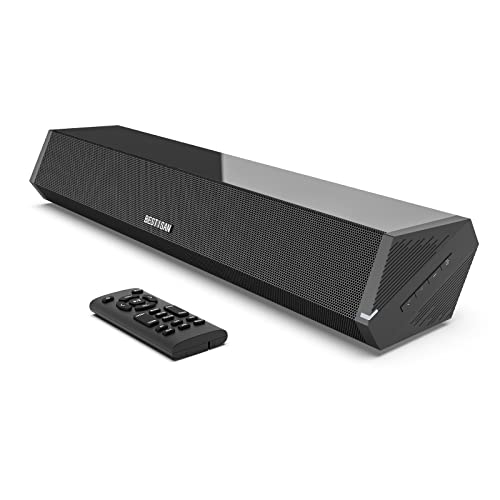
Bestisan 16-inch 50W Small Soundbar — Best Compact Pick
The second Bestisan-family entry shrinks the formula to 16 inches and keeps the 50-watt claim, titling itself a small soundbar for TV with depth-of-sound enhancement language. Its habitat is the smaller older television: the bedroom set on a chest of drawers, the kitchen television, the spare-room screen — sets whose stands and rooms reject full-width bars and whose speakers, often the smallest ever fitted to a television, need the most help. Sixteen inches of forward-firing bar transforms those sets out of all proportion to its size.
Compact bars earn a specific older-set virtue beyond fit: proportion. A modest television with a modest bar looks and sounds coherent, and at the close distances of bedrooms and kitchens the bar’s output is entirely sufficient — these are rooms where a large system’s headroom would never be used and its width would never be forgiven. The depth-enhancement language in the title describes processing intended to give the small enclosure a larger apparent scale; judge it as a pleasant widening of a small bar’s stage, not as a substitute for size, and it does its job.
The connection homework for this pick matters more than its sound, as with most of this pool: the title foregrounds size and power rather than a socket list, so verify the inputs against the maker’s documentation and match them to your set’s panel before ordering — the family’s wider models suggest breadth, but this guide credits only what each title states. Confirmed, the little Bestisan is the small older set’s natural partner.
Kitchen televisions deserve their sentence in this pick’s favour. A kitchen set is watched from across a room full of competing noise — kettles, extractors, conversation — at volumes its own speakers cannot reach cleanly. A compact bar at ear-ish height near the set restores intelligibility without filling the worktop, and the small Bestisan’s entire design brief reads as though written for that counter corner.
- Width: 16-inch small bar, per the listing title
- Output: 50W, as titled
- Processing language in the title: depth sound enhancement
- Maker: Bestisan
- Connection list: Not stated in the listing title — verify with Bestisan documentation
Strengths
- Proportioned for smaller sets and smaller rooms
- Transforms the weakest class of television speakers
- Simple, single-bar installation
Trade-offs
- Connections must be verified beyond the title
- Small-enclosure bass limits apply
- Enhancement processing is width suggestion, not true surround
Best for: a smaller older television in a bedroom, kitchen or spare room. Not suited for: a main living-room set where a wider bar could be accommodated.

Assistrust Sound Bar for Smart TV — Best with Auto Volume
The Assistrust closes the list with the most modern connection sentence in the pool — Bluetooth, ARC, optical and AUX in one title — and one feature aimed like a dart at the older-television complaint list: auto volume. Every viewer of broadcast television on an older set knows the offence: the programme at a civilised level, the advertising break arriving like a brass band in the room. Auto volume levels those jumps automatically, and for households where the remote is always in the wrong hand when the adverts land, it alone can justify the pick.
The connection spread deserves its due as well. ARC covers the newer edge of the older-set population with television-remote volume control; optical covers the heartland; AUX reaches the analogue sets; Bluetooth serves the phones. Only the RCA-named route of the third pick is absent from the title, and AUX covers much of that ground depending on the set’s sockets. As a one-bar answer to an unknown back panel, the Assistrust runs the BESTISAN coverage pick close, and beats it for the broadcast-heavy household on the strength of that levelling feature.
Its smart-TV titling should not mislead older-set owners: the connections named are precisely the ones older sets offer, and the bar’s usefulness here has nothing to do with smart platforms. Buy it for the socket spread and the advert-taming, verify the exact behaviours in the maker’s documentation as this guide advises throughout, and an older television gains the one modern convenience its owners actually asked for.
Auto volume has a second beneficiary beyond the broadcast viewer: the household that shares walls. Late-evening films on an older set swing between whispered dialogue and exuberant effects, and a levelling bar compresses those swings before they reach the neighbours. If the set’s viewing is mostly after nine in the evening, weigh that feature as heavily as any socket in the title.
- Connections named in the title: Bluetooth, ARC, optical and AUX
- Feature headlined in the title: auto volume levelling
- Intended pairing: smart televisions, with the connections older sets need
- Maker: Assistrust
- RCA-specific provision: not named in the title; AUX covers sets with a 3.5mm output — verify with Assistrust documentation
Strengths
- Auto volume answers the loudest older-broadcast complaint
- Four named connection routes cover nearly every back panel
- ARC offers television-remote volume where the set supports it
Trade-offs
- RCA route not named; oldest sets should check AUX compatibility
- Auto volume can flatten intentional dynamics in films if left on
- Brand support network is smaller than Bose’s
Best for: a broadcast-heavy household on an optical or ARC-equipped older set. Not suited for: a purely RCA-output set where the AUX-to-RCA pick speaks more directly.
How Do the Six Compare by Connection?
| Pick | Optical | Analogue route | ARC | Defining trait |
|---|---|---|---|---|
| Optical-First Bar | Headlined in title | Not stated | Not stated | Compact clarity for optical sets |
| BESTISAN 50W | Named | AUX named | HDMI named; ARC to verify | Widest coverage plus sub-out |
| AUX-to-RCA Bar | Not stated | AUX to RCA named | Not stated | The pre-optical specialist |
| Bose TV Speaker | Yes | None — converter needed | Yes | Dialogue-first premium simplicity |
| Bestisan 16-inch | To verify | To verify | To verify | Compact fit for smaller sets |
| Assistrust | Named | AUX named | Named | Auto volume for broadcast viewers |
This is the only comparison table in this site’s soundbar guides where the columns are sockets, and that is the correct shape for the question. Find your television’s column first; the bars that carry a named entry in it are your shortlist, and the trait column breaks the tie.
What If Your Set Has None of These Outputs?
It happens, and honesty is cheaper than a return. A small population of sets — some very early flat panels, some budget models that assumed their own speakers would suffice — offers no usable audio output at all beyond perhaps a headphone socket. Work through the fallbacks in order. The headphone socket is a genuine output and will drive any bar with an analogue input, with the television’s volume governing the level. A set-top box, streaming stick or recorder in the chain may offer its own audio output — optical from a cable box is a classic rescue — and the bar can take the box’s sound while the television takes only its picture, at the cost of the bar serving that box rather than every source.
Beyond those fallbacks sits the converter question in its true form. Digital-to-analogue converters and HDMI audio extractors are small, inexpensive boxes that manufacture an output the set never had. They work, and for a beloved television they are a rational purchase. They also add a power supply, a cable and a component that can fail silently, and they should be the last resort after the native picks in this guide — several of which exist precisely to make converters unnecessary for the great majority of older sets. If your panel defeats every native route, buy the converter and the bar together, from sellers whose returns you trust, and test the whole chain in the first week.
And if even the converter route fails — a set with truly no output path — the remaining truthful answer is that the television has reached the end of its audio life even if its picture has not. A bar cannot amplify a signal it cannot receive. That verdict is rare, it is not a sales pitch for a new set, and it is better delivered by a guide than discovered by a parcel.
Before reaching that verdict on any set, give the panel one last examination in good light with the photograph enlarged on a phone. Sockets hide behind cable bundles, under lips of casing, and inside recessed wells that a glance in a dark room will miss entirely. More than one household has bought a converter for a television whose optical socket was there all along, wearing its little protective plug like a disguise.
That rarity is worth quantifying in the only terms available: in the experience behind this guide, the overwhelming majority of sets that owners describe as too old for a soundbar prove to have an optical socket, an analogue pair, or a headphone output that settles the matter in an afternoon. The truly output-less television exists, but it is the exception that a generation of generous back panels made rare — one more reason the older set deserves its reputation as the easiest screen in the house to serve.
Keep the photograph habit for the bar itself once it is installed: a picture of the final wiring, taken before the television goes back against the wall, is the household’s service record. When anything changes years later — a new box, a moved room, a mysterious silence — that photograph answers in seconds the questions that otherwise take an afternoon behind the furniture.
How Do You Connect a Bar to an Older Television, Step by Step?
Start with the television off and its back panel photographed, because you will want the photograph again. Identify the audio outputs — not inputs — using the labels: Digital Audio Out for optical, Audio Out beside red and white sockets for RCA, a headphone symbol for the 3.5mm route. Choose the best route your set and bar share, in the order optical, then ARC where genuinely labelled, then analogue. Connect that one cable. Resist connecting two routes at once; multiple live connections invite the television to choose unpredictably and complicate every later diagnosis.
Then set the television’s sound menu to match. Select the external output if the menu offers it, mute or disable the internal speakers if they keep playing alongside the bar, and where the set offers a digital output format choice, PCM is the safest setting for a bar — it is the dialect every digital input understands. Power the bar, select the input you cabled, and play a familiar programme at a normal volume. If the sound is delayed against the picture, look for an audio delay or lip-sync control on the set or bar and adjust in small steps while watching speech close up.
Analogue connections add two small rituals. Set the television’s volume to a healthy middle level when using a headphone or variable output, and thereafter control volume at the bar, so the signal arriving is strong and clean. Keep the analogue cable’s run short and away from power cables where the furniture allows, because analogue is the one route that can pick up hum. Finish by teaching the household the new normal: which remote runs volume now, and which input the bar should sit on — a note taped inside a cabinet door has saved more family evenings than any feature in this guide.
The final step is a week of ordinary use before any judgement is carved in stone. Older sets and new bars occasionally disagree about small things — a delay that appears only on one channel, a hum that arrives with one appliance — and nearly all of them are one cable reroute or one menu setting away from resolved. Keep the packaging, keep the photograph of the panel, and let the household’s routine, rather than the first evening’s novelty, deliver the verdict.
How Does a Bar Help When the Problem Is Hearing, Not the Television?
Often, and the mechanism is worth understanding because it changes which pick to choose. Age-related hearing change typically erodes the high frequencies first — the consonants that distinguish one word from another — while leaving volume sensitivity largely intact. A television’s speakers, small and rear-firing, deliver those consonants weakly and muddied by the wall behind the set. A bar fires them forward, from drivers built for the purpose, at the listener. The result is not merely louder speech but clearer speech at the same volume, which is why so many households report that the television can finally be turned down once a bar arrives.
Three provisions in this guide serve that need specifically. Dialogue-forward voicing, the Bose’s speciality, lifts the speech band by design. Auto volume, the Assistrust’s headline, prevents the compensating volume ride — loud for dialogue, scrambling down for effects — that exhausts households. And simple analogue or optical connections matter more than they seem to here, because a setup an older viewer can operate confidently, with one remote whose job they understand, is a setup that gets used at the right volume instead of endured at the wrong one.
Set the expectation honestly to close: a soundbar is not a hearing aid, and profound hearing loss needs proper assessment and equipment of its own. But for the enormous middle ground — the set turned up a little more each year, the subtitles switched on for dramas first and then for everything — a well-chosen bar is the single most effective purchase available, and it is routinely described by the households in that position as giving them their programmes back.
Subtitles are the diagnostic hiding in plain sight. The creep from no subtitles, to subtitles for films, to subtitles for everything, describes a sound problem that has outgrown the television’s speakers — and that progression, noticed, is the most reliable buying signal in this entire guide. The bar that reverses it, even partially, has justified itself in the only terms that were ever really at stake.
What Mistakes Do Older-Television Owners Make?
The first is assuming HDMI means ARC, and ordering an ARC-only arrangement for a set whose sockets predate the feature. The label beside the socket is the only authority. The second is its analogue twin: plugging into RCA inputs because they are the sockets that fit, and concluding the bar is broken when the set’s outputs sit two inches away, unconsulted. Third is buying on sound alone — the finest bar in this guide is the wrong purchase for a back panel it cannot speak to — which is why this guide’s table is organised by socket rather than by rank.
Fourth is neglecting the remote question until the first evening. Optical and analogue routes leave volume with the bar’s remote, and households that plan for that — a learning remote, a designated spot for the bar’s handset — live happily, while households that discover it mid-programme resent a bar that is performing exactly as physics requires. Fifth is dismissing a converter too quickly or embracing it too quickly: a converter genuinely rescues a beloved set for a beloved bar, and it genuinely adds a box and a power supply to fail. Decide with eyes open, using the native-connection picks as the benchmark the converter route must beat.
Sixth is buying the bar before photographing the panel — the mistake this guide has been organised to prevent, and still the most common one in the category, because the heart shops faster than the torch hand. The panel photograph takes ninety seconds and converts every subsequent decision from a guess into a lookup. Take it before the catalogue, and most of this guide’s warnings will never apply to you.
Final Recommendation
Let the back panel choose, and it will choose well. If your set has optical, the Optical-First bar and the Bose divide the decision between value and voicing, with the Assistrust entering wherever loud adverts rule the evening. If your set speaks only analogue, the AUX-to-RCA pick was titled for you, and the BESTISAN’s AUX covers the sets a generation younger. If you cannot identify the sockets at all, the BESTISAN’s coverage is the insurance policy. Photograph the panel, match the socket, connect one cable — and a television with years of picture left in it will sound like it was made yesterday.
A final reassurance for the household that has been putting this off: the whole project, panel photograph to first programme, is an afternoon’s gentle work, most of it spent behind the television with a torch rather than in menus. The bar will then serve for years without asking anything further, which is the fitting reward for a television that has already served for years without asking anything either.
And when the new television eventually does arrive — years from now, on the old set’s schedule rather than a retailer’s — keep this bar. Its sockets will speak to the new set as fluently as to the old, and the household will discover that the purchase made for a fading television has become the foundation of the new one’s sound. Few technology purchases get to be right twice; a connection-rich soundbar is one of them.
Frequently Asked Questions
My television has HDMI sockets. Can I use an ARC soundbar?
Only if one socket is labelled ARC. HDMI carried video and audio into televisions for years before the audio-return channel existed, and many older sets have no ARC socket at all. Check the printing beside each socket. If none says ARC, shop the optical and analogue picks in this guide; you lose remote-control convenience, not sound quality.
What if my television has only RCA outputs?
Then your shortlist is the analogue one, and its head is the pick in this guide whose title names the AUX-to-RCA route — it was designed for your back panel. The BESTISAN’s AUX input may also serve, depending on the cable arrangement your set needs, which its documentation will confirm. Expect stereo sound, the bar’s remote for volume, and a transformation over the set’s own speakers regardless.
Do I need a converter for the Bose TV Speaker?
Only if your television has neither an optical output nor an ARC-labelled HDMI socket. With optical — fitted to a great many older sets — the Bose connects directly and needs nothing else. With neither, a digital-to-analogue or HDMI-extractor converter must sit between set and bar; it works, but weigh its extra box and power supply against the analogue-native picks before choosing that route.
Will the television remote still control the volume?
On an ARC connection, yes — that is ARC’s chief convenience. On optical and analogue connections, volume lives with the bar’s remote, unless the bar can learn your television remote’s commands or you use a universal remote. A headphone-socket connection is the exception: the television’s own volume governs the signal it sends, so the set’s remote keeps working in that arrangement.
Is optical really better than AUX or RCA?
It is cleaner and more capable: a digital signal, immune to the hum analogue cables can collect, and able to carry surround formats as well as stereo. For speech and ordinary television, a well-run analogue connection sounds far better than sceptics expect, and it reaches sets optical never visited. Use optical where it exists; use analogue without apology where it does not.
One practical footnote: optical cables are more fragile than their copper cousins and dislike sharp bends, so route them in gentle curves and never pinch them behind a heavy set. An optical link that crackles or drops is almost always a bent or poorly seated cable rather than a failing bar, and reseating both ends — they click home with a definite feel — is the first and usually the last repair it will ever need.
How do I stop adverts blasting louder than the programme?
The Assistrust in this guide names auto volume in its title — processing that levels sudden jumps automatically, built for exactly that offence. On other bars, look for a night or volume-levelling mode in the maker’s documentation. Failing those, the analogue discipline helps a little: loudness jumps are a broadcast habit, not your equipment’s fault, and the bar remote kept within reach remains the analogue age’s honest answer.
There is a neater variant for some households: several bars in this class can learn the volume commands of the television’s own remote, restoring one-remote life even on an optical connection. The capability is model-specific and lives in the maker’s documentation rather than in any title here, so treat it as a question to ask of your shortlisted bar — and if the answer is yes, the last argument for enduring two remotes disappears.
Ask the same documentation one more question while you are there — whether the bar wakes automatically on its optical or analogue input when the television starts — because a bar that wakes with the set completes the illusion that nothing in the household’s routine has changed except the sound.
That illusion, sustained over years, is the real product this category sells.
It is also, not coincidentally, the reason this guide exists in its socket-first shape: the households who need it most are the ones least served by guides that assume a television bought last year.
Can I use a bar with a set-top box instead of the television?
Often, yes, and it is a classic rescue for sets whose own outputs are missing or awkward. Many cable and satellite boxes offer optical or analogue audio outputs of their own; connect the bar to the box, and the box’s programmes gain the bar’s sound while the television handles only the picture. The limitation is scope: the bar then serves that box, so sources outside it — a DVD player, a games console — need their own arrangement or a return to the television’s outputs.
Related Guides
For newer televisions on a budget, compare soundbar systems inside a fixed budget segment; where stand height is the problem rather than the sockets, read flat soundbars for low-profile setups; and for the console corner of the room, see soundbars chosen for console gaming.


