What's inside
- Key Takeaways
- Quick Picks
- How Did We Choose Soundbars for a Desk Rather Than a Sofa?
- What Makes a Soundbar Sound Good at Sixty Centimetres?
- Which of These Bars Belongs Under Your Monitor?
- How Do the Six Desk Bars Compare?
- How Much Desk Does a Soundbar Really Need?
- How Does One Desk Bar Serve Music, Films and Calls in a Single Day?
- How Do You Set Up a PC Soundbar for Work and Play?
- What If the Desk Is Shared, Streamed From or Next to a Sleeping Room?
- What Mistakes Do PC Soundbar Buyers Make?
- Final Recommendation
- Frequently Asked Questions
- Related Guides
As an Amazon Associate I earn from qualifying purchases. This post may contain affiliate links at no extra cost to you.
gizmoverdict.com is reader-supported. When you buy through links on our site, we may earn an affiliate commission.
Where to buy: Amazon links for all six bars sit in the Quick Picks table, with a second link inside each full review. Connection claims in this guide follow the listing titles exactly; where a title does not name a connection, the spec box says so rather than guessing, because a PC bar’s cable is its whole installation.
The hunt for the best acoustic soundbars for pc starts at the desk, where the usual speaker advice breaks down. A pair of bookshelf speakers wants stands, separation and a clear metre of desk on either side of the monitor; a gaming headset sounds private and feels like work after three hours; and the monitor’s own speakers, firing at the desk or the wall from drivers the size of coins, make dialogue in games and calls sound like it is happening in another building. A PC soundbar answers with a single unit that slides under the monitor, fires at the listener from a foot away, and turns the nearfield — that small, close listening position unique to desks — into an advantage rather than a compromise.
Acoustic is the operative word in the keyword, and this guide takes it seriously. At desk distance, the qualities that matter are not the ones that sell television bars. Dialogue clarity in story games, the intelligibility of voices on calls, the stereo image that tells you which side a sound came from, and a tonal balance that stays pleasant at arm’s length for eight hours — these are acoustic virtues, and they are what the six picks below were chosen and ranked on. Raw volume is nearly irrelevant; a bar that cannot be listened to comfortably at close range fails at its only job.
The list divides by ambition. Razer fields two entries from its Leviathan line, one a single full-range bar and one a multi-driver system with a subwoofer under the desk. Creative’s Sound Blaster family contributes two more, the larger Katana V2X and the compact GS3, carrying the company’s long desktop-audio heritage. Redragon and Nylavee close the list with simpler desktop bars whose titles promise lighting, Bluetooth and AUX flexibility rather than gaming spectacle. Between them they cover every desk from a studio workstation to a student’s bedroom setup.
Key Takeaways
- Nearfield listening rewards clarity and balance over power; every pick here is judged at arm’s length, not across a room.
- The two Razer bars split the range: a single full-range unit for tidy desks, a subwoofer system for gaming weight.
- Creative’s Katana V2X is the enthusiast option, while the GS3 shrinks the same idea for small desks in a white finish.
- Only the Nylavee title names its connections — Bluetooth and AUX — so verify connection details for the other picks against maker documentation.
- A bar under the monitor frees the desk space a speaker pair would consume on both sides.
- RGB lighting appears across the gaming picks; it changes nothing acoustically and can usually be dimmed or switched off.
Quick Picks
| Pick | Badge | Why it is here |
|---|---|---|
| Razer Leviathan V2 X | Best Single-Bar Desk Pick | Full-range drivers in one unit, for a desk that wants real sound without a subwoofer under it. |
| Razer Leviathan V2 | Best for Gaming Weight | A multi-driver bar with a subwoofer, the fullest gaming sound in this line-up. |
| Creative Sound Blaster Katana V2X | Best for Enthusiast Desks | Creative’s flagship-style gaming bar with RGB, from the family that defined PC audio for a generation. |
| Sound Blaster GS3 | Best Compact Bar | A compact RGB bar with a Superwide brief and a white finish for smaller, brighter desks. |
| Redragon GS560 | Best Simple Desktop Bar | A 2.0 channel desktop speaker bar with dynamic lighting, pitched at straightforward PC audio. |
| Nylavee Computer Speakers for Desktop PC | Best Connection Flexibility | Bluetooth and AUX named in its own title, for desks that swap between computer and phone. |
How Did We Choose Soundbars for a Desk Rather Than a Sofa?
The first filter was physical: a PC soundbar must fit the slot under a monitor, which in practice means a width the monitor stand tolerates and a height that does not eat the screen’s lower edge. Every pick here is designed for that slot by its maker. The second filter was acoustic intent. Bars voiced for television spectacle — bass-heavy, treble-lifted, designed to impress across a room — sound harsh and tiring at sixty centimetres, so preference went to designs whose titles and families indicate nearfield thinking: full-range drivers, multi-driver layouts built for imaging, and the desktop heritage of the Sound Blaster line.
Connection honesty formed the third filter, and it is why the spec boxes below are unusually explicit about silence. Desktop bars connect by USB in one flavour or another, by analogue AUX, by Bluetooth, or by several of these, and the difference decides whether a bar works with a given laptop, console-fed monitor or work machine whose ports are restricted. Only one title in this pool names its connections outright. Rather than fill the gaps from general knowledge of the models, each spec box states what the title states and marks the rest for verification against the maker’s documentation — a small inconvenience that prevents the one truly miserable PC-audio experience, which is a bar that cannot plug into the machine it was bought for.
Finally, the six had to span real desk types: the gaming battlestation, the work-from-home desk that lives on calls, the compact student setup, and the tidy minimal desk that tolerates exactly one object under the monitor. A guide of six near-identical gaming bars would have failed four of those desks. The lighting-heavy picks and the plain ones are both here because both kinds of desk exist.
One boundary was held firmly while shortlisting: nothing whose primary design brief is a television was admitted and rebadged as a PC bar. Television bars assume a listener metres away, voice themselves accordingly, and their remotes, stands and connection priorities all point at the sofa. Every pick here was conceived for the monitor slot by its maker, and the difference is audible within a minute at a desk — in the treble’s manners, in the volume control’s useful range, and in how the stereo image is scaled for a listener who could reach out and touch the bar.
What Makes a Soundbar Sound Good at Sixty Centimetres?
Proximity rewrites the rules. Across a room, a speaker’s job is to fill a volume of air and survive reflections; at a desk, the sound reaches your ears almost directly, so tonal accuracy and driver quality announce themselves immediately, and so do flaws. A bar with a ragged treble that a living room would forgive becomes fatiguing by the second hour of a workday. This is why the full-range driver approach of the Leviathan V2 X matters: a single well-behaved driver per channel, asked to cover the whole audible range at modest volume, can sound remarkably coherent at nearfield distances, without the crossover seams that multi-driver designs must hide.
Stereo imaging sharpens at the desk, too. With the bar a foot or two away and its drivers spread across its width, small pans in a game’s mix — footsteps circling, a radio call moving off to one side — resolve into genuine positions rather than vague directions. The effect is the desktop equivalent of surround and it costs nothing in extra speakers. It does depend on symmetry: a bar shoved to one side of the monitor, or a desk against a side wall that reflects one channel harder than the other, collapses the image toward the louder side. Centring the bar under the screen is the single highest-value act in PC audio.
Volume behaviour completes the picture. Desk listening happens at low absolute levels, and lesser amplifiers and drivers reveal themselves there as hiss, imbalance between channels at the bottom of the volume range, and bass that vanishes entirely. A good PC bar stays composed whisper-quiet for late-night sessions and scales without hardening when a game demands it. When you test a new bar, test it at the volume you will actually use at midnight, not at the volume that impresses at noon.
There is one more desk-specific phenomenon to know: the desk itself is part of the speaker. A bar firing across a hard, bare desktop gets a free reflection that sharpens its sound and can exaggerate treble; the same bar on a desk mat or a cluttered desk sounds calmer. Neither is wrong, but the difference explains why a bar can audition brightly in one room and warmly in another, and why a large desk mat — bought for the mouse — sometimes improves the audio as a side effect. Judge your bar on your desk, with your usual objects in place, before adjusting anything.
Monitor height plays a quieter role. A screen on a low stand leaves the bar close under it, near the desk surface and its reflections; a screen on a tall riser or arm lets the bar sit higher and freer. If your bar sounds boxed-in, try raising it on a low shelf or the riser itself before blaming its drivers — a few centimetres of elevation, bringing the drivers closer to ear level when seated, is the cheapest acoustic upgrade in desktop audio and the one most often skipped.
Which of These Bars Belongs Under Your Monitor?

Razer Leviathan V2 X — Best Single-Bar Desk Pick
The Leviathan V2 X is the purist object in this guide: one bar, full-range drivers, no subwoofer, no satellite anything. Razer’s title for it is almost austere by gaming standards, and the design logic follows. A full-range driver covers the spectrum from one point per channel, which at desk distance produces a coherent, unforced sound — voices in story games sit naturally in the mix, acoustic music keeps its timbre, and the stereo image holds together because each channel speaks with one voice rather than a committee of drivers handing frequencies between them.
The absence of a subwoofer is a decision, not an omission, and it suits a particular desk perfectly: the tidy workstation, the shared study, the setup in a room where a sub under the desk would boom against a wardrobe or annoy the household through the floor. Explosions will be suggested rather than felt, and players who chase that physicality should read the next review instead. But for the long middle of PC life — work, video, calls, strategy and story games, music while concentrating — the V2 X’s completeness in a single unit is the most grown-up proposition here. It also leaves the under-desk entirely free, which every past victim of a kicked subwoofer will recognise as a genuine feature.
Connection specifics are the one homework item: the title names the bar a PC soundbar without detailing its cabling, so confirm the exact arrangement against Razer’s documentation for your machine before ordering, particularly if your computer is a laptop with few ports or a work device with restrictions. That single check done, the V2 X is the bar this guide would put under a monitor and forget about, in the complimentary sense.
There is a subtler strength to the single-bar approach worth naming: consistency. With no subwoofer to balance and no satellites to position, the V2 X sounds the same on day one and day ninety, in summer furniture arrangements and winter ones. Desks get rearranged, monitors get upgraded, chairs get swapped — a one-piece bar centred under the screen survives all of it without its sound being renegotiated, and that stability is a form of quality that specification tables never capture.
- Drivers: full-range, per the listing title
- Format: single bar, no subwoofer in this design
- Brand line: Razer Leviathan, the company’s PC soundbar family
- Colour: black, as titled
- Connection type: Not stated in the listing title — verify with Razer documentation
Strengths
- Coherent single-driver-per-channel sound at desk distance
- No subwoofer to place, kick or annoy neighbours through the floor
- Tidy one-unit footprint suits work desks as much as gaming desks
Trade-offs
- Deep bass is absent by design; effects are suggested, not felt
- Connection detail must be verified beyond the title
- Gaming presentation is refinement-led rather than spectacular
Best for: a tidy dual-purpose desk used for work and story-driven games. Not suited for: a battlestation built around bass-heavy shooters and films.
Razer Leviathan V2 — Best for Gaming Weight
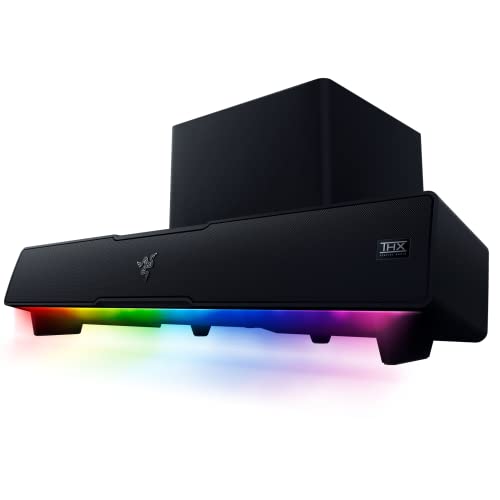
The full Leviathan V2 answers the question its X sibling declines: what happens when a PC bar is allowed a subwoofer and a multi-driver layout? The title’s own words — multi-driver PC gaming soundbar with subwoofer — describe a system designed to reproduce the whole architecture of a game soundtrack, from the sub-bass rumble of machinery and weather to the directional midrange where footsteps and reloads live. At a desk, that completeness has a particular thrill: the sound field is close enough to feel architectural, and the subwoofer under the desk couples its output to the furniture and the floor in a way that makes large game spaces feel large.
Multi-driver design is also how this bar builds its imaging. Separate drivers handling separate bands can be positioned and tuned so that the stereo field at the listening position is wide and stable, and in competitive games that stability is information: the direction of a sound is data, and a bar that renders it consistently is equipment, not decoration. The trade is complexity and footprint. The subwoofer needs its place under or beside the desk, cables multiply, and the system’s talents are wasted on a desk used mainly for documents and calls.
Judge this pick by your evenings. If the PC is primarily a games machine and the desk is its shrine, the Leviathan V2 is the fullest expression of the category in this guide, and its Razer lineage means it was voiced by people who play the games it will reproduce. If the desk earns its living in spreadsheets, the X above is the wiser Razer. The two are not rivals so much as answers to different questions asked at the same desk shop.
The system’s appetite should be matched to the room’s tolerance as much as to the player’s taste. A subwoofer under a desk in a flat shares its output generously with the floor below, and late-night sessions will either use a restrained sub level or a pair of headphones for the loudest passages. None of that diminishes the pick; it defines the household it suits, which is one where the gaming happens at sociable hours or behind a door that closes.
- Drivers: multi-driver layout, per the listing title
- Subwoofer: included, as titled
- Role: PC gaming soundbar, in the title’s own wording
- Colour: black, as titled
- Connection type: Not stated in the listing title — verify with Razer documentation
Strengths
- Full-range gaming sound with real low-end physicality
- Multi-driver imaging supports directional awareness in games
- Voiced by a gaming-first audio team for gaming-first content
Trade-offs
- Subwoofer claims under-desk space and adds cabling
- Over-specified for a desk used mainly for work and calls
- Connection detail must be verified beyond the title
Best for: a dedicated gaming desk where the PC is the main entertainment machine. Not suited for: a small desk in a shared room where a subwoofer would disturb others.
Creative Sound Blaster Katana V2X — Best for Enthusiast Desks
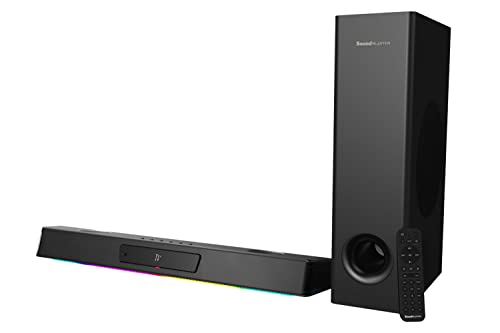
The Katana name carries history. Creative’s Sound Blaster family defined PC audio for the generation that bought sound cards by choice, and the Katana line translated that heritage into the soundbar form: a wide, low bar that treats the PC as a serious audio source rather than an afterthought. The V2X carries the family name with RGB lighting in its title, signalling its gaming-desk intent, and it is the pick here for the enthusiast who reads audio specifications for pleasure and expects a bar to serve games, films and music at a desk with equal conviction.
What distinguishes the Katana proposition in practice is breadth of duty. A television in the same room, a console feeding the same monitor, a phone with a playlist — enthusiast desks accumulate sources, and a bar from Creative’s stable is designed with that accumulation in mind, even though this guide, bound by its evidence rule, leaves the exact input list to the maker’s documentation. The acoustic brief is equally broad: nearfield clarity for calls and dialogue, enough scale for film trailers and game cinematics, and a presentation that flatters music rather than merely surviving it.
The RGB lighting deserves its honest sentence: it is there, it is in the title, and on a gaming desk it completes the aesthetic the rest of the setup already speaks. It contributes nothing to the sound, and owners of sober workspaces should confirm it can be dimmed or extinguished — most implementations allow it — before letting it count against an otherwise strong bar. Judged on sound and pedigree, the Katana V2X is the connoisseur’s entry in this line-up.
Long-session comfort is where the Katana’s breadth shows its value in practice. A bar asked to carry a working day of calls, an evening of games and a film to close will expose any tonal exaggeration three times over; the Sound Blaster lineage’s experience is precisely in balancing those duties so that no single one is served at the others’ expense. Enthusiasts will still find edges to critique — that is what enthusiasts are for — but the balance itself is the achievement.
- Family: Sound Blaster Katana, Creative’s PC soundbar line
- Lighting: RGB, per the listing title
- Role: gaming soundbar, as titled
- Generation: V2X revision of the Katana design
- Connection type: Not stated in the listing title — verify with Creative documentation
Strengths
- Deep PC-audio heritage behind the tuning and design
- Broad duty across games, films and music at one desk
- RGB completes a gaming setup’s look where that matters
Trade-offs
- Enthusiast breadth is wasted on a purely administrative desk
- Lighting must be managed in sober workspaces
- Connection detail must be verified beyond the title
Best for: an enthusiast desk serving games, films and music in rotation. Not suited for: a minimalist office desk where lighting and breadth go unused.

Sound Blaster GS3 — Best Compact Bar
The GS3 shrinks the Sound Blaster idea to the desks that need it most. Its title stacks three telling words — compact, RGB, Superwide — and a colour, white, that quietly announces a different customer from the black battlestation crowd. Compact is the headline: this is the bar for a small desk, a laptop-based setup, a bedroom workspace where the monitor is modest and the space beneath it is measured in centimetres. Superwide is Creative’s name for its processing that pushes the stereo image wider than the bar’s physical span, a trick that earns its keep precisely when the bar is narrow and the listener is close.
At desk distance, a well-executed width effect is more than a novelty. It restores the sense of a sound field larger than the hardware, letting game environments breathe and giving music a stage instead of a slot. The GS3’s scale of output is honestly small-room, small-desk scale; it will not fill a living room and should not be asked to. Within its brief it offers the Sound Blaster tuning lineage in the least demanding physical package in this guide, and the white finish suits the bright, plant-and-paper desks that gaming-black hardware visually bullies.
Students and laptop users should look hardest at this pick. A laptop’s own speakers are the weakest link in most portable setups, and a compact bar transforms films, lectures and calls on the same desk the laptop already occupies, without stands, without a subwoofer, and without surrendering the desk’s working surface. Confirm the connection arrangement against Creative’s documentation for your machine, as with every pick here whose title is silent on cabling.
The GS3 also makes an unusually good travel-adjacent bar for the desk-away-from-desk: a rented room, a term-time address, a workshop bench. Its compactness is not a compromise extracted from a bigger design but the design itself, and equipment conceived small tends to survive being moved, stored and reinstalled better than equipment merely shrunk. For the years of life when the desk changes annually, that is a practical virtue with real weight.
- Size class: compact, per the listing title
- Processing named in the title: Superwide stereo widening
- Lighting: RGB, as titled
- Colour: white finish, as titled
- Connection type: Not stated in the listing title — verify with Creative documentation
Strengths
- Smallest footprint in the guide for genuinely tight desks
- Width processing compensates for the narrow span
- White finish suits bright, non-gaming workspaces
Trade-offs
- Output scale is desk-scale only
- No subwoofer; deep bass is out of scope
- Connection detail must be verified beyond the title
Best for: a compact laptop desk or student setup needing a clear, small bar. Not suited for: a large gaming desk expecting room-filling output.
Redragon GS560 — Best Simple Desktop Bar
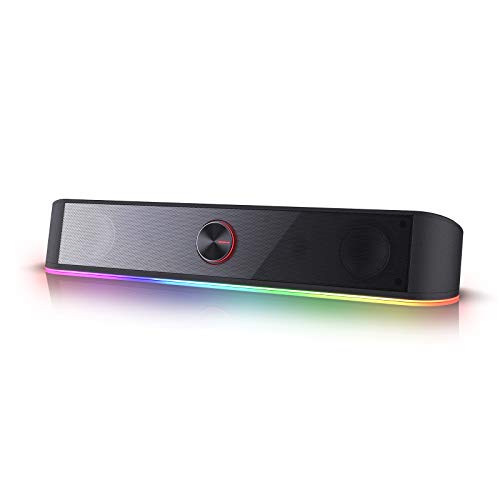
Redragon built its name on gaming peripherals that undercut the big brands, and the GS560 applies that formula to desk audio: a 2.0 channel computer speaker in bar form, with dynamic RGB lighting in its title and no grander claims. The proposition is refreshingly legible. Two channels, one unit under the monitor, lighting that matches the keyboard-and-mouse ecosystem the same buyers already own, and sound that lifts a PC’s output from monitor-speaker misery to genuine listenability for games, video and music.
A 2.0 bar without a subwoofer lives on its midrange, and for desktop content that is the right place to live. Voices in calls and cutscenes, the interface sounds and midrange detail of games, the body of most music — all of it sits in the band a bar like this reproduces honestly. What it will not do is shake the desk with explosions, and its stereo imaging, while a revelation beside monitor speakers, is simpler than the multi-driver Razer’s. The GS560’s buyer is purchasing the steepest part of the improvement curve: the jump from built-in speakers to a real bar, which is where most of the audible difference in PC audio lives.
The lighting, again, is garnish — dynamic, colourful, and coordinated with the rest of a Redragon desk. Treat it as a reason to smile at the setup, not as a reason to buy, and the GS560 stands as the guide’s value-minded simple bar: the one that fixes the problem its buyer actually has, at the complexity level that buyer actually wants.
Desk tidiness is the GS560’s underrated contribution. A speaker pair drags two cabinets, two cables and a volume knob’s worth of clutter onto the working surface; the bar consolidates all of it into the dead space under the monitor that most desks waste. For a student or a first-job desk where the surface is also the dining table and the workbench, that consolidation can matter as much as the sound, and it arrives free with the format.
- Channels: 2.0, per the listing title
- Format: desktop soundbar and computer speaker, as titled
- Lighting: dynamic RGB backlighting, per the title
- Brand: Redragon, in its gaming peripheral line
- Connection type: Not stated in the listing title — verify with Redragon documentation
Strengths
- The big jump from monitor speakers in one simple unit
- Lighting matches a Redragon peripheral setup
- Two-channel honesty suits mixed everyday PC content
Trade-offs
- No subwoofer, so effects lack physical weight
- Simpler imaging than the multi-driver picks
- Connection detail must be verified beyond the title
Best for: a first desk-audio upgrade on a gaming-flavoured setup. Not suited for: a listener expecting home-theatre bass from a desktop bar.
Nylavee Computer Speakers for Desktop PC — Best Connection Flexibility
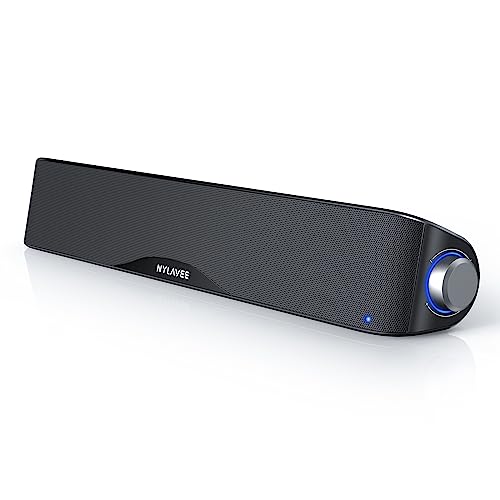
The Nylavee entry earns its place on a virtue the other five titles leave unstated: it names its connections. Bluetooth and AUX, printed in the listing title, describe a bar designed for a desk with more than one sound source in its life. The computer takes the wired connection for work and games; the phone takes Bluetooth for music and podcasts while the computer sleeps; a tablet, an older laptop or a handheld console can borrow the AUX lead. On desks that serve as the household’s general charging-and-listening station, that flexibility is not a footnote — it is the feature that gets used daily.
Acoustically the Nylavee plays the straightforward desktop hand: a bar-form computer speaker that improves clarity, volume headroom and stereo separation over built-in speakers across the board, without the gaming-specific voicing or the enthusiast breadth of the Razer and Creative picks. Its natural habitat is the family desk, the home office that doubles as a homework station, the spare-room setup where several devices rotate through. Judged in that habitat, connection generosity outranks the last degree of imaging precision, because a bar that every device can use beats a finer bar that only one device can reach.
One discipline applies to Bluetooth at any desk: pair the devices you actually use, and remove forgotten pairings, so the bar connects to the intended source rather than hunting a phone in another room. That thirty seconds of housekeeping, repeated whenever a device leaves the household, is the entire maintenance burden of the most flexible pick in this guide — a fair exchange for a bar that every screen and phone in the home can speak through. With that housekeeping done, the Nylavee is the guide’s most sociable pick — the bar the whole household’s devices will end up using.
Analogue AUX deserves its small defence in an age of wireless everything. The AUX lead never needs pairing, never drops out mid-song because a microwave ran, and never asks a guest’s device to be trusted by a network. A bar that keeps the humble socket alongside Bluetooth is keeping the door open to every audio source of the last thirty years, and on a family desk that inclusiveness is used far more often than any specification suggests.
- Connections named in the title: Bluetooth and AUX
- Format: PC sound bar and desktop computer speaker, as titled
- Brand: Nylavee
- Channels: not specified in the listing title; treat as a stereo desktop bar and verify with Nylavee documentation
- Gaming-specific features: none claimed in the title
Strengths
- Two named connection routes cover computers and phones alike
- Sociable design suits shared and family desks
- Bar form keeps the desk surface clear
Trade-offs
- No gaming or enthusiast specialisation
- Channel detail is not stated in the title
- Bluetooth needs pairing housekeeping on shared desks
Best for: a shared home-office desk where phones and computers rotate. Not suited for: a dedicated gaming rig chasing directional precision.
How Do the Six Desk Bars Compare?
| Bar | Layout | Named in title | Defining trait |
|---|---|---|---|
| Razer Leviathan V2 X | Single bar | Full-range drivers | Coherent one-unit nearfield sound |
| Razer Leviathan V2 | Bar plus subwoofer | Multi-driver design | Gaming weight and imaging |
| Creative Katana V2X | Single bar | RGB lighting | Enthusiast breadth from the Sound Blaster line |
| Sound Blaster GS3 | Compact bar | Superwide processing | Small-desk fit in a white finish |
| Redragon GS560 | 2.0 bar | Dynamic lighting | Simple first upgrade for gaming desks |
| Nylavee Desktop Bar | Bar | Bluetooth and AUX | Connection flexibility for shared desks |
The table’s middle column is deliberately titled by evidence rather than by specification: it records what each maker chose to claim in the listing itself. Read across a row for the bar’s character, and read down the layout column for the physical commitment — one unit, one unit plus a subwoofer, or a compact unit for a small desk. Those two reads together settle most purchases in this category.
How Much Desk Does a Soundbar Really Need?
Less than the speaker pair it replaces, but not none, and the details decide whether the installation looks designed or improvised. The bar needs its width clear under the monitor — which means evicting the monitor stand’s usual tenants: the sticky notes, the external drive, the mug. It needs a few centimetres of depth in front of the stand, and it needs its cable to reach the computer without crossing the keyboard’s territory. Measure the slot before ordering, in the same spirit as the television guides on this site: the exact width and depth figures for each pick live in the makers’ documentation, and a bar that overhangs the desk’s front edge is a bar waiting to be knocked.
Monitor arms change the geometry in the bar’s favour. A screen floated on an arm leaves the whole desk surface beneath it usable, and the bar can sit further back, closer to the acoustic centre of the setup, with the keyboard’s space untouched. Laptop desks are the opposite case: the laptop’s own body occupies the centre, so the bar goes in front of it or beneath a laptop riser, and the GS3’s compactness or the Nylavee’s flexibility earns its keep. In both cases the principle is constant — the bar belongs on the line between the screen and the listener, centred, unobstructed, with its front face in free air.
Cable management is the final ten percent. One lead from bar to computer, dressed along the monitor’s own cable path, keeps the desk’s look; a subwoofer’s leads want the same treatment along the desk’s rear edge. Do this on installation day, because nobody in history has returned to tidy a working desk’s cables voluntarily, and a PC soundbar setup is judged by its owner every single day at arm’s length, where clutter is as visible as it is audible.
Height clearance under the monitor deserves the tape measure treatment one more time. A bar that fits the slot but touches the monitor’s lower bezel can transmit vibration into the screen at high volume and, on some stands, rock the panel almost imperceptibly during heavy game passages. Leave a finger’s width of air above the bar. If the slot cannot give it, a monitor riser or arm is the correct purchase to make alongside the bar, and it improves the desk’s ergonomics as a dividend.
How Does One Desk Bar Serve Music, Films and Calls in a Single Day?
The modern desk is a three-shift workplace, and a PC soundbar is the only audio device asked to work all three shifts. The morning shift is calls and focus: voices must be intelligible at low volume, background music must stay background, and the bar must never draw attention to itself. The evening shift is play: games and films want scale, direction and bass, the exact qualities the morning asked the bar to restrain. The late shift is quiet again — a video essay, a podcast, a streamed match at a volume that respects the house. A bar that serves all three is not three bars; it is one bar with a tonal balance honest enough not to favour any shift so heavily that the others suffer.
This is the practical meaning of the word acoustic in this guide’s keyword. A bar tuned for spectacle — bass lifted, treble sharpened — wins the evening and loses the morning, because voices on calls turn sibilant and focus music turns busy. A bar tuned only for speech wins the morning and flattens the evening. The picks that rank highest here, the two Razers and the Katana, are the ones whose makers understand the desk’s whole day. When you audition a bar, audition the whole day in miniature: one call recording, one dialogue scene, one action scene, one favourite song, each at its real volume. Fifteen minutes of that tells you more than an hour of demo material.
Volume discipline across the shifts is the owner’s half of the bargain. Set a work level and a play level and move between them deliberately rather than drifting upward all day, because ears adapt and the drift ends at a volume that fatigues. The bar’s job is to stay composed at both levels; yours is to remember that the desk is a nearfield environment where small numbers on the volume control represent large amounts of sound at your ears.
How Do You Set Up a PC Soundbar for Work and Play?
Position comes before cabling. Centre the bar under the monitor, front edge clear of the stand, and if the monitor sits on a riser or a stack of books, let the bar share that elevation so its drivers aim at your ears rather than your chest. On a desk with two monitors, centre the bar under the primary screen — the one games and films use — and accept that the second screen’s audio image will lean; the alternative, a bar centred between mismatched screens, serves neither properly. Keep the bar’s top clear: several desk bars vent or radiate upward, and all of them suffer under a parked keyboard.
Then make the computer agree. Set the bar as the default output in the operating system’s sound settings, and check the per-app settings of your call software and games, which often keep their own device choices and will cheerfully keep using the monitor’s speakers while the bar sits silent. Play a familiar track and a familiar game scene at your normal volume, and confirm the stereo sides are the right way round — a reversed image is the classic symptom of a hurried analogue connection. Finally, decide the lighting question once: set the RGB to the level you can live with at midnight, or off, rather than leaving the factory celebration running.
Sound modes on desk bars deserve the same restraint advised elsewhere in this guide. A game or surround mode that widens the image can be genuinely effective for films at the desk, but leave it off for calls and music until you have learned the bar’s native voice; processing stacked on an unfamiliar bar teaches you the processing, not the bar. After a week of native listening, audition one mode on one familiar scene, and keep it only if it survives a full evening rather than a first impression.
Equaliser adjustments, where a pick provides them, follow the same rule of small steps. At nearfield distances a decibel or two of treble trim is a large change, and the temptation to keep sculpting is the surest route to a bar that sounds impressive on test tones and tiring on everything else. Set the balance for dialogue clarity first — the desk’s most frequent content — and let games and music inherit that honesty.
For the Leviathan V2, place the subwoofer before finalising anything else. Under the desk against a side panel gives the most even result for the listener and the least annoyance beyond the room; directly under the chair couples the most energy into the floor. Start with its level low and raise it until game effects gain body without music turning thick, then stop. Subwoofers at desks are felt by the feet as much as heard, and a little goes a long way at this distance.
What If the Desk Is Shared, Streamed From or Next to a Sleeping Room?
Shared desks change the etiquette rather than the equipment. A bar in a family room or a shared flat will be heard by people who did not choose it, which argues for the composed single bars — the V2 X, the GS3, the Nylavee — over the subwoofer system, and for a household agreement about the loud hours. It also argues for the Nylavee’s flexibility in particular, since a shared desk’s bar becomes shared equipment, and a bar that accepts every device gracefully avoids the small daily friction of one person’s source being locked out.
Streamers and creators have a specific interaction to plan: a loud bar and an open microphone are natural enemies. Most desk creators monitor on headphones while broadcasting and use the bar for everything off-stream, which makes the bar’s off-hours quality the real purchase. If you intend to play through the bar while a microphone is live, expect echo-cancellation battles and test before committing to the arrangement; the bar is not at fault, but the physics of a microphone in a small loud room are unforgiving.
The sleeping-room-next-door case is the midnight-volume test from this guide’s earlier section, promoted to a buying criterion. Thin walls transmit bass disproportionately, so the subwoofer picks should be auditioned at night levels specifically, and the household should know that the single bars exist precisely for this geometry. Choosing the V2 X over the V2 for a thin-walled flat is not settling; it is matching the equipment to the building, which is what good audio buying always is.
What Mistakes Do PC Soundbar Buyers Make?
The first is shopping with television instincts: choosing by maximum volume or by the deepest bass claim, when desk listening rewards the opposite virtues of low-volume composure and midrange clarity. The second is neglecting the connection homework this guide keeps repeating. Ports differ between machines, work laptops restrict what can be attached, and a bar’s title may not name its cabling — verify against the maker’s documentation before the box is on its way, not after. Third is placement laziness: a bar pushed to one side, buried behind the monitor stand, or left firing into a raised laptop’s underside, each quietly destroying the imaging that justified the purchase.
Fourth, buyers forget the call test. A bar that flatters games may place voices oddly for video calls if the desk’s reflections are unkind, and the desk you work at is the desk you will be heard from’s neighbour all day. Run one call in the first week and listen to a recording of the room. Fifth, lighting gets judged at noon: RGB that looks tasteful in daylight can glare in a dark room at eye level, so make the dimming decision in the conditions you will actually use. None of these mistakes is expensive to avoid; all of them are annoying to live with.
Sixth, and most specific to this category, is assuming the loudest demo in the shop predicts the desk. Shops are large, noisy and nothing like a bedroom desk at midnight; a bar that wins a volume contest in a warehouse may be unusable below its harsh low-volume floor at home. Wherever you buy, use the first week at home — at your volumes, on your content — as the real audition, and keep the packaging until that week has spoken.
Final Recommendation
For the desk that does everything, the Razer Leviathan V2 X is the recommendation to start from: one coherent bar, no subwoofer politics, and sound that flatters work and play equally. Step to the Leviathan V2 when gaming is the desk’s main event and bass is part of the pleasure, or to the Katana V2X when the desk is an enthusiast’s station serving several sources and media. The GS3 owns the small desk, the Redragon the first-upgrade gaming setup, and the Nylavee the shared desk where Bluetooth and AUX earn their keep daily. Centre the bar, verify the cable, test it at midnight volume — and the monitor’s own speakers will never be switched on again.
Keep the receipt of that first week in mind when the upgrade itch arrives, as it reliably does around month three. The next step up from a good desk bar is not a louder desk bar; it is a different system entirely — separates, stands, a treated room — and the jump in cost and desk space is enormous beside the jump in sound at nearfield distances. These six bars occupy the point where the curve bends. Enjoy the bend, centre the bar, and spend the difference on the chair.
Frequently Asked Questions
Is a soundbar better than speakers for a PC?
For most desks, yes, on the evidence of space and simplicity: one unit under the monitor, no stands, no separation to arrange, and a stereo image designed for a single centred listener. A good speaker pair can image more widely and satisfy music purists further, but it demands desk area on both sides and careful placement. The bar is the better tool for the desk as it actually exists in most rooms.
Do I need a subwoofer at a desk?
Only if your content does. Games with cinematic sound design and films gain real physicality from the Leviathan V2’s subwoofer, and at desk distance the effect is involving. Work, calls, strategy games, most music and video are fully served by a good single bar, and the subwoofer’s costs — space, cabling, sound travelling to other rooms — are real. Let your evenings, not a specification sheet, decide.
Why do the spec boxes keep saying a connection is not stated?
Because the listing titles for five of these six bars do not name their connections, and this guide prints only what it can source. The detail exists in each maker’s documentation and on the full listing; check it there before ordering, especially for a laptop with few ports or a managed work machine. The Nylavee is the exception, naming Bluetooth and AUX in its title outright.
Will a PC soundbar improve video calls?
The hearing side of calls improves immediately: voices come from real drivers at ear level rather than from the monitor’s downward-firing speakers, and meeting fatigue drops across a long day. The bar does not change your microphone, so your own voice to others stays as it was, but a clearer incoming picture of colleagues is the half of call quality you control from your side of the desk.
Does RGB lighting affect sound or performance?
No. Lighting on the Katana V2X, GS3 and GS560 is cosmetic, drawing a small amount of power and adding nothing to the audio path. Its only practical considerations are taste and night-time glare, both handled by the brightness controls such systems provide. Judge these bars on their drivers and layout; let the lighting be a bonus you can switch off.
Can I use a PC soundbar with a console or a television?
Often, but verify rather than assume. A console feeding the same monitor may route its audio through the computer or the monitor depending on your wiring, and a television is a different input world from a PC. The makers’ documentation for each pick lists its intended inputs; where a bar’s connections suit a second source, the desk gains a genuinely flexible hub, and where they do not, a television deserves a television bar from this site’s other guides.
The same verification habit serves a simpler question — whether the bar will fit a monitor arm’s lowered screen or a shelf above the desk — and the answer in both cases is to measure the slot first and consult the maker’s stated dimensions rather than the category’s averages.
Related Guides
For the screen across the room, compare soundbar systems in the budget segment; for gaming on the television itself, read soundbars chosen for console gaming; and for music-first listening, step up to high-fidelity soundbars.


