What's inside
- Key Takeaways
- Quick Picks
- How Did We Choose These Picks?
- What Actually Makes a Build Worth Looking At?
- Which Showcase Design Fits the Way You Build?
- How Do the Six Cases Compare Side by Side?
- What Should You Plan Before Building in a Glass Case?
- How Do You Photograph and Light a Showcase Build Well?
- What Mistakes Ruin an Otherwise Good Showcase Build?
- How Do You Route Cables So the Glass Has Nothing to Forgive?
- Should You Mount the Graphics Card Vertically?
- How Should Lighting Be Chosen So the Build Ages Gracefully?
- How Do You Keep Tempered Glass Looking Like Glass?
- Where Does a Showcase Case Sit in a Whole Desk Setup?
- Final Recommendation
- Frequently Asked Questions
- Related Guides
As an Amazon Associate I earn from qualifying purchases. This post may contain affiliate links at no extra cost to you.
gizmoverdict.com is reader-supported. When you buy through links on our site, we may earn an affiliate commission.
Where to buy: Every case in this guide links to its own Amazon listing, and the display features discussed — glass panels, radiator capacity, chamber layout — are drawn from what each listing title states. Where a title is brief, we describe the case’s design family rather than inventing specifications.
There is a moment in many builds when the machine stops being an appliance and becomes an object. The best pc cases to show off whats inside exist for that moment: the point where the cable work is tidy, the lighting is deliberate, the components were chosen partly for how they look together, and hiding all of it behind a steel panel feels like hanging a painting face to the wall. Showcase cases are not vanity in the dismissive sense. They are the difference between a PC that sits under a desk and one that anchors a room, a stream backdrop, or a desk setup someone photographs with pride.
But “showcase” covers several genuinely different design philosophies, and choosing between them matters more than choosing between brands. The panoramic aquarium style wraps the build in glass on two or three sides and treats the interior as a lit stage. The dual-chamber style hides the power supply and cables behind a partition so the visible half looks impossibly clean. The open-frame style abandons the box entirely and mounts the components on a sculptural plate, turning cooling hardware into the exhibit itself. The six cases in this guide divide across those philosophies, and the right answer depends on what you want a visitor’s eye to do: wander a lit interior, admire an absence of clutter, or stare at machinery that makes no apology for being machinery.
Glass also imposes disciplines that steel never did. A showcase case shows everything, including the cable you meant to route better, the dust you meant to clean, and the one component whose colour clashes with the rest. Builders who thrive in these cases plan the interior as a composition: a colour story across motherboard, memory, fans and cables; lighting placed to model the components rather than flood them; and a maintenance habit, because a lit interior advertises dust the way a dark suit advertises lint. This guide weighs those realities alongside the glamour, because the case that photographs best on day one is not always the case that still looks intentional in month nine.
Cooling is the other honest tension. Glass is an insulator and a barrier; the panoramic designs answer with side and bottom intake paths and generous radiator support, while the open frame answers by abolishing walls altogether. None of the six picks is a thermal trap, but they achieve airflow by different routes, and the detailed reviews below take each route seriously rather than pretending the glass is free.
Key Takeaways
- Showcase design splits into three philosophies — panoramic glass, dual-chamber concealment and open frame — and the philosophy matters more than the badge on the box.
- The Lian Li O11D EVO RGB states support for a 420mm radiator in its title, the largest cooling canvas among the enclosed picks.
- Back-connect motherboard support, named in the O11 Vision Compact and Corsair 6500D titles, is the newest tool for invisible cabling.
- The Thermaltake Core P3 TG Pro removes the walls entirely; it is the boldest display and the least dust-forgiving.
- A showcase build is a maintenance commitment: lighting reveals dust, so plan cleaning access and a colour story before ordering parts.
Quick Picks
| Pick | Badge | Why it earns its place |
|---|---|---|
| LIAN LI O11D EVO RGB Black | Best panoramic stage | E-ATX panoramic case whose title states 420mm radiator support — the biggest lit canvas here. |
| Lian Li O11 Vision Compact | Cleanest sightlines | Back-connect support and the Vision line’s pillar-free glass corner for an uninterrupted view. |
| Hyte Y70 | Most theatrical presence | Hyte’s modern aesthetic flagship, built as a desk centrepiece rather than a container. |
| Hyte Y40 | Best vertical showcase | Panoramic tempered glass mid-tower whose title names the glass outright, in a smaller footprint than the Y70. |
| CORSAIR 6500D Airflow | Best airflow with glass | Dual-chamber layout, tempered glass and reverse-connector support with an airflow-first front. |
| Thermaltake Core P3 TG Pro | Boldest display of all | Open-frame ATX design that exhibits the components themselves, with no box to hide behind. |
How Did We Choose These Picks?
Display quality was judged on sightlines first: how much of the interior can a viewer actually see, from how many angles, and what interrupts the view — a thick corner pillar, a tinted panel, a cable that has nowhere to hide. Cases earned their places by answering that question in distinctly different ways, so that the list reads as a set of real alternatives rather than six versions of the same glass box.
Second came the support structure for the show: radiator capacity, because liquid cooling is both the best-looking and most-demanding way to fill a showcase; chamber layout, because where the power supply and cables live decides whether the visible half can look effortless; and motherboard compatibility, including the back-connect designs that move the cables behind the board entirely. The titles of these listings state several of those facts directly — radiator size on the O11D EVO RGB, back-connect on the Vision Compact, dual chamber and reverse connection on the 6500D — and we lean on those stated facts rather than brochure memory.
Finally, we kept one foot in the real room. A showcase case sits on a desk, which makes footprint a feature; it glows, which makes lighting control a feature; and it is cleaned, upgraded and stared at for years, which makes panel removal and interior access features too. The reviews below score each pick against the room it will actually live in, not just the render it was marketed with.
What Actually Makes a Build Worth Looking At?
Builders new to showcase cases often assume the answer is lighting — more of it, in more colours. Experienced builders know the hierarchy runs the other way. First comes cleanliness: cables routed as if they were designed into the case, no stray runs crossing the composition, nothing dangling. Second comes coherence: components that share a colour and finish language, so the eye reads one machine rather than a parts list. Third comes proportion: a case filled by its components looks deliberate, while a small board adrift in a huge glass volume looks like a tenant who could not afford the apartment. Lighting comes fourth, and it works by revealing the first three — which is why badly planned RGB does not decorate a build so much as interrogate it.
This hierarchy explains the design directions in the list. Dual-chamber cases exist to make cleanliness achievable, by giving the messy half of the machine a room of its own. Back-connect motherboards exist to push coherence further, moving the cable exits behind the tray so even the necessary runs vanish. Panoramic glass exists for proportion and presence, wrapping the composition so it can be read from the front and the side at once. And the open frame exists for builders who find the whole concealment game dishonest — whose aesthetic is the pump, the tubing and the radiator, displayed like an engine on a stand.
There is a budget truth inside the hierarchy, too. A mid-priced build with ruthless cable discipline and one coherent finish will out-display a flagship build assembled carelessly, every single time. That is liberating news for most buyers: the showcase effect is purchased more with planning than with money. The case is the one component where spending up genuinely shows — glass quality, frame rigidity, panel fit — but beyond a competent case, the returns move from the wallet to the workbench. Buy the case that fits your philosophy from the six below, then invest the difference in the unglamorous heroes of the genre: sleeved cables, a proper fan hub, matching fans, and the afternoon it takes to assemble the machine as if someone will be looking at it — because that is the entire point.
Keep that hierarchy in mind while reading the picks. Each review names the philosophy the case serves, because the most common showcase disappointment is not a bad case but a mismatched one: an open frame bought by someone who wanted serenity, or a sealed glass stage bought by someone who wanted to tinker weekly. The case is the frame; the picture is your build; the two decisions should be made together.
Which Showcase Design Fits the Way You Build?

LIAN LI O11D EVO RGB Black — Best panoramic stage
The O11 line essentially invented the modern panoramic case, and the EVO RGB is its most developed form: an E-ATX enclosure in black whose listing title states support for a 420mm radiator, a figure that tells experienced builders two things at once. First, the case is physically generous — a 420mm radiator is a long, serious piece of cooling hardware. Second, the design expects liquid cooling to be part of the exhibit, because in the O11 philosophy the radiator and its fans are not hidden infrastructure; they are part of the lit composition, arrayed along the case’s edges like a gallery’s picture lights.
The “RGB” in the name is integrated into that composition rather than sprayed over it. The EVO family’s signature is the light strip work along the case’s frame, which gives the interior a defined border — the visual equivalent of a mount inside a picture frame. Inside that border, the dual-chamber layout keeps the power supply and the cable mass behind the motherboard tray, so what the glass presents is board, card, memory, cooling and light, arranged with the uncluttered calm that made this case family the default backdrop of a thousand build videos.
Choose it when the build itself is ambitious: E-ATX headroom, a custom loop or a large AIO, a graphics card you intend to look at. Its size is the honest cost — this is a desk-dominating object, and in a small room it will be the room’s loudest piece of furniture even with the lighting off. But for the builder whose machine is meant to be seen, the EVO RGB is the stage with the longest track record and the fewest compromises between spectacle and serious cooling.
- Form factor: E-ATX case
- Radiator support stated in title: 420mm
- Colour: Black
- Design family: Panoramic dual-chamber with integrated RGB framing
- Model reference: O11DERGBX.US
Strengths
- Stated 420mm radiator support gives custom loops and large AIOs room to be part of the display.
- The panoramic dual-chamber layout hides power supply and cable mass behind the tray.
- Frame-integrated lighting gives the interior a finished border rather than scattered glow.
Trade-offs
- Its footprint dominates a desk; small rooms should measure before falling in love.
- The glass stage shows every cable shortcut and dust film — it rewards tidy builders only.
- E-ATX generosity is wasted on a modest build, which will look underfilled inside it.
Best for: an ambitious liquid-cooled build meant to be the centrepiece of a desk setup. Not suited for: a compact desk with limited depth, since the E-ATX panoramic frame needs generous surface space to sit and be viewed from two sides.

Lian Li O11 Vision Compact — Cleanest sightlines
If the EVO RGB is a stage, the Vision Compact is a vitrine — the museum case whose glass seems to disappear. The Vision family’s defining move is removing the corner pillar where front and side glass meet, so the view into the build wraps around the corner without a structural interruption. The Compact version brings that trick to an ATX footprint, and its listing title adds the second half of the cleanliness story: back-connect support, meaning motherboards whose connectors sit on the rear of the board can route their cables entirely behind the tray.
Back-connect deserves explanation, because it changes what “clean” means. In a conventional build, even perfect cable work leaves the cables visible where they plug in — the thick motherboard power run, the front-panel leads, the fan headers. A back-connect board moves those sockets to the back, so the visible face of the build contains no cable origins at all. Paired with a case designed to receive them, the result is the closest a working PC has come to the render images: components floating in glass, apparently unwired. The Vision Compact is built for exactly that pairing, and its black finish keeps the frame recessive so the interior does the talking.
The Compact’s smaller volume is a feature with a discipline attached. It suits ATX builds that are complete rather than sprawling — one graphics card, a tidy loop or AIO, storage on the board — and it punishes the parts-hoarding instinct that fills big cases with maybes. Builders who know exactly what their machine is will find the proportions flattering; builders who expand by accretion should take the EVO’s larger stage instead.
- Form factor: ATX case
- Motherboard feature stated in title: Back-connect support
- Colour: Black
- Design family: Pillar-free panoramic glass, Vision line
- Model reference: O11VPX
Strengths
- Pillar-free glass corner gives the least interrupted interior view of any enclosed pick.
- Back-connect support allows a build whose visible face shows no cable origins.
- Compact ATX volume keeps proportions tight around a focused, finished build.
Trade-offs
- Realising the cleanest look requires a back-connect motherboard, an additional platform decision.
- The compact interior leaves less room for sprawling storage or oversized cooling experiments.
- Glass on multiple faces means multiple faces to clean — the vitrine shows fingerprints too.
Best for: a refined ATX build with a back-connect board, where the goal is an interior that looks unwired. Not suited for: a conventional motherboard build expecting the same invisible-cabling result, because the case’s back-connect support only pays off when paired with a rear-connector board.

Hyte Y70 — Most theatrical presence
Hyte designs cases the way concept cars are designed: the Y70’s listing describes a “modern aesthetic gaming PC case,” and the understatement is almost comic, because the Y70 in person is the most theatrical object in this guide. Its panoramic glass wraps a tall, sculpted volume that presents the build at a slight remove, like an exhibit under a bell jar, and the whole case is proportioned as furniture first and enclosure second. People do not put a Y70 under a desk. They put it where the room can see it, and the room rearranges itself around it.
That theatricality is a genuine design achievement rather than a gimmick, because it survives contact with real components. The interior volume is generous enough for high-end hardware and serious cooling, and the vertical presentation flatters long graphics cards and tall cooling arrangements that look cramped in conventional towers. Hyte’s aesthetic language — softened edges, deliberate colour options in the wider line, glass treated as architecture — gives the build a gallery calm that the more aggressive gaming cases never attempt.
Owners tend to describe the Y70 less as a case and more as the purchase that reorganised their setup around it: the desk gets cleared, the monitor gets an arm, the lighting in the room gets reconsidered. That gravitational pull is either the product’s greatest pleasure or its hidden cost, depending on how much of the room you were planning to redesign anyway. Builders mid-way through a setup overhaul will find the Y70 a willing anchor for the whole project; builders who wanted only a case should know in advance that this one arrives with opinions about everything around it, and that its opinions are usually right — which is precisely how a case purchase becomes a room project.
The decision to buy a Y70 is therefore really a decision about the room. It asks for desk or floor space, for components handsome enough to justify the presentation, and for an owner who will keep it clean, because a bell jar displays dust with the same fidelity as it displays the build. Grant those conditions and it is the pick that guests ask about. Deny them, and the same money buys a more forgiving case that asks less of its owner — several of which share this list.
- Form factor: Gaming PC case, full showcase volume
- Design language stated in title: Modern aesthetic
- Presentation: Panoramic glass exhibit styling
- Colour: As listed
- Intended role: Desk or room centrepiece
Strengths
- The most striking physical presence here — a case that functions as room furniture.
- Generous interior volume presents high-end components without visual crowding.
- Vertical panoramic presentation flatters long cards and tall cooling layouts.
Trade-offs
- Demands prominent placement and real space; it cannot be tucked away.
- The exhibit styling displays dust and fingerprints as faithfully as components.
- Modest components look lost in its volume — it expects a build of matching ambition.
Best for: a flagship build intended as the visual centre of a room or streaming setup. Not suited for: an under-desk placement, because the Y70’s panoramic exhibit design exists to be seen and wastes its entire premise hidden below desk height.
Hyte Y40 — Best vertical showcase
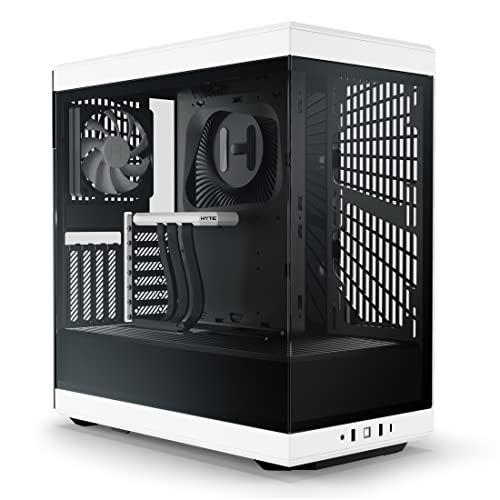
The Y40 is the Y70’s design language distilled into a mid-tower: its listing title names a panoramic tempered glass mid-tower ATX gaming case, and every element of that phrase does work. Panoramic tempered glass is the display promise. Mid-tower is the mercy — a footprint that fits ordinary desks and ordinary rooms. ATX is the compatibility baseline that keeps motherboard choice uncomplicated. For many builders, this is the sweet spot of the entire showcase category: the exhibit look without the exhibit logistics.
Hyte’s vertical emphasis is the Y40’s character. The case is composed to present the graphics card as the hero component — in modern builds the card is the largest, most sculptural and most expensive object in the machine, and the Y40’s layout and glass arrangement treat it accordingly. A build planned around a handsome card, tidy cabling and restrained lighting finds this case an unusually willing collaborator; the composition almost assembles itself, because the case’s sightlines were drawn around the components people actually buy.
Against its larger sibling, the Y40 trades volume for discipline. Extreme cooling arrangements and the very largest hardware combinations belong to the Y70’s class; the Y40 serves the single-card, well-planned ATX build that constitutes most real showcase machines. That is not a consolation prize. It is the case in this guide most likely to be bought, built in a weekend, and still admired a year later, because it asks for a good build rather than a grand one.
- Form factor: Mid-tower ATX
- Glass stated in title: Panoramic tempered glass
- Design language: Hyte modern aesthetic, vertical presentation
- Colour: As listed
- Intended role: Desk showcase for a single-card build
Strengths
- Panoramic glass in a mid-tower footprint that fits ordinary desks.
- Vertical presentation makes the graphics card the natural hero of the composition.
- Standard ATX platform keeps motherboard and component choices simple.
Trade-offs
- Less interior volume than the Y70 class for extreme cooling or oversized combinations.
- The card-forward presentation exposes a plain reference card’s looks as much as a handsome one’s.
- Tempered glass panels require the usual care in handling and cleaning.
Best for: a single-card ATX build that wants the panoramic exhibit look on a normal desk. Not suited for: an oversized multi-radiator custom loop, since the mid-tower volume is drawn around a focused build rather than maximum cooling hardware.

CORSAIR 6500D Airflow — Best airflow with glass
The 6500D Airflow is the pick for the builder who refuses to choose between a showcase and a wind tunnel. Its title strings the whole argument together: a mid-tower ATX dual-chamber case with tempered glass and reverse-connector support, in Corsair’s Airflow line — meaning the front of the case is engineered to breathe, while the dual-chamber layout keeps the power supply and cable mass in the rear room where the glass never has to acknowledge them.
That combination addresses the classic showcase objection head-on. Glass-fronted cases earn their looks by walling off the intake; the 6500D’s airflow design routes around the dilemma, feeding the visible chamber through a front designed for air rather than for a solid glass slab, while the glass side panel does the displaying. The result is a case that can be photographed like a showpiece and benchmarked like a performance case, which is a rarer sentence than the market’s confidence suggests.
Reverse-connector support aligns it with the same cleanliness movement as the Vision Compact: boards with rear-facing connectors can hide their cable origins behind the tray, and the dual chamber gives those cables a spacious room to arrive in. Corsair’s ecosystem gravity is the final consideration — builders already invested in the brand’s fans, lighting and control software will find the 6500D the natural centre of that system, while builders outside it should weigh the case on its layout, which is strong enough to stand without the badge.
- Form factor: Mid-tower ATX, dual chamber
- Glass stated in title: Tempered glass
- Motherboard feature stated in title: Reverse-connector support
- Cooling line: Airflow series
- Colour: As listed
Strengths
- Airflow-first front design answers the thermal objection to glass showcase cases.
- Dual-chamber layout keeps supply and cables out of the displayed volume entirely.
- Reverse-connector support enables the cable-free visible face of back-connect builds.
Trade-offs
- Dual-chamber cases are wider than single-chamber towers of similar capacity — check desk depth.
- The full cable-hiding effect depends on a reverse-connector motherboard.
- Its performance orientation means a busier front aesthetic than the pure glass sculptures here.
Best for: a high-performance build that wants display glass without surrendering intake airflow. Not suited for: a narrow desk where a dual-chamber case’s extra width crowds out the monitor and peripherals it is meant to sit beside.

Thermaltake Core P3 TG Pro — Boldest display of all
Every other pick in this guide shows off the build through something. The Core P3 TG Pro shows it off by removing the something. Thermaltake’s title calls it an open-frame ATX-compatible case, and open frame is the literal truth: the components mount on an exposed structure, with a tempered glass element as accent rather than enclosure, and the machine’s working parts — board, card, cooling, cabling — become the entire visual event. It is the difference between a painting in a frame and a sculpture on a plinth.
The P series has a devoted following because it serves builders the glass boxes quietly frustrate: the tinkerers. In an open frame, every component is reachable without removing panels; a custom loop can be drained, rerouted and refilled as a bench activity rather than a surgical one; a graphics card can be displayed vertically as a deliberate composition choice. The Pro version continues that lineage for ATX builds, and wall-mounting — a long-standing P-series party trick — turns the whole machine into literal wall art for the builder willing to commit.
The honesty paragraph writes itself. An open frame offers components no protection from dust, pets, toddlers or spilled coffee; it radiates fan noise and coil sounds with nothing to muffle them; and it demands the tidiest cable work of any pick here, because there is no rear chamber to forgive a mess. It is, in short, the highest-effort and highest-impact display on the list. Builders who recognise themselves in that sentence will not be talked out of it, and should not be.
- Form factor: Open frame, ATX compatible
- Glass element: Tempered glass accent (TG)
- Model: CA-1G4-00M1WN-09
- Design family: Thermaltake Core P open-frame series
- Intended role: Exposed-component display and tinkering
Strengths
- Nothing between viewer and components — the purest display of the hardware itself.
- Unmatched access for upgrades, loop maintenance and component swaps.
- Cooling hardware breathes room air directly, with no enclosure to restrict it.
Trade-offs
- No barrier against dust, pets or accidents; the environment must be controlled.
- Component noise reaches the room unmuffled, including under load.
- Cable work is fully exposed, so the tidiness standard is the highest on this list.
Best for: a tinkerer or custom-loop builder who wants the components themselves as the exhibit. Not suited for: a household with curious pets or small children, because the open frame leaves powered components physically exposed at all times.
How Do the Six Cases Compare Side by Side?
| Case | Display philosophy | Stated highlight | Best setting |
|---|---|---|---|
| LIAN LI O11D EVO RGB | Panoramic stage | 420mm radiator support, E-ATX | Flagship desk build |
| Lian Li O11 Vision Compact | Pillar-free vitrine | Back-connect support, ATX | Minimalist clean build |
| Hyte Y70 | Exhibit sculpture | Modern aesthetic flagship volume | Room centrepiece |
| Hyte Y40 | Vertical showcase | Panoramic tempered glass, mid-tower | Ordinary desk, single card |
| CORSAIR 6500D Airflow | Dual-chamber performance | Tempered glass, reverse-connector support | High-airflow display build |
| Thermaltake Core P3 TG Pro | Open frame | ATX compatible, exposed layout | Tinkerer’s bench or wall |
The pattern to notice is that each case hides a different thing. The dual-chamber designs hide the power supply and cables. The back-connect designs hide the cables’ very origins. The Hyte designs hide nothing but frame everything, relying on composition. The open frame hides nothing at all and calls the honesty a style. Choosing among them is choosing your relationship with the machine’s messy half — conceal it, design around it, or exhibit it.
What Should You Plan Before Building in a Glass Case?
Plan the colour story on paper first. List every visible component — board, card, memory, cooler, fans, cables, even the storage — and assign each a role in a palette of two, at most three, finishes. The discipline feels fussy in a spreadsheet and looks like genius through glass. Mismatched finishes are the single most common reason a showcase build looks like a parts bin despite expensive components, and they are nearly free to prevent at ordering time and annoyingly expensive to fix afterwards.
Plan the cable routes before the components go in, including which cables will be extensions, which will be the supply’s own, and where each run enters and exits the visible chamber. In back-connect builds this planning shifts behind the tray but does not disappear — the rear chamber has finite room, and a cable bundle forced against a panel announces itself as a bulge. Take the ten minutes to dry-route with the panels off; the glass will grade your work every day afterwards.
Plan the lighting as illumination, not decoration. The goal is to model the components — to give the card’s shroud a highlight, the memory a gentle wash, the cooling hardware a sense of depth. One or two light sources with a consistent temperature achieve this; a dozen competing rainbow devices achieve a fairground. Most experienced showcase builders settle on a single static colour or a slow, restrained effect, and the builds that age best photograph that way too.
Finally, plan the maintenance before the first fingerprint. Know how each panel comes off, keep the microfibre cloth in the desk rather than in a cupboard downstairs, and set a realistic dust rhythm — a monthly glass wipe and a quarterly interior blow-out keeps a lit build looking intentional. The open-frame pick shortens that rhythm further. None of this is burdensome; it is simply the rent a showcase charges, and it is cheaper paid regularly.
How Do You Photograph and Light a Showcase Build Well?
Since many of these machines will be photographed — for setup posts, sale listings or simple pride — a few principles separate a good shot from a true one. Turn the room lights down and let the case be the light source; a showcase is composed to glow, and competing room light flattens it. Shoot from the corner angle the panoramic cases were designed for, slightly above the graphics card’s plane, so the glass wrap and the interior depth read in one frame. And clean the glass immediately before shooting, because the camera finds fingerprints the eye forgives.
For daily living rather than photography, position matters as much. A showcase case on the desk at eye level rewards the owner constantly; the same case on the floor shows its top panel and its dust to the world. The Hyte designs in particular assume elevation — they are composed to be looked slightly up at or across at, like the exhibits they imitate. If the only available spot is the floor, the open-frame and dual-chamber picks tolerate it better, and even they would rather be raised.
What Mistakes Ruin an Otherwise Good Showcase Build?
The classic mistake is buying the glass before planning the interior — ordering a panoramic case and then filling it with whatever components were cheapest that week, in four finishes and two lighting ecosystems. The case displays the decision faithfully. The second mistake is scale error: a micro-ATX board and a short card adrift in an E-ATX aquarium, or conversely a flagship card shoehorned against the glass of a case a size too small. Proportion is visible in every photograph, and no lighting setting repairs it.
The third mistake is neglecting the room. A showcase case is a light source and a visual claim; placed facing a bed, beside a television, or under harsh downlights that reflect in its glass, it fights its environment instead of anchoring it. The fourth is forgetting that glass is fragile in transit — a showcase build that travels to LAN events or house moves needs its panels protected or removed, and the open-frame pick needs a carrying plan of its own. Build the machine for the life it will actually lead, and the display will keep paying its rent.
How Do You Route Cables So the Glass Has Nothing to Forgive?
Start behind the tray, because that is where showcase cable work is actually decided. Mount the power supply first and dress its cables in the rear chamber before any component goes in: the motherboard power run, the CPU power run and the graphics card runs each get a planned path, a planned exit grommet, and enough slack to connect without strain and no more. Excess cable is coiled and secured in the rear chamber’s dead space, never pushed forward into the visible volume “temporarily” — temporary cables are the ones still there in every photograph two years later.
In the visible chamber, the rule is that every cable should look like it belongs to the architecture. Runs should follow edges and corners rather than diagonals; crossings should happen behind components, not in open glass; and a cable that must cross open space should do so at a deliberate right angle, the way a road crosses a field on a map. Sleeved extensions earn their keep here — they present a uniform, chosen finish along the visible portion of a run, while the supply’s own varied cables stay behind the tray where their honest utility look harms nothing.
Fan and lighting cables are the detail work that separates good from great. A radiator’s worth of fans can produce a thicket of small leads; route them as a loom along the radiator’s edge, combine them with splitters or a hub placed behind the tray, and bring a single lead into view if one must appear at all. Plan the hub’s location before the fans are mounted, because a hub chosen early disappears and a hub chosen late sits on the chamber floor like a dropped tool in a showroom.
The back-connect builds change the geography but not the principles. Cables arrive behind the tray from the board itself, which removes the visible origins, but the rear chamber then carries everything — and a rear chamber stuffed without order will bow a panel or block a drive mount. Dress it with the same discipline: planned paths, secured coils, nothing under tension. The reward is the full effect the Vision Compact and 6500D promise — a front view in which the machine appears to run on good intentions alone.
Should You Mount the Graphics Card Vertically?
Vertical mounting is the showcase builder’s most consequential aesthetic choice, because the graphics card is the largest decorated surface in a modern build and a horizontal mount shows only its edge. Vertical presentation turns the card’s shroud and fans into the composition’s centrepiece — which is why the Hyte cases are drawn around it. If your card’s shroud is the handsome object its price suggested, vertical mounting is how the room finds out.
The costs are practical. A vertical mount uses a riser cable, which must be a quality part matched to the board’s PCIe generation to avoid link-training headaches; it places the card’s fans near the glass in some layouts, which can cost a little cooling headroom compared with an open horizontal arrangement; and it usually sacrifices the remaining expansion slots, so capture cards and extra adapters need a different plan. None of these is a veto. All of them belong in the decision, made before the mount is ordered rather than discovered during assembly.
There is also a middle path many builders overlook: choose a horizontally mounted card with a beautiful edge and backplate, and let a showcase case’s sightlines do the rest. Backplates are designed surfaces too, and in the panoramic cases the top-down view through the front glass shows the backplate to anyone standing. The vertical mount is a statement; the considered horizontal build is a composition. The case list above supports both temperaments, and the honest question is which one matches the card you actually own.
How Should Lighting Be Chosen So the Build Ages Gracefully?
Lighting ecosystems are the showcase world’s quiet lock-in. Fans, strips, blocks and memory each want a controller and a software home, and a build that mixes three ecosystems inherits three applications, three update habits and the occasional turf war over a header. Decide the ecosystem when you decide the case — Corsair’s environment if the 6500D anchors the build, the board maker’s environment for a simpler setup, or a single open standard where possible — and let every lit component be chosen inside that decision. The glass makes ecosystem chaos visible as mismatched colours and unsynchronised effects; coherence here is worth more than any single device’s brilliance.
Colour discipline ages better than colour abundance. A single hue, or white light treated as illumination, flatters components of any finish and photographs honestly. Slow-moving effects in one family of tones read as ambience. The full rainbow wave reads as a demo mode — because it usually is one — and most owners quietly retire it within a month. Plan for the setting you will actually live with: a warm white that makes aluminium look expensive, or a single accent colour drawn from the build’s own palette, repeated in the memory, the fans and the case’s frame lighting so the whole machine hums one note.
Brightness deserves the same restraint. A showcase case in a living room or bedroom is a lamp whether you planned it or not; lighting that can dim to a glow for films and evening use will be loved, and lighting stuck at noon will be switched off and wasted. Check dimming behaviour and per-device control before buying the fans, and if the machine shares a room with a sleeper, treat a true off state as a requirement rather than a preference. The best-lit builds are the ones whose owners still have the lights on, at a level the room enjoys, a year after the novelty faded.
How Do You Keep Tempered Glass Looking Like Glass?
Tempered glass rewards a specific care routine. Clean it with a microfibre cloth and nothing abrasive; use a small amount of glass cleaner applied to the cloth rather than sprayed at the panel, so liquid never finds its way to an edge seal or an interior component. Support a removed panel with both hands and lay it on a soft surface — tempered glass is strong across its face and surprisingly vulnerable at its edges and corners, which is why panels die during cleaning more often than during any other moment of a build’s life. Treat every removal as a small ceremony and the panel will outlive the components behind it.
Tint and finish choices made at purchase echo through ownership. A lightly tinted panel hides minor dust and cable shadows and gives lighting a moody depth; a clear panel presents the build with showroom honesty and demands showroom housekeeping. Neither is wrong, but the tint is the more forgiving housemate, and builders who know their cleaning discipline is aspirational rather than actual should let that self-knowledge vote. The same honesty applies to mirrored and smoked finishes in the wider market: beautiful at noon on day one, and a daily referendum on your habits thereafter.
Fingerprints have a geography worth learning. They gather where hands actually go — the panel’s opening edge, the corner near the desk chair, the top face of a case used as a shelf. A thirty-second wipe of just those zones, weekly, keeps the case looking freshly built without a full panel-off session; save the deep clean for the quarterly interior dust-out, when the panels are off anyway and the whole machine gets its reset. Owners who adopt that rhythm report the strange truth of showcase ownership: the case stays beautiful not because it is cleaned heroically, but because it is never allowed to get dirty enough to need heroism.
Where Does a Showcase Case Sit in a Whole Desk Setup?
The case is one object in a composition that includes the monitor, the desk surface, the wall behind and the light in the room — and the setups that photograph best were planned as one scene. A panoramic case earns its keep when the desk’s sightline gives it an audience: at the desk’s end, angled slightly toward the chair and the door, where both its glass faces work. A monitor arm that lifts the screen to the case’s visual height stops the two objects competing; a desk mat in a tone drawn from the build’s palette ties the scene together more cheaply than any peripheral.
Cable discipline extends beyond the case in a showcase setup, because the eye that admires the glass will follow the desk’s own cables next. The runs to the monitor, the keyboard and the case itself deserve the same planned-path treatment — under-desk channels, a single visible drop to the floor, nothing dangling in the glass’s reflection. Streamers learn this fastest, since the camera audits the whole scene, but the principle serves any owner: the case promises a standard, and the desk either keeps the promise or quietly breaks it.
Sound is the scene’s final layer. A showcase build’s fans live behind glass or in the open, and their tone becomes part of the room. Fan curves set for silence at idle and grace under load, components chosen with an ear as well as an eye, and the case placed so its exhaust does not warm the owner’s elbow — these are the unglamorous decisions that decide whether a beautiful machine is also a pleasant one to sit beside for eight hours. The display gets the compliments; the acoustics get the loyalty.
Final Recommendation
For most builders, the Hyte Y40 is the sweet spot: panoramic glass, a hero-card layout and a mid-tower footprint that fits real desks. For the cleanest possible interior, the Lian Li O11 Vision Compact with a back-connect board is unmatched, while its EVO RGB sibling serves the biggest, most ambitious liquid-cooled stages. The Corsair 6500D Airflow is the performance pragmatist’s showcase, and the Hyte Y70 is the full theatrical statement. The Thermaltake Core P3 TG Pro stands apart for builders who want no glass between the room and the machine at all. Choose the philosophy first and the brand second — a showcase case is a long relationship, and when the evening light catches a clean build through clean glass, the room itself seems to have been designed around the machine.
Frequently Asked Questions
Does a glass case hurt cooling performance?
It changes the airflow problem rather than dooming it. Panoramic cases intake from the side and bottom and exhaust through the top and rear, and the Corsair 6500D Airflow is designed airflow-first. The open-frame Core P3 TG Pro sidesteps the question entirely by having no enclosure to restrict air.
What is a back-connect motherboard, and do I need one?
It is a board with its power and data connectors on the rear face, so cables attach behind the motherboard tray and the visible side shows no cable origins. The O11 Vision Compact and 6500D Airflow state support for the concept. You do not need one — but it is the single biggest step toward the unwired look those cases promise.
Which pick suits a first showcase build?
The Hyte Y40. Its mid-tower size, standard ATX platform and card-forward composition make a good-looking result achievable without custom-loop skills or a furniture rearrangement, and it forgives a learning curve better than the giant or open-frame options.
Is an open-frame case safe around a desk setup?
It is safe electrically in normal use, but it offers components no physical protection and no noise muffling. In a controlled room with an adult owner it is a delight; around pets, toddlers or drink-heavy desks, an enclosed glass case is the wiser display.
How do I stop a showcase build looking dusty within weeks?
Positive-pressure fan balance, intake filtration where the design provides it, the case raised off the floor, and a short regular cleaning rhythm. Lighting reveals dust early, which is a feature if you act on it — the build tells you when it needs attention.
Do showcase cases hold their value for resale builds?
Unusually well, because the case is the component a buyer sees first and because these designs age slowly — a clean panoramic case with its panels unmarked presents a whole used build as cared-for. Keep the original box and panel protection if you can; the same glass that sells the build is the part most at risk in shipping.
What if my components are different colours?
Work with it rather than against it: pick the dominant finish among your parts, choose cables, fans and lighting in that family, and let the odd component become a deliberate accent by repeating its colour once elsewhere — a cable run or a lighting hue. One repeated accent reads as design; five competing finishes read as accident.
Can these cases be wall-mounted or floor-standing instead of on a desk?
The Core P3 line is known for wall-mounting, which suits its open sculpture. The glass towers are happiest elevated on a desk or stand, both for viewing angles and dust; floor placement works mechanically but wastes the sightlines they were designed around.
Related Guides
Complete the composition with our guides to addressable RGB fans and lighting control, custom liquid cooling for showcase builds and back-connect motherboards explained, each written to the same plan-before-you-buy standard, so the machine you assemble reads as one deliberate object from the first cable to the last lighting decision, and keeps reading that way long after the build-day photographs have been posted and forgotten.


