What's inside
- Key Takeaways
- Quick Picks
- How Did We Choose These Picks?
- What Does “No External PSU” Actually Mean on a Graphics Card?
- How Do the Six Compare Side by Side?
- How Do You Check Whether a Card Really Needs No PSU Cable?
- What Should You Check in the Host PC Before Buying?
- What Mistakes Do Buyers Make With Slot-Powered Cards?
- How Do You Install a Slot-Powered Card in an Old Office Tower, Step by Step?
- What Frame Rates Should You Honestly Expect at 1080p?
- How Do You Read a Spec Sheet Without Being Misled?
- Which Pair Should You Actually Buy? A Walk-Through
- Can a Small Prebuilt Power Supply Actually Cope With These Cards?
- Final Recommendation
- Frequently Asked Questions
- Related Guides
As an Amazon Associate I earn from qualifying purchases. This post may contain affiliate links at no extra cost to you.
gizmoverdict.com is reader-supported. When you buy through links on our site, we may earn an affiliate commission.
Where to buy: All six cards below link to listings checked in this site’s product pool. Every one of them was chosen for the same practical reason: it is a low-power design in the class of cards that run from the motherboard slot rather than from a cable run off the power supply, which is exactly what an older office PC or a small prebuilt usually needs.
People search for the best graphics cards that do not require an external PSU for one of three reasons, and it helps to know which one is yours before you spend anything. The first is the rescued office machine: a Dell, HP or Lenovo tower bought for documents, now wanted for games or a second life as a living-room PC, whose power supply has no spare PCIe power leads and sometimes no way to swap in a bigger unit because the motherboard uses a proprietary connector. The second is the small build, where a compact supply exists but cable room does not. The third is simple tidiness and safety: a card that takes everything it needs through the slot is a card you cannot wire up wrongly.
The slot in question is the PCI Express x16 connector, and its power budget is the whole subject of this guide. A standard PCIe slot is specified to deliver up to 75 watts to the card plugged into it. Any graphics card designed to live inside that envelope never needs a cable from the PSU, because the motherboard itself feeds it. Cards above that line carry a six-pin or eight-pin socket on their top or rear edge, and the cable that fills that socket is what this entire category exists to avoid. So the real question behind the search is not which cards are fastest, but which cards do something worthwhile with 75 watts or less.
The honest answer is: more than they used to, and less than marketing suggests. Modern entry-level GPUs squeeze respectable 1080p gaming, hardware video encoding and multi-monitor desktop work out of that budget. What they will not do is high-refresh ray tracing or 4K play, and no honest guide should pretend otherwise. The six cards below split into three pairs. Two low-profile RTX 3050 6GB cards lead on features and memory. Two Radeon RX 6400 cards follow as the slimmest, most frugal options. Then come a Radeon RX 6500 XT ITX that sits at the energetic edge of this class and deserves a careful look at its exact board before buying, and an Intel Arc A380 whose media engine is the best in this group even though its gaming drivers demand more patience.
Key Takeaways
- A standard PCIe x16 slot supplies up to 75 watts, and a card designed within that budget needs no cable from the power supply at all.
- Check the exact board, not the chip name alone: partner designs vary, and the connector on the card’s edge is the fact that settles the question.
- The RTX 3050 6GB low-profile cards are the strongest all-rounders here, with the most memory and the widest feature set in the group.
- The RX 6400 pair are the slimmest and most frugal picks, happiest in genuinely tiny or elderly machines with modest gaming ambitions.
- An Arc A380 earns its place through its media engine and 6GB of memory, provided its owner accepts younger drivers.
- Measure your case and confirm your motherboard has a full-length x16 slot before ordering any card, however small the card looks.
Quick Picks
| Pick | Badge | Why it is here |
|---|---|---|
| MSI Gaming RTX 3050 LP 6G OC | Best overall | A low-profile RTX 3050 with 6GB of memory that turns a slim office tower into a credible 1080p games machine. |
| GIGABYTE GeForce RTX 3050 WINDFORCE OC V2 6G | Best cooling | The twin-fan WINDFORCE treatment of the same 6GB RTX 3050 idea, for cases with a little more room to breathe. |
| XFX Speedster SWFT105 Radeon RX 6400 | Slimmest fit | A compact RDNA 2 card with 4GB of GDDR6 for the tightest cases and the lightest gaming loads. |
| ASRock Radeon RX 6400 Challenger ITX | Best for ITX | An ITX-length Challenger design with a 2321 MHz boost clock, built for shoebox builds. |
| PowerColor Radeon RX 6500 XT ITX | Most gaming muscle | The strongest raster gaming chip in this list, in ITX form — verify the exact board’s power arrangement before buying. |
| ASRock Intel Arc A380 Challenger ITX 6GB OC | Best media engine | Six gigabytes and Intel’s capable video hardware make it the interesting pick for streaming and transcoding boxes. |
How Did We Choose These Picks?
We started from the constraint rather than from a benchmark chart. A card only belongs in this guide if its design centres on slot power: a low-power GPU, a board built around that GPU’s modest appetite, and a physical format that suits the machines people actually rescue. That filter removes most of the graphics card market immediately, which is the point. What survives is a small field of entry-level cards from NVIDIA, AMD and Intel, and the interesting work is ranking them by what each does with its watts.
Memory came next. In this class, the difference between 4GB and 6GB of VRAM is not a spec-sheet nicety; it decides whether a modern game at 1080p holds its texture settings or stutters when a new area loads. Cards with 6GB were ranked ahead of equally frugal 4GB designs for general buyers, while the 4GB cards were kept for the roles where they genuinely shine: tiny cases, light esports titles, and display-driving duty. Physical format mattered just as much. Low-profile and ITX-length cards dominate this list because the machines that lack PSU cables are usually the machines that also lack room.
We also deliberately included one pick from each of the three GPU makers, not as a quota but because this class is where the three families’ philosophies differ most visibly. With a power ceiling flattening raw performance differences, the choice between brands becomes a choice about drivers, encoders, software features and update habits — the things an owner lives with daily. A guide that listed six cards from one maker would be hiding the most interesting decision in the category.
Finally, we weighed the ecosystem around each chip. NVIDIA’s cards bring the most mature drivers and the broadest encoder support. AMD’s bring simplicity and, in the RX 6400’s case, an exceptionally small appetite. Intel’s A380 brings the strongest media hardware of the three families at this level, balanced against drivers that have improved steadily but still reward an owner who keeps them updated. No card here was chosen on a single number, and none should be bought on one either.
What Does “No External PSU” Actually Mean on a Graphics Card?
The phrase describes where the card’s electricity comes from, nothing more mystical than that. Every graphics card draws power from the PCIe slot it sits in. Hungrier cards draw more from cables connected directly to the power supply, using six-pin or eight-pin PCIe power connectors. A card described as needing no external PSU connection is one whose total appetite fits inside what the slot alone provides, so installation is literally pushing it into the slot and securing the bracket. There is no second step, no hunting through a rat’s nest of PSU cables for a lead that a cheap prebuilt supply may not even have.
That simplicity is why this category matters most for prebuilt machines. A typical office tower ships with a power supply sized for its original configuration, often with no PCIe power leads at all, and in many models the supply is a non-standard shape wired to the motherboard with a proprietary harness. Upgrading that supply can cost more than the graphics card and sometimes cannot be done at all. A slot-powered card sidesteps the entire problem. It also sidesteps a safety issue: nobody has ever damaged a card by forgetting a power cable that the card never needed.
It is worth understanding why this class has grown more capable in recent years, because it explains the shape of the list below. Graphics chips used to scale their performance almost in proportion to the power they were fed, so a 75-watt ceiling meant a genuinely weak card. Modern architectures broke that link: the RTX 3050’s generation, AMD’s RDNA 2 and Intel’s Arc design all extract far more work per watt than the cards of a decade ago, through smaller manufacturing processes and smarter power management that shifts energy to wherever the current frame needs it most. The result is that the slot’s old 75-watt allowance, unchanged on paper, now buys a card that plays current games rather than merely displaying a desktop. Efficiency, not generosity from the slot, is what built this category.
There is one caution that honest guides owe you. The chip name does not guarantee the board. Most designs around these low-power chips are slot-powered, but board partners occasionally build variants, and some chips sit close enough to the line that individual models differ. The physical check takes ten seconds: look at the top and rear edges of the card in the listing photographs. A six-pin or eight-pin socket is easy to spot. If one is present, that specific board wants the cable, whatever the headline says. We flag the one pick in this list where that check matters most.

MSI Gaming RTX 3050 LP 6G OC — Best overall
The 6GB version of the RTX 3050 is the card that changed what a slot-powered upgrade can mean, and MSI’s low-profile OC edition is its most useful form. The listing title gives the essentials plainly: an NVIDIA RTX 3050 on a 96-bit memory bus with 6GB of memory and a boost clock of 1492 MHz, in an LP — low-profile — board. That combination is aimed squarely at the slim tower on a desk or under a TV, the machine with a half-height expansion bay and a power supply that was never meant to feed a gaming card. Into that machine, this card brings real RTX features: DLSS upscaling for supported games, ray tracing at modest settings, and NVIDIA’s well-regarded video encoding for anyone who records or streams.
In practice the experience it delivers is honest 1080p gaming. Esports titles run fast and fluid; bigger games run well with sensible settings and DLSS doing quiet work in the background. The 6GB of memory is the detail that separates it from the 4GB cards below: modern games increasingly treat 4GB as a floor rather than a target, and the extra headroom shows up as steadier frame pacing when textures stream in. The low-profile bracket also opens machines the other picks cannot enter, and cards of this type typically include the half-height bracket in the box — check the listing contents for your exact unit, because a slim case needs that bracket and a standard one is not a substitute.
- Chip: NVIDIA GeForce RTX 3050
- Memory: 6GB on a 96-bit bus, per the listing title
- Boost clock: 1492 MHz, per the listing title
- Form factor: low profile (LP), for slim and half-height cases
- Power approach: low-power design in the slot-powered class — confirm no auxiliary socket on the exact board before fitting
Strengths
- The most memory in this guide, which directly steadies 1080p gaming in newer titles.
- Low-profile shape fits the slim prebuilt towers that need this category most.
- DLSS support stretches its gaming life well beyond what the raw hardware suggests.
Trade-offs
- It is the ceiling of this class, not a bargain basement card, and priced accordingly among these six.
- A small low-profile cooler has less thermal headroom than a full-size twin-fan design in a hot case.
- Ray tracing is a modest-settings feature here, not a headline experience.
Best for: owners of slim or standard prebuilt towers who want the strongest slot-powered gaming and streaming feature set in one step. Not suited for: a build chasing high-refresh 1440p play, where the 96-bit bus and this power class set a hard ceiling no settings menu can lift.

GIGABYTE GeForce RTX 3050 WINDFORCE OC V2 6G — Best cooling
GIGABYTE’s take on the same 6GB RTX 3050 idea trades the MSI card’s half-height ambition for airflow. The title describes a WINDFORCE OC V2 card with two WINDFORCE fans and 6GB of GDDR6 memory. Two fans on a low-power chip is not about chasing overclocks; it is about noise and temperature in ordinary use. A cooler that is oversized for the heat it handles can spin slowly, and slowly spinning fans are the difference between a living-room PC you forget is on and one you can hear during quiet film scenes. If your case has full-height expansion slots and reasonable room, this is the calmer way to buy the same GPU.
The gaming story matches its MSI sibling because the silicon matches: the same 6GB buffer, the same DLSS support, the same sensible 1080p expectations. Where the cards diverge is in the machines they suit. This one asks for a standard-height slot and a bit of length for the twin-fan shroud, so the truly slim towers are out. In return, sustained loads — a long gaming session, a lengthy video export — sit at friendlier temperatures, and the card is the better choice for a general-purpose family PC that games in the evening and works all day. As with every pick here, glance at the board’s edges in the listing photos to confirm the power arrangement of the exact unit you are buying.
- Chip: NVIDIA GeForce RTX 3050
- Memory: 6GB GDDR6, per the listing title
- Cooling: 2X WINDFORCE fans, per the listing title
- Edition: WINDFORCE OC V2 factory overclock model
- Power approach: low-power design in the slot-powered class — confirm no auxiliary socket on the exact board before fitting
Strengths
- Twin fans give this frugal chip generous cooling, which usually means lower noise under load.
- The same 6GB memory advantage as the guide’s top pick, with DLSS on top.
- A full-size bracket suits the standard towers most home upgraders actually own.
Trade-offs
- Full-height format rules out the slim cases the MSI LP card was made for.
- The twin-fan shroud needs more case length than the stubbiest mini towers offer.
- It shares the RTX 3050 6GB ceiling: capable at 1080p, out of its depth beyond it.
Best for: a standard-height prebuilt or home build where quiet cooling matters as much as the frame rate. Not suited for: half-height slim cases, whose expansion bays physically cannot accept a full-height bracket.
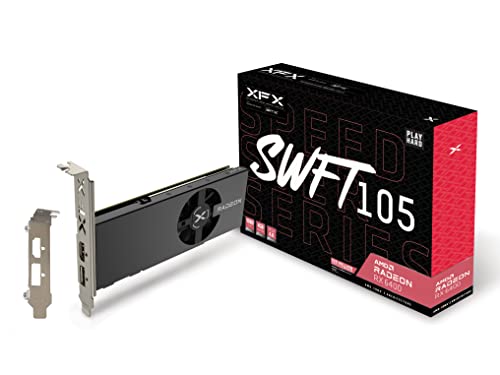
XFX Speedster SWFT105 Radeon RX 6400 — Slimmest fit
The RX 6400 is the most frugal genuine gaming chip in this guide, and XFX’s Speedster SWFT105 is a tidy expression of it: the title lists a Radeon RX 6400 with 4GB of GDDR6 memory on AMD’s RDNA 2 architecture. This is the card for the machine that barely has room to be upgraded at all — the compact desktop with a cramped interior, a feeble supply and an owner who wants older games, indie titles and esports staples to run properly rather than heroically. Within that brief it is excellent. It sips power, asks little of the case’s airflow, and turns a spreadsheet machine into something that can hold its own in a Rocket League session.
Set expectations by the memory and the class. Four gigabytes is workable for light gaming at 1080p with textures set sensibly, and RDNA 2’s efficiency keeps the card composed while it works. What this tier of Radeon hardware does not bring is a strong media feature set: buyers planning to record gameplay or lean on hardware encoding for streaming should look at the RTX or Arc picks instead, because this chip’s talents are deliberately narrow — it is a display-and-play card. For a second PC, a child’s first gaming machine, or a compact box for the spare room, that narrowness is a fair trade for its size and appetite.
- Chip: AMD Radeon RX 6400
- Memory: 4GB GDDR6, per the listing title
- Architecture: AMD RDNA 2, per the listing title
- Series: XFX Speedster SWFT105 compact design
- Power approach: among the lowest-power designs in this guide — confirm the exact board’s edges before fitting
Strengths
- Exceptionally modest power draw suits the weakest prebuilt supplies in this category.
- Compact Speedster board fits cases that reject longer or taller cards.
- Handles esports and older titles at 1080p without drama or heat.
Trade-offs
- 4GB of memory is a real constraint in newer games, even at 1080p.
- Media encoding is this chip family’s weak side; streamers should look elsewhere in the list.
- Its narrow talents mean keen gamers will outgrow it sooner than the 6GB picks.
Best for: very compact or elderly desktops needing light 1080p gaming and modern display outputs on the smallest power budget here. Not suited for: recording or streaming gameplay through hardware encoding, a job this chip was not built to do well.

ASRock Radeon RX 6400 Challenger ITX — Best for ITX
ASRock’s Challenger ITX version of the RX 6400 is built around a single idea: the shortest useful gaming card for the smallest honest cases. The title states 4GB of memory, a 2321 MHz boost clock and AMD’s RDNA 2 architecture, wrapped in a Challenger board in ITX format. Where the XFX card above is compact in a general sense, this one is deliberately sized for mini-ITX enclosures, the cube and console-style cases where card length is measured in millimetres of clearance against a front panel or a drive cage. If your case’s specification sheet lists a maximum GPU length that rules out everything else in this guide, this is probably the pick that survives the measurement.
Performance expectations mirror its XFX sibling — same chip family, same 4GB, same light-gaming brief — with the Challenger’s boost clock suggesting ASRock tuned its small board to run the chip as intended rather than throttled down for size. In a well-ventilated ITX case it will hold that behaviour through a gaming session; in a sealed shoebox with no intake fan, any card of any brand will warm up, so give it whatever airflow the case allows. Buy it for geometry first and gaming second: it exists so that a specific, tiny machine can play games at all, and at that job it is hard to beat.
- Chip: AMD Radeon RX 6400
- Memory: 4GB, per the listing title
- Boost clock: 2321 MHz, per the listing title
- Form factor: Challenger ITX length, for mini-ITX cases
- Power approach: low-power slot-powered class design — confirm the exact board’s edges before fitting
Strengths
- ITX length solves the clearance problem that defeats other cards in tiny enclosures.
- A stated 2321 MHz boost clock shows the small board is not a detuned compromise.
- Sips power, which suits the modest supplies bundled with compact prebuilts.
Trade-offs
- Shares the RX 6400’s 4GB ceiling and its modest media feature set.
- A single small fan works harder, and can be heard more, than the twin-fan designs here.
- In a standard tower its size advantage buys nothing, and roomier picks serve better.
Best for: mini-ITX and console-style cases where card length, not performance, is the binding constraint. Not suited for: a standard tower with room to spare, where the cooler, roomier 6GB cards serve better.
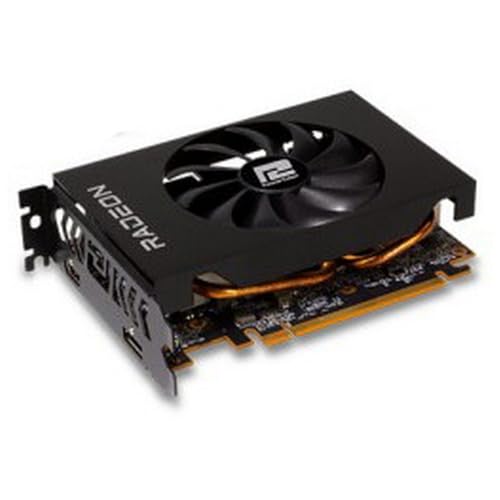
PowerColor Radeon RX 6500 XT ITX — Most gaming muscle
This is the pick that needs the most careful reading, and this guide will give it exactly that. The PowerColor card pairs AMD’s RX 6500 XT — a step up the RDNA 2 ladder from the 6400 pair, with 4GB of GDDR6 memory per the title — in an ITX gaming board. As a gaming chip it is the strongest raster performer in this list at 1080p, with the clocks and shading resources to hold higher settings than the 6400s manage. That is the attraction. The caution is that the RX 6500 XT family sits at the energetic edge of the low-power class, and individual board designs around it vary more than they do around the 6400. Some implementations of chips in this borderland do carry an auxiliary power socket.
So the buying advice is precise: this pick belongs on your shortlist for its gaming strength and its ITX size, and the final check belongs to you, takes seconds, and is described in the how-to section below. Examine the listing photographs of the exact board, looking along the top and rear edges for a six-pin socket. If the board in front of you is a slot-powered implementation, it fits this guide’s brief and gives you the most gaming performance available without a PSU cable. If it carries a socket, treat it as a different category of card and choose one of the other five. Handled that way, the 6500 XT ITX is a genuinely useful option rather than a trap — the fastest card here for the buyer willing to verify one physical detail.
- Chip: AMD Radeon RX 6500 XT
- Memory: 4GB GDDR6, per the listing title
- Form factor: PowerColor ITX gaming board
- Architecture family: AMD RDNA 2 generation
- Power approach: verify the exact board — implementations at this level vary, so confirm whether the unit shown carries an auxiliary socket
Strengths
- The strongest conventional gaming performance in this guide at 1080p.
- ITX sizing keeps it eligible for compact cases that reject full-length cards.
- A clear step up from the RX 6400 pair for players of more demanding titles.
Trade-offs
- The exact board’s power arrangement must be verified before purchase, unlike the safer picks above.
- Still 4GB of memory, so texture settings need the same care as the 6400 cards.
- Its media feature set shares the narrowness of this Radeon tier.
Best for: a compact build wanting the most 1080p gaming available in this class, whose owner will verify the board’s power edges in the listing photos first. Not suited for: a build that must be guaranteed cable-free with no verification step, where the MSI or GIGABYTE RTX 3050 are the safe choices.

ASRock Intel Arc A380 Challenger ITX 6GB OC — Best media engine
The Arc A380 is the odd one in this guide in the best way. ASRock’s Challenger ITX OC version, per its title, carries a 2250 MHz GPU clock, 6GB of GDDR6 on a 96-bit bus, PCIe 4.0 and a single-fan ITX board. Intel built its Arc cards with media hardware as a headline feature rather than an afterthought, and at this level nothing else in the list matches the A380 as a video engine: hardware AV1 encoding support is the standout, a capability the bigger brands reserve for far pricier cards, and it makes this little board genuinely interesting for a home server that transcodes a film library, a streaming PC, or a creator recording in modern codecs.
As a gaming card it is respectable at 1080p in well-supported titles, with the honest caveat that Intel’s drivers are the youngest here. They have improved markedly release by release, and current drivers are a different world from the launch state, but the A380 still rewards an owner who updates drivers as a habit and who plays mainstream games rather than obscure back-catalogue titles with unusual engines. One technical note matters for rescued office machines: Arc cards lean on Resizable BAR, a motherboard feature that older systems may lack or may need a BIOS setting to enable, and performance without it suffers. Check your board’s support before choosing this pick for an elderly host.
- Chip: Intel Arc A380
- Memory: 6GB GDDR6 on a 96-bit bus, per the listing title
- GPU clock: 2250 MHz, per the listing title
- Interface: PCIe 4.0, single-fan Challenger ITX board, per the listing title
- Power approach: low-power slot-powered class design — confirm the exact board’s edges before fitting
Strengths
- The strongest media hardware in the guide, including AV1 encode support rare at this level.
- 6GB of memory matches the RTX picks and beats the 4GB Radeons for texture headroom.
- ITX single-fan format fits compact media-centre cases neatly.
Trade-offs
- Driver maturity trails NVIDIA and AMD; keeping drivers current is part of ownership.
- Wants Resizable BAR enabled for full performance, which some older boards cannot offer.
- Gaming results vary more by title than with the other families here.
Best for: a media server, transcoding box or streaming PC that also plays mainstream games at 1080p. Not suited for: a very old motherboard without Resizable BAR support, where this card cannot show what it can do.
How Do the Six Compare Side by Side?
| Pick | Memory | Format | Strongest suit |
|---|---|---|---|
| MSI RTX 3050 LP 6G OC | 6GB | Low profile | All-round gaming and features in slim towers |
| GIGABYTE RTX 3050 WINDFORCE OC V2 6G | 6GB GDDR6 | Full height, twin fan | Quiet cooling in standard towers |
| XFX Speedster SWFT105 RX 6400 | 4GB GDDR6 | Compact | Lightest power draw, light gaming |
| ASRock RX 6400 Challenger ITX | 4GB | ITX length | Shortest fit for mini-ITX cases |
| PowerColor RX 6500 XT ITX | 4GB GDDR6 | ITX | Most 1080p gaming muscle — verify the board |
| ASRock Arc A380 Challenger ITX | 6GB GDDR6 | ITX, single fan | Media encoding and transcoding |
Read the table by your constraint, not by the chip hierarchy. A slim office tower narrows the field to the MSI LP before performance enters the discussion. A mini-ITX case narrows it to the three ITX boards. A media server narrows it to the Arc. Only a standard tower with no special job attached leaves all six genuinely open, and in that happy situation the two RTX 3050 6GB cards are where most buyers should land, with the PowerColor as the gamer’s verified alternative.
How Do You Check Whether a Card Really Needs No PSU Cable?
The check is physical, quick, and more reliable than any headline. First, look at the card itself — in listing photographs before purchase, and in your hand after. Auxiliary power sockets sit on the top edge or the rear end of the board, and they are unmistakable: a rectangular six-pin or eight-pin receptacle, usually white, black or yellow, that nothing else on a graphics card resembles. No socket, no cable needed. Second, read the board maker’s own specification page for the exact model, including the suffixes, because a single letter can separate two different boards. The specification will state the power connector requirement outright.
Third, sanity-check the host machine. Confirm it has a free full-length PCIe x16 slot — some compact boards offer only a short x1 or x4 slot that a graphics card cannot use. Confirm the slot is not blocked by a neighbouring card or a drive cage. Fourth, measure: card length against the case’s stated GPU clearance, and bracket height against the expansion bay, remembering that slim cases need low-profile brackets. Fifth, once fitted, the machine should simply work: slot-powered cards draw everything through the connector you have already pushed them into, so a failure to boot points at seating, BIOS display settings or drivers — not at a missing cable that does not exist.
What Should You Check in the Host PC Before Buying?
Beyond the slot itself, three host details decide whether these cards succeed. The first is the BIOS. Some older prebuilts ship with settings that prefer integrated graphics or restrict add-in cards; if the machine boots to a black screen with the card fitted, the usual fixes are seating the card fully, connecting the display cable to the card rather than the motherboard, and checking the BIOS for a primary-display option. The second is driver hygiene: remove the previous graphics driver cleanly before installing the new card’s software, especially when changing brand families, because leftover drivers cause more mysterious faults than any hardware in this guide.
The third is airflow, and it is the one buyers forget because these cards are sold as effortless. A slot-powered card still turns electricity into heat inside what is often a small, elderly case with one tired fan. The twin-fan GIGABYTE and the low-profile MSI both assume at least modest case ventilation. If your rescued tower has none, a single inexpensive intake fan transforms the reliability of the whole upgrade. Effortless to wire is not the same as effortless to cool, and the five minutes spent on airflow is the cheapest performance in this entire guide.
What Mistakes Do Buyers Make With Slot-Powered Cards?
The classic mistake is buying on chip name alone. Two cards can share a GPU and differ in bracket height, length, outputs and — at this class’s energetic edge — power arrangement. The listing photographs and the maker’s specification for the exact model are the authority; a review of a different board with the same chip is background reading, not evidence. The second mistake is forgetting the display cable: after fitting a card, plugging the monitor back into the motherboard’s video port leaves the new card idle and the owner convinced it is broken. It happens constantly, and it is a ten-second fix.
A third mistake is expecting the upgrade to fix a machine whose real bottleneck is elsewhere. A slot-powered GPU transforms gaming and video work, but it does not speed up a system strangled by 4GB of system memory or a mechanical hard drive. Spend a moment checking the whole machine before blaming or crediting the card. Finally, buyers of very slim cases forget the bracket: a low-profile card is only low-profile once the half-height bracket is fitted, so confirm the box contents before the parcel arrives, not after the tower is open on the kitchen table.
How Do You Install a Slot-Powered Card in an Old Office Tower, Step by Step?
Installation is the easiest in all of PC building, which is the category’s charm, but a methodical pass prevents the two faults that fill support forums. Begin with the machine off, unplugged, and its side panel removed. Touch a metal part of the case to discharge static. If an old card or a blanking plate occupies the slot, remove it, and remove the blanking plate beside the x16 slot for the new card’s bracket. On a slim tower, swap the card’s bracket for the low-profile one first, while the card is still on the desk and the screws are easy to reach — doing this after the card is in the case is a small misery nobody needs.
Align the card with the slot and press down firmly with both thumbs on the top edge until the slot’s retaining latch clicks. The card should sit level, with the bracket flush against the case’s rear. Secure the bracket screw. Then the step that catches out half of all first-time upgraders: move the display cable. The monitor must plug into a port on the new card, not into the motherboard port it used yesterday. A machine that boots to a black screen with the cable in the old port has not failed; it is simply still talking to the integrated graphics. Close the case, power on, and let the system reach the desktop on basic display drivers before installing the current driver package from the GPU maker’s site.
After drivers, do three small jobs. Set the display’s refresh rate in the operating system, because a 144 Hz monitor left at a 60 Hz default is performance paid for and never collected. Enable Resizable BAR in the BIOS if the board offers it and your card is the Arc — and leave it on for the others too, as modern drivers assume it. Finally, run one game or benchmark you know well and watch temperatures for ten minutes. A rescued tower with weak airflow will show itself here, at a moment when adding a case fan is still a calm, planned errand rather than a diagnosis.
What Frame Rates Should You Honestly Expect at 1080p?
Expectations divide cleanly by genre, and setting them before purchase is what separates a delighted upgrader from a disappointed one. Esports and competitive titles — the games this class is secretly built for — run beautifully: high frame rates at 1080p with settings that favour visibility, which is how their players configure them anyway. The RTX 3050 pair and the 6500 XT handle these with room to spare, and even the RX 6400 cards stay comfortably fluid. Nobody in this guide’s audience loses a match to their graphics card.
Big single-player releases ask for negotiation. At 1080p with medium settings, and with DLSS on the NVIDIA cards doing genuine work, recent titles are playable and often enjoyable on the 6GB picks; the 4GB cards need texture settings watched and occasionally lowered, because memory, not shading power, is their binding constraint. Ray tracing belongs in the “try it in a quiet scene” category on the RTX cards rather than as a default. Indie games, strategy titles, simulations and the vast back catalogue of the last decade run essentially without compromise on everything here — and for many rescued machines, that back catalogue is the actual point of the upgrade.
Outside gaming, the expectations invert in an interesting way. For video playback, multi-monitor desktop work and hardware-accelerated browsing, every card here is effectively flawless, and the Arc A380 steps ahead for encoding and transcoding. For beginner video editing, the RTX cards’ encoder and mature software support make them the comfortable choice. A slot-powered card is a specialist tool: inside its specialism — light gaming, media, and making an old machine feel new — it is not a compromise at all.
How Do You Read a Spec Sheet Without Being Misled?
Three numbers on a low-power card’s specification decide real ownership, and none of them is the boost clock that headlines the box. The first is memory capacity, because at 1080p the 4GB-to-6GB step in this guide changes which texture settings a game will tolerate, and texture quality is the setting players notice most. The second is the card’s physical dimensions — length, height and slot thickness — checked against your case’s published GPU clearance rather than against a photograph and a guess. A card that is 5mm too long is not “close enough”; it is a return. The third is the output selection on the bracket: how many DisplayPort and HDMI sockets the exact board carries, because a buyer planning two or three monitors needs to count them before the card arrives, and low-profile boards sometimes trade outputs for their small bracket.
Boost clocks deserve their demotion. The MSI card’s 1492 MHz and the ASRock 6400’s 2321 MHz are not comparable numbers across different chip designs, and even within one chip family a modest factory overclock moves real frame rates by a few percent at most. Cooling quality, memory size and physical fit will shape your ownership far more than the last digit of a clock speed. Read spec sheets for the things that can strand you — size, outputs, memory, power arrangement — and treat the marketing numbers as weather: interesting, roughly indicative, and no basis for a decision.
Which Pair Should You Actually Buy? A Walk-Through
Start with the machine, not the card. If the tower is a slim or small-form-factor prebuilt, the shortlist writes itself: the MSI RTX 3050 LP if the budget stretches, because its 6GB and low-profile bracket solve both the power and the geometry problem at once; the ASRock Challenger ITX 6400 if it does not. If the tower is a standard mid-size case, ask what the machine does at 7pm. Games, mostly? The GIGABYTE WINDFORCE RTX 3050 for its cooler and memory, or the PowerColor 6500 XT after its board check, if raw 1080p pace leads your priorities. Films, a media library, a stream? The Arc A380’s media engine outweighs its driver homework for that household.
Then ask what the machine did before the upgrade, because the honest bottleneck is often not graphical. A rescued tower with a spinning hard drive and minimal system memory will feel slow in ways no graphics card touches; if the budget forces a choice between the stronger card here and the weaker card plus a solid-state drive, the second basket usually produces the happier machine. This guide’s job is the graphics card, but a graphics card installed into an otherwise neglected PC is a chapter, not the whole story — and the buyers who check the whole machine are the ones who write the pleased reviews.
Can a Small Prebuilt Power Supply Actually Cope With These Cards?
This is the question underneath the whole category, and it deserves a calmer answer than forum threads usually give. A slot-powered card draws its share through the motherboard, and the motherboard was designed to supply that slot. The real question is the total budget: the supply in a small prebuilt must feed the processor, drives, fans and now a card that can take the slot’s full allowance under gaming load. In practice, the mainstream office towers this guide targets cope well, because their processors are modest and their original configurations left headroom. The machines to think twice about are the ultra-compact units with the smallest supplies and an unusually hungry processor fitted — and even there, the RX 6400 pair exist precisely because their appetite is the gentlest in the class.
Age matters here in one more small way: a supply that has run an office workload for six years is not the component it was when new, and a gaming load is a new kind of demand. The first long session is a fair test — a machine that runs it stably has answered the question, and one that shuts down under load has answered it too, pointing at the supply rather than the card.
Two habits keep the arrangement healthy. Keep the case’s vents clear and its single fan working; a supply that runs hot ages faster than one that runs cool, whatever the load. And avoid stacking further upgrades onto the same small supply without thought — a rescued tower that gains a graphics card, three extra drives and a capture card in the same month is asking a component sized for an office workload to feed a hobbyist’s build. Add the card first, live with it, and let the machine prove its stability before the next step. Judged that way, slot power is not a loophole in PC design; it is a designed-in upgrade path that these six cards use exactly as intended.
Final Recommendation
For most people rescuing a prebuilt or building small, the MSI RTX 3050 LP 6G OC is the answer: the most memory, the fullest feature set, and a shape that fits the machines this category exists for. Choose the GIGABYTE WINDFORCE version when your tower is standard-height and quiet running matters. Take the ASRock Challenger ITX when millimetres decide, the XFX SWFT105 when the power budget is the tightest in the room, and the PowerColor 6500 XT when gaming strength leads and you have verified its board. Let the Arc A380 tempt you if the machine’s real job is video. A slot-powered card will not turn an office tower into a flagship gaming rig — but chosen by constraint rather than by headline, it turns it into exactly the machine its owner actually wanted. That is the quiet success of this category: not the fastest card in any shop, but the right card for the computer that is already sitting on the desk, waiting for someone to notice that its only real problem was a missing cable that turns out never to have been needed at all.
Frequently Asked Questions
Will a slot-powered card work in any PC with a PCIe x16 slot?
Almost any, with three checks: the slot must be full-length and unobstructed, the case must accept the card’s length and bracket height, and the BIOS should allow an add-in card as the display source. Very old systems may also need a BIOS update before recognising newer cards. If those pass, installation is mechanical: seat the card, secure the bracket, connect the display to the card, install drivers.
Is 75 watts really enough to play games?
It is enough for the class of gaming these cards target: 1080p play with sensible settings, esports titles at high frame rates, and older or indie games at their best. It is not enough for 1440p high-refresh play or heavy ray tracing, and no card in this power class changes that arithmetic. Judge the category by what it promises — a real upgrade for machines that cannot feed a hungrier card — and it delivers fully.
How can I tell if a specific board needs a six-pin cable?
Look at the card’s top and rear edges in the listing photographs: an auxiliary socket is a distinct rectangular six-pin or eight-pin receptacle that is easy to spot. Then confirm on the board maker’s specification page for the exact model name, suffixes included. If a socket is present, that board needs the cable regardless of what any headline or review of a sibling model says.
Which of these cards is best for a home media server?
The ASRock Arc A380 Challenger ITX, because Intel equipped the Arc family with strong media hardware including AV1 encoding support, which matters for transcoding a film library to modern devices. Its 6GB of memory and ITX format also suit compact server cases. Keep its drivers updated and enable Resizable BAR in the BIOS if your board offers it.
Do low-profile cards perform worse than full-size versions of the same chip?
The GPU and memory are the same class of hardware, so gaming performance is broadly comparable. The differences are physical and thermal: a low-profile card’s smaller cooler has less headroom in a hot case, and its bracket suits slim machines. In a well-ventilated slim tower, the MSI LP card in this guide gives up very little to its full-size sibling.
Should I upgrade my power supply instead of buying a slot-powered card?
Only if your machine accepts a standard supply and you genuinely want a faster class of card. Many prebuilts use proprietary supplies and motherboard wiring that make swapping impractical or impossible, which is precisely the situation this category solves. If a standard swap is possible and your ambitions reach beyond 1080p, a bigger supply plus a hungrier card is a legitimate different plan — but it is a different plan, not a better version of this one.
My prebuilt has a proprietary power supply. Does that rule out every upgrade?
No — it rules out the upgrades that need a different supply, which is exactly the gap this category fills. A proprietary supply and motherboard harness prevent fitting a hungrier card, but a slot-powered card asks nothing of the supply beyond what the motherboard slot already provides by design. That is why these cards are the standard recommendation for slim Dell, HP and Lenovo towers: they work with the machine’s constraints instead of against them. Measure the bay, confirm the slot, pick by memory and format, and the proprietary supply stops being a problem at all.
Can I run two monitors, or three, from one of these cards?
Two monitors is routine for every card here; three depends on the exact board’s output count, which varies by model and shrinks on some low-profile brackets. Count the DisplayPort and HDMI sockets in the listing photographs of the specific card, and remember that adapters can convert between connector types for ordinary desktop use. If multi-monitor work is the machine’s main job rather than a bonus, the dedicated multi-output cards in our related projection-mapping guide are the specialist tools, but for a pair of desktop displays any pick in this list serves well.
Related Guides
Building small or upgrading a prebuilt leads to a few natural next reads: our guide to graphics cards sized for mini-ITX cases goes deeper on length and clearance, the roundup of cards with multiple outputs for projection mapping covers display-count questions, and our Photoshop and Premiere graphics card picks help if the rescued machine is headed for creative work instead of games.


