What's inside
- Where to buy
- Key Takeaways
- Quick Picks
- How We Chose These Picks
- How Do You Enlarge a Reference Onto a Large Canvas Without Losing Proportion?
- How Bright Does an Art Projector Need to Be for Canvas Work?
- What Is the Difference Between a Drawing App, Built-In Grids and a Plain Projector?
- How Should You Set Up a Studio for Large-Canvas Projection?
- The Six Picks in Detail
- Projection Size, Grids and Focus: The Six Art Picks Side by Side
- Common Mistakes
- Final Recommendation
- How Do You Register a Multi-Session Trace?
- What Should You Test in the First Week?
- How Do You Judge Whether a Projected Reference Deserves Your Canvas?
- What Changes When the Canvas Becomes a Mural?
- How Do You Care for a Projector That Lives in a Studio?
- Frequently Asked Questions
- Related Guides
As an Amazon Associate I earn from qualifying purchases. This post may contain affiliate links at no extra cost to you.
gizmoverdict.com is reader-supported. When you buy through links on our site, we may earn an affiliate commission.
Our Top Picks
Where to buy
The best art projectors for large canvas do a job no ordinary projector is designed for: they hold a reference image perfectly still, perfectly square and perfectly focused across a canvas taller than the artist, so a drawing can be traced, scaled and checked over hours of work. Enlarging is where small flaws become large ones. A focus that is soft at the edges of a small projection turns a face’s contour into guesswork at five feet wide; a keystone error that looks trivial on a desk becomes a drawing that leans; and a projector that cannot hold its position — on a stand, at an angle, for a whole session — will drift the image mid-trace and ruin an evening. The six picks in this guide are purpose-built digital art projectors, judged on what their listing titles state about grids, focus, projection size and power.
Two makers divide the shelf. Caydo’s P3 leads with native 1080P resolution, a built-in drawing app, auto focus and keystone, a 360-degree rotatable stand and a stated 40-to-120-inch projection range — the widest canvas ambition in this guide, stated in its title. Caydo’s P1 covers 30 to 100 inches with a sealed optical engine, and its tiny M1C is a palm-size DLP machine spanning 10 to 100 inches on a rechargeable battery. Artograph, the name with the longest history in artists’ projection, fields the Inspire 2000 with 96 built-in art grids and cordless operation, the Flare 900 with 96 grids and a stated 200 ANSI lumens, and the Smart HD with 36 grid patterns and a stated 400 lumens.
Grids deserve a sentence of their own, because they are the feature that separates an art projector from a borrowed home projector. A grid overlaid on the reference — and matched to a grid drawn lightly on the canvas — turns enlargement from freehand estimation into transferable measurement: each square’s contents can be copied square by square, and proportions survive the scaling. The Artograph titles count their grids proudly, 96 across 32 patterns in three colours for the Inspire 2000, and Caydo answers with dedicated drawing apps. For large canvas work, where a portrait must arrive at life size with its likeness intact, the grid system is not a garnish. It is the method.
A note on the older technology, for completeness: traditional opaque projectors, which bounce light off a physical photograph or sketch, still exist and still suit artists enlarging from paper originals. They are a different class from everything reviewed here — no digital file, no grid overlay, no app — and this guide’s picks all assume the modern workflow: a digital reference, a phone or computer feeding the projector, and a canvas waiting at the other end of the room.
Key Takeaways
- Projection range is the large-canvas headline: the Caydo P3 states 40”–120”, the widest canvas ambition here.
- Grids are the method, not a garnish — the Artograph Inspire 2000 states 96 built-in grids across 32 patterns in 3 colours.
- Auto focus and auto keystone, stated across the Caydo and Artograph lines, protect a long tracing session from drift and lean.
- Brightness is stated for only two picks — Flare 900 at 200 ANSI lumens, Smart HD at 400 lumens — so plan on a dimmable studio for the rest.
- Cordless operation appears twice: the Inspire 2000 states 1.5–3 hours, and the Caydo M1C carries an 8000mAh battery.
Quick Picks
| Pick | Role in this guide | Headline detail from the listing title |
|---|---|---|
| Caydo P3 | Widest stated range: 40”–120” | Native 1080P, drawing app, auto focus and keystone, rotatable stand |
| Caydo P1 | Sealed-engine tracing for dusty studios | 30”-100” projection, sealed optical engine, auto screen-fit |
| Artograph Inspire 2000 | The grid specialist, cordless | 96 grids, 32 patterns, 3 colours; Full HD 1080P; 1.5–3 hours cordless |
| Artograph Flare 900 | 96 grids with stated brightness | 200 ANSI lumens stated, 1080p Full HD, monopod arm included |
| Artograph Smart HD | Brightest stated figure: 400 lumens | 400 lumens, 36 grid patterns, rechargeable battery, case included |
| Caydo M1C | Palm-size DLP with drawing app | DLP, 8000mAh battery, 10”-100” projection, drawing app |
How We Chose These Picks
We restricted the shortlist to projectors built for artists — machines whose titles speak the language of drawing apps, grids, tracing and canvas work — rather than general mini projectors that merely can show a picture. Each pick was then read for the five things a large-canvas workflow consumes: the stated projection range, because a canvas artist’s first question is how big; the grid or app system, because that is the transfer method; focus and keystone automation, because a two-metre image magnifies every geometric sin; stated brightness, because studio light is the enemy; and power arrangement, because a projector on a stand in the middle of a studio floor is a cable trip hazard away from a ruined session.
The Caydo P3 earned the lead on the range figure alone — 40 to 120 inches stated, native 1080P stated — with the P1 as its sealed-engine sibling for dustier studios. Artograph’s three entries trade on the grid heritage: the Inspire 2000’s 96 grids in 32 patterns and three colours is the richest stated grid system here, the Flare 900 pairs 96 grids with a stated 200 ANSI lumens and an included monopod arm, and the Smart HD states 400 lumens with 36 grid patterns and a case included. The Caydo M1C closes the list as the palm-size DLP outlier, battery-powered and wide-ranging on paper.
Where titles are silent — brightness for four of the six, throw ratios for all — the spec boxes mark the silence rather than filling it. An artist planning a six-foot canvas under studio lighting needs brightness facts, and the two picks that state theirs make that planning possible; for the others, the maker’s documentation and a dimmable room are the honest prescription.
How Do You Enlarge a Reference Onto a Large Canvas Without Losing Proportion?
The method has three layers, and a good art projector serves all of them. First, geometry: the projector must sit square to the canvas — perpendicular, centred — because any angle becomes distortion that grows with size. Auto keystone, stated across most of these titles, corrects small sins, but the professional habit is to square the machine physically first and let the electronics fine-tune. Focus comes next, and at large sizes it is unforgiving: check focus at the canvas’s corners, not only its centre, because a tracing line must be copyable at the shoulder of a portrait as faithfully as at its chin. Auto focus earns its keep every time the stand is bumped — and in a working studio, the stand will be bumped.
Second, the grid. Draw a light grid on the canvas — in pencil or charcoal that will disappear under paint — and overlay the matching grid on the reference through the projector’s grid system or drawing app. Now enlargement becomes bookkeeping: the eye in square C3 of the reference goes into square C3 of the canvas, at whatever scale the two grids define. Likeness stops depending on a heroic freehand eye and becomes a checkable transfer, square by square. This is why the grid counts in the Artograph titles matter, and why Caydo builds a drawing app into its machines rather than treating projection as mere display.
Third, session discipline. Mark the projector stand’s feet on the floor with tape, and the canvas’s position too, so a break does not become a re-registration project. Work in passes — block the whole composition lightly before refining any corner — because a large canvas invites the beginner’s error of finishing one beautiful eye in a drawing whose proportions are quietly wrong. The projector holds still so the artist can move; that division of labour is the entire point of the tool.
How Bright Does an Art Projector Need to Be for Canvas Work?
Tracing is a contrast task: the artist must see the projected line and their own pencil line at once, on a surface that is itself pale. Canvas and gesso are reflective, which helps, and studio practice helps more — most artists dim the room for the tracing pass and raise the lights to judge the drawing between passes. In that working pattern, modest brightness suffices, and the two stated figures in this guide — 200 ANSI lumens for the Flare 900, 400 lumens for the Smart HD — describe machines for dimmed studios, not sunlit lofts. Where a title states no brightness, as with the Caydo picks and the Inspire 2000, assume the same discipline and verify the figure in the maker’s documentation if your studio cannot darken.
Size taxes brightness exactly as it taxes everything else. The same projector spread over a 120-inch canvas delivers a quarter of the light per square foot it delivers at 60 inches, so the large-canvas artist lives nearer the brightness edge than the sketchbook artist using the same machine. Practical countermeasures: trace at the largest sizes in the dimmest conditions, keep the canvas surface matte, and position the projector no farther than the size demands. If your studio has immovable daylight — a north-facing wall of glass you bought the studio for — brightness becomes the first specification to verify, ahead of grids, apps and stands.
One more subtlety: colour. A reference projected for tracing is usually judged in monochrome line, but artists who block in colour directly from projection need the projected hues to stay honest at working brightness. Judge that in your own room during the returns window, with your own reference images, rather than from any figure a listing can print. The projector that traces beautifully and blocks colour faithfully is the one that stays; the rest is specification.
What Is the Difference Between a Drawing App, Built-In Grids and a Plain Projector?
A plain projector shows an image. An art projector helps you transfer it, and the help comes in two philosophies visible in this guide. The built-in grid philosophy — Artograph’s — puts the transfer tool inside the machine: dozens of grid patterns in several colours, summoned from the projector itself, independent of any phone or software. It is appliance-like, dependable and identical every session. The drawing-app philosophy — Caydo’s — pairs the projector with dedicated software that manages the reference: overlaying grids, adjusting the image, and guiding the drawing workflow from the device that holds your photographs anyway. Neither is superior in the abstract; they suit different studios.
The app route’s strength is the workflow around the image — your references live on your phone, edits are quick, and the app can evolve. Its dependency is equally clear: a phone, a connection, an app that must keep working across the years a projector serves. The built-in route’s strength is permanence — the grids will work in a decade, in a field, with any source — and its limit is a fixed pattern library. For large canvas work specifically, test the grid you will actually use: the pattern’s line weight and colour must remain visible against both your reference and your canvas at full size, a trial no specification can run for you.
Both philosophies beat the improvised alternative — a general projector with a grid image file you made yourself — mainly in registration and convenience: the overlay stays locked to the image, session after session. Artists who enlarge occasionally can improvise happily. Artists whose practice is large canvas will feel the difference in the third hour of a trace, which is where these machines earn their price.
How Should You Set Up a Studio for Large-Canvas Projection?
Start with the canvas wall: flat, matte and big enough to take the full projection with margin, because composing to the very edge of the light is misery. Measure the room’s depth honestly — the projection ranges in these titles, up to 120 inches for the P3, demand throw distance, and a small studio caps canvas size before any other specification does. The 360-degree rotatable stand in the Caydo P3’s title, and the monopod arm included with the Flare 900, exist for studios where the projector must perch at odd angles — on a shelf, beside the easel, wherever the room allows — and still arrive square at the canvas.
Power and cables shape the session more than specifications admit. A cordless window — the Inspire 2000 states 1.5 to 3 hours of cordless operation, the M1C carries its 8000mAh battery — covers a tracing pass without a cable crossing the studio’s walking line, which is both a safety feature and a registration feature: nobody trips the stand mid-trace. For longer sessions, route the cable along the wall, tape it at crossings, and give the projector’s position the taped-feet treatment described earlier. Studios are choreography; the projector is one dancer, and the floor plan should know its steps.
Light the room in two states and switch deliberately: dim for tracing, bright for judging. Keep a lamp on a separate switch rather than fumbling with the projector’s image to evaluate your drawing — the drawing must be judged in the light it will be painted in, or the values you traced will deceive you at the easel. The session rhythm that emerges — project, trace, lights up, step back, judge, lights down, continue — is the large-canvas method in one sentence, and every feature in this guide exists to serve one of its beats.
The Six Picks in Detail

Caydo P3 Art Projector (1080P)
The P3 is the large-canvas headline of this guide because its title states the range plainly: 40 to 120 inches of projection, from a native 1080P panel, with auto focus and keystone, a 360-degree rotatable stand and Caydo’s built-in drawing app. A 120-inch diagonal is a canvas over two metres wide — mural-adjacent territory — and native 1080P at that size keeps a traced line’s edge honest in a way upscaled inputs cannot. The rotatable stand is a studio feature, not a gimmick: it lets the machine perch where the room allows and still present square to the wall, which in cramped studios is the difference between a workable setup and a daily wrestling match.
The drawing app is Caydo’s answer to the grid question — the transfer tools live in software paired with the machine, managing the reference while the projector handles light. The stated 30,000-hour lifespan describes the light source’s endurance class, which for an artist means the tool will outlast many bodies of work. What the title does not state is brightness, so the P3’s planning rule is the guide’s standing one: verify the figure in Caydo’s documentation if your studio cannot dim, and expect to trace large canvases in lowered light. On stated evidence — range, resolution, automation, stand — this is the most complete large-canvas proposition here.
What the listing title states
- Resolution: native 1080P, as stated in the title
- Projection size: 40”-120” Projection, as stated in the title
- Focus and geometry: auto focus & keystone, 360° rotatable stand, as stated in the title
- Software: built-in exclusive drawing app, as stated in the title
- Brightness: Not stated in the listing title — verify with the maker’s documentation
Strengths
- The widest stated projection range here reaches genuine mural scale
- Native 1080P keeps traced lines crisp at the top of that range
- A 360-degree rotatable stand solves real studio placement problems
Trade-offs
- Brightness is not stated in the title, so daylight studios must verify before buying
- The app-centred workflow depends on the software’s continued support
- At 120 inches, room depth and dimming discipline become the artist’s homework
Best for: painters and muralists working at the largest canvas sizes, in studios that can dim for the tracing pass.
Not suited for: a sunlit loft studio that cannot darken, until the brightness figure is verified from Caydo’s documentation.
Large-canvas artists can check the P3’s current Amazon price — and pace out the 120-inch throw distance in the studio before it arrives.
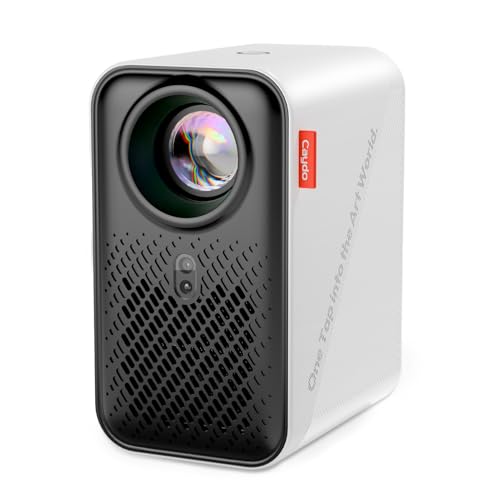
Caydo P1 Art Projector
The P1 covers the large-but-not-mural band of canvas work — 30 to 100 inches stated — and adds the feature a working studio should applaud: a sealed optical engine. Art studios are dusty kingdoms of charcoal, pastel, sanded gesso and aerosol fixative, and dust inside a projector’s optics becomes permanent spots on every projection. A sealed engine keeps the light path closed against that atmosphere. Paired with auto focus, auto keystone and auto screen-fit — the machine squares and sizes itself to the canvas — the P1 is the low-fuss tracing station of the Caydo line, with dual-band WiFi and Bluetooth 5.0 stated for feeding it references.
Its drawing app matches the P3’s workflow philosophy, so an artist’s habits transfer between the two. The honest gaps in the title are resolution and brightness: neither is stated, so both belong on the verification list — resolution because a traced line’s quality depends on it, brightness because the studio’s light does. Read generously, the P1 is the P3’s pragmatic sibling for canvases up to a hundred inches in a real, dusty, working room. Read strictly, it asks two documentation questions first. Both readings are printed here so the buyer can choose their own order of operations.
What the listing title states
- Projection size: 30”-100” Projection Size, as stated in the title
- Automation: auto focus & keystone, auto screen-fit, as stated in the title
- Optics: sealed optical engine, as stated in the title
- Connectivity: dual-band WiFi & Bluetooth 5.0, as stated in the title
- Resolution: Not stated in the listing title — verify with the maker’s documentation
Strengths
- A sealed optical engine is the right answer to a dusty art studio
- Auto screen-fit joins auto focus and keystone for a genuinely hands-off setup
- A 100-inch ceiling covers most easel-scale large canvases
Trade-offs
- Resolution is not stated in the title — a tracing-critical figure to verify
- Brightness is likewise unstated, leaving the daylight question open
- It cedes the P3’s extra twenty inches at the top of the range
Best for: studio artists tracing canvases up to 100 inches amid charcoal dust and pastel, who value a sealed engine and automatic setup.
Not suited for: mural-scale work beyond 100 inches, where the P3’s stated range takes over.
Check the P1’s current Amazon price, and put its resolution figure — from Caydo’s documentation — on the same page as your order.

Artograph Inspire 2000
If grids are the method, the Inspire 2000 is the method’s maximalist: 96 built-in art grids across 32 unique patterns in 3 colours, stated in its title with an accountant’s precision. Pattern variety is not vanity — a fine grid serves a portrait’s likeness, a coarse grid serves a landscape’s masses, and a grid colour that vanishes against one reference glows against another. Building them into the machine means the transfer system works with any source, in any year, with no app to maintain. Add Full HD 1080P, auto focus, WiFi 6 and Bluetooth 5.4, and the Inspire reads as the traditional art-projector idea executed with current parts.
The cordless figure completes the studio picture: 1.5 to 3 hours of cordless operation, stated in the title, covers a full tracing pass with no cable crossing the floor and no trip hazard nudging the stand. For large canvas work — where the projector often stands mid-room — that freedom is a registration feature as much as a convenience. Brightness is not stated, so the dim-studio rule applies and daylight users verify first. But for the artist whose practice is grid transfer at scale, this title states the richest toolkit in the guide.
What the listing title states
- Resolution: Full HD 1080P, as stated in the title
- Grids: 96 built-in art grids across 32 unique patterns in 3 colors, as stated in the title
- Focus: auto focus, as stated in the title
- Power: allows 1.5-3 hours of cordless operation, as stated in the title
- Brightness: Not stated in the listing title — verify with the maker’s documentation
Strengths
- The richest stated grid library here — patterns and colours for every reference type
- Cordless operation removes the mid-room cable that ruins registrations and ankles
- Full HD resolution with auto focus keeps big traces sharp through a session
Trade-offs
- Brightness goes unstated in the title, so bright studios must verify it
- Cordless hours suit a tracing pass, not an all-day paint-by-projection session
- Its grid wealth is wasted on artists who enlarge freehand and never grid
Best for: grid-method artists enlarging portraits and detailed references to large canvas, who want the projector untethered mid-studio.
Not suited for: an all-day, lights-up painting workflow run directly from projection, where corded power and verified brightness lead.
Grid devotees can check the Inspire 2000’s current Amazon price — count the patterns your practice actually uses and it likely covers them.

Artograph Flare 900
The Flare 900 earns trust the unfashionable way: it states its brightness. Two hundred ANSI lumens, printed in the title, tells the artist exactly which room this machine belongs in — a dimmable studio, tracing at moderate-to-large sizes — and that honesty lets a buyer plan instead of hope.
For large canvas specifically, read the lumens against the size ambition: at the top of the canvas range, 200 lumens in a dimmed room gives a traceable, gentle image — the traditional working condition of the art projector — while a bright room or a truly enormous canvas will stretch it. Artists whose studios darken properly, and whose canvases live in the one-to-two-metre band, get a fully specified, grid-rich machine with its stand included. That completeness — every critical figure stated, the arm in the box — makes the Flare 900 the guide’s most plannable Artograph.
What the listing title states
- Brightness: 200 ANSI Lumens, as stated in the title
- Resolution: 1080p Full HD, as stated in the title
- Grids: 96 grids, as stated in the title
- Focus and feed: auto focus, WiFi screen mirroring, as stated in the title
- Included: monopod arm included, as stated in the title
Strengths
- A stated brightness figure lets the studio plan around facts, not hopes
- 96 grids match the Inspire’s library for grid-transfer work
- The included monopod arm removes a separate stand purchase and setup hunt
Trade-offs
- 200 ANSI lumens confines it to properly dimmed rooms at large sizes
- No cordless operation is stated, so a cable joins the studio choreography
- Projection range is not stated in the title — verify the maximum size for your canvas
Best for: artists in dimmable studios tracing mid-to-large canvases by the grid method, who want every key figure stated up front.
Not suited for: a bright, glass-walled studio, where 200 stated lumens will lose to the daylight at canvas scale.
Check the Flare 900’s current Amazon price; its stated lumens make it the easiest pick here to match honestly to a room.

Artograph Smart HD
The Smart HD states the strongest brightness in this guide — 400 lumens — and wraps it in the most complete travel kit: 36 built-in grid patterns, a rechargeable battery, Wi-Fi and Bluetooth, HDMI and USB ports, a remote, a stand, and a case included. For the artist who teaches, demonstrates or works between studios, that case is not packaging; it is the product’s second half. The projector arrives as a system — carry it, set it on its stand, feed it from a laptop by HDMI or a phone wirelessly, and trace — with the brightest stated figure here giving it the most forgiving relationship with imperfect room light at canvas sizes.
Two phrases in its title deserve the guide’s careful reading. ‘Up to 4K Resolution’ describes the input ceiling the machine accepts, in the usual listing dialect — it should not be read as a native 4K panel, and artists for whom native resolution is decisive should verify the panel figure in Artograph’s documentation. And its 36 grid patterns, while fewer than the 96-grid siblings, still cover the working range of grid spacings most transfer methods use. Judged whole, the Smart HD is the generalist: brightest stated, battery aboard, every port a travelling artist packs for, in a case.
What the listing title states
- Brightness: 400 Lumens, as stated in the title
- Grids: 36 built in grid patterns, as stated in the title
- Resolution claim: up to 4K resolution, as stated in the title — read as input support; native panel resolution: Not stated in the listing title — verify with the maker’s documentation
- Power and ports: rechargeable battery, Bluetooth, HDMI, USB ports, as stated in the title
- Included: remote, stand, case included, as stated in the title
Strengths
- The brightest stated figure in the guide doubles the Flare 900’s lumens
- A complete kit — battery, stand, remote and case — suits teaching and travelling artists
- HDMI and USB ports alongside wireless cover every reference source a studio owns
Trade-offs
- ‘Up to 4K’ is an input claim, not a native resolution — verify the panel if that is decisive
- 36 grid patterns is a working set, but grid maximalists get 96 from its siblings
- The generalist breadth means specialists may prefer a sibling’s single superlative
Best for: teaching artists and studio-hoppers who carry their projector between rooms and want the brightest stated figure here.
Not suited for: a fixed mural installation chasing maximum stated range, where the Caydo P3’s 120 inches lead.
Mobile artists can check the Smart HD’s current Amazon price — case, stand and battery included change the true cost comparison.

Caydo M1C (DLP, palm-size)
The M1C shrinks the art projector to palm size and keeps the credentials surprisingly complete: DLP technology, Caydo’s built-in drawing app, an 8000mAh rechargeable battery, 4K support — read in the usual dialect as input support — and a stated projection range of 10 to 100 inches with a 30,000-hour lifespan class. That range is the widest span in the guide, from sketchbook-page enlargements at ten inches to full canvases at a hundred, from a machine that fits in a hand. For artists who work between home, class and residency, or whose large canvas happens in borrowed rooms, the M1C’s portability is not a compromise feature; it is the enabling one.
The expectations to set are physical. A palm-size, battery-powered projector will not match a mains-powered machine’s sustained brightness — the title states no lumen figure, so the dim-studio rule applies with emphasis at the 100-inch end of its range. Its natural large-canvas pattern is the tracing pass: set up fast, transfer the drawing cordlessly, then let the projector rest while the painting happens in full light. Judged as that tool — the go-anywhere transfer station with the family drawing app aboard — the M1C closes the guide’s range from mural rig to pocket kit.
What the listing title states
- Technology: DLP technology, palm-size design, as stated in the title
- Projection size: 10”-100” Projection, as stated in the title
- Battery: 8000mAh rechargeable battery, as stated in the title
- Software: built-in exclusive art drawing app, as stated in the title
- Brightness: Not stated in the listing title — verify with the maker’s documentation
Strengths
- A 10-to-100-inch stated range from a palm-size body is unmatched versatility here
- The 8000mAh battery makes the tracing pass fully cordless, anywhere
- Caydo’s drawing app keeps the transfer workflow consistent with its bigger siblings
Trade-offs
- No brightness figure is stated, and palm-size physics cap expectations at 100 inches
- Battery sessions suit tracing passes rather than day-long projection
- DLP’s rendering of subtle colour should be tested by colour-blocking artists in their returns window
Best for: mobile artists, teachers and residency-hoppers who need a cordless transfer station from sketchbook to full canvas.
Not suited for: a permanent mural wall demanding maximum sustained brightness, where a mains-powered sibling belongs.
Artists on the move can check the M1C’s current Amazon price — it is the only pick here that fits the same bag as the sketchbook.
Projection Size, Grids and Focus: The Six Art Picks Side by Side
| Pick | Projection range stated | Grid / app system stated | Brightness stated |
|---|---|---|---|
| Caydo P3 | 40”-120” (stated) | Built-in drawing app (stated) | Brightness not stated in the title |
| Caydo P1 | 30”-100” (stated) | Drawing app (stated) | Brightness not stated in the title |
| Artograph Inspire 2000 | Projection range not stated in the title | 96 built-in grids, 32 patterns, 3 colors (stated) | Brightness not stated in the title |
| Artograph Flare 900 | Projection range not stated in the title | 96 grids (stated) | 200 ANSI Lumens (stated) |
| Artograph Smart HD | Projection range not stated in the title | 36 built-in grid patterns (stated) | 400 Lumens (stated) |
| Caydo M1C | 10”-100” (stated) | Built-in art drawing app (stated) | Brightness not stated in the title |
Two columns divide this table into philosophies. The range column belongs to Caydo: three stated ranges, topping out at the P3’s 120 inches, against Artograph titles that state no range at all — those must be verified from documentation before a mural is planned around them. The grid column belongs to Artograph: counted, patterned, built-in systems against Caydo’s app-based approach. And the brightness column belongs to honesty itself — only the Flare 900 and Smart HD state a figure, and every other row’s silence is a instruction to dim the studio or check the datasheet. Choose which column your practice lives in, and the row chooses itself.
Common Mistakes
Projecting at an angle and trusting keystone to fix the drawing
Keystone correction makes a rectangle; it does not make a true one. A projector angled at a canvas stretches one side of the reference more than the other, and the copied drawing inherits the lie at full size — a portrait that leans, a circle that is secretly an oval. Square the projector physically to the canvas, use auto keystone only as a final polish, and verify with a projected square measured at both diagonals before tracing a line.
Finishing one area before blocking the whole composition
Large canvas seduces artists into rendering a beautiful passage inside an unproven drawing. The projector method exists to prevent exactly that: transfer everything lightly, step back in full light, correct the proportions while correction is cheap, and only then commit. The grid systems and apps in this guide are structured for that order of work — use them in it.
Tracing in a bright room and blaming the projector
Most art projectors are dim-room instruments, and only two picks here even state a brightness figure. If the studio cannot darken, the honest fixes are scheduling tracing for evening, adding blackout control to one wall, or verifying a brighter machine’s figures from documentation — not pushing a dim projector to a washed-out maximum and tracing a ghost. Match the room to the tool or the tool to the room, consciously.
Letting the projector move mid-project
A stand nudged between sessions shifts the image by millimetres at the canvas — invisible until the new tracing refuses to meet the old. Tape the stand’s feet, mark the canvas’s position, note the projector’s settings, and photograph the setup. Registration discipline sounds fussy for exactly one session; by the third session on a large canvas, it is the difference between one drawing and two overlapping arguments.
Final Recommendation
For the largest canvases, the Caydo P3 states the strongest case: 120 inches of range, native 1080P, automatic geometry and a stand built for awkward studios. For the grid purist, the Inspire 2000’s 96 patterns and cordless freedom define the method at its richest, while the Flare 900 and Smart HD serve artists who plan around stated lumens — 200 for the dim studio, 400 for the travelling kit. The P1 guards its optics against studio dust, and the M1C puts the whole practice in a palm.
Whichever machine you choose, square it to the canvas, grid the transfer, and trace in a dimmed room: a large canvas forgives nothing, but a well-set projector makes enlargement feel less like a risk and more like what it should be — the quiet first hour of the painting itself.
How Do You Register a Multi-Session Trace?
Large canvases are rarely traced in one sitting, so build registration into the first session. Before tracing, project the reference and mark three small registration crosses on the canvas — top corners and bottom centre — directly from the projected image, in a medium that survives painting or hides beneath it. Photograph the projector’s position, the stand’s taped feet and the machine’s settings screen. At the next session, re-project, align until the three crosses sit exactly under their projected twins, and only then continue tracing. Three points defeat every drift a bumped stand can introduce, because two points can still describe a rotation and one point describes nothing at all.
Keep a session log on the canvas’s reverse or in the sketchbook: date, projector settings, grid pattern used, and where the tracing stopped. It sounds bureaucratic until the third week of a big piece, when the log is the only reliable memory of which grid spacing produced the lines already on the canvas. The machines in this guide hold their side of the bargain — auto focus, stored patterns, consistent apps. The log is how the artist holds theirs.
What Should You Test in the First Week?
Use the returns window as a studio trial with four tests. First, the square test: project a perfect square at your largest intended size, measure both diagonals on the canvas, and confirm your setup routine makes them equal. Second, the corner test: check line sharpness at all four corners of the full-size image, not just the centre. Third, the grid test: run your actual transfer method on a real reference at full size for twenty minutes and judge whether the pattern’s colour and weight stay legible against both image and canvas. Fourth, the light test: trace at the brightest hour you realistically work, and learn whether your room and this projector are compatible before the mural depends on it.
A projector that passes your four tests in your room is the right projector, whatever any guide — this one included — ranked first. Keep the one that passes. Return the one that fails without sentimentality, because a large canvas project will amplify whichever truth the first week revealed, across months of work.
How Do You Judge Whether a Projected Reference Deserves Your Canvas?
Projection makes any image large; it cannot make any image good, and at canvas scale the reference’s quality stops being a detail. A small, soft photograph enlarged to six feet gives the artist large, soft information — edges that must be invented rather than copied, which is either the project’s freedom or its trap, depending on intent. Before a big trace, inspect the reference at the size it will be projected: most phones and computers can zoom a file to an honest preview of what the wall will show. If the contour you most need dissolves at that zoom, the projector cannot rescue it, and the session is better spent improving the reference — a sharper photograph, a higher-resolution scan — than tracing a fog.
Composition deserves the same pre-flight. Project the reference at full size before any tracing and live with it for ten minutes: walk the room, sit where viewers will sit, and check that the scale does to the image what you hoped. Large canvases change an image’s politics — a face at life size is a portrait; the same face at twice life size is a presence, and not every reference survives becoming one. Cropping at this stage costs nothing. Cropping after the trace costs the trace.
Finally, mark the reference’s own grid decision before the projector’s grid is chosen. Some images transfer best on a fine grid — a likeness, a hand — and some on a coarse one, where the masses matter and detail will be painted rather than copied. The grid libraries and apps in this guide offer both; the artist’s job is to decide which kind of truth the painting is after, while the decision is still free.
What Changes When the Canvas Becomes a Mural?
Cross from canvas to wall and several assumptions retire. The surface stops being uniformly pale and flat — masonry, old paint and architectural interruptions join the composition — and the projector’s image must be judged against the actual wall in the actual light, which for exterior work changes by the hour. Registration becomes architectural: the taped feet and marked crosses of the studio method scale up into chalk lines, laser levels and photographs from fixed points across sessions, because a mural is traced over days and the projector will be struck and reset many times. The Caydo P3’s stated 120-inch ceiling and the discipline of re-registration are the muralist’s core kit; beyond that size, the method becomes tiling — projecting and tracing the image in overlapping sections, each registered to its neighbours.
Light behaves differently too. An interior mural can borrow the studio’s dimming discipline; an exterior wall offers only dusk and night as working light, which is why so much mural tracing happens after dark with the projector as the site’s brightest object. Battery operation — the Inspire 2000’s cordless hours, the M1C’s big battery — moves from convenience to logistics on a scaffold or a rented lift, where every cable is a negotiation. Plan the power as carefully as the image.
The drawing itself simplifies with distance. A mural is read from across a street, so the trace should capture the large structure with ruthless clarity and leave micro-detail to the painting stage, where it can be judged at the distance it will be seen. Artists crossing from canvas often over-trace their first mural, importing easel habits to a building. The projector serves the mural best when it is asked for the fewest, largest truths — and then switched off so the painting can begin.
How Do You Care for a Projector That Lives in a Studio?
Studios are hostile environments for optics, and a little ritual keeps an art projector honest for years. Dust is the first enemy: it settles on lenses, creeps toward vents, and — in charcoal and pastel studios — arrives coloured. The Caydo P1’s sealed optical engine is the engineered answer; for every machine, the habits matter too. Cap or cover the projector when it is not in use, keep it out of the direct plume of sanding and spraying, and clean the lens only with a blower and a proper cloth, never a sleeve. A lens cleaned wrong is scratched forever, and at canvas scale a scratch has a signature in every projection.
Heat is the second enemy. A projector working at the top of its range in a warm room needs its vents unobstructed and its sessions broken by the natural rhythm of the work — trace, lights up, judge, rest. Battery machines add their own care: a rechargeable pack kept neither perpetually full nor forgotten empty ages best, and the Inspire 2000 and M1C will serve longer for an owner who treats their batteries like the consumables they are. Note the battery’s behaviour in the session log; a pack that once covered a full trace and now covers half is telling you next season’s purchase in advance.
Finally, protect the registration of the machine itself. The stand’s threads, the rotatable joints, the monopod arm — these are the projector’s posture, and a wobbling joint becomes a drifting image becomes a ruined trace. Tighten what loosens, replace what strips, and store the machine in its case — the Smart HD includes one for a reason — rather than on the studio’s most precarious shelf. An art projector is a precision instrument that happens to be affordable; treat it as the former and it will behave as neither cheap nor fragile.
Before the first full session, run one rehearsal enlargement of a reference you know intimately — a face you have drawn before, a still life sitting in the same room. Familiarity is the point: you already know where the truth of that image lives, so every softness, lean or dimness the projector introduces announces itself against your knowledge instead of hiding inside an unfamiliar subject. Note the projector’s distance, the grid you chose and the room’s light state in the session log. That single rehearsal calibrates the machine, the room and your own expectations together, and it converts the first real canvas from an experiment into a second performance of something that already worked once.
Keep the rehearsal image, too, as a standing test. Project it at the start of each new project, at the size you intend to work, and compare what you see with what you remember. A projector ages, a bulb of dust lands, a stand joint loosens — and the familiar image betrays each change immediately, while a new reference would have hidden it. Studios keep colour-check prints for their monitors; the projected rehearsal is the same discipline for the wall, and it costs five minutes at the moment when five minutes can still change everything.
Frequently Asked Questions
What size canvas can these projectors actually cover?
By their titles: the Caydo P3 states 40–120 inches, the P1 30–100 inches and the M1C 10–100 inches of projection. The Artograph titles state no projection range, so verify their maximum image sizes in the maker’s documentation before planning a specific canvas around them. Remember that room depth must also accommodate the throw distance.
Do I need a grid to enlarge a drawing?
Not strictly — skilled artists enlarge freehand — but a grid converts enlargement into a checkable transfer, square by square, which is why the Artograph line builds in up to 96 grids and Caydo builds a drawing app. For likeness-critical work at large sizes, a portrait especially, the grid is the difference between hoping and verifying.
Can I trace in a bright studio?
Only two picks state brightness: the Flare 900 at 200 ANSI lumens and the Smart HD at 400 lumens — both are dim-room figures at canvas scale. If your studio cannot darken, verify brightness from the maker’s documentation for any pick, and consider tracing in the evening. Pale canvas helps, but it does not repeal the arithmetic of light.
What does ‘4K support’ mean on the Smart HD and M1C?
In listing language it means the projector accepts a 4K input signal, not that its panel is natively 4K. For tracing, native 1080P-class panels — as the P3 and Inspire 2000 state — keep lines crisp at large sizes. If native resolution is decisive for your colour-blocking work, confirm the panel specification in the documentation.
Cordless or corded for a long tracing session?
The Inspire 2000 states 1.5–3 hours cordless and the M1C carries an 8000mAh battery — both suit a tracing pass beautifully, with no cable to trip the stand. For all-day projection, plan on mains power and a taped-down cable route. Many artists trace cordless, then paint in full light with the projector off.
Are these better than an old opaque projector?
They solve a different workflow. Opaque projectors enlarge from physical originals — a sketch or photograph on paper. These digital machines enlarge from files, add grid overlays and apps, and hold registration electronically. Artists working from digital references get more from this class; artists enlarging paper originals are the opaque machine’s remaining constituency.
How do I keep a traced drawing honest once I start painting over it?
Photograph the traced stage before any paint touches the canvas, with the projector switched off and the studio lit as evenly as you can manage. That photograph becomes your reference of record: when a passage starts to drift after several painting sessions, you can compare the living canvas against the traced state instead of trusting memory, which always edits in your favour. Leave two or three small registration marks outside the image area — at the canvas edges, where a frame or a later trim will hide them — so the projector can be re-registered to exactly the same position if you need to check a contour mid-painting. Work the likeness-critical passages early, while the drawing beneath is still fully visible, and save broad colour areas for later, because opaque paint erases your map in the order you apply it. Finally, step back to the viewing distance the finished piece will actually be seen from before you correct anything: a contour that looks wrong at arm’s length may read perfectly across a room, and chasing it can undo the enlargement’s whole point.
Related Guides
- Best projectors for mural art on exterior and interior walls
- Best mini projectors for small studio spaces
- Best drawing tablets with screens for digital reference work
Scale up the canvas and the same throw calculations land you in the hall, where our guide to the best led projectors for auditorium takes over.
Artists who project at wall size often print at sheet size too, and our guide to the best printers for blueprints handles the wide-paper side of the studio.


