What's inside
- Key Takeaways
- Quick Picks
- How Did We Compare Six Two-Camera Systems?
- Split Screen or Scan: Which Rhythm Suits Your Nights?
- What Changes When the Two Cameras Watch Twins?
- Six Boxes, Two Cameras Each: the Lay of the Land
- How Do Two Cameras Strain a Link Across a Real House?
- How Do You Install Two Cameras in Two Rooms, Safely?
- How Does Audio Behave When Two Rooms Share One Speaker?
- Which Two-Camera Mistakes Do Parents Make Most?
- What Happens to the Second Camera as the Children Grow?
- What Does a Night Actually Look Like With Two Rooms on One Screen?
- How Do Two Cameras Travel — Holidays, Grandparents and Split Homes?
- Why One Two-Camera Box Beats Two Single Monitors
- Which System Fits Which Family Shape?
- Final Recommendation
- Frequently Asked Questions
- Related Guides
As an Amazon Associate I earn from qualifying purchases. This post may contain affiliate links at no extra cost to you.
gizmoverdict.com is reader-supported. When you buy through links on our site, we may earn an affiliate commission.
Where to buy: every system in this guide to the best baby monitor with 2 cameras ships with both cameras in the one box and is linked to its own Amazon listing from the quick picks and the detailed reviews, where the exact screen, battery and range details can be confirmed before you check price on Amazon.
Two children change the arithmetic of a nursery monitor completely. With one baby, a monitor is a window. With a baby in the nursery and a toddler down the hall — or twins in two cribs, or a newborn and a grandmother’s spare room pressed into service — a single-camera monitor becomes a choice you remake all night: which child do I watch, and which do I merely trust? The six systems in this guide exist to abolish that choice. Each ships with two cameras in the box, each pairs them to one parent screen, and each keeps the link private in the no-WiFi manner — no network, no account, no app — so the doubling of cameras does not double any exposure beyond your own walls.
The great dividing question of this category is not brand or screen size. It is how the two pictures reach you. Split-screen systems show both rooms at once, side by side, all night: glance, and both children are accounted for in the same second. Scan-based viewing shows one room at a time and rotates between them on a timer, giving each camera the full screen in turn. Both approaches are honest, and they suit different anxieties. The parent of twins, for whom simultaneous silence from two cribs is the whole question, generally wants the split. The parent of a baby and an older toddler, whose rooms matter at different moments, often finds the scan’s full-screen turns perfectly sufficient — and sometimes prefers the larger single picture when the screen does settle on a room.
Safety framing, as in any nursery guide, outranks every feature that follows. Two cameras mean two cords, and both must be routed completely out of children’s reach, with both cameras mounted or placed outside the cribs they watch — never on a crib rail, never within grabbing distance, and re-audited as each child learns to stand, climb and reach. And the monitor, however many rooms it covers, remains an aid to the caregivers: it summons you, it informs you, it does not safeguard anyone by itself, and safe sleep — clear, flat crib, baby on their back — is a practice no camera count can substitute for.
A note on identity, to prevent a common mix-up: the HelloBaby HB6550 appears in this guide as a two-camera box, a different product from the single-camera HB6550 in our companion privacy guide. Same family name, different box, different job — do not let a listing’s familiarity blur them when you order, because the household that receives one camera when it planned its nursery around two will spend the first fortnight improvising exactly the coverage this guide exists to make deliberate, tested and calm. With that settled, the six systems below divide by screen size from 4.3 to 6 inches, by stated range from 960 feet upward, by battery philosophy and by the split-versus-scan philosophy that should drive your choice more than any other line in their specifications, however the listings choose to order their own headlines on the page for a hurried shopper scrolling at midnight with one hand on a phone and the other on a restless, wakeful, entirely unimpressed baby who has strong opinions about everything except product taxonomy and sleep.
There is an emotional fact under the logistics, and a guide that ignored it would be missing the product entirely. The second child rearranges a parent’s attention in ways that can feel, at 3 a.m., like a small betrayal of both children — the baby feeding while the toddler cries unheard, the toddler’s nightmare unfolding while the baby’s room holds the screen. A two-camera monitor does not solve the arithmetic of love, but it removes the blindness from it: you may still have to choose who to go to first, yet you will choose with both pictures in front of you, and neither child will ever again cry into a room nobody knew about. Parents consistently describe that as the purchase’s real return, worth more than every specification tabulated below.
Key Takeaways
- Every pick here ships with two cameras in the box and one parent screen — no add-on camera purchases, no compatibility puzzles.
- The decisive question is viewing style: simultaneous split-screen for the glance that covers both rooms, or rotating scan for full-screen turns in each room.
- All six use private no-WiFi links; the ANMEATE states its FHSS basis explicitly, and none of the six needs an account or an app.
- Screens run from the iFamily’s 4.3 inches to the Blemil’s 6 inches — on a split screen, size is legibility for two children at once.
- Stated batteries cluster around 30 hours on the HelloBaby, GoodBaby and ANMEATE, with the Babysense and Blemil carrying 4000mAh units.
- Two cameras double the safety discipline: two cords beyond reach, two mounts outside cribs, and checks repeated as both children grow.
Quick Picks
| Pick | Badge | Why it earns its place |
|---|---|---|
| HelloBaby HB6550 (2 cameras) | Best two-camera default | The trusted HB6550 formula doubled: 5-inch screen, private link, two-room monitoring and travel-friendly portability. |
| GoodBaby 5-inch Split Screen (2 cameras) | Best stated battery | A true split screen with a 30-hour stated battery, remote PTZ and lullabies on a secure no-WiFi link. |
| iFamily Split Screen (2 cameras) | Best compact split screen | Simultaneous viewing on a 4.3-inch screen, with a feeding clock and lullabies for the nursery routine. |
| Babysense 5-inch HD (2 cameras) | Best night-light system | HD split-screen viewing with a built-in night light, 4x zoom and a 4000mAh battery from a baby-specialist brand. |
| ANMEATE Split Screen (2 cameras) | Best stated FHSS clarity | A 5-inch split screen on an explicitly FHSS secure link, with PTZ, 30-hour stated battery and intercom. |
| Blemil 6-inch Split Screen (2 cameras) | Biggest two-room screen | Six inches of split-screen nursery, ECO mode, remote PTZ and a stated 1000-foot range. |
How Did We Compare Six Two-Camera Systems?
First, by confirming the box: every pick here includes both cameras, because a two-camera guide that quietly requires a second purchase has failed its only promise. Second, by viewing philosophy — which systems present both rooms simultaneously, and how legible each child remains when the screen is halved. A 6-inch split screen and a 4.3-inch split screen are different instruments at 3 a.m., and the reviews treat them so. Third, by the link: all six are no-WiFi designs, and we note where a maker states its method, as ANMEATE does with FHSS, because a named method is a small but real addition of candour in a category that usually deals in adjectives.
Fourth, by the household logistics nobody puts on the box: battery stamina across a night of split-screen viewing, which is thirstier work than single-camera watching; the stated range and how a two-storey house will tax it; the extras that serve a two-room routine — feeding clocks, lullabies, night lights, ECO modes that stretch the battery by waking the screen on sound. And throughout, by the placement burden: two cameras must be mountable in two rooms with their cords vanishing beyond reach, a criterion that quietly favours systems whose cameras are compact and whose power leads are sensibly long. Parents still deciding whether they need the second camera at all should read our guide to the best encrypted baby cameras alongside this one; parents outfitting a whole home can extend the picture with the best affordable indoor cameras.
Split Screen or Scan: Which Rhythm Suits Your Nights?
Picture the two experiences honestly. Split screen: the parent unit glows on your nightstand with both rooms in miniature, the baby asleep left, the toddler asleep right, and your half-waking brain completes its check in one glance without fully surfacing. The cost is size — each child gets half a screen — and a low murmur from either room arrives with company. Scan: the screen shows the nursery at full size for a while, then turns to the toddler’s room, then back. Each view is generous, each check is sequential, and there exists a small, real interval in which the unwatched room is unwatched — an interval that matters enormously to some parents and not at all to others, depending on the children’s ages and the house’s acoustics.
Audio complicates the picture usefully. On split-screen systems you generally hear both rooms or the room you select, and the better implementations let a cry from either side seize your attention regardless of which picture holds it. On scan systems the audio typically follows the picture, which is why scan suits households where the second room’s occupant is older — a toddler who can call out, get up, come and find you. Twins and two-under-twos are the split screen’s natural constituency; a baby plus a self-sufficient four-year-old is the scan’s. Most families in this guide’s audience will land on split, and four of the six picks lead with it, but the honest guide names the trade rather than crowning a winner your household did not elect.
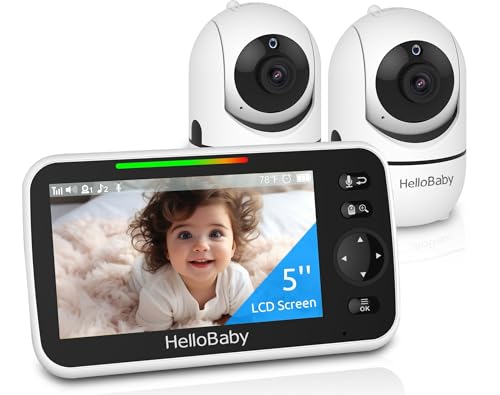
HelloBaby HB6550 (2 cameras) — Best two-camera default
The two-camera HB6550 takes the most trusted single-camera formula in this field and doubles its eyes: a 5-inch screen, a private no-WiFi link, clear day and night viewing from two rooms, easy setup, a stated 1000-foot range, and a portability the listing pitches at travel. What the doubling preserves is the family’s defining virtue — the system behaves exactly as a tired parent hopes, with the second camera arriving as a capability rather than a complication. If your household’s question is simply we have two rooms now, what do we buy, this is the answer with the fewest footnotes.
It earns a special mention for the travelling two-child family. Two cameras and a parent unit pack into a bag, establish their private link in a holiday cottage or a grandparent’s house without joining anyone’s network, and stand watch over a travel cot and a borrowed bed with the same manners they keep at home. Placement discipline travels too: in a strange room the temptation is to perch a camera wherever it fits, and the rule must travel faster than the temptation — outside the crib, cord beyond reach, in every postcode. Set up with that care, the HB6550 pair is the default this guide would hand to most two-room households without a specialised need.
- Cameras: two in the box, distinct from the single-camera HB6550 box
- Link: private no-WiFi
- Screen: 5-inch video display
- Range: 1000ft as stated, open-air
- Viewing: two-room monitoring, day and night
- Character: portable, travel-ready setup
Strengths
- The most familiar, proven interface in the field, now watching two rooms.
- Private link with no setup beyond pairing — works in any house instantly.
- Travel portability suits split-location families and holidays.
Trade-offs
- Buyers wanting a headline split-screen specification should compare the GoodBaby and ANMEATE closely.
- Two cameras share one screen’s attention however the viewing is arranged.
- The name collides with the single-camera version; order the two-camera box deliberately.
Best for: most two-room households wanting the trusted default. Not suited for: parents who need the largest possible split-screen picture.
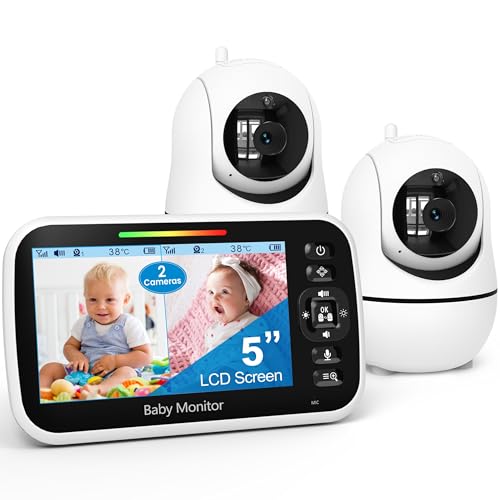
GoodBaby 5-inch Split Screen (2 cameras) — Best stated battery
GoodBaby’s two-camera system states its priorities in its name: split screen first. Both rooms, simultaneously, on a 5-inch display, with a stated battery of 30 hours behind the screen — a figure that matters more in split mode than anywhere, because a screen showing two rooms all night is a screen doing double duty on a single charge. Remote pan, tilt and zoom on the cameras, automatic night vision, room-temperature reading, two-way audio and lullabies complete a specification that reads like a checklist written by a parent of two.
The lullabies and temperature reading deserve their sentence each, because in a two-room house they stop being garnish. A lullaby triggered from the parent unit can settle the toddler without a visit that would wake the baby; a temperature figure for the watched room answers the is-it-the-room question that otherwise sends a parent on a midnight expedition. The link is the secure no-WiFi class, with a stated range of 960 feet — marginally the shortest figure here, and in practice indistinguishable inside a real house from its rivals’ rounder numbers. For split-screen households counting stamina as the deciding axis, this is the system to beat.
- Cameras: two in the box
- Viewing: split screen, simultaneous
- Screen: 5-inch display
- Battery: 30 hours as stated
- Range: 960ft as stated, open-air
- Extras: remote PTZ, room temperature, two-way audio, lullabies
Strengths
- True simultaneous viewing backed by the joint-longest stated battery here.
- Remote PTZ lets you reframe either room without entering it.
- Lullabies and temperature serve the two-room routine directly.
Trade-offs
- The stated range is the group’s most modest, whatever real houses make of it.
- Split viewing halves each child’s picture, as it does on every rival.
- Feature depth means a first evening spent learning menus.
Best for: split-screen households that prize overnight stamina. Not suited for: very large properties where range is the binding constraint.

iFamily Split Screen (2 cameras) — Best compact split screen
The iFamily makes the case that split-screen peace of mind does not require a big device: a 4.3-inch screen carrying both rooms at once, remote pan and tilt, night vision, a temperature sensor, two-way audio — and two small features that reveal a nursery-savvy designer, a feeding clock and lullabies. The feeding clock is the kind of detail that sounds minor until the fourth night-feed, when nobody in the house can remember which side, which room or how long ago; a monitor that keeps the schedule is a monitor that has understood its actual job in a two-baby household.
The compact screen cuts both ways and the review should say so without flinching: at nightstand distance the split view is perfectly serviceable, and the small unit travels and perches where the 6-inch furniture cannot; across a room, two children on 4.3 inches become a rumour rather than a picture. The iFamily’s natural home is the bedside of a parent who checks by lifting the unit, in a flat or a compact house where range is a formality. Within that life it is a complete, honest system — the smallest full answer to the two-camera question in this guide.
- Cameras: two in the box
- Viewing: split screen, simultaneous
- Screen: 4.3-inch display
- Camera control: remote pan and tilt
- Sensing: temperature sensor, night vision
- Extras: feeding clock, lullabies, two-way audio
Strengths
- Simultaneous viewing in the most compact, portable form here.
- The feeding clock serves the newborn routine with unusual thoughtfulness.
- Full two-camera function without big-screen bulk or price posture.
Trade-offs
- Split images on 4.3 inches are a lift-and-look experience, not a glance.
- Pan and tilt without the zoom some rivals add.
- Compact units rarely lead on battery or range claims, and this is no exception.
Best for: bedside checkers in compact homes and travelling families. Not suited for: anyone hoping to supervise two rooms from the far end of a lounge.

Babysense 5-inch HD (2 cameras) — Best night-light system
Babysense builds baby monitors the way some companies build only one thing — because it is the only thing they build — and this two-camera HD system carries that specialisation in its details: a 5-inch HD split screen, a night light built into the system for the room that needs a gentle glow, 4x zoom for the closer look, a 4000mAh battery, a stated 1000-foot range, two-way audio and night vision, all on a non-WiFi link. The night light is the signature: in a toddler’s room it is a comfort object; in a nursery it is the difference between a feed conducted in kind dimness and one under the ceiling’s full glare.
The HD designation matters specifically in split mode, where each child occupies half the pixels and a sharper panel keeps a small face a face rather than a suggestion. Zoom, likewise, is a split-screen feature in disguise: the parent who can push 4x into one side of the picture can verify a blanket, a position, a thumb in a mouth, without walking a corridor and opening a door that creaks. Families choosing between this and its PRO sibling in the companion guide should note the division of labour — the PRO adds the sound machine and the larger screen; this system is the leaner, night-light-led two-camera answer — and both keep the same private architecture and the same placement law: cameras outside cribs, cords beyond reach, in both rooms, every night.
- Cameras: two in the box
- Viewing: HD split screen
- Screen: 5-inch HD display
- Battery: 4000mAh
- Range: 1000ft as stated, open-air
- Extras: built-in night light, 4x zoom, two-way audio
Strengths
- HD sharpness pays off exactly where split-screen needs it.
- An integrated night light removes another corded gadget from the nursery.
- A baby-specialist brand’s maturity shows in the whole routine.
Trade-offs
- Battery is stated in capacity rather than hours; stamina depends on mode.
- No sound machine, where its PRO sibling includes one.
- Split-screen halves remain halves, HD or not.
Best for: two-room families who value night-time gentleness and sharpness. Not suited for: buyers wanting the full comfort suite of light plus sound in one box.

ANMEATE Split Screen (2 cameras) — Best stated FHSS clarity
The ANMEATE earns its place with a word most listings avoid: FHSS. Its title states the method of its secure link outright — frequency-hopping spread spectrum, the paired, hopping, no-WiFi conversation this category runs on — and in a field of adjectives, a mechanism is a breath of candour. Around that stated link sits a complete two-camera specification: a 5-inch split screen, remote pan, tilt and zoom, a stated 30-hour battery, a stated 1000-foot range, automatic night vision, room temperature, and two-way audio that the listing calls an intercom, which is precisely what it becomes in the toddler years.
Judge the ANMEATE as the engineer’s pick of the six. Its numbers are the class’s honest centre — no category-topping claims, no eccentric extras — and its one flourish is the flourish a privacy buyer should most appreciate: it tells you how it works. Households that read manuals, label chargers and keep the firmware of their lives in order will feel recognised by this monitor. It asks the same discipline in return as every system here — two cameras mounted outside two cribs, two cords vanished along two walls — and repays it with simultaneous, private, intercom-equipped watch over both rooms.
- Cameras: two in the box
- Link: no-WiFi FHSS, stated in the listing
- Viewing: split screen, simultaneous
- Screen: 5-inch display
- Battery: 30 hours as stated
- Extras: remote PTZ, room temperature, two-way intercom
Strengths
- Names its FHSS method — rare candour about how the link stays private.
- Matches the best stated battery and range figures in the group.
- Intercom-grade two-way audio grows into the toddler years gracefully.
Trade-offs
- A plainer extra list than the Babysense or GoodBaby comfort suites.
- Less of a household name than HelloBaby or Babysense for support lore.
- Split-screen legibility is bounded by the same 5-inch physics as rivals.
Best for: buyers who like mechanisms stated and numbers honest. Not suited for: families shopping for lullabies, lights and comfort extras first.

Blemil 6-inch Split Screen (2 cameras) — Biggest two-room screen
The Blemil’s argument is legibility, and it is a strong one: on a split screen, inches are information, and its 6-inch display — the largest in this guide — gives each of two children a picture the size of a respectable single-camera monitor. Remote pan, tilt and zoom, automatic night vision, an ECO mode that rests the screen until sound summons it, two-way talk, a 4000mAh battery and a stated 1000-foot range in ideal conditions — the listing’s own honest qualifier, which this guide appreciates — complete the specification. Its title also boasts support for many languages in its menus, a small cosmopolite touch for multilingual households and grandparents visiting from abroad.
ECO mode deserves the spotlight the Blemil gives it, because split-screen’s weakness is stamina and ECO is the direct answer: screen dark, ears open, picture restored at the first murmur. A 6-inch screen running ECO can outlast a smaller screen running always-on, which scrambles the naive ranking of battery figures and rewards the household that configures rather than merely charges. The Blemil is the least pocketable system here and the most commanding on a kitchen counter, and its placement burden is the familiar doubled one — two outside-the-crib mounts, two invisible cords — performed in two rooms by parents who will be repaid in glances: both children, both rooms, one look, at a size that never needs squinting. Readers furnishing a nursery from scratch may also browse the best 2pack indoor cameras for the non-nursery rooms of the house.
- Cameras: two in the box
- Viewing: split screen, simultaneous
- Screen: 6-inch display, largest here
- Battery: 4000mAh, with ECO mode
- Range: 1000ft as stated, in ideal conditions per the listing
- Extras: remote PTZ, auto night vision, two-way talk, multilingual menus
Strengths
- Six inches makes split-screen genuinely glanceable from across a room.
- ECO mode answers split-screen’s stamina problem intelligently.
- The listing’s ideal-conditions honesty about range sets a candour example.
Trade-offs
- The largest parent unit is the least portable thing in this guide.
- Capacity-stated battery makes hour comparisons with rivals indirect.
- A newer name than the category’s elders, with a thinner owner-lore base.
Best for: across-the-room glancers and parents with tired eyes. Not suited for: travelling families needing a bag-sized parent unit.
What Changes When the Two Cameras Watch Twins?
Twins collapse the split-versus-scan debate into a verdict: simultaneous viewing, because twin care is a science of comparison. Which one is awake, which one is merely dreaming aloud, which one settled first and by what magic — the split screen answers in a glance, and the parent of twins learns to read its two halves the way a pilot reads instruments. Two cameras over two cribs, or two angles within one nursery, also solve the twin nursery’s particular geometry: the crib you can see is never the crib making the noise, a law as reliable as any in parenting, and a single wandering camera obeys it cruelly.
Twin households should weight this guide’s axes differently. Screen size rises in importance, because both pictures are primary, all night, every night — the Blemil’s six inches and the Babysense’s HD sharpness speak directly to that life. Battery rises too, since the screen is never idle, which honours the GoodBaby’s and ANMEATE’s 30-hour claims and the ECO discipline. And the safety audit doubles in a specific way: twin cribs are often adjacent, and a cord routed safely for one crib must be re-imagined against two children’s combined reach and ingenuity, which history suggests exceeds the sum of its parts. The parents of twins do not need this guide to tell them their life is logistics; the monitor that respects logistics — labelled cameras, one charger, one screen, both children — is the one that will still be loved in month nine.
Six Boxes, Two Cameras Each: the Lay of the Land
| System | Screen | Viewing | Stated stamina | Stated range | Signature |
|---|---|---|---|---|---|
| HelloBaby HB6550 (2 cameras) | 5 in | Two-room monitoring | Family-typical | 1000ft | Trusted default, travels well |
| GoodBaby Split Screen | 5 in | Split screen | 30 hours | 960ft | Stamina plus lullabies |
| iFamily Split Screen | 4.3 in | Split screen | Compact class | Long-range class | Feeding clock, smallest unit |
| Babysense HD | 5 in HD | Split screen | 4000mAh | 1000ft | Night light and 4x zoom |
| ANMEATE Split Screen | 5 in | Split screen | 30 hours | 1000ft | FHSS stated, intercom audio |
| Blemil Split Screen | 6 in | Split screen | 4000mAh with ECO | 1000ft ideal | Largest screen, ECO mode |
How Do Two Cameras Strain a Link Across a Real House?
One camera asks a radio link to cross a house; two cameras ask it to cross the house twice, from two directions, often with the parent unit moving between floors in a parent’s hand. The stated ranges in this guide — 960 to 1000 feet in the open — translate, through brick, foil-backed plasterboard, metal ducting and the water mass of a hot-water cylinder, into a map every household must draw for itself. The drawing method is the first-week test from the setup section, performed with both cameras live and the unit carried to every chair and pillow it will ever occupy. Dead spots discovered then are furniture problems, soluble by moving the unit’s home or a camera’s wall; dead spots discovered during a child’s illness are crises wearing a small disguise.
Split-screen households should test in split mode specifically, because holding two streams is the link’s hardest shift and the mode in which a marginal signal first shows its seams. If the far nursery thins the picture, the remedies are humble and effective: raise the camera, clear the line of the house’s great metal masses, keep the parent unit’s overnight perch on the nursery side of the home’s centre. None of the six systems here will defeat a genuinely hostile building — a stone farmhouse may simply be a two-household problem, solved by accepting the monitor’s geography — but most suburban and urban homes, tested honestly, will find both rooms comfortably within a well-sited link’s reach.
How Do You Install Two Cameras in Two Rooms, Safely?
Walk both rooms before you open either camera box, and decide the two mounting points as a pair. Each camera needs a view of its whole crib or bed, a position outside that sleep space — wall or high shelf, never the crib itself — and a power route that descends the wall and disappears behind furniture where no hand, present or future, can find it. Fit the room of the more mobile child first, because that room’s reach grows fastest; then mirror the discipline in the nursery, where a presently immobile baby is a standing toddler on a schedule you cannot see but can set your watch by.
Pair both cameras before mounting either, and label them — a dot of tape, a menu name, anything — because at 3 a.m. the difference between nursery and toddler-room on a split screen should be knowledge, not deduction. Walk the parent unit through your evening’s geography with both cameras live: sofa, kitchen, your bedside, the garden door if summer evenings live there. Note the wall that thins the signal and plan the unit’s overnight home accordingly. Set each room’s VOX or ECO behaviour separately if the system allows it; a silent newborn room and a dreaming, muttering toddler room want different thresholds, and a screen woken by every toddler sigh is a screen that teaches its owners to ignore it — the one habit a monitor must never teach.
Finally, brief the household. Every caregiver should know which side of the screen is which child, where the unit charges, and the standing law that the screen summons a person rather than replacing one. Stick the spare adapter in the drawer where the torches live. Two-camera systems fail socially more often than electronically — a unit left uncharged in the wrong room, a camera unplugged for the vacuum and never restored — and a household routine, written on the fridge if necessary, is the cheapest reliability upgrade in this entire guide. For the rest of the home’s watchful needs, our best cameras to watch your pets covers the four-legged family members’ rooms too.
How Does Audio Behave When Two Rooms Share One Speaker?
Two pictures are easy to divide; one speaker is not, and audio design is where two-camera systems quietly differentiate. The question to ask of any system is what your ears receive at 2 a.m.: both rooms blended, the selected room only, or a priority arrangement where a cry from either side breaks through. Blended audio suits twins in one nursery, where the rooms are one acoustic space anyway. Selected-room audio suits the baby-plus-toddler house, where the toddler’s audiobook habit should not narrate your night. Priority behaviour, where offered, is the diplomat’s answer and worth configuring deliberately rather than discovering accidentally.
Two-way talk multiplies the subtlety. A voice sent to the wrong room is a small domestic farce — the toddler woken by a lullaby-voice meant for the baby — that every parent of two will perform exactly once before labelling the cameras becomes a religion. The ANMEATE’s intercom framing is apt: think of the system as a house intercom with pictures, addressable by room, and the discipline follows naturally. Test the talk routing on the first evening, in both directions, with the other caregiver listening in each room, and write the room names on the cameras in marker if the menus allow ambiguity. It is the least glamorous setup step in this guide and the one most fondly remembered later.
Which Two-Camera Mistakes Do Parents Make Most?
The safety mistake outranks all others and this guide will state it as often as it states anything: a camera perched on a crib rail because the view is perfect, its cord within a curtain’s sway of small hands. The view from outside the crib, properly mounted, is also perfect, and it stays perfect on the day the baby first pulls up and grabs. Audit both rooms monthly; children develop in secret and announce their new reach by using it. The second mistake is asymmetrical attention — falling in love with the split screen’s completeness and slowly ceasing the in-person checks that remain the actual substance of care. Two rooms on a screen are two rooms you still walk to, on a rhythm the screen informs but does not set.
The third mistake is buying the second camera as an afterthought accessory for a single-camera system never designed around it, with pairing quirks and a screen too small for the split it now attempts; every pick in this guide was designed as a pair, and the difference shows nightly. Fourth is ignoring audio design — discovering at midnight that the toddler’s room is audible only when its picture is selected, in a household that needed the reverse. Read the audio behaviour before ordering, and match it to your children’s ages as the split-versus-scan section advises. Fifth is range optimism in big houses: two cameras at two far ends of a long house ask more of a link than one camera ever did, so test both, at night, in the first week, while returning is still a errand rather than a grievance.
What Happens to the Second Camera as the Children Grow?
A two-camera system’s life has chapters, and buying with the later ones in mind is the mark of the household that gets its money’s worth. Chapter one is the twin or two-room infancy this guide has dwelt on. Chapter two arrives when the older child graduates from monitoring — a four or five-year-old whose room no longer needs a camera — and the second camera is suddenly a spare eye looking for employment. Households redeploy it creatively: the playroom during the baby’s nap, the garden room where a grandparent rests, the temporary sickroom on the night of the winter bug. A camera that can be re-paired and re-sited in minutes, as all six here can, keeps earning its shelf space through each redeployment.
Chapter three is the honest ending: the system retires, whole or in parts, to a sibling’s new nursery, a friend’s first baby, or the grandparents’ house as a permanent installation. Plan the ending with the same care as the beginning — reset pairings, inspect both cords, pass on the disciplines in writing if the recipients are new to them — and the monitor completes a life of genuine service. The systems in this guide are built to consumer, not heirloom, standards, but a well-kept pair commonly outlasts one family’s need for it, and the second family’s safety audit, described in the mistakes section, is what makes the inheritance a blessing rather than a liability.
What Does a Night Actually Look Like With Two Rooms on One Screen?
Evening first: the toddler’s bedtime is a performance with negotiations, and the monitor’s role is backstage — a parent settles the baby while the screen keeps a courteous eye on the toddler’s delaying tactics, and two-way talk delivers the final goodnight without a second staircase climb. Then the house exhales. The screen takes its post, ECO or VOX armed, both rooms in their halves. The night’s small hours bring the monitor’s real examination: a murmur — which room? The split screen answers before your feet find the floor, and nine times in ten the answer is neither: a dream, a roll, a settling sigh, watched for ten seconds and released back into sleep, yours and theirs.
The tenth time is the one the system exists for. A cry with a location, a picture with a context — the toddler tangled in a duvet, the baby awake and indignant — and a parent walking directly to the right door with the right response already forming. Compare the single-camera household’s version of that moment: a cry, a guess, a wrong door opened on a sleeping child. Multiplied across a year of nights, the two-camera system’s gift is not information but precision, and precision, at 3 a.m., is indistinguishable from kindness — to the children, who are woken only when they are the ones who called, and to the parents, whose sleep survives in the unbroken stretches between true alarms.
How Do Two Cameras Travel — Holidays, Grandparents and Split Homes?
A two-camera system that cannot leave home is a system that fails precisely when routines dissolve: the holiday cottage where the toddler sleeps in a strange room down an unfamiliar corridor, the grandparent’s house where two grandchildren descend at once, the split-location family whose children keep two bedrooms in two postcodes. The no-WiFi architecture of all six picks is the traveller’s friend — no host network to join, no account to sign into on a borrowed television’s terms — and the HelloBaby pair in particular is pitched by its maker at exactly this portable life. Pack the cameras in their rooms’ order, pack two adapters, and treat the destination setup with the full home discipline: outside the travel cot, cords vanished, in rooms you have walked with a toddler’s-eye view before the first nap.
Grandparents deserve a paragraph of their own, because a two-camera visit concentrates every challenge: unfamiliar house, excited children, caregivers whose monitor experience may be a generation old. The systems that shine there are the legible ones — the iFamily’s compact clarity, the Blemil’s big forgiving screen — with the cameras pre-labelled and the unit pre-charged by the visiting parents, who should also leave the one-sentence version of the law behind them: the screen is for checking, the children are for checking on. A monitor that a grandparent can operate without a tutorial is a monitor whose second camera will actually be used, and unused safety equipment, in any house, is just furniture with a lens.
Why One Two-Camera Box Beats Two Single Monitors
Households sometimes drift into two-camera life by buying a second single monitor, and the drift is worth resisting on the evidence. Two singles mean two parent units competing for the nightstand, two chargers, two volumes to balance, and — the decisive flaw — two separate checks to perform, serially, half-asleep, forever. A designed pair collapses all of that into one screen, one charger, one glance. The integration is not a luxury; at the hour these devices earn their keep, integration is the difference between a system and a pile of equipment. There is also the link itself: a factory pair shares one paired conversation with the parent unit, while two independent systems are two separate radio citizens of the same house, each ignorant of the other, each with its own pairing to maintain through every reset and replacement.
The exception proves the rule in the familiar place: households whose two rooms are really two households — the split-location family with a nursery in each parent’s home — may rationally run a single-camera system in each, and the companion guide’s picks serve exactly that life. But where the children sleep under one roof and the caregivers under the same one, the integrated pair is the architecture that matches the problem, and every system in this guide embodies it out of the box.
Which System Fits Which Family Shape?
Twins, same nursery or split cribs: the Blemil for screen size or the Babysense HD for sharpness, with split-screen non-negotiable and the battery discipline rehearsed. Baby plus toddler, two rooms: the GoodBaby for stamina and lullabies, or the HelloBaby pair for the interface the whole extended family already half-knows. Baby plus older child: reconsider whether the second room needs a picture at all — if it does, the ANMEATE’s intercom makes the older child’s camera a communication tool rather than a watchpost, which respects everyone’s dignity further. Compact flat, bedside life, frequent travel: the iFamily, small and complete. Multilingual household or grandparents in residence: the Blemil again, whose menus speak more of the world’s languages than its rivals bother to.
Notice what that mapping never does: it never asks which system is best in the abstract, because in this category the abstract best is a mirage that dissolves at the first family’s floor plan. The six systems here are six answers to six shapes of the same love — two children, two rooms, one pair of eyes that sleep has made unreliable — and the right purchase is the one whose shape matches your household’s nights, tested in your own corridors during the first calm week.
Final Recommendation
Most two-room households should start where the trust is: the HelloBaby HB6550 two-camera box for its proven manners, or the GoodBaby split screen where simultaneous viewing and a 30-hour stated battery state your priorities exactly. Choose the Babysense HD for its night light and sharpness, the ANMEATE for its candid FHSS link and intercom, the iFamily for a compact bedside in a smaller home, and the Blemil when your eyes demand the biggest split picture on offer. But hold the hierarchy this guide opened with: the viewing style is a preference, the battery is a convenience, and the placement — two cameras outside two cribs, two cords beyond two children’s reach, and a screen that sends you walking toward your children rather than excusing you from them — is the substance. Get that right, and whichever of the six glows on your nightstand, both rooms will feel close enough to touch on the nights when closeness is the whole of parenting.
One more consideration belongs to the parents reading this at the kitchen table with a toddler climbing the furniture and a bump or a bassinet announcing the second act: buy the system before you need it, and install it during a nap-time lull rather than on the new baby’s first night. Two rooms to mount, two cords to vanish, one link to map across the house — it is a Saturday morning’s pleasant work in advance and a midnight ordeal in arrears. The families who love their two-camera systems are, disproportionately, the families who met them calmly.
A minority of households will use the pair in a way the boxes never advertise: both cameras in one room. A wide view of the whole nursery and a close view of the crib; or one camera on the crib and one on the door of a sleepwalking toddler’s room-within-a-room life. The split-screen systems handle this gracefully — the two angles read like a film editor’s coverage — and for a large nursery with a crib at one end and a feeding chair at the other, the arrangement can serve better than any single repositioned camera. If you experiment this way, keep every discipline doubled rather than relaxed: two mounts outside the sleep space, two cords beyond reach, and the same monthly audit, because a room watched from two angles is still a room whose small occupant is learning, nightly, to reach further than yesterday.
Whichever geometry you choose, write your household’s version of the routine down somewhere the exhausted future selves of 3 a.m. can find it: which camera is which room, where the unit charges, what a dark screen means and what it does not. The monitor will do its half of the night faithfully for years; the written routine is how the humans do theirs.
Frequently Asked Questions
Is split screen always better than scanning between rooms?
Not always. Split screen gives the one-glance check that parents of twins and two-under-twos rely on, at the cost of halving each picture. Scan-style viewing gives each room the full screen in turn and suits a baby plus an older, more independent child. Four of this guide’s picks lead with split screen; choose by your children’s ages, not by fashion.
Can I add a third or fourth camera later?
Many two-camera systems accept additional paired cameras, but listings vary and this guide’s picks were chosen as complete two-camera boxes. If a third room is already on your horizon — a playroom, a second nursery to come — verify expansion on the specific listing before ordering, and remember each added camera is another cord to route beyond reach.
Are these the same HB6550 as the single-camera version?
No. The HelloBaby HB6550 name covers both a single-camera box, reviewed in our privacy-focused companion guide, and this two-camera box. They are different products for different households. Check the box contents on the listing — two cameras — before you order.
How should the two cameras be positioned?
Each in its own room, mounted or shelved outside the crib with a full view of the sleep space, each cord routed down and away where no child can reach it — and re-checked as each child learns to stand and climb. Never on the crib rail, never within grabbing distance, in either room, at any age.
Will one parent unit’s battery really last all night in split mode?
Split-screen viewing is the thirstiest mode, which is why stated figures and ECO or VOX behaviour matter. The GoodBaby and ANMEATE state 30 hours; the Blemil’s ECO mode rests its big screen between sounds. Charge nightly as a routine regardless — stamina claims are a cushion, not a plan.
Do two-camera monitors need WiFi or an app?
None of the six in this guide does. All use private, paired no-WiFi links — ANMEATE states FHSS explicitly — so both rooms’ pictures stay inside your house, viewable only on the parent unit you hold. That is a deliberate privacy architecture, shared with the single-camera class in our companion guide.
And when the system is installed and its two small windows glow side by side for the first time, take a moment to appreciate the strangeness of what you are looking at: both of your children, asleep, in two rooms, watched over by a device that asks nothing of the internet and tells nothing to anyone — a small, private constellation above the nightstand, doing the oldest job in the house with the newest discretion.
Finally, a reassurance for the parent who has read all six reviews and still feels the choice is large: the differences between these systems are real but they are differences of fit, not of worth. Every one of them will watch two rooms privately, summon you faithfully, and survive the toddler years in service. The wrong choice in this guide barely exists; the right one is simply the one whose screen, stamina and temperament match the house it will glow in, and you know that house better than any reviewer ever will.
Order it this week if the second crib is already in the house with a baby due any day, or this month if it is still on its way through the slow logistics of family life; the calm installation window closes faster than any parent expects, and the first night the system earns its place will not send advance notice of its arrival, and the households that meet that night with the cameras mounted, the cords vanished and the screen already glowing in its halves are the ones who will describe the purchase, ever after, as the easiest decision of the second-child year.
Related Guides
For the front of the house, see the best doorbell cameras no subscription, and for the single-room privacy deep-dive, revisit the companion roundup linked throughout this article.
The patience a garden camera teaches has a nursery echo, and our guide to the best garden wildlife cameras is where that echo lives.


